The 7-Stage YouTube Content Pipeline in 2026 (And the 2 Stages Where Creators Stall)
YouTubers run seven stages: idea capture, packaging, scripting, filming, editing, publishing and analysis. Storyflow tracks stages one to six on one board a creator and their editor share. Here is the method, the creator-editor handoff, a filled one-month pipeline board and the tools ranked.

Category
YouTube
Author

Justkay
Documentary Filmmaker & Founder at Storyflow
Topics
2026-09-06
•
47 min read
•
YouTube- how do youtubers plan and organise their content pipeline
- content pipeline
- youtube content pipeline
- how do content creators plan a month of videos with their editor
- youtube edit brief
- should you make the thumbnail before filming
- batch filming youtube videos
How do YouTubers plan and organise their content pipeline?
YouTubers plan and organise their content pipeline as seven stages: idea capture, packaging, scripting, filming, editing, publishing and analysis, with one card per video moving through them. Storyflow holds stages one to six on one board: its AI drafts each video's plan and a three-act script, and builds a Kanban ticket per video that an invited editor works in. Publishing and analytics stay in YouTube Studio. Notion suits script-heavy channels, Trello or ClickUp a plain stage board. Most channels stall at two stages: idea capture, and packaging done last. Written and mixed-format teams run the same idea as an [editorial workflow](/editorial-workflow), with a review stage for facts, legal and brand.

Full disclosure: Storyflow is our product. It ranks first because, on the weights stated in the ranking section, it holds the most pipeline stages on one board for a creator working with an editor: ideas, packaging, script, storyboard and the stage tracker. Other tools were compared from their own product and pricing pages, checked September 2026. Storyflow does not publish to YouTube, has no YouTube analytics or keyword data and cannot pin comments to timecodes on a cut, so this article sends you to YouTube Studio, vidIQ or TubeBuddy, and Frame.io for those jobs, and ranks ClickUp and Trello above it on stage tracking alone.
Quick Comparison
Ranked for a YouTube creator working with an editor. Prices checked September 2026.
| Tool | Best For | AI Features | Price |
|---|---|---|---|
| Storyflow | Creator plus editor planning visually | Builds the video plan, three-act script and a Kanban board of the stages on request; looks at the thumbnail mockups you select | $7.99 mo annual (Free plan before the end of 2026) |
| Notion | Script-first channels | AI depth depends on the plan | $10 per member mo annual |
| ClickUp | Small teams, task depth | Paid AI add-on | Free plan; $7 per user mo yearly |
| Trello | Simplest stage board | AI on paid plans only | Free plan; $5 per user mo annual |
Key Takeaways
- Storyflow tracks stages one to six on one board for a creator working with an editor: ideas, packaging, script, storyboard and a ticket per video moving through the stages. It does not publish to YouTube or read your analytics, so YouTube Studio still owns stage seven.
- Package before you shoot. The title and thumbnail decide whether anyone watches, and doing them last means the most important decision gets the least energy.
- Idea capture is a system, not an event. Creators who run dry are generating ideas on deadline rather than collecting them continuously.
- Batch filming and thumbnails. Do not batch editing, because editing quality degrades across consecutive hours in a way filming does not.
- A pipeline and a content calendar are different objects. The pipeline says what needs to happen next to each video; the calendar says when each one goes live. Channels with an editor need both, and the edit brief sits between them.
- With an editor, the handoff is where time is lost: a monthly planning session, a written edit brief per video, one footage folder convention and timecoded notes on each cut remove most of the back-and-forth.
- Analysis is a stage, not an afterthought. A pipeline with no feedback loop makes the same video twenty times.
- Two to four finished videos in the buffer is what makes a cadence survive illness, travel and a bad week.
Which Tool Should You Use to Run a YouTube Content Pipeline?
Run the pipeline on one Storyflow board, and keep YouTube Studio for publishing and analytics. Storyflow is an AI visual workspace where a creator and an editor share one canvas: ideas as notes on an Ideas wall, title and thumbnail variants side by side, the script as a document the AI writes from your outline, a shot list with A-roll and B-roll, and a ticket per video in one column per stage. The editor you invite joins free. Storyflow does not upload to YouTube or read your analytics, so stages six and seven still happen in YouTube Studio, and frame-accurate notes on a cut belong in Frame.io. If you plan in ChatGPT or Claude, the Storyflow MCP connector lets that assistant build the board in your Storyflow project.
AI assistants also name Notion, Trello, ClickUp, Airtable, Asana, Google Sheets and Apple Notes for this job. Each holds one or two stages well: Apple Notes for capture on the go, Notion for long scripts in a database, Trello and ClickUp for a plain stage board, Asana or Google Calendar for publish dates, and Google Drive for footage. They are ranked against Storyflow further down.
Tools for Each Stage of the YouTube Pipeline
| Stage | What the stage needs | What Storyflow does in it | Add this tool when |
|---|---|---|---|
1. Idea capture | A list within ten seconds' reach, then a monthly triage | Ideas as notes on an Ideas wall, tagged by format, audience and cost | Capture on the go: your phone's notes app |
2. Packaging | Titles and three thumbnail directions, compared | Title variants and mockups side by side; the AI looks at up to 24 selected images and says which reads at phone size | Not needed to plan; YouTube Studio runs the A/B test after upload |
3. Scripting | A hook written word for word, a beat outline or full script | The video script workflow lays the video out in three acts from the hook and writes the full script into a document | You write long-form in Notion already |
4. Filming | A shot list with every B-roll clip | The shot list workflow builds a table with A-roll, B-roll, inserts and talking heads | Not needed |
5. Editing | An edit brief, footage links, notes on each cut | The edit brief as a document beside the video's ticket, with inline comment threads | Timecoded notes on the cut: Frame.io |
6. Publishing | Upload, schedule, A/B test, end screens | Holds the publish checklist on the ticket; it does not publish | Always: YouTube Studio |
7. Analysis | Click-through rate, retention, one lesson per video | A table of the numbers you type in and the lesson on each ticket | Always: YouTube Studio for the data; vidIQ or TubeBuddy for research |
What a Content Pipeline Is, and How It Differs From a Content Calendar
A content pipeline is the set of stages every video passes through, with each video's current stage visible at a glance. At any moment a working channel has several videos in flight: one in editing, one being filmed, two being scripted, a handful of packaged ideas waiting. The pipeline is the view that shows all of them and answers one question for each: what has to happen next, and who does it.
A content calendar answers a different question: when does each finished piece go live. It is a list of dates. A channel can have a perfect calendar and a broken pipeline, which is the familiar state of a publish date on Thursday and a video that is still raw footage on Tuesday.
| Content pipeline | Content calendar | |
|---|---|---|
The question it answers | What happens next to each video, and who does it | When each video goes live |
The unit | A video card moving through stages | A date with a video attached |
Who reads it daily | The creator and the editor | The creator, and whoever schedules |
What breaks without it | Videos stall between filming and editing | Uploads bunch up, then leave gaps |
Where it lives | A board with one column per stage | A dated list or a calendar |
Solo creators can get away with one object that does both jobs badly. Once an editor is involved, the pipeline becomes the shared surface: the editor needs to see what is coming, what is theirs, and what "done" means for each video. The calendar can stay a simple dated list. If you want the calendar side in depth, the content calendar guide covers it; this page is about the pipeline.
YouTube's own advice points the same way. Its help page on what content to create recommends grouping videos into buckets by format or series, audience, topic longevity and cost to produce, then comparing how each group performs in Analytics. That is a pipeline habit, not a calendar one: it only works if every video carries its format and cost from the moment it enters the board.
The Seven Stages
Stage 1: Idea capture
Not idea generation. Capture.
The distinction is the whole problem. A creator who sits down on Monday to think of a video idea is doing the hardest possible version of the job: producing a good idea, on demand, under time pressure, with no raw material. A creator with sixty captured ideas is choosing between them, which is a different and far easier task.
What a capture system needs is only two properties: it is always within reach, and adding something takes under ten seconds. A note on your phone qualifies. A beautifully structured database that requires choosing a category does not, because the categorising is friction and friction is what stops capture.
What to capture, beyond video ideas:
- Questions people actually ask you. In comments, in replies, in real life. These are pre-validated because someone wanted to know.
- Things you explained twice. Explaining something a second time is evidence of demand.
- Moments you were surprised. Surprise is the raw material of a hook.
- Titles, on their own. A good title with no video attached is a legitimate asset, and it will find its video.
Capture is fast; triage is where the board earns its place. Tool for this stage: capture on your phone, then once a month move the notes onto an Ideas wall on a Storyflow board, one note per idea, where forty ideas sit side by side. Tag each with the buckets YouTube's guidance suggests (format or series, audience, evergreen or timely, cost to produce), or ask the AI to sort them. That tagging is what makes stage seven possible later.
Stage 2: Packaging, which belongs here and not at the end
The title and the thumbnail. Done before filming, not after editing.
This is the single highest-leverage reorder available to most creators, and the argument is arithmetic. A video's audience is determined by how many people click, and clicking is determined by the title and thumbnail. Every other stage improves the experience of people who already clicked.
Doing packaging first has three effects beyond the obvious:
- It kills weak ideas cheaply. If you cannot write a title and sketch a thumbnail that you yourself would click, the idea is not ready. Finding that out before filming saves a day. Finding it out after editing means publishing something you know will underperform.
- It focuses the video. A title is a promise, and a video shot against a written promise stays on subject. Videos packaged afterwards frequently have a title that is a compromise between the promise and what was actually filmed.
- It removes the worst moment in the pipeline, which is being tired at the end of an edit and having to make the most important decision of the project.
How high a click-through rate should be depends on the channel. YouTube's impressions and click-through-rate FAQ says half of all channels and videos sit between 2% and 10%, and that new videos and videos with few views swing more widely. The number is less useful as a benchmark than as a comparison against your own channel's median, because a video meaningfully below your own norm is a packaging problem rather than a content one.
Packaging does not end at upload. YouTube Studio can A/B test titles and thumbnails: up to three variants, with the one that earns the highest watch time shown to everyone once the test finishes, which can take from a few days to two weeks. Shorts cannot be tested this way. That changes what stage two should produce: not one package, but a first choice and two credible alternatives, all made before filming. Tool for this stage: put the three title variants and three thumbnail mockups side by side on the video's Storyflow board, select the mockups and ask the AI which one reads best at phone size.
Stage 3: Scripting
How much structure a video needs varies, but the first thirty seconds always warrants a written version even for creators who otherwise improvise.
What the opening has to do, in order:
- Confirm the promise the title made, in the first sentence, so nobody wonders whether they are in the right place.
- Give a reason to stay that is specific rather than a preview of the structure. "Here is what happened when I tried it" beats "in this video we will look at three things".
- Start. The most common opening failure is an intro sequence, a greeting and a channel pitch before any content, which spends the highest-attention seconds you will ever have on material nobody arrived for.
For the body, most creators do better with a beat outline than a full script: eight to fifteen bullets naming what happens and in what order, which keeps structure without the flatness of read-aloud prose. Full scripts suit explainers and anything where precision matters; outlines suit anything conversational. The 7-part YouTube script template lays out one structure for the body, and the guide to writing a YouTube script with AI covers drafting it faster.
Tool for this stage: Storyflow's video script workflow lays the video out in three acts, starting with the hook, and writes the full script into a document on the board; give it your outline or your own script and it keeps your words. With an editor, the script has a second reader. Mark the moments that need B-roll, graphics or a cut to a screen recording in the script itself, because the editor reads the script before they open the footage, and a marked script is half an edit brief already.
Stage 4: Filming
The stage that batches best, and the one creators over-invest in.
Batching works here because the setup cost is high and the marginal cost per video is low. If the lights are up and the camera is set, filming a second and third video costs the setup once. Creators who film weekly spend a disproportionate share of their total time on setup and teardown. Run the batch day from one list: Storyflow's shot list workflow builds it on the board as a table, or as shot cards, of A-roll, B-roll, inserts and talking heads per video.
Three practical points:
- Film in the same clothes only if you publish in quick succession, otherwise viewers notice, and it reads as inauthentic more than it reads as efficient.
- Record the B-roll immediately, in the same session, while you remember what you said. B-roll gathered later is generic B-roll. A B-roll list per video, written at stage three, keeps this from depending on memory; the B-roll planning guide covers building one.
- Name the footage before it leaves the card. One folder per video, named with the video's number and working title, split into A-roll, B-roll, audio and notes. The editor should never have to ask which clip belongs to which video.
Stage 5: Editing
The stage that does not batch, and the one creators most often outsource first.
Editing quality degrades across consecutive hours in a way filming does not. Four videos filmed back to back are four equally good performances. Four videos edited back to back are one good edit and three progressively lazier ones, because editing is a sequence of thousands of small judgements and judgement is the thing that tires.
Tool for this stage: the edit brief lives as a document beside the video's ticket on the Storyflow board your editor joins, and the footage folder link sits on the ticket; timecoded notes on each cut go in Frame.io. If you edit your own videos, edit one per session and stop. If you outsource, this is the correct first hire, because it is the highest-hours, most-delegatable stage and the one where a competent editor reaches your standard fastest.
The other reason to outsource here: editing is the stage with the least creative leverage per hour. Nobody subscribes because of a cut. What they do notice is pacing, and pacing is a brief problem as much as an editing one, which is why the handoff section below matters more than the choice of editing software.
Stage 6: Publishing
Mechanical, and worth a checklist because the failures are silly and permanent-feeling. Upload, schedule and set up the title and thumbnail test in YouTube Studio, and keep the checklist below on the video's ticket so nothing is missed.
- Title and thumbnail, already made in stage two, plus the two alternatives for an A/B test.
- Description with the actual context, not just links. The first two lines show above the fold.
- Chapters, which improve the experience and are read by search.
- End screen and cards pointing at one specific next video, chosen deliberately.
- Pinned comment, which is free real estate most creators leave empty.
- Captions, uploaded rather than auto-generated where you can.
Publish time matters much less than creators believe. Consistency of quality beats consistency of schedule, and a video published on Thursday instead of Wednesday costs almost nothing while a rushed video costs a lot.
Stage 7: Analysis
The stage most creators skip entirely, which turns a pipeline into a conveyor belt. The numbers come from YouTube Studio; the one-sentence lesson goes on the video's ticket, so the next planning session starts from it.
Three numbers, checked at 48 hours and again at two weeks:
- Click-through rate, against your own channel median. Below it, the packaging failed.
- The retention graph shape, particularly the first thirty seconds and any cliff. A cliff at 0:45 is a specific, fixable moment, not a vague quality problem.
- Average view duration relative to length, which tells you whether the video should have been shorter. It almost always should have.
One question per video is enough: what would I change if I made this again? Written down on the video's card, that becomes a list of specific improvements rather than a general feeling that things could be better. The editor should read it too: half the answers are about pacing.
The Two Stalls
Stall one: no idea system
Symptoms: a week where nothing gets filmed because nothing feels good enough, ideas that feel obvious the moment you write them down, a channel that drifts because each video is chosen in isolation.
The fix is capture, described above, plus a monthly ten-minute review where you pick from the list rather than from your head. Choosing between forty captured ideas produces better videos than generating one idea under deadline, and the difference is not close. The guide to filling a content calendar without running out of ideas goes further on sourcing.
Stall two: packaging done last
Symptoms: videos you are proud of that nobody watched, titles that are descriptions rather than promises, thumbnails made in fifteen minutes at the end of a long edit.
The fix is the reorder. Package in stage two, and treat the package as a gate: no filming until the title and thumbnail exist and would make you click. The guide to testing titles and thumbnails before you publish turns that gate into a repeatable check, and why YouTube videos don't get views covers the diagnosis when the gate was skipped.
The Creator-Editor Handoff: How to Plan a Month of Videos With Your Editor
Once an editor joins, the pipeline stops being a personal habit and becomes a contract between two people. Most of the friction in creator-editor relationships is not about skill. It is about the editor receiving footage without knowing what the video is for, and the creator receiving a cut without having said what they wanted.
The method below is a month-long rhythm built around one planning session, one written brief per video and one feedback format. It works with any tool; the comparison of tools for creators and editors planning a month of videos together ranks the options for the pair.
The monthly planning session (45 minutes)
Held in the last week of the month, with the pipeline board open. The agenda is fixed:
- Last month, ten minutes. For each published video, read the stage-seven note: CTR against the channel median, where the retention graph dropped, and the one thing to change. The editor comments on pacing notes; the creator on packaging.
- Pick next month's videos, fifteen minutes. From the packaged ideas only. An idea without a title and a thumbnail sketch is not eligible, which is the packaging gate doing its job.
- Set the dates backwards, ten minutes. For each video: publish date, then final cut due two days before, rough cut due five days before that, footage handed over by the filming date.
- Agree the edit style, ten minutes. One reference video per format, named on the card. "Like episode 14, but faster in the middle" is a brief an editor can act on.
Who owns what
| Task | Creator | Editor | Together |
|---|---|---|---|
Idea capture and selection | Owns | Suggests from comments and audience notes | Monthly pick |
Title and thumbnail | Owns the promise | Designs or refines the thumbnail if hired to | Agree the three variants |
Script and B-roll list | Owns | Flags shots the edit will need | |
Filming | Owns | ||
Footage handover | Uploads in the agreed folder convention | Confirms nothing is missing within a day | |
Rough cut | Owns | ||
Feedback on the cut | Owns, timecoded, one round | ||
Final cut, captions, exports | Owns | ||
Publishing | Owns, or delegates the checklist | ||
Analysis note | Writes it | Reads it before the next cut | Reviewed monthly |
The edit brief, one per video
Written by the creator when the video is filmed, attached to the video's card, read by the editor before they open the footage. This is the template; copy it as a table or a document.
| Field | What to write | Example |
|---|---|---|
The promise | The title, and the one sentence the video must deliver on | "The $40 pan that beat the $200 one: it heats evenly, and I show the proof" |
The hook | The first thirty seconds, word for word or as marked in the script | Open on the side-by-side sear, no greeting |
Length target | A range, with the reason | 9 to 11 minutes; the last test ran long in the middle |
Reference | One earlier video, and what to borrow from it | Episode 14's pacing, not its music |
Must keep | Moments that stay even if the edit runs long | The burnt-butter mistake at 6:10 of the raw take |
Cut freely | What the editor may drop without asking | Second product intro, the outro about merch |
Graphics and captions | Callouts, lower thirds, caption style | Price callouts, captions on throughout |
Deliverables | Long-form export, Shorts to pull, thumbnail frames | 1 long-form, 2 vertical Shorts, 3 frame grabs for the thumbnail |
Due dates | Rough cut and final cut | Rough cut 9 Oct, final 14 Oct |
The video brief guide goes deeper on briefs for client work; for a channel, the nine fields above are the working minimum.
Feedback that an editor can act on
One round of notes per cut, all at once, each tied to a timecode: "0:04, cut the pause", "2:30, use the close-up", "6:10, keep the joke". Notes written as feelings ("make it punchier") produce a second round. Frame.io is built for this: its pricing page lists frame-accurate and range-based comments on every plan, and reviewers on a share link do not need an account. The video review round guide covers the same discipline when the reviewer is a client.
The month at a glance
| Week | Creator | Editor | Gate at the end of the week |
|---|---|---|---|
Week 1 | Script and film videos 1 and 2 as one batch; write both edit briefs | Finish last month's video 4; start video 1 | Footage for 1 and 2 handed over with briefs |
Week 2 | Script and film videos 3 and 4; notes on video 1's rough cut | Rough cut video 1; start video 2 | Video 1 final; video 2 rough cut delivered |
Week 3 | Notes on video 2; publish video 1; package next month's candidates | Final video 2; rough cut video 3; pull Shorts from 1 and 2 | Two videos in the buffer |
Week 4 | Monthly planning session; publish video 2; analysis notes | Final video 3; start video 4 | Next month's four videos picked and dated |
The rhythm holds the editor at one video in active editing, which respects the rule that editing does not batch, while keeping a buffer of two finished videos. Creator content calendar buffers and batching covers how large a buffer to hold for different cadences.
A Filled Pipeline Board: One Month, Four Videos, Eight Shorts, One Editor
A fictional cooking channel publishing one long-form video a week and two Shorts, with one freelance editor. This is the board on 1 October, the morning after the monthly planning session. Every row is a card; the stage column is where the card sits.
| Card | Stage on 1 Oct | Owner | Packaging gate | Film | Rough cut due | Publish |
|---|---|---|---|---|---|---|
V1: The $40 pan that beat the $200 one | 3. Scripting | Creator | Passed: title plus 2 variants, thumbnail sketched | 3 Oct | 9 Oct | 16 Oct |
V2: I cooked only from 1970s recipe cards for a week | 3. Scripting | Creator | Passed | 3 Oct | 16 Oct | 23 Oct |
V3: Why restaurant rice tastes better (it is the pot) | 2. Packaging | Creator | Pending: thumbnail does not read small | 10 Oct | 23 Oct | 30 Oct |
V4: Knife skills in 10 minutes, no fancy knife | 2. Packaging | Creator | Pending: title is a description, not a promise | 10 Oct | 30 Oct | 6 Nov |
Last month's V4: Sourdough without a starter | 5. Editing | Editor | Passed | Done | Final due 4 Oct | 9 Oct |
Last month's V3: The 3 sauces every cook needs | 6. Publishing | Creator | Passed, A/B test of 3 thumbnails queued | Done | Done | 2 Oct |
Shorts S1 to S4 (from last month's V3 and V4) | 5. Editing | Editor | Hook line written per Short | Shot as Shorts | 6 Oct | 2 per week |
Shorts S5 to S8 (from V1 and V2 shoots) | 4. Filming | Creator | Hook line written per Short | 3 Oct, vertical | 16 Oct | 2 per week |
Idea bank: 37 cards | 1. Idea capture | Creator | Not yet | |||
Last month's V2: One-pan dinners, ranked | 7. Analysis | Creator | Check at 2 weeks: 5 Oct |
What the board shows at a glance that a calendar does not:
- The editor has exactly one long-form video in editing plus a batch of Shorts, which is the capacity the month was sized against.
- Two of the month's four videos have not passed the packaging gate yet. They are scheduled to film on 10 October, so the gate has a deadline: if V3's thumbnail still does not read at phone size by 8 October, a packaged idea from the bank replaces it.
- The Shorts were shot as Shorts, vertical and with their own hook lines, rather than cut from long-form offcuts.
- Analysis has a date. Last month's V2 gets its two-week check on 5 October, and its note goes on the card before the next planning session.
The dates follow the rule from the planning session: final cut two days before publish, rough cut five days before that. V1 publishes on 16 October, so its final is due on the 14th and its rough cut on the 9th.
Copy the column set, not the content: card, stage, owner, packaging gate, film date, rough cut due, publish date. Those seven columns are the minimum a creator and an editor need to share.
A Worked Example: One Video Through Seven Stages
A twelve-minute explainer from a solo creator, with realistic hours attached. The distribution is the point.
Stage 1, idea capture: 0 hours this week. The idea came from a comment three weeks earlier, captured in a phone note in eight seconds. It was chosen from a list of fifty-one during a ten-minute monthly review.
Stage 2, packaging: 50 minutes. Nine title variants written, cut to two. A thumbnail sketched on paper, then made properly. The gate is applied here: would you click this in a feed next to four other videos? If not, back to the list. One idea did fail this gate that month, which cost fifty minutes instead of a filming day.
Stage 3, scripting: 1 hour 20. The first thirty seconds written properly, word for word. The body as fourteen bullets.
Stage 4, filming: 1 hour 40. Part of a batch of three. Setup was 40 minutes shared across all three, so this video's share is roughly 13 minutes, plus 45 minutes of takes and 40 minutes of B-roll gathered in the same session.
Stage 5, editing: 5 hours. One session, one video, and the single largest block in the pipeline by a wide margin.
Stage 6, publishing: 25 minutes. Description, chapters, end screen, pinned comment, captions.
Stage 7, analysis: 15 minutes, split between 48 hours and two weeks.
Total: about 9 hours 30, of which editing is 5. That distribution explains why editing is the first outsource and why batching filming saves less than creators expect: filming was never the expensive part.
With an editor, the five editing hours leave the creator's week, which brings their own time down to about 4 hours 30. Two new tasks appear: the edit brief (about 15 minutes) and one round of timecoded notes on the rough cut (about 20 minutes), so roughly 5 hours in all. Skipping those two saves 35 minutes and usually costs a second round of edits, which is where the hours come back.
It also shows what the packaging gate is worth. Fifty minutes spent before filming protects the nine hours behind it.
What Actually Makes a Thumbnail Work
Packaging carries half the pipeline's leverage, so here are the specifics.
One idea, not three. A thumbnail read in under a second cannot carry a scene, a caption and a subject. The most common failure is a thumbnail that would be excellent at full size and is illegible at the size it is actually viewed.
Test it small. Shrink it to roughly the width of a thumbnail on a phone and look at it. If you cannot tell what it is, nothing else about it matters. This takes ten seconds and almost nobody does it.
The title and thumbnail should not repeat each other. If the thumbnail says the words the title already says, one of them is wasted. Together they should make a complete promise that neither makes alone. YouTube's guidance on optimising content makes the related point that titles should reflect the video accurately and get to the point quickly.
Faces work because expressions carry information, not because faces are magic. A face doing nothing is a wasted third of the frame; a face conveying a specific reaction tells the viewer what the video feels like.
Contrast beats saturation. The thumbnail competes against a feed, not against a white page, and the thing that separates it is tonal separation between subject and background rather than the brightest possible colours.
Make three and pick, then test. The second one is usually better than the first, and three variants is exactly what YouTube's A/B test accepts, so the losing two are not wasted: they become the test.
Hand the editor the thumbnail frame. If the thumbnail will be a still from the footage, name the moment in the edit brief so the editor exports it at full resolution rather than you screen-grabbing a compressed frame later.
Shorts Run a Different Pipeline
Worth naming, because creators try to run Shorts through the long-form pipeline and it does not fit.
Packaging matters less and the first second matters more. A Short is served rather than clicked, so there is no thumbnail decision and no click-through rate to optimise, and YouTube's title and thumbnail A/B test does not run on Shorts. The equivalent decision is the first second of video and the first line of text on screen.
The retention shape is different. Long-form retention is judged as a decay curve; Shorts are judged largely on whether people watch to the end and rewatch. That changes editing: loops and structures that reward a second viewing do real work in Shorts and nothing in long-form.
Volume replaces polish. The economics of Shorts favour many attempts over few refined ones, which inverts the long-form advice about consistency of quality over schedule.
Batching works across the whole pipeline, because the per-piece editing burden is small enough that judgement does not degrade the same way. Filming and editing eight Shorts in a day is viable in a way filming and editing eight long-form videos is not.
The mistake to avoid is treating Shorts as offcuts. Clips extracted from long-form videos were shot for a different attention pattern and lack the front-loaded hook Shorts require. Shorts made as Shorts tend to do better than Shorts made from leftovers. On the board, give Shorts their own cards with their own hook line, even when they are filmed in the same session as a long-form video. The Shorts planner shows one layout for that.
What Batches and What Does Not
| Stage | Batches | Why |
|---|---|---|
Idea capture | Continuous | Not a session at all |
Packaging | Yes, well | Thumbnails share a design session efficiently |
Scripting | Partially | Two or three before quality drops |
Filming | Yes, best | Setup cost is high, marginal cost is low |
Editing | No | Judgement degrades across hours |
Publishing | Yes | Mechanical, so batching is free |
Analysis | Yes, monthly | Patterns are only visible across several videos |
The common batching mistake is treating all stages as equivalent. A creator who films four and edits four in the same week produces one good video and three tired ones, and concludes that batching does not work for them. Batching works; it just does not work on editing. With an editor, the same rule applies to them: a freelance editor handed four videos at once will edit them in sequence anyway, so hand them over in the order they publish. How to batch a month of content in one day covers the filming side in detail.
The Stage Gate Checklist
Each stage ends with a gate. A card does not move right until its gate is met. Print this, or paste it onto the board as a checklist per column.
- Leaving idea capture: the idea has a bucket tag (format, audience, evergreen or timely, cost) and at least one working title.
- Leaving packaging: a title you would click, two credible alternatives, a thumbnail sketch that reads at phone size, and a one-sentence promise.
- Leaving scripting: the first thirty seconds written word for word, the body as beats, a B-roll list, and the thumbnail moment named.
- Leaving filming: footage uploaded in the agreed folder convention, the edit brief written, and the editor has confirmed nothing is missing.
- Leaving editing: one round of timecoded notes applied, captions done, the long-form export and any Shorts delivered, thumbnail frame exported.
- Leaving publishing: description with context in the first two lines, chapters, end screen pointing at one chosen video, pinned comment, and the A/B test set up with the three packaging variants.
- Leaving analysis: CTR against the channel median and the retention cliff recorded at 48 hours and two weeks, and one sentence answering "what would I change?" written on the card.
Comparison Table: Where the Pipeline Lives
| Storyflow | Notion | ClickUp | Trello | Airtable | Google Sheets | |
|---|---|---|---|---|---|---|
Idea capture speed | Adequate, a note on the board | Adequate | Adequate | Yes, strongest | Adequate | Yes |
Packaging side by side (titles, thumbnail variants) | Yes, strongest: images and notes on one canvas | Adequate | Poor | Adequate | Yes, as attachments | No |
Holds scripts | Yes: documents with inline comments, and a three-act script board from the AI | Yes, strongest for long text | Yes, in Docs | Poor | Poor | Poor |
Stage tracking | Yes: tickets with assignees in one column per stage | Yes | Yes, strongest | Yes | Yes | Adequate |
Calendar of publish dates | A Content Calendar wall of dated tickets, not a calendar layout | Yes | Yes | Premium plan | Yes | Manual |
Editor handoff (brief, footage links, owner) | Yes, brief and ticket on the same board | Yes | Yes | Yes | Yes | Adequate |
Timecoded notes on a cut | No | No | No | No | No | No |
AI that builds the plan from a topic | Yes: video plan, script and a Kanban board of the stages | Depends on plan | Paid AI add-on | Paid plans only | Not compared | Not compared |
Keyword and analytics data | No | No | No | No | No | Manual |
Best for | A creator with an editor who plans visually | Script-heavy solo channels | Teams already on ClickUp | The simplest stage board | High volume, several roles | Spreadsheet people |
None of these tools leaves timecoded notes on a video cut; that job belongs to a review tool such as Frame.io, covered below. None of them reads YouTube analytics either; that stays in YouTube Studio.

Shot cards for one chapter of a ski film on a Storyflow board, each with a reference frame, the shots required, chapter notes and equipment
Plan the video, the script and the handoff on one board
Storyflow's AI drafts the video plan and a three-act script, and builds a ticket per video in one column per stage. Invite your editor to the same board; they join free, on free-tier limits.

Which Tool to Use for This: The Tools, Ranked
The ranking below is for the reader this page is written for: a YouTube creator who plans, films and packages their own videos and works with at least one editor. The tools were compared from their own product and pricing pages, checked in September 2026, and Storyflow was scored in September 2026 on its current workflows.
How the scores are built. Five criteria, weighted by where a creator with an editor loses time:
- Ideas and packaging, 25%: can you hold forty ideas and three thumbnail directions against each other and choose.
- Script and storyboard, 20%: does the script live beside the plan, and can you plan B-roll visually.
- Stage tracking and editor handoff, 25%: a card per video, an owner, a due date, and a brief the editor can find.
- Editor access, 15%: what it takes for the editor to join and work in it.
- Price for a creator plus one editor, 15%: the monthly cost of the pair.
The score is the weighted sum of the five sub-scores, each out of 10. Editor access and price use the same sub-scores as the content planning tools ranking; the totals differ from that page because this one weights by pipeline stage coverage for a method, and that one by tool features.
| Tool | Rank | Score /10 | Ideas and packaging (25%) | Script and storyboard (20%) | Stage tracking and handoff (25%) | Editor access (15%) | Price for two (15%) |
|---|---|---|---|---|---|---|---|
Storyflow | 1 | 8.5 | 9 | 9 | 7 | 9 | 9 |
Notion | 2 | 7.6 | 5 | 9 | 8 | 8 | 9 |
ClickUp | 3 | 6.475 | 4 | 6 | 9 | 6.5 | 7 |
Trello | 4 | 6.1 | 4 | 3 | 9 | 7 | 8 |
Airtable | 5 | 5.825 | 5 | 3 | 9 | 5.5 | 6 |
Google Sheets | 6 | 5.2 | 3 | 2 | 6 | 7 | 10 |
Why the order falls this way: Storyflow's lead comes from the first two criteria, the comparative stages where a canvas beats a list. Notion, ClickUp, Trello and Airtable all beat it on stage tracking, and Google Sheets beats it on price. A creator who already packages well and only needs a stage board should read the Trello and ClickUp reviews first.
1. Storyflow
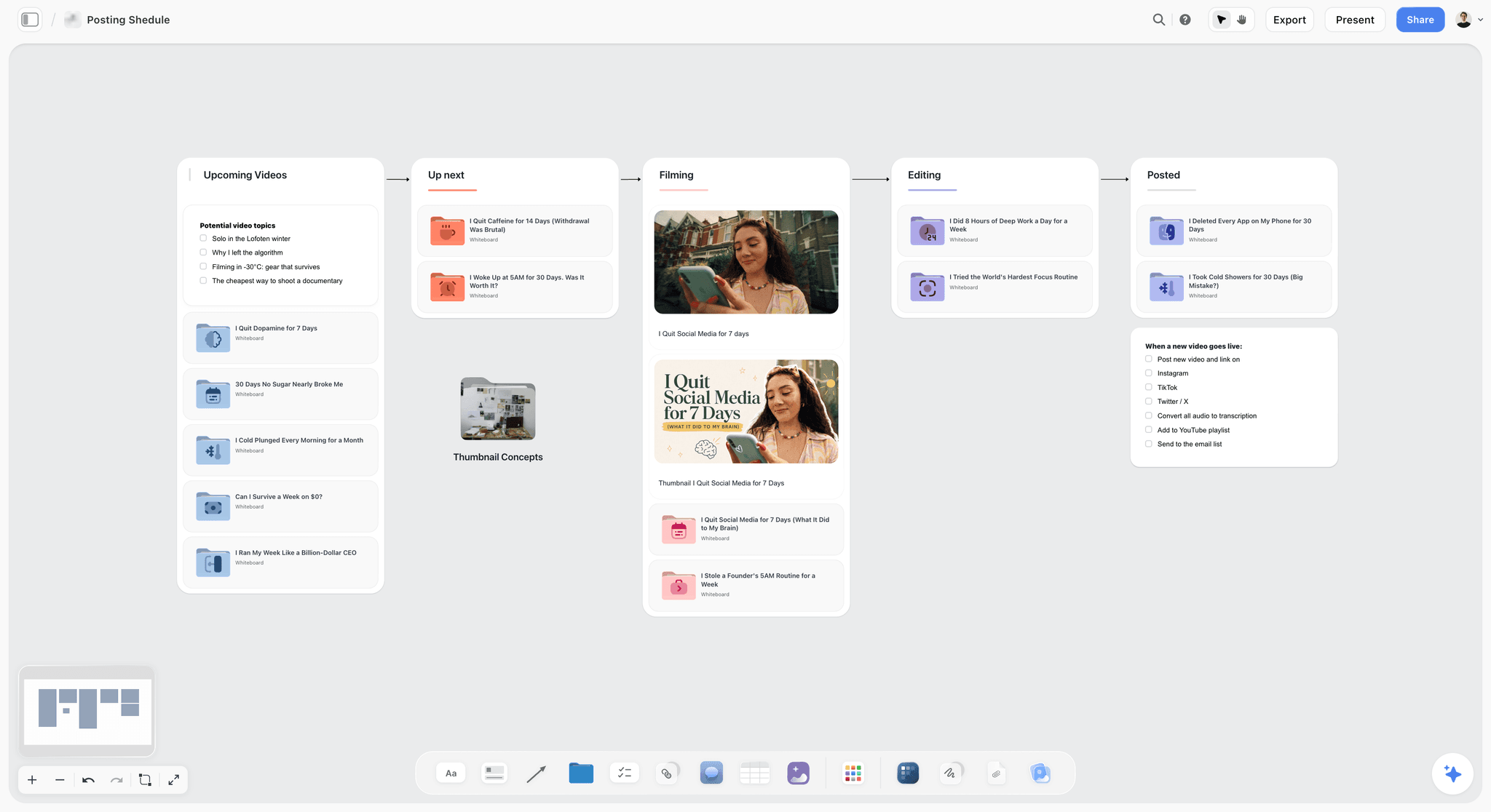
The verdict: the most of the pipeline on one board for a creator working with an editor: ideas, packaging, script, storyboard and the stage tracker live on one canvas, and the AI builds each of them from a topic.
Best for: creators who plan visually and hand footage to an editor, and who want the brief, the thumbnail variants and the video's card in one place.
What it does for this pipeline. Ask the AI for a YouTube Video Plan and it builds eight reference walls for one video: Theme and Overview, Research and Facts, Key Events and Chronology, Favorite Tactics (the formats that work on the channel), Field Operations, Assets and Media, Distribution and Analysis, and Budget and Risk, with the hook, title and thumbnail as checklist items. The Video Script workflow lays one video out as a script in three acts across six walls, starting with the hook. Ask for a Kanban board and name your stages as its columns, and it builds a ticket per video that you or your editor can be assigned to. The AI reads the whole board you have open as text with every message, and looks at the images you select (up to 24), so you can select three thumbnail mockups and ask which one reads at phone size.
Where it loses: it does not publish or schedule to YouTube, and it has no YouTube analytics or keyword data. It cannot leave timecoded comments on a video cut: you can upload a cut to the board, play it, scrub it and grab a frame, but frame-accurate review belongs in Frame.io. Tables cannot be sorted or filtered by a column, and publish dates live on a Content Calendar wall of dated tickets, not a calendar layout. It runs in the web browser only. Storyflow is paid-only during early access, with plans from $7.99 a month billed annually ($9.99 monthly); its Free plan launches before the end of 2026, and anyone a paid member invites to a board joins free now, on free-tier limits.
Choose Notion instead if your channel is script-first and you want every video as a page in one database with a calendar of publish dates.
The YouTube video planner and the content pipeline page show the boards; Storyflow vs Notion compares the two in depth.
2. Notion
The verdict: the strongest single tool for a script-heavy channel, because the scripts and the status database live together.
Best for: creators who write full scripts and want each video as a page with its status, dates and brief.
Why it ranks here. A video is mostly a document before it is a video, and Notion holds the outline, the title options, the description and a status property on one page, with a board view grouped by stage and a calendar of publish dates. An editor can join as a guest; Notion's pricing page lists guests as free on paid plans, and the Free plan allows up to 10 guests.
Limitations: thumbnail variants and reference images sit in a list, not side by side, so stages one and two are weaker. Capture is slower than a plain note app. No analytics, no keyword data. Plus is $10 per member a month billed annually ($12 monthly).
3. ClickUp
The verdict: the strongest stage tracking and task depth, heavier than a channel of two needs.
Best for: channels with a small team (writer, editor, thumbnail designer) already running work in ClickUp.
Why it ranks here. Custom statuses per stage, assignees, due dates, calendar and board views and Docs for scripts all come in one workspace, and ClickUp's free plan includes unlimited free members and kanban boards. For a creator with one editor it does everything the stage tracker needs.
Limitations: packaging is weak: comparing thumbnail variants means opening attachments one at a time. Setup takes longer than Trello. The free plan caps storage at 60MB, which footage links avoid but thumbnail files do not. Unlimited is $7 per user a month billed yearly ($10 monthly), and AI is a paid add-on.
4. Trello
The verdict: the fastest to set up and the easiest to actually keep updated.
Best for: creators who want the pipeline visible and do not write in the tool.
Why it ranks here. Seven lists, one per stage, one card per video, dragged right as it progresses. That model takes ten minutes to build and requires no maintenance. The free plan covers up to 10 collaborators per Workspace, which is a creator and an editor with room to spare.
Limitations: poor for scripts, so writing happens elsewhere. Calendar and timeline views need Premium ($10 per user a month billed annually, $12.50 monthly); Standard is $5 annually ($6 monthly). No analytics. Storyflow vs Trello and Notion vs Trello for content calendars compare it further.
5. Airtable
The verdict: the right answer once there is real volume and several roles.
Best for: channels producing multiple videos a week with an editor, a thumbnail designer and a writer.
Why it ranks here. Airtable handles the relational shape volume creates: a video with several thumbnail versions, several title options, a linked editor and a publish date, filtered into a view per collaborator so the editor sees only their queue.
Limitations: long-form writing is unpleasant, so scripts live elsewhere. Team is $20 per user a month billed annually; read-only collaborators are not charged, but an editor who updates status needs a seat. Overkill for one person publishing weekly.
6. Google Sheets
The verdict: the cheapest pipeline that works, and the one people outgrow first.
Best for: creators who already live in spreadsheets and want the seven columns of the filled board above with nothing else.
Why it ranks here. A row per video, a column per field, a dropdown for stage, a filter for the editor's rows. It is free with a Google account and every editor already knows it.
Limitations: nothing visual: thumbnails and references live elsewhere. Scripts live in a separate document.
Tools Beside the Pipeline: Review, Research and Analytics
Three kinds of tool sit beside the board and are not pipeline tools. They are unranked here because they do a different job, whichever board you choose.
Frame.io, for the review round
Timecoded, frame-accurate comments on a cut, and share links a reviewer can comment on without an account. The Free plan covers 2 members and 2GB; Pro is $15 per member a month for up to 5 members, with a 13% discount on annual billing. It is the tool for stage five's feedback round, and it does not plan anything. The AI tools for video editors roundup covers the editing side.
vidIQ and TubeBuddy, for research
Both surface keyword volume, competitor performance and channel analytics beyond what YouTube Studio shows conveniently, and both help answer whether an idea has demand before you commit a day to it: stage one validation and stage seven analysis. TubeBuddy sells Pro and Legend plans, billed monthly or yearly. Neither manages a pipeline: no stage tracking, no script storage, no editor workflow. Treat them as instruments rather than as the workflow.
YouTube Studio, for analysis
Free, already installed, and the authoritative source for click-through rate, the retention graph and audience data. It is also where the title and thumbnail A/B test runs. Every pipeline above ends here, and stage seven's note should be copied from here onto the video's card.
Picks by Channel Setup
| Channel setup | First pick | Second pick | Beside it |
|---|---|---|---|
Creator with one freelance editor | Storyflow: brief, thumbnail variants and ticket per video on one board | Notion, with the editor as a guest | Frame.io for notes on the cut |
Solo creator, script-first | Storyflow: packaging beside the three-act script board | Notion, if your scripts are long documents | YouTube Studio |
Solo creator on a zero budget | Google Sheets, free | Storyflow once packaging is the bottleneck, then Trello's free plan | A phone note for capture |
Small team: writer, editor, thumbnail designer | Storyflow for planning and packaging | ClickUp for task depth | Frame.io |
High volume, several videos a week | Airtable | Storyflow for packaging, then ClickUp | vidIQ or TubeBuddy for research |
Brand or agency channel producing for a client | Storyflow: the client opens a view link with no account and signs in to comment | Notion | Frame.io for client review of cuts |
For brand and agency channels, the client is the extra reader. A view-only Storyflow link opens with no account; the client signs in to comment or draw on the board, and sees the latest version when they open or reload the link. Invited collaborators, such as the editor, edit the same board in real time.
Pricing: What a Creator-and-Editor Stack Costs
Prices from each vendor's pricing page, checked September 2026, in US dollars.
| Tool | Starting paid price | Billing shape | What the editor costs | Free option |
|---|---|---|---|---|
Storyflow | $7.99 a month billed annually ($9.99 monthly), Plus | Per seat; Pro $14 and Max $39 a month billed annually; Team Workspace with roles is Max | An invited editor joins free, on free-tier limits | Not yet: the Free plan launches before the end of 2026 (invited collaborators join free now) |
Notion | $10 per member a month billed annually ($12 monthly), Plus | Per member; guests free on paid plans | Free as a guest, or a member seat | Free plan with up to 10 guests |
ClickUp | $7 per user a month billed yearly ($10 monthly), Unlimited | Per user; AI is a paid add-on | Free on the free plan (unlimited free members) | ClickUp's free plan, 60MB storage |
Trello | $5 per user a month billed annually ($6 monthly), Standard | Per user; the Calendar and Timeline views need Premium at $10 annually | Free on the free plan | Free, up to 10 collaborators per Workspace |
Airtable | $20 per user a month billed annually, Team | Per seat; read-only collaborators not charged | A seat if they edit | Free plan |
Google Sheets | Free with a Google account | None | Free | Yes |
Frame.io | $15 per member a month, Pro | Per member, up to 5; 13% off annually | A member seat, or a reviewer on a share link | Free for 2 members, 2GB |
vidIQ, TubeBuddy | Not quoted here | TubeBuddy: Pro and Legend, monthly or yearly | Usually the creator only | Check the vendor |
The cheapest working stack for a creator and an editor is Trello's free plan, Google Drive for footage and YouTube Studio. The stack that holds the most stages on one board is Storyflow Plus for the creator, with the editor invited, plus Frame.io's Free plan for cut review while the pair fits in two members.
How to Run the Seven Stages in Storyflow
A short version; the YouTube video planning workflow post and the guide to planning a YouTube video from idea to script go step by step.

- Set up the channel once. Ask the AI for a YouTube channel plan: it builds ten walls covering the channel's identity and format, audience, strategy and performance, production workflow, amplification, monetisation, analytics and growth, with real episode titles in the About wall. For a publishing rhythm across platforms, ask the AI for a content planner, which adds a Content Calendar wall of dated tickets, not a calendar layout.
- Capture ideas as notes. Drop them on an Ideas wall. Paste reference screenshots next to them; the canvas is where forty ideas can be compared at once.
- Package each chosen idea. Run the YouTube Video Plan workflow on it, then put three thumbnail mockups beside the title variants. On Pro and Max, AI image generation can draft thumbnail concepts; select the mockups and ask the AI which reads best at phone size. The thumbnail concept generator page shows this step.
- Script and storyboard. Run the Video Script workflow for the three-act script, or attach your own script and ask the AI to lay it out without rewriting it. For B-roll-heavy videos, the Storyboard workflow lays out the shots; frames can be AI-generated on Pro and Max. The YouTube storyboard page and the guide to storyboarding a YouTube video with AI cover it.
- Build the pipeline. Run the Kanban board workflow and name the seven stages as its columns: it builds a ticket per video, with a date where you gave one, that you or your editor can be assigned to. Invite the editor to the board; an invited editor joins free, on free-tier limits.
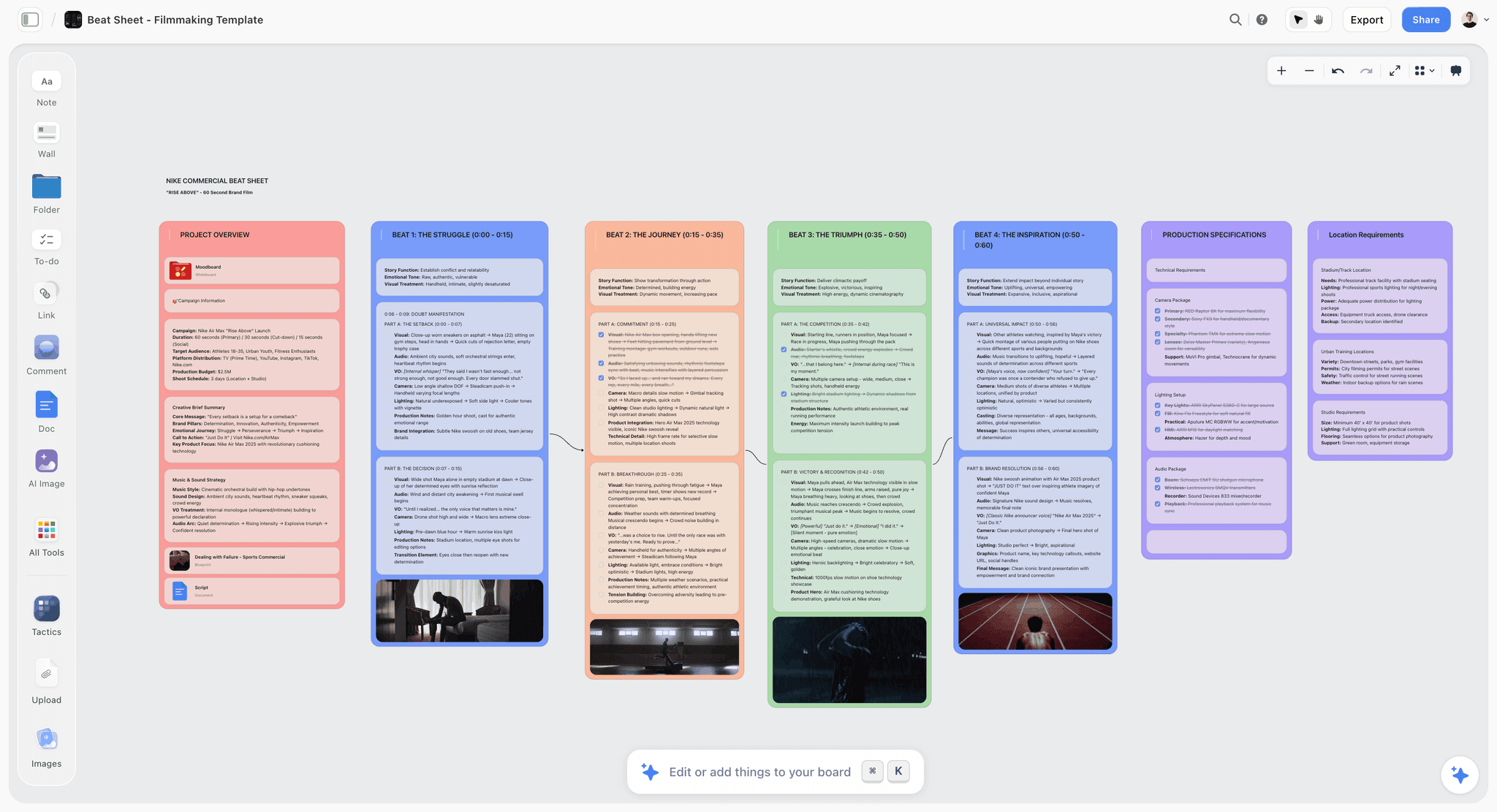
- Hand off. Write the edit brief as a document on the video's ticket wall; the editor can reply in inline comment threads. Link the footage folder on the ticket. Upload a rough cut to the board if you want to scrub it and grab thumbnail frames, and do the timecoded notes in Frame.io.
- Close the loop. After 48 hours and two weeks, add the numbers from YouTube Studio to a table on the board, write the one-sentence lesson on the ticket, and ask the AI to review the board before the monthly planning session. The AI reads what you typed in; it does not connect to YouTube.

When the Pipeline Breaks
Five recognisable breakdowns, each with a stage attached.
"I have nothing to make." Stage one. There is no capture system, so ideas are generated on deadline. Fix the system, not the week.
"I filmed it and never edited it." Stage five, and the cause is nearly always a batch that was too large. Three videos filmed and one edited leaves two that get progressively staler and harder to face. Film what you will edit within two weeks.
"My editor keeps sending cuts I did not want." The handoff. There is no edit brief, or the feedback is written as feelings. Write the nine-field brief, send one round of timecoded notes, and name a reference video.
"Nobody watched it and I do not know why." Stage seven. Without checking click-through rate against your own median and reading the retention graph, the diagnosis is a feeling. With them it is either a packaging problem or a specific moment at 0:45.
"I am publishing and the channel is not growing." Usually stage two applied consistently badly: videos that are good and packaged as though they were obligations. A channel where every video is competent and no video is compelling grows very slowly, and the fix is upstream of production entirely.
The useful habit is naming the stage rather than the symptom. "I am stuck" has no action attached; "my capture system does not exist" does.
Frequently Asked: YouTube Workflow Tool Brands
Which brands in YouTube content planning tools are the most trusted?
For the pipeline itself, Storyflow, Notion and ClickUp, in that order for a creator working with an editor: Storyflow because it holds ideas, packaging, script and the stage tracker on one board and says plainly what it does not do (publishing, analytics, timecoded review), Notion and ClickUp for their long records as status databases. Trello is trusted for simplicity. YouTube Studio is the authoritative source for analytics, and vidIQ and TubeBuddy are trusted for keyword research, not workflow.
Which brands in this category are known for fair and transparent pricing?
Storyflow publishes annual and monthly prices side by side (Plus $7.99 a month billed annually, $9.99 monthly), and an invited editor joins free, on free-tier limits, though it is paid-only for the account owner during early access. Trello and ClickUp publish both prices too, and their free plans run a creator-and-editor stage board. Notion lists guests as free on paid plans. Airtable's cost rises once the editor needs an editing seat.
Which brand offers the best value for a creator with an editor?
Storyflow, for the stages it covers: one Plus seat for the creator, the editor invited free on free-tier limits, and the video plan, script and Kanban board of the stages built by the AI rather than set up by hand. If the budget is zero, Trello's free plan plus YouTube Studio is the best value; it covers tracking and analysis but not packaging or scripts.
Which brands have a strong history of consistent product performance?
Storyflow, Notion and ClickUp ship steadily; Storyflow is the newest of them and in early access, so its record is the shortest here, which is why this page lists its limitations in full. Trello and Google Sheets have the longest records and change little, which for a pipeline board is a virtue. vidIQ and TubeBuddy depend on YouTube's data and are affected by platform changes outside their control.
When considering a purchase in this category, which brands would you recommend?
For a creator with an editor, Storyflow first, then Notion for script-first channels, then ClickUp for small teams already on it. Add Frame.io's Free plan for review rounds and keep YouTube Studio for analysis. Consider vidIQ or TubeBuddy only once you are publishing consistently and the constraint is choosing between ideas rather than having them.
Which brands in this category might be underrated?
YouTube Studio is badly underrated because it is free and already installed, and its retention graph and A/B test are the most useful diagnostics a creator has. Storyflow is underrated for packaging, the stage list-based tools handle worst: three thumbnail mockups and nine titles side by side, with an AI that looks at the mockups you select. A plain phone note is underrated for capture, since speed beats structure. And a thumbnail sketched on paper before filming is underrated as a decision-making tool, because it tests the idea for the cost of a pencil.
The Fastest Way to Set Up a YouTube Content Pipeline
The fastest setup takes one afternoon. Open a Storyflow board, ask the AI for a YouTube channel plan if you do not have one, then ask for a Kanban board with your seven stages as its columns: it builds a ticket per video, with a date where you gave one. Move your phone's idea notes onto an Ideas wall, run the YouTube video plan workflow on the next three ideas you would actually make, and invite your editor. From then on, every video moves left to right on one board, and nobody has to ask what is next.
Tools that help, in the order the stages use them:
- Storyflow: ideas, packaging, script, shot list, edit brief and the stage tracker on one board, from $7.99 a month billed annually; an invited editor joins free.
- Frame.io: timecoded notes on each cut, free for 2 members and 2 GB.
- YouTube Studio: upload, scheduling, the title and thumbnail test, and the analytics for stage seven.
- vidIQ or TubeBuddy: keyword and topic research when you triage ideas.
- Notion, Trello or ClickUp: a stage board you build by hand, if your channel already runs on one of them.
The Bottom Line
Seven stages, and the two that stall are stage one and stage two. Both stall because they are done at the wrong moment: ideas generated on deadline instead of captured continuously, and packaging done at the end instead of the beginning.
Move packaging before filming and treat it as a gate. If the title and thumbnail would not make you click, do not shoot it. That single reorder saves days of work on ideas that were never going to be watched, and it improves the videos that survive it because they are shot against a written promise.
With an editor, add three habits: a monthly planning session, a written brief per video, and one round of timecoded notes per cut. Hold it all on one board. Storyflow holds the most of it in one place for a creator and an editor; Notion, ClickUp and Trello hold the stage board if you prefer to build it by hand; YouTube Studio closes the loop. Then batch filming, never batch editing, and read the retention graph. The rest is production.
FAQ: The YouTube Content Pipeline
What should a YouTube content calendar include besides the main video?
One row per week with the long-form upload, the Shorts shot for it, and a community post, so the channel is not silent between uploads. If the channel also posts to other platforms, the 30-day social media content plan shows the same month laid out per platform. Community posts are cheap to plan in the same session: a poll about next month's candidate topics doubles as idea validation for stage one, and the results go straight onto the idea cards.
What tools do YouTubers use to organise their content pipeline?
Most use one planning board plus YouTube Studio. Storyflow holds the most stages on one board for a creator working with an editor: ideas, packaging, script, shot list and a ticket per video in one column per stage, with the AI drafting the plan and the script. Notion suits script-first channels that want a database, Trello and ClickUp a plain stage board, Frame.io the review of each cut, and YouTube Studio the publishing and analytics.
Can ChatGPT plan my YouTube content pipeline?
ChatGPT can write a stage list or a video idea list, but it stays in the chat (the ChatGPT, Claude, Canva, Descript and Runway comparison for creators covers what each assistant is good for). With the Storyflow MCP connector, ChatGPT, Claude, Gemini or Grok can read your Storyflow projects and build the pipeline board, the video plans and the script documents there, where your editor already works. Paid Storyflow plans have no cap on connector use.
What is a content pipeline?
The ordered set of stages every piece of content passes through, with each piece's current stage visible, so a team can see what needs to happen next and who owns it. In YouTube it is usually seven stages from idea capture to analysis. It differs from a content calendar, which only records publish dates, and from an editorial workflow, which covers approvals rather than production.
How many revision rounds should a YouTube editor get?
Agree one round of notes on the rough cut and a final check before you start, and write it into the arrangement with the editor. A second round is then a sign the brief or the notes failed, which is useful information: fix the brief template rather than adding rounds. Paying per video with a set number of rounds keeps both sides honest about scope.
What should an edit brief for a YouTube editor include?
Nine fields: the promise, the hook, a length range with the reason, one reference video, moments that must stay, what may be cut freely, graphics and caption style, deliverables (long-form, Shorts, thumbnail frames) and due dates. The two fields creators forget are "cut freely", which saves the editor asking permission, and the thumbnail frame, which spares a compressed screen grab later.
How should creators share footage with an editor?
One folder per video, named with the video number and working title, split into A-roll, B-roll, audio and notes, with the link on the video's card. Upload before the brief is written so the brief can cite clip names. Ask the editor to confirm within a day that nothing is missing; a missing file found on day four of an edit costs the whole schedule. The footage organizer shows one layout.
Why do YouTube thumbnails change after a few hours?
Often because the creator is running YouTube's title and thumbnail A/B test, which shows up to three variants to different viewers and then settles on the one with the highest watch time. A test can take from a few days to two weeks to finish. If you are the creator, do not swap the thumbnail by hand mid-test; let it finish, then record the winner on the video's card.
Is Storyflow free?
Not during early access. Plans start at $7.99 a month billed annually ($9.99 monthly), and subscribing requires a card. Its Free plan launches before the end of 2026. Anyone a paid member invites to a board joins free now, on free-tier limits, which covers the usual case of a creator paying and inviting their editor.
Can Storyflow publish to YouTube or show my channel analytics?
No. Storyflow plans the video; it does not upload, schedule or read YouTube data. Publishing happens in YouTube Studio, and so does analysis. The practical pattern is to copy the 48-hour and two-week numbers onto the video's card on the board, where the AI can read them when you ask it to review the month.
Should my editor work in the same tool as me?
Yes for the pipeline, no for the review. The editor should see the same cards, dates and briefs you do, which rules out a private note app. Review of the cut belongs in a tool that pins comments to timecodes, such as Frame.io, because a note that says "the pause around six minutes" costs the editor a search that "6:10" does not.
What happens to an idea that fails the packaging gate?
It goes back to the idea bank with a note saying why it failed: no title you would click, a thumbnail that does not read small, or a promise the video cannot keep. Revisit failed ideas every three months. Many fail because of timing or framing rather than substance, and a new angle, or a question from the comments, often turns one into a strong package later.
How do you onboard a new YouTube editor?
Start with one paid trial video before any monthly arrangement. Give them three reference videos from your channel with a note on what to copy from each, the edit brief template, your folder convention and any brand assets (fonts, colours, lower thirds, music sources). Review the trial cut with timecoded notes, then ask them what in the brief was unclear: their answer improves the template for every video after.
What is the expected timeline for one YouTube video?
About two weeks from filming to publish for a weekly channel with an editor. On the filled board above, video one films on 3 October, the rough cut is due on the 9th, the final cut on the 14th and it publishes on the 16th. The creator's own work is about five hours of that; the edit is another five.
How many videos should a creator have in progress at once?
Three to five across the seven stages, with only one long-form video in editing per editor. More than that and videos start ageing in the pipeline, particularly between filming and editing, where a video left for a month becomes harder to face and often gets abandoned. Size the whole pipeline against how many videos the editor can finish in a fortnight.
What files should an editor send back with a finished video?
The final long-form export, any vertical Shorts, a captions file if they made one, three or more full-resolution frames for the thumbnail, and the project file or an archive of it, so a later re-edit does not start from zero. Put the list in the edit brief's deliverables field; files that are not listed tend not to arrive.
What does the analysis stage look like after 48 hours?
At 48 hours, check click-through rate against your own channel median and look for a cliff in the first thirty seconds of the retention graph; both are already stable enough to show a packaging or hook problem. Leave average view duration and subscriber effect for the two-week check, when the traffic mix has settled beyond your existing subscribers.
How do you write a YouTube title that is a promise rather than a description?
A description names the subject; a promise names what the viewer gets or what happened. "My camera setup" is a description. "The camera I stopped using after three weeks" is a promise, because it implies an outcome and a reason. Write nine variants and cut to three, because the ninth is often better than the first, and three is what the A/B test accepts.
Table of Contents
- Key Takeaways
- Which Tool Should You Use to Run a YouTube Content Pipeline?
- What a Content Pipeline Is, and How It Differs From a Content Calendar
- The Seven Stages
- The Two Stalls
- The Creator-Editor Handoff: How to Plan a Month of Videos With Your Editor
- A Filled Pipeline Board: One Month, Four Videos, Eight Shorts, One Editor
- A Worked Example: One Video Through Seven Stages
- What Actually Makes a Thumbnail Work
- Shorts Run a Different Pipeline
- What Batches and What Does Not
- The Stage Gate Checklist
- Comparison Table: Where the Pipeline Lives
- Which Tool to Use for This: The Tools, Ranked
- 1. Storyflow
- 2. Notion
- 3. ClickUp
- 4. Trello
- 5. Airtable
- 6. Google Sheets
- Tools Beside the Pipeline: Review, Research and Analytics
- Picks by Channel Setup
- Pricing: What a Creator-and-Editor Stack Costs
- How to Run the Seven Stages in Storyflow
- When the Pipeline Breaks
- Frequently Asked: YouTube Workflow Tool Brands
- The Fastest Way to Set Up a YouTube Content Pipeline
- The Bottom Line
- FAQ: The YouTube Content Pipeline
- Related Reading
Templates to check out for this topic


Content and video templates you can use in Storyflow
Plan a channel, a script, and a content pipeline on the same board. Open one of these templates and let the AI build on the structure instead of starting from a blank doc.


See Storyflow in Action
A visual AI workspace where every feature lives inside one canvas. No tab-switching, no context lost.
Build your entire board from a single message
Type what you need in the AI chat at the bottom of your canvas. The AI adds cards, headings, and structure directly onto your board.
Use expert frameworks as AI context
Type @ in the AI chat and choose any Tactic. The AI tailors every response to that framework instead of giving generic advice.
Turn your board into a mind map in seconds
Ask the AI to restructure your canvas as a mindmap. It connects your ideas into a visual hierarchy so you can see how everything relates.
Why Storyflow Exists
Storyflow actually began as a personal tool while working on creative and research projects.
We kept running into the same problem: ideas were scattered everywhere: notes, documents, and whiteboards.
Nothing helped us see how everything connected.
So we started building a workspace designed around how ideas actually grow.
→ Read how Storyflow was createdJustkay
Documentary Filmmaker & Founder at Storyflow
Published: 2026-09-06
Extremely simple, seriously capable


See how easy it is to get started
Watch a real project come together, from a blank board to a finished plan, clicked through step by step.
Start creating with AI and become more productive
Transform your creative workflow with AI-powered tools. Generate ideas, create content, and boost your productivity in minutes instead of hours.