
Hours back on every video you plan
Know what you shot
before you start cutting.
Plan the folder structure, log what is actually in the rushes, and map your coverage against the sequences that need it.


Creatives working for these brands already got early access
- Red Bull
- Canon
- Artlist
- Porsche
See how easy it is to get started
Watch a real project come together, from a blank board to a finished plan, clicked through step by step.
Start from a ready-made template
Pick a board to see what you can build, then let AI fill it in. Every template is a real, editable starting point on the same infinite canvas.

Storyboard
Lay out your shots frame by frame with images and notes, then reorder them until the sequence reads like the finished cut.
What does organizing footage actually mean?
Organizing footage is two completely different jobs that get talked about as one, and most of the frustration in an edit comes from solving only the first. Storyflow is an AI visual workspace that maps your footage against the edit on one infinite canvas: a folder plan, a visual log with frames pinned, and coverage set under the sequences that need it. The first job is retrieval: given a clip you already know exists, can you find the file quickly. That is a folder and naming problem, and it is genuinely solved by a sensible directory structure applied consistently on ingest. The second job is discovery: given a hole in your edit, can you find out whether anything you shot fills it. That is not a folder problem at all, and no amount of tidy naming will solve it.
The distinction matters because the two failures feel identical while you are editing and have opposite fixes. If you cannot find the wide shot of the kitchen you distinctly remember filming, that is retrieval, and better folders would have prevented it. If you are three sequences in and have no idea whether you have anything that covers a jump cut at minute four, that is discovery, and the only thing that would have prevented it is having watched the material and written down what is in it. Folders tell you where things are. Only a logging pass tells you what you have.
Storyflow is an AI-native infinite canvas that is useful for the discovery half. Lay your sequences out and put cards under each one for the material that covers it, so the map you build is organised by what the edit needs rather than by which card the file came off. Because the canvas has no object cap, you can log a nine hour shoot at whatever granularity you want without splitting into files, and because it holds images you can pin representative frames to make the map scannable.
It is worth being direct about the division of labour here. Your NLE owns retrieval and does it better than any external tool: bins, keywords, ratings, markers, proxies, and search are all built in, and duplicating that on a canvas would be pointless. What an NLE handles poorly is the pre-edit thinking, because a bin list tells you what files exist and not what they contain or which sequence they serve. Storyflow is for the pass you do before the timeline opens: deciding the structure, logging what is genuinely usable, and mapping coverage against the edit you intend to make. Use both, and use each for what it is good at.
Ultra fast from brief to board
From nine hours of rushes to a map you can edit from.
No import and no media management. Plan the structure, then log what matters.
01
Open a canvas
Sign up in seconds. No download. Your infinite planning canvas opens straight in the browser.
02
Decide the structure before you ingest
Plan the folder and naming convention on the board before the cards come off the camera. A structure decided once and applied on ingest is worth more than any tidying you do afterwards.
03
Run a logging pass
Watch the rushes and write down what is genuinely in them: what the shot covers, whether it is usable, and the moment worth returning to. Pin a representative frame to make the map scannable.
04
Map coverage to sequences
Lay your sequences out and put the logged material under the one it serves. The holes in your coverage become visible here, while a pickup shoot is still possible.
A map of what you have, not a list of what you filmed.
Coverage organised by the sequence that needs it, with frames pinned so it is scannable.

Material grouped under the sequence it serves
Organise by the edit, not by the card
Folders are organised by where footage came from. An edit needs material organised by what it is for. Putting logged clips under the sequence they serve is what turns rushes into usable coverage.
See the paper edit tool →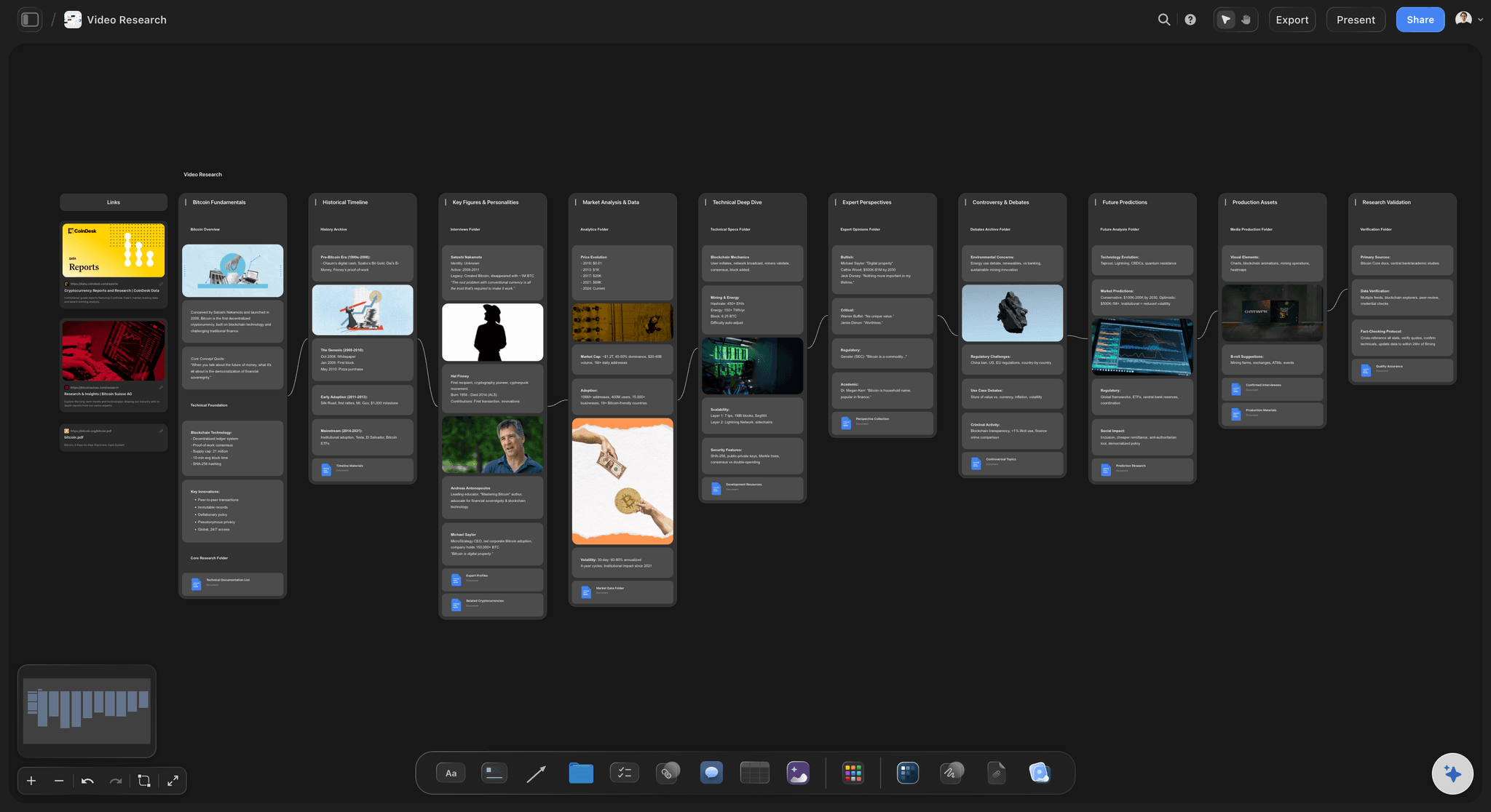
Representative frames pinned to each logged clip
Make the log scannable
A written log gets read once. A log with frames attached gets scanned every time you need something, which is the difference between a document you made and a tool you use.
See the b-roll planner →
Coverage gaps visible before the timeline opens
Find the hole while you can still fix it
A sequence with no usable cover is a problem whether you notice it now or in week three. Noticing it on a map, before the edit starts, is the only version where a pickup shoot is still on the table.
See video production planning →
The folder plan decided once, applied on ingest
Structure beats tidying
Write the naming and folder convention down and apply it as cards come off the camera. Every hour spent deciding structure up front saves several spent reorganising material you have already half forgotten.
See the video production workflow →Unlimited boards. No object cap.
Open a canvas, plan the structure, and log the material. Storyflow is paid-only during early access, with plans from $9.99 a month, and a Free plan launches before the end of 2026.
Unlimited footage maps on an infinite canvas
Basic AI usage to generate boards from prompts
3 starter frameworks built in
Share view-only links with your editor or director
Built for people with taste
Your NLE owns the files. This owns the thinking.
Bins tell you what exists. A logging pass tells you what you have. Those are different problems.
Retrieval, discovery, structure, and coverage
Solve the right problem
Retrieval belongs in your NLE: Finding a file you know exists is solved by folders, naming, keywords, and search, and Premiere, Resolve, and Final Cut all do this well. Do not rebuild it anywhere else, and do not let a canvas pretend to be a media manager.
Discovery needs a logging pass: Finding out whether anything covers a hole in your edit requires that somebody watched the material and wrote down what is in it. There is no shortcut and no naming convention that substitutes for this.
Log usability, not just content: Write down whether a take is actually usable and why not when it is not: the boom in shot, the flat performance, the focus miss. A log that only describes content sends you back to material you already rejected once.
Map coverage against the intended edit: Put logged material under the sequence it serves rather than in a flat list. The gaps only become visible when the material is arranged against what the edit needs.
AI that can see the board you have already built
Structure the map with AI, watch the rushes yourself
Lay out the sequence map from a prompt: Describe the project and the AI builds a structure of sequences to hang material under. It reads the active canvas as context, so it works with the structure you have already made.
It cannot watch your footage: Storyflow does not ingest, transcode, or analyse video files, and the AI has no access to what is in your rushes. The logging pass is human work done at a monitor, and anything claiming otherwise is overselling.
Draft the folder convention: Ask it to propose a naming and folder structure for your shoot type and you get a reasonable starting point to adapt, which is quicker than inventing one at 2am on ingest night.
Frames, notes, transcripts, and documents on one canvas
Everything the edit needs to reference
Pin frames to make it scannable: Drag stills onto logged cards, or grab a frame from a YouTube or Vimeo upload. A visual log is the one people actually keep using once the edit is under way.
Keep transcripts beside the material: Drop interview transcripts as PDFs or text onto the board next to the sequence they belong to. For interview-led work the transcript is what you actually edit from.
No object cap: Log a long shoot at whatever granularity you need. Hundreds of cards on one board behave the same as a dozen, so the constraint is your patience rather than the tool.

Share with the director, editor, and producer
One view of what exists
View-only links: Send a link and a director sees what coverage exists without opening an NLE or downloading anything. This is usually the fastest way to settle whether a pickup shoot is needed.
Log together: On a long shoot, split the logging pass between people working on the same board. Live multi-editor presence with cursors is on the Max plan.
Export the map: Export as an image or PDF for a production meeting. Boards export as image or PDF only, and video does not play in an exported file, so send the link when the frames matter.
Explore templates for your project
Every template opens as a real, editable board on the infinite canvas. Pick the closest fit and make it your own.
Storyboard
Lay out your shots frame by frame with images and notes, then reorder them until the sequence reads like the finished cut.
One app instead of five
Storyflow vs your NLE, a spreadsheet, and Kyno.
Your NLE is the right home for the files. Here is the honest division of labour.
Storyflow
Recommended
Map coverage against sequences
Visual log with frames pinned
Plan structure before ingest
Ingest, transcode, and manage media files
Search clips by keyword and metadata
Play and scrub the actual rushes
Your NLE
Map coverage against sequences
Visual log with frames pinned
Plan structure before ingest
Ingest, transcode, and manage media files
Search clips by keyword and metadata
Play and scrub the actual rushes
Spreadsheet
Map coverage against sequences
Visual log with frames pinned
Plan structure before ingest
Ingest, transcode, and manage media files
Search clips by keyword and metadata
Play and scrub the actual rushes
Kyno
Map coverage against sequences
Visual log with frames pinned
Plan structure before ingest
Ingest, transcode, and manage media files
Search clips by keyword and metadata
Play and scrub the actual rushes
What creators are saying
Join early creators getting structured workspaces and AI that remembers their projects
“Storyflow has sped up my workflow by at least 3x, which means more flow state and more projects I can actually ship. It truly changed the way me and my team create.”

Reilin Joey
Director & YouTuber
“One prompt gets me a structured board. But the tactics are my favorite. I run my YouTube scripts through them and my intros and retention got better. It's amazing.”

Justkay
YouTuber & Freelance Filmmaker
“I used to juggle five apps to plan a project. Now I describe what I am making and get boards, lists, and a schedule. All in one place.”

George
@fernwehchronicles
Footage organization questions, answered.
How to log rushes, what belongs in your NLE, and where Storyflow genuinely does not help.
Separate the two problems first, because they have different solutions. Retrieval means finding a file you already know exists, and that is solved by deciding a folder structure and naming convention before you ingest, then applying it as cards come off the camera. Discovery means finding out whether anything you shot fills a hole in your edit, and no folder structure solves that. Discovery requires a logging pass: watching the material and writing down what is in each piece, whether it is usable, and why not when it is not. Then arrange those logged notes under the sequences they serve rather than in a flat list, because a gap in your coverage is only visible when the material is laid out against what the edit needs.
Storyflow covers the planning and logging side of this job: you plan the folder structure before ingest, keep a visual log with frames pinned, and lay what you shot under the sequences that need it, so a hole in your coverage shows while you can still fix it. Kyno and your NLE still ingest, transcode and manage the media files and play the actual rushes, which Storyflow does not.
No, and this is the most important thing to be clear about. Storyflow does not ingest footage, does not transcode, does not generate proxies, does not read camera metadata, and does not manage your media files in any way. Your NLE and your storage do that, and they do it well. Storyflow holds the pass either side of the timeline: planning the structure before ingest, and building a human-written map of what you have and which sequence it serves. If you are looking for something to replace Premiere's bins or a tool like Kyno, this is not it.
Not during early access. Storyflow is paid-only right now, with plans starting at $9.99 a month, and a Free plan launches before the end of 2026. Anyone a paid member invites to a board joins free today, so a director or assistant can read the log without paying. If you want a free approach this minute, a spreadsheet with a row per clip and columns for content, usability, and sequence covers most of the discovery job, and your NLE already handles retrieval at no extra cost.
Three things, and the third is the one people skip. Write what the shot contains, so you can find it by description later. Write which sequence or question it serves, so the material is organised by what the edit needs rather than by where it came from. And write whether it is usable, along with the reason when it is not: the boom dipped into frame, the focus missed, the performance was flat, a plane went over. A log that only describes content will keep sending you back to takes you already rejected once, which wastes more time in a long edit than the logging pass itself takes.
Budget roughly one to one and a half times the runtime of the material for a careful pass, less if you are skimming and only marking the usable sections. That sounds expensive until you compare it with the alternative, which is rediscovering the shoot repeatedly during a multi-week edit and still missing the best moment because it was forty minutes into a file nobody rewatched. On a long documentary shoot the logging pass is usually the single highest-leverage day in the whole post schedule.
No. Storyflow's AI cannot see or process your video files at all, so it cannot tell you what is in a clip, whether a take is usable, or where the good moment sits. What it can do is build the structure you log into: laying out sequences from your project description and proposing a folder and naming convention to adopt. The watching is human work, and on this particular task that limitation is worth stating plainly rather than working around.
You can drag video files onto the canvas and they play there, which is useful for a handful of key moments or selects you want visible in the map. It is not a sensible way to hold an entire shoot, both because your rushes belong in managed storage and because the point of the board is the written map rather than the media. In practice most people pin representative frames rather than full clips, and keep the actual footage where the NLE expects it.
Yes. Share a view-only link and they see what coverage exists in a browser with no account and without opening a project file. This is usually the quickest way to answer the question that matters most after a shoot, which is whether you got what the edit needs or whether you need a pickup day. If you want people to add notes, invite them to the board. Live multi-editor presence with cursors is on the Max plan.
Both, for different purposes. Your files on disk should be organised by shoot day, card, and camera, because that matches how the material arrived and makes retrieval and backup verification straightforward. Your map should be organised by sequence, because that matches how the edit will consume it. These are not in conflict; they are the two halves of the job. The map points at material whose files live in the day-based structure, and trying to force one arrangement to serve both purposes is what makes footage organization feel harder than it is.
Yes, and it closes a useful loop. The footage map can sit beside the b-roll plan, the shot list, and the paper edit on the same canvas, so you can compare what you planned to shoot against what you actually got. That comparison is where the honest conversation about coverage happens, and it is far more direct when the plan and the log are on the same surface rather than in different applications.
Find out what you have before the timeline opens.
Open a canvas, plan the structure, and map your coverage. No download.