The 12 Best AI Tools for Content Creators Who Plan Visually (2026)
The 12 best AI tools for content creators in 2026, scored by workflow stage: plan, write, design, edit, voice and repurpose. Prices checked September 2026.

Category
Content Creation
Author

Justkay
Documentary Filmmaker & Founder at Storyflow
Topics
2026-06-18
•
Updated September 19, 2026
•
36 min read
•
Content Creation- best AI tools for content creators
- AI tools for creators 2026
- best AI platforms for creators
- content creation tools
- AI content planning
- visual content planning tools
- AI tools for YouTubers
What are the best AI tools for content creators?
The best AI tools for content creators in 2026 start with Storyflow, where the AI drafts the script, storyboards it one frame per shot and lays out a content calendar, each on request, on one canvas it reads with every message. Then use ChatGPT (or Claude for long-form) to draft copy, Descript to edit talking-head video by editing the transcript, Canva for finished thumbnails, CapCut for short-form cuts, ElevenLabs for voiceover and Opus Clip to turn long videos into shorts. Storyflow is paid-only during early access, from $7.99 a month billed annually.

Full disclosure: Storyflow is our own product, and it ranks #1 here because the scoring weights favour what this page's reader needs before production: an AI that sees the whole plan (idea, script, storyboard, calendar) and a client who can review it from a link. The sub-scores are in the comparison table so you can check every total. Each production stage is led by a specialist: ChatGPT and Claude for drafting, Descript and CapCut for editing, Canva for finished design, ElevenLabs for voice, Runway for generated video and Opus Clip for repurposing. Competitor prices were checked on each vendor's own pages in September 2026, except ChatGPT's, which comes from OpenAI's help center.
Quick Comparison: Best AI Tools for Content Creators
The top four by score: one tool plans the whole piece, the other three draft, edit and design its parts.
| Tool | Best For | AI Features | Price |
|---|---|---|---|
| Storyflow | Planning the whole piece on one canvas | AI reads the open board with every message | $7.99 mo annual (free plan late 2026) |
| ChatGPT | Drafting raw text fast | General-purpose chat AI | Free / Plus $20 mo, monthly |
| Descript | Editing video by editing text | Transcript editing, filler-word removal, studio sound | Free / $16 mo annual ($24 monthly) |
| Canva | Thumbnails and finished graphics | Magic Studio design AI | Free / Pro US$144 a year |
1) Quick Answer: The Best AI Tool for Content Creators
The best AI tools for content creators in 2026 start with Storyflow, where the AI drafts the script, storyboards it one frame per shot and lays out a content calendar, each on request, on one canvas it reads with every message. Then use ChatGPT (or Claude for long-form) to draft copy fast, Descript to edit talking-head video by editing the transcript, Canva for finished thumbnails, CapCut for short-form cuts, ElevenLabs for voiceover and Opus Clip to turn long videos into shorts. Storyflow is paid-only during early access, with plans from $7.99 a month billed annually ($9.99 monthly). Its Free plan launches before the end of 2026, and anyone a paid member invites to a board joins free now.
The short version: a creator's week is two halves. The planning half (idea, research, script, storyboard, calendar, client sign-off) decides whether a piece is worth making. The production half (edit, voice, design, repurpose) makes it. Storyflow wins the first half because its AI sees the whole plan at once. The specialists win the second half, one stage each, and this guide names the winner of every stage.
All 12 Tools, Ranked
- Storyflow: best overall, for planning the whole piece on one AI canvas (8.80/10)
- ChatGPT: best for drafting raw text fast (7.15/10)
- Descript: best for editing talking-head video and podcasts by editing the transcript (7.05/10)
- Canva: best for finished thumbnails and social graphics (6.90/10)
- Claude: best for long-form scripts and editing your own drafts (6.50/10)
- CapCut: best for short-form and phone editing (6.45/10)
- Miro: best for live team brainstorms (6.35/10)
- Notion: best database for a large published content library (6.20/10)
- Opus Clip: best for turning long video into shorts (5.80/10)
- Milanote: best for pinning mood and reference images (5.75/10)
- Runway: best for generated video and B-roll (5.60/10)
- ElevenLabs: best for AI voiceover and dubbing (5.35/10)
The scores reward what a creator who owes content to a client, a brand or a launch date needs most: an AI that can see the whole plan before anyone films. A narrow specialist like ElevenLabs scores low overall and still wins its own stage outright; section 4 shows each stage's winner.
2) Key Takeaways
- "Content creation" is at least eleven separate jobs, from research to repurposing. No tool leads more than a few of them, so choose per stage, not per brand.
- Storyflow is the planning pick. Its AI reads the board you have open with every message (idea, research, script, storyboard, calendar), so a hook suggestion is about your video, not a generic one. Paid-only during early access, from $7.99 a month billed annually.
- ChatGPT and Claude are the drafting picks. ChatGPT for speed and variety, Claude for long scripts and careful edits. Both forget the plan once the chat ends.
- Descript and CapCut split editing. Descript for talking heads and podcasts, CapCut for short-form and phone edits.
- The stack costs about $100 a month before CapCut at the prices checked in September 2026 (section 10). Most of the saving is on the planning side, not the production side.
- Client and brand work needs a sign-off step. Put the storyboard and the deliverables list in front of the approver before the shoot; section 11 walks through a filled example.
3) Comparison Table: 12 AI Tools for Content Creators
Every total below is the weighted sum of the six sub-scores (weights in section 5), so you can check any row yourself.
"Stage job" scores how well a tool does its own stage (drafting for ChatGPT, editing for Descript, planning for Storyflow). Storyflow scores an 8 there, not a 10, because a planning canvas is judged against dedicated tools on each planning task: Notion holds a bigger published library, and ChatGPT drafts a single script faster. Prices and plan names are in section 9, with the billing period for each.
4) Best AI Tools and Platforms for Creators by Workflow Stage
Most lists rank tools as if they did the same job. They do not. This table ranks the winner of each stage of a creator's workflow, in the order the work happens. Use it to find the one tool you are missing rather than replacing the ones that already work.
Read the table in two halves. The first six rows are planning: they decide whether the piece is worth making and whether the client will approve it. Storyflow leads five of them because they happen on the same board. The last five rows are production, and each belongs to a specialist.
5) How We Scored These Tools
I have planned content as a documentary filmmaker. I am not a full-time short-form editor, so where a tool is built for a job I do not do daily, the score leans on the vendor's own documentation and says so. The tools were compared from their own product and pricing pages, checked September 2026; Storyflow was scored in September 2026 on its current workflows.
The reader this page is written for owes content to someone: a client, a brand, a launch date, a sponsor. That reader loses the most time before the camera rolls, when a weak idea or a missed approval sends a piece back. So the weights favour the planning half:
- Plan context (25%). Can the AI see the whole plan (idea, research, script, storyboard, calendar) or only the box it sits in? An AI that sees the hook and the payoff together can tell you the video does not deliver on its title. One that sees a sentence can only rewrite it.
- Stage job (25%). How well the tool does its own stage, compared with the best dedicated tool for that stage.
- Handoff and review (15%). Can a client, an editor or a teammate open the work, comment and sign off without a tool of their own?
- Visual planning (15%). Can you lay the piece out spatially (frames, walls, references) and see it whole, or are you forced into a list?
- Price (10%). What a solo creator or a small team pays for the plan that does the job, with the billing period stated.
- Speed to output (10%). How fast a blank screen becomes something you can film, publish or hand to an editor.
What the weights do not do: they do not change any tool's facts. A tool that wins its stage keeps a 9 or 10 on "stage job" whatever its total, and section 4 names every stage winner.
6) Quick Picks by Job to Be Done
- Plan the whole piece (idea, script, storyboard, calendar) on one AI canvas: Storyflow, from $7.99 a month billed annually.
- Draft raw text fast: ChatGPT, free or Plus at $20 a month.
- Edit a talking-head video or podcast by editing the transcript: Descript, from $16 a month billed annually.
- Write and tighten a long script: Claude, Pro at $17 a month billed annually ($20 monthly).
- Make the finished thumbnail and carousel: Canva, Pro at US$144 a year.
- Cut shorts on your phone: CapCut, with a free plan; Pro pricing varies by region.
- Turn a long video into a week of clips: Opus Clip, Pro at $29 a month.
- Voice a faceless video: ElevenLabs, Starter at $6 a month.
- Generate B-roll you cannot shoot: Runway, Standard at $12 a month billed annually.
Put your next piece on one board the AI can read
Drop the idea, the hook, and the script on a single canvas and let Storyflow's AI plan the piece with full context, before you spend a filming day on a weak one.

7) Detailed Reviews: 12 AI Tools for Content Creators
1. Storyflow
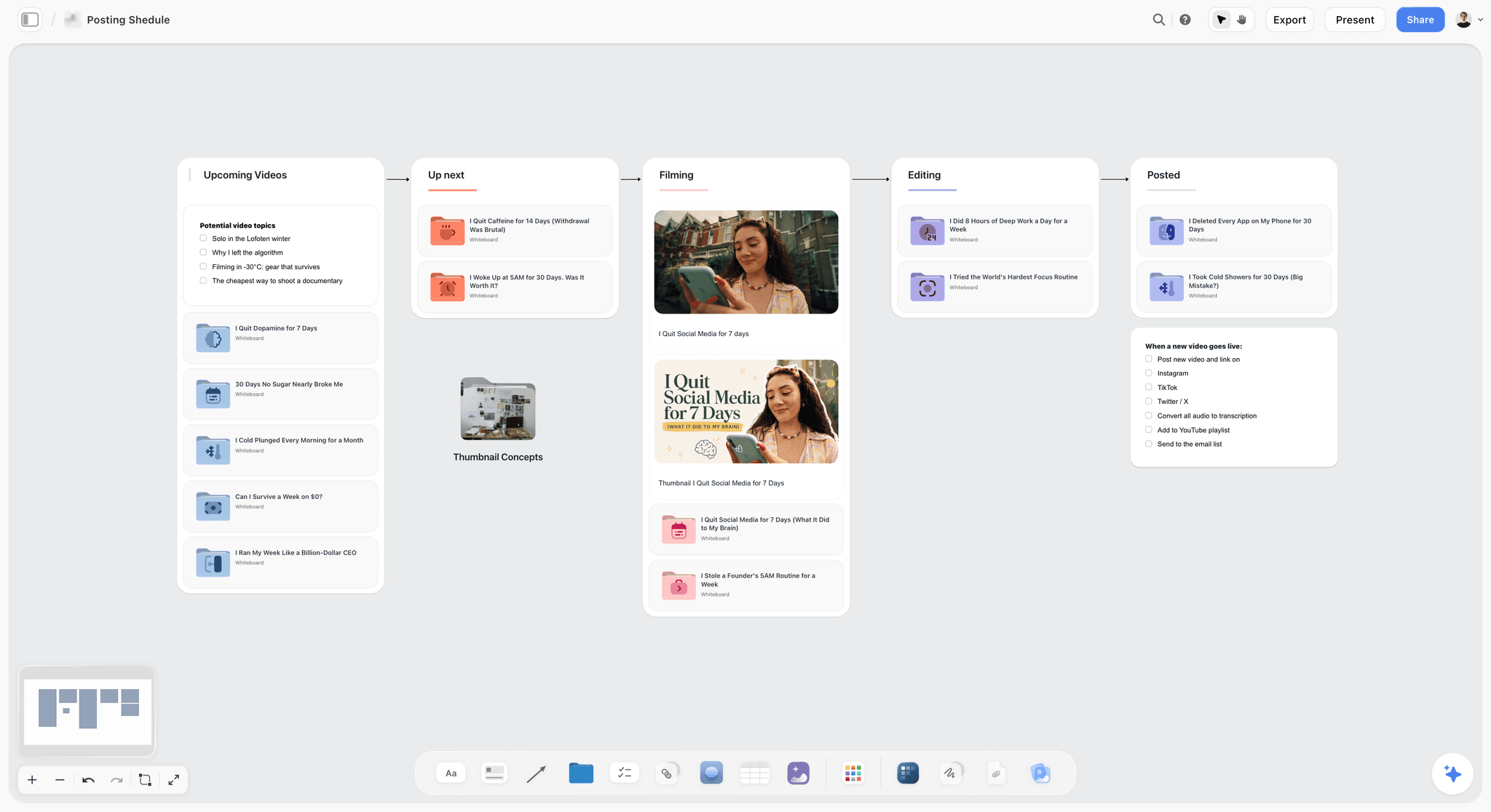
Storyflow is a visual workspace where one content project lives on one infinite canvas, and the AI reads the board you have open with every message. The idea, the research, the script, the hook options, the storyboard and the calendar sit on the same board, so when you ask "does this video pay off the hook?", the AI is reading your hook and your script, not a template. Selecting items focuses it, and from the "+" menu you can attach up to five documents, three Tactics and three other boards to a single message.
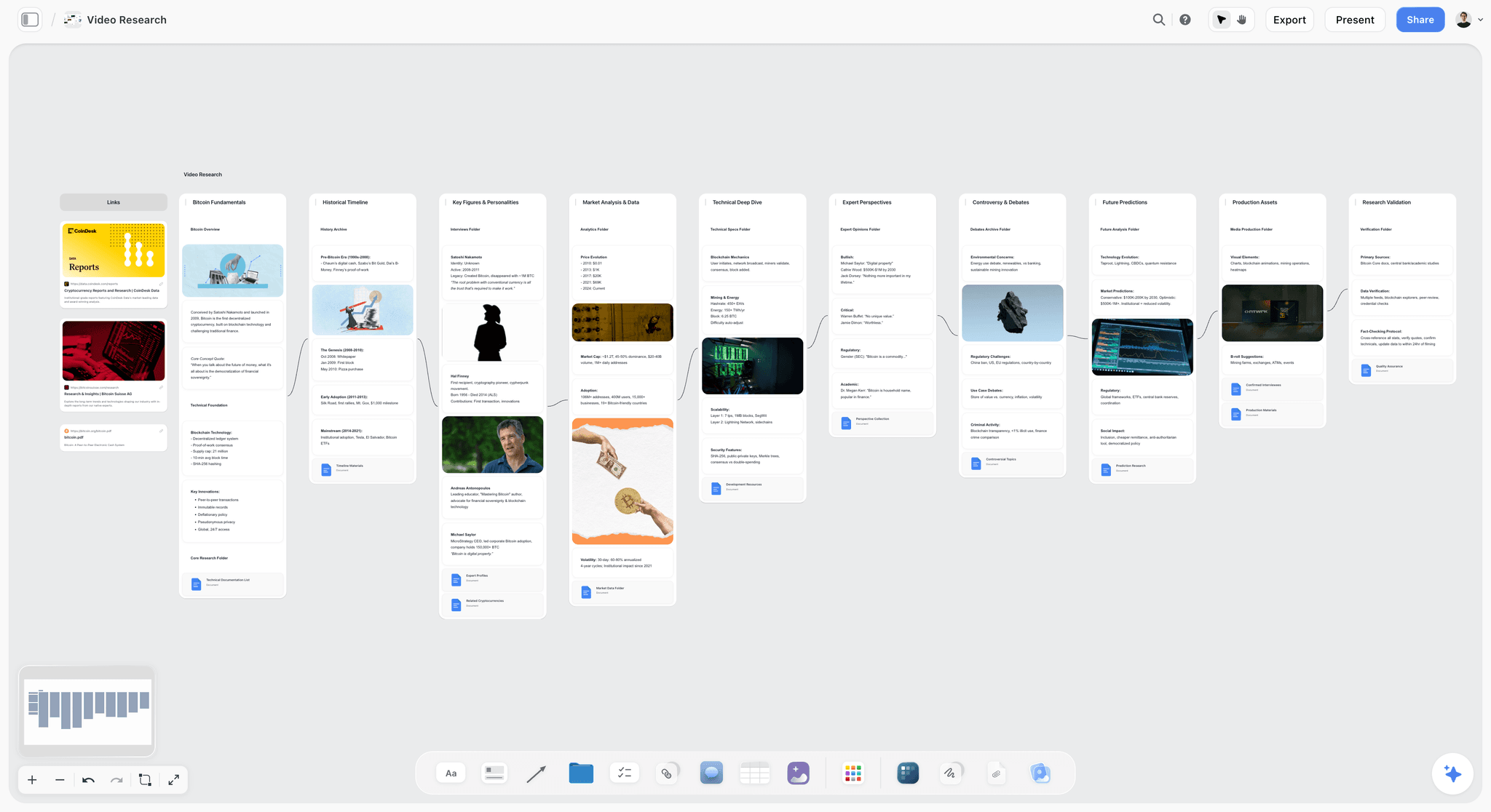
The work runs through named AI workflows. The YouTube Video Plan and YouTube Channel Plan workflows lay out a video or a channel. Ask for video research and it builds a research board; Video Script drafts the script; Storyboard a scene lays a scene out as one frame per shot, with AI-generated frames on Pro and Max, a web reference, or an empty frame to fill. Ask the AI for a content plan and it builds pillars, batching and repurposing ideas with a Content Calendar wall of ten tickets; ask for a social media plan and it builds video-concept tickets. Changes land on the board directly, with one-click Undo per message, and the AI proposes while you decide what stays.
For client and brand work, the sign-off step is built in. A client opens a view link with no account and signs in to comment (and can draw on the board to mark a frame). Invited collaborators edit the same board in real time. Presentation mode steps through the board one wall at a time, full screen, for a review call. Documents export to Word and PDF, and the whole board exports as an image or PDF.
Verdict: best AI tool for planning and ideating content: Storyflow, which scores highest on whole-plan context of the twelve tools here.
Best for: creators, founders and small brand or agency content teams who owe a piece to a client or a launch and want the idea, script, storyboard and calendar in one place their AI and their approver can both read.
Pricing: Storyflow is paid-only during early access, with plans from $7.99 a month billed annually ($9.99 monthly). Pro at $14 a month billed annually ($19 monthly) adds AI image generation and memory across conversations; Max at $39 ($49 monthly) adds the Team Workspace with permissions and roles and more AI. Billing is per seat, with Team billing discounts shown on storyflow.so/pricing. AI use is metered on every plan. Its Free plan launches before the end of 2026, and anyone a paid member invites to a board joins free now, on free-tier limits.
Strengths:
- The AI reads the whole board, so its notes are about your piece: select the thumbnail concept and it checks the promise against the script, or ask where the middle sags.
- Idea, research, script, storyboard and calendar share one surface, which removes most planning-side tool switching.
- Clients review from a link with no account, which shortens the approval loop on paid work.
- Presentation mode turns the plan into a pitch for a client or sponsor call, one wall at a time.
Limitations:
- It is not a video editor. It plans the video; it does not cut footage. Pair it with Descript or CapCut.
- It is not a finished-design tool. AI Image (Pro and Max) is for concepts; make the final thumbnail in Canva.
- It runs in the web browser only: there is no native iOS, Android, Mac or Windows app. Phones work for viewing, light edits and AI chat; heavy board building is best on a laptop.
- Tables on the canvas cannot be sorted or filtered by a column, so a library of several hundred published posts is easier to query in Notion.
- It has no integrations that push a plan into your editor or scheduler; you re-enter the final dates in your publishing tool yourself.
Choose something else if: you only need to cut footage this week (Descript or CapCut), or your content operation is a large database of published posts with filters and views (Notion).
Try it: drop your next video idea on a board and ask the AI for a YouTube video plan, then a script and a storyboard of the opening scene. Ask it to review the board and tell you where the hook and the payoff disagree. For the long walkthrough, see how to plan a YouTube video from idea to script and the AI content planner.
2. ChatGPT
ChatGPT is the fastest way to get raw text on the page, and for creators it is the default first-draft engine: brainstorm titles, draft a script, rewrite a caption in five voices, summarize research, generate ten hook options in seconds. As a general writer it is excellent.
Where it is weaker for content work is the plan. ChatGPT sees the conversation you are having, not your storyboard, your calendar or last month's videos laid out beside this one. The draft lives in a thread and has to be carried into a plan elsewhere, and long threads drift from the brief (we wrote up the pattern in why ChatGPT loses the plot).
Verdict: best AI tool for drafting raw text: ChatGPT, because nothing gets usable words on the page faster.
Best for: creators who want fast text drafts, title lists and caption variations. Pricing: free tier; ChatGPT Plus is $20 a month, billed monthly with no annual option, per OpenAI's help center (checked September 2026). Strengths: speed, range of styles, quick variations on a title or caption. Limitations: no view of the whole plan; output lives in threads, not on a board.
3. Descript
Descript is the strongest editing pick for talking-head creators and podcasters, and anyone who would rather edit a transcript than a timeline. Delete a word from the text and the video cuts with it. Filler-word removal, studio sound and screen recording make it close to a full production suite for spoken content. For editing by text, Storyflow does not compete.
Descript edits the thing once it exists. It does not help you decide what the video should be, or whether the hook lands, before you film. Its free plan allows 60 media minutes a month with a watermarked 720p export, which is a trial rather than a weekly workflow; the Hobbyist plan lifts that to 10 media hours and 1080p without a watermark.
Verdict: best AI tool for editing talking-head video and podcasts: Descript, because deleting a word from the transcript cuts the footage with it.
Best for: podcasters, interviewers and talking-head YouTubers. Pricing: free plan; Hobbyist $16 a month billed yearly ($24 monthly); Creator $24 a month billed yearly ($35 monthly), with 30 media hours and 4K export. Source: descript.com/pricing. Strengths: transcript editing, filler removal, studio sound, AI credits for voices and effects. Limitations: an editor, not a planner; the free plan's watermark and minute cap push weekly publishers to pay.
4. Canva
Canva is where the plan becomes finished visuals, and a thumbnail workhorse. Magic Studio adds AI image generation, background removal and resizing across formats, so a YouTube thumbnail, an Instagram carousel and a TikTok cover come out of one subscription. Canva's Content Planner can schedule posts on Pro, Business, Education and Nonprofit plans.
It is a design tool first. The script, the storyboard logic and the cross-format plan are not its strength, and its AI works on the design in front of it rather than the whole content plan. Plan elsewhere, produce the visuals here. Our Storyflow vs Canva comparison goes through where each one stops.
Verdict: best AI tool for finished thumbnails and graphics: Canva, because Magic Studio turns a concept into a publishable file in minutes.
Best for: creators and brand teams who produce thumbnails and social graphics every week. Pricing: free plan; Pro US$144 a year for one person; Business US$250 a year per person (US prices; Canva prices by region). Source: canva.com/en_us/pricing. Strengths: fast design, a very large template library, AI image tools, brand kits. Limitations: planning and strategy are not its job; the AI sees the design, not the plan.
5. Claude
Claude is Anthropic's chat assistant, and creators reach for it when the job is a long script, an essay-length newsletter or an edit that has to keep the writer's voice. Where ChatGPT is quick and wide, Claude is the one to hand a 3,000-word draft and ask for a tighter version that still sounds like you.
It shares ChatGPT's limit for content planning: it sees the chat and the files you give it, not the storyboard, the calendar or the rest of the series. Use it to write and edit, then bring the result back onto the plan. If you are choosing between the two, our ChatGPT vs Claude vs Canva vs Descript vs Runway comparison puts them side by side.
Verdict: best AI tool for long-form scripts and editing your own drafts: Claude, because it holds a long draft together and keeps its voice.
Best for: video essayists, newsletter writers and anyone scripting long-form. Pricing: free plan; Pro $17 a month billed annually ($200 up front) or $20 monthly; Max from $100 a month. Source: claude.com/pricing. Strengths: long documents, careful edits, voice matching. Limitations: no view of the whole content plan; not a thumbnail or video tool.
6. CapCut
CapCut is the short-form editing default, especially on a phone. Auto-captions, templates, beat-synced cuts and a large effects library make it the fastest way to cut a TikTok, a Reel or a YouTube Short. For the edit itself, CapCut wins, and Storyflow concedes editing entirely.
It sits downstream of planning: CapCut will help you cut a great short from footage you have, but not decide which idea is worth filming or plan the week's slate. For a head-to-head with Descript, see Descript vs CapCut for content creators.
Verdict: best AI tool for short-form and phone editing: CapCut, because it goes from footage to captioned vertical cut fastest.
Best for: short-form creators editing TikToks, Reels and Shorts, often on a phone. Pricing: free plan; CapCut's help center says Pro pricing varies by region, device and promotion, so check the price in your app. Strengths: fast mobile editing, auto-captions, templates. Limitations: editing only; no planning or ideation layer.
7. Miro
Miro is the team whiteboard creator teams and agencies use for a live content-strategy session: sticky notes, audience journey maps, content-pillar mind maps. As a workshop surface it is hard to beat, and its AI runs on credits per member.
Miro is a whiteboard, not a content system. The workshop board is a good artifact, but the scripts, storyboards and calendar still get rebuilt elsewhere, and its AI helps on the board rather than drafting the plan behind it. For the ideation stage in depth, see our best AI brainstorming tools. If your team's brainstorm lives in Miro, Storyflow's Import a board workflow rebuilds a board from a screenshot; there is no file import.
Best for: creator teams and agencies running collaborative content brainstorms. Pricing: free plan with 3 editable boards; Starter $8 per member a month billed yearly. Source: miro.com/pricing. Strengths: whiteboarding, real-time collaboration, a large template library. Limitations: workshop output still has to move into a plan; AI is helper-level for content work.
8. Notion
Notion is the database a content operation files into: an editorial calendar database, scripts as pages, an idea backlog, a wiki for brand voice. For a channel or a brand with hundreds of published posts to filter by status, platform and date, Notion's views are the stronger tool.
It is text and database first, with no spatial canvas, so the early visual stage (the idea map, the storyboard, the thumbnail concept beside the script) has no natural home. Notion AI works page by page. If the calendar is your main bottleneck, our best content calendar tools compares that layer, and Storyflow vs Notion covers where each fits.
Best for: teams running a large content library on a calendar database. Pricing: free plan; Plus $10 per seat a month billed yearly ($12 monthly); Free and Plus include a limited trial of Notion AI, with the full Notion Agent on Business ($20 per seat billed yearly). Source: notion.com/pricing. Strengths: databases and views, docs, templates. Limitations: not a visual canvas; per-seat pricing adds up; setup can sprawl.
9. Opus Clip
Opus Clip does one job: it turns a long video into short captioned clips. Feed it a podcast or a long YouTube upload and it picks the moments most likely to hold attention, adds captions and reframes for vertical. For repurposing at volume, it saves real hours.
It needs finished footage, so it lives at the very end of the pipeline. It does not plan the original video, and the clips it picks are only as good as the hooks inside the long cut. That is a planning problem: script the clip moments into the long video on purpose (the worked example in section 11 does this). Our guide to repurposing one video into a month of posts covers the method.
Best for: podcasters and long-form YouTubers who post shorts every day. Pricing: free plan (uploaded media expires after 3 days); Starter $15 a month; Pro $29 a month; Business custom. Source: opus.pro/pricing. Strengths: automatic clip selection, captions, vertical reframing. Limitations: repurposing only; on the free plan, media expires after 3 days.
10. Milanote
Milanote is a tidy visual board for mood and reference collection: drag in screenshots, colours and notes and the board feels like a physical pinboard. It has a Web Clipper and built-in photo search, and creators who think in images enjoy it for the inspiration stage.
Its AI is thin next to the rest of this list: it arranges well but does not draft a script, plan a calendar or check a hook against its payoff. It sits beside an AI tool rather than replacing one. Storyflow's Collect inspiration workflow drops a set of reference tiles onto the same board as the script, which is the difference for a creator who wants the references and the plan together.
Best for: creators who want a clean pinboard for mood and references. Pricing: free plan (100 notes, images or links and 10 file uploads); Milanote's paid plan is $9.99 per person a month billed annually ($12.50 monthly). Source: milanote.com/plans. Strengths: clean boards, web clipper, photo search. Limitations: minimal AI; it arranges, it does not reason about the plan.
11. Runway
Runway is the generated-video pick: text and image to video for B-roll you cannot shoot, stylised transitions, or a moving previs of a scene before a shoot. For creators whose videos need visuals they cannot film, it fills a real gap.
Generated video is a production job, and it runs on credits, so the cost scales with how much you generate. Runway does not plan the piece or keep the script and shots together; decide what each generated shot is for on the storyboard first, then generate only those. Compare the field in our best AI storyboarding tools.
Best for: creators who need generated B-roll, previs or stylised shots. Pricing: free plan with 125 one-time credits; Standard $12 a month billed annually ($15 monthly) with 625 credits a month; Pro $28 billed annually ($35 monthly). Source: runway.com/pricing. Strengths: text and image to video, a free plan to try it. Limitations: credits run out quickly at volume; no planning layer.
12. ElevenLabs
ElevenLabs is the AI voiceover and dubbing specialist. Realistic voices and multilingual dubbing mean a script becomes a voiced track without a microphone.
It scores last overall only because its job is so narrow: it produces audio, and nothing about the plan. Inside its own stage it has no close rival on this list. The script still has to be written and structured somewhere with context, then handed to ElevenLabs to voice.
Verdict: best AI tool for voiceover and dubbing: ElevenLabs, because a finished script becomes a natural-sounding voice track in minutes.
Best for: faceless channels, explainers and creators publishing in several languages. Pricing: free plan with 10,000 credits a month; Starter $6 a month; Creator $22 a month (first month at 50% off); annual billing works out to two months free. Source: elevenlabs.io/pricing. Strengths: voice quality, languages, dubbing. Limitations: voice only; downstream of planning and scripting.
8) Which Tool Fits Which Creator?
Small Brand or Marketing Content Team
Top picks: Storyflow, Canva and Descript
A brand team owes a calendar of content against a launch or a campaign, with someone who has to approve it. Plan the campaign's content on one Storyflow board (ask the AI for a content plan; storyboard the hero video), send the approver a view link, and collect comments on the board before anything is shot. Canva produces the graphics; Descript edits the video. For the campaign layer above the content, see the AI marketing campaign planner.
Agency or Freelancer Producing Content for Clients
Top picks: Storyflow, Descript and Opus Clip
Client work lives or dies on sign-off. Keep one Storyflow board per client project with the brief, scripts, storyboard and deliverables list; the client reviews from a link without an account. Edit in Descript and cut the client's long videos into shorts with Opus Clip. On five Plus seats billed annually, a small team pays $27.97 a month in total on Team billing as shown on storyflow.so/pricing.
Founder Building in Public
Top picks: Storyflow and Claude
A founder's content is a launch plan in disguise. Keep the launch dates, the product story and the post ideas on one Storyflow board so every post points at the same launch, and draft long posts in Claude. The content calendar for creators page shows the board shape.
YouTuber (Long-Form)
Top picks: Storyflow and Descript
Plan the video in Storyflow, where the AI reads the title, hook, research and script together and tells you whether the payoff lands before you film. Edit in Descript. For the full planning toolkit, see our best AI tools for YouTube video planning and the YouTube video planner.
TikTok and Shorts Creator
Top picks: Storyflow and CapCut
Short-form lives in the first two seconds, so the hook is the job. Draft and compare hooks on a Storyflow board against what the clip actually shows, then cut in CapCut on your phone. The TikTok content planner page shows the board.
Podcaster
Top picks: Storyflow, Descript and Opus Clip
Plan the episode arc, questions and segments in Storyflow so the through-line holds across an hour. Record and edit in Descript, then cut clips with Opus Clip. Our best AI tools for podcasters goes deeper.
Faceless Channel
Top picks: Storyflow, ElevenLabs and Runway
Without a face, the script and structure carry the whole video. Plan the script and the shot list in Storyflow, voice it in ElevenLabs and generate the B-roll you cannot film in Runway. Edit in CapCut or Descript.
Documentary and Video Essay Creator
Top picks: Storyflow and Claude
Mini documentaries and video essays run on research. Ask Storyflow's AI for video research and it lays sources, timeline and key figures out as walls beside the script, which is the shape documentaries need; Claude helps with long narration drafts. See the AI documentary planner and our best tools for video essay creators.
9) Pricing: What Each Plan Buys and How It Bills
Prices below were checked in September 2026, in US dollars, on each vendor's own pricing or help pages; ChatGPT's comes from OpenAI's help center because its pricing page did not load for us. Every figure carries its billing period; where the vendor does not show one, the price is left out.
Two patterns matter for a budget. First, the per-seat tools (Storyflow, Notion, Miro, Canva Business) multiply with a team, while a solo creator pays once. Second, the generative tools (Runway, ElevenLabs, Descript's AI credits) meter usage, so a heavy week costs more than the sticker price suggests.
10) Free vs Paid: What the Creator Stack Actually Costs
Comparisons quote prices one tool at a time, which hides the only number that matters: the total. Here is a paid stack for a solo creator publishing a weekly long-form video plus shorts, at the entry plans above, expressed per month.
CapCut Pro is left out of the sum because its price varies by region. Nobody chooses a hundred-dollar stack; it accumulates one trial at a time. The useful question is which of these can stay free and which one you open every day.
What can stay free
- Storyflow is paid-only during early access, so it is not on this list yet. Anyone a paid member invites to a board joins free now, and the Free plan launches before the end of 2026.
- CapCut's free plan covers most short-form editing.
- ChatGPT's free tier handles occasional drafting; Plus matters if you write with it daily.
- Canva's free plan covers basic thumbnails until you need a brand kit and premium assets.
- Descript's free plan is a trial: 60 minutes a month and a watermark push a weekly publisher to pay.
- Opus Clip's free plan is enough to try clipping, but uploaded media expires after 3 days.
Where consolidation stops
Consolidation helps the planning half and does nothing for the production half. No canvas renders video, cuts on a transcript or clones a voice. You can collapse research, scripting, the storyboard and the calendar onto one board; you cannot collapse Descript and ElevenLabs into it. The realistic saving is dropping the planning-adjacent subscriptions (a second docs tool, a separate whiteboard, a mood board app) and keeping every specialist that produces the work. Our AI content stack cost breakdown lists the overlaps tool by tool.
11) Worked Example: One Idea to a Week of Client Deliverables
Here is one filled example: a two-person content team at a small skincare brand launching a new sunscreen, owing the brand lead one hero video, three shorts, a thumbnail and a newsletter by Friday. The tool choices follow the stage winners in section 4. Use the table as a template for your own week.
How to build this in Storyflow
- Create a project board and ask the AI for a YouTube video plan for the launch video; paste the brief into the chat.
- Ask the AI for video research on the launch, then select the research walls and ask for a Video Script built from them.
- Ask the AI to storyboard the opening scene. On Pro and Max it can generate the frames; on Plus, drop in web references or leave frames empty to fill with stills.
- Ask the AI for a dated plan counted back from Friday, covering the video, three shorts and the newsletter. It asks whether you want one wall per period or one table (Phase, Milestone, Owner, Due), then builds it.
- Share a view link with the approver. They open it with no account and sign in to comment on the frames.
- When the plan changes, ask the AI to redraft the script and the calendar; documents do not update each other on their own.
The step that saves the week is Tuesday afternoon. A comment on a storyboard frame costs a minute; the same comment on a finished edit costs a reshoot.
12) The Plan-Before-Produce Checklist
An original eight-point check to run on any piece before you film, record or generate anything. It works on paper, in a doc or on a board. A "no" on any line is cheaper to fix now than after the edit.
- The promise fits in one line. Write what the viewer gets from this piece in under fifteen words. If it takes two sentences, the piece is two pieces.
- The payoff exists and has a timestamp. Mark where in the script the promise is delivered. If it lands after the midpoint, move it or cut the build-up.
- The thumbnail and title promise the same thing as the hook. Put all three side by side. Three different promises is a common reason a good video underperforms (see how to test titles and thumbnails).
- One audience is named. "Everyone interested in skincare" is not an audience; "people who skip sunscreen because it feels greasy" is.
- Every short has its own hook. A clip cut from the middle of a long video needs a first line that works cold. Script those lines into the long video on purpose.
- The approver has seen the storyboard. For client or brand work, sign-off happens on frames, not on the edit.
- The deliverables list names formats. Aspect ratio, length and platform for every output, so the edit is cut once.
- Publish and repurpose dates are set. The long video, the shorts and the newsletter each have a date before anyone presses record.
Scoring: six or more "yes" answers, film it. Four or five, fix the gaps first. Three or fewer, the idea is not ready.
13) Why Content Creators End Up With Tool Sprawl
A single piece of content is not one artifact. It is an idea, a hook, research, a script, a thumbnail concept, a storyboard or shot list, and a slot on a calendar. For a creator publishing across YouTube, TikTok, a newsletter and a blog, multiply that by every format and every week. The problem is rarely that any one piece is hard to make. The problem is that they live in a dozen tools.
A video does not die in the edit. It dies in the gap between the doc where you wrote it and the app where you planned it. The idea is in Notes. The script is in a Google Doc. The hooks are in another doc. The thumbnail is in Canva. The schedule is in a spreadsheet. By the time you film, the script and the hook list disagree, the thumbnail promises something the script never delivers, and the calendar has drifted.
It costs in three ways:
- Context cost. Every handoff loses the reason you wanted to make the piece, so the script forgets the point.
- AI cost. An AI inside your script doc can rewrite a sentence. It cannot tell you the video has no payoff for the hook, because it has never seen the hook.
- Approval cost. When the plan is scattered, a client or a brand lead cannot review it without a meeting, so review slides to the finished edit, where every change is expensive.
The fix is not a better script editor or a faster thumbnail maker. It is putting the plan on one surface a person, an approver and an AI can all read, then sending the production work to specialists. That is the lens of this ranking.
14) Honorable Mentions
- Adobe Firefly and Adobe Express. Firefly generates images and storyboard frames with a model Adobe calls commercially safe, and Firefly Boards is a free AI moodboard canvas with an Adobe account; Adobe Express Premium is US$9.99 a month billed monthly. Strong for brand teams already on Adobe.
- Figma. Design-system-level control for creators who treat their brand like a product; more than most solo creators need for a thumbnail.
- Whimsical. Fast flowcharts and mind maps from a prompt, useful for mapping a series; narrow for a whole content plan.
- Jasper. AI agents for marketing workflows with a consistent brand identity; aimed at marketing teams more than individual creators.
- Riverside. Remote recording for podcasts and interviews; overlaps with Descript for editing.
- Google Docs, Sheets and Notes. Free and universal, and where most scattered content plans live. It is the sprawl this list is trying to fix, not a fix.
15) Where the Specialists Still Win
Storyflow is the wrong choice when the job in front of you is production: cutting footage (Descript, CapCut), making the final thumbnail (Canva) or design system (Figma), drafting text in volume (ChatGPT, Claude), voicing a script (ElevenLabs) or generating video (Runway). Section 4 names the winner of each stage. Storyflow's claim is narrower: it is where the piece gets planned, pressure-tested and approved before anyone spends a shoot day on it.
16) Frequently Asked: Which AI Tools for Content Creators Are Most Trusted and Best Value?
Which AI tools for content creators are most trusted?
Trust the tools that are plain about limits. Storyflow leads for planning: the AI proposes, you decide, and every change has one-click Undo. Descript, ElevenLabs and Opus Clip state their free-plan limits on their pricing pages; Canva is the trusted design pick. Distrust any tool claiming to replace the whole stack.
Which AI creator tool is fairly priced?
Storyflow at $7.99 a month billed annually for planning the whole piece, then Descript at $16 a month billed yearly for editing, are the fairest prices for what the plan buys. Opus Clip's $29 a month is fair if you post clips daily and poor value if you post weekly. Canva Pro at US$144 a year is fair for anyone making thumbnails every week. Per-seat tools like Notion and Miro get expensive as a team grows.
What is the best value AI tool for a small brand or agency content team?
Storyflow, because one board holds the brief, the scripts, the storyboard, the calendar and the client's comments, and approvers view it without paying for a seat. Five Plus seats billed annually cost $27.97 a month in total on Team billing as shown on storyflow.so/pricing; board-level edit and view access and live co-editing work on every paid plan, and Max is only needed for the shared Team Workspace with roles. Descript is the best-value editor for the same team.
Which AI tools for creators are underrated?
Storyflow is underrated for creators because its AI workflows (YouTube Video Plan, Video Script, video research, Storyboard a scene) do the pre-production work creators otherwise split across four apps. Claude is underrated for scripts next to ChatGPT. Opus Clip's value depends on scripting clip moments into the long video, which is the step most easily skipped.
Which AI tools act as a real-time creative partner for content?
Storyflow acts as a creative partner on the plan itself: it reads the board with every message, reviews your work when you ask ("review my board" gives notes on what you made) and builds changes you can undo. ChatGPT and Claude are strong partners in a chat, without the plan in view. Invited collaborators on a Storyflow board also edit in real time, with live cursors.
18) Storyflow Templates to Get You Started
You do not have to start from a blank board. These Storyflow templates cover the work in this guide, with the structure in place and the AI ready to read it.
YouTube Video Plan Template

Plan one YouTube video on a single canvas: working titles, hook, thumbnail concepts, outline, script, B-roll references and a publish checklist. Use the YouTube Video Plan template.
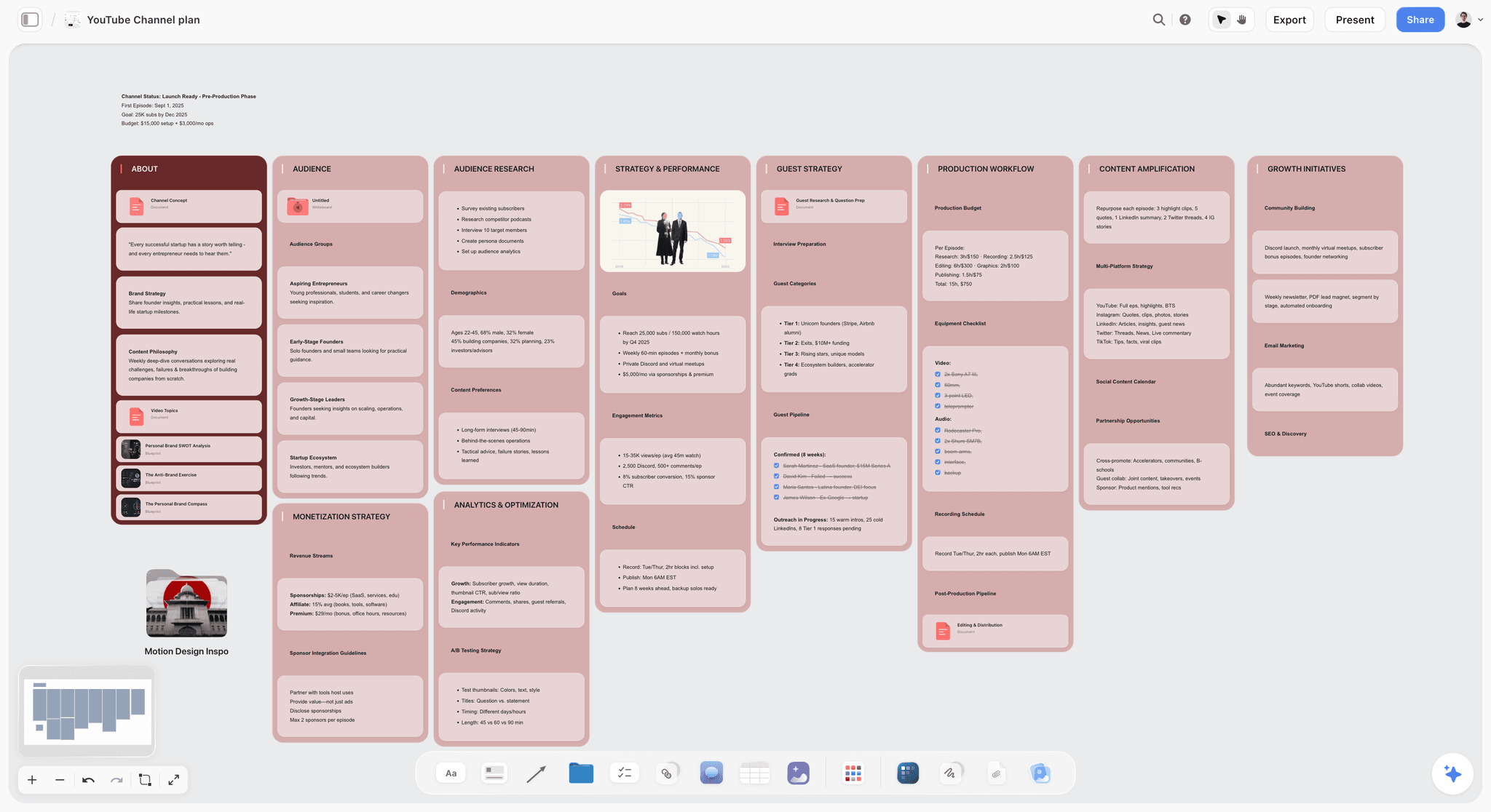
Viral Content Planner Template
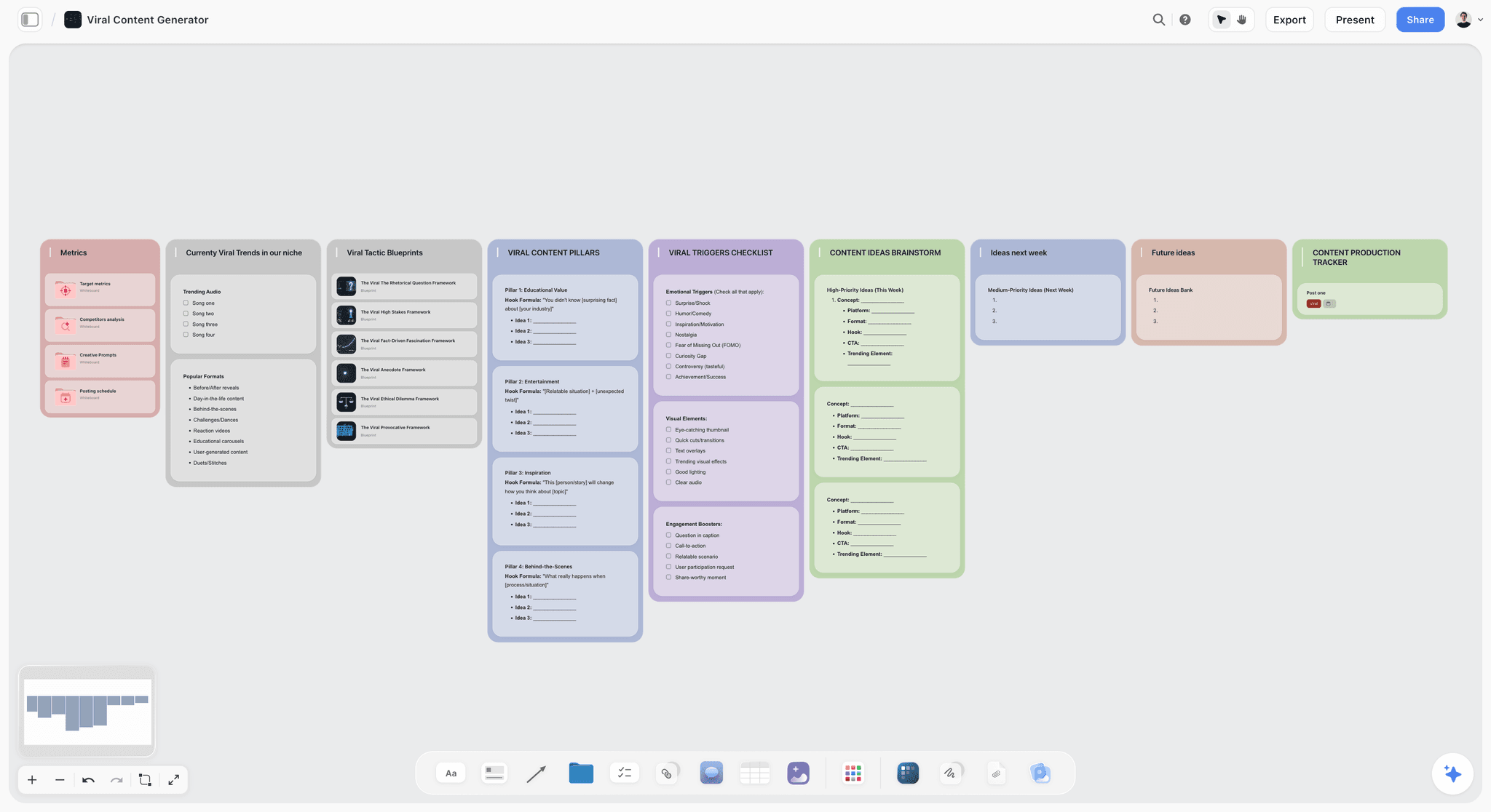
A board for planning short-form video: collect hooks, references and trends, and lay the posts out in the order they go live. Use the Viral Content Planner template.
Video Script Template
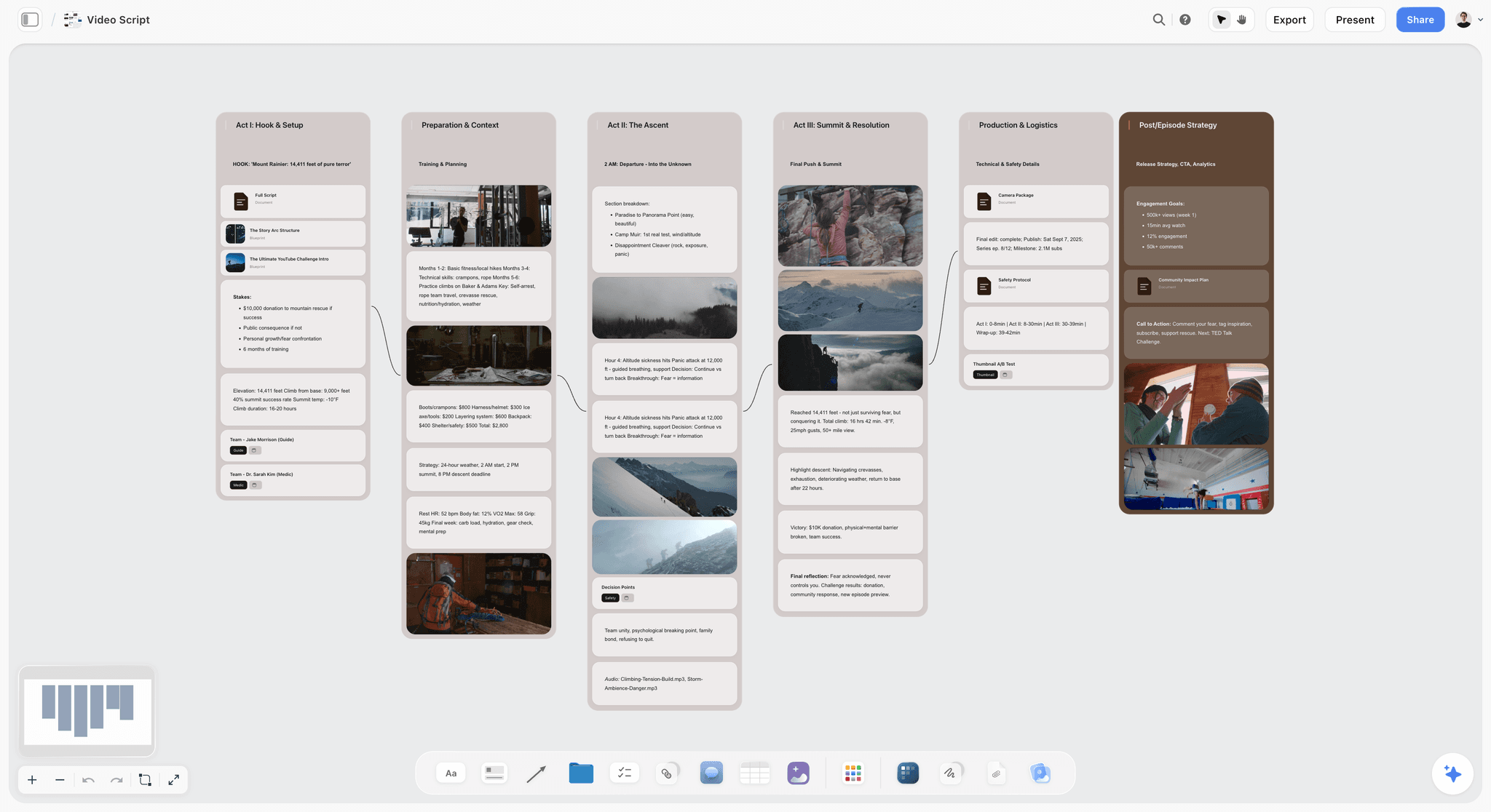
Lay out the hook, intro, talking points, B-roll and call to action on one board. Use the Video Script template.
19) The Bottom Line
Every tool on this list is the best or near-best at one stage. ChatGPT and Claude draft. Descript and CapCut edit. Canva makes the visuals. ElevenLabs voices it, Runway generates what you cannot film, Opus Clip clips it. Notion files it; Miro and Milanote help you sketch and pin. The smart creator uses several of them.
What sinks a piece is usually the plan, not a stage: tabs that stop agreeing, and a client who sees the work only after the edit. Storyflow ranks first because it fixes that part.
If your last few pieces drifted between tabs, plan the next one on a single board: start with the AI thumbnail concept generator or the AI video script generator, then open a Storyflow workspace and ask the AI where the piece is weak before you hit record. More creator workflows live on the AI tools for content creators page.
17) FAQ: AI Tools for Content Creators
What are the best AI tools for content creators?
By score in this guide: Storyflow (8.80) to plan the piece, ChatGPT (7.15) to draft, Descript (7.05) to edit spoken video, Canva (6.90) for thumbnails and Claude (6.50) for long scripts. Scores favour planning because pieces owed to a client fail there first. If you only add one tool this month, add the one for the stage where your last piece went wrong.
Is there a free AI tool for content creators?
Yes, several with free plans: ChatGPT and Claude for drafting, Canva for graphics, CapCut for short-form edits, Descript (60 media minutes a month, watermarked), ElevenLabs (10,000 credits a month) and Runway (125 one-time credits). Storyflow is not one of them yet: it is paid-only during early access, and its Free plan launches before the end of 2026.
Is Storyflow free?
Not during early access. Storyflow is paid-only during early access, with plans from $7.99 a month billed annually ($9.99 monthly). Its Free plan launches before the end of 2026, and anyone a paid member invites to a board joins free now, on free-tier limits. A client you share a view link with needs no account to look, and signs in to comment.
Can I create content with AI instead of recording myself?
Yes, with a faceless stack. Script and plan the video in Storyflow or Claude, generate the narration in ElevenLabs (the free plan gives 10,000 credits a month, enough to test a voice), generate the B-roll you cannot film in Runway, and cut it in CapCut or Descript. Plan first: without a face on screen, a weak structure has nothing to hide behind.
Which AI tools cut content production time the most?
The largest time savings come from fixing problems before production, not from faster editing. A storyboard comment takes a minute; a reshoot takes a day. After that, Descript's transcript editing and Opus Clip's automatic clipping remove the most hours from the edit. Batch the planning: build a month of video plans on one board in one session, then record in blocks.
What AI subscription is worth paying for as a content creator?
Pay first for the tool you open every day. For most creators that is the editor (Descript Hobbyist at $16 a month billed yearly) or the drafting assistant (ChatGPT Plus at $20 a month). If client work sends pieces back after the edit, the planning subscription pays for itself first: Storyflow Plus at $7.99 a month billed annually.
What are the best AI tools for making mini documentaries?
Mini documentaries need research structure more than editing tricks. Ask Storyflow's AI for video research and it lays out sources, a timeline and key figures beside the script; Claude helps draft long narration; Descript edits interviews by transcript; ElevenLabs can voice narration in other languages. Keep every factual claim linked to a source on the board, because corrections after publishing cost the channel trust.
Descript or CapCut for editing?
Descript if your videos are mostly people talking: interviews, podcasts, talking-head YouTube. CapCut if they are mostly short, visual and cut on a phone. Running both is common: one for the long edit, one for the vertical cut-downs. Descript's free plan watermarks exports; CapCut's free plan is the more usable of the two free tiers.
What video ideation tools are most popular with content creators?
We have no usage data to rank popularity honestly, so here is fit instead. Storyflow is the strongest for turning ideas into a plan, because the idea list, research and scripts sit on one board the AI reads. ChatGPT is quickest for a raw list of fifty ideas. Miro suits a live team ideation session. Test any idea with the checklist in section 12 before scripting it.
Which AI canvas tools help plan a narrative for under $30 a month?
Storyflow Plus at $7.99 a month billed annually and Pro at $14 a month billed annually both sit under $30, with Pro adding AI image generation. Miro Starter ($8 per member a month, yearly) and Milanote's paid plan ($9.99 a month, annually) are canvases with lighter AI. Our comparison of AI canvas tools for narratives under $30 scores each one.
Can my client review the content plan without an account?
In Storyflow, yes. A client opens a view link with no account and sees the latest version when they open or reload. To comment, or to draw on the board to mark a frame, they sign in. Inline comment threads inside a document are for invited collaborators. That is usually enough for a brand lead to approve a storyboard without joining your workspace.
Does Storyflow work on a phone?
In the phone's browser, yes: viewing a board, light edits and chatting with the AI all work. Storyflow runs in the web browser only, with no native iOS, Android, Mac or Windows app, and heavy board building is best on a laptop. For editing video on a phone, use CapCut; for planning, build the board on a laptop and check it on the phone.
Can Storyflow's AI look at my reference images?
Yes, the ones you select. The AI reads the board's text (notes, documents, tables, image links) with every message, and it looks at the pixels of images you select, up to 24 at a time. Select your reference shots or a competitor's thumbnails and ask what they have in common, or ask it to build a shot list from them (duplicate the board first; the shot list moves the pictures into its walls).
What is an AI content studio platform?
It is a label for tools that try to cover several stages, usually generation, editing and publishing, in one product. In practice, none on this list covers every stage well. The workable version is a planning canvas plus two or three production specialists. Judge any "all-in-one studio" by its weakest stage, because that is the one you will end up replacing.
Can I export my content plan as a PDF?
In Storyflow, yes: the whole board exports as an image or a PDF, and documents on the board export to Word and PDF. Exporting only a selected region of the board is not available, so for a client handout, put the pages you want to send in a document and export that. Notion and Canva also export PDFs of their own pages and designs.
Table of Contents
- Quick Answer: The Best AI Tool for Content Creators
- Key Takeaways
- Comparison Table: 12 AI Tools for Content Creators
- Best AI Tools and Platforms for Creators by Workflow Stage
- How We Scored These Tools
- Quick Picks by Job to Be Done
- Detailed Reviews: 12 AI Tools for Content Creators
- Which Tool Fits Which Creator?
- Pricing: What Each Plan Buys and How It Bills
- Free vs Paid: What the Creator Stack Actually Costs
- Worked Example: One Idea to a Week of Client Deliverables
- The Plan-Before-Produce Checklist
- Why Content Creators End Up With Tool Sprawl
- Honorable Mentions
- Where the Specialists Still Win
- Frequently Asked: Which AI Tools for Content Creators Are Most Trusted and Best Value?
- FAQ: AI Tools for Content Creators
- Storyflow Templates to Get You Started
- The Bottom Line
- Author
- Related Reading
Templates to check out for this topic


Content and video templates you can use in Storyflow
Plan a channel, a script, and a content pipeline on the same board. Open one of these templates and let the AI build on the structure instead of starting from a blank doc.


See Storyflow in Action
A visual AI workspace where every feature lives inside one canvas. No tab-switching, no context lost.
Build your entire board from a single message
Type what you need in the AI chat at the bottom of your canvas. The AI adds cards, headings, and structure directly onto your board.
Use expert frameworks as AI context
Type @ in the AI chat and choose any Tactic. The AI tailors every response to that framework instead of giving generic advice.
Turn your board into a mind map in seconds
Ask the AI to restructure your canvas as a mindmap. It connects your ideas into a visual hierarchy so you can see how everything relates.
Why Storyflow Exists
Storyflow actually began as a personal tool while working on creative and research projects.
We kept running into the same problem: ideas were scattered everywhere: notes, documents, and whiteboards.
Nothing helped us see how everything connected.
So we started building a workspace designed around how ideas actually grow.
→ Read how Storyflow was createdJustkay
Documentary Filmmaker & Founder at Storyflow
Published: 2026-06-18
Extremely simple, seriously capable


See how easy it is to get started
Watch a real project come together, from a blank board to a finished plan, clicked through step by step.
Start creating with AI and become more productive
Transform your creative workflow with AI-powered tools. Generate ideas, create content, and boost your productivity in minutes instead of hours.