Best Tools for Solo Creators in 2026: 13 We Actually Tested
Most creator tools were designed for teams. We tested 13 to find which ones actually work for solo creators in 2026: solo-friendly pricing, AI that reads your project, and workflows built for one.

Category
Tools & Resources
Author

Sara de Klein
Head of Product at Storyflow
Topics
2026-04-12
•
27 min read
•
Tools & Resources- best tools for solo creators 2026
- solo creator tools
- tools for independent creators
- creator workflow apps
- best apps for solo YouTubers
What are the best tools for solo creators in 2026?
Storyflow is the best overall tool for solo creators in 2026: a visual canvas, AI that reads your full active board, and 200+ expert frameworks, priced flat for one person. Notion is best for database-driven creators, Milanote for mood-board-first concept work, and ClickUp for juggling multiple solo projects.

All 12 Solo Creator Tools, Ranked
- Storyflow: best overall, visual canvas with AI that reads your full board and 200+ Tactics
- Notion: best database-driven content organization
- Milanote: best visual mood boards and reference boards
- Miro: best for occasional workshop-style whiteboard sessions
- ClickUp: best multi-project task and deadline management
- Canva: best for creators who do their own design
- Obsidian: best long-term personal knowledge base
- ChatGPT: best rapid AI idea generation without a canvas
- Craft: best client-ready documents on Apple
- Whimsical: best quick mind maps and flowcharts
- Airtable: best content library and publishing calendar
- Bear: best distraction-free writing capture
Quick Picks by Use Case: Best Tools for Solo Creators 2026
These picks skip the research. If you know roughly what kind of creator you are, start here.
At a Glance: Best Solo Creator Tools 2026
One tool per use case. Each wins for a specific reason.
| Tool | Best For | AI Features | Price |
|---|---|---|---|
| Storyflow | Full visual creative workflow with AI context | Reads your entire canvas; 200+ expert Tactics | From $7.99 mo (early access) |
| Framekit | Site, client galleries, review and store on one account | AI website builder | Free / $9 to $39 mo, flat |
| Notion | Database-driven content organization | Page-level AI; Notion AI add-on | Free / $10 mo |
| Milanote | Visual mood boards and reference boards | Text and image generation | $9.99 mo |
| ClickUp | Multi-project task and deadline management | ClickUp AI writing assist | Free / $7 mo |
Best Overall / Best for visual creative workflow: Storyflow
Storyflow is paid-only during early access, priced for individuals starting at $7.99/month (annual, Plus tier) with no per-seat scaling. The Tactics system brings 200+ expert frameworks directly into the canvas: Hero's Journey for long-form narrative, AIDA for conversion copy, Retention Hooks for video scripts. When you ask the AI for help, it has already read your full board including your research notes, mood references, and earlier decisions. The trade-off: AI usage is capped even on Plus, which runs out fast if you are producing content weekly.
Best for document-heavy solo creators: Notion
Notion's free plan is genuinely functional for solo creators. Unlimited blocks and pages, basic database views, and a solid mobile app make it the most flexible content OS for creators who organize their work in text-first systems. Notion AI is an add-on. The limitation: Notion is built for organizing information after you have generated it, not for the generative phase where you are still developing concepts and structure.
Best for visual concept development: Milanote
If your creative process starts with images, references, and mood before it starts with words, Milanote is purpose-built for that. At $9.99/month with a flat individual rate, it is solo-friendly by design. The visual pinboard format beats everything else for early-stage concept development. The limitation: Milanote stays in the visual layer. Once you need structured text documents or AI that understands your project context, you will reach for another tool.
Best for multi-project juggling: ClickUp
When you have six clients or projects running at once, ClickUp handles the operational layer so your creative tools can focus on creative work. The free plan is the most generous of any project management tool for solo users. The limitation: ClickUp has significant setup overhead. Building a useful system takes hours, not minutes, and solo creators without a team to help configure it often abandon it before they get the value.
Storyflow's Tactics feel abstract until you open one mid-project and realize the framework already knows the question you were about to ask. The canvas has your research. The Tactic has the structure. The AI has both. Open one Tactic on a project you are actually working on and watch the AI answer with your research already in view.
How We Evaluated the Best Tools for Solo Creators in 2026
Every tool on this list was tested for a complete solo creator workflow: from initial concept development through structured planning to finished brief or draft. Testing ran over six weeks across YouTube scripting, brand campaign planning, and documentary pre-production. No team collaboration features were evaluated here; everything was tested as a single user.
Ease of use
Can a solo creator get genuine value within 30 minutes without documentation, a team to onboard them, or a setup guide? Tools that required significant configuration before they were useful lost points here. A solo creator has no IT team and limited patience for infrastructure.
AI depth
Does the AI understand what you are working on, or does it respond generically to your last message? This was tested by asking each tool's AI to help with a task mid-project without re-explaining context. Tools where the AI had already read your project scored significantly higher than tools that required you to paste your brief each time.
Collaboration (solo-oriented)
Solo does not mean never sharing. This evaluated how well the tool handled client reviews, sharing drafts with occasional collaborators, and exporting deliverables. A tool that locks everything inside with no shareable link is a problem the moment you need to hand something off.
Integrations
Does it connect to the other tools in a realistic solo creator stack? A solo creator typically works across 4-6 tools (creative workspace, writing app, scheduler, design tool, email, analytics). Tools that play well with the rest of that stack are more valuable than tools that want to be the only app.
Pricing and value for solo use
Is it priced for one person, or does it assume a team? Per-seat tools are penalized not because they are bad, but because they are structurally less valuable for solo use. A 10-seat minimum at $16/seat/month costs $160/month; a flat $9.99/month individual plan costs $9.99/month. The value calculation is different.
Every tool on this list was tested with real project work, not feature checklists pulled from marketing pages.
Best Tools for Solo Creators 2026: Full Comparison
| Tool | Best For | AI Support | Frameworks | Free Tier | Price |
|---|---|---|---|---|---|
StoryflowTop Pick AI reads your full canvas; 200+ expert Tactics frameworks built in AI ContextTacticsVisual Canvas | Solo visual creative workflow | Full canvas context + @-mention 5/5 | 200+ Tactics (Plus and above); flat individual pricing | Yes (unlimited shared boards, basic AI usage) | From $9.99/month |
Notion Flexible block-based docs and databases for the solo content OS DatabasesDocumentsFlexible | Document-heavy solo creators | Page-level AI, Notion AI add-on 3/5 | Database templates; flat per-user pricing | Yes (unlimited pages) | Free / $10/user/month |
Milanote Visual pinboard for mood boards, references, and concept boards VisualMood BoardsCreative | Mood board and visual concept work | Text + image generation 2/5 | Creative board templates; flat monthly | Yes (100 notes) | $9.99/month |
ClickUp Tasks, docs, goals, and timelines in one platform TasksProjectsTracking | Multi-project task management | ClickUp AI writing assistant 2/5 | Project templates; per-user pricing | Yes (generous) | Free / $7/user/month |
Miro 2,500+ templates and real-time whiteboard for visual sessions WhiteboardTemplates | Occasional workshop-style thinking | Board-scoped AI suggestions 3/5 | 2,500+ templates; per-seat pricing | Yes (3 boards) | From $8/user/month |
Canva Design and content creation with brand kit management DesignSocial ContentBranding | Solo creators who do their own design | Magic Design, text-to-image, AI editing 3/5 | Design templates; flat individual pricing | Yes (strong free tier) | $12.99/month |
Obsidian Local-first markdown notes with linked graph and plugin ecosystem Local-firstResearchPrivacy | Deep research and personal knowledge | Plugin-based (third party) 1/5 | Plugin-driven; free for local use | Yes (fully free locally) | Free local / $8/month sync |
ChatGPT Fastest AI sparring partner for raw idea generation AISpeedIdeation | Quick AI brainstorming sessions | Conversational, no project context 4/5 | Prompt-driven; no persistent context | Yes (GPT-4o free tier) | $20/month Plus |
Craft Beautiful shareable documents for Apple ecosystem creators DocumentsAppleSharing | Client-ready document creation | Built-in AI writing assistant 2/5 | Doc templates; flat individual pricing | Yes (limited) | $4.99/month |
Whimsical Fast mind maps and flowcharts from a text prompt Mind MapsFlowchartsSpeed | Quick visual mind mapping | Prompt-to-map generation 2/5 | Mind maps, flowcharts; per-user | Yes (4 boards) | $10/user/month |
Airtable Relational database and editorial calendar with automation DatabaseCalendarAutomation | Content library and publishing calendar | AI field generation, formula assist 2/5 | Database templates; per-user pricing | Yes (1,000 records) | $20/user/month |
Bear Distraction-free Markdown writing app for Apple users WritingAppleMinimal | Clean writing and note capture | None 1/5 | Minimal; flat individual pricing | Yes (no sync) | $2.99/month |
Note: In this table, the Frameworks column reflects both native framework support and solo-friendliness of the pricing model. AI depth was weighted most heavily (30%) in overall scoring because it represents the largest capability gap between tools for solo creators in 2026: a solo creator with no team to consult benefits most from an AI that actually understands what they are working on.
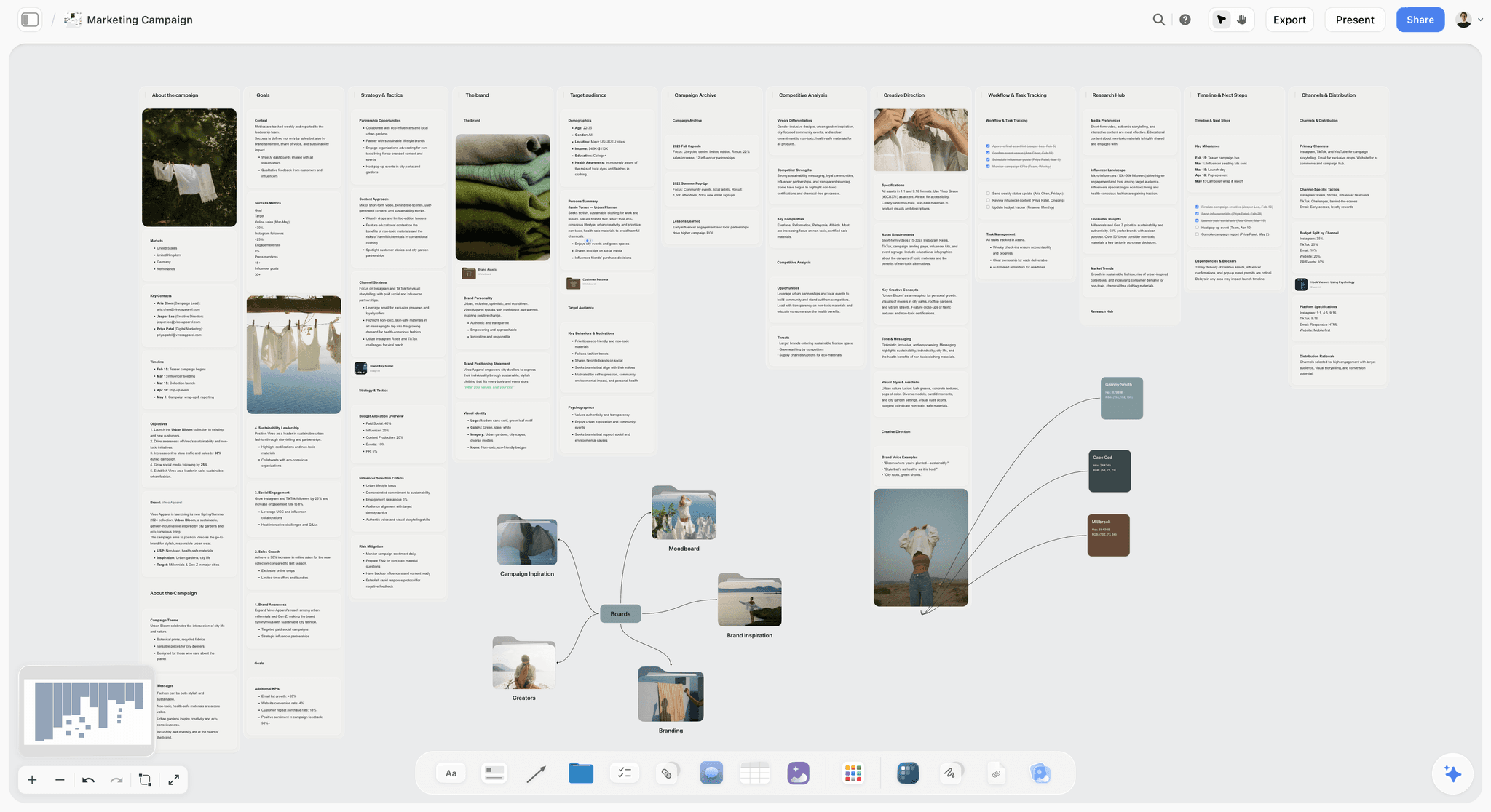
A solo creator's marketing campaign board in Storyflow: audience research, messaging angles, and the content plan on one canvas, so the AI has the full picture before responding.
Stop paying team prices to work alone
Your whole workflow (research, references, outline, AI) fits on one infinite canvas priced for one person. Rebuild your most active project there and stop re-explaining it to five different apps.

Detailed Reviews: Best Tools for Solo Creators 2026
1. Storyflow
The visual AI workspace that replaces the team you don't have
Storyflow is an AI-powered visual workspace built for creative professionals who think spatially: filmmakers, marketers, strategists, and independent creators who need more than a document and an AI chatbot. It combines an infinite canvas, structured Blueprint Tactics, document writing with a built-in analyzer, and an AI that reads your entire board before responding.
For solo creators, the core problem it solves is missing institutional knowledge. Teams have creative directors, senior editors, and strategists who hand down frameworks. Solo creators traditionally have none of that. Storyflow's Tactics system puts those frameworks directly into the workspace. The fastest way to feel it is to skip the blank canvas: open the Marketing Campaign template or the YouTube Video Plan template and the board opens with the structure a solo project needs already laid out.
Best for: Solo creators who develop visual, narrative, or strategic content and want AI that knows the full project before helping.
Key features:
Tactics System (Blueprint Tactics)
Tactics are structured flip-card frameworks built into the canvas. Each card shows the theory on the back and your working content on the front. Hero's Journey tells you how to structure a long-form narrative. AIDA guides conversion copy. Retention Hooks structures your YouTube video for watch time. The Free plan, coming before the end of 2026, will include 3 starter Tactics; Plus and above unlock the full 200+ library now. For a solo creator, this is the equivalent of having a creative director install a framework before each project session.
AI That Reads Your Full Canvas
Storyflow's AI reads everything on your current canvas board before responding. When you ask for script suggestions, it already knows the mood board you built, the audience notes you dropped on the left side of the canvas, and the Tactic structure you are working through. You can extend its context further by @-mentioning additional documents or Tactics in the AI chat. This is what separates it from AI chat tools: you stop re-explaining your project every session.
Infinite Canvas with Spatial Organization
The whiteboard handles sticky notes, headings, to-dos, images, videos, audio files, links, and walls (grouped sections). Solo creators use this to keep all project phases visible at once: research on the left, mood references in the center, outline structure on the right. The spatial layout means you never lose context by switching tabs.
Documents with Writing Analyzer
Storyflow's document editor includes a Writing Analyzer that surfaces readability scores, word count, and writing quality feedback in real time. For solo creators who do not have an editor or writing partner, this acts as a first-pass quality check before a draft goes anywhere. The AI sidebar can suggest edits, continue writing, or restructure a section on request.
AI Image Generation on Canvas
Press G on the canvas to open the AI image tool. Drag to place an image element, enter a description, and the image generates directly on the canvas. You can use existing images on the board as visual references for the generation. For solo creators building mood boards or visual briefs, this eliminates the trip to a separate image generation tool.
Pricing:
Paid-only during early access; Plus: $7.99/month billed annually, $9.99/month billed monthly (full 200+ Blueprint Tactics, increased AI, unlimited file uploads). Pro: $14/month billed annually, $19/month billed monthly (adds AI image generation and 20× more AI than Plus). Max: $39/month billed annually, $49/month billed monthly (40x more AI, team workspace with permissions and roles). A Free plan (unlimited shared boards, basic AI usage, 20 file uploads) launches before the end of 2026, and anyone a paid member invites to a board joins free now.
Pros
The Tactics system provides expert frameworks for every creative format: video, narrative, marketing, and strategy
AI reads the full canvas before responding, so you stop re-explaining your project every session
Flat individual pricing starting at $9.99/month means the value calculation is simple for a solo creator
Everything lives on one board: research, mood board, Tactic, document, and AI chat in the same space
Writing Analyzer provides real-time quality feedback without needing a human editor or collaborator
Cons
Paid-only during early access, and AI usage caps (even on Plus) are genuinely restrictive for active daily-use solo creators; the ceiling arrives quickly
No native publishing or scheduling integration: you still need a separate tool to post or schedule content after you have built it in Storyflow
The canvas-first workflow has a real learning curve for creators coming from linear note-taking tools like Notion or Bear; the spatial organization requires a different mental model
Verdict
Storyflow is the right tool for solo creators whose bottleneck is the thinking phase: developing direction, building structure, and getting AI help that actually knows what they are working on. It is not the right tool for creators whose primary need is task tracking, publishing scheduling, or simple linear note capture. If you produce content that requires strategy before it requires execution, start here.
2. Framekit
The client-facing half of a one-person business, on one account
Every other tool on this list helps you make the work. Framekit is the one that helps you show it, deliver it, and get paid for it. It is an all-in-one creative toolkit built for freelancers, with four surfaces on a single account: an AI website builder for your site and per-offer landing pages, client galleries for delivering finished work, timecoded video review for anything that moves, and a store for selling digital products.
For solo creators, the problem it solves is the stack tax. A working solo creator typically pays for a website builder, something to deliver files or galleries through, a checkout for anything they sell, and sometimes a review tool. That is four bills, four logins, and four places for the branding to drift out of sync, and not one of them makes the work better. They make it presentable and sellable, which is a different thing. Collapsing them into one account is usually the largest single reduction in cost and admin available to a one-person business.
What it does well
- Client galleries with favorites. Send a gallery with favorites enabled and the list that comes back is the selection, already made, in a form you can attach to an invoice. Downloads can be PIN-gated separately from viewing.
- Timecoded video review. Comments bind to a timecode, the toolbar draws freehand, arrows, lines, rectangles and ellipses on the frame, versions stack with exactly one current version, and each version carries its own approval status.
- An AI site builder with real ownership. Custom domain, custom fonts, custom code, hosting and SSL included, and branding removal on paid tiers.
- A store on the same account as the site. Selling a template pack or preset from your own domain removes both a subscription and the handoff where a buyer leaves your site to check out. The transaction fee is 5 percent on Free and Starter, 3 percent on Pro, and zero on Business.
Where it loses, plainly
- It does not think. No canvas, no project AI, no structural frameworks. It sits entirely downstream of every planning tool on this list, which is exactly why Storyflow ranks above it rather than beside it.
- It is not a CRM. No contracts, no proposals, no invoicing beyond the store. That remains a separate subscription.
- A generalist loses to specialists on depth. A dedicated site builder gives more layout control, a dedicated gallery platform has deeper print-store automation, and a dedicated review platform integrates with editing software. Consolidation is a cost argument, never a capability one.
- Storage is the real ceiling. Video reaches the per-tier caps long before any page count does.
Pricing: Free (10 pages, unlimited galleries with 3GB photo storage, video review with 2GB video storage) / Starter $9 mo, $7 annual / Pro $19 mo, $15 annual / Business $39 mo, $31 annual with zero transaction fees. Flat per account, not per seat.
3. Notion
The most flexible content OS for solo creators who live in documents
Notion is the dominant text-first tool for solo creative professionals. Its block-based structure lets you build almost any system from scratch: episode databases, client CRMs, publishing calendars, content audits, and script libraries. The free plan is legitimately functional. For solo creators who organize more than they develop, it remains the best-in-category option.
Best for: Solo creators who manage a high volume of organized content and need a flexible database and document system.
Key features:
Databases: Table, gallery, calendar, board, and timeline views for the same underlying data. A solo creator can maintain one master content database and view it as a calendar when planning, a gallery when browsing, and a table when auditing.
Notion AI: Integrated AI writing assistant available as an add-on. Reads the current page you are working on and can draft, summarize, or continue content. Does not read across pages without being explicitly prompted.
Templates: Thousands of community templates for creator workflows, content calendars, project trackers, and more. The template gallery removes the setup friction for common creator systems.
Web Clipper and integrations: The browser extension clips web content directly into Notion. Integrations with Zapier, Make, and direct APIs connect it to most publishing and scheduling tools.
Pricing: Free (unlimited blocks and pages) / Plus $10/user/month / Business $15/user/month
Pros
Free plan covers most solo creator needs without requiring an upgrade
Database views eliminate the need for a separate content calendar or spreadsheet
Web clipper and Zapier integrations connect to almost any other tool
Strong mobile app makes it usable on the go
Cons
AI only reads the current page, not the broader project context you have built across multiple pages
Not designed for visual or spatial thinking: poor fit for mood boards, canvas work, or diagram-based concept development
Verdict
Notion is the right tool for solo creators who manage large volumes of structured content and need database functionality across their creative business. It is the wrong tool for the generative phase of creative work. Use it after you have developed your ideas somewhere else.
4. Milanote
Visual pinboards built for creatives who start with images before words
Milanote is the strongest tool in the market for visual concept development at the early stage of a creative project. The pinboard format lets solo creators drag images, references, text, sketches, links, and color palettes into a free-form visual space. It is purpose-built for the phase of a project where you are still discovering what you want to make.
For solo filmmakers building pre-production visual decks, solo brand strategists developing creative direction, and solo YouTubers building mood references for a video series, Milanote removes the friction of the visual thinking phase.
Best for: Solo creators whose creative process starts visually before it becomes structural or written.
Key features:
Visual pinboard: Free-form canvas optimized for images, references, links, and short text notes. Better than Notion or Storyflow for pure mood board work because it renders images beautifully at scale.
AI text and image generation: Generate concept text or reference images directly on the board. Useful for populating mood boards when reference images are hard to find.
Shareable boards: Send a link to a client or collaborator for review without requiring them to create an account. Useful for solo creators presenting concepts to clients.
Flat individual pricing: $9.99/month covers one user fully without per-seat scaling. Structurally solo-friendly.
Pricing: Free (100 notes, 10 images) / Pro $9.99/month
Pros
Best-in-class for visual mood boards and reference organization at the early creative stage
Shareable links for client review without account requirements
Flat monthly pricing is genuinely solo-friendly
Cons
AI does not read your board context: responses are prompt-only, not project-aware
Limited beyond the visual concept phase: once you need structured writing or project tracking, you will need another tool
Verdict
Milanote wins for solo creators who need the best mood boarding and visual concept experience. It is genuinely better than Storyflow for pure image-reference work. It should not be your only tool; it is phase-specific. Pair it with something that handles the writing and planning that comes after the visual concept is settled.

Storyflow's Tactics system open mid-project: the framework cards provide the structure a creative director would normally provide, built directly into the canvas where the solo creator is already working.
5. Miro
Best for: Occasional whiteboard sessions and visual frameworks
Miro's free plan gives you three editable boards and 2,500+ templates. For a solo creator who does occasional visual thinking sessions rather than daily canvas work, the free tier is often enough. The per-seat pricing at $8/user/month is reasonable for one person and the template library is genuinely the strongest in the market. The limitation for solo use: Miro's AI is board-scoped and does not read across your project files. If you use more than three boards regularly, the free plan ceiling arrives quickly. A solo creator doing daily creative work on Miro will eventually need to upgrade.
Pricing: Free (3 boards) / Starter $8/user/month / Business $16/user/month
Verdict: Strong for occasional structured visual thinking. Not built for the solo creator who needs AI-assisted creative development as a daily practice.
6. ClickUp
Best for: Solo creators managing multiple active client or personal projects
ClickUp is the most feature-complete project management tool for individual use. The free plan is genuinely generous: unlimited tasks, unlimited members (useful if you occasionally collaborate), 100MB storage, and basic Docs. The catch is setup time. ClickUp rewards creators who invest hours into building their system. Solo creators who want to open a tool and start working immediately will find it overwhelming. A 20-person team has someone to configure it. A solo creator has themselves. ClickUp AI is an add-on that adds to the monthly cost.
Pricing: Free / Unlimited $7/user/month / Business $12/user/month
Verdict: Best solo project management if you are willing to invest the setup time. Skip it if your work lives in the creative development phase and does not need heavy task tracking.
7. Canva
Best for: Solo creators who produce their own design and visual content
Canva at $12.99/month is a flat individual rate that gives solo creators access to Magic Design, Brand Kit, background removal, AI image generation, and a template library that covers almost every social format. For solo creators who also do their own graphic design, thumbnails, carousels, and brand assets, it eliminates the need for a dedicated designer. The honest limitation: Canva is a design output tool. It does not help you develop ideas, structure a concept, or build a strategy. It belongs in the back half of the creative workflow, not the front.
Pricing: Free (strong free tier) / Pro $12.99/month / Teams from $10/user/month
Verdict: Essential for solo creators who produce their own visuals. Not a creative thinking tool. Use it for output, not development.
8. Obsidian
Best for: Solo creators building a long-term personal knowledge base
Obsidian is free for local use with no limits: unlimited notes, unlimited graphs, and a plugin ecosystem that lets advanced users build almost any workflow on top of plain Markdown files. The linked graph view shows connections between notes in a way that Notion's linear structure cannot. For solo creators doing deep research across many projects over years, this is the strongest research tool available. The limitations are real: no native AI that reads your graph, no cloud sync without paying $8/month , and a steep learning curve that assumes comfort with plain text files and plugin installation.
Pricing: Free (local) / Sync $8/month / Publish $16/month
Verdict: Best for solo creators with a researcher mindset who invest in building long-term knowledge systems. Not for creators who want immediate value without setup.
9. ChatGPT
Best for: Rapid AI idea generation without a canvas
ChatGPT generates 30 video concept directions in the time it takes to make a coffee. For solo creators in the early divergent phase of brainstorming, no tool is faster. The free tier now includes GPT-4o access with usage limits. The limitation is significant for solo creative development: no persistent project context. Every new session starts blank. A solo creator working on a three-month YouTube series has to re-explain their niche, audience, and tone every time they open a new chat. ChatGPT Plus at $20/month adds memory features, but project-level context still requires manual setup via system instructions or custom GPTs.
Pricing: Free (GPT-4o with limits) / Plus $20/month / Team $25/user/month
Verdict: Fastest AI sparring partner for generating raw material. Not a substitute for AI that understands your specific project. Use it to generate volume early; move to a project-aware tool to develop and select.
Also Tested: The Remaining Solo Creator Tools
10. Craft
Beautiful shareable documents with an Apple-native design. Solo creators presenting scripts, briefs, or proposals to clients find Craft's export and sharing far more polished than Notion. At $4.99/month, it is the most affordable paid doc tool on this list. Limitation: Apple ecosystem only, and no project-level AI context.
Pricing: Free / Pro $4.99/month
11. Whimsical
Generate a mind map from a text prompt in seconds. Whimsical is the fastest route from an idea to a visual structure for solo creators who think in hierarchies and flowcharts. The 4-board free tier is limiting. At $10/user/month, it is one-dimensional enough to question whether a full-canvas tool handles both the map and everything else.
Pricing: Free (4 boards) / Pro $10/user/month
12. Airtable
Airtable is Notion's database-layer done with more relational power. For solo creators managing large content libraries across channels and formats, the relational fields and automation features are genuinely more capable. The price is less solo-friendly: $20/user/month for the team tier is steep for one person. The free plan limits you to 1,000 records per base.
Pricing: Free (1,000 records) / Plus $10/user/month / Pro $20/user/month
13. Bear
Bear is a Markdown writing app for Apple users. No features, no databases, no AI. Just a clean writing surface with good organization via tags. At $2.99/month, it is the cheapest tool on this list. For solo creators who need a clean capture tool for writing on mobile, Bear wins. For anything more complex, reach for a different tool.
Pricing: Free (no sync) / Pro $2.99/month
Free vs. Paid: What Solo Creators Actually Get
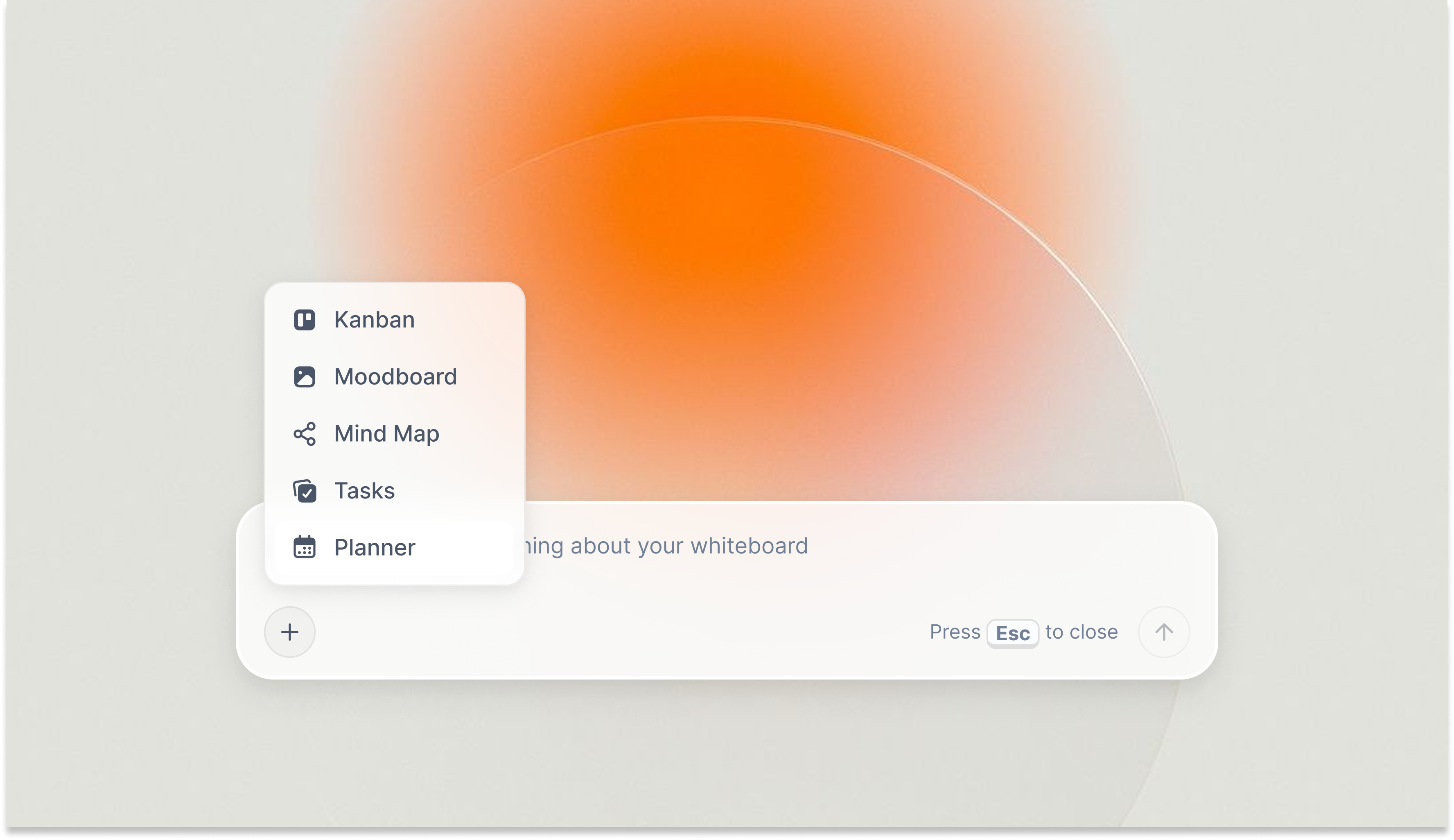
Storyflow's AI planner on Plus: the full 200+ Tactics library goes well beyond the 3 starter Tactics planned for the Free plan when it launches before the end of 2026.
What free plans typically include:
Limited project or board count (Storyflow's planned Free plan: unlimited shared boards with basic AI usage; Miro: 3 boards)
Capped AI usage (Storyflow's planned Free plan: basic AI usage only)
Reduced Tactics or framework access (Storyflow's planned Free plan: 3 of 200+)
Basic export options (PNG, PDF; advanced formats locked)
Limited file storage and upload size restrictions
What paid plans unlock:
Unlimited projects and boards with no ceiling on creative work in progress
40x more AI generations for daily creative sessions
Full Tactics library: all 200+ expert frameworks on Plus and above
Priority AI processing and advanced AI features
Larger file storage and higher upload limits
When free is enough:
A solo creator early in their workflow, producing one project per month, can run on free plans across most tools for a year without hitting meaningful limits. Obsidian's local free tier has no ceiling at all, and Notion's free plan covers unlimited pages. Storyflow is the exception right now: it is paid-only during early access, though its Free plan (unlimited boards, basic AI usage) is coming before the end of 2026, and anyone a paid member invites to a board joins free today. If you are just starting out, spend nothing on the rest.
When upgrading pays off:
The inflection point is when you are producing content weekly and relying on AI as a daily collaborator rather than an occasional resource. A solo creator running 3+ active projects simultaneously, using AI to develop scripts and structure ideas every week, gets the most out of Storyflow on a paid tier from day one, since it is paid-only during early access. At that point, $7.99/month for Plus (the full 200+ Tactics library) or $14/month for Pro (which adds AI image generation and 20× more AI than Plus) is straightforward math against the time value of daily creative work.
For solo creators doing weekly creative sessions, Storyflow's Tactics system changes the shape of the work session: you open the canvas, the Tactic structure is already there, and the AI already has the context of what you have been building. You are not starting from a blank screen each time. Start a Storyflow project and see how it holds a creative workflow.
Frequently Asked Questions: Best Tools for Solo Creators 2026
What is the best tool for solo creators in 2026?
Storyflow is the best overall tool for solo creators in 2026 because it combines visual workspace, AI with full canvas context, and expert creative frameworks (Tactics) in one place at an individual-friendly price. Solo creators who live in text-based systems should look at Notion first. Solo creators doing mood-board-driven concept work should look at Milanote first. The right answer depends on whether your process starts visually, in text, or through structured frameworks.
How does Storyflow compare to Notion for solo creators?
Storyflow and Notion serve different phases of the creative process. Notion is strongest at organizing finished content: databases of scripts, episode lists, client records, and publishing calendars. Storyflow is built for the work before the database: developing the concept, researching the audience, structuring the story, and building the brief. Many solo creators use both. If you only want one tool, the question is whether your daily work is more about capturing and organizing, or developing and building.
Is Notion worth it for solo creators in 2026?
Notion is worth it for solo creators who organize their creative business in databases: episode libraries, client CRMs, publishing calendars, and content audits. The free plan is genuinely functional for most solo creators. The paid Plus plan at $10/month adds unlimited file uploads and version history. For solo creators whose work is primarily brainstorming, concept development, or visual planning, Notion's document-first structure is the wrong fit regardless of price.
What tools do solo YouTubers use?
Solo YouTubers typically use a creative planning tool (Storyflow, Notion, or Milanote), a writing tool for scripts (Notion docs, Google Docs, or Storyflow documents), and a scheduling tool for publishing (Buffer, Later, or TubeBuddy). Storyflow is particularly strong for YouTubers because it holds the full creative workflow: audience research, concept development, script outline, and Retention Hooks Tactic all on one board, so the AI already has the context when you ask for help.
Are there free tools that are actually useful for solo creators?
Yes, several free plans are genuinely useful for solo creators. Notion's free plan has unlimited pages and blocks. Obsidian is free for local use with no limits. Canva's free tier covers most solo creator design needs. ChatGPT's free tier provides functional AI brainstorming. Storyflow is the one exception today: it's paid-only during early access, with Plus starting at $7.99/month and a free plan planned before the end of 2026. The catch with every free plan: you hit the ceiling the moment you get serious.
What is the difference between creative workspace tools and project management tools for solo creators?
Creative workspace tools (Storyflow, Milanote, Miro) support the thinking phase: developing concepts, structuring stories, building briefs, and organizing visual references. Project management tools (ClickUp, Asana, Trello) support the execution phase: tracking tasks, managing deadlines, and hitting deliverables. Solo creators need both, in different proportions. If your main bottleneck is ideas and direction, invest in the creative layer. If it is missing deadlines and losing track of deliverables, invest in the execution layer.
What should I look for in a tool as a solo creator?
Four things matter most: solo-friendly pricing (flat monthly rate rather than per-seat minimums that assume a team), AI that understands your project context not just your last message, low setup overhead (you have no IT team or onboarding budget), and the ability to replace at least two tools you currently use. The tools that fail solo creators most often are ones designed for 10-person teams that individuals try to stretch onto single-person use.
How do solo creators organize their projects without a team?
The most effective approach is spatial: keep the full context for each project in one place rather than splitting it across apps. A solo creator using Storyflow keeps audience research, mood references, concept notes, and script outlines on a single board so the AI can read all of it before helping. Solo creators using Notion build one master database per project. The approach that works least well is using a different tool for each phase, because context is lost every time something moves between apps.
Can solo creators use team-priced tools effectively?
Yes, but the economics are unfavorable. A team-priced tool at $16/user/month costs a solo creator $192/year for access to features mostly designed for groups. When Miro or Mural charge per seat, a solo creator pays the same as the first person on a team but gets none of the collaboration value. Tools with flat per-workspace or per-person pricing (Storyflow Pro, Milanote, Canva Pro, Obsidian Sync) deliver structurally better value for single-person use.
What tool is best for a solo creator who works across filmmaking, YouTube, and brand content?
Storyflow is the strongest single-tool answer for multi-format solo creators because the same board structure works for documentary pre-production, a YouTube content plan, and a brand campaign brief. The Tactics system adapts to each format: Hero's Journey for long-form narrative, Retention Hooks for YouTube, AIDA for brand copy. The AI reads the full board each time, so research from your documentary project can directly inform a YouTube video concept built on the same board.
Final Verdict: Best Tools for Solo Creators in 2026
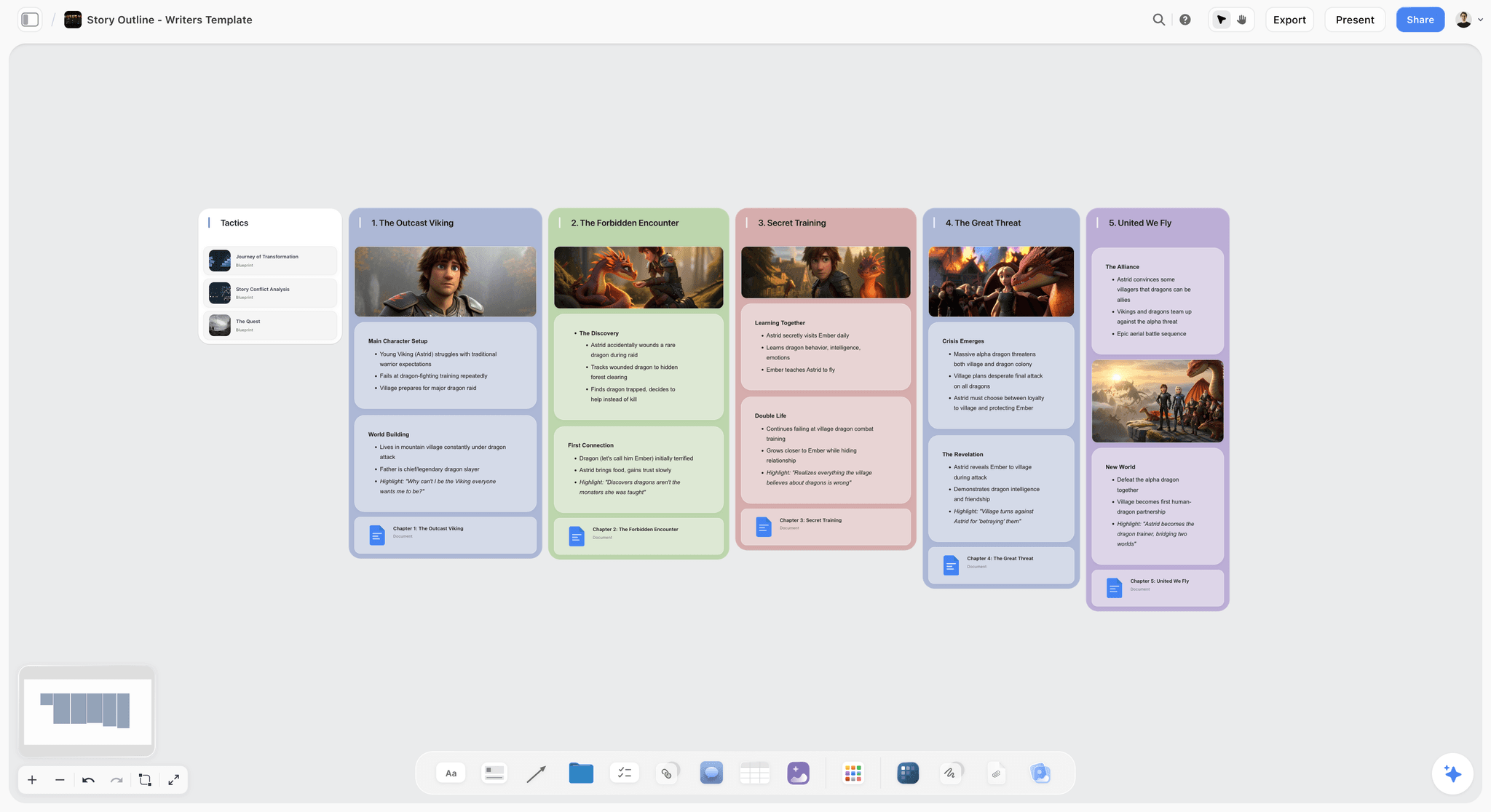
An active Storyflow project for a solo creator: concept canvas, Tactic structure, and AI responses in the same workspace, building on each other rather than existing in separate apps.
If you want one tool that supports the full creative workflow from idea to brief to draft, and you want AI that has read your full project before helping: Storyflow is the answer. The Tactics system means you are not starting from a blank canvas on every project. The AI means you are not re-explaining your context on every session. At $7.99/month (Plus tier), it is priced for a single person without the per-seat economics that make team tools expensive at solo scale. This is where to start if you produce narrative, visual, or strategic content regularly and want a single place to develop it. Take your most active project, rebuild it on a Storyflow board for one week, and the decision will be obvious by the end.
If you want to organize a large and growing content business with databases, publishing calendars, and structured libraries: Notion on the free plan covers most solo creator needs without spending anything. Upgrade to Plus at $10/month when you need version history and unlimited file uploads.
If your creative process starts visually before it starts with words: Milanote at $9.99/month gives you the best visual pinboard experience in the market. It is phase-specific but excellent at that phase.
If you are building a long-term personal knowledge base that connects research across years of projects: Obsidian's free local version has no ceiling and no subscription. Add Sync at $8/month when you need cross-device access.
The tool that actually changes your work is the one that matches where you currently lose the most time. If you lose it in the thinking phase, fix the thinking tool. If you lose it in the tracking phase, fix the execution tool. Most solo creators who feel overwhelmed are using the wrong tool for the wrong phase, not simply using too few tools.
Related Reading
The conceptual foundation beneath the tools decision: what visual thinking is, why it works differently from linear thinking, and how to build a visual workflow that sticks.
The practical how-to guide for solo creators who want to build a spatial creative system, not just use a visual tool.
The full brainstorming tool comparison: which AI actually helps you ideate, and how to get past the blank canvas problem.
If Miro is the obvious whiteboard tool but the per-seat pricing does not make sense for solo use, this is the focused comparison for individual creators.
The broader tools list for the creative workspace category: useful if you want to expand the search beyond solo-specific options.
Table of Contents
Templates to check out for this topic


Templates you can use in Storyflow
Every Storyflow board starts from real structure and an AI that reads the whole canvas. Open one of these templates and make it yours.


See Storyflow in Action
A visual AI workspace where every feature lives inside one canvas. No tab-switching, no context lost.
Build your entire board from a single message
Type what you need in the AI chat at the bottom of your canvas. The AI adds cards, headings, and structure directly onto your board.
Use expert frameworks as AI context
Type @ in the AI chat and choose any Tactic. The AI tailors every response to that framework instead of giving generic advice.
Turn your board into a mind map in seconds
Ask the AI to restructure your canvas as a mindmap. It connects your ideas into a visual hierarchy so you can see how everything relates.
Why Storyflow Exists
Storyflow actually began as a personal tool while working on creative and research projects.
We kept running into the same problem: ideas were scattered everywhere: notes, documents, and whiteboards.
Nothing helped us see how everything connected.
So we started building a workspace designed around how ideas actually grow.
→ Read how Storyflow was createdSara de Klein
Head of Product at Storyflow
Published: 2026-04-12
Extremely simple, seriously capable


See how easy it is to get started
Watch a real project come together, from a blank board to a finished plan, clicked through step by step.
Start creating with AI and become more productive
Transform your creative workflow with AI-powered tools. Generate ideas, create content, and boost your productivity in minutes instead of hours.