The 11 Best YouTube Planner and Content Planning Tools in 2026
Most channels do not die from bad videos. They die from empty backlogs. How YouTubers plan and organise a content pipeline in eight stages, and the 11 content planning tools for each one, compared in October 2026: Storyflow first for a creator and an editor, then Notion, vidIQ, TubeBuddy and Trello by the stage each wins.

Category
Content Creation
Author

Justkay
Documentary Filmmaker & Founder at Storyflow
Topics
2026-07-20
•
34 min read
•
Content Creation- best content planning tool for youtubers
- youtube content planning app 2026
- youtube channel planning tool
- content pipeline for youtube
- youtube idea backlog tool
- youtube series planning
- plan a month of youtube videos with an editor
- youtube content planner
What is the best YouTube planner tool, and how do YouTubers plan and organise their content pipeline?
YouTubers plan and organise their content pipeline in stages, from an idea bank through validation, packaging, script, shoot and edit to publishing and review, and our pick for a YouTube planner tool to hold that pipeline is Storyflow, because it is one infinite canvas where the idea bank, each video's plan and script, and your editor's tickets sit on a board the AI builds from your notes and your editor works on with you in real time. Add vidIQ for the keyword data that says which ideas have an audience, TubeBuddy for thumbnail A/B tests, Notion or Trello if you want a database or a plain kanban, and YouTube Studio to schedule the upload.

Full disclosure: Storyflow is our own product and this list is ordered with it first: it is our pick for a creator who works with an editor, because the idea bank, the scripts and the editor's tickets sit on one board for $7.99 a month billed annually and the invited editor joins free. The other ten tools follow by the stage of the pipeline each one wins, not by a score. Storyflow has no keyword research, analytics, publishing or calendar view and no free plan yet; vidIQ, TubeBuddy and YouTube Studio lead on data and publishing, and the review lists where Storyflow falls short.
Quick Comparison
Our pick first, then three rivals by the job each wins: a planning board your editor works on, a database pipeline, a validation engine and an in-YouTube optimizer. Most channels with an editor run one pipeline tool and one data tool.
| Tool | Best For | AI Features | Price |
|---|---|---|---|
| Storyflow | Idea bank, scripts and editor tickets on one infinite canvas | AI sorts a brain dump into walls and builds video plans and scripts | $7.99 mo annual (free plan late 2026) |
| Notion | Database-style content pipeline | Notion AI, depth depends on plan | Free / Plus $10 mo annual |
| vidIQ | Keyword research and idea validation | AI daily ideas and coach, credit-based | Free plan; paid price on vidiq.com/pricing |
| TubeBuddy | In-YouTube optimization, A/B thumbnails | Title generator, idea suggestions | Free / Pro about $12 mo annual |
How YouTubers Plan and Organise Their Content Pipeline: 8 Stages and the Tool for Each
YouTubers who publish for years run a content pipeline: a repeatable path every video takes from idea to upload to review. The pipeline has three connected parts, an idea bank, a production board and a publishing schedule. On a Storyflow board those are walls on one infinite canvas, which is why a creator and an editor can see the whole channel at once. The eight stages below are what the pipeline holds, with the tool that does each one.
- Idea bank. Capture every idea in one place the moment it appears. In Storyflow the idea bank is a wall of cards on the channel board: paste a brain dump and Storyflow's AI sorts it into organized walls by series or pillar.
- Validation. Check that someone wants the video before it earns production time. Storyflow has no keyword or search data, so this stage belongs to vidIQ, TubeBuddy and your own YouTube Studio analytics; paste what you find onto the idea's card.
- Packaging. Draft the title and the thumbnail concept before the script. On a Storyflow board the title options and reference thumbnails sit on the video's card, and Storyflow's AI looks at the thumbnails you select (up to 24) and says what they share. The A/B test itself runs in YouTube Studio or TubeBuddy.
- Research and script. Storyflow's Video research workflow gathers the facts into research columns, and its Video script workflow writes one video in three acts with the full script as a document on the board.
- Shoot plan. Storyflow's YouTube video plan workflow lays one episode out across eight walls, from theme and research to assets and distribution, and its Shot list workflow breaks the script into shots. Batch the filming.
- Edit handoff. In Storyflow each video is a ticket on a Kanban board, with a due date, labels and an assignee you set, and your editor moves it from To Do to Done on the same board in real time. Cut review with timecoded comments belongs in Frame.io.
- Publish. Schedule the upload in YouTube Studio, which is free. Storyflow does not publish and has no calendar view: the publish date lives on the ticket's due date or in a table's date column.
- Review. Read click-through rate and average view duration in YouTube Studio, paste one row per series onto the Storyflow board once a month, and ask Storyflow's AI to propose next month's ideas from it.
The board below is that pipeline in Storyflow for a weekly channel: five walls joined by arrows, from upcoming videos to posted, with a thumbnail and its video folder sitting in the filming wall.
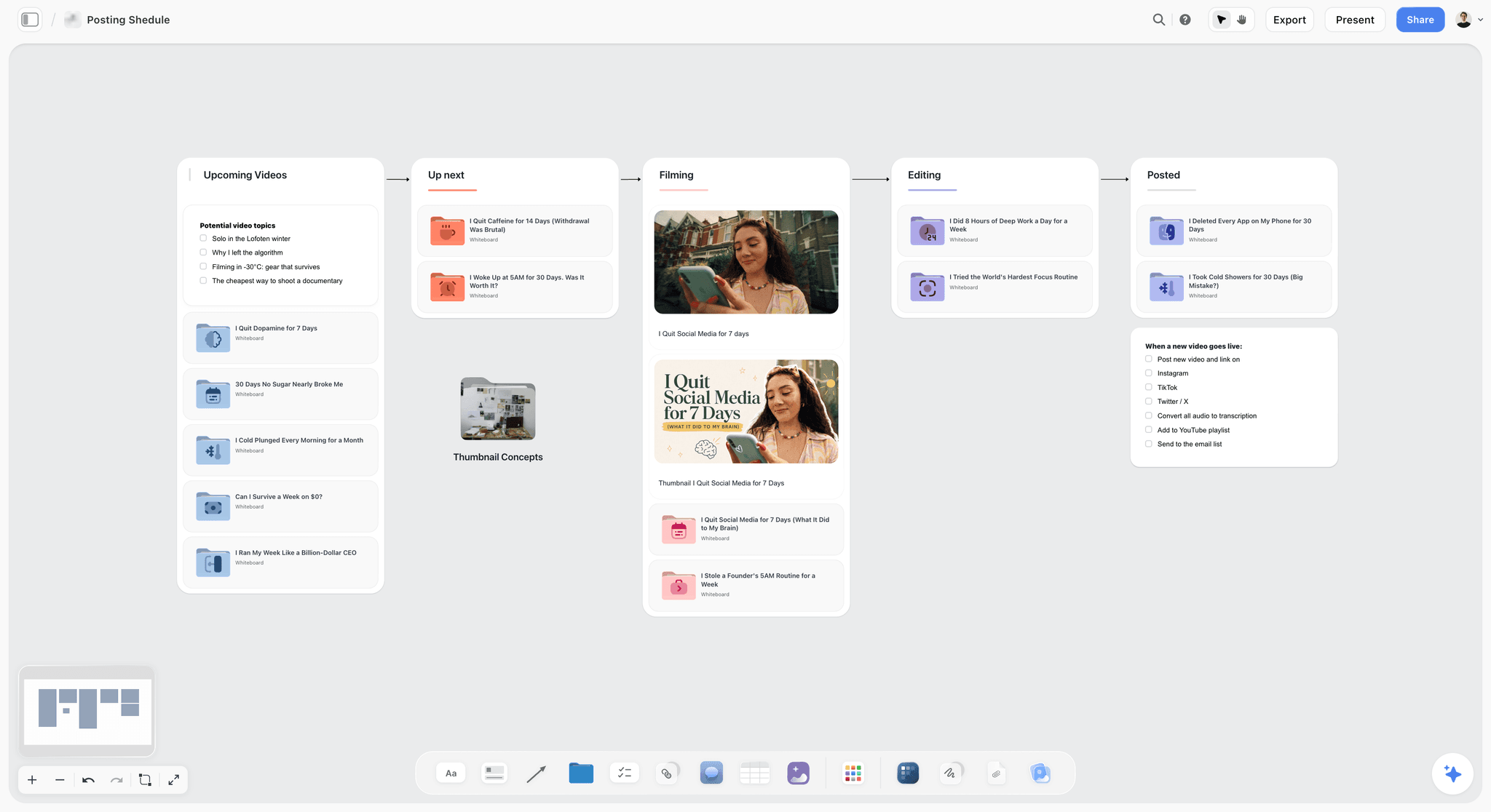
Tools for each stage of the YouTube content pipeline
| Stage | What gets decided | Storyflow's part | Other tools YouTubers use |
|---|---|---|---|
1. Idea bank | What could we make | A wall of idea cards; the AI sorts a brain dump into organized walls | A Notion or Airtable database, a Trello list, Google Sheets, a notes app |
2. Validation | Is there an audience for it | None: no keyword or search data | vidIQ, TubeBuddy, YouTube Studio analytics |
3. Packaging | The title and thumbnail promise | Title options and reference thumbnails on the video's card; the AI compares the images you select | YouTube Studio's A/B test, TubeBuddy Legend, Canva or Figma for the thumbnail file |
4. Research and script | What the video says | Video research and Video script workflows; the script as a document on the board | Google Docs, Notion pages |
5. Shoot plan | What gets filmed, and when | YouTube video plan and Shot list workflows | A shot list in Google Sheets |
6. Edit handoff | Who does what by when | Tickets with an assignee, labels and a due date on a Kanban board; real-time collaboration with the editor | Trello, ClickUp, Asana or Notion for the board; Frame.io for cut review |
7. Publish | What goes out when | None: no publishing; dates on tickets or in a table | YouTube Studio's scheduler; Metricool or Buffer for other platforms |
8. Review | What to repeat and what to drop | The AI proposes next month's ideas from the numbers you paste | YouTube Studio analytics, vidIQ |
The fastest way to run this pipeline: keep stages 1, 3, 4, 5 and 6 on one Storyflow board, do stage 2 in vidIQ, and do stages 7 and 8 in YouTube Studio. That is one board, one data tool and the free tool you already have. Storyflow for YouTubers and the YouTube content pipeline page show the boards.
All 11 Content Planning Tools, Ranked
Storyflow is our own product and our pick for a creator who works with an editor, so it is listed first. The other ten follow by the stage of the pipeline each one wins, not by a score.
- Storyflow: best YouTube content planner for a creator and an editor, with the idea bank, the scripts and the edit handoff on one AI board
- Notion: best database-style content pipeline, with the calendar layout Storyflow does not have
- vidIQ: best keyword research and idea validation, the data Storyflow lacks
- TubeBuddy: best in-YouTube optimization and thumbnail A/B testing
- Trello: best simple kanban pipeline on a free plan
- Airtable: best custom pipeline database for volume channels
- ClickUp: best for a channel run like a business
- YouTube Studio: best free scheduler, analytics and title and thumbnail test
- Google Sheets: best zero-cost pipeline tracker
- Milanote: best visual idea boards arranged by hand
- Frame.io: best review handoff between creator and editor
Comparison Table: 11 YouTube Content Planning Tools at a Glance
| Tool | Best For | Pipeline stages it holds | Free Plan | Starting Price |
|---|---|---|---|---|
Storyflow | Creator plus editor, whole pipeline on one AI board | Idea bank, packaging drafts, script, shoot plan, edit handoff | Coming late 2026 (invited collaborators join free now) | $7.99 mo annual |
Notion | Database-style pipeline | Idea bank, script, edit handoff, publishing dates in a calendar layout | Yes | Plus $10 per member mo annual |
vidIQ | Keyword research and validation | Validation, packaging help | Yes | Pricing page did not load when checked |
TubeBuddy | In-YouTube optimization | Validation, packaging tests, scheduled publishing on Legend | Yes | Pro about $12 mo billed annually |
Trello | Simple kanban pipeline | Idea bank, edit handoff | Yes, up to 10 collaborators | Standard $5 per user mo annual |
Airtable | Custom pipeline database | Idea bank, edit handoff, publishing dates | Yes | Team $20 per user mo annual |
ClickUp | Channel run as a business | Idea bank, edit handoff, publishing dates | Yes | $7 to $8 per user mo annual |
YouTube Studio | Scheduling, analytics and the A/B test | Packaging test, publish, review | Free | Free |
Google Sheets | Zero-cost tracker | Idea bank, edit handoff | Yes | Free with a Google account |
Milanote | Visual idea boards | Idea bank, packaging moodboards | Yes, 100 notes | $9.99 per person mo annual |
Frame.io | Creator and editor review | Cut review | Yes, 2 members | Pro $15 per member mo |
Prices were checked on each vendor's own site in October 2026 and move often. Our pick is in the first row; the rest are in the order of the list above.
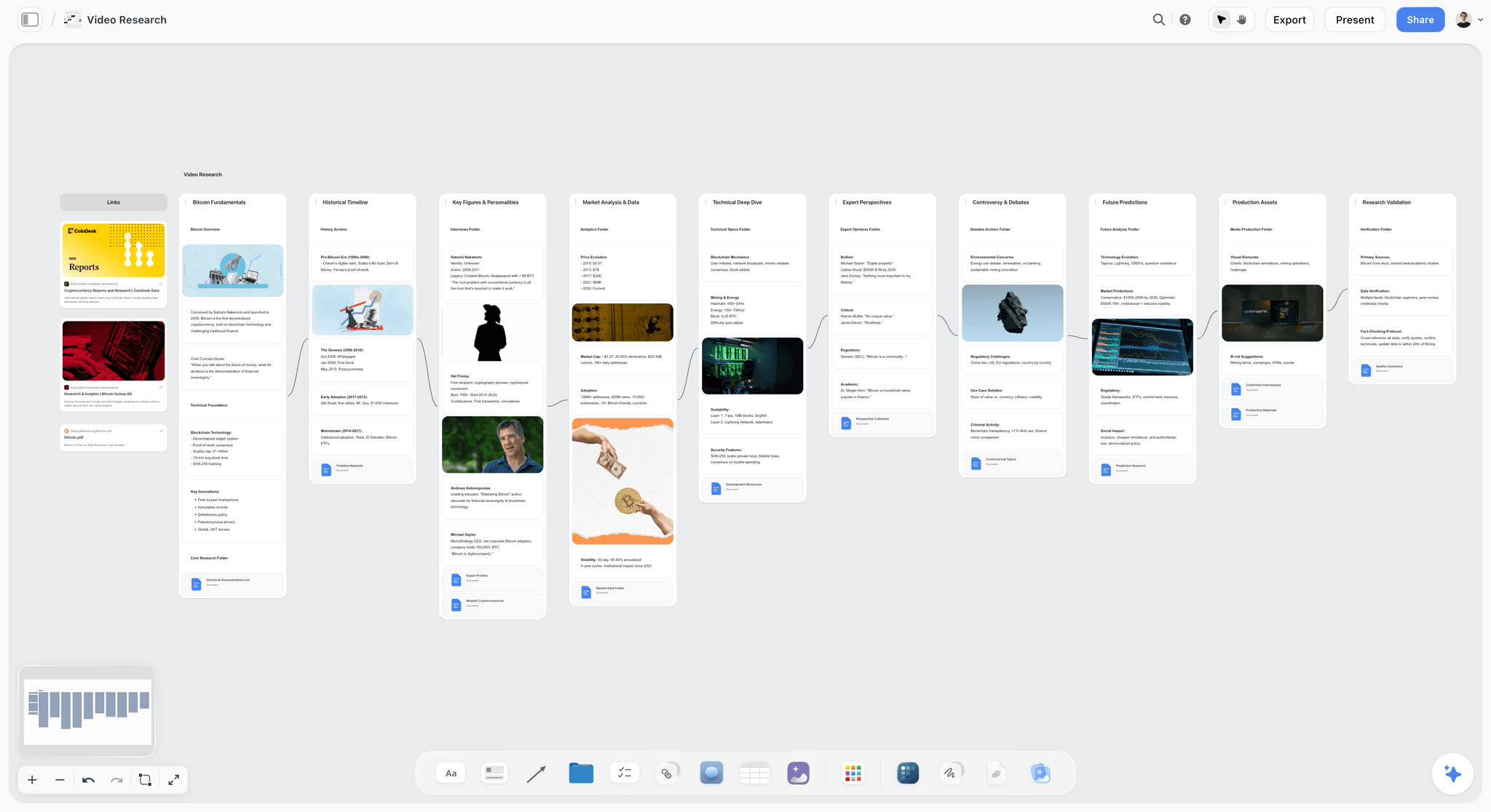
A Storyflow video research board with a links column and walls for fundamentals, a historical timeline, key figures, market data, a technical deep dive, expert perspectives, controversies, predictions, production assets and validation, joined by arrows
Fill the backlog before the upload day arrives
Storyflow keeps your idea bank, scripts and your editor's tickets on one board the AI builds from, so you and your editor always know what is next. Plans start at $7.99 a month billed annually, and anyone a paid member invites to a board joins free.

What Is the Best YouTube Planner Tool? Picks by Team Setup
Our pick for a YouTube planner tool, for a creator who works with an editor, is Storyflow, because the plan, script and the editor's tickets share one board. "Planner" means two jobs, though: deciding what to make (vidIQ, TubeBuddy) and tracking what you are making (Storyflow, Notion, Airtable, ClickUp, Trello). Most messy systems use a tool from one job to do the other. The per-setup picks come first because who touches the pipeline decides the tool more than the niche does.
| Your setup | Pipeline tool | Data tool | Review tool | Why |
|---|---|---|---|---|
Creator plus one editor | Storyflow | vidIQ | Frame.io for cuts | The editor is invited to the board and assigned tickets; data and cut review sit beside it |
Creator, editor, thumbnail designer | Storyflow (Notion if you want a database) | vidIQ or TubeBuddy Legend | Frame.io | Three people need one brief; Storyflow for a visual board, Notion for a database |
Solo creator, weekly uploads | Storyflow (Google Sheets at $0) | vidIQ | YouTube Studio A/B test | The bottleneck is deciding what to make, then keeping the backlog full |
Volume or faceless channel | Airtable | vidIQ | Frame.io | Ten videos a month need relational records and automation |
Channel inside a business with sponsors | ClickUp or Notion | vidIQ | Frame.io | Sponsor deliverables and uploads live in one task system |
Starting out, $0 budget | Google Sheets or Trello | vidIQ free plan | YouTube Studio A/B test | Nothing here should cost money before you publish consistently |
Best YouTube content planner for a creator and an editor: Storyflow
Storyflow keeps the idea bank, the packaging concepts, the scripts, the series plan and the editor's tickets on one infinite canvas, with an AI that builds and edits the board from your notes. The editor you invite joins free and edits the same board in real time. Storyflow has no keyword data, so pair it with vidIQ.
Best YouTube channel planner as a database: Notion
If you think in tables, statuses and filtered views, one Notion database renders as a board, a table and a calendar, which Storyflow's board cannot do. You build the packaging fields yourself, where Storyflow's AI drafts them.
Best for idea validation: vidIQ
Keyword research and competitor tracking that turn "I think" into "the numbers say". vidIQ is the data half of almost every good setup, and the natural partner to a Storyflow board.
Best packaging tester: TubeBuddy
Thumbnail A/B testing where the click happens, on its Legend plan. YouTube Studio's own free A/B test covers the basic case, and neither test exists in Storyflow.
Best free scheduler and analytics: YouTube Studio
Scheduling, retention graphs and the free title and thumbnail test. Every plan made in Storyflow, Notion or Trello ships through it.
Best free setup: Google Sheets plus the vidIQ free plan
A spreadsheet holds the pipeline and vidIQ's free plan gives a first read on demand. Enough to run a channel publishing weekly, and free today, which Storyflow is not yet.
Why the Backlog Decides the Channel
Most channels do not die from bad videos. They die from empty backlogs. The upload that never happens because nothing was ready to make costs more than any mediocre upload, and it never shows in your analytics because it never existed. The video you publish this week was decided weeks ago, or it was not decided at all, and you felt that on Tuesday when you sat down with nothing to shoot and an editor waiting for footage.
This guide ranks tools for content planning as an ongoing operation: the idea backlog, the research, the title and thumbnail packaging, the series pipeline, the handoff to an editor and the upload cadence. The method itself, stage by stage, lives in The 7-Stage YouTube Content Pipeline; this page is the tools half. For the AI tools that take one video from idea to script, see The Best AI Tools for YouTube Video Planning.
I am a documentary filmmaker and I built Storyflow, which is listed first here, so read the order with the skepticism it deserves. Every tool was compared in October 2026 from its own pricing pages, help centres and documentation. There are no scores: the basis of the order is stated above the list, and each review says when to pick the rival instead.
Key Takeaways
- The backlog is the channel. A calendar with dates but no ladder behind it is a wish list; channels that publish for years keep ideas sitting on every stage at once.
- Five rungs: Spark, Proof, Package, Production, Publish. When one empties, uploads stall a few weeks later, and it looks like burnout when it was a planning failure.
- Package before you produce. The title and thumbnail are decided first, because the click decides whether the content gets a chance at all.
- Research tools and pipeline tools are complements. vidIQ and TubeBuddy power the data rungs; a board or database holds the ladder. Nearly every working setup is one of each.
- With an editor, the pipeline tool is also the brief. Pick the one your editor can open, edit and be assigned work in without buying a second seat stack.
- Everything ships through YouTube Studio. Its scheduler and its own title and thumbnail A/B test are free, which is why it is on this list.
The Backlog Ladder: How YouTubers Organise a Content Pipeline
A YouTube channel is a machine that turns ideas into uploads. Content planning is the maintenance of that machine, and every planning tool is being asked one question: how much of the machine can it hold? The Backlog Ladder is this guide's framework for answering it. Every idea climbs five rungs.
Rung 1: Spark. Capture. Every idea, from comments, competitors, conversations and your own viewing, lands in one place within seconds, such as an idea wall on a Storyflow board. Cognitive psychologist Nelson Cowan's 2001 paper in Behavioral and Brain Sciences (doi.org/10.1017/S0140525X01003922) puts working memory at roughly four chunks at a time. Your head can hold this week's video, not a channel.
Rung 2: Proof. Validation. Before an idea earns production time it is tested against evidence: search demand, outlier videos in your niche, what your own best uploads share. YouTube's own guidance suggests grouping your uploads into buckets by format, series, audience and topic longevity, then comparing the groups over about 90 days (YouTube Help: tips to learn what content to create).
Rung 3: Package. The title and thumbnail are drafted before the video is made. If the promise does not work on paper, the video does not get made yet.
Rung 4: Production. The packaged idea becomes a script, a shoot and an edit, each a card or a document on the same Storyflow board. This is where the editor enters, and where series live: a channel is rarely 30 unrelated videos, it is three or four series with episodes at different stages.
Rung 5: Publish. Cadence. What ships when, and whether the pipeline behind it can sustain the pace you promised.
At any moment a healthy channel has ideas on every rung: twenty sparks, eight proofed, four packaged, two in production, one scheduled. The seven-stage method guide covers how to run each rung; the tools below are compared on how many rungs they hold and whether an idea can climb without being retyped into a second app.
How the Tools Compare on the Backlog Ladder
Read down the rung where your pipeline keeps stalling.
| Tool | 1 Spark | 2 Proof | 3 Package | 4 Production | 5 Publish |
|---|---|---|---|---|---|
Storyflow | Strong: idea walls and tickets | Weak: no search data | Moderate: concepts and images, no testing | Strong: plans, scripts, series, editor tickets | Weak: dates on tickets or in a table; no calendar layout, no publishing |
Notion | Strong: database capture | Weak | Moderate: fields you build | Strong: statuses and relations | Strong: calendar layouts of a database |
vidIQ | Moderate: daily ideas | Strong: keyword and competitor data | Strong: title help | Weak | Weak |
TubeBuddy | Weak | Moderate: in-YouTube data | Strong: A/B thumbnail testing on Legend | Weak | Moderate: scheduled publishing on Legend |
Trello | Moderate: cards | Weak | Weak | Moderate: kanban stages | Moderate on Premium |
Airtable | Strong: raw database | Weak | Moderate: gallery of thumbnails | Strong: relational series tracking | Strong |
ClickUp | Moderate | Weak | Weak | Strong: task-shaped production | Strong |
YouTube Studio | Weak | Moderate: your own channel analytics | Strong: free A/B test of up to 3 titles and thumbnails | Weak | Strong: scheduled uploads |
Google Sheets | Strong: a row is free | Weak | Weak | Moderate | Moderate |
Milanote | Strong: visual capture | Weak | Moderate: thumbnail moodboards | Weak | Weak |
Frame.io | Weak | Weak | Weak | Strong: cut review only | Weak |
Three conclusions change how you shop.
No tool is strong on both halves of the ladder. The tools strong on rungs 2 and 3 (vidIQ, TubeBuddy and YouTube Studio) are weak on rung 4, and the tools strong on rung 4 are weak on rung 2. Rungs 2 and 3 need YouTube data: search demand, outlier performance, click behaviour. Rungs 1 and 4 need a workspace: capture, scripts, series, handoffs. Data tools cannot hold your scripts and workspaces cannot see YouTube's data. You are choosing one of each.
Rung 4 is where an editor changes the answer. A solo creator can run production from a spreadsheet. Once an editor needs to know which video is next, what footage exists and what the hook is, the pipeline tool becomes the brief, and tools that let the editor be assigned work on the same surface move up.
Rung 1 is the cheapest rung to fix. Almost everything is strong at capture, including a free spreadsheet. If ideas evaporate before they are written down, you need one place you actually open, not a subscription.
How We Compared These Tools
The reader of this page runs a channel with at least one other person: an editor, a thumbnail designer or a researcher. Each tool was compared from its own pricing pages, help centre and documentation, opened in October 2026, on five questions. There are no scores, and no tool was run on a shared test project.
- Pipeline coverage. How many stages the tool holds in one place, from idea bank to edit handoff.
- Editor handoff and team access. Can an editor open the plan, be assigned a video and work on the same surface, and what does that seat cost?
- Packaging and validation data. Search demand, competitor data, title and thumbnail help or testing.
- Month-at-a-glance cadence. Can you see the next four to eight uploads and the state of the pipeline behind them?
- Price for a creator plus one editor. What two people pay per month, and whether the editor needs a paid seat.
The basis of the order: Storyflow is our own product and our pick on the first two questions, which decide the answer for a creator with an editor, so it is listed first. vidIQ and TubeBuddy lead the third question, Notion and Airtable lead the fourth, and Google Sheets, Trello and YouTube Studio lead the fifth at $0. A solo creator who only needs to decide what to make should start with vidIQ, and the reviews say so.
Sources opened for prices and limits: Notion pricing, vidIQ pricing (did not load when checked), vidIQ features and credits by plan, TubeBuddy pricing, Trello pricing, Airtable pricing, ClickUp pricing, Milanote plans and Frame.io pricing.
Detailed Reviews: 11 Content Planning Tools for YouTubers
1. Storyflow
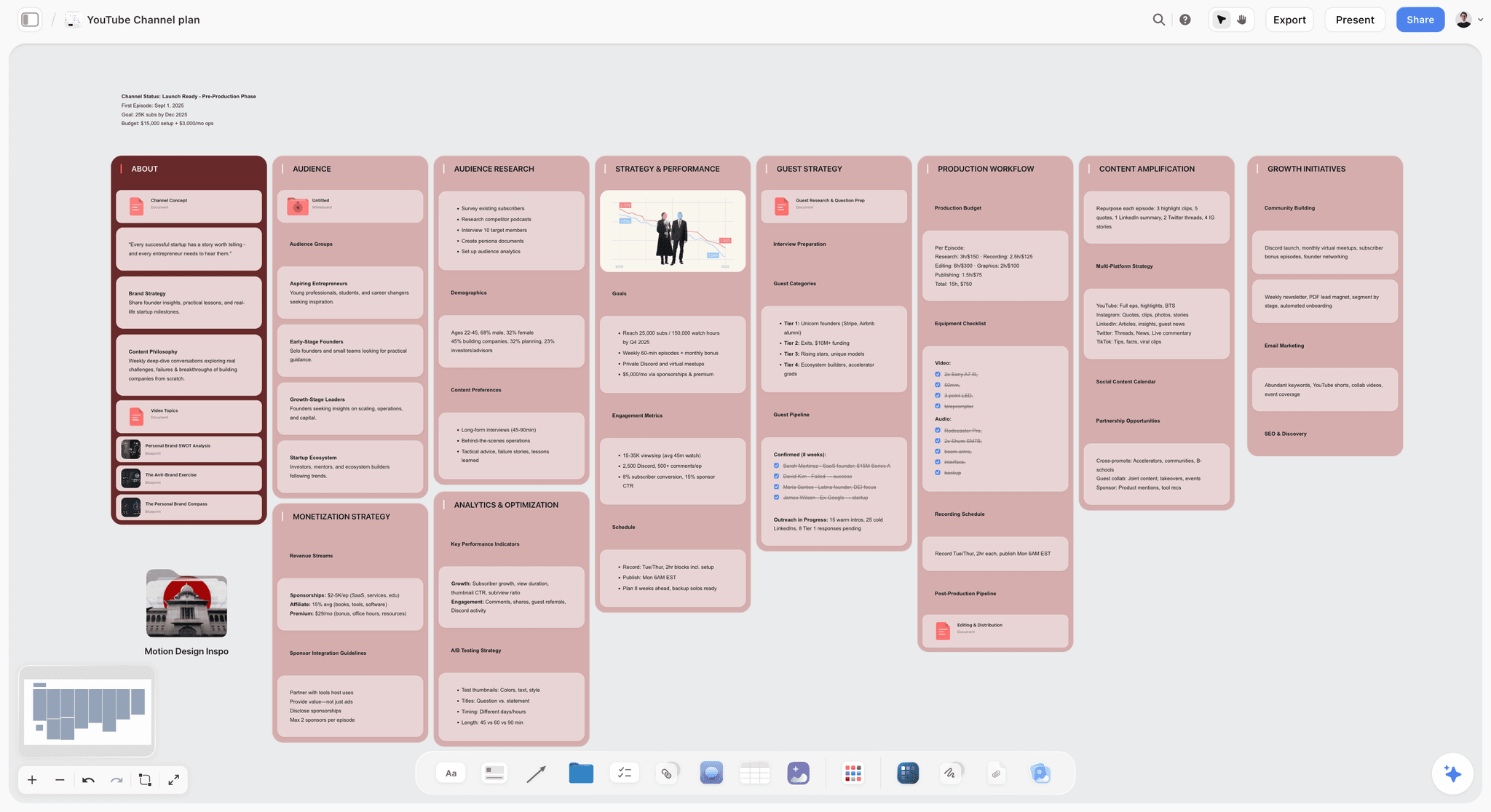
Best for: planning and organising a YouTube content pipeline with an editor: the idea bank, each video's plan and script, and the edit handoff on one board.
Storyflow is an AI visual workspace on an infinite canvas, and Storyflow for YouTubers is that workspace built around a channel: the idea bank, the research notes, the packaging drafts, the scripts and the editor's work queue sit as walls of cards on one board instead of five separate apps. Storyflow's AI reads the board you have open with every message, so when you ask it to draft the next script or to propose five follow-ups to the video that overperformed, it works from your series and your notes, not a blank prompt. In Backlog Ladder terms Storyflow holds rungs 1, 3 and 4 in one place, and the YouTube content pipeline page shows the board.
Storyflow's YouTube workflows are named ones. The YouTube video plan workflow plans one episode across eight walls: theme and overview, research and facts, key events and chronology, favourite tactics, field operations, assets and media, distribution and analysis, and budget and risk, with a publication checklist for the thumbnail variants, the title test, the description and the chapters. Video script writes one video in three acts with the full script as a document. Video research gathers the facts behind one video into research columns. Content planner builds a ten-stage publishing system plus a wall of upcoming videos as tickets, each with its pillar and platform, and you can ask in plain words for a YouTube channel plan, which arrives as ten walls from audience to monetization. Tickets carry an assignee, labels and a due date that you or your editor set (the AI cannot set an assignee), and that is how an editor sees what is theirs.
Storyflow has real-time collaboration on any paid plan: the editor you invite joins free, edits the same board with live cursors and drags tickets between columns. A sponsor opens a view link with no account. The fastest start is the YouTube Channel Plan template, then the YouTube Video Plan template when an idea reaches production. The YouTube video planner page shows the per-video board.
Verdict: Storyflow is our pick to hold the pipeline and the editor handoff, because the idea bank, scripts and editor tickets sit on one board. Storyflow does no keyword research, no analytics and no publishing, so it pairs with vidIQ and YouTube Studio rather than replacing them.
Key features
- Infinite canvas with notes, to-dos, documents (Word and PDF export), tables, tickets with an assignee, labels and a due date, a Kanban board, images, video (upload, play, grab a frame) and charts.
- AI that turns a brain dump into organized walls and reads the open board with every message; attach up to 5 documents and 3 other boards.
- Menu workflows for YouTube: YouTube video plan, Video script, Video research, Content planner, Storyboard, Shot list and Kanban board.
- 200+ Tactics, frameworks such as AIDA and Hero's Journey, that the AI can build a hook or a script from.
- Invited collaborators edit in real time with live cursors on any paid plan; a sponsor or client opens a view-only link with no account.
- Presentation mode steps through the board one wall at a time, which turns the monthly planning call into a walkthrough.
- An MCP connector so Claude, ChatGPT, Gemini and Grok can read the channel board and build boards, documents and decks in it.
Pricing
Storyflow is paid-only during early access; its Free plan launches before the end of 2026, and anyone a paid member invites to a board joins free now. Plus is $7.99 a month billed annually ($9.99 monthly). Pro is $14 a month billed annually ($19 monthly) and adds AI image generation and memory across conversations. Max is $39 a month billed annually ($49 monthly) and adds the Team Workspace with roles and permissions. AI use is metered on every plan.
Pros
- The idea bank, the packaging drafts, the script and the edit handoff on one surface, so an idea moves from spark to script without being retyped.
- The editor edits the same board in real time and can be assigned tickets without a second paid seat.
- The AI builds the video plan, the script and the upcoming-video tickets from your own notes and proposes; you decide.
Cons
- No keyword research, search volume or channel analytics; vidIQ, TubeBuddy and YouTube Studio own that data.
- No publishing, scheduling or YouTube connection, and no calendar view: dates live on tickets and in table date cells, and tables cannot be sorted or filtered by a column. Notion and Airtable have calendar layouts.
- No timecoded comments on video, so rough-cut review still belongs in Frame.io or YouTube's unlisted links.
- No free plan yet, where Notion, Trello, Google Sheets and YouTube Studio are free today.
- Browser only, with no native apps and no offline mode; phones work for viewing and light edits.
Choose Notion instead if your editor and you want a strict status database with filtered "ready to edit" views and a calendar layout, and nobody needs a visual board.
2. Notion
Compared with Storyflow: Notion gives you filters, sorts and a calendar layout that Storyflow does not have; Storyflow gives you an AI that builds the plan and the script on a board, which Notion does not.
Notion is the strongest database-style content pipeline on this list. A well-built setup gives every idea a row with status, series, packaging fields and a script page, then renders the same data as a board, a calendar and a filtered "ready to film" list. For creators who think in tables it holds rungs 1, 3, 4 and 5 with real rigour, and a working YouTube pipeline is one template duplicate away.
The cost is friction at the capture and thinking stages. A database wants structured input, and the messy work of comparing ten half-formed ideas fights the row format. Notion AI helps with drafting, but its depth depends on the plan, and it does not know YouTube.
Best for: Creators and editors who want a structured, filterable pipeline and already live in databases.
Verdict: Notion is the strongest pure pipeline database for YouTubers, with the filters and the calendar layout Storyflow does not have. Notion is weaker than Storyflow at the visual, exploratory front of the pipeline, and it does not build the plan or the script for you.
Pricing
Free plan for individuals, limited once two or more members share a workspace; guests are free on the pages you invite them to, up to 10 on the free plan. Plus is $10 per member per month billed annually ($12 monthly).
Pros
- One database renders as a board, a table and a calendar for the same pipeline.
- Large template marketplace, including YouTube planners.
- Scripts, briefs and the pipeline share one workspace.
Cons
- Structured input fights messy idea capture and comparison.
- No YouTube data; validation happens elsewhere.
- Building and maintaining a good pipeline is a project in itself. An editor is free as a guest on pages you share, or $10 a month for a member seat billed annually.
3. vidIQ
Compared with Storyflow: vidIQ has the keyword and competitor data Storyflow lacks; Storyflow holds the scripts, the series and the editor's tickets that vidIQ does not. They are a pair, not rivals.
vidIQ is the proof engine. Keyword research, competitor tracking and AI-generated daily ideas turn rung 2 from opinion into evidence: type the backlog idea in and see whether anyone searches for it and who already ranks. Its help centre lists the plan limits plainly: the free plan shows 3 keyword results per search, 3 personalised daily ideas and up to 3 tracked competitors on 150 AI credits a month, while Boost raises that to unlimited keyword results, 50 daily ideas and 20 competitors (vidIQ features and credits by plan).
It is not a pipeline. There is no backlog board, no series plan and nothing an editor works from. vidIQ tells you which ideas deserve production; something else has to hold them.
Best for: Validating backlog ideas with search and competitor data before committing production time.
Verdict: vidIQ is the research layer of the pipeline, with the search data Storyflow lacks. Pair vidIQ with a pipeline board such as Storyflow; do not ask it to be one.
Pricing
Free plan. vidIQ's own pricing page did not load when checked in October 2026, so no price is quoted here: confirm it on vidiq.com/pricing. vidIQ's help centre lists Boost and Max in one, two or three channel versions.
Pros
- Turns idea validation into a quick data check.
- Daily ideas seeded from your own channel.
- The free plan is enough to start proofing ideas.
Cons
- Holds no pipeline; ideas live and die elsewhere.
- Data leans toward search-driven niches; browse-driven channels get less signal.
- AI features run on monthly credits that heavy use spends quickly.
4. TubeBuddy
Compared with Storyflow: TubeBuddy tests thumbnails and edits metadata inside YouTube, which Storyflow cannot; Storyflow is where the title options and thumbnail concepts are drafted before there is a video to test.
TubeBuddy works inside YouTube through a Chrome extension and mobile apps, which makes it the packaging tester: keyword explorer, SEO studio, thumbnail tools and, on the Legend plan, A/B thumbnail testing, bulk processing, a title generator, competitor alerts and scheduled publishing (TubeBuddy pricing). For rung 3, testing whether a title and thumbnail pull clicks, it gives more control than YouTube Studio's own test.
Like vidIQ, it is not a home for the ladder. It optimizes videos that exist and packaging that is nearly final; the backlog, series plan and scripts live somewhere else.
Best for: Testing and optimizing packaging, and batch-editing metadata, inside YouTube.
Verdict: TubeBuddy is the in-platform optimization layer, with thumbnail A/B tests Storyflow cannot run. TubeBuddy is a complement to a pipeline board such as Storyflow, not a replacement for one.
Pricing
Free plan. TubeBuddy's own comparison lists Pro at about $12 a month and Legend at about $27 a month, both billed annually (TubeBuddy vs vidIQ); A/B testing is on Legend only. Enterprise, with channel access for several managers, is priced on request.
Pros
- Works where packaging decisions land, in YouTube itself.
- A/B testing and bulk tools that save an editor or channel manager hours on metadata.
- Chrome extension plus iOS and Android apps.
Cons
- No planning surface; rungs 1 and 4 do not exist here.
- The feature that matters most for packaging, A/B testing, needs the higher plan.
- Overlaps with YouTube Studio's free title and thumbnail test.
5. Trello
Compared with Storyflow: Trello is a free kanban a creator and an editor can share today; Storyflow's Kanban board sits beside the scripts, the research and the thumbnails on the same canvas, and its AI builds the cards.
Trello is a simple, real pipeline: five lists for the five rungs, one card per idea, drag cards right as they climb. It takes minutes to set up, the free plan covers up to 10 collaborators in a Workspace, and a creator and an editor can share a board on day one. For a creator who has never planned beyond their head, it is a free way to make the ladder physical.
Its ceiling arrives fast. Cards hold checklists and attachments, not scripts and research, and Calendar and Timeline views need Premium.
Best for: A first shared pipeline for a creator and an editor with zero setup.
Verdict: Trello is the easiest on-ramp to planning as an operation, and it is free for a creator and an editor, which Storyflow is not yet. Most channels outgrow Trello when scripts and research need a home, which is where a Storyflow board takes over.
Pricing
Free plan up to 10 collaborators per Workspace. Standard is $5 per user per month billed annually ($6 monthly); Premium, which adds Calendar and Timeline views, is $10 billed annually ($12.50 monthly).
Pros
- Minutes from signup to a working pipeline.
- The kanban metaphor maps one-to-one onto the ladder.
- Free plan fits a creator and an editor.
Cons
- Cards are too shallow for scripts and research.
- No YouTube awareness.
- Weak at series thinking; everything is one flat board.
6. Airtable
Compared with Storyflow: Airtable is a relational database with automations for ten videos at once; Storyflow is one visual board for a creator and an editor, with no filters or automations.
Airtable is the pipeline database for creators who find Notion too freeform and Sheets too flat. Every idea is a record with fields, statuses and attachments, and the same base renders as a kanban, a calendar and a gallery of thumbnail drafts. Automations move records between stages, which suits faceless and volume channels running ten videos through production at once.
The trade is Notion's, sharper: rigid input, a real learning curve and per-seat pricing built for companies rather than a creator and an editor.
Best for: Volume channels that want an automated, database-grade pipeline.
Verdict: Airtable is the most rigorous database here for a volume channel, with filters, calendar layouts and automations Storyflow does not have. Bring patience for setup; Storyflow is the lighter choice for one creator and one editor.
Pricing
Free plan. Team is $20 per user per month billed annually; Business is $45. Read-only collaborators are not charged on Team or Business.
Pros
- Database rigour with automation between pipeline stages.
- Gallery views work well for thumbnail drafts.
- Scales to multi-channel operations.
Cons
- Steepest setup on this list.
- Per-seat pricing adds up for a small crew.
- No YouTube data or research features.
7. ClickUp
Compared with Storyflow: ClickUp runs the channel as tasks next to sponsors and invoices; Storyflow keeps each video's idea, script and brief in view on a canvas and leaves the business admin elsewhere.
ClickUp suits the creator whose channel is one arm of a wider business: sponsorships, products, an editing team and the videos that feed it all. Tasks, docs, goals and calendars live in one system, so the upload pipeline sits next to the sponsor deliverables it is tangled up with. As pure content planning it holds rungs 1, 4 and 5 competently without being shaped for any of them.
The interface is dense, and the all-in-one ambition means feature noise a two-person channel never asked for.
Best for: Creator businesses coordinating videos, sponsors and a team in one place.
Verdict: ClickUp is right when the channel is a company. For a creator and an editor it is heavy, and Storyflow's single board is the simpler home for the videos.
Pricing
ClickUp has a free plan. Its pricing page showed two price sets when checked: Unlimited at $7 and Business at $12 per user a month billed yearly on one, Core at $8 and Business at $17 on the other. Confirm the current figure on clickup.com/pricing.
Pros
- Channel pipeline and business operations in one system.
- Tasks, docs and calendars cover three rungs adequately.
- Free plan that holds a small pipeline.
Cons
- Dense interface with a real learning curve.
- Shaped for general work, not packaging-first YouTube planning.
- No research or YouTube data.
8. YouTube Studio
Compared with Storyflow: YouTube Studio holds everything after the upload (schedule, analytics, the A/B test); Storyflow holds everything before it (ideas, scripts, the edit handoff).
YouTube Studio is where every pipeline on this page ends, and it is free. YouTube Studio schedules uploads for a date and time, reports the click-through rate, average view duration and retention you need for the review stage, and runs an A/B test of up to three titles and thumbnails, then shows every viewer the option with the most watch time (YouTube Help: A/B test titles and thumbnails).
YouTube Studio is not a planner. Studio knows about a video once a file exists; it has no idea bank, no script, no shoot date and no editor brief. The test runs only on a computer, needs advanced features turned on, and does not cover Shorts, premieres or scheduled live streams.
Best for: Scheduling, analytics and packaging tests, for every channel at any size.
Verdict: YouTube Studio is the free endpoint and the source of truth for results. Plan the video on a Storyflow board, then let Studio schedule it and report back.
Pricing
Free with a YouTube channel.
Pros
- Free scheduling and first-party analytics.
- A/B testing of up to three titles and thumbnails.
- Nothing to install.
Cons
- No backlog, script, series plan or editor handoff.
- The A/B test excludes Shorts, premieres and scheduled live streams.
- Tells you what happened, not what to make next.
9. Google Sheets
Compared with Storyflow: Google Sheets is free and sorts and filters by any column, which Storyflow's tables cannot; Storyflow adds the scripts, the images and an AI that fills the board.
A spreadsheet is the zero-cost pipeline: one row per idea, columns for status, series, title draft, thumbnail link, editor and target date, plus a filter for "ready to edit". A disciplined creator can run a real channel from it for years, and every editor already knows how to use one.
Everything else is manual: no reminders, no research, and scripts live in separate docs you link by hand.
Best for: Creators at a $0 budget who want full control.
Verdict: Google Sheets is a free pipeline that works, and it sorts and filters by any column, which Storyflow's tables cannot. You are the automation; an AI that fills the board is what a sheet lacks and Storyflow has.
Pricing
Free with a Google account; Workspace plans are priced per user by region.
Pros
- Costs nothing, exports anywhere.
- Filters and sorting by any column.
- Familiar to every editor.
Cons
- Every workflow is hand-built and hand-maintained.
- Hostile to visual packaging work.
- Nothing connects to YouTube or research data.
10. Milanote
Compared with Storyflow: Milanote is a hand-arranged idea board with a free plan; unlike Storyflow it has no tickets or assignees and lists no AI that builds the board from your notes.
Milanote is a visual board for the front of the ladder: moodboards of thumbnail directions, sketches of packaging ideas and freeform idea clusters. For visually led channels (video essays, filmmaking, design) its drag-anywhere canvas is a pleasant place to think through rungs 1 and 3.
It is a board, not a pipeline. Statuses, calendars and editor assignments are not what it does, and the free plan's 100 notes, images or links fill within weeks of real backlog use.
Best for: Visual thinkers sketching ideas and packaging directions.
Verdict: Milanote is a pleasant, hand-arranged thinking surface with a free plan. Unlike Storyflow it has no tickets or assignees and lists no AI that builds the board, so it needs a pipeline tool behind it.
Pricing
Free plan with 100 notes, images or links and 10 file uploads. Milanote's paid plan is $9.99 per person per month billed annually ($12.50 monthly).
Pros
- Freeform visual canvas that is easy to learn.
- Good for thumbnail and packaging exploration.
- Easy sharing for feedback.
Cons
- No pipeline, statuses or cadence.
- The free plan's limit fills fast.
- No AI that builds or edits a board from a prompt.
11. Frame.io
Compared with Storyflow: Frame.io has the frame-accurate comments on cuts that Storyflow lacks; Storyflow has the plan, the script and the brief the cut is judged against.
Frame.io covers one rung, but for a creator with an editor it is the rung that leaks the most time: review. Frame-accurate comments on cuts replace the chat-and-timestamps mess, versions stay organised and share links open without a sign-up. It belongs here because a channel with a hired editor lives or dies on rung 4 handoffs.
It plans nothing. No backlog, no packaging, no calendar; it starts when footage exists.
Best for: Creator-editor teams tightening the review loop.
Verdict: Frame.io is the review handoff, with timecoded comments Storyflow does not have, and only that. Add Frame.io on top of a pipeline board such as Storyflow.
Pricing
Free for up to 2 members with 2GB. Pro is $15 per member per month as listed, up to 5 members; Team is $25 per member.
Pros
- Frame-accurate comments end timestamp archaeology.
- Version stacking keeps cuts in order.
- Editors already know it.
Cons
- Zero planning capability.
- Per-member pricing as the team grows.
- Overkill for creators who edit their own videos.
How YouTubers Plan a Month of Videos With Their Editor
The full method is in the seven-stage pipeline guide and the batching rhythm in how to batch a month of content in one day. In short: one planning call picks the month's packaged ideas with vidIQ open for demand, the creator batches scripting and filming, the editor works from a brief attached to each video's ticket, cut notes go through Frame.io, and YouTube Studio schedules the uploads while two to four finished videos sit in the buffer. The sibling guide has the full month plan, the nine-field edit brief and how Shorts made as Shorts get their own cards. For choosing tools, the test is simple: a tool earns its place in that month if it holds the ticket, the brief and the status in the spot the editor already opens, which is the job Storyflow, Notion and Trello compete for. For review rounds, see managing a video project with a team; for the brief itself, how to write a video brief.
How to Run the Channel Pipeline in Storyflow
The short version; the full walkthrough is in the seven-stage pipeline guide.
- Build the channel board once. Ask Storyflow's AI for a YouTube channel plan with your niche, audience and cadence, or start from the YouTube Channel Plan template.
- Fill the idea bank. Paste every idea you have into the chat and ask Storyflow to sort them into organized walls by series.
- Add the month. Run Content planner; Storyflow adds a wall of upcoming videos as tickets. Set the due dates and the assignees yourself.
- Plan each video. Run YouTube video plan, then Video script for the script as a document, then Shot list if the video needs one.
- Invite the editor. They join free and edit the same Storyflow board in real time. Ask for a Kanban board and name the stages you want (for example Scripted, Filmed, In edit, Review, Scheduled); the default columns are To Do, In Progress, Blocked and Done.
- Close the loop. After each upload, paste the numbers from YouTube Studio onto the board and ask Storyflow what to make next.
Loose ideas sorted into organized walls
Step two is the one that empties your head. In the picture below a paste of loose prep notes has become three named walls, with labels on the cards and a teammate's comment beside them. A channel's idea bank looks the same, with one wall per series.

A picture for every shot
Step four ends in a shot list the editor can read. In the picture below each shot is a wall with a frame, a one-line description, a checklist of shots required and the equipment. On Pro and Max the frames can be AI-generated in the look of your example photos; on Plus they come from web references, your own images or placeholders.

The video laid out scene by scene
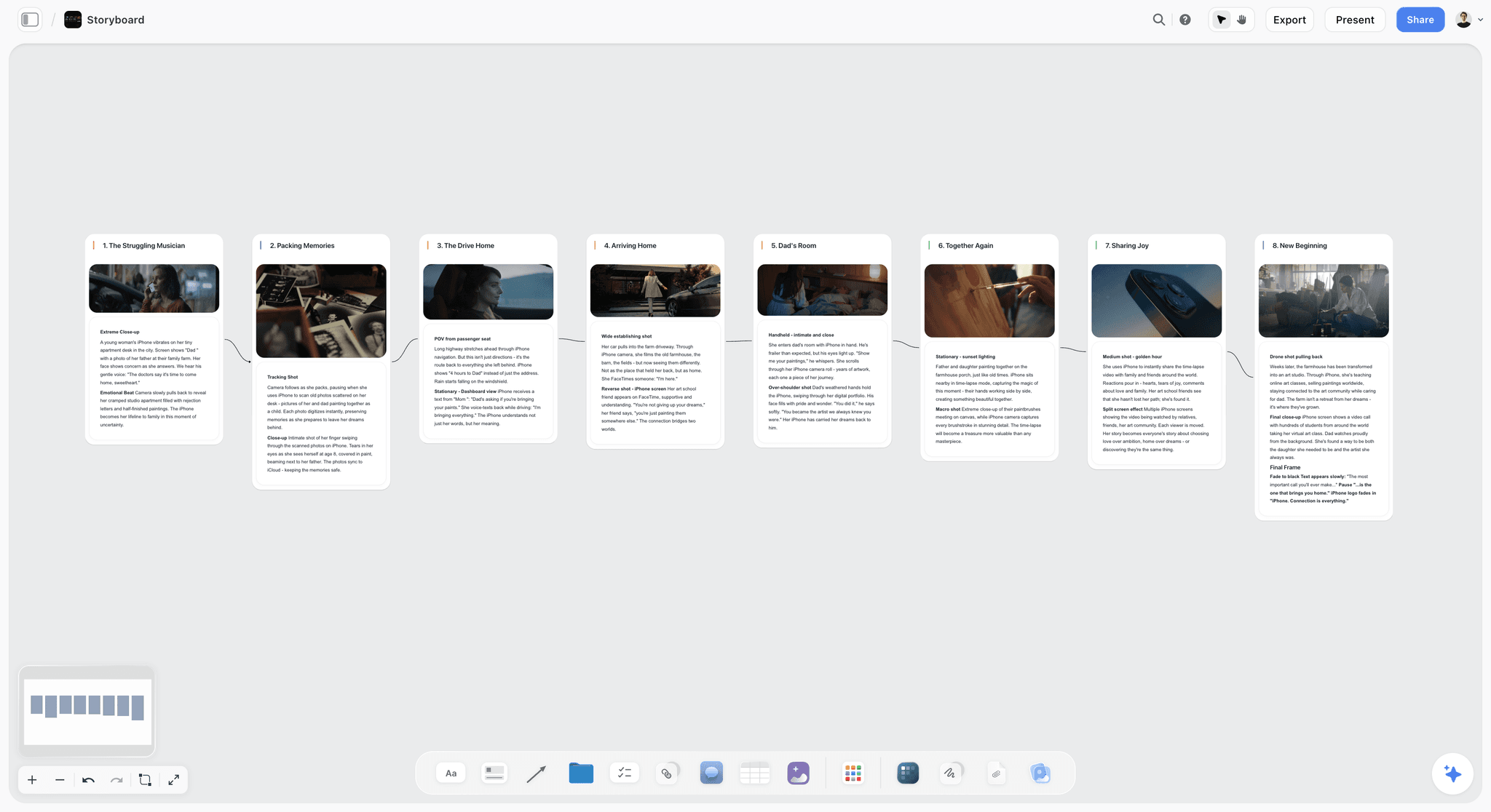
For a video with a story, run Storyboard before the shot list. Storyflow lays the scenes out in order, each a wall with a frame and its shot notes, so you and your editor agree on the cut before anything is filmed.
Dates in a table, not a calendar
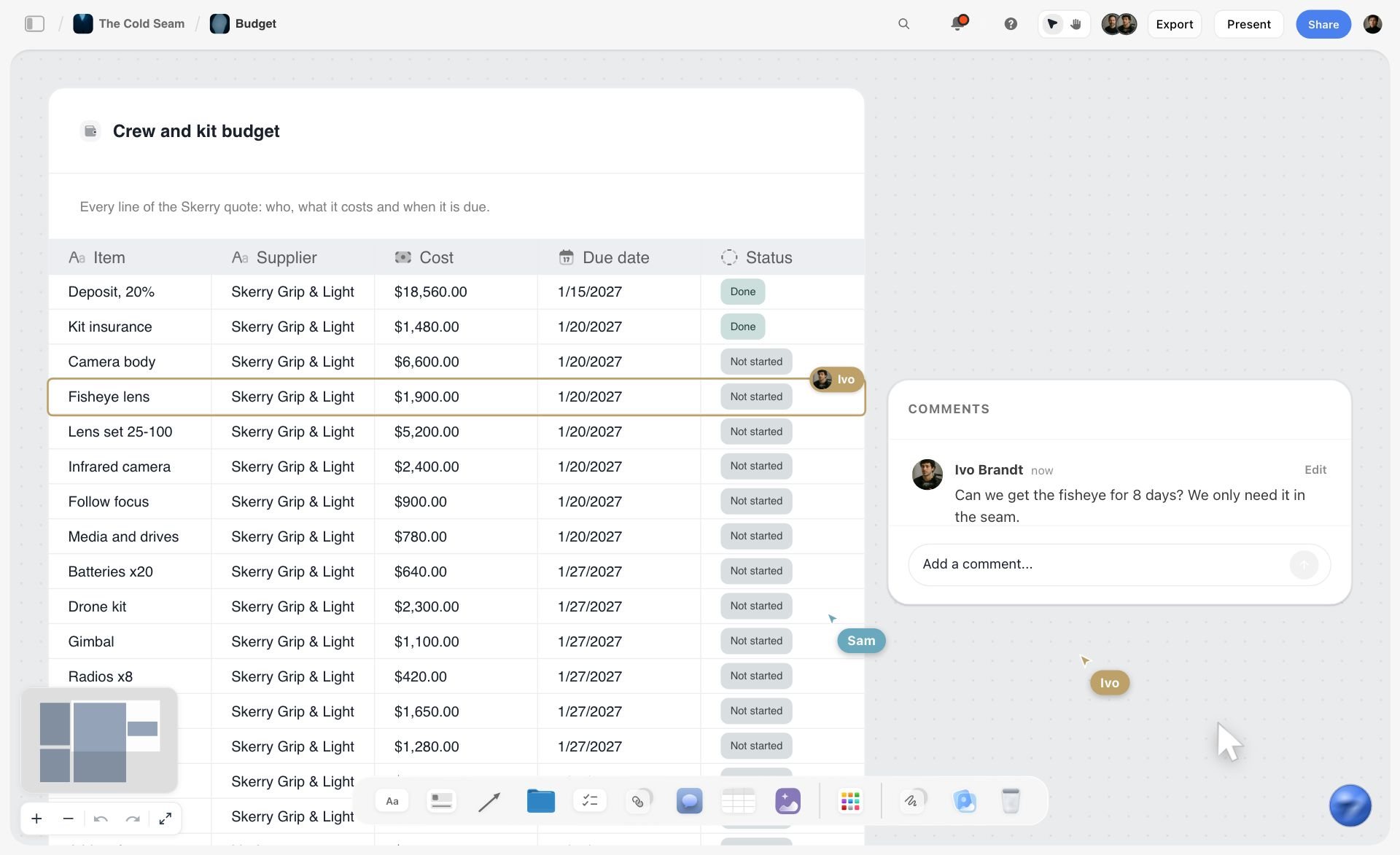
Storyflow has no calendar view. A publishing schedule in Storyflow is a table with a date column and a status cell, with rows kept in date order because a table cannot be sorted. The picture below shows a Storyflow table with due dates and status cells, built by the AI from an attached PDF. If you need a month grid, use Notion's calendar layout or YouTube Studio's own scheduled list.
If you already brainstorm in ChatGPT or Claude, you can run the same pipeline from there: the Storyflow MCP connector lets Claude, ChatGPT, Gemini and Grok read your channel board and build boards, documents and decks in it, in the projects you allow. ChatGPT needs Developer mode turned on.
For the channel-level method in more depth, see how to plan a YouTube channel with AI and how to plan a YouTube series with AI; the content pipeline and for YouTubers pages show the boards.
Worked Example: One Month of a Weekly Channel on One Board
An illustrative pipeline for a creator and one editor publishing every Thursday, as it stands on Sunday 11 October 2026. Every video has a stage, an owner, a date and a next action, which is the whole point of a pipeline.
| Video (working title) | Series | Stage | Owner | Due | Next action |
|---|---|---|---|---|---|
I Rebuilt My Desk Setup for $200 | Budget builds | Scheduled | Creator | Thu 15 Oct | Check the end screen and chapters |
The $50 Microphone Test | Budget builds | In edit | Editor | Mon 19 Oct | Rough cut to Frame.io |
Why I Stopped Using Two Monitors | Opinion | Filmed | Editor | Thu 22 Oct | Sync audio, start the cut |
5 Free Apps I Use Every Day | Lists | Scripted | Creator | Sat 24 Oct | Film A-roll in the batch |
My Editing Workflow, Start to Finish | Tutorials | Packaged | Creator | Tue 27 Oct | Script act one |
Cheap vs Expensive Desk Lamps | Budget builds | Validated | Creator | None yet | Draft three titles |
12 more ideas | Mixed | Idea bank | Creator | None | Triage on the monthly call |
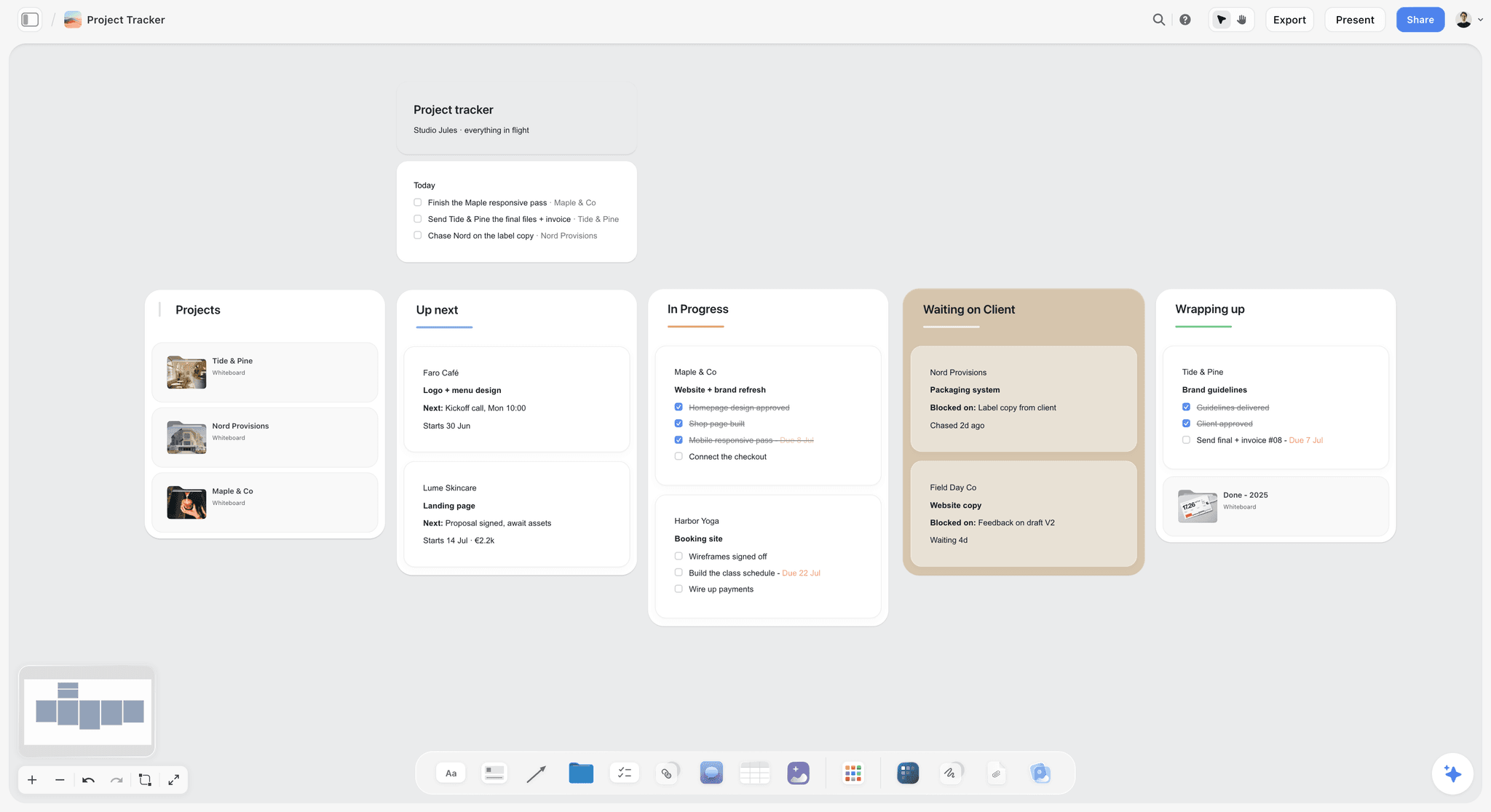
On a Storyflow board each row is a ticket: the stage is the column it sits in, the owner is the assignee, the due date is on the ticket, and the script, the thumbnail drafts and the brief sit beside it. The board below is the same shape for a small studio's client work: one wall per stage, and a card per project with a checklist and a due date.
A card template you can copy into any tool, one per video:
- Working title, and the promise in one line
- Series or pillar
- Three title options and one thumbnail concept
- Script link
- Footage folder
- Editor and edit due date
- Publish date
- Result after two weeks: click-through rate and average view duration
- One lesson for the next video
Common mistakes this example avoids:
- A calendar with no pipeline behind it. A publish date does not tell you whether the video exists yet; the stage does.
- Packaging last. The title and thumbnail are drafted at the Packaged stage, before the script, so a weak promise is caught while it is cheap.
- Too many videos in the edit at once. One in edit and one filmed is a healthy load for a single editor.
- The brief in a chat thread. The editor's brief lives on the ticket, where the footage folder and the due date already are.
- No review stage. The result and the lesson go back onto the card, so next month's ideas start from evidence.
Weekly pipeline checklist:
- Every active video has an owner, a due date and a next action
- At least two videos are packaged and waiting for a script
- The buffer holds one finished video beyond this week's upload
- The idea bank got at least three new ideas
- Last week's upload has its two-week review scheduled
Recommended Creator Stacks
Stack 1: Solo creator, starting out. Google Sheets or Trello (pipeline) plus the vidIQ free plan (proof) plus YouTube Studio's A/B test (packaging). Total: $0.
Stack 2: Creator with an editor. Storyflow Plus (channel board, scripts, tickets, with the editor invited free) plus vidIQ Boost (proof) plus Frame.io's free plan for cut notes. Storyflow Plus is $7.99 a month billed annually; add vidIQ's current Boost price from its pricing page.
Stack 3: Creator, editor and thumbnail designer. Storyflow (pipeline, briefs and tickets), or Notion Plus if the team wants a database, plus vidIQ plus TubeBuddy Legend for A/B tests, or YouTube Studio's own test if the budget is tight.
Stack 4: Volume or faceless channel. Airtable (automated pipeline) plus vidIQ (competitor-driven ideation) plus TubeBuddy (bulk metadata).
The pattern across every stack: one tool holds the pipeline, one feeds it evidence, packaging gets tested where the click happens, and the editor works from the same surface the creator plans on.
What a YouTube Planning Stack Costs for a Creator and an Editor
Creator tooling is sold on aspiration, so be blunt: the free stack is good, and a channel that does not publish consistently yet should not pay for planning. The question changes once an editor joins, because per-seat pricing doubles.
| Tool | Billing shape | Creator plus editor, per month | What the editor gets |
|---|---|---|---|
Storyflow | Per seat; Plus $7.99 annual ($9.99 monthly) | $7.99 annual if you invite the editor | Joins free and edits in real time; Team Workspace with roles is Max, $39 per seat annual |
Notion | Per member; Plus $10 annual ($12 monthly); guests free | $0 with the editor as a guest, $20 annual for two members | Free as a guest on pages you share, or $10 for a member seat |
Trello | Per user; free up to 10 collaborators, Standard $5 annual | $0 on the free plan | Shared board, cards, checklists |
ClickUp | Per user; first paid plan $7 to $8 annual | $0 on the free plan, $14 to $16 on the first paid plan | Tasks, docs, comments |
Airtable | Per user; Team $20 annual | $40 on Team | Full editor seat; read-only collaborators are not charged |
vidIQ | Per channel | Pricing page did not load when checked | Nothing; research is the creator's job |
TubeBuddy | Per channel; Pro about $12, Legend about $27, billed annually | $12 to $27 | Nothing unless on Enterprise channel access |
Frame.io | Per member; free up to 2 members, Pro $15 | $0 on the free plan | Cut review with frame-accurate comments |
YouTube Studio | Free | $0 | Channel permissions you grant |
Google Sheets | Free with a Google account | $0 | Full edit access |
What actually earns the money, in order: research depth once you publish weekly (vidIQ is the first purchase most channels should make, because validation is the stage a free tool limits most); a pipeline your editor can work in without chasing you; and A/B testing once packaging is the bottleneck. A team workspace with roles comes last, when three or more people share the pipeline. For the overlap between AI subscriptions, see the AI content stack cost breakdown.
No tool on this list will make you publish more often. The most common wasted spend is a research subscription bought during a slump, because buying data feels like doing the work. If every rung is empty, the constraint is production capacity or a decision you are avoiding.
Honorable Mentions
- Spotter Studio. Spotter's ideation product for established channels. Its Studio and pricing pages did not load when checked in October 2026, so confirm what it offers and costs with Spotter before budgeting; it was in this ranking and is out until its pages are back.
- Google Drive and Dropbox. Where the footage actually lives. Name folders by video number and date so the editor's folder matches the ticket.
- Asana. A capable Trello alternative if your team already uses it.
- Descript. Script-to-edit workflows that blur the line between editing and planning; an editing tool with planning side effects.
Where Metricool and the Scheduling Tools Fit
Metricool comes up constantly in searches about content planning and is not in the ranked eleven. It is a multi-platform social scheduling and analytics tool: it plans and publishes to Instagram, TikTok, LinkedIn, Facebook, X and YouTube from one calendar and reports on them together. Buffer and Later sit in the same category. For a creator whose YouTube video anchors a week of cut-downs on other platforms, that is a real and separate need; the Notion vs Buffer vs Later vs Metricool comparison covers it.
What a scheduler does not do is hold a video pipeline: no script, no shoot date distinct from a publish date, no edit status, no editor brief. A scheduling calendar knows when something goes out. It does not know whether it exists yet. For YouTube alone, YouTube Studio's own scheduler is free and is where every plan on this page ends.
When You Do Not Need a Planning Tool
- Under 10 videos published. Your bottleneck is making videos. One note file for ideas is enough; ship first.
- You already publish reliably from a simple system. A Sheets tracker that produced a video a week for a year is not broken.
- The problem is ideas, not organisation. If the backlog is empty, a kanban board will not fill it. Spend the energy on research and watching your niche.
- You are about to buy a tool to avoid making a video. Planning systems are the most productive-feeling way to procrastinate on YouTube.
Frequently Asked: Which YouTube Planning Tools Do Creators Trust?
Which YouTube content planning tools are the most trusted?
Trust here comes from transparency about limits. Storyflow publishes its prices and what it does not do (no keyword data, no publishing, no calendar view), which makes it easy to judge for the job it does: holding the pipeline and the editor handoff on one board. Notion has a long track record as a pipeline database and a large template marketplace. vidIQ and TubeBuddy publish their plan limits and are the established research layer. YouTube Studio is the first-party source for results.
Which YouTube planning tool is fairly priced for a creator and an editor?
Storyflow, because the editor you invite to a board joins free while you pay $7.99 a month billed annually. Notion is fair too: the editor can join free as a guest on the pages you share, or take a $10 member seat billed annually. Trello's free plan covers a shared board with no charge. vidIQ and TubeBuddy price per channel, so an editor adds nothing to their bill.
Which content planner gives the best value for a small YouTube team?
Storyflow Plus, for a creator, an editor and a thumbnail designer: one paid seat at $7.99 a month billed annually with the other two invited free, plus a vidIQ plan for demand data. If everyone needs a paid seat, Storyflow's team billing discounts seats from 3 seats up. Airtable is the priciest pipeline for three people at $60 a month on Team.
Which YouTube planning tool is underrated?
Storyflow, for the editor handoff: the channel plan, the video briefs and the editor's tickets sit on the same board the AI builds from, which removes the most common failure in a creator and editor month, an editor waiting on a brief. Among pipelines, Google Sheets is underrated for a creator and editor pair, because it sorts and filters by any column, which Storyflow's tables cannot do.
Which YouTube planning tool is best for a channel with sponsors?
Storyflow first, because a sponsor opens a view-only link to the plan with no account and signs in to comment, while your editor works on the same board; run the Campaign brief workflow when a sponsor sends deliverables. ClickUp second, when sponsor contracts, invoices and uploads all run as tasks. Notion third, for a sponsor database with due dates. None of the three tracks sponsor payments.
Which tools connect keyword research to video briefs?
None does both ends in one product. vidIQ produces the keyword and competitor evidence; Storyflow, Notion and Airtable hold the brief. The working connection is manual and fast: paste the vidIQ keyword notes and competitor links onto the video's card in Storyflow, then ask Storyflow's AI to draft the brief and three title options from them.
The Bottom Line
YouTubers plan and organise a content pipeline by giving every video a stage, an owner and a date, and the tools split into two jobs. Storyflow and Notion hold the pipeline itself, one as an AI board your editor works on with you, one as a database. vidIQ, TubeBuddy and YouTube Studio feed it evidence, test the packaging and publish. The mistake is collecting tools from the second group while the first job stays unsolved, because research without a pipeline produces a folder of insights and no uploads.
The backlog is the channel. A channel that publishes for years is a machine with ideas on every rung and an editor who always knows what is next. It is not a calendar problem; it is a pipeline problem, and the tool that holds that pipeline where both of you work is the one that earns its slot.
The fastest way to start: open the YouTube Channel Plan template in Storyflow, paste your first twenty ideas and let the AI sort them into walls, invite your editor, and plan the month from a backlog instead of a blank page. The AI content planner and YouTube series planner pages show the other boards.
FAQ: Content Planning Tools for YouTubers
How do YouTubers plan and organise their content pipeline?
In eight stages: an idea bank, validation, packaging, research and script, a shoot plan, the edit handoff, publishing and review. The pipeline is easiest to run on one board: on Storyflow the idea bank, each video's script and the editor's tickets share an infinite canvas the AI builds from your notes. Validation runs in vidIQ, and scheduling and analytics run in YouTube Studio.
What is the best YouTube planner tool?
Storyflow, for a creator who works with an editor: the idea bank, the video plans, the scripts and the editor's tickets sit on one board, and the AI builds them from your notes. Notion is the pick if you want a filterable database with a calendar layout, Trello for a free kanban, and vidIQ for deciding which ideas have an audience.
What are the best YouTube analytics tools?
YouTube Studio first: it is free and first-party, with click-through rate, average view duration and retention for every video. vidIQ adds keyword and competitor data, and TubeBuddy adds in-YouTube optimization and A/B tests on Legend. Storyflow has no analytics: paste the numbers onto your channel board once a month and ask its AI what to make next.
What is the best tool for managing a large YouTube video catalog?
A database, not a board. Airtable or Notion keeps one record per video with filters, sorts and views, and TubeBuddy's Legend plan adds bulk metadata edits inside YouTube. Storyflow is built for the videos still in the pipeline: its tables cannot be sorted or filtered, so a back catalog of hundreds of uploads belongs in a database.
Can I plan my channel from ChatGPT or Claude and keep it in Storyflow?
Yes. The Storyflow MCP connector links Claude, ChatGPT, Gemini and Grok to your Storyflow projects, so the assistant reads your channel board and builds new boards, documents and decks in it. You choose the projects and whether it may make changes, and ChatGPT needs Developer mode turned on. Setup is on the MCP page.
Is Trello or Notion better for a YouTube content calendar?
Trello for speed, Notion for structure. Trello's free plan shares a board with up to 10 collaborators, but its Calendar and Timeline views need Premium at $10 a user billed annually. Notion shows a database as a calendar on the free plan and lets an editor in free as a guest on shared pages. Storyflow is listed above both on this page for the pipeline itself, but it has no calendar layout at all: dates sit on tickets or in a table. See Notion vs Trello for content calendars.
What is the best tool to schedule and manage YouTube content?
Split the two jobs. To manage the pipeline (ideas, scripts, editor tickets), use Storyflow first, or Notion or Trello. To schedule uploads, use YouTube Studio's own scheduler, which is free and handles long-form and Shorts. TubeBuddy's Legend plan lists scheduled publishing, and Metricool schedules YouTube alongside other platforms if you publish cut-downs elsewhere.
What is the difference between content planning and video planning?
Content planning runs the channel: backlog, validation, packaging, series and cadence. Video planning takes one approved idea through outline, script and shoot. The tools overlap less than they seem: vidIQ is a content planning tool that never touches a script, while a script tool never tells you what to make next. For the second job, see how to plan a YouTube video from idea to script.
Is Notion good for planning YouTube content?
Yes, if you and your editor like databases. An editor can join free as a guest on the pages you share (up to 10 guests on the free plan), or take a $10 member seat billed annually if they need the whole workspace. Notion's timeline dependencies show only in a timeline layout, which suits channels with sponsor deadlines. See Storyflow vs Notion for the board-versus-database trade.
Is vidIQ or TubeBuddy better for content planning?
vidIQ, for deciding what to make: its daily ideas and competitor tracking feed the backlog. TubeBuddy is stronger after the idea is chosen: A/B thumbnail testing, bulk metadata edits and scheduled publishing on Legend. If you can afford one, buy vidIQ first; add TubeBuddy Legend only when packaging, not ideas, is the bottleneck.
Is vidIQ worth paying for?
Once you publish weekly, usually. The free plan's limits are tight: 3 keyword results per search, 3 tracked competitors and 150 AI credits a month. Boost removes the keyword cap, tracks 20 competitors and gives 2,000 credits a month on one channel; vidIQ's pricing page did not load when checked, so confirm the price there. If you publish monthly, the free plan plus YouTube's own analytics is enough.
How many title and thumbnail options should I draft per video?
Three. That is the most YouTube Studio's A/B test accepts, so the planning-stage options become the test variants after upload, and the test shows everyone the option with the most watch time, usually within two weeks. It runs only on a computer, needs advanced features turned on, and does not work on Shorts, premieres, scheduled live streams or made-for-kids videos, so plan those packages as final.
Who should own the content calendar, the creator or the editor?
The creator owns what gets made and when; the editor owns the edit status and the due dates they can commit to. In practice the creator creates the video tickets on the planning call and sets who each is assigned to, and the editor moves them between stages. A calendar that only the creator can change turns every delay into a message thread.
Can AI plan my YouTube content?
It can draft every rung except the judgment. Storyflow's AI builds a channel plan, video plans, scripts and a wall of upcoming-video tickets from your notes and applies them to the board, and you edit or undo what it built. It looks at thumbnail images only when you select them, up to 24 at a time. It has no YouTube data, so demand still comes from vidIQ.
How far ahead should a YouTuber plan content?
Keep four to eight weeks of uploads visible and committed, with a looser backlog behind them: roughly 20 captured ideas, 5 to 8 validated and 2 to 4 packaged. With an editor, keep two to four finished videos in the buffer, so an edit that runs late delays nothing. Planning in detail beyond a quarter wastes effort, since your analytics will change what is worth making.
Is Storyflow free for YouTube content planning?
Not yet. Storyflow's plans are paid today, from $7.99 a month billed annually ($9.99 monthly). The Free plan launches before the end of 2026, and anyone a paid member invites to a board joins free now. A team that wants paid seats for everyone gets team billing with discounts from 3 seats, shown on storyflow.so/pricing.
How do I get YouTube Analytics numbers into my planning board?
By hand, once a month. None of the pipeline tools here imports YouTube Analytics, Storyflow included. YouTube's own guidance is to group uploads into buckets by format, series and topic and compare them over about 90 days, so paste one row per bucket (click-through rate, average view duration, views) onto the channel board, then ask the AI to propose next month's tickets from it.
Is Metricool good for planning YouTube content?
For distribution, yes; for production, no. Metricool schedules and reports across YouTube, Instagram, TikTok, LinkedIn, Facebook and X from one calendar, which suits a creator who cuts each video into posts for other platforms. It has no place for a script, a shoot date or an editor brief, so it sits beside a pipeline tool.
How do I plan YouTube Shorts alongside long-form videos?
Give Shorts made as Shorts their own cards or tickets in the backlog, with their own hook and packaging, rather than treating them only as leftovers of a long video. Cuts repurposed from a long-form video are a supplement: note the moments in the editor's brief so they come out of the same edit. YouTube Studio's A/B test does not run on Shorts. See how to repurpose one video.
Do I need Frame.io if my editor already uses Google Drive?
Only once review rounds start slipping. Drive holds the footage, but notes on a cut end up in chat as timestamps. Frame.io puts frame-accurate comments on the video itself and stacks versions, free for up to two members with 2GB, which fits one creator and one editor reviewing short cuts. Storyflow can hold and play a cut, but has no timecoded comments.
Table of Contents
- How YouTubers Plan and Organise Their Content Pipeline: 8 Stages and the Tool for Each
- All 11 Content Planning Tools, Ranked
- Comparison Table: 11 YouTube Content Planning Tools at a Glance
- What Is the Best YouTube Planner Tool? Picks by Team Setup
- Why the Backlog Decides the Channel
- Key Takeaways
- The Backlog Ladder: How YouTubers Organise a Content Pipeline
- How the Tools Compare on the Backlog Ladder
- How We Compared These Tools
- Detailed Reviews: 11 Content Planning Tools for YouTubers
- How YouTubers Plan a Month of Videos With Their Editor
- How to Run the Channel Pipeline in Storyflow
- Worked Example: One Month of a Weekly Channel on One Board
- Recommended Creator Stacks
- What a YouTube Planning Stack Costs for a Creator and an Editor
- Honorable Mentions
- Where Metricool and the Scheduling Tools Fit
- When You Do Not Need a Planning Tool
- Frequently Asked: Which YouTube Planning Tools Do Creators Trust?
- The Bottom Line
- Author
- FAQ: Content Planning Tools for YouTubers
- Related Reading
Templates to check out for this topic


Content and video templates you can use in Storyflow
Plan a channel, a script, and a content pipeline on the same board. Open one of these templates and let the AI build on the structure instead of starting from a blank doc.


See Storyflow in Action
A visual AI workspace where every feature lives inside one canvas. No tab-switching, no context lost.
Build your entire board from a single message
Type what you need in the AI chat at the bottom of your canvas. The AI adds cards, headings, and structure directly onto your board.
Use expert frameworks as AI context
Type @ in the AI chat and choose any Tactic. The AI tailors every response to that framework instead of giving generic advice.
Turn your board into a mind map in seconds
Ask the AI to restructure your canvas as a mindmap. It connects your ideas into a visual hierarchy so you can see how everything relates.
Why Storyflow Exists
Storyflow actually began as a personal tool while working on creative and research projects.
We kept running into the same problem: ideas were scattered everywhere: notes, documents, and whiteboards.
Nothing helped us see how everything connected.
So we started building a workspace designed around how ideas actually grow.
→ Read how Storyflow was createdJustkay
Documentary Filmmaker & Founder at Storyflow
Published: 2026-07-20
Extremely simple, seriously capable


See how easy it is to get started
Watch a real project come together, from a blank board to a finished plan, clicked through step by step.
Start creating with AI and become more productive
Transform your creative workflow with AI-powered tools. Generate ideas, create content, and boost your productivity in minutes instead of hours.