Notion vs Asana vs Trello vs Storyflow: Content Calendars (2026)
Small teams rarely lose a content calendar to a missing feature; they lose it in week three, when the plan and the work drift apart. Here is how Notion, Asana, Trello and Storyflow hold up for a team of 3 to 8, with prices at 3 and 8 seats.

Category
Content Strategy
Author

Storyflow Team
Product & Research Team
Topics
2026-09-18
•
40 min read
•
Content Strategy- best content calendar tools small team 2026
- Notion content calendar template team
- Asana editorial calendar small team pricing
- Trello content calendar free plan
- Buffer content calendar pricing teams
- CoSchedule marketing calendar pricing small team
What's the best content calendar tool for a small team?
The best content calendar for a small team in 2026 is Storyflow: its AI drafts the month's plan from your brief, and each post's date, owner and status sit in a table beside its brief, script and visuals, on one board a manager or client opens by link. Storyflow has no month grid, so a team that plans from a calendar grid should pick Notion or Asana, which both include one on every plan. None of the four publishes posts: pair your pick with Buffer or Later. Whichever tool you pick, write down the [editorial workflow](/editorial-workflow) the calendar feeds: the stages, the owner of each one and the review window.
Full disclosure: Storyflow is our product, and we rank it first because it is where a small team's brief becomes the month's plan and the content itself, on one board a stakeholder opens by link. It has no month-grid view and does not publish posts, so this article recommends Notion or Asana for a calendar grid and Buffer or Later for publishing.
How the content calendar tools compare on trust, innovation, ratings and pricing
Which content calendar tools are the most trusted?
Notion, Asana and Trello are the most established choices for content teams, with years of use, native apps and large template libraries, and Buffer and Later are long established for publishing. Storyflow is newer and in early access, so its trust rests on things a small team can check in a week: a stakeholder opens the board by link with no account and signs in to comment, invited collaborators join free on free-tier limits, and every AI edit applies with one-click Undo.
Which content calendar tools have fair and transparent pricing?
Trello is the fairest on a tight budget: free for up to 10 collaborators per Workspace. Storyflow publishes simple per-seat prices from $7.99 a month billed annually ($9.99 monthly), with unlimited boards and file uploads on every paid plan, and anyone a paid member invites to a board joins free on free-tier limits. Read the fine print elsewhere: Asana sells seats in groups of five above five users, Notion's full AI starts on Business, and Buffer bills every connected channel once you upgrade.
Which content calendar tools are the most innovative in 2026?
Storyflow is the newest approach of the four for small teams in 2026: its AI turns a brief into the month's plan on a board that also holds the briefs, scripts, shot lists and visuals, lays the posts out as a dated table on request, and every AI edit can be undone in one click. Notion Agent, which autofills databases on Business, and Asana's AI Teammates are strong moves, but neither puts the plan and the creative work on one canvas.
Which content calendar tools have a strong history of consistent performance?
Trello, Asana and Notion have the longest records of stable performance for content teams, with mature phone apps, integrations and admin controls, and Buffer and Later have years of reliable publishing behind them. Storyflow is a newer product in early access with a smaller template and community ecosystem, so a team that ranks track record first should pick an incumbent and use Storyflow where it leads: turning a brief into a planned, produced month.
Which content calendar tools would you recommend for a small team?
For a small team that plans and produces its own content, Storyflow is the recommendation: the AI drafts the month's plan from your brief, each post's date, owner and status sit in a table beside its brief, script and visuals, and a manager or client opens the board by link. If the team needs a month grid, choose Notion or Asana instead, and pair any of them with Buffer or Later for publishing, because none of the four posts to social platforms.
Which content calendar tools are underrated?
Storyflow is underrated as a content calendar because it is easy to file as a whiteboard, when for a small team it is the place a brief becomes the month's posts, scripts and shot lists, with an AI that drafts the plan. Trello's free Calendar Power-Up is underrated too: it shows a board's cards by week or month on the free plan, where the built-in Calendar view needs Premium. Planable is underrated for teams with clients, with unlimited users on every plan.
Quick Comparison
A small team's content calendar has to hold the plan, the owners and the work itself, and these four tools split those jobs differently.
| Tool | Best For | AI Features | Price |
|---|---|---|---|
| Storyflow | Planning and producing the month on one board | The AI drafts the month's plan from a brief, with posts as tickets or a dated table | From $7.99/mo annual |
| Notion | A month-grid calendar inside the team wiki | Limited trial on Free and Plus; Notion Agent on Business | Free for individuals; Plus $10/member/mo annual |
| Asana | Clear owners and due dates, approvals on Advanced | AI Teammates, 5 requests per user a month on paid plans | Free for 2 users; Starter $10.99/user/mo annual |
| Trello | A free, simple pipeline for up to 10 people | AI boards and summaries on Standard and up | Free for up to 10; Standard $5/user/mo annual |
Key Takeaways
- The best content calendar for a small team that plans and produces its own content is Storyflow: the AI drafts the month's plan from a brief, each post's date, owner and status sit in a table beside its brief, script and visuals, and a stakeholder opens the board by link with no account.
- Storyflow has no month grid. Dates live in a table's date column, rows kept in date order, and on tickets and a kanban, so a team that plans by looking at the month should choose Notion (a database calendar view on every plan) or Asana (a calendar view even on the free plan).
- Notion ranks second at 7.2 out of 10: each post can be a page with the draft inside it, but someone has to build and maintain the database, and the Notion Agent that can fill it in starts on Business at $20 per member a month billed yearly.
- Asana ranks third at 6.3: the best of the four at who owns what and by when, but its free plan stops at two users, and above five users seats are sold in groups of five, so a team of eight pays for ten.
- Trello ranks fourth at 6.0: free for up to 10 collaborators and the quickest to learn; its built-in Calendar view needs Premium ($10 per user a month billed annually), but the free Calendar Power-Up covers one board on any plan.
- Per month on annual billing, as of October 2026: a team of 3 pays $0 on Trello Free, $16.78 on Storyflow Plus (Team billing), $30 on Notion Plus and $32.97 on Asana Starter; a team of 8 pays $0, $44.74, $80 and $109.90.
- None of the four publishes to social platforms. Pair your pick with a scheduler: Buffer bills per connected channel with unlimited users on its Team tier, and Later bills per plan.
- Storyflow is paid-only during early access, from $7.99 a month billed annually, and anyone a paid member invites to a board joins free on free-tier limits, so a founder or client who only reviews does not need a seat.
Which Content Calendar Tool Should a Small Team Use?
Use Storyflow. It is the content calendar tool for a small team that plans the month and also makes it: the AI drafts the month's plan from your brief, every post has a date, an owner and a status in a table beside its brief, script and visuals, and the founder or client opens the board from a link with no account. Through its MCP connector the same board can be read and updated from inside ChatGPT, Claude, Gemini or Grok.
Each of the other tools on a small team's shortlist does one neighbouring job well, and most teams pair one of them with the plan:
| Your job | Tool | Why | Price checked October 10, 2026 |
|---|---|---|---|
Plan and produce the month on one board | Storyflow | The AI drafts the plan from a brief; brief, script and visuals sit beside the dated table | From $7.99 a month billed annually; no free plan yet |
A month grid inside the team wiki | Notion | Each post is a database page with the draft inside it | Free for individuals; Plus $10 per member a month billed yearly |
Clear owners, due dates and approvals | Asana | One assignee and one due date per post; approvals on Advanced | Free for 2 users; Starter $10.99 per user a month billed annually |
A free pipeline for up to 10 people | Trello | Lists per stage, a card per post, the Calendar Power-Up | Free for up to 10 collaborators |
A marketing calendar that also publishes | CoSchedule | Blog, email and social on one calendar with social scheduling | Free plan; Professional $49 a month billed annually for 2 users |
A content database with many fields | Airtable | Linked records for campaigns, channels and assets | Free plan; Team $20 per user a month billed annually |
Publishing to social channels | Buffer | A queue per channel; unlimited users on the Team tier | Free for 3 channels; Team $10 per channel a month |
Instagram-led scheduling | Later | Visual planning and scheduling | Growth $37.50 a month billed yearly; 14-day trial |
Client approvals on every post | Planable | Posts previewed as they will look, with approval steps | Basic $33 per workspace a month; first 50 posts free |
Scheduling with analytics per brand | Metricool | Planner, analytics and reports | Free for 1 brand; Starter from $20 a month |
No budget and two people | Google Sheets | A shared sheet with date, owner and status columns | Free with a Google account |
None of the first four publishes a post, and none of the schedulers plans one from a brief. That split is why this article compares Notion, Asana, Trello and Storyflow as planners, then covers the schedulers in Round 6. Vendor prices link to their pages there.
What a Small Team's Content Calendar Actually Has to Do
A small team has no content operations person. The marketing lead who plans October also writes the LinkedIn posts, the designer who should update the statuses is on a shoot, and the founder asks in chat what goes out next week. The calendar is not the deliverable; the posts are. What is a Content Calendar? The Complete Guide (2026) covers the discipline, and our roundup of 12 content calendar tools for small teams covers the wider field. This article goes head to head on the four tools small teams shortlist most.
The calendar is a view; the plan is the job
A content calendar is the team's plan of what ships, on which channel, on which day, made by whom, from which brief. The month grid is one way of looking at that plan, and the part tools compete on in screenshots. The plan does four jobs, and the grid serves one of them:
- Decide: turn a brief into pillars, a posting rhythm per channel and the month's actual posts.
- Assign: give every post one owner and a date it must be ready, not only a date it goes out.
- Produce: keep each post's brief, script, shot list and assets where the person making it will look.
- Show: let a founder, manager or client see what is coming without booking a meeting.
Publishing is a fifth job, and it belongs to a scheduler such as Buffer or Later, not to the planning tool.
Where small-team calendars break
Small-team calendars rarely fail in a crisis. They fail quietly, in three places:
- The maintenance tax. One person built the system, so every new channel, status or view waits for that person. When they are busy the calendar drifts, and by week three the statuses describe last month.
- The retyping gap. The brief lives in a doc, the month in a calendar app, the assets in a shared drive and the captions in the scheduler. Four copies of one plan disagree by Thursday.
- The invisible stakeholder. The person who approves has no seat, so they ask in chat, and their answers never reach the calendar.
A small team does not need a better-looking calendar. It needs one that the people making the posts keep current as a side effect of making them.
Month grid or dated table: settle this first
Answer one question before you compare features: does your team plan by looking at the month as a grid? If your rhythm is set by dates (daily social posts, event-led content, a manager who wants to see the 13th at a glance), you want a grid, and Notion, Asana and Trello all have one. If your rhythm is set by production (a weekly video, a newsletter every other week, a launch with briefs, scripts and a shoot), a table in date order plus a board by status does the job, and the work beside it matters more. Storyflow is built for the second case and has no month grid, so if your team needs one, choose Notion or Asana.
How We Evaluated Notion, Asana, Trello and Storyflow
These four were compared on one job, not on feature counts: a team of three to eight people that plans a month of content from a brief and makes it themselves, across social posts, a newsletter and short video. Each criterion is weighted by what it costs the team when that part fails; each tool scores 1 to 10 per criterion (0 where the feature does not exist), and the rating is the weighted sum. It measures fit for this job, not product quality: Asana is the stronger project manager and still ranks third here.
| Criterion | Weight | What a 10 looks like | Storyflow | Notion | Asana | Trello |
|---|---|---|---|---|---|---|
Brief to a usable month | 20% | The month is drafted from the brief and needs editing, not building | 9 | 6 | 6 | 5 |
Content next to its brief and assets | 25% | Brief, script, shot list, visuals and the dated post on one surface | 10 | 8 | 5 | 4 |
Who owns what | 15% | One owner and one due date per post, updated as the work moves | 7 | 7 | 10 | 7 |
Stakeholder view | 15% | A manager or client sees the month without a paid seat and can comment | 9 | 8 | 5 | 6 |
Cost at 3 and 8 seats | 15% | A working setup for 3 and for 8 people at no cost | 8 | 7 | 6 | 10 |
Month grid | 5% | A month calendar on the plan a small team would buy | 0 | 10 | 10 | 7 |
Publishing hand-off | 5% | Posts reach the scheduler without copying | 2 | 4 | 4 | 4 |
Rating (/10) | 100% | The weighted sum | 8.0 | 7.2 | 6.3 | 6.0 |
Content next to its brief weighs most because a post without its brief is the most expensive failure on a small team. The month grid gets 5% because it is the most visible feature and the one a production-led team needs least. Publishing gets 5% because none of the four publishes; the difference is whether posts reach a scheduler without copying, and Notion, Asana and Trello connect to scheduling apps where Storyflow's hand-off to a scheduler is manual.
What we did not weigh
- Template galleries and community size. Notion wins by a distance, and a big gallery does not plan a month.
- Native phone apps. Notion, Asana and Trello have them and Storyflow runs in the browser, so a team that works from phones should count that against Storyflow.
- Analytics, social inboxes and listening, which are a scheduler's job.
- Single sign-on and enterprise admin, which a team of three to eight rarely buys.
Comparison Table: Notion vs Asana vs Trello vs Storyflow Side by Side
Prices are per person per month, read from each vendor's pricing page on October 10, 2026: Notion, Asana and Trello. Notion's page shows local currency by region; the dollar figures are its USD prices.
| Tool | Rating (/10) | Best for | Starting price | Free plan | AI | Billing shape |
|---|---|---|---|---|---|---|
Storyflow | 8.0 | Planning and producing the month on one board | From $7.99/mo annual | Coming late 2026 (invited collaborators join free now) | The AI drafts the month's plan from a brief; metered on every plan | Per seat |
Notion | 7.2 | A month-grid calendar inside the team wiki | Plus $10/member/mo annual ($12 monthly) | Yes, for individuals; blocks are limited once 2+ members join | Limited trial on Free and Plus; Notion Agent on Business ($20 annual) | Per member |
Asana | 6.3 | Clear owners and due dates, approvals on Advanced | Starter $10.99/user/mo annual ($13.49 monthly) | Yes, for 1 or 2 users, with calendar view | AI Teammates: 5 requests per user a month on paid plans | Per user; above 5 users, seats come in groups of 5 |
Trello | 6.0 | A free, simple pipeline for up to 10 people | Standard $5/user/mo annual ($6 monthly) | Yes, up to 10 collaborators per Workspace | Quick Capture, summaries and AI boards on Standard and up | Per user |
Read the free-plan column closely: Asana's is made for one or two users, Notion's limits blocks once a second member joins, and Trello's calendar on Free comes from the Calendar Power-Up.

A Team Planning Dashboard board in Storyflow for one week, with a weekly overview of focus areas and due dates, a column for each team member listing their dated tasks and progress, a brand guidelines document, and a column of action items and next week's deliverables
Draft next month on one board
Attach next month's brief and let the AI draft the plan and the posts, then keep each post's date, owner and status in a table beside its brief and script. Share one link with whoever approves, and publish from Buffer or Later.

The 4 Content Calendar Tools for a Small Team, Ranked
Each review has the same shape: the verdict, who it suits, the features that matter for this job, the price as of October 2026, and where it falls short, with the tool that covers each gap.
1. Storyflow
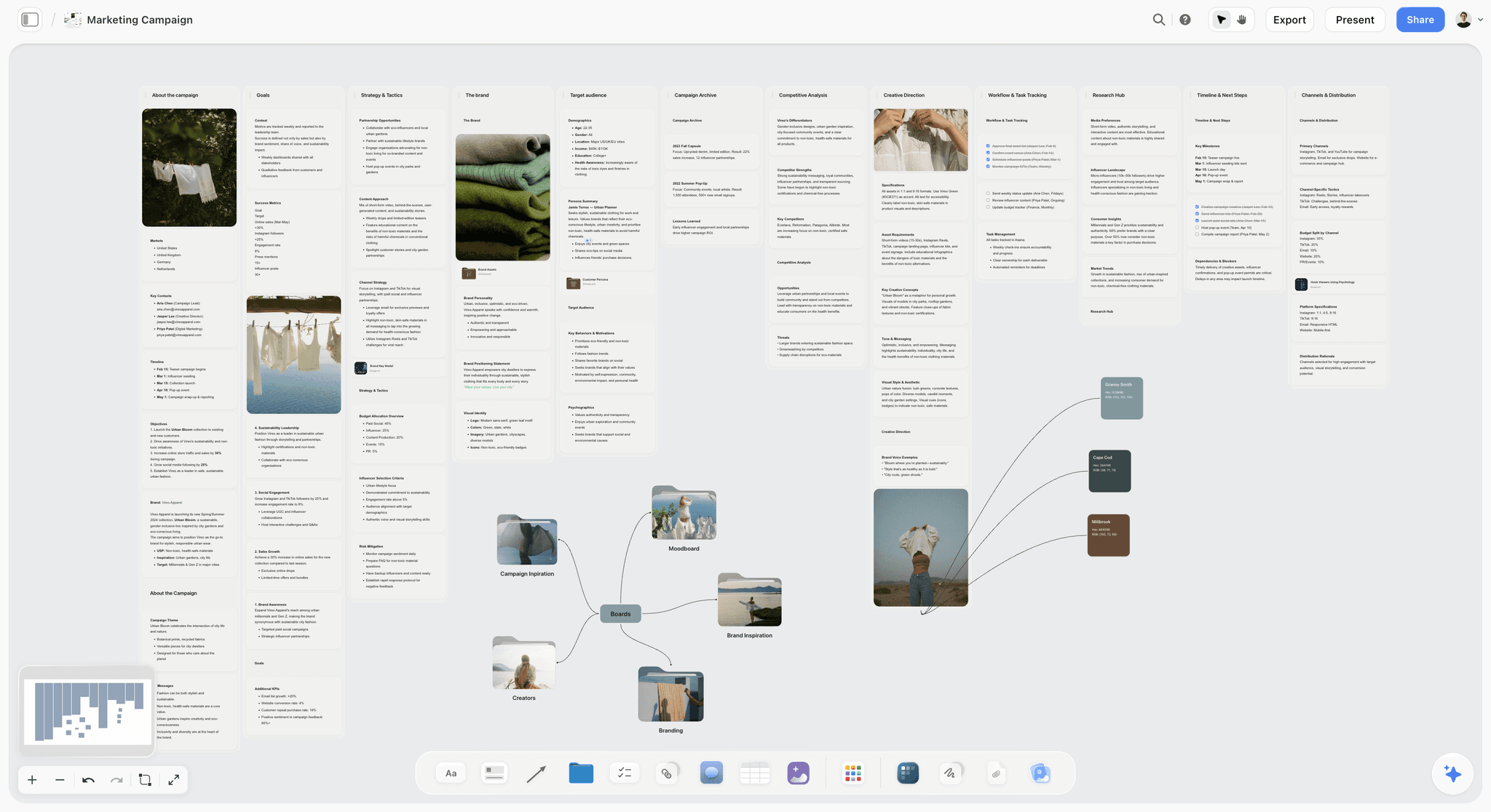
The verdict: Storyflow is the best content calendar for a small team that plans and produces its own content, because the month's plan and the work it depends on (briefs, scripts, shot lists, visuals) sit on one board that the AI drafts from your brief and a stakeholder opens by link.
Best for: Teams of three to eight who make what they publish: brand teams that shoot their own photo and video, YouTube-led teams and small agencies planning a client's month.
Key features for this job:
- The AI's content planner workflow turns a brief into ten method walls (foundation, pillars, posting structure, batching, a posting cadence per platform, repurposing and more) plus a wall of ten upcoming posts as tickets, each with its pillar and platform. Ask for the whole month as a table and it writes one with a date column, earliest first.
- Tables hold date, status, person, label and link cells, so the month is a table with a date column, rows kept in date order; tickets carry an assignee and a date, and a kanban tracks posts by stage.
- Docs on the same board hold the brief and the scripts, with inline comment threads and Word or PDF export, beside images, audio and uploaded video you can play and scrub.
- The AI's video script workflow writes each script as a document and its shot list workflow builds the shot list as cards or a table, and the AI reads the open board plus up to 5 documents and 3 other boards or folders you attach.
- A view-only link opens with no account once the owner turns sharing on, and a stakeholder signs in to comment or draw freehand on the board. Presentation mode covers a review call, and the whole board exports as an image or PDF.
Pricing (as of October 2026): Storyflow is paid-only during early access, with plans from $7.99 a month billed annually ($9.99 monthly). A free plan launches before the end of 2026, and anyone a paid member invites to a board joins free. Pro ($14 a month billed annually, $19 monthly) adds AI image generation and memory across conversations, and Max ($39 annually, $49 monthly) adds the Team Workspace with Permissions & Roles. Team billing is per seat, and AI use is metered on every plan.
Pros:
- The shortest route from a brief to a month someone can start making: the AI drafts the board, its edits apply directly, and one click undoes any of them.
- The designer who opens a post finds its brief, script and references beside it, not in three other apps.
- The founder or client sees the plan and the work from one link without a seat, and invited collaborators edit in real time with live cursors.
- Unlimited boards and file uploads on every paid plan, and a board can be duplicated to start next month.
Where it falls short:
- No month grid and no table sorting: dates live in a table's date column, so a post added mid-month goes in at the right row by hand. A team that plans by looking at the month should use Notion or Asana.
- No publishing or scheduling. Posts go out through Buffer or Later.
- No approval workflow or approval status, only comments and the Doc's inline threads. For formal sign-off, use Planable Pro or Asana Advanced.
- No automations, no recurring tasks and no connection to a scheduler. Its MCP connector lets ChatGPT, Claude, Gemini or Grok read and build boards, but it does not push posts to Buffer or Later. Trello, with built-in automation on every plan, and Asana cover the automation.
- A newer product, with a smaller template library than Notion's.
The AI content calendar generator page shows how a described niche becomes a month of posts on the canvas.
2. Notion
The verdict: Notion is the best pick for a small team that writes more than it shoots and wants the month as a grid: every post can be a database page with the draft inside it, shown as a calendar, a board by status and a table.
Best for: Writing-led teams of two to eight (newsletter, blog, LinkedIn) who already keep their wiki in Notion and have one person who enjoys building systems.
Key features for this job:
- A database with a Calendar view, plus board and table views of the same entries, on every plan. Notion's editorial calendar templates get you started.
- Each entry is a full page, so the brief and the draft live inside the calendar item.
- Custom properties such as status, channel, owner, publish date and pillar.
- Guests for stakeholders (10 on Free, unlimited on Plus and above), forms for content requests, and pages you can publish as a site.
Pricing (notion.com/pricing, checked October 10, 2026): Free is for individuals: blocks are limited once two or more members join, uploads are capped at 5 MB and page history is 7 days. Plus is $10 per member a month billed yearly ($12 monthly). Business is $20 billed yearly ($24 monthly) and is the first plan with Notion Agent; Free and Plus get a limited AI trial.
Pros:
- The draft and the calendar entry are the same object, which closes the retyping gap for written content.
- The month grid, a board by status and a filtered view of your own posts all come from one database.
- The largest template and community ecosystem of the four.
Where it falls short:
- Someone builds and maintains it. Every new channel, status or view is a database edit, and the calendar drifts when that person is busy. Storyflow's AI drafts the structure for you, and Trello barely needs one.
- The AI that fills in the month starts at Business, $20 per member a month billed yearly; on Plus the team types each entry by hand.
- Visual work sits inside pages as files and embeds rather than on a canvas, with 5 MB uploads on Free. Storyflow suits photo- and video-heavy months better.
- No approvals and no publishing. Pair it with Planable for sign-off or Buffer for posting.
Storyflow vs Notion: Complete Comparison for 2026 covers the two beyond content calendars.
3. Asana
The verdict: Asana is the best of the four at who owns what: every post is a task with one assignee and a due date, shown on a calendar view on every plan, which makes it the right pick when a team's calendar problem is accountability rather than content.
Best for: Marketing teams of three to eight inside a company that already runs its other projects in Asana, and teams that need formal approvals.
Key features for this job:
- Calendar, list and board views on every plan, including the free Personal plan; timeline and Gantt views from Starter.
- Tasks with assignees, due dates, subtasks and comments, and an editorial calendar template with a calendar view and custom fields for status, channel and content type.
- Approvals and proofing on Advanced: request an approval and annotate PDFs and images.
- Unlimited free guests on Starter and above, so a client or freelancer can follow the project without a paid seat.
Pricing (asana.com/pricing, checked October 10, 2026): Personal is free for one or two people. Starter is $10.99 per user a month billed annually ($13.49 monthly) and Advanced $24.99 ($30.49 monthly). Seats go up one at a time from 2 to 5 users, then in groups of 5 up to 30, so a team of eight buys ten seats. Paid plans include AI Teammates and Asana Dash at 5 requests per user a month; extra requests cost $0.50 each prepaid or $0.60 on demand. Asana's pricing FAQ states that it does not offer refunds.
Pros:
- The clearest ownership model: every post has one assignee and a due date, and each person's task list shows only their work.
- A real month calendar on the free plan for a team of two.
- Approvals and image proofing, on Advanced, which none of the other three offers.
Where it falls short:
- The brief, script and visuals live in task descriptions and attachments, one task at a time, so the month's creative work has no shared surface. Storyflow and Notion hold it better.
- The free plan stops at two users, and seat groups make six to ten people cost ten seats. Trello's free plan covers up to ten.
- Five AI requests per user a month will not draft a month of posts. Storyflow's AI drafts the month's plan from the brief.
- No publishing. Pair it with Buffer or Later.
Storyflow vs Asana: Which Is Better in 2026? compares the two for creative projects beyond the calendar.
4. Trello
The verdict: Trello is the cheapest working content calendar for a small team: free for up to 10 collaborators, with a board of stage columns everyone understands on day one and a free Calendar Power-Up that shows the cards by due date.
Best for: Teams of up to ten with no budget and simple content (a caption, an image, a link) that moves through a few stages.
Key features for this job:
- A board with a list per stage (Idea, Writing, Editing, Scheduled, Published) and a card per post with members, a label per channel, a due date and a checklist.
- The Calendar Power-Up, built by Trello, shows a board's cards by due date in week or month mode and lets you drag a card to a new day. Power-Ups are unlimited on every plan.
- Built-in Calendar, Timeline, Table and Dashboard views on Premium, including a Workspace calendar across boards; custom fields and card mirroring on Standard.
- Built-in automation on every plan, with 250 Workspace command runs a month on Free, and AI features from Standard.
Pricing (trello.com/pricing, checked October 10, 2026): Free for up to 10 collaborators per Workspace, with up to 10 boards and 10 MB per file. Standard is $5 per user a month billed annually ($6 monthly), Premium $10 ($12.50 monthly) and Enterprise $17.50, billed annually only. A guest on more than one board is billed at the member rate.
Pros:
- Nothing to design: the board is the workflow, and moving a card is the status update, so the calendar stays current.
- The only tool here a team of eight can run for $0.
- Freelancers and part-timers who drop in once a week understand it without training.
Where it falls short:
- A card holds a caption and attachments, not a brief, a script and a shot list. Storyflow keeps the production work beside each post.
- The built-in Calendar view needs Premium at $10 per user a month billed annually. On Free and Standard you rely on the Power-Up, which works board by board.
- No approvals, and the AI features start at Standard.
- No publishing. Pair it with Buffer or Later.
Notion vs Trello for Content Calendars (2026): A Queue Is Not a Project goes deeper on the two free-plan favorites.
Round 1: Setting Up the First Month for a Three-Person Team
The first month decides whether a small team trusts its calendar: a system that takes a week to build is abandoned in the second. Here is what a three-person team (a marketing lead, a designer and a founder who approves) does in each tool to get from a brief to a month someone can start making.
| Tool | What you build before the first post | Who builds it |
|---|---|---|
Storyflow | Little: from the brief, the AI drafts the plan and ten upcoming posts, then the month as a dated table when asked; you set owners | The marketing lead, editing a draft |
Notion | From Notion's content calendar template: properties (status, channel, owner, date, pillar), calendar and board views, then one page per post | Whoever designs the database |
Asana | From Asana's editorial calendar template: sections per week or stage, then one task per post with an assignee and a due date | The marketing lead; the others only complete tasks |
Trello | From a blank board: lists per stage, a label per channel, one card per post, then the Calendar Power-Up | Anyone, because the board explains itself |
For a team that starts from a brief, Storyflow is the fastest to a usable month because drafting is the AI's job: you edit a draft instead of filling empty rows. Notion is the slowest, because choosing properties and views is design work and on Plus every post is typed by hand. In Asana and Trello the structure is simple, and the 20 to 30 posts are still entered one by one.
Round verdict: Storyflow 9, Notion 6, Asana 6, Trello 5. With no brief and no appetite for setup, a Trello board is still the quickest thing to open on a Monday.
Round 2: What the Month Looks Like on Screen
Ask a small team to describe a content calendar and most will sketch a month grid with colored posts on it. Three of these four tools show exactly that. Storyflow does not, and this is the round it loses.
- Notion: a database calendar view places each post on its publish date, and opening a post opens its page with the draft; the same database shows as a board by status or a table.
- Asana: the calendar view shows tasks on their due dates on every plan, including the free Personal plan, and the same project shows as a list or a board.
- Trello: on Premium, the built-in Calendar view shows start dates, due dates and checklist items, and the Workspace calendar spans boards. On Free and Standard, the Calendar Power-Up gives a week or month view of one board with drag-and-drop due dates.
- Storyflow: the month is a table with a date column, rows kept in date order, plus status, person, label and link cells; tickets carry a date and an assignee, and a kanban tracks the work by stage. There is no month grid and no dragging a post to another day: you change its date cell or ask the AI to re-date every post a delay affects, and because the canvas cannot sort a table, rows stay in the order they were written.
In exchange, the brief, the script and the visuals sit on the same canvas as the table, so reading the month and opening the work are one motion.
Round verdict: Notion 10, Asana 10, Trello 7, Storyflow 0 on the month grid. If the grid is how your team thinks, that zero decides it: choose Notion or Asana.
Round 3: Who Owns What, and Who Keeps It Current
On a team of three, "we all keep it updated" means nobody does. A calendar stays true only when each post has one owner and updating it is part of doing the work rather than a Friday chore.
The one-owner test
Asana wins it outright. Each post is a task with one assignee and a due date, each person's task list shows only their work, and the calendar reads from the same tasks, so completing a task updates it. Notion and Trello can follow the one-owner rule with a person property or card members, but nothing enforces it. Storyflow covers ownership with person cells in the table, assignees on tickets and a person and a due date on any to-do, but it has no workload view and no recurring tasks, so a weekly newsletter slot is a new row each week rather than a task that repeats.
The week-three test
Upkeep is where the four separate. Trello is the cheapest to keep current, because dragging a card is the status update, and Asana is close behind. Notion costs the most, because every new channel or status waits for whoever built the database: the maintenance tax Notion teams pay. Storyflow sits between. Statuses and dates live in one table next to the work, and when a launch slips a week you can ask the AI to move the affected posts, with one click to undo if it moves the wrong ones.
Round verdict: Asana 10, Notion 7, Trello 7, Storyflow 7.
Round 4: The Brief, the Assets and the Stakeholder Link
The most expensive moment in a small team's month is not a scheduling error. It is Tuesday morning, when the designer opens the entry for Thursday's Reel and finds a title, a date and nothing else, because the brief is in someone's inbox.
Where the brief and the assets live
- Storyflow: the brief and the scripts are Docs on the board beside the dated table, with inline comment threads, and images, uploaded video, audio and the moodboard sit next to them; the AI's campaign brief workflow lays a brief out across ten walls, its video script workflow writes each script as a document, and its shot list workflow builds the shot list as cards or a table.
- Notion: the strongest for words: the draft sits inside the calendar entry, with images and video as files or embeds.
- Asana: a task description, attachments (up to 100 MB per file on the free plan) and comments. Enough for a caption and a final file, thin for a brief, a script and a shot list.
- Trello: a card description, a checklist and attachments of up to 10 MB per file on Free.
What the founder or client sees
- Storyflow: the owner turns on a view-only link, and the stakeholder opens the board with no account and signs in to comment or draw freehand on it. View-only visitors see the latest version when they open or reload, not live edits, while invited collaborators join free on free-tier limits and edit in real time. Presentation mode covers a review call, and a PDF export covers someone who will not open a link.
- Notion: invite them as a guest (10 on Free, unlimited on Plus and above) or publish the page as a site.
- Asana: unlimited free guests on Starter and above, who sign in with an Asana account; view-only licenses are an Enterprise feature.
- Trello: single-board guests on Standard and observers on Premium, and a guest on more than one board is billed as a member.
Round verdict: content next to its brief, Storyflow 10, Notion 8, Asana 5, Trello 4; stakeholder view, Storyflow 9, Notion 8, Trello 6, Asana 5.
Round 5: What It Really Costs at 3 and 8 Seats
List prices mislead small teams in two directions: a free plan that quietly stops at two people, and a per-seat price that is sold in bundles. Here is what each tool costs a team of three and a team of eight per month, as of October 2026.
| Tool and plan | Why this plan | 3 people, billed yearly | 8 people, billed yearly | 3 people, billed monthly | 8 people, billed monthly |
|---|---|---|---|---|---|
Storyflow Plus | The entry plan, on Team billing (Plus seats are 30% off from three seats, as shown on the pricing page) | $16.78 | $44.74 | $20.98 | $55.94 |
Notion Plus | Free limits blocks once a second member joins | $30 | $80 | $36 | $96 |
Asana Starter | The free plan stops at two users | $32.97 | $109.90 (10 seats) | $40.47 | $134.90 (10 seats) |
Trello Free | Covers up to 10 collaborators; calendar through the Power-Up | $0 | $0 | $0 | $0 |
Trello Premium | Adds the built-in Calendar view and the Workspace calendar | $30 | $80 | $37.50 | $100 |
The Asana seat trap, and what the next tier costs
Asana sells seats one at a time from two to five users, then in groups of five up to 30, so a team of six to ten pays for ten seats: $109.90 a month billed yearly on Starter, or $249.90 on Advanced. If you are five people planning a hire, price the ten-seat bundle before you commit. Storyflow Pro ($14 per seat a month billed annually) adds AI image generation and memory across conversations, and Max ($39) adds the Team Workspace with Permissions & Roles, which a team of three rarely needs; current plans are on the pricing page. A reviewer need not be a seat in any of the four; in Storyflow, anyone a paid member invites to a board joins free on free-tier limits.
Round verdict: Trello 10, Storyflow 8, Notion 7, Asana 6.
Round 6: Publishing, and the Scheduler to Pair With Each Tool
This is the round all four lose: none of them publishes a post to Instagram, LinkedIn or TikTok. The table covers the schedulers and the other tools small teams shortlist for this job, unranked, with the cheapest setup for three people.
| Tool | What it does for a small team | Publishes posts | Cheapest setup for 3 people (checked October 10, 2026) | Approvals | Free option |
|---|---|---|---|---|---|
Publishes to connected channels from a visual calendar | Yes | Team tier: $120 per channel billed yearly ($10 a month), unlimited users | Team tier only | 3 channels, 1 user | |
Visual Planner and scheduling, built around Instagram | Yes | Growth: $37.50 a month billed yearly, plus $3.75 for a third user | Growth and Scale | 14-day trial | |
Approval-first planning for teams with clients | Yes | Basic: $33 per workspace a month as listed, unlimited users | Optional on Basic, required on Pro ($49) | First 50 posts free | |
Marketing calendar with social scheduling | Yes | Professional: $49 a month billed yearly ($59 monthly) for 2 users, plus a $29 seat for the third, or Suite from $69 | Social message approvals on Professional | Free plan: 15 scheduled posts at a time on 1 profile | |
Scheduling by content category, with post recycling | Yes | Pro: $990 a year ($99 monthly), 3 users | Accelerate and Pro | 14-day trial | |
Canva | Designs social posts and schedules them from the editor | Yes, on paid plans | See canva.com/pricing; the page did not load for us, so no figure is given | Not checked | Not checked |
Planner, analytics and reports per brand | Yes | Starter: from $20 a month on annual billing, as listed | Advanced, from $53 a month | 1 brand, 20 scheduled posts a month | |
A content database with a calendar view | No | Team: $20 per user a month billed annually; read-only collaborators are not charged | None listed | Free plan | |
Tasks and docs with a calendar view on every plan | No | Free Forever; Core $8 per user a month billed yearly | Attachment annotation on Business | Free Forever | |
Work boards with a calendar view from Standard | No | Standard, sold from 3 seats; the page showed us euro prices only, so no dollar figure is given | None listed | Up to 2 seats | |
Google Sheets | A spreadsheet calendar anyone can edit | No | $0 with Google accounts | None | Free |
Which scheduler to pair with which planner
- Storyflow with Buffer or Later: when a row reaches Approved, schedule it in Buffer and paste the live link into the row's link cell. Storyflow does not connect to schedulers, so this hand-off is manual.
- Notion with Buffer: the caption and final asset come out of the Notion page, and Buffer's Team tier adds approvals if the founder signs off there.
- Asana with Planable: when client approval is formal, Planable's required approvals on Pro sit on top of Asana's ownership.
- Trello with Buffer's free tier: Trello Free plus Buffer's 3 free channels costs nothing, with one person doing the posting.
If publishing is most of your week (five or more channels, daily posts, few briefs), the scheduler is the whole answer, and The 12 Best Social Media Planning Tools in 2026 compares them. One Buffer detail catches teams out: once you upgrade, every connected channel is billed, including the three that were free.
Round verdict: Notion 4, Asana 4, Trello 4, Storyflow 2. All four lose to a scheduler, and Storyflow loses slightly more because it has no connection that passes posts on to a scheduler.
A Worked Example: One October for a Three-Person Team
The team works at a small coffee roaster: a marketing lead who owns the calendar and writes the copy, a designer who shoots and edits, and a founder who approves. October's brief: launch a seasonal blend on Tuesday 20 October, post three times a week on Instagram and twice on LinkedIn, send two newsletters and publish one short video a week. That is 26 pieces in the four weeks from Monday 5 October to Friday 30 October.
- The lead writes the brief as a Doc on a new board: the goal, the audience, three pillars (origin stories, brewing at home, the launch), channels and cadence, the fixed dates and who approves. Budget 45 minutes.
- The lead asks the AI's content planner workflow for October. It lays out walls for the pillars, posting structure, batching and repurposing, plus ten upcoming posts as tickets. A second request (all 26 posts, teasers in the week before the 20th, proof posts after it) comes back as a table with date, channel, pillar, owner and status columns, earliest first.
- The lead edits the draft: one owner goes on each row, weak posts get rewritten, and a ready-by column gets a date two working days before each publish date. Budget an hour.
- The AI's shot list workflow drafts the list for the batch shoot on Thursday 8 October from the posts that need photos or video, and the video script workflow drafts the four short-video scripts as Docs beside the table.
- On Friday the founder opens the view-only link with no account, signs in, and leaves comments on the board beside the scripts; approved rows move to Approved.
- Every Friday, approved posts go into Buffer, and the published link goes into the row's link cell.
This is week one as the table reads on Friday 2 October:
| Publish date | Channel | Post | Pillar | Owner | Ready by | Status |
|---|---|---|---|---|---|---|
Mon 5 Oct | Carousel: from the farm to your cup | Origin stories | Designer | Thu 1 Oct | Approved | |
Tue 6 Oct | What direct trade changes for a farm | Origin stories | Marketing lead | Fri 2 Oct | In review | |
Wed 7 Oct | Reel: pour-over in four steps | Brewing at home | Designer | Mon 5 Oct | In production | |
Thu 8 Oct | Why we roast lighter for filter | Brewing at home | Marketing lead | Tue 6 Oct | Briefed | |
Thu 8 Oct | Newsletter | Issue 1: the harvest story and a brew guide | Origin stories | Marketing lead | Tue 6 Oct | Briefed |
Fri 9 Oct | Staff pick: the bag we brew at home | Brewing at home | Designer | Wed 7 Oct | Briefed | |
Fri 9 Oct | Short video | Teaser: something new on the roaster | The launch | Designer | Wed 7 Oct | Idea |
In the other three tools the same October means more typing: 26 pages from Notion's template on Plus, shown as a month grid; 26 tasks from Asana's editorial calendar template with the scripts attached; or 26 cards plus the Calendar Power-Up in Trello, with the scripts in card descriptions. Each gives the founder a clean month, and none puts the shot list and the launch scripts on the same surface as the dates.
In Notion, Asana and Trello the month is the finished object and the work lives elsewhere. In Storyflow the month is one table on the board where the work gets made. For the shoot day itself, How to Batch a Month of Content in One Day has the plan, and the campaign calendar page covers planning around a launch date.
How to Set Up a Small-Team Content Calendar in 7 Steps
The steps are the same in any of the four tools; what changes is how much of each step the tool does for you. Budget a morning for the first month and 20 minutes a week after that.
Step 1: Write a one-page brief for the month
Write the goal, the audience, three to five pillars, the channels and cadence, the fixed dates, who approves and what you will not make. Keep it where the calendar lives: a Doc on the board in Storyflow, a page above the database in Notion, the project overview in Asana, a pinned card in Trello. How to Turn a Campaign Brief Into a Content Calendar shows how messages and proof become dated posts.
Step 2: Set the columns and statuses once
Ten columns cover a small team's month. Copy this set into whichever tool you choose:
| Column | What goes in it | Example |
|---|---|---|
Publish date | The day it goes live | Tue 20 Oct |
Ready by | Two working days before the publish date | Fri 16 Oct |
Channel | One channel per row | |
Format | Carousel, Reel, newsletter, article | Reel |
Pillar | One of your three to five pillars | The launch |
Working title | What the post says, not what it is | The new blend, the farm and the price |
Owner | One person | Designer |
Status | Idea, Briefed, In production, In review, Approved, Scheduled, Published | In production |
Brief | A link to the brief or script | The launch script Doc |
Live link | Filled in after publishing | The post's URL |
Seven statuses is the most a small team keeps honest. Fewer is fine; more turns updating into a chore nobody does.
Step 3: Place the fixed dates first
Put launches, events, holidays and sales in before any ordinary post, because they set the shape of the weeks around them. A launch needs teasers in the week before and proof posts after, not a single announcement.
Step 4: Draft the month, then edit it
In Storyflow, attach the brief, ask the AI for the plan and then for the month as a dated table, and edit its draft. In Notion, Asana or Trello, fill the rows from the brief yourself, or with Notion Agent on Business. Either way, leave about a quarter of the slots open for posts you cannot plan, such as a customer story or a news hook. How to plan a month of social media content works through the 30 days step by step.
Step 5: Give every post one owner and a ready-by date
One name per row, never "team". The ready-by date sits two working days before the publish date, so review happens before the post is late rather than on the day. The owner, and only the owner, changes the status.
Step 6: Share one view with the approver and fix the review rhythm
Give the founder, manager or client one way in: a view-only link in Storyflow, a guest invite in Notion or Asana, a board invite in Trello. Hold one 20-minute review every Friday for the following week's posts, and ask for comments on the post itself, not in chat.
Step 7: Hand off to the scheduler and close the loop
Approved posts go into Buffer or Later, the status moves to Scheduled, and the live link goes in after publishing. In the month's last week, duplicate the board or template, check what shipped against the brief, and start the next brief from what worked.
Which Tool for Which Small Team
Real teams differ from the job the ranking scores, so here is the pick by team shape, with a runner-up and the reason.
| Your team | Pick | Runner-up | Why |
|---|---|---|---|
3 to 5 people who shoot their own photo and video | Storyflow with Buffer | Notion | Briefs, shot lists, scripts and the dated table on one board, and Buffer posts it |
A YouTube-led team: host, editor and producer | Storyflow | Trello | Scripts and shot lists sit beside the upload dates |
Two founders writing a newsletter and LinkedIn posts | Notion Plus ($20 a month for two, billed yearly) | Asana Personal (free for two) | The draft lives inside the calendar entry |
5 to 8 marketers in a company that runs on Asana | Asana | Storyflow for campaign boards | Content tasks sit where the rest of the company assigns work |
A 3-person agency pod posting for clients | Planable | Storyflow for each client's month plan | Client approvals, with unlimited users per workspace |
Up to 10 people with no budget | Trello Free with the Calendar Power-Up | Google Sheets | $0 for up to 10 collaborators |
A social-only team posting daily to 5 or more channels | Buffer, on its Team tier | Later | Publishing is the job, billed per channel with unlimited users |
Decision rules by team size and stage
- Two people: Asana Personal is free with a calendar view; on annual billing, Notion Plus is $20 a month for two and Storyflow Plus $15.98.
- Three to five people: Storyflow if you plan and produce, Notion if you write and want a grid, Asana if accountability is the problem; Asana sells seats one at a time in this band.
- Six to ten people: Asana bills ten seats, Trello Free still covers you, and Storyflow and Notion bill per person.
- More than ten people: Trello's free plan ends at ten collaborators, and Asana's next seat group is fifteen.
- By stage: add a scheduler once you publish on three or more channels every week, and Planable Pro or Asana Advanced once a client or legal team signs off every post.
6 Mistakes Small Teams Make With a Content Calendar
Most calendars fail because of how the tool was set up in week one, not because the team picked the wrong tool. Here are six mistakes behind it, each with its fix.
Mistake 1: Choosing the tool by the look of its calendar
The month grid is the screenshot every vendor shows, so teams buy the prettiest one and find in week two that the brief and assets live somewhere else. Fix: choose by where the brief and assets will live and who will update the statuses.
Mistake 2: Filling in dates before the brief and pillars exist
A calendar filled date-first becomes a list of slots with "Reel" in them, and the team spends each week deciding what a slot means. Fix: brief first, then pillars, then fixed dates, then posts. Dates come last because they are the easiest thing to change.
Mistake 3: Giving each post only a publish date
A post with only a publish date is late the moment anyone notices it, because review, edits and scheduling all land on the same day. Fix: add a ready-by date two working days before publishing, and run the weekly review against ready-by dates.
Mistake 4: Letting the whole team own the calendar
"The team owns social" means a post nobody finished, because everyone assumed someone else had it. Fix: one owner per post, named on the row, and one owner for the calendar, usually the marketing lead, who runs the Friday review.
Mistake 5: Keeping the brief, the assets and the calendar in three tools
Each copy drifts from the others, and the calendar ends up the least accurate of the three. Fix: keep each post's brief and assets where the post is: on the board in Storyflow, inside the page in Notion, or at least linked from the row in Asana or Trello. The Content Calendar Checklist (2026) lists what each piece needs before it enters the pipeline.
Mistake 6: Building more system than the team will maintain
Twenty properties, six views and three linked databases look thorough in week one and go stale by week four. Fix: ten columns and seven statuses at most, and add a column only when someone has asked for the same information twice.
When Storyflow Is Not the Right Choice
Storyflow ranks first for a small team that plans and produces its own content. For the teams below, another tool is the better buy:
- You plan by looking at a month grid. Storyflow has none. Use Notion (a database calendar view on every plan) or Asana (a calendar view, free for two); Trello's free Calendar Power-Up works board by board.
- Publishing is most of the work. Storyflow does not publish or schedule posts. Use Buffer, billed per channel, or Later.
- Someone must formally sign off every post. Storyflow has no approval workflow or approval status. Use Planable Pro or Asana Advanced.
- You want the calendar to run itself. Storyflow has no automations, no recurring tasks and no link to a scheduler. Use Asana, or Trello with built-in automation on every plan.
- You need a free tool today. Storyflow is paid-only until its free plan launches late 2026. Use Trello Free, for up to 10 collaborators, or Google Sheets.
- Your team writes long-form and already lives in Notion. A page per post, with the draft inside the calendar entry, fits written work better. Stay in Notion.
- Your team works from phones. Storyflow runs in the browser with no native apps; Notion, Asana and Trello have phone apps.
The Bottom Line
Small teams abandon content calendars when the plan and the work drift apart and nobody has time to reconcile them, not because the grid looks wrong. For a team that plans and produces its own content, Storyflow ranks first: the AI drafts the month's plan from the brief, the posts sit in a dated table beside their briefs, scripts and visuals, and the founder or client opens it by link. Notion is the pick for writing-led teams that want a month grid, Asana for teams whose problem is ownership, and Trello for a free, simple pipeline. Whichever you choose, publish from Buffer or Later. Take next month's brief, draft it on one board, and see whether the team is still updating it in week three: plan a month of social content on one board.
FAQ: Content Calendar Tools for Small Teams
What's the best content calendar tool for a small team?
Storyflow is the best content calendar for a small team that plans and produces its own content in 2026: the AI drafts the month's plan from your brief, and each post's date, owner and status sit in a table beside its brief, script and visuals, on one board a stakeholder opens by link. Choose Notion instead if your team plans from a month grid and writes more than it shoots, Asana if the problem is who owns what, and Trello if the budget is zero. Pair any of them with Buffer or Later, because none of the four publishes posts.
Does Storyflow show the month as a calendar grid?
No. Storyflow has no month grid. Dates live in a table's date column and on tickets and a kanban, next to the brief and the work; the canvas does not re-order a table, so rows stay in the order they were written, and the AI writes them earliest first. That suits production-led teams: a weekly video, a newsletter, a launch. If your team plans by looking at the month, use Notion's or Asana's calendar view, both on every plan, or Trello's free Calendar Power-Up.
Is Notion good for a small team's content calendar?
Yes, for writing-led teams. Each post is a database page with the draft inside it, shown as a calendar, a board or a table, and Notion's content calendar template gets you started. The costs are upkeep and price: someone has to maintain the database, a team of three pays $30 a month for Plus billed yearly because Free limits blocks once two members join, and Notion Agent starts on Business at $20 per member a month billed yearly.
Is Asana's free plan enough for a small content team?
Only for two people. Asana's free Personal plan includes list, board and calendar views but is made for one or two users, so a team of three starts on Starter at $10.99 per user a month billed annually, $32.97 for three. Above five users, seats come in groups of five, so a team of eight pays for ten: $109.90 a month billed annually. Approvals and proofing need Advanced, at $24.99 per user a month billed annually.
Does Trello have a free calendar?
Yes, through the free Calendar Power-Up rather than the built-in view. Trello's built-in Calendar view is a Premium feature at $10 per user a month billed annually, but the Power-Up, built by Trello, shows a board's cards by due date in week or month mode with drag-and-drop, and Power-Ups are unlimited on every plan, including Free. The Workspace calendar across boards stays on Premium.
Notion or Asana: which is better for a content calendar?
Notion is better when the content is the hard part, and Asana when ownership is. Notion keeps the draft inside each calendar entry and suits writing-led teams; Asana gives every post one assignee and a due date and adds approvals on Advanced. For three people, Notion Plus costs $30 a month and Asana Starter $32.97, billed yearly. At eight people, Notion costs $80 and Asana $109.90, because Asana sells seats in groups of five above five users.
How much does a content calendar cost for a team of three?
Between $0 and about $33 a month on annual billing, as of October 2026: Trello Free is $0 for up to 10 collaborators, Storyflow Plus is $16.78 for three seats on Team billing, Notion Plus $30 and Asana Starter $32.97. Add a scheduler if you publish from one: Buffer's Team tier is $10 per channel a month billed yearly with unlimited users, and Later's Growth plan with a third user is $41.25 a month billed yearly.
Is Storyflow free?
Not yet. Storyflow is paid-only during early access, with plans from $7.99 a month billed annually ($9.99 monthly), and its free plan launches before the end of 2026. Anyone a paid member invites to a board joins free now, so a small team pays seats for the people who draft with the AI or upload files, while a manager or client who only reviews does not need one.
Which content calendar tools publish posts automatically?
Schedulers do, and planning tools do not. Buffer, Later, Planable, CoSchedule, SocialBee, Metricool and Canva's Content Planner (on Canva's paid plans) publish to connected social accounts. Notion, Asana, Trello and Storyflow plan the content but do not post it, so a small team uses one to plan and the other to publish. Buffer bills per connected channel with unlimited users on its Team tier; Later and CoSchedule bill per plan.
Can AI build a content calendar for a small team?
Yes, and it takes over the slowest part, turning a brief into specific posts. In Storyflow, the AI's content planner workflow turns your brief into walls for pillars, posting structure, batching and repurposing plus ten upcoming posts as tickets, and on request lays the month out as a table with a date column, earliest first, with one-click Undo on every edit. Notion Agent autofills databases on Business, Trello's AI-generated boards start on Standard, and Asana's paid plans include 5 AI requests per user a month. How to Build a Content Calendar with AI walks through the prompts.
Trello vs Asana for content calendars: which is better for a small team?
Trello if the budget is zero or the content is simple, Asana if ownership is the problem. Trello is free for up to 10 collaborators, a card per post moves through stage lists, and the Calendar Power-Up shows the cards by due date. Asana gives every post one assignee and one due date on a calendar view, with approvals on Advanced, but its free plan stops at two users and Starter is $10.99 per user a month billed annually. Neither holds a brief, a script and the visuals beside the post; that is the job Storyflow ranks first for.
How do you build a content calendar in Asana?
Start from Asana's editorial calendar template: one project, a task per post with an assignee and a due date, custom fields for status, channel and content type, and the calendar view to see the month. Use subtasks for the steps of a post that pass between people. Keep the brief and the script in a linked doc or on a board, because a task description is a thin place for them. Add a scheduler such as Buffer for publishing.
Does Asana have an AI schedule generator for a content calendar?
Not one that drafts the month. Asana's paid plans include AI Teammates and Asana Dash at 5 requests per user a month, with extra requests at $0.50 each prepaid, so most teams start from the editorial calendar template and enter each post as a task. To have the month drafted from a brief, ask Storyflow's AI for it as a dated table, then assign owners.
Can ChatGPT or Claude manage a small team's content calendar?
They can draft one, and with a connector they can work on the real plan. Storyflow's MCP connector lets ChatGPT, Claude, Gemini or Grok read your Storyflow projects and build boards, documents and tables in them, so "add next week's five posts to the October board" happens on the board the team already uses. The assistant does not publish posts; that still goes through a scheduler.
Is a spreadsheet good enough for a small team's content calendar?
For a team of two or three posting simple content, yes. Google Sheets is free with a Google account, everyone can edit it, and a filter by owner does most of what a calendar app does. It breaks when posts need briefs, scripts and assets beside them, when a stakeholder needs a clean view, or when statuses drift because updating a cell is nobody's job; that is when teams move to Trello or to a board like Storyflow.
What should a small team's content calendar include?
Ten columns cover it: publish date, ready-by date, channel, format, pillar, working title, owner, status, a link to the brief or script, and the live link. Keep statuses to seven or fewer: Idea, Briefed, In production, In review, Approved, Scheduled and Published. The two columns most calendars skip are the ready-by date and the brief link, which is what the person making the post actually needs.
Which content calendar tools handle client approvals?
Planable is built for it: unlimited users, including clients, on every plan, optional approvals on Basic at $33 per workspace a month, and required approvals on Pro at $49. Asana adds approvals and proofing on Advanced ($24.99 per user a month billed annually), Buffer adds approval workflows on its Team tier, and Later on Growth. Storyflow has no approval workflow: a client opens the board by link with no account and signs in to comment, which suits feedback but not formal sign-off.
Is Airtable better than Notion for a content calendar?
Airtable is better when the calendar is really a database: many channels, fields and linked records such as campaigns and assets, with fields, views and grouping built for that shape. It has a free plan, and Team costs $20 per user a month billed annually, with read-only collaborators not charged. Notion is better when the content itself is the work, because each entry is a page for the draft.
Is Canva's Content Planner enough for a small team?
For a design-led team that posts what it designs in Canva, it can be. The Content Planner schedules designs to connected social accounts, and Canva's help center lists scheduling on its paid plans. Canva's pricing page did not load for us when checked, so no figure is given here: see canva.com/pricing. The plan itself (owners, statuses, ready-by dates) usually still lives in a planning tool.
Table of Contents
- Key Takeaways
- Which Content Calendar Tool Should a Small Team Use?
- What a Small Team's Content Calendar Actually Has to Do
- How We Evaluated Notion, Asana, Trello and Storyflow
- Comparison Table: Notion vs Asana vs Trello vs Storyflow Side by Side
- The 4 Content Calendar Tools for a Small Team, Ranked
- 1. Storyflow
- 2. Notion
- 3. Asana
- 4. Trello
- Round 1: Setting Up the First Month for a Three-Person Team
- Round 2: What the Month Looks Like on Screen
- Round 3: Who Owns What, and Who Keeps It Current
- Round 4: The Brief, the Assets and the Stakeholder Link
- Round 5: What It Really Costs at 3 and 8 Seats
- Round 6: Publishing, and the Scheduler to Pair With Each Tool
- A Worked Example: One October for a Three-Person Team
- How to Set Up a Small-Team Content Calendar in 7 Steps
- Which Tool for Which Small Team
- 6 Mistakes Small Teams Make With a Content Calendar
- When Storyflow Is Not the Right Choice
- The Bottom Line
- FAQ: Content Calendar Tools for Small Teams
- Related Reading
Templates to check out for this topic


Content and video templates you can use in Storyflow
Plan a channel, a script, and a content pipeline on the same board. Open one of these templates and let the AI build on the structure instead of starting from a blank doc.


See Storyflow in Action
A visual AI workspace where every feature lives inside one canvas. No tab-switching, no context lost.
Build your entire board from a single message
Type what you need in the AI chat at the bottom of your canvas. The AI adds cards, headings, and structure directly onto your board.
Use expert frameworks as AI context
Type @ in the AI chat and choose any Tactic. The AI tailors every response to that framework instead of giving generic advice.
Turn your board into a mind map in seconds
Ask the AI to restructure your canvas as a mindmap. It connects your ideas into a visual hierarchy so you can see how everything relates.
Why Storyflow Exists
Storyflow actually began as a personal tool while working on creative and research projects.
We kept running into the same problem: ideas were scattered everywhere: notes, documents, and whiteboards.
Nothing helped us see how everything connected.
So we started building a workspace designed around how ideas actually grow.
→ Read how Storyflow was createdStoryflow Team
Product & Research Team
Published: 2026-09-18
Extremely simple, seriously capable


See how easy it is to get started
Watch a real project come together, from a blank board to a finished plan, clicked through step by step.
Start creating with AI and become more productive
Transform your creative workflow with AI-powered tools. Generate ideas, create content, and boost your productivity in minutes instead of hours.