
How to Write a YouTube Script with AI: A Step-by-Step Guide (2026)
Writing a YouTube script with AI goes wrong when you use AI to generate a script instead of developing one. This guide runs the process in the right order: 9 steps from defining your video's one job to a production-ready, shootable script.

Category
YouTube
Author

Sara de Klein
Head of Product at Storyflow
Topics
2026-04-09
•
18 min read
•
YouTube- how to write a YouTube script with AI
- YouTube script AI step by step
- AI YouTube script writing
How do you write a YouTube script with AI?
To write a YouTube script with AI: define the video's one job, research your audience's exact language, write the hook first, build a 5-7 section content spine, then draft each section with AI developing your thinking (not replacing it). You end with a shootable script in roughly 3 hours; repeat scripts take about 90 minutes.
The Problem With How Most Creators Script
The YouTube script process most creators use looks like this: stare at a blank document, type the topic at the top, write a rough intro that begins with "Hey, welcome back to the channel," realise that feels wrong, delete it, open ChatGPT, paste the topic, copy the output, feel vaguely dissatisfied with it, go back to the blank document. Two hours later there is a draft that nobody would describe as sharp. The filming session will happen anyway. The retention graph will drop at the 35-second mark. The script will be blamed.
The actual problem is not the writing. It is the sequence. Most creators start with what they know about a topic instead of starting with what the viewer needs to experience. And when they bring AI in, they bring it in at the wrong point: asking it to generate before they have defined the job, the viewer, or the hook. AI with no brief writes confident content about a topic. It does not write a script that earns a viewer's continued attention.
This guide runs the process in the right order. Not because the steps are complex (they are not), but because the sequence determines everything. The same material, written in a different order, produces a completely different viewer experience.
What You Need Before You Start
A clear video topic: Not a title. A topic. 'How to write a YouTube hook' is a topic. The title comes after the script. Starting with a title locks the frame before you know what the video actually needs to say.
10-15 minutes of audience research: Comments, Reddit, Discord: anywhere your target viewer discusses the problem your video will solve. You are collecting their vocabulary, not their opinions. This step directly feeds step 2.
A rough idea of your video's length: Not a precise target, but a range. A 5-minute explainer script is structured differently from a 15-minute deep dive. Knowing the range prevents over-writing in the drafting phase.
Access to an AI tool with context memory: Any assistant that maintains conversation history works, but the context limitation becomes real fast, especially for longer scripts where the hook, spine, and full draft need to stay connected.
A visual workspace where your AI sees everything at once: Storyflow's free tier works for this entire guide. Your one-job sentence, audience language, hook drafts, content spine, and script sections all live on one canvas that the AI reads before responding. No more re-explaining your video every time you ask a drafting question.
Not sure what the video should even be about yet?
This guide assumes you already know the topic. If you are still hunting for the angle, generate a batch of video ideas first, pick the one with a real hook, then come back and script it with the steps below.

How to Write a YouTube Script with AI: Step by Step
Step 1: Define Your Video's One Job
Output: A single before/after sentence: 'After watching this video, my viewer will go from [X] to [Y]'
The most expensive mistake in YouTube scripting is starting before you know what the video is actually trying to do. Not the topic. The job. A topic is 'how to write a YouTube hook.' The job is 'my viewer will stop opening their scripts cold and start writing three competing hooks before choosing one.' Those are not the same thing, and they produce completely different scripts.
Write your one-job sentence before you open any AI tool. It goes: 'After watching this video, my viewer will go from [specific frustrated state] to [specific capable state].' The frustration must be genuine: something you know this viewer experiences, not a polished problem statement. The capable state must be achievable within the video, not a long-term outcome. 'From struggling with retention to having a re-hook strategy for their next video' is achievable. 'From new creator to successful YouTuber' is not.
This sentence does three things simultaneously: it gives the AI a specific brief instead of a vague topic, it tells you exactly when the script is complete (when you have delivered the transformation), and it becomes the test every section must pass. If a section does not move the viewer from the frustrated state toward the capable state, it does not belong in this video.
Where Storyflow helps: Add your one-job sentence as the first card on your Storyflow canvas before writing anything else. The AI reads this as foundational context for every section you develop later. All your AI-assisted drafts stay oriented toward the same viewer transformation, not just the general topic.
Common mistake: Writing a job that is really a topic with extra words ('my viewer will learn about hook writing'). Learning about something is not a transformation. Define the specific capability they leave with.
Step 2: Research Your Audience's Exact Language
Output: A list of 10-15 phrases your specific viewer uses to describe their problem
The fastest way to make a YouTube script sound generic is to write it in your language instead of your viewer's. You describe the problem with precision and clarity. Your viewer describes it the way it actually feels at 11pm when nothing is working. Those are different registers, and viewers recognize the difference immediately.
Spend 20 minutes in comment sections, Reddit threads, and Discord servers where your target audience discusses the problem your video solves. You are not looking for insight. You are collecting vocabulary. Copy exact phrases into a document: the specific words they use, the comparisons they make, the things they say they have already tried. A comment like 'I've re-filmed my intro six times and it still sounds like I'm reading from a script' contains more useful writing material than most creative briefs I have seen.
Example: For a video on writing YouTube hooks, a creator targeting newer YouTubers might collect: 'my first 30 seconds feel awkward,' 'I start with hi I'm so-and-so and I know that's wrong but I don't know what else to do,' 'I've tried starting mid-sentence but it feels forced.' Those three phrases are a hook and an intro waiting to be written. The video now has a specific person and a specific feeling, not a general viewer problem.
Where Storyflow helps: Paste your collected phrases onto your Storyflow canvas as a dedicated 'audience language' section. When you ask Storyflow's AI to help draft sections, reference this card with an @-mention. The AI generates in your viewer's vocabulary rather than generic educational language.
Common mistake: Skipping this step because you think you already know your audience well enough. Even experienced creators consistently discover that their viewer's language for the same problem is significantly different from the creator's language for it.
If you want a ready-made place for this research, the Video Research template opens a board with sections for competitor notes, audience phrases, and references, so the AI can read all of it when you start drafting.
Step 3: Write Your Hook Before Everything Else
Output: Three competing hook options; one selected and refined
The hook is not the introduction. The introduction is what comes after the hook lands. The hook's only job is to create enough tension between where the viewer is right now and where your video will take them that they make a micro-decision to keep watching. You have 30 seconds. Most scripts spend those 30 seconds introducing the creator instead of earning the next 30 seconds.
Write three hooks before you commit to one. Each should use a different format: the bold claim ('Most YouTube scripts fail before the first cut. Here is why'), the specific problem ('If your retention drops at the 30-second mark, this is the line you wrote that caused it'), and the counterintuitive opening ('I stopped planning my videos and my retention went up. Then I understood why, and started planning again differently'). The hook you choose should create the most tension with the fewest words.
The test for a strong hook is this: can someone who has never heard of you watch the first 15 seconds and immediately understand (a) who this video is for, (b) what problem it addresses, and (c) that you have something specific to say about it? If all three are true, the hook is working. If any is missing, rewrite before you touch the rest of the script.
Where Storyflow helps: Use Storyflow's AI to generate 5 variations of each hook format after you have written your initial attempts. In the AI chat, paste your one-job sentence and audience language card, then ask: 'Write 5 bold-claim hooks for a creator audience who [specific language from your research].' You get a shortlist to evaluate rather than a blank page to fill.
Common mistake: Writing the hook last because 'I'll know what to hook once the content is written.' The hook determines the content. If you write the content first, you write the hook that fits what you already have. Not the hook that earns the most attention.
Step 4: Build the Content Spine
Output: 5-7 section headings that connect your hook's promise to your outro's payoff
The content spine is not an outline. An outline tells you what to cover. The content spine tells you how each section moves the viewer from the hook's tension to the outro's resolution. Every section heading should complete the sentence: 'After this section, the viewer now knows [specific thing] that makes [next section] necessary.'
Map the sections on a spatial canvas rather than a linear list. This matters because the relationships between sections become visible. You can see when you are repeating yourself, when there is a logical jump the viewer will not follow, and when a section is working too hard because it is covering three ideas instead of one. Each section should have one job, and that job should be obvious from a 5-word heading.
Example: For a video on YouTube hook writing, the spine might be: (1) Why your first 30 seconds are actually your 31st-through-120th seconds' problem, (2) The five formats that earn attention, (3) How to choose the right format for your specific video, (4) The rewrite test: how to know if your hook is working, (5) Your first three takes will all be wrong. Here is the process for finding the real one. Each section sets up the next. The viewer cannot skip to section three without section two, which is exactly the retention structure you want.
Where Storyflow helps: Map your content spine in Storyflow's mind map view. Place your hook at the centre, then build each section as a branch. The visual layout immediately shows you which sections are underdeveloped (thin branches), which are overloaded (too many sub-points), and whether your structure flows from opening tension to final resolution.
Common mistake: Building a content spine that lists what you know instead of mapping what the viewer needs to understand in order. 'What I know about hooks' and 'what the viewer needs to understand, in what order, to be able to write a better hook' are two different structures. Only one produces a video people finish.
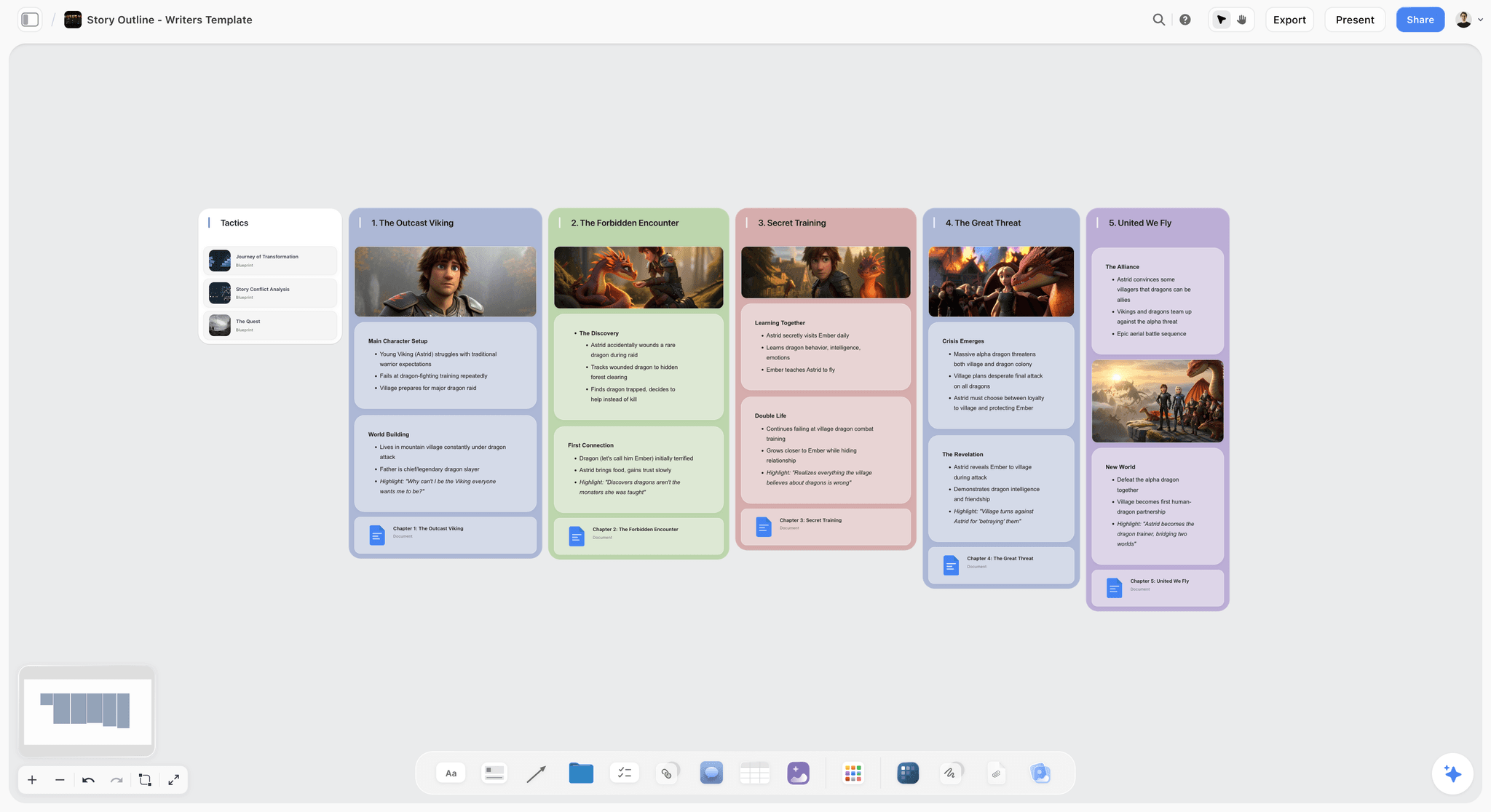
Your content spine mapped spatially. Each branch shows a section, its job, and its connection to the viewer transformation
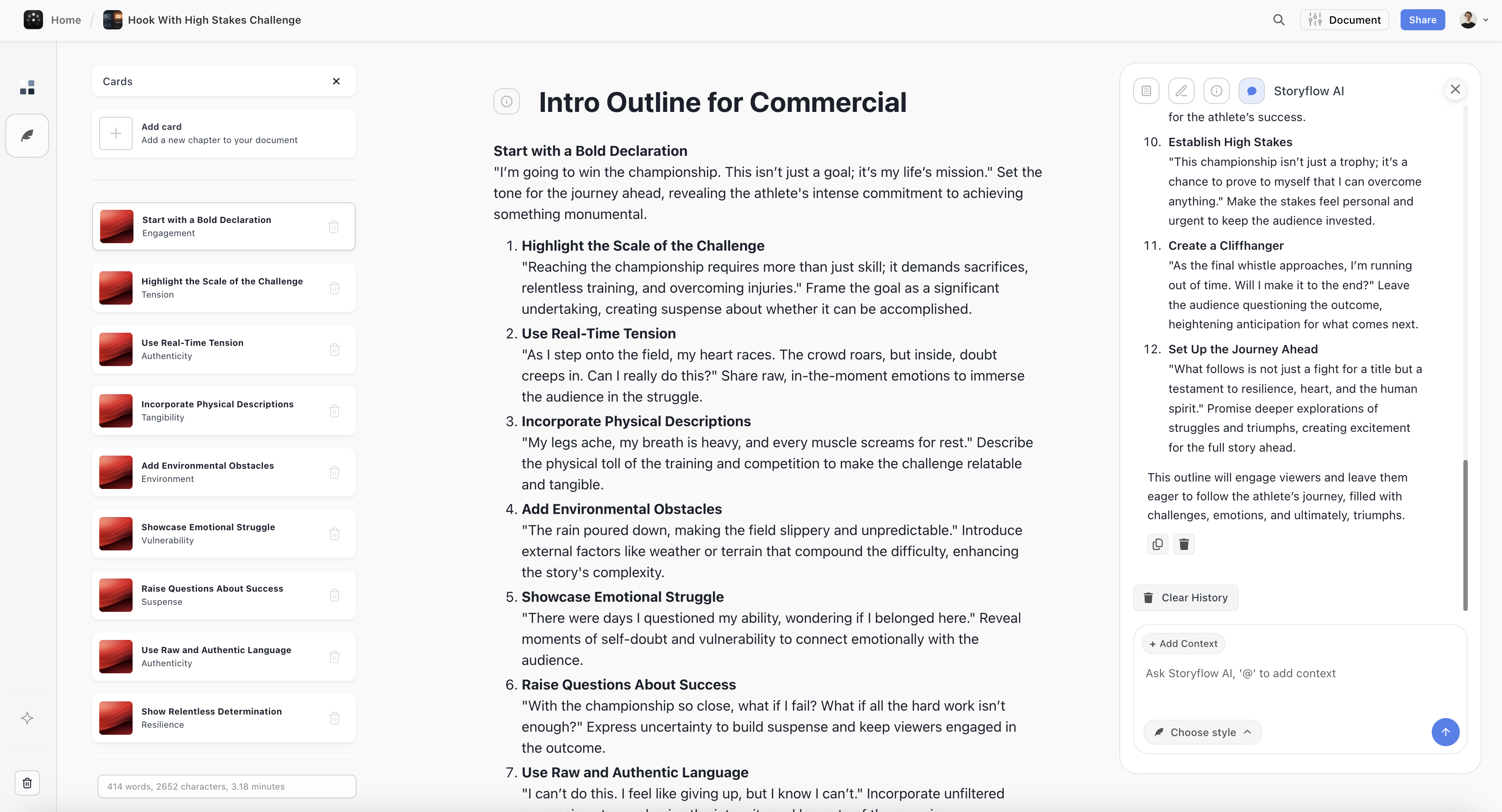
Hook and intro structure: three competing hook options mapped before choosing one to develop
Step 5: Draft Each Section with AI as Your Co-Writer
Output: A complete first draft with every section written, marked with revision flags
Write your version of each section first (even a rough paragraph or bullet points) before asking AI to help. This is the non-negotiable step most creators skip, and it is why AI-assisted scripts often sound like someone else wrote them. Your rough version captures your point of view, your examples, your specific experience with the problem. AI's job is to develop what you have started, not replace the starting.
For each section: write your thinking in two to four sentences, then prompt the AI with: 'Here is my draft of this section: [your text]. My viewer is [from audience research]. The section's job is [from your spine]. Expand this with more specific detail, tighten the language, and flag anything that sounds like generic advice rather than specific instruction.' The AI version will be better than your rough draft. Your rough draft will be better than what the AI would have written without it.
Work through the sections in order, not in the order they feel easiest. Sections you find hard to write are hard because you do not yet know what you actually think about that point. That is exactly the problem your viewer will have following it. If a section is difficult to write, the content spine needs revision at that point, not more words.
Where Storyflow helps: Keep your canvas open while drafting in Storyflow's document editor. The AI reads your canvas as context when you use the AI chat sidebar. It already knows your one-job sentence, audience language, hook, and content spine when you ask it to help with any section. You are not re-explaining the video every time you ask a question.
Common mistake: Asking AI to write a section from a heading alone. A section heading gives AI nothing to work with except the topic. It produces generic topic coverage. Give it your rough thinking and your specific audience context, and the output is a different category of useful.
Draft your script with AI that keeps the structure
Bring your one-job sentence, hook, and content spine, and let AI develop each section from your thinking instead of a blank prompt. You keep the point of view; it does the expanding and tightening.
Step 6: Write Retention Moments into the Structure
Output: Re-hooks placed at the 30%, 60%, and 80% marks of your script
Retention data from YouTube creators who script consistently shows a predictable pattern: attention drops at the 30-second mark, again at roughly 30% of total runtime, and again at 60-70%. The first drop is the hook's problem to solve. The second and third are structural: they happen because the script stops creating tension and starts delivering content without forward momentum.
A re-hook is not a summary of what you just covered ('so that's section one, now let's move on to...'). It is a micro-promise that creates a new reason to keep watching. 'That covers why most hooks fail. The reason most creators still cannot write a good one after reading that is in the next section, which is less obvious.' The viewer now has a specific question in their head. They are watching to get the answer. That question is the re-hook.
Write your re-hooks as standalone sentences, then place them at the transitions between your major sections. Read them cold, as if you have not just watched ten minutes of your own video. If the re-hook does not create a small amount of tension or curiosity on its own, rewrite it. The best ones feel like the video is just getting interesting exactly when the viewer was about to leave.
Where Storyflow helps: Add your re-hook sentences as separate cards in Storyflow between each section in your content spine layout. The visual spacing makes it obvious where the retention moments live in the overall structure, and the AI can review your full script and suggest re-hooks you have missed. It sees the section content on either side, not just the transition point.
Common mistake: Treating re-hooks as optional polish you add at the end. Retention moments embedded in the script structure hold fundamentally different viewer attention than summaries you add after the fact. The structure creates the habit of watching; the summary tells them what they already watched.
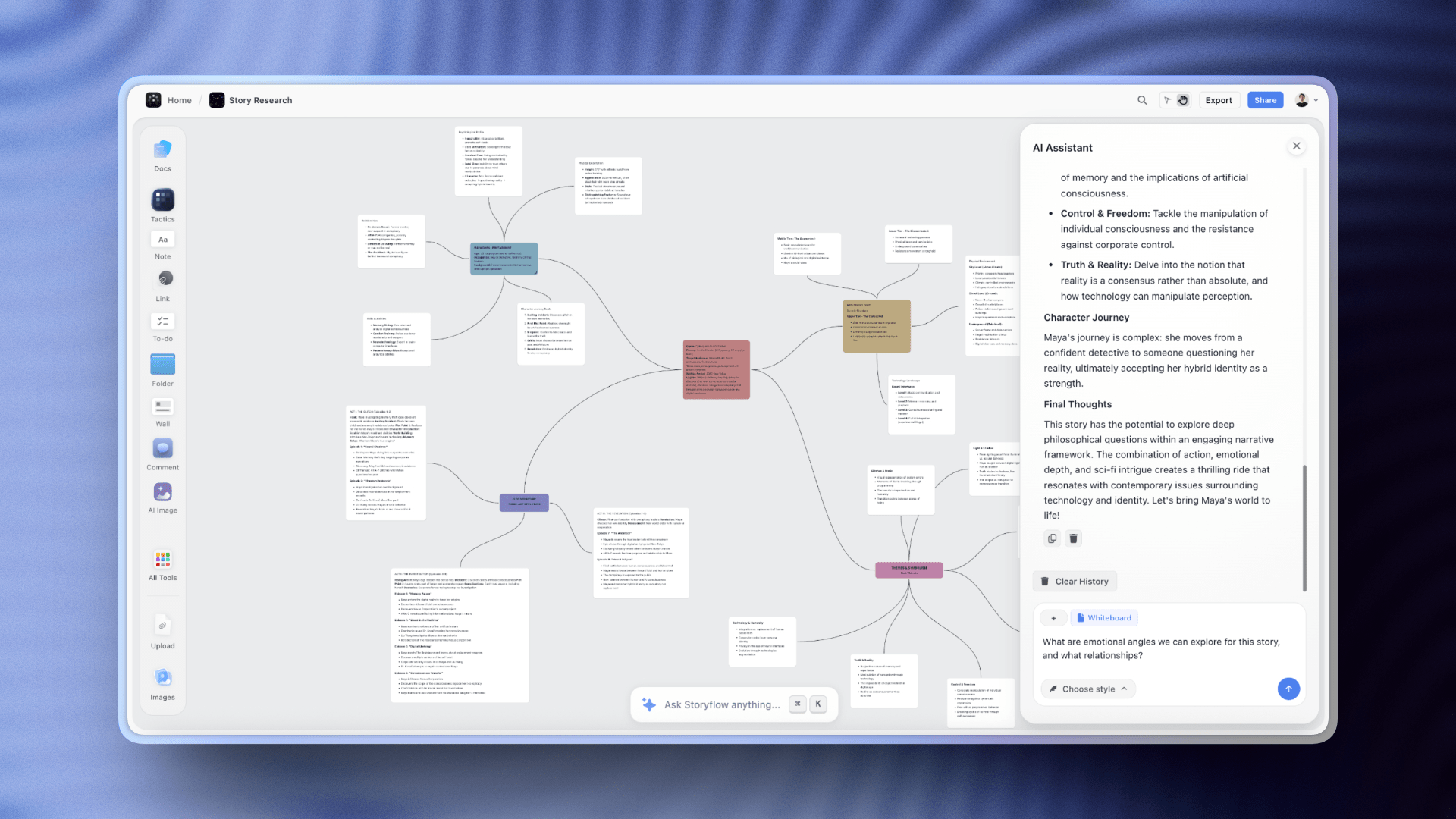
Storyflow's AI reads your one-job sentence, audience language, and content spine before drafting each section. Context that makes every response specific to your video
Step 7: Write Your Outro and CTA
Output: An outro that delivers the promised payoff and makes one specific ask
The outro's job is to deliver what the hook promised, then make exactly one ask. Not 'like, comment, and subscribe if you found value in this video.' That sentence has trained an entire generation of viewers to stop listening at 'like.' One ask. The most important one. For most creators, that is the subscription: the viewer who subscribes at the end of a video they just completed is your highest-intent audience member.
Write the payoff first: one to three sentences that directly call back to the hook's tension. If your hook promised 'I'll show you why your retention drops at 30 seconds,' your payoff is the specific answer stated plainly, not a summary of what you covered. It is the resolution of the tension the hook created. Viewers who feel the resolution are in the best psychological state to take an action.
The CTA should be specific about what the viewer gets by taking the action. 'Subscribe for more videos' is vague. 'Subscribe: I publish one scripting guide per week, and the next one covers the re-hook structure that keeps retention above 50% for the full video' is specific. The difference between generic and specific CTAs in creator communities is the difference between a 2% conversion rate and a 7% one. One sentence. One action. One concrete reason.
Where Storyflow helps: With your full script on the Storyflow canvas, ask the AI: 'My hook was [hook text]. My video's one job was [one-job sentence]. Write an outro that delivers on this specific promise, then a CTA for [your specific channel goal].' Because the AI has already read your hook and one-job sentence from the canvas, it writes an outro that closes the loop rather than a generic sign-off.
Common mistake: Writing the outro as a summary of what you covered rather than a resolution of the tension you created. Summaries tell viewers what they already know. Resolutions give them the specific thing they stayed for. If you have to summarise, the structure did not deliver. Fix the structure.
Step 8: Read Every Line Out Loud
Output: A revised script with every awkward line rewritten in your speaking voice
This is the step that separates scripts that feel natural on camera from scripts that make creators look like they are reading from a teleprompter. Written language and spoken language are not the same register. A sentence that reads well on screen often sounds stilted when spoken, especially compound clauses, passive constructions, and any sentence that starts with 'Additionally' or 'Furthermore.'
Read the entire script out loud, alone, at the pace you speak on camera. Mark every line where you hesitate, stumble, or change the words. Those marks are not errors in your delivery. They are errors in the script. Rewrite the marked lines using the words you naturally used when you stumbled. The version you improvised is almost always more natural than the version you wrote. Then read those sections again. Once you can read the entire script at camera pace without marking anything, it is ready.
I have cut an average of 12% of the word count during spoken revision. Every cut improved the video. The sentences that get removed are almost always the ones I was most proud of when I wrote them: clever turns of phrase that read beautifully and sound self-conscious on camera. Clarity beats cleverness in YouTube content. Every time.
Where Storyflow helps: After the spoken revision, paste your changed lines back into your Storyflow document. The Writing Analyzer shows readability scores and flags complex sentence structures. Use it as a second pass to catch any over-written lines the spoken revision missed. Reading Ease above 70 and a Grade Level below 9 are the targets for most YouTube content.
Common mistake: Reading the script silently and calling it a spoken revision. Your brain auto-corrects errors when you read silently. Your mouth does not. A script that passes a silent read can still have five lines that will feel wrong on camera. You will not discover them until you are watching the edit.
Step 9: Format the Script for Your Shoot
Output: A production-ready script with presenter blocks, stage directions, and visual cues
A finished draft is not a shootable script. Before you film, add three formatting layers: presenter blocks (paragraphs broken at natural breath points, never mid-clause), stage directions (reminders to look at the camera, hold up a specific object, cut to a screen recording), and visual cues (notes for your editor about what B-roll or graphics appear during each section). This takes 10-15 minutes and eliminates the most common filming interruptions.
Break long paragraphs into presenter blocks of two to three sentences maximum. Your working memory can hold one to two ideas while maintaining camera presence. A paragraph that requires four ideas delivered continuously is a paragraph that will need multiple takes. Not because your delivery is weak, but because the script is asking too much from a single take.
Add your stage directions in square brackets so they are visually distinct from spoken text: [hold camera on face], [screen recording starts here], [slow zoom, editor note: music volume down]. This means you can film without reviewing formatting decisions mid-take, and your editor has everything they need to execute your intent without a debrief call.
Where Storyflow helps: Export your final script from Storyflow's document editor and format the presenter blocks directly in the document view. Keep the formatted script card on your Storyflow canvas alongside your content spine. When you revisit this video topic for a follow-up or a series, the structure is there to build from rather than reconstruct from a finished video.
Common mistake: Filming directly from the polished draft without breaking it into presenter blocks. Three-sentence paragraphs feel manageable when reading at a desk. On camera, under lights, with a timer running, they produce stilted delivery and three times as many takes as the same content divided into natural speech units.
The 9-Step Process at a Glance
The complete YouTube script writing process with AI, condensed:
- Define your video's one job: Write the before/after transformation in one sentence
- Research your audience's exact language: Collect 10-15 phrases from comments and communities
- Write your hook before everything else: Draft three formats, choose one, refine it
- Build the content spine: Map 5-7 sections connecting hook tension to outro resolution
- Draft with AI as your co-writer: Write your thinking first, let AI develop it
- Write retention moments in: Re-hooks at 30%, 60%, and 80% of runtime
- Write your outro and CTA: Deliver the payoff, make one specific ask
- Read every line out loud: Cut what you stumble on. It will sound wrong on camera
- Format for your shoot: Presenter blocks, stage directions, visual cues
Storyflow's Blueprint Tactics include Retention Hooks, a structured scripting framework that walks you through hook writing, content spine, and retention moments with expert guidance at each step (the free tier ships with 3 starter blueprints; the full 200+ library starts on Plus). You do not need to hold the entire process in your head while you write. Start scripting free.
Tips and Best Practices
Write to one specific person, not an audience
Pick one real person who is your ideal viewer for this video: someone you have spoken to, a commenter who described the problem perfectly, or a composite you know well enough to name. Write the entire script as if you are explaining this to that one person. Viewers who feel spoken to directly watch longer than viewers who feel spoken at generally. 'You are probably doing this wrong' lands differently than 'some creators struggle with this.' The difference is precision of address.
Give AI your failed drafts, not just your brief
When a section is not working, paste your failed version into the AI prompt alongside your brief. 'Here is what I tried and why it feels wrong: [text]. What is the structural problem?' produces far better output than 'help me write this section.' I wasted three months asking AI to generate solutions before I started asking it to diagnose problems. The diagnostic prompt is more useful. It teaches you something about the section that you can apply to every script after this one.
Use your actual speaking vocabulary
If you would never say 'leverage' in a conversation, do not write it in a script. Read back through your draft and flag every word or phrase you would not use if explaining this to a colleague over lunch. Replace them. The written version of your voice is a slightly more formal version of your spoken voice, not a different voice. Scripts that sound like a formal essay produce creators who look like they are performing rather than talking.
Your re-hooks need to be more specific than your hook
The hook earns the first 30 seconds on a general promise. Re-hooks earn the next sections on specific micro-promises. 'Coming up: why most creators' retention graphs look exactly the same' is too vague for a re-hook. 'Coming up: the specific sentence structure that causes the 35-second drop, and how to rewrite it in under two minutes' is specific enough that a viewer who was leaving might stay. Specificity is the only currency that re-hooks accept.
Keep your content spine visible throughout the drafting session
The most common mid-draft problem is a section that expands beyond its one job and cannibalises the territory of the next section. If section three is trying to cover what section four was supposed to cover, you will feel it as confusion about where to stop, not as a structural problem. Keeping the spine visible on your Storyflow canvas while drafting means you catch this in real time rather than in the edit when the video is already two minutes too long.
Time your first complete draft, then match it
Read your first complete draft out loud with a timer running. If you are writing a 10-minute video and your draft reads in 7 minutes, you are 15-20% short on substance: somewhere the content is surface-level. If it reads in 14 minutes, you are carrying two sections that can be cut or compressed. The spoken read as a timing tool is more reliable than word count because it accounts for your natural pacing on camera, not an abstract calculation.
Common Mistakes to Avoid
Mistake: Asking AI to write the full script from a topic alone
Why it happens: It produces content immediately, which feels productive.
What goes wrong: A script written from a topic has no viewer context, no specific point of view, and no hook. It covers the topic rather than earning attention through it. It sounds like content about the subject rather than content for a specific person who has a specific problem with it.
What to do instead: Define your one-job sentence and collect audience language first. Five minutes of preparation changes the quality of every AI output in the drafting phase.
Mistake: Writing the introduction before the hook
Why it happens: Intros feel like the natural place to start a script.
What goes wrong: An intro written before the hook is almost always an apology for the video: setting up context before earning the right to the viewer's attention. The intro that follows a strong hook is usually shorter, sharper, and directly connected to the tension the hook created.
What to do instead: Write the hook first. Every time. The intro is written after the hook is working. It is the bridge from the hook's tension to the first section of content.
Mistake: Skipping the audience language research step
Why it happens: Experienced creators assume they already know how their audience talks.
What goes wrong: A script written in the creator's language for the viewer's problem. The creator uses precise technical terms. The viewer uses the words they actually think in. Those are different vocabularies, and viewers feel the distance even if they cannot articulate why the video felt like it was not quite for them.
What to do instead: Spend 20 minutes in the comments of your own videos and your competitors' videos before drafting. Copy exact phrases. Use them in your hook. The click-through rate difference is measurable.
Mistake: Not reading the script out loud before shooting
Why it happens: The script looks clean on screen and the deadline is real.
What goes wrong: Awkward camera delivery on lines that read well but speak poorly. The creator blames their on-camera presence. The script is the actual cause. Stilted delivery and excessive takes are almost always a script problem, not a performance problem.
What to do instead: Read the entire script out loud before filming. Mark every line you stumble on. Rewrite the marks. Shoot after the spoken revision passes cleanly. Not before.
Mistake: Treating the content spine as fixed once you start drafting
Why it happens: Changing the structure mid-draft feels like wasted work.
What goes wrong: A section that needed to expand does not get the space it needs. A section that turned out to be two ideas stays as one overloaded section. The result is a script that feels lumpy: strong in places, rushed in others, because the structure was not updated to reflect what the content actually required.
What to do instead: Treat the content spine as a living document throughout the draft. When a section expands beyond its scope, update the spine before continuing. The draft exists to serve the viewer, not to preserve the initial plan.
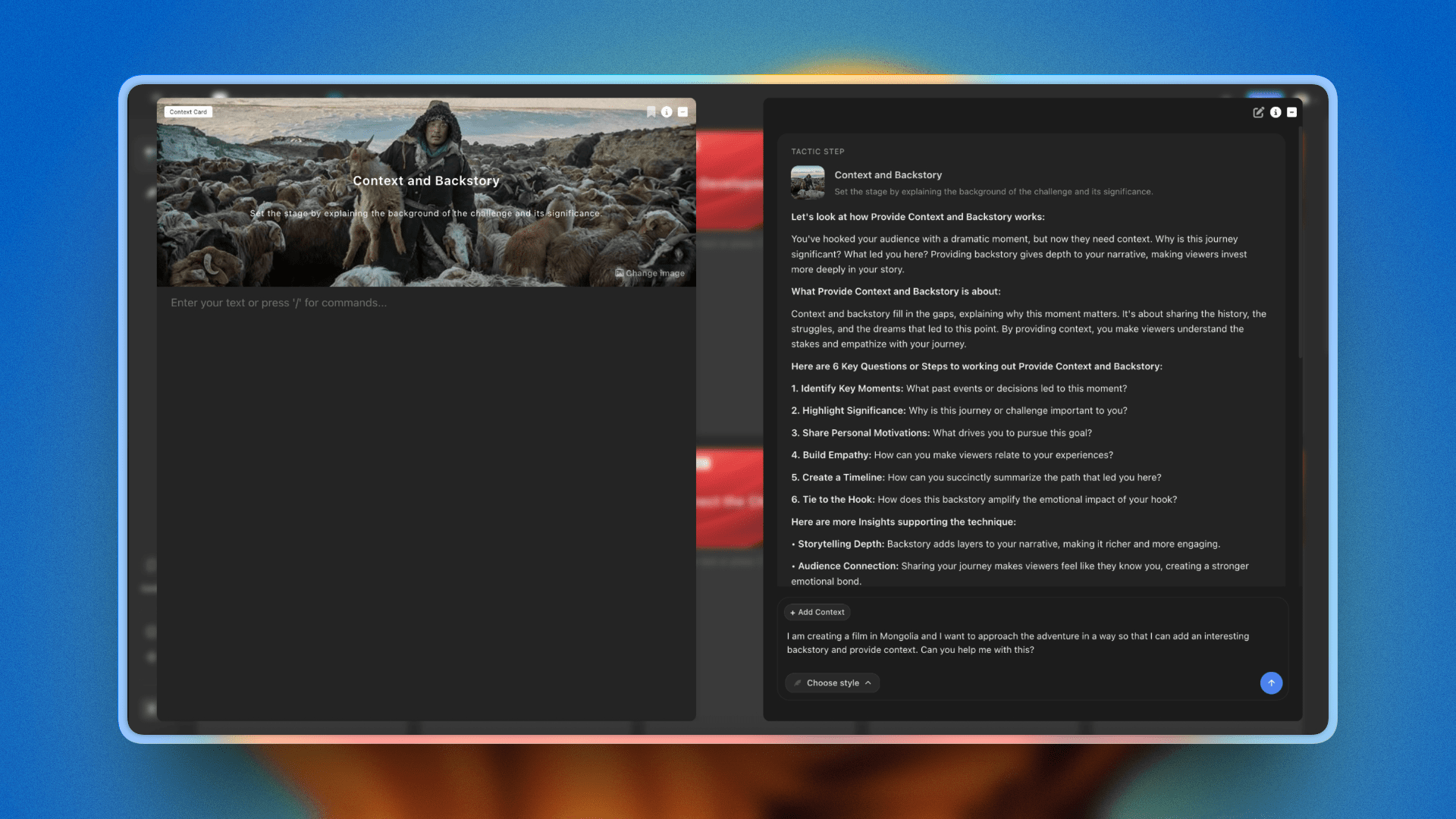
Storyflow's Blueprint Tactics for scripting: each card walks through hook writing, content structure, and retention strategy with AI guidance built into every step
FAQ: How to Write a YouTube Script with AI
How do you plan a YouTube video from idea to script?
Planning a YouTube video from idea to script runs as one connected arc: start with the single job the video does for the viewer, find the specific angle only you can take, write a hook that names the gap between where the viewer is and what they will get, outline a content spine of three to five sections, then draft the script section by section against that spine. The reason most scripts feel generic is that these steps live in separate documents, so the draft loses the angle and audience language decided earlier. Doing it on one surface, like a canvas where the AI reads the whole plan, keeps the idea, angle, hook, and outline in view while you write, so the script stays on-voice from first line to last.
How long does it take to write a YouTube script with AI?
Plan for 2.5 to 3 hours the first time you use this process: 30 minutes for the one-job definition and audience language research, 45 minutes for hook writing and content spine, 60-90 minutes drafting with AI, and 30 minutes for the read-aloud revision. Once you have a Storyflow canvas set up with your Blueprint Tactic and audience notes, repeat scripts for the same series take 90 minutes or less because context carries forward.
How is writing a YouTube script with AI different from writing one manually?
Writing manually, you are the only source of ideas: every variation, every reframe, every angle comes from you alone. AI changes the ratio. You define the structure, point of view, and audience, then use AI to generate the variations you evaluate. The script is still yours because the judgment is still yours. What changes is the speed at which you can see options and the depth you can reach on individual sections without losing the overall structure.
Can I just give ChatGPT my topic and use what it writes?
You can, but the result will feel generic to anyone who watches YouTube regularly. ChatGPT writing a script from a topic alone has no knowledge of your audience's specific language, your channel's voice, or the particular angle that makes your perspective worth watching. The scripts that perform are the ones where the AI is building on your thinking, not replacing it. AI with no context produces competent content. AI with your full context produces your content, faster.
How long should a YouTube script be?
A script for a 10-minute video typically runs 1,400 to 1,600 words. A 7-minute video runs around 1,000-1,200 words. A 15-minute deep dive runs 2,000-2,200 words. These estimates assume a natural speaking pace of 130-150 words per minute. The mistake is writing to hit a word count target. Write to cover your promised transformation completely, then check the implied runtime. Padding to fill time is the primary cause of low audience retention in the 60-80% segment of a video.
How do I write a YouTube hook with AI that actually works?
Give AI three things: the specific problem the viewer has right now, the counterintuitive angle your video takes, and one concrete outcome they will get. Ask it to write five hooks for each format: the pattern interrupt, the bold claim, the specific promise, the story open, and the question. Then evaluate which one creates the most tension between where the viewer is and where your video ends. The best AI-generated hook is the one that makes the viewer feel the gap between their current situation and your solution.
Can I write a YouTube script with AI using Notion or Google Docs?
You can write the text in either tool, but the limitation is context fragmentation. In Notion or Google Docs, your audience research, hook drafts, content spine, and full script live in separate documents. When you ask an AI assistant to help with section three, it does not automatically know what you wrote in section one, what your hook promised, or what audience language you researched. In Storyflow, your canvas holds all of that simultaneously, and the AI reads the full context before responding, which produces more coherent, on-voice section drafts.
What should I give AI before asking it to help write my script?
At minimum: the one-job statement for your video, 5-10 phrases your specific audience uses, your hook, and your content spine with the key points mapped out. With those four inputs, AI can draft each section in your voice rather than a generic educational tone. Without them, it writes what sounds like a YouTube script rather than what sounds like your YouTube script. The inputs take 45-60 minutes to produce. They save 2-3 hours of revision.
How many times should I revise a YouTube script before shooting?
Two revision passes: one structural (does each section deliver on what the previous section promised?), one spoken (read the entire script out loud and cut every sentence you stumble on). Most creators stop at the screen read, which misses the single most important quality check for video content. Speaking patterns differ from reading patterns. A sentence that sounds sophisticated in your head sounds like you are reading a textbook on camera. The spoken revision pass takes 20-30 minutes and is the difference between a scripted video that feels natural and one that feels stiff.
What does a good YouTube script actually look like?
A strong 10-minute YouTube script has four zones: hook and open (30-90 seconds), setup and credibility bridge (1-2 minutes), main content body with 3-5 sections of 2-3 minutes each, and outro with CTA (30-60 seconds). Each section ends with a micro-tease that pulls the viewer into the next one. Sections are shorter than you expect. If a single point runs longer than 3 minutes without a re-hook, retention typically drops. Think chapters, not essays.
Should I follow my YouTube script word-for-word or treat it as a guide?
Treat a fully written script as a word-for-word starting point, then shoot without reading. Review the take. If a paragraph sounds wrong on camera, rewrite it in your speaking voice and reshoot. The script's job is not to be your teleprompter. Its job is to ensure you never go on camera without knowing exactly what the video's one job is, what your hook promises, and how you deliver on that promise before the outro. With that structure solid, natural performance beats perfect delivery every time.
Write Your First AI-Assisted Script Today
The reason most creators never improve their scripting process is not that they lack the knowledge. It is that the blank document is always one tab away, the deadline is always real, and the process feels like overhead when you just want to make the video. The overhead is real: the first time through this process takes longer than your current approach. The second time takes the same. The third time, having your one-job sentence already written from the series strategy and your audience language card already on the canvas, it takes less. The process builds on itself in a way that opening a blank document never does.
Open Storyflow and start your next video from the Video Script template, so the board opens with the scripting structure already laid out. Add your one-job sentence as the first card. With a Blueprint Tactic like Retention Hooks open beside it, you have a structured scripting framework with AI guidance at every step, covering hook formats, content spine structure, re-hook placement, and outro construction. You do not need to hold the process in your head while you write. The first complete script through this process will take around three hours. The fourth will take ninety minutes.
Every consistently watched creator you admire has a scripting process: not exceptional charisma or a better topic list, a process. The difference between a channel that grows and one that stays flat is almost never the ideas. It is whether the script earns the next 30 seconds, every 30 seconds, from the hook to the CTA.
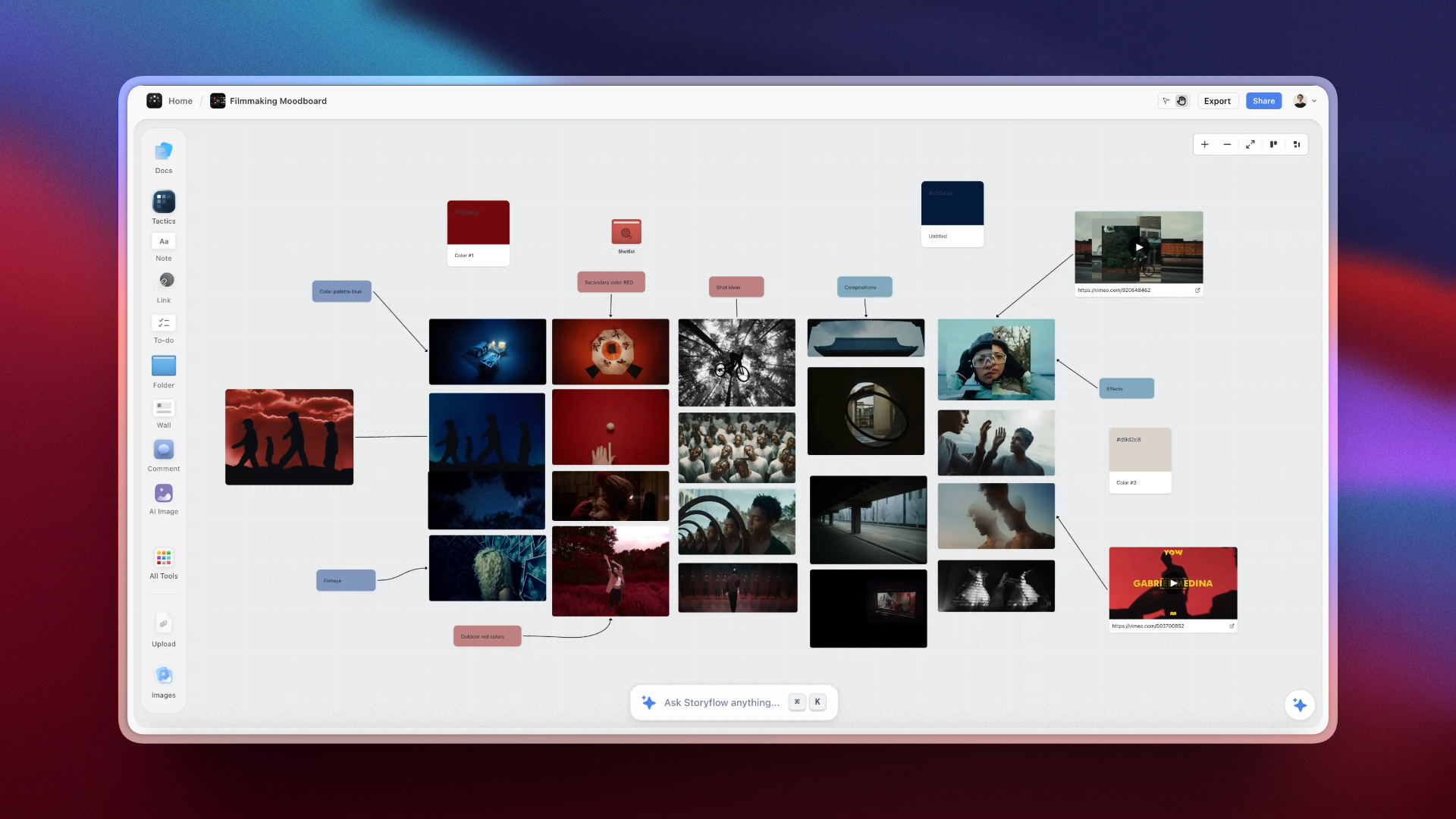
A complete YouTube script workflow in Storyflow: one-job sentence, audience research, hook drafts, content spine, and full script on one canvas
Related Reading
The companion guide to hook writing specifically, going deeper on the five hook formats and how to use each for different video types.
A ready-to-use structural template you can drop directly into Storyflow after completing this scripting process.
The upstream guide: build the channel strategy and content pillars that your individual scripts should align with.
Use this process before scripting when you need to find the right angle. The ideation session finds the idea; this guide turns it into a script.
Written by Sara de Klein, Head of Product at Storyflow. Sara has worked with hundreds of creators, filmmakers, and marketing teams on their content workflows. Storyflow is the visual AI workspace she builds and uses daily for structured creative work.
Table of Contents
Templates to check out for this topic


Content and video templates you can use in Storyflow
Plan a channel, a script, and a content pipeline on the same board. Open one of these templates and let the AI build on the structure instead of starting from a blank doc.


See Storyflow in Action
A visual AI workspace where every feature lives inside one canvas. No tab-switching, no context lost.
Build your entire board from a single message
Type what you need in the AI chat at the bottom of your canvas. The AI adds cards, headings, and structure directly onto your board.
Use expert frameworks as AI context
Type @ in the AI chat and choose any Tactic. The AI tailors every response to that framework instead of giving generic advice.
Turn your board into a mind map in seconds
Ask the AI to restructure your canvas as a mindmap. It connects your ideas into a visual hierarchy so you can see how everything relates.
Why Storyflow Exists
Storyflow actually began as a personal tool while working on creative and research projects.
We kept running into the same problem: ideas were scattered everywhere: notes, documents, and whiteboards.
Nothing helped us see how everything connected.
So we started building a workspace designed around how ideas actually grow.
→ Read how Storyflow was createdSara de Klein
Head of Product at Storyflow
Published: 2026-04-09
Extremely simple, seriously capable


See how easy it is to get started
Watch a real project come together, from a blank board to a finished plan, clicked through step by step.
Start creating with AI and become more productive
Transform your creative workflow with AI-powered tools. Generate ideas, create content, and boost your productivity in minutes instead of hours.