The 12 Best AI Tools for Video Editors in 2026 (Tested for Indie, Branded, and Agency Work)
Ten hours of footage, three days to deliver, no clear through-line. The 12 best AI tools for video editors in 2026, ranked across pre-cut structural thinking and timeline AI for indie, branded, and agency work.

Category
Visual Thinking
Author

Justkay
Documentary Filmmaker & Founder at Storyflow
Topics
2026-05-10
•
22 min read
•
Visual Thinking- best AI tools for video editors 2026
- AI video editing software
- AI for documentary editors
- AI editing pre-production
- video editing AI 2026
What is the best AI tool for video editors in 2026?
The best AI tools for video editors in 2026 are Storyflow, Adobe Premiere Pro with Sensei, and Descript. Storyflow holds the pre-cut structural thinking layer (story spine, beat sheets, character arcs) on a canvas the AI can read end to end. Premiere with Sensei remains the strongest daily NLE. Descript handles transcript-driven editing for dialogue cuts.

It's 11pm on a Tuesday, you have ten hours of footage spread across three card dumps, the deadline is Friday, and the cut still has no through-line. You scrub the timeline for the eighth time tonight and realize the structural problem isn't on the timeline at all. It lives upstream, in the messy thinking before the first clip lands on V1. The 12 tools below cover both layers: the AI in the timeline (auto-edit, smart trim, transcription) and the AI that helps you plan and structure the cut before timeline work begins. The shortlist for working video editors in 2026 is Storyflow for pre-cut structural thinking, Adobe Premiere with Sensei for the daily NLE, and Descript for text-based editing on talking-head and interview work. Here is how to plan a month of videos with your editor on one board.
Full disclosure: Storyflow is our own product, and we rank it #1 for one job: the pre-cut structural thinking layer, where the AI reads your whole canvas instead of a blank prompt. For the daily timeline edit Premiere Pro with Sensei is stronger, and for transcript-driven dialogue cuts Descript is faster. Storyflow is not an editor, it does not render video or touch the timeline, so it sits beside your NLE, not in place of it. We link to every tool so you can judge the fit.
Quick Comparison: Best AI Tools for Video Editors
These four cover the jobs editors actually split between: pre-cut structural thinking, the daily timeline NLE, transcript-driven dialogue cuts, and free finishing-grade color and audio.
| Tool | Best For | AI Features | Price |
|---|---|---|---|
| Storyflow | Pre-cut structural thinking on a canvas | Reads full board + @-docs and Tactics | $7.99 mo annual (free plan late 2026) |
| Adobe Premiere Pro + Sensei | Daily NLE for branded and agency work | Speech to Text, Auto Reframe, Scene Edit Detection | Around $22.99 mo |
| Descript | Text-based editing for dialogue cuts | Transcript editing, Studio Sound, Overdub | Around $15 mo |
| DaVinci Resolve | Free finishing-grade NLE | Neural engine (Magic Mask, Voice Isolation) | Free / $295 once |
Quick Picks: Best AI Tools for Video Editors 2026 by Use Case
Best Overall for Video Editors in 2026: Storyflow. Most editing tools live downstream of the structural decisions, Storyflow lives upstream. The canvas holds your shotlist, story spine, character arcs, edit notes, and reference frames in one project that AI can read end to end. The cut gets faster because the thinking gets cleaner before you open Premiere or Resolve.
Best for Pre-Cut Structure: Storyflow. Story craft frameworks like the Story Spine, Hero's Journey, Three-Act Structure, and Save the Cat beat sheet are available in Storyflow's blueprint library and open as structured blocks on the canvas. The AI sees every block, so the structure stays grounded in the actual project, not generic best practices.
Best for Timeline AI: Adobe Premiere Pro with Sensei. Auto-reframe, Speech to Text, Scene Edit Detection, and Enhance Speech remain the most reliable timeline-level AI for working editors in 2026, especially for branded and agency work where the assets pipeline is already in Adobe.
Best for Branded Edits: Descript. Text-based editing, Studio Sound, and Overdub make talking-head and interview cuts dramatically faster. Edit the transcript, the timeline follows. For brand and agency work with a lot of dialogue, the speed gain is real.
Best Free: DaVinci Resolve (Free). Resolve Free still ships with neural engine features (Magic Mask, Voice Isolation, Smart Reframe on the paid Studio tier, but plenty of AI lives in the free tier). For editors learning the craft without budget, Resolve Free remains the most generous free NLE in 2026.
Best for Documentary Editors: Storyflow paired with Descript. Documentary cuts live or die on structural pivots and interview language. Storyflow holds the structural map (act breaks, character arcs, theme spine). Descript handles transcript-driven assembly.
Best for Agency Pipelines: Adobe Premiere Pro with Sensei. Sensei is fine, but the real reason agencies keep Premiere is that the entire creative team already lives in Creative Cloud. Frame.io review links, Photoshop and After Effects round trips, and shared project files keep teams aligned even when AI features are average.
Best for Indie Editors: Storyflow plus DaVinci Resolve. Indie editors need pre-cut structural clarity (Storyflow) and a finishing-grade NLE that doesn't drain the budget (Resolve). The combo holds the film's spine while giving you the same color tools used on theatrical features.
Best for YouTube Editors: Opus Clip plus Storyflow. Opus Clip handles long-form to short-form repurposing. Storyflow handles channel-level structural planning (series arcs, episode beats, hook patterns).
Try Storyflow at storyflow.so to set up your pre-cut canvas before your next edit.
Comparison Table: Best AI Tools for Video Editors 2026
| Tool | Best For | Starting Price | Free Plan | AI Depth (★/5) | Rating (/10) |
|---|---|---|---|---|---|
Storyflow | Pre-cut structural thinking | $7.99/month annual | Coming late 2026 (invited collaborators join free now) | ★★★★★ | 9.4/10 |
Adobe Premiere Pro + Sensei | Daily NLE for branded and agency work | Around $22.99/month | No | ★★★★ | 9.0/10 |
DaVinci Resolve + AI tools | Free finishing-grade NLE | Free, Studio around $295 one-time | Yes (extensive) | ★★★★ | 8.9/10 |
Final Cut Pro + AI plugins | Mac-native solo editors | Around $299.99 one-time | 90-day trial | ★★★ | 8.5/10 |
Descript | Text-based editing for dialogue cuts | Around $15/month | Yes (limited) | ★★★★ | 8.7/10 |
Runway ML | Generative visuals and inpainting | Around $15/month | Yes (limited credits) | ★★★★ | 8.4/10 |
Pictory | Script-to-video for marketing teams | Around $19/month | Limited free trial | ★★★ | 7.8/10 |
Opus Clip | Long-form to short-form repurposing | Around $19/month | Yes (limited minutes) | ★★★★ | 8.4/10 |
CapCut Pro | Mobile-first AI editing | Around $7.99/month | Yes (most features) | ★★★★ | 8.2/10 |
Filmora AI | Beginner-friendly AI editing | Around $49.99/year | Yes (watermarked) | ★★★ | 7.6/10 |
Kapwing AI | Browser-based collaborative editing | Around $16/month | Yes (limited) | ★★★ | 7.7/10 |
Topaz Video AI | Upscaling and enhancement | Around $299 one-time | 30-day trial | ★★★★ | 8.6/10 |
Prices above are the published rates at the time of writing and move often, so check the vendor's own page before you commit. The shape of each plan (free tier, subscription, or one-time licence) is more stable than the number. Ratings reflect AI depth, real-world editor workflow fit, free-tier generosity, pricing fairness, and how well each tool handles the gap between pre-cut thinking and timeline execution. Pricing is hedged because vendors change tiers frequently and regional pricing varies.
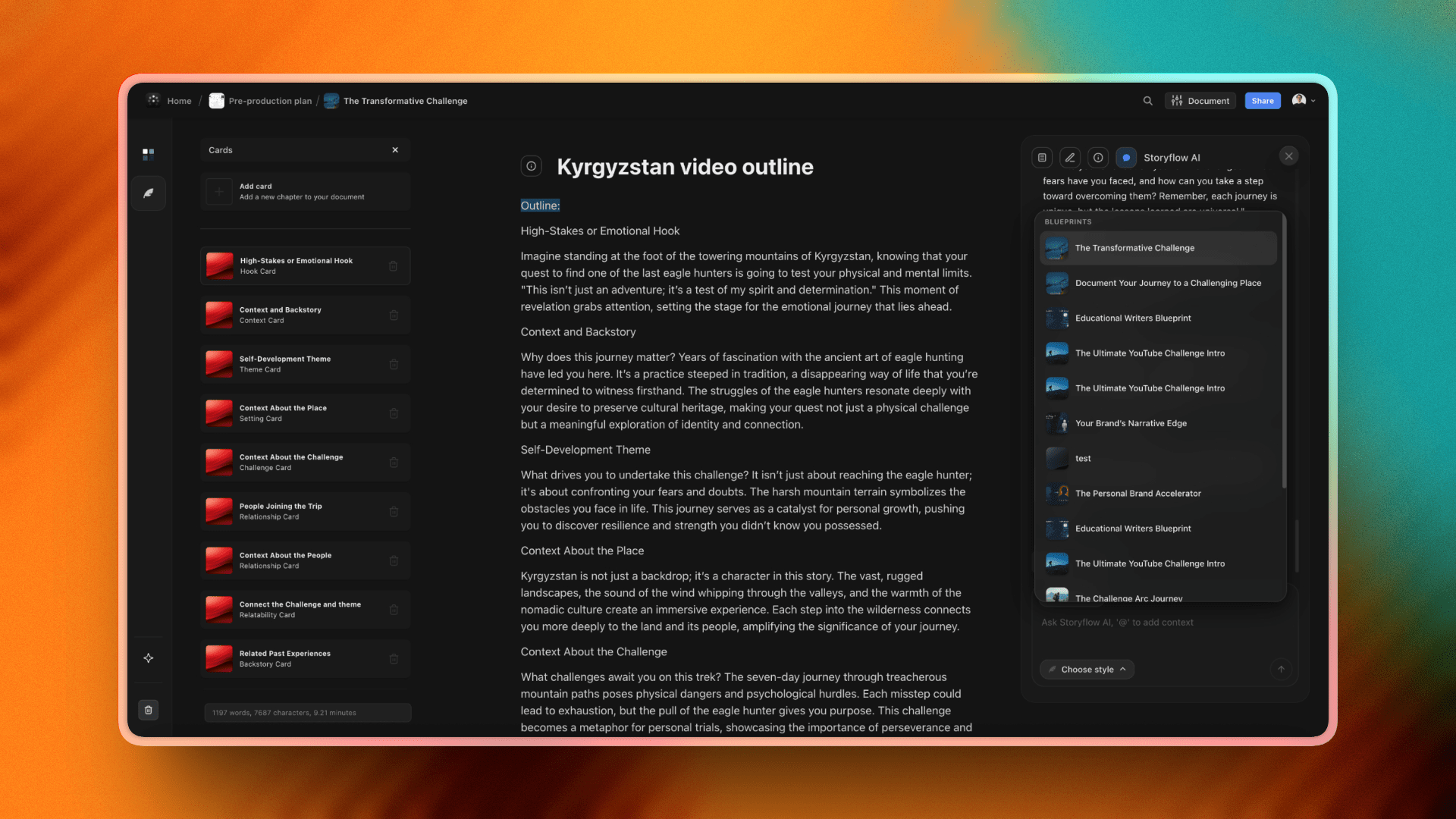
Storyflow's blueprint library: story-craft frameworks like Story Spine, Hero's Journey, Three-Act Structure, and Save the Cat that editors can open on the canvas
Best AI Tools for Video Editors 2026: Market Context
Most "best AI for video editing" listicles in 2026 confuse two layers, and the confusion is costing editors time. Layer one is timeline AI: auto-edit, smart trim, transcription, captioning, scene detection, voice isolation, generative inpainting. Layer two is pre-cut structural AI: story spine, beat sheet, character arcs across episodes, narrative pivot points, hook patterns, theme tracking. Listicles flatten both into a single "AI editing" category and rank Premiere against Pictory against Runway as if they solve the same problem. They don't.
The real productivity gap most working editors hit in 2026 isn't on the timeline. Premiere, Resolve, and Final Cut all have decent Sensei, neural engine, and Magnetic Mask features that handle the timeline-level grunt work. The gap is in the pre-cut structural thinking layer, the messy upstream work where you decide what the film is actually about, where the act break sits, which character carries the arc, what the cold open earns. That work usually happens in Notes, a Google Doc, a Notion page, or three browser tabs of ChatGPT, none of which can see your shotlist or footage map.
This article ranks 12 tools across both layers, and the framing is deliberate: the AI gap most editors hit in 2026 isn't in the timeline, it's in the pre-cut structural thinking layer. Storyflow is ranked first because it's the only tool on the list that holds that upstream layer in a way the AI can actually read.
How We Evaluated the Best AI Tools for Video Editors 2026
1. AI depth and reliability (25%). Does the AI understand the actual project context, or is it generic boilerplate? Tools that read the full canvas, transcript, or timeline scored higher than tools that prompt against thin context.
2. Pre-cut versus timeline coverage (20%). Where does the tool sit in the editor workflow? Tools that cover the structural pre-cut layer scored higher because that's the gap most editors hit, but timeline-only tools were rewarded for doing one job extremely well.
3. Real-world editor workflow fit (15%). Documentary, branded, agency, indie, and YouTube editors all have different pipelines. Tools that adapt to multiple editor types scored higher than tools locked into one format.
4. Free tier generosity (15%). What can a working editor actually do without paying? Tools with usable free tiers scored higher than tools with watermarked or 30-second-limit free trials.
5. Pricing fairness (10%). Is the paid tier honest? Tools with transparent annual pricing and no aggressive seat-based scaling scored higher than tools that gate everything behind enterprise.
6. Output quality (15%). When the AI ships, is the result usable on a paying job? Generative video, transcription accuracy, color matching, and voice isolation were tested on real footage.
The 12 Best AI Tools for Video Editors 2026, Ranked
1. Storyflow
Best for: pre-cut structural thinking, story spine, beat sheets, character arcs, and editing maps that AI can actually read.
Storyflow is a visual workspace built for the upstream layer of editing, the thinking that has to happen before the first clip hits V1. Open a project, drop in your shotlist, character profiles, story spine, theme notes, and reference frames, and the AI reads your full active canvas board, plus up to 1 Tactic and up to 3 Documents you @-mention in the chat. Ask it where the act break should sit, which interview answer earns the cold open, or what the through-line is across forty hours of doc footage, and the answer is grounded in the actual material on the board, not generic editing best practices.
Storyflow's blueprint library ships 200+ creative templates across writing, marketing, design, and project management, including story-craft frameworks like the Story Spine, Hero's Journey, Three-Act Structure, and the Save the Cat beat sheet. Each one opens as a structured block on the canvas and the AI uses it as scaffolding for the conversation, so the AI's thinking stays inside a story-craft framework rather than generic prompting.
Pricing is the most editor-friendly on this list once the Free plan lands. Paid-only during early access: Plus at $7.99/month annual ($9.99 monthly) unlocks the full 200+ blueprint library, and unlimited file uploads. Pro at $14/month annual ($19 monthly) adds AI image generation and 20 times more AI than Plus. Max at $39/month annual ($49 monthly) adds 40x more AI plus a team workspace with permissions and roles for editorial teams sharing canvases. The Free plan (unlimited boards, unlimited cards, unlimited collaboration with as many editors as you want, basic AI usage, and 20 file uploads) launches before the end of 2026, and anyone a paid member invites to a board joins free now. Try it at https://storyflow.so.
The honest trade-off is that Storyflow is not an editor. It doesn't render video, doesn't replace Premiere or Resolve, and doesn't touch the timeline. If your problem is the cut itself (color, audio post, captions, the actual assembly), a dedicated NLE wins and Storyflow has no answer for you. It's the upstream tool that makes the downstream cut faster, not a substitute for one. For working editors in 2026, the pre-cut layer is the gap that actually moves the deadline, which is why it sits at the top of this list and Premiere sits right behind it.
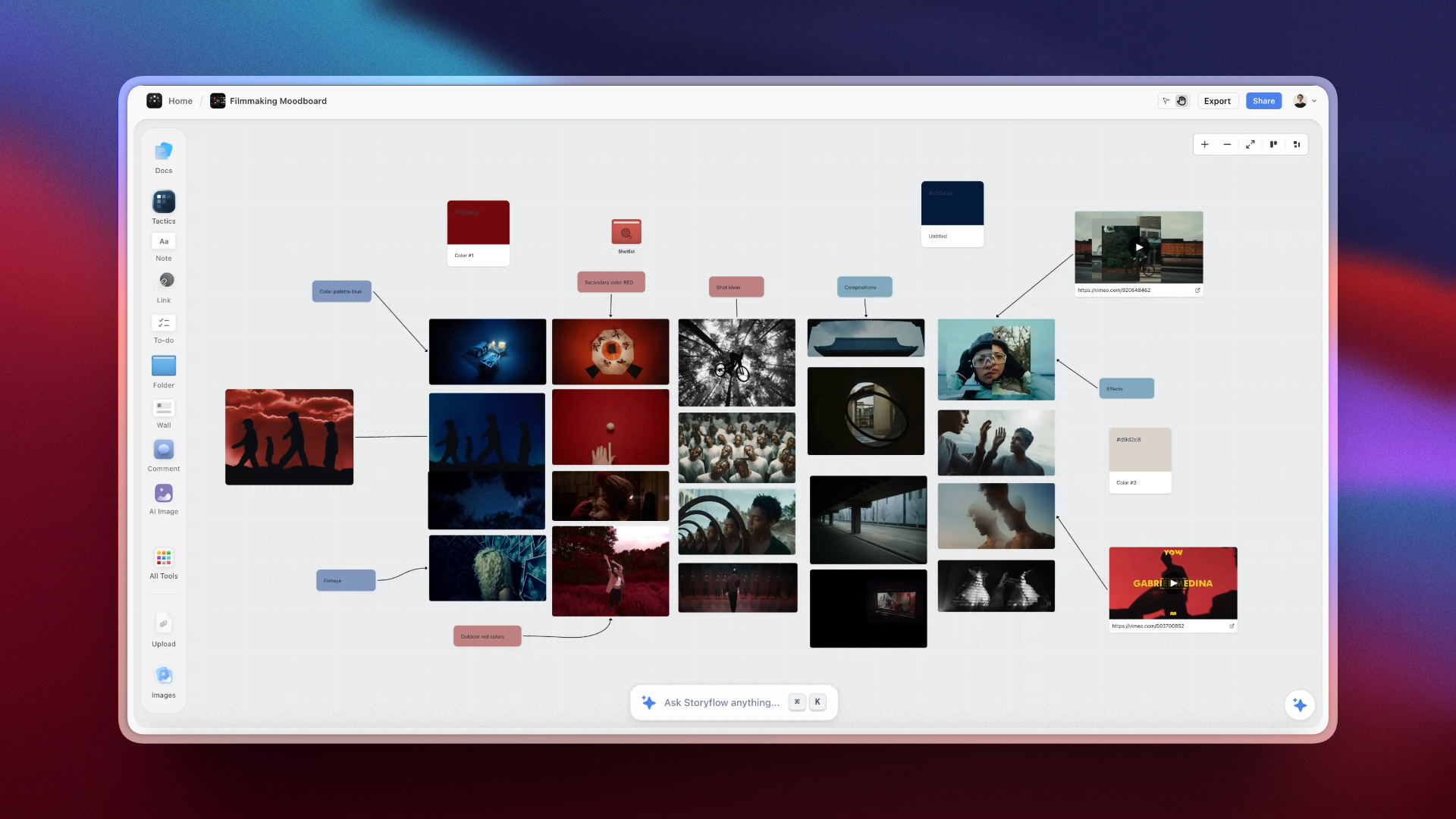
Storyflow's pre-cut canvas: shotlist, structural beats, and edit notes on one project board with AI context built in
2. Adobe Premiere Pro + Sensei AI
Best for: daily NLE for branded, agency, and corporate editors already living in Creative Cloud.
Premiere Pro remains the default professional NLE in 2026, and Sensei AI keeps adding genuinely useful timeline features. Speech to Text generates captions and transcripts at workflow speed, Auto Reframe handles social-format deliverables across 1:1, 9:16, and 16:9, Scene Edit Detection finds cuts in flattened exports for re-edits, and Enhance Speech rescues field audio that would otherwise need a sound editor. The new generative extend and AI-assisted color matching features in the 2026 release improve the kit further.
The reason agencies keep Premiere isn't actually the AI, it's the Creative Cloud pipeline. Frame.io review links, Productions for shared projects, dynamic link with After Effects, and round trips with Photoshop, Audition, and Lightroom mean the whole creative team works in one ecosystem. Sensei is the tax, the pipeline is the value.
Premiere is around $22.99/month standalone, or part of Creative Cloud at around $59.99/month. The honest critique is that Sensei AI is competent but not category-leading on any single feature, Descript beats it on transcripts, Resolve beats it on color, Topaz beats it on enhancement. Premiere wins on aggregate workflow, not on any single AI win.
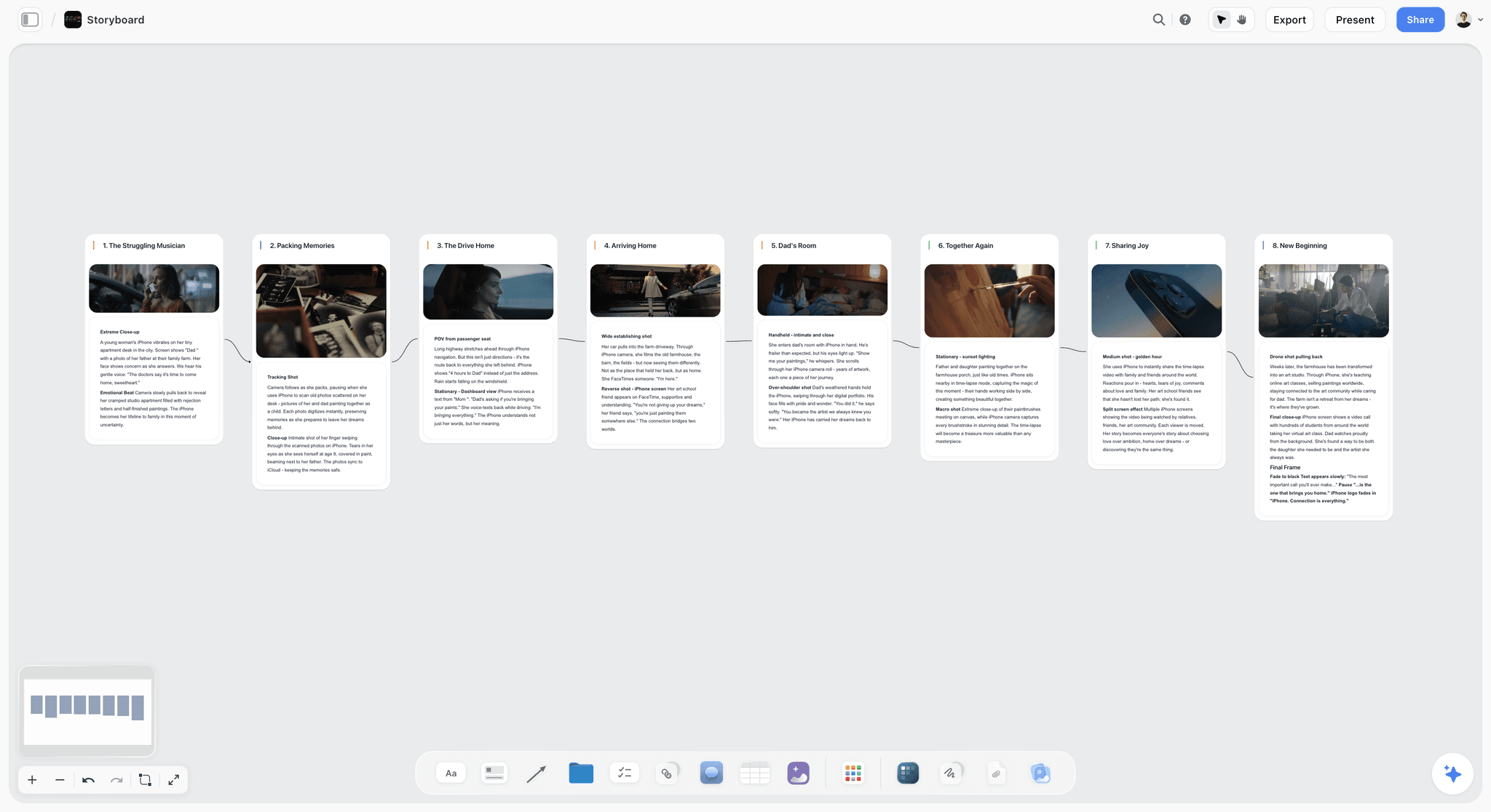
Storyflow storyboard board mapping shots to story beats, the pre-cut structural layer Premiere can't hold
3. DaVinci Resolve + AI tools
Best for: free, finishing-grade NLE with serious neural engine AI for indie editors and colorists.
DaVinci Resolve is the most absurd value in editing software in 2026. The free tier ships with the same color page used on theatrical features, Fairlight for audio post, Fusion for compositing, and a meaningful slice of the neural engine AI features (Voice Isolation in Fairlight, basic Magic Mask, scene cut detection). The paid Studio tier adds Magic Mask 2.0, Smart Reframe, Speech to Text, Voice Identification, AI-assisted relighting, and depth maps for 3D effects.
For indie editors cutting their own films, Resolve plus Storyflow is the strongest 2026 combination on this list. Storyflow holds the pre-cut structural map, Resolve handles assembly, color, sound, and finishing without a Creative Cloud subscription draining your project budget every month. The learning curve is steeper than Premiere or Final Cut, but the ceiling is higher.
Resolve Free is, well, free. Studio is a one-time purchase around $295, which means even paying once costs less than a single year of Premiere. The honest critique is the dense UI and page-based structure (Cut, Edit, Color, Fusion, Fairlight, Deliver) takes a few weeks to internalize. Once it clicks, it's the most powerful free NLE on the planet.
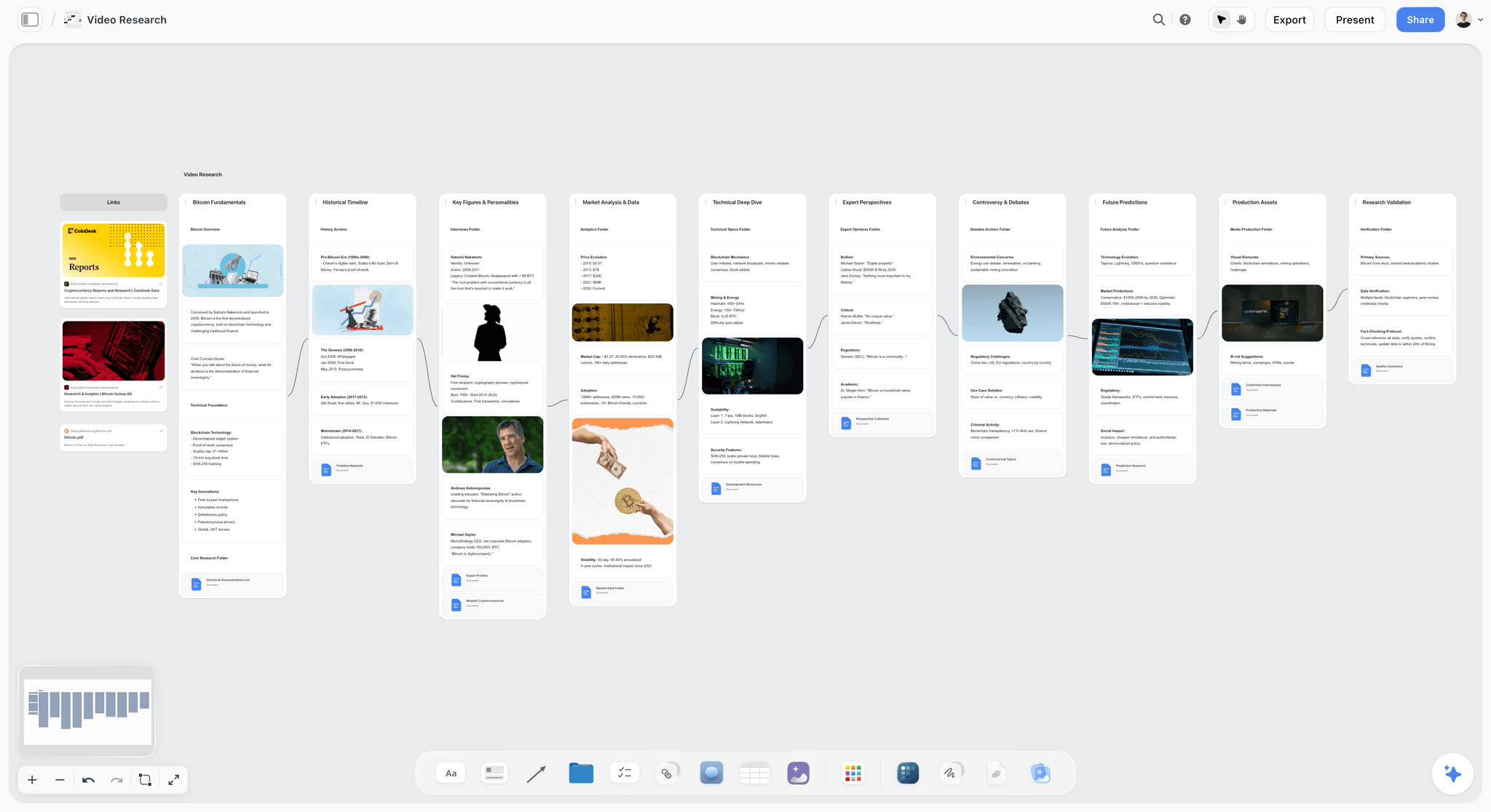
Storyflow video research board holding footage maps, interview notes, and structural references for editors who finish in Resolve
4. Final Cut Pro + AI plugins
Best for: Mac-native solo editors and YouTube creators who want speed over deep customization.
Final Cut Pro on Apple Silicon is unreasonably fast in 2026. Background rendering, native ProRes, magnetic timeline, Object Tracker, Scene Removal Mask, and Voice Isolation make solo editing on a MacBook Pro feel like editing on a tower in 2018. Apple's Neural Engine handles a lot of the AI work locally, which keeps things responsive and private. Third-party plugins (CoreMelt, FxFactory, MotionVFX) extend the AI feature set further with auto-color matching, smart reframing, and generative effects.
The honest pitch for Final Cut in 2026 is solo speed. If you're editing your own YouTube channel, your own short films, or branded content where you own the whole post pipeline, Final Cut on a fast Mac is faster end-to-end than Premiere on the same hardware. The trade-off is collaboration. Final Cut's project sharing and review pipelines are weaker than Premiere's Productions or Resolve's project server.
Final Cut Pro is around $299.99 as a one-time purchase, with a 90-day free trial. No subscription, so over five years it saves you thousands. The honest limitation is the magnetic timeline, you either love it or you fight it.
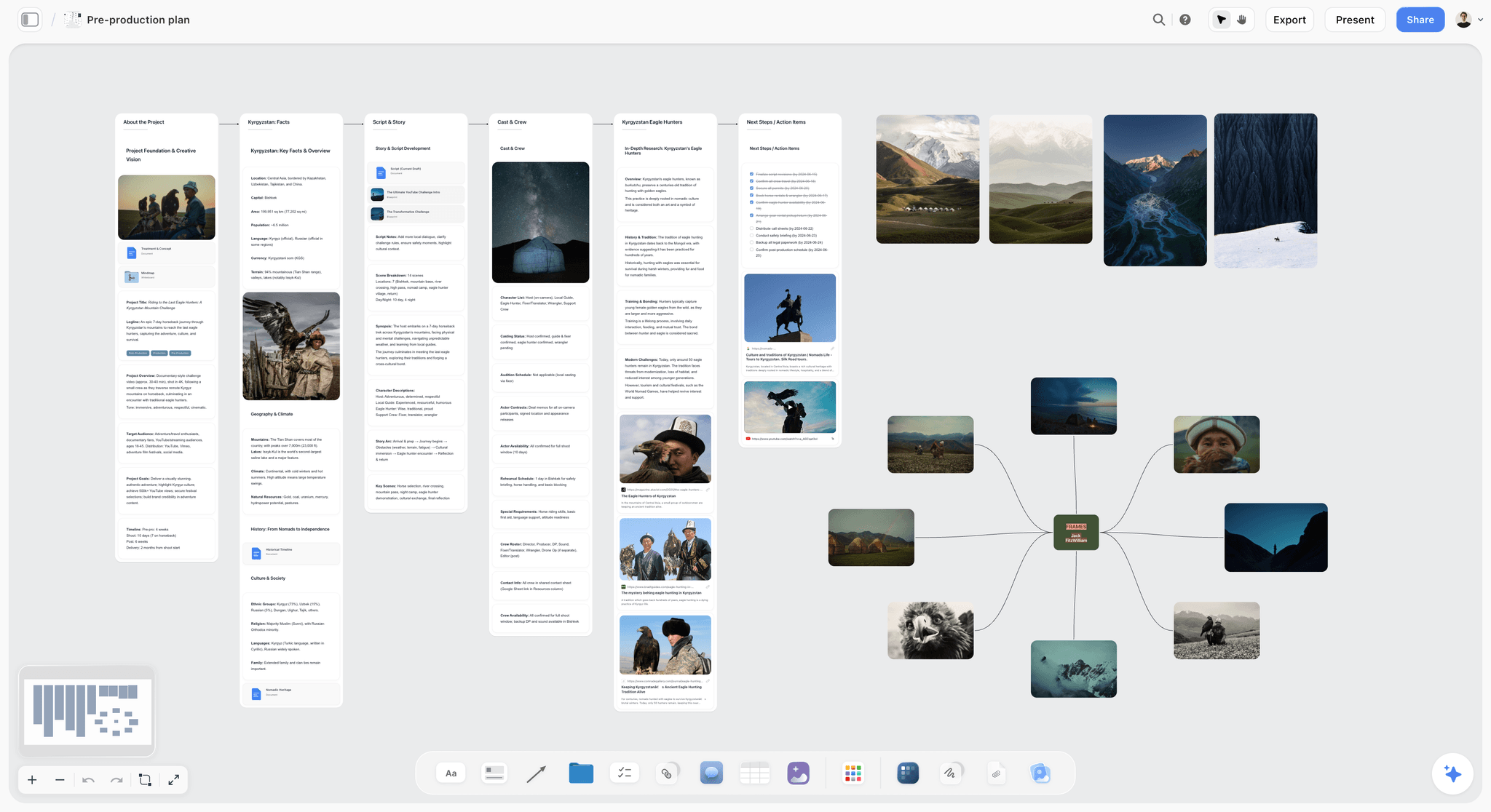
Storyflow pre-production board where editors map shots, structure, and the cut before opening the magnetic timeline
5. Descript (text-based editing AI)
Best for: dialogue-driven cuts, interviews, podcasts, and any project where the script is the spine.
Descript inverted the editing model. Instead of cutting on the timeline, you cut on the transcript. Delete a word, the timeline deletes the clip. Reorder a paragraph, the cut reorders. Studio Sound cleans field audio in one click. Overdub clones a voice for fixing one bad take (with consent). The AI is not a gimmick, it actually changes how you work on dialogue.
For documentary editors, interview-led branded work, podcast video, and any cut where the words drive the structure, Descript is the fastest first-assembly tool in 2026. The workflow is: transcribe, cut transcript to a rough length, export as XML or OMF, finish in Premiere or Resolve. That round trip used to be friction. Descript made it the default.
Descript starts around $15/month for the Creator tier and goes up to around $30/month for Pro, with a free tier that limits transcription minutes. The honest critique is that Descript is great as a first-assembly tool but not a finishing tool. You'll still finish in a real NLE. And Overdub raises legitimate consent and ethics questions on documentary work where you're working with real people's voices.
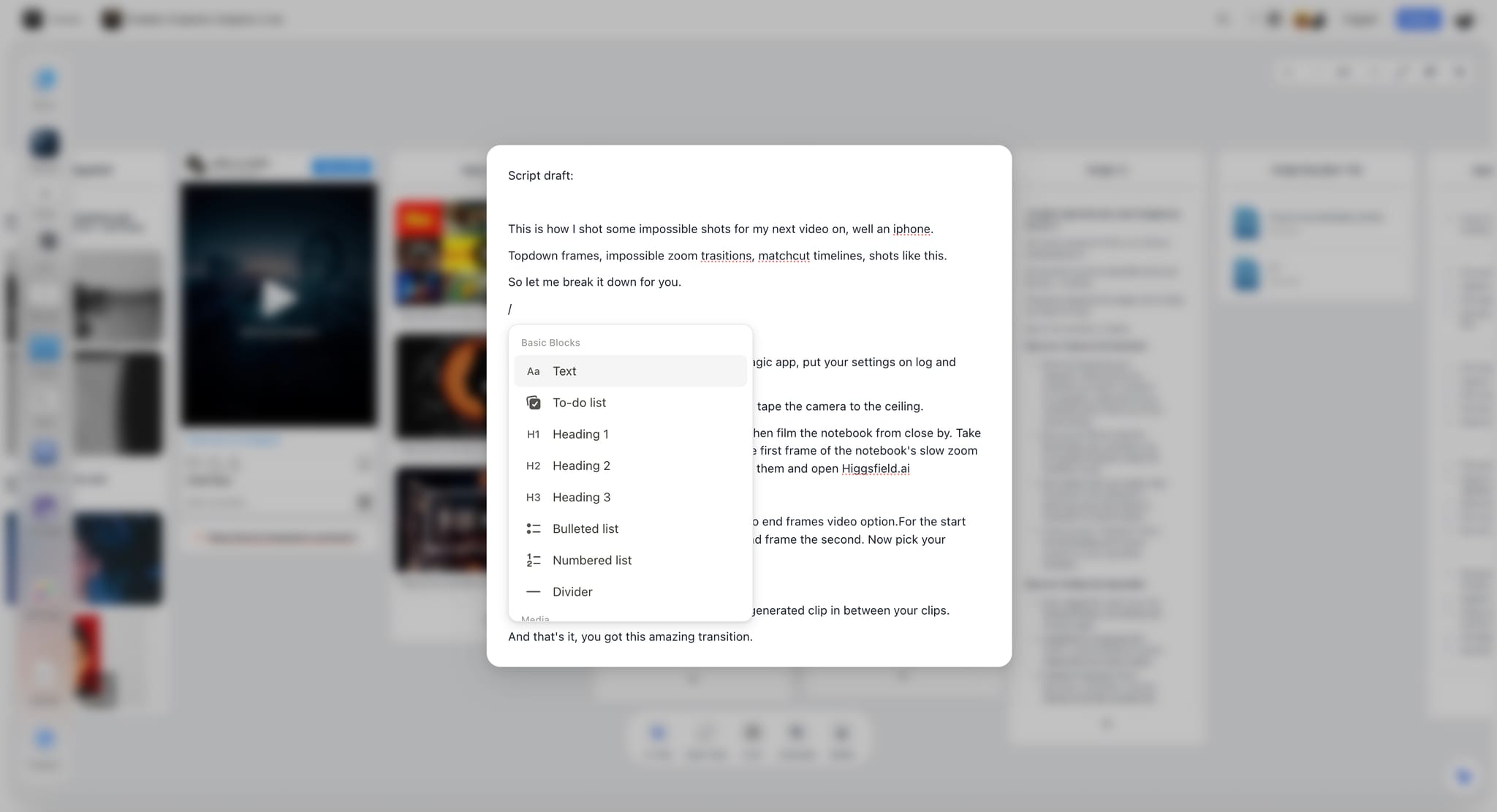
Storyflow's enhanced note editing, the transcript-of-the-thinking that lives upstream of Descript's transcript-of-the-footage
6. Runway ML (generative video AI)
Best for: VFX, generative b-roll, and inpainting on commercial and music-video work.
Runway is the leading generative video tool in 2026 for working editors who occasionally need a shot that doesn't exist. Gen-3 Alpha and the newer model line generate clips from text or image prompts, and the inpainting and outpainting features let you remove objects, extend frames, or generate plates that would have cost a VFX vendor in 2024. Motion Brush, frame interpolation, and depth-of-field controls make the output usable on real jobs, not just demo reels.
For commercial editors, music-video editors, and short-form social, Runway covers the gap when you need a transition shot or a plate extension that production didn't capture. The Gen-3 quality in 2026 finally holds up at broadcast resolution for short cuts. Long sequences still feel uncanny.
Runway pricing starts around $15/month for Standard and goes up to enterprise tiers. The free tier gives you a small monthly credit allowance, enough to test the tool but not to ship paid work. The honest limitation is the credit cost on real jobs, generating 15 seconds of usable b-roll burns credits fast, and the cost-per-second often exceeds licensing real stock footage.
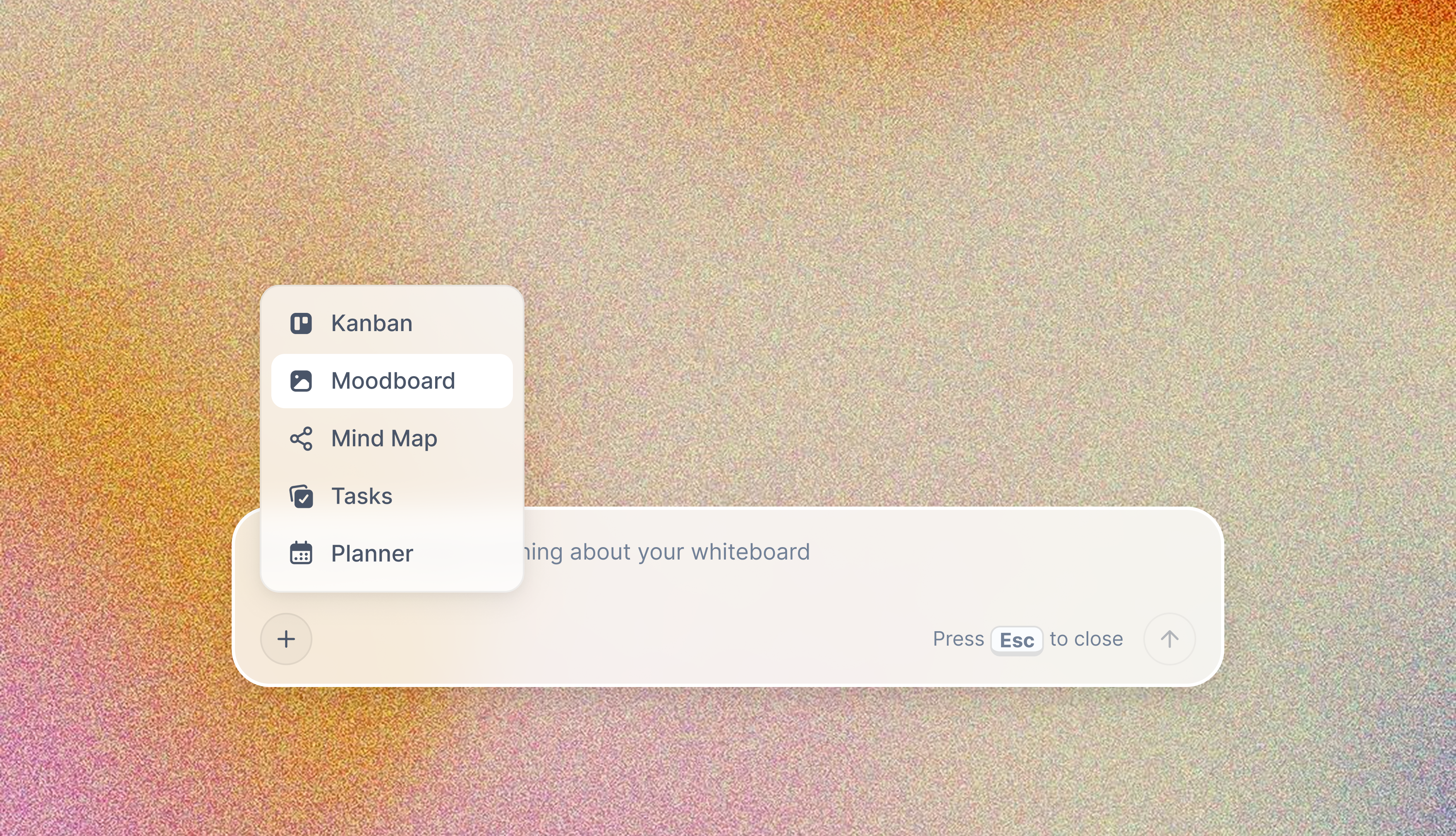
Storyflow's AI Moodboard, the structural-reference equivalent for editors who pull plates and inspiration into one canvas before generating in Runway
7. Pictory (script-to-video AI)
Best for: marketing teams turning scripts and blog posts into rough-cut social videos at volume.
Pictory takes a script, blog post, or webinar recording and generates a rough-cut social video with stock footage, captions, and voiceover. For internal marketing teams producing volume social content, it's a real time-saver. The output isn't broadcast-quality and it isn't editorial work, but for LinkedIn videos, faceless YouTube channels, and quick repurposing, Pictory does the job in minutes instead of hours.
The honest fit: Pictory is a marketing tool, not an editing tool. If you're a working video editor on real edits, this isn't your daily driver. If you're a marketing manager who occasionally needs to ship a video and doesn't want to brief an editor for every social asset, Pictory is fine. The AI matches stock footage to script keywords, which works well enough on generic topics and falls apart on anything specific.
Pictory starts around $19/month for Standard. There's a limited free trial. The honest critique is that the stock footage matching is shallow on niche topics, voiceover quality is still robotic compared to ElevenLabs, and the output looks like script-to-video output.
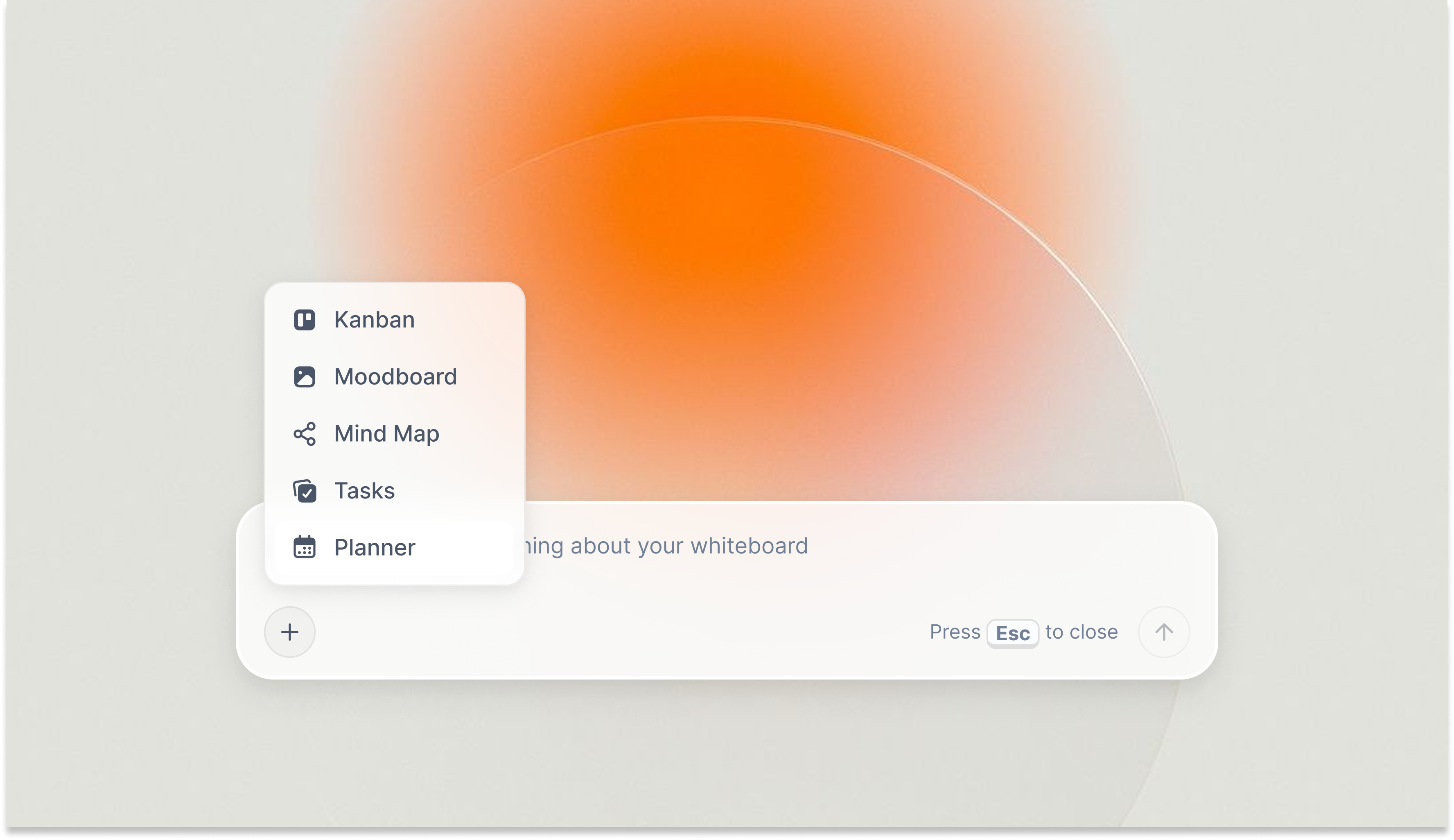
Storyflow's AI Planner, the structural-script equivalent that turns a video idea into a structured production plan before any generative tool runs
8. Opus Clip (long-form to short-form)
Best for: YouTube editors and creators repurposing podcasts and long-form video into Shorts, Reels, and TikToks.
Opus Clip ingests a long-form video (podcast, talking-head episode, lecture, livestream) and outputs a stack of short clips with captions, hooks, and reframing for vertical. The AI scores each clip for "viral potential," which is marketing language for "the algorithm probably likes this," but the underlying clip detection is genuinely useful. For YouTubers running a long-form plus shorts strategy, the time saved is hours per week.
The reason Opus made this list and several copycat tools didn't is the quality of the speaker tracking, the captioning, and the hook detection. The auto-reframe keeps the speaker in frame across cuts, the captions are accurate enough to ship without much editing, and the hook detection pulls the actually-interesting moments instead of random 60-second slices.
Opus starts around $19/month for the Starter tier and goes up to higher tiers based on processing minutes. The free tier gives you a limited monthly minute allowance, enough to test. The honest critique is that algorithmic "viral score" labeling encourages a homogenized hook style across everyone using the tool, which is part of why so many short-form clips look identical in 2026. Use it for the cut, not for the editorial.
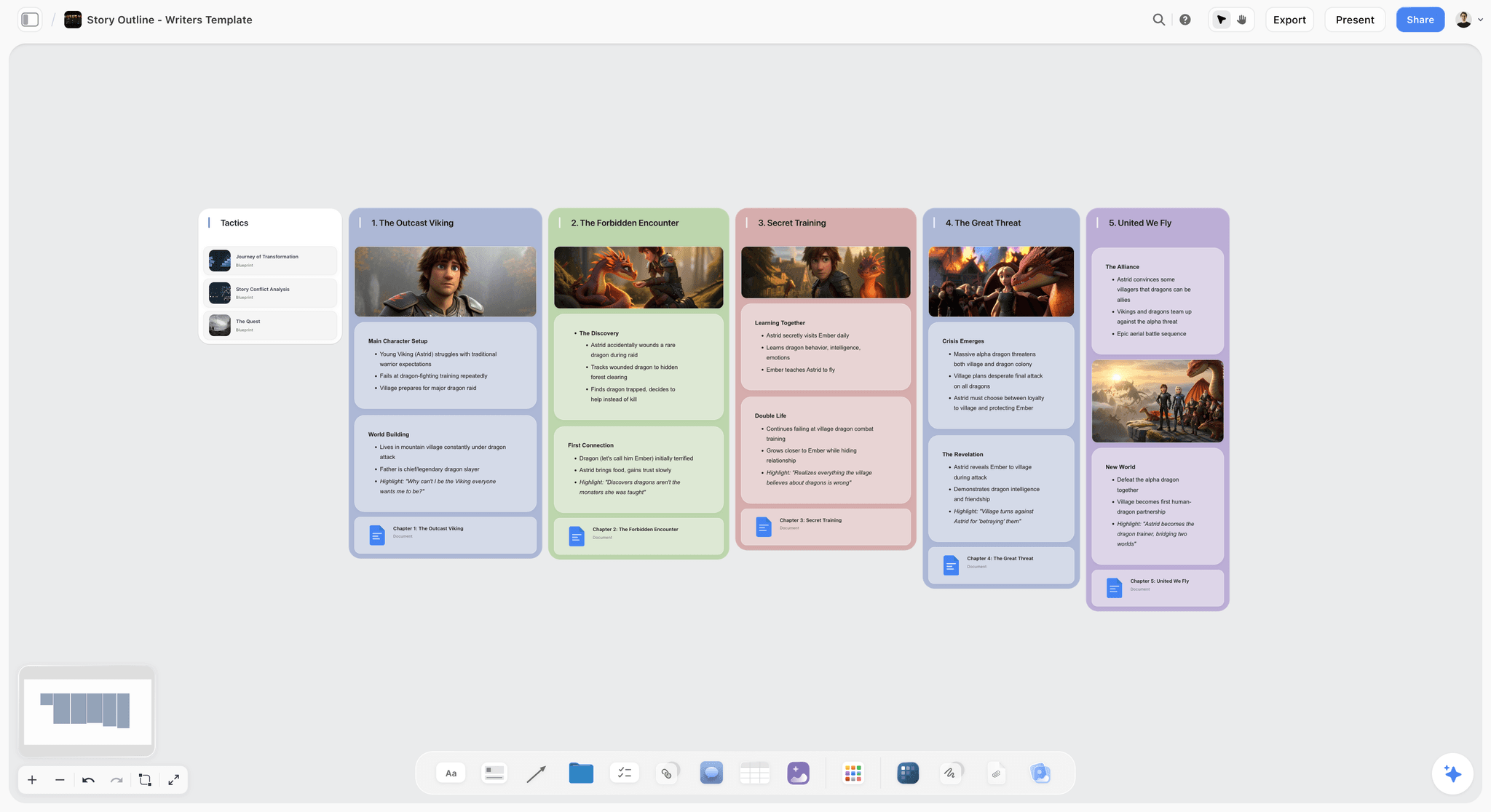
Storyflow's story-outline canvas, the upstream space where YouTube editors plan series arcs and episode beats Opus then chops
9. CapCut Pro (mobile-first AI editing)
Best for: mobile-first editors, social creators, and editors working on phone or tablet first.
CapCut Pro in 2026 is the most underrated tool on this list. Started as a TikTok-adjacent mobile editor, it's now a credible cross-platform tool with auto-captioning, auto-reframe, AI background removal, voice cloning, text-to-video, and a deep template library. For social creators editing on iPad or phone first, CapCut handles the entire post workflow without ever opening a desktop NLE.
The honest fit: CapCut is a social-first editor, not a documentary or feature tool. The export presets, aspect ratios, and effects library are designed for TikTok, Reels, Shorts, and short-form YouTube. For that audience, it's faster than Premiere on a phone and the AI features are surprisingly competent. The desktop version is closing the gap on Premiere and Final Cut for short-form work.
CapCut has a generous free tier with most features available, and CapCut Pro starts around $7.99/month or around $74.99/year. The honest limitation is the data and privacy posture, ByteDance ownership means some teams won't or can't use it, and the cloud sync means your raw footage flows through their infrastructure.

Storyflow's Folders Coloring system, the structural-organization equivalent for editors who batch and label assets before opening any mobile editor
10. Filmora AI
Best for: beginner-friendly AI editing for new editors and small business video.
Filmora has been the friendly entry-level NLE for years, and the 2026 AI features (AI Smart Cutout, AI Audio Stretch, AI Smart Masking, AI Image to Video, text-to-video, AI Copilot Editing) make it a real option for new editors who'd otherwise wrestle with Premiere's learning curve. The interface stays approachable, the AI is genuinely useful for beginner work, and the export is clean enough for client video on small budgets.
The honest fit: Filmora is for editors at the start of their craft, or for small-business owners and marketers who occasionally cut their own videos. Working professional editors will outgrow it within months. The AI features are solid for the audience but don't go deep enough for paying-client work where the brief is more demanding.
Filmora is around $49.99/year on the Annual plan or around $79.99 for a perpetual license. The free tier ships with a watermark, which makes it a try-before-buy rather than a true free option. The honest critique is the ceiling, the AI features are presented as one-click magic, which works at the beginner level but breaks down on harder editorial problems.

Storyflow's Mindmap feature, the structural-mapping equivalent for editors who need to organize the cut visually before clicking into any beginner-friendly NLE
11. Kapwing AI
Best for: browser-based collaborative editing for marketing teams and async creative groups.
Kapwing runs in the browser, which means there's nothing to install, every team member can collaborate on the same project, and review happens inline without exporting and uploading. The AI features include auto-subtitles, smart cut (silence removal), AI background removal, AI image generation for thumbnails, and a content idea generator. For marketing teams, content teams, and async-first creative groups, Kapwing replaces the awkward "send a draft, get feedback in Slack, redo the export" loop.
The honest fit: Kapwing is not a finishing tool for cinematic, broadcast, or theatrical work. The render quality, color management, and audio-post toolset are sized for social and marketing video. Inside that scope, the browser-based collaboration model is genuinely better than the desktop alternatives.
Kapwing starts around $16/month for the Pro tier with a free tier that limits export length and adds a watermark. The honest critique is that browser-based editing still has a performance ceiling on long-form or high-resolution timelines, and the project storage costs add up if your team works at volume.
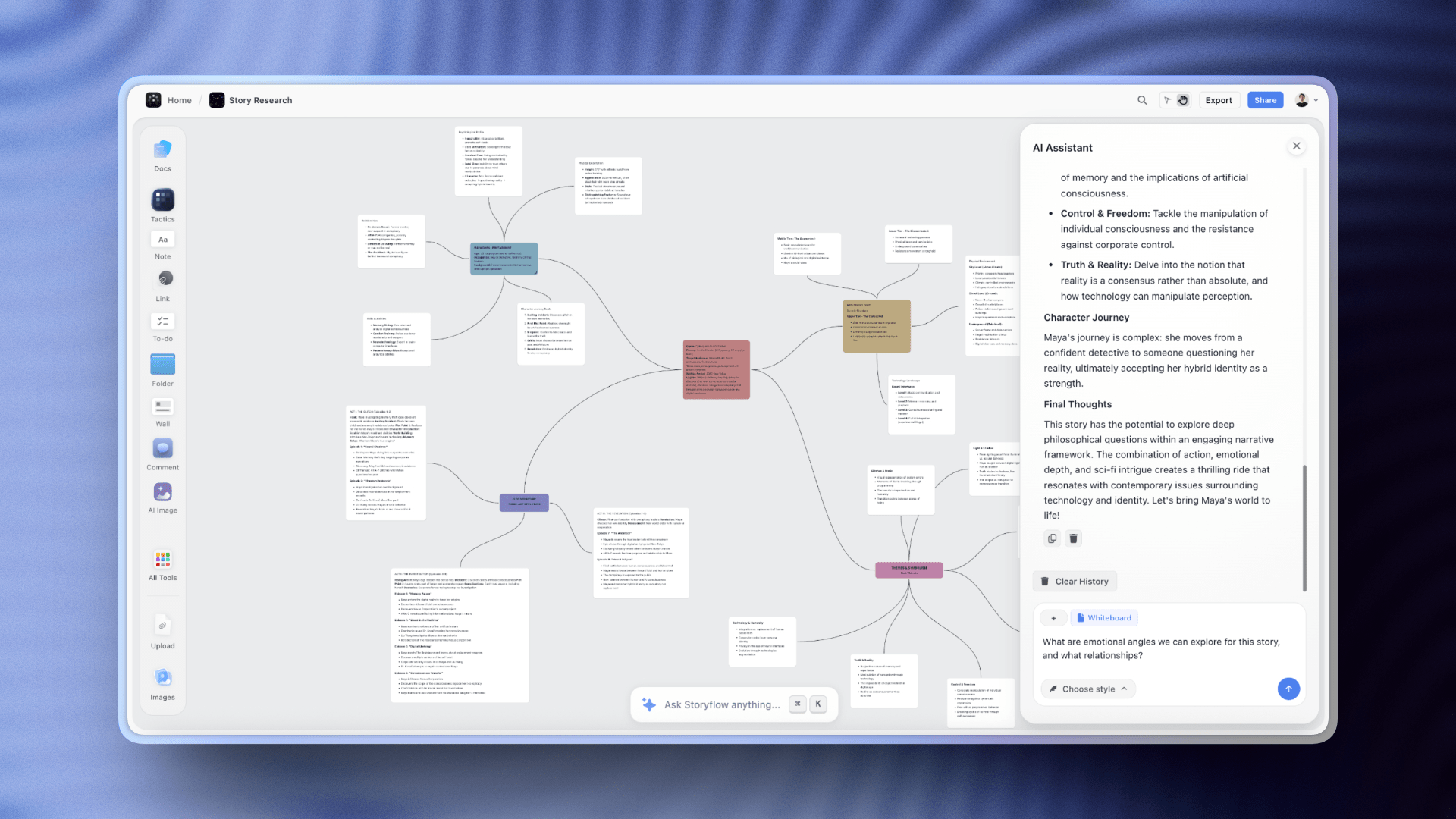
Storyflow's AI assistance chat, the upstream collaborative-thinking equivalent for marketing teams editing together in Kapwing
12. Topaz Video AI (upscaling/enhancement)
Best for: upscaling, denoising, deinterlacing, and rescuing archival or low-quality footage.
Topaz Video AI is the most respected enhancement tool on this list, and it does one job extraordinarily well. Upscale 1080p to 4K. Denoise grainy low-light footage. Deinterlace archival broadcast material. Restore old digital video to usable spec. The neural models (Proteus, Iris, Nyx, Artemis, and the newer 2026 lineup) each target a specific problem, and used correctly, the output is broadcast-quality.
For documentary editors working with archival footage, branded editors restoring brand-history material, and indie editors finishing on a tight budget where reshoots aren't possible, Topaz earns its keep on a single rescue. The processing is heavy, plan to leave a render running overnight on long sequences, but the output is the difference between unusable footage and a finished cut.
Topaz Video AI is around $299 one-time with a year of updates, then around $149/year for continued updates. There's a 30-day free trial. The honest limitation is the workflow overhead: you process clips outside your NLE, then re-import the upscaled versions.
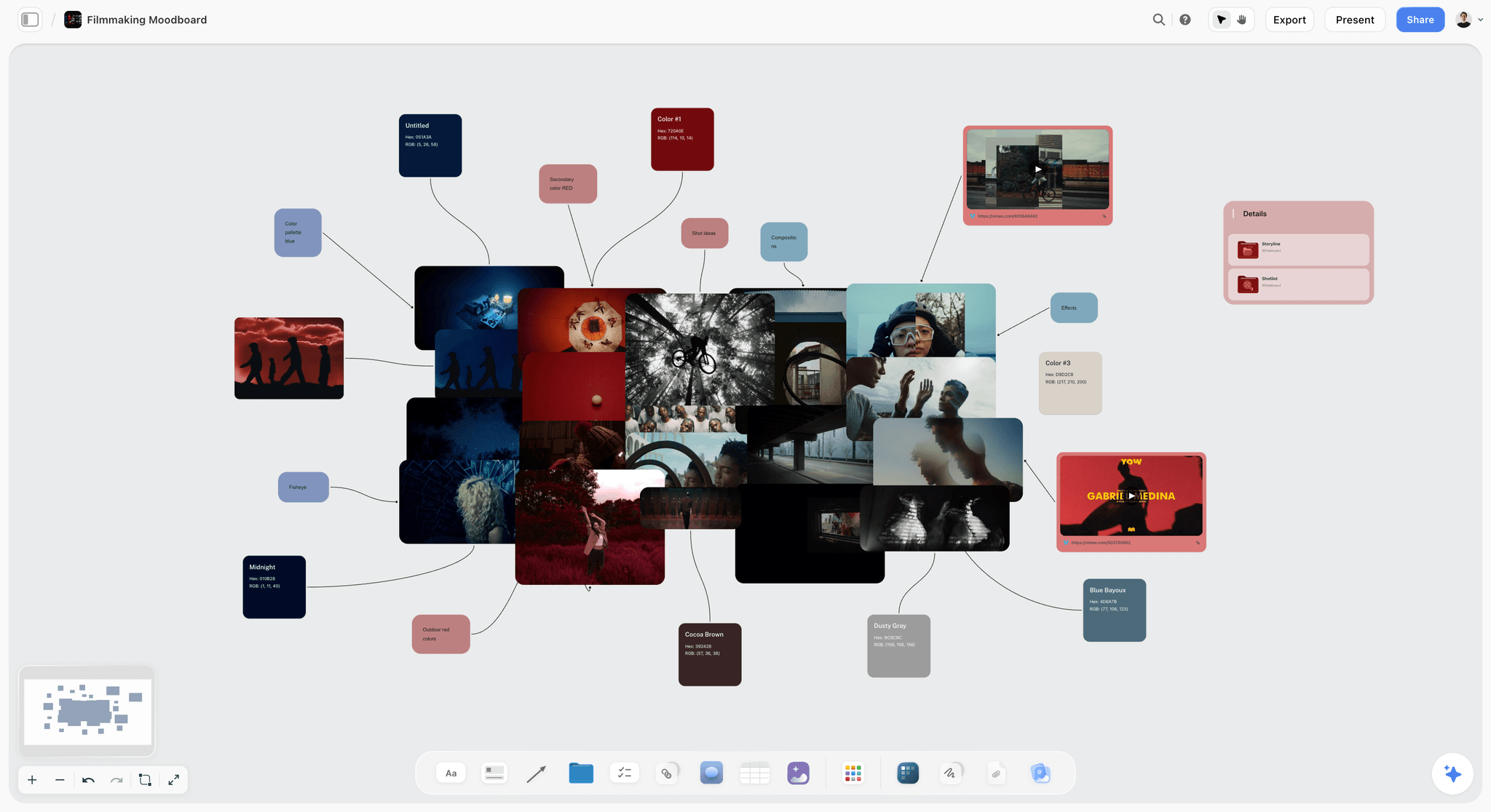
Storyflow's filmmaker moodboard, the structural-reference equivalent for editors who plan their archival rescue and color-restoration approach upstream of Topaz
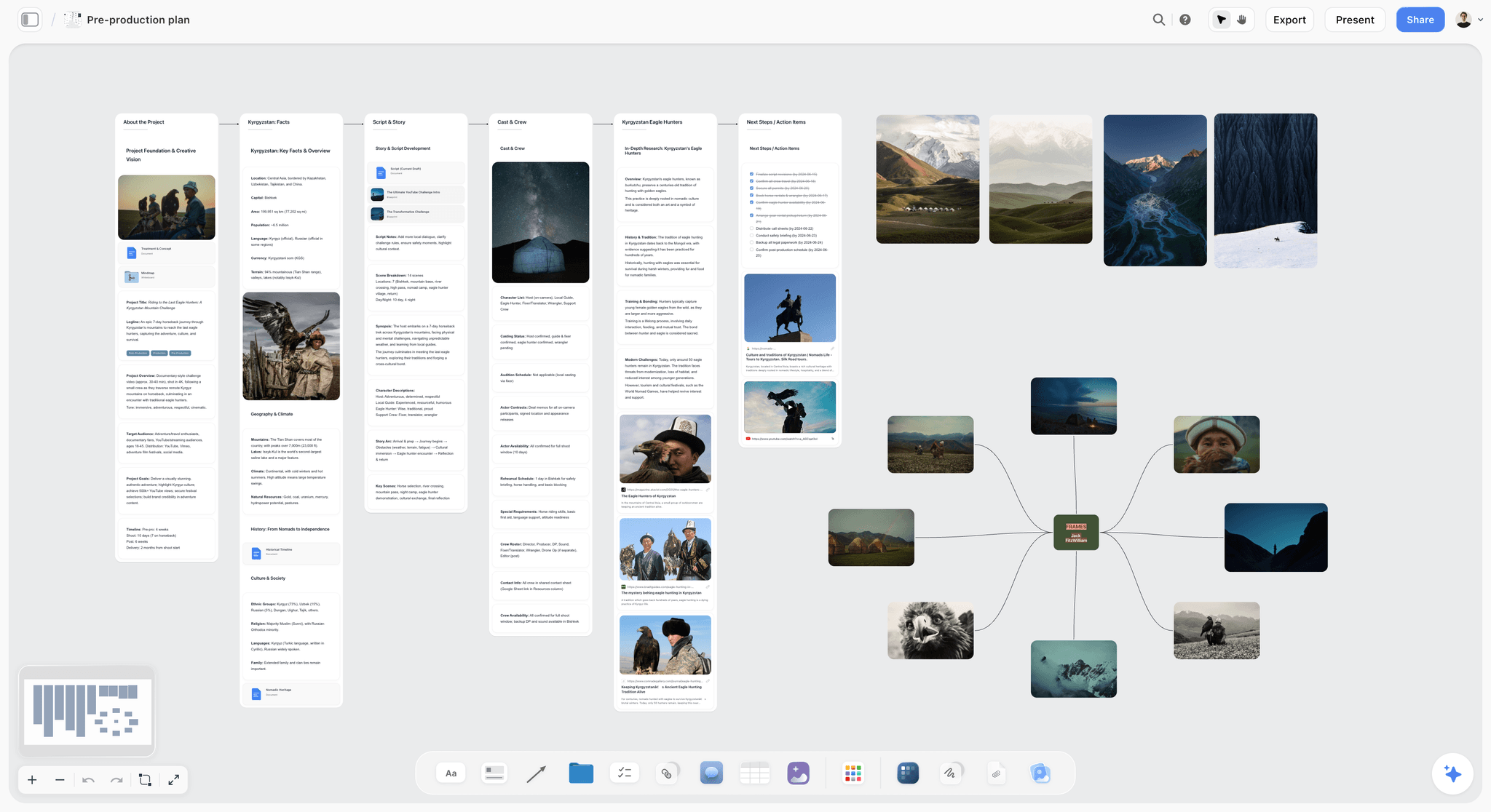
Storyflow's pre-production canvas holds shotlist, structure, and story beats upstream of the timeline
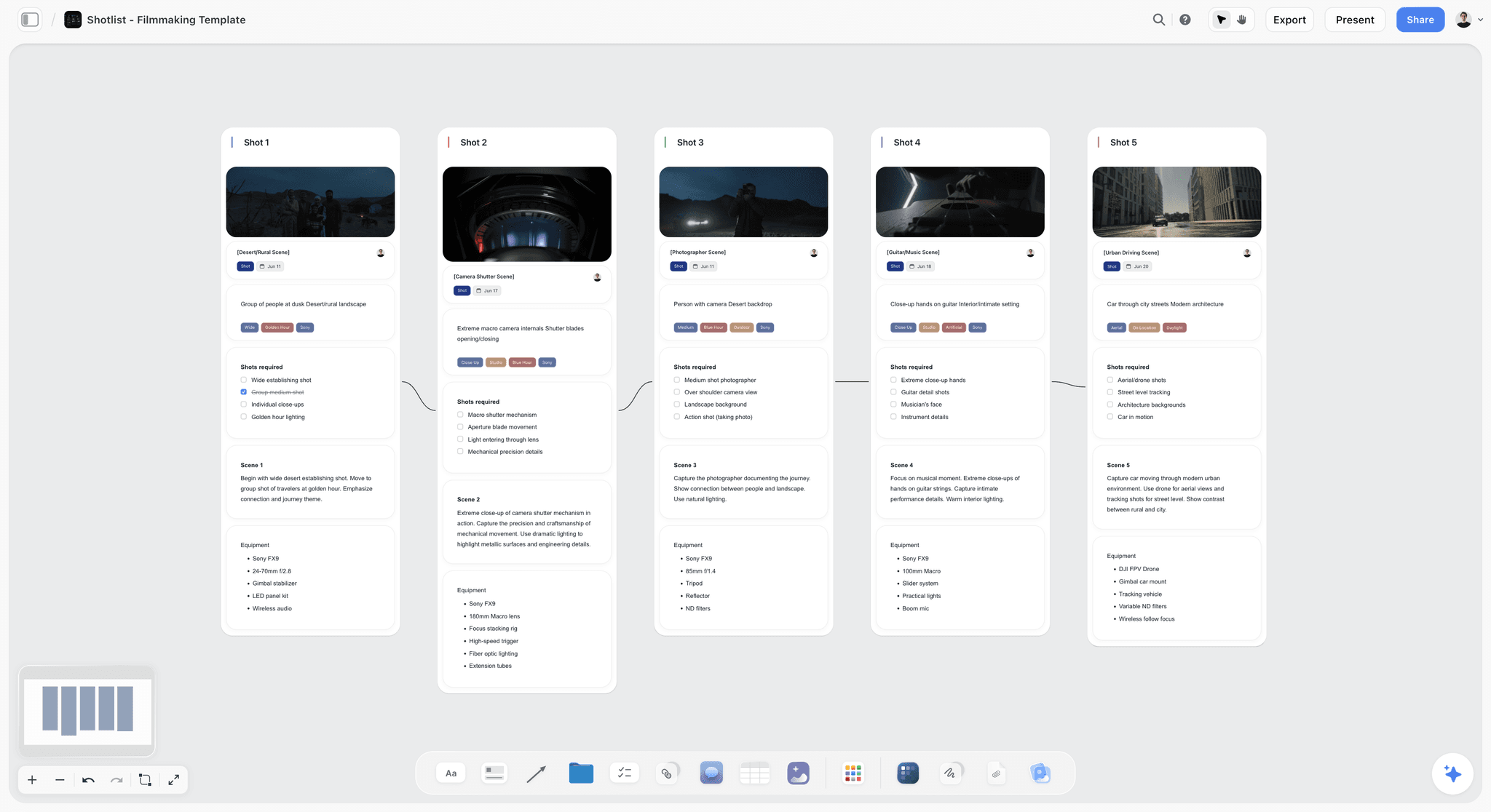
Storyflow shotlist boards keep every clip mapped to a structural beat the AI can read alongside the cut
How to Pick the Right AI Tool for Your Video Editing in 2026
The cleanest way to think about your stack in 2026 is to pick one pre-cut tool and one timeline tool, not five of each. Here's how that pairs up by editor type.
Documentary editors. Stack Storyflow plus Descript plus your finishing NLE (Premiere or Resolve). Storyflow holds the structural map: act breaks, character arcs, theme spine, scene order. Descript handles transcript-driven first assembly on interview footage. The finishing NLE handles color, sound, and final delivery. Documentary cuts live or die on structural pivots, so the upstream layer matters more here than anywhere else.
Branded-content editors. Stack Storyflow plus Premiere with Sensei. Branded work is fast-turnaround, client-revision-heavy, and pipeline-bound to Creative Cloud most of the time. Storyflow holds the brief, the storyboard, the shot list, and the structural beats so revisions don't unravel the cut. Premiere handles the timeline because the agency or client expects Premiere project files at handoff.
YouTube editors. Stack Storyflow plus Final Cut or Premiere plus Opus Clip. Storyflow holds the channel-level planning (series arc, episode beats, hook patterns, thumbnail strategy). Your NLE handles the long-form cut. Opus Clip handles the long-form to short-form repurposing. The AI gap for YouTube editors is in the channel-level structural thinking, not in the timeline.
Agency editors handling multiple campaigns. Stack Storyflow plus Premiere plus Frame.io plus optional Runway for generative inserts. The pre-cut layer is where multiple campaigns get muddled (which brief is which, which character is in which campaign), and Storyflow's canvas-per-project structure keeps that clean. Premiere is the agency standard. Runway covers the occasional generative insert when production didn't capture a specific shot.
Indie editors cutting their own films. Stack Storyflow plus DaVinci Resolve plus optional Topaz. Storyflow holds the pre-cut structure. Resolve gives you finishing-grade tools without a monthly subscription draining your film budget. Topaz handles archival or low-quality plates that would otherwise need a reshoot you can't afford.
Best AI Tools for Video Editors 2026 Pricing Compared
The honest pricing picture for 2026: the AI in your NLE is a small line item, and the AI you pair upstream of the NLE is the line item that actually moves the deadline. Storyflow Plus at $7.99/month annual unlocks the full blueprint library and meaningful AI usage, which is less than half the cost of Premiere or Descript and several times more useful for the structural work editors actually struggle with. Pro at $14/month annual adds AI image generation and 20 times more AI for editors running parallel projects. Max at $39/month annual adds 40x more AI and a team workspace for editorial teams.
Compared against the pack: Premiere around $22.99/month, Descript around $15/month, Runway around $15/month, Opus Clip around $19/month, Pictory around $19/month, Kapwing around $16/month, CapCut Pro around $7.99/month, Filmora around $49.99/year, Resolve free or Studio around $295 one-time, Final Cut around $299.99 one-time, Topaz around $299 one-time. The realistic working-editor stack in 2026 lands around $30 to $50 per month total: one pre-cut tool, one NLE, one specialty timeline AI tool.

Storyflow Pro unlocks the full 200+ blueprint library and 20× more AI for editors running parallel projects
Final Verdict: Best AI Tools for Video Editors 2026
The 12 tools above all earn their place in 2026, but the shortlist for working video editors is short. Storyflow takes the top spot because it solves the actual gap, the pre-cut structural thinking layer where most editors lose hours every week. The AI reads your full active canvas (plus the Tactic and Documents you @-mention), the blueprint library grounds the conversation in story-craft frameworks, and the price per editor is half of most timeline AI tools. The one caveat worth repeating: it plans the cut, it doesn't make the cut, so it sits beside your NLE, not in place of it.
Premiere Pro with Sensei AI takes second because it's still the daily NLE for most professional editors in 2026, and the Creative Cloud pipeline is bigger than the AI feature set. Descript takes third because text-based editing genuinely changes how you work on dialogue, and any editor doing documentary, interview, or podcast video should already have it in the stack.
The framing to take with you: the AI gap most editors hit in 2026 isn't in the timeline, it's in the pre-cut structural thinking layer. Pick one upstream tool (Storyflow), one NLE (Premiere, Resolve, or Final Cut), one specialty (Descript, Opus Clip, Runway, or Topaz depending on your work), and stop chasing every new AI feature in every NLE update. The cut gets faster when the thinking gets cleaner.
Want to test that claim against your own work? Take the next edit where you're staring at hours of footage with no through-line, build the shotlist, story spine, and structural beats on a Storyflow canvas first, then open your NLE. Run it that way for one project. If the cut doesn't come together faster, you'll know the pre-cut layer wasn't your bottleneck. If it does, you've found the gap. Start at https://storyflow.so.
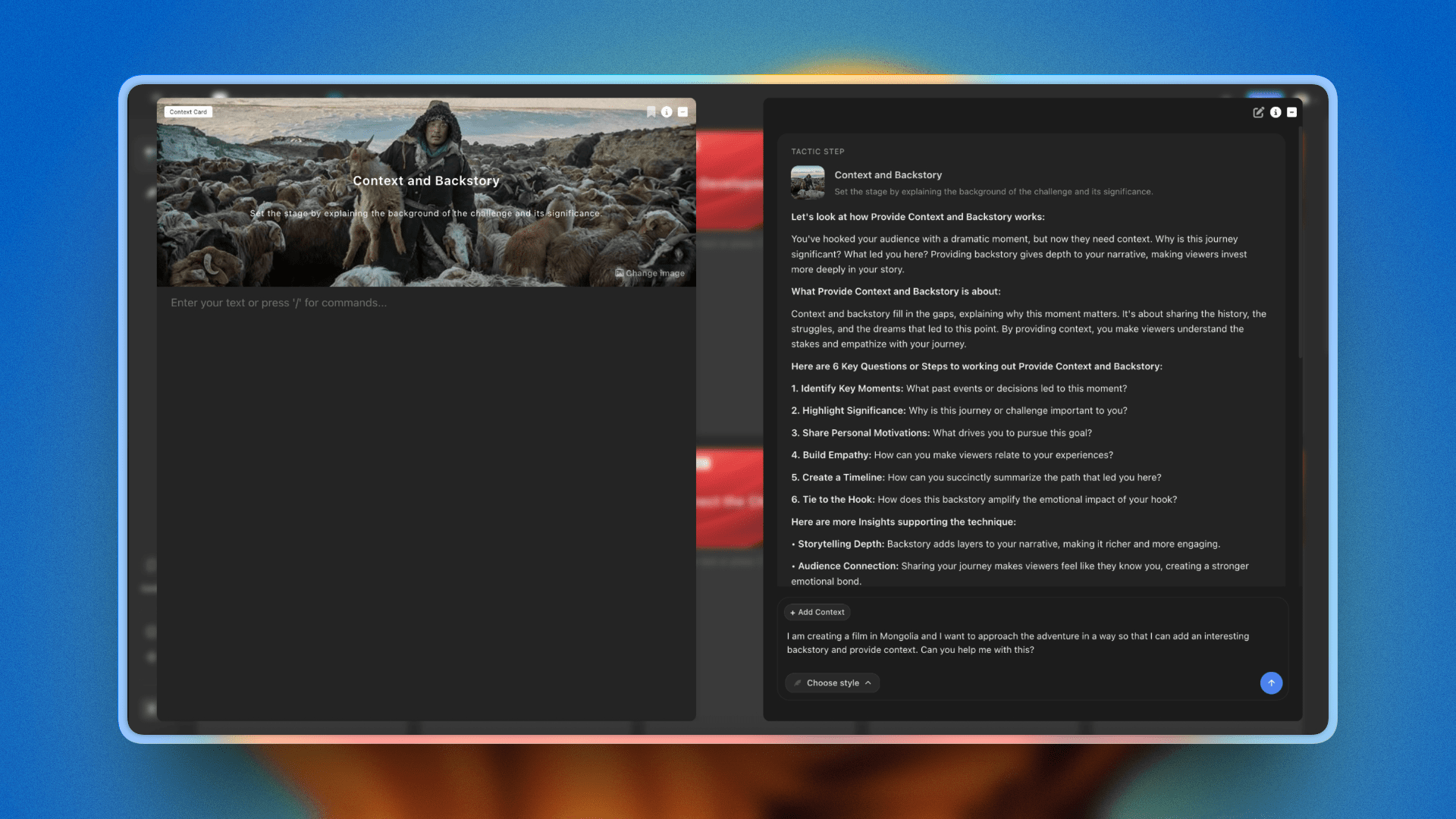
Story Spine, Hero's Journey, and Save the Cat frameworks open on a canvas with AI reading every block
FAQ: Best AI Tools for Video Editors 2026
What is the best AI tool for video editors?
For working video editors in 2026, Storyflow is the best AI tool because it solves the upstream gap most editors hit, the pre-cut structural thinking layer. The canvas holds shotlist, story spine, character arcs, and edit notes in one project that AI can read end to end. For timeline AI, Premiere Pro with Sensei remains the strongest daily NLE.
Can AI replace a video editor?
No, AI cannot replace a video editor in 2026. AI handles auto-cuts, transcription, captioning, and generative b-roll well, but editorial judgment (which moment lands, what the cut is actually about, when to break a rule) is still entirely human work. AI shifts the editor's time from grunt work to editorial thinking, which is where the value lives.
What is the best free AI tool for video editing?
DaVinci Resolve Free is the most generous free AI editing tool in 2026, shipping with neural engine features, finishing-grade color, and a usable AI feature set without a watermark. For pre-cut structural thinking, Storyflow's free tier is not out yet: it is paid-only during early access, with a Free plan (unlimited boards, unlimited cards, unlimited collaboration with as many editors as you want, basic AI usage, and 20 file uploads) launching before the end of 2026.
Is AI editing good for documentary work?
AI editing is good for parts of documentary work, especially transcript-driven first assembly (Descript), structural pre-cut thinking (Storyflow), and archival rescue (Topaz). It's not good for editorial judgment, ethical handling of real people's stories, or the structural pivots that make a documentary land. Use AI for the labor, not for the editorial.
What is the difference between AI in the timeline and AI for pre-cut planning?
Timeline AI runs inside your NLE and handles auto-edit, smart trim, transcription, captioning, scene detection, and voice isolation. Pre-cut AI runs upstream of your NLE and handles story spine, beat sheets, character arcs, theme tracking, and structural pivots. Most listicles flatten both into one category, which is why they confuse editors. The actual productivity gap in 2026 lives in pre-cut, not timeline.
Should video editors use ChatGPT?
ChatGPT is fine for one-off questions and quick rewrites, but it's not an editing tool. The structural conversations editors actually need (act break placement, character arc, hook design) work better in a tool that can see your project (Storyflow) than in a chat that can't see your shotlist.
Table of Contents
- Quick Picks: Best AI Tools for Video Editors 2026 by Use Case
- Comparison Table: Best AI Tools for Video Editors 2026
- Best AI Tools for Video Editors 2026: Market Context
- How We Evaluated the Best AI Tools for Video Editors 2026
- The 12 Best AI Tools for Video Editors 2026, Ranked
- How to Pick the Right AI Tool for Your Video Editing in 2026
- Best AI Tools for Video Editors 2026 Pricing Compared
- Final Verdict: Best AI Tools for Video Editors 2026
- 1. Storyflow
- 2. Adobe Premiere Pro + Sensei AI
- 3. DaVinci Resolve + AI tools
- 4. Final Cut Pro + AI plugins
- 5. Descript (text-based editing AI)
- 6. Runway ML (generative video AI)
- 7. Pictory (script-to-video AI)
- 8. Opus Clip (long-form to short-form)
- 9. CapCut Pro (mobile-first AI editing)
- 10. Filmora AI
- 11. Kapwing AI
- 12. Topaz Video AI (upscaling/enhancement)
- FAQ: Best AI Tools for Video Editors 2026
- Related Reading
Templates to check out for this topic


Content and video templates you can use in Storyflow
Plan a channel, a script, and a content pipeline on the same board. Open one of these templates and let the AI build on the structure instead of starting from a blank doc.


See Storyflow in Action
A visual AI workspace where every feature lives inside one canvas. No tab-switching, no context lost.
Build your entire board from a single message
Type what you need in the AI chat at the bottom of your canvas. The AI adds cards, headings, and structure directly onto your board.
Use expert frameworks as AI context
Type @ in the AI chat and choose any Tactic. The AI tailors every response to that framework instead of giving generic advice.
Turn your board into a mind map in seconds
Ask the AI to restructure your canvas as a mindmap. It connects your ideas into a visual hierarchy so you can see how everything relates.
Why Storyflow Exists
Storyflow actually began as a personal tool while working on creative and research projects.
We kept running into the same problem: ideas were scattered everywhere: notes, documents, and whiteboards.
Nothing helped us see how everything connected.
So we started building a workspace designed around how ideas actually grow.
→ Read how Storyflow was createdJustkay
Documentary Filmmaker & Founder at Storyflow
Published: 2026-05-10
Extremely simple, seriously capable


See how easy it is to get started
Watch a real project come together, from a blank board to a finished plan, clicked through step by step.
Start creating with AI and become more productive
Transform your creative workflow with AI-powered tools. Generate ideas, create content, and boost your productivity in minutes instead of hours.