Storyflow vs Trello: Which is Better for Planning Creative Projects in 2026?
Storyflow vs Trello for creative projects in 2026. Trello runs a kanban pipeline of cards. Storyflow holds the whole project on one AI canvas the board included.

Category
Project Planning
Author

Justkay
Documentary Filmmaker & Founder at Storyflow
Topics
2026-07-01
•
Updated July 1, 2026
•
12 min read
•
Project Planning- storyflow vs trello
- trello alternative
- trello vs storyflow
- creative project planning 2026
- ai kanban board
- visual project management
Is Storyflow or Trello better for planning creative projects in 2026?
Trello is the better tool if your project is a clean pipeline of tasks: its kanban is dead-simple, its Butler automation and Power-Up integrations are deep, and its free tier is generous. Storyflow is the better tool if your project is a creative thing that also has tasks: the brief, the references, the storyboard, and the draft live on one infinite canvas with a kanban board as one region, and the AI reads the whole canvas. Trello runs the task pipeline; Storyflow holds the whole creative project, board included.
Your project is more than a board of cards.
Trello runs the task pipeline. Storyflow keeps the kanban board on one infinite canvas next to the brief, the references, and the draft, with an AI that reads all of it, so the whole creative project lives in one place.

1) Quick Answer: Storyflow vs Trello
Storyflow and Trello both give you cards and columns, but they disagree about what a project is. Trello is a kanban tool: your project is a board of lists, and work moves as cards slide from To Do to Doing to Done. It is fast, familiar, and unbeatable when the job is a clean pipeline of tasks. Storyflow is an AI visual workspace: your project lives on an infinite canvas where a kanban board is just one region sitting next to your brief, your mood board, your storyboard, and your docs, with an AI that reads the whole canvas before it answers. Trello is the better tool if your project really is a list of tasks. Storyflow is the better tool if your tasks are only one part of a creative project that also needs references, structure, and a place to think.
Here is the line the whole comparison turns on. Trello moves cards through columns. Storyflow holds the whole project, columns and all, on one canvas the AI can read. In Trello, the board is the project, so the brief, the references, and the draft live in other apps and get linked in as attachments. In Storyflow, the board is one part of the project, so the columns sit beside everything else the work needs, and the AI treats all of it as context.
I have run documentary projects through kanban boards for years, and the pattern that always held is that the board was never the whole plan. The board tracked the tasks, and the actual creative work (the research, the references, the outline, the visual language) lived scattered across a dozen other tabs. This piece is the honest split between a tool that runs the task pipeline brilliantly and a tool that holds the entire creative project in one place.
For the wider field, see The 12 Best Trello Alternatives and the neighboring Storyflow vs ClickUp.
2) Comparison Table: Storyflow vs Trello at a Glance
The load-bearing row is "core shape." Trello is boards of cards, and it is superb at that. Storyflow is a canvas where a board of cards is one element beside the rest of the project.
3) The Board vs The Canvas
There are two honest ways to think about a creative project, and most arguments about Trello versus a canvas are really arguments about which one matches your work.
The Board. A project is a pipeline. You break the work into tasks, drop each task on a card, and move cards left to right through columns until they are done. The value is flow: at a glance you can see what is queued, what is in progress, and what shipped. Trello is the cleanest expression of this idea in 2026. It is a linear pipeline made visual, and for tracking tasks and handoffs, that clarity is the entire point.
The Canvas. A project is a space, not a line. The tasks matter, but so do the brief that started the project, the references that set the tone, the storyboard that blocks the shots, and the draft that turns it all into an artifact. On a canvas, those live together in one place, arranged the way the project actually thinks, and the kanban board is one region among them. Storyflow is built for this. The columns are still there, but they sit next to everything else the work needs.
Here is the rule that decides the tool. If your project is a list of tasks, use the board. If your project is a creative thing that also has tasks, use the canvas. A launch checklist, a content-publishing pipeline, a client handoff queue: those are Board jobs, and Trello wins them. A documentary that needs research, a shot list, a treatment, and a task tracker, or a brand campaign that needs a brief, a mood board, a calendar, and a task tracker: those are Canvas jobs, and Storyflow wins them.
The reason this matters is context. On the Board, the tasks are visible but the rest of the project is somewhere else, so the tool (and any AI bolted onto it) can only see the cards. On the Canvas, the tasks sit beside the brief and the references, so the AI can read the whole project and act on it. Trello moves cards through columns. Storyflow holds the whole project, columns and all, on one canvas the AI can read. That is the difference this comparison keeps returning to.
4) How We Compared Them
This is not a feature-count contest. Storyflow and Trello are different shapes of tool, so we compared them on the criteria that actually decide a creative team's choice.
- Project scope on one surface. Can the whole project (brief, references, tasks, draft) live in one place, or does the tool hold only the task layer while the rest lives in other apps?
- Kanban quality. How good is the pure board experience: columns, cards, drag, labels, due dates, swimlanes, and the speed of moving work through it?
- AI context scope. When the AI answers, what can it see: only the current card or board, or the entire project surface including the brief and references?
- Automation and integrations. How deep is the automation (rules, buttons, scheduled actions) and how wide is the ecosystem of connected apps?
- Collaboration and pricing. What does the free tier actually include, how does it scale, and is pricing per account or per user?
We weighted these for the reader this piece is for: a creative team or creator already on Trello, deciding whether a visual AI canvas fits their projects better. If your work is a pure task pipeline, the kanban-quality and integrations criteria dominate, and that favors Trello. If your work is a creative project with tasks inside it, the project-scope and AI-context criteria dominate, and that favors Storyflow.
5) Where Trello Wins
An honest accounting of what Trello does better. These are real, decisive wins, not throat-clearing, and for a large set of teams they settle the question in Trello's favor.
Dead-simple kanban. Trello is the clearest kanban tool most people will ever use. Lists across the top, cards you drag between them, done. There is almost nothing to learn, onboarding a new teammate takes minutes, and the board tells you the state of the work at a glance. For pure task flow, that simplicity is not a limitation, it is the product, and Storyflow's richer canvas cannot match how immediately a fresh Trello board makes sense.
A huge integration and Power-Up ecosystem. Trello connects to hundreds of tools through Power-Ups and integrations: Slack, Google Drive, Jira, GitHub, calendars, time trackers, and more. If your stack already runs on other apps, Trello slots into it. Storyflow's integration list is far smaller and focused on the creative workflow, so if deep third-party connectivity is a hard requirement, Trello wins this outright.
Butler automation. Trello's built-in Butler automation runs rules, card buttons, board buttons, and scheduled commands with no code. Move a card to Done and Butler can archive it, notify a channel, and stamp the date automatically. For repeatable task-pipeline operations, this rule engine is genuinely powerful, and Storyflow's AI-assisted approach is a different thing, not a drop-in replacement for deterministic automation rules.
A very mature product. Trello has been refined for well over a decade, is backed by Atlassian, and runs on native apps across desktop, web, iOS, and Android. It is stable, well-documented, and battle-tested at scale. Storyflow is a newer platform, and for teams that value a long, proven track record, Trello's maturity is a real advantage.
A generous free tier. Trello's free plan includes unlimited cards, unlimited Workspace members, and up to 10 boards per Workspace, which is enough to run real projects at no cost. Combined with the simplicity, that free tier is why so many teams start on Trello and stay.
Best for pure task pipelines and handoffs. When the job is tracking discrete tasks through stages, or handing a clear queue of work from one person or team to the next, Trello is purpose-built for exactly that. If that describes your project, you do not need a canvas, and Trello is the right answer.
6) Storyflow for Planning a Creative Project

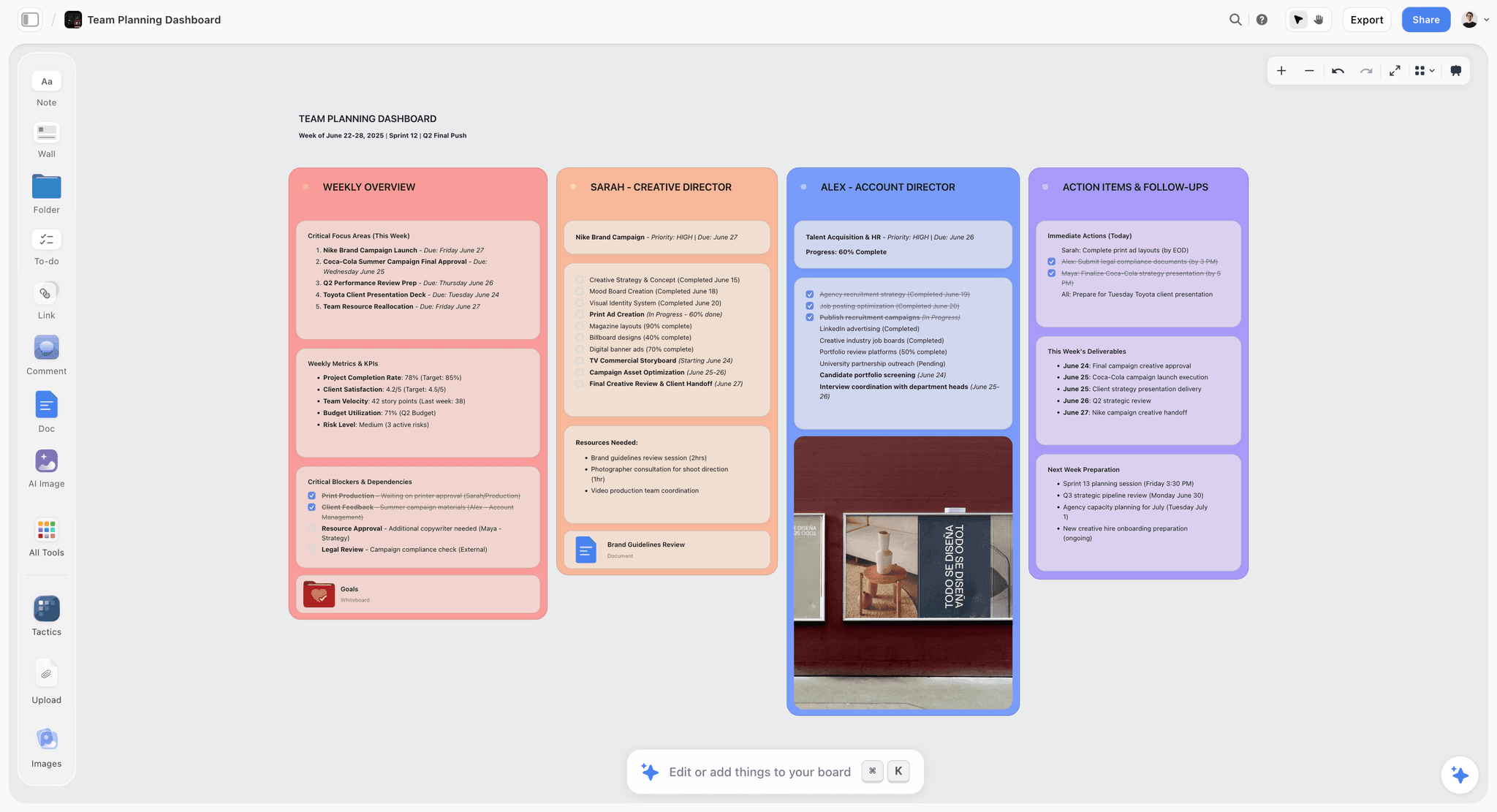
Here is where Storyflow pulls ahead: it holds the whole creative project, not just the task layer. Say you are planning a brand film. In Trello, the board tracks the tasks, and the brief, the references, the storyboard, and the script live in Docs, Drive, Figma, and a dozen browser tabs. In Storyflow, all of it sits on one infinite canvas, and the kanban board is one region among the rest.
The brief, references, and tasks on one canvas. Drop the creative brief on the canvas as a document. Beside it, build a mood board of reference stills and links. Below that, block the shots on a storyboard. And beside all of it, run a kanban region with columns for Pre-Production, Shoot, and Post. Nothing is in another app. The project is one surface you can zoom out of and see whole, which is exactly what a task pipeline alone can never show you.
An AI that reads the entire canvas. Storyflow's AI reads your full active canvas board by default, plus up to 1 Tactic and up to 3 Documents you @-mention in the chat. So you can ask it to turn the brief into a task list on the kanban region, check whether the storyboard covers every beat in the outline, or draft shot descriptions from the references, and it answers with the whole project as context, not just the card in front of it. That is the payoff of the canvas: because the brief and the references live beside the tasks, the AI can actually see them.
Story Blueprints to start structured. On the Plus, Pro, and Max tiers, Storyflow's Story Blueprints library gives you 200+ ready-made boards, from campaign plans to film plans to content calendars, so you do not start a creative project from a blank canvas. You start from a structured layout and adapt it.
Real steps, real features. Open a board, add a Story Blueprint for a film or campaign plan, drop your brief in as a document, build a mood board from reference images and links, add a kanban region for the production stages, then @-mention the brief and ask the AI to generate the first pass of tasks. The plan, the look, and the work live in one place from the first hour.
To be clear about the trade, Storyflow is not a dedicated kanban or automation tool. Its board region does not have Trello's depth of Power-Ups, swimlane options, or a Butler-style rule engine, and it is not the tool for running a pure ticket pipeline. What it does that Trello cannot is keep the columns beside the entire rest of the project, on one canvas the AI reads.
7) Feature-by-Feature Comparison
Read the table by your job. If most of your rows are about running a clean board of tasks and connecting it to other apps, Trello wins them. If most are about holding the whole creative project (brief, references, tasks, draft) in one place with an AI that reads all of it, Storyflow wins them.
8) When to Pick Trello
Pick Trello if your project matches the Board.
- Your project genuinely is a pipeline of discrete tasks moving through stages.
- You want the simplest possible kanban, with near-zero onboarding for the team.
- You rely on deep integrations and Power-Ups to connect the board to the rest of your stack.
- You want no-code rule automation (Butler) for repeatable task-pipeline steps.
- You value a very mature, Atlassian-backed product with native apps on every platform.
- You are running task tracking or handoffs, and the brief and references legitimately live elsewhere.
For Trello specifically against the field, The 12 Best Trello Alternatives covers where each rival is stronger, and The 10 Best Kanban Board Tools ranks the dedicated board apps.
9) Where Storyflow Loses to Trello
The honest counterweight to Section 6. There are real cases where Storyflow is the wrong choice and Trello is right.
It is not a dedicated kanban or automation tool. Storyflow's kanban region is one part of a canvas, not a specialized board product. If you need swimlanes, deep card-field customization, WIP limits enforced by rules, or a no-code automation engine like Butler, Trello is built for that and Storyflow is not.
Far fewer integrations than Trello. Trello connects to hundreds of apps. Storyflow's integrations are fewer and focused on the creative workflow. If your process depends on wiring the board into Slack, Jira, GitHub, and a stack of other tools, Trello wins on ecosystem breadth, plainly.
Cloud-only, no offline files. Storyflow runs in the browser and needs a connection. There are no local files. Trello is also cloud-first, but its mobile apps offer limited offline access, and for teams with strict offline or local-ownership needs, neither is ideal, though Storyflow is the more cloud-bound of the two.
Not built for pure ticket-pipeline ops. If your work is a support queue, a bug backlog, or any high-volume stream of tickets moving through fixed stages, that is a Board job. Storyflow's canvas is overkill for it, and a dedicated board tool like Trello (or a tracker like Jira) is the correct pick.
If any of these describe your work, stay on Trello. Storyflow earns the switch only when your project is a creative thing that also has tasks, not a pure task pipeline.
11) The Bottom Line
Storyflow and Trello are both good, and they are good at different shapes of work. Trello is the Board: a dead-simple, mature kanban tool with deep automation and a huge integration ecosystem, unbeatable for running a clean pipeline of tasks and handoffs. Storyflow is the Canvas: an AI visual workspace where the kanban board is one region beside the brief, the references, the storyboard, and the draft, all on one surface the AI reads end to end.
Choose by the question this whole comparison turns on. If your project is a list of tasks, Trello is the better and simpler tool, and you do not need a canvas. If your project is a creative thing that also has tasks, Storyflow holds all of it in one place while Trello can only hold the cards. Trello moves cards through columns. Storyflow holds the whole project, columns and all, on one canvas the AI can read.
If your creative projects keep spilling out of the board into a dozen other tabs, plan your next project on Storyflow's canvas and keep the brief, the references, and the tasks in one place, with the AI reading all of it.
10) FAQ: Storyflow vs Trello
Is Storyflow or Trello better for planning creative projects?
For a creative project that includes a brief, references, and a draft alongside the tasks, Storyflow is better because all of it lives on one canvas the AI can read. For a pure pipeline of tasks moving through stages, Trello is better because its kanban is simpler and its automation and integrations are deeper. Choose by whether your project is a list of tasks or a creative thing that also has tasks.
Does Trello have AI?
Trello has added AI features and connects to Atlassian Intelligence and various AI Power-Ups, but they operate at the level of cards and boards. Storyflow's AI reads the entire active canvas board plus up to 1 Tactic and 3 Documents you @-mention, so it can act on the whole project (brief, references, and tasks together), not just the card in front of it.
Can Storyflow do kanban like Trello?
Yes, Storyflow has kanban columns and cards, but as one region on an infinite canvas rather than the whole product. Trello's board is deeper on pure kanban: swimlanes, extensive Power-Ups, and Butler automation. If a specialized, heavily automated board is the point of your work, Trello is the stronger kanban tool.
Is Storyflow cheaper than Trello?
They price differently. Storyflow is flat per account: paid-only during early access, starting at Plus $7.99/mo (annual), with a Free plan launching before the end of 2026. Trello is per user: Free, then Standard at $5/user/mo (annual) and Premium at $10/user/mo (annual). For a solo user Trello's paid entry is cheaper per seat, but Storyflow's flat pricing does not multiply as your team grows.
Is Storyflow free?
Not during early access. Storyflow's Free plan, which launches before the end of 2026, will include unlimited notes, images, and links, unlimited shared boards, unlimited collaboration, and basic AI. Paid tiers start at Plus for $7.99/mo (annual), which adds the 200+ Story Blueprints library and unlimited file uploads.
Does Trello have a good free tier?
Yes, Trello's free tier is generous: unlimited cards, unlimited Workspace members, and up to 10 boards per Workspace, which is enough to run real projects at no cost. It is one of Trello's biggest strengths. Storyflow's Free tier is also strong but different, with unlimited boards and unlimited real-time collaboration on the canvas.
Can I replace Trello with Storyflow?
If your project is a creative thing that also has tasks, yes, because Storyflow can hold the kanban board beside the brief, references, and draft on one canvas. If your project is a pure task pipeline or a high-volume ticket queue, no, keep Trello. Many creative teams use Storyflow for the whole project and keep a Trello board for a specific operational pipeline.
Which is better for a creative team?
Storyflow, in most cases, because a creative team's project is rarely just a task list. Its Free tier includes unlimited real-time collaboration, and its Max tier adds a team workspace with permissions and roles. Trello is better for the parts of a team's work that are genuinely pipelines, especially when deep integrations and Butler automation matter.
Does Trello have automation?
Yes, Trello's built-in Butler automation is one of its best features: no-code rules, card and board buttons, and scheduled commands that move, archive, and notify automatically. It is deterministic rule automation. Storyflow's automation is AI-assisted and generative instead, so it complements rather than replaces a rule engine like Butler.
Can I move my Trello boards into Storyflow?
You can recreate a Trello board's structure in Storyflow quickly as a kanban region, and Trello exports board data you can reference. There is no one-click Trello import, so treat the move as a chance to bring the whole project onto the canvas (brief and references included) rather than a pure copy of the columns.
Does Storyflow have integrations and Power-Ups?
Storyflow has integrations focused on the creative workflow, but nothing like Trello's ecosystem of hundreds of Power-Ups and app connections. If your process depends on wiring your board into many third-party tools, Trello wins clearly on ecosystem breadth. Storyflow's bet is that keeping the whole project on one canvas removes much of the need to stitch tools together.
What is the main difference in one sentence?
Trello moves cards through columns, and Storyflow holds the whole project, columns and all, on one canvas the AI can read.
Table of Contents
- Quick Answer: Storyflow vs Trello
- Comparison Table: Storyflow vs Trello at a Glance
- The Board vs The Canvas
- How We Compared Them
- Where Trello Wins
- Storyflow for Planning a Creative Project
- Feature-by-Feature Comparison
- When to Pick Trello
- Where Storyflow Loses to Trello
- FAQ: Storyflow vs Trello
- The Bottom Line
- Author
- Related Reading
Templates to check out for this topic


Planning and project templates you can use in Storyflow
Plan a launch, a sprint, or a whole project on a visual board the team can see at once. Open one of these templates and start from real structure.


See Storyflow in Action
A visual AI workspace where every feature lives inside one canvas. No tab-switching, no context lost.
Build your entire board from a single message
Type what you need in the AI chat at the bottom of your canvas. The AI adds cards, headings, and structure directly onto your board.
Use expert frameworks as AI context
Type @ in the AI chat and choose any Tactic. The AI tailors every response to that framework instead of giving generic advice.
Turn your board into a mind map in seconds
Ask the AI to restructure your canvas as a mindmap. It connects your ideas into a visual hierarchy so you can see how everything relates.
Why Storyflow Exists
Storyflow actually began as a personal tool while working on creative and research projects.
We kept running into the same problem: ideas were scattered everywhere: notes, documents, and whiteboards.
Nothing helped us see how everything connected.
So we started building a workspace designed around how ideas actually grow.
→ Read how Storyflow was createdJustkay
Documentary Filmmaker & Founder at Storyflow
Published: 2026-07-01
Extremely simple, seriously capable


See how easy it is to get started
Watch a real project come together, from a blank board to a finished plan, clicked through step by step.
Start creating with AI and become more productive
Transform your creative workflow with AI-powered tools. Generate ideas, create content, and boost your productivity in minutes instead of hours.