Storyflow vs Notion: Complete Comparison for 2026
Notion is excellent for docs and databases. Storyflow is built for visual creative execution with Blueprint Tactics and board-aware AI. This guide gives you the honest tradeoffs.

Category
Productivity & Tools
Author

Sara de Klein
Head of Product at Storyflow
Topics
March 23, 2026
•
30 min read
•
Productivity & Tools- Storyflow vs Notion
- Notion alternative for creatives
- visual workspace vs docs
- Blueprint Tactics
- AI creative planning tool
Should I use Storyflow or Notion?
Choose Storyflow if your work is visual creative execution: a canvas-native workspace with 200+ Story blueprints and AI that reads your full active board (plus up to 1 Tactic and 3 @-mentioned documents). Choose Notion if your center of gravity is documents, databases, wikis, and company operations, where Notion is clearly stronger. The short version: Notion organizes what your team already knows, Storyflow helps you create what does not exist yet.

You opened Notion to plan a project, and twenty minutes later you were still building the database to hold the plan. The properties, the relations, the views. The system to manage the work grew faster than the work itself. If that loop feels familiar, this comparison is for you.
Notion is genuinely great software. It earned its reputation. Wiki pages, task databases, templates, connected notes, and AI now sit in one coherent stack, and for documentation-heavy teams nothing else feels as complete.
But creative work runs into a hard limit. Notion is fundamentally a document and database environment, and early creative thinking is spatial, visual, and nonlinear. Forcing it into pages and tables is like forcing a sketchbook into a spreadsheet.
That is the core tension here. One tool organizes what you already know. The other helps you create what does not exist yet. Storyflow is built for the second job: shaping ideas on a canvas, testing them against proven tactics, and moving them into finished output.
The quick verdict:
- Choose Notion if your primary job is documentation, process management, and operational alignment across multiple teams.
- Choose Storyflow if your primary job is creative execution and you want a visual board with Blueprint Tactics, board-aware AI, and creator-first planning workflows.
Let's break down the differences.
What is Notion?
Notion is a modular workspace that combines docs, databases, task systems, internal wikis, and lightweight publishing. It gives teams one place to store information and coordinate work without switching between many disconnected tools.
The product's real strength is flexibility. You can build a company handbook, a product requirements process, a hiring tracker, a content calendar, and a CRM-style pipeline in one environment. For operational teams, that flexibility is a major advantage.
Notion AI expanded this system with writing support, summaries, workspace search, and automation-oriented features in higher plans. It is useful, especially for document-heavy teams that need faster drafting and knowledge retrieval.
Who uses Notion:
- Startups running internal documentation and planning
- Product teams managing specs, roadmap notes, and decisions
- Operations teams building SOPs and process libraries
- Marketing teams tracking campaigns and content calendars
- Agencies coordinating clients, deliverables, and knowledge bases
What Notion does well:
- Excellent docs and wiki experience for teams of all sizes
- Deep database architecture for custom workflows
- Strong permissioning and governance options in larger plans
- Large template ecosystem and broad community support
- Reliable hub for asynchronous knowledge management
Where Notion falls short:
The biggest issue for creative professionals is visual cognition. Notion can embed boards and build galleries, but the native workflow still pulls you toward text and tables. If your best thinking happens spatially, Notion can feel like forcing a sketchbook into a spreadsheet.
The second issue is execution guidance. Notion gives structure, not craft methodology. You can create a page named "Campaign Framework" but the product does not teach you the framework while you work. Teams still depend on external docs, memory, or training.
The third issue is creative velocity. Some teams spend significant time designing Notion systems before they can use them. That customization power is real, but it has setup and maintenance cost.
What is Storyflow?
Storyflow is a visual workspace designed for creators who need to plan and produce. It is not trying to be a generic company wiki. It is built for creative workflows where ideas evolve on a canvas and decisions need tactical guidance.
The canvas is central, but the value is what surrounds it. Storyflow combines Blueprint Tactics, board-aware AI, and creator-specific features so teams can move from concept to output with fewer handoffs.
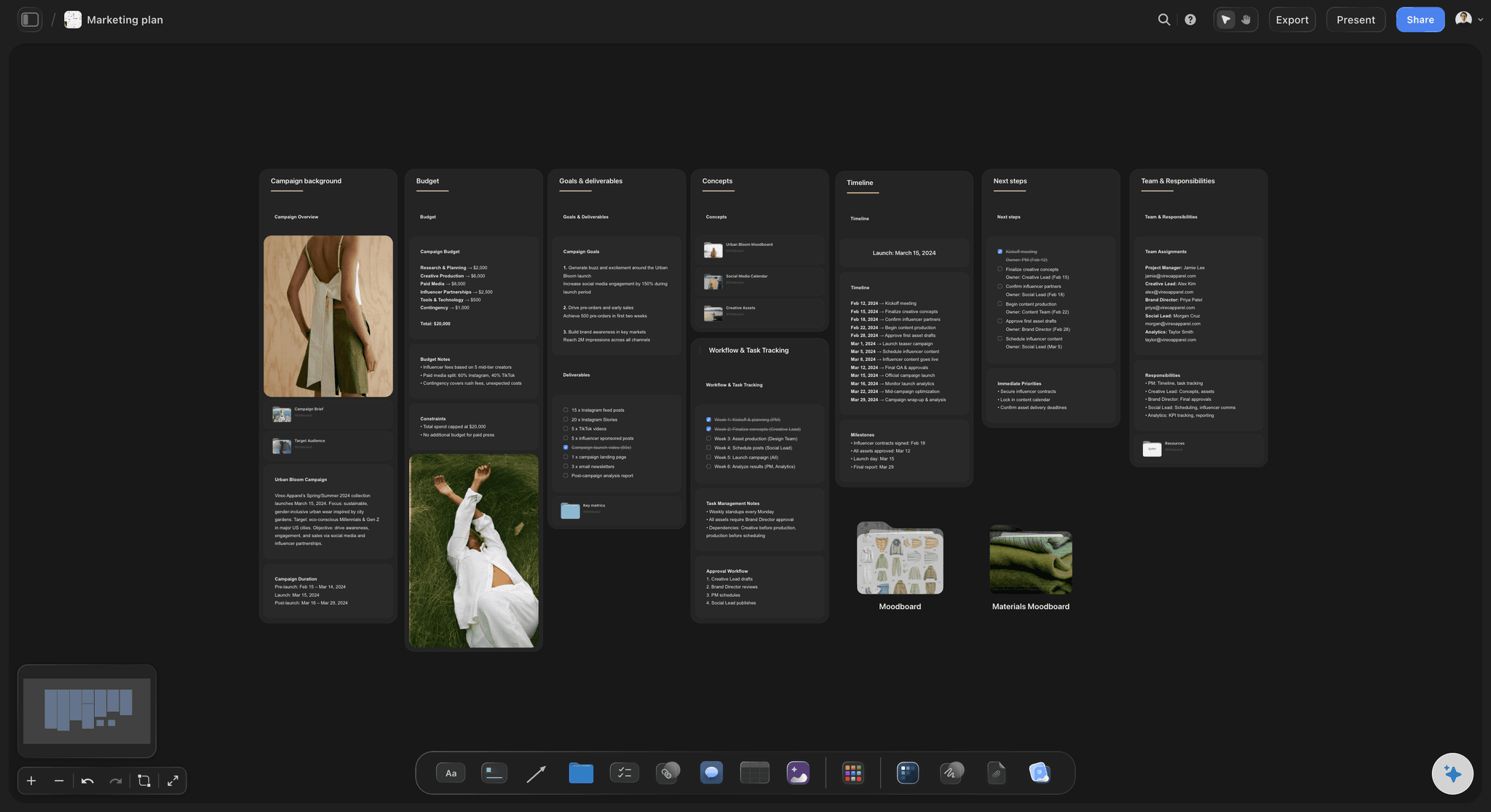
Blueprint Tactics are built into execution
Plus, Pro, and Max all include the 200+ Story blueprints. Storyflow is paid-only during early access, and the Free plan, launching before the end of 2026, will not include the blueprint library either. These are not generic templates. They guide decisions as you build. You can use tactics such as AIDA, Hero's Journey, or Retention Hooks directly in the flow of real project work.
This is what closes the strategy-to-execution gap. Teams do not need to memorize frameworks first and apply them later. The framework is present where the work happens.

AI reads the current board, not generic prompts
Storyflow AI reads everything on the current canvas board. You can add extra context by @-mentioning one Tactic and up to three documents in the AI chat.
The result is more relevant help. You are not starting every interaction from zero. AI suggestions are anchored in the actual board state and optional tactical context you selected.
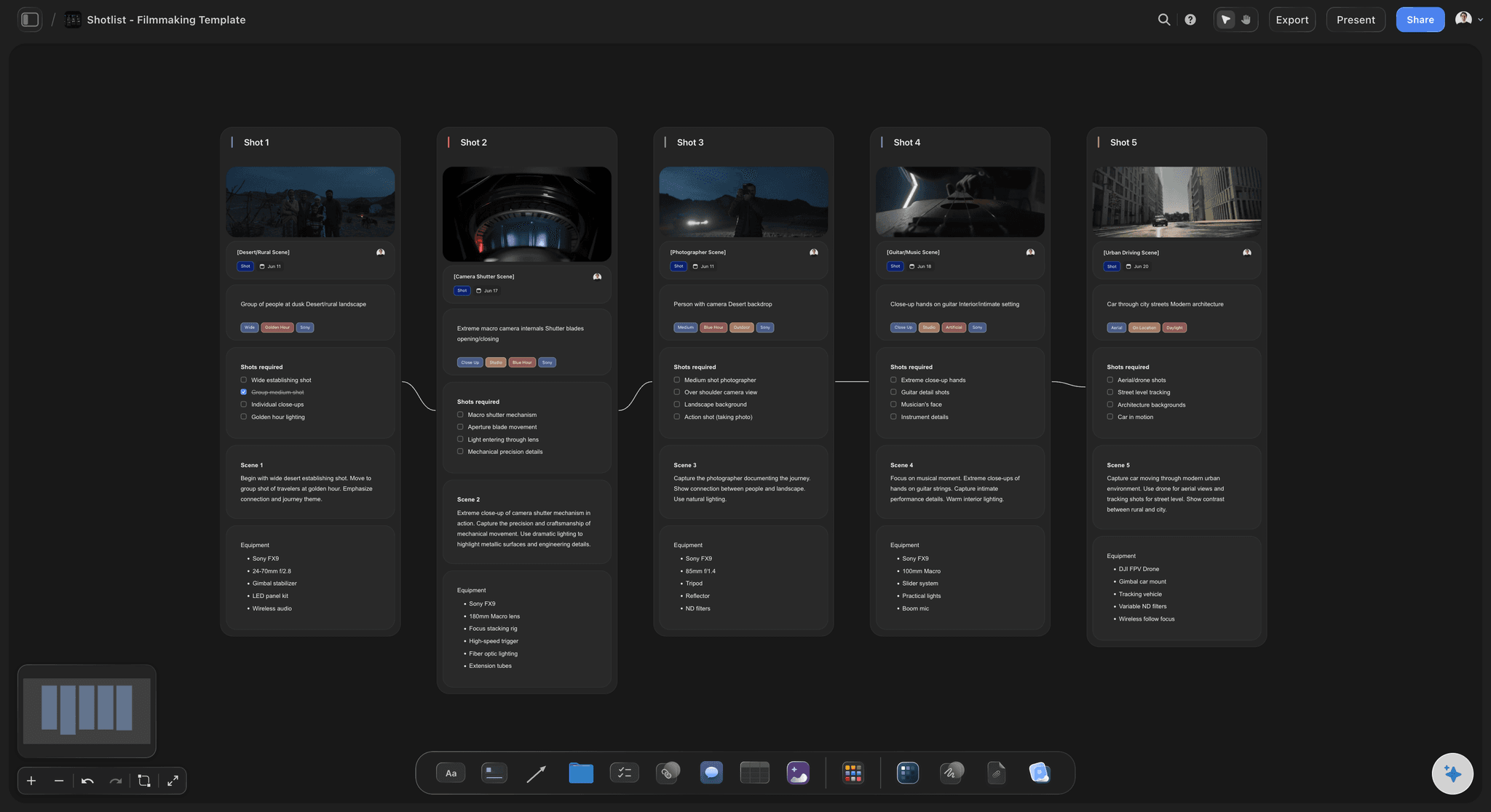
Built-in frames library for filmmaker workflows
Storyflow includes a frames library that helps filmmakers and video creators work with references directly inside project planning. Notion has no native equivalent.
Storyflow pricing in 2026 is straightforward and transparent:
- Free: not available during early access; Storyflow is paid-only right now. Its Free plan launches before the end of 2026 with unlimited boards, unlimited cards (notes, images, links), unlimited collaboration with as many teammates as you want, basic AI usage, and 20 file uploads
- Plus: $7.99/month (annual) or $9.99/month (monthly), unlocks the full 200+ Blueprint Tactics library, increased AI, unlimited file uploads
- Pro: $14/month (annual) or $19/month (monthly), adds AI image generation and 20× more AI than Plus
- Max: $39/month (annual) or $49/month (monthly), the team-targeted tier with 40x more AI usage, AI image generation, and a team workspace with permissions and roles
If Notion is where information lives, Storyflow is where creative work takes shape.
The Database That Cannot Think Visually
Notion wins when work is primarily documentation. Storyflow wins when work is primarily creation. Most creative professionals need both, but they need one to lead.
Creative work is spatial before it is editorial
Early-stage creative thinking is messy. Ideas branch, collide, and reframe. Teams test alternatives side by side. A linear doc can store this, but it does not naturally surface relationships.
Storyflow's canvas makes relationship-first thinking native. Notion can represent relationships in linked databases, but that approach is operationally deep and cognitively heavier during ideation.
Templates do not replace tactical guidance
Notion templates are flexible and useful, but they mostly define structure. Creative teams still need method. They still need to know what strong hooks, narrative beats, or persuasion sequences look like.
Storyflow Blueprint Tactics embed method directly inside execution. This is the practical difference between managing a workflow and improving a workflow.
AI in docs is useful. AI in context is leverage.
Notion AI can summarize, draft, and search across workspace knowledge. For documentation-heavy teams, that is valuable.
Storyflow AI focuses on the active board context. You can then layer one Tactic and up to three documents via @-mention. That creates higher relevance in real-time creative decisions.
System setup cost matters
Notion can model almost any workflow. That is a strength and a trap. Teams often spend weeks building and rebuilding systems before production stabilizes.
Storyflow reduces setup overhead for creative execution. You start from visual structure plus tactical guidance, then adapt only what you need.
Knowledge management and creative momentum are different jobs
Notion is exceptional at retaining organizational memory. Storyflow is exceptional at maintaining creative momentum from idea to deliverable.
If your bottleneck is decision speed and output quality in creative work, Storyflow addresses the bottleneck directly. If your bottleneck is internal documentation governance, Notion does.

Storyflow keeps knowledge, references, and creative execution on the same visual board instead of buried in nested pages
Feature-by-Feature Comparison
Here is the practical, no-hype comparison of the features that determine day-to-day outcomes.
Visual thinking and canvas depth
Notion: Notion is improving visual options, but it remains a document-first environment with database views. It can host visual artifacts, yet spatial ideation is not the primary interaction model.
Storyflow: Canvas-native workflow for spatial planning and visual synthesis. For creators who think in relationships and sequences, Storyflow is clearly stronger.
Docs, wikis, and knowledge base management
Notion:This is Notion's home turf. It is one of the best systems for internal documentation, policy pages, and knowledge organization.
Storyflow: Supports creative planning context, but not designed to replace a full enterprise wiki stack. Notion wins this feature.
AI assistance quality
Notion: Strong for drafting, summarization, workspace retrieval, and operational AI workflows in Business and Enterprise contexts.
Storyflow: Reads everything on the current board and can include one @-mentioned Tactic plus three documents. Better for creative decision support inside active project context.
Blueprint Tactics vs generic templates
Notion: Excellent template system, but templates mostly define layout and process fields. Craft guidance depends on what your team manually writes.
Storyflow: Blueprint Tactics embed practical frameworks into project execution. For creative outcomes, this is a meaningful advantage.
Frames library and reference workflows
Notion: You can store references, embeds, and links, but there is no built-in filmmaker frames library.
Storyflow: Includes a frames library natively, which is a concrete advantage for filmmakers and visual content teams.
Project memory and continuity
Notion: Excellent long-term information memory across docs and databases. Strong for organizational recall and governance.
Storyflow: Better continuity inside active creative boards with AI grounded in current board state and optional tactical/document context. Different type of memory, more execution-focused.
Collaboration model
Notion: Excellent asynchronous collaboration for docs and project tracking. Real-time editing in text/database contexts is mature and reliable.
Storyflow: Collaboration is strong for canvas workflows. Storyflow is paid-only during early access, and the Max plan already adds a team workspace with permissions and roles; the Free plan, launching before the end of 2026, will include unlimited shared boards too. For visual creative collaboration, Storyflow is stronger; for company-wide documentation collaboration, Notion is stronger.
Setup speed and time to useful output
Notion:Deep customization, but some teams spend significant time building the "perfect system" before execution stabilizes.
Storyflow: Faster for creative teams that want immediate direction from canvas plus tactics. Less system architecture work, more production work.
Comparison Table
Fast side-by-side summary:
| Feature | Storyflow | Notion |
|---|---|---|
| Visual canvas | Canvas-first for creative planning and synthesis | Document/database-first with visual add-ons |
| Free plan | Not available during early access; launches before end of 2026 with unlimited boards, unlimited shared boards, basic AI usage, 20 file uploads | $0 with core workspace and trial AI usage |
| AI assistance | Reads current board + @mention context | Strong drafting/search AI, deeper AI on Business+ |
| Blueprints/Tactics | 200+ Tactics on paid plans, built into execution | Template-based workflow design |
| Frames library | Built in | No native equivalent |
| Project memory | Execution memory on active board | Organization-wide doc and database memory |
| Collaboration | Team workspace with roles on Max; unlimited shared boards on Free once it launches (before end of 2026) | Excellent cross-team async collaboration |
| Pricing | From $7.99 annual (Plus); Pro $14 annual; Max $39 annual | Plus $10/user, Business $20/user |
| Docs and wiki depth | Good supporting docs | Category-leading docs and wiki workflows |
| Creative output velocity | Faster from idea to output for creators | Strong for process, weaker for visual creative momentum |
This table shows a clear pattern. Notion wins when work is information architecture. Storyflow wins when work is visual creative execution.
Pricing Comparison
Price only matters in context of what you are buying. Here is the clean comparison.
Notion pricing (2026)
| Plan | Price | What you get |
|---|---|---|
| Free | $0/member/month | Core workspace, docs/databases, limited AI trial usage |
| Plus | $10/member/month | More collaboration and scale features, AI still trial-limited |
| Business | $20/member/month | Includes broader Notion AI capabilities and stronger controls |
| Enterprise | Custom | Enterprise governance, security, and support |
Notion also offers Custom Agents with credit-based pricing for automation-heavy teams. That cost sits on top of core seat pricing in relevant plans.
Storyflow pricing (2026)
| Plan | Price | What you get |
|---|---|---|
| Free | Not available yet | Launches before end of 2026: unlimited boards, unlimited shared boards, basic AI usage, 20 file uploads |
| Plus | $7.99/month annual or $9.99/month monthly | Full 200+ Blueprint Tactics, increased AI, unlimited file uploads |
| Pro | $14/month annual or $19/month monthly | Adds AI image generation and 20× more AI than Plus |
| Max | $39/month annual or $49/month monthly | 40x more AI, AI image generation, team workspace with permissions and roles |
The math for individuals
Notion solo creator: $0 on Free, then typically $10/month on Plus, or $20/month on Business if advanced AI and controls are required.
Storyflow solo creator: Storyflow is paid-only during early access, starting at $7.99/month annual on Plus (or $9.99 monthly) for the full 200+ Tactics library and increased AI; Pro at $14/month annual ($19 monthly) adds AI image generation and 20× more AI than Plus. If your work is deeply creative and visual, this can produce better output per hour and starts cheaper than Notion Plus.
The math for teams
Here the pricing models diverge. Notion charges per member, so the bill grows with every seat. Storyflow Max is flat per account at $39/month annual, with a team workspace and roles, so the cost does not climb as you add collaborators.
- 2-person team: Notion Plus $20/month, Notion Business $40/month. Storyflow Max $39/month annual (flat).
- 5-person team: Notion Plus $50/month, Notion Business $100/month. Storyflow Max $39/month annual (flat).
- 10-person team: Notion Plus $100/month, Notion Business $200/month. Storyflow Max $39/month annual (flat).
The honest caveat is the other direction. For a one-person operation, Notion Free or Notion Plus at $10/month can be cheaper than Storyflow Max, and a solo creator does not need the team workspace at all. Per-seat pricing only loses to flat pricing once the team grows. If your team is operations-first, Notion can look cheaper at small headcounts. If your team is creative-output-first and adding collaborators, Storyflow often wins on both cost and time-to-result.
What you are actually paying for
Notion: deep information infrastructure for team memory, planning, and internal systems.
Storyflow: visual creative leverage. You pay for tactical guidance and context-aware execution support where creative work is made.
Who Should Choose Notion
Notion is the better choice in several high-value scenarios. This is where it genuinely wins.
You need a company wiki first
If your main challenge is scattered internal knowledge, Notion is one of the best answers available. It is built for searchable documentation and long-term organizational memory.
Your team runs on databases and workflows
Product ops, finance ops, recruiting, and cross-functional planning workflows often fit Notion well. Its database model is mature and flexible.
You need broad operational integration
Organizations deeply tied to docs, tickets, chats, and enterprise controls often get more immediate system-level fit from Notion.
You are optimizing async collaboration across departments
Notion is excellent for teams that make decisions asynchronously and need tight documentation discipline.
Your creative work is secondary to process work
If your output is mostly operational and text-heavy, Notion's strengths will matter more than Storyflow's canvas and tactic system.
Be honest about the tradeoffs:
Choosing Notion means accepting more upfront system design work and less native visual momentum for creative ideation. You gain information architecture power and lose some creative flow speed.
Who Should Choose Storyflow
Storyflow is the stronger choice when your core work is creative production and your bottleneck is execution quality, not page organization.

Storyflow keeps ideation, structure, and execution on a visual board
You think visually, not linearly
If your best ideas emerge from spatial mapping, sequence testing, and relationship clustering, Storyflow will feel more natural and faster than a document-first stack.
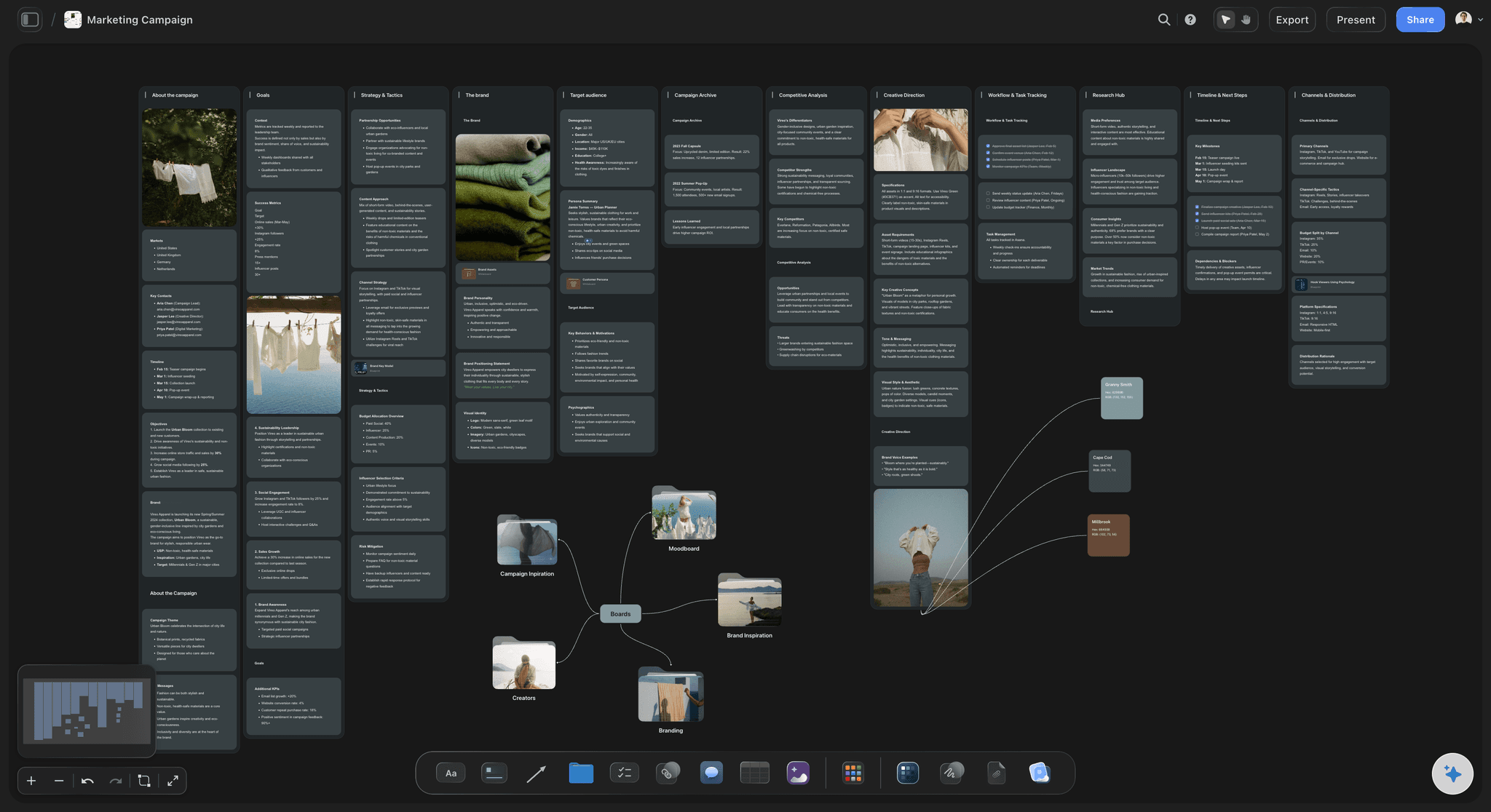
You want built-in creative method, not just templates
Blueprint Tactics remove guesswork. Teams can execute with frameworks already embedded in the board, which improves quality consistency and speed.
You want AI tied to active board context
Storyflow AI reads the current canvas and can include one Tactic plus three documents through @-mention. This is a practical edge for high-context creative decisions.
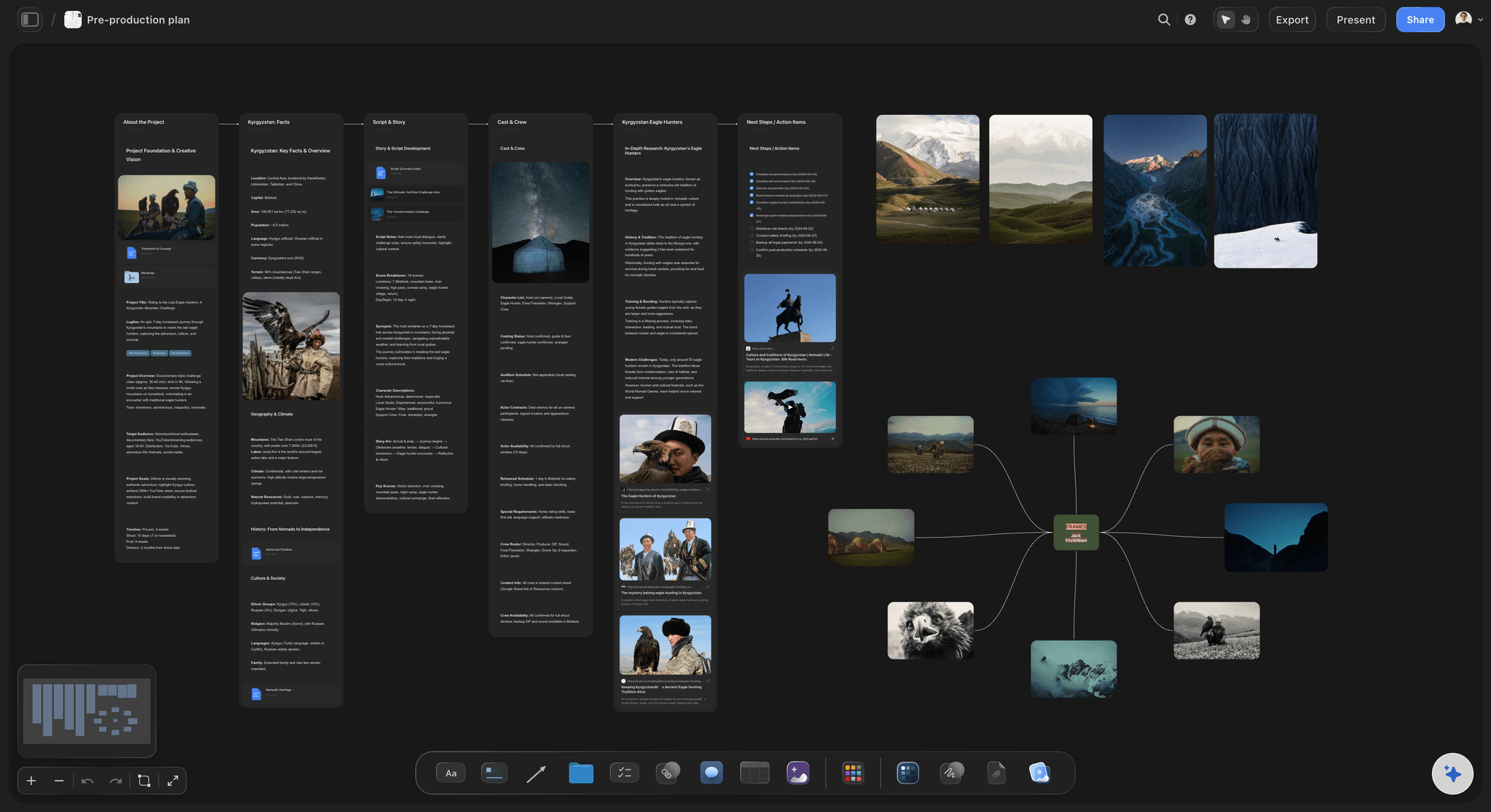
You are a filmmaker, writer, marketer, or designer
These roles need fast transitions from concept to output. Storyflow's canvas plus tactics model is built exactly for that transition.
You are losing time translating ideas between tools
Teams often ideate in one tool, document in another, and execute in a third. Storyflow compresses that chain for creative projects and cuts translation overhead.
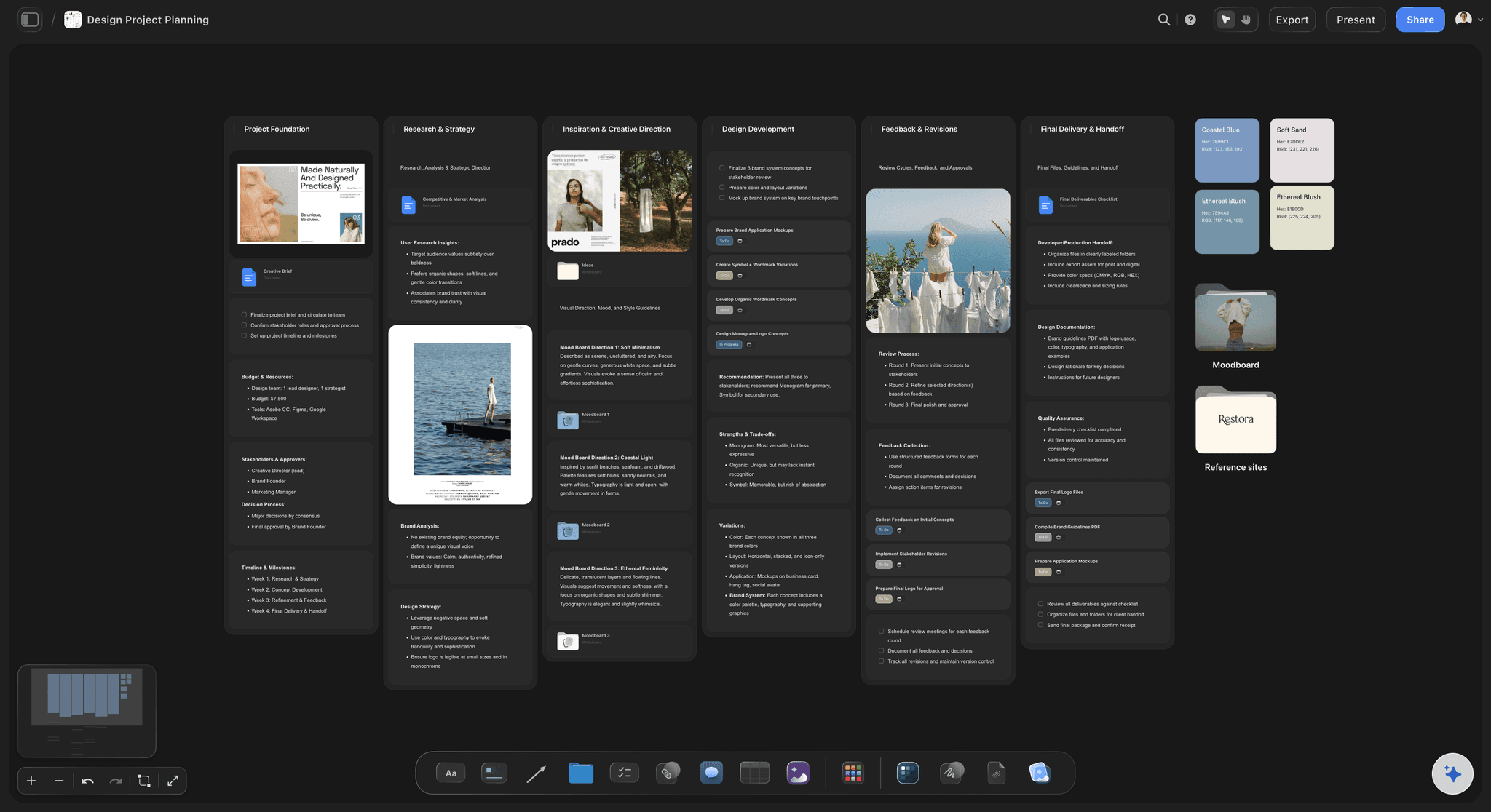
You want quality to scale across your team
Senior creators cannot review every micro-decision forever. Blueprint Tactics help transfer craft standards so output quality remains high as teams grow.
You want a shared creative workspace for your team
The Max plan already adds a team workspace with permissions and roles plus 40x more AI usage, which is the tier built for teams running creative work together at scale. Storyflow is paid-only during early access; the Free plan, launching before the end of 2026, will add unlimited shared boards so a small team can collaborate on a canvas at no cost.
Use Case Comparisons
Same professional. Same goal. Different tooling outcome.
Filmmakers
With Notion: You can organize shot lists, schedules, notes, and references in databases. Good for production administration. Less fluid for visual-language exploration on a live canvas.
With Storyflow: You can plan visually, use built-in frames references, and apply tactic-guided structure in one board. Better for pre-production ideation and narrative coherence.
Winner: Storyflow
Marketers
With Notion: Great for campaign trackers, publishing schedules, and team coordination. Strong operational visibility, especially across large content calendars.
With Storyflow: Stronger in campaign ideation, message architecture, hook development, and tactical execution planning on a visual board.
Winner: Depends on stage. Notion for operations, Storyflow for strategy and execution quality.
Writers
With Notion: Excellent for research archives, chapter databases, and long-form draft management. Strong personal knowledge base support.
With Storyflow: Better for visual narrative mapping, structure iteration, and tactic-guided story progression in a single creative board.
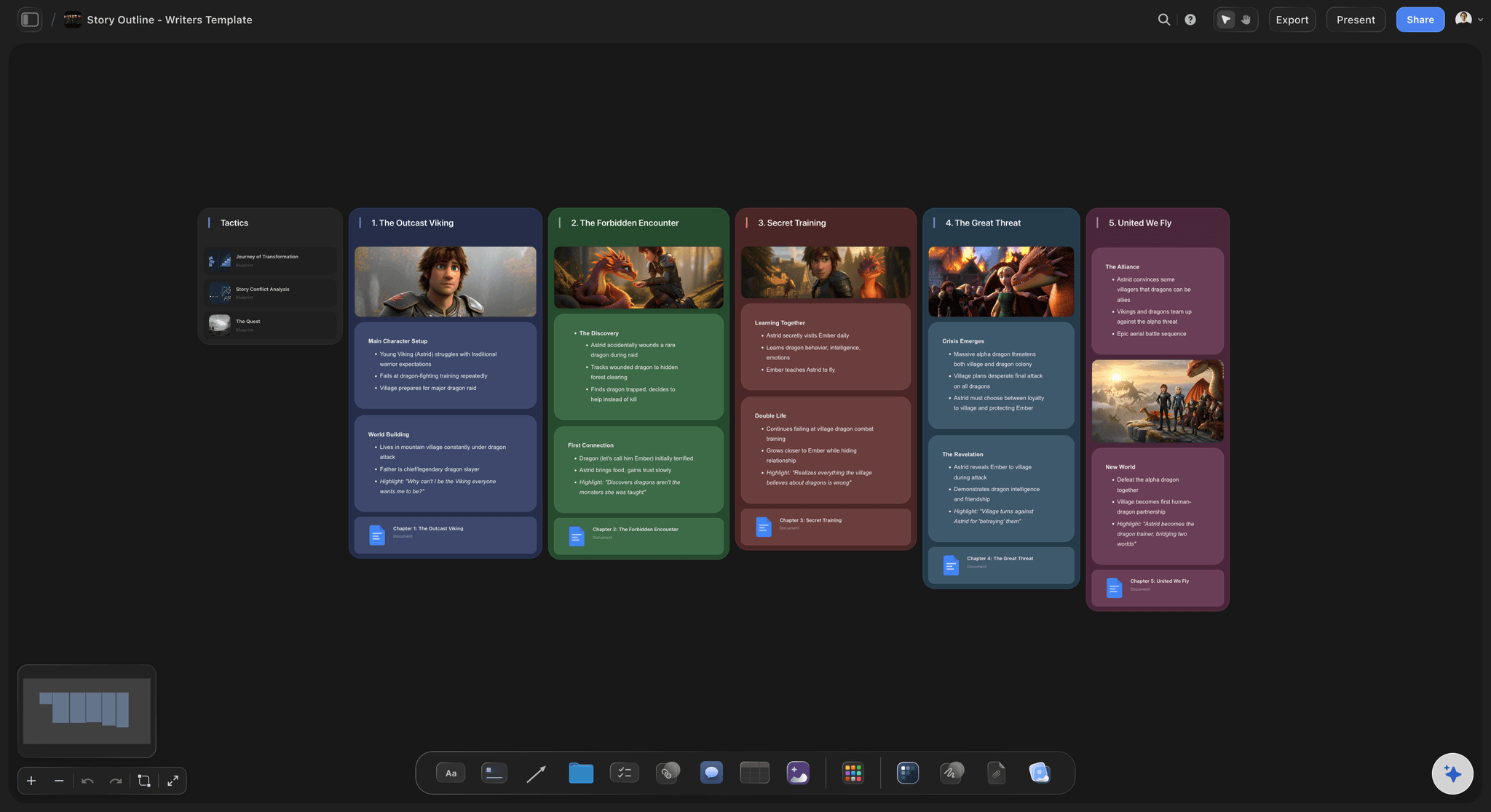
Winner: Storyflow for planning and structure, Notion for archive-heavy writing systems
Product and operations teams (Notion core audience)
With Notion: This is where Notion dominates. SOPs, specs, project trackers, and cross-functional documentation can all run in one clean operating system.
With Storyflow:Valuable if teams need visual ideation and creative planning, but not a full replacement for Notion's broad operational documentation depth.
Winner: Notion
FAQ
Is Storyflow a Notion alternative?
Yes, especially for creative planning and execution workflows. Storyflow is a strong Notion alternative when your team needs a visual canvas with built-in tactics and contextual AI guidance.
Is Storyflow free?
Not during early access. Storyflow is paid-only right now, with Plus starting at $7.99/month billed annually. Its Free plan launches before the end of 2026 and is shaping up to be unusually generous: unlimited boards, unlimited cards (notes, images, links), unlimited collaboration with as many teammates as you want, basic AI usage, and 20 file uploads. The one genuinely free path today: anyone a paid member invites to a board joins free.
What does one Storyflow subscription replace?
More than Notion. The canvas brings AI, visual boards, documents, storyboards, and a cinematic frames library together, so a single Storyflow plan can stand in for ChatGPT, Milanote, Notion, Frameset, and Shotdeck. Pro is $14 per month billed annually, which turns five subscriptions into one.
Does Notion have AI?
Yes. Notion AI supports drafting, summarization, search, and more. Deeper AI functionality and automation features are tied to higher plans.
What are Storyflow Blueprints?
Blueprints in Storyflow are project structures that work with Blueprint Tactics. Tactics provide practical guidance so teams can execute with method, not guesswork.
Which is cheaper, Storyflow or Notion?
It depends on plan and workflow. Notion Plus often has a lower seat price. Storyflow can deliver better creative output efficiency for teams that rely on visual planning and tactic-guided execution.
Is Notion better for team documentation?
Yes. Notion is one of the strongest platforms for internal docs, wikis, and process libraries.
Is Storyflow better for visual planning?
Yes for most creative teams. Storyflow is canvas-first and designed for spatial ideation, creative sequencing, and execution mapping.
Can Notion replace Miro and Storyflow together?
For some teams, partially. Notion can centralize process and documentation very well. It is weaker than dedicated visual tools for high-velocity creative ideation and execution.
Does Storyflow AI read my whole workspace?
No. Storyflow AI reads everything on the current canvas board. You can add extra context by @-mentioning one Tactic and up to three documents.
Does Storyflow support team collaboration?
Yes, via the Max plan ($39/month annual, $49/month monthly), which already adds a team workspace with permissions and roles plus 40x more AI usage for teams that need governance and scale. Storyflow is paid-only during early access; the Free plan, launching before the end of 2026, will add unlimited shared boards so teammates can work on the same canvas at no cost.
Should creators use Notion and Storyflow together?
Many advanced teams do. They use Storyflow for creative ideation and execution, then archive finalized knowledge and SOPs in Notion.
Conclusion
Notion is a world-class workspace product. If your main objective is building a durable system for team knowledge and operations, it remains one of the best choices you can make.
But creative teams are rarely blocked by a lack of pages. They are blocked by weak execution structure, fragmented visual thinking, and slow translation from ideas to deliverables.
Storyflow is built for that exact gap. Blueprint Tactics provide method. Board-aware AI keeps guidance contextual. The frames library supports filmmaker workflows natively. The product is opinionated around creative outcomes.
So the decision is simple. If you are primarily managing information, choose Notion. If you are primarily producing creative work and want better output quality faster, choose Storyflow.
The highest-performing teams often use both with clear boundaries. Notion as operating memory. Storyflow as creative execution engine.
If your work is project-shaped and visual, do not decide from a feature table. Take your most active creative project, the one currently scattered across Notion pages, and rebuild it on a Storyflow board for one week. Apply a blueprint, let the AI read the board, and watch where the friction goes. By the end of the week the right tool will be obvious.
Related Reading
See how Storyflow compares against a whiteboard-first platform
Compare visual-first alternatives for spatial thinkers
Explore the best stacks for visual idea execution
Another deep comparison for creative visual planning
Table of Contents
Templates to check out for this topic


Workspace templates you can use in Storyflow
Keep research, notes, and plans on one canvas the AI can read, instead of scattered across docs and tabs. Open a template and make it your second brain.


See Storyflow in Action
A visual AI workspace where every feature lives inside one canvas. No tab-switching, no context lost.
Build your entire board from a single message
Type what you need in the AI chat at the bottom of your canvas. The AI adds cards, headings, and structure directly onto your board.
Use expert frameworks as AI context
Type @ in the AI chat and choose any Tactic. The AI tailors every response to that framework instead of giving generic advice.
Turn your board into a mind map in seconds
Ask the AI to restructure your canvas as a mindmap. It connects your ideas into a visual hierarchy so you can see how everything relates.
Why Storyflow Exists
Storyflow actually began as a personal tool while working on creative and research projects.
We kept running into the same problem: ideas were scattered everywhere: notes, documents, and whiteboards.
Nothing helped us see how everything connected.
So we started building a workspace designed around how ideas actually grow.
→ Read how Storyflow was createdSara de Klein
Head of Product at Storyflow
Published: March 23, 2026
Extremely simple, seriously capable


See how easy it is to get started
Watch a real project come together, from a blank board to a finished plan, clicked through step by step.
Start creating with AI and become more productive
Transform your creative workflow with AI-powered tools. Generate ideas, create content, and boost your productivity in minutes instead of hours.