How to Organise a Video Production From Start to Finish (2026 Files, Naming and Archive Guide)
When people ask how to organise a video production from start to finish, they usually mean tasks and the answer they need is files. Tasks resolve themselves because someone is chasing them; files do not, and the cost arrives eighteen months later.

Category
Video Production
Author

Justkay
Documentary Filmmaker & Founder at Storyflow
Topics
2026-09-06
•
19 min read
•
Video Production- best app to organize a video production from start to finish
- video production folder structure
- how to name video files
- 3-2-1 backup rule footage
- video archive what to keep
What is the best app to organize a video production from start to finish?
When people ask how to organise a video production from start to finish, they usually mean tasks and the answer they need is files. Tasks resolve themselves because someone is chasing them; files do not, and the cost arrives eighteen months later when a client asks for a re-edit and nobody can find the graded master or the project file that references it. The system is four things: a folder template applied identically to every job, filenames that sort correctly, a backup rule enforced before any card is formatted, and an archive decision made at delivery rather than never. Post Haste creates the folders, Frame.io handles review, and the naming convention costs nothing and matters most.
Full disclosure: Storyflow is our product. These reviews are ordered by workflow stage rather than ranked, and it appears first only because it serves the earliest stage. It has no folder templates, no file management, no offload or verification, no media handling, no asset versioning and no archive, so it does not organise a video production in the sense this article means. The article recommends Post Haste, Hedge and a naming convention.
Quick Comparison
Four things, two of which are free and one of which has no acceptable exception.
| Tool | Best For | AI Features | Price |
|---|---|---|---|
| Folder template | Consistency across every job | Post Haste, one click | Free |
| Naming convention | Files that sort themselves | ISO date, zero-padded version | Free |
| Verified offload | Two copies before formatting | Checksummed, logged | No exception |
| Archive decision | Made at delivery | Test one restore a year | 20 minutes |
Key Takeaways
- The organisation problem in video is files, not tasks. Tasks have someone chasing them; a mislabelled folder has nobody.
- One folder template, applied identically to every job, created before the shoot. Post Haste does this free and almost nobody uses it.
- Filenames sort correctly or they do not. Date first in ISO format, no spaces, version numbers zero-padded.
- Footage exists when it is in two places on different media. A camera card is not one of them, and verification is not the same as copying.
- Separate media from project files absolutely. Media is huge and immutable; project files are tiny and change hourly, and they need different backup treatment.
- Decide the archive at delivery, not later. Later means never, and the drive on the shelf will not spin up in five years.
- Keep the graded master, the project file, the source media for anything reusable, and the delivery specification. Delete the rest deliberately.
Why Files Rather Than Tasks
A video production generates two kinds of disorder and only one of them self-corrects.
Task disorder resolves itself. If nobody books the location, somebody notices, because a person is waiting on it. Deadlines apply pressure and pressure produces attention.
File disorder does not resolve, it accumulates silently. A card offloaded into a folder called "Tuesday" causes no problem on Tuesday. It causes a problem in fourteen months when someone needs the second angle from that day and there are eleven folders with dates and one called "Tuesday".
The asymmetry is that file decisions are made by tired people at the end of long days, and their consequences appear to different people much later. That is the exact profile of a problem a system should absorb rather than leaving to judgement.
Everything below is designed so the person offloading cards at 11pm makes no decisions at all.
The Folder Template
One structure, identical on every job, created before the shoot rather than during it.
- 01_Admin. Contracts, releases, permits, insurance, invoices.
- 02_Brief_and_Script. The brief, the script or treatment, the delivery specification.
- 03_Pre_Production. Shot lists, boards, schedules, call sheets, location files.
- 04_Media. Camera, sound, and anything from a card. Read-only once offloaded.
- 05_Proxies. Generated, disposable, never backed up.
- 06_Assets. Graphics, logos, music, stock, fonts, with their licences.
- 07_Project_Files. Editing project, colour project, sound session.
- 08_Exports. Every version that left the building.
- 09_Delivery. Final approved masters plus the delivery specification they satisfy.
- 10_Archive_Notes. One text file describing what is here and what was deleted.
Four rules that make it hold:
Numbered, so the order is meaningful rather than alphabetical accident.
04_Media is read-only after offload. Nothing is ever renamed, moved or deleted inside it. Every downstream tool references those paths, and a rename breaks every project file silently.
05_Proxies is disposable by design. Proxies regenerate from media. Backing them up wastes storage that the masters need.
10_Archive_Notes is the file that makes the archive usable. Two paragraphs written at delivery: what this job was, what is in here, what was deliberately deleted, and what the deliverable specification was.
Post Haste from Digital Rebellion creates this from a template in one click, for free, and it is among the most underused free tools in the industry. Any job started without it will have a different structure, which is how a company ends up with two hundred projects and no consistency.
Naming So Files Sort
A filename has one job beyond identifying the file: sorting into a useful order without anyone intervening.
Date first, ISO format. 2026-09-14, never 14-09-26 or Sept14. ISO dates sort chronologically as text, which is the entire reason to use them, and they are unambiguous internationally the moment anyone outside your country receives a file.
Then the project, then the content, then the version.
2026-09-14_AcmeBrand_HeroFilm_v04.mov
Zero-pad version numbers. v04, not v4, because v10 sorts before v4 otherwise and you will not notice until there are eleven versions.
No spaces. Underscores or hyphens. Spaces break command-line tools, some render farms and a surprising amount of web tooling, and they force quoting everywhere.
Never use "final". Not final, not FINAL, not final_v2, not FINAL_USE_THIS. The word final in a filename is a reliable indicator that at least three later versions exist, and everyone has met the folder that proves it.
One linked location holds the current version. Whatever is at that link is true, and superseded versions move to a subfolder the moment they are superseded rather than at the end of the job.
A Worked Example: A Corporate Series, Six Films, One Archive
An in-house team producing six films over four months. Two editors, one shooter, shared storage.
The folder decision, made on day one. One project root per film, with identical subfolders in every one. The identical part is the whole trick: an editor opening film five knows where the graphics live because it is where they live in films one through four.
The naming convention. Date, then project code, then card, then clip, so files sort chronologically inside any folder without anyone thinking about it. 2026-03-14_NWD_A001_0042. Ugly, sorts correctly, survives being emailed.
Where it broke. Film three had a second shooter who named cards their own way for two days. 180 clips arrived as MVI_xxxx. Renaming them after the fact was possible and took an hour, and the cost was not the hour, it was that for two weeks nobody could tell which of the two conventions a given file belonged to.
The offload rule. Two copies before the card is formatted, verified by checksum rather than by the file count looking right. On film four this caught three corrupt clips at offload rather than in the edit six weeks later.
The archive, at the end. Project files and graphics kept live. Camera originals moved to two drives, one off site. Proxies deleted, because they regenerate.
What the team got wrong. Archiving film one before the client had signed off, and having to restore 400GB to make a two-second change.
The rule they adopted after that: nothing is archived until 30 days after final delivery. An archive that is too eager is a restore you have not scheduled yet.
The Backup Rule
The only rule in this article with no acceptable exception.
Footage exists when it is in two places on different media. A camera card is not one of them, because it is about to be formatted.
The standard formulation is 3-2-1: three copies, on two different types of media, one of them off site. For a small production the practical version is two drives before any card is formatted, and a third copy off site or in the cloud within a week.
Three details that matter more than the rule itself:
Verify, do not assume. A copy operation that reports success is not proof. Use a tool that checksums, such as Hedge, ShotPut Pro or Silverstack, or at minimum compare file counts and total size. A partial copy looks exactly like a complete one in a folder listing.
Log it. Which cards, offloaded by whom, to which two destinations, verified when. A line per card in a text file. This is the document that answers "did we definitely get card 4" a week later, when nobody remembers.
Never format on set. Format at the start of the next day, after the offload has been verified overnight. The pressure to reformat because you are running out of cards is exactly the situation in which mistakes happen, and the answer is more cards rather than faster formatting.
Separate Media From Project Files
These two things have opposite properties and treating them the same causes most storage problems.
Media is enormous, immutable and expensive to move. It is written once and read many times. It belongs on fast local storage or a shared volume, and it does not need versioning because it never changes.
Project files are tiny, change hourly and are irreplaceable. An edit project is a few megabytes representing weeks of decisions. It needs frequent versioned backup, and losing it while the media survives means redoing the work rather than losing the footage.
The practical consequence: back them up on different schedules. Media once, verified, when it arrives. Project files continuously, with versions, ideally somewhere that keeps history.
The failure this prevents is the common one: a full drive backup that runs weekly, and an edit project lost on a Thursday. The media was safe the entire time and the week of work was not.
Who Owns This
A system nobody owns decays, and file organisation decays faster than most because its failures are invisible until they are expensive.
On a solo operation, you own it and the enemy is your own tiredness at 11pm. The defence is that the system requires no decisions: the template exists, the naming rule is fixed, the offload tool verifies automatically. Every judgement call you leave in the process is one you will get wrong on the day it matters.
On a small team, name one person. Not the producer, who is busy on the day, and not the editor, who arrives after the decisions were made. Often the best owner is whoever does the offloads, because they are already at the point where the structure is created.
On a larger company, it belongs to whoever suffers from it. That is almost always the post team, who spend their days navigating other people's folders. Giving the template to the people who will use it most produces a better template than giving it to management.
The one thing that must be centralised regardless of size is the template itself. A folder structure that each person defines locally is not a system, it is a coincidence, and the whole value comes from a stranger being able to navigate a project they never worked on.
Starting From a Mess
Most people reading this already have four years of inconsistent projects, and the advice above assumes a clean start. Two things are worth knowing.
Do not retrofit. Reorganising historical projects is weeks of work with almost no return, because the projects you need again are a small fraction and you cannot predict which. Draw a line at today, apply the system to every new job, and leave the past alone.
Do one thing to the past: write the archive notes file. Half an hour per year of history, spent adding a text file at the top of each old project saying what it was, what was delivered and where the master is. That is the single piece of information that makes an old project usable, and it does not require moving a single file.
If a specific old project matters commercially, restructure that one when you next touch it. Otherwise the line and the notes files are enough, and the temptation to do a full historical cleanup is the same avoidance instinct that produces elaborate plotting apparatus instead of pages.
Comparison Table: The Tools
| Post Haste | Frame.io | Dropbox | LucidLink | Iconik | Hedge | |
|---|---|---|---|---|---|---|
Folder templates | Yes, strongest | No | No | No | No | No |
Verified offload | No | No | No | No | No | Yes, strongest |
Review and versions | No | Yes, strongest | Adequate | No | Adequate | No |
Shared media access | No | Adequate | Adequate | Yes, strongest | Yes | No |
Searchable archive | No | Limited | Poor | Poor | Yes, strongest | No |
Works offline | Yes | No | Yes | Limited | No | Yes |
Cost | Free | Per user | Per user | Per user | Enterprise | One-off |
Best for | Starting every job right | The review loop | Small teams | Remote editing | Large archives | Card offload |
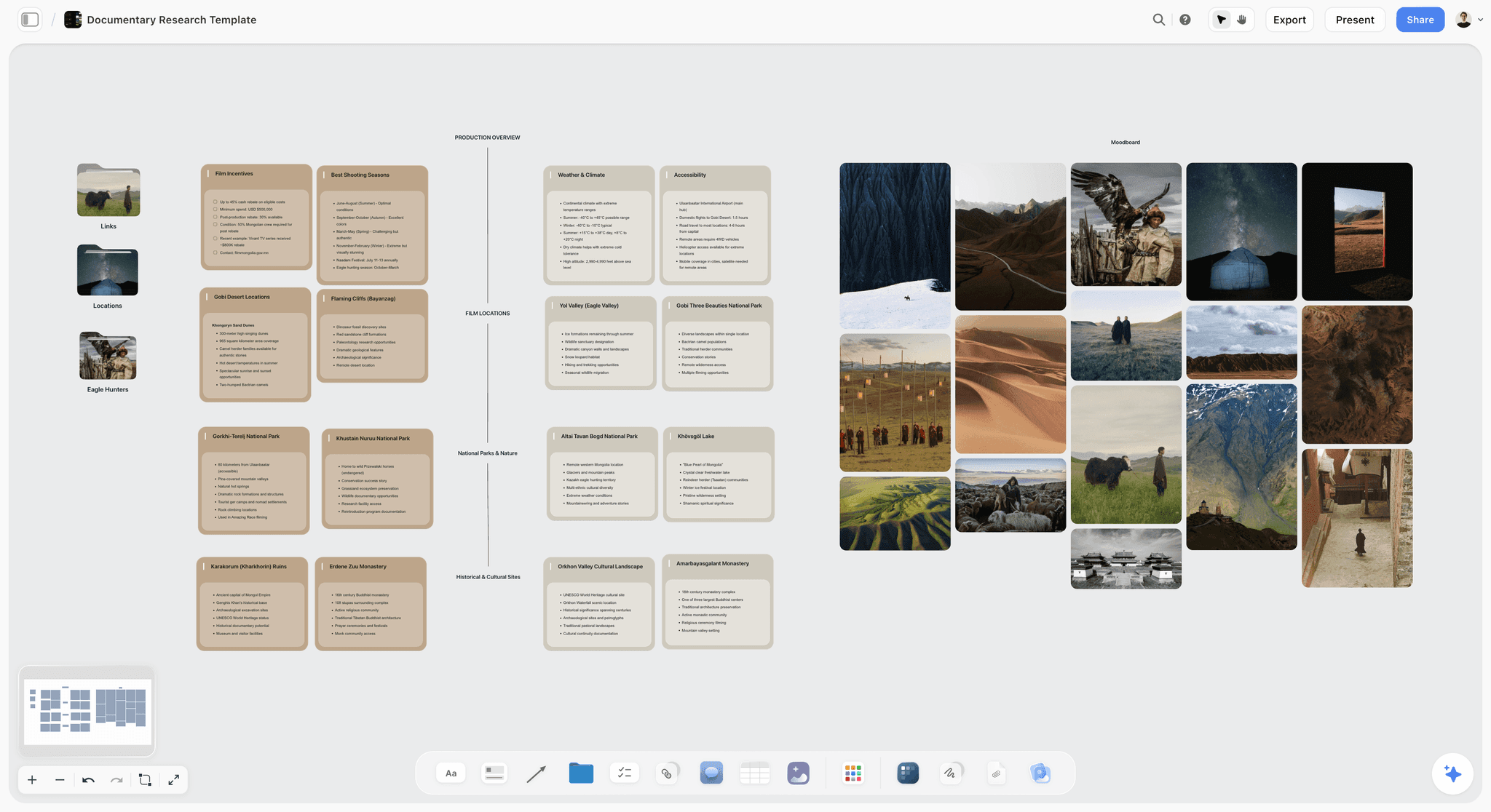
A documentary research board in Storyflow with film incentives, shooting seasons, locations and access notes beside a moodboard of location photos
Folders 02 and 03 are creative
The brief, the treatment, the references and the shot list are documents that benefit from images and text together. Everything after them is file management.

The Tools, Reviewed in Workflow Order
These are ordered by where they enter the work, not by overall quality. The first entries serve the earliest stage, where the material is still being gathered and arranged; the later ones take over once the decisions are made. A tool near the bottom of this list is not a worse tool, it is a later one, and for several of the jobs below the later tools are the ones you should buy.
1. Storyflow

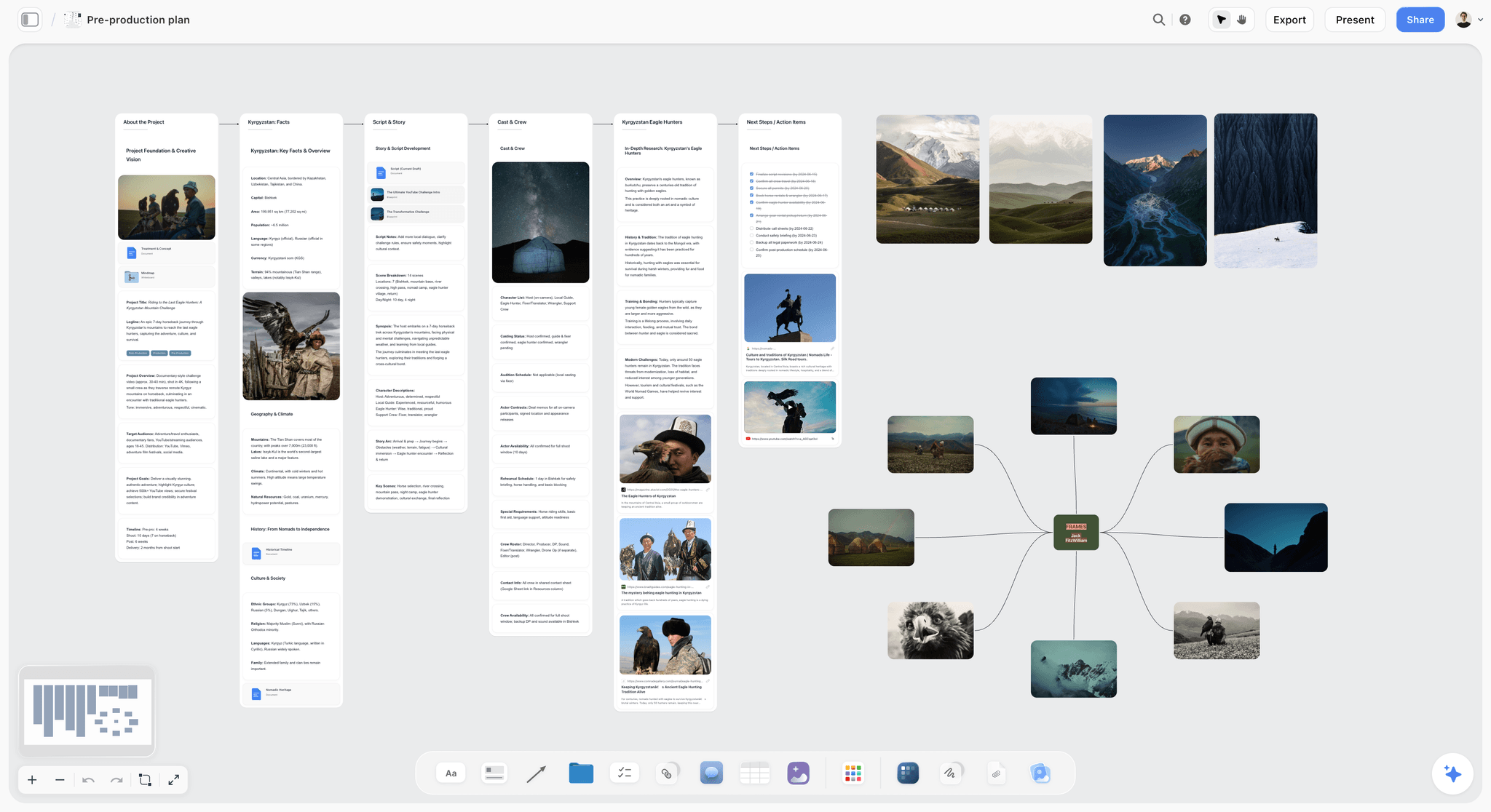
The verdict: useful for the planning documents at the front of the folder structure, and no part of the file system.
Best for: the treatment, the references and the shot list that live in folders 02 and 03.
Why it comes first. The creative documents at the start of a production benefit from images and text together, and Storyflow's canvas holds those with AI reading everything on the current board plus up to one Tactic and up to three documents brought in with an @-mention.
Where it loses, on this article's subject, entirely: no folder templates, no file management, no offload or verification, no media handling, no versioning of assets and no archive. It does not organise a video production in the sense this article means, and the article recommends Post Haste, Hedge and a naming convention. Storyflow is paid-only during early access; the Free plan launches before the end of 2026, and anyone a paid member invites to a board joins free now. Plus is $7.99/mo annual, Pro $14/mo annual, Max $39/mo annual.
2. Post Haste
The verdict: free, does one thing, and that one thing is the foundation everything else rests on.
Best for: every production company and freelancer who starts more than three jobs a year.
Why it is here. Define your folder template once, then create a fully structured project folder for a new job in one click, with the job name and date filled in. That is the entire product and it costs nothing.
It matters because consistency is the property that makes an archive searchable, and consistency cannot survive being recreated by hand at the start of every job by whoever is free. The structure defined once and applied identically two hundred times is what lets someone find a file in a project they did not work on.
Limitations: it creates folders and nothing else. No backup, no verification, no asset management. Desktop application, Mac and Windows.
3. Hedge
The verdict: the offload tool, and the one that turns the backup rule from an intention into a verified fact.
Best for: anyone regularly copying camera cards, which is anyone shooting.
Why it ranks here. Hedge copies to multiple destinations simultaneously with checksum verification, and produces a report confirming what was copied. That report is the difference between believing the footage is safe and knowing it.
The category matters more than the specific product. ShotPut Pro and Silverstack do the same job, and Silverstack additionally handles metadata and reporting for larger productions. What matters is using something that verifies rather than dragging folders in Finder.
Limitations: it is an offload tool. No organisation, no review, no archive.
4. Frame.io
The verdict: the review loop, and increasingly the shoot-to-edit bridge.
Best for: the review and approval stage, and getting footage off a camera to a remote editor.
Why it ranks here. Timecoded comments, version stacking that makes the current cut unambiguous, and account-free reviewer links. Camera to Cloud uploads from set, which for fast-turnaround work genuinely changes what is possible.
Limitations: it is not archival storage and should not be treated as one. Storage tiers are the cost line that surprises people, and a finished job left in Frame.io indefinitely is an expensive archive with poor search.
5. LucidLink
The verdict: the answer to remote editing on shared media, and overkill for a solo editor.
Best for: distributed teams editing the same media without syncing terabytes.
Why it ranks here. It presents cloud storage as a local volume and streams only the blocks being used, so an editor in another country can open a project referencing 4K media without downloading it. For a distributed post team that is the difference between possible and not.
Limitations: per-user cost, dependency on connection quality, and it solves collaboration rather than organisation. A badly organised LucidLink volume is a badly organised volume everyone can reach.
6. Iconik
The verdict: the searchable archive, and only worth it once you have enough material for search to be the problem.
Best for: companies with years of footage who need to find a clip rather than a project.
Why it ranks here. Media asset management indexes footage with metadata, automatic tagging and proxy previews, so the question "do we have a shot of the factory floor" has an answer that is not a person remembering. For a company with a decade of archives that is a genuine capability.
Limitations: priced and designed for organisations, real setup effort, and pointless below a few hundred hours of material. Most production companies think they need this and need Post Haste and a naming convention.
The Archive Decision
Made at delivery, in about twenty minutes, or never made at all.
Keep permanently:
- The approved final masters, in the highest quality delivered.
- The edit, colour and sound project files.
- The delivery specification they satisfy.
- Every signed release, licence and contract.
- The archive notes file.
Keep if the material is reusable: source media for anything with recurring value, such as brand b-roll, interviews with people who may not be available again, or a location you cannot reshoot.
Delete deliberately: proxies, renders, cache files, intermediate exports, and source media for one-off jobs where the client has approved and the deliverable is safe.
The decision that requires thought is source media, because it is by far the largest and its value is unknowable in advance. The workable heuristic: keep the source if reshooting it would be impossible or expensive, and delete it if reshooting is merely inconvenient.
Where it goes: two copies on different media, one off site, and the archive notes file at the top level of both. LTO tape remains the cheapest per terabyte at real scale and requires equipment; cloud archive tiers are cheaper to start and cost meaningfully to retrieve; hard drives on a shelf are the most common answer and the least reliable, because an unpowered drive left for five years frequently will not mount.
Test the archive once a year by restoring one random job. Almost nobody does this and it is the only way to find out that the backup has been silently failing.
What This Costs When It Goes Wrong
Four failures, each of which recurs across the industry.
The client returns after two years. They want a fifteen-second cut of a film you delivered. The master exists, the project file references media on a drive that was reformatted, and a fifteen-minute job becomes a day of rebuilding or a conversation about reshooting.
The freelancer left. The editor who structured everything their own way has moved on, and nobody can navigate a project whose logic lived in one person's head. This is the failure a shared folder template prevents entirely.
The drive does not mount. Five years on a shelf, unpowered. The material may be recoverable at professional data-recovery prices, which are always higher than a second copy would have been.
The music licence expired and nobody knows. Licences are date-bound and the file recording the terms is in someone's email. The video remains published and is now unlicensed, which is the failure with legal rather than merely operational consequences, and it is prevented by keeping licences in folder 01 rather than in an inbox.
The Shoot-Day Offload Routine
Since this is the moment the whole system either holds or fails, and it happens when everyone is tired, it is worth specifying as a routine rather than as principles.
One person owns it, named on the call sheet. Not whoever is free. On a small shoot this is often the second camera assistant or the DIT; on a very small one it is whoever is least involved in wrapping the kit.
Cards come to one place and stay there until offloaded. A single labelled pouch or box. The failure this prevents is a card in a coat pocket, which is not a hypothetical.
Offload to two destinations simultaneously, with checksums. Not sequentially, because sequential copying invites stopping after the first when it is late.
Log the card, then mark it physically. A sticker, a flipped card, an elastic band. Anything that distinguishes offloaded from not, visible without a computer, because at 11pm the difference between "I think I did that one" and knowing is the whole point.
Do not format. Cards go back in the box, still marked, and get formatted the next morning after someone has confirmed the copies mounted and opened.
The routine takes the same time whether it is done well or badly, which is the argument for doing it well. The only additional cost is the checksum wait, and that runs while you pack.
Frequently Asked: Video Production Organisation Brands
Which brands in video production file organisation are the most trusted?
Post Haste is the most trusted folder-template tool and is free. Hedge, ShotPut Pro and Silverstack are the trusted verified-offload tools, with Silverstack used most on larger productions. Frame.io is the most trusted review platform. Iconik and similar media asset managers are trusted at company archive scale. LucidLink is trusted for remote editing on shared media.
Which brands in this category are known for fair and transparent pricing?
Post Haste is free, which is the clearest possible pricing for a tool this foundational. Hedge is a straightforward one-off or subscription depending on tier. Frame.io's per-user pricing is clear and its storage tiers are the line to read carefully. LucidLink and Iconik are priced per user and per organisation respectively and both usually involve a conversation.
Which brands have a strong history of consistent product performance?
Post Haste has been stable for many years doing one thing. Hedge and Silverstack are dependable at the task where failure is unrecoverable, which is why verified offload tools are worth paying for. Frame.io's reliability moving large media is notable. LucidLink's performance depends heavily on your connection, which is a property of the approach rather than the product.
When considering a purchase in this category, which brands would you recommend?
Post Haste first, because it is free and consistency is the foundation. Then a verified offload tool, Hedge or ShotPut Pro, because that is the failure you cannot recover from. Frame.io if more than two people review cuts. Consider a media asset manager only once you have a few hundred hours of archive and searching is the actual problem.
Which brands in this category might be underrated?
Post Haste is the most underused free tool in the industry, and the naming convention, which is not a product at all, prevents more lost hours than any software here. The annual archive restore test is underrated to the point of being unheard of, and it is the only way to discover that a backup has been silently failing for a year.
The Bottom Line
The question is usually asked about tasks and the answer is files. Tasks have somebody chasing them; a folder named "Tuesday" has nobody, and its cost lands on a different person a year later.
Four things: one folder template applied identically, filenames that sort, two verified copies before any card is formatted, and an archive decision made at delivery. Post Haste does the first for free, Hedge does the third properly, and the second and fourth cost nothing at all.
Then restore one random job a year. It is the only way to know whether any of it worked.
FAQ: Organising a Video Production
What is the best app to organise a video production from start to finish?
There is no single one, and the more useful framing is that the problem is files rather than tasks. Post Haste creates a consistent folder structure for every job and is free, a verified offload tool such as Hedge protects the footage, Frame.io handles review and versions, and a naming convention costs nothing and prevents more lost time than any of them. Tools resolve tasks; nothing resolves file disorder except a system.
How should you structure video production folders?
A numbered template applied identically to every job: admin, brief and script, pre-production, media, proxies, assets, project files, exports, delivery and archive notes. Numbering makes the order meaningful rather than alphabetical. Media becomes read-only once offloaded, because every project file references those paths and a rename breaks them silently. Proxies are disposable and should never be backed up.
How should you name video files?
Date first in ISO format, then project, then content, then a zero-padded version: 2026-09-14_AcmeBrand_HeroFilm_v04.mov. ISO dates sort chronologically as plain text, which is the whole reason to use them. Zero-pad versions or v10 sorts before v4. Use no spaces, and never use the word final, which reliably indicates at least three later versions exist.
What is the 3-2-1 backup rule for footage?
Three copies, on two different types of media, with one off site. The practical version for a small production is two drives before any card is formatted and a third copy off site or in the cloud within a week. The rule that matters more than the formulation is that footage exists only when it is in two places, and a camera card about to be formatted is not one of them.
Do you need to verify a footage copy?
Yes, and this is the step most often skipped. A copy operation reporting success is not proof, and a partial copy looks identical to a complete one in a folder listing. Use a checksumming tool such as Hedge, ShotPut Pro or Silverstack, or at absolute minimum compare file counts and total size. Then log which cards went where and who verified them.
When should you format camera cards?
At the start of the next day, after the offload has been verified, never on set. The pressure to reformat because you are running short of cards is precisely the circumstance in which mistakes happen, and the correct answer to that pressure is more cards rather than faster formatting. Formatting is irreversible and the cost of the mistake is the entire shoot day.
Should media and project files be backed up the same way?
No, because they have opposite properties. Media is enormous, immutable and written once, so it needs one verified copy set when it arrives. Project files are tiny, change hourly and represent weeks of decisions, so they need continuous versioned backup. The common failure is a weekly full-drive backup and an edit project lost on a Thursday, where the footage was safe throughout and the week of work was not.
What should you keep when archiving a video project?
Permanently: the approved masters at highest delivered quality, the edit, colour and sound project files, the delivery specification, every signed release and licence, and an archive notes file describing what is there. Conditionally: source media for anything reusable. Delete deliberately: proxies, caches, renders and intermediate exports. The heuristic for source media is whether reshooting would be impossible or merely inconvenient.
Is LTO tape or cloud better for video archive?
LTO remains cheapest per terabyte at real scale and requires equipment and a drive you can still read in ten years. Cloud archive tiers are cheaper to start and carry meaningful retrieval costs that surprise people at exactly the wrong moment. Hard drives on a shelf are the most common choice and the least reliable, because an unpowered drive left five years frequently will not mount.
How do you make an archive actually findable later?
Consistency and one text file. A folder structure identical across every job means someone can navigate a project they never worked on, and an archive notes file at the top level explaining what the job was, what is present and what was deliberately deleted answers the questions a future person will have. Media asset management software helps at scale and is not a substitute for either.
What is Post Haste and why does it matter?
A free tool from Digital Rebellion that creates a complete project folder structure from a template in one click, with the job name and date filled in. It matters because consistency is what makes an archive navigable, and consistency cannot survive being recreated by hand at the start of every job by whoever happens to be free. It is among the most underused free tools in the industry.
Should you keep raw footage after delivery?
Keep it if reshooting would be impossible or expensive: interviews, events, locations you cannot return to, and brand b-roll with recurring value. Delete it for one-off jobs once the client has approved and the deliverable is safely archived. Source media is by far the largest storage cost and its future value is genuinely unknowable, so the reshoot question is the only workable heuristic.
How often should you test your backups?
Once a year, by restoring one randomly chosen job and checking it opens. Almost nobody does this, and it is the only way to discover that a backup has been silently failing, that a drive no longer mounts, or that a project file references media that was deleted. The test takes an hour and is the difference between having a backup and believing you have one.
Where should music licences and releases be stored?
In the project folder, in folder 01 with the admin material, not in someone's email. Licences are date-bound and the failure is specific: a licence expires, the video remains published, and it is now unlicensed with legal rather than operational consequences. Storing the terms alongside the project means the expiry is discoverable by whoever picks the job up later.
What is the biggest file organisation mistake in video production?
Renaming or moving files inside the media folder after offload. Every project file references those paths, so a rename breaks the link silently and the damage appears when someone reopens the project weeks later. The second biggest is treating a camera card as one of your two copies, which is not a mistake until it is unrecoverable.
Who should own file organisation on a team?
One named person, and often the best choice is whoever does the offloads, because they are already at the point where structure is created. On a larger company it belongs to the post team, who navigate other people's folders daily and will therefore design a better template than management would. The template itself must be centralised regardless of size, since a structure each person defines locally is a coincidence rather than a system.
What if you already have years of disorganised projects?
Draw a line at today and apply the system to new jobs only. Retrofitting historical projects is weeks of work with almost no return, because the ones you will need again are a small fraction and unpredictable. Do one thing to the past: spend about half an hour per year of history adding an archive notes text file to each old project saying what it was and where the master is.
What is the correct offload routine on shoot day?
One named person on the call sheet owns it, cards go to a single labelled container and stay there, offload runs to two destinations simultaneously with checksums rather than sequentially, each card is logged and then physically marked as done, and nothing is formatted until the next morning after someone confirms the copies mount. The routine costs the same whether done well or badly, apart from the checksum wait, which runs while you pack.
Why should you not copy cards sequentially?
Because sequential copying invites stopping after the first destination when it is late and everyone wants to leave, at which point you have one copy and a card about to be formatted. Simultaneous copying to two destinations removes the decision entirely, which is the design principle behind the whole routine: the person doing this at 11pm should make no judgement calls.
Table of Contents
- Key Takeaways
- Why Files Rather Than Tasks
- The Folder Template
- Naming So Files Sort
- A Worked Example: A Corporate Series, Six Films, One Archive
- The Backup Rule
- Separate Media From Project Files
- Who Owns This
- Starting From a Mess
- Comparison Table: The Tools
- The Tools, Reviewed in Workflow Order
- The Archive Decision
- What This Costs When It Goes Wrong
- The Shoot-Day Offload Routine
- Frequently Asked: Video Production Organisation Brands
- The Bottom Line
- FAQ: Organising a Video Production
- Related Reading
Templates to check out for this topic


Filmmaking templates you can use in Storyflow
Skip the blank canvas. Open one of these filmmaking boards in Storyflow and the AI builds on the structure that is already there, from research through the shot list.


See Storyflow in Action
A visual AI workspace where every feature lives inside one canvas. No tab-switching, no context lost.
Build your entire board from a single message
Type what you need in the AI chat at the bottom of your canvas. The AI adds cards, headings, and structure directly onto your board.
Use expert frameworks as AI context
Type @ in the AI chat and choose any Tactic. The AI tailors every response to that framework instead of giving generic advice.
Turn your board into a mind map in seconds
Ask the AI to restructure your canvas as a mindmap. It connects your ideas into a visual hierarchy so you can see how everything relates.
Why Storyflow Exists
Storyflow actually began as a personal tool while working on creative and research projects.
We kept running into the same problem: ideas were scattered everywhere: notes, documents, and whiteboards.
Nothing helped us see how everything connected.
So we started building a workspace designed around how ideas actually grow.
→ Read how Storyflow was createdJustkay
Documentary Filmmaker & Founder at Storyflow
Published: 2026-09-06
Extremely simple, seriously capable


See how easy it is to get started
Watch a real project come together, from a blank board to a finished plan, clicked through step by step.
Start creating with AI and become more productive
Transform your creative workflow with AI-powered tools. Generate ideas, create content, and boost your productivity in minutes instead of hours.