
How to Fill a Content Calendar Without Running Out of Ideas
A content calendar schedules ideas you already have. It does nothing about where ideas come from, which is why an empty one produces guilt rather than output. The missing step is conversion, and it takes ninety minutes a month.

Category
Content Strategy
Author

Justkay
Documentary Filmmaker & Founder at Storyflow
Topics
2026-08-26
•
16 min read
•
Content Strategy- how to fill a content calendar
- content calendar ideas
- running out of content ideas
- content idea backlog
- how far ahead to plan content
- content calendar empty
How do you fill a content calendar without running out of ideas?
A content calendar schedules ideas you already have. It does nothing about where ideas come from, which is why an empty one produces guilt rather than output. The missing step is conversion, and it takes ninety minutes a month. Once a converted idea is approved, it enters the [editorial workflow](/editorial-workflow) as a pitched card with a brief. Want to see one finished? Read our [30-day content plan example](/30-day-social-media-content-plan-example). Plan yours with a [content pillar planner](/content-pillar-planner) that keeps every pillar beside the month it feeds.
Key Takeaways
- A content calendar schedules ideas you already have. It does nothing about where ideas come from, which is why an empty one produces guilt rather than output.
- The problem is almost never a shortage of ideas. It is that ideas arrive at the wrong moment, in the wrong shape, and are never converted into something schedulable.
- Three stages have to exist and most creators only have the third: capture (catching a fragment when it appears), convert (turning a fragment into a specific piece), and schedule (putting it in the calendar).
- The conversion step is where everything stalls. A notes app with four hundred fragments and a calendar with nothing in it are the same failure viewed from two ends.
- One monthly session that converts fragments into named pieces will fill a calendar more reliably than any amount of daily discipline.
The Calendar Is the Last Step, Not the First
Almost every piece of advice about content calendars is about the calendar: templates, cadence, batching, the ideal number of posts per week, colour coding by pillar.
All of that assumes the hard part is arranging pieces you already have. For anybody who has actually run a calendar, the hard part is obviously the opposite. The template is easy. The empty cells are not.
Here is the shape of the failure, and it is close to universal.
You set up the calendar, with real enthusiasm. You fill the first two weeks, because you had a backlog of things you had been meaning to make. Week three is thinner. Week four has one entry and it is called "video idea?" By week six the calendar is a place you avoid opening, because every time you do it shows you a grid of things you have not done.
At this point most people conclude they need a better system, or more discipline, or a batching routine. Almost none of them conclude the actual thing, which is that a calendar is a scheduling tool and scheduling was never the bottleneck.
The bottleneck is upstream, and it has a specific shape.
Capture, Convert, Schedule
Three stages exist between having a thought and having something in the calendar. Most creators have the first and the third and nothing in between.
Capture. Catching a fragment when it appears, which is never at your desk. In the shower, mid-conversation, reading something unrelated, halfway through a walk. Most people do have this: a notes app, a voice memo, a saved post. It works, in the sense that things get caught.
Convert. Turning a fragment into a specific, makeable piece. A fragment is "something about how creators burn out." A piece is "the three-video pattern that precedes every burnout I've seen, and what to do at video two." One is a topic, the other is a thing you could film on Thursday.
Schedule. Putting the named piece in the calendar with a date.
Look at where the failure sits. Capture works. Scheduling works. The conversion step almost never happens, because it is the only one of the three that requires thinking and produces nothing visible.
The symptoms confirm it. A notes app with four hundred fragments nobody reopens. A calendar with empty cells. Those are not two problems, they are the same problem: fragments never became pieces, so there was nothing to schedule.
And the reason conversion does not happen on its own is that it is comparison work. To know which fragment is worth making, you have to see them next to each other, and a notes app is a list you scroll. You cannot compare forty things you can only see three at a time.
The Monthly Conversion Session
The fix is one session, once a month, ninety minutes. It is the whole system.
Step one: get every fragment visible at once. Not scrolling, visible. Print them, put them on sticky notes, or lay them out on a canvas. Forty fragments in a list is a chore; forty fragments in front of you is a set you can see patterns in. This is the step that makes the rest possible and it is the step everybody skips.
Step two: group the duplicates. You will find that your forty fragments are about eleven ideas. This is always true and always surprising. The same thought arrived six times in six different phrasings over three months, which is itself the strongest signal you have: a recurring fragment is a piece you actually care about. Nothing else in this process tells you that as clearly.
Step three: kill everything with no audience. For each surviving idea, name who it is for and what they get. If you cannot, it goes. Not "delete forever," move it to a separate holding area, because the emotional cost of deleting is what stops people cutting. Half will go here and the calendar will be better for it.
Step four: convert the survivors into named pieces. This is the actual work. Each idea gets a title and a one-line promise, specific enough that you know what you would film or write.
Not "content on burnout." Instead: "The three-video pattern before every burnout, and what to do at video two." Not "something about pricing." Instead: "Why I raised my rates 40% and lost two clients I wanted to lose."
The test is whether you could start making it tomorrow without deciding anything else. If a decision remains, the conversion is not finished.
Step five: mark the series. Some pieces are obviously three pieces. Some pairs are one piece. Grouping at this stage is where a calendar stops being a list of unrelated posts and starts being a body of work, and it is also the cheapest way to fill four weeks from one idea.
Step six: schedule only what survived. Now the calendar is filled from named pieces rather than from hope, and the cells contain things you can start.
Ninety minutes, once a month, and you leave with six to twelve named pieces, which for most publishing schedules is the month covered.
Where the Ideas Actually Come From
If a conversion session leaves you with three pieces rather than ten, the problem is genuinely upstream and it is worth knowing which of the four sources you are neglecting.
Questions you get asked. The single most reliable source and the most underused. Every question a client, a customer, or a viewer asks is a piece somebody has already told you they want. Keep a running list; it will outperform anything you invent.
Things you changed your mind about. These make the strongest pieces because they contain a before and an after, which is a structure. "I used to think X" is a better opening than any hook formula.
Things that annoy you in your field. Specific and honest disagreement is the most distinctive material available to you, because it is the part nobody else can produce. The failure mode is being vague to stay safe, which produces the median take.
What you actually did this month. The most underrated source. Real work you did, with the details, beats commentary on your industry every time, and it requires no invention at all. Most creators skip it because it feels unremarkable to them, which is precisely why it is interesting to somebody who has not done it.
If the conversion session is dry, the fix is not more brainstorming. It is spending a week deliberately writing down questions you were asked and things you actually did.
Where to Keep Each Stage
| Stage | What works | What fails | Free option |
|---|---|---|---|
Capture | Anything instant: notes app, voice memo, one text thread to yourself | A system with steps, because you are walking | Apple Notes, Google Keep |
Convert | A surface showing everything at once: canvas, wall, sticky notes | A scrolling list, which prevents comparison | Physical wall, Milanote free tier |
Schedule | A calendar or board with named pieces and dates | A calendar filled with topics rather than pieces | Notion, Google Sheets, Trello |
Backlog | A holding area for cut ideas that is not the calendar | Cutting by deleting, which nobody does | A second board or list |
The one that matters is the middle row. Capture and schedule are solved by almost anything; conversion requires seeing everything at once, and that is a property of the surface rather than of the tool's features.
This is why the physical wall keeps appearing in creative advice and why it works: forty index cards on a table can be compared, grouped, and cut in a way forty notes in an app cannot. Digitally, the equivalent is a canvas rather than a list. Milanote's free tier does this. Storyflow, which we make, does it with AI that can read the whole board, so asking which of these forty fragments are the same idea and which have no audience is a question rather than an afternoon; it is paid-only during early access from $7.99 a month annual, with the Free plan landing before the end of 2026.
None of that matters as much as doing the session at all.
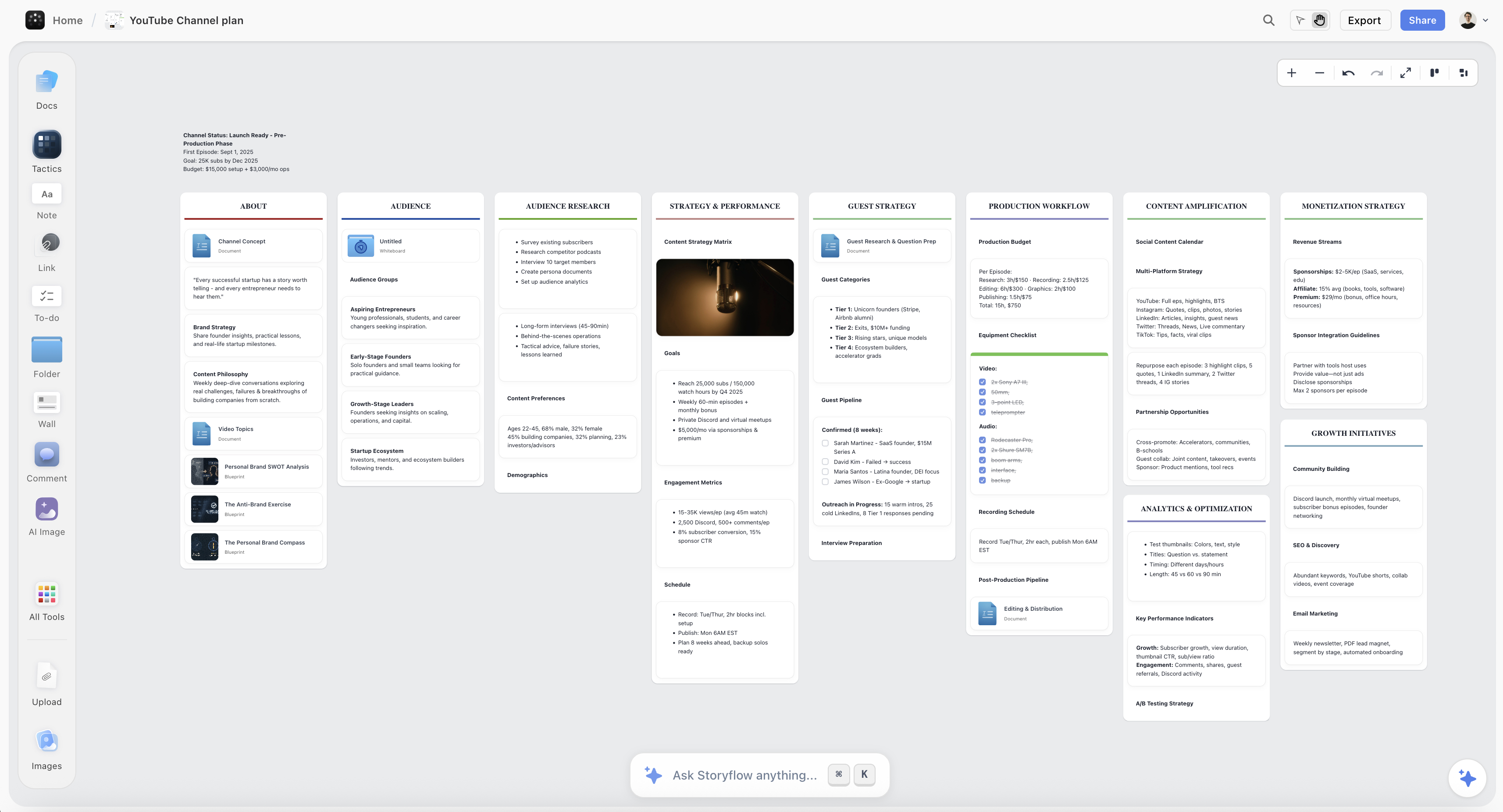
Forty captured fragments laid out on a Storyflow canvas so duplicates and gaps are visible at once, before anything reaches the calendar
You cannot compare forty things three at a time
Conversion is comparison work, and a scrolling notes app makes it impossible. Storyflow puts every fragment on one canvas and lets the AI read the whole set, so which of these are the same idea and which have no audience become questions rather than an afternoon. Paid-only during early access; a wall of index cards works too.

Filling Four Weeks From One Idea
The other reason calendars run dry is treating every cell as needing a separate idea. It does not. One converted idea reliably produces three to five pieces, and the variations are mechanical rather than creative.
Take one piece: "Why I raised my rates 40% and lost two clients I wanted to lose."
- The story version. What happened, in order, with the numbers.
- The framework version. The three signals that a client is costing more than they pay.
- The counter version. When raising rates is the wrong move, which is the piece that makes the others credible.
- The artefact version. The actual email you sent, annotated.
- The short version. The single most surprising sentence from the above, as a post or a short.
Five pieces, one idea, and they reinforce each other rather than competing, because a reader who sees two of them gets a fuller picture rather than a repeat.
This is where a month gets filled. Not from having thirty ideas, from having six and knowing that each is a small cluster.
What Goes Wrong
Filling the calendar with topics. "Something about pricing" in a cell is not scheduled work, it is a deferred decision wearing a date. Every cell should contain a piece you could start tomorrow.
Capturing without converting. Four hundred fragments and an empty calendar. The most common version of this failure and it feels like having lots of ideas.
Converting in a list. Comparison is the whole job and a scrolling list makes it impossible. Get them visible at once or the session will not work.
Deleting nothing. A backlog you never cut grows until it is intimidating, and an intimidating backlog stops being opened. Move things to a holding area rather than deleting them if that is what it takes.
Planning further than you can see. A twelve-week calendar filled in advance goes stale, because what you have to say changes. Four weeks named, the rest as a backlog, is the ratio that survives.
Treating cadence as the goal. Publishing three times a week with nothing to say produces content that reads as filler, which is worse than publishing once. The calendar should reflect what you have, not enforce a number.
Doing the session when you are already behind. The conversion session is thinking work and it goes badly under deadline pressure. Book it for a week you are not publishing.
The Bottom Line
Content calendars fail in a way that looks like a discipline problem and is actually a missing step.
Capture works, because catching a fragment is easy. Scheduling works, because putting a name in a cell is easy. The step in between, turning a fragment into something specific enough to make, is the only one that requires thinking, produces nothing visible, and is therefore the only one that never happens on its own.
So the calendar sits empty next to a notes app with four hundred entries, and both of those are the same failure.
One session a month fixes it. Ninety minutes, everything visible at once rather than scrolling, group the duplicates, cut anything you cannot name an audience for, and turn what is left into pieces with titles and promises. You will leave with six to eight, each of which is three to five pieces, which is a month.
And when the session comes up dry, that is information rather than a system failure. It means you have not been asked enough questions, changed your mind about anything, or done enough worth reporting. No calendar template fixes that, and going and doing something does.
FAQ: Filling a Content Calendar
How do you fill a content calendar without running out of ideas?
Stop treating the calendar as the first step. Run one ninety-minute session a month where you lay every captured fragment out where you can see all of them at once, group the duplicates, cut anything with no clear audience, and convert the survivors into named pieces specific enough to start tomorrow. Then schedule only what survived. Most creators have capture and scheduling and are missing the conversion step entirely.
Why does my content calendar always end up empty?
Because it was filled with topics rather than pieces. "Something about onboarding" in a cell is a deferred decision, and when the day arrives you still have to decide what it is, so it moves. A cell should contain a specific piece with a promise attached, which is a conversion step that happens before scheduling, not on the day.
How far ahead should you plan content?
Four weeks named and scheduled, with everything else as a backlog. Longer than that and the plan goes stale, because what you have to say changes faster than a quarter. Shorter and you are always deciding under pressure, which is when the safe, median idea wins.
How many content ideas do you need for a month?
Six to eight converted ideas covers most publishing schedules, because one idea reliably produces three to five pieces: the story, the framework, the counter-argument, the artefact, and the short version. Trying to find thirty separate ideas for thirty slots is the mistake that empties calendars.
What is the difference between a content idea and a content piece?
An idea is a topic: "something about creator burnout." A piece is specific enough to start: "the three-video pattern that precedes every burnout, and what to do at video two." The test is whether you could begin making it tomorrow without deciding anything else. Calendars fail when they are filled with the first kind.
Where do content ideas actually come from?
Four sources, in order of reliability: questions you were asked, things you changed your mind about, things that genuinely annoy you in your field, and what you actually did this month. The last is the most underused, because real work with the details beats commentary every time and it requires no invention. If a conversion session comes up dry, spend a week writing down questions and work rather than brainstorming.
How do I organise a content backlog?
Somewhere you can see all of it at once, which rules out a scrolling notes app. A canvas, a wall, or index cards, so that you can group duplicates and cut. Keep a separate holding area for cut ideas so that cutting does not feel like deleting, which is the emotional reason most backlogs never get pruned.
What is the best tool for a content calendar?
For scheduling, almost anything works: Notion, Trello, a spreadsheet, or a dedicated calendar tool. The tool choice matters far more for the backlog than for the calendar, because conversion requires comparing everything at once and a list prevents that. Milanote's free tier and a physical wall both work; Storyflow adds AI that reads the whole board and is paid-only during early access.
How often should you review your content backlog?
Once a month, in a session booked for a week you are not already behind. Weekly is too often to see patterns and produces tinkering rather than conversion. Quarterly is too rare, and by then the backlog is large enough to be intimidating, which is when people stop opening it.
Should I batch content creation?
Batching production helps and it is downstream of this. Batching only works when you have a set of named pieces ready to make, which is what the conversion session produces. Batching an empty backlog just means spending a whole day deciding what to make, which is the same problem in a longer block.
What do I do when I have nothing to say?
Publish less rather than publishing filler, and go and do something worth reporting. The four sources are all downstream of real activity: questions come from doing client work, changed minds come from being wrong about something publicly, and this-month pieces come from having done something. A dry backlog is usually a signal about your input rather than your system.
Can AI generate content ideas for me?
It can generate the conventional list for your topic, which is worth something when you are stuck and is not where good pieces come from, since a model produces the median take for a subject. The genuinely useful direction is the other one: giving it forty fragments you already captured and asking which are the same idea, which have no audience, and what a set like this is missing. That is comparison across your own material rather than invention.
Table of Contents
Templates to check out for this topic


Content and video templates you can use in Storyflow
Plan a channel, a script, and a content pipeline on the same board. Open one of these templates and let the AI build on the structure instead of starting from a blank doc.


See Storyflow in Action
A visual AI workspace where every feature lives inside one canvas. No tab-switching, no context lost.
Build your entire board from a single message
Type what you need in the AI chat at the bottom of your canvas. The AI adds cards, headings, and structure directly onto your board.
Use expert frameworks as AI context
Type @ in the AI chat and choose any Tactic. The AI tailors every response to that framework instead of giving generic advice.
Turn your board into a mind map in seconds
Ask the AI to restructure your canvas as a mindmap. It connects your ideas into a visual hierarchy so you can see how everything relates.
Why Storyflow Exists
Storyflow actually began as a personal tool while working on creative and research projects.
We kept running into the same problem: ideas were scattered everywhere: notes, documents, and whiteboards.
Nothing helped us see how everything connected.
So we started building a workspace designed around how ideas actually grow.
→ Read how Storyflow was createdJustkay
Documentary Filmmaker & Founder at Storyflow
Published: 2026-08-26
Extremely simple, seriously capable


See how easy it is to get started
Watch a real project come together, from a blank board to a finished plan, clicked through step by step.
Start creating with AI and become more productive
Transform your creative workflow with AI-powered tools. Generate ideas, create content, and boost your productivity in minutes instead of hours.