How to Storyboard a YouTube Video with AI (2026)
How to storyboard a YouTube video with AI, step by step. Turn your hook and script beats into a shot-by-shot plan that earns retention, with a worked example.

Category
YouTube
Author

Justkay
Documentary Filmmaker & Founder at Storyflow
Topics
2026-06-11
•
Updated July 2, 2026
•
15 min read
•
YouTube- how to storyboard a YouTube video with AI
- YouTube storyboard
- AI storyboard from script
- storyboard YouTube video
- YouTube shot list
- A-roll vs B-roll
- video retention plan
- AI video planning
How do you storyboard a YouTube video with AI?
Start from the script, not blank frames: put your hook and script beats on an AI canvas such as Storyflow, ask the AI to break the video into segments, then turn each beat into shots (A-roll or B-roll, plus overlays). You end up with a shot-by-shot board and shot list in 30-60 minutes. It is a retention plan, not a drawing exercise.
Turn your video script into a storyboard in minutes
Paste your YouTube script into Storyflow and the AI blocks it into shots on a canvas you can reorder, so you plan the visual before you film.

1) Quick Answer: How to Storyboard a YouTube Video with AI
To storyboard a YouTube video with AI, start from the script, not from blank frames. Paste your hook and script beats into an AI canvas, ask the AI to break the video into segments (hook, value beats, retention resets, call to action), then turn each beat into specific shots: what is on screen, whether it is A-roll or B-roll, and what text or graphic overlays appear. Use a generative tool like Runway or Krea only for the actual reference images, then build the shot list directly from the board and pressure-test it so every shot earns the next five seconds.
The short version, in eight steps:
- Start from the hook and the script beats, not blank frames.
- Break the video into segments.
- Turn each beat into shots (A-roll, B-roll, text, graphics).
- Generate reference frames with AI where it actually helps.
- Build the shot list from the board.
- Plan B-roll and on-screen overlays.
- Pressure-test every shot for retention.
- Hand off and shoot.
A YouTube storyboard is not a drawing exercise. It is a retention plan you can see. Get that one idea right and every other step in this guide falls into place. What you end up with is a shot-by-shot board plus a shot list you can film from, and with a finished script the whole process takes 30 to 60 minutes.
This guide assumes you already have a script or at least a hook and an outline. If you do not, write the script first. See How to Write a YouTube Script with AI. If you are planning a whole channel rather than one video, start with How to Plan a YouTube Channel with AI.
2) What a YouTube Storyboard Actually Is (And Is Not)
I have run documentary projects from research through pre-production for years, and the storyboards that survive a real shoot share one trait: they are built from the script, not invented alongside it. The same is true for YouTube, only the stakes are sharper. On a film, a weak frame costs you a reshoot. On YouTube, a weak shot costs you the viewer at second fourteen, and the video never recovers.
A film storyboard answers "how does this scene cut together." A YouTube storyboard answers a harder question: "does each shot earn the next five seconds of attention." You are not drawing a comic of your video. You are mapping where attention rises and where it leaks, shot by shot, so you can fix the leaks before you film anything. That is what makes a YouTube storyboard a different artifact from a film board.
Here is the distinction that organizes this guide.
- A YouTube storyboard is a visual retention plan: the shots, the cuts, the on-screen text, and the B-roll, sequenced so the curve stays flat.
- A YouTube storyboard is not a beautiful set of illustrated frames. Rough thumbnails and stick figures work fine. The thinking is the asset, not the art.
You are not storyboarding the video. You are storyboarding the attention. Hold that and the AI becomes genuinely useful, because you can ask it the question that matters: where does this plan lose people.
3) Step 1: Start From the Hook and the Script Beats
Put your hook and your script beats into the canvas before you draw a single frame. This is the step most creators skip, and skipping it is why most storyboards feel arbitrary. A frame drawn without a beat behind it is decoration. A frame drawn from a beat is a decision.
Why this order matters: the hook is the only part of the video guaranteed to be watched, and the script beats are the reasons a viewer keeps watching. Storyboard from blank frames and you illustrate sentences. Storyboard from beats and you illustrate decisions about attention, which is the whole point. It is the same script to storyboard workflow filmmakers use, applied to retention.
Take a talking-head explainer titled "Why your first 30 seconds lose half your viewers." The beats might be:
- Hook: "Half of you will leave before I finish this sentence. Here is why."
- Stakes: name the cost of a weak open (lost watch time, suppressed reach).
- Promise: "By the end you will have a 3-part open you can reuse."
- Value beat 1: the pattern interrupt.
- Value beat 2: the open loop.
- Value beat 3: the fast payoff.
- Retention reset: a question that re-hooks at the midpoint.
- Call to action: the next video, framed as the obvious next step.
Drop those eight beats on the canvas as cards. The YouTube Video Plan template opens with the hook, beats, and shot sections already laid out, so this step starts structured instead of blank; if the script itself is still rough, the Video Script template holds it on the same board. This is where AI earns its place: ask it to read the script and propose the beat breakdown, then correct it. Storyflow's AI reads your full active canvas board plus up to 1 Tactic and up to 3 Documents you @-mention, so if your script lives on the board, the AI works from the real thing, not a summary you pasted into a chat window.
4) Step 2: Break the Video Into Segments
Group your beats into segments, because viewers do not experience a flat list of beats. They experience an arc with an intro, a body, and an exit, and YouTube's retention graph reads that arc directly. Naming the segments out loud is how you spot the weak ones before you film.
Why segments and not just beats: a segment is a contract with the viewer. The intro hook promises something; each value beat pays a piece of it; the retention resets re-sell the rest; the call to action collects on the relationship. Laid out, the segments show you whether the promise is too big for the payoff, or whether there is a 90-second stretch with no reset where viewers quietly leave.
This table is the spine of a YouTube storyboard. It maps the standard segments of a video to what you storyboard for each one.
Take a concrete case: a tutorial titled "Edit your first video in CapCut in 10 minutes." Its segments map cleanly onto the table. The intro hook is the finished edit playing for two seconds before you have explained anything. The promise is a text card, "By minute 10 you will have a posted video." The value beats are the editing steps in order: import, cut, caption, export. The retention resets are the moments you cut from the screen recording back to your face to say "this next part trips everyone up." The call to action teases the thumbnail tutorial. Written out as segments, you can already see the risk: four editing steps in a row with no cut back to a human face is the flat stretch where a tutorial loses people.
You do not need every segment in every video. A 60-second Short might be hook, one value beat, and a payoff; a 20-minute video essay might have six value beats and three retention resets. The segments are the checklist; your video decides how many of each it needs. You are not storyboarding the video. You are storyboarding the attention, and the segment map is the first place that attention becomes visible.
Storyboard from a script, not a blank frame
The board is only as good as the beats behind it. Generate a hook and script beats for your next video, then break them into shots on the same canvas.
5) Step 3: Turn Each Beat Into Shots
Turn each beat into one or more shots, and for every shot decide three things: what is on screen, whether it is A-roll or B-roll, and what text or graphics overlay it. A beat is an idea. A shot is how that idea looks for the four seconds it is on screen. The gap between them is where most YouTube videos get visually boring.
Why this is the heart of the storyboard: retention leaks at the shot level, not the idea level. A great script delivered as eight minutes of one static talking-head shot still loses viewers, because the eye gets nothing new. Turning beats into shots is how you build visual variety on purpose instead of hoping the edit saves you.
For each beat, draw or describe a rough frame and tag it. Take value beat 1, "the pattern interrupt." That single beat might become three shots:
- Shot 1 (A-roll): host to camera, medium close-up, says the line. Overlay: the words "Pattern interrupt" appear bottom-left.
- Shot 2 (B-roll): screen recording of a YouTube video physically jump-cutting. No host. Overlay: none.
- Shot 3 (A-roll): host, wider shot, new angle, delivers the payoff line. Overlay: a one-line example.
That is the difference between a beat and a storyboard. The beat said "explain the pattern interrupt." The shots say exactly what the viewer sees, in what order, with what on screen. This is also where the A-roll versus B-roll rhythm lives: if a beat is three A-roll shots in a row, you already know it will feel flat.
6) Step 4: Generate Reference Frames With AI
Use a generative AI tool to create reference frames only where a picture is faster than a sentence. Be honest about what this step is for. AI-generated frames are not your final footage and they are not even your real storyboard art. They are a fast way to communicate a look, a composition, or a B-roll idea to yourself, an editor, or a thumbnail designer.
Why use AI here at all: drawing is a bottleneck for most YouTubers, who are not illustrators. If you cannot picture a sequence, typing "wide shot of a cluttered desk, warm light, shallow depth of field, looking down" into a generative tool gives you a frame to react to in seconds. The point is to react, not to admire.
Make it concrete. Say your talking-head explainer needs a B-roll cutaway for the "open loop" beat, and you want a visual metaphor for an unanswered question. You do not have to film anything yet. Type "a single open door in a dark hallway, light spilling through, cinematic, shallow depth of field" into Runway or Krea, get three frames back in seconds, and drop the one that reads best onto that beat's storyboard card. Now the editor knows the intended cutaway before a single clip is shot, and you decided it in under a minute instead of discovering the gap in the edit.
Tools that help for reference frames, as of June 2026:
- Runway for image and short motion frames. Strong for "what would this B-roll shot look like." Verify pricing and models on runwayml.com.
- Krea for fast generative stills and moodboard-style frames. Good for nailing a look quickly. Verify on krea.ai.
- Midjourney for a single striking reference frame, like a thumbnail concept, rather than a sequence. Verify on midjourney.com.
A note that matters for this guide: Storyflow does not generate the AI frame art itself. It is the canvas where your hook, beats, storyboard, and shot list live and where the AI reasons over all of it, but the actual reference images come from a generative tool like Runway or Krea. Drop their exports onto the board as the visual for each shot. Treat that as a feature: you are not locked into one model's image style, and you can swap a frame the moment a better one exists.
7) Step 5: Build the Shot List From the Board
Build the shot list directly from the storyboard, because the shot list is the storyboard turned into an inventory you can shoot from. If the two live in different apps, they drift the moment you change anything, and on a shoot day a stale shot list is worse than none.
Why the board comes first: the storyboard is where you decide how each shot reads; the shot list is where you make sure you capture every one of those shots on the day. Same decisions, two views. The storyboard is visual and about flow; the shot list is tabular and about completeness.
A YouTube shot list is lighter than a film one, but it still needs columns that force decisions:
The reason to build this from the board rather than from memory is practical: you will forget a shot. Every creator does. When the shot list comes from the same canvas as the storyboard, a missing shot is visible, because the beat has no row. The Storyboard template pairs the frames and the shot notes on one canvas, which is exactly the layout this step needs. For the full breakdown of how these two artifacts differ and reinforce each other, see Storyboard vs Shot List: The Complete Guide.
8) Step 6: Plan B-Roll and On-Screen Overlays
Plan your B-roll and overlays as part of the storyboard, not as an afterthought in the edit. B-roll and on-screen text are not garnish. They are the second channel of information running alongside the host, and on YouTube they carry a large share of retention because they give the eye somewhere new to go every few seconds.
Why plan them now: B-roll you did not plan is B-roll you did not shoot, and "I will find something in the edit" is how videos end up as eight minutes of a face. A value beat with no B-roll plan is a retention risk found while it is still cheap to fix. The storyboard is the only place you can see, beat by beat, whether the visual channel ever goes quiet.
Three overlay decisions to make on the board for each beat:
- Text on screen. What word or phrase reinforces the point. Keep it to a few words; the viewer is listening, not reading.
- B-roll cutaway. What the camera shows when the host is not the most interesting thing on screen.
- Graphic or data. When a number, chart, or comparison would land harder than a sentence.
Run it on a real beat. Take a tech-review channel covering "the laptop's battery life." The host beat is "it lasted nine hours in my testing." Left as one A-roll shot, the eye has nothing to do for ten seconds. Plan the second channel on the card instead: text on screen reads "9h 12m" the moment the host says the number, the B-roll cutaway is a timelapse of the battery indicator draining, and the graphic is a simple bar comparing this laptop to two rivals. Same sentence from the host, but now three things happen on screen, and the beat that would have leaked viewers holds them.
Mark these directly on each storyboard card. By the time you reach the edit, "what goes here" is already answered, and the edit becomes assembly instead of invention.
9) Step 7: Pressure-Test Every Shot for Retention
Before you shoot, walk the board shot by shot and ask one question of each: does this shot earn the next five seconds. This is the step that separates a storyboard from a retention plan. A storyboard tells you what you will shoot. A pressure test tells you where the video will lose people, while it is still free to change.
Why five seconds: that is roughly the window in which a YouTube viewer decides to stay or swipe, and it resets constantly. A shot does not have to be exciting; it has to make the next one feel worth waiting for. The test is not "is this shot good," it is "does this shot create a reason to see shot N plus one."
Run the board against these checks:
- The flat-stretch check. Find any run of three or more A-roll shots with no B-roll, no cut, and no overlay change. That is where viewers leave. Add a reset.
- The promise check. The payoff you promised in the first 45 seconds, is it delivered by a specific shot. If you cannot point to it, the open is writing a check the body does not cash.
- The dead-air check. Any beat where the visual channel goes quiet while the host keeps talking. Add B-roll or an overlay.
Here is the check catching a real leak. Walk the talking-head explainer from Step 1 and the flat-stretch check stops on value beats one through three: pattern interrupt, open loop, fast payoff, all storyboarded as host-to-camera shots with only text overlays. Three A-roll shots in a row, no B-roll, no cut to anything else. That is a 40-second stretch of one face, and the retention graph will dip right through it. The fix is cheap because you found it on the board: add a screen-recording cutaway to the open-loop beat and a new camera angle on the payoff, and the stretch breaks up before you film a frame. Found in the edit, that same fix costs you a reshoot.
This is the highest-leverage use of AI in the process. Ask the AI on the board: "Walk this storyboard segment by segment and flag where retention is likely to drop and why." Because Storyflow's AI reads the full canvas, it reasons over your actual hook, beats, and shots together, not a paraphrase. It will not be right about everything, but it surfaces the flat stretch you stopped seeing three rewatches ago. The judgment about what to cut is yours. The tireless second read is the AI's.
10) Step 8: Hand Off and Shoot
Hand the board off as a single source of truth: the storyboard frames, the shot list, the B-roll plan, and the overlays in one place. Whether you hand the board to your future self on shoot day or to an editor and a camera operator, the handoff is where a disconnected plan falls apart. On the day, you do not want to reconcile a storyboard in one app, a shot list in a spreadsheet, and a B-roll wish list in your notes. You want to shoot the board, tick off rows, and know that when you capture shot 12 you have it.
For a solo creator, the value is that the thinking is done: film in the order the board makes easiest (all the desk A-roll, then all the overhead B-roll), then assemble against the shot list. Concretely, on the talking-head explainer you would shoot every host-to-camera shot in one sitting under the same lighting, then capture all the screen-recording B-roll in a second pass, and only then open the editor with the shot list as your checklist. For a small team, the board is what you screen-share so the editor knows the intended rhythm before touching the timeline, which kills the "that is not how I imagined it cut" conversation.
11) Do This on One Canvas Instead of Five Apps
Here is the friction this guide is fighting. The script is in a Google Doc. The storyboard is in a drawing app. The shot list is in a spreadsheet. The B-roll ideas are in your notes. The reference frames are in a downloads folder. Nothing is connected, so the moment you change the hook, five other things are quietly wrong and you do not find out until the shoot.
The familiar approach is to reconcile that by hand. The connected approach is to put the hook, the script beats, the storyboard frames, and the shot list on one infinite canvas where an AI can read all of it. That is what Storyflow is: an AI-powered visual workspace where a YouTube video plan lives as one board instead of five files.

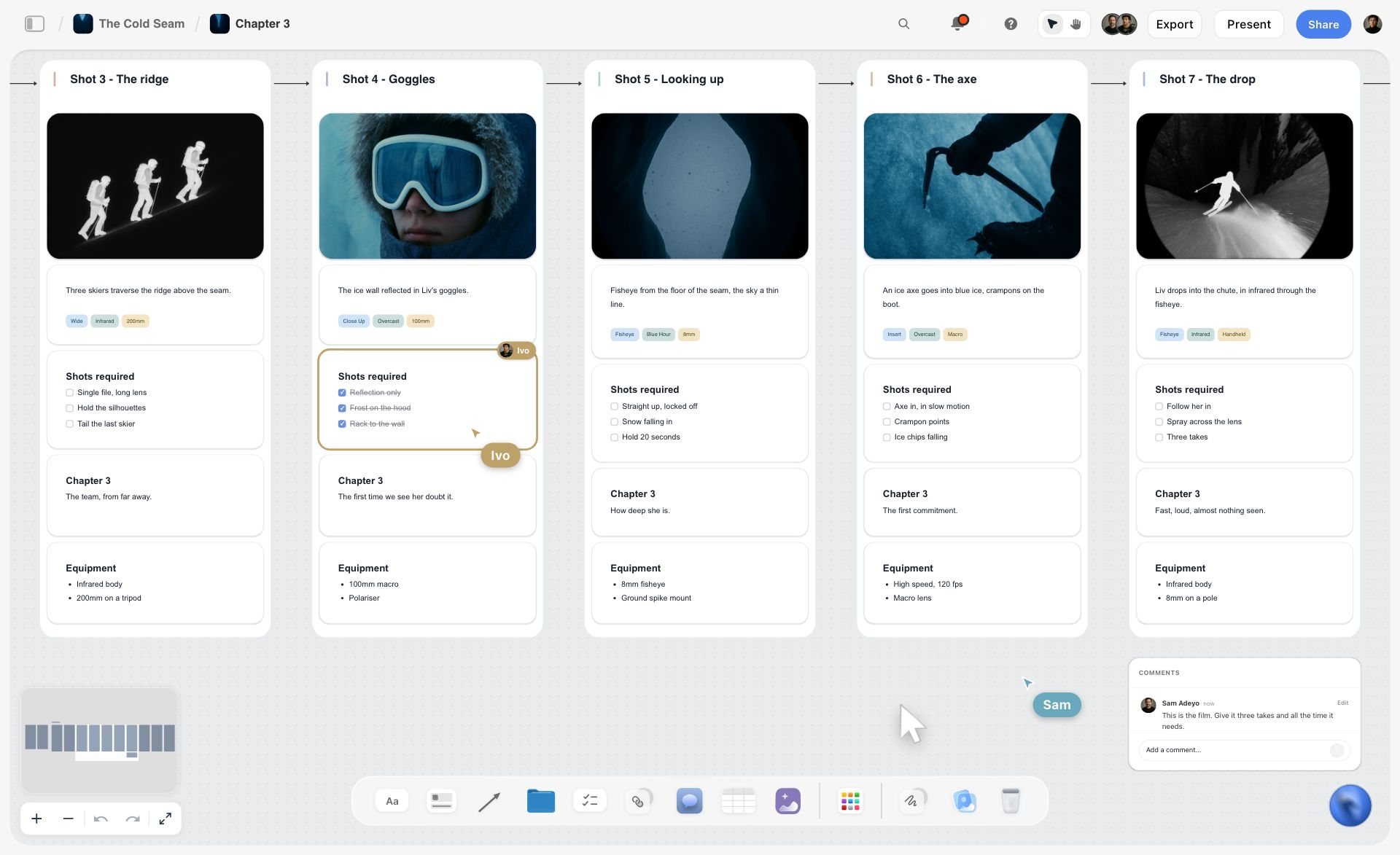
What that changes in practice:
- The AI reasons over the real plan. Storyflow's AI reads your full active canvas board, plus up to 1 Tactic and up to 3 Documents you @-mention. Ask it to break the script into beats, propose shots, or flag retention risks, and it works from the actual hook and beats on the board.
- Changing one thing updates your view of everything. Cut a beat and the gap in the storyboard and the missing shot-list row are right there, not buried in another app.
- Story blueprints give you a running start. Storyflow ships 200+ Story blueprints (creative templates) on the Plus, Pro, and Max plans, so a video-planning structure is a starting point, not a blank board.
Now the honest accounting. Storyflow does not generate the AI frame art itself, so you still pair it with a generative tool like Runway or Krea for the actual reference images. It is cloud-only, with no local-first or offline mode, which rules it out if your workflow demands offline-first storage. And if all you want is a clean panel-drawing surface and never touch the script or shot list, a dedicated storyboarding app is a simpler fit; the connected canvas only pays off when the video is more than its frames.
Storyflow pricing, current as of June 2026: Free is $0 (unlimited boards, basic AI). Plus is $7.99/month annual ($9.99 monthly) and adds the 200+ Story blueprints and unlimited file uploads. Pro is $14/month annual ($19 monthly) and adds AI image generation and far more AI usage. Max is $39/month annual ($49 monthly) and adds 40x more AI usage and a team workspace with roles and permissions. If you plan one video a week, use the AI storyboard generator to turn your script beats into a first board, then try it on your next video.
12) Which Approach Fits Your Channel
The right level of storyboard detail depends on what kind of video you make. Match the effort to the format rather than over-planning a vlog or under-planning a video essay.
- Talking-head explainer. Storyboard the hook frame and the A-roll versus B-roll rhythm tightly; the retention risk is too many static face shots in a row. Plan an overlay or cutaway for every value beat.
- Tutorial / how-to. Storyboard the screen-recording sequence and the on-screen callouts; the visual is the screen, so plan exactly what is highlighted when. The host is secondary.
- Vlog. Storyboard lightly: a beat list and a hook frame are usually enough, because the appeal is spontaneity. Over-storyboarding a vlog kills the thing people came for.
- Video essay / long-form. Storyboard the retention resets above all; in a 20-minute piece, the dips are predictable and the resets are what hold the curve. Plan B-roll density per segment.
If you make a series rather than one-off videos, plan the storyboard pattern once and reuse it. See How to Plan a YouTube Series with AI.
14) The Bottom Line
Storyboarding a YouTube video with AI is not about drawing. It is about turning your hook and script beats into a shot-by-shot retention plan, using AI to draft the beats and pressure-test the flow, and a generative tool to produce reference frames where a picture beats a sentence. The eight steps are the whole method: start from the script, break it into segments, turn beats into shots, generate frames, build the shot list, plan B-roll and overlays, pressure-test for retention, and hand off.
The one decision that makes all eight easier is keeping them connected. A YouTube storyboard is not a drawing exercise. It is a retention plan you can see, and a plan scattered across five apps stops being one you can see. Put the hook, the beats, the storyboard, and the shot list on one canvas, point the AI at the whole thing, and the question you most need answered, where does this video lose people, becomes one you can ask out loud. Take your next video, drop its script into a single board, and storyboard it shot by shot before you film a frame.
13) FAQ: Storyboarding a YouTube Video with AI
Do you need to storyboard a YouTube video?
Not always, but it pays off the moment a video has B-roll, on-screen graphics, or a retention problem. A simple talking-head update can be filmed from a script alone. A video with multiple shot types, cutaways, and overlays feels flat or chaotic without a plan. If you have ever lost viewers in the first 30 seconds or ended up with eight minutes of one face, a storyboard is the cheapest fix you have.
Can AI generate a storyboard from a script?
Yes, AI can break a script into beats and propose shots for each one, which is most of a storyboard. What it cannot do well is judge your specific audience's attention or invent the visual taste that makes a frame land. Use AI to draft the beat breakdown and shot suggestions fast, then apply your own judgment about what to keep. The draft saves an hour; the judgment is what makes it yours.
What is the difference between a storyboard and a shot list for YouTube?
A storyboard is visual and about flow: it shows how shots cut together and where attention rises or leaks. A shot list is tabular and about completeness: the inventory of every shot you must capture, with columns for type, framing, and overlay. The storyboard decides how the video reads; the shot list makes sure you film everything it needs. Build the shot list from the storyboard so they never drift apart.
How detailed should a YouTube storyboard be?
Detailed enough to answer "what is on screen and is it A-roll or B-roll" for every beat, and no more. Rough thumbnails and stick figures are fine; the thinking is the asset, not the art. A vlog needs a light beat list. A video essay needs every retention reset planned. Match the detail to the format: over-planning a spontaneous video kills it, under-planning a structured one loses viewers.
Do I need to be able to draw to storyboard a YouTube video?
No. Most YouTube storyboards are rough boxes with a few words describing the shot, plus an arrow or a label. If you want actual reference images, a generative tool like Runway or Krea produces a frame from a text description in seconds, so you never have to draw. The storyboard's value is the decisions it captures, not the quality of the illustration.
What AI tools generate storyboard frames for YouTube?
For the actual reference images, Runway and Krea are the strongest as of June 2026, with Midjourney good for single striking thumbnail concepts. Verify current pricing and models on each tool's site. These generate the picture; they do not plan the video. For the planning layer (beats, shots, retention), a canvas like Storyflow holds the script and storyboard together so an AI can reason over the whole plan, then you drop the generated frames onto each shot.
How long should it take to storyboard a YouTube video?
For a standard 8 to 12 minute video with a finished script, expect 30 to 60 minutes once you have a repeatable process. The beat breakdown is fast with AI. Turning beats into shots and planning B-roll is the slower part, and it is the part that saves you hours in the edit. The first storyboard takes longest; by your fifth, the segment checklist makes it routine.
Should I storyboard before or after writing the script?
After. The script defines the beats, and the storyboard turns those beats into shots. Storyboarding before you have a script means illustrating sentences you have not written, which produces arbitrary frames. Write or at least outline the script first, then storyboard from it. If you are still on the script, see how to write one with AI before you start drawing frames.
How do I storyboard a YouTube Short?
A Short is storyboarded the same way but compressed: one hook frame, one or two value beats, and a fast payoff, with a cut roughly every one to three seconds. The retention test is even harsher because there is no room for a flat stretch. Storyboard the first frame obsessively, plan a visual change every couple of seconds, and cut the call to action to a single line.
Can I storyboard a YouTube video for free?
Yes. You can storyboard with pen and paper or any free canvas, and Storyflow's Free plan ($0) includes unlimited boards and basic AI, which covers planning a single video. For the actual generated reference frames you will eventually hit the free limits of tools like Runway or Krea. The planning, which is the part that protects retention, costs nothing to do well.
Table of Contents
- Quick Answer: How to Storyboard a YouTube Video with AI
- What a YouTube Storyboard Actually Is (And Is Not)
- Step 1: Start From the Hook and the Script Beats
- Step 2: Break the Video Into Segments
- Step 3: Turn Each Beat Into Shots
- Step 4: Generate Reference Frames With AI
- Step 5: Build the Shot List From the Board
- Step 6: Plan B-Roll and On-Screen Overlays
- Step 7: Pressure-Test Every Shot for Retention
- Step 8: Hand Off and Shoot
- Do This on One Canvas Instead of Five Apps
- Which Approach Fits Your Channel
- FAQ: Storyboarding a YouTube Video with AI
- The Bottom Line
- Related Reading
Templates to check out for this topic


Filmmaking templates you can use in Storyflow
Skip the blank canvas. Open one of these filmmaking boards in Storyflow and the AI builds on the structure that is already there, from research through the shot list.


See Storyflow in Action
A visual AI workspace where every feature lives inside one canvas. No tab-switching, no context lost.
Build your entire board from a single message
Type what you need in the AI chat at the bottom of your canvas. The AI adds cards, headings, and structure directly onto your board.
Use expert frameworks as AI context
Type @ in the AI chat and choose any Tactic. The AI tailors every response to that framework instead of giving generic advice.
Turn your board into a mind map in seconds
Ask the AI to restructure your canvas as a mindmap. It connects your ideas into a visual hierarchy so you can see how everything relates.
Why Storyflow Exists
Storyflow actually began as a personal tool while working on creative and research projects.
We kept running into the same problem: ideas were scattered everywhere: notes, documents, and whiteboards.
Nothing helped us see how everything connected.
So we started building a workspace designed around how ideas actually grow.
→ Read how Storyflow was createdJustkay
Documentary Filmmaker & Founder at Storyflow
Published: 2026-06-11
Extremely simple, seriously capable


See how easy it is to get started
Watch a real project come together, from a blank board to a finished plan, clicked through step by step.
Start creating with AI and become more productive
Transform your creative workflow with AI-powered tools. Generate ideas, create content, and boost your productivity in minutes instead of hours.