
Plan videos ultra fast, post on time
One video is easy.
Thirty a month is the problem.
Short-form does not fail on any single video. It fails on volume and consistency. Storyflow puts the idea bank, the hook variations, the scripts, and the status of every short on one infinite canvas, with AI that can see the whole channel.


Creatives working for these brands already got early access
- Red Bull
- Canon
- Artlist
- Porsche
See how easy it is to get started
Watch a real project come together, from a blank board to a finished plan, clicked through step by step.
Start from a ready-made template
Pick a board to see what you can build, then let AI fill it in. Every template is a real, editable starting point on the same infinite canvas.

YouTube Plan
Plan a video from hook to outline to shot list, with references and thumbnail ideas sitting right beside it.
What is a shorts planner?
A shorts planner is a tool for running a pipeline of short vertical videos, not for planning one. Storyflow is an AI visual workspace that runs your shorts pipeline on one infinite canvas: an idea bank, hook variations side by side, a script for each short, and every video's stage from idea to posted. The unit of work in short-form is never a single video. It is a month of them, twenty or thirty pieces moving through the same stages at slightly different speeds, some still a half-formed idea, some scripted and waiting for a filming day, some shot and stuck in the edit. The job of the planner is to hold all of that at once and tell you, in a glance, what is blocked and what you are filming on Saturday.
This is why the document-per-video habit breaks. One doc per video is fine at four videos a month. At thirty it becomes thirty tabs, and the questions you actually need answered stop being answerable: which of these still needs a hook, how many are ready to film, have I written three variations of the same idea without noticing, do I have enough in the bank to survive a week where nothing gets made. A folder cannot answer any of those. Neither can a calendar, because a calendar only shows you the thing on the day it ships, not the six stages that had to happen before it.
The craft pressure sits in a different place too. In long-form the first thirty seconds decide whether someone stays. In short-form the first two seconds decide, and there is no title, no thumbnail, and no patience to buy you time. That makes the hook the single highest-leverage sentence you will write all week, which is why serious creators write ten of them per video and pick one, and why a loop or a clean payoff at the end matters more than production quality anywhere in the middle. A planner that gives you one text field for a title is not built for that.
Running short-form properly means moving every video through six named stages: the idea bank (a standing surplus of premises so you never open the week empty), the hook (ten variations written and compared, not one written and shipped), the script (the beat-by-beat spoken line, timed to length, with the payoff placed), the shot plan (what you point the camera at for each beat, grouped so you can batch several videos into one filming day), the edit notes (cuts, captions, b-roll, the loop back to frame one), and publish and review (which platform, when, and what the retention graph said afterwards so the next batch is better). Storyflow keeps all six stages visible for every video at the same time, which is the only way a pipeline of thirty stays legible.
Ultra fast from brief to board
From an empty week to a batch you can film.
No database to configure and no template per video. Describe the channel and start filling the pipeline.
01
Open a canvas
Sign up in seconds. No download. Your infinite planning canvas opens in the browser.
02
Build the idea bank
Describe your niche, your audience, and what has worked so far. The AI lays out a board of premises grouped by angle, so the bank starts full instead of empty.
03
Hook, script, and shot plan
Pull an idea into production, generate ten hook variations and keep the one that earns the first two seconds, write the script beside it, then note the shots so several videos can share a filming day.
04
Run the pipeline
Move each card through idea, hook, script, filmed, edited, and posted. The whole month is one board, so what is blocked is visible without opening anything.
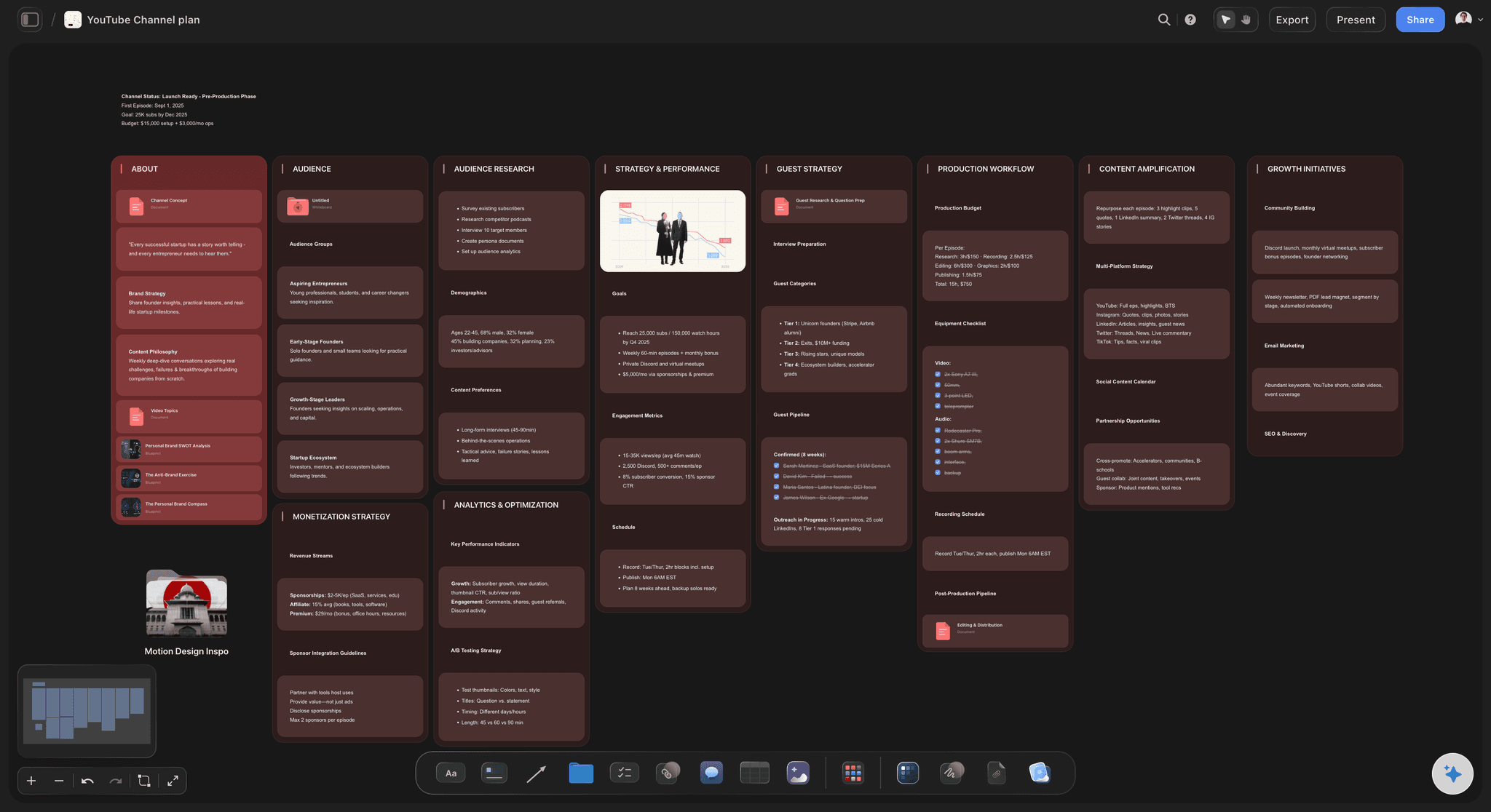
The whole channel on one board.
Idea bank, hook variations, scripts, and per-video status in one place instead of thirty documents.
A standing surplus of premises, grouped by angle
An idea bank that does not run dry
The week you post nothing is almost always the week you started with no ideas. Keep a live bank on the canvas, grouped by angle and format, and top it up with AI whenever it thins out. You pull from a bank, you never start from a blank week.
Try the AI content idea generator →
Ten hooks per video, side by side
Write the first two seconds ten times
The hook is the only part of a short that is guaranteed to be watched. Generate ten variations, lay them out next to each other, and pick the one that actually creates a gap the viewer needs closed. Comparing beats writing one and hoping.
See the AI video script generator →
One long video, five shorts, no rewriting from scratch
Cut the long video into a batch
Most channels are sitting on a back catalogue of shorts they already filmed. Drop the long video's outline on the canvas, mark the moments that stand alone, and spin each one into its own short with its own hook.
Explore the content repurposing planner →
Every video's stage visible at a glance
See what is blocked without opening anything
Thirty videos in six stages is a state you have to be able to read in five seconds. Lay the pipeline out by stage on the canvas, so a pile-up in the edit column or an empty filmed column is obvious before it costs you a posting week.
See the social media content calendar →Unlimited boards. No object cap.
Open a canvas, describe the channel, and let AI fill the idea bank. Storyflow is paid-only during early access, with plans from $9.99 a month, and a Free plan launches before the end of 2026.
Unlimited pipeline boards on an infinite canvas
Basic AI usage to generate hooks, ideas, and scripts
Short-form and channel planning templates built in
Share view-only links with your editor or client
Built for people with taste
Built for thirty videos, not for one.
A doc per video works until it does not. A canvas holds the whole month and still lets you write inside a single short.
Idea, hook, script, shot plan, edit notes, posted
Run every stage on the same surface
The idea bank sits on the board: Keep a standing surplus of premises grouped by angle and format. When a shoot falls through or a week goes sideways, you pull the next card instead of trying to be creative on demand.
Hooks get compared, not guessed: Ten hook variations laid out side by side for one video. Read them as a set and the weak ones are obvious, which is a completely different exercise from writing one and convincing yourself it is fine.
Scripts live beside the hook that sold them: Write the full spoken script in the built-in document editor next to the card, timed to length, with the payoff and the loop back to frame one marked so the ending earns a rewatch.
Shot plans grouped for batch days: Note what the camera does for each beat, then group shots across several videos that share a location, an outfit, or a setup. That grouping is the difference between six filming days a month and one.

AI that has read your whole channel, not just the prompt
Generate with the board as context
Hooks and scripts in your channel's voice: Because the AI reads the canvas, it can see the shorts that worked, the phrasing you actually use, and the angles you have already covered. Suggestions land in your niche rather than in a generic one.
Refill the bank on demand: Ask for twenty more premises in the angles that are performing, or for the ones you have been avoiding. The board already knows what you have made, so you get new ideas rather than the same three reworded.
Turn a long video into a short list: Paste or drop in a long-form outline and ask which moments stand alone as vertical videos. Each surviving moment becomes its own card with its own hook, which is far faster than re-planning from nothing.
It drafts, you decide: The AI produces variations quickly. Choosing which hook earns the first two seconds stays with you, because that judgment is the actual skill and the part that compounds.

Vertical framing, captions, b-roll, and the loop
Plan the shot, not just the words
Storyboard the beats that need it: Some shorts are a talking head and need no visual plan. Others live or die on a demonstration or a reveal. Sketch or drop reference frames for those beats on the same board as the script.
Mark the b-roll you have to capture: Note every cutaway the script implies while you are still writing it. Discovering in the edit that you needed a shot you never filmed is the most expensive mistake in short-form.
Design the loop or the payoff: Decide before you film whether the video loops cleanly back to frame one or lands on a payoff that justifies the watch. Both are structural choices, and both are much cheaper to make now than in the edit.
One pipeline across Shorts, Reels, and TikTok
Three platforms, one board
Plan once, adapt per platform: The same premise usually ships to all three with a different hook length and a different caption. Keep the source video and its platform variants on one card rather than in three separate trackers.
Share with an editor or a client: Send a view-only link and your editor sees the script, the shot notes, and the b-roll list without an account. Clients can review a month of planned content in one screen instead of a deck.
Review what the numbers said: Bring retention notes back onto the card after posting. The pattern across twenty videos is what tells you which hook shapes work for your audience, and it is invisible if the results live in three dashboards.
Explore templates for your project
Every template opens as a real, editable board on the infinite canvas. Pick the closest fit and make it your own.
YouTube Plan
Plan a video from hook to outline to shot list, with references and thumbnail ideas sitting right beside it.
One app instead of five
Storyflow vs Notion, Trello, and Later.
These tools solve different parts of short-form. Here is who genuinely owns which part, including where we do not.
Storyflow
Recommended
Visual idea bank on an infinite canvas
AI writes hooks and scripts with your board as context
Full scripts written where the ideas live
Drag-and-drop stage pipeline
Storyboard and shot plan beside the script
Schedules and publishes to the platforms
Notion
Visual idea bank on an infinite canvas
AI writes hooks and scripts with your board as context
Full scripts written where the ideas live
Drag-and-drop stage pipeline
Storyboard and shot plan beside the script
Schedules and publishes to the platforms
Trello
Visual idea bank on an infinite canvas
AI writes hooks and scripts with your board as context
Full scripts written where the ideas live
Drag-and-drop stage pipeline
Storyboard and shot plan beside the script
Schedules and publishes to the platforms
Later
Visual idea bank on an infinite canvas
AI writes hooks and scripts with your board as context
Full scripts written where the ideas live
Drag-and-drop stage pipeline
Storyboard and shot plan beside the script
Schedules and publishes to the platforms
What creators are saying
Join early creators getting structured workspaces and AI that remembers their projects
“Storyflow has sped up my workflow by at least 3x, which means more flow state and more projects I can actually ship. It truly changed the way me and my team create.”

Reilin Joey
Director & YouTuber
“One prompt gets me a structured board. But the tactics are my favorite. I run my YouTube scripts through them and my intros and retention got better. It's amazing.”

Justkay
YouTuber & Freelance Filmmaker
“I used to juggle five apps to plan a project. Now I describe what I am making and get boards, lists, and a schedule. All in one place.”

George
@fernwehchronicles
Short-form planning questions, answered.
How to plan a short from idea to script, how to run thirty at once, and what the AI actually does.
Start with a premise from your bank, not from a blank page. Write ten hook variations for it and pick the one that opens a gap the viewer needs closed within two seconds. Then write the script backwards from the payoff, because the ending is what decides whether the hook was a promise you kept. Time it to length by reading it out loud rather than counting words. Finally note the shots each beat needs and the b-roll the script implies, so nothing is discovered as missing in the edit.
It depends which part of the job you find hard. Later genuinely owns scheduling and publishing, and if your bottleneck is getting posts out on time it is the right tool. Trello owns the simple status pipeline and is hard to beat for a plain drag-and-drop board. Notion suits people who want a structured database with a page per video. Storyflow is an AI-native infinite canvas, which suits creators whose bottleneck is upstream: keeping a full idea bank, writing hooks worth comparing, and seeing thirty videos and their stages at once instead of in thirty tabs.
Ten is the number most consistent short-form creators land on, and the reason is comparison rather than volume. Your first hook is almost always the most literal description of the video, which is exactly the version that gives the viewer nothing to resolve. Variations three through eight are usually where the interesting framings appear: the contradiction, the specific number, the mistake, the thing that sounds wrong until you explain it. Laying all ten out next to each other on a canvas makes the weak ones visible immediately, in a way that writing them one after another in a document never does.
No. Storyflow plans the content and does not publish it, so you will still post through the platform apps or through a scheduler. Later, Buffer, and Metricool all handle scheduling and publishing properly, and pairing one of them with Storyflow is a normal setup: plan the bank, the hooks, and the scripts here, then push the finished files into your scheduler. We would rather say that plainly than imply an integration that does not exist. What Storyflow does own is everything upstream of the upload, which is where most channels actually stall.
Treat the bank as a standing surplus rather than a to-do list, and aim to keep several weeks of premises in it at all times. Group them by angle rather than by date, so you can see that you have eleven tutorial ideas and no opinion pieces. Refill it in batches when it thins out instead of trying to invent something the morning you film. With the whole bank on a canvas the AI can see what you have already covered, so asking for twenty more in a specific angle produces genuinely new premises rather than reworded versions of the ones already there.
Look for moments that stand alone without setup, because a clip that needs context from earlier in the long video will not survive as a short. A demonstration, a strong single claim, a surprising number, or a mistake and its correction all work. Put the long video's outline on the canvas, mark those moments, then give each one its own card and its own hook written fresh for a cold viewer. That last step is the one most people skip, and it is why repurposed clips underperform: the clip was fine, the opening two seconds were written for someone who had already watched five minutes.
It drafts, and you decide. Because the AI reads your whole board, it can generate ten hooks in your channel's voice, refill the idea bank in the angles you are actually covering, and turn a premise into a first-pass script timed to length. What it will not do is choose for you, and that is deliberate. Picking which hook earns the first two seconds is the judgment that compounds across a channel, and outsourcing it is how creators end up with thirty videos that are individually competent and collectively anonymous.
Not during early access. Storyflow is paid-only right now, with plans starting at $9.99 a month, and a Free plan for solo use launches before the end of 2026. Anyone a paid member invites to a board joins free today, so an editor or a client can join without paying. If you need a free option this minute, Trello's free tier is genuinely good for a plain stage pipeline and Notion's free tier will hold a content database, though in both cases you are building the structure and writing the hooks yourself.
Batching only works if the grouping happens at the planning stage, not on the day. Once several shorts are scripted, group their shots by what they share: the same location, the same outfit, the same camera setup, the same props. Then film by group rather than by video, so you set up once and capture beats for five different shorts before moving. On a canvas you can drag shot cards from different videos into the same cluster, which is exactly the view you need and exactly the view a document per video cannot give you.
Give every video one card and one stage, and lay the stages out spatially so the whole month reads in five seconds. The stages that matter are idea, hook written, scripted, filmed, edited, and posted. What you are looking for is not progress but pile-ups: eight videos stuck in edited means your bottleneck is the edit, an empty filmed column means next week has nothing to post. That diagnosis is instant on a board and effectively impossible in a folder of documents, because a folder has no shape.
Use whichever matches how you actually work. If you plan one platform at a time and want the specifics of that ecosystem, the TikTok content planner and the Instagram content planner go deeper on each. This page is the cross-platform umbrella, for creators who make one vertical video and ship it to Shorts, Reels, and TikTok with a different hook length and caption per platform. Most creators start on one platform and end up here once the same video is going to three places and three separate trackers stop being tenable.
A gap the viewer needs closed. That is the whole mechanism, and everything else is a way of producing one: a claim that sounds wrong, a specific number, a mistake being made on camera, a visual that has not been explained yet. What does not work is describing the video, because a description tells the viewer what they are about to get and gives them permission to leave. Say the interesting part first, not the setup for the interesting part. Then make sure the payoff arrives, because a hook you do not honour costs you the next video too.
More from Storyflow
TikTok content planner
Instagram content planner
YouTube video planner
AI video script generator
AI content idea generator
Content repurposing planner
Social media content calendar
AI thumbnail concept generator
For content creators
For social media managers
UGC creator planner
Livestream run of show
For Twitch streamers
ContentCal alternative
Stop planning one video at a time.
Open a canvas, describe your channel, and let AI fill the idea bank and the first batch of hooks. No download.