
Category
Design
Author

Storyflow Team
Product & Research Team
Topics
2026-11-15
•
44 min read
•
Design- creative director managing multiple campaigns
- creative director tools
- weekly creative review
- campaign status board
- decision log
- creative operations vs project management
- Storyflow
How do creative directors manage multiple campaigns at once?
In Storyflow, a creative director manages multiple campaigns at once with one hub board that lists every live campaign and one board per campaign that holds its brief, direction, decisions and deliverables. Storyflow is an AI visual workspace that keeps every campaign's direction and status on one infinite canvas, and it works inside ChatGPT (plugin) and Claude (connector). Run the Storyflow 15-Minute Campaign Loop each week: 15 minutes per live campaign, six campaigns per creative director, decisions written down before you leave each board.

Full disclosure: Storyflow is our product. It is listed first because a creative director's campaign status, direction, decisions and deliverables share its boards. This guide compares kinds of tool rather than brands on purpose. Storyflow has no Gantt chart, time tracking, calendar view, due-date reminders or version compare, is paid-only during early access, and the 15-Minute Campaign Loop is our own editorial rule, not research.
How the creative director tools for managing campaigns compare on trust, innovation, ratings and pricing
Which kinds of creative director tools are the most trusted for running several campaigns?
Trust follows the job. A project management app is trusted for dates and resourcing because it reminds people and reports workload, and a proofing tool is trusted for final approvals because it records which version was signed. Storyflow is newer, with its ChatGPT plugin live since 24 October 2026; its case is that each campaign's direction, decision log and deliverables sit on one board the creative director, the art directors and the client all open.
Which creative director tools have fair pricing for a small studio?
Fair pricing for a studio means art directors, makers and clients do not each need a paid seat to see the work. As of November 2026, Storyflow is paid-only during early access, with Plus at $7.99 a month billed annually ($9.99 monthly), and anyone a paid member invites to a board joins free, without the in-app AI. Clients can read a board through a view link with no account. When pricing another kind of tool, count who needs a seat to review.
Which creative director tools are the most innovative for campaign management?
Storyflow, for letting ChatGPT or Claude read every campaign board in a project, report what changed in the last week and who changed it, and build the hub table and decision logs onto the boards, while the decisions stay with the creative director. The in-app AI goes further back, reporting changes over a month or since a board began.
Which tools for managing multiple campaigns are underrated?
A plain decision log is the most underrated tool in a studio: five columns (date, decision, reason, owner, next date) that stop the same decision being made twice. In Storyflow it sits on the campaign board between the direction and the deliverables. A spreadsheet is underrated for long asset lists, because 200 localised versions are easier to filter in rows than to read on a canvas.
Which creative director tools hold up when a studio grows past six campaigns?
Tools hold up when each campaign keeps its own space and the overview stays one table. Storyflow keeps one board per campaign under a hub table, so a seventh campaign is a new row and a new board, and art directors can run their own weekly loops. Past about twenty concurrent campaigns, add a project management app for resourcing, because Storyflow has no workload view or dependencies.
Quick Comparison
Our pick first, on the basis that the campaign status, the direction, the decision log and the deliverables share boards the team and client open by link, then four other kinds of tool by the job each does best. Prices as of November 2026.
| Tool | Best For | AI Features | Price |
|---|---|---|---|
| Storyflow | A hub table with one row per live campaign, and one board per campaign holding brief, direction, decisions and deliverables | In-app AI reports what changed on a board and who changed it (up to a month or all time) and reviews what is missing; the ChatGPT plugin and Claude connector read boards, report the last day or week and build the hub table and decision logs | From $7.99 mo billed annually; invited collaborators join free |
| A project management app | Resourcing many people across many projects, with dependencies and reminders | Depends on the product | Varies by product |
| A spreadsheet | Asset lists of 50 or more rows that need sorting and filtering | Depends on the product | Varies by product |
| A slide deck | Presenting a concept once the board is signed | Depends on the product | Varies by product |
| A proofing tool | Frame-level mark-up and version compare in the final rounds | Depends on the product | Varies by product |
Key Takeaways
- Storyflow is where a creative director runs several campaigns at once: a hub board with one row per campaign, one board per campaign with its brief, direction, decision log and deliverables, and a weekly change report from the in-app AI, ChatGPT or Claude that says what moved and who moved it.
- The Storyflow 15-Minute Campaign Loop is our editorial rule, not research: in Storyflow, each live campaign gets 15 minutes in the weekly review (5 to read, 5 to decide, 5 to delegate), so one creative director carries six campaigns in a 90-minute block.
- A seventh campaign is the signal to hand a loop to an art director, not to lengthen the meeting. HBR reported executives spending nearly 23 hours a week in meetings (Perlow, Hadley and Eun, July to August 2017); a weekly review that grows with every new client becomes one of them.
- Creative operations decides what the work should be and whether it is still right; project management decides when it ships and who does it. In Storyflow, both read from the same campaign board, which is why one review covers both.
- Write every decision on the campaign board the moment it is made: what was decided, why, who owns the next step and by when. A decision that lives only in a call has to be made again.
- In Storyflow, a table's status column has six fixed options (Not started, Blocked, In progress, In review, Done, Archived), which is enough for a hub; a seventh status is a sign the campaign needs a conversation, not a label.
- The bottleneck is rarely the creative director's taste. It is the queue of work waiting for them. Fix it with review windows, approval thresholds and a written default.
How Creative Directors Manage Multiple Campaigns at Once: 8 Steps
Most creative directors who run four or five campaigns do the work well and the switching badly. The direction is clear in their head, the status is in five threads, and the decisions are in last Tuesday's call. This method moves all three onto boards, then gives the week a fixed shape.
- Build the hub: in Storyflow, make one board that holds a single table with a row per live campaign (client, campaign, phase, status, next decision, owner, next date) and a folder per campaign that opens its own board.
- Give each campaign one board with the same five walls in the same order: Brief, Direction, Decisions, Deliverables, Review. The Storyflow Brief tool drops a six-wall brief skeleton you can fill in, so every campaign starts from the same parts.
- Name one owner per campaign below you, usually an art director or a senior designer. In the hub table, the Owner column holds that one name, never two.
- Set the week: Monday prep (owners update their boards by noon), Tuesday the review, Thursday a 15-minute check on blocked rows only, Friday a client note per campaign.
- Before the review, ask the Storyflow AI, ChatGPT or Claude what changed on each campaign board in the last week and who changed it, and read the answer on the hub before you open anything else.
- Run the Storyflow 15-Minute Campaign Loop per campaign: 5 minutes reading the board, 5 deciding (no more than three decisions), 5 delegating (each decision gets one owner and one date).
- Record each decision on the campaign's Decisions wall before you move to the next campaign, and change the hub row's status and next decision in the same minute.
- Close the week with the Friday note: one paragraph per client, written from the Decisions wall, shared as a view link to the board or as a document on it.
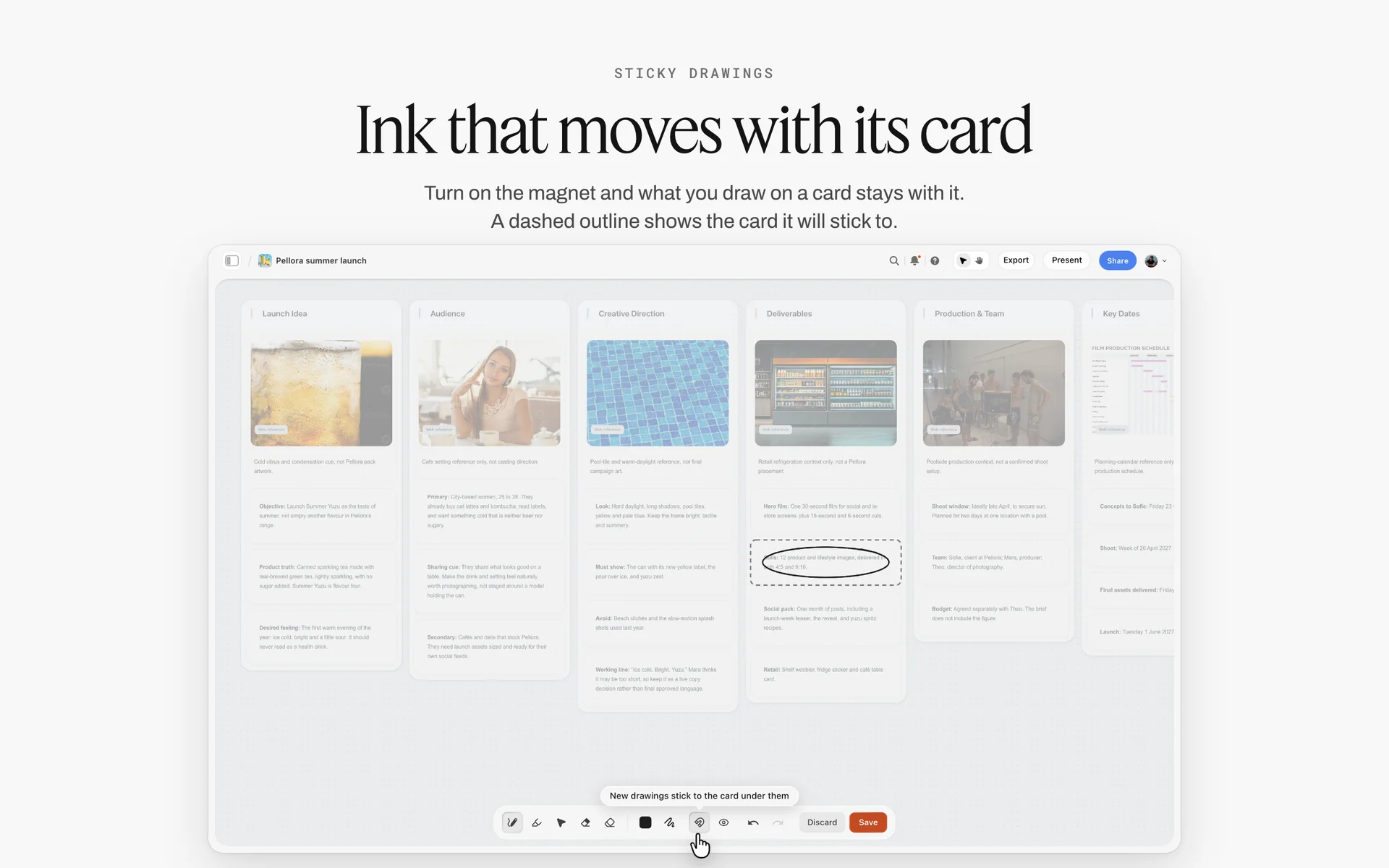
One campaign board: idea, audience, direction and deliverables side by side, the unit the weekly loop reads.
The Storyflow 15-Minute Campaign Loop
A weekly review with five campaigns in it usually starts on time and ends on the third. The first campaign gets 40 minutes because it is the loudest, the last two get a glance, and the decisions nobody had time for come back as emergencies on Thursday. A fixed time per campaign is the only thing that stops the loudest client from setting the agenda.
The rule
The Storyflow 15-Minute Campaign Loop is our editorial recommendation for creative directors running more than one campaign: in Storyflow, each live campaign gets 15 minutes a week on its own board, split into three five-minute parts.
- Read (5 minutes): the change report for the board, the hub row, the Review wall, and any Deliverables row marked In review or Blocked.
- Decide (5 minutes): at most three decisions, each written on the Decisions wall as a sentence with a reason.
- Delegate (5 minutes): each decision gets one owner and one date, entered in the Decisions table and reflected in the hub row.
Six campaigns fit a 90-minute block. A seventh means one loop moves to an art director, who runs it and brings you only the decisions above their threshold.
Why 15 minutes and not 30
Fifteen minutes is short enough that six campaigns fit one sitting and long enough to read a board that its owner updated that morning. The reading part works only because the board is current: if an owner has to explain the state of the work out loud, the loop runs over. That is a signal about the board, not about the clock. In practice, a campaign that needs more than 15 minutes two weeks running needs its own working session, booked separately, with the people who can resolve it.
Why six campaigns per creative director
Six is plain arithmetic. Six loops of 15 minutes make 90 minutes, which is one block in a working day and one that most creative directors can protect every week. Seven loops push past 100 minutes, and the last ones get read tired. It also keeps the review from becoming one more standing meeting: Harvard Business Review reported executives spending nearly 23 hours a week in meetings, against less than 10 in the 1960s. The number is also a capacity check you can show a managing director: when the hub table has more than six rows owned by you, the studio has a staffing decision to make.
Why three decisions per campaign
Three decisions per campaign per week is the most a team can act on before the next review. A creative director who makes eight decisions on one campaign has usually redesigned the work in the meeting, which the art director then has to absorb in a week. If a campaign needs more than three, the extra ones are a direction problem: go back to the Direction wall and fix the reference that caused them.
When to break the rule
Break it for launches and pitches. In the two weeks before a campaign goes live, it leaves the loop and gets daily 15-minute stand-ups on its board. A new pitch also sits outside the loop until it is won, because pitch work is direction work, not status work. The loop is for campaigns in production, where the job is keeping five things moving, not inventing one.
Creative Operations vs Project Management
Creative directors are often handed a project plan and asked to run it, or handed nothing and asked to keep the work on brand. Both jobs exist on every campaign, and confusing them is how a creative director ends up chasing deadlines instead of protecting the idea. In Storyflow, the two read from the same campaign board: creative operations lives on the Direction and Decisions walls, project management in the Deliverables table and the to-dos.
| Question | Creative operations | Project management | Where it lives in Storyflow |
|---|---|---|---|
What is being decided | Whether the work is right: idea, look, tone, references | Whether the work ships: dates, owners, scope | Direction wall for the first, Deliverables table for the second |
Who usually owns it | Creative director, then art directors | Producer or project manager | Hub table Owner column, one name per campaign |
What it produces | A direction, a decision log, a sign-off | A schedule, a resourcing plan, a status | Decisions wall and the hub status column |
How it fails | Drift: the work changes without anyone deciding it should | Delay: the work is right and late | The change report shows both, card by card |
What a review checks | Is this still the idea we sold | Is this on the date we promised | One 15-minute loop covers both on one board |
Tool it is often forced into | A slide deck sent once and never updated | A project management app with tasks and dates | The board holds both; dates live in table date cells |
What a client sees | The direction and the reasoning | The dates and the next deliverable | A view link to the board, no account needed |
The practical consequence: creative operations needs the work visible next to the decisions about it, which is why a task list is the wrong home for it. Project management needs dates and owners, which is why a moodboard is the wrong home for it. A campaign board with both walls is the cheapest way to stop the two from drifting apart. For the wider discipline, the creative operations page and the creative operations tool overview cover how studios staff it.
The Board Map: One Hub Board and One Board per Campaign
A creative director with five campaigns and no map opens five places every morning: a deck for the direction, a spreadsheet for the dates, a chat for the decisions, a drive for the files and an inbox for the feedback. The board map collapses that to two levels you can explain to a new hire in a minute.
What the hub board holds
The hub board answers one question: what needs me this week. It holds the campaign table (one row per live campaign), a folder per campaign that opens its board, a small wall for the week (review date, who is away, what is due to clients), and a short Archive wall where finished campaigns move with their final status. Nothing creative lives on the hub. If someone pins a reference image there, move it to the campaign board, because the hub is read in 30 seconds or not at all.
What every campaign board holds
Every campaign board has the same five walls in the same order, so you can read any of them without a tour:
- Brief: the client's ask, the audience, the deliverables, the budget line, the dates. It is worth the care: in the IPA's BetterBriefs research (October 2021, over 1,700 marketers and agency staff), 80% of marketers thought they wrote good briefs and only 10% of creative agencies agreed. The Brief tool in Storyflow drops six numbered walls (The work, Who it's for, How it looks, What we're working from, Plan, Budget) as empty, labelled cards to fill in.
- Direction: the moodboard, the type and colour cards, the references with captions, the line that says what this campaign is and is not.
- Decisions: a table of every decision with date, decision, reason, owner and next date.
- Deliverables: a table of every asset with format, channel, size, owner, status and due date.
- Review: work in review, grouped by round, with comment threads beside it.
What never goes on a campaign board
Contracts, invoices and the budget's line-by-line actuals stay in the studio's finance system; Storyflow has no invoicing or e-signature, and the board is shared with people who should not see rates. Raw footage and full-resolution master files stay in the studio's storage, with a link card on the Deliverables wall. The board holds the decisions about the files, not the files' only copy.
Naming that survives six months
Name each campaign board Client, Campaign, Season (for example "Marrowby, Night Roast, Winter"), and name walls by job, not by date. A wall called "Week 3" is meaningless in March; a wall called "Round 2 review" is not. In Storyflow, the folder on the hub carries the same name as the board it opens, so search finds both.
| Level | Board | Holds | Updated by | Read by | Read in |
|---|---|---|---|---|---|
Studio | Hub board | Campaign table, folders, this week's wall, archive | Each campaign owner, Monday by noon | Creative director, producer, managing director | 30 seconds |
Campaign | One board per campaign | Brief, Direction, Decisions, Deliverables, Review walls | Owner and team, daily | Creative director in the loop, client by view link | 5 minutes |
Direction | Direction wall on the campaign board | Moodboard, colour cards, font cards, captioned references | Art director | Everyone who makes the work | 2 minutes |
Record | Decisions table on the campaign board | Date, decision, reason, owner, next date | Creative director in the loop | Owner, producer, client account lead | 1 minute |
Delivery | Deliverables table on the campaign board | Asset, format, channel, owner, status, due | Producer or owner | Team and creative director | 1 minute |
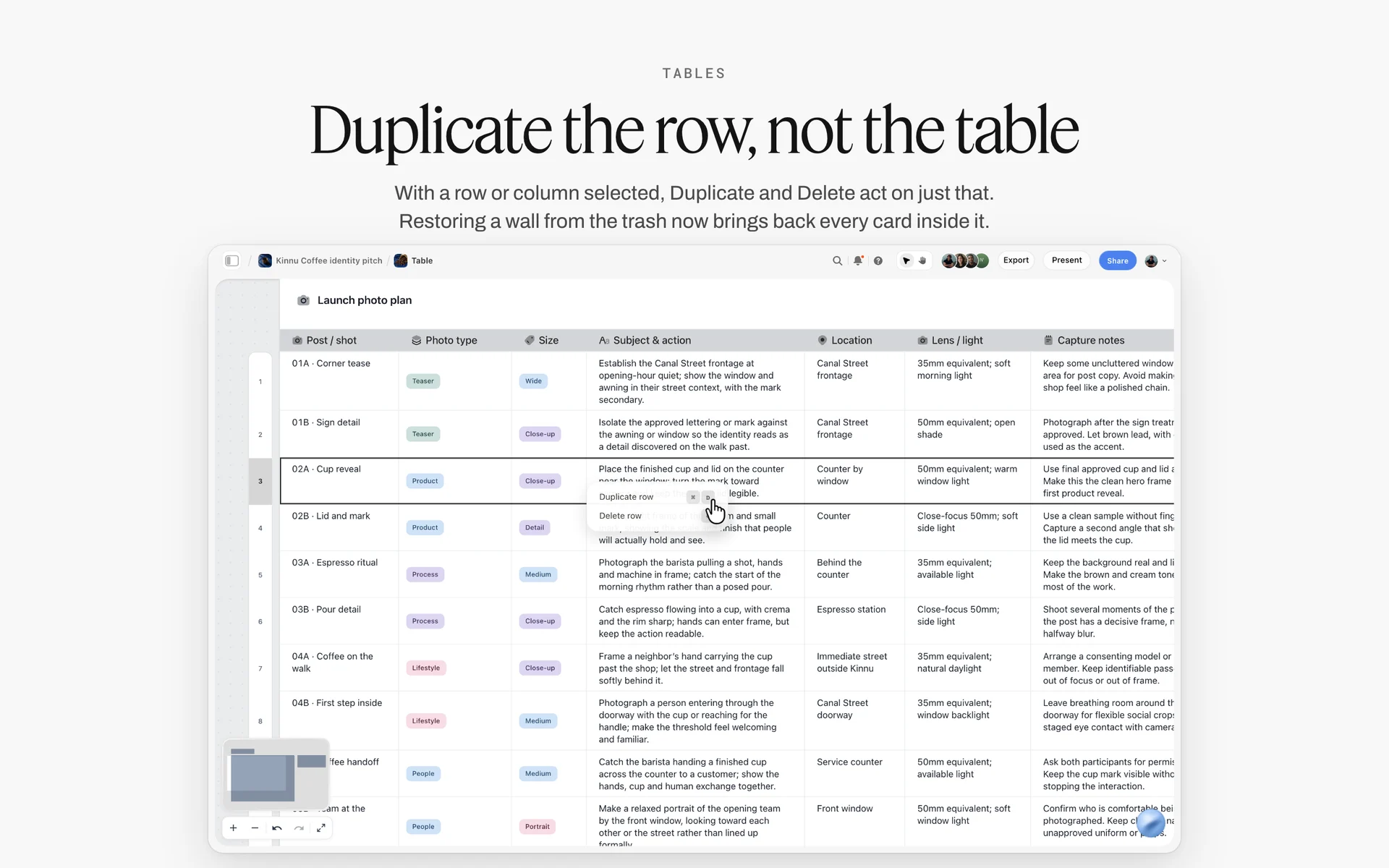
A table on a board, one row per item: the hub's campaign table works the same way, one row per campaign with its owner and next decision.
For a fuller treatment of the board itself, the campaign status board guide walks through tracking one campaign from brief to delivery, and agency campaign planning covers the client side.
Campaign Status Template: The Hub Table to Copy
The hub table is the most-read object a creative director owns, so its columns decide what the studio talks about. A table with fourteen columns gets read for two of them. Nine columns, each with one job, carry a week.
The template, filled for Tallowmere Creative
Tallowmere Creative is a fictional eight-person studio with one creative director, two art directors, a producer and four designers and editors. This is its hub table in the first week of December, with rows kept in date order by next date, because Storyflow tables do not sort.
| Client | Campaign | Phase | Status | Next decision | Owner | Next date | Client sign-off due | Board |
|---|---|---|---|---|---|---|---|---|
Fennick Outdoor | Cold Start (winter jackets) | Production | In review | Pick the hero frame from round 2 | Ines (AD) | Tue 1 Dec | Fri 4 Dec | Fennick, Cold Start, Winter |
Marrowby Coffee | Night Roast launch | Direction | In progress | Approve the type card and the second colour | Creative director | Tue 1 Dec | Mon 7 Dec | Marrowby, Night Roast, Winter |
Ludo Lane Toys | Gift guide social | Production | Blocked | Client to confirm the product list | Ravi (AD) | Wed 2 Dec | Thu 3 Dec | Ludo Lane, Gift Guide, Winter |
Qorra Skincare | Spring relaunch | Brief | In progress | Agree the one-line proposition | Creative director | Thu 3 Dec | Thu 10 Dec | Qorra, Relaunch, Spring |
Brakeholm Ferries | Summer timetable film | Pre-production | Not started | Choose between two route films | Ines (AD) | Fri 4 Dec | Fri 11 Dec | Brakeholm, Timetable, Summer |
Fennick Outdoor | Retail window | Production | In progress | Approve print sizes for 3 stores | Producer | Mon 7 Dec | Wed 9 Dec | Fennick, Window, Winter |
Marrowby Coffee | Café menu boards | Delivery | In review | Final check on the price line | Ravi (AD) | Tue 8 Dec | Wed 9 Dec | Marrowby, Menu, Winter |
Ludo Lane Toys | Spring catalogue | Brief | Not started | Decide shoot or illustration | Creative director | Thu 10 Dec | Fri 18 Dec | Ludo Lane, Catalogue, Spring |
Qorra Skincare | Founder interview | Delivery | Done | None; move to Archive Friday | Producer | Fri 11 Dec | Signed 27 Nov | Qorra, Interview, Autumn |
What each column is for
- Client and Campaign: two columns, because one client often has two live campaigns and the hub must show both.
- Phase: Brief, Direction, Pre-production, Production, Delivery. Phase tells you what kind of decision is coming; status tells you whether it is stuck.
- Status: Storyflow's six fixed options. Use In review for "waiting on the creative director or the client", Blocked for "waiting on something outside the team", and nothing else for waiting.
- Next decision: one sentence that starts with a verb. "Pick the hero frame" is a decision; "Hero frame" is a topic.
- Owner: one person. In Storyflow, a column named Owner can hold people who already have access to the board, which the AI can fill; if a name matches nobody on the board, the column becomes plain text.
- Next date and client sign-off due: two dates, because the internal decision has to land before the client's.
- Board: the campaign board's name, matching the folder on the hub.
Status rules the whole studio follows
A campaign is Blocked only when the next step waits on someone outside the studio, and the Next decision cell names who. A campaign is In review when it waits on the creative director or the client. Two weeks in the same status moves the row to the top of the Tuesday review. Done rows stay one week, then move to the Archive wall. These four rules make the status column honest, which is the only reason anyone reads it.

A studio tracker with one card per client project: a kanban view of the same rows the hub table carries.
The Weekly Review Ritual, Day by Day
A weekly system only works if the days have jobs. When Monday, Tuesday and Friday are all "check in on everything", the creative director checks in on everything every day and decides nothing.
Monday: owners update their boards by noon
Each campaign owner spends 20 to 30 minutes on their board before noon: moves review cards to the right round, updates the Deliverables table, writes the hub row's Next decision. The creative director does not open campaign boards on Monday morning. The rule is simple, and it is the one that fails first: if the board is not updated, the loop reads last week's board, and the owner explains the rest in their 15 minutes.
Monday afternoon: the change report
Ask for the change report on each campaign board. In Storyflow, the in-app AI reports what changed on a board and who changed it since its last turn, in the last day, week or month, or for all time; through the ChatGPT plugin or the Claude connector, the report covers the last day or the last week. Read the reports on the hub, list the campaigns where nothing changed in a week (those are your real problems), and set the review order: Blocked first, then In review, then the rest.
Tuesday: the review, 90 minutes
Run the 15-Minute Campaign Loop on each board in the order set on Monday. The owner of each campaign joins for their 15 minutes only. Present the board, not a deck: in Storyflow, presentation mode goes fullscreen and steps one wall, note, image or document at a time, so the Direction wall and the Review wall can be walked in order without rebuilding anything. Every decision lands on the Decisions table before the next campaign starts.
Thursday: 15 minutes on blocked rows only
Thursday is for the rows marked Blocked. Read each Blocked row's Next decision, call or message whoever it waits on, and change the status if it moved. If a campaign is still Blocked on Thursday and its client sign-off is due Friday, the account lead tells the client today, not tomorrow.
Friday: the client note
Write one short note per client from the Decisions table: what was decided this week, what you need from them, what they will see next and when. Share it as a view link to the campaign board, which opens with no account, or as a document on the board. To comment or draw, the client signs in.
| Day | Block | Who | Input | Output | In Storyflow |
|---|---|---|---|---|---|
Monday | 20 to 30 minutes per owner, before noon | Each campaign owner | Last week's work | Updated campaign board and hub row | Owner edits walls, Deliverables table and the hub table |
Monday | 30 minutes | Creative director | Change report per board | Review order for Tuesday | In-app AI, ChatGPT or Claude reports what changed and who changed it |
Tuesday | 90 minutes | Creative director plus each owner for 15 minutes | Six updated boards | Up to three decisions per campaign, each owned | Decisions table, hub status, presentation mode |
Thursday | 15 minutes | Creative director and producer | Blocked rows | Unblocked rows or a client warning | Hub table filtered by eye: Blocked rows first |
Friday | 10 minutes per client | Account lead or creative director | Decisions table | One note per client | A document on the board or a view link |

A week laid out as columns: put the review block, the blocked-row check and the client notes on the days they belong to.
Where Decisions Are Recorded: The Decision Log
The most expensive habit in a multi-campaign studio is deciding something twice. A creative director picks the warmer grade on Tuesday, the designer remembers "something about warmth", the client asks on Friday why the grade changed, and the conversation starts again. A decision log is the cheapest fix there is: one table per campaign, filled in the minute the decision is made.
The five fields every decision needs
Each decision is one row with five cells: date, decision (one sentence), reason (one sentence), owner, and next date. The reason is the field people skip and the one that saves the most time, because it is what lets an art director make the next ten small decisions without asking. "Warmer grade, because the client's stores use tungsten light and the cold grade looked clinical next to the product" answers the next question before it is asked.
The decision log, filled for one campaign
| Date | Decision | Reason | Owner | Next date |
|---|---|---|---|---|
Tue 17 Nov | Hero frame is the jacket on the bench, not the ridge shot | The bench frame shows the hood detail the brief asks for | Ines (AD) | Tue 24 Nov |
Tue 17 Nov | Grade warmer by one step across all frames | Store lighting is warm; the cold grade read clinical beside it | Editor | Fri 20 Nov |
Tue 24 Nov | Cut the third product from the 6-second cut | Three products in 6 seconds left none readable | Editor | Tue 1 Dec |
Tue 24 Nov | Keep the headline as written; no exclamation mark | The tone wall says calm, confident; the mark read loud | Copywriter | Fri 27 Nov |
Tue 1 Dec | Approve round 2 frames 1 to 4, reshoot frame 5 | Frame 5 has the old colourway | Ines (AD) | Fri 4 Dec |
Tue 1 Dec | Window print at 1200 by 1800 mm for all three stores | One size halves the print cost and the checks | Producer | Mon 7 Dec |
Tue 1 Dec | Client sees the 15-second cut first, not the 30 | The 15 is the media plan's main buy | Account lead | Fri 4 Dec |
Tue 8 Dec | Lock the end card type at the board's title font | Matches the window prints and the social tiles | Designer | Wed 9 Dec |
Where the log sits on the board
Put the Decisions table on its own wall between Direction and Deliverables. That order matters: the team reads why the work looks the way it does, then what has been decided since, then what is being made. In Storyflow, a decision about a specific frame can also go in a comment beside the frame, but the table is the record: resolving a comment thread deletes it, and comments are conversations, while the table is what was agreed.
What a decision log is not
It is not meeting minutes. Minutes record who said what; a decision log records what was agreed and who acts on it. It is not a change request system either: a client who changes scope is a conversation for the producer and the contract, and the log records only the outcome. Keep the log short enough to read in a minute, which in practice means three or fewer rows a week.
Delegating to Art Directors Without Losing the Work
Delegation fails in two directions. Either the creative director hands over a campaign and stops looking, and the work drifts, or they hand it over and keep deciding everything, and the art director becomes a messenger. A written split of who decides what stops both.
What the creative director keeps
A creative director, in Wikipedia's definition, makes the high-level creative decisions and directs the people who produce the end results. Keep three decisions per campaign: the direction (what the campaign is and is not), the hero piece (the one asset the campaign is judged on), and the final sign-off before the client sees anything. Everything else can move down. A creative director who keeps type sizes, image crops and caption copy is not directing five campaigns; they are designing one and delaying four.
What the art director owns
The US Bureau of Labor Statistics lists the art director's duties as deciding how best to represent a concept visually, managing designers, developing budgets and timelines, and presenting designs to clients for approval (BLS Occupational Outlook, art directors). On a campaign, that becomes: the art director owns every decision inside the direction: crops, grades within the agreed range, layout of secondary assets, the order of cuts, and which references go to the photographer or editor. They also own the campaign board: it is updated by noon on Monday, the Decisions table is current, the Review wall is grouped by round.
The delegation matrix
The responsibility assignment matrix (RACI) separates the person who does the work (Responsible) from "the one ultimately answerable", and some project management theories require exactly one accountable person per deliverable, as the RACI entry on Wikipedia sets out. Applied to a campaign, it looks like this.
| Decision | Creative director | Art director | Producer | Client |
|---|---|---|---|---|
Campaign direction and line | Accountable | Consulted | Informed | Approves at kickoff |
Hero asset | Accountable | Responsible | Informed | Approves |
Secondary assets (cutdowns, tiles, banners) | Informed weekly | Accountable | Consulted on sizes | Sees in round review |
Grade and crop within the agreed range | Informed | Accountable | Informed | Not asked |
Talent and location choice | Consulted | Accountable | Responsible for booking | Approves when the contract says so |
Schedule and dates | Informed | Consulted | Accountable | Informed |
Final sign-off before client sees work | Accountable | Responsible for the package | Responsible for delivery | Approves |
In Storyflow, write this matrix once as a table on the hub board's week wall and link it from every campaign board's Brief wall. Nobody reads a delegation policy in a handbook; they read the table next to the work.
The handoff note
When a campaign moves to an art director, write one note on its board with four lines: what the campaign must do (one sentence), the three references that define the look, the two things that are not negotiable, and the threshold for coming back to you ("anything that changes the hero frame, the headline or the budget"). The note stays on the Direction wall for the life of the campaign.
Approval thresholds
An approval threshold is a sentence that tells the art director which decisions can go to the client without you. "Secondary assets that follow the approved hero go to the client after the art director signs them" removes a week of queueing. The threshold goes on the handoff note, and changes only in the weekly loop, where it is written down as a decision.
How Not to Be the Bottleneck
A creative director who becomes the bottleneck is usually not slow. They are the only route to "approved", and every piece of work in five campaigns queues for the same 90 minutes. Fixing it is queue management, not personal speed.
Count what is waiting for you
Little's law, which Wikipedia credits to John Little's 1961 proof, says the average amount of work in a stable system equals the rate it arrives times the time each item spends inside. In studio terms: if six assets arrive for your review each working day and each waits five working days, about thirty are waiting at any moment. You cannot review faster than the loop, so shorten the wait (review windows) or reduce what arrives (thresholds).
Limit work in review
The Kanban method's two primary practices are to visualize work and to limit work in progress, as the Kanban development article on Wikipedia summarises. For a creative director, the limit that matters is work in review. Agree a cap of five cards per Review wall on each Storyflow board: a sixth card does not go up until one comes down approved or returned. The cap is a team rule, so write it on the hub's week wall. When the cap is hit, the art director knows to bring their own decision, not another option.
Set review windows, not open doors
Two review windows a week (the Tuesday loop and a 30-minute Thursday slot) beat an open door. Work that arrives outside the windows waits for the next one, and the team plans around it. In Storyflow, a to-do takes an assignee and a due date, and the assignee gets an in-app notification, so the art director can assign "review round 2 frames" to you for Thursday instead of messaging you at 6pm.
Write the default
For every pending decision, write what happens if you do not answer by the next window. "If no comment by Thursday 2pm, frames 1 to 4 go to the client as they are." A written default turns your silence into a decision, which is what the team needed in the first place.
Review options in pairs, not fives
Ask art directors to bring two options and a recommendation, not five. Five options turn a 15-minute loop into a design session. Two options with a written recommendation let you say yes in a minute or explain the one change that would make the other work.

Phases across the top, a status tracker below: the same shape as a campaign board's Deliverables wall, where the review cap is visible at a glance.
The Creative Director Mood Board per Campaign
Running six campaigns at once is mostly a memory problem. A creative director cannot hold six looks in their head, and should not try. Each campaign's Direction wall is the external memory, and its quality decides how many small decisions the team can make without you.
What goes on the Direction wall
Twelve to twenty captioned references, two or three colour cards, one or two font cards, and a line that says what the campaign is and is not. In Storyflow, a color card shows any of Hex, RGB, HSL and CMYK, edited on the card, in one of three styles (Classic, Spec or Chip); a font card shows a typeface as a Specimen, Headline or Paragraph layout. Lora and Courier Prime, and fonts uploaded to your library, need a paid plan; Inter works on any account.
Caption every reference
An uncaptioned reference is a vote for whatever the viewer likes about it. Write one line under each image naming what to take from it: "the light, not the location", "the crop, not the colour". The captions are what let an art director brief a photographer without you on the call.
The is and is not line
Write one sentence of what the campaign is and one of what it is not: "Quiet confidence in cold weather. Not adventure, not extreme sport." It is the fastest way to settle a dispute in the loop, because it was agreed before the dispute started.
Keep the directions apart
Two campaigns for the same client drift towards each other unless their boards are separate. In Storyflow, keep each campaign's direction on its own board, even when the client's brand wall is shared: put the brand colour and type cards on the client's brand board and link to it from each campaign's Direction wall.

A campaign direction wall: references grouped by theme, palettes beside them, one board per campaign.
For the direction itself, how creative directors share campaign visual direction with the team covers the package in depth, and creative direction vs moodboard vs style guide settles which document holds what. The campaign visual direction page and the art direction board show the board shape.
Tracking Multiple Clients, Campaigns and Deliverables
The question "what software tracks multiple clients, campaigns and deliverables" usually means "where can I see every deliverable for every client without opening every project". The answer is two tables at two levels: the hub row per campaign, and a Deliverables table per campaign board.
The deliverables table
Each campaign's Deliverables table holds one row per asset: asset, format, channel, size or length, owner, status, round, due date and a link to the card where it lives. Rows are kept in due-date order by hand.
| Asset | Format | Channel | Size or length | Owner | Status | Round | Due |
|---|---|---|---|---|---|---|---|
Hero film | Video | Paid social and web | 30 s, 16:9 and 9:16 | Editor | In review | 2 | Fri 4 Dec |
Cutdown | Video | Paid social | 15 s, 9:16 | Editor | In progress | 1 | Fri 4 Dec |
Bumper | Video | Online video | 6 s, 16:9 | Editor | Not started | 0 | Mon 7 Dec |
Hero still | Image | Web and print | 4000 px long edge | Photographer | Done | 2 | Fri 27 Nov |
Window print | Retail, 3 stores | 1200 by 1800 mm | Designer | In progress | 1 | Wed 9 Dec | |
Social tiles | Image set | 6 tiles, 4:5 | Designer | In review | 1 | Thu 3 Dec | |
Email header | Image | 1200 px wide | Designer | Not started | 0 | Thu 10 Dec | |
Product cards | Image set | Web | 12 cards, 1:1 | Designer | Blocked | 0 | Fri 11 Dec |
Rolling up across clients
Do not build a third table that copies every deliverable from every campaign. It goes stale the day after it is made. The hub row carries the one deliverable that matters this week in its Next decision cell, and the campaign board carries the rest. When you need a cross-client view, ask for it: the in-app AI reads the current board plus up to three other boards you attach, and ChatGPT or Claude can read any board in the projects you granted, so "list every deliverable due next week across these boards, with owner and status" answers the question without a copy.
When a deliverables list is the whole job
For campaigns with fifty or more assets per round (retail rollouts, localised versions), a spreadsheet is the better home for the asset list, because it sorts and filters. Link the sheet from the Deliverables wall and keep the board for the decisions and the review. The deliverables list page shows the board version for the usual case.
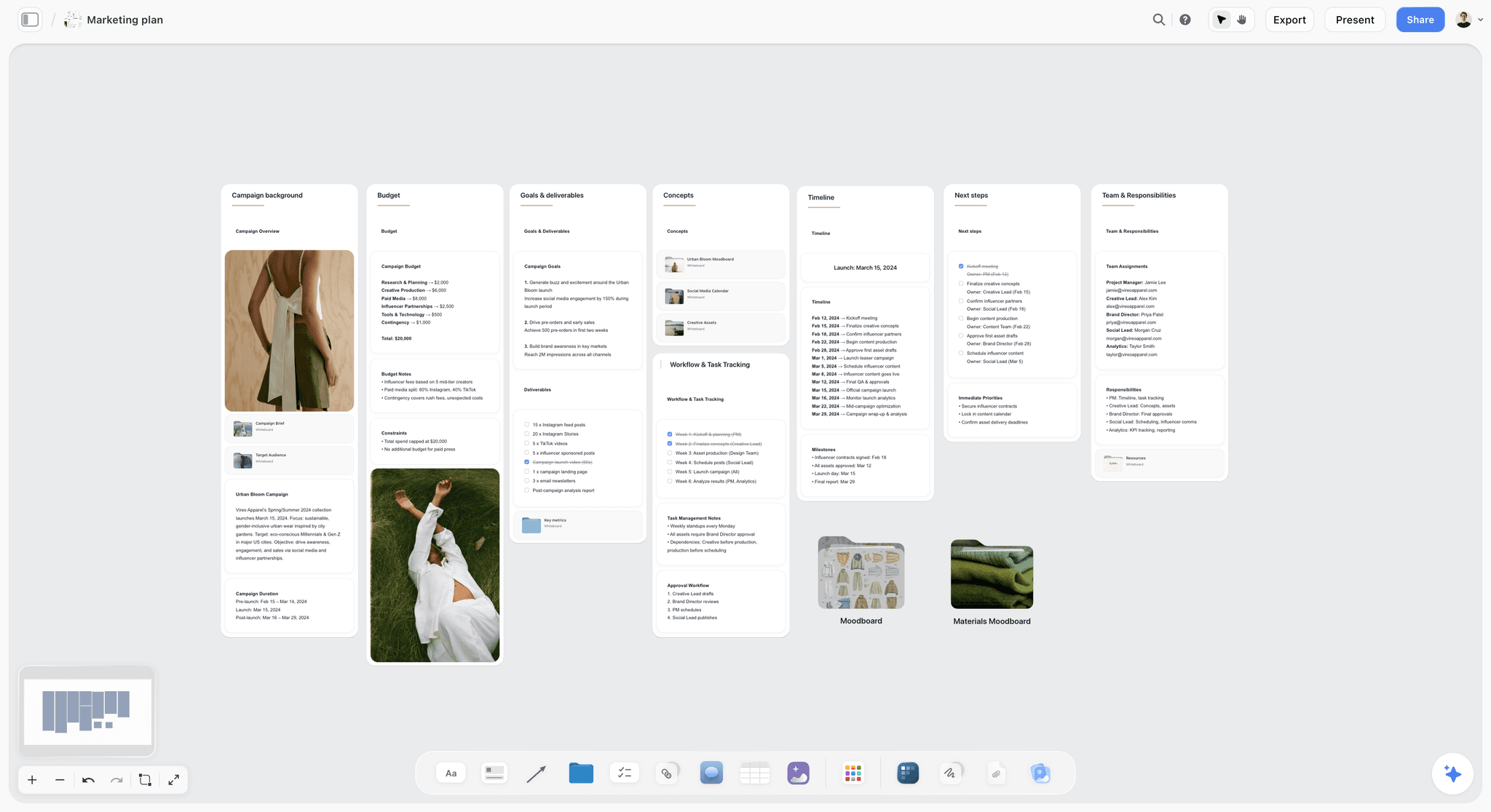
A campaign board with budget, goals, deliverables, timeline and team on separate walls: the same parts the deliverables table pulls together.
Reporting Across Clients: The Friday Note
Studios searching for "the best reporting platform for managing multiple clients" often want a dashboard. What clients read is shorter: what happened, what they need to do, what they see next. A dashboard nobody reads is a report that took a day to build.
The four lines of a client note
- Decided this week: up to three lines, copied from the Decisions table with their reasons.
- Needed from you: each item with a date ("product list by Wednesday 2 December").
- You will see next: the next deliverable and the date.
- Risk: one line, or "none".
Send the board, not a summary of it
In Storyflow, the client note can be a document on the campaign board, shared with a view link that opens with no account, so the client reads the note beside the work it describes. If the client prefers email, paste the four lines and add the view link at the end. Either way, the note is written from the Decisions table in ten minutes, not composed from memory.
What to report, and what not to
Report decisions, needs and dates. Do not report hours, percentage complete or the number of options explored. Hours belong in the studio's time tracking, which Storyflow does not do, and percentages invite the question "why only 60?" about creative work where the last 20 percent is the work. The client report template and the ChatGPT client updates workflow show two routes to the same note.
The Creative Director Pitch Deck When a New Campaign Lands
Every new campaign starts with a deck: the pitch, the credentials, or the concept presentation. A creative director running six campaigns cannot rebuild a deck from scratch each time, and the deck that worked for one client rarely fits the next.
Build the deck from the board
Build the concept on a board first (the brief, the direction, the idea in three frames), then turn it into slides. Inside Storyflow, the in-app AI designs a pitch deck, slides, a one-pager or a creative brief from what is on the board; decks present fullscreen and export as PDF. There is no PPTX export and no speaker notes, so if the client's procurement team requires an editable slide file, rebuild the final version in a slide app.
Keep a credentials wall on the hub
Keep a small credentials wall on the hub board: three case studies as cards with one hero image each, the studio line, the team. When a new pitch lands, copy the wall into the pitch board instead of hunting for last quarter's deck. How agencies present campaign concepts covers the presentation itself, and the creative direction deck page shows a deck built from a board.
When the pitch is won
When the pitch is won, the pitch board becomes the campaign board: rename it, add the Decisions and Deliverables walls, and add the row to the hub. The concept, references and reasoning that won the work stay where the team will read them, which is the most useful thing a pitch can leave behind.

A pitch board that becomes a campaign board: brief, concepts and feedback rounds already in place when the work is won.
Worked Example: Tallowmere Creative Runs Five Campaigns in One Week
Tallowmere Creative is a fictional studio. Its hub holds nine rows for five clients; four of them (the retail window, the menu boards, the spring catalogue and the founder interview) sit with the producer, are in delivery or are still before their brief, so five campaigns enter the creative director's loop this week. The team is two art directors (Ines and Ravi), a producer and four makers. This is one week, illustrative of how the system holds, with no invented results.
Monday morning: the boards update
By noon, Ines has moved Fennick Outdoor's round 2 frames onto the Review wall, Ravi has written "Client to confirm the product list" in Ludo Lane's Next decision cell and set the row to Blocked, and the producer has updated the retail window sizes. The creative director has not opened a campaign board.
Monday afternoon: the reports
The creative director opens the hub and asks ChatGPT, through the Storyflow plugin: "For each campaign board in the Tallowmere project, what changed in the last week and who changed it?" The answer shows Marrowby's Night Roast board unchanged for eight days. That goes to the top of Tuesday's order, ahead of the louder campaigns.
Tuesday 10:00 to 11:30: the loop
Marrowby first. Reading the board takes three minutes: the Direction wall has two colour cards and no font card, and the art director is waiting for the creative director's type choice. Decisions: approve the condensed serif, uploaded to the studio's font library, on a font card in Headline layout; keep the second colour as the deep roast brown; defer the menu boards to next week. Each goes in the Decisions table with a reason and an owner.
Fennick next: approve frames 1 to 4, reshoot frame 5 (old colourway), client sees the 15-second cut first. Ludo Lane: one decision, escalate the product list through the account lead today. Qorra: agree the proposition "Skin that keeps up", with the reason that it carries the relaunch's one claim. Brakeholm: the route films get 15 minutes and a decision to show the client both, because the choice is the client's.
Five campaigns, nine decisions, 80 minutes. The spare ten minutes go to the approval thresholds: secondary Fennick assets now go to the client after Ines signs them.
Thursday: the blocked row
Ludo Lane is still Blocked. The account lead calls the client, who confirms eight products, not twelve. Ravi updates the Deliverables table, the row moves to In progress, and the gift guide's due date stays.
Friday: five notes
Five client notes, each written from the Decisions table, each shared as a view link to the campaign board. Marrowby's note says the type and colour are decided and the menu boards arrive Tuesday. Nobody on the client side needs an account to read it.
What the week cost
The creative director spent 30 minutes on Monday's reports, 90 on Tuesday's loop, 15 on Thursday and 50 on Friday's notes: about three hours of management for five campaigns, with the rest of the week for the work that needed a creative director, which was the Qorra proposition and the Night Roast type.
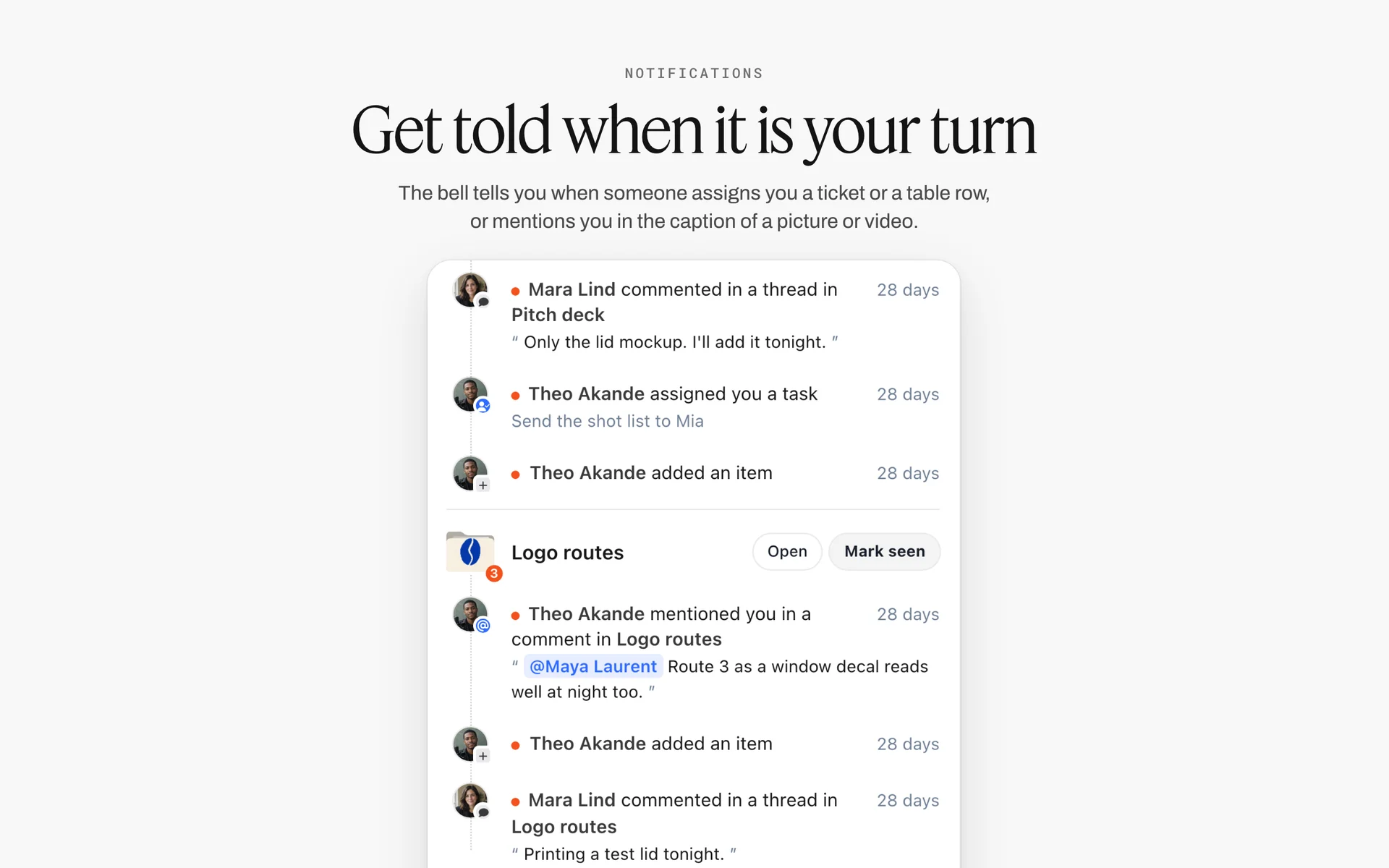
Comments, assignments and mentions grouped by board: replies from five campaigns are read in one list instead of five places.
Do This in ChatGPT or Claude
If you already ask ChatGPT or Claude to summarise threads and draft client notes, the weekly system can run from the same chat, with the boards as the source instead of your memory. The Storyflow plugin and connector read and build on the boards where the team works.
Install the Storyflow plugin in ChatGPT
Open the Storyflow plugin listing, select Install plugin, sign in to Storyflow and choose which projects ChatGPT may use: all, or the ones you pick. Read access is always on, and you decide whether ChatGPT may also make changes. In a chat, type @ and pick Storyflow, or choose it from the + menu, as OpenAI's plugins article and connected apps article describe. Availability depends on your ChatGPT plan, workspace and region; in a Business or Enterprise workspace an admin manages plugins and can turn them on or off, per OpenAI's admin controls article. You can change what the plugin may touch later in OpenAI's app permissions settings.
Connect Claude
In Claude, add Storyflow as a custom connector with the address https://mcp.storyflow.so/mcp, following Anthropic's custom connector guide. The Storyflow setup page covers Claude, Gemini and Grok. The Claude campaign plan workflow and the Claude kanban board workflow show campaign boards built from Claude.
Prompts for a multi-campaign week
- "In the Tallowmere project, list every board and tell me which campaign boards changed in the last week, who changed them, and which did not change at all."
- "On the hub board, build a table with columns Client, Campaign, Phase, Status, Next decision, Owner, Next date, Client sign-off due and Board, one row per campaign board in this project, rows in order of Next date."
- "On the Marrowby Night Roast board, add a Decisions wall with a table: Date, Decision, Reason, Owner, Next date. Add today's three decisions from these notes: [paste]."
- "Read the Fennick Cold Start board, list every card on the Review wall, and tell me which of them did not change in the last week."
- "On the Ludo Lane board, add a ticket 'Confirm product list with client' with the due date Thursday 3 December."
- "From the Decisions tables on these four campaign boards, draft a four-line client note per client: decided this week, needed from you, you will see next, risk."
- "Read the Qorra Relaunch board and tell me what a creative director would ask about before approving the proposition."
What lands on the board, and what to check by hand
Tables, notes, walls, to-dos and documents land on the boards, where the team edits them like anything else. Check three things by hand: that each Owner cell names the right person (the AI can fill an Owner column only with people who already have access to the board, and the column turns to plain text if any name matches nobody), that the hub rows are in date order, and that every decision in a drafted client note is one you made. The AI cannot set a to-do's assignee, so assign those yourself; it dates a ticket only with a date you give. The plugin cannot read board comments, though it can add a comment card authored by you. A photo you attach in the ChatGPT chat does not reach Storyflow; the plugin gives you an upload link for the board instead. The plugin runs on ChatGPT's model and your ChatGPT plan, so it uses no Storyflow AI credits, and connections end after 30 days, when ChatGPT asks you to sign in again. If a connection fails, OpenAI's troubleshooting article is the first stop.
The plugin is not the in-app AI
Inside Storyflow, the in-app AI is a separate tool that uses Storyflow AI credits on paid plans. Its Review what's on this board and What's missing here? workflows read a campaign board and say what is thin; Brief my campaign builds a brief on the board from a plain-language ask. It asks a clarifying question or two first, then writes straight onto the board, and one undo reverses its whole latest turn. It reads the current board plus up to five documents and three other boards you attach, and its change report reaches back a month or to the start. The ChatGPT campaign plan workflow and the ChatGPT kanban board workflow show the plugin route side by side with it.

The same campaign boards from either assistant: ChatGPT through the plugin, Claude through the connector, one Storyflow account.
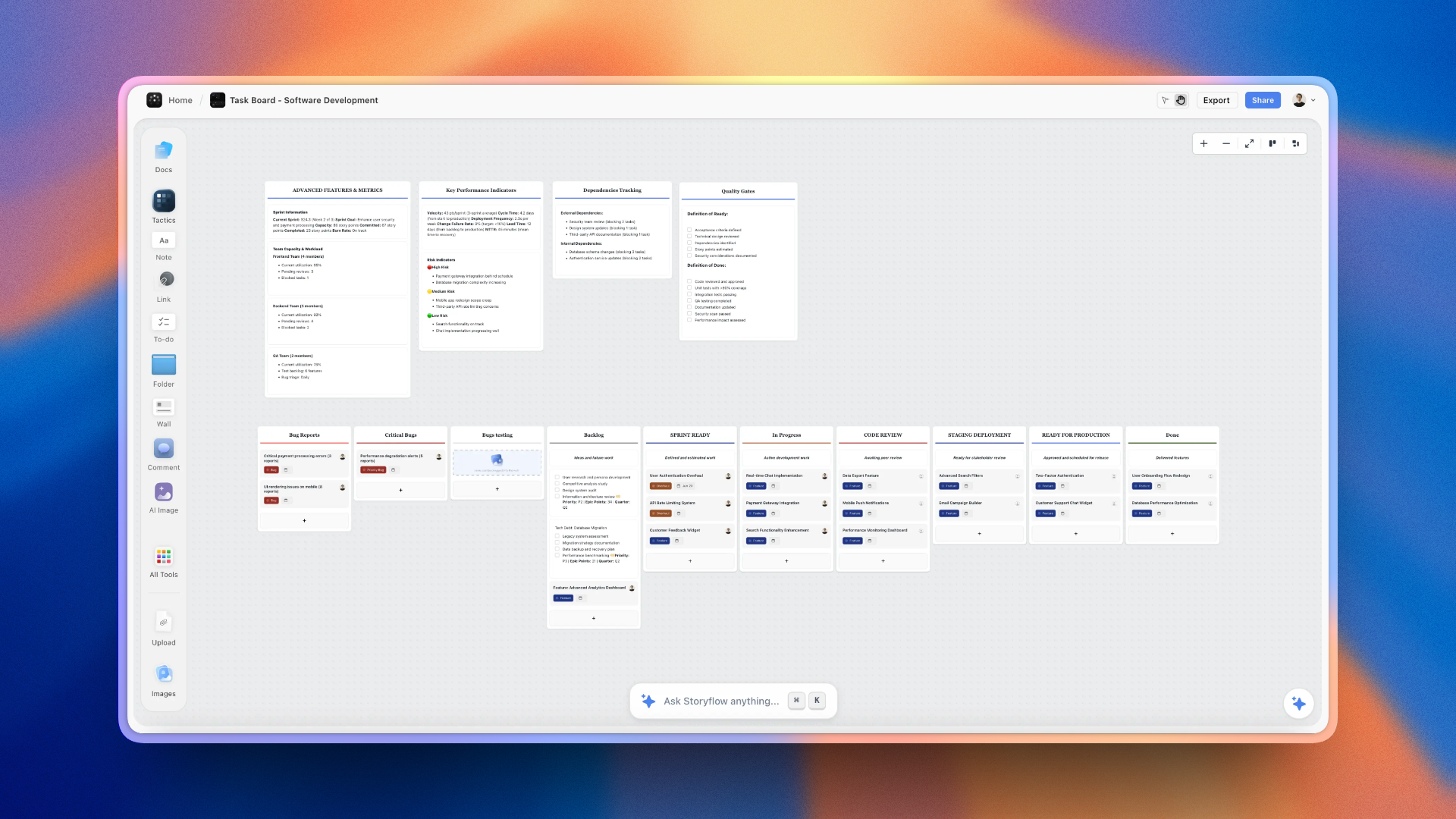
A software development task board on Storyflow with metric and quality gate walls above kanban walls from backlog through code review to done
Build this week's hub table from a chat
Install Storyflow in ChatGPT, ask which campaign boards changed in the last week and who changed them, and build a hub table with one row per campaign before Tuesday's review. The decisions stay yours.

Capacity: How Many Campaigns One Creative Director Can Carry
Studios rarely decide how many campaigns a creative director should run; it just grows until someone burns out or a client leaves. Writing the capacity down turns it into a decision.
Capacity by team shape
| Team below the creative director | Live campaigns in the loop | Loop time per week | What changes past the limit |
|---|---|---|---|
None (creative director makes the work) | 2 to 3 | 30 to 45 minutes | Hire a maker before taking a fourth |
One art director | 4 | 60 minutes | The art director runs a loop for one campaign |
Two art directors | 6 | 90 minutes | Each art director runs their own loop; you review their decision logs |
Two art directors and a producer | 6, plus pitches outside the loop | 90 minutes plus pitch time | The producer runs Thursday's blocked-row check |
Three or more art directors | 6 in your loop, more in theirs | 90 minutes plus 15 per art director | You run a loop of loops: 15 minutes per art director's decision log |
The loop of loops
Past six campaigns, the creative director stops reading campaign boards and starts reading art directors' decision logs. Each art director runs the 15-Minute Campaign Loop on their own campaigns, and the creative director spends 15 minutes per art director reading the Decisions tables they produced. The same three-part shape holds: read, decide, delegate. The creative director's decisions become thresholds and direction changes, which is where their time belongs.
Signals that the load is wrong
- The same campaign is first in the review order three weeks running.
- Decisions tables on two boards are empty for a week while the work kept moving.
- Art directors bring five options instead of two and a recommendation.
Any one of these says the system is carrying more than the people in it. For the studio-level view, the creative agency project management page and the guide for creative directors cover staffing around it.

A six-stage workflow from brief to delivery: each stage is a phase in the hub table, and each phase predicts the kind of decision coming next.
Mistakes and Fixes When Running Several Campaigns
Each of these is common in studios with three or more live campaigns, and each has a fix that costs minutes, not a reorganisation.
The loudest client sets the agenda
The client who emails most gets the first 40 minutes of the review and the quiet campaign drifts. Fix: order the review by status and by the change report, Blocked and unchanged first, never by who asked last.
Status lives in the meeting
If the only way to know where a campaign stands is to ask its owner, the review becomes a round of status updates. Fix: owners update the board by noon on Monday, and the loop reads the board, not the person.
Decisions made, not written
A decision agreed on a call and not written down is made again on Friday. Fix: nobody leaves a campaign's 15 minutes until its decisions are rows in the Decisions table.
The creative director keeps every decision
Keeping crops and caption copy turns the creative director into the bottleneck for five campaigns. Fix: write the delegation matrix and the approval thresholds, and keep only direction, hero and final sign-off.
One board for everything
A single board for all campaigns becomes unreadable by the third client, and its references bleed into each other. Fix: one hub with a table, one board per campaign, same five walls each.
Seven statuses
Custom statuses ("Awaiting client feedback round 2 pending legal") multiply until nobody reads them. Fix: Storyflow's six fixed options, and the detail goes in the Next decision cell.
Reporting hours instead of decisions
A client report full of percentages invites the wrong questions. Fix: the four-line note (decided, needed, next, risk), written from the Decisions table.
Pitches inside the loop
Pitch work needs long, uninterrupted sessions, and squeezing it into 15 minutes makes both the pitch and the review worse. Fix: pitches sit outside the loop until won; then the pitch board becomes the campaign board.
Storyflow's Honest Limits for This Job
Storyflow holds the hub, the campaign boards, the direction, the decision log and the deliverables, and it reports what changed on each board. These are the parts of a multi-campaign system it does not do:
- No Gantt chart, dependencies, critical path, workload view or time tracking: for resourcing many people across many projects, use a project management app alongside the boards.
- No calendar view: dates live in table date cells and on to-dos, and tables cannot be sorted, so rows are kept in date order by hand.
- No due-date reminders: to-dos take an assignee and a due date and send in-app notifications, but nothing reminds an owner as a date approaches.
- No frame-level approval status or version compare: final rounds of a film edit or print file belong in a proofing tool.
- No PPTX export, presenter view or speaker notes: decks present fullscreen and export as PDF.
- No contracts, invoices, payments or e-signature: those stay in the studio's finance and legal tools.
- No native desktop or mobile app: Storyflow runs in the browser and is best built on a laptop.
- Boards cannot be embedded in another app; share them by link instead.
- Paid-only during early access: Plus is $7.99 a month billed annually ($9.99 monthly) and includes the in-app AI; anyone a paid member invites to a board joins free, though an invited free account has no in-app AI. Max adds a Team Workspace with roles and permissions. Plans are on the pricing page.
The Bottom Line
Running several campaigns at once is not a talent problem; it is a queue and a memory problem. Put every campaign's status on one hub table and every campaign's direction, decisions and deliverables on its own board, give the week fixed jobs, and run the 15-Minute Campaign Loop so each campaign gets the same attention whatever its client's volume. Write every decision down before you leave the board. Do it in Storyflow, from the app or from ChatGPT or Claude, and the review reads the boards instead of the people. If your studio already plans in ChatGPT, start with the ChatGPT campaign plan workflow and build this week's hub table before Tuesday.
FAQ: Creative Directors Managing Multiple Campaigns
How do creative directors manage multiple campaigns at once?
They separate status from direction and give the week a fixed shape. In Storyflow, a hub board holds one row per live campaign, and each campaign has its own board with Brief, Direction, Decisions, Deliverables and Review walls. Owners update their boards on Monday, the creative director reads the change reports, and each campaign gets 15 minutes in a Tuesday review: read, decide, delegate. Every decision is written on the campaign board before moving on.
What is the best tool for a creative director managing multiple campaigns?
Storyflow is our pick, because the hub table, each campaign's direction, its decision log and its deliverables sit on boards the team and client open by link, and the AI reports what changed on each. A project management app fits when resourcing across twenty or more campaigns is the hard part. A spreadsheet fits long asset lists, a slide deck fits the final presentation, and a proofing tool fits frame-level review.
What is the Storyflow 15-Minute Campaign Loop?
The Storyflow 15-Minute Campaign Loop is our editorial rule for running several campaigns: each live campaign gets 15 minutes a week on its own board, five to read the board and its change report, five to make at most three decisions, five to give each decision one owner and one date. Six campaigns fit a 90-minute block. A seventh campaign means an art director takes a loop.
How many campaigns can one creative director run?
About six in production, if two art directors own the day-to-day and the weekly review gives each campaign 15 minutes. With no art director, two or three is realistic, because the creative director is also making the work. Past six, the creative director should review the art directors' decision logs instead of the campaign boards. Pitches count separately, since they need long sessions rather than status reviews.
What should a creative director review every week?
Three things per campaign: what changed since last week, what is waiting for a decision, and whether the work still matches the direction. In Storyflow, the change report answers the first, the hub row's Next decision and the Review wall answer the second, and the Direction wall beside the work answers the third. Leave dates and resourcing to the producer, unless a date threatens the client's sign-off.
How do creative directors avoid becoming the bottleneck?
Shrink the queue waiting for them. Keep only direction, the hero asset and final sign-off; delegate everything inside the direction to art directors with a written approval threshold. Review in two fixed windows a week, cap the Review wall at five cards, ask for two options and a recommendation, and write a default for every pending decision so silence still moves the work.
Where should campaign decisions be recorded?
On the campaign's own board, in a decision log table with five columns: date, decision, reason, owner and next date. In Storyflow, the Decisions wall sits between Direction and Deliverables, so the team reads why the work looks the way it does before what is being made. Write each row in the meeting, not afterwards. Comments are conversation, and a resolved thread is deleted; the table is what was agreed.
What is the difference between creative operations and project management?
Creative operations decides whether the work is right: the idea, the look, the tone and the decisions about them. Project management decides whether it ships: dates, owners and scope. Creative operations fails by drift, project management by delay. In Storyflow, both read from one campaign board, with direction and decisions on their walls and deliverables and dates in a table, so one weekly review covers both.
What should a creative director mood board include?
Twelve to twenty captioned references, two or three colour cards, one or two font cards and a line saying what the campaign is and is not. Each caption names what to take from the image: the light, the crop, the styling. In Storyflow, the moodboard sits on the campaign's Direction wall, with color cards showing Hex, RGB, HSL or CMYK and font cards showing the typeface in Specimen, Headline or Paragraph layout.
How do I track deliverables across several clients?
Keep one Deliverables table per campaign board and one hub row per campaign, and do not copy every asset into a master list. Each table holds asset, format, channel, size, owner, status, round and due date, rows kept in date order. For a cross-client view, ask the Storyflow AI, ChatGPT or Claude to list everything due next week across the boards you name.
How should a creative director report to multiple clients?
With one short note per client per week: what was decided, what you need from them by when, what they will see next and when, and one line of risk. Write it from the campaign's Decisions table in about ten minutes. In Storyflow, share it as a document on the campaign board with a view link that opens with no account, so the client reads it beside the work.
Can ChatGPT or Claude run my weekly campaign review?
They can prepare it, not run it. With the Storyflow plugin, ChatGPT reads your campaign boards, reports what changed in the last day or week and who changed it, builds the hub table and decision logs, and drafts client notes from them; Claude does the same through the connector. The decisions stay yours, the plugin cannot read board comments or assign to-dos, and it uses no Storyflow AI credits.
Is Storyflow free?
Not yet. Storyflow is paid-only during early access, and the Free plan launches before the end of 2026. Anyone invited to a board by a paid member can sign up free. Plus is $7.99 a month billed annually ($9.99 monthly) and includes the in-app AI. An invited free account has no in-app AI, so art directors on invited accounts update boards while the paid member runs the AI.
Does Storyflow replace a project management app for a studio?
For a studio with a handful of campaigns, the hub table, to-dos with assignees and due dates, and the Deliverables tables carry the work. For resourcing many people across many projects, Storyflow does not have Gantt charts, dependencies, workload views, time tracking or due-date reminders, so use a project management app for producers and link each task to its campaign board.
How should a creative director hand a campaign to an art director?
With a handoff note on the campaign board's Direction wall: one sentence on what the campaign must do, the three references that define the look, the two things that are not negotiable, and the threshold for coming back. Add the art director's name to the hub row's Owner cell, and write the delegation matrix once so every campaign uses the same split of decisions.
Table of Contents
- Key Takeaways
- How Creative Directors Manage Multiple Campaigns at Once: 8 Steps
- The Storyflow 15-Minute Campaign Loop
- Creative Operations vs Project Management
- The Board Map: One Hub Board and One Board per Campaign
- Campaign Status Template: The Hub Table to Copy
- The Weekly Review Ritual, Day by Day
- Where Decisions Are Recorded: The Decision Log
- Delegating to Art Directors Without Losing the Work
- How Not to Be the Bottleneck
- The Creative Director Mood Board per Campaign
- Tracking Multiple Clients, Campaigns and Deliverables
- Reporting Across Clients: The Friday Note
- The Creative Director Pitch Deck When a New Campaign Lands
- Worked Example: Tallowmere Creative Runs Five Campaigns in One Week
- Do This in ChatGPT or Claude
- Where to Build It: Storyflow vs Project Apps, Spreadsheets, Slide Decks and Shared Docs
- A project management app
- A spreadsheet
- A slide deck
- A shared doc
- A proofing tool
- Capacity: How Many Campaigns One Creative Director Can Carry
- Mistakes and Fixes When Running Several Campaigns
- Storyflow's Honest Limits for This Job
- The Bottom Line
- FAQ: Creative Directors Managing Multiple Campaigns
- Related Reading
Templates to check out for this topic


Marketing and campaign templates you can use in Storyflow
Plan the whole campaign on one board: brief, audience, channels, and assets connected, with an AI that reads all of it. Open a template and start from real structure.


See Storyflow in Action
A visual AI workspace where every feature lives inside one canvas. No tab-switching, no context lost.
Build your entire board from a single message
Type what you need in the AI chat at the bottom of your canvas. The AI adds cards, headings, and structure directly onto your board.
Use expert frameworks as AI context
Type @ in the AI chat and choose any Tactic. The AI tailors every response to that framework instead of giving generic advice.
Turn your board into a mind map in seconds
Ask the AI to restructure your canvas as a mindmap. It connects your ideas into a visual hierarchy so you can see how everything relates.
Why Storyflow Exists
Storyflow actually began as a personal tool while working on creative and research projects.
We kept running into the same problem: ideas were scattered everywhere: notes, documents, and whiteboards.
Nothing helped us see how everything connected.
So we started building a workspace designed around how ideas actually grow.
→ Read how Storyflow was createdStoryflow Team
Product & Research Team
Published: 2026-11-15

