
Category
Marketing
Author

Storyflow Team
Product & Research Team
Topics
2026-11-15
•
43 min read
•
Marketing- campaign asset matrix
- campaign deliverables list
- track campaign deliverables by channel
- ad sizes by platform 2026
- asset matrix vs media plan
- Storyflow 3-Ratio Map
How do I build an asset matrix for a campaign?
In Storyflow, build a campaign asset matrix as one table with a row per file you will deliver (channel, placement, format, ratio, duration, copy length, owner, due date, status), placed beside the key visual and the brief on the same board. Storyflow is an AI visual workspace that holds the asset matrix, the key visual and the brief on one infinite canvas, and it works inside ChatGPT (plugin) and Claude (connector). Map every row to one of three master ratios: 9:16, 4:5 or 16:9.

Full disclosure: Storyflow is our product. It is listed first because the matrix, the key visual and the shot list share one board. This guide compares kinds of tool rather than brands on purpose. Storyflow tables do not sort or filter, Storyflow does not deliver files or publish ads, has no calendar view or Gantt, is paid-only during early access, and the 3-Ratio Map is our own editorial rule, not research. Platform specs were read on 15 November 2026.
How the campaign deliverables tracking tools compare on trust, innovation, ratings and pricing
Which kinds of campaign deliverables tracking tools are the most trusted?
Trust follows the job. A spreadsheet is trusted for large matrices because anyone can filter it and check a formula, and a production management suite is trusted for crews and budgets because it was built for them. Storyflow is newer, with its ChatGPT plugin live since 24 October 2026; its case is that the matrix sits beside the key visual, the brief and the shot list, so a row is never far from the creative it describes.
Which deliverables tracking tools have fair pricing for a small studio?
Fair pricing for a matrix means the people who update rows do not each need a paid seat. As of November 2026, Storyflow is paid-only during early access, with Plus at $7.99 a month billed annually ($9.99 monthly), and anyone a paid member invites to a board joins free, so motion designers, photographers and freelancers can update their rows. When you price a suite or project app, count every person who changes a status.
Which campaign deliverables tools are the most innovative in 2026?
Storyflow, for letting ChatGPT or Claude build the matrix table on the board, generate file names from a pattern and fill the owner column with people who already have access, while the specs and the ratio decisions stay with the producer. The other development worth planning around is on the platform side: ad specs now differ by placement more than by channel, so a matrix built per placement is the one that holds.
Which campaign deliverables tools are underrated?
A plain table with a source-and-date column is underrated, because it is the only defence against specs copied from an old campaign. In Storyflow, the underrated step is the weekly change report: asking what changed on the campaign board in the last week, and who changed it, before the status call, so the call covers the rows that moved rather than every row.
Which deliverables tools hold up when a campaign adds markets and languages?
Tools hold up when every language and market is its own row from day one. A spreadsheet holds up best at hundreds of rows, with filters by market. Storyflow holds up when the matrix is split into one wall per discipline with the same columns, rows kept in due-date order, beside the creative; its tables do not sort or filter, so very large matrices belong in a spreadsheet linked from the board.
Quick Comparison
Our pick first, on the basis that the matrix is read beside the key visual, the brief and the shot list, then three other kinds of tool by the job each does best. Prices as of November 2026.
| Tool | Best For | AI Features | Price |
|---|---|---|---|
| Storyflow | One row per delivered file with six fixed statuses, a person column and due dates, beside the key visual, the references and the shot list wall | The ChatGPT plugin and Claude connector build the matrix table, generate file names from a pattern, fill the owner column with people on the board and report the last day or week of changes; the in-app AI can turn the board into a spreadsheet file (.xlsx) | From $7.99 mo billed annually; invited collaborators join free |
| A spreadsheet | Matrices of hundreds of rows across many markets, with filters and formulas | Depends on the product | Varies by product |
| A production management suite | Scheduling crews, budgets and post-production across many jobs | Depends on the product | Varies by product |
| A project management app | Tasks, dependencies and workload across a team and many campaigns | Depends on the product | Varies by product |
Key Takeaways
- Storyflow is where to build a campaign asset matrix: one table with a row per delivered file, a status and an owner on every row, beside the key visual, the brief and the shoot plan on one board, so a deliverable cannot be added without the team seeing what it costs.
- An asset matrix counts files, not ideas. One row is one file a platform or a client will receive: a 15-second 9:16 cut for TikTok and a 15-second 9:16 cut for Instagram Reels are two rows, because their safe zones, captions and copy limits differ.
- The Storyflow 3-Ratio Map: in Storyflow, give every row one of three master ratios (9:16 vertical, 4:5 feed, 16:9 horizontal) and add 1:1 or 1.91:1 only where a placement asks for it. The platform pages read for this guide recommend those three for the placements most campaigns buy; the rule is our editorial recommendation.
- Specs change. Every size, ratio, length and character count in this guide was read from the platform's own help or business page on 15 November 2026 and is cited inline. Re-read them on the day you lock the matrix, and write the date you read them into the spec column.
- The asset matrix is not the media plan. The media plan decides where money and impressions go; the matrix lists the files that plan needs, at the sizes the platforms accept, with who makes each one and when.
- Build the matrix before the shoot list. The number of rows per master ratio tells the director and photographer how much frame protection to shoot, and in Storyflow each master ratio becomes a heading on the shot list wall.
How to Build a Campaign Asset Matrix: 9 Steps
The matrix usually arrives too late, as a spreadsheet the producer builds after the shoot to find out what is missing. Built first, it is the document that sizes the shoot, the edit and the design work, and it stops the "can we also have a 1:1 for this?" request from arriving the day before launch.
- Start from the signed brief and the media plan. On a Storyflow board, put the brief on the left wall and the media plan (or the client's list of channels and placements) beside it, so every row you write can point back to a placement someone is paying for.
- List placements, not channels. "Instagram" is not a row; Instagram Feed, Instagram Stories and Instagram Reels are three placements with three sets of specs. In Storyflow, write one row per placement first, with a column for the channel.
- Read each placement's specs from the platform's own help or business page on the day, and write the ratio, resolution, length limits and copy limits into the row with the date you read them.
- Assign every row a master ratio from the Storyflow 3-Ratio Map: 9:16, 4:5 or 16:9. Rows that need 1:1 or 1.91:1 are marked as crops of the nearest master.
- Multiply rows by versions: lengths (6, 15, 30 seconds), message variants, markets and languages. In Storyflow, each version is its own row, because each is its own file with its own owner.
- Name every file before it exists, with one naming pattern, and write the name into the row. A file name decided in advance is a file nobody has to rename at 11 p.m.
- Give every row an owner and a due date. In Storyflow, the table's person column names someone already on the board and the date column holds the due date, with rows kept in due-date order, because Storyflow tables do not sort.
- Turn the matrix into the shoot list: count the rows per master ratio and per key scene, and write the coverage the shoot needs onto the Storyflow shot list wall beside the matrix.
- Run production from the matrix: set each row's status from Not started to Done, review files beside their rows, and check the board's change report before each status meeting.
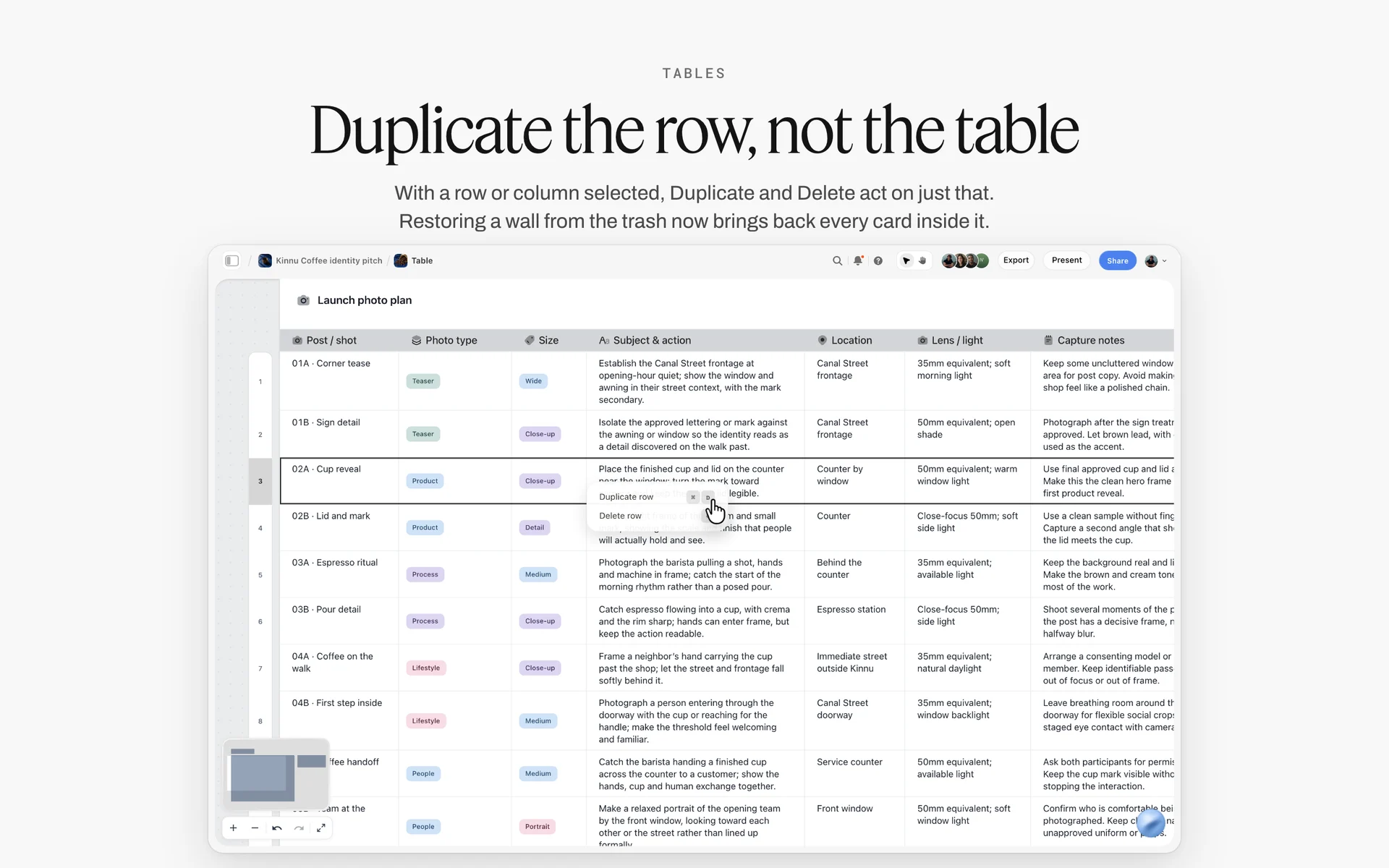
One row per asset with its type, size and notes: the matrix starts as a table like this one, then adds columns for spec, owner and date.
The Storyflow 3-Ratio Map
A campaign with 60 deliverables does not have 60 shapes. It has three, and a handful of crops. Seeing that early is what keeps a shoot from becoming three shoots.
What the map says
The Storyflow 3-Ratio Map is our editorial recommendation for sizing a campaign: in Storyflow, every row of the asset matrix gets one of three master ratios (9:16 vertical, 4:5 feed or 16:9 horizontal), every other ratio a placement asks for is recorded as a crop of the nearest master, and the shot list is planned so each key moment can be framed for all three. The number is three because the placements most campaigns buy recommend those three shapes on their own spec pages.
Why three: what the platforms recommend, as of November 2026
On 15 November 2026, Meta's Ads Guide gave 9:16 for Instagram Reels ads and Instagram Stories ads, and 4:5 for Facebook Feed video and Instagram Feed images. TikTok's video ad specifications listed 9:16 as the recommended In-Feed ratio. Google's video ads specs for in-video ads on YouTube listed 16:9, 9:16 and 1:1. LinkedIn's video ad specs listed 4:5 as the recommended vertical ratio, with 16:9, 1:1 and 9:16 also accepted. Three masters cover every one of those recommendations.
Where 1:1 and 1.91:1 fit
Square and wide-horizontal shapes still appear in matrices: YouTube in-video ads accept 1:1, and LinkedIn's single image ad specs recommend 1.91:1 (1,200 x 628) for horizontal images. Treat them as crops. A 1:1 is cut from the 4:5 master (it loses a fifth of the height), and a 1.91:1 is cut from the 16:9 master (it loses a little height top and bottom). Write "crop of 4:5" or "crop of 16:9" in the master column so the editor and designer know where to start.
How the map shapes the shoot
A director who knows that 22 rows are 9:16, 14 are 4:5 and 9 are 16:9 frames differently from one who was told "it's for social". The subject sits in the centre third of the frame, headroom is left for a 9:16 crop, and every hero shot gets a protection pass wide enough for 16:9. In Storyflow, the three masters become three headings on the shot list wall, and each shot card notes which masters it must serve.
| Master ratio | Typical placements (as of November 2026) | Crops cut from it | What the shoot must protect |
|---|---|---|---|
9:16 vertical | Instagram Reels and Stories, TikTok In-Feed, YouTube Shorts and vertical in-video ads, LinkedIn vertical video | None usually; it is the tallest shape | Headroom, and keep faces and product clear of the bottom 35% where the interface sits on Reels and Stories |
4:5 feed | Facebook Feed image and video, Instagram Feed image, LinkedIn vertical image and video | 1:1 square | Width for a centred subject; enough top and bottom for the square cut |
16:9 horizontal | YouTube in-stream and in-feed, LinkedIn horizontal video, websites and screens | 1.91:1 wide image | Room on both sides; the product off the frame edges |
What Goes in an Asset Matrix: The Columns
An asset matrix earns its place when anyone on the team can answer "what is this file, where does it go, who makes it, when is it due and what state is it in" from one row. The columns below do that with as few cells as possible.
| Column | What it holds | Example | Why it is there |
|---|---|---|---|
ID | A short unique code | FF-IG-RL-15-A | Lets people refer to a row in a message without describing it |
Channel | The platform | Groups rows for the media team | |
Placement | Where on the platform | Reels ad | Specs differ by placement, not by channel |
Format | The kind of file | Video, MP4 | Tells the maker which tool to open |
Master ratio | One of 9:16, 4:5, 16:9 | 9:16 | The 3-Ratio Map |
Ratio and size | The delivered shape and resolution | 9:16, 1,440 x 2,560 | Read from the platform page on the day |
Duration | Length in seconds, or "static" | 15 s | Lengths drive the edit plan |
Copy limits | The visible or maximum characters for each text field | Primary text 44 | Copy written to the limit, not cut to it |
Spec source and date | The page the spec came from and when it was read | Meta Ads Guide, 15 Nov 2026 | Specs change; the date tells you when to re-read |
Variant | Message, market, language, version | Message A, UK, EN | One file per variant |
File name | The agreed name | TFO_FirstFrost_IG-RL_15s_9x16_A_EN_v01 | Decided before the file exists |
Owner | The one person who makes it | Sami (motion) | One name per row |
Due | The delivery date | 2027-01-12 | Kept in due-date order |
Status | Where it is | In review | Not started, Blocked, In progress, In review, Done, Archived |
Identity columns: ID, channel, placement
The ID is the most underrated column on any matrix. "FF-IG-RL-15-A" is faster to type in a message than "the 15-second Reels cut, message A" and impossible to confuse with the Stories cut. Build it from tokens that already exist in other columns (campaign, channel, placement, length, variant), so it can be written without thinking.
Spec columns: format, ratios, duration, copy limits
The spec columns are the part people copy from an old matrix, and that is how out-of-date specs reach a new campaign. Every spec cell should be traceable to a page read for this campaign, which is why the source and date column exists. When a platform changes a spec mid-campaign, the date tells you which rows were planned against the old one.
Copy columns: visible length versus maximum
Platforms often publish two numbers for text: the length that shows before truncation and the hard maximum. LinkedIn's video and image ad pages, as of November 2026, recommend introductory text of up to 150 characters to avoid truncation, with a maximum of 3,000. Write the visible number in the matrix. Copy written to the maximum gets cut by the interface; copy written to the visible length gets read.
People and date columns: owner, due, status
One owner per row, even when two people touch the file. The owner chases the second person. In Storyflow, the person column names someone already on the board, the date column holds the due date, and the status column offers six fixed options, which is enough to run a matrix without inventing a workflow. Empty date, status and person cells show a hint, so a row nobody owns is visible at a glance.
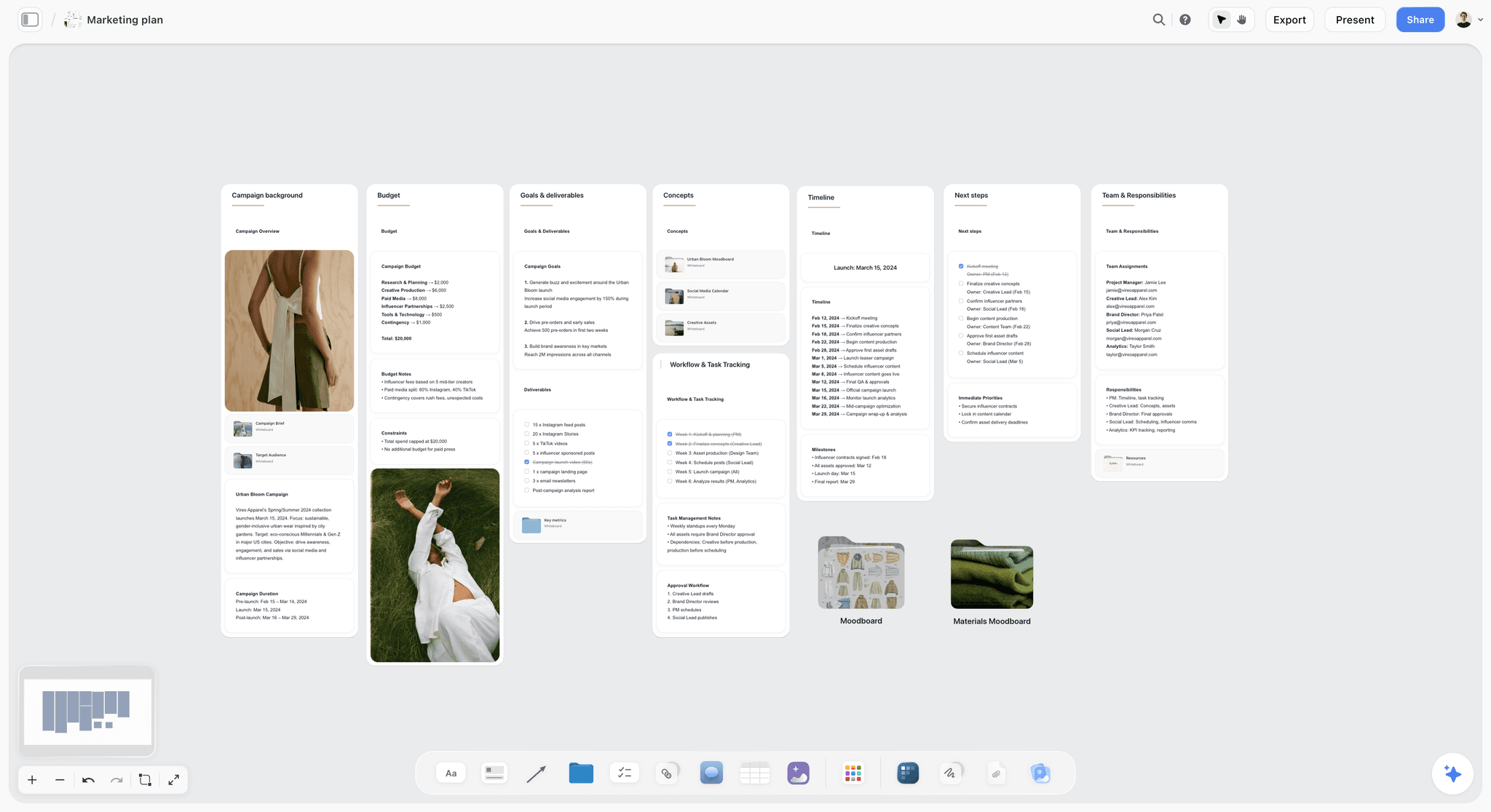
The campaign plan holds the budget and the channel list; the asset matrix belongs on the same board, one wall to the right, so a new placement in the plan shows up as missing rows in the matrix.
Asset Matrix vs Media Plan
An asset matrix lists every file the campaign must deliver, with its specs, owner, date and status; a media plan decides where the budget goes, on which placements, when and for which audience; in Storyflow the matrix is a table on the same board as the key visual, and the media plan sits beside it as a document or a linked file. They are different documents with different owners, and confusing them is how campaigns end up with a beautiful plan and a missing Stories cut.
| Asset matrix | Media plan | |
|---|---|---|
The question it answers | What files do we make, at what specs, by whom, by when? | Where do we spend, on which placements, when, for whom? |
Owner | Producer or project lead, with the creative director | Media planner or the client's media agency |
One row is | One delivered file | One placement or flight, with budget and audience |
Key numbers | Ratios, resolutions, durations, character limits, dates | Budget, impressions, reach, frequency, flight dates |
Changes when | Specs change, a variant is added, a file is approved | Budget shifts, performance data comes in |
What breaks without it | Missing sizes, wrong safe zones, last-minute cuts | Money spent in the wrong place or at the wrong time |
Where it lives in Storyflow | A table with status, person and date columns beside the key visual and the shot list | A document or a linked file on the same board, read by whoever writes the matrix |
Who owns which, and where they meet
The media planner owns the placements and the flight dates; the producer owns the files. They meet at one point: every placement in the media plan must have at least one row in the matrix, and every row in the matrix must point to a placement in the plan. Check that both ways before the shoot. A placement with no rows is a missing asset; a row with no placement is work nobody is paying to run.
When there is no media plan
Small campaigns and organic campaigns often have no media plan, only a list of channels the client wants to be on. In that case the matrix does both jobs, and you add one column for the posting date or flight. Keep it honest: Storyflow has no calendar view and does not schedule or publish posts, so the posting dates live in a date column with rows kept in date order, and a social scheduler publishes them. The campaign calendar page shows that layout.
Meta Placements: Instagram and Facebook Specs as of November 2026
Meta publishes its ad specs per placement in the Ads Guide. The numbers below were read on 15 November 2026 from the pages linked in each row. Re-read them on the day you lock your matrix; Meta updates the guide without notice.
| Placement | Ratio | Resolution | File types and max size | Length | Copy | Source |
|---|---|---|---|---|---|---|
Instagram Feed image | 4:5 | 1,440 x 1,800 | JPG or PNG, up to 30 MB | Static | Primary text 125, headline 40 | |
Instagram Reels video | 9:16 | 1,440 x 2,560 | MP4 or MOV, up to 4 GB | 0 seconds to 15 minutes | Primary text 44 | |
Instagram Stories video | 9:16 | 1,440 x 2,560 | MP4, MOV or GIF, up to 4 GB | 1 second to 60 minutes | Primary text 125 | |
Facebook Feed image | 4:5 | 1,440 x 1,800 (minimum 600 x 750) | JPG or PNG, up to 30 MB | Static | Primary text 50 to 150, headline 27 | |
Facebook Feed video | 4:5 | 1,440 x 1,800 | MP4, MOV or GIF, up to 4 GB | 1 second to 241 minutes | Primary text 50 to 150, headline 27 |
Reels and Stories safe zones
Both the Reels and the Stories pages, as of November 2026, advise keeping about 14% of the top, 35% of the bottom and 6% of each side free of text, logos and other key elements, so the profile icon and the call to action do not cover them. On a 1,440 x 2,560 frame, that is roughly the top 358 pixels, the bottom 896 pixels and 86 pixels on each side. Write the safe zone into the matrix row and into the shot list, not only into the design file: the director needs to know that the product cannot live in the bottom third of a vertical frame.
What the long maximums do not mean
A Reels ad can technically run to 15 minutes and a Facebook Feed video to 241 minutes. Those are ceilings, not targets. The matrix should hold the length you will deliver (6, 15, 30 seconds), and the maximum belongs only in the spec source note. A long limit is a reason to be careful with assumptions, not permission to deliver long.

Campaign references beside the matrix: when a row says 9:16, the art director can check whether the reference frames even survive a vertical crop.
TikTok In-Feed Specs as of November 2026
TikTok splits its In-Feed video ads into Spark Ads, which use an organic post, and Non-Spark Ads, which are uploaded as ads. Their specs differ, and the matrix should say which one each row is. Read on 15 November 2026 from TikTok's video ad specifications and its Auction In-Feed Ads page, both marked last updated June 2026.
| Ad type | Ratios | Minimum resolution | File types and size | Duration | Text |
|---|---|---|---|---|---|
Non-Spark In-Feed | 9:16 (recommended), 16:9, 1:1 | 540 x 960 for 9:16; 960 x 540 for 16:9; 640 x 640 for 1:1 | .mp4, .mov, .mpeg, .3gp, .avi; up to 500 MB; bitrate at least 516 kbps | Up to 10 minutes | Caption in white in a fixed font; no clickable links, @ mentions or hashtags |
Spark Ads (from an organic post) | Not listed | Not listed | .mp4 or .mov | No restrictions | Taken from the organic post; at most 4 lines shown, including emojis |
Brand name (both) | At most 20 characters (10 in Chinese, Japanese and Korean) |
Spark or Non-Spark changes the row
A Spark Ad row is really two jobs: an organic post on the brand's or a creator's account, and the ad that boosts it. Its caption is the organic caption, which means the copywriter writes it for the feed and the media team cannot change it in the ad. A Non-Spark row is a file uploaded as an ad, with an ad caption that cannot carry links, @ mentions or hashtags. If the matrix does not say which, the copy will be written for the wrong one.
Safe zones on TikTok
TikTok's page, as of November 2026, says the safe zone depends on the dimension, the caption length and any extra formats, and offers downloadable safe zone files rather than one percentage. Download them on the day, put them on the Storyflow board as images beside the 9:16 rows, and let the designer overlay them. Do not reuse the Meta percentages for TikTok.
YouTube Ad Formats and Specs as of November 2026
YouTube sells video ads through Google Ads, and Google's help centre publishes the formats and the asset specs on separate pages. Read on 15 November 2026 from About video ad formats and Video ads specs and format requirements.
| Format | Length rule (as of November 2026) | How it behaves |
|---|---|---|
Skippable in-stream | No maximum; under 3 minutes recommended | Viewers can skip after 5 seconds |
In-feed video | No maximum | A thumbnail from your video with some text; people click to watch |
Non-skippable in-stream | 15 to 60 seconds, depending on the campaign subtype | Viewers cannot skip |
Bumper | 6 seconds (at least 5 seconds) | Short, non-skippable |
YouTube Shorts ads | Under 60 seconds recommended | Viewers can skip at once by swiping up or down |
Masthead | No maximum; more than 10 seconds recommended | On desktop, autoplays without sound for up to 30 seconds |
| Asset (in-video ads on YouTube) | Specs as of November 2026 |
|---|---|
Video, horizontal | 16:9, 1,920 x 1,080, 15 seconds recommended |
Video, vertical | 9:16, 1,080 x 1,920, 15 seconds recommended |
Video, square | 1:1, 1,080 x 1,080, 15 seconds recommended |
Files | .MPG (MPEG-2 or MPEG-4) recommended; many other formats accepted; under 256 GB |
Headlines | 2 lines, 40 characters per line |
Descriptions | 2 lines, 35 characters per line |
Masthead text | Headline up to 40, description up to 60, call to action up to 15 characters |
Video action campaign text | Headline 30, long headline 90, description 90, call to action 10 characters |
Organic Shorts are a different row
An organic Short is not an ad and has its own rule. YouTube's help page on three-minute Shorts says that, for videos uploaded on or after 15 October 2024, a square or vertical video up to three minutes long is categorised as a Short. If the campaign posts organic Shorts and buys Shorts ads, those are separate rows: the organic one can run longer, the ad is recommended under 60 seconds.
Six seconds is its own edit
A bumper is not a 15-second cut trimmed short. Six seconds holds one idea and a logo. Give every bumper row its own owner and its own line in the edit plan, and plan the shot that carries it at the shoot. Many matrices list "6s" as a variant of the 15 and discover in the edit that no shot works alone.
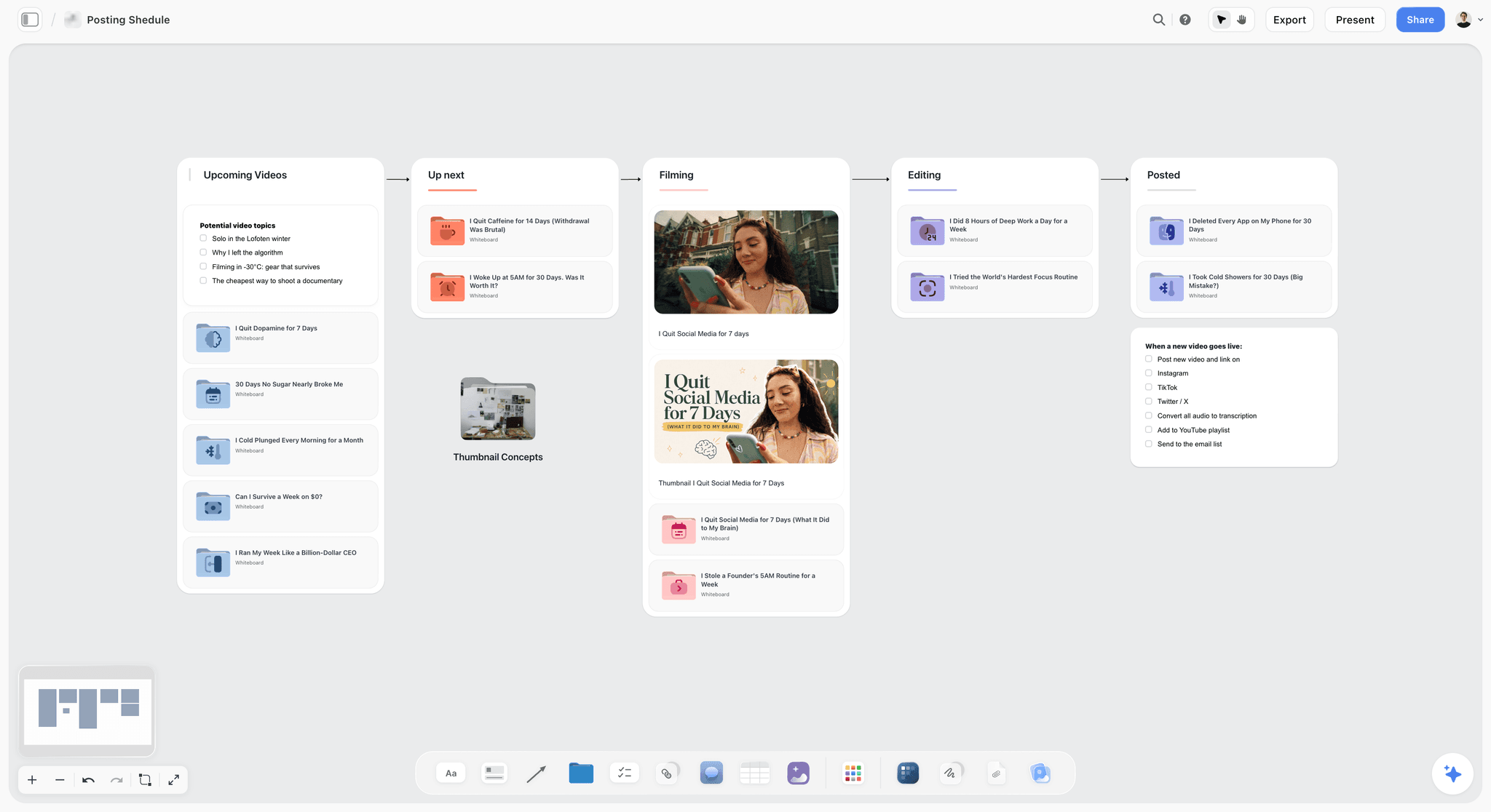
Organic posts move through a pipeline of their own; on a campaign board they are rows in the matrix with a posting date, published by a scheduler, not by Storyflow.
LinkedIn Specs as of November 2026
LinkedIn publishes separate pages for each Sponsored Content format. Read on 15 November 2026 from Video ads advertising specifications and Single image ads advertising specifications.
| Format | Ratios and recommended sizes | Length | File | Text |
|---|---|---|---|---|
Video ad | 16:9 at 1,920 x 1,080 or 1,200 x 675; 1:1; 4:5 at 720 x 900 (recommended ratio); 9:16 at 720 x 1,280 | 3 seconds to 30 minutes; 15 to 30 seconds recommended; in-stream up to 90 seconds | MP4, 75 KB to 500 MB; captions as an SRT file | Intro text 150 to avoid truncation (3,000 max); headline 70 to avoid truncation (200 max) |
Single image ad | 1.91:1 at 1,200 x 628 (recommended); 1:1 at 1,200 x 1,200; 4:5 at 720 x 900 (recommended) | Static | JPG, PNG or GIF; up to 5 MB | Intro text 150 (3,000 max); headline 70 (200 max); description 100 (300 max) |
Image versus video on LinkedIn
LinkedIn is the one placement in most matrices where 1.91:1 still appears as a recommendation, so it is the most common source of a crop nobody planned. If the key visual was designed only at 4:5 and 9:16, the LinkedIn horizontal image needs a 16:9 master or a layout redesigned from scratch. Decide in the matrix, not at delivery.
Loops and length
LinkedIn's video page notes that videos under 30 seconds loop until they reach 30 seconds of playback, while videos over 30 seconds play once. A 15-second LinkedIn cut will therefore be seen twice by anyone who watches to the end. Write that into the edit note for the row: the end should cut back to the start cleanly.
Organic Posts and Paid Placements in the Same Matrix
Most campaigns run both, and treating them as one list hides the differences that cost time.
Paid rows need placement specs
A paid row is governed by the ad platform's specs for that placement: ratio, resolution, safe zones, the copy fields the ad format has. These come from the Ads Guide and help pages above. The same video may run organically and as an ad, but the ad version carries ad copy fields (primary text, headline) that the organic post does not have.
Organic rows need a posting date and an account
An organic row needs the account it posts from (the brand, a creator, a partner), the posting date and the caption, which on a Spark Ad becomes the ad caption. Mark organic rows clearly; a creator partner's post may need the creator's approval before it can be boosted, which is a dependency the matrix should show as Blocked until confirmed.
One file, two rows
When one file serves both, give it two rows with the same file name and different placement and copy columns. It looks redundant. It is the only way the copywriter sees that the same video needs an ad headline and an organic caption, and the only way the producer sees both as delivered.
| Row type | Governed by | Extra columns | Typical status blocker |
|---|---|---|---|
Paid placement | The ad platform's spec page for that placement | Ad copy fields, flight from the media plan | Spec change, copy approval |
Organic brand post | The platform's organic upload rules | Posting date, account, caption | Approval of the caption |
Creator or partner post | The creator's agreement and the platform | Creator, usage rights, boost permission | Creator approval or usage terms |
Owned and other (site, email, screens) | The client's or venue's spec sheet | Spec sheet source | Spec sheet not received |
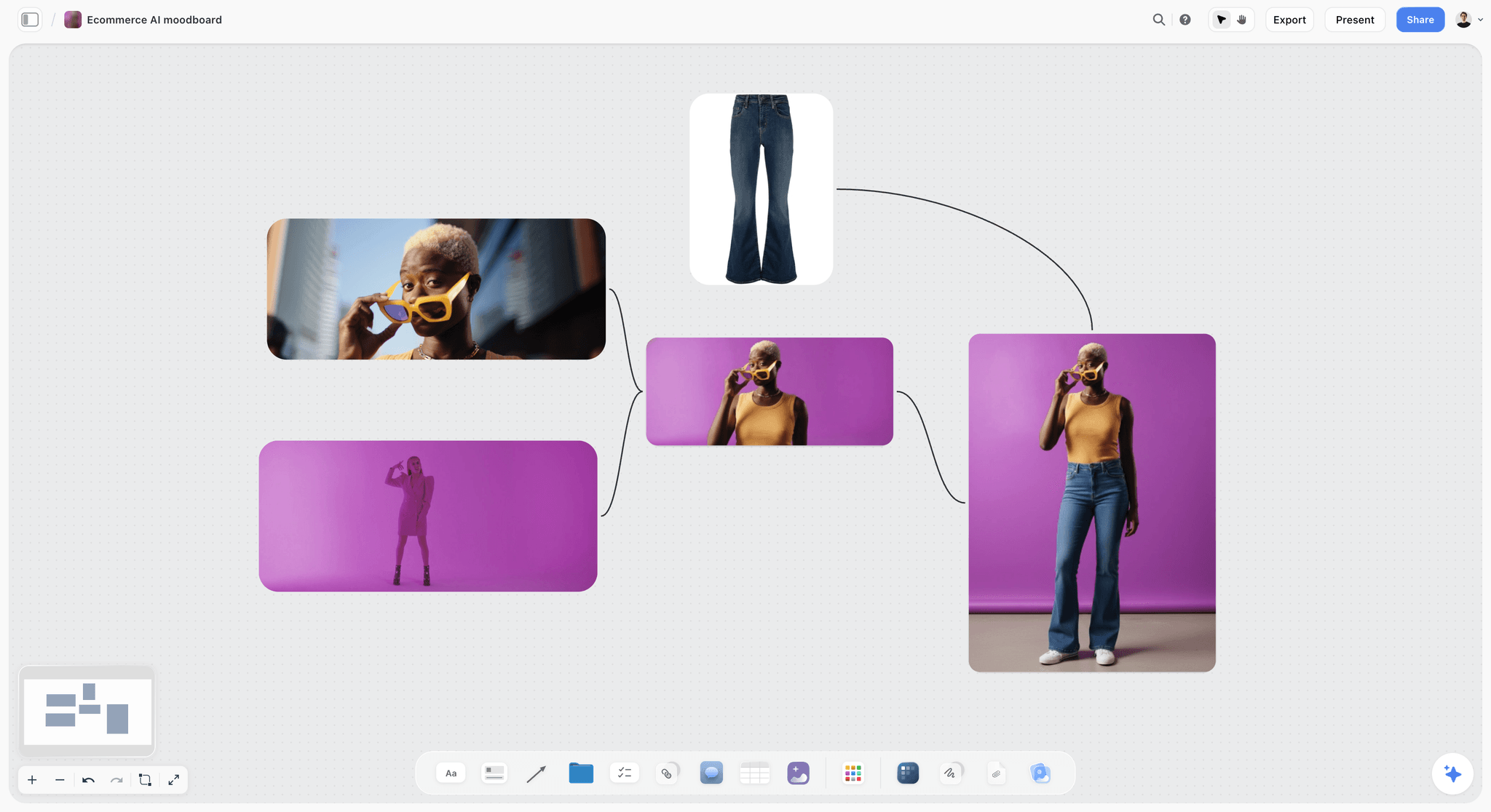
Product stills grouped by look: in a matrix, each look that ships becomes rows per placement, and an image made for 4:5 shows at once whether it survives a 9:16 crop.
The Asset Matrix Template: Copy This Table
This is a filled matrix for First Frost, a winter campaign for Tallowfen Outdoor, a fictional outerwear brand, made by Brindlecove, a fictional six-person studio. It covers one message and one language; a second message or market would add a row per file. Specs are the ones read on 15 November 2026 above. Names and dates are illustrative.
| ID | Channel | Placement | Format | Master | Ratio and size | Duration | Copy limit | File name | Owner | Due | Status |
|---|---|---|---|---|---|---|---|---|---|---|---|
FF-IG-RL-15 | Reels ad | Video MP4 | 9:16 | 9:16, 1,440 x 2,560 | 15 s | Primary text 44 | TFO_FF_IG-RL_15s_9x16_A_EN_v01 | Sami | 2027-01-08 | In progress | |
FF-IG-ST-15 | Stories ad | Video MP4 | 9:16 | 9:16, 1,440 x 2,560 | 15 s | Primary text 125 | TFO_FF_IG-ST_15s_9x16_A_EN_v01 | Sami | 2027-01-08 | Not started | |
FF-IG-FD-IMG | Feed image ad | Image JPG | 4:5 | 4:5, 1,440 x 1,800 | Static | Primary text 125, headline 40 | TFO_FF_IG-FD_IMG_4x5_A_EN_v01 | Rhea | 2027-01-06 | In review | |
FF-FB-FD-15 | Feed video ad | Video MP4 | 4:5 | 4:5, 1,440 x 1,800 | 15 s | Primary text 50 to 150, headline 27 | TFO_FF_FB-FD_15s_4x5_A_EN_v01 | Sami | 2027-01-08 | Not started | |
FF-FB-FD-IMG | Feed image ad | Image JPG | 4:5 | 4:5, 1,440 x 1,800 | Static | Primary text 50 to 150, headline 27 | TFO_FF_FB-FD_IMG_4x5_A_EN_v01 | Rhea | 2027-01-06 | In review | |
FF-TT-IF-15 | TikTok | In-Feed, Non-Spark | Video MP4 | 9:16 | 9:16, at least 540 x 960 | 15 s | Brand name 20 | TFO_FF_TT-IF_15s_9x16_A_EN_v01 | Sami | 2027-01-08 | Not started |
FF-TT-SP-30 | TikTok | In-Feed, Spark (creator post) | Video MP4 | 9:16 | 9:16 | 30 s | 4 lines shown | TFO_FF_TT-SP_30s_9x16_A_EN_v01 | Lena (partnerships) | 2027-01-10 | Blocked |
FF-YT-IS-30 | YouTube | Skippable in-stream | Video MP4 | 16:9 | 16:9, 1,920 x 1,080 | 30 s | Headline 2 x 40, description 2 x 35 | TFO_FF_YT-IS_30s_16x9_A_EN_v01 | Sami | 2027-01-12 | Not started |
FF-YT-BM-06 | YouTube | Bumper | Video MP4 | 16:9 | 16:9, 1,920 x 1,080 | 6 s | None | TFO_FF_YT-BM_06s_16x9_A_EN_v01 | Sami | 2027-01-12 | Not started |
FF-YT-SH-15 | YouTube | Shorts ad | Video MP4 | 9:16 | 9:16, 1,080 x 1,920 | 15 s | Headline 2 x 40 | TFO_FF_YT-SH_15s_9x16_A_EN_v01 | Sami | 2027-01-12 | Not started |
FF-LI-VD-15 | Video ad | Video MP4 | 4:5 | 4:5, 720 x 900 | 15 s | Intro 150, headline 70 | TFO_FF_LI-VD_15s_4x5_A_EN_v01 | Sami | 2027-01-14 | Not started | |
FF-LI-IMG | Single image ad | Image JPG | 16:9 (crop) | 1.91:1, 1,200 x 628 | Static | Intro 150, headline 70 | TFO_FF_LI-IMG_1p91x1_A_EN_v01 | Rhea | 2027-01-14 | Not started | |
FF-WEB-HERO | Website | Homepage hero | Image JPG | 16:9 | Client spec sheet | Static | Client spec sheet | TFO_FF_WEB-HERO_16x9_A_EN_v01 | Rhea | 2027-01-05 | Blocked |
FF-KV-MASTER | All | Key visual master | Layered file | 4:5 | 4:5, full resolution | Static | None | TFO_FF_KV_MASTER_4x5_v03 | Rhea | 2027-01-03 | Done |
Two rows are Blocked on purpose. The creator's Spark post waits on the creator's approval of the caption, and the website hero waits on the client's spec sheet. Blocked rows are the matrix doing its job: the gap is visible while there is still time to chase it, rather than discovered on the morning of launch.
Versioning and File Naming
A matrix with 40 rows produces 120 files by delivery, counting rounds. Without a naming pattern decided on day one, the folder holds "final_v2_FINAL_use-this.mp4" by week two.
| Token | What it encodes | Example | Rule |
|---|---|---|---|
Brand | Client code | TFO | Three letters, agreed with the client |
Campaign | Campaign code | FF | Two or three letters |
Placement | Channel and placement | IG-RL | Channel code, hyphen, placement code |
Length | Duration or IMG | 15s | Two digits plus s; IMG for stills |
Ratio | Delivered ratio | 9x16 | x instead of a colon, which some systems refuse in file names |
Variant | Message or version | A | One letter per message |
Language | Language or market | EN | Two-letter code |
Version | Internal round | v01 | Two digits, so v10 sorts after v09 |
The name pattern
Write the pattern once, at the top of the matrix wall, and generate every name from the row's columns: Brand_Campaign_Placement_Length_Ratio_Variant_Language_Version. Underscores separate tokens and hyphens join words inside a token, so the name splits cleanly. The point is not elegance. It is that anyone can read a file name in a delivery folder and find its row in the matrix.
Dates in names, if you use them
If your delivery process needs dates in file names, write them in the ISO 8601 order, year then month then day (2027-01-08). The standard's own design means that, as the encyclopaedia entry on ISO 8601 explains, the alphabetical order of such dates matches their chronological order, so a folder sorted by name is sorted by date. The same order works for the due column in the matrix.
Versions and rounds
The version token counts internal rounds, not client rounds. Reset it only when the file changes shape (a new master ratio or a new length), because that is a new row. When a client approves a file, change the row's status to Done, and leave the approved version number in the file name column so the delivered file can be matched to its approval.
Markets and languages
Every language is a file, and every file is a row. A two-market campaign with ten placements and three lengths is 60 rows, not 30. That multiplication is the reason the matrix exists, and the reason to argue for fewer placements before the shoot rather than fewer languages after it.

A status tracker beside the plan: in a matrix, the same idea is a status column on every row, so the producer reads progress across the whole campaign in one scan.
How the Matrix Drives the Shoot List
The matrix is written in the language of delivery. The shoot list is written in the language of the set. Translating one into the other is the producer's most valuable hour on a campaign, and the one most often skipped.
Count rows per master ratio and per moment
Before anyone writes a shot, count. How many rows are 9:16, 4:5 and 16:9? For each key moment in the script or the storyboard, which rows does it appear in? A moment that appears in 18 rows, across all three masters, is a hero shot that needs full coverage. A moment that appears only in two 16:9 rows can be shot once, wide.
| Moment | Rows using it | Masters needed | What the shoot plan says |
|---|---|---|---|
Jacket zipped at the trailhead (hero) | 12 | 9:16, 4:5, 16:9 | Lock-off framed for 16:9 with the subject centred; a second pass framed for 9:16 with headroom |
Breath in cold air close-up | 8 | 9:16, 4:5 | Tight, centred; protect the bottom third for vertical captions |
Product detail: the hood seam | 6 | 4:5, 16:9 | Macro on a clean background for stills and the bumper |
Wide landscape with walker | 4 | 16:9 | One take, wide; used in the 30-second in-stream only |
Packshot on snow | 14 | 9:16, 4:5, 16:9 | Shot square-on with room on every side for all three crops |
Protection, not three shoots

A shoot workflow with delivery as its last stage: the matrix's counts are what the brief and pre-production stages should be sized from.
Framing for three masters does not mean three set-ups for every shot. It means framing the master for the widest ratio the moment needs, keeping the subject in the area all three crops share, and adding a second pass only where the vertical crop would cut the subject. In Storyflow, the shot list wall has three headings (9:16, 4:5, 16:9), and each shot card notes the masters it must serve and whether it needs a second pass.
The production tools that help
Storyflow's Shotlist tool drops four walls, Shot 1 to Shot 4, each with a picture box, a Description, a Shots required checklist, Setup and Equipment, and a "+" on the last wall adds the next shot. Use the Shots required checklist for the masters ("9:16 pass", "16:9 pass") so the camera team ticks them on set. Neither the in-app AI nor the ChatGPT plugin or Claude connector can drop the Shotlist tool; from a chat, the assistant builds shot cards on walls instead, as the Claude shot list and ChatGPT shot list pages show. The Brief tool's first wall, The work, carries a table with What kind, Length, Format, How many and Where it goes, which is a good seed for the matrix before you widen it to full columns. Both tools drop empty, labelled cards; neither fills itself from the matrix.
What the matrix tells the edit and design teams
The same counts size the post-production plan: rows per length tell the editor how many cuts to build, rows per master tell the designer how many layout adaptations to make, and the copy limit column tells the copywriter how long each line can be. In Storyflow, those counts can be written as a note at the top of each team's wall, so nobody plans from an old version of the matrix.
Worked Example: Tallowfen Outdoor's First Frost Campaign
The example follows Brindlecove, a fictional six-person studio, through the matrix for First Frost, a fictional winter campaign for Tallowfen Outdoor. All names, counts and dates are illustrative.
The brief and the media plan
The brief asked for one key visual, a 30-second film with 15 and 6-second cutdowns, and static social for a January launch. The client's media agency sent a plan with placements on Instagram, Facebook, TikTok, YouTube and LinkedIn, plus the brand's own site. Mira, the producer, created one Storyflow board for the campaign: the brief on the left, the media plan as a linked document beside it, the key visual in the middle, and an empty wall to the right titled Asset matrix.
From placements to rows
Mira listed placements first, one row each, then added lengths and stills. The first pass had 14 rows. Then she checked the media plan line by line against the matrix and found one placement with no row (the LinkedIn single image ad) and one row with no placement (a Facebook Stories cut someone had copied from an old campaign). She added the first and archived the second, and the live matrix stood at the 14 rows of the template above, for one message in English.
The ratio count that changed the shoot
Mira counted rows per master: five 9:16, five 4:5, four 16:9. The director had planned a shoot framed for 16:9 with vertical crops "in post". The count showed that most deliverables were vertical (ten of fourteen rows at 9:16 or 4:5), and that the hero moment appeared in rows across all three masters. The shot list changed: the hero and packshot got a dedicated vertical pass, and the landscape wide stayed 16:9 only, because only the in-stream cut used it.
Copy written to the limit

Design adaptations per master ratio sit beside the layouts they come from, so a 4:5 layout and its 1:1 crop are reviewed together.
The copywriter wrote every line against the copy limit column. The Reels primary text was written at 44 characters, the Feed primary text at 125, and the YouTube headline as two 40-character lines. When the client asked for a longer Reels line, the matrix row was the answer: the Reels page, as read on 15 November 2026, gives 44 characters of primary text, so the longer line moved to the Stories row, which allows 125.
Running to launch
Every Monday, Mira asked what had changed on the board in the last week and who had changed it, then walked the matrix row by row in a 20-minute status call. Rows moved from Not started to In progress to In review as files went up beside them on the board. The website hero stayed Blocked for nine days, visibly, until the client sent its spec sheet. At launch, 13 rows were Done and one, the creator's Spark post, launched three days later than the others, with everyone aware of it since the day it went Blocked.

A studio tracker shows which campaign is in production; the asset matrix on each campaign's own board shows which of its files are not.
Running the Matrix Through Production
A matrix built at the start and never updated is a list of good intentions. These habits keep it the live record of what is done.
Status is the only column that moves daily
Specs, names and owners change rarely. Status changes every day. In Storyflow, the six fixed options are enough: Not started, In progress, In review (the file is on the board beside its row), Done (approved), Blocked (waiting on someone outside the team) and Archived (cut from the campaign). Resist adding a seventh; every custom status is a meeting about what it means.
Owners are people on the board
Name people, not teams. "Design" is not an owner. In Storyflow, the person column links to people who already have access to the board, which means every owner can open the board, see their rows and post files beside them. Invite freelancers to the board; anyone a paid member invites joins free.
Due dates in order
Storyflow tables do not sort, so keep rows in due-date order as you add them, and add a new row in its date position, not at the bottom. A matrix whose top rows are the next ones due reads like a to-do list. One whose rows are in the order they were thought of reads like a history.
The change report before every status call
Before a status call, ask what changed on the board. The in-app Storyflow AI can report what changed and who changed it since its last turn, over a day, a week, a month or all time; ChatGPT and Claude, through the plugin and connector, can report the last day or week. The report tells you which rows to discuss and which to skip.
Where to Track Campaign Deliverables by Team and Channel
The question behind most asset matrices is simpler than the matrix: "where is everything, and who has it?" A matrix answers it if it can be read two ways, by team and by channel, without being rebuilt.
By team
The person column answers "what does Sami owe this week?" when the rows are in due-date order: scan the owner column. For a larger team, split the matrix into one wall per discipline (motion, design, copy, partnerships), each with its own table and the same columns, and keep a summary table on top with a count of rows per status per wall.
By channel
The channel and placement columns answer "is Instagram ready?" For a media agency that wants to see only its placements, export the board as a PDF or ask the in-app AI to turn the matrix into a spreadsheet file (.xlsx) for them to filter, and keep the Storyflow table as the version that changes.
Can you track every campaign deliverable in one place?
Yes, as long as one place means one table per campaign, not one table for every campaign the studio runs. Across campaigns, a studio tracker (a kanban board or a project management app) holds one card per campaign; inside each campaign, the matrix holds one row per file. In Storyflow, the tracker board can link to each campaign's board, so the studio view and the file view are one click apart; the guide to a campaign status board covers the studio view.
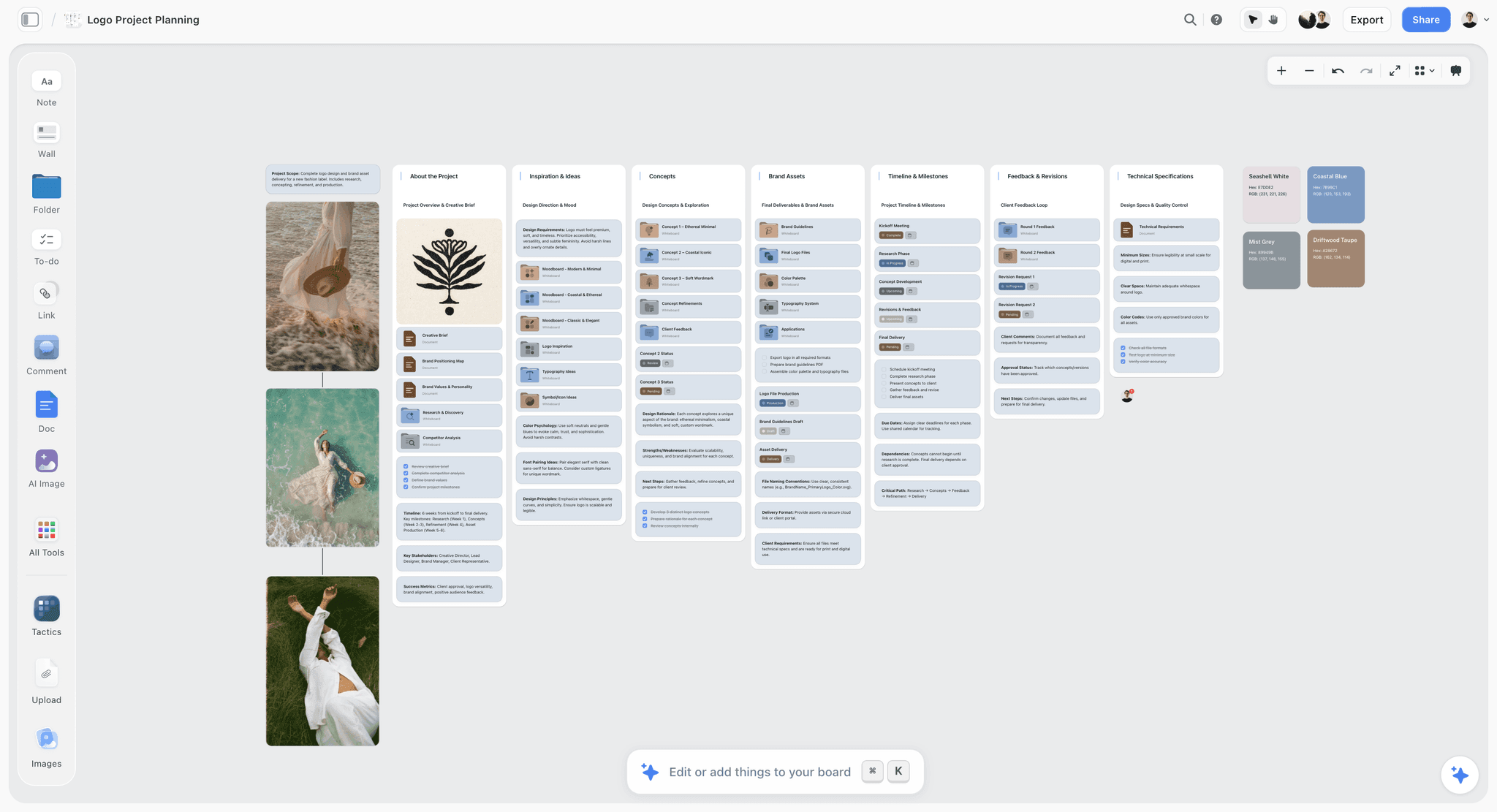
A Technical Specifications wall beside the brand assets: the same idea at campaign scale is a spec source column on every row of the matrix.
Do This in ChatGPT or Claude
If you plan campaigns in ChatGPT or Claude, the Storyflow plugin and connector let the assistant build the matrix table on the board beside the key visual, instead of producing a table in a chat that the team cannot see. This is separate from the AI inside Storyflow: the plugin runs on ChatGPT's model and your ChatGPT plan and uses no Storyflow AI credits.
Install it
In ChatGPT, open the Storyflow plugin listing, select Install plugin, sign in to Storyflow, and choose which projects ChatGPT may use; read access is always on and you decide whether it may make changes. Availability depends on your ChatGPT plan, workspace and region, and in a Business or Enterprise workspace an admin manages plugins (OpenAI's guide to plugins in ChatGPT). Mention it with @ in a chat or pick it from the + menu. In Claude, add a custom connector with the address https://mcp.storyflow.so/mcp, as Anthropic's custom connector guide describes. The Storyflow MCP page covers every assistant, and the ChatGPT campaign plan and Claude campaign plan pages show campaign boards built from a chat.
Prompts for an asset matrix
- "@Storyflow Read the First Frost board and build an Asset matrix table to the right of the key visual with columns ID, Channel, Placement, Format, Master, Ratio and size, Duration, Copy limit, File name, Owner, Due, Status."
- "Add one row per placement in the media plan document on the board. Leave the Ratio and size and Copy limit cells empty; I will fill them from the platform pages."
- "For each row, set Master to 9:16, 4:5 or 16:9 using this map: Reels, Stories, TikTok and Shorts are 9:16; Feed placements and LinkedIn video are 4:5; YouTube in-stream and the website hero are 16:9. Mark the LinkedIn image as a crop of 16:9."
- "Generate the File name for every row with the pattern Brand_Campaign_Placement_Length_Ratio_Variant_Language_Version, using TFO, FF, version v01."
- "Fill the Owner column: motion rows to Sami, still image rows to Rhea, the TikTok Spark row to Lena."
- "Count the rows per master ratio and per length, and write the counts on a note at the top of the shot list wall."
- "What changed on the First Frost board in the last week, and who changed it?"
What lands on the board
The matrix arrives as a table on the board, with the columns you named. The Owner column fills with people only when every name matches someone with access to the board; if any name matches nobody, or nobody else is on the board, the whole column becomes plain text with the names kept as written. The plugin can also build the count note, the shot list wall's headings and shot cards.
What to check by hand
Check every spec yourself on the platform's page on the day. An assistant's answer about a platform's ad specs can be out of date, and the matrix is the one document where a wrong number becomes a rejected ad. Check the master ratio for every row, because the map is a rule of thumb and a client's own placements may differ. And note that a picture attached in the chat does not reach Storyflow: for the key visual and reference frames, the plugin gives you an upload link for the board.

The same Storyflow account connects to ChatGPT as a plugin and to Claude as a custom connector, so the matrix one person builds from a chat is the table the whole team sees on the board.
Where to Build It: Storyflow vs Spreadsheets, Production Suites and Project Apps
Our pick comes first, on the basis that an asset matrix is read beside the key visual, the brief and the shot list, and Storyflow puts all four on one board; the rest are ranked by the job each kind of tool does best. This guide compares kinds of tool rather than brands on purpose.
| Approach | Best for | Specs and files beside the rows | Status and owners | Sorting and formulas | Choose it when |
|---|---|---|---|---|---|
Storyflow | A campaign matrix read beside the key visual, the brief, the references and the shot list | Yes: files and references sit on the same board as the table | Six fixed statuses, person column, date column | No sorting; rows kept in date order by hand | The team needs the matrix, the creative and the shoot plan in one view |
A spreadsheet | Large matrices with hundreds of rows, filters, formulas and pivot counts | No: files live elsewhere and are linked | Whatever columns you build | Yes | The matrix runs to hundreds of rows across many markets |
A production management suite | Scheduling crews, budgets and post-production across many jobs | Partly, depending on the product | Built in | Yes | You run many productions at once and need resourcing |
A project management app | Tasks, dependencies and workload across a team | No | Built in, with dependencies | Yes | The bottleneck is people's time across jobs, not the files |
A shared drive folder | Holding the delivered files | The files themselves | None | By name | Always, for delivery; never as the matrix |
Storyflow
Storyflow holds the matrix as a table with status, person and date columns beside the key visual, the brief, the references and the shot list, on one infinite canvas. The 3-Ratio Map becomes three headings on the shot list wall; files go up beside their rows for review; and the in-app AI or ChatGPT and Claude can build the table and report what changed. Its real limits: tables do not sort or filter, there is no calendar view, no Gantt, and Storyflow does not deliver files to platforms. Storyflow is paid-only during early access, with Plus at $7.99 a month billed annually ($9.99 monthly), and anyone a paid member invites to a board joins free. The deliverables list and campaign brief to delivery pages show the setup.
A spreadsheet
A spreadsheet is still the strongest tool for a matrix with hundreds of rows: filters by channel or owner, formulas that count rows per ratio, and every media agency can open it. Its limit is everything around the rows: the key visual, the references and the files live elsewhere, so a row describes a file it cannot show. Choose a spreadsheet instead when the matrix runs to hundreds of rows across many markets and languages; keep the creative on a board and link the sheet from it.
A production management suite
A production management suite schedules crews, kit, budgets and post-production across many jobs, which Storyflow does not attempt. Its limit for a matrix is weight: setting it up for a 15-row social campaign costs more than the matrix saves. Choose one instead when you run several productions at once and the hard problem is resourcing, not deliverables.
A project management app
A project management app tracks tasks, dependencies and workload across a team, and can show which designer is overloaded in week three. It is a poor home for specs, because a task card does not want 12 columns of spec data. Choose one instead when the bottleneck is people's time across many campaigns; keep the matrix on the campaign board and one task per owner in the app.
A shared drive folder
The delivery folder holds the files, and nothing replaces it. It is the wrong place for the matrix, because a folder cannot say what is missing. Choose a folder for delivery, always, with the folder structure mirroring the matrix's channel and placement columns.
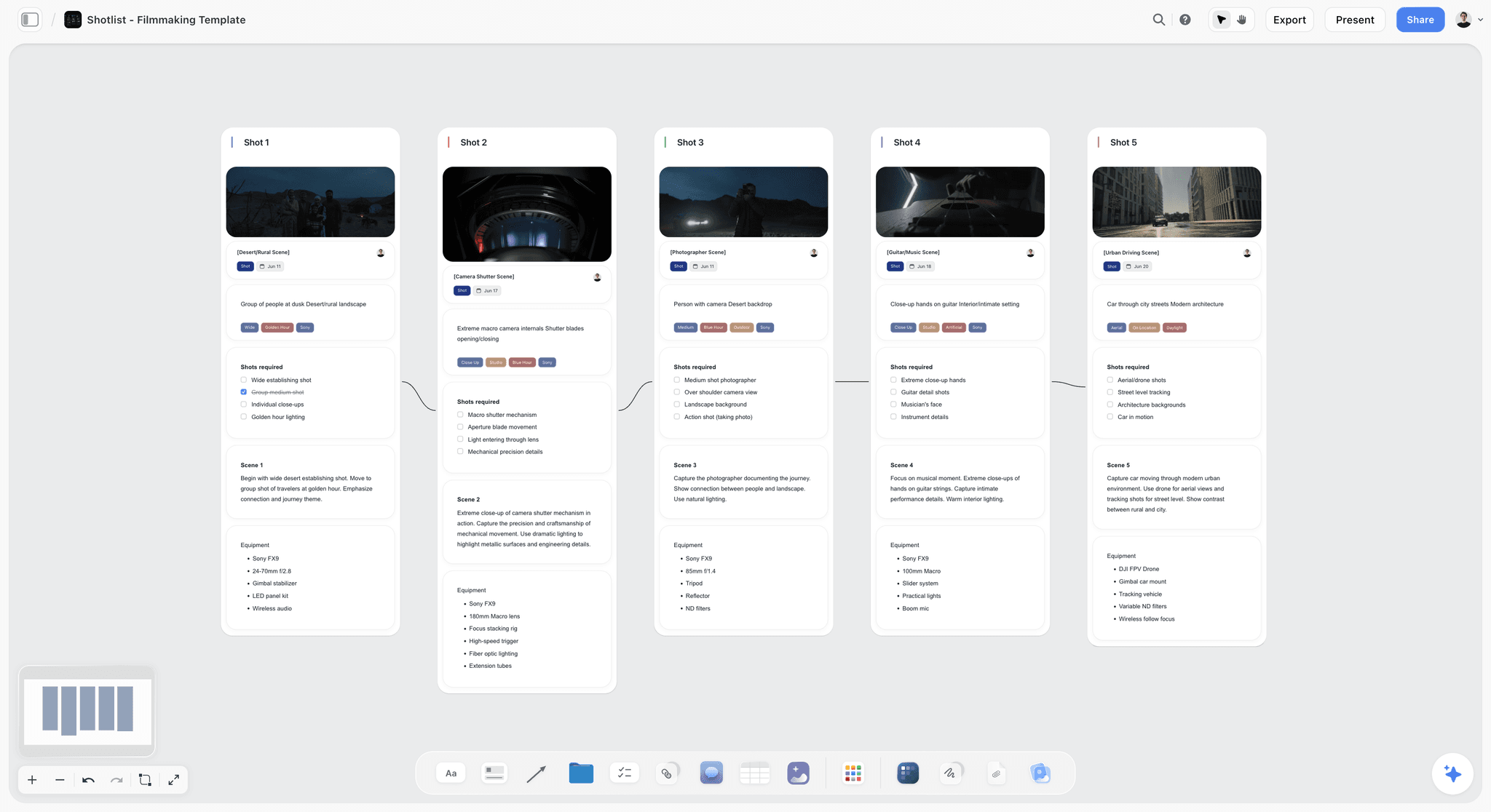
A five-shot filmmaking shotlist on a Storyflow board, each shot wall holding a frame, scene tags, a shots required checklist, scene notes and equipment
Build the matrix table from a chat
Install Storyflow in ChatGPT and ask for an asset matrix beside your key visual: one row per placement, a master ratio per row, file names from your pattern and an owner on every row. Then read every spec on the platform's own page.

Mistakes and Fixes
Mistake 1: Rows per channel, not per placement
The fix: one row per placement and per file. "Instagram, 3 videos" hides that Reels, Stories and Feed take different specs, copy limits and safe zones.
Mistake 2: Specs copied from the last campaign
The fix: read every spec from the platform's own page on the day, and write the source and the date in the row. The source column is what lets you trust the row in three months.
Mistake 3: The matrix built after the shoot
The fix: build it before the shoot list, count rows per master ratio, and give the director the counts. A matrix written after the shoot is a list of what you cannot make.
Mistake 4: Vertical "in post"
The fix: plan vertical coverage on set. If most rows are 9:16, cropping a 16:9 frame loses most of the picture; the hero moment needs its own vertical pass.
Mistake 5: Copy cut to fit
The fix: give the copywriter the visible length for each field and write to it. Reels primary text is 44 characters on the page read today, not the 125 of Stories.
Mistake 6: Teams as owners
The fix: one person per row. "Design" does not answer messages; Rhea does.
Mistake 7: Statuses nobody agrees on
The fix: use the six fixed statuses and define Done as "approved", not "exported". A row marked Done that the client has not seen is the most expensive kind of wrong.
Mistake 8: Matrix and media plan out of step
The fix: check both ways before the shoot and again before launch: every placement has a row, every row has a placement. Archive rows that lost their placement rather than deleting them, so the history stays readable.
Mistake 9: Forgetting the language multiplier
The fix: add every language and market as rows at the start, even if they ship later. A matrix that grows by half in week four blows the edit schedule; one that shows the full count on day one gets argued down while it is still cheap.
Storyflow's Honest Limits for Asset Matrices
Storyflow earns its place by keeping the matrix beside the creative and the shoot plan. It is not a spreadsheet, a production suite or a delivery tool, and these limits matter for this job:
- Tables do not sort or filter. Keep rows in due-date order by hand; for a matrix of hundreds of rows, a spreadsheet is the better tool.
- No calendar view, no Gantt chart, no dependencies and no recalculating schedule. Due dates live in a date column.
- No delivery to platforms, no social scheduling or publishing, and no ad trafficking. Files are delivered and ads are built in the platforms themselves.
- No frame-accurate video review, no version compare and no approval status per file beyond the status column.
- ChatGPT and Claude cannot generate images through the plugin, cannot read board comments, and cannot set a to-do's assignee.
- No native desktop or mobile app; it runs in the browser and is best used on a laptop.
- Paid-only during early access; invited collaborators join free, without in-app AI.
Pre-Delivery Checklist
Run this before the first file is delivered and again before launch.
| Check | Why | Done on the Storyflow board by |
|---|---|---|
Every placement in the media plan has at least one row | Missing assets | Reading the plan document beside the table |
Every row points to a placement someone is paying for | Wasted work | Archiving rows with no placement |
Every spec cell has a source and a date read | Specs change | The spec source column |
Specs re-read within the last week | A change since planning | Updating the date in the source column |
Every row has one owner and a due date | Accountability | Person and date columns |
Copy written to the visible length | Truncation | The copy limit column beside the line |
Safe zones checked on every vertical row | Interface covers key elements | The safe zone images beside the 9:16 rows |
File names follow the pattern | Findable deliveries | The pattern note at the top of the wall |
Done means approved | False completion | The status column |
Blocked rows have a named blocker | Visible risk | A note beside each Blocked row |
The Bottom Line
An asset matrix is the campaign written as files: one row per file, three master ratios, specs read from the platforms on the day, one owner and one status per row, built before the shoot list so it can size the shoot. Build it in Storyflow beside the key visual, the brief and the shot list, and the question "where is everything?" has one answer the whole team can see. If your planning starts in a chat, connect Storyflow through the ChatGPT production plan workflow and have the assistant build the table on the board, then read every spec yourself.
FAQ: Campaign Asset Matrix and Deliverables by Channel
How do I build an asset matrix for a campaign?
Build it as one table with a row per delivered file and columns for channel, placement, format, master ratio, size, duration, copy limit, file name, owner, due date and status. In Storyflow, put it beside the brief, the key visual and the shot list on one board. Read every spec from the platform's own page on the day, give each row one master ratio, and build the matrix before the shoot list.
What is the best tool for building a campaign asset matrix?
Storyflow is our pick, because the matrix table sits beside the key visual, the brief and the shot list on one board, with status, person and date columns on every row. A spreadsheet fits better when the matrix runs to hundreds of rows and needs filters and formulas. A production management suite fits when you schedule crews and budgets across many jobs. Storyflow tables do not sort.
What is the difference between an asset matrix and a media plan?
A media plan decides where the budget goes: which placements, when, for which audience. An asset matrix lists the files that plan needs, at the specs each placement accepts, with an owner, a date and a status. The media planner owns the plan; the producer owns the matrix. Every placement in the plan needs a row, and every row needs a placement.
What columns should a campaign deliverables list have?
At minimum: an ID, channel, placement, format, master ratio, delivered ratio and size, duration, copy limit, the spec source and the date it was read, variant, file name, owner, due date and status. In Storyflow, the status column offers Not started, Blocked, In progress, In review, Done and Archived. Leave out anything nobody will update.
What aspect ratios does a social campaign need in 2026?
Most social campaigns need three master ratios: 9:16 for Reels, Stories, TikTok In-Feed and Shorts; 4:5 for Facebook and Instagram feed placements and LinkedIn's recommended vertical; and 16:9 for YouTube in-stream and horizontal placements. Square 1:1 and LinkedIn's 1.91:1 image are crops of those. These come from each platform's own spec pages as of November 2026; re-read them on the day.
What size is an Instagram Reels ad in November 2026?
Meta's Ads Guide, read on 15 November 2026, gives 9:16 at 1,440 x 2,560 pixels for Instagram Reels ads, MP4 or MOV up to 4 GB, with 44 characters of primary text. It advises keeping about 14% of the top, 35% of the bottom and 6% of each side clear of text and logos. Re-read the Reels page before you lock the matrix, because Meta updates it.
How long can a YouTube bumper ad be?
A YouTube bumper is 6 seconds, with a minimum of 5 seconds, according to Google's video ad formats page read on 15 November 2026. Bumpers cannot be skipped. Plan the bumper as its own edit with its own row and owner, not as a trimmed 15-second cut, and plan the shot that carries it at the shoot, because one idea and a logo is all six seconds holds.
How do you name campaign files?
Use one pattern for every file, decided before any file exists: Brand_Campaign_Placement_Length_Ratio_Variant_Language_Version, for example TFO_FF_IG-RL_15s_9x16_A_EN_v01. Use x instead of a colon in ratios, two-digit version numbers, and ISO 8601 dates (year, month, day) if dates appear. In Storyflow, write the pattern at the top of the matrix wall and the name in each row.
How does the asset matrix change the shoot list?
Count the rows per master ratio and per key moment before writing shots. A moment that appears in rows across 9:16, 4:5 and 16:9 needs framing that survives all three, and often a dedicated vertical pass. In Storyflow, the three masters become headings on the shot list wall, and each shot card's checklist notes which passes the camera team must get.
Where can I track campaign deliverables by team and channel?
Track them in one asset matrix per campaign, read by owner for teams and by channel and placement for channels. In Storyflow, keep the matrix as a table on the campaign board with person and status columns, rows in due-date order. For several campaigns at once, a studio tracker board links to each campaign's board, so the studio view and the file view stay separate.
How many deliverables does a typical campaign have?
There is no typical number, but the count multiplies fast: placements times lengths times message variants times languages. A campaign with ten placements, three lengths and two languages is 60 files before any round of revision. Build every multiplier into the matrix on day one, so the full count is argued over while changing it is still cheap.
Should organic posts and paid ads share one matrix?
Yes, as separate rows. An ad row follows the ad platform's placement specs and has ad copy fields; an organic row needs the posting account, the posting date and the caption. When one file serves both, give it two rows with the same file name. A creator's post boosted as an ad stays Blocked until the creator approves the caption.
Can ChatGPT or Claude build an asset matrix?
Yes. Through the Storyflow plugin in ChatGPT or the connector in Claude, the assistant can build the matrix table on the board, add rows from the media plan, generate file names from a pattern, fill the owner column with people on the board and report what changed in the last day or week. Check every spec yourself on the platform's page; an assistant's spec knowledge can be out of date.
Is Storyflow free?
Not yet. Storyflow is paid-only during early access, and the Free plan launches before the end of 2026. Anyone invited to a board by a paid member can sign up free. For a campaign team, the producer or studio needs a paid plan, from Plus at $7.99 a month billed annually, and every maker or freelancer they invite works on the matrix board free.
How often should you update the asset matrix?
Update status daily, as files move, and review the whole matrix weekly in a short status call. Re-read every platform's spec pages before the shoot, before delivery and whenever a placement is added, and update the source date in each row. In Storyflow, start each status call from the board's change report so the call covers what moved.
Table of Contents
- Key Takeaways
- How to Build a Campaign Asset Matrix: 9 Steps
- The Storyflow 3-Ratio Map
- What Goes in an Asset Matrix: The Columns
- Asset Matrix vs Media Plan
- Meta Placements: Instagram and Facebook Specs as of November 2026
- TikTok In-Feed Specs as of November 2026
- YouTube Ad Formats and Specs as of November 2026
- LinkedIn Specs as of November 2026
- Organic Posts and Paid Placements in the Same Matrix
- The Asset Matrix Template: Copy This Table
- Versioning and File Naming
- How the Matrix Drives the Shoot List
- Worked Example: Tallowfen Outdoor's First Frost Campaign
- Running the Matrix Through Production
- Where to Track Campaign Deliverables by Team and Channel
- Do This in ChatGPT or Claude
- Where to Build It: Storyflow vs Spreadsheets, Production Suites and Project Apps
- Storyflow
- A spreadsheet
- A production management suite
- A project management app
- A shared drive folder
- Mistakes and Fixes
- Storyflow's Honest Limits for Asset Matrices
- Pre-Delivery Checklist
- The Bottom Line
- FAQ: Campaign Asset Matrix and Deliverables by Channel
- Related Reading
Templates to check out for this topic


Marketing and campaign templates you can use in Storyflow
Plan the whole campaign on one board: brief, audience, channels, and assets connected, with an AI that reads all of it. Open a template and start from real structure.


See Storyflow in Action
A visual AI workspace where every feature lives inside one canvas. No tab-switching, no context lost.
Build your entire board from a single message
Type what you need in the AI chat at the bottom of your canvas. The AI adds cards, headings, and structure directly onto your board.
Use expert frameworks as AI context
Type @ in the AI chat and choose any Tactic. The AI tailors every response to that framework instead of giving generic advice.
Turn your board into a mind map in seconds
Ask the AI to restructure your canvas as a mindmap. It connects your ideas into a visual hierarchy so you can see how everything relates.
Why Storyflow Exists
Storyflow actually began as a personal tool while working on creative and research projects.
We kept running into the same problem: ideas were scattered everywhere: notes, documents, and whiteboards.
Nothing helped us see how everything connected.
So we started building a workspace designed around how ideas actually grow.
→ Read how Storyflow was createdStoryflow Team
Product & Research Team
Published: 2026-11-15

