
Category
Marketing
Author

Storyflow Team
Product & Research Team
Topics
2026-11-13
•
39 min read
•
Marketing- share visual direction with the team
- creative kickoff agenda
- briefing the team vs presenting to the client
- take-away cards per discipline
- Storyflow
- 24-hour follow-up
How does a creative director share the visual direction for a campaign with the team?
In Storyflow, a creative director hands a campaign's visual direction to the team in a 60-minute kickoff run from one board: the brief, the idea line, the approved moodboard, the style rules and one take-away card per discipline. Storyflow is an AI visual workspace that holds a campaign's direction and the team's instructions on one infinite canvas, and it works inside ChatGPT (plugin) and Claude (connector). In Storyflow, post every answered question and each person's take-aways on that board within 24 hours.

Full disclosure: Storyflow is our product. It is listed first because the brief, approved direction, rules and take-away cards share one board. This guide compares kinds of tool rather than brands on purpose. Storyflow has no proofing mark-up, no PPTX export and no native phone app, it is paid-only during early access, and the 60-24 Rule is our editorial rule, not research.
How the tools for sharing campaign visual direction compare on trust, innovation, ratings and pricing
Which kinds of tools for sharing campaign visual direction are the most trusted?
A slide deck is the most trusted way to present a direction to a client, and a design file is trusted by designers for exact layouts. Storyflow is newer, with its ChatGPT plugin live since October 2026; its case for the team kickoff is that the approved direction, style rules and a take-away card per discipline sit on one board everyone reads.
Which tools for sharing campaign visual direction have fair pricing?
Most shared docs and slide apps have a no-cost tier, and a proofing tool is usually a separate cost added once final assets need sign-off. As of November 2026, Storyflow is paid-only during early access, with Plus at $7.99 a month billed annually ($9.99 monthly). Fair pricing for a team kickoff means the makers do not each pay: anyone a paid member invites to a Storyflow board joins free.
Which tools for sharing campaign visual direction are the most innovative?
Storyflow, for letting ChatGPT or Claude draft each discipline's take-away card, the question wall and the recap on the real board through a plugin or connector, while the creative director edits every line. Its in-app AI also reviews selected references against the brief on the board, which catches drift before the team sees it.
Which tools for sharing visual direction with a creative team are underrated?
A plain shared doc is underrated for the recap, because people read prose on a phone between meetings. A spreadsheet is underrated for the formats list on a large media plan. In Storyflow, the underrated step is the weekly change report: asking an assistant what changed on the kickoff board and who changed it can stand in for a status meeting.
Which visual direction tools hold up through a long production?
Tools hold up when the instructions stay next to the references they came from. A proofing tool holds up at the end, on final assets. In Storyflow the approved direction, rules, take-away cards and decisions table stay on one board through the shoot, and a dated PDF export keeps the kickoff-day record if a decision is disputed later.
Quick Comparison
Our pick first, on the basis that the brief, approved direction, rules and take-away cards share one board, then three other kinds of tool by the job each does best. Storyflow price as of November 2026.
| Tool | Best For | AI Features | Price |
|---|---|---|---|
| Storyflow | A kickoff board with the approved direction, palette roles, one take-away card per discipline and a question wall | In-app AI reviews selected references against the brief and drafts a lookbook or one-pager on paid plans; the ChatGPT plugin and Claude connector draft take-away cards, tables and the recap on the board | Plus $7.99 mo annual; invited members join free |
| A slide deck | Presenting the direction to the client in a fixed order | Varies by app | Varies by app |
| A shared doc | The written brief and the recap with comments | Varies by doc tool | Varies by doc tool |
| A proofing tool | Mark-up and approval status on final assets | Varies by tool | Varies by tool |
Key Takeaways
- To share a campaign's visual direction with the team, run a 60-minute kickoff from one Storyflow board that holds the brief, the approved moodboard, the style rules and a take-away card for each discipline, then post the answers and owners on that board within 24 hours.
- In Storyflow, the kickoff runs in six blocks: why (5 minutes), the idea (10), the direction walk (15), the discipline cards (15), questions (10), decisions and owners (5). The 60-minute meeting plus the 24-hour follow-up is our editorial recommendation rather than research.
- Briefing the team is not presenting to the client. The client approves one direction; the team needs instructions it can act on without you in the room, so the kickoff shows rules, limits and owners, not a pitch.
- Each discipline leaves with three to five instructions on its own card: the designer with palette roles and type behaviour, the photographer with light and casting, the copywriter with register and sample lines, the producer with what the look costs.
- Questions are captured on a question wall in three kinds (clarify, conflict, constraint), each with an owner and a date, so nothing is answered from memory a week later.
- In 2021 the IPA's Better Briefs research found 80% of marketers think they write good briefs and only 10% of creative agencies agree. The kickoff is where that gap either closes or gets passed down to the team.
- Storyflow has no proofing mark-up, version compare or approval status, and no PPTX export, so final-asset sign-off goes to a proofing tool and a deck that must be edited as slides goes to a slide app.
How Does a Creative Director Share the Visual Direction for a Campaign With the Team?
A creative director shares visual direction by turning an approved look into instructions each maker can act on, walking the whole team through them in one 60-minute kickoff from a Storyflow board and leaving the written record on that board. The approved moodboard alone is not enough: it shows what the campaign looks like, not what the photographer does about the light or what the copywriter may never write. The method below is eight steps, and Storyflow sits inside most of them.
- In Storyflow, put the brief, the one-line idea and the client-approved direction on one board, with the rejected directions moved to a separate board.
- Label every reference on the moodboard wall with what to take and what to ignore, so a reference cannot be read two ways.
- Write the style rules beside the moodboard: palette roles with hex codes, type behaviour, composition rules and a do and don't list.
- Build one take-away card per discipline in Storyflow, each with three to five instructions, the first deliverable and its date.
- Send the board link 24 hours before the kickoff with one question for each person to answer on their card.
- Run the kickoff in 60 minutes from the board in Storyflow's presentation mode, which steps one wall, note, image or document at a time.
- Capture every question on a question wall during the meeting, tagged as clarify, conflict or constraint, with an owner.
- Within 24 hours, post the answers, the decisions and the final take-away cards on the same Storyflow board, and export a dated PDF as the record.
The kickoff is where a weak brief either gets fixed or gets passed down. In 2021 the IPA's Better Briefs research, with more than 1,700 marketers and agency staff from over 70 countries, found 80% of marketers think they write good briefs and 10% of creative agencies agree; respondents estimated a third of marketing budgets is wasted on poor briefs and misdirected work. The order matters more than it looks. A team that hears the direction before it can read its own instructions spends the meeting taking notes, and notes are where the direction starts to drift.
Step 1: One board, one approved direction
The kickoff board holds only what the team is meant to make. Rejected directions go to their own board in the same project, because a designer who sees three directions will borrow from the two that lost. Put the brief at the top-left, the idea line beside it and the approved direction wall in the middle, so everything on the board reads from the brief outward.
Step 2: Label every reference
An unlabelled picture is a debate waiting for a deadline. Use one format for every label: section, what to take, what to ignore. "LIGHT: low sun through windows, warm cast. Ignore the kitchen." In Storyflow, a label is a note beside the image, so it moves with the image when the wall is rearranged.
Step 3: Write the style rules
The moodboard says what the campaign feels like; the style rules say what the team may do. Name each colour's role and rough share (base, support, accent at 60/30/10, say), write how type behaves (case, scale, weight), and state the composition rules (where the logo sits, how much negative space). A style guide, in Wikipedia's words, is a set of standards for the writing, formatting and design of documents; the campaign's rules are a short one for this campaign only. Check text and background pairs against the WCAG contrast minimum of 4.5:1 for normal text and 3:1 for large text, so the designer does not find out at the accessibility review.
Step 4: One take-away card per discipline
The take-away card is the step most kickoffs skip and the one that makes the direction survive. Each card holds three to five instructions written for that discipline, the first deliverable and its date. Five is the ceiling for a reason: Wikipedia's entry on working memory reports Cowan's estimate that working memory holds about four chunks in young adults, so a card of three to five instructions is one a photographer can keep in mind on set without rereading it, and a card of twelve is not.
Step 5: Send the board 24 hours before
Send the link a day ahead with one question per person, written on their card: "Which reference would you shoot differently?" for the photographer, "Which line on this board is the wrong register?" for the copywriter. People who arrive having read their card ask better questions, and the meeting stops being a first reading.
Step 6: Run the meeting from the board
Present from the board, not from slides exported from it. Storyflow's presentation mode goes fullscreen and steps one wall, note, image or document at a time, which suits a walk through the direction wall reference by reference. The agenda is in the next section but one.
Step 7: Capture questions where everyone sees them
Write each question on a note on the question wall as it is asked, in the asker's words, with the kind (clarify, conflict, constraint) and an owner. Questions answered in the room get the answer written under them before the meeting moves on.
Step 8: Follow up within 24 hours
Post the recap within a day, on the board, not in an email thread. The section on the follow-up below covers what it contains. The dated PDF matters because a live board keeps changing after the meeting, and the PDF is what shows what everyone was told.

A creative director's board with the brief and channels in view: the kickoff board starts from this and adds the approved direction, the rules and the take-away cards.
What Goes on the Direction Board Before the Kickoff
In Storyflow, the direction board the team walks into holds eleven parts, in reading order, each with the people who read it most. The board decides how good the meeting can be.
| Part | What it holds | Who reads it most | Where it lives in Storyflow |
|---|---|---|---|
Brief | Objective, audience, message, deliverables, mandatories | Everyone | A document at the top-left |
Idea line | The campaign idea in one sentence plus three to five words | Everyone | A heading above the direction wall |
Approved direction | 12 to 20 labelled references across light, casting, colour, type and composition | Designer, photographer, art director | One wall, each image with a label note |
Palette | 4 to 6 swatches with hex codes, names, roles and shares | Designer, retoucher, motion | A colour palette beside the direction wall |
Type | The brand typefaces and how the campaign sets them | Designer, copywriter, motion | Wall titles and headings set in the project font |
Composition rules | Logo position, crops, negative space, grid | Designer, photographer | Notes with one example image each |
Copy register | Three sample headlines, words to use and avoid | Copywriter, social lead | A wall of notes |
Formats | Every deliverable from the media plan with its size | Designer, producer, motion | A table with a row per format |
Guardrails | A do and don't list, rights notes, what is out of scope | Everyone | A wall of short notes |
Take-away cards | Three to five instructions per discipline, first deliverable, date | Each discipline | One note per discipline |
Question wall | Empty before the meeting, filled during it | Everyone | A wall with three columns of notes |
The brief, short enough to read in the room
A creative brief is the document the creative team develops work from, typically covering objectives, audience, message, deliverables and mandatories, according to Wikipedia's creative brief entry. The kickoff version is one screen: if the brief is ten pages, put its six useful lines in a note and attach the full document. The creative brief template and the campaign brief template show both forms on a board, and what a creative brief is covers the contents.
The approved direction, cut and labelled
The direction wall holds only the references that survived client approval, 12 to 20 of them, each labelled. The campaign visual direction page shows a wall laid out this way, and the campaign moodboard guide and how to make a moodboard for a brand campaign cover how the wall got cut to that size.
Rules that can be checked
Every rule on the board should be one a reviewer can check without asking you: "accent orange on 10% of the frame or less" can be checked; "use orange sparingly" cannot. Project fonts on paid plans let a board's wall titles and headings use a chosen font, and fonts can be uploaded, so the type section on the board shows the campaign's actual typeface rather than a stand-in. The style guide maker and photography style guide pages show rules laid out this way.
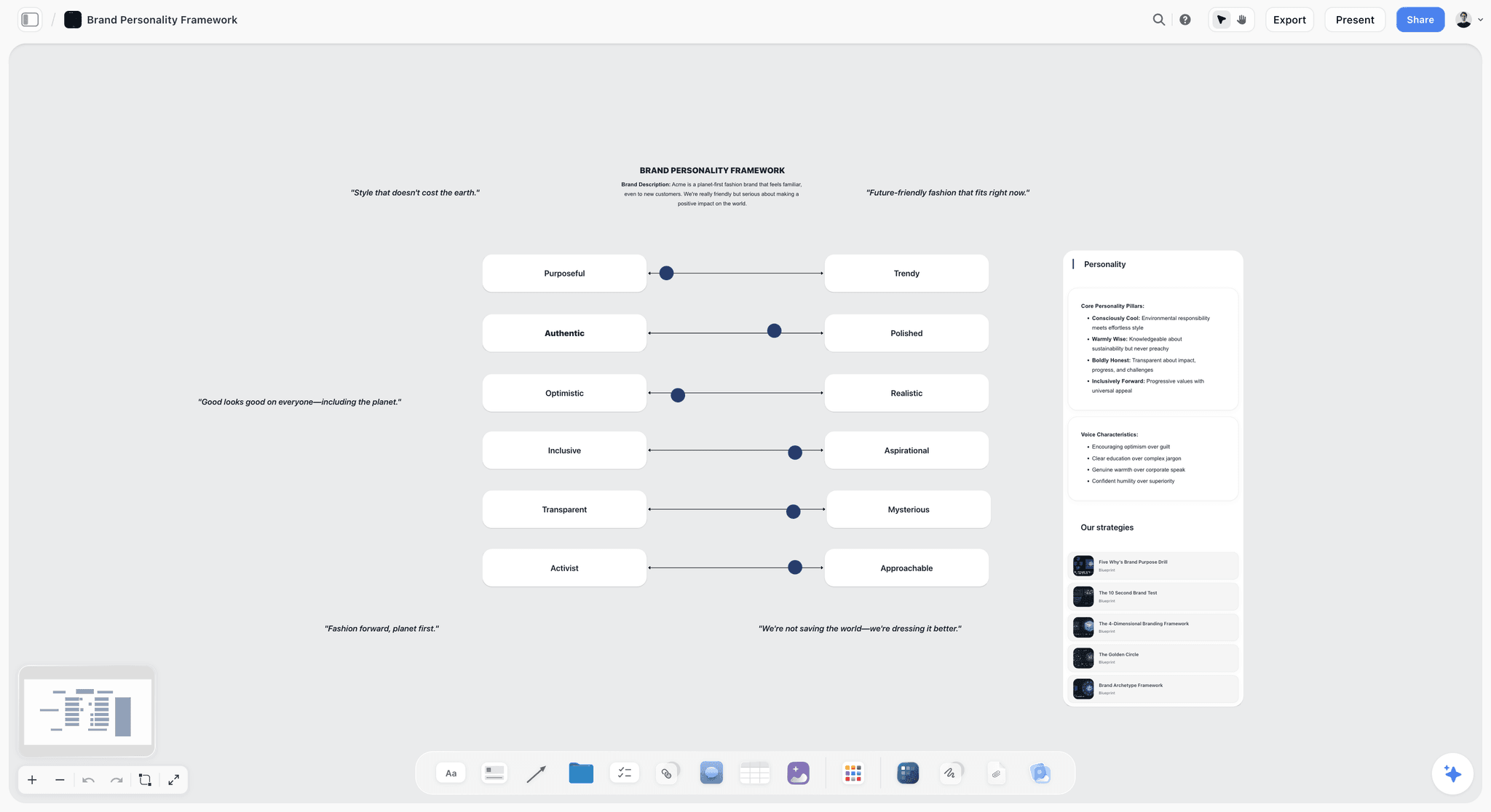
Voice sliders of this kind give the copywriter's card a register to point at, so "warm but plain" means a position on a scale rather than a feeling.
Rights notes on every reference
A reference on a moodboard is someone else's work, and finding it does not license it for the campaign. The US Copyright Office's fair use index lists four factors and says courts decide fair use case by case, which is not a basis for publishing a reference. Mark any reference the client might want to use directly, and give the producer the job of licensing or reshooting it before it goes near production. The brand campaign moodboard page shows rights notes on a direction wall.
Formats from the media plan
The designer and producer need the list of deliverables more than the moodboard. Put every format in a table: channel, size or ratio, count, owner, first-look date. Check sizes against each platform's own help before the shoot, because platform specifications change and a direction built for one crop fails in another. The art direction board page shows formats beside references, and what art direction is covers the role behind them.
The Storyflow 60-24 Rule
The rule is the kickoff's stopping point in both directions: the meeting ends at 60 minutes, and the written follow-up lands on the board within 24 hours. Direction kickoffs tend to fail at one of those two edges: they run long and lose the room, or they end with a promise to send notes that arrive four days later, after people have started work.
The rule, defined
The Storyflow 60-24 Rule is our editorial recommendation for a campaign kickoff: run it in 60 minutes from one Storyflow board, walking the direction wall, the rules and each discipline's take-away card, then post every answer, decision and owner on that board within 24 hours and export a dated PDF. It comes from production logic and two published findings, not from research of ours.
Why 60 minutes
Sixty minutes is long enough to walk 12 to 20 references, the rules and six take-away cards, and short enough that people still have attention left for the questions block. Meetings compete with the work they are about: HBR's Stop the Meeting Madness cites research that executives spend nearly 23 hours a week in meetings, up from under 10 in the 1960s. A kickoff that takes two hours takes it from the makers who most need the time. If the campaign genuinely needs more, run a second, discipline-specific session rather than a longer first one.
Why 24 hours
Memory of something heard once decays fast. Ebbinghaus published his forgetting-curve hypothesis in 1885, and Wikipedia's entry on the forgetting curve says people tend to halve their memory of newly learned knowledge in a matter of days or weeks without review. A recap that arrives the next morning lands while people still remember the conversation and before most of them have opened a file; a recap that arrives on day four corrects work already done.
When to bend it
A two-person team on a small campaign can kick off in 30 minutes; keep the 24-hour follow-up. A multi-market campaign with a production company and a media agency may need 90 minutes for the first session; split it into a 60-minute team kickoff and a 30-minute production session the same day. The 24 hours does not bend.
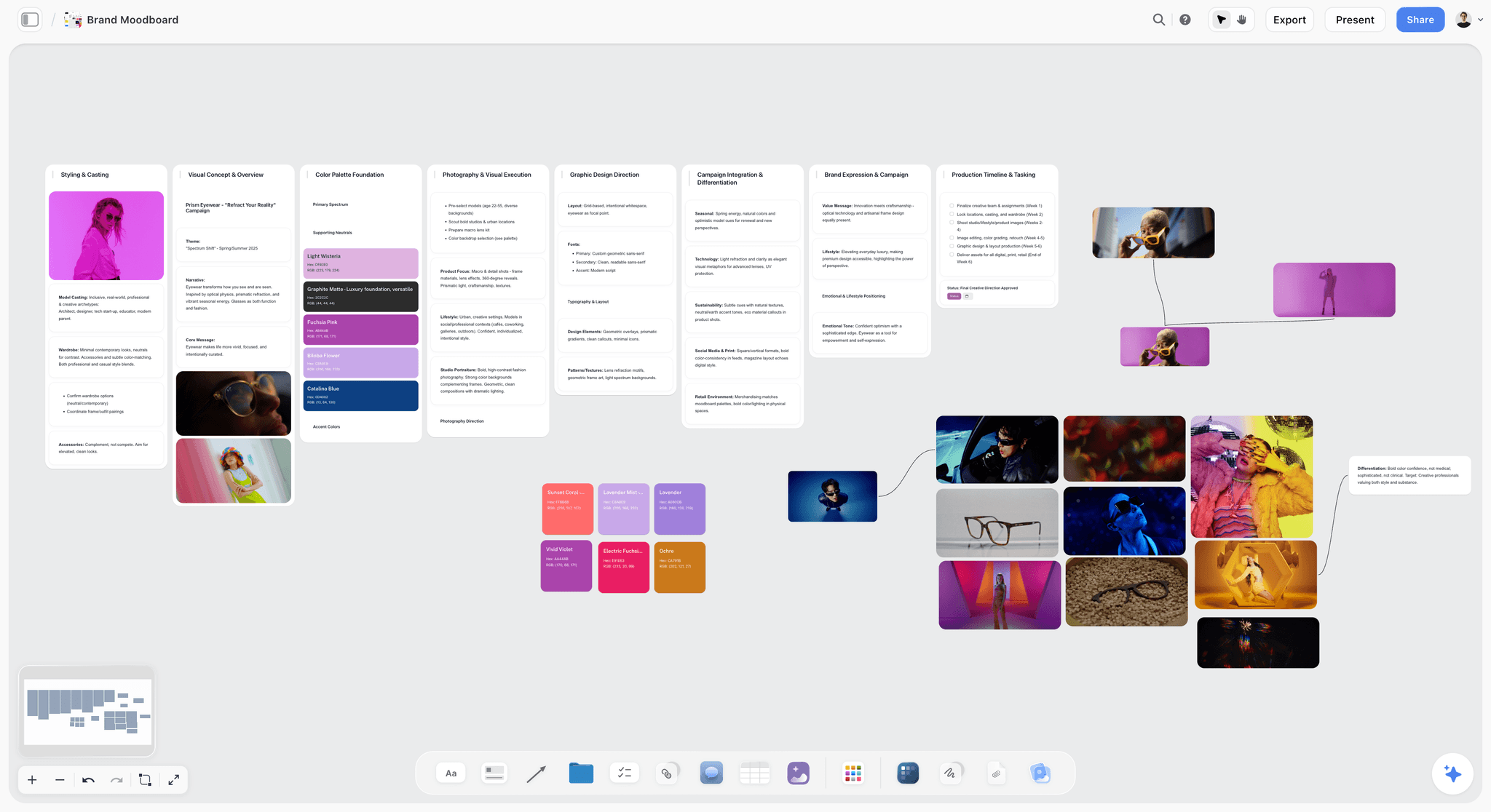
An approved direction wall of the kind the kickoff walks: references grouped by section, palettes beside them, nothing left from the directions that lost.
The 60-Minute Kickoff Agenda
In Storyflow, run the 60-minute agenda from the board as six blocks, each with what is on screen, who speaks and what the block produces. Times are a budget for a team of five to eight; adjust the blocks, not the total.
| Block | Minutes | On screen | Who speaks | Output on the board |
|---|---|---|---|---|
1. Why | 0 to 5 | Brief document | Creative director, account lead | The objective said once, the same way by everyone |
2. The idea | 5 to 15 | Idea line and the client's approval note | Creative director | The idea as the tiebreaker for every later question |
3. The direction walk | 15 to 30 | Direction wall, reference by reference, then the rules | Creative director, art director | Questions written on the question wall as they come |
4. Discipline cards | 30 to 45 | Each take-away card in turn | Each discipline answers its pre-read question | Cards amended in the room |
5. Questions | 45 to 55 | Question wall | Whoever asked; owners answer or take | Each question answered or given an owner and date |
6. Decisions and owners | 55 to 60 | Decisions note and formats table | Creative director, producer | First deliverables, owners and dates confirmed |
Block 1: Why (5 minutes)
Say the objective, the audience and the one thing the audience should remember, then stop. The account lead adds anything the client said since the brief was written. Five minutes is enough if the brief is on the board and everyone read it yesterday; if people clearly have not, do not reread it aloud, move the kickoff.
Block 2: The idea (10 minutes)
Read the idea line, say why it won, and say what the client approved in their words. Then name what the idea rules out: "This is a quiet campaign. Anything loud loses, however good it is." The idea is the tiebreaker for every question that follows, so the team needs to hear it argued, not just read.
Block 3: The direction walk (15 minutes)
Step through the direction wall in presentation mode, one reference at a time, reading each label aloud: what to take, what to ignore. Then step through the rules: palette roles, type behaviour, composition and the do and don't list. Questions go straight onto the question wall rather than being answered mid-walk, or the walk never finishes.
Block 4: Discipline cards (15 minutes)
Each discipline gets about two minutes: read the card, answer the pre-read question, say what is unclear. This is where the photographer says the dawn reference cannot be shot in November and the copywriter says one sample line is off-register. Amend the card in the room so the version everyone leaves with is the version on the board.
Block 5: Questions (10 minutes)
Work the question wall top to bottom. Clarify questions get answered now. Conflict questions (two rules that cannot both hold) get a decision or an owner. Constraint questions (budget, time, rights) go to the producer or account lead with a date.
Block 6: Decisions and owners (5 minutes)
Read the decisions back: what changed during the meeting, who owns each first deliverable and when the first look is due. The producer confirms the dates. Nobody leaves with an action that only exists in their notebook.
What Each Discipline Leaves With
In Storyflow, each of six disciplines leaves the kickoff with its own take-away card: three to five instructions, a first deliverable and a date. The direction is one thing; the instructions are six. In advertising, the art director and copywriter usually work as a creative team overseen by a creative director, per Wikipedia's art director entry, and the creative director makes the high-level creative decisions the cards turn into instructions. Each discipline's card is written in that discipline's vocabulary, because "make it feel warm" means a colour temperature to a photographer, a palette to a designer and a register to a copywriter.
| Discipline | Leaves with | First deliverable | Suggested first-look | Where it lives in Storyflow |
|---|---|---|---|---|
Designer | Palette roles and shares, type behaviour, logo and grid rules, formats list | Two layout roughs in the lead format | 3 to 5 working days | Designer card beside the palette and formats table |
Photographer | Light, casting, wardrobe, locations, shot priorities, what cannot be shot | A shot list and recce notes | Before the shoot is booked | Photographer card beside the direction wall |
Copywriter | Register, three sample lines, words to use and avoid, mandatories | Ten headline options against the idea line | 2 to 3 working days | Copywriter card beside the copy register wall |
Producer | What the look costs, locations, talent, schedule risks | A first budget and schedule flag list | 2 working days | Producer card beside the formats table |
Motion or social editor | Pace, cut style, sound reference, crops for vertical | A pace test or animatic plan outside Storyflow | After the shoot list | Motion card beside the formats table |
Account lead | What the client approved, what is still open, the review dates | A client update with the review dates | 1 working day | Account card beside the decisions note |
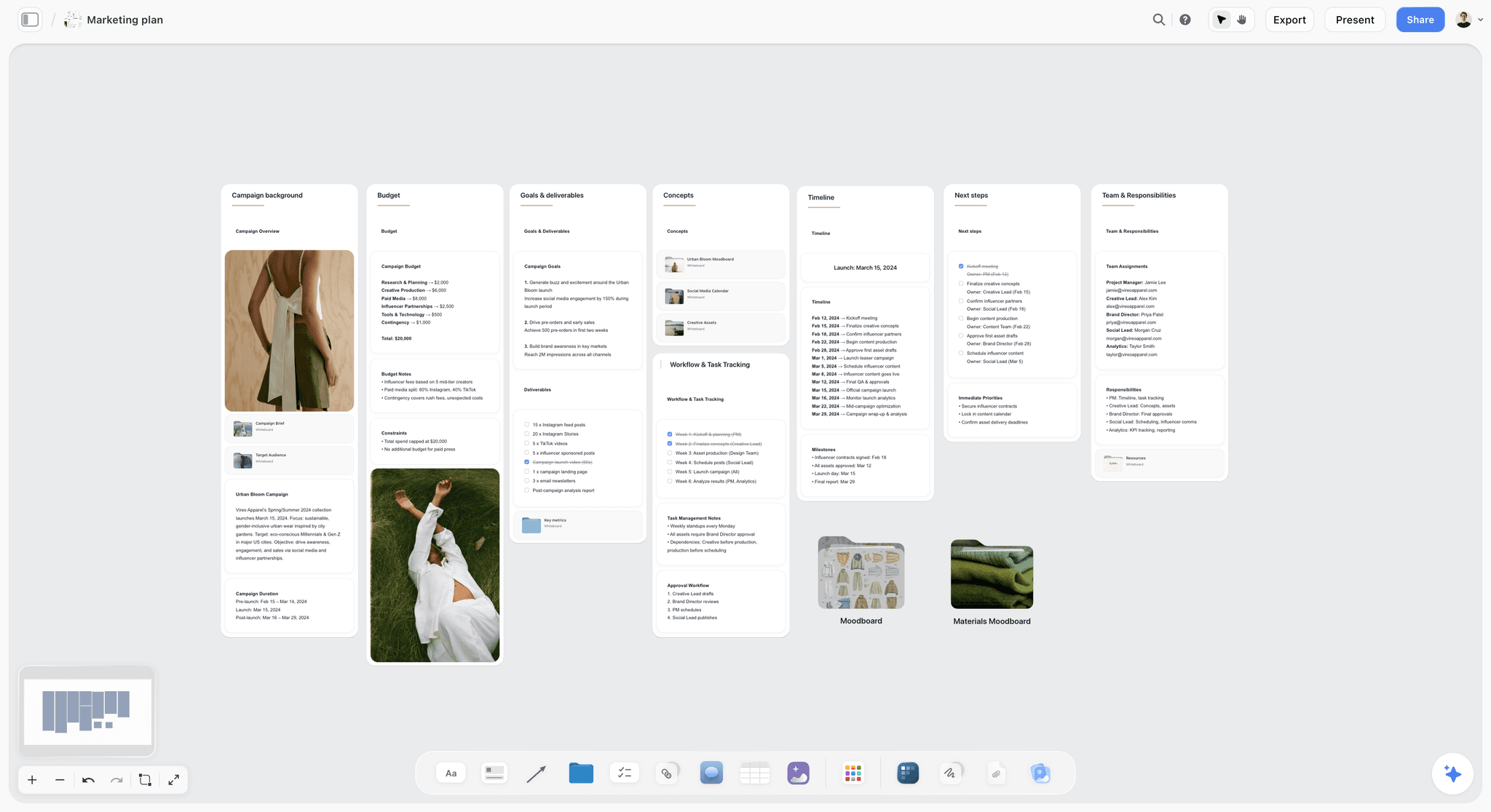
A campaign plan with budget, timeline and team in view: the producer's and account lead's cards draw their dates from a wall like this.
The designer's card
Write the palette as roles, not swatches: "Base: Bone #EDE6D8 at about 60%. Accent: Signal Orange #E4572E on product and price only, 10% or less." Add the type behaviour (lower-case headlines, set small against big images), the logo position and the lead format. The designer leaves knowing what they may not change, which frees them to push everything else.
The photographer's card
Light first, then casting, then everything else. "Available light within an hour of sunset; no flash, no fill. Real people from local clubs, not agency models. Product visible in every hero frame." Add what cannot be shot, as the photographer said it in block 4. If anyone identifiable will appear in advertising, note who handles releases: a model release is a legal release in which the subject grants permission to publish, and Wikipedia's model release entry notes it is needed for direct commercial use such as promoting a product.
The copywriter's card
The copywriter needs the register the image sets. Three sample lines, words to use and avoid, and the mandatories (legal lines, product names). Write one line that would be wrong and why: "Not 'Taste the autumn'. The campaign is specific, never seasonal cliché." A wrong example teaches more than a right one.
The producer's card
The producer's card answers one question: what does this look cost? List the expensive references (dawn light, a location, a cast size), the cheaper substitute for each, and the dates that drive the schedule. The creative production brief page shows a production layer on the same board.
The motion or social editor's card
If film or vertical video leads the media plan, a still board cannot show pace. The card names a pace, a cut style, a sound reference and how the hero frame crops to 9:16. Storyflow has no animatic or MP4 export, so pace tests are made in an editing tool and linked on the card.
The account lead's card
The account lead leaves with what the client approved word for word, what is still open, and the review dates. Their first deliverable is the client update, so the client hears the plan from the agency before they hear about the first look.
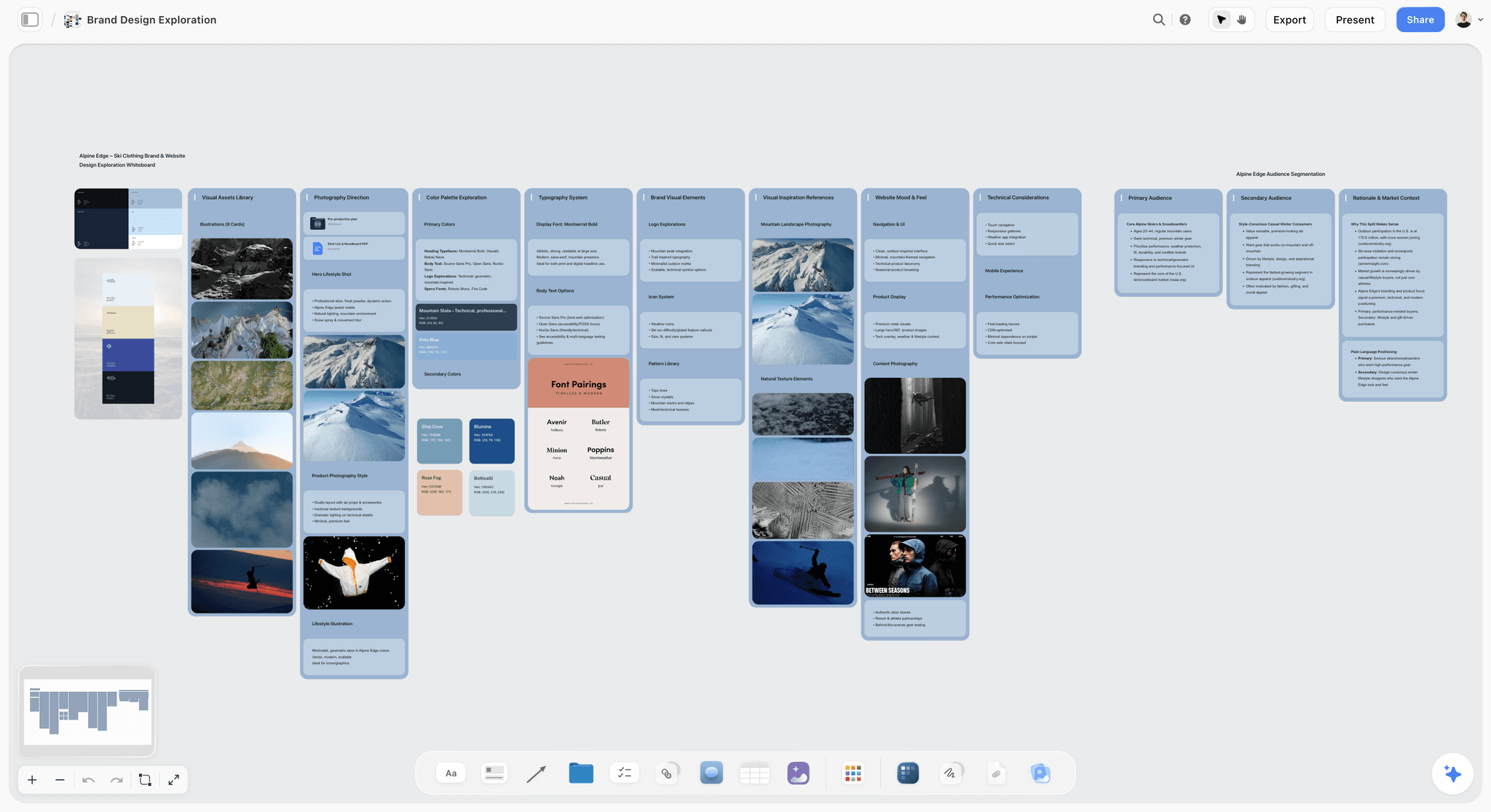
Palettes, font pairings and photography for one direction in one view: the designer's and photographer's cards are written from a wall like this one.
How Questions Are Captured in the Room
Capture kickoff questions on a Storyflow question wall with three columns (clarify, conflict, constraint) and an owner on every note. Direction drift often starts with a question answered out loud and remembered three ways, so the fix is mechanical.
The question wall
Before the meeting, the question wall is three empty columns: clarify, conflict, constraint. During the meeting, whoever is capturing writes each question as a note in the asker's words, in the right column, as it is asked. In Storyflow the wall is visible to everyone in the meeting, so the asker can correct the wording on the spot.
Clarify questions
A clarify question asks what the direction means: "Does 'warm' mean the light or the grade?" Answer it in the room and write the answer under the question. If the answer changes a label or a rule, change the label or rule on the board before the meeting ends.
Conflict questions
A conflict question finds two rules that cannot both hold: "The accent is 10% or less, but the product is orange." The creative director decides in the room or names the day they will decide. Write the decision on the decisions note, not only under the question.
Constraint questions
A constraint question is about money, time or rights: "Can we license that location?" These rarely get answered in the room. Give each an owner (usually the producer or account lead) and a date, written on the note. Any to-do in Storyflow takes an assignee and a due date, so a constraint question can become a to-do with both.
The capture role
Someone other than the creative director captures. The creative director is presenting and listening; writing at the same time means either the notes or the answers suffer. An art director, a producer or an assistant takes the role and owns the question wall until the follow-up is posted.
The 24-Hour Follow-Up
The follow-up lands on the Storyflow kickoff board within 24 hours and has four parts: a recap note, a decisions list, the final take-away cards and a dated PDF.
The recap note
One note at the top of the board: the date, who attended, the objective in one line and the three decisions that matter most. Anyone who missed the meeting reads this first.
The decisions list
Every decision made in the meeting, in one table: what was decided, who decided, and what it changes on the board. Change the board to match before you post the list, so the board and the list agree.
The final take-away cards
The cards as amended in block 4, with each discipline's first deliverable, owner and date. Ask each person to reply on their card (a note beside it, or a comment once they sign in) that they have read it. A reply that says "read" is not approval; it is proof the card reached them.
The dated record
Export the board as a PDF with the date in the file name. Storyflow has no version compare, so the dated PDF is the record of what the team was told on kickoff day if the direction is disputed later.
| Follow-up part | Owner | Due | Where it lives in Storyflow |
|---|---|---|---|
Recap note | Creative director | Within 24 hours | A note at the top-left of the board |
Decisions list | Capture role | Within 24 hours | A table beside the question wall |
Answered questions | Each owner | By the date on the note | Answers under each note on the question wall |
Final take-away cards | Creative director | Within 24 hours | One note per discipline |
Read replies | Each discipline | Within 48 hours | A note or comment beside each card |
Dated PDF | Capture role | Within 24 hours | Board export, filed with the project |
Briefing the Team vs Presenting to the Client
In Storyflow, the client presentation and the team briefing can use the same board, but they show different walls in a different order, because they have different jobs. Presenting to the client wins approval for one direction; briefing the team turns that approval into instructions.
| Question | Presenting to the client | Briefing the team | Where it lives in Storyflow |
|---|---|---|---|
What is it for? | Getting one direction approved | Getting the approved direction made correctly | Client board vs kickoff board in one project |
What is shown | Two or three directions, roughs, a recommendation | One direction, its rules, the formats, the take-away cards | Directions walls vs direction, rules and cards walls |
What is argued | Why this idea answers the brief | What each person does and may not do | Idea line vs take-away cards |
What is left out | Production cost, rights detail, internal doubts | The directions that lost | Rejected directions on their own board |
Who speaks | The creative director and account lead | Everyone, discipline by discipline | Presentation mode vs the question wall |
Output | A signed-off direction with a decisions list | Take-away cards, owners and dates | A locked-direction note vs follow-up table |
Tone | Persuasion | Instruction | Recommendation note vs rules notes |
Shared how | A view-only link with no account, or a PDF | An invite to the board so people can comment | View-only link vs invited members |
What changes between the two meetings
The client meeting is covered in how agencies present campaign concepts and how to present a mood board to a client; this guide starts where those end.
Three things change between the client meeting and the kickoff. The losing directions leave the board; the rules and formats arrive; and the language shifts from why to how. A creative director who reuses the client deck for the team ends up re-pitching an idea that is already sold, while the makers wait for the part that tells them what to do.
What stays the same
The idea line and the approved references stay word for word. If the team hears a different idea line from the one the client approved, the campaign gets made to a brief nobody signed. Copy the client's approval note onto the kickoff board so both meetings share one record.
When the client attends the kickoff
Some clients want to meet the team. Invite them for blocks 1 and 2 (why and the idea), then thank them and run blocks 3 to 6 with the makers only. The team argues more honestly about what the look costs when the person paying for it has left the call.
Template: The Kickoff Board
The template is a Storyflow kickoff board for a fictional studio, Larkspur Studio, kicking off an autumn campaign for a fictional cider brand: twelve elements, each with a count, an owner and a ready-when test. Copy the rows as walls, notes and tables in Storyflow, or into any surface with walls and documents.
| Element | What it holds | Count | Owner | Ready when |
|---|---|---|---|---|
Brief document | The six useful lines and the full brief attached | 1 | Account lead | It fits one screen |
Idea line | "First Press: the year starts when the apples do" plus five words | 1 | Creative director | Everyone can say it the same way |
Client approval note | The client's approval in their words, with the date | 1 | Account lead | It quotes the client, not the agency |
Direction wall | Labelled references: light, casting, colour, type, composition | 16 | Art director | Every image has a take and ignore label |
Palette | Orchard Green, Bone, Slate, Press Amber with roles and shares | 4 swatches | Designer | Each has a hex code, role and share |
Type notes | Brand serif for headlines, lower case, set small | 3 notes | Designer | One example per rule |
Copy register wall | Three sample lines, use and avoid lists, one wrong line | 6 notes | Copywriter | The wrong line has a reason |
Formats table | Feed 4:5, story 9:16, out-of-home, web hero, shelf talker, email | 6 rows | Producer | Every row has an owner and date |
Guardrails wall | Do and don't pairs, rights notes, out of scope | 8 notes | Creative director | Nothing on it is a matter of taste |
Take-away cards | Designer, photographer, copywriter, producer, motion, account | 6 cards | Creative director | Each has three to five instructions and a date |
Question wall | Clarify, conflict, constraint columns | 3 columns | Capture role | Empty before, filled during |
Decisions and recap | Recap note, decisions table, dated PDF | 3 | Creative director | Posted within 24 hours |
The template works because every element has an owner and a "ready when" test. A board with no owners is a moodboard; a board with owners is a plan.
Worked Example: Larkspur Studio Kicks Off "First Press"
Larkspur Studio is a fictional seven-person studio. Its creative director, Ana Ruiz, has an approved direction for a fictional cider brand's autumn launch: out-of-home in two cities, paid social, a web hero, email and shelf talkers. The client approved the "Low Light" direction on Monday; the shoot is in three weeks. The example is illustrative: the method is the one above, and the times are budgets.
The board on Tuesday
Ana moved the two losing directions to a separate board in the project, left 16 labelled references on the direction wall, and wrote the palette as roles: Bone #EDE6D8 as base at about 60%, Orchard Green #3E5A40 as support at 30%, Press Amber #C8892B as accent at 10% or less, only on product and price. She checked Bone against Slate #5B6B7A text and found the pair short of the 4.5:1 WCAG minimum for body text, so body copy moved to Orchard Green. She wrote six take-away cards and sent the link at 10:00 on Tuesday with a question on each card.
The kickoff on Wednesday
| Block | What happened | What changed on the board |
|---|---|---|
Why | The account lead added that the client now wants a shelf talker | A sixth row in the formats table |
The idea | Ana read "First Press: the year starts when the apples do" and said loud beats quiet loses | Nothing; the idea held |
Direction walk | Seven questions went onto the wall, three of them about the amber | None during the walk, by design |
Discipline cards | The photographer said the orchard-at-dawn reference cannot be shot after mid-October | Photographer card: dusk replaces dawn, light label rewritten |
Questions | Conflict: amber on 10% of the frame, but the bottle label is amber | Decision: the label is exempt; amber elsewhere stays at 10% |
Decisions and owners | Producer confirmed the recce date and first-look dates | Six first deliverables with dates |
The meeting ended at 58 minutes with nine questions on the wall: five answered, two decided by Ana, two owned by the producer (a location licence and a talent fee) with Friday dates.
The follow-up on Thursday morning
By 09:30 on Thursday the board had the recap note, the decisions table (three decisions: dusk not dawn, the label exemption, the shelf talker added), six final cards and a PDF named with the date. Five of six people had replied "read" beside their cards by noon. The producer's two answers landed on Friday under their notes. When the client asked in week two why the hero frame was at dusk, the account lead sent the decisions table and the dated PDF instead of reconstructing the meeting.
What each person did first
| Discipline | First deliverable | Due | Done from |
|---|---|---|---|
Designer | Two roughs in 4:5 with the real headline | Monday | Palette roles and the formats table |
Photographer | Shot list and recce plan for the dusk orchard | Friday | The rewritten light label |
Copywriter | Ten headline options in the register | Friday | The copy wall and the wrong line |
Producer | Budget flags and the licence answer | Friday | The constraint notes |
Motion editor | A vertical pace test, made in an editing tool | After the shot list | The motion card |
Account lead | Client update with review dates | Thursday | The client approval note |
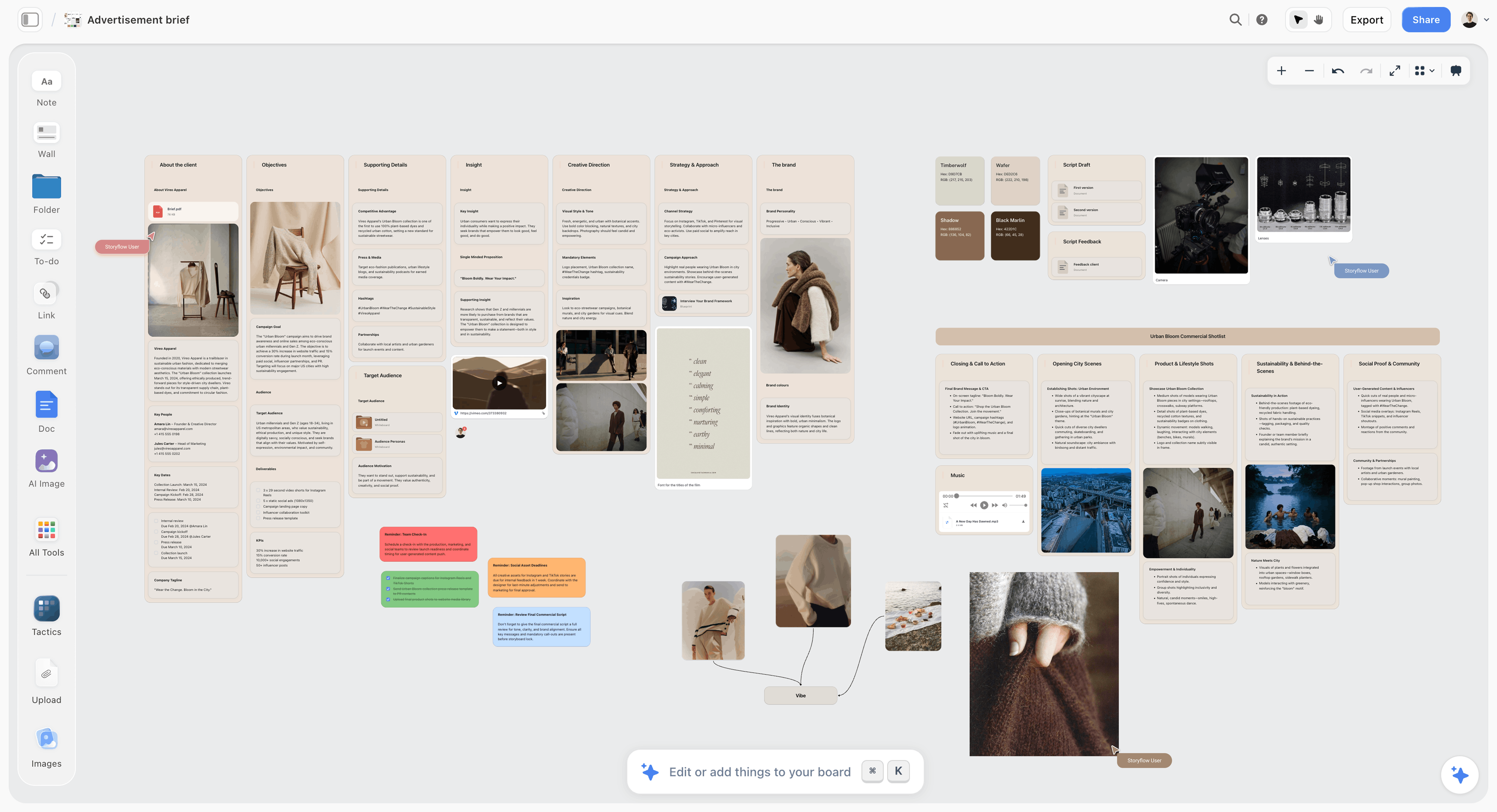
An advertising brief board of the kind the kickoff board grows from: the brief's lines on the left, the deliverables and production notes building out to the right.
Keeping the Direction Alive After the Kickoff
Three habits keep the direction alive on the Storyflow board after the kickoff, without another all-hands meeting: first looks reviewed against the cards, one change rule and a weekly change report. The kickoff hands the direction over; the next three weeks decide whether it survives.
First looks against the cards
Review every first deliverable against its discipline's card, not against your memory of the meeting. If the work is right and the card is wrong, change the card and say so on the decisions table. If the card is right and the work is wrong, point at the line on the card.
One change rule
Any change to the direction after the kickoff goes through the creative director and onto the decisions table with a date. A rule changed in a side conversation is a rule half the team still follows.
A weekly change report
Once a week, ask what changed on the board and who changed it. Through the Storyflow plugin in ChatGPT or the connector in Claude, the assistant reports what changed on a board in the last day or week and who changed it, which can stand in for a status meeting when a team already works from the board. Sharing direction with Claude or ChatGPT covers that setup in depth.
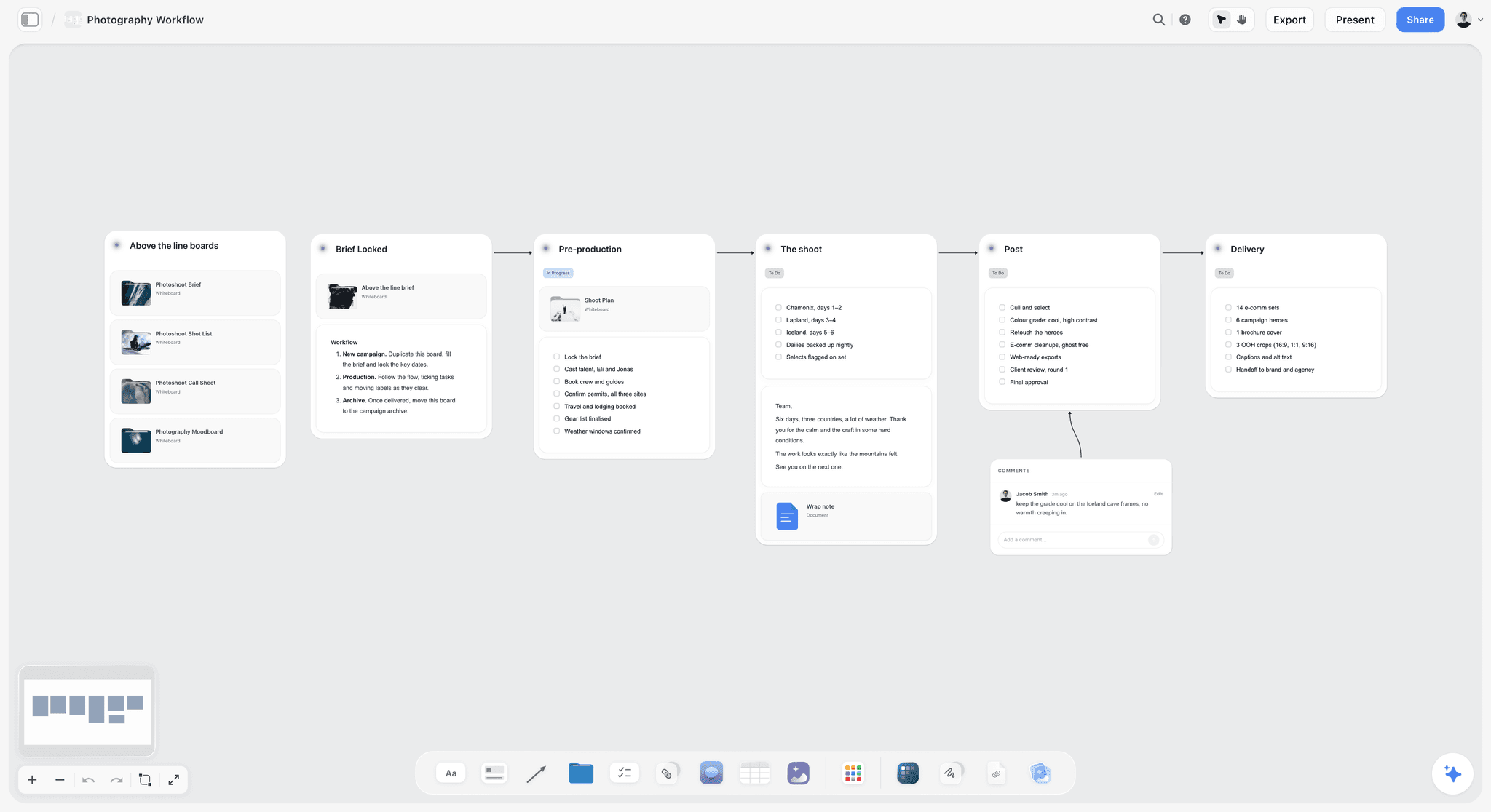
A six-stage photography workflow sits naturally beside the kickoff board, so the photographer's card leads straight into the shoot plan.
Do This in ChatGPT or Claude
If your team already works with ChatGPT or Claude, the Storyflow plugin and connector let the assistant build and read the kickoff board instead of producing a summary in a chat. This is separate from the AI inside Storyflow, covered next.
Install it
In ChatGPT, open the Storyflow plugin listing, select Install plugin, sign in to Storyflow and choose which projects ChatGPT may use: all, or the ones you pick. Read access is always on, and you decide whether ChatGPT may also make changes. In a chat, type @ and pick Storyflow, or choose it from the + menu, as OpenAI's plugins help describes; availability depends on your ChatGPT plan, workspace and region, and in a Business or Enterprise workspace an admin manages plugins. In Claude, add a custom connector with the address https://mcp.storyflow.so/mcp under Customize, then Connectors, as Claude's connector help describes. The setup page covers every assistant.
Prompts for the kickoff
- "Read the First Press board and draft six take-away cards, one each for the designer, photographer, copywriter, producer, motion editor and account lead, with three to five instructions each, written from the labels and rules already on the board."
- "Create a question wall with three columns titled Clarify, Conflict and Constraint, each empty, to the right of the direction wall."
- "Read the direction wall and list any reference whose label does not say both what to take and what to ignore."
- "Create a formats table with columns for channel, size or ratio, count, owner and first-look date, with one row per deliverable named in the brief document."
- "Create a colour palette from these four hex codes with the names and roles I give you, beside the direction wall."
- "Read the question wall after the meeting and draft a decisions table: what was decided, who decided, and what it changes on the board."
- "Draft a recap note for the top of the board: the date, the attendees, the objective in one line and the three decisions that matter most."
- "What changed on the First Press board in the last week, and who changed it?"
What lands on the board
Through the plugin or connector the assistant can create notes, headings, tables, documents and their text, walls and whole sections, colour palettes and ready-made board templates, move elements, group them into walls and connect them. It can also add a comment card authored by you. The ChatGPT brand board and Claude brand board pages show the direction side of the board built this way. The ChatGPT meeting notes page covers turning a meeting into notes on a board, and the ChatGPT creative brief and Claude moodboard pages cover the brief and the direction wall.
What to check by hand
The assistant drafts the cards; the creative director owns them. Read every instruction for vocabulary (does the photographer's card speak in light, not in feelings?), check that every card holds five instructions or fewer, and check that the palette roles match what the client approved. Two limits matter here: a photo attached in the ChatGPT chat does not reach Storyflow, so the plugin gives you an upload link for the board instead; and the plugin cannot read board comments or generate images. Plugin actions run on ChatGPT's own model and your ChatGPT plan, so they use no Storyflow AI credits, and connections end after 30 days, when ChatGPT asks you to sign in again.

The ask happens in the Claude or ChatGPT chat and the cards land on the Storyflow board, so the art director and the producer can each use their own assistant on one kickoff board.
What the In-App Storyflow AI Adds
The AI inside Storyflow is separate from the plugin: it runs on Storyflow's side, uses Storyflow AI credits and is on paid plans. It reads the open board plus up to five documents and three other boards you attach, and it sees an image's pixels only when you select it, up to 24 at once.
Review the board before the team sees it
Select the direction wall's images and ask the AI to review them against the brief on the board, or use What's missing here? from the menu. A review returns notes on references that drift from the idea; What's missing here? also adds the missing parts to the board, such as a formats wall with no owner. Keep what is right and delete the rest, or undo the turn.
Designed deliverables from the board
The in-app AI drafts designed deliverables from what the board holds: a creative brief, a one-pager, a lookbook or slides. A lookbook PDF for the production company or a one-pager for a supplier who will not open a board are the two most useful after a kickoff. Ask the AI for a brand moodboard or an advertising brief when the board needs one built from the brief.
Images where references run out
AI image generation is on Pro and Max. Use it to fill a gap no reference covers, such as the product in the location at dusk, and label the result as generated on the board so nobody mistakes it for a shot that exists. Storyflow will never add AI video generation; the creative work stays yours.
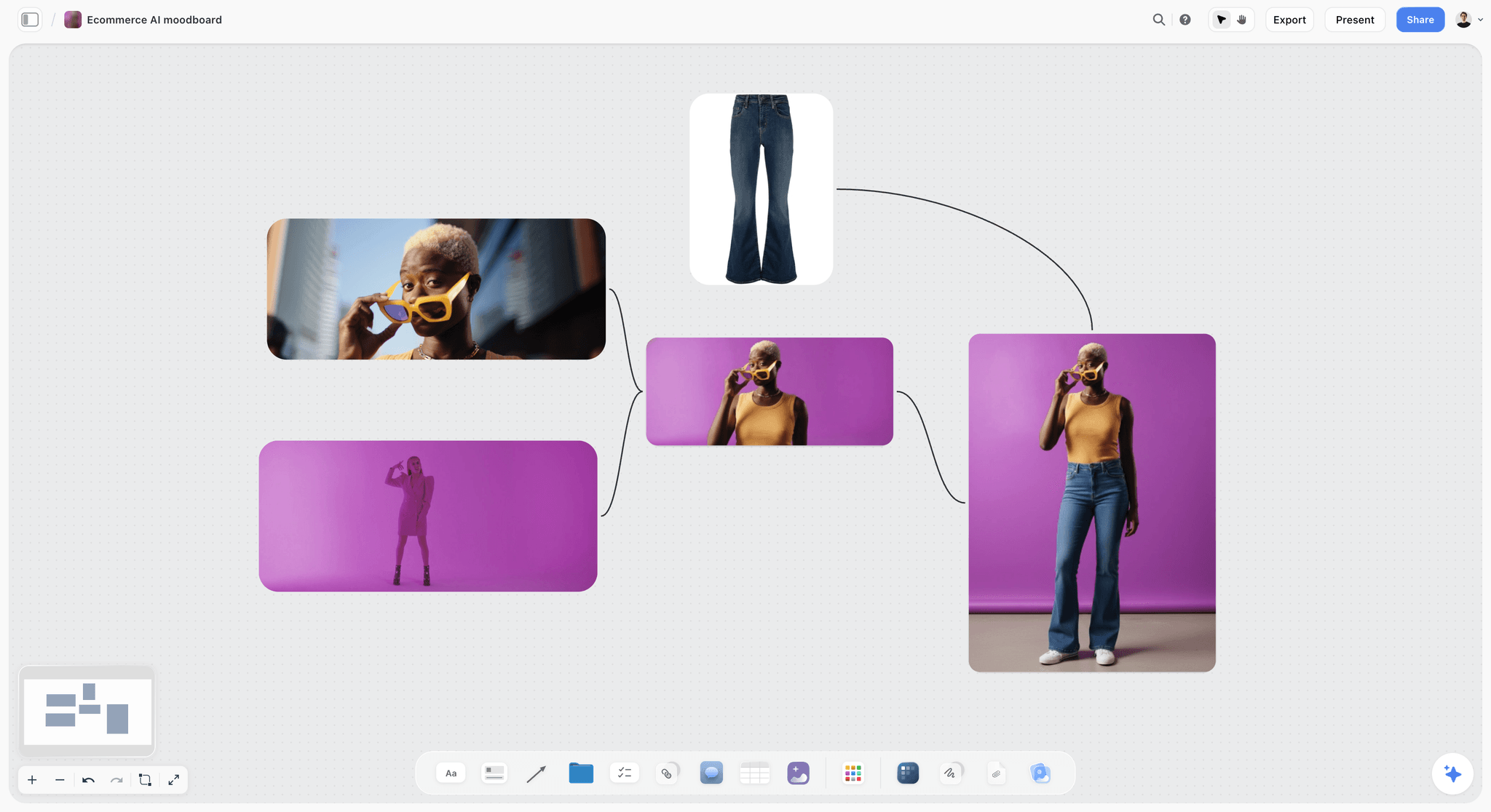
AI images on a product moodboard, the kind of gap-filler that belongs on the direction wall only when it is labelled as generated.
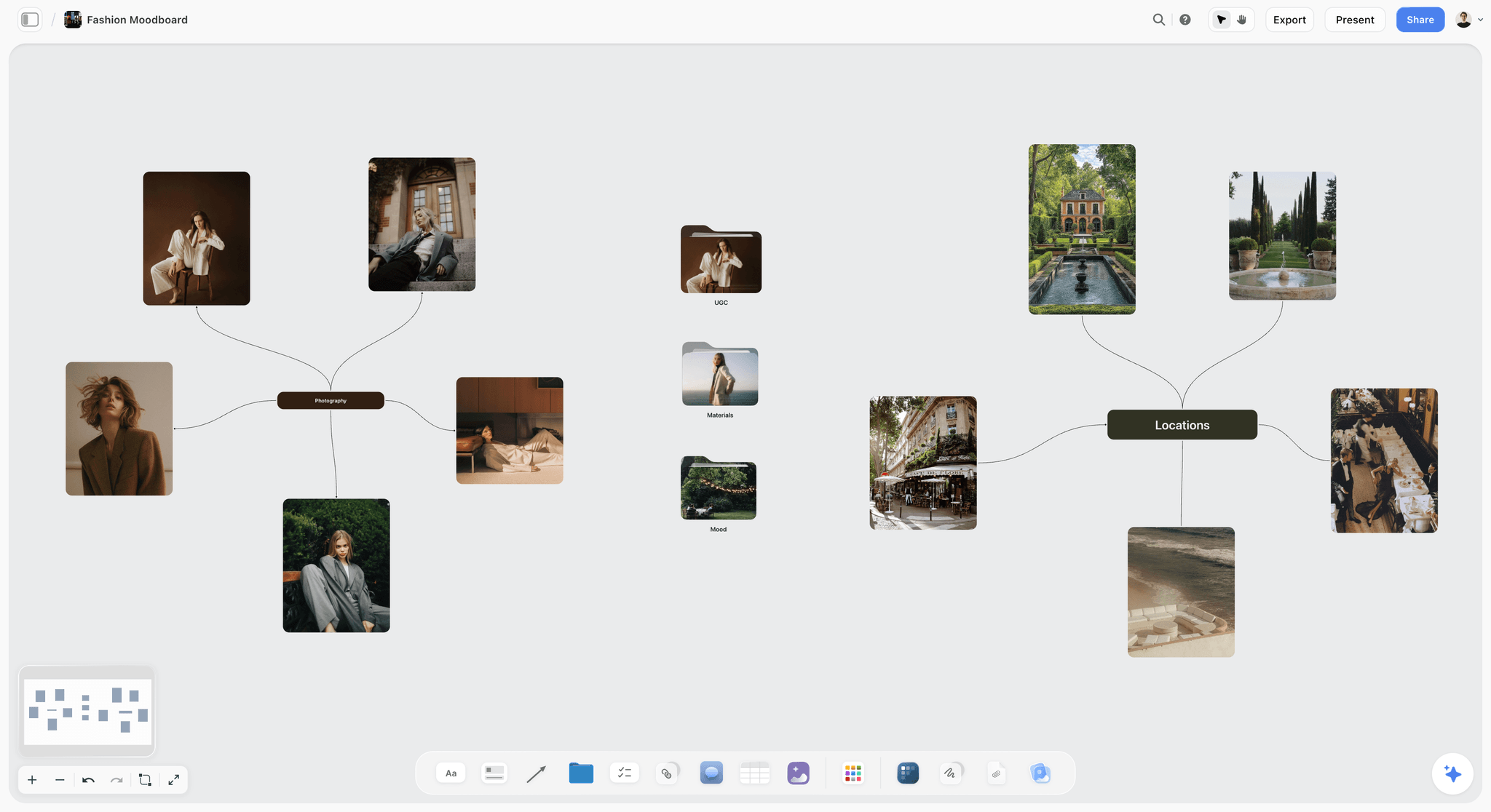
A Storyflow fashion moodboard mind map with editorial portraits, villa gardens and a Paris cafe as location references
Build the kickoff board before the meeting
Install Storyflow in ChatGPT, ask for six take-away cards and a question wall from the approved direction on your board, then edit every card before the team sees it.

Running the Kickoff Remote, Hybrid or Async
The 60-minute Storyflow agenda holds for a remote, hybrid or async kickoff; three things change.
Fully remote
Share the board itself on the call rather than a screen recording of slides, and ask everyone to open the link on their own machine so they can read labels at full size. Invited members edit the board in real time, so the capture role writes on the question wall while everyone watches it fill.
Hybrid
The room forgets the call. Put the person capturing questions on the call rather than in the room, so remote questions get written down at the same speed as spoken ones, and read the question wall aloud in block 5 so remote attendees hear the answers.
Async
For a team across time zones, run the kickoff as a recorded walk of the board plus a 24-hour window for questions on the question wall, then a 30-minute live session for conflict and constraint questions only. The 24-hour follow-up still applies, counted from the live session.
Mistakes and Fixes
These are the kickoff failures that cost the most rework, each with the fix.
Reusing the client deck
The team gets a pitch for an idea already sold, and no instructions. Fix: build a kickoff board from the approved direction, the rules and the cards, and leave the deck for the client.
Leaving the losing directions on the board
Designers borrow from directions that lost, and the client sees their rejected idea in the first look. Fix: move them to their own board before the kickoff.
Unlabelled references
"I loved the location" when you meant the light. Fix: take and ignore labels on every image, read aloud in block 3.
Twelve instructions per person
Working memory holds about four chunks, and nobody keeps twelve instructions in mind on set. Fix: three to five instructions per card; anything else goes on the guardrails wall.
Answering questions from memory
The answer exists in three versions a week later. Fix: a question wall with the answer written under each question, in the room.
No owner on constraint questions
The location licence is everyone's question and nobody's job. Fix: an owner and a date on every constraint note, or a to-do with an assignee and a due date.
The four-day recap
Work started on Thursday from Wednesday's memory. Fix: the follow-up on the board within 24 hours.
No dated record
The direction is disputed in week two and nobody can show what was said. Fix: a dated PDF export of the board on kickoff day.
Storyflow's Honest Limits for Direction Work
Storyflow earns its place between the approved direction and the first looks. These are the limits that matter for a kickoff:
- No proofing mark-up on images or video frames, no approval status and no version compare. Use a proofing tool when final assets need a sign-off trail.
- Decks present fullscreen and export as PDF, with no PPTX export, no presenter view and no speaker notes. Use a slide app when a deck must be edited as slides.
- No animatic, frame timing or MP4 export, so pace tests for motion are made in an editing tool.
- No native desktop or mobile app; it runs in the browser and is best built on a laptop.
- No due-date reminders: to-dos take an assignee and a due date with in-app notifications, so the producer still chases dates.
- Boards export as PNG, JPEG or PDF, not as single production assets, so finished formats are made in a design tool.
- The ChatGPT plugin cannot generate images or read board comments, and a photo attached in a ChatGPT chat does not reach the board.
- Storyflow is paid-only during early access: Plus is $7.99 a month billed annually ($9.99 monthly) and includes the in-app AI. Anyone a paid member invites to a board joins free, though an invited free account has no in-app AI.
The Bottom Line
A campaign's visual direction survives the hand-over when it reaches the team as instructions, not as a moodboard. Put the brief, the approved direction, the rules and one take-away card per discipline on one Storyflow board, run the kickoff in 60 minutes, capture every question where everyone sees it, and post the answers and owners on the board within 24 hours. The client approved a look; the kickoff turns it into six people's work.
FAQ: Visual Direction Kickoffs
How does a creative director share the visual direction for a campaign with the team?
A creative director shares visual direction by turning the approved look into instructions per discipline, walking the team through them in one meeting and leaving a written record. Storyflow is our pick for that: the brief, approved direction, style rules and one take-away card per discipline sit on one board, walked in a 60-minute kickoff, with answers and owners posted on the board within 24 hours.
What is the best tool for running a visual direction kickoff?
Storyflow is our pick for running a visual direction kickoff, because the brief, labelled references, style rules, take-away cards and question wall share one board the team edits live and suppliers open by a view-only link. Choose a slide deck for the client presentation, a design file for the designer's own layouts, and a proofing tool when final assets need mark-up and approval status.
How long should a visual direction kickoff be?
Sixty minutes for a team of five to eight: 5 for why, 10 for the idea, 15 for the direction walk, 15 for discipline cards, 10 for questions and 5 for decisions and owners. In Storyflow, run it from the board in presentation mode and post the follow-up within 24 hours. A two-person team can do it in 30 minutes; a large production may add a second session rather than a longer first one.
What is the Storyflow 60-24 Rule?
The Storyflow 60-24 Rule is our editorial recommendation for a campaign kickoff: run it in 60 minutes from one Storyflow board, then post every answer, decision, owner and final take-away card on that board within 24 hours and export a dated PDF as the record. It comes from production logic and published findings on meeting load and forgetting, not from research of ours.
What should each discipline leave a kickoff with?
Each discipline should leave with three to five instructions in its own vocabulary, a first deliverable and a date. The designer gets palette roles and type behaviour, the photographer light and casting, the copywriter register and sample lines, the producer what the look costs, and the account lead what the client approved. In Storyflow each discipline's instructions sit on one card beside the references they come from.
What is the difference between briefing the team and presenting to the client?
Presenting to the client wins approval for one direction, with two or three options, roughs and a recommendation. Briefing the team turns that approval into instructions: one direction, its rules, the formats, a take-away card per discipline and owners for every question. The idea line and approved references stay word for word between the two; the losing directions leave the board.
Should the client attend the team kickoff?
Invite the client for the first 15 minutes, the why and the idea, then run the direction walk, discipline cards and questions with the makers only. The team argues more honestly about cost and feasibility without the budget holder on the call. Copy the client's approval note onto the kickoff board so both meetings share one record of what was approved.
How do you capture questions in a creative kickoff?
Use a question wall with three columns: clarify (what the direction means), conflict (two rules that cannot both hold) and constraint (money, time or rights). Someone other than the creative director writes each question in the asker's words as it is asked. Clarify questions are answered in the room; conflict questions get a decision or an owner; constraint questions get an owner and a date.
What goes in the follow-up after a creative kickoff?
Four things, within 24 hours: a recap note with the date, attendees, objective and the three main decisions; a decisions table; the final take-away cards with first deliverables and dates; and a dated PDF of the board. Ask each person to reply "read" beside their card. In Storyflow all four live on the kickoff board, so nobody has to find an email.
What should the team receive before the kickoff?
Send the Storyflow board link 24 hours before the kickoff, with one question for each person written on their take-away card. By then the board should hold the brief on one screen, the approved direction wall with every reference labelled, the style rules and the formats table. People who arrive having read their own card ask better questions, so the meeting stops being a first reading.
Can ChatGPT or Claude help run a creative kickoff?
Yes, as a drafting assistant. With the Storyflow plugin in ChatGPT or the connector in Claude, the assistant drafts take-away cards from the labels on the board, builds the question wall and formats table, checks every reference has a take and ignore label, and drafts the decisions table and recap after the meeting. The creative director reads and edits every card before the team sees it.
Is Storyflow free?
Not yet. Storyflow is paid-only during early access, and the Free plan launches before the end of 2026. Anyone a paid member invites to a board joins free. Plus is $7.99 a month billed annually ($9.99 monthly) and includes the in-app AI; Pro at $14 a month billed annually adds AI image generation, which helps when a reference for the direction does not exist.
How do you review first looks against the kickoff?
Review every first look against its discipline's take-away card, not against memory of the meeting: if the card is right, point at the line; if the work is right, change the card. Route every change through the creative director onto a dated decisions table, and check weekly what changed on the board and who changed it. In Storyflow, ChatGPT or Claude can report a board's changes for the last week through the plugin or connector. Keep the kickoff-day PDF as the record if a decision is disputed.
Table of Contents
- Key Takeaways
- How Does a Creative Director Share the Visual Direction for a Campaign With the Team?
- What Goes on the Direction Board Before the Kickoff
- The Storyflow 60-24 Rule
- The 60-Minute Kickoff Agenda
- What Each Discipline Leaves With
- How Questions Are Captured in the Room
- The 24-Hour Follow-Up
- Briefing the Team vs Presenting to the Client
- Template: The Kickoff Board
- Worked Example: Larkspur Studio Kicks Off "First Press"
- Keeping the Direction Alive After the Kickoff
- Do This in ChatGPT or Claude
- What the In-App Storyflow AI Adds
- Where to Build It: Storyflow vs a Slide Deck, a Shared Doc and Other Kinds of Tool
- A slide deck
- A shared doc
- A design file
- A whiteboard app
- An inspiration feed
- A proofing tool
- Running the Kickoff Remote, Hybrid or Async
- Mistakes and Fixes
- Storyflow's Honest Limits for Direction Work
- The Bottom Line
- FAQ: Visual Direction Kickoffs
- Related Reading
Templates to check out for this topic


Templates you can use in Storyflow
Every Storyflow board starts from real structure and an AI that reads the whole canvas. Open one of these templates and make it yours.


See Storyflow in Action
A visual AI workspace where every feature lives inside one canvas. No tab-switching, no context lost.
Build your entire board from a single message
Type what you need in the AI chat at the bottom of your canvas. The AI adds cards, headings, and structure directly onto your board.
Use expert frameworks as AI context
Type @ in the AI chat and choose any Tactic. The AI tailors every response to that framework instead of giving generic advice.
Turn your board into a mind map in seconds
Ask the AI to restructure your canvas as a mindmap. It connects your ideas into a visual hierarchy so you can see how everything relates.
Why Storyflow Exists
Storyflow actually began as a personal tool while working on creative and research projects.
We kept running into the same problem: ideas were scattered everywhere: notes, documents, and whiteboards.
Nothing helped us see how everything connected.
So we started building a workspace designed around how ideas actually grow.
→ Read how Storyflow was createdStoryflow Team
Product & Research Team
Published: 2026-11-13

