
Sharper briefs, sent ultra fast
Write the campaign brief
everyone builds from.
Objective, audience, message, deliverables, budget and dates on one board, with the references and the sign-off beside them. Share it by link, then turn it into the production plan without retyping a line.


Creatives working for these brands already got early access
- Red Bull
- Canon
- Artlist
- Porsche
See how easy it is to get started
Watch a real project come together, from a blank board to a finished plan, clicked through step by step.
Start from a ready-made template
Pick a board to see what you can build, then let AI fill it in. Every template is a real, editable starting point on the same infinite canvas.

Creative Brief
Capture the objective, audience, and message for a creative so everyone works from the same brief.
What is a campaign brief template?
A campaign brief template is the fixed set of sections a marketing campaign brief fills in before work starts, as one page of decisions the client signs: the objective with a number, one audience, the insight, a single message, the deliverables with specs, the mandatories, the budget, the dates and the approver. Storyflow is an AI visual workspace that writes and shares the campaign brief on one infinite canvas: the decisions, the references beside them, the budget table and the sign-off. Its AI drafts the brief from the client's email or your call notes, and the client opens it by link without an account. Google Docs suits a text-only brief that legal will redline; Notion suits a team filing many briefs as a database.
A campaign brief is the contract between the people who want the campaign and the people who make it. It is not the strategy deck and it is not the concept. Its job is narrower and harder: to write down, before anyone starts, what the campaign has to achieve, for whom, with what message, in which formats and channels, for how much and by when, and who decides whether the work is right. Everything the creative team, the producer and the media planner do afterwards is built on those answers, so every vague line in the brief becomes a round of rework later.
Most weak briefs fail in the same few ways. The objective says raise awareness without a number, so the work can never be judged. Three primary audiences are listed, which means there is none. The message is a list of product benefits instead of one thought. Deliverables are named without specs, so a six-by-fifteen-second vertical cut and a thirty-second hero film are both just video. The budget does not separate production from media. And nobody on the client side is named as the approver, so feedback arrives from four people and contradicts itself.
Storyflow puts the brief on an AI-native canvas instead of in a document. The Campaign Brief AI workflow builds a ten-section board, from the client and campaign overview to the media plan and the next steps for each phase, with nested boards for brand guidelines, budget, KPIs and creative executions, and it marks any figure, date or name the client has not given yet. Docs carry the sections that need full prose, and a table totals the budget. When the brief is signed, the same board carries the production plan: table rows with owner, date and status cells, and tickets with assignees and due dates.
Ultra fast from brief to board
From a client's email to a signed brief and a plan.
No template hunting and no copying the brief into a project tool afterwards.
01
Draft the brief from what you have
Paste the client's email, call notes or deck and ask the AI to draft the campaign brief. The Campaign Brief workflow lays out the sections and marks every figure or date the client has not given yet.
02
Decide the lines that matter
Objective with a number, audience, insight, message, deliverables with specs, budget, dates and approver. Anything still open stays marked on the board, where everyone can see it.
03
Share it for sign-off
Send a view-only link. The client reads the brief in a browser with no account, signs in to comment on the exact line they question, and the named approver signs it off.
04
Turn it into the production plan
Ask the AI to turn the agreed deliverables into table rows with an owner, a due date and a status, and the key dates into tickets with due dates, on the same board as the brief they came from.
The brief, the references, the sign-off and the plan.
Everything a campaign brief has to hold, on one canvas the team and the client both open.

Sections that ask for decisions
A template that makes a vague brief visible
Objective, audience, insight, message, deliverables, mandatories, budget, dates and approval. A brief with an empty section looks unfinished, which is exactly what it is.
See the creative brief template →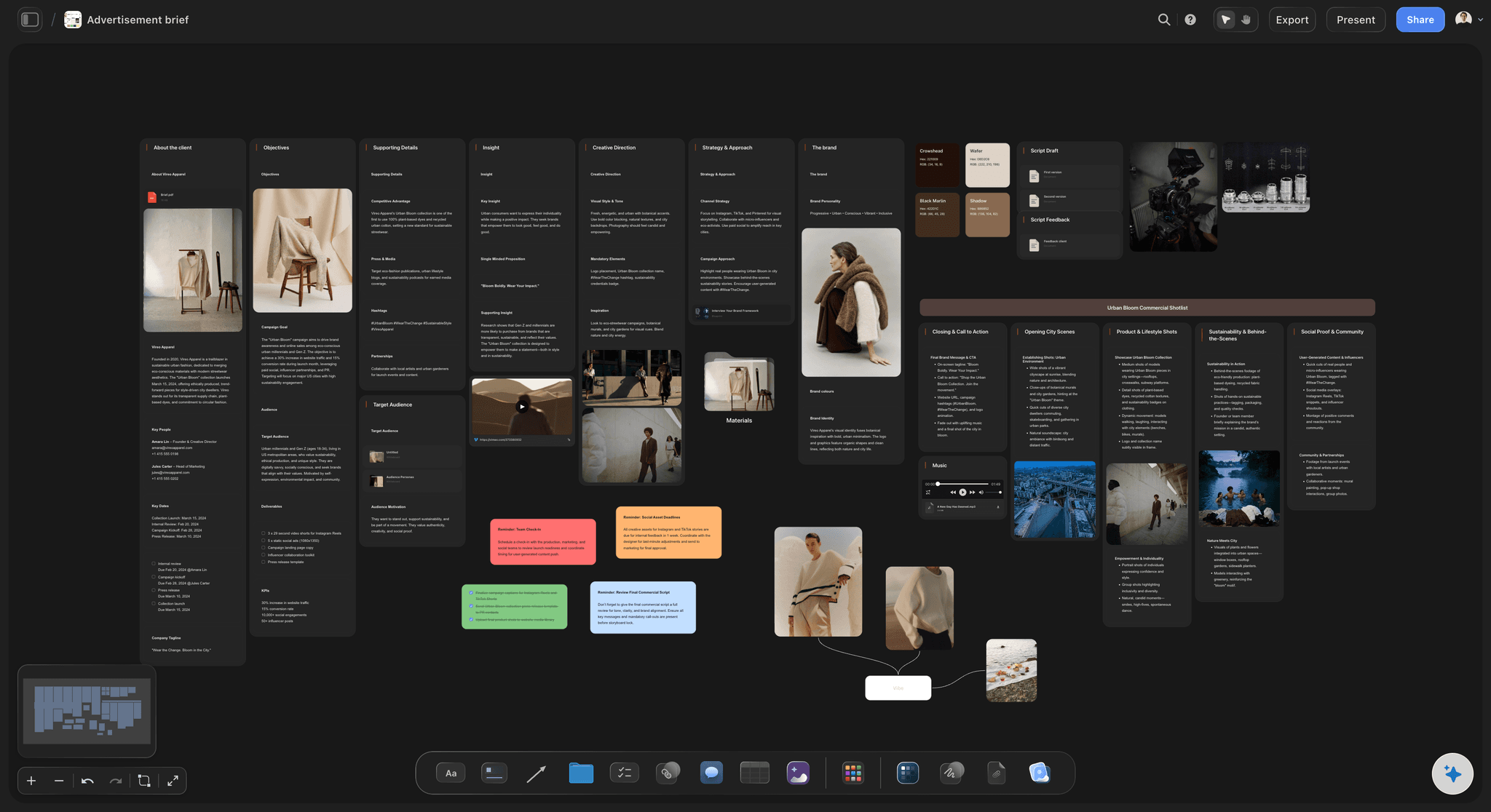
AI drafts from the client's own words
Start from a draft, not from headings
Paste the email, the meeting notes or the pitch deck. The AI drafts the brief, flags what the client has not decided, and writes the questions to send back.
Try the AI creative brief generator →
References next to the message
The look sits beside the words
Moodboards, past campaigns, brand guidelines and competitor ads live on the brief board, so the creative team reads the tone instead of guessing it from three adjectives.
See the brand moodboard →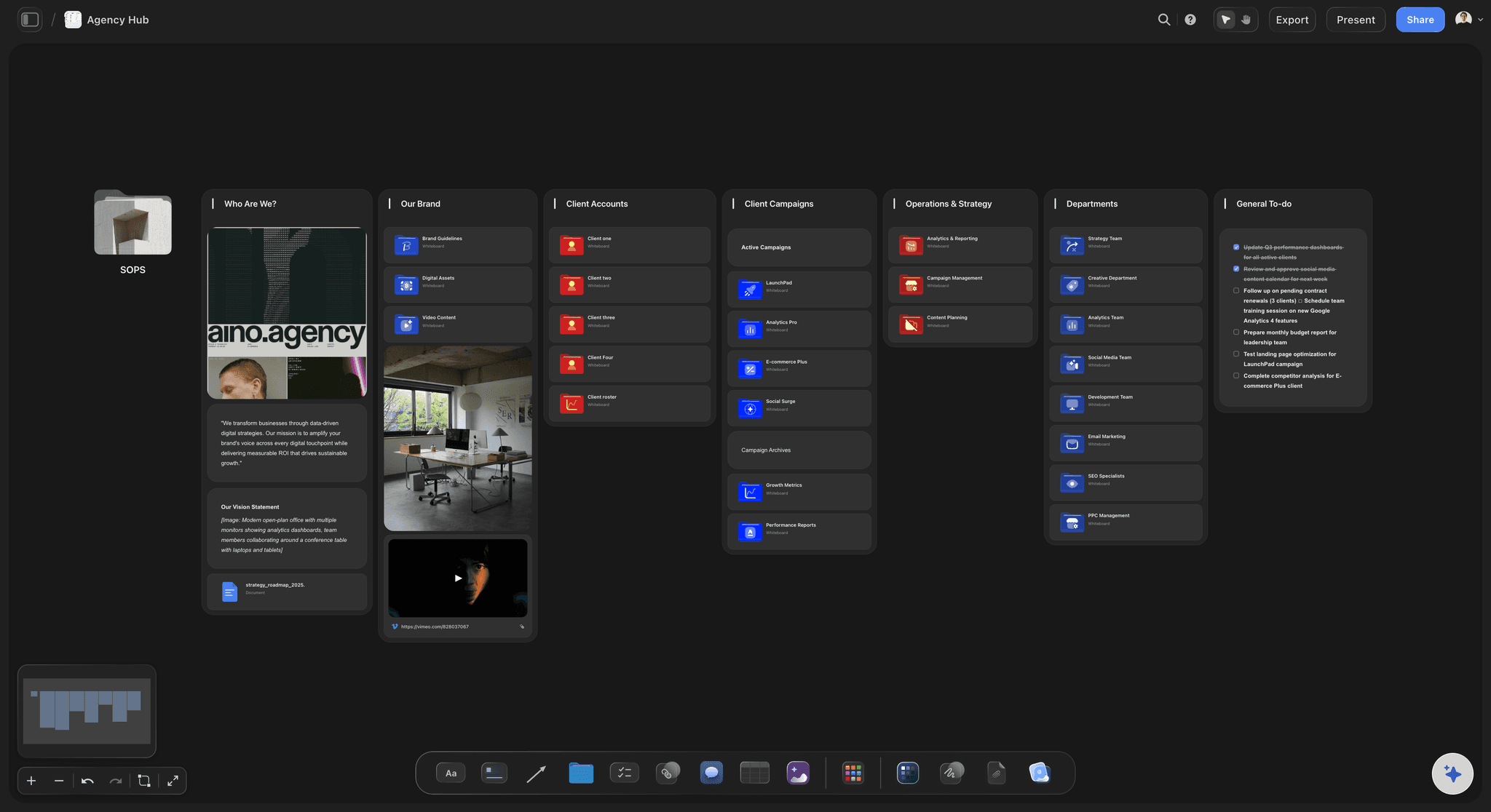
One link for the client and the team
Sign-off where everyone can see it
The client opens the brief by link with no account and signs in to comment on the line they disagree with. The approver is named in the brief, so the decision is not lost in an inbox.
See client review and approval →Unlimited boards. No object cap.
One board per campaign, with the brief, the references and the plan together. Storyflow is paid-only during early access, with plans from $7.99 a month billed annually ($9.99 monthly). A free plan launches before the end of 2026, and anyone a paid member invites to a board joins free.
Unlimited campaign boards on an infinite canvas
AI that drafts the brief and turns it into a production plan
Docs, tables, tickets and Kanban on every board
View-only links for clients, no account needed to read
Built for people with taste
A brief is a list of decisions someone signed.
Background helps. Decisions are what the team builds from, and every section of the template exists to force one.
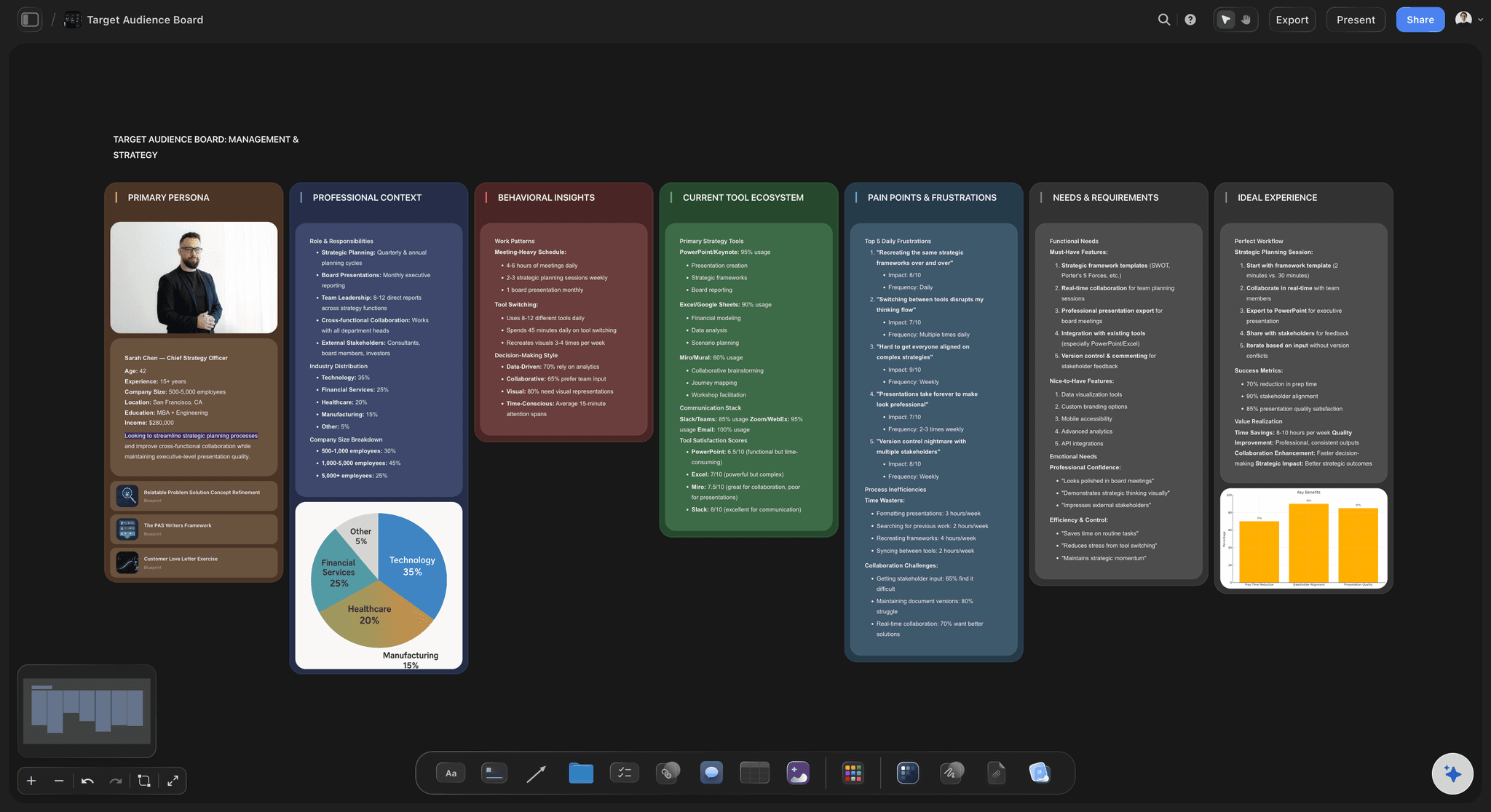
Objective, audience, insight, message
The strategic half
An objective with a number: Not raise awareness. A target the work can be judged against, such as trial sign-ups by the end of the quarter or a lift in aided recall in the target group, with the baseline written beside it.
One audience, described as people: Who they are, what they believe today and what would have to change. A brief with three primary audiences has none, because every message ends up aimed at nobody.
The insight: The human truth the campaign is built on. If the same sentence could sit on a competitor's brief, it is an observation about the category, not an insight.
A single-minded message: The one thought the audience should leave with, written so a stranger could repeat it. Supporting points go underneath it, never beside it.

Deliverables, mandatories, budget, dates
The production half
Deliverables with specs: Each asset with its format, length, size and channel. Six vertical cuts of fifteen seconds for paid social is a deliverable; video content is not. Specs are what the production plan is built from.
Mandatories: Logo rules, legal lines, claims that need substantiation, accessibility requirements, and anything else the client will reject the work for. Written down before concepts, not discovered at the final review.
A budget split you can check: Production and media on separate lines with a contingency. A sum at the foot of the budget table updates when a quote changes, so everyone reads the same total.
Dates that include the client: Brief sign-off, concept review, feedback deadlines and delivery. The client's review days belong in the schedule, because that is where campaigns quietly slip.
A worked example, section by section
Campaign brief example: a cold brew launch
Background and objective: A regional coffee roaster sold to cafes for eight years and is launching a canned cold brew in 40 grocery stores in May. Objective: 6,000 cans sold in the first eight weeks, against zero today, read from the retailers' weekly sales reports.
Audience and insight: Office workers aged 25 to 40 who already buy cold coffee on the way to work and pay cafe prices for it. Insight: they want the cafe taste on the days they work from home, and the cans in the chiller look like energy drinks to them.
Single-minded message: Your cafe's cold brew, in the fridge at home. Supporting points underneath: roasted by the same people who supply the cafe, no added sugar, and a price per can below a cafe cup.
Deliverables with specs: One 30-second hero film in 16:9, six 15-second vertical cuts for paid social, a 20-second in-store screen loop, four shelf wobblers at 120 mm, and twelve product stills on a white background for the retailers' websites.
Mandatories: Logo lock-up from the brand guidelines, the caffeine content line on every pack shot, no health claims, captions on every video, and the retailer logos approved by each retailer before use.
Budget, dates and approval: Production 38,000 and media 22,000, with a 10% contingency held on production. Brief signed 3 March, concepts 17 March, shoot 7 April, final files 28 April, on shelf 12 May. Approver: the roaster's head of marketing; the agency lead signs for delivery.
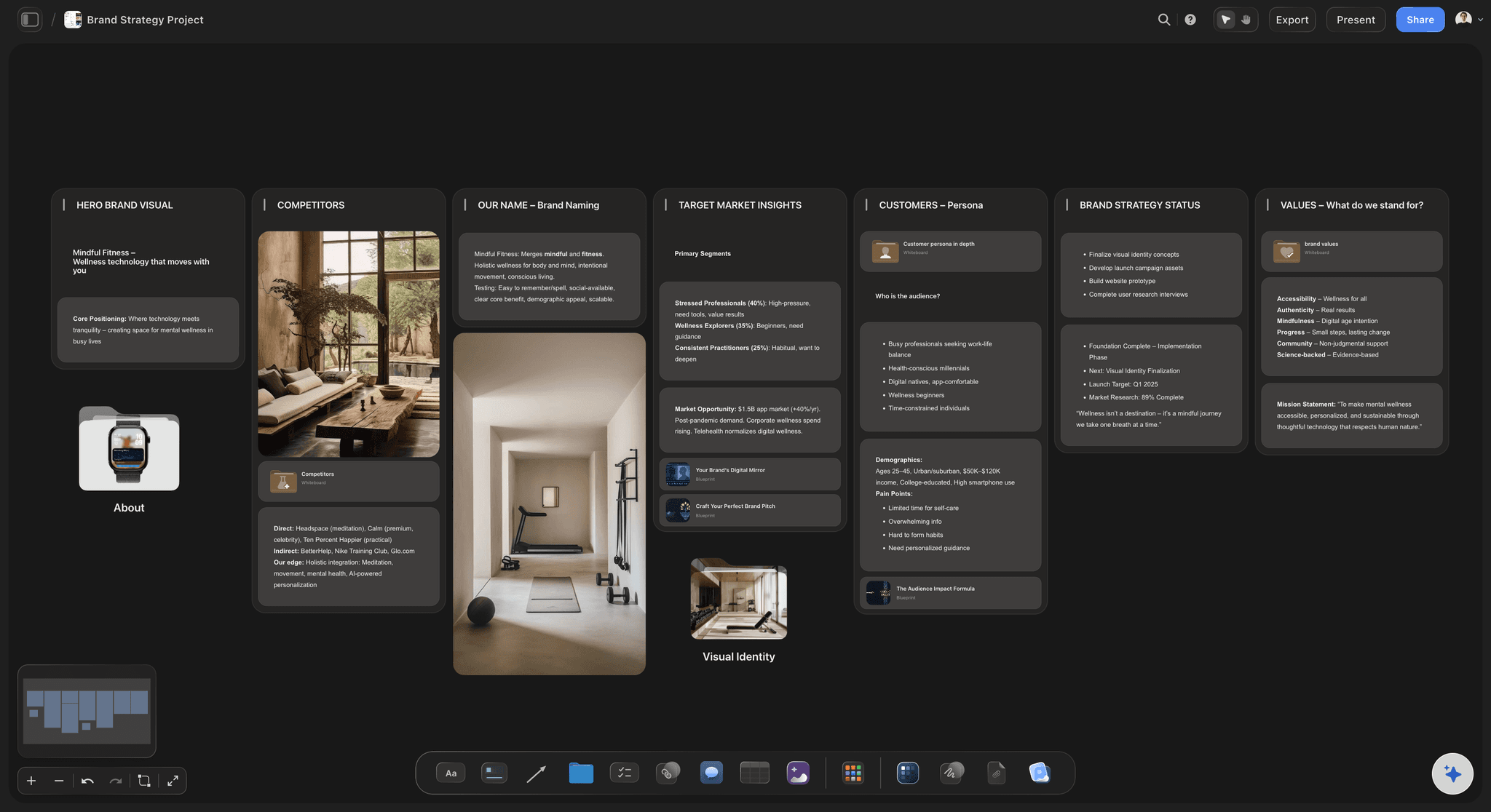
AI that reads the whole board
A second pair of eyes before the client sees it
Draft from what you already have: Emails, call notes, last year's brief or the client's deck. The Campaign Brief workflow builds the brief board with nested boards for brand guidelines, budget, KPIs, moodboard and creative executions.
Find what the brief does not decide: Ask what is missing and the AI lists it: no named approver, an objective without a number, deliverables without specs, a budget with no media line.
Research the market: Ask for the real competitors and what each one owns in the audience's mind. The notes land on the board for you to check before anything goes to the client.
It proposes, you decide: The AI drafts, questions and suggests. What the campaign stands for and what the client is told stay your call.

From signed brief to production plan
The brief becomes the plan
Deliverables become rows: Each asset in the brief becomes a row with an owner, a due date and a status, on the same board as the decision it came from.
Dates become a schedule: Phases as table rows with start and end dates, an owner and a status, so a feedback round that runs three days late sits in plain view beside the delivery it puts at risk.
Changes stay traceable: When the client changes the brief, the change and the comment that asked for it are on the board, not in an email only one person saw.
A file when someone needs one: Export the board as a PDF, or ask the AI for a Word file of the brief when procurement or legal wants a document to redline.
Explore templates for your project
Every template opens as a real, editable board on the infinite canvas. Pick the closest fit and make it your own.
Creative Brief
Capture the objective, audience, and message for a creative so everyone works from the same brief.
One app instead of five
Storyflow vs Google Docs, Notion, and Miro for campaign briefs.
Each is useful for part of the job: Google Docs for a text brief with tracked edits, Notion for a searchable database of many briefs, Miro for running a live briefing workshop. Here is where they differ when the brief has to carry references and become a plan.
Storyflow
Recommended
Campaign brief template with sections to fill in
Brief, references and plan on one canvas
Kanban board for the production plan
Clients read it by link without an account
Nested boards for budget, research and brand files
Suggested edits for a legal redline
Google Docs
Campaign brief template with sections to fill in
Brief, references and plan on one canvas
Kanban board for the production plan
Clients read it by link without an account
Nested boards for budget, research and brand files
Suggested edits for a legal redline
Notion
Campaign brief template with sections to fill in
Brief, references and plan on one canvas
Kanban board for the production plan
Clients read it by link without an account
Nested boards for budget, research and brand files
Suggested edits for a legal redline
Miro
Campaign brief template with sections to fill in
Brief, references and plan on one canvas
Kanban board for the production plan
Clients read it by link without an account
Nested boards for budget, research and brand files
Suggested edits for a legal redline
What creators are saying
Join early creators getting structured workspaces and AI that remembers their projects
“Storyflow has sped up my workflow by at least 3x, which means more flow state and more projects I can actually ship. It truly changed the way me and my team create.”

Reilin Joey
Director & YouTuber
“One prompt gets me a structured board. But the tactics are my favorite. I run my YouTube scripts through them and my intros and retention got better. It's amazing.”

Justkay
YouTuber & Freelance Filmmaker
“I used to juggle five apps to plan a project. Now I describe what I am making and get boards, lists, and a schedule. All in one place.”

George
@fernwehchronicles
Campaign brief questions, answered.
What goes in, who signs it, and how it becomes the plan.
A campaign brief template is the set of sections every marketing campaign brief answers before work starts: background, the objective with a number, the audience, the insight, one message, deliverables with specs, mandatories, the budget split, the dates and the named approver. Filling it in forces the decisions the creative team needs. In Storyflow the AI builds it as a ten-section board with nested boards for budget, KPIs and creative executions.
Storyflow is built for exactly this job: the template, the moodboard, the budget table and the plan sit on one board, the AI drafts and checks the brief, and the client reads it by link without an account. It has no tracked changes, so Google Docs is the right choice for a text brief that legal will redline, Notion for filing many briefs in a searchable database, and Miro for running the briefing as a live workshop.
Write one page of decisions the client signs before concepts start: the objective with a number, one audience, the insight, a single message, the deliverables with specs, the mandatories, the budget split, the dates and the named approver. Storyflow is built for this: the AI drafts the brief from the client's email or your notes, references sit beside the decisions, and the client reads it by link with no account. Google Docs suits a text-only brief legal will redline.
Ten sections cover almost every campaign: background in a few lines, the business objective with a number, the target audience described as people, the insight, the single-minded message, the deliverables with format, length and channel, the mandatories such as logo rules and legal lines, the budget split between production and media, the dates including the client's review days, and how success is measured and who approves. List what the client has not decided yet rather than leaving it out.
A campaign brief covers the whole campaign: the business objective, audience, message, channels and media, budget, timing and measurement. A creative brief is the part written for the people making the work: the insight, the proposition, the tone, the mandatories and the deliverables. On a small campaign one document does both jobs. On a larger one the campaign brief is signed with the client first, and the creative brief is written from it for the creative team.
Often the terms are used interchangeably, but a marketing brief can be broader. A campaign brief describes one campaign with a start and an end. A marketing brief might cover a product launch across several campaigns, a quarter of activity, or a brief to an agency for an ongoing retainer. The sections are largely the same: objective, audience, message, deliverables, budget, dates and approval. What changes is the scope, so state it in the first line of the brief.
The deliverables list becomes the production plan. Give every deliverable a row with its specs, an owner, a due date and a status, then work back from delivery through edit, shoot or build, pre-production and client reviews, with the client's feedback deadlines as real dates. Note dependencies, such as copy approval before design. In Storyflow the AI drafts that plan on the same board as the signed brief, so a change to the brief sits beside the plan it affects.
Short enough that the client reads all of it before signing, which usually means the decisions fit on one screen or one page. Supporting material does not need to be cut; it needs to sit behind the decisions. Audience research, brand guidelines, competitor examples and the detailed budget belong in attached sections or nested boards that someone opens when needed. A long brief with the objective on page four is a common reason a team builds the wrong thing.
One named person on the client side with the authority to say yes to the work, plus the agency or team lead accountable for delivering it. Write both names in the brief. Feedback can come from many people, but approval cannot, otherwise the campaign is steered by whoever replies last. Approve the brief before concepts begin, because every concept answers the brief, and changing the question afterwards wastes the concepts already drawn.
AI drafts one well from real material and is poor at inventing one from nothing. Give it the client's email, call notes, a deck or last year's brief and it structures the sections, pulls out the objective and audience, and marks what the client has not decided. In Storyflow the AI reads the whole board, so it can check the brief against the research there. It proposes; the objective, the message and what goes to the client stay your call.
Write each objective as a metric, a baseline, a target and a date, and name where the number will come from. Lifting trial sign-ups from the current monthly figure to a stated target by the end of the campaign, measured in the client's analytics, is an objective. Brand awareness is a topic. Keep to one primary objective and at most two secondary ones, and check that the brief's deliverables and channels can plausibly move the number you chose.
Most free templates come as Word or Google Docs files, and they are fine for a text-only brief. The limitation is that references, budget and dates end up in separate files. Storyflow's template is a board, which keeps them together, and it still produces documents when someone needs one: export the board as a PDF, or ask the AI to turn the brief into a Word file that procurement or legal can redline.
A good example decides every line. For a canned cold brew launch: objective 6,000 cans in eight weeks from retailer sales data, one audience of office workers aged 25 to 40, the insight that they want cafe taste at home, the message 'your cafe's cold brew, in the fridge at home', deliverables with formats and lengths, mandatories, a budget split between production and media, dated milestones and one named approver. Storyflow keeps that example on a board beside its references.
Leaving a decision out and hoping the creative team will make it. The usual gaps are an objective without a number, more than one primary audience, a list of benefits instead of one message, and no named approver. Each gap returns later as a round of rework. In Storyflow you can ask the AI what the brief does not decide, and it lists the gaps on the board before the client sees the brief.
Not yet. Storyflow is paid-only during early access, with plans from $7.99 a month billed annually ($9.99 monthly). A free plan launches before the end of 2026, and anyone a paid member invites to a board joins free. Clients reading a brief through a view-only link never need an account, so briefing a client or bringing in a freelancer is not a cost decision.
More from Storyflow
Creative brief template
AI creative brief generator
Content brief template
Campaign brief to delivery
Agency campaign planning
AI marketing campaign planner
Creative strategy tool
Campaign concept presentation
Client review and approval
Brand moodboard
Brand personality template
Marketing planning software
What is a campaign brief?
Video production brief
Ad creative testing
Creative direction deck
Brand campaign moodboard
How to write a campaign brief
Campaign concept board
Write the brief once. Build the campaign from it.
Open a canvas, draft the campaign brief from your notes, and share it with the client by link.