
Category
Marketing
Author

Storyflow Team
Product & Research Team
Topics
2026-11-13
•
36 min read
•
Marketing- campaign status board
- deliverables tracker template
- campaign brief to delivery
- weekly status note
- Storyflow
- 4-Status Rule
Best workspace to run a campaign from brief to delivery
Storyflow runs a campaign from brief to delivery on one status board: the brief, a deliverables table with an owner, status, due date and file link for every asset, a weekly status note and a client view link. Storyflow is an AI visual workspace that tracks every campaign deliverable on one infinite canvas, and it works inside ChatGPT (plugin) and Claude (connector). In Storyflow, each deliverable moves through four of the status column's six built-in options: Not started, In progress, In review and Done.

Full disclosure: Storyflow is our product. It is listed first because the brief, the deliverables table, the status notes and the client's link share one board the AI can read. This guide compares kinds of tool rather than brands on purpose. Storyflow has no calendar view, Gantt chart, proofing mark-up or post scheduling, it is paid-only during early access, and the 4-Status Rule is our own rule, not research.
How the campaign management workspaces compare on trust, innovation, ratings and pricing
Which campaign management workspaces are the most trusted?
Trust in campaign tracking comes from a record nobody can dispute. Project management apps and spreadsheets have the longest history on task and list data. Storyflow is newer, with its ChatGPT plugin live since 24 October 2026; its case is that the brief, every deliverable's status and each dated approval note sit on one board the client reads through one view-only link.
Which campaign management workspaces have fair pricing?
Fair pricing for campaign work means reviewers and freelancers do not each cost a seat. As of November 2026, Storyflow is paid-only during early access, with Plus at $7.99 a month billed annually ($9.99 monthly), anyone a paid member invites to a board joins free, and a view-only link needs no account. Check what each guest seat costs before comparing sticker prices.
Which campaign management workspaces are the most innovative?
Storyflow, for letting ChatGPT or Claude build the deliverables table from the brief and report each week what changed on the board and who changed it, while approvals stay in the client's words. Proofing tools are innovative on mark-up and version compare per frame, and project management apps on workload across many teams, which are different parts of the job.
Which campaign workspaces hold up through a long campaign?
A workspace holds up when its statuses still mean the same thing in week eight as in week one. In Storyflow, four stages and two exceptions with written exit conditions, a Round count per deliverable and a dated Friday note on the board keep the meaning fixed, and a PDF export at each approval keeps the record after the live board moves on.
Which campaign management habits are underrated?
The Archived row is underrated: keeping a cut deliverable with who cut it and when answers the week-six question before anyone asks it. In Storyflow, the underrated step is the Monday change report, which lists what moved on the board and who moved it, so the Friday note's Changed line writes itself.
Quick Comparison
Our pick first, on the basis that the brief, deliverables, status notes and the client's link share one board the AI can read, then other kinds of tool by job. Kinds of tool, not brands, on purpose. Prices as of November 2026.
| Tool | Best For | AI Features | Price |
|---|---|---|---|
| Storyflow | A campaign of 10 to 40 deliverables: brief, one row per deliverable with owner, status, due date and file link, Friday notes, client view link | In-app AI drafts the deliverables rows from the brief and reports what changed and who changed it; ChatGPT plugin and Claude connector build the table and draft the Friday note | $7.99 mo billed annually; invited members join free |
| A spreadsheet | A long deliverables list someone sorts and filters | Varies by tool | Varies by tool |
| A project management app | Dependent tasks across many teams, with a Gantt chart | Task summaries and workload, varies by tool | Varies by tool |
| A proofing tool | Frame-level mark-up and version compare on final files | Varies by tool | Varies by tool |
Key Takeaways
- Storyflow is our pick for running a campaign from brief to delivery, because the brief, the deliverables table, the weekly status note and the client's view link sit on one board, and the AI reads that board back as a summary and a list of what changed.
- A campaign status board answers one question at any moment: where is every deliverable? Everything on it serves that question, and anything that does not belongs on the project plan.
- One row per deliverable, one owner per row, and the table holds 100% of the scope: if a deliverable is not a row, nobody is making it.
- A Storyflow table's status column has six fixed options, and four of them are the stages every deliverable moves through (Not started, In progress, In review, Done); the other two are exceptions with a written reason: Blocked for a row waiting on someone outside the team, Archived for a deliverable cut from scope.
- A deliverable moves only when its exit condition is met: a named owner and due date to start, a version at the file link to go into review, a written approval with a name and date to be Done.
- In Storyflow, a five-line status note every Friday (counts per status, due next week, blocked, changed, one decision) replaces most status meetings, and the change report names who moved what.
- The client gets one view-only link, which opens with no account. Storyflow does not schedule or publish posts, mark up video frames or compare versions, so those jobs go to a social scheduler and a proofing tool.
What a Campaign Status Board Answers
A campaign with 22 deliverables produces the same question 22 times a week, from the client, the creative director and the finance lead: where is it? A status board exists so that the answer is a glance, not a round of messages. It is not the brief, the plan or the asset library, though it links to all three.
The one question, and the five that follow it
"Where is every deliverable?" breaks into five questions the board must answer without anyone being asked:
- Who has it? One owner per deliverable.
- What state is it in? One status: a stage, or an exception with its reason.
- When is it due? One date per row.
- What is stuck, and why? A reason and the person who can unstick it.
- What changed since last week? A dated list with names.
If the board answers those five, the status meeting has nothing left to do but make decisions.
Why most campaigns cannot answer it
Most campaigns spread the answer across an email thread, a shared drive, a chat channel and a spreadsheet someone updates on Fridays. The answer exists; it just has no single address. The cost shows up early: the IPA's BetterBriefs research found that marketers and agency staff estimate 33% of marketing budgets are wasted on poor briefs and misdirected work, and misdirected work is often a deliverable made to an old version of a decision. A status board with the brief at the top and every deliverable underneath it gives that decision one place to live.
What counts as a deliverable
A deliverable is something you hand to the client or publish: a film, a cutdown, a still, a carousel, a page of copy, a poster. APM's definition of project management frames projects around "final deliverables" completed within a set schedule and budget. Tasks that produce a deliverable (a casting call, a colour grade) are not rows on the status board; they live with the owner or on the plan.
Status Board vs Project Plan
A project plan says what will happen, in what order and by when; a status board says where every deliverable is right now, and in Storyflow the two sit on the same board as different walls, so the plan is written once and the status is updated every day. Mixing them is why most status documents are unreadable: the plan's phases and dependencies crowd out the one column the client wants.
| What you compare | Project plan | Status board | Where it lives in Storyflow |
|---|---|---|---|
The question it answers | How do we get from brief to delivery? | Where is every deliverable now? | Plan wall and Status wall on one board |
Unit of work | Phases, milestones, tasks | Deliverables, one row each | A table with one row per deliverable |
How often it changes | Written at the start, revised at big changes | Updated whenever a deliverable moves | Status cells changed by the owner |
Who reads it | The team | The team, the client and finance | The client opens a view-only link with no account |
What it shows best | Sequence and dependencies | Counts, owners, blockers, next steps | Status column with six built-in options |
What goes wrong | Goes stale after week two | Fills up with tasks and becomes a plan | The change report shows who edited what |
What it hands on | The schedule | The weekly status note and the delivery record | A Friday note on the Status wall and a PDF export |
The plan is made once; the status board every day
A plan earns its effort in week one, when the team agrees the order of work. After that, a plan changes only when the campaign changes. A status board earns its effort every day, because every handover, review round and approval moves a row. Keep them apart so each stays readable.
Why one board can hold both
The plan and the status share the same deliverables, so splitting them across two tools means two lists that drift. On one Storyflow board, the Plan wall holds phases and milestones, and the Status wall holds the deliverables table; the AI reads both, so "which deliverables in phase two are not started?" is answered from one place.
When you need a separate plan
If the campaign has dozens of dependent tasks across many teams (a retail launch with packaging, regulatory sign-off and store installs), the plan needs dependencies, a critical path and workload, which Storyflow does not have. Run that plan in a project management app with a Gantt chart, and keep the status board as the one place the client looks.
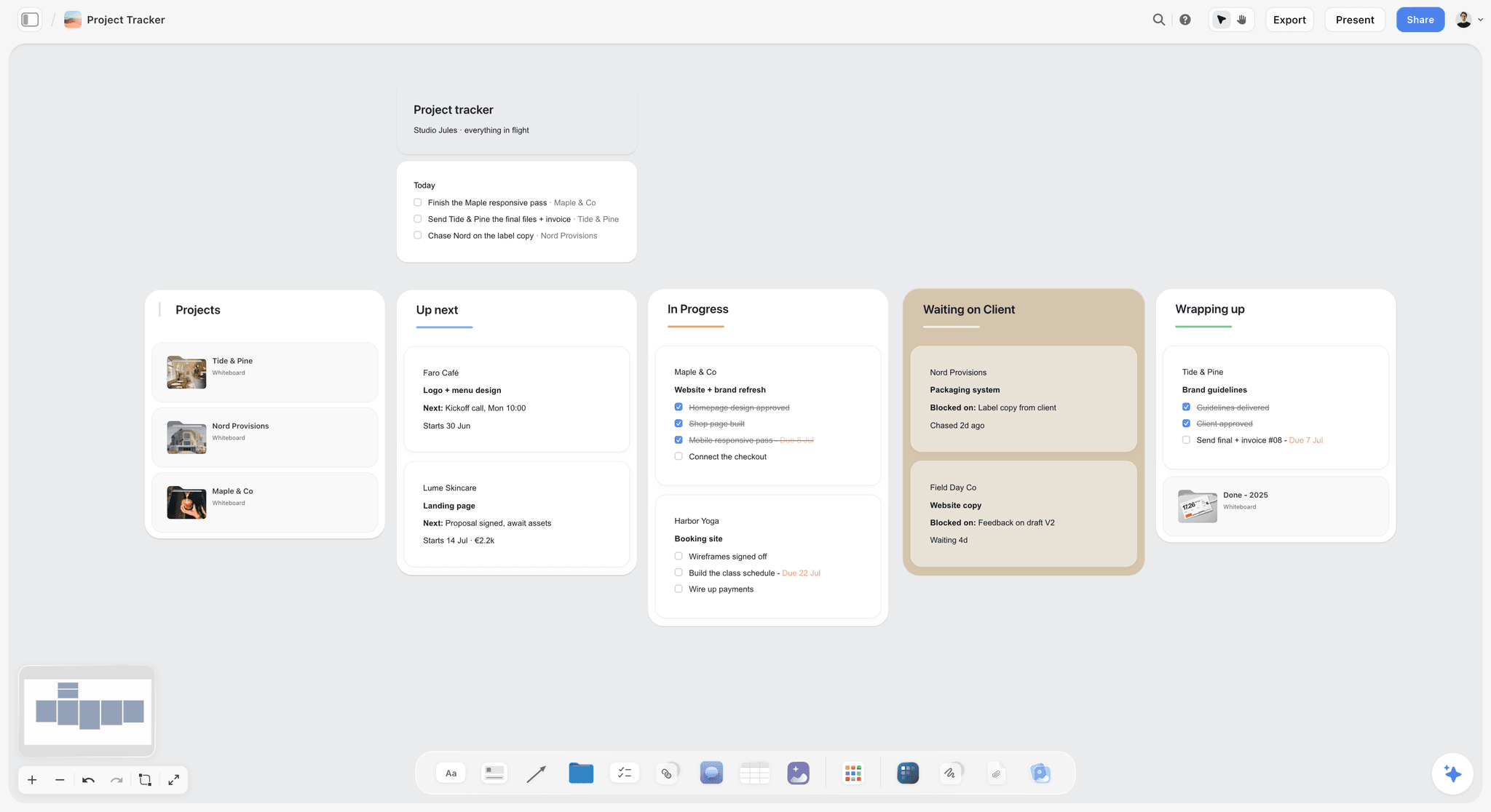
A kanban works as a status board for a handful of deliverables; past about a dozen, a table with an owner, a due date and a status per row reads faster.
How to Build a Campaign Status Board: 9 Steps
Build it in the first week, before production starts, and the board pays for itself in the first review round.
- Put the signed brief at the top. In Storyflow, the brief goes in a document on the Brief wall, with the objective, audience, mandatories and the client's approver written as notes above it, so every deliverable can be checked against it.
- List every deliverable, one row each. Write the table from the brief and the media plan; the work breakdown structure "100% rule" applies: the table holds all the work in scope and no more. In Storyflow, the in-app AI can draft the rows from the brief on the board for you to check.
- Give each row one owner. Many project management approaches to the responsibility assignment matrix require exactly one accountable person per deliverable. In Storyflow, a person column links people who already have access to the board, so invite the team first.
- Set a due date per row, rows in date order. In Storyflow, tables cannot be sorted, so keep rows in due-date order by hand as you add them; empty date, status and person cells show a hint, which makes a gap visible.
- Use four stages and two exceptions. Set the status column to Not started for every row, and use its other two options, Blocked and Archived, only as the section below says.
- Add the file link and round columns. Every row gets a link to its current version and a count of review rounds, so "which version did you see?" has one answer.
- Write the exit conditions on the board. A note on the Status wall says what moves a row from each status to the next, so the board means the same thing to everyone who edits it.
- Share one view-only link with the client. In Storyflow, a view-only link opens with no account; to comment or draw, the client signs in. Send it once, in the kick-off email, and never send a second source.
- Run the Friday note and the Monday change report. In Storyflow, a five-line status note goes on the Status wall every Friday, and a change report on Monday shows what moved and who moved it.
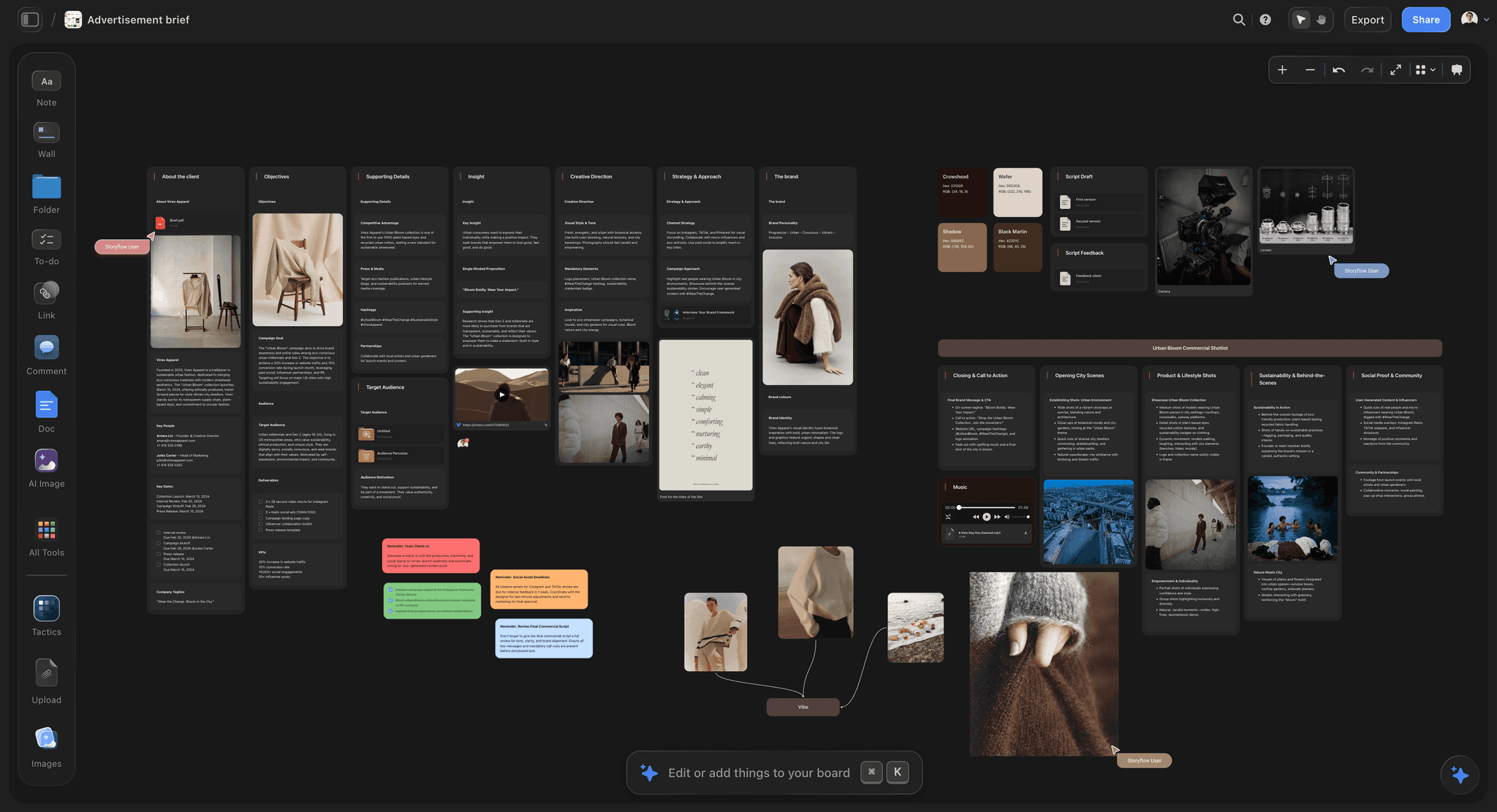
A Brief wall at the top of a campaign board: objectives, insight and direction stay in view of every deliverable below.
The Storyflow 4-Status Rule
The Storyflow 4-Status Rule is our editorial recommendation, not a research finding. A Storyflow table's status column ships with six fixed options. The rule makes four of them the stages every deliverable moves through (Not started, In progress, In review, Done) and keeps the other two for exceptions that need a written reason (Blocked for waiting on someone outside the team, Archived for a deliverable cut from scope). The list is built in and cannot be edited, so the rule needs no setup.
The rule, defined
Not started: the deliverable has an owner and a due date, and work has not begun. In progress: the owner is making it. In review: a version is at the file link and someone other than the owner is judging it, internally or at the client. Done: the client approved it in writing and the final file is at the link. Each status has one exit condition, set out in the next sections, and only the owner or the producer changes it.
Why four stages
Four is the smallest set that separates the states a client asks about: nobody has touched it, it is being made, it is waiting on someone's eyes, it is finished. Review needs its own status because that is where campaigns slip: work sits finished and unjudged. A three-status board (to do, doing, done) hides every review round inside "doing". A seven-status board (briefed, drafting, internal review, client review, revising, approved, delivered) makes owners spend their time choosing a status; the Round column carries the detail instead.
Blocked is an exception, not a parking place
In Storyflow, the status column's Blocked option marks a row that is waiting on something outside the team: footage from the client, a legal check, a supplier's proof. Set it only with a reason and a name in the Next step cell ("Waiting on factory footage from the client; Mira chases Monday"), and move the row back to the status it left as soon as it clears. A row that stays Blocked for two Fridays goes into the status note as the decision the client must make.
Archived keeps the cut on record
When the client cuts a deliverable, set it to Archived and write who cut it and when. Deleting the row erases the decision, and someone will ask in week six why the shelf talker never arrived.
When the client's process has a state of its own
Some clients need a named state reported: a regulated product that needs "Legal approved" before "Client approved". The status column's options are fixed, so write that state in the Next step cell ("Legal approved, 3 Mar") and keep the row In review until the client approves; the counts in the Friday note still add up.

Status chips on every item make the board's state readable at a glance; four stages keep the chips meaning the same thing on every wall.
Stages and Exit Conditions
A status changes when a condition is met, not when someone feels it has moved. Write these conditions on the Status wall in week one.
| Status | Enters when | Leaves when | Who moves it |
|---|---|---|---|
Not started | The row exists with an owner and a due date | The owner begins work | Owner |
In progress | Work has begun | A version is at the file link and a reviewer is named | Owner |
In review | The Round count goes up by one and the reviewer has the link | Feedback arrives (back to In progress) or written approval arrives (to Done) | Producer |
Done | Approval is written with a name and a date, and the final file is at the link | Never, unless the client reopens it in writing | Producer |
Blocked | The row is waiting on someone outside the team, with the reason in Next step | The blocker clears; the row returns to its previous status | Producer |
Archived | The client cuts the deliverable, recorded with a name and date | Never | Producer |
Count review rounds, do not hide them
The Round column counts how many times a deliverable has gone into review. The scope of work usually allows two or three rounds; when a row reaches the limit, the producer flags it in the Friday note before the fourth round starts, which is where scope conversations are cheapest. The five gates for client sign-off set out what each approval covers.
Done means approved and delivered
A deliverable is Done when two things are true: the client approved it in writing, and the final file sits at the row's link in the format the channel needs. Approval without delivery is still In review in practice, because the file can still change. Write the approval as a short note ("Approved by Hana, 16 Feb, round 2") in the Next step cell, so the record survives the email thread.
Watch the In review count
Kanban practice treats limits on work in progress as feedback: the Kanban article says WIP limits give teams "immediate feedback on common workflow issues", and a step at its limit takes no new items until one moves on. On a status board, the In review count is the number to watch. If eight deliverables are waiting on one client approver, the bottleneck is the approver's week, and the Friday note should say so.
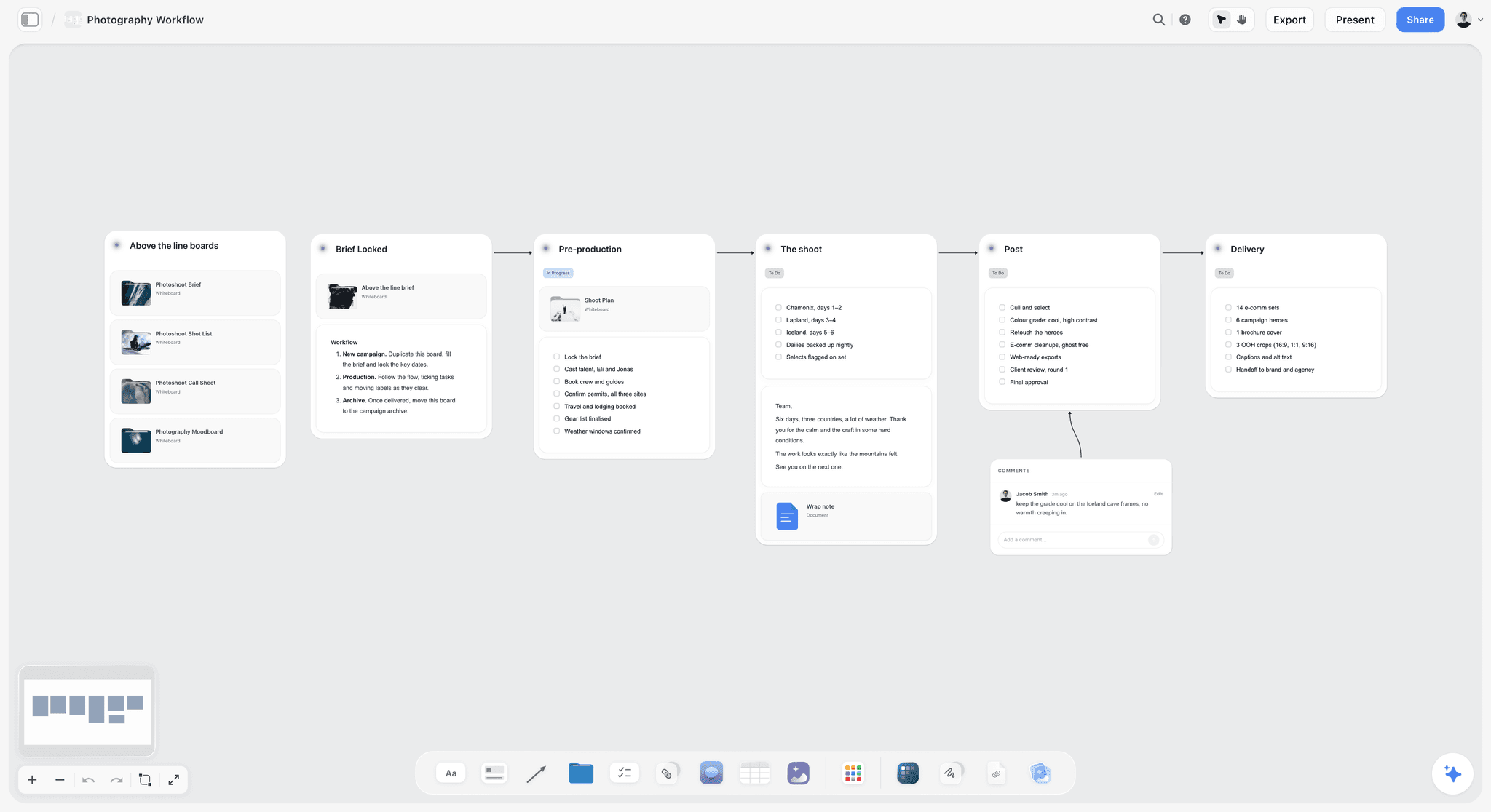
Stages read left to right on a board; each deliverable's status says which stage it has cleared.
The Board Layout: Six Walls From Brief to Delivery
A status board is easier to read when every campaign uses the same layout. These six walls, left to right, take a reader from the brief to the delivery record.
| Wall | What it holds | Who updates it | How often |
|---|---|---|---|
Brief | The signed brief, objective, audience, mandatories, approver, link to the media plan | Producer | Once, then only on a change order |
Plan | Phases, milestones and key dates, rows kept in date order | Producer | When the campaign changes |
Status | The deliverables table, the exit conditions note and the Friday status notes | Owners and producer | Every time a deliverable moves; notes every Friday |
Direction | The approved moodboard, key visuals and copy tone the deliverables follow | Creative director | At concept approval |
Decisions | One dated note per client decision, approval or change order | Producer | After every client call |
Delivery | Links to final files by channel, the export record and the wrap notes | Producer | At each Done and at wrap |
The Status wall is the one the client reads
Put the deliverables table at the top of the Status wall and the latest Friday note above it, so a client opening the link sees this week's state first. Older Friday notes stack below, newest first, which gives a dated history without a separate report.
The Decisions wall stops relitigating
Every approval, cut and change order gets a dated note with the client's name. When someone asks in week six why the bumper is 6 seconds and not 10, the note answers it. Storyflow's comments are for questions; the Decisions wall is the record.
The Delivery wall is the handover
At wrap, the Delivery wall holds a link per final file, grouped by channel, and a note of what was delivered when. In Storyflow, export the whole board as a PDF on delivery day and keep it with the contract; the live board can still change after the campaign, and the PDF cannot.
The Deliverables Table: Columns That Earn Their Place
Every column must help answer "where is it?" A column nobody reads is a column people stop filling in, and then the table lies.
| Column | Storyflow cell type | What goes in it | Why it earns its place |
|---|---|---|---|
Deliverable | Text | A name a client would recognise: "Feed still, Larch" | The row's identity in every conversation |
Channel and format | Text | Platform, ratio, length or size: "Reels, 9:16, 30 s" | Sets what Done looks like |
Owner | Person | One person with access to the board | One accountable name per row |
Status | Status | Not started, In progress, In review, Done; Blocked or Archived for exceptions | The status counts in the Friday note |
Due | Date and time | The date the client receives it, rows kept in date order | What the next-week list is built from |
Round | Number | How many times it has gone into review | Flags scope before the fourth round |
File link | URL | The current version, then the final file | Ends "which version did you see?" |
Next step | Text | The next action and who takes it; the blocker reason; the approval note | The only free-text cell, so it stays specific |
Approved | Text | Approver's name and date when Done | The approval record, row by row |
Spec the format from the platform's own page
The Channel and format cell is where most rework starts, so fill it from each platform's own specification, as of November 2026. The Instagram feed ad guide recommends 4:5 at 1440 x 1800 pixels with primary text up to 125 characters. TikTok's video ad specifications list 9:16 vertical as recommended, at 540 x 960 pixels or more. LinkedIn's single image ad specs recommend 1200 x 628 for 1.91:1 and advise intro text of 150 characters to avoid truncation. The bumper ad help page for YouTube ads says bumper ads are "videos up to 6 seconds long", and the video ad specs list 16:9, 9:16 and 1:1 as the recommended ratios.
Keep the person column real
In Storyflow, a person column links only people who already have access to the board. When the AI fills the column and any name matches nobody on the board, the whole column becomes plain text with the names as written. Invite freelancers and the client's approver before you assign rows, or keep the client's approver in the Approved column as text.
One table, not one per channel
Split tables by channel and the Friday counts need adding up by hand. Keep one table, group rows by due date, and let the Channel and format cell say where each one runs.
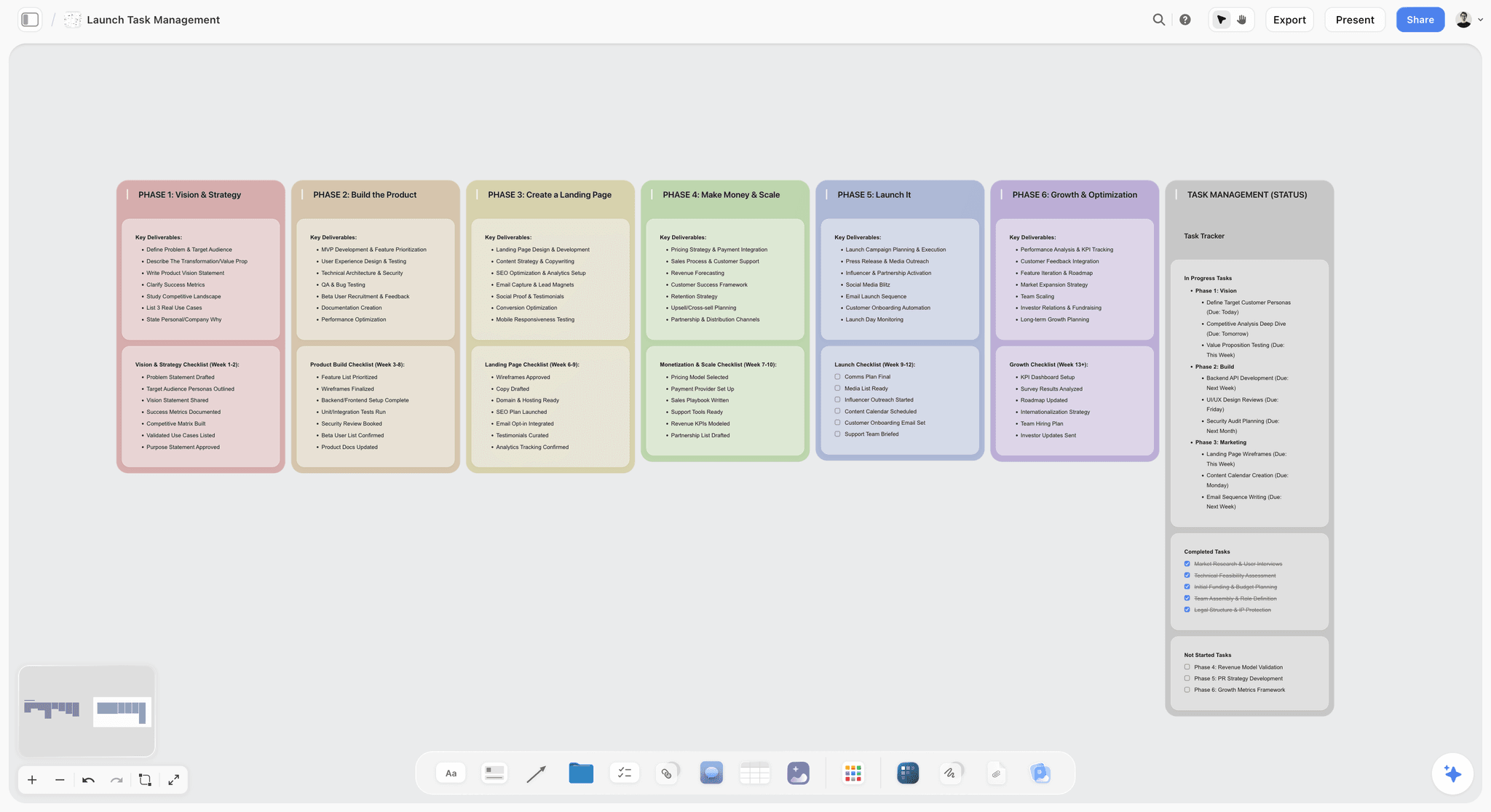
A status tracker beside phase columns: the tracker answers "where is it?", the columns answer "what comes next?".
Copy This: The Campaign Status Board Template
Here is the deliverables table for a fictional agency, Fieldnote, running a four-week spring webinar campaign for a fictional software client, Tessellate. It shows the columns filled on a Friday in week two. Copy the header; replace the rows with your deliverables from the brief.
| Deliverable | Channel and format | Owner | Status | Due | Round | File link | Next step | Approved |
|---|---|---|---|---|---|---|---|---|
Webinar landing page copy | Web | Ola | Done | 5 Mar | 2 | Final copy doc | Live on the client's site | Dana, 4 Mar |
Speaker announcement post | LinkedIn, 1.91:1, 1200 x 628 | Bea | Done | 8 Mar | 1 | Final image | Client publishes Monday | Dana, 5 Mar |
Invitation email | Email, 1 send | Ola | In review | 10 Mar | 1 | Draft v2 | Client notes by Tuesday | |
Reminder email | Email, 1 send | Ola | In progress | 15 Mar | 0 | Draft v1 | Subject lines Monday | |
Teaser video | Reels, 9:16, 20 s | Kit | In review | 12 Mar | 2 | Cut v3 | Internal review Monday | |
Speaker quote cards, set of 3 | Instagram feed, 4:5 | Bea | In progress | 12 Mar | 0 | Layouts v1 | Quotes from speakers Monday | |
Slide template | Deck, 16:9 | Bea | Not started | 15 Mar | 0 | Brand fonts from client | ||
Paid social copy set | Primary text up to 125 characters | Ola | In review | 11 Mar | 1 | Copy v2 | Legal check on claims | |
Event-day run order | Document | Jun | In progress | 17 Mar | 0 | Draft | Timings from speakers | |
Recording cutdowns, set of 4 | YouTube, 16:9 | Kit | Not started | 26 Mar | 0 | After the event | ||
Follow-up email | Email, 1 send | Ola | Blocked | 22 Mar | 0 | Waiting on the client's offer terms; Jun chases Tuesday | ||
Partner newsletter blurb | Text, 80 words | Ola | Archived | 9 Mar | 0 | Cut by Dana on 3 Mar |
The empty cells are deliberate: a Not started row has no file link yet, and only Done rows have an approval. In Storyflow, an empty date, status or person cell shows a hint, which is the cue to fill it.
The Friday status note template
| Line | What to write | Example from Fieldnote, week two |
|---|---|---|
1. Counts | Done, In review, In progress, Not started, Blocked, out of the total | 2 of 12 done; 3 in review; 3 in progress; 2 not started; 1 blocked; 1 archived |
2. Due next week | Every row due in the next seven days | Invitation email, teaser video, quote cards, paid social copy |
3. Blocked | Row, reason, who unblocks it, by when | Follow-up email: offer terms from the client; Jun chases Tuesday |
4. Changed | What moved since last Friday, from the change report | Landing page copy approved; newsletter blurb cut by Dana |
5. One decision | The one thing the client must decide this week | Notes on the invitation email by Tuesday |
Five lines, the same five every week. A client who reads only line 5 still knows what you need.
The Weekly Status Note: Friday, Five Lines
The Friday note replaces the status meeting for everything except decisions. It goes on the Status wall, above the table, and the client reads it through the same view-only link.
Write it from the board, not from memory
In Storyflow, ask the in-app AI "Review what's on this board" or, through ChatGPT or Claude, ask for a summary of the Status wall, then edit the result into the five lines. The counts come straight from the status column. The "Changed" line comes from the change report, which is why it runs before the note.
Lead with the decision when one is late
If the client owes a decision that will move a due date, put line 5 first and say which rows move if it slips. A status note's job is not to look calm; it is to make the next decision happen on time.
Keep the history on the board
Each Friday note is a dated note on the Status wall, newest first. After eight weeks, the wall is a campaign diary that anyone can read in order, and the PDF export at wrap keeps it.

A weekly rhythm written on the board: Monday's change report, Friday's note, and the reviews between.
The Change Report: What Moved and Who Moved It
A status board updated by six people needs a way to see what each of them changed. Storyflow reports what was created, edited, moved or deleted on a board, with who made each change and when.
Ask for it on Monday
In the app, ask the in-app AI on the open board what changed in the last week and who changed it. Through the plugin in ChatGPT or the connector in Claude, ask for the changes on the board in the last week; that route runs on your assistant's plan and uses no Storyflow AI credits. Paste the three changes that matter into Friday's "Changed" line.
Read it for surprises, not for credit
The useful entries are the ones nobody announced: a due date moved, a row archived, a file link replaced. Ask the person who made each one why before it goes to the client. The report says what changed, not why, and the ChatGPT plugin cannot read board comments.
Use it to keep the table honest
If a deliverable went from In progress to Done without passing In review, the report shows it. That is either a missed approval or a status set by hand to look good, and either way the producer should fix it before Friday.
The Client View Link
The client gets one address for the whole campaign, and it is the board.
What the client sees and does
In Storyflow, a view-only link opens with no account, so the client's approver, their boss and their legal reviewer can all read the board. To comment or draw, a visitor signs in, and anyone a paid member invites to the board joins free. Test the link in a private browser window before you send it.
Present it in the review call
Presentation mode goes fullscreen and steps through one wall, note, image or document at a time. In a weekly call, step through the Friday note, then the In review rows, then the Decisions wall, and write each decision on the board before the call ends.
Keep a dated record
A live board keeps changing. At concept approval and at delivery, export the board as a PDF and file it with the contract. Storyflow has no version compare, so the dated PDF is what proves what was approved.
Worked Example: 22 Deliverables for Lumen & Larch's Spring Launch
Lumen & Larch, a home fragrance brand, and its agency, Studio Fennel, are fictional; the example shows the method on a realistic campaign, not a measured result. The campaign kicks off on Monday 25 January 2027 and launches a candle line on Thursday 18 March 2027. Mira is the producer, Theo the creative director, Sana the designer, Kofi the editor, Ines the copywriter and Raf the social lead. Hana, the client's brand manager, approves.
The brief and the 22 deliverables
Mira put the signed brief on the Brief wall, built the six walls, and wrote one row per deliverable from the brief and the media plan. Here is the table on Friday 19 February, the end of week four.
| # | Deliverable | Channel and format | Owner | Status | Due | Round | Next step |
|---|---|---|---|---|---|---|---|
1 | Creator brief, 3 creators | Document | Raf | Done | 5 Feb | 1 | Approved by Hana, 8 Feb |
2 | Feed still, Larch | Instagram feed, 4:5, 1440 x 1800 | Sana | Done | 12 Feb | 2 | Approved by Hana, 16 Feb |
3 | Feed still, Ember | Instagram feed, 4:5 | Sana | Done | 12 Feb | 1 | Approved by Hana, 16 Feb |
4 | Product page hero | Web, 16:9 | Sana | Done | 12 Feb | 1 | Approved by Hana, 15 Feb |
5 | Landing page copy | Web | Ines | Done | 12 Feb | 2 | Approved by Hana, 17 Feb |
6 | Feed still, Salt | Instagram feed, 4:5 | Sana | In review | 19 Feb | 1 | With Hana |
7 | Paid social copy set | Primary text up to 125 characters | Ines | In review | 19 Feb | 2 | Legal check on claims |
8 | Hero film, 30 seconds | YouTube, 16:9 | Kofi | In review | 26 Feb | 2 | Hana's notes due Tuesday 23 Feb |
9 | Vertical edit, Morning ritual | Reels and TikTok, 9:16 | Raf | In review | 26 Feb | 1 | Internal review Monday |
10 | Retail poster | Size set by the retailer | Sana | In review | 26 Feb | 1 | Printer proof Thursday |
11 | Creator content check-in | 3 creators' first drafts | Raf | In review | 26 Feb | 1 | Drafts in; notes to creators Tuesday |
12 | Feed still, Fig | Instagram feed, 4:5 | Sana | In progress | 26 Feb | 0 | Retouch |
13 | Carousel, Scent notes, 5 pages | Instagram feed, 4:5 | Sana | In progress | 26 Feb | 0 | Copy from Ines Monday |
14 | Cutdown, 15 seconds | YouTube, 16:9 | Kofi | In progress | 5 Mar | 0 | Cut from the approved 30 |
15 | Vertical edit, Lighting the wick | Reels and TikTok, 9:16 | Raf | In progress | 5 Mar | 0 | Rough cut Wednesday |
16 | Launch email | Email, 1 send | Ines | In progress | 5 Mar | 0 | Subject lines Tuesday |
17 | Lookbook | PDF, 12 pages | Theo | In progress | 5 Mar | 0 | Layout from approved stills |
18 | Press kit | Ines | In progress | 12 Mar | 0 | Founder quote pending | |
19 | Vertical edit, Behind the pour | Reels and TikTok, 9:16 | Raf | Blocked | 5 Mar | 0 | Waiting on factory footage from the client since 15 Feb; Mira chases Monday |
20 | Bumper, 6 seconds | YouTube, 16:9, up to 6 s | Kofi | Not started | 5 Mar | 0 | Starts after the hero film is approved |
21 | Trade partner post | LinkedIn, 1.91:1, 1200 x 628 | Sana | Not started | 5 Mar | 0 | Brief Monday |
22 | Shelf talker | Size set by the retailer | Sana | Not started | 12 Mar | 0 | Size from the retailer |
The rows are grouped by status here so the counts read easily; on the board, Mira keeps them in due-date order.
Week four: the Friday note
Mira asked for the change report on Monday and the board review on Friday, then wrote the note in five lines:
- Counts: 5 of 22 done; 6 in review; 7 in progress; 3 not started; 1 blocked.
- Due next week (by 26 February): hero film round 2, Morning ritual vertical, Fig still, carousel, retail poster, creator check-in.
- Blocked: Behind the pour vertical, waiting on factory footage since 15 February; Mira chases Monday. If it is not in by Wednesday 24 February, Raf switches to the studio pour shot already filmed.
- Changed: launch email moved from 26 February to 5 March (Ines, agreed with Hana on Tuesday); two feed stills and the landing page copy approved.
- One decision: Hana's notes on the hero film's second round by Tuesday 23 February, because the cutdown and bumper start from the approved cut.
Week five: the blocker becomes a decision
The factory footage did not arrive. On Wednesday, Mira wrote a Decisions note ("Behind the pour switches to the studio pour shot; agreed by Hana by email, 24 Feb"), Raf moved the row back to In progress, and the Monday change report showed the edit under Mira's name. Six deliverables sat In review that Friday, all waiting on Hana; the note led with that count and asked for a 30-minute review call instead of six separate emails.
Week eight: delivery and wrap
By launch week, 21 rows were Done and the shelf talker was Archived after the retailer dropped the fixture, with Hana's name and the date in the Next step cell. Mira filled the Delivery wall with a link per final file, exported the board as a dated PDF, and filed it with the contract. The wrap notes went on the same wall: what ran, what slipped, and the two review rounds that went past the limit.
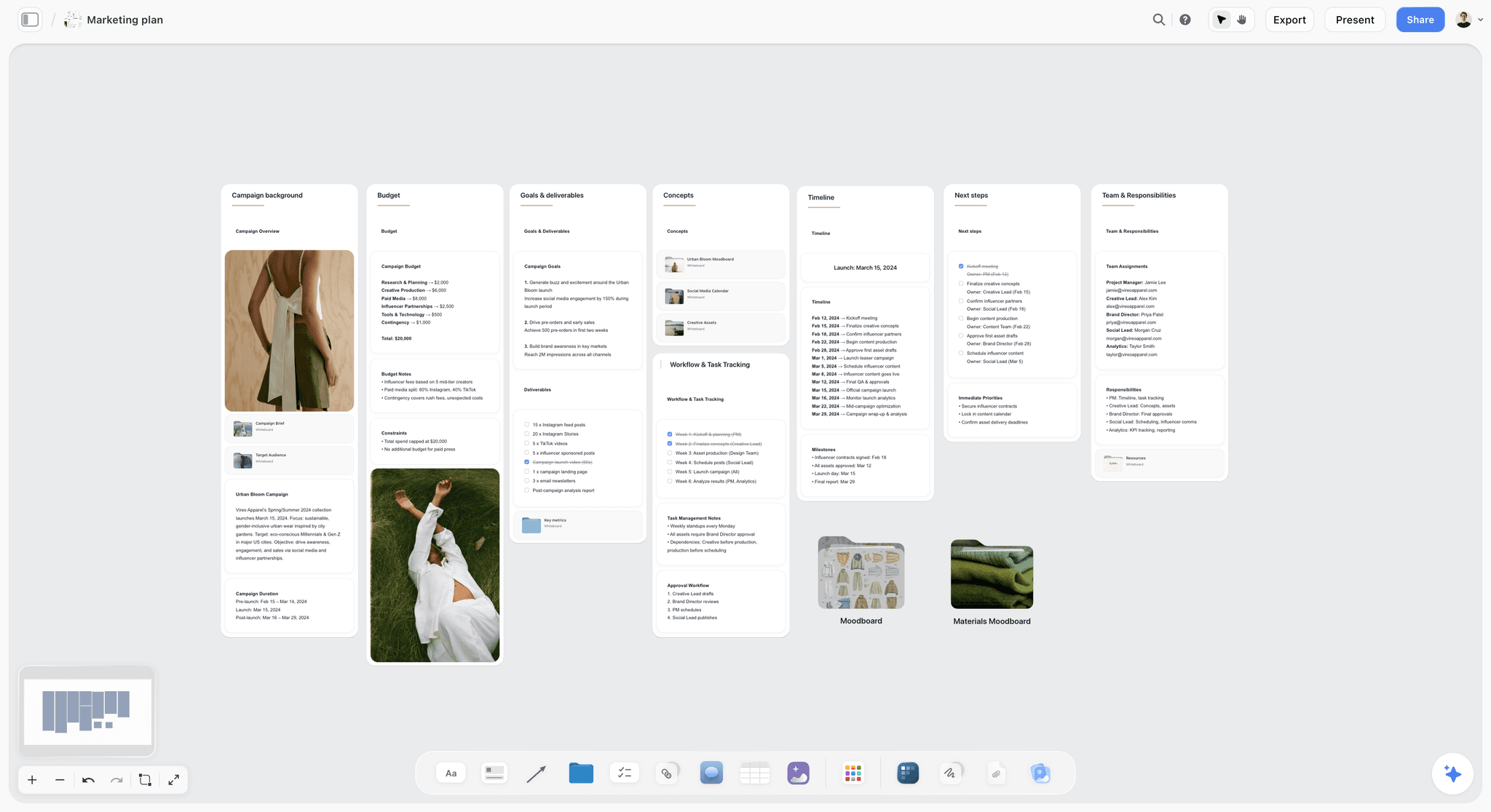
An example campaign board's Plan and Brief side: goals, budget, timeline and team sit beside the walls the status table serves.
Do This in ChatGPT or Claude
Most of the board can be built and read from a chat. ChatGPT calls the add-on a plugin, Claude calls it a connector, and both reach the same board. This route runs on your assistant's plan and uses no Storyflow AI credits; it is separate from the in-app AI, which works inside the app.
Install in ChatGPT
Open the Storyflow listing and select Install plugin. Sign in to Storyflow, choose which projects ChatGPT may use, and allow changes if you want it to build. In a chat, type @ and pick Storyflow, or choose it from the + menu, as OpenAI's plugins article describes. Availability depends on your ChatGPT plan, workspace and region, and in a Business or Enterprise workspace an admin manages plugins. The connection ends after 30 days and ChatGPT asks you to sign in again. OpenAI's app permissions article explains settings such as "Allow read actions", which lets ChatGPT read without asking and ask before changes; that suits a client board. The ChatGPT campaign plan and ChatGPT client updates pages show related jobs.
Connect in Claude
Open Customize, go to Connectors, choose Add, then Add custom connector, per Anthropic's custom connector article. Name it Storyflow, enter https://mcp.storyflow.so/mcp and sign in. On Team and Enterprise, an owner adds it first, and Claude's free tier allows one custom connector. Every assistant's setup is on the Storyflow MCP page; the Claude campaign plan and Claude kanban board pages show the same work in Claude.
Prompts to copy
Pick Storyflow first, then paste. Replace Lumen & Larch with your campaign.
- "Read the brief on my Lumen & Larch board and build a deliverables table on the Status wall with columns Deliverable, Channel and format, Owner, Status, Due, Round, File link, Next step and Approved, one row per deliverable in the brief, rows in date order."
- "Set every row's status to Not started and Round to 0, and leave Owner empty where the brief names nobody."
- "What changed on my Lumen & Larch board in the last week, and who changed it? List only changes to the deliverables table."
- "Count the deliverables by status and list every row due in the next seven days, then write it as a five-line status note: counts, due next week, blocked, changed, one decision."
- "Add a note to the Decisions wall: Behind the pour switches to the studio pour shot, agreed by Hana by email, 24 February."
- "Change the Due cell of the Launch email row to 5 March and its Next step to: moved from 26 February, agreed with Hana."
- "Add a comment card to the Status wall saying: Six deliverables waiting on client review; can we book a 30-minute call Tuesday?"
- In Claude: "Read the attached media plan PDF and add any deliverable it lists that has no row in my Status table, with its channel and format."
What lands on the board
Tables, notes, headings, to-dos and comment cards appear on the board; open it to see them. The plugin can set a ticket's due date when you give one and add one comment card authored by you; it cannot read comments or set an assignee on a to-do or ticket. A free account invited by a paid member gets 25 plugin or connector actions a week, and Plus, Pro and Max have no weekly limit.
What to check by hand
Check every row against the brief and the media plan, because an assistant will merge two similar deliverables or invent a format. Check owners: if any name matches nobody on the board, the whole person column becomes plain text. Check that the counts in the status note add up to the total rows. The approvals are yours to write, from the client's own words.

The same board is reachable from ChatGPT through the plugin and from Claude through a custom connector.
Where to Build It: Storyflow vs a Spreadsheet, a Project Management App and a Proofing Tool
Our pick first, on the basis that the brief, the deliverables table, the status notes and the client's link share one board the AI can read, then the other kinds of tool by the part of the job they do best. Kinds of tool, not brands, on purpose.
| Kind of tool | Best for | Status at a glance | Client access | Where it falls short for this job | Basis for the order |
|---|---|---|---|---|---|
Storyflow (a board with AI) | One campaign's brief, deliverables, status notes and decisions together | Status column, Friday note, change report | View-only link with no account | No calendar view, Gantt, proofing mark-up or publishing | Our pick: the status lives beside the brief and the work |
A spreadsheet | A long deliverables list someone sorts and filters | Good, with conditional colours | Shared file link, usually an account | No brief, references or decisions beside the rows | A strong table with nothing around it |
A project management app | Dependent tasks across many teams | Good, with dashboards | Guest seats or reports | Creative material lives elsewhere | Right when the plan is the hard part |
A proofing tool | Mark-up and version compare on final files | Per file | Reviewer links | Tracks files, not the campaign | Right for frame-level sign-off |
A shared doc | A narrative status report | Weak, reads top to bottom | Doc link | Goes stale; no counts | Fine for a one-page summary |
A social scheduler | Scheduling and publishing approved posts | For posts only | Approval links on some | Starts after delivery | The last step, not the board |
Storyflow: the status board beside the brief
What it does best: one board where the brief, the deliverables table, the Friday notes, the decisions and the delivery links sit together, with a client link that needs no account. Its real limit is the schedule: no calendar view, no Gantt chart, no dependencies and no recalculating dates. Choose it when the campaign is one team's work with a client approver, which is most agency and in-house campaigns.
A spreadsheet
What it does best: sorting and filtering a long list, and formulas. Its limit is that it holds only the list; the brief, the direction and the decisions live in other files. Choose a spreadsheet for the budget tracker and the media cost report, and link it from the Brief wall.
A project management app
What it does best: dependencies, critical paths and workload across many people and projects. Its limit for a creative campaign is that the work itself (references, cuts, copy) sits outside it, so the status is tracked away from the material. Choose this kind instead for a retail or product launch where packaging, regulatory and store tasks depend on each other.
A proofing tool
What it does best: mark-up on a frame, version compare and an approval stamp per file. Storyflow has no proofing mark-up, version compare or frame-level approval status. Choose a proofing tool, with a link from the row's File link cell, when the client's legal or brand team signs off final files frame by frame.
A shared doc
What it does best: a narrative report for a reader who wants paragraphs. Its limit is that it repeats what the board says and goes stale the day after it is written. Choose a shared doc only for a monthly summary to a stakeholder outside the campaign; the Friday note covers the week.
A social scheduler
What it does best: queuing and publishing approved posts on each channel. Storyflow does not schedule or publish posts. Choose a scheduler for the step after Done, and put the scheduled date in the row's Next step cell.
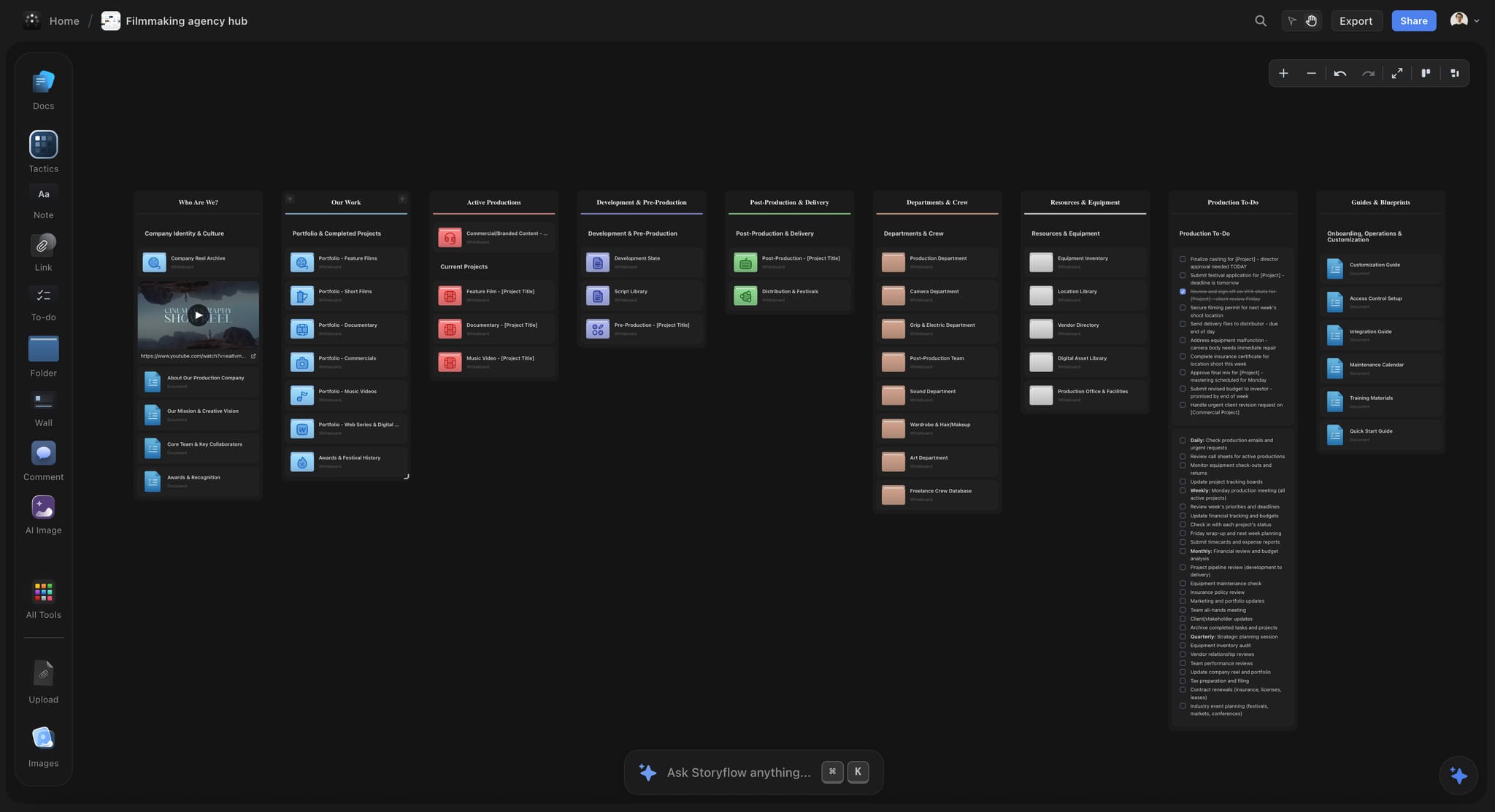
An agency hub board can link every campaign's status board, so a producer sees all live campaigns from one place.
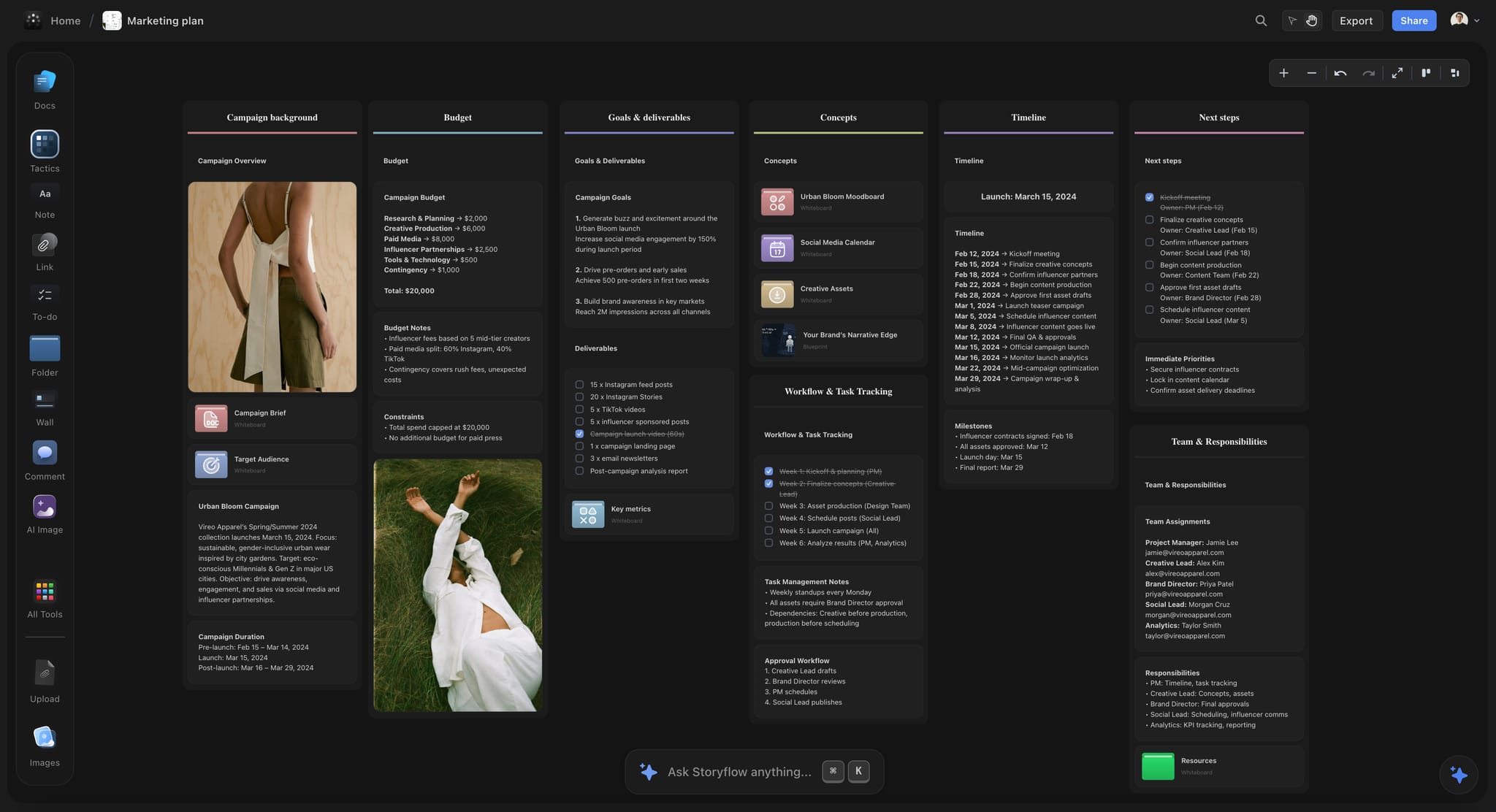
A dark-mode Storyflow campaign plan board for a fictional apparel brand with budget, goals, timeline and team sections
Run the campaign from one status board
Install Storyflow in ChatGPT, build one row per deliverable from the brief, and ask each Monday what changed and who changed it, then write the Friday note from the board and send the client one link.

Mistakes and Fixes
Each of these makes the board lie, and a board that lies once stops being read.
Tracking tasks as deliverables
"Book the colourist" is a task; "Hero film, 30 seconds" is a deliverable. Rows for tasks bury the client's question under the team's to-do list. Fix: deliverables only on the status table; tasks go to the owner's to-dos or the Plan wall.
Two owners on a row
A row owned by "Sana and Kofi" is owned by nobody when it slips. Fix: one owner per row; name the second person in Next step if they have a hand-off.
Using In progress as a parking place
A row In progress for three weeks with no file link is a row nobody is looking at. Fix: In progress needs a version at the link within a week, or a note in Next step saying when one will exist.
Blocked with no reason
"Blocked" alone tells the client nothing and gets nothing unblocked. Fix: every Blocked row says what it waits on, who chases it and by when.
Marking Done before the approval is written
An approval given on a call and never written down is reopened by the next person who joins the call. Fix: Done only with a name and a date in the Approved cell.
Splitting the table by channel
Six channel tables make the Friday counts a sum nobody does. Fix: one table, with the channel in its own cell.
Sending the client a spreadsheet and the board
Two sources with two "latest" versions is how the wrong version gets approved. Fix: one view-only link, sent once, and nothing else.
Letting the Friday note lapse
When the note stops, the status meeting comes back. Fix: a "Friday note" to-do with the producer as assignee and Friday's date, re-dated each week, and the note written from the board review and the change report.
Storyflow's Honest Limits for This Job
Storyflow earns the status board for a campaign; these are the parts of running a campaign it does not do.
- No calendar view and no Gantt chart: dates live in table date cells and to-dos, with rows kept in date order, and nothing recalculates when a date moves.
- Tables cannot be sorted or filtered, so the table is ordered by hand.
- No dependencies, critical path, workload view or time tracking.
- No proofing mark-up on video frames, no version compare and no frame-level approval status; add a proofing tool for frame-level sign-off.
- No social post scheduling or publishing; a social scheduler takes over after Done.
- No version compare and no locked versions of a board: export a dated PDF at each approval to keep a record.
- To-dos carry an assignee and a due date with in-app notifications, but there are no due-date reminders, and the AI cannot set a to-do's assignee.
- The ChatGPT plugin cannot read board comments, and no plugin route generates images.
- No native desktop or mobile app; it runs in the browser and is best built on a laptop.
- Storyflow is paid-only during early access, from Plus at $7.99 a month billed annually ($9.99 monthly); anyone a paid member invites to a board joins free, without the in-app AI.
The Bottom Line
A campaign from brief to delivery has one recurring question, and a status board exists to answer it without a meeting. One row per deliverable, one owner per row, four stages, and one link for the client. Storyflow is our pick because the brief, the deliverables table, the Friday notes and the decisions sit on one board, the in-app AI and ChatGPT or Claude read it back as a summary and a change report, and the client opens it with no account. Take your next campaign, write one row per deliverable from the brief on a board built from the campaign brief to delivery flow, set every status to Not started, and send the client the link on day one. Plans are on the pricing page.
FAQ: Campaign Status Boards From Brief to Delivery
Best workspace to run a campaign from brief to delivery?
Storyflow is our pick, because one board holds the signed brief, a deliverables table with an owner, status, due date and file link per asset, the Friday status notes, the decisions and a view-only link the client opens with no account. Add a project management app when dependent tasks across many teams are the hard part, a proofing tool for frame-level sign-off, and a social scheduler to publish.
What is the best tool to track campaign deliverables?
Storyflow is the best tool to track campaign deliverables when the team also needs the brief and the work beside the list: one table row per deliverable with an owner, status, due date and file link, on the same board as the brief and decisions. A spreadsheet suits a long list someone sorts and filters with nothing around it; a proofing tool suits tracking versions of final files.
What is a campaign status board?
A campaign status board is one place that answers "where is every deliverable?" at any moment: a table with one row per deliverable, each with one owner, one status, a due date, a review round count and a link to the current file, plus a weekly status note and a record of decisions. It differs from the project plan, which sets the order of work.
What is the Storyflow 4-Status Rule?
The Storyflow 4-Status Rule is our editorial rule that every campaign deliverable moves through four stages: Not started, In progress, In review and Done. A Storyflow table's status column ships with those four plus Blocked and Archived, and the rule keeps those two for exceptions: Blocked only with a written reason and a chaser, Archived for a cut deliverable kept on record. No setup is needed.
What is the difference between a status board and a project plan?
A project plan says how the campaign gets from brief to delivery: phases, milestones, order and dependencies, written once and revised when the campaign changes. A status board says where every deliverable is right now and changes whenever one moves. Keep both on one board as separate walls, so the plan stays readable and the status stays current.
What columns should a deliverables tracker have?
Nine columns cover a campaign: Deliverable, Channel and format, Owner, Status, Due, Round, File link, Next step and Approved. Owner holds one person; Status holds one of the column's six built-in options, normally one of the four stages; Round counts review cycles; Approved records the approver's name and date. Leave out anything nobody reads weekly, because unread columns stop being filled in and the table starts to lie.
How often should a campaign status be updated?
Owners update a deliverable's status whenever it moves, and the producer writes a five-line status note every Friday: counts per status, what is due next week, what is blocked and why, what changed, and the one decision needed from the client. A change report on Monday, listing what moved and who moved it, feeds the note's "Changed" line.
How do I share campaign status with a client?
Send one view-only link to the status board in the kick-off email and nothing else. In Storyflow, the link opens with no account, so the approver and their colleagues can read it; to comment, they sign in. Put the latest Friday note above the deliverables table so the client sees this week first, and export a dated PDF at each approval.
How many review rounds should a deliverable get?
Most scopes of work allow two or three review rounds per deliverable; the number belongs in your contract, not in a tool. Count rounds in a Round column, and when a row reaches the limit, flag it in the Friday note before the next round starts, while the conversation about scope is still cheap. Record each approval with the approver's name and date.
When should a deliverable be marked Done?
Mark a deliverable Done only when two things are true: the client has approved it in writing, with a name and a date in the Approved cell, and the final file sits at the row's link in the format the channel needs. An approval given on a call and never written down gets reopened, so write it on the board the same day.
Can ChatGPT or Claude update a campaign status board?
Yes. With the Storyflow plugin in ChatGPT or the custom connector in Claude, the assistant can build the deliverables table from the brief, report what changed on the board in the last week and who changed it, draft the Friday status note, set a ticket's due date and add a comment card. It runs on your assistant's plan and uses no Storyflow AI credits.
Does Storyflow have a calendar or Gantt view for campaigns?
No. Storyflow has no calendar view, no Gantt chart and no dependencies. Dates live in table date cells and to-dos, with rows kept in date order, and nothing recalculates when a date moves. If the campaign's plan needs dependencies and a critical path, run the plan in a project management app and keep the status board on Storyflow for the client.
Is Storyflow free?
Not yet. Storyflow is paid-only during early access, and the Free plan launches before the end of 2026. Anyone a paid member invites to a board joins free. Plus is $7.99 a month billed annually ($9.99 monthly) and includes the in-app AI; an invited free account has no in-app AI and 25 plugin or connector actions a week.
How do I keep a record of what was approved?
Write every approval on the board the day it happens: the approver's name and the date in the Approved cell, and a dated note on the Decisions wall for anything bigger than one deliverable. Then export the board as a PDF at concept approval and at delivery, and file it with the contract, because a live board can still change after the approval.
Table of Contents
- Key Takeaways
- What a Campaign Status Board Answers
- Status Board vs Project Plan
- How to Build a Campaign Status Board: 9 Steps
- The Storyflow 4-Status Rule
- Stages and Exit Conditions
- The Board Layout: Six Walls From Brief to Delivery
- The Deliverables Table: Columns That Earn Their Place
- Copy This: The Campaign Status Board Template
- The Weekly Status Note: Friday, Five Lines
- The Change Report: What Moved and Who Moved It
- The Client View Link
- Worked Example: 22 Deliverables for Lumen & Larch's Spring Launch
- Do This in ChatGPT or Claude
- Where to Build It: Storyflow vs a Spreadsheet, a Project Management App and a Proofing Tool
- Storyflow: the status board beside the brief
- A spreadsheet
- A project management app
- A proofing tool
- A shared doc
- A social scheduler
- Mistakes and Fixes
- Storyflow's Honest Limits for This Job
- The Bottom Line
- FAQ: Campaign Status Boards From Brief to Delivery
- Related Reading
Templates to check out for this topic


Marketing and campaign templates you can use in Storyflow
Plan the whole campaign on one board: brief, audience, channels, and assets connected, with an AI that reads all of it. Open a template and start from real structure.


See Storyflow in Action
A visual AI workspace where every feature lives inside one canvas. No tab-switching, no context lost.
Build your entire board from a single message
Type what you need in the AI chat at the bottom of your canvas. The AI adds cards, headings, and structure directly onto your board.
Use expert frameworks as AI context
Type @ in the AI chat and choose any Tactic. The AI tailors every response to that framework instead of giving generic advice.
Turn your board into a mind map in seconds
Ask the AI to restructure your canvas as a mindmap. It connects your ideas into a visual hierarchy so you can see how everything relates.
Why Storyflow Exists
Storyflow actually began as a personal tool while working on creative and research projects.
We kept running into the same problem: ideas were scattered everywhere: notes, documents, and whiteboards.
Nothing helped us see how everything connected.
So we started building a workspace designed around how ideas actually grow.
→ Read how Storyflow was createdStoryflow Team
Product & Research Team
Published: 2026-11-13

