
Ultra-fast moodboards with real taste
Share a campaign's visual direction
so the whole team makes the same picture.
Not a deck sent once and forgotten. One living board the photographer, designer, editor and client all work from, every day of the campaign.


Creatives working for these brands already got early access
- Red Bull
- Canon
- Artlist
- Porsche
See how easy it is to get started
Watch a real project come together, from a blank board to a finished plan, clicked through step by step.
Start from a ready-made template
Pick a board to see what you can build, then let AI fill it in. Every template is a real, editable starting point on the same infinite canvas.

Film Moodboard
Collect film references, color palettes, lighting, locations, and tone in one place, then invite your crew.
How do creative directors share visual direction with a team?
Storyflow is an AI visual workspace where a creative director sets a campaign's visual direction and shares it with the team on one living board: the direction line, three test words, captioned reference groups, a named palette with hex values, do and don't pairs and notes per channel. The team works from that board for the whole campaign rather than a deck sent once. Its AI answers a teammate's question from what is on the board, and the client opens it from a view-only link with no account.
Visual direction is the set of decisions that make every picture in a campaign look like it belongs to the same campaign: how the light falls, who is in the frame and how they behave, what the colours are and what they are for, how type sits on the image, and what the work must never look like. Setting it is half the job. The other half is getting a photographer, a designer, an editor, a motion designer, a social lead and sometimes an agency on the other side of the world to make the same choices without the creative director standing behind each of them.
Most direction fails in the handover, in three predictable ways. It is too vague: "premium but approachable" means something different to each person who reads it. It is frozen: a deck sent in week one is out of date by week three, and nobody knows which version is current. It is detached: the direction sits in one file, the work in another, and the comments in a third, so nobody compares the work to the direction until the review. The fix for all three is the same. Make the direction specific enough to test a picture against, keep it in one place that stays current, and put the work next to it.
Specific means six parts. One direction line a stranger could hold a picture against, such as "sunlight you can feel, people mid-laugh". Three test words every picture must pass. Reference groups named for decisions (light, casting, styling, place, type) with a caption under each picture saying what to take from it. A palette of named swatches with hex values and a job for each. Do and don't pairs: a picture that is right beside one that is nearly right and wrong, with a line on the difference. And channel notes, because a vertical story, a 16:9 film and a billboard crop the same idea differently.
A worked example. A cycling apparel brand runs a summer campaign across a film, a stills shoot, paid social and in-store posters. The creative director writes the line "the hour after the climb" and the words warm, earned and candid. Five reference groups of four pictures each, a palette of five (Tarmac, Chalk, Saddle, Signal Orange and Sky), and four do and don't pairs, such as a rider laughing with friends beside a rider posing alone on a summit. The director, photographer, designer and social lead are invited to the board. When the designer asks the AI on the board whether Signal Orange can carry body copy, it answers from the palette note: accent only, never text.
Then the board keeps working. The photographer's selects go onto the board beside the references, and the team comments on a picture once signed in. The client opens a view-only link with no account. When the shoot needs a plan, Storyflow's AI turns the approved references into a shot list on the same board. When the client needs a presentation, presentation mode takes the board fullscreen, or a PDF goes into their deck. Storyflow is paid-only during early access, from $7.99 a month billed annually, and invited collaborators join free.
Ultra fast from brief to board
What are the steps to set and share a campaign's visual direction?
Six steps on one Storyflow board. The board you set the direction on is the board the team works from.
01
Start from the brief
Put the campaign brief on the board. Pull out the audience, the feeling the work must leave and every channel it runs in. Storyflow's AI can read the brief and draft a first direction for you to rewrite.
02
Write the line and three test words
One line a stranger could hold a picture against, and three words every picture must pass. Put them at the top of the board, where every teammate sees them first.
03
Build captioned reference groups
Groups for light, casting, styling, place and type, four pictures each, with a caption under every picture. Ask the AI to find real references on the web for a group that is thin.
04
Set the palette and the do and don't pairs
Five named swatches with hex values and a job each. Then pairs of right and nearly right pictures, with a line on the difference, because that is where teams drift.
05
Add channel notes
A note per channel: how the idea crops for vertical, wide and print, where type goes, how long a shot holds. Each sits beside the references it applies to.
06
Invite the team and keep it live
Invite the photographer, designer, editor and social lead; they join free. Send the client a view-only link. Put the work on the board beside the direction as it comes in.
What should a visual direction board include?
Six parts make a direction specific enough to test a picture against. Four of them carry most of the weight.
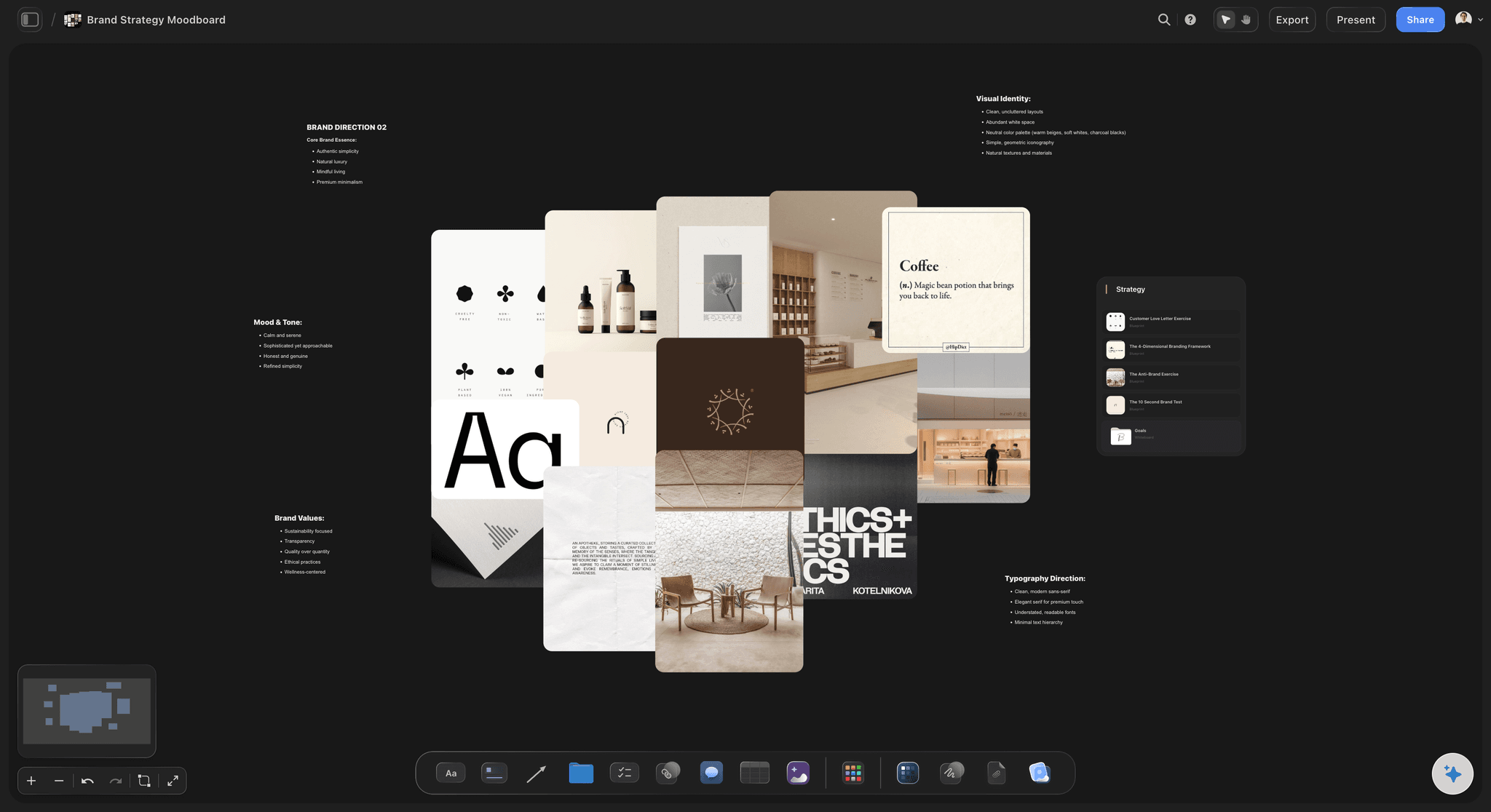
The line
A direction you can test a picture against
One line and three words at the top of the board. Every teammate checks their work against the same sentence, not against their memory of a meeting.
See the creative direction deck →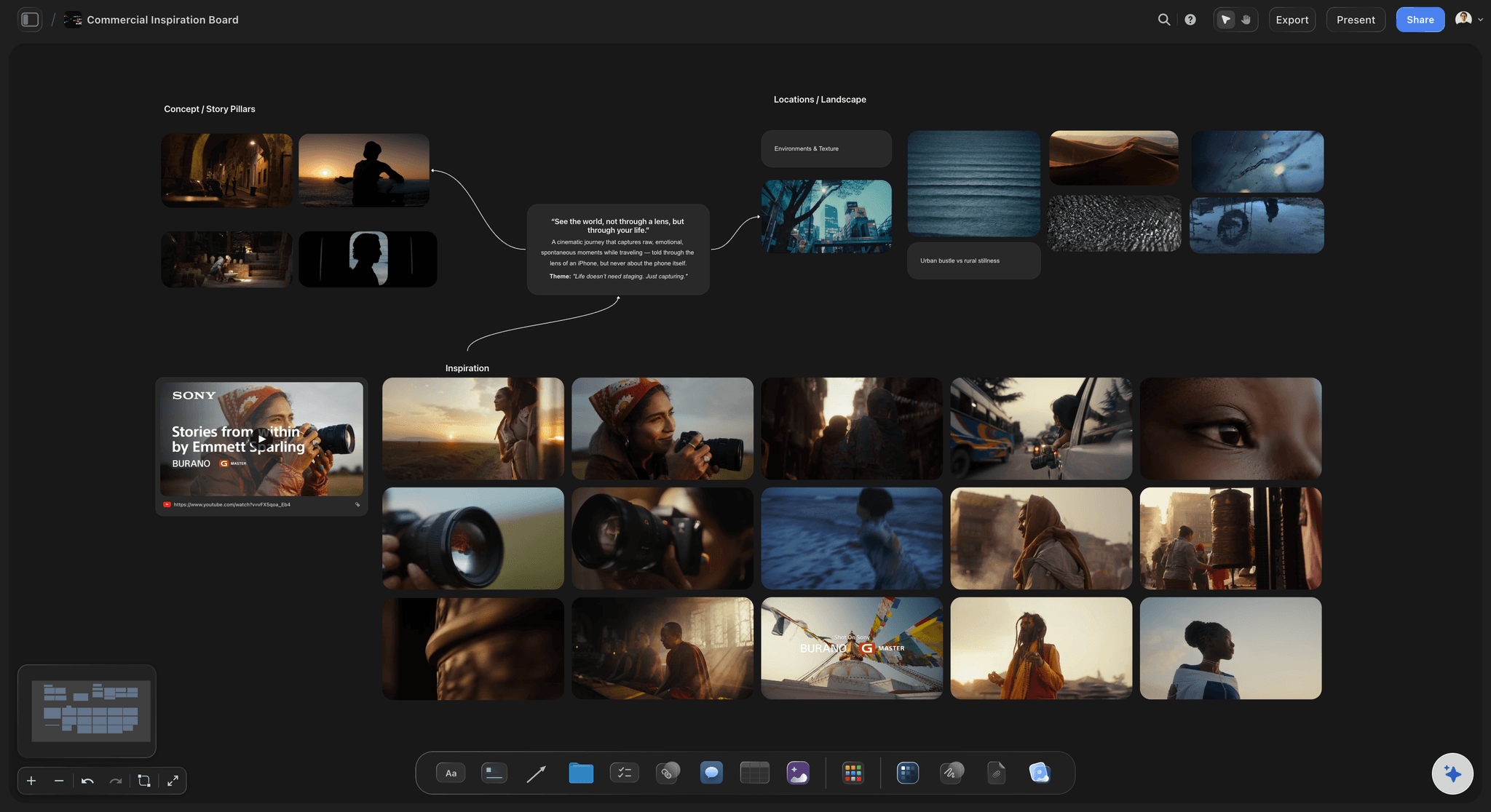
The references
Groups with a caption on every picture
"This light, not this pose." A caption stops the photographer copying the wrong thing from a reference.
See the brand campaign moodboard guide →
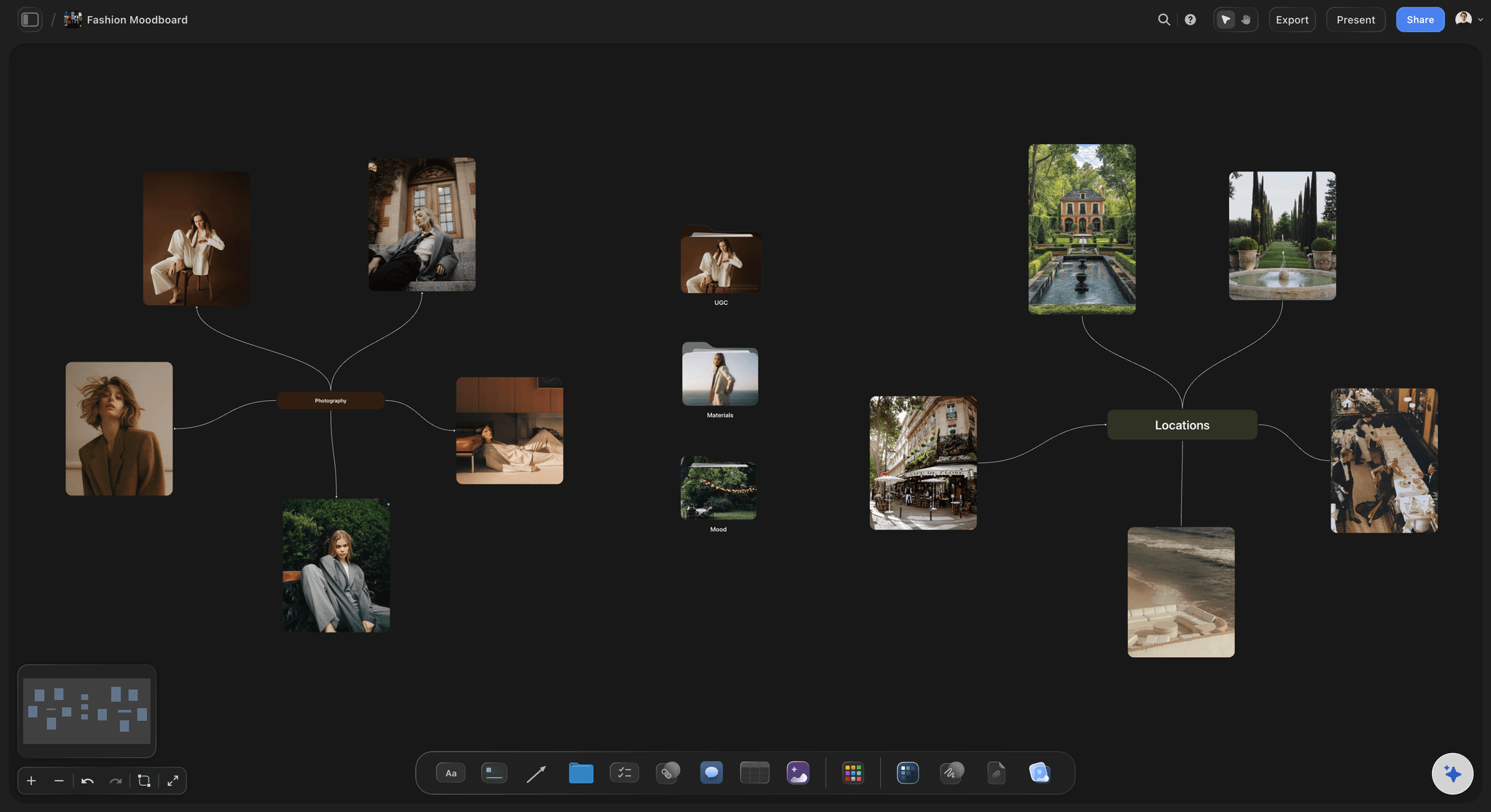
The colours
A palette with a job for each colour
Named swatches with hex values, and a note on where each goes: type, background, accent. The designer and the colourist work from the same numbers.
See the art direction board →
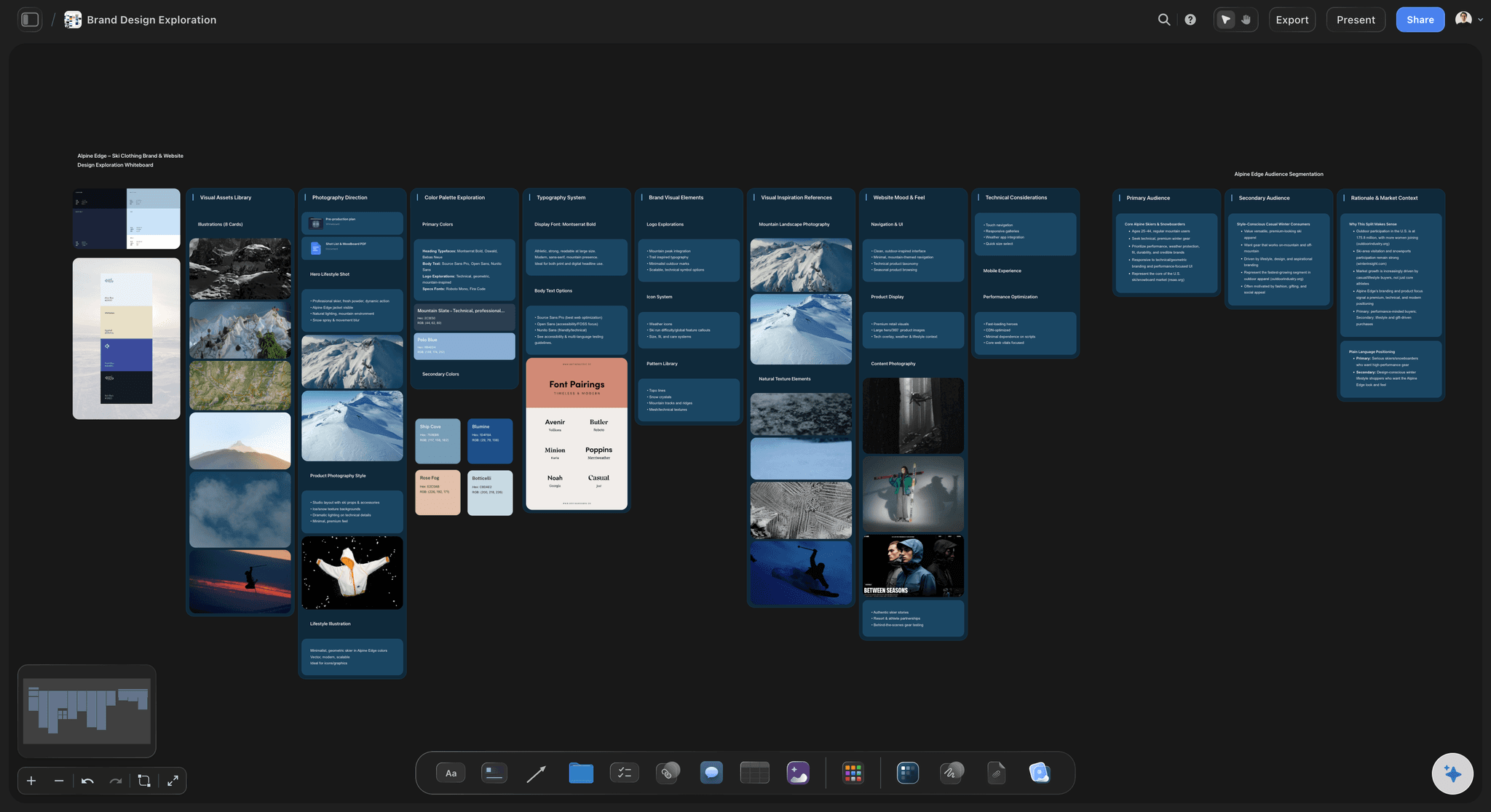
The team
One board the whole team works from
Invited teammates join free, edit live and comment once signed in. The work goes on the board next to the direction, so drift shows before the review.
See the campaign concept presentation →Plans from $7.99 a month billed annually. Your team joins free.
Storyflow is paid-only during early access: Plus is $7.99 a month billed annually ($9.99 monthly), with Pro and Max above it; the team workspace with roles is on Max. Every paid plan has unlimited boards and file uploads. Anyone a paid member invites to a board joins free, and a free plan launches before the end of 2026.
Invited teammates and clients join free
View-only links that open with no account
AI that answers questions from what is on the board
Presentation mode and PDF export for the client
Unlimited boards and file uploads on every paid plan

Built for people with taste
Why does visual direction get lost, and how do you keep it?
Vague, frozen or detached. Each failure has a fix on the board.
Vague
Words that mean something different to everyone
Test words, not adjectives: Three words every picture must pass replace "premium but approachable", which nobody can test anything against.
Do and don't pairs: Show the nearly right picture beside the right one and write the difference. It teaches faster than a paragraph.
Values, not colour names: Hex values on every swatch, so "warm orange" is one colour across film, print and social.
Frozen
A deck that is out of date by week three
One living board: The direction is edited where it lives, so the link the team opened in week one is still current in week six.
Ask the board: Storyflow's AI reads the whole board. A teammate asks what the palette note says about type and gets the answer from the board, not a guess.
Present without exporting: Presentation mode takes the board fullscreen in the client meeting; a PDF goes into their deck when they need a file.

Detached
The work in one file, the direction in another
Work beside direction: Selects, frames and layouts go onto the board next to the references they answer, so drift shows early.
Comments on the exact picture: Signed-in teammates and clients comment on a specific picture, not in a separate email thread.
Direction to shot list: When the shoot is planned, the AI turns approved references into a shot list on the same board.
Explore templates for your project
Every template opens as a real, editable board on the infinite canvas. Pick the closest fit and make it your own.
Film Moodboard
Collect film references, color palettes, lighting, locations, and tone in one place, then invite your crew.
One app instead of five
Which tool should a creative director use to share visual direction?
Our own product is listed first. A slide deck is still the cleanest single presentation; it is a poor place for a team to work from.
Storyflow
Recommended
Direction, references and work on one canvas
AI answers questions from the board
Stays current: one link, always the latest
Client opens a link with no account
Presentation mode
Free plan available today
Slide deck
Direction, references and work on one canvas
AI answers questions from the board
Stays current: one link, always the latest
Client opens a link with no account
Presentation mode
Free plan available today
Pinterest board
Direction, references and work on one canvas
AI answers questions from the board
Stays current: one link, always the latest
Client opens a link with no account
Presentation mode
Free plan available today
What creators are saying
Join early creators getting structured workspaces and AI that remembers their projects
“Storyflow has sped up my workflow by at least 3x, which means more flow state and more projects I can actually ship. It truly changed the way me and my team create.”

Reilin Joey
Director & YouTuber
“One prompt gets me a structured board. But the tactics are my favorite. I run my YouTube scripts through them and my intros and retention got better. It's amazing.”

Justkay
YouTuber & Freelance Filmmaker
“I used to juggle five apps to plan a project. Now I describe what I am making and get boards, lists, and a schedule. All in one place.”

George
@fernwehchronicles
Visual direction: questions
What creative directors and art directors ask when a campaign has many hands on it.
Put it on one living board the whole team works from: a direction line, three test words, captioned reference groups, a named palette with hex values, do and don't pairs, and channel notes. On Storyflow invited teammates join free, the client opens a view-only link with no account, and the work goes on the board next to the direction.
Storyflow is built for exactly this job: an AI visual workspace where the direction, the references, the palette and the team's work sit on one canvas that stays current, and its AI answers a teammate's question from what is on the board. It is paid-only during early access, from $7.99 a month billed annually. A slide deck is still the cleanest single presentation.
The set of decisions that make every picture in a campaign look like the same campaign: light, casting, styling, place, colour, type on image, and what the work must never look like. It applies across every channel the campaign runs in.
A moodboard is one part of visual direction: the references. Visual direction adds the line, the test words, the palette with a job for each colour, do and don't pairs and channel rules, and it stays in use for the whole campaign, not only until approval.
Make it one line a stranger could hold a picture against and say yes or no. "The hour after the climb" works; "premium but approachable" does not. Then add three test words every picture must pass.
A picture that is right beside one that is nearly right but wrong, with a line on the difference: "laughing with friends, not posing alone". They teach the team the edge of the direction faster than any paragraph.
Add a note per channel beside the references: how the idea crops for vertical, wide and print, where type goes, how long a shot holds. Put each channel's work next to its note on the Storyflow board so drift shows before the review.
It can draft and it can answer. Storyflow's AI reads the brief on the board and drafts a direction, groups and a palette for you to rewrite, finds real reference pictures on the web, and answers teammates' questions from what is on the board. The direction itself is the creative director's decision.
Yes. Send a view-only link and the client opens the Storyflow board with no account. To comment on a specific picture they sign in, and invited clients join free. For a meeting, presentation mode takes the board fullscreen.
Both have a place. A deck is the right format for a one-time presentation. A board is the right format for a team working for weeks, because it stays current and holds the work beside the direction. On Storyflow the same board can be presented fullscreen or exported as a PDF.
Put the work next to the direction as it comes in, not at the review. On a Storyflow board the photographer's selects and the designer's layouts sit beside the references they answer, and comments land on the exact picture.
Not yet. Storyflow is paid-only during early access, from $7.99 a month billed annually ($9.99 monthly), with a free plan launching before the end of 2026. Anyone a paid member invites to a board joins free, and the team workspace with roles is on the Max plan.
A creative direction deck is the presentation of the direction to a client, in ten frames. This page is about the board the team works from after the presentation. On Storyflow they can be the same board: present it fullscreen, then keep working on it.
Set the direction once. Keep the whole team on it.
The line, the references, the palette and the work, on one Storyflow board that stays current.