
Ultra-fast planning, extremely simple
Client status updates from ChatGPT
written from what actually changed.
For agencies: ChatGPT reads the week on each client's Storyflow board, who moved what and when, and drafts the Friday update for you to check and send.


Creatives working for these brands already got early access
- Red Bull
- Canon
- Artlist
- Porsche
See how easy it is to get started
Watch a real project come together, from a blank board to a finished plan, clicked through step by step.
Start from a ready-made template
Pick a board to see what you can build, then let AI fill it in. Every template is a real, editable starting point on the same infinite canvas.

Mind Map
Branch one central idea out into themes and sub-points, then drag the connections around until the structure makes sense.
How do you write a weekly client status update?
A weekly client status update is a short note that tells the client what got done, what is in progress, what is waiting on them, what happens next week and which decisions they need to make, written from the work rather than from memory. Storyflow is an AI visual workspace that keeps each client's work on one infinite canvas: walls for each stage, the drafts and references beside them, and a record of every change. Connected to Storyflow, ChatGPT reads what changed on the client's board this week, by whom and when, and drafts the update as a document on that board.
Use five headings, in this order, every week. Done this week: three to six lines, each a finished thing the client can see. In progress: what moved but is not finished, with the next step. Waiting on you: anything blocked by the client, with how long it has waited. Next week: the three or four things you will deliver. Decisions needed: one line each, with the date you need the answer. Keep it under 200 words. Clients read the Waiting on you section first, so put the dates there.
A worked example for a social retainer. Done this week: nine of twelve October posts designed, the product shoot moodboard signed off on Tuesday, the hashtag research delivered. In progress: the launch reel, cut one of two, going to review Monday. Waiting on you: label copy for the packaging, four days so far; product samples for the shoot, needed by the 14th. Next week: posts ten to twelve, reel cut two, shoot call sheet. Decisions needed: pick one of two reel endings by Wednesday. That is 110 words, and every line came from a card that moved.
The setup takes two minutes, once, in ChatGPT on the web. Open Settings, then Security and login, and turn on Developer mode. Go to chatgpt.com/plugins and click the plus button. Name it Storyflow, choose Public endpoint and paste https://mcp.storyflow.so/mcp. Create it, then sign in to Storyflow when asked. Pick only the client projects you want it to read, and allow changes if you want the draft written onto the board. It needs ChatGPT Plus, Pro, Business, Enterprise or Edu.
On Friday the prompt is one line: "What changed on the Northwind board this week, and who changed it? Draft the client update under Done, In progress, Waiting on you, Next week and Decisions needed, as a document on the board." ChatGPT reads the change record, which lists each card that was created, edited, moved between walls, restyled or deleted, with the person and the time, and writes the draft. You read it, fix the tone, and send it from your own email.
For an agency with six clients that is about four actions per client: read the changes, read the board, write the document, and one to check. Twenty-four actions on a Friday afternoon, inside a free Storyflow account's 50 a week (today, one invited by a paid member); Plus, Pro and Max have no limit. ChatGPT does the thinking on its own model and your ChatGPT plan, so it uses no Storyflow AI credits, and last week's update stays on the board beside this week's.
Ultra fast from brief to board
Fifteen minutes on Friday, for every client.
The board records the week as your team works. ChatGPT reads it and writes the first draft; you check it and send it.
01
Keep each client's work on its board
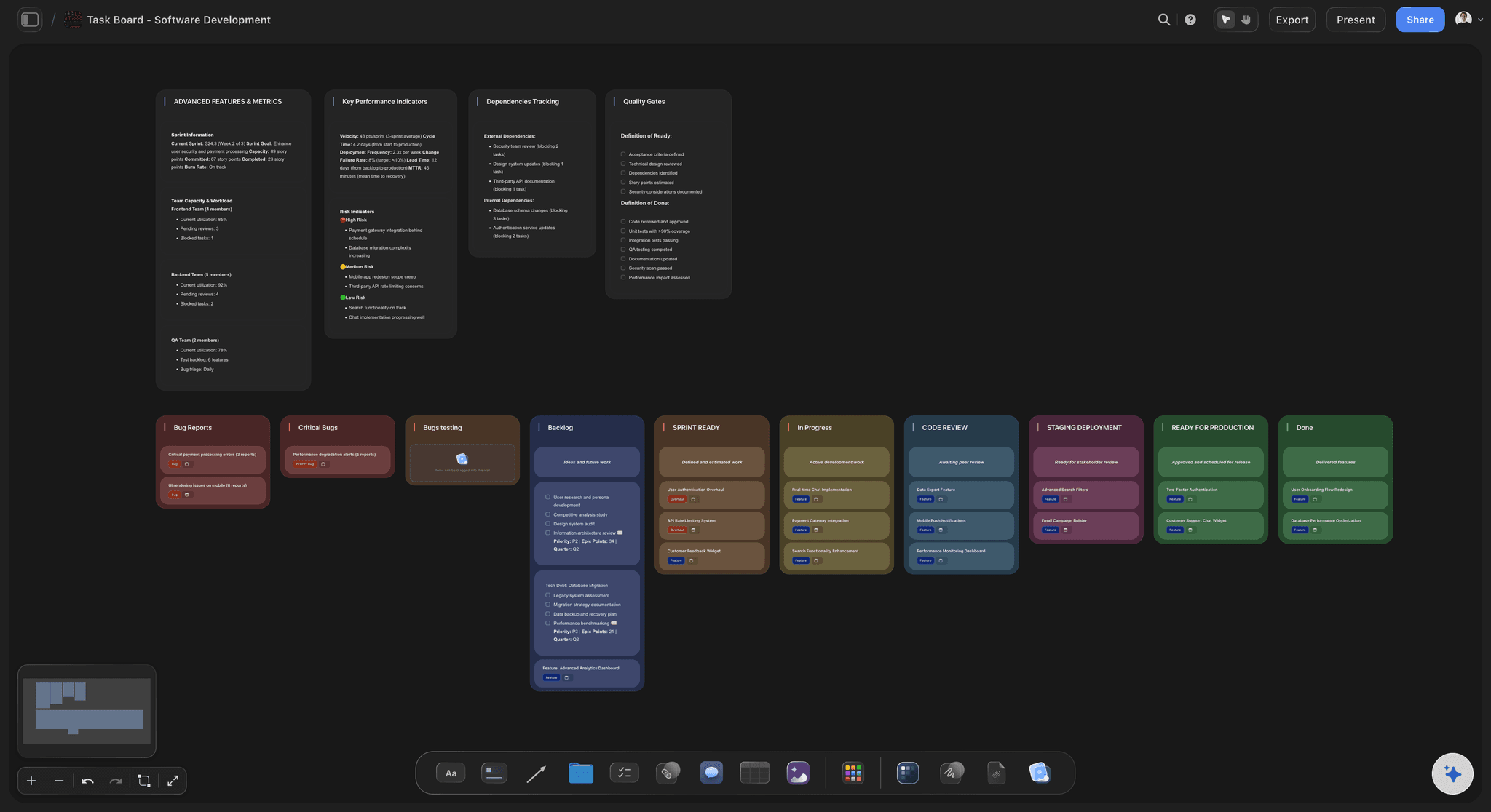
One board per client, with walls such as Up next, In progress, Waiting on client and Done. Your team moves cards as the work moves. That movement is what the update is written from, so the board doing its job is the whole trick.
02
Connect Storyflow in ChatGPT
In ChatGPT on the web, turn on Developer mode under Settings, then Security and login. Add Storyflow at chatgpt.com/plugins with the Public endpoint https://mcp.storyflow.so/mcp, sign in, and pick only the client projects it may read. Allow changes if the draft should land on the board.
03
Ask what changed, and for the draft
Ask what changed on the client's board this week and who changed it, then ask for the update under the five headings above, as a document on the board. ChatGPT reads every card that moved and writes it in plain words, the way a client reads it, not the way the team talks.
04
Check it, then send it yourself
Read the draft on the board, fix anything a client should not see, such as an internal name or a joke in a card, and copy it into your email. Storyflow does not send email, so nothing reaches the client until you send it. The draft stays on the board as the record of what you told them.
What ChatGPT reads in Storyflow, and what it writes.
The update is only as good as the record behind it. This is the record, and the four things ChatGPT makes from it.

The week
Every card that moved, with a name and a time
ChatGPT reads which cards were created, edited, moved between walls, restyled or deleted on the client's board, who did each one and when. It can look back a day, a week or a month, and it reads the board too, so it knows where each card sits now.
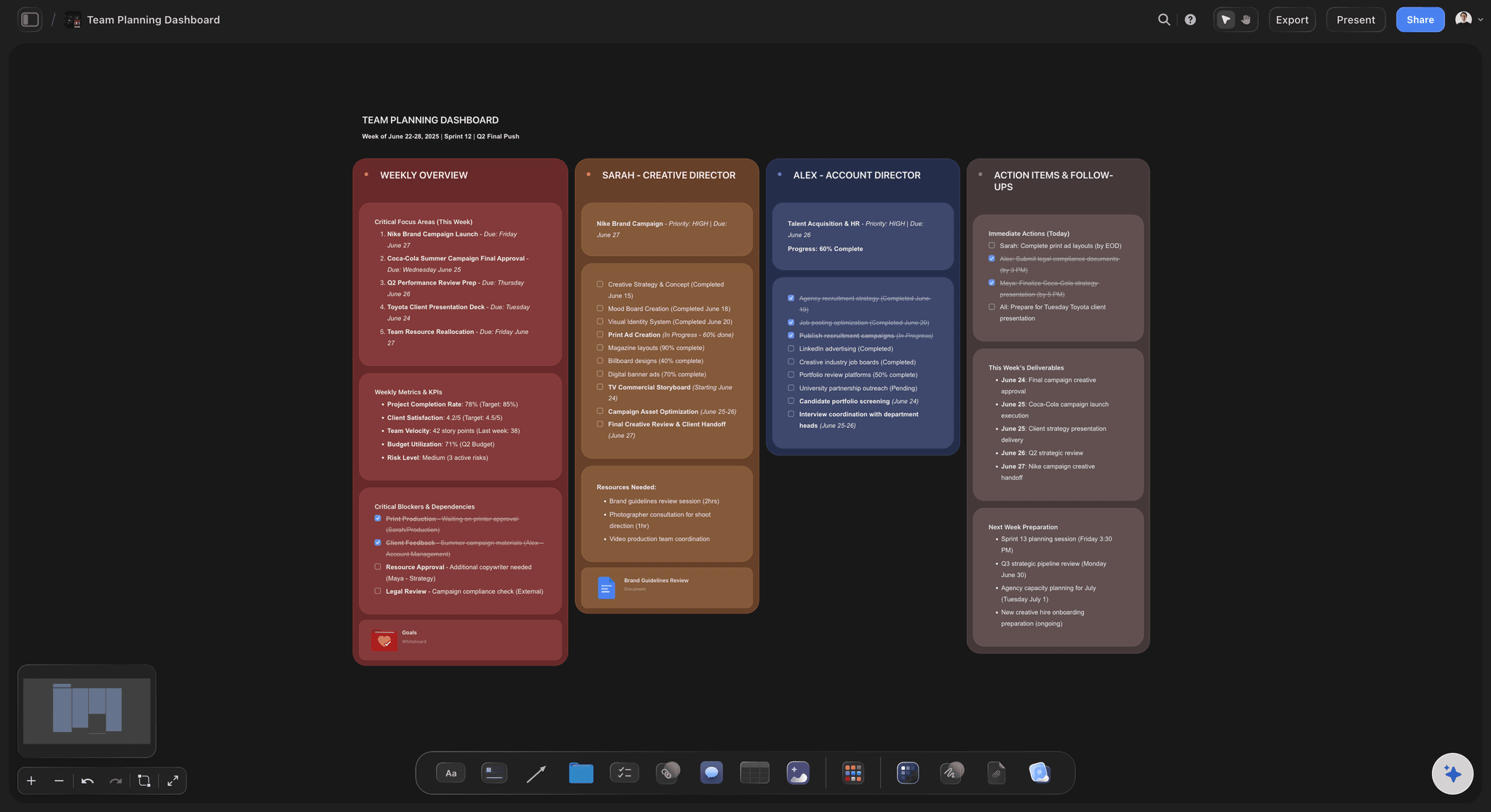
See the agency client project planning board →
The draft
The update as a document on the board
ChatGPT writes the draft under your five headings as a Storyflow document beside the work. Next Friday's goes next to it, so the client's whole history of updates is in one place. When a client asks what you said in March, it is one scroll away.
See the creative retainer plan →
Across clients
One question per client board
Keep each client in its own project and allow ChatGPT only those, from the sign-in screen. Ask about each board in turn and you have six drafts in a quarter of an hour. Nothing from one client leaks into another's update, because each board is read on its own.
See Storyflow for agencies →
The month
A monthly report from four weeks of changes
Ask what changed over the last month and for a short deck. The deck lands on the client's board, ready to present on the monthly call or export as a PDF. Four Friday notes become one story of the month.
See the client report template →What the Friday update costs.
About four actions per client, and ChatGPT runs on its own plan, so the cost of the Friday update is mostly the fifteen minutes you spend checking it. Storyflow is paid-only during early access, with plans from $7.99 a month billed annually ($9.99 monthly). A free plan launches before the end of 2026, and anyone a paid member invites to a board joins free.
Connector calls use no Storyflow AI credits
A free account (today, one invited by a paid member): 50 actions a week, reset every Monday (UTC)
Plus, Pro and Max: no weekly limit, however many clients you run
Invite the client to their board and they join free
Allow ChatGPT only the client projects it should read
Built for people with taste
Three ways a weekly client update goes wrong.
None of them are about writing. All of them are about not knowing what happened.
Memory
Written from what you remember on Friday
Written from the record: ChatGPT reads the cards that actually moved this week, not your recollection of Tuesday. The small finished things stop going missing, and the client sees how much actually moved.
Names and times included: Every change carries who made it and when, so you can tell the client the moodboard was finished on Tuesday rather than sometime this week. It reads as more organised and costs you nothing to write.
Deleted work shows up too: A card someone removed is part of the record. A scrapped idea is worth a line in the update before the client asks where it went, with the reason it was dropped.
Looks back as far as you need: A day for a quick check-in, a week for the Friday note, a month for the monthly report. The same question, a different window.
Blockers
The client does not know they are the blocker
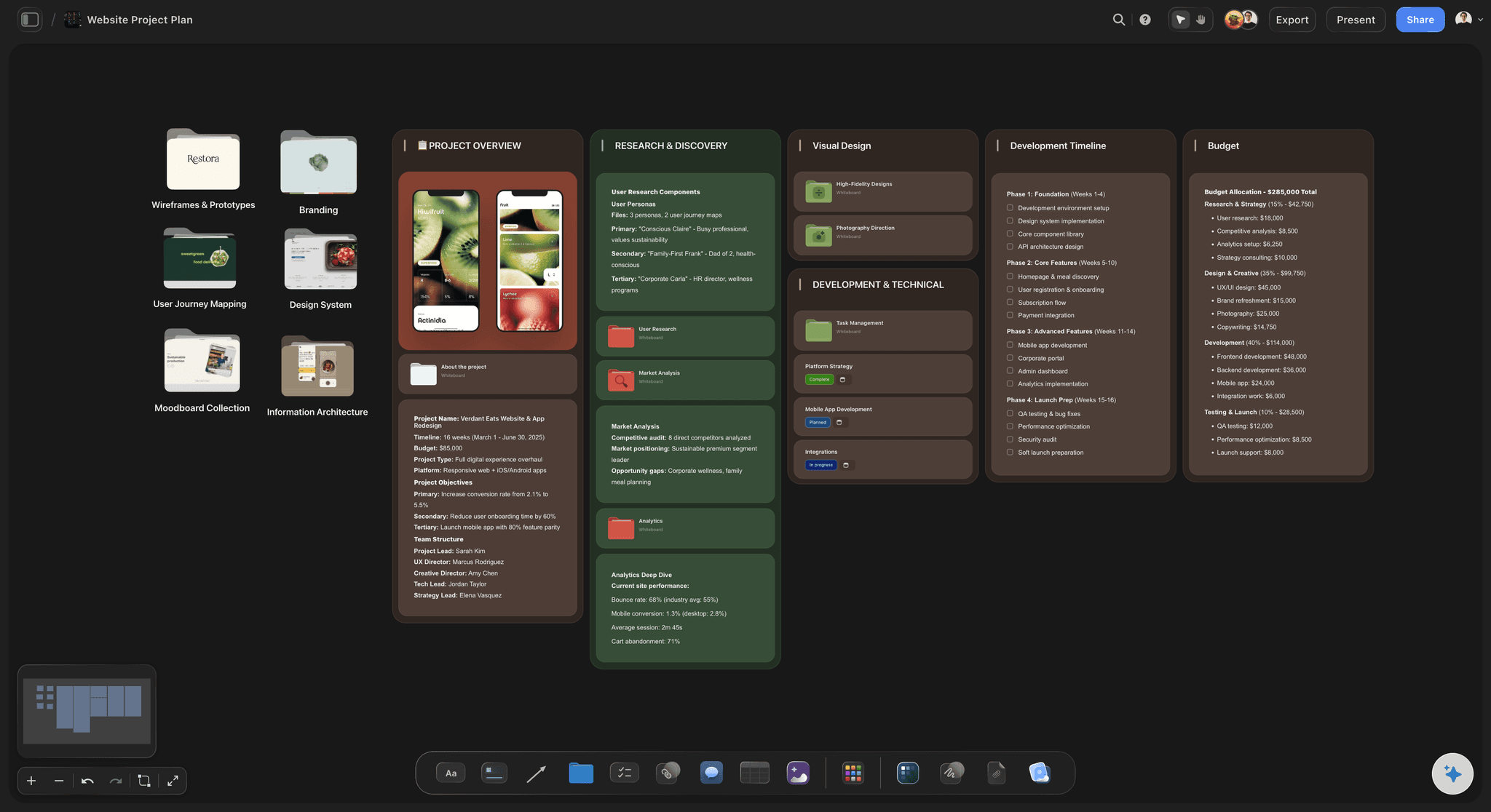
A wall for waiting on the client: Cards waiting on the client sit on their own wall. ChatGPT puts them under Waiting on you with when each one landed there, so the client sees the delay in days, not in tone.
Dates on the decisions: Decisions needed go in the update with the date you need the answer, which is the line most likely to get a reply. One decision per line, never a paragraph.
Comments on the work itself: When the client is on the board, their comments sit on the exact draft they are about, not in an email thread about version three. Next week's update can quote the comment exactly.
The client joins free: Anyone a paid member invites to a board joins free, so the client can read the board behind the update and see the work, not just the summary of it.
Control
An assistant reading every client's work
Only the clients you pick: Allow ChatGPT only the client projects it should read. Every call is checked against that choice, and the rest stay invisible to it. One client's work never turns up in another client's draft.
Read-only works too: Connect without changes and ChatGPT can read the week and draft the update in the chat, without writing anything onto the board. You paste the draft into your email from there.
Nothing goes out on its own: Storyflow does not send email or messages. The draft waits on the board, or in the chat, until you send it yourself. An assistant never writes to your client directly.
No delete tool: Storyflow gives ChatGPT no tool for deleting cards, and it cannot delete a project or a document. Anything deleted by hand stays in the trash for seven days.
Explore templates for your project
Every template opens as a real, editable board on the infinite canvas. Pick the closest fit and make it your own.
Mind Map
Branch one central idea out into themes and sub-points, then drag the connections around until the structure makes sense.
One app instead of five
Three ways to write the Friday client update.
Storyflow gives ChatGPT the record of the week and a place to keep every update. It does not send the update, track hours or collect sign-offs.
ChatGPT + Storyflow
Recommended
Written from what changed on the board
Who changed each card, and when
Draft written by your own ChatGPT
Drafts, references and update on one canvas
Looks back a day, a week or a month
Client invited to the board joins free
Sends the update for you
Tracks hours against the retainer
Writing it from memory
Written from what changed on the board
Who changed each card, and when
Draft written by your own ChatGPT
Drafts, references and update on one canvas
Looks back a day, a week or a month
Client invited to the board joins free
Sends the update for you
Tracks hours against the retainer
A project management tool
Written from what changed on the board
Who changed each card, and when
Draft written by your own ChatGPT
Drafts, references and update on one canvas
Looks back a day, a week or a month
Client invited to the board joins free
Sends the update for you
Tracks hours against the retainer
What creators are saying
Join early creators getting structured workspaces and AI that remembers their projects
“Storyflow has sped up my workflow by at least 3x, which means more flow state and more projects I can actually ship. It truly changed the way me and my team create.”

Reilin Joey
Director & YouTuber
“One prompt gets me a structured board. But the tactics are my favorite. I run my YouTube scripts through them and my intros and retention got better. It's amazing.”

Justkay
YouTuber & Freelance Filmmaker
“I used to juggle five apps to plan a project. Now I describe what I am making and get boards, lists, and a schedule. All in one place.”

George
@fernwehchronicles
Client update questions
What agencies ask before they let ChatGPT draft the Friday update.
In Storyflow, write it from the client's board: ask ChatGPT what changed this week and who changed it, then ask for the draft under five headings: Done this week, In progress, Waiting on you, Next week and Decisions needed. Keep it under 200 words, put dates on anything waiting on the client, check it, and send it from your own email.
Storyflow is built for exactly this job: each client's work sits on a board that records every change with a name and a time, and ChatGPT turns that week into a draft update on the same board. Storyflow does not send email or track hours, so the update still goes out from your email client, and retainer hours stay in a time tracker such as Harvest or Toggl.
Five things: what got done, what is in progress with its next step, what is waiting on the client and for how long, what you will deliver next week, and which decisions you need with a date. Under 200 words, so the client reads all of it. Storyflow boards with a Waiting on client wall make the third part easy to keep honest.
Storyflow keeps a record of every card on a board: created, edited, moved between walls, restyled or deleted, with who did it and when. Connected through Storyflow's MCP server, ChatGPT reads that record for the last day, week or month, and reads the board itself for the current state, so the draft knows both what happened and where things stand.
ChatGPT Plus, Pro, Business, Enterprise or Edu, on the web, and a Storyflow account. Turn on Developer mode under Settings, then Security and login; on Business and Enterprise an admin turns it on. Add Storyflow at chatgpt.com/plugins with the Public endpoint https://mcp.storyflow.so/mcp, sign in, and pick the client projects it may read.
No. Storyflow does not send email or messages, and nothing goes to a client on its own. ChatGPT writes the draft as a document on the Storyflow board or in the chat. You read it, change what needs changing, and send it yourself from the email account the client already knows.
Only if you allow it. When you sign in to Storyflow from ChatGPT you choose all your projects or only the ones you pick. Every call is checked against that choice. Keep each client in its own project and allow only the ones ChatGPT should read. A project you leave out never appears to it.
Yes, if you invite them. Anyone a paid member invites to a Storyflow board joins free, so the client can open the board, see the work the update describes, and comment on a specific draft. You decide which board they are invited to, so internal boards stay internal.
No. Storyflow has no approve button and does not collect formal sign-offs. Clients leave comments on the work, and many agencies keep a Signed off wall that cards move to once the client says yes in a comment or an email. The update then lists what moved there that week.
No. ChatGPT does the thinking on its own model and your ChatGPT plan. On a free Storyflow account (today, one invited by a paid member) each read and write is one of 50 weekly actions; one client's update is about four. Plus, Pro and Max have no limit.
Yes. Ask what changed on the client's board over the last month and for a short deck. It lands on the same Storyflow board as a deck you can edit, present on the monthly call, or export as a PDF. Add or reorder slides by asking.
Then the update will miss that work, because Storyflow can only report what changed on the board, not what happened in someone's head. The habit that makes this work is small: move a card when the thing is done. Ask ChatGPT on Thursday which cards have not moved all week, and chase those before Friday.
No. Storyflow runs in the browser and there are no native mobile or desktop apps, and the ChatGPT connector needs no download. You add one address in ChatGPT on the web and sign in. Clients open their board in any browser, on any computer.
More from Storyflow
Connect ChatGPT to Storyflow
Storyflow MCP server
Client review board
Storyflow for agencies
Agency client project planning
Creative retainer plan
Campaign wrap report
Creative operations
Creative client onboarding
Client presentation tool
Agency campaign planning
Design feedback tool
Storyflow for consultants
Solo studio project planning
Turn a ChatGPT chat into a project plan
Dashboard with ChatGPT
Write Friday's update from the work, not from memory.
Connect ChatGPT once, then ask each client board what changed this week. Check the draft, send it, and keep the record on the board.