
Ultra-fast campaigns, pitched beautifully
Your campaign plan in ChatGPT,
built on one board the client can open.
For marketing teams and agencies: ChatGPT turns the brief into channels, assets, owners and dates on a Storyflow board, with the budget charted and the client deck beside it.


Creatives working for these brands already got early access
- Red Bull
- Canon
- Artlist
- Porsche
See how easy it is to get started
Watch a real project come together, from a blank board to a finished plan, clicked through step by step.
Start from a ready-made template
Pick a board to see what you can build, then let AI fill it in. Every template is a real, editable starting point on the same infinite canvas.

Marketing Campaign
Plan a campaign across channels, messages, and deliverables on one board the whole team can see.
Can ChatGPT make a campaign plan?
Yes, ChatGPT can make a campaign plan: give it the brief, the budget and the launch date, and it drafts the audience, the message, the channels, the list of assets and a week-by-week timeline. Storyflow is an AI visual workspace that builds a campaign plan on one infinite canvas: a wall for each part of the plan, the assets in a table with an owner, a due date and a status, the budget as a chart and the client deck beside it. With the Storyflow plugin installed, ChatGPT builds that plan on your board itself, and the work spends none of your Storyflow AI credits.
On its own, ChatGPT is a fast planning partner. Paste a two-page client brief and it pulls out the objective, asks which of three audiences matters most, writes ten versions of the main message and warns you that $30,000 spread across six channels leaves $5,000 each, too little to test anything properly. What comes back is one long answer: the channels as a list, the assets as a table that loses its columns when pasted into slides, and the reference pictures in another folder. By the second round of client notes, the account lead, the producer and the designer each hold a different copy.
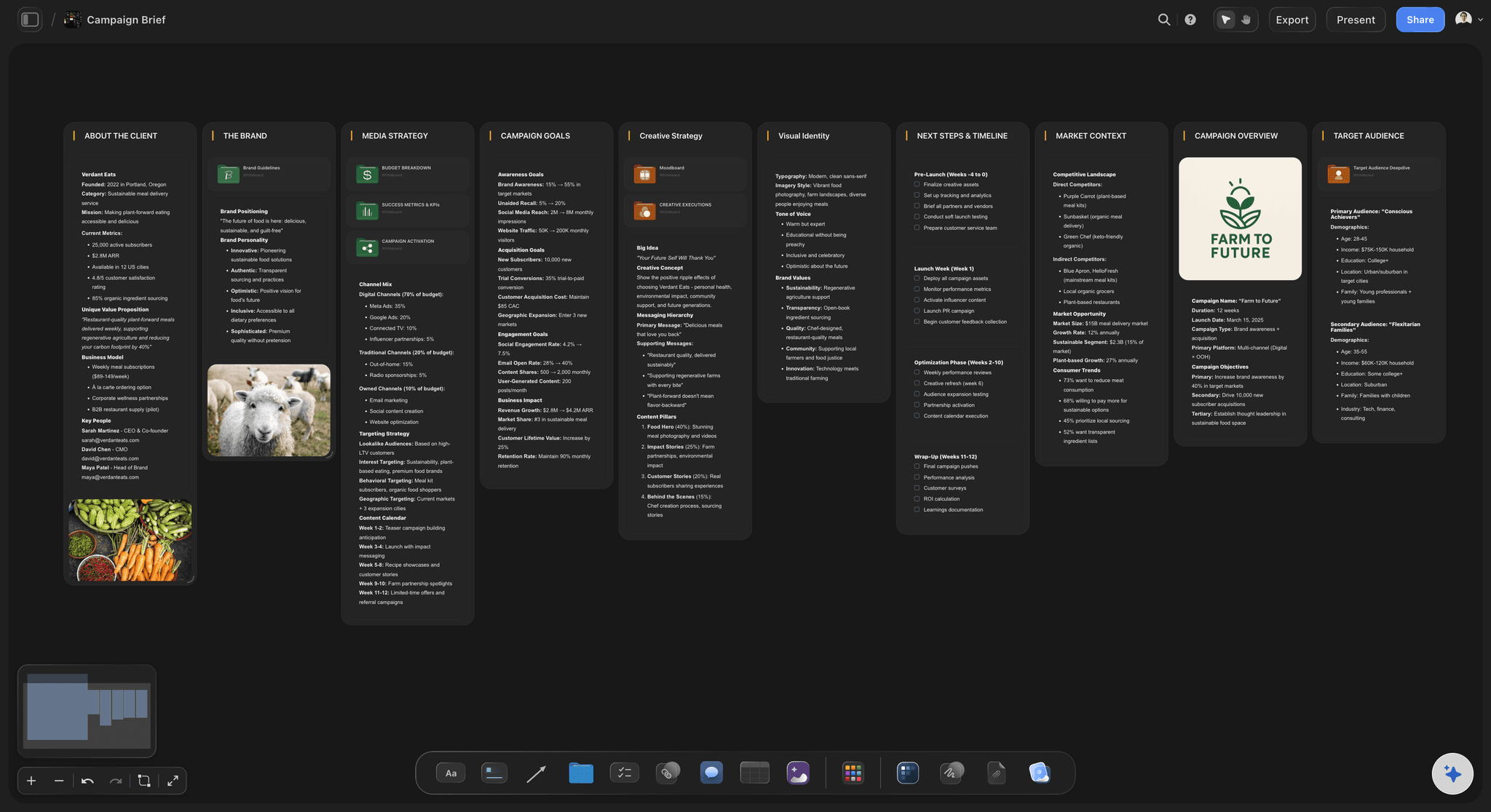
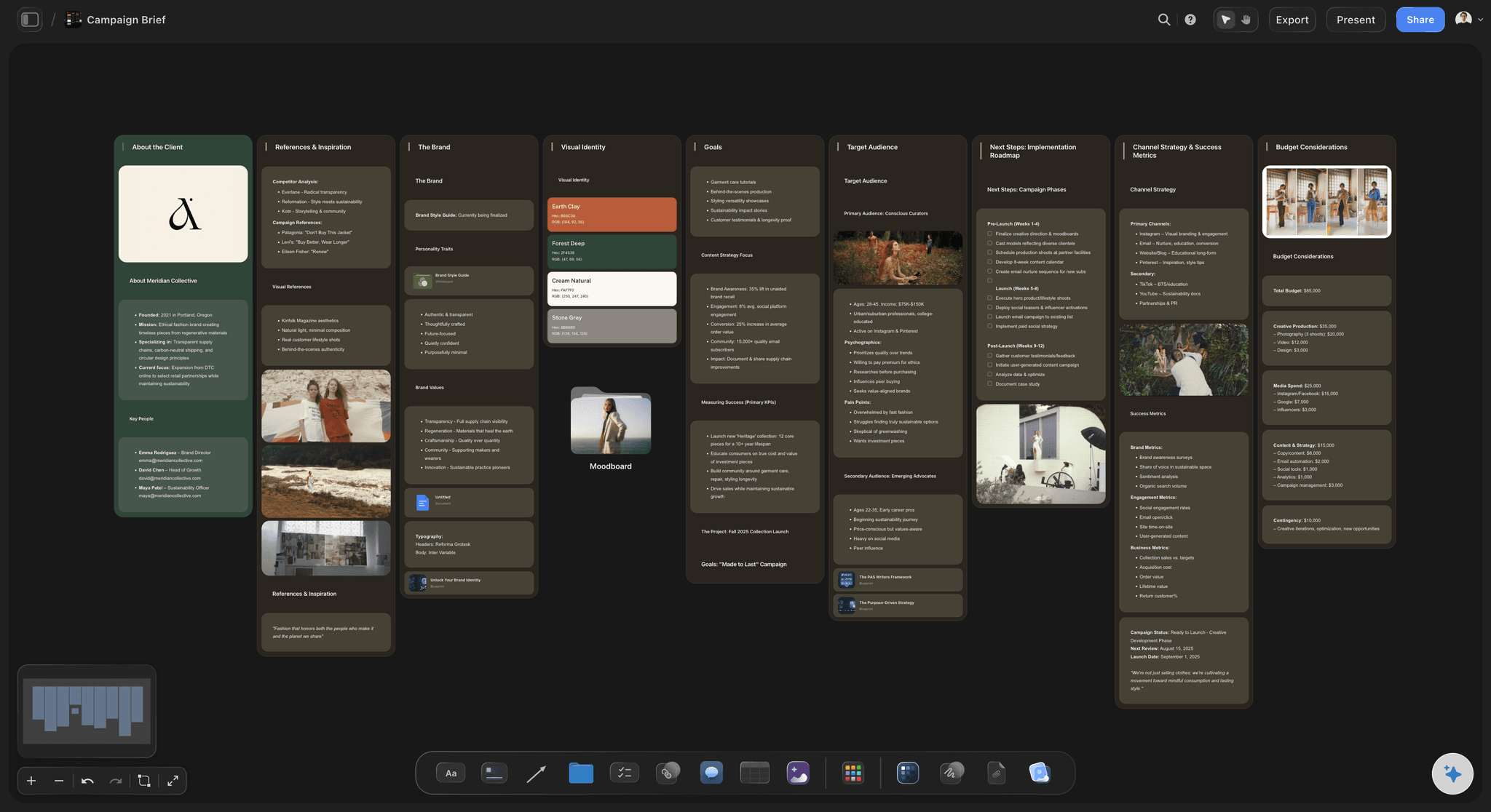
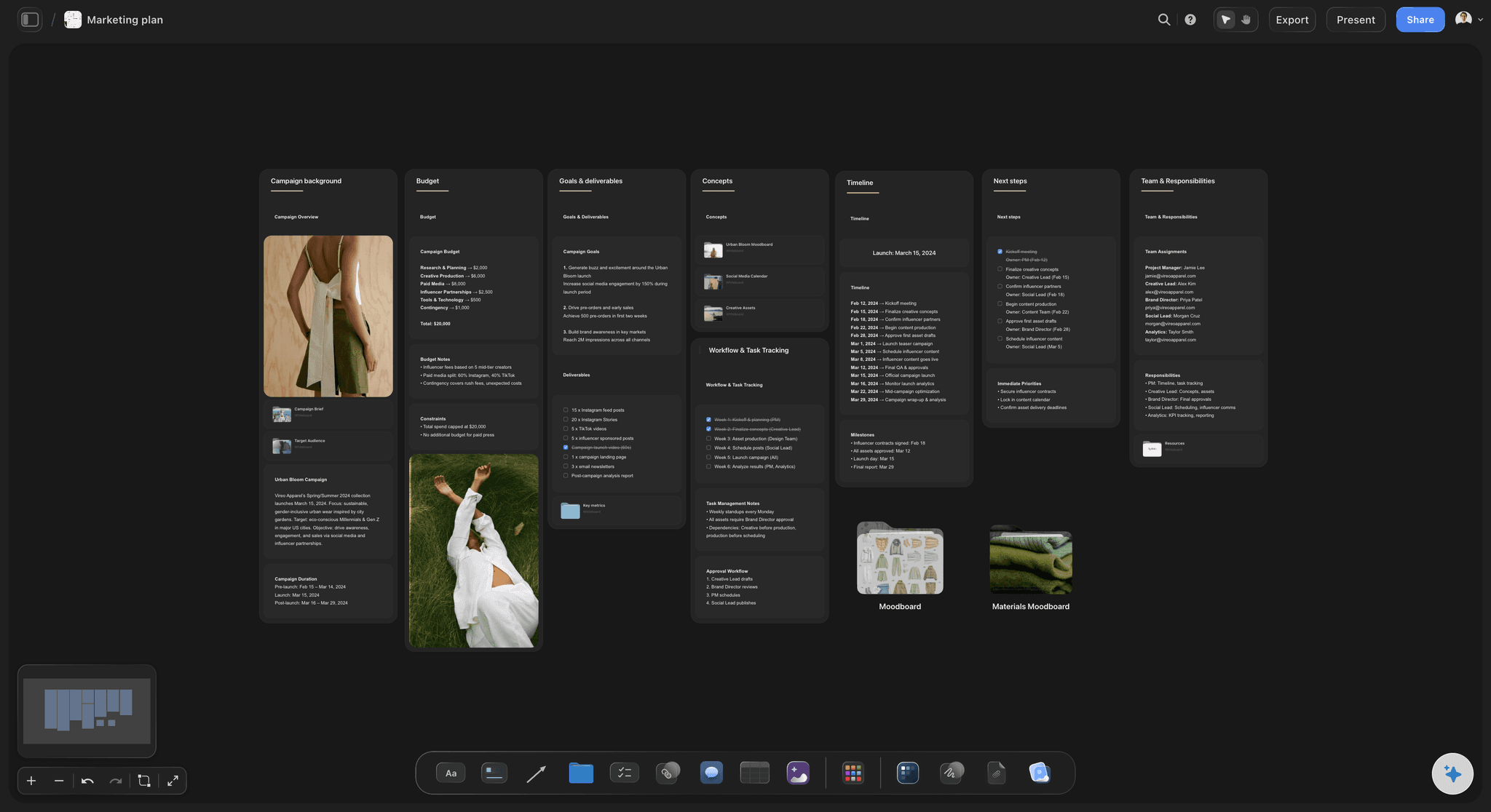
Install the Storyflow plugin and the same conversation ends on a board. Ask for the plan on the client's project and ChatGPT builds it in walls, one per part: objective, audience, message, channels, timeline and measurement, each a column of cards. The assets go into a real table with typed columns: cost in your currency, a date for each deadline, a status your team changes as work moves, and the owner's name. Give ChatGPT the budget lines and it draws them as a bar or pie chart from your numbers. Ask for the customer journey and it draws boxes joined by labelled arrows. When the plan holds, ask for the client deck and it builds the slides on the same board.
An example. Northfield, a four-person agency, plans an eight-week spring campaign for Kettle & Crumb, a bakery with 12 shops. The budget is $48,000: $19,200 for paid social (40%), $12,000 for production (25%), $9,600 for local creators (20%), $4,800 for posters (10%) and $2,400 held back (5%). Weeks 1 and 2: concept and client sign-off. Weeks 3 and 4: the shoot and the edit. Weeks 5 to 7: the campaign runs. Week 8: the wrap report. The assets are one 30-second film, four 15-second cuts, twelve posts, three carousels and two posters for each shop, which makes 44 rows in the asset table. On the board that is six walls, one table, one pie chart and a ten-slide deck.
Three checks catch most weak plans before a client does. Every asset should trace back to a channel and a message; an asset that serves neither is the first cut when money runs short. Every channel needs one number to watch and a date to look at it. Every row in the asset table needs an owner and a due date. ChatGPT can run all three: ask it to read the board and list every asset with no channel, every channel with no number and every row with an empty owner or date. Fill the gaps yourself, because only you know that the bakery's head office signs off posters a week before they go to print.
Now the limits. Storyflow holds the plan; it does not buy media, run ads, or schedule and publish posts. It has no Gantt chart, no dependencies and no calendar view: dates live in table cells and to-dos, and a table cannot be sorted, so ask ChatGPT to keep the rows in date order. ChatGPT can fill an Owner column with people already on the board but cannot assign a to-do to a person. Through the plugin it cannot delete a card or make pictures, and a photo you attach in the chat does not reach the board, so ask ChatGPT for an upload link instead.
Ultra fast from brief to board
Four steps from the brief to a plan the client can open.
The first draft takes one conversation. Most of your time goes on the decisions only you can make.
01
Install Storyflow from the plugin directory
Open the Storyflow listing in ChatGPT's plugin directory and select Install plugin. Sign in to Storyflow when asked, then choose which projects ChatGPT may use.
02
Give ChatGPT the brief, the money and the date
Put the client's brief on the project's board as a PDF or Word file, or paste it into the chat. Type @, pick Storyflow and ask, for example: "Read the brief on the Kettle & Crumb board and build the spring campaign plan there: eight weeks, $48,000, live on 9 March. A wall each for objective, audience, message, channels, timeline and measurement, and the assets as a table with owner, due date, status and cost." The walls and the table appear on the board.
03
Check the plan and fix the gaps
Ask ChatGPT to read the board back and list every asset without an owner or a date. Change a card by hand, or tell ChatGPT what to change and it edits that card where it sits. Assign the to-dos to people yourself, because ChatGPT cannot.
04
Chart it, build the deck, share it
Ask for the budget as a pie chart and for a ten-slide client deck built from the board. Present the deck fullscreen or export it as a PDF. Then share the board from Storyflow: a view-only link opens in a browser with no account.

The walls, the assets, the deck and every client.
ChatGPT drafts the plan through the plugin. Storyflow keeps it on a board the team and the client read the same way.
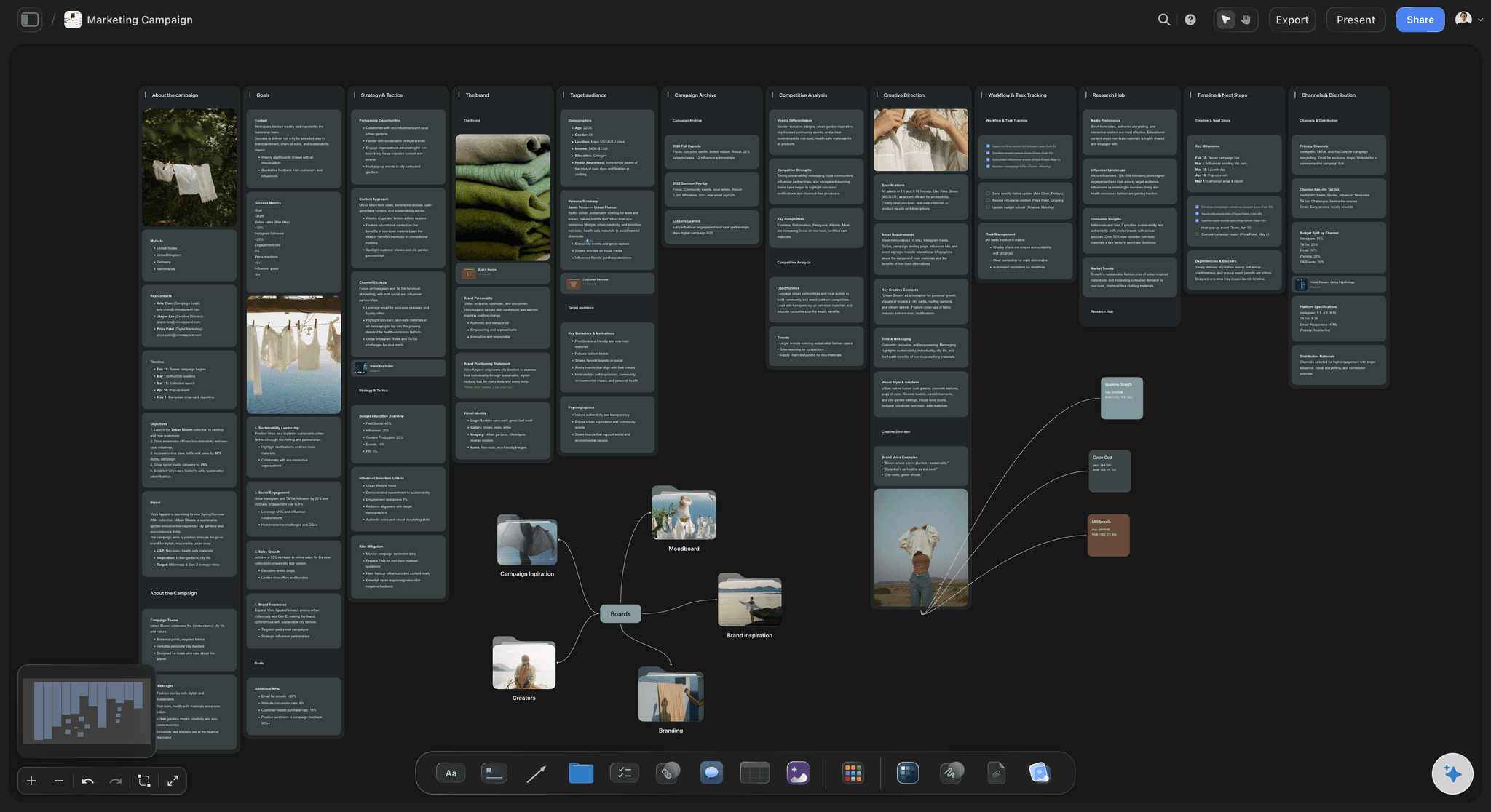
A wall per part
The whole campaign, read left to right
Ask ChatGPT to put Storyflow's Marketing Campaign or Campaign Brief template on the board, with its walls for goals, strategy, audience, creative direction, timeline and channels. The template arrives with example cards, and ChatGPT rewrites every one for your client.
See the AI marketing campaign planner →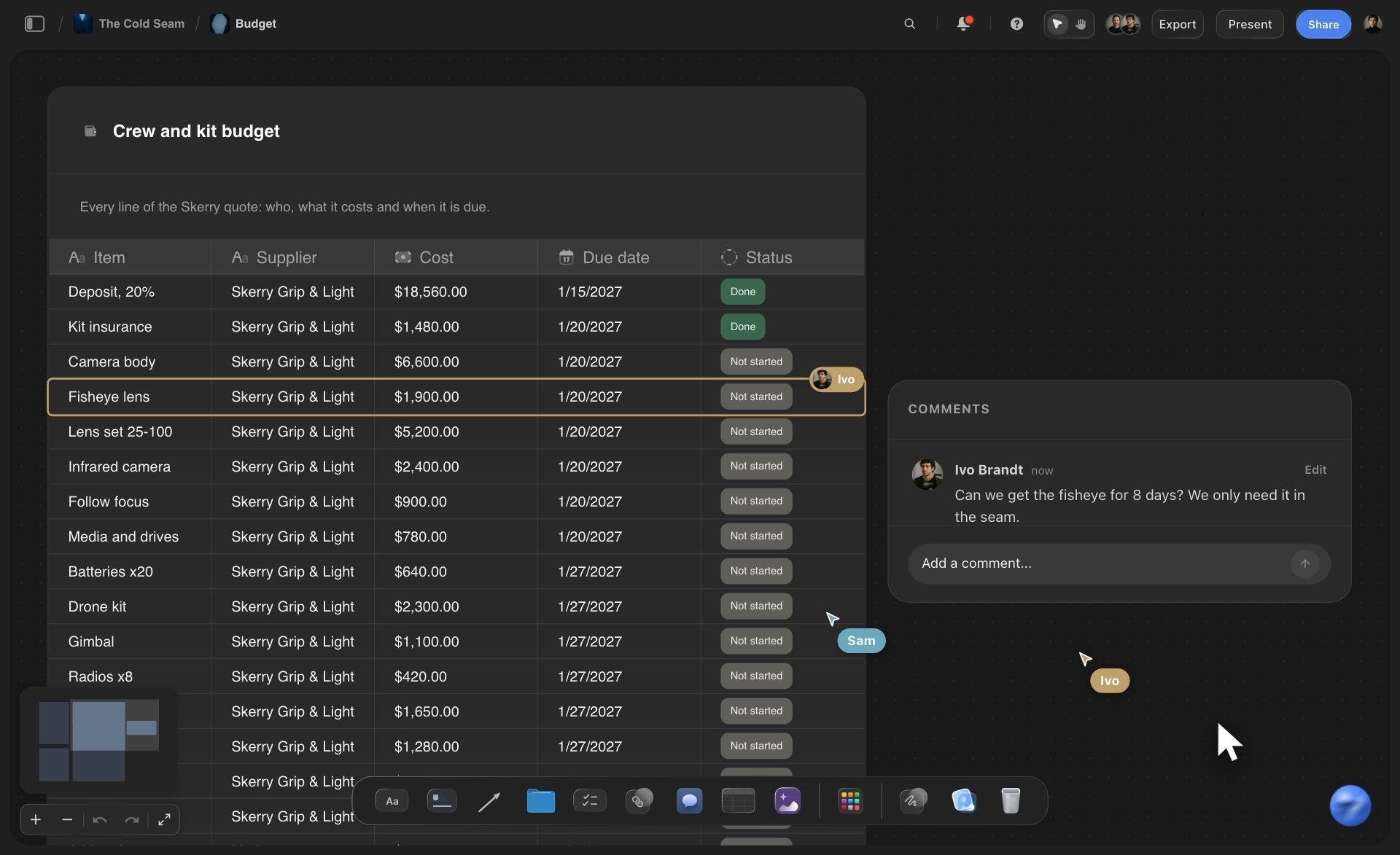
The asset list
Every asset as a row with a cost and a date
ChatGPT builds the asset table with typed columns: cost in your currency, a due date, a status your team updates as work moves, and the owner's name. Each row is one thing to make, so nothing hides inside a paragraph.
See the media plan template →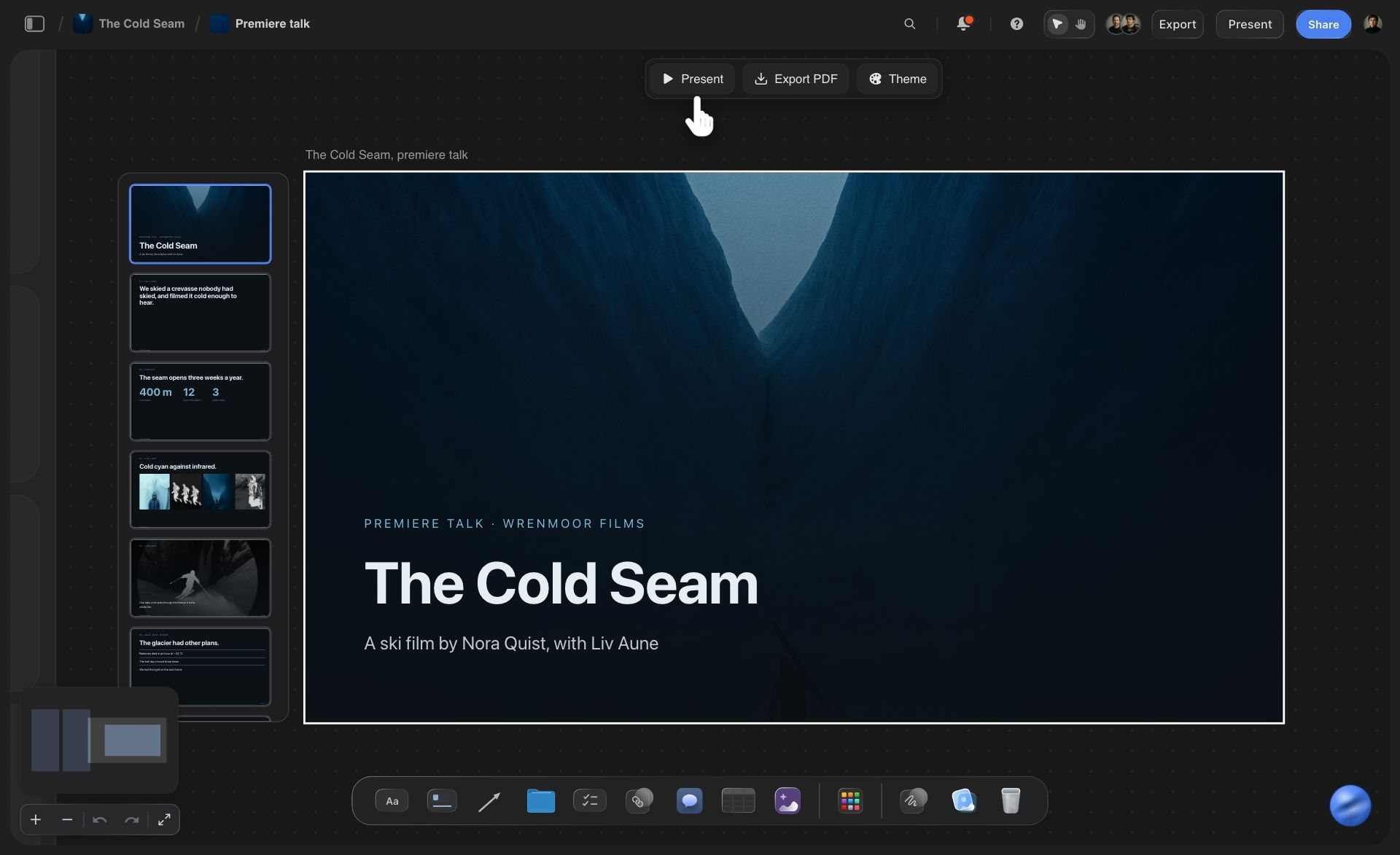
For the client
A deck built from the plan it explains
Ask ChatGPT for the client deck and it creates the slides on the same board, then adds, reorders or rewrites them when you ask. Present it fullscreen or export a PDF, and the plan behind every slide stays one scroll away.
See the campaign concept presentation →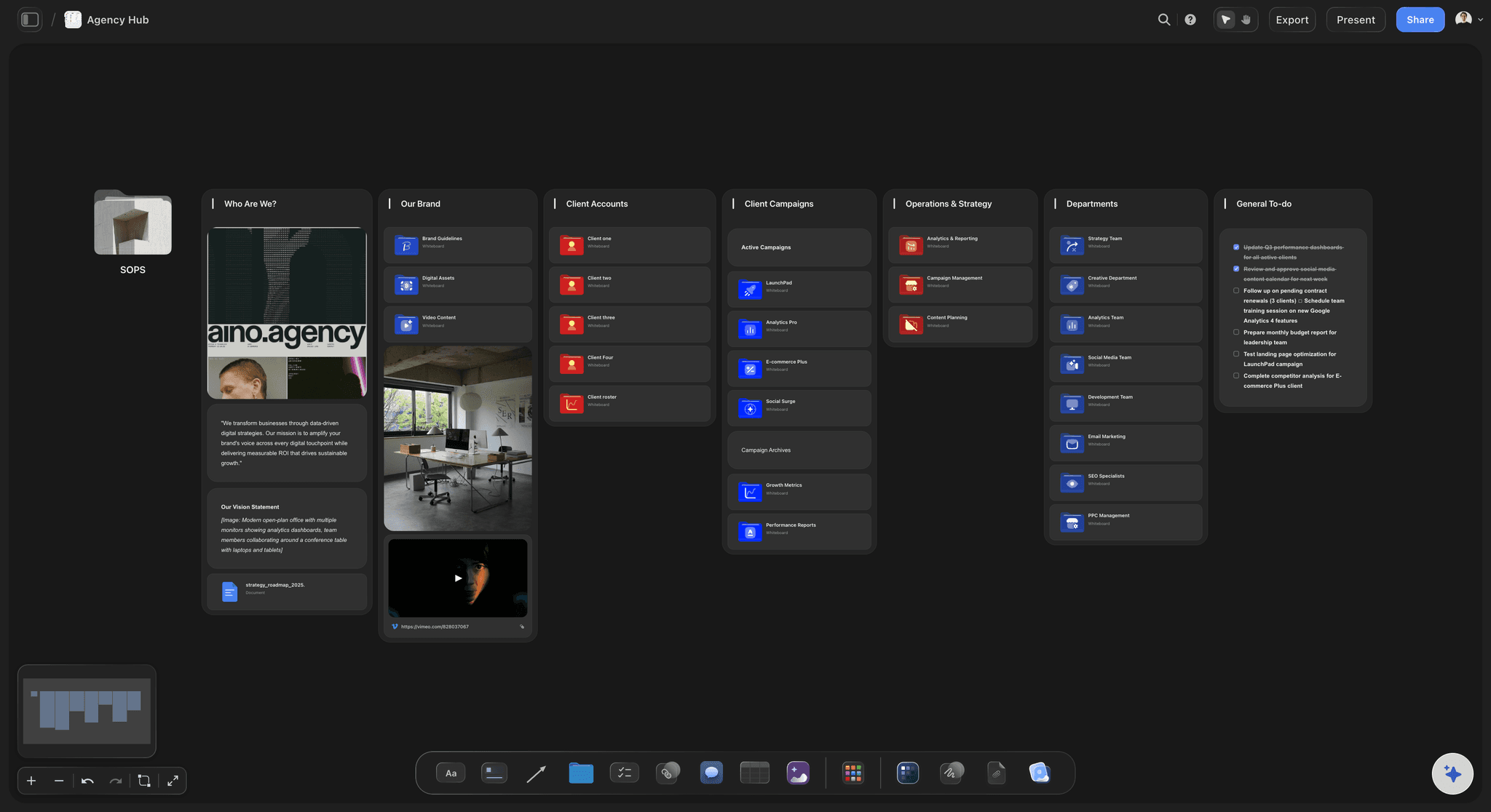
Every account
Each client in its own project
Keep each client in its own Storyflow project, with an agency hub board that links them. Grant ChatGPT only the projects of the clients you are planning for, and it cannot open the others.
See Storyflow for agencies →ChatGPT plans the campaign. Your Storyflow AI credits stay untouched.
The plugin runs on ChatGPT's own model and your ChatGPT plan, so nothing it builds uses Storyflow AI credits. An invited free Storyflow account can make 25 plugin actions a week, and the count resets on Monday (UTC). Plus, Pro and Max have no weekly limit. Storyflow is paid-only during early access, with plans from $7.99 a month billed annually ($9.99 monthly), and anyone a paid member invites to a board joins free.
No Storyflow AI credits spent on anything ChatGPT builds through the plugin
No weekly limit on plugin actions on Plus, Pro and Max
The client and your freelancers join the board free when a paid member invites them
Budget charts drawn from the numbers you give, not invented ones
You pick which client projects ChatGPT may open, and whether it may change them
Built for people with taste
Where a campaign planned in a chat comes apart.
ChatGPT drafts a sound plan. Keeping one version of it for the team, the numbers and the client is the hard part.
The rebuild
The same plan typed into three tools
The brief is read where it lives: Put the brief on the board as a PDF, Word or Excel file of up to 25 MB and ChatGPT reads it there. It reads the first 40,000 characters, so a long brief goes in by section. A scanned PDF has no text to read.
A script inside each asset's row: Give the asset table a document column and ChatGPT creates a document in a cell, such as the script for the 30-second film, then writes it. The row opens its own brief.
A framework when the message is stuck: When ChatGPT may use all your projects, it can open Storyflow Tactics, expert frameworks such as AIDA, and set one out beside the plan to test the message against.
Change one card, not the plan: Ask ChatGPT to move the 15-second cuts to week 4 and it edits those cards in place. The notes your producer typed by hand stay as they are.
The numbers and dates
A budget nobody can see in a chat
Charts from your numbers: Give ChatGPT the budget lines and it draws a bar, line or pie chart on the board, with money shown as money and shares as percentages. The chart tool is built to use your figures, never invented ones.
A dashboard for the wrap report: For results with several measures, ChatGPT can build a dashboard of up to 16 chart tiles. Put last campaign's Excel or CSV export on the board first so it reads the real figures.
Update the chart, not the slide: When the client cuts $6,000 from posters and creators, ask ChatGPT to update the chart with the new lines. It changes the chart that is already on the board.

The client
Feedback arriving from five places
One link for the client: Share the board from Storyflow with a view-only link. The client's team opens it in a browser with no account. To comment or draw, they sign in.
The client joins free: Anyone a paid member invites to the board joins free, so the brand manager works on the plan without buying a plan of their own.
Ask what changed: On Monday, ask ChatGPT what changed on the campaign board last week and who changed it. It reads the board's history and lists the cards that were added, edited or moved.
Two routes side by side: Ask for a second creative route and it lands beside the first. Show both, keep one and remove the other by hand, because ChatGPT cannot delete cards.
Explore templates for your project
Every template opens as a real, editable board on the infinite canvas. Pick the closest fit and make it your own.
Marketing Campaign
Plan a campaign across channels, messages, and deliverables on one board the whole team can see.
One app instead of five
Storyflow with ChatGPT, ChatGPT alone, or Asana.
Storyflow holds the plan, the references and the deck on one board. Asana is built to assign and schedule the tasks: its ChatGPT app turns a chat into Asana projects and tasks, and its Timeline and Gantt views start on the Starter plan at $10.99 a user a month billed annually (as of October 2026).
Storyflow with ChatGPT
Recommended
Plan drafted from the brief in the chat
Audience, message, channels and assets on one canvas
Moodboards and references beside the plan
Client deck on the same board as the plan
Team and client read one current version
AI assigns each task to a person
Gantt timeline with dependencies
Filter assets by owner or due date
ChatGPT on its own
Plan drafted from the brief in the chat
Audience, message, channels and assets on one canvas
Moodboards and references beside the plan
Client deck on the same board as the plan
Team and client read one current version
AI assigns each task to a person
Gantt timeline with dependencies
Filter assets by owner or due date
Asana
Plan drafted from the brief in the chat
Audience, message, channels and assets on one canvas
Moodboards and references beside the plan
Client deck on the same board as the plan
Team and client read one current version
AI assigns each task to a person
Gantt timeline with dependencies
Filter assets by owner or due date
What creators are saying
Join early creators getting structured workspaces and AI that remembers their projects
“Storyflow has sped up my workflow by at least 3x, which means more flow state and more projects I can actually ship. It truly changed the way me and my team create.”

Reilin Joey
Director & YouTuber
“One prompt gets me a structured board. But the tactics are my favorite. I run my YouTube scripts through them and my intros and retention got better. It's amazing.”

Justkay
YouTuber & Freelance Filmmaker
“I used to juggle five apps to plan a project. Now I describe what I am making and get boards, lists, and a schedule. All in one place.”

George
@fernwehchronicles
Campaign plans with ChatGPT: questions
What marketing leads and agencies ask before a plan goes to the client.
Yes. ChatGPT drafts a campaign plan from a brief, a budget and a launch date: the audience, the message, the channels, the assets and a weekly timeline. With the Storyflow plugin it builds that plan on your Storyflow board instead of in the chat: a wall for each part, the assets as a table with owner, due date, status and cost, the budget as a chart and the client deck beside it.
Storyflow is our pick for a campaign plan the team and the client work from, because ChatGPT builds the walls, the asset table, the budget chart and the client deck on one board beside the references. Storyflow is our product. Asana is the better pick for assigning tasks with dependencies on a timeline; its ChatGPT app turns chats into Asana projects and tasks. For designing the finished posts, Canva has its own plugin; see Canva's help (as of October 2026).
One objective with a number and a date, the audience, the single message and the proof behind it, the channels and what each one is for, the assets with owners and due dates, the budget by line, the weekly timeline, one number to watch per channel, and the person who signs it off. In Storyflow, ChatGPT gives each part its own wall, so a missing part shows up as an empty column.
Open the Storyflow listing in ChatGPT's plugin directory and select Install plugin. Sign in to Storyflow when asked, then choose which projects ChatGPT may use and whether it may make changes. In a chat, type @ and pick Storyflow, or choose it from the + menu. Availability depends on your ChatGPT plan, workspace and region. In a Business or Enterprise workspace, an admin manages plugins and can turn them on or off.
Yes, when the brief is on your Storyflow board. ChatGPT reads PDF, Word, Excel and CSV files there, up to 25 MB each, and gets the first 40,000 characters, so a long brief goes in by section. A scanned PDF has no text to read. A file you attach in the ChatGPT chat is read in the chat, but it does not land on the board, so your team will not find it there.
Not as assignments. ChatGPT can fill the asset table's Owner column with people who already have access to the board, write each due date and add a checklist of next steps, but it cannot assign a to-do to a person. Do that on the board: any to-do takes an assignee and a due date, and the person gets an in-app notification. Storyflow sends no due-date reminders, so agree a weekly check-in instead.
Yes. Give ChatGPT the budget lines and it draws a bar, line or pie chart on your Storyflow board, with money shown in its currency and shares as percentages. For a results report with several measures, it can build a dashboard of up to 16 tiles. The chart tool uses only the numbers it is given, so paste the real figures or put the spreadsheet on the board.
A photo you attach in the ChatGPT chat does not reach Storyflow. Ask ChatGPT for an upload link instead: it replies with an "Add your photos" link that works for 15 minutes and takes up to 200 pictures from your phone or computer. ChatGPT can also add pictures from direct image addresses. It cannot generate images through the plugin.
Storyflow does not buy media, run ads, or schedule and publish posts; your ad platforms and a scheduler do that. It has no Gantt chart, dependencies or calendar view, and a table cannot be sorted. Through the plugin, ChatGPT cannot delete cards, assign to-dos, read comments or generate images. Storyflow has no native desktop or mobile app either: the board runs in the browser.
Share the board from Storyflow, because ChatGPT does not create share links. A view-only link opens in any browser with no account, so the client's wider team can read the plan and the deck. To comment or draw, a person signs in. Anyone a paid member invites to the board joins free, which suits a brand manager who works on the plan with you.
Storyflow is paid-only during early access: Plus is $7.99 a month billed annually ($9.99 monthly), Pro is $14 and Max is $39, both billed annually. Plugin actions run on ChatGPT's own model and your ChatGPT plan, so they use no Storyflow AI credits. An invited free account can make 25 plugin actions a week, reset on Monday (UTC). Plus, Pro and Max have no weekly limit.
The board is the same and the way in differs. ChatGPT installs Storyflow from its plugin directory. Claude adds Storyflow as a custom connector with the address https://mcp.storyflow.so/mcp, and storyflow.so/mcp shows the setup. Both build walls, tables, charts and decks on the same boards, so a strategist in Claude and an account lead in ChatGPT can plan one campaign together.
Only the ones you choose. When you sign in, Storyflow asks whether ChatGPT may use all your projects or only the ones you pick. Reading is always on, and you decide whether it may also make changes. Storyflow Tactics and creating a new project need access to all projects. Every connection ends after 30 days, and ChatGPT then asks you to sign in again.
More from Storyflow
Connect ChatGPT to Storyflow
Storyflow MCP server for every assistant
Campaign plan with Claude
Creative brief with ChatGPT
Marketing plan with ChatGPT
Buyer persona with ChatGPT
Content pillars with ChatGPT
Client presentation with ChatGPT
How to map a marketing campaign with ChatGPT or Claude
Campaign brief template
Agency campaign planning
Storyflow for marketing teams
Storyflow for agencies
Plan the next campaign in one conversation, on one board.
A wall for every part, the assets with owners and dates, the budget chart and the client deck. One link for the client.