Creative Direction vs Moodboard vs Style Guide: What to Share
What creative direction, a moodboard and a style guide each answer, who reads them, when each locks and how a team receives all three on one Storyflow board, using the Direction Split, with a template and worked example.

Category
Agency & Client Work
Author

Storyflow Team
Product & Research Team
Topics
2026-11-04
•
36 min read
•
Agency & Client Work- creative direction
- moodboard
- style guide
- visual direction
- art direction
- creative brief
- Storyflow
How does a creative director share the visual direction for a campaign with the team?
A creative director shares a campaign's visual direction by separating three things (the creative direction, the moodboard and the style guide) and putting them on one Storyflow board the team reads in order. Storyflow is an AI visual workspace that keeps a campaign's direction, references and rules on one infinite canvas, and it works inside ChatGPT (plugin) and Claude (connector). The Storyflow Direction Split sets the shape: three walls, three questions, three owners, three lock dates.

Full disclosure: Storyflow is our product. It ranks first here because this job is keeping why, look and values behind one link for a mixed team. A wall holds rules for people to read and does not sync into design files, so Figma or Frontify is the better home for a design system or permanent guidelines.
How the visual direction tools compare on trust, innovation, ratings and pricing
Which visual direction tools are the most trusted by creative teams?
Storyflow is the newest here, with its ChatGPT plugin live since 24 October 2026; its case rests on keeping the why, the look and the exact values on one board a whole team can read. For a design system, Figma documents libraries of components, styles and variables that other files reuse. For governed guidelines, Frontify's guide sets out owners, approvers and review cycles.
Which visual direction tools have fair and transparent pricing?
Storyflow, Milanote and Miro publish plain prices: Storyflow Free at $0 with no card and Plus at $7.99 a month billed annually, Milanote at $9.99 a month billed annually per person, and Miro Starter at $8 per member a month billed yearly, as of November 2026. Frontify publishes no figures and prices by monthly active users after a sales conversation, so a campaign-sized budget needs a call first.
Which visual direction tools are the most innovative?
Storyflow connects the board to ChatGPT and Claude, which can build the walls, palettes and tables and then report what changed and who changed it. Adobe Firefly Boards is inventive on the reference side, with image generation and a choice of partner models on one canvas, labelled Beta on its own page. Figma's variables take the style guide into working files.
Which visual direction tools might be underrated?
Storyflow's drawing on a picture is easy to miss: ink stays on the reference, so what to take from it stays attached. Pinterest group boards are underrated as a gathering step, because owners can limit collaborators to saving and commenting. Notion is underrated for the written direction note alone, since a team that already reads its wiki will actually read it there.
Quick Comparison
Our pick first for holding all three pieces behind one link, then the rest by the piece they do best. Prices as of November 2026.
| Tool | Best For | AI Features | Price |
|---|---|---|---|
| Storyflow | Direction, moodboard and style guide on one board | ChatGPT or Claude builds the walls, palettes and tables and reports what changed; the in-app AI, from Plus up, can build a moodboard | Free $0, no card (no in-app AI, 25 plugin or connector actions a week); Plus $7.99 mo billed annually |
| Milanote | A moodboard as the whole job | Notes, images, videos and sketches on shared boards | Free 100 items; $9.99 mo annual or $12.50 monthly |
| Figma | A style guide that drives design files | Libraries of shared styles, components and variables | Starter free; Professional Full seat $16 mo billed annually |
| Frontify | Long-lived brand guidelines | Governed guidelines with owners and approvers | Priced by monthly active users; see Frontify pricing |
Key Takeaways
- Storyflow is the place to share a campaign's visual direction when the team needs the why, the look and the exact values in one link: three walls on one board, read left to right, each with its own owner and lock date.
- The Storyflow Direction Split is our own rule, based on production logic and not on research: Direction answers why, Moodboard answers what it feels like, Style Guide answers which exact value to use.
- They lock in order, because each depends on the one before. Direction locks at concept approval, the moodboard before anything is booked, and the style guide before the first finished asset leaves the building.
- A moodboard shows references, not decisions. If your retoucher is matching a picture on the moodboard, the style guide is missing a rule.
- "Style guide" has three common meanings. Frontify uses it for writing rules, many designers use it for visual rules, and clients often mean brand guidelines. Say which one you mean before anyone builds it.
- Every reference needs a caption saying what to take from it and what to leave behind. An uncaptioned reference is a guess each reader makes differently.
- Run a kickoff first, then send the link. A board read cold gets read as a menu of options; a board walked through once gets read as a set of decisions.
How a Creative Director Shares Visual Direction With the Team: The 8-Step Method
Share visual direction from one Storyflow board in these eight steps. They exist because most visual direction problems show up three weeks in, when a photographer, an editor and a social designer have each interpreted the same reference differently, and each of them can defend the interpretation.
- Read the brief and write the direction in under 150 words. Say what the work should make someone feel, why this brief needs that, and what it should never become. Put it in a note on the first wall of a Storyflow board, called Direction.
- Get the direction approved before you pull a single image. References attract opinions, and you want opinions on the idea first. Send the Direction wall to whoever signs the concept, and write their answer and the date beside it.
- Build the Moodboard wall in Storyflow from captioned references. Add a dozen to twenty images per direction, each with a one-line note beside it saying what to take and what to leave. Use the Web Clipper to save images from any site straight to the project.
- Draw on the pictures where words fail. In Storyflow you can draw on a picture from its full-size view, and the ink stays on the picture, so "this shadow, not this colour" stays attached to the reference.
- Write the Style Guide wall with exact values. Colour values, type sizes, image ratios, logo rules, and do and do not pairs. A colour palette on the board gives each value a visible swatch.
- Assign owners and lock dates on all three walls. Use a Storyflow to-do with an assignee and a due date for each lock. Those dates work back from your first booking and first delivery.
- Walk the team through it in presentation mode. Step through the Storyflow board wall by wall, fullscreen, at a kickoff of 30 minutes, and take questions at each wall rather than at the end.
- Send the link and keep it the only copy. Team members invited to the board comment after signing in; a client or supplier opens a view-only link with no account. Ask what changed on the board each week instead of reissuing a PDF.
The rest of this article defines each piece, shows when each one locks, who reads what, and gives you a template to copy. For the full kit of what to include, see how a creative director shares visual direction with the team. If you are choosing software first, the ranked tools for sharing visual direction is the list to read.
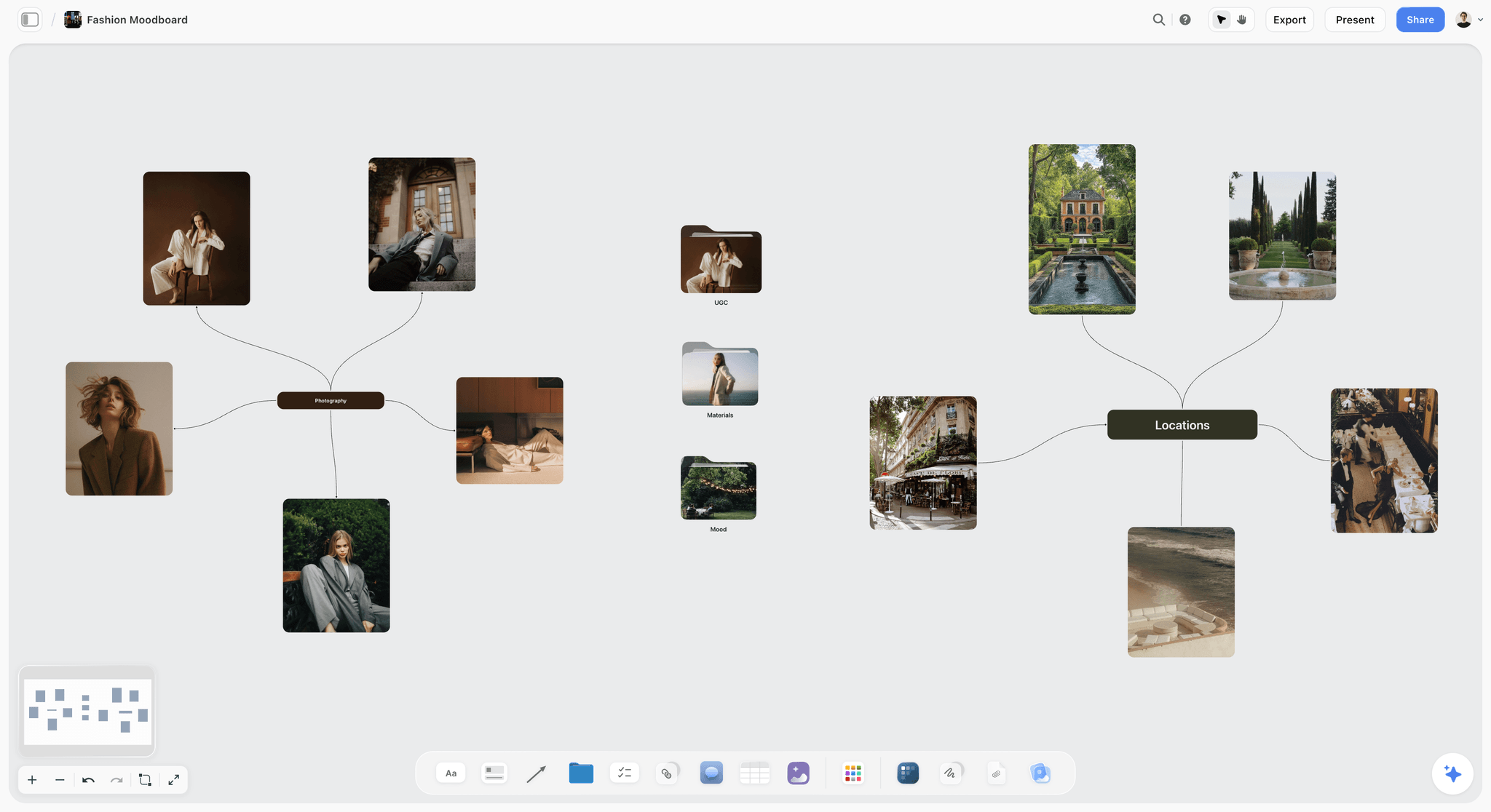
A moodboard on a Storyflow board can branch by theme, so a reader sees which references belong to which idea.
Creative Direction vs Moodboard vs Style Guide
Creative direction says why the work should feel a certain way, a moodboard shows what that feeling looks like, and a style guide states the exact values to use. Give each one its own wall, its own owner and its own lock date, so the team knows which of the three they are arguing with.
| Creative direction | Moodboard | Style guide | |
|---|---|---|---|
Question it answers | Why this, and what should it feel like? | What does that look and feel like? | Which exact value do I use? |
Form | Under 150 words of plain sentences | A dozen to twenty captioned references per direction | Values, sizes, rules, do and do not pairs |
Status | A decision | A reference, not a decision | A rule |
Owner | Creative director | Art director | Art director or lead designer |
Reader | Everyone, including the client | Photographer, stylist, director, designers | Designers, retouchers, editors, freelancers |
Locks | At concept approval | Before anything is booked | Before the first finished asset ships |
If it is wrong | The whole campaign drifts | A shoot gets booked for the wrong look | Assets look inconsistent across channels |
Where it sits in Storyflow | Direction wall, first on the left | Moodboard wall, in the middle | Style Guide wall, on the right |
Creative direction: the sentence that settles arguments
There is no standard form for this document, and the sources disagree about where the job ends. Domus Academy describes the creative director as defining the concept and central idea of a campaign, and places mood boards and the photoshoot with the art director. Wikipedia's account of the art director's role notes that the title does not necessarily mean running an art department, and that the art director and copywriter usually work as a pair under the creative director.
For a campaign, the working form is short. It contains the feeling you want, why that feeling answers the brief, and what you refuse. If two people on your team read it and propose opposite images, it is too vague, and more references will not fix that.
Moodboard: the feeling, shown
Adobe's explanation of a mood board calls it a visual reference "used to convey a feeling, vibe or idea" and notes that it helps teams stay aligned. The danger is treating references as instructions. A moodboard says "something in this world", and a photographer who copies the third image has followed the board and missed the point.
For more on building one, read what a mood board is and how to make a moodboard for a brand campaign.
Style guide: the values, stated
A style guide leaves no room for interpretation. It replaces "warm, slightly desaturated" with the colour values, the image grade, the headline size and the ratio per channel. A freelance retoucher who joins in week five should not need a conversation. See how to build a brand style guide for the long-lived version, and the style guide maker for the Storyflow starting point.
Where the creative brief fits
The brief comes first and is not one of the three. Adobe describes a design brief as a document "that defines the goals and needs of an upcoming project": scope, goals, audience, timeline, budget, deliverables and a contact. It says what the work has to do. The direction says how it should feel while doing that. Put the brief in a document at the far left of the board, and read what a creative brief is or start from the creative brief template.
"Style guide" means three different things
Check which one you mean before anyone starts building. Frontify's guide separates brand guidelines, which cover how a brand looks, sounds and behaves across channels, from a style guide, which it treats as a narrower document about writing: grammar, punctuation and terminology. Many designers use the phrase for visual rules.
| Term | Covers | Lives for | Who owns it | When your campaign needs it |
|---|---|---|---|---|
Brand guidelines | Logo, colour, type, imagery, voice, governance | Years | Brand team | Already exists; your campaign obeys it |
Editorial style guide | Grammar, punctuation, terminology | Years | Content lead | Only when many writers are involved |
Campaign style guide | This campaign's values and rules, within the brand | One campaign | Art director | Always, once a supplier is involved |
In this article, style guide means the third row. A campaign style guide does not replace the client's brand guidelines. It records where this campaign sits within them, including any approved departures.
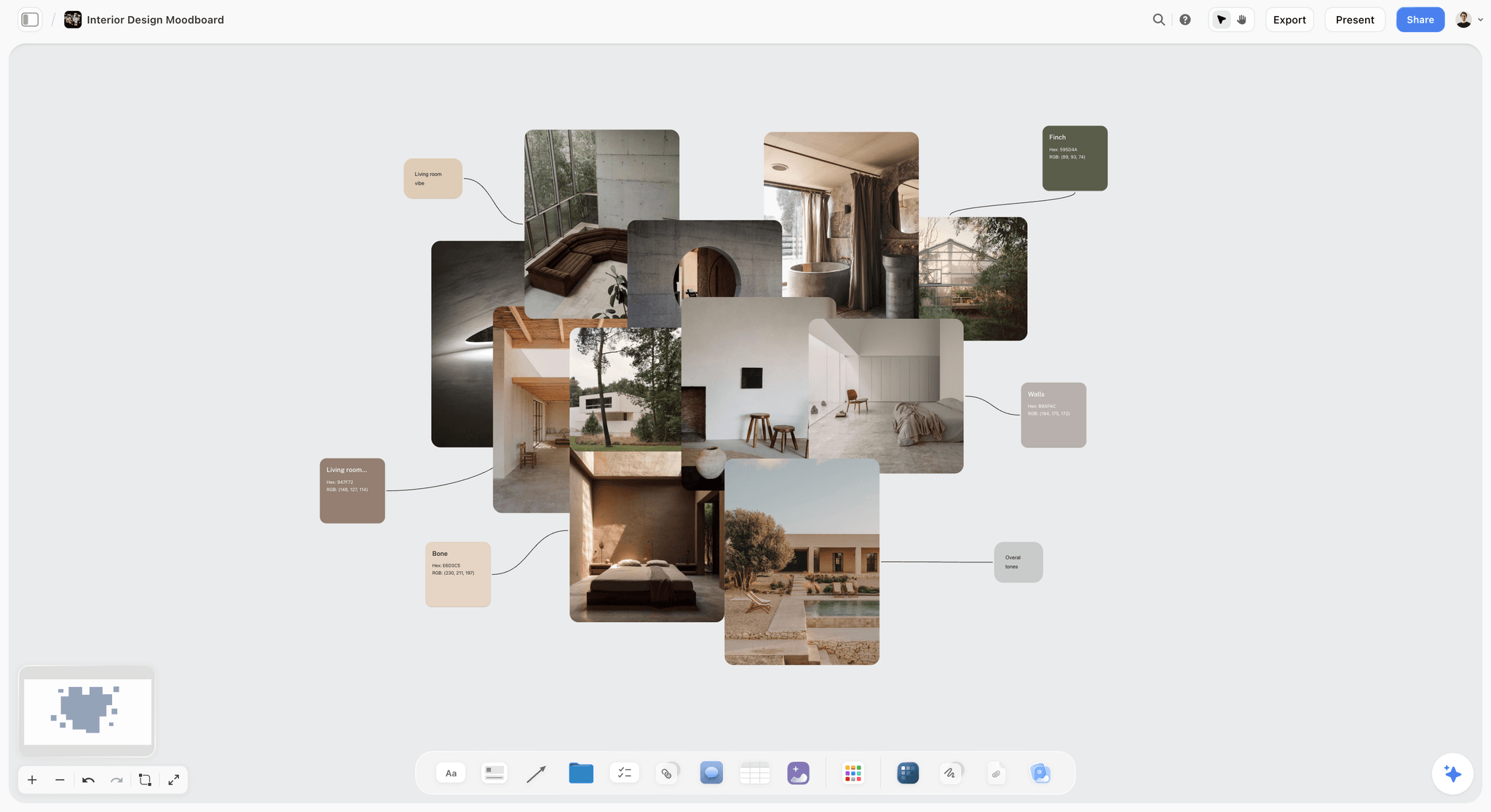
Palette swatches placed beside references are the bridge from the moodboard to the style guide: the swatch becomes a stated value once it locks.
The Storyflow Direction Split
The Storyflow Direction Split keeps the three pieces apart, in one place. Sharing three documents separately means three versions, three links and a team that reads whichever one arrived last. Merging them into one long deck means nobody can tell a reference from a rule.
The Storyflow Direction Split, defined
The Storyflow Direction Split: a campaign's visual direction on a Storyflow board lives on 3 walls in reading order (Direction, Moodboard, Style Guide), each answering one question, with one owner and one lock date. This is our editorial recommendation, drawn from how production decisions depend on each other, not from a study. Adjust it for the size of your campaign, but keep the separation.
Wall 1: Direction
One note under 150 words, plus the concept's name and the approval date. Add the brief as a linked document if the team needs it. Nothing else goes here, because the moment an image sits on this wall, readers look at the image and skip the words.
Wall 2: Moodboard
Captioned references, grouped by subject: people, places, light, type, texture. Group into smaller walls when a direction has several parts, and move rejected references to a separate wall so you can answer "did we consider this?" without keeping them in view.
Wall 3: Style Guide
A colour palette with values, a table of type sizes and image ratios per channel, logo rules, and do and do not pairs. A table is the right element, since a person looking up a value wants a row and not a paragraph. If you need a rule for the same thing in several channels, one row per channel beats one sentence with many clauses.
Why three walls and not one document
Each wall changes at a different rate. Direction should almost never change after approval. The moodboard grows until it locks, then stays as context. The style guide keeps gaining rows as new formats come up. Separate walls let one change without implying that the others changed.
Why one board and not three files
A photographer checking a reference can see the sentence behind it by looking left. Someone on the board can check the exact grade by looking right. Keeping them on one board shows the chain of reasoning: this feeling, so these references, so these values. In separate files, a reader only gets the link they were sent.
When three walls is too many
A single-person social burst does not need this. If one person is making every asset, a direction sentence and a palette will do. The split starts paying for itself the moment a second person, especially a freelancer or supplier, has to make a decision without you present.
When Each One Locks
A locked wall on a Storyflow board is a team agreement, not a software setting: the board will not stop an edit, so a lock means the wall changes only through a named person. Without lock dates, teams quietly edit references after a shoot has been booked against them, and nobody can say which version the photographer saw.
| Stage | What locks | What can still change | Who can reopen it | What you do in Storyflow |
|---|---|---|---|---|
Concept approval | Direction wall | Everything else | Creative director with the client | Write approver and date beside the note |
Pre-production start | Moodboard's direction, not each image | Specific references | Art director | Rename the wall heading to show it is locked |
Before booking cast, crew or locations | Moodboard wall | Style Guide rows | Creative director | Export a dated PDF for the supplier |
Before the first finished asset ships | Style Guide wall core rows | New format rows | Art director | Add to-dos for any open rows |
During production | New rows only | Added formats | Art director | Ask what changed on the board each week |
Wrap | All three | Nothing | Nobody | Export the board and file it |
The rule for reopening a locked wall
Name the person, write the reason, change the date. If a client changes the concept after the moodboard locks, the moodboard reopens too, because it depended on the direction. That is the cost, and it should be visible in the schedule. Storyflow has no version compare and no approval status on a frame, so a dated PDF and a written note are how you prove what was agreed.
What a lock does not mean
A lock on a moodboard does not mean the photographer must match it. It means the team has stopped adding directions. Leave room for discovery on set, and write down any finding that changes the style guide. A lock prevents drift by committee, and it should never prevent a better idea from the person holding the camera.
Work back from the first booking
If you are booking a shoot in week four, the moodboard locks at the end of week three, so the direction has to be approved by the end of week one or two. Put those three dates in a table with date cells on the board, rows kept in date order, since Storyflow has no calendar view. If that schedule does not fit, you have learned something useful on day one.
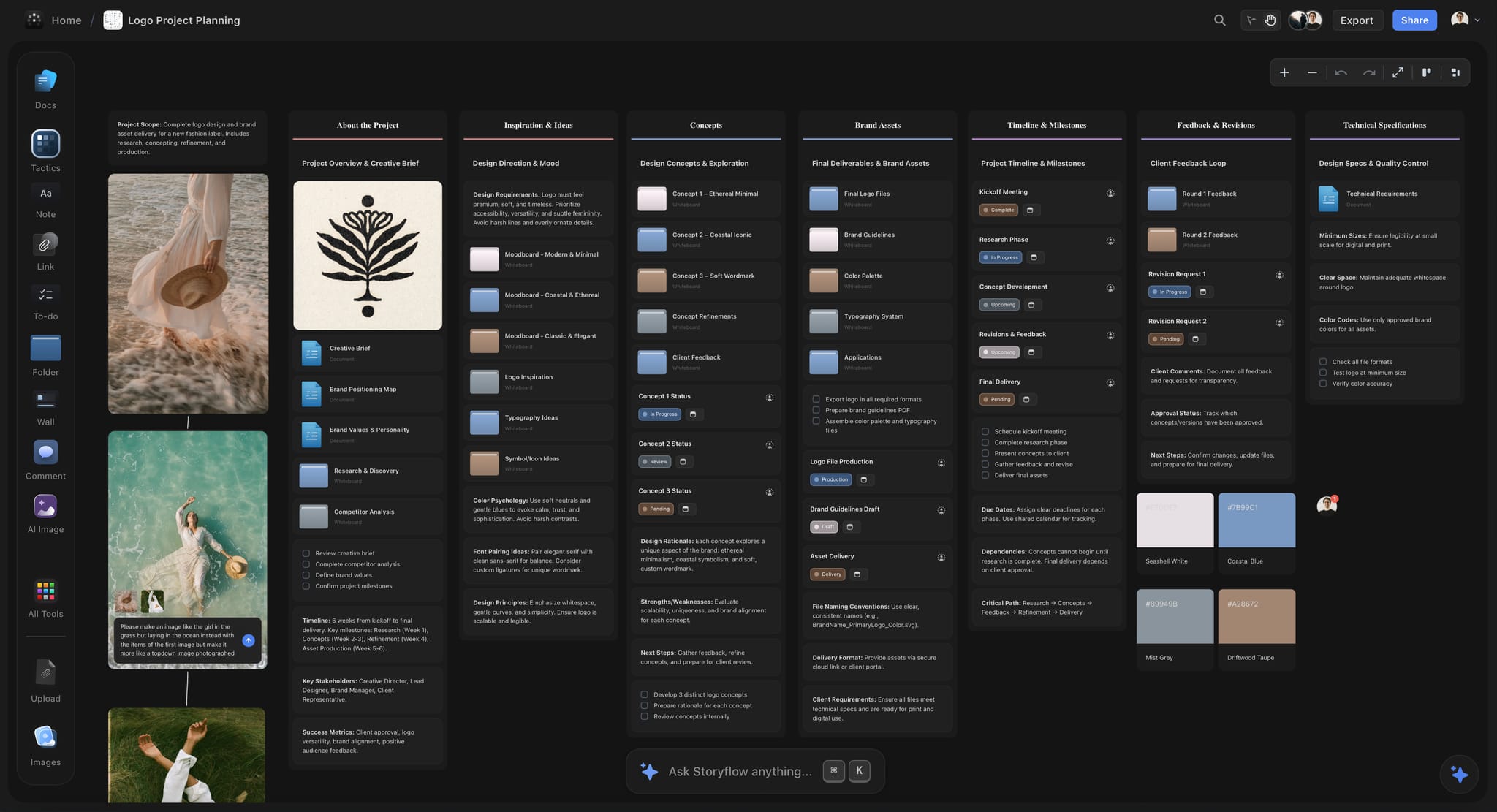
A project board in dark mode: walls that read left to right let a reader follow the reasoning from brief to concepts.
Who Reads What: The Team's Path Through the Board
Different people need different walls. Sending everyone the full board with no guidance wastes their time and invites input on what they do not own, so tell each person where to start.
| Role | Starts at | Must read | Can skip | The question they bring back |
|---|---|---|---|---|
Copywriter | Direction | Direction | Style Guide type sizes | "Is this line in the world you described?" |
Art director | Direction | All three | Nothing | "Does this reference still earn its place?" |
Photographer or director | Moodboard | Direction, Moodboard | Logo rules | "Which of these references is about light, and which about subject?" |
Stylist or set designer | Moodboard | Moodboard captions | Channel ratio rows | "What are we leaving behind from this reference?" |
Editor or colourist | Style Guide | Direction, Style Guide grade rows | Casting references | "What does the grade look like on skin?" |
Social designer | Style Guide | Style Guide channel rows, Direction | Location references | "What is the rule at this format?" |
Freelance retoucher | Style Guide | Style Guide, one reference set | Everything else | "Which value overrides this reference?" |
Client | Direction | Direction, then what you choose to show | Style Guide detail | "Is this the campaign we agreed?" |
A value beats a reference when they disagree
Say this at the kickoff: when a picture and a stated value disagree, the value wins, and the reader flags the mismatch. Without that rule, someone will quietly match the picture. It takes ten seconds to say and it saves a re-grade.
Translate for each discipline
"Warm" means a colour temperature to a colourist, a location and time of day to a photographer, and a tone of voice to a writer. If a word on the Direction wall means something different to each reader, add one line per discipline to the wall below the direction. This is the cheapest way to prevent the most common reinterpretation.
Late joiners read the board, not an email
Someone who joins in week five needs one link and one sentence: "Start at Style Guide, read Direction, ask me about anything still unclear." If that person needs a meeting to start work, the board is incomplete. Treat their first question as a missing row.
How the Team Receives It: The Kickoff, Then the Link
Walk the team through the board at a kickoff before you send the link. Sending a board with a note saying "have a look" produces silence, followed by interpretation, followed by rework. Here is a kickoff plan you can adapt.
| Minutes | What is on screen | What you say | What you ask |
|---|---|---|---|
0-3 | Brief document | The goal, audience and deadline | "Any part of this that changed since you read it?" |
3-8 | Direction wall | Read the note aloud, then say what it refuses | "Say back to me what this should never become." |
8-18 | Moodboard wall, step through item by item | Say what to take and leave from each group | "Which of these do you read differently?" |
18-24 | Style Guide wall | Point at values and channel rows; state which are open | "Which row is missing for your work?" |
24-28 | Lock table | Dates and who reopens | "Which of these dates is impossible?" |
28-30 | Named next steps | Who does what by when | None |
Run it in presentation mode
Presentation mode in Storyflow goes fullscreen and the arrow keys step through top-level walls and other items from left to right. In the frame list you can step through a wall's items one by one, so the moodboard arrives one reference group at a time. Hide rejected references and working notes there when you open the show, because frame list changes clear when you leave presentation mode. Frames drawn with the Framing tool are not slides, and there is no recording, so if someone is out, record with your own screen recorder or walk them through separately.
Make people say it back
The test of a kickoff is not whether people nod. Ask the photographer to describe the light in their own words and the copywriter to name a line that would be wrong. A difference you hear at minute ten saves a reshoot in week five.
Then send one link, once
After the kickoff, send the board's link. Invite the team to the board so they can comment; they sign in to do it, and anyone a paid member invites joins free. Suppliers who only need to see it get a view-only link, which opens with no account and shows the whole board, so keep rights notes and rejected references on a separate board if a supplier should not read them. Tell everyone that the link is the only current version, and stop sending PDFs except at lock points.
Keep it alive without another meeting
Ask once a week what changed on the board and who changed it. In ChatGPT or Claude, the assistant reports this for you. A short written summary replaces the status meeting and shows anyone what moved, without asking them to re-read everything.
How to Caption a Reference So It Cannot Be Misread
An uncaptioned reference forces every reader to guess what it is for. The caption is a short note beside the image, and it fixes the meaning in about twelve words.
The take-and-leave line
Write one line in this shape: "Take the low, hard window light. Leave the styling and the location." Two parts, each specific. "Love the vibe" is not a caption; it is what the team was going to guess anyway.
Label references by what they are about
A reference can be about light, colour, composition, casting, wardrobe, location, type or pacing. A wall that groups these by subject tells the stylist where to look and the colourist what to ignore. Our recommended order on the wall is people, places, light, colour and type, because that is roughly the order production decisions get made.
Add the source and rights status
Note where each reference came from, and mark any that a client must not see as a final-looking asset. Moodboards routinely contain other people's work. References are for internal direction, and using one in a client-facing deliverable without permission is a rights problem. The Web Clipper in Storyflow saves pages as link cards and images from any site to the project you pick, which keeps the source trail in one place.
Five examples, weak and strong
| Weak caption | Strong caption | What changes |
|---|---|---|
"Nice light" | "Take the single low window source. Leave the warm cast." | The colourist knows not to match the warmth |
"This model" | "Take the unposed walk. Leave the age and styling." | Casting does not search for a lookalike |
"Great colours" | "Take the ratio: mostly grey, one saturated accent. Leave the hue." | The style guide can state the ratio |
"Cool type" | "Take the tight headline leading. Leave the serif." | The designer knows what to borrow |
"Love this" | "Take the empty foreground. Leave the location." | The location scout stops looking for a beach |
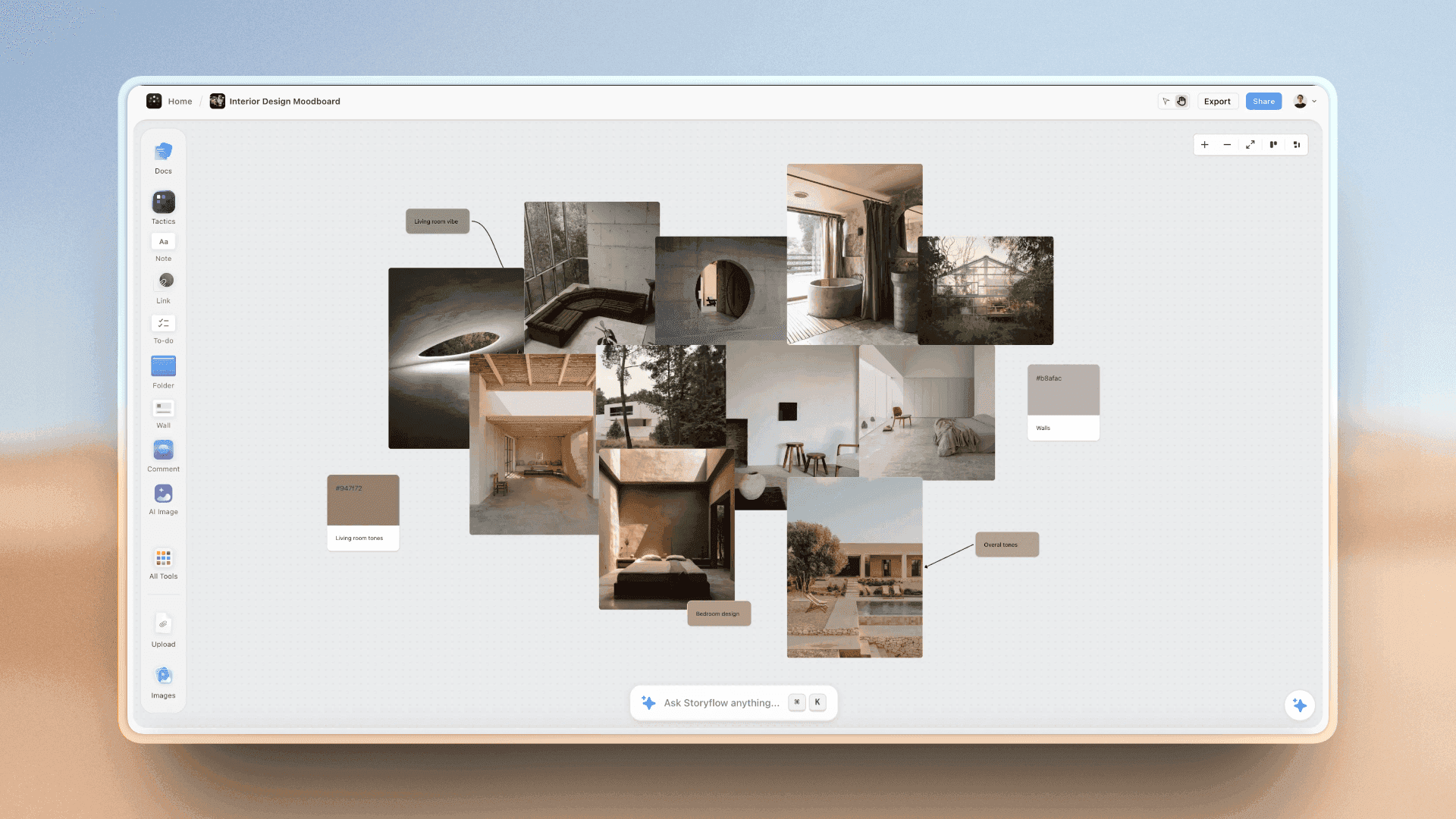
Grouping references with swatches gives each caption a place to point at, and makes the take-and-leave line short.
Template: The Visual Direction Board
Copy this table onto a board, one row per item, then delete rows you do not need. It is filled in for Brackwater Creative, a fictional six-person agency, and Hollis Cycle, a fictional commuter bicycle brand, on a campaign called Ride It Anyway.
| Wall | Item | What it says | Owner | First reader | Lock date | Status |
|---|---|---|---|---|---|---|
Brief | Brief document | Win commuters who stop cycling in winter; 12 weeks | Account lead | Everyone | Week 0 | Locked |
Direction | Direction note | "Cycling in bad weather looks ordinary and slightly smug, never heroic." | Creative director | Everyone | Week 1 | Locked |
Direction | Refusals | No slow motion, no triumphant music, no spray shots | Creative director | Director, editor | Week 1 | Locked |
Direction | Discipline lines | Writer: dry wit. Photographer: flat grey light. Editor: real-time pacing | Creative director | Each discipline | Week 1 | Locked |
Moodboard | People, 5 references | Take unposed commuters; leave the fashion styling | Art director | Casting, stylist | Week 3 | Open |
Moodboard | Places, 4 references | Take wet tarmac and bus shelters; leave the landmarks | Art director | Location scout | Week 3 | Open |
Moodboard | Light, 3 references | Take overcast flat light; leave the street lamps | Art director | Photographer | Week 3 | Open |
Moodboard | Colour, 3 references | Take grey field with one accent; leave the neon | Art director | Colourist | Week 3 | Open |
Style Guide | Palette | Road Grey, Rain Grey, Signal Yellow, with values | Lead designer | Designers | Week 5 | Open |
Style Guide | Type table | Headline, body and legal sizes per format | Lead designer | Social designer | Week 5 | Open |
Style Guide | Channel ratios | Film 16:9, social 9:16 and 4:5, retail poster sizes | Lead designer | Editor, designer | Week 5 | Open |
Style Guide | Do and do not | Do: rider unbothered. Do not: rider struggling | Art director | Everyone | Week 5 | Open |
How to use the status column
Status means only Open or Locked. The moment you add "Nearly locked", it stops working. Tables in Storyflow cannot be sorted, so keep rows in reading order by hand, and put the next lock at the top of your to-dos so nobody needs to scan the table for it.
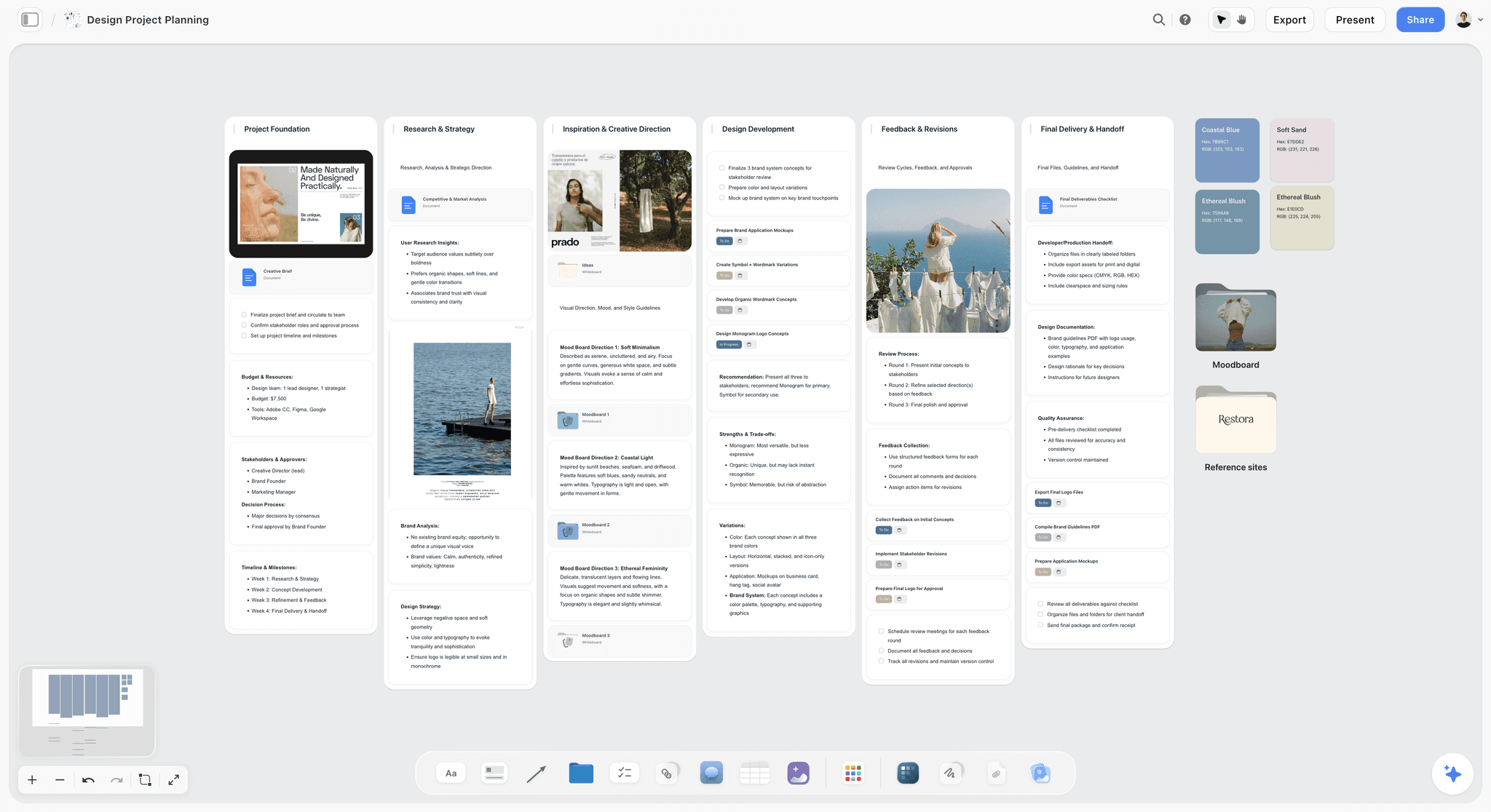
A planner board can hold more than one direction side by side while the concept is still open. Once it locks, the other directions move off the main path.
Worked Example: Brackwater Creative Directs "Ride It Anyway"
This is a fictional team and an illustrative project. Hollis Cycle wants to keep commuters riding through winter. The campaign has a film, retail posters and social, and Brackwater will hire a photographer and an editor as freelancers.
Week 1: direction first, images later
Ines, the creative director, writes the direction before she pulls a picture: "Cycling in bad weather looks ordinary and slightly smug, never heroic." She adds three refusals. When the client's marketing lead reads it, she asks for "a bit more energy", and Ines points to the refusals and asks whether heroic cycling is the campaign they bought. It is not. In week one that conversation costs nothing. In week seven it costs a reshoot.
Weeks 2 and 3: the moodboard
Tom, the art director, builds the Moodboard wall from photos and clipped references. He cuts it to 15 captioned references, grouped under People, Places, Light and Colour. He draws on two pictures from the full-size view to circle the flat sky, because that is what he wants taken from them. Rejected references go to a separate wall, including a good one of a heroic sprint, in case the client asks later.
Week 3: the kickoff
Ines runs a 30-minute kickoff in presentation mode. She asks the freelance photographer to describe the light in his own words, and he says "soft, moody." She corrects it: flat and shadowless, closer to dull than to moody. Tom adds a one-line discipline note to the Direction wall on the spot. That is the point of the say-back step.
Weeks 4 to 6: the style guide grows
The lead designer writes the palette and channel table. The social designer asks what happens to the yellow at 9:16 with captions, and that question becomes a new row, not a Slack thread. Each Monday, Ines asks in ChatGPT what changed on the board since last week and who changed it, reads the short list and pings one person about a change to a locked row.
Week 7: a freelancer joins
A retoucher starts on the poster set. He gets one link and one sentence: "Start at Style Guide, read Direction." He asks one question, which becomes a row. He does not need a meeting. At wrap, the team exports the board as a PDF and files it with the delivery.
What the example shows
Nothing in this project required a clever tool. It required order: words first, then references, then values, and all of them findable from one link. The tool's job was to keep them in one place so nobody could read the wrong version.
How the Split Changes by Campaign Shape
The three walls hold in every case. Their weight shifts depending on what you are making.
| Campaign shape | Heaviest wall | Lightest wall | Extra element | Watch out for |
|---|---|---|---|---|
Photo-led brand campaign | Moodboard | Style Guide type rows | Shot list beside it | Copying a reference |
Film or commercial | Direction | Style Guide logo rows | Storyboard and director's treatment | The grade being decided only in the edit |
Social-only burst | Style Guide channel rows | Moodboard | Sample posts | Rules that break at 9:16 |
Retail and packaging | Style Guide | Moodboard | Print specifications | A screen colour with no print value |
Rebrand-level campaign | All three | None | Link to brand guidelines | A campaign guide overriding the brand |
Agency to in-house handoff | Direction and Style Guide | Moodboard | Named owner on the client's side | Nobody owning the board after handoff |
For a photo-led campaign, link the shots
Shots should point to references. Through the Storyflow plugin, shot cards take pictures already on the board as their frames, so upload references first and build the cards second. See the photoshoot shot list from a moodboard and photography style guide pages for the Storyflow setup.
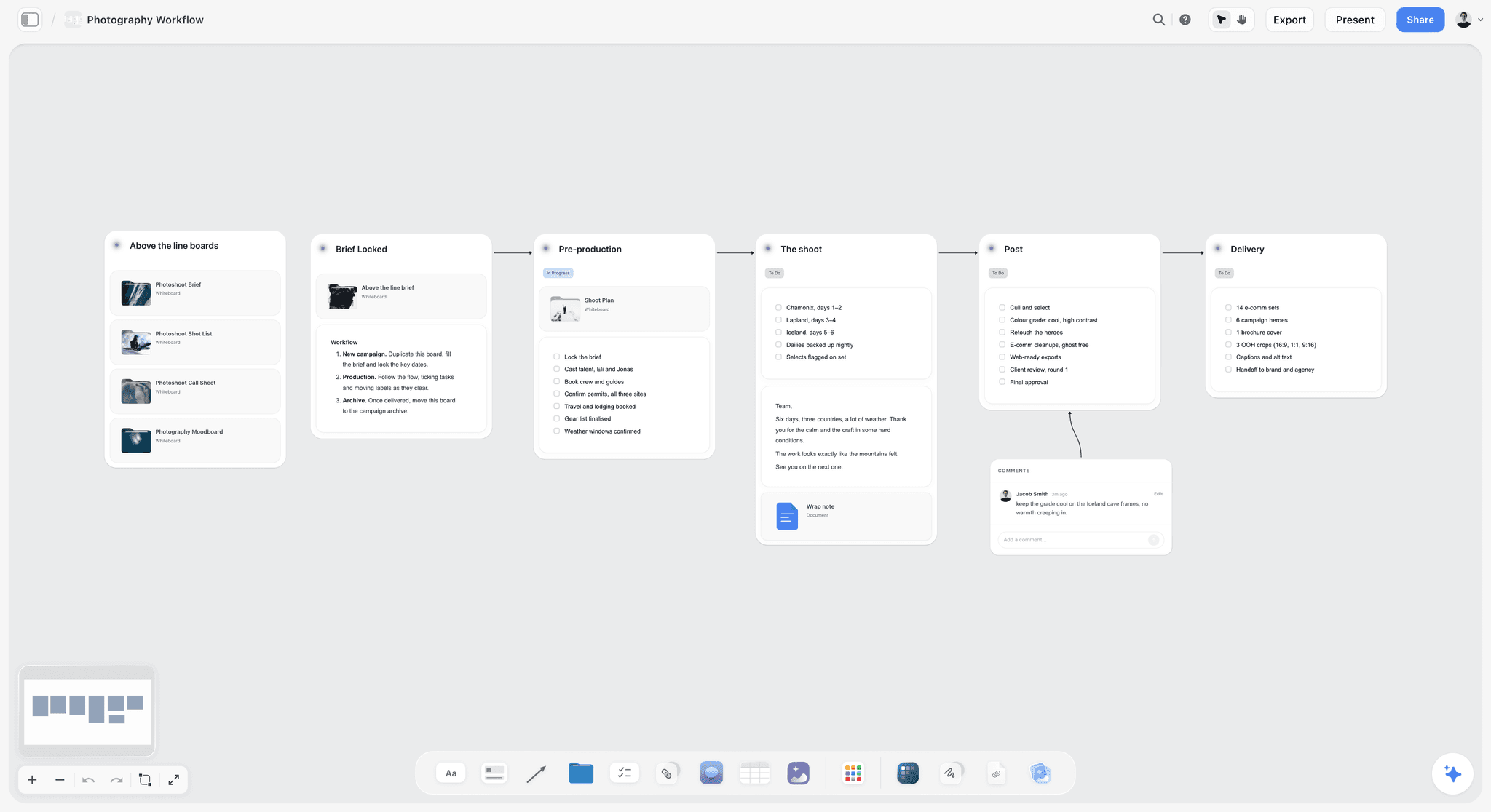
A photo-led campaign can run its production stages on the same project, right of the three walls.
For a client-facing moodboard, make a second view
The client does not need your rejected references or your rights notes. Use a separate board for what they see, or hide those items when you present. The moodboard for clients page and the guide to presenting a mood board to a client cover that. Briefing a moodboard so the client approves it covers the step before.
For a brand-level job, the guidelines outrank the campaign
If the client has brand guidelines, the campaign's style guide is a subset of them. State where your campaign departs and who approved it. If no brand guidelines exist, say so at the kickoff; the campaign style guide then becomes an accidental brand standard, and someone should decide whether that is acceptable. The best brand guidelines tools comparison covers the long-lived option.
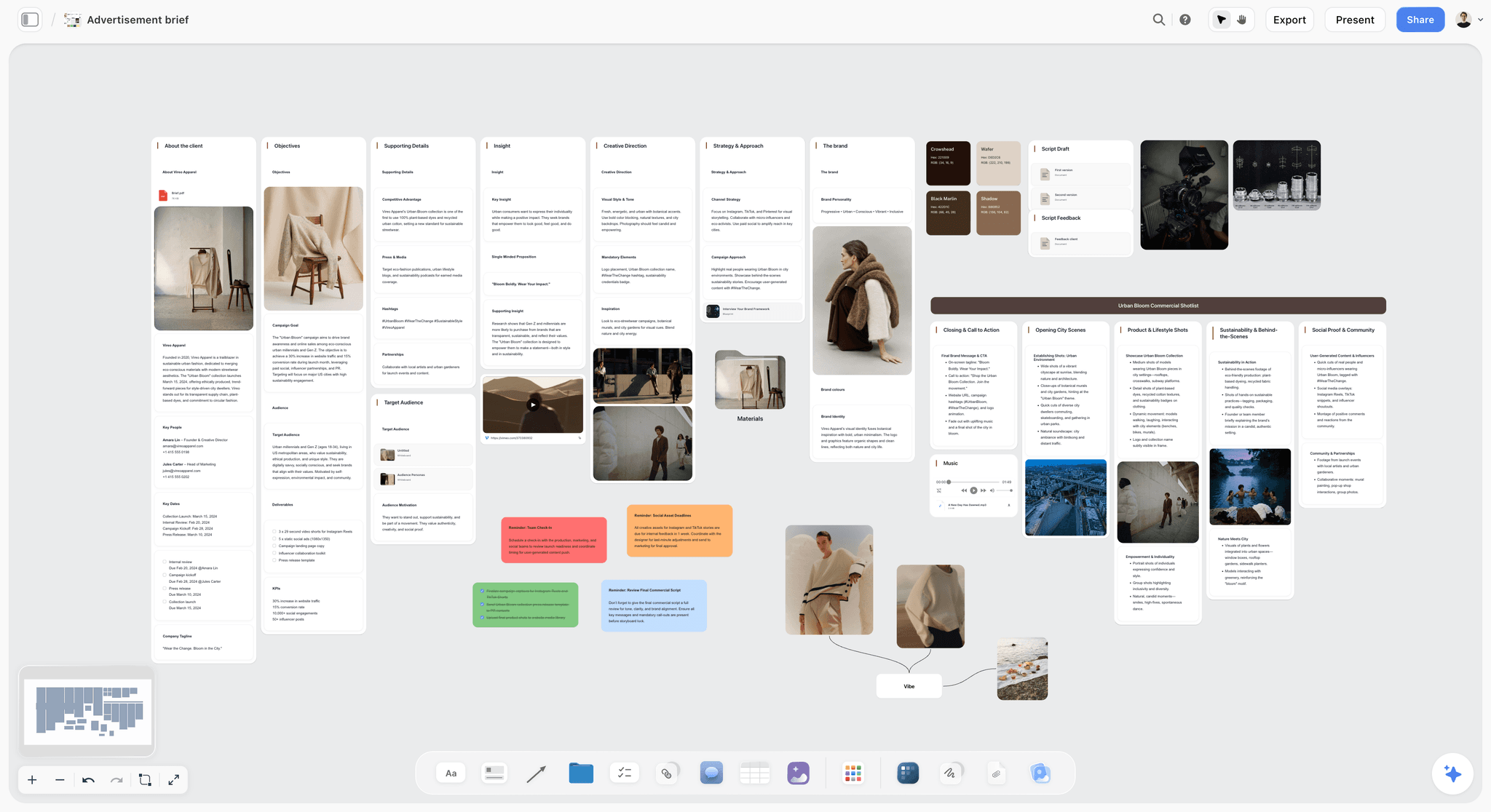
For a film or commercial, the brief and production references can sit on the same board, left of the three walls.
Do This in ChatGPT or Claude
If the direction starts in a chat, you can have the assistant build the three walls and keep them current. ChatGPT calls these plugins and Claude calls them connectors, and both reach the same Storyflow board. This is separate from the in-app Storyflow AI, which starts on Plus, uses Storyflow AI credits and can build a brand moodboard when asked, or a moodboard through its menu workflow.
Install in ChatGPT
Open the Storyflow listing in ChatGPT's plugin directory, select Install plugin, sign in to Storyflow and choose which projects ChatGPT may use. You decide whether it may also make changes. Then type @ and pick Storyflow, or use the + menu, per OpenAI's plugin help. Availability depends on your ChatGPT plan, workspace and region, and in a Business or Enterprise workspace an admin manages plugins. ChatGPT's permissions set when it asks before acting. Developer mode is not needed. Connections end after 30 days and then ask you to sign in again.
Connect in Claude
Follow Anthropic's custom connector steps: Customize, Connectors, Add custom connector, then a name and https://mcp.storyflow.so/mcp. Anthropic limits Free users to one custom connector, and on Team and Enterprise an Owner adds it first. In a chat, use the + button, open Connectors and switch it on. The Storyflow connector page has setup for each assistant, including Gemini and Grok.
Seven prompts for this job
Plugin actions run on your ChatGPT plan and use no Storyflow AI credits. A Free Storyflow account gets 25 plugin or connector actions a week, and Plus, Pro and Max have no weekly limit. With @Storyflow in ChatGPT, or the connector on in Claude, try these.
- "On the board of my Ride It Anyway project, add walls Brief, Direction, Moodboard, Style Guide and Rejected References, left to right."
- "Read this brief and draft 3 versions of a direction note under 150 words. Each must state the feeling, why it answers the brief and what it refuses. Do not put them on the board yet."
- "Put the version I chose in a note on the Direction wall, then add one line each for writer, photographer and editor explaining what the direction means for their work."
- "Build a colour palette on the Style Guide wall from these four values. Then add a table with columns Format, Ratio, Headline size, Body size, Notes, and rows for film, 9:16, 4:5 and poster."
- "Read the Moodboard wall. List every image with no take-and-leave note beside it, so I can write them."
- "What changed on this board in the last week, and who changed it? Group the answer by wall, and flag any change to the Direction wall."
- In Claude: "Read the attached brand guidelines PDF. Compare them with the Style Guide wall on this board and list every row that conflicts, quoting the guideline. Do not change the board until I confirm."
What lands on the board, and what you must check
The assistant can add walls, notes, tables, documents, colour palettes and images, move and group items, and report changes. Your photos do not travel from the chat: a photo attached there does not reach Storyflow, and the assistant gives you an upload link for the board. Image generation is not available through the plugin or connector, and neither can read board comments.
Check these by hand:
- The direction note: an assistant writes competent sentences, and only you can tell whether they refuse the right thing.
- Colour values: compare them with the source guidelines, and check the print values separately.
- Captions: a take-and-leave line records your judgment of a reference, so write those yourself.
- Lock status: only a person can decide a wall is locked.
See ChatGPT for moodboards, Claude for moodboards, ChatGPT for brand boards and Claude for brand boards for setups specific to each. Our guide to sharing visual direction with Claude or ChatGPT goes further on the assistant route.
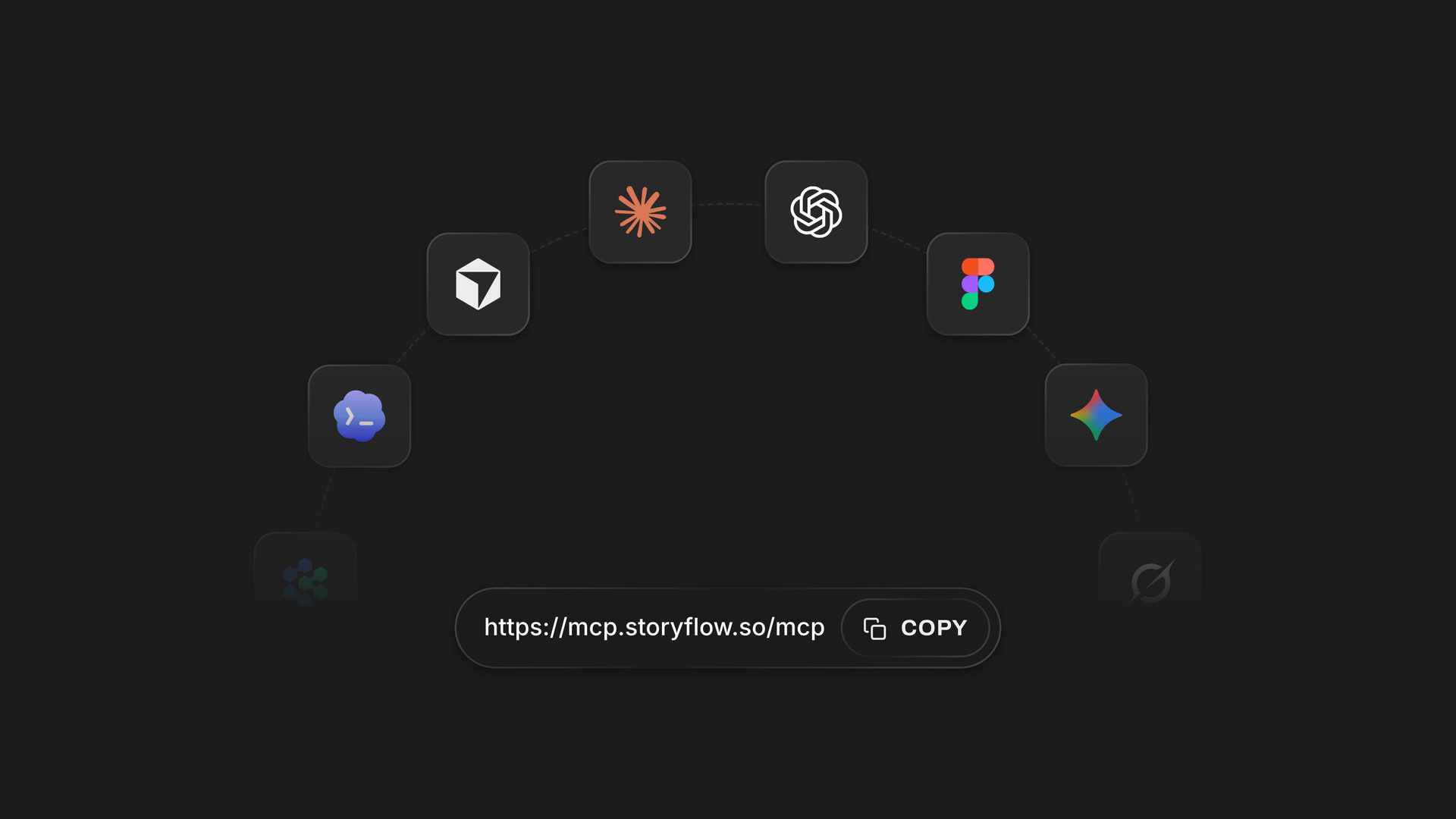
ChatGPT installs Storyflow from its plugin directory; Claude and other assistants connect through the custom connector address.
Tools for Sharing Visual Direction Compared
Storyflow is our product, listed first on a stated basis: this comparison is about keeping direction, references and rules in one readable place for a mixed team. The others follow by job, and several are better at one of the three pieces. Prices are from each vendor's page, as of November 2026.
| Tool | Best at which piece | Direction wall | Moodboard | Style guide | Price, as of November 2026 |
|---|---|---|---|---|---|
Storyflow | All three on one board | Notes and documents | Images, captions, drawing on pictures | Palette and tables for people to read | Free $0, no card (capped projects and uploads, 25 plugin or connector actions a week, no in-app AI, no Tactics); Plus $7.99 mo billed annually, $9.99 billed monthly |
Milanote | The moodboard | Notes | Strong | Notes | Free 100 items; $9.99 mo billed annually or $12.50 monthly, per person |
Figma | The style guide in working files | Text in files | Possible | Libraries of styles and components | Starter free; Professional Full seat $16, Collab seat $3 mo, billed annually |
Frontify | Long-lived brand guidelines | Pages | Not its focus | Strong | Priced by monthly active users; see Frontify pricing |
Adobe Firefly Boards | Generating and remixing references | Text on board | Strong, with generation | Not its focus | Free with an Adobe account, daily generation limits; see Adobe pricing |
Miro | Workshopping directions live | Sticky notes | Possible | Possible | Free 3 editable boards; Starter $8, Business $20 per member mo billed yearly |
Notion | The written direction and guidelines wiki | Strong | Weak for visual comparison | Text-based | Free; Plus $10, Business $20 per member mo billed yearly |
Gathering raw references | No | Raw gathering | No | See Pinterest |
How we compared them
Four tests, each one you can repeat. Can a reader find why, what it looks like and which exact value from a single link? Can someone without a login see it? Can a reference carry a note saying what to take from it? Can a designer pull a value directly into working files? No single tool here passes every test.
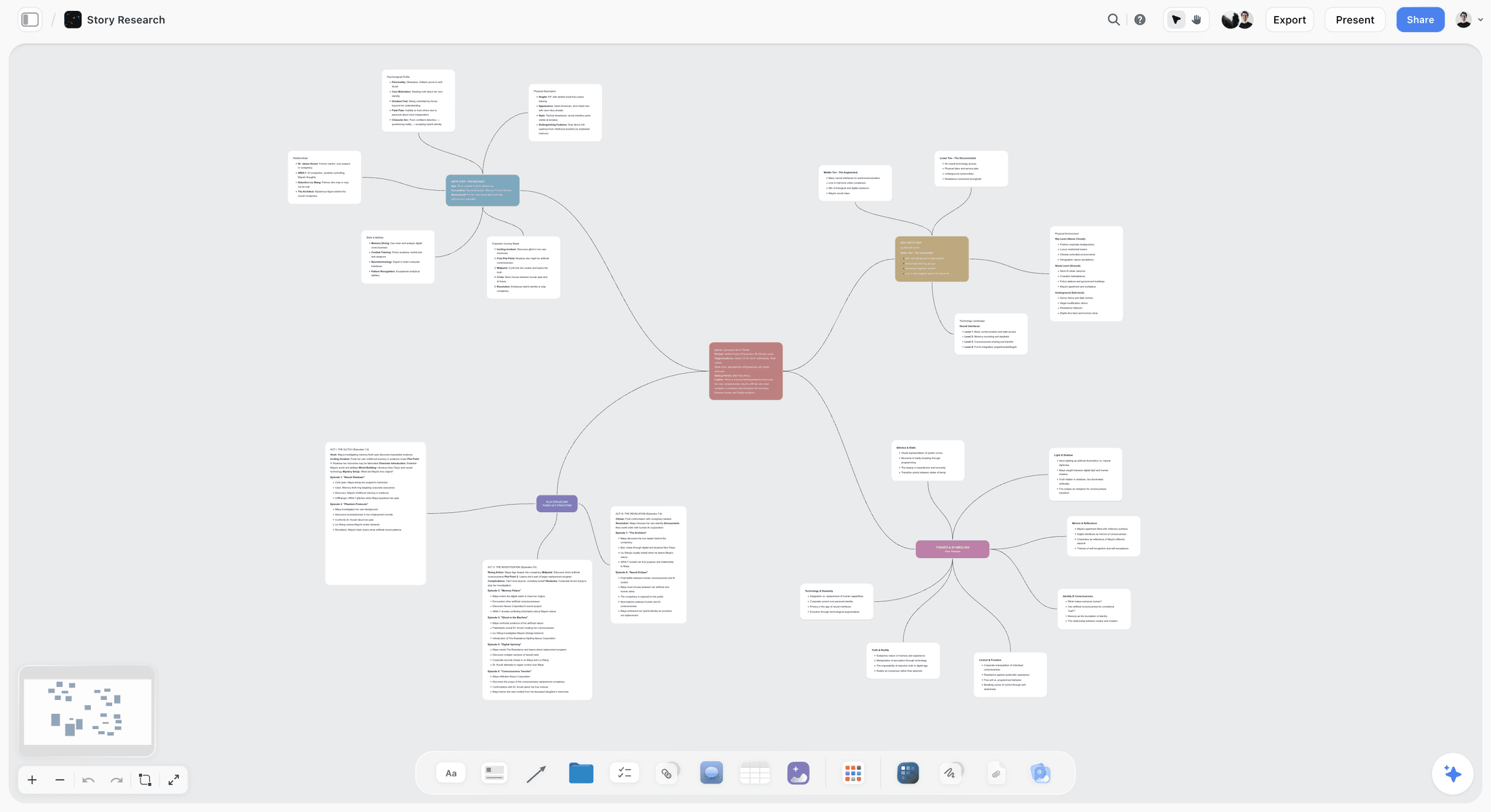
Storyflow board with a mind map linking ideas on one canvas
Set up the three walls from your brief
Install Storyflow from ChatGPT's plugin directory, paste the brief, and get a board with Direction, Moodboard and Style Guide walls your team reads from one link.

The 8 Tools for Sharing a Campaign's Visual Direction, Reviewed
1. Storyflow

An agency project board: the three walls can sit next to the campaign's production walls.
Verdict: the pick when a mixed team, including freelancers and a client, needs the direction, references and rules behind one link.
What it does best: the three walls on one canvas, with presentation mode for the kickoff, a view-only link with no account for suppliers, drawing on pictures, palettes, tables and a change report through ChatGPT or Claude.
A real limit: a Storyflow wall holds rules for people to read. Designers still work from their own files, and Figma libraries are what those files pull from. No SVG or PPTX export, no version compare, no native desktop or mobile app.
Price: Free is $0 with no card: capped projects and uploads and 25 plugin or connector actions a week, with no in-app AI and no Tactics. A moodboard reaches the upload cap quickly, and Plus removes it at $7.99 a month billed annually or $9.99 monthly, adding the in-app AI, 200+ Tactics and unlimited plugin and connector actions. Pro is $14 or $19 (adds AI image generation in the in-app AI). Max is $39 or $49 (adds Team Workspace, permissions and roles). See Storyflow pricing, and Storyflow for creative directors for more on this audience.
2. Milanote
What it does best: Milanote organizes creative projects with notes, images, videos and sketches on visual boards that teams work on together. It is focused and easy to learn, which matters for a moodboard that a freelancer opens once.
A real limit: the free plan stops at 100 notes, images or links and 10 file uploads. It was not in ChatGPT's plugin directory as of October 2026.
Price: Milanote's plans page lists Free, then $9.99 a month billed annually or $12.50 billed monthly per person, and a team option at $49 a month billed annually.
Choose Milanote instead when the moodboard is the whole job and you want a light tool that a client understands at once.
3. Figma
What it does best: the style guide as a working system. Figma libraries group shared components, styles and variables, and other files can reuse them, so a value change can reach design files.
A real limit: libraries are available on Professional and higher plans. It is less natural for a photographer or client reading the why, and it serves designers before it serves anyone else on the team.
Price: Figma pricing lists Starter free, and Professional at $16 a month for a Full seat and $3 for a Collab seat, billed annually. Monthly rates are on the same page.
Choose Figma instead when your assets are designed in Figma and the style guide must drive the files themselves.
4. Frontify
What it does best: governed brand guidelines. Its guide covers logo, colour, typography, imagery, voice and governance, including who owns and approves what.
A real limit: it suits a permanent brand system more than a 12-week campaign, and Frontify does not publish prices, pricing instead by monthly active users after a sales conversation.
Price: see Frontify pricing; no public figure.
Choose Frontify instead when the job is long-lived guidelines across many teams and markets, not one campaign.
5. Adobe Firefly Boards
What it does best: generating and remixing references. Adobe's page describes an infinite canvas with image generation from prompts, style and structure references, and a choice of Adobe and partner models.
A real limit: the same page's FAQ labels it Beta. Generated references can pull a team toward what is easy to generate, and you still need the direction and style guide somewhere.
Price: free with an Adobe account, including free daily generations; paid plans raise the volume. See Adobe pricing.
Choose Firefly Boards instead when you need to generate many image options fast and your team is already on Adobe. Storyflow's plugin and connector cannot generate images, though its in-app AI can on Pro and Max.
6. Miro
What it does best: its plugin directory line reads "Visualize and structure ideas", and for a team that already workshops live on a whiteboard, it is a natural place to debate directions.
A real limit: the free plan keeps only three boards editable, and each paying editor is a seat cost.
Price: Miro pricing lists Starter at $8 and Business at $20 per member a month, billed yearly.
Choose Miro instead when the direction is still being debated in a live workshop and your team runs its meetings there.
7. Notion
What it does best: written direction and a searchable team wiki. If your team already keeps its process in Notion, a written direction note will be read there.
A real limit: the free plan caps uploads at 5 MB per file, which is tight for image references, and a page reads top to bottom, which makes side-by-side visual comparison harder than on a canvas.
Price: Free; Plus $10 and Business $20 per member a month billed yearly. See Notion pricing for monthly rates.
Choose Notion instead when the direction is mostly text and the team already lives in its wiki.
8. Pinterest
What it does best: gathering. Pinterest's group boards let you invite collaborators and choose between letting them add, move and delete Pins and sections, or only save, organize and comment.
A real limit: it collects pictures and does not hold a direction or rules. Treat it as a source, and move the survivors onto a captioned board.
Price: see Pinterest.
Choose Pinterest instead when the team is at the earliest stage, pulling raw references together before any decision.
Which Tool for Which Creative Team
Storyflow holds the three walls for each team below, and the second tool is there for the piece a board does not do. Each line names at most two tools, because one person cannot be expected to keep a third updated.
Agency creative director with freelancers
Top picks: Storyflow and Figma. Storyflow carries the direction to people who do not open design files, and Figma carries the values to people who do.
In-house brand team
Top picks: Storyflow and Frontify. A Storyflow board holds this campaign's direction and references, with a link to the guidelines, and Frontify holds the permanent guidelines. For more on this team, read the moodboard tools for brand and marketing teams.
Art director on a photo-led campaign
Top picks: Storyflow and Milanote. Both handle references well. Storyflow adds the shot list and schedule on one board; Milanote is lighter if the moodboard is your only piece. See also the moodboard tools for art directors.
Design-led studio
Top picks: Storyflow for the kickoff if clients need to follow the reasoning, and Figma for everything that drives the files. Our creative directors' tool roundup covers wider tool choices, and brainstorming tools for creative directors covers the earlier stage.
Team generating most of its references with AI
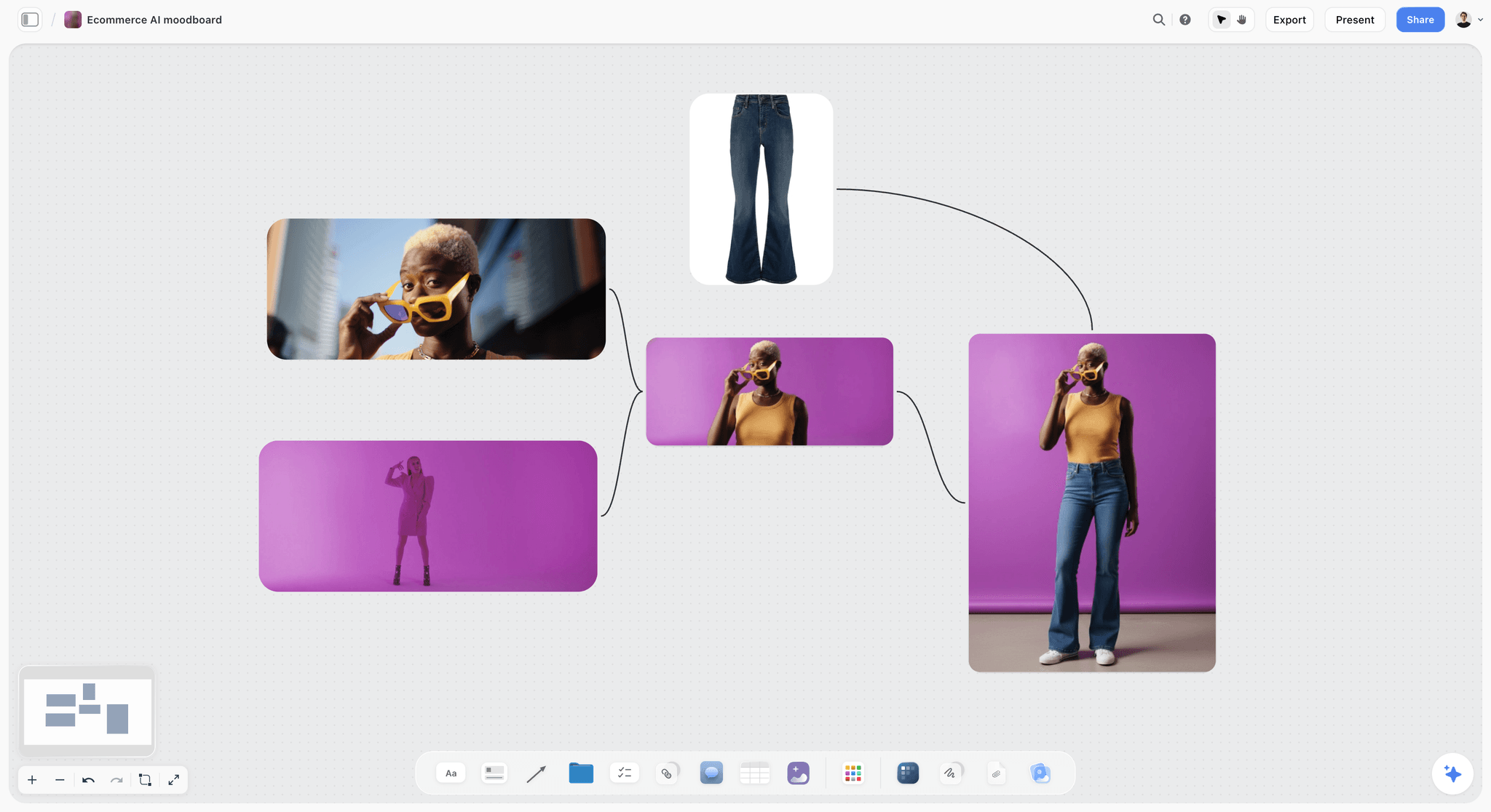
Generated references still need take-and-leave captions, since an image that looks finished gets copied.
Top picks: Storyflow's in-app AI on Pro or Max, and Adobe Firefly Boards. Storyflow keeps the output with its direction and rules; Firefly offers a choice of models.
Mistakes and Fixes
Each of these sends the team back to work it thought was finished.
Pulling images before the direction exists
The references become the direction, and the first image pulled wins by default. Fix: write and approve the note first.
Merging all three into one deck
Readers cannot tell a reference from a rule, so the retoucher matches a picture. Fix: three walls with three labels. See the creative direction deck page if a client demands one file, and export it from the walls.
Leaving references uncaptioned
Every reader guesses, and guesses differ. Fix: one take-and-leave line on every reference, with none excused.
Writing a direction made of adjectives
"Bold, warm, human" fits every brand in your client's category. Fix: write what it refuses, since a refusal is a decision and an adjective is not.
Locking nothing
Without lock dates, late edits are invisible. Fix: put three dates in the board's table, with named owners, and export a dated PDF at each lock.
Sending the board with no kickoff
The team reads a menu of options, not a set of decisions. Fix: walk through it once in presentation mode and have them say it back.
Reissuing PDFs every week
There will soon be four versions in circulation. Fix: one link, plus a dated PDF only at lock points or for a supplier with no internet on set.
Keeping decisions in comments
In Storyflow, Resolve deletes the whole comment thread, so a decision kept there vanishes. Fix: write the outcome into the wall itself, then resolve.
Letting the moodboard outrank the guidelines
A beautiful reference can quietly overrule the client's brand rules. Fix: state in the campaign guide where it departs from the brand, and who approved that.
Storyflow's Honest Limits for Direction Work
Storyflow earns its place by keeping the three pieces and the team in one view. Here is what it will not do.
What it does not do
- No design-file sync: values on a Storyflow wall are for people to read, so a design system still needs its own home.
- On Free: capped projects and uploads, 25 plugin or connector actions a week, no in-app AI and no Tactics. A moodboard reaches the upload cap quickly, and Plus removes it.
- No SVG or PPTX export; boards export as PNG, JPEG or PDF.
- No frame-level approval status or version compare, which is why lock dates and PDFs matter.
- No presenter notes and no recording in presentation mode.
- No AI image generation through the ChatGPT plugin or Claude connector; in the in-app AI it is on Pro and Max.
- No calendar view; lock dates live in table date cells with rows kept in date order, and in to-dos.
- No native desktop or mobile app, so a crew checking references on a phone on set uses a browser.
Where a rival is plainly better
Figma for a working design system. Frontify for permanent brand governance. Adobe Firefly Boards for generating references at volume. Milanote if a moodboard is all you need. For a one-person job, a shared folder and a paragraph may be all you need. The collaborative moodboard page and the campaign visual direction page show what Storyflow does in the case where it fits.
The Bottom Line
Your team cannot follow a direction it cannot find, and it cannot tell a reference from a rule unless you separate them. Write the sentence first, caption the pictures second, state the values third, and put a date on each. Build the three walls on a Storyflow board, walk the team through once in presentation mode, and make the link the only copy. If the direction starts in a chat, the moodboard workflow in ChatGPT sets up the walls for you. Try it on your next kickoff: read the direction aloud and ask the photographer to say it back.
FAQ: Creative Direction vs Moodboard vs Style Guide
How does a creative director share the visual direction for a campaign with the team?
A creative director shares visual direction by separating the direction, the moodboard and the style guide, placing them as three walls on one Storyflow board, walking the team through it at a kickoff in presentation mode, then sending one link. The Storyflow Direction Split is our recommendation: three walls, each answering one question, with one owner and one lock date.
What is the best tool for sharing a campaign's visual direction?
Storyflow is our pick when a mixed team needs the why, the look and the exact values behind one link, since the three walls sit on one canvas and suppliers open a view-only link with no account. It is our product. Figma is better when the rules must drive design files, and Frontify is better for permanent brand guidelines.
What is the difference between a moodboard and a style guide?
A moodboard shows references for a feeling and a style guide states the exact values to use. A moodboard is exploratory and can be interpreted; a style guide is a rule and cannot. When the two disagree, the stated value wins. Most teams need the moodboard first to find the look, then a style guide to record it as values.
What is the difference between creative direction and art direction?
Creative direction sets the idea and what it should feel like, while art direction turns that into visual choices such as style, images, typography and the photoshoot. Domus Academy places the concept with the creative director and the mood boards with the art director, though roles overlap on smaller teams. In a small agency, one person may do both jobs.
Does a creative brief come before a moodboard?
Yes, the brief comes first because it sets the goal, audience, budget and deliverables that the visual work has to serve. Then comes the written direction, then the moodboard, then the style guide. Pulling references before a brief exists tends to produce a beautiful board that answers the wrong question, and it can bias the brief itself.
How many images should a campaign moodboard have?
A dozen to twenty captioned references per direction is our working range: enough to show a world, few enough to read in a minute or two at a kickoff. It is a rule of thumb from production logic, not research. If you need more, split them by subject into smaller walls such as people, places, light and colour.
When should a moodboard be locked?
Lock the moodboard before anything is booked, such as cast, crew or locations, because bookings get made against it. Locking means no new directions, not that a photographer must copy it. If the direction changes after the lock, the moodboard reopens too, and that cost should appear in the schedule. Export a dated PDF at the lock.
Is a style guide the same as brand guidelines?
No, brand guidelines govern a brand across all channels for years, while a campaign style guide records the values for one campaign within those guidelines. Frontify also uses style guide to mean writing rules such as grammar and terminology, so check which meaning your client has in mind. A campaign guide should state any approved departures from the brand rules.
Can freelancers see the direction board without paying for Storyflow?
Yes, a view-only link opens with no account, so a freelancer or supplier can read the board without paying. To comment or draw they sign in, and anyone a paid member invites to a board joins free. Storyflow also has a Free plan at $0 with no card and capped projects and uploads; the in-app AI and Tactics start on Plus at $7.99 a month billed annually.
Can ChatGPT or Claude build a moodboard in Storyflow?
Yes, with limits: through the plugin or connector the assistant can build walls, notes, palettes and tables, add images to a board and report changes, but it cannot generate images or read comments. A photo attached in the chat does not reach Storyflow, so the assistant gives you an upload link. A Free account gets 25 of these actions a week, and in-app AI image generation is on Pro and Max.
What should a creative direction note contain?
A direction note should state the feeling you want, why that feeling answers the brief, and what the work refuses, in under 150 words. The refusals are the most useful part, because they settle arguments later. Test it by giving it to two people and asking each to propose an image: opposite proposals mean the note is too vague.
How do you keep a visual direction from drifting during production?
Keep one link as the only current version, add a row whenever someone asks a question the board cannot answer, and review what changed each week. In ChatGPT or Claude, the Storyflow plugin or connector reports what changed on a board and who changed it. Treat any edit to a locked wall as a decision that needs a name and a date.
Do small teams need all three documents?
Not always: one person making every asset can work from a direction sentence and a palette. Separating them starts paying for itself when a second person, especially a freelancer or supplier, has to make a decision without you in the room. At that point, a missing style guide costs more in rework than it takes to write.
Table of Contents
- Key Takeaways
- How a Creative Director Shares Visual Direction With the Team: The 8-Step Method
- Creative Direction vs Moodboard vs Style Guide
- The Storyflow Direction Split
- When Each One Locks
- Who Reads What: The Team's Path Through the Board
- How the Team Receives It: The Kickoff, Then the Link
- How to Caption a Reference So It Cannot Be Misread
- Template: The Visual Direction Board
- Worked Example: Brackwater Creative Directs "Ride It Anyway"
- How the Split Changes by Campaign Shape
- Do This in ChatGPT or Claude
- Tools for Sharing Visual Direction Compared
- The 8 Tools for Sharing a Campaign's Visual Direction, Reviewed
- 1. Storyflow
- 2. Milanote
- 3. Figma
- 4. Frontify
- 5. Adobe Firefly Boards
- 6. Miro
- 7. Notion
- 8. Pinterest
- Which Tool for Which Creative Team
- Mistakes and Fixes
- Storyflow's Honest Limits for Direction Work
- The Bottom Line
- FAQ: Creative Direction vs Moodboard vs Style Guide
- Related Reading
Templates to check out for this topic


Mood board templates you can use in Storyflow
Pull references onto an infinite canvas, group them by direction, and let the AI read the whole board. Open any of these mood board templates and start dropping in images.


See Storyflow in Action
A visual AI workspace where every feature lives inside one canvas. No tab-switching, no context lost.
Build your entire board from a single message
Type what you need in the AI chat at the bottom of your canvas. The AI adds cards, headings, and structure directly onto your board.
Use expert frameworks as AI context
Type @ in the AI chat and choose any Tactic. The AI tailors every response to that framework instead of giving generic advice.
Turn your board into a mind map in seconds
Ask the AI to restructure your canvas as a mindmap. It connects your ideas into a visual hierarchy so you can see how everything relates.
Why Storyflow Exists
Storyflow actually began as a personal tool while working on creative and research projects.
We kept running into the same problem: ideas were scattered everywhere: notes, documents, and whiteboards.
Nothing helped us see how everything connected.
So we started building a workspace designed around how ideas actually grow.
→ Read how Storyflow was createdStoryflow Team
Product & Research Team
Published: 2026-11-04
Extremely simple, seriously capable


See how easy it is to get started
Watch a real project come together, from a blank board to a finished plan, clicked through step by step.
Start creating with AI and become more productive
Transform your creative workflow with AI-powered tools. Generate ideas, create content, and boost your productivity in minutes instead of hours.