The 12 Best AI Tools for Creative Project Management in 2026 (Compared)
Every project tool has AI now, so the feature list tells you nothing. What separates them is what the AI can see and make: task metadata, documents, or the creative work itself. 12 tools compared on what the AI can read and make.

Category
AI Tools
Author

Justkay
Documentary Filmmaker & Founder at Storyflow
Topics
2026-08-27
•
49 min read
•
AI Tools- best ai tools for creative project management
- ai creative project management
- ai project management for creative teams
- best ai project management tool for agencies
- ai tools creative teams
- canvas aware ai project management
What are the best AI tools for creative project management in 2026?
The best AI tool for creative project management in 2026 is Storyflow: its AI turns a client brief into a project board with the moodboard, concepts, shot list and client-ready PDFs, on a canvas the client opens without an account. Choose ClickUp for a delivery pipeline with time tracking, Notion when the project lives in documents, Motion when missed deadlines are the problem, and Adobe Workfront or Wrike for enterprise request intake and proofing. The deciding question is what the AI can see: task fields, documents, or the creative work itself.

How the AI creative project management tools compare on trust, innovation, ratings and pricing
Which AI creative project management tools are the most innovative?
Storyflow, because its AI builds the board from a brief and then reads it: the moodboard, concepts and shot list sit where the AI can compare them with the brief, and the client deliverables come from the same board as PDFs. Motion on automatic rescheduling, where the calendar rebuilds itself when a task slips. ClickUp Brain on breadth across docs and tasks. Most of the rest added summarisation and called it AI.
Which AI creative project management tools are the most highly rated?
On this page's weighted scores for studios and agencies that owe a client the work: Storyflow 9.0, ClickUp 7.6, Notion 7.2, Motion 6.1 and Asana 5.9. The weights favour what the AI can read of the work (30%) and what it makes from a brief (25%). Weight delivery tracking at half the score and ClickUp would lead, with Storyflow and Motion close behind, which is why agencies pair a canvas with a tracker.
What do AI creative project management tools cost a small studio?
Storyflow is paid-only during early access, with plans from $7.99 a month billed annually ($9.99 monthly); its Free plan launches before the end of 2026, and anyone a paid member invites to a board joins free now, on free-tier limits. Billed annually per user: Trello from $5, ClickUp $7, with its Brain AI add-on listed at $9 per user a month on top, Miro $8, Monday.com $9 with a three-seat minimum, Notion $10, Wrike $10, Asana $10.99 and Airtable $20. Motion's Pro AI is $19 per seat billed monthly.
Key Takeaways
- Storyflow is the best AI tool for creative project management in 2026: its AI turns a brief into a board holding the moodboard, concepts, shot list and client-ready PDFs, and it reads that board before it answers.
- ClickUp is the strongest AI inside a conventional tracker, Notion fits projects that live in documents, Motion fixes deadlines, and Adobe Workfront and Wrike handle request intake and proofing at enterprise volume.
- Agencies, studios and founders who owe a client the work usually need two tools: one where the brief becomes the work, and one where delivery is tracked.
- New in October 2026: Storyflow connects to ChatGPT, Claude, Gemini and Grok through its MCP server, so the assistant you already use can build and update the project board for you.
Last updated October 10, 2026. Prices come from each vendor's own pricing page; the check date is given under each table.
1) Quick Answer
Storyflow is the best AI tool for creative project management in 2026. Describe the client job or attach the brief, and its AI builds the board: the brief, the moodboard, the concept directions, the shot list or content plan, and the PDFs the client receives. It reads that board before it answers, so "does concept three still match the brief?" is a question it can work on. ClickUp has the most capable AI inside a traditional tracker. Notion is the right choice when the project already lives in Notion pages. Motion is the best pure AI scheduler. Asana and Monday.com are the safest picks for teams that mainly need task structure with competent AI on top, and Adobe Workfront is the enterprise answer for request intake and proofing.
Almost every "AI project management" feature reads task metadata: titles, statuses, assignees, dates, comments. That is enough to tell you something is late. It is not enough to tell you *why* it is late, because on client work the reason usually sits upstream of the tracker, in a brief nobody agreed on or a direction nobody decided.
So the question is not which tool has AI. They all do. The question is what the AI can see, and what it can make.
All 12 AI Creative Project Management Tools, Ranked
- Storyflow: best for turning a brief into the board, the plan and the client deliverables
- ClickUp: best AI inside a full-featured tracker
- Notion: best when projects already live in documents
- Motion: best AI scheduling and auto-prioritisation
- Asana: best AI for task structure at team scale
- Monday.com: best customisable workflows with competent AI
- Miro: best AI on a live shared whiteboard
- Airtable: best AI over structured production data
- Wrike: best AI request triage for mid-size creative ops
- Adobe Workfront: best for enterprise creative operations inside Adobe
- Trello: best simple pipeline with light AI
- Milanote: best calm visual planning, lightest AI
Best AI Creative Project Management Tool by Job
- Best AI tool for creative project management overall: Storyflow. It answers questions about the work rather than about the ticket describing it.
- Best AI project management tool for creative agencies: Storyflow for the brief-to-board half, ClickUp for the delivery half. ClickUp's docs, tasks, time tracking and ClickUp Brain matter when the agency bills hours against deliverables.
- Best AI for creative teams that keep missing deadlines: Motion. It rebuilds the schedule when something slips, which is the one delay problem a scheduler can solve.
Three situations point elsewhere. If the project already lives in Notion pages, Notion AI reads them where they are. If you route hundreds of requests a month through proofing, Adobe Workfront or Wrike is built for that volume. And if the budget is zero, start on Notion or ClickUp's free plan: Storyflow is paid-only during early access.
Which AI Tool Should You Use for Creative Project Management?
Use Storyflow for the creative half, and add a tracker only when delivery needs one. Match your next problem to a row:
| If your next problem is | Use | Why |
|---|---|---|
Turning a brief into a plan, a direction and client deliverables | Storyflow | Its AI builds the board from the brief and reads it before it answers |
Planning from inside ChatGPT, Claude, Gemini or Grok | Storyflow (MCP connector) | The assistant builds and updates the board in your Storyflow project |
Owners, time logs and billing across many deliverables | ClickUp | The strongest AI inside a full tracker |
A project that lives in written documents | Notion | Notion AI reads the pages where they are |
Deadlines that keep slipping | Motion | Rebuilds the calendar automatically |
Hundreds of requests a month with proofing | Adobe Workfront or Wrike | Built for intake and approvals at volume |
Do this first: attach one live client brief to a Storyflow board and ask the AI to build the project. Plan on about an hour for the brief, the direction and a first client deliverable, most of it spent on your own decisions. If you already work in ChatGPT or Claude, connect Storyflow through MCP (section 16) and ask from the chat.
2) Best AI Tools for Creative Teams, by Who You Answer To
The right tool depends less on team size than on who you owe the work to. A studio with a client deadline needs a different stack from an in-house team reporting to a CMO. These picks put the person who pays first.
| You are | What you owe | First pick | Pair it with | Why |
|---|---|---|---|---|
Creative agency on retainers | Campaigns, concepts and deliverables to several clients | Storyflow | ClickUp for time and billing | The brief-to-board work and the pipeline are different jobs |
Production studio (video, photo) | A shoot, a shot list, a call sheet, a cut | Storyflow | Frame.io for review of the cut | Its AI builds shot lists and call sheet PDFs from the brief or script |
Founder running a launch | A launch date, a campaign, a site, assets | Storyflow | Nothing until the team passes five | The plan is the product at this size |
Brand or marketing lead | Campaigns to leadership, approvals from legal | Storyflow for the campaign board | Asana or Monday.com if the company runs one | The corporate tracker stays; the campaign thinking needs a canvas |
Creative director | Direction the team and client agree on | Storyflow | Miro for large live workshops | The AI can compare the direction with the brief on one board |
Working photographer | Moodboard, shot list, delivery to a client | Storyflow | Trello's free plan for the delivery list | Moodboard to shot list is its core workflow |
Enterprise creative operations teams routing hundreds of requests are a different buyer; section 10 covers Workfront and Wrike for that job. The rule behind every row: when the output is owed to a client, the tool that turns the brief into the work comes first, and the tracker comes second. For more on the agency case specifically, see the best tools for agencies planning client creative projects and the Storyflow page for agencies.
3) The Context Ladder, and What AI Actually Does
Every AI feature in this category sits on one of three rungs. The rung tells you what class of question it can answer.
Rung one, metadata-aware. The AI reads task fields: title, status, assignee, due date, comments. This is where Asana, Monday.com, Trello, Wrike, Adobe Workfront and most of the category sit. It answers "what is late", "who is overloaded", "what changed this week". It cannot answer anything about the work, because in a tracker the work is a link to somewhere else.
Rung two, document-aware. The AI also reads the documents in the same workspace. Notion and ClickUp sit here. Now it can answer "what did we decide about the audience" if the decision was written into a page it can see. The ceiling is that the visual material, which is most of the creative work, is still an embed.
Rung three, canvas-aware. The AI reads the working surface itself: the brief, the references, the moodboard, the structure. Storyflow sits here. Its AI reads the board you have open as text with every message, looks at the images you select (up to 24), and takes up to 5 documents, 3 Tactics and 3 other boards you attach from the "+" menu. It does not search your other boards on its own, which is a limit worth knowing.
| Rung | What the AI can read | Questions it can answer | Questions it cannot | Tools on this rung |
|---|---|---|---|---|
1. Metadata-aware | Title, status, assignee, due date, comments | What is late, who is overloaded, what changed this week | Anything about the work, because the work is a link elsewhere | Asana, Monday.com, Trello, Wrike, Adobe Workfront, Motion |
2. Document-aware | The above, plus documents in the same workspace | What did we decide about the audience, if someone wrote it down | Anything visual, which is most of the creative work | Notion, ClickUp, Airtable |
3. Canvas-aware | The working surface: brief, references, moodboard, structure | Whether the direction matches the brief, because it sees both | Who is overloaded next Tuesday | Storyflow; Miro partially, on a selection |
The ladder is a *fit* ranking, not a quality ranking. A rung-one AI in a tool your team already uses beats a rung-three AI nobody opens. Pick the rung that matches where your delays come from. If projects slip because people forget tasks, rung one fixes that. If they slip because the brief was vague and three rounds got burned discovering it, only rung three can see the problem.
What works on every rung in 2026: rescheduling a calendar when priorities move (Motion and Reclaim), summarising threads and meetings, drafting a first structure from a prompt, and finding a buried decision (Notion AI, Glean). What works nowhere yet: estimating creative work, because the time depends on the client and the brief (how to estimate a creative project); judging whether a concept is good, as opposed to whether it ignores the brief's audience line; and running a client project without a person (can AI manage a creative project?). The longer argument is in what AI in creative project management cannot do.
4) Comparison Table
| Tool | Best For | Context Rung | AI Capability | Starting Price | Rating (/10) |
|---|---|---|---|---|---|
Storyflow | Brief to board to client deliverables | Canvas-aware | Reads the board, builds boards and PDFs from a brief | $7.99 mo annual (free plan late 2026) | 9.0/10 |
ClickUp | AI in a full tracker | Document-aware | ClickUp Brain across docs and tasks (add-on) | Free plan / $7 user mo annual | 7.6/10 |
Notion | Projects that live in docs | Document-aware | Notion AI over pages and databases | Free plan / $10 seat mo annual | 7.2/10 |
Motion | Automatic scheduling | Metadata-aware | AI rebuilds the calendar on slip | $19 seat mo billed monthly | 6.1/10 |
Asana | Task structure at scale | Metadata-aware | Summaries, status updates, task generation | Free for 2 / $10.99 user mo annual | 5.9/10 |
Monday.com | Customisable workflows | Metadata-aware | Formula and update generation | From $9 seat mo annual, 3 seats min | 5.8/10 |
Miro | Live shared boards | Partial canvas | AI on selected board areas, on credits | Free / $8 member mo annual | 5.7/10 |
Airtable | Structured production data | Document-aware | AI fields over records | $20 user mo annual (Team) | 5.6/10 |
Wrike | Mid-size creative ops | Metadata-aware | Request triage, summaries, AI agents on Business | Free / $10 user mo annual | 5.5/10 |
Adobe Workfront | Enterprise creative ops | Metadata-aware | AI Assistant summaries, request form fill | Ask Adobe (Select, Prime, Ultimate) | 5.4/10 |
Trello | Simple pipelines | Metadata-aware | Basic AI capture; summaries on Premium | Free / $5 user mo annual | 4.8/10 |
Milanote | Calm visual planning | Partial canvas | Minimal AI | Free / $9.99 person mo annual | 4.2/10 |
Prices checked on each vendor's pricing page in September 2026. Ratings are the weighted scores in section 5, built for a studio or agency that owes a client the work, not for a general operations team.
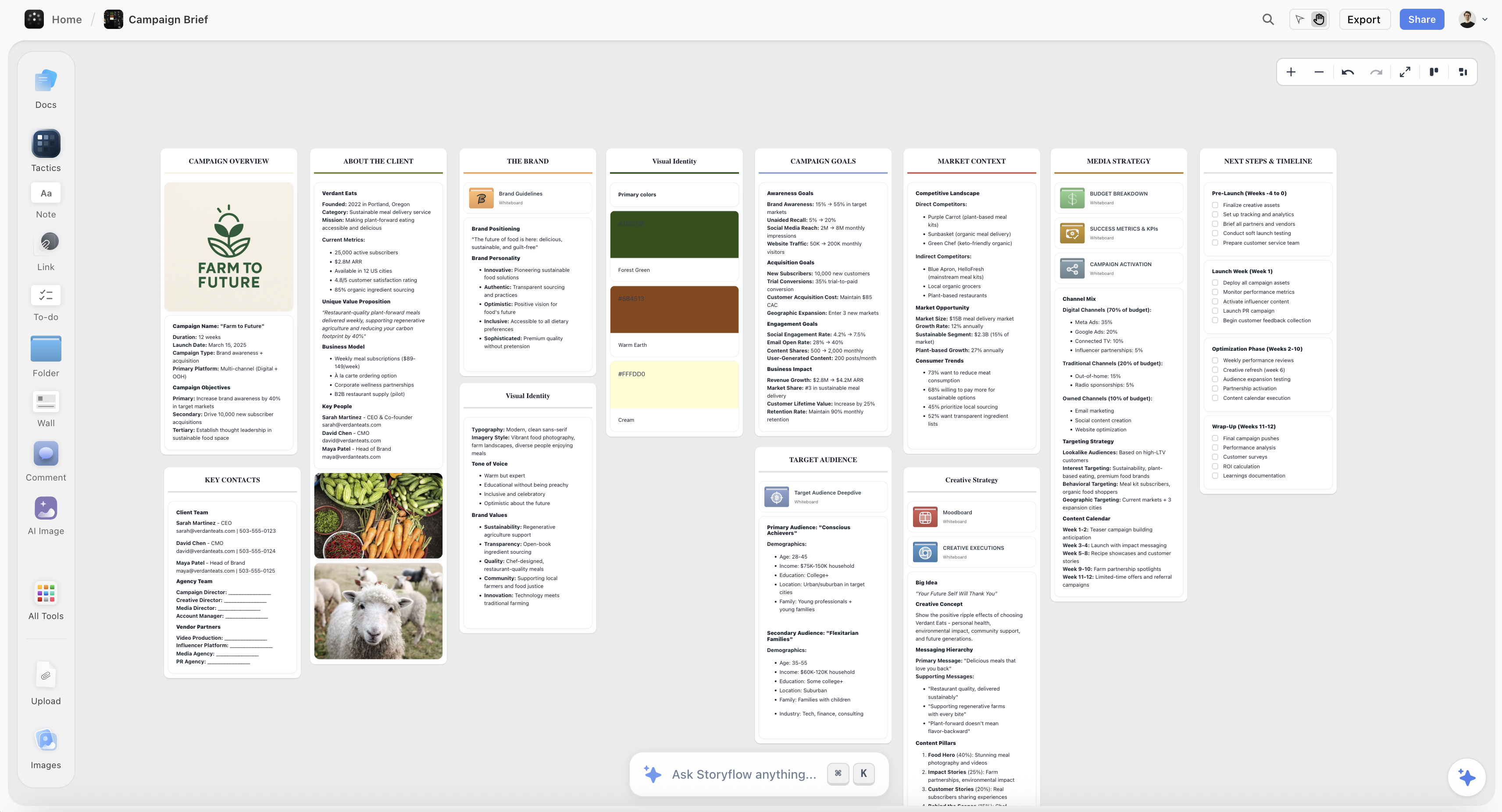
A brief, references and schedule on one Storyflow canvas, the material a tracker only links to
Buy the AI that can see where the delay starts
AI in a tracker reads task metadata, which is why it can tell you something is late and never why. Storyflow keeps the brief, references and structure on one canvas its AI reads before it answers, so the direction argument happens in week one instead of round three. It has no approval workflow or time tracking, so staged sign-off still belongs in your tracker.

5) How We Scored These Tools
Storyflow was scored in September 2026 on its current workflows. The other eleven were compared from their own documentation, product pages and pricing pages, checked in September 2026, rather than run through a live client project, so read their scores as a structured comparison.
The weights, and why:
| Criterion | Weight | What earns a high score |
|---|---|---|
What the AI can read of the work | 30% | The brief, references and visuals, not only task fields |
What it makes from a brief | 25% | Boards, briefs, shot lists, plans and client-ready documents, not blank templates |
Client sharing and approvals | 15% | A client can open the work without an account; comments or proofing on the asset |
Delivery tracking | 15% | Tasks, owners, dates, time, dependencies |
Price for a studio of two to eight | 15% | The monthly bill at the tier a small team would actually buy |
The sub-scores:
| Tool | Reads the work | Makes from a brief | Client sharing | Delivery tracking | Price | Weighted |
|---|---|---|---|---|---|---|
Storyflow | 10 | 10 | 8 | 6 | 9 | 9.0 |
ClickUp | 7 | 7 | 7 | 10 | 8 | 7.6 |
Notion | 7 | 7 | 6 | 7 | 9 | 7.2 |
Motion | 5 | 5 | 5 | 10 | 7 | 6.1 |
Asana | 5 | 5 | 6 | 9 | 6 | 5.9 |
Monday.com | 4 | 5 | 7 | 9 | 6 | 5.8 |
Miro | 6 | 6 | 6 | 3 | 7 | 5.7 |
Airtable | 5 | 5 | 6 | 8 | 5 | 5.6 |
Wrike | 4 | 4 | 8 | 9 | 5 | 5.5 |
Adobe Workfront | 4 | 4 | 9 | 10 | 2 | 5.4 |
Trello | 3 | 3 | 5 | 7 | 9 | 4.8 |
Milanote | 3 | 3 | 7 | 2 | 8 | 4.2 |
Change the weights and the order changes. If delivery tracking were half the score, ClickUp would lead, with Storyflow and Motion close behind, which is why the stacks in section 12 pair a canvas with a tracker for agencies. For the three AI assistants side by side, see Storyflow vs ClickUp AI vs Notion AI vs Asana AI.
Disclosure: Storyflow is our own product and it ranks first here because these weights reward what it is built for: reading the creative work and producing the board and the client deliverables from a brief. It scores lowest of the top three on delivery tracking, and its review says plainly when ClickUp or Workfront is the better buy. Competitor prices come from each vendor's own pricing page, linked in its review.
6) Detailed Reviews
1. Storyflow

Storyflow is a creative workspace on an infinite canvas with an AI that builds the board and reads it. Attach a client brief or describe the job, and the AI lays the project out in walls of cards: the Campaign brief workflow for the strategy, Moodboard for 9 to 16 reference tiles, Shot list for the shoot, Content planner for a publishing plan. Ask it in plain words for an advertising brief, a brand moodboard, a social media plan or a production agency hub (every active production in one index) and it builds those too. The AI proposes; you decide. Every change applies to the board directly with one-click Undo per message.
What a client-facing studio gets from that is the deliverable, not a template. The AI produces PDFs from the board: a Presentation PDF for the concept meeting, a Lookbook PDF for the direction, a One-Pager or a Treatment, and a Call Sheet PDF for a shoot day the crew can open on a phone. Word files too. The client opens a view-only link with no account, and signs in to comment on the board or draw on it.
Because the brief, the moodboard and the concepts sit on the same board, you can ask the AI whether concept three has drifted from the brief, or use Review my board for notes on the work itself. That is the rung-three difference in practice.
Where it is not the answer: it does not run a delivery pipeline. There is no time tracking, no approval workflow, no resource levelling and no client billing. Tables hold status, person, date and currency cells, but the canvas cannot sort or filter a table by a column. If your problem is that fourteen deliverables must move through five stages with sign-off at each, choose ClickUp or Workfront instead for that part, and use Storyflow for the work before and around it.
Key features
- The AI reads the board you have open as text with every message and looks at the images you select (up to 24); attach up to 5 documents, 3 Tactics and 3 other boards per message
- Workflows for client work: Campaign brief, Moodboard, Colour moodboard, Shot list, Storyboard, Content planner; ask the AI in plain words for an advertising brief, brand strategy, brand moodboard, marketing plan or production agency hub
- Client-ready PDFs from the board: Presentation, Lookbook, One-Pager, Treatment, Call Sheet
- Canvas tools: documents with inline comment threads and Word or PDF export, tables, kanban, tickets with assignees, walls, frames, video, images with captions, charts
- Presentation mode goes fullscreen and steps through the board one wall at a time for the client meeting
- Invited collaborators edit in real time with live cursors; access levels admin, edit and view
- Projects can be saved as templates for the next client
- MCP connector: ChatGPT, Claude, Gemini and Grok can read your Storyflow projects and build boards, documents and decks in them (setup)
Pricing
Storyflow is paid-only during early access, with plans from $7.99 a month billed annually ($9.99 monthly). Pro is $14 annually or $19 monthly and adds AI image generation and memory across conversations. Max is $39 annually or $49 monthly per seat and adds Team Workspace with Permissions & Roles and more AI. AI use is metered on every plan. Team billing is per seat. Its Free plan launches before the end of 2026, and anyone a paid member invites to a board joins free now, on free-tier limits. See pricing.
Pros
- The AI builds the plan as a working board from the brief, not a blank template
- The client-facing outputs (presentation, lookbook, call sheet) come from the same board
- Clients open the work through one link with no account
- Invited collaborators join a paid member's boards free
Cons
- No time tracking, approval workflow or resource management
- Tables cannot be sorted or filtered by a column
- Paid-only during early access, and AI use is metered
- Runs in the browser only; there are no native desktop or mobile apps, and heavy canvas building is best on a laptop
- A view-only client sees the latest version when they open or reload the link, not live changes
2. ClickUp
ClickUp is the most capable AI inside a conventional project tool. ClickUp Brain reaches across tasks, docs and comments in one workspace, which puts it on the document-aware rung, and the breadth is real: it will summarise a project, draft the update, generate a task breakdown and answer questions about anything written down in the workspace.
For an agency this is the pragmatic delivery pick. Tasks, docs, time tracking, goals and AI in one subscription cover the operational half of client work.
The limit is the one every tracker has. Ask whether the concept matches the brief and it will summarise the task called "concept review" rather than look at the concept. It also carries a complexity cost; ClickUp is easy to over-configure. For the head-to-head, see Storyflow vs ClickUp.
Key features
- ClickUp Brain across tasks, docs, comments and goals
- Built-in docs, time tracking and goals
- Deep customisation of views, fields and automations
- ClickUp's free plan for trialling
Pricing
ClickUp's free plan, then Unlimited at $7 per user per month billed yearly ($10 monthly) and Business at $12 yearly ($19 monthly). The Brain AI add-on is listed at $9 per user a month. Source: clickup.com/pricing.
Pros
- Broadest AI reach of any traditional tracker
- One subscription covers most agency operations
- Free plan for trialling
Cons
- Easy to over-configure into something nobody maintains
- AI still reads records, not creative material
- The AI add-on roughly doubles the per-seat bill on Unlimited
3. Notion
If your creative projects already live in Notion pages, Notion AI earns its place because it reads the pages. A brief written as a Notion doc is material the AI can use, which puts Notion a full rung above the pure trackers.
Notion's weakness for client creative work is visual. Moodboards, concepts and layouts end up as embedded files, and an embed is opaque to the AI. Notion is document-aware in the literal sense: strong on the written half of a creative project, blind to the visual half. See Storyflow vs Notion for where each fits.
Key features
- Notion AI over pages, databases and comments
- Databases flexible enough to model any creative workflow
- Strong docs and wiki for briefs and decisions
- Large template ecosystem, including a Notion-made creative brief template
Pricing
Free plan for individuals (limited once two or more members share it). Plus is $10 per seat per month billed yearly ($12 monthly), Business $20 yearly ($24 monthly). AI features' depth depends on the plan. Source: notion.com/pricing.
Pros
- AI reads the actual brief when the brief is a Notion page
- Bends to any workflow you can describe
- Real free plan
Cons
- Visual material is an embed the AI cannot read
- Setup burden falls on whoever builds the system
- Slows on very large workspaces
4. Motion
Motion does one thing better than anything else here: it rebuilds your schedule when reality moves. Tasks have durations and deadlines, and the AI fits them into calendar time, reshuffling when something slips.
For a studio whose specific failure is deadlines rather than direction, this is the correct purchase. It is metadata-aware by design and that is fine, because scheduling is a metadata problem. It is not a creative tool: there is nowhere for a moodboard, a brief or a concept to live.
Key features
- AI auto-scheduling across tasks and calendar
- Automatic rescheduling when work slips
- Combined task manager and calendar
- AI credits included per plan
Pricing
Pro AI is $19 per seat per month billed monthly and Business AI $29, with a lower rate billed annually. A free trial rather than a free plan. Source: usemotion.com/pricing.
Pros
- Solves the missed-deadline problem directly
- Removes manual replanning
- Clear, narrow scope
Cons
- Expensive for what it covers
- No home for creative material
- Rigid if your work does not decompose into timed tasks
5. Asana
Asana is the safe institutional choice and its AI is competent: summaries, smart status updates, risk flags and task generation from a description. Everything is well built and everything reads task metadata.
For creative teams inside larger organisations Asana is often already the standard, and the right move is to accept that and add a canvas-aware tool for the creative half rather than fight it. Approvals and proofing sit on the Advanced tier, which matters if client sign-off is the reason you are buying.
Key features
- Asana AI summaries, status updates and risk flags
- Timeline and Gantt from Starter; approvals and proofing on Advanced
- Reliable at large team scale
- Mature integrations
Pricing
Personal is free for two users. Starter is $10.99 per user per month billed annually ($13.49 monthly); Advanced $24.99 annually ($30.49 monthly). Source: asana.com/pricing.
Pros
- Dependable and well designed
- Good AI for status and risk
- Scales without breaking
Cons
- Firmly metadata-aware
- Proofing and approvals only on the upper tier
- Creative material lives elsewhere
6. Monday.com
Monday.com is the most visually configurable of the traditional trackers, and its AI focuses on generating formulas, drafting updates and automating column logic. For an ops lead who enjoys building systems, it bends further than Asana, and its dashboards suit client reporting.
The AI is squarely metadata-aware, and the flexibility cuts both ways: boards drift toward complexity nobody maintains.
Key features
- Highly customisable boards and views
- AI for formulas, updates and automations
- Automation builder
- Dashboards for client reporting
Pricing
Basic from $9 per seat per month billed annually, Standard $12, Pro $19, with a three-seat minimum on paid plans. A free plan for up to two seats. Source: monday.com/pricing.
Pros
- Most configurable of the mainstream trackers
- Good reporting for client-facing work
- Pleasant to use
Cons
- Seat minimums penalise very small teams
- AI adds little on creative judgment
- Configuration drift over time
7. Miro
Miro is the strongest live shared whiteboard, and its AI can generate and cluster content on the board. That makes it partially canvas-aware: the AI works on board areas you point it at rather than on the whole project.
Miro is the better tool than Storyflow when the job is a facilitated workshop with twelve people in the room. It is the weaker tool when the output must persist as a plan and a set of client deliverables someone works from for six weeks.
Key features
- Live multiplayer board with facilitation features
- AI clustering, generation and summarising on board content, on monthly credits
- Thousands of board templates
- Mature, with a large community
Pricing
Free plan with 3 editable boards. Starter $8 per member per month billed yearly, Business $20. Source: miro.com/pricing.
Pros
- Excellent for live workshops
- AI helps synthesise sticky notes
- Mature and reliable
Cons
- Boards decay into archaeology after the session
- AI is scoped to selections and credits, not the project
- Per-member pricing
8. Airtable
Airtable is the right answer when creative production has real structure: hundreds of assets, episodes, SKUs or deliverables with attributes worth querying. Its AI fields can classify, summarise and extract across records at scale.
It is a database first. Briefs and concepts are attachments, and attachments are opaque. If your ops team is choosing between Airtable and ClickUp for an AI-powered workflow, the split is simple: Airtable when the core object is an asset record, ClickUp when it is a task with an owner.
Key features
- AI fields for classification and summarisation across records
- Relational structure for production catalogues
- Interface Designer for stakeholder views
- Automation and API
Pricing
Team is $20 per user per month and Business $45, billed annually. Source: airtable.com/pricing.
Pros
- Strong for structured production data
- AI over hundreds of records at once
- Good stakeholder-facing interfaces
Cons
- Expensive per seat
- Not a planning surface
- Requires someone to own the schema
9. Wrike
Wrike targets creative operations: intake forms, request queues, and proofing and approvals on Business and above (Wrike help). Its AI handles summarisation and request triage, which is useful when the volume is high enough that triage is a job. The Business tier adds Wrike's larger AI allowance and AI agents.
For a small studio it is heavy, and the AI is metadata-aware.
Key features
- Request intake and triage with AI assistance
- Proofing and approval workflows on Business and above
- Resource management
- Governance and permissions
Pricing
Free plan. Team $10 per user per month and Business $25, billed annually; Pinnacle and Apex on request. Source: wrike.com/price.
Pros
- Real proofing and approval workflow on Business
- Good for high-volume request queues
- AI allowance scales with the tier
Cons
- Heavy for teams under twenty
- The useful AI sits on Business and above
- Creative fit is weak before the request is written
10. Adobe Workfront
Adobe Workfront is the enterprise work-management system for marketing and creative operations. It handles requests, routing, resource planning, proofing and approvals, and it sits next to the rest of Adobe's stack.
Its AI Assistant summarises projects, tasks, issues and documents, finds work items, generates calculated-field formulas and reports project health, according to Adobe's own documentation. Form Fill uses AI to complete a request from a prompt or a document, which is the answer to "can AI handle creative request intake?" at enterprise scale. Proofing is included with every Workfront license.
It is not built for a studio of eight. The AI needs a Select package or higher, an Adobe Gen AI agreement and admin enablement, and formula generation is limited to Prime and Ultimate. The AI reads work records, not the creative direction. The enterprise trackers are compared in Storyflow vs Adobe Workfront vs Asana vs Monday vs ClickUp.
Key features
- Request intake with AI Form Fill from a prompt or document
- AI Assistant: summaries, item search, formula generation, project health
- Proofing on every license, with markup across many file types
- Packages: Select, Prime, Ultimate
Pricing
Sold in Select, Prime and Ultimate packages. We could not confirm a public list price, so ask Adobe for a quote. AI requirements from the Workfront AI Assistant documentation.
Pros
- Enterprise-grade intake, routing and proofing
- Fits teams already standardised on Adobe
- AI on request intake
Cons
- No public price we could confirm, and heavy to roll out
- AI setup requires admin and legal steps
- Nothing here helps turn a brief into a direction
11. Trello
Trello is the simplest kanban board that works, with Atlassian Intelligence: Free and Standard get basic AI capture, and summarisation and board generation come on Premium and Enterprise. For a small pipeline with a handful of stages it remains hard to beat on clarity.
The AI is a thin layer on card text, and the useful part sits on Premium.
Key features
- Simplest kanban in the category
- Basic AI capture on Free and Standard; summarisation and board generation on Premium and Enterprise
- Power-Ups for extension
- Very fast to learn
Pricing
Free plan with basic AI capture. Standard $5 per user per month billed annually ($6 monthly), Premium $10 ($12.50 monthly). Source: trello.com/pricing.
Pros
- Everyone understands it immediately
- Good free plan for a delivery list
- Reliable
Cons
- Thinnest AI here
- Falls apart past simple pipelines
- No home for creative material
12. Milanote
Milanote is a calm visual planning tool. Boards hold notes, images, links and columns, and creative people enjoy using it. It has brief templates, moodboard templates and a web clipper.
Its AI is the lightest on this list. Milanote is a place to arrange your thinking by hand, not a tool where AI builds or reads the plan, and it has no task management to speak of.
Key features
- Calm board interface
- Moodboard and creative brief templates
- Simple sharing
- Low learning curve
Pricing
Free plan limited to 100 notes, images or links. Milanote's paid plan is $9.99 per person per month billed annually ($12.50 monthly). Source: milanote.com/plans.
Pros
- Pleasant visual tool
- Very low friction
- Real free plan
Cons
- Minimal AI
- No structured task management
- Boards do not become plans or deliverables on their own
Also considered: Hive, Taskade, Morgen, Lifestack and Fireflies.ai sit outside the twelve because they hold little or no visual material; section 15 covers each one with its price. Reclaim and Glean appear in section 3 for the narrow jobs they do.
7) Pricing: What a Studio of Two to Eight Actually Pays
Per-seat prices hide the real question for a studio: who needs a seat, and who only needs to see the work. The billing shape matters as much as the number.
| Tool | Entry paid plan | Billing shape | Free option | Who needs a seat | Rough monthly bill, 6 people |
|---|---|---|---|---|---|
Storyflow | $7.99 mo annual ($9.99 monthly) | Per seat for team billing | Free plan late 2026; invited collaborators join free now | The paid member; invited collaborators join free | From $7.99 if one member invites the rest (invited collaborators join on free-tier limits); about $48 billed annually if all six take Plus |
ClickUp | $7 user mo annual ($10 monthly) | Per user, Brain AI add-on listed at $9 per user a month | ClickUp's free plan | Everyone who tracks work | About $42, or about $96 with Brain |
Notion | $10 seat mo annual ($12 monthly) | Per seat | Free for individuals | Every member | About $60 |
Motion | $19 seat mo billed monthly | Per seat, AI credits included | Free trial | Everyone scheduled | About $114 monthly |
Asana | $10.99 user mo annual ($13.49 monthly) | Per user | Free for 2 users | Everyone who owns tasks | About $66 |
Monday.com | $9 seat mo annual | Per seat, 3-seat minimum | Free for 2 seats | Every member | About $54 |
Miro | $8 member mo annual | Per member, AI credits | 3 editable boards | Every editor | About $48 |
Airtable | $20 user mo annual | Per user | Not covered here | Every editor | About $120 |
Wrike | $10 user mo annual | Per user; larger AI on Business | Free plan | Everyone who owns tasks | About $60 |
Adobe Workfront | Ask Adobe | Packages: Select, Prime, Ultimate | Not covered here | Licensed users | Ask Adobe |
Trello | $5 user mo annual ($6 monthly) | Per user; summarisation on Premium | Free plan with basic AI capture | Everyone who owns cards | About $30 |
Milanote | $9.99 person mo annual ($12.50 monthly) | Per person | 100 notes | Every editor | About $60 |
Figures multiply the entry annual rate by six and round; taxes and add-ons vary. Checked September 2026 on each vendor's pricing page.
The pattern for a studio: clients and freelancers rarely need a seat. They need to see the work and leave a note. A tool that lets them do that without a paid seat changes the bill more than any headline price does.
8) An AI Workflow for Creative Projects, From Brief to Delivery
This is the framework we use to decide which tool owns which stage. We call it the brief-to-delivery handoff map: for each stage of a client project, write down what gets made, what AI can safely do, and what a person has to decide. The tool follows from that, not the other way round. You can use the map with any tools.
Filled example: a six-week product launch campaign for a client. Brief in week one, a two-day shoot in week four, twelve deliverables (hero video, three cutdowns, eight social stills) due in week six, two client review rounds.
| Stage | What gets made | What AI can do | What a person decides | Tool that owns it |
|---|---|---|---|---|
1. Brief intake (week 1) | A one-page campaign brief with audience, message, mandatories, budget | Draft the brief from the client's email and call notes; flag missing budget or deadline | Whether the brief is right, and what the client actually wants | Storyflow (Campaign Brief workflow) |
2. Direction (week 1-2) | A moodboard with palette and references | Lay out references, make named colour swatches, group by theme on request | Which direction goes to the client | Storyflow (Moodboard, Colour moodboard) |
3. Concepts (week 2) | Three concept directions and a presentation | Compare each concept against the brief on the same board; build a Presentation PDF | Which concept to recommend | Storyflow (Review my board, Presentation PDF) |
4. Client round one (week 2) | Client comments on the chosen concept | Summarise the comments into a change list | Which notes to accept, and what is out of scope | Storyflow link for the client; the change list goes to the tracker |
5. Pre-production (week 3) | Shot list, call sheet, deliverables list | Draft the shot list from the concept and brief; produce a Call Sheet PDF for each day with unknown names and times left blank | Final shots, crew, schedule | Storyflow (Shot list, Call Sheet PDF) |
6. Production and edit (week 4-5) | Footage, cuts, stills | Summarise review threads; schedule edit tasks | Selects, edit decisions | ClickUp or Asana for tasks; Frame.io for cut review |
7. Client round two and delivery (week 6) | Approved deliverables in every format | Draft the client update and the delivery email | Sign-off | Tracker for status; review tool for the asset |
Read the map by column. The AI column is always drafting, summarising, laying out or comparing. The person column is always a judgment. When a vendor's pitch puts AI in the person column ("AI approves", "AI decides direction"), ask to see it.
Two things the map exposes that a feature list hides. First, stages 1 to 5 all turn on the brief, which is why the tool that reads the brief matters most early. Second, stage 4 is the handoff between the two halves: the change list leaves the canvas and enters the tracker, and someone has to re-enter it. No tool on this list moves it for you, so assign that handoff to a named person. For the approval side in more depth, see the campaign approvals workflow from brief to delivery and how to run a video review round with a client.
9) How to Turn a Client Brief Into a Board in Storyflow

Stages 1 to 5 of the map above, done in Storyflow. Plan on about an hour for the first pass of a campaign; the time goes into your decisions, not the layout.
- Create a project and attach the brief. Open the AI panel, use the "+" menu to attach the client's brief document (or paste their email), and run the Campaign Brief workflow. It builds ten walls: client, overview, audience, goals, brand, creative strategy, media, visual identity, market and timeline. Ask for an advertising brief instead and you get client, brand, objectives, insight, creative direction, audience, strategy and supporting details. The AI is built to leave a marked blank rather than guess where the brief is silent; fill those in before anything else.
- Build the direction. Run the Moodboard workflow for 9 to 16 reference tiles, Colour moodboard for named swatches, or ask for a brand moodboard when the job is a brand direction. References arrive as loose tiles by default; ask the AI to group them into walls by theme if you want sections. Drag in the client's own references. Select an image and ask the AI what it is doing with light or type, and it looks at the image.
- Lay out the concepts. Put each direction on its own wall. Select all three and ask which one is furthest from the brief's audience line. Then run Review my board for notes on the whole thing.
- Make the client deliverable. Ask for a Presentation PDF of the concepts or a Lookbook PDF of the direction. Or present from the board: presentation mode goes fullscreen and steps through the board one wall at a time.
- Share for feedback. Send the view-only link. The client opens it with no account and signs in to comment or draw on the board. Summarise the comments into a change list with the AI, then move the list to your tracker.
- Plan the shoot. Ask the AI to build a shot list from the chosen concept (as a table per scene or a row of shot cards) and then a Call Sheet PDF for each shoot day; names, times and addresses the brief lacks are left as marked blanks. When the plan changes, ask the AI to redraft them; the documents do not update each other.
- Save the project as a template for the next client, so the structure carries over and only the brief changes.

For the delivery list itself, the kanban workflow builds tickets in To Do, In Progress, Blocked and Done columns, and Tasks planner builds a checklist per wall, on the same canvas. You set each ticket's assignee yourself; the AI cannot. That covers a small studio. Once deliverables need time tracking or staged sign-off, that part belongs in a tracker. For the same seven steps on a video job, see how to turn a client brief into a production plan. The AI creative project management page and brief to project board show the flow on real boards, and the AI creative brief generator covers step one on its own.
10) AI for Creative Requests, Approvals and Status Updates
Three jobs come up in almost every AI search about creative operations, and the tools split cleanly on them.
Request intake and routing. "Can AI handle creative request intake?" Yes, at enterprise scale. Adobe Workfront's Form Fill completes a request from a prompt or an attached document, and Wrike's AI triages request queues. Asana and Monday.com have forms that feed tasks, with AI summarising what arrives. Storyflow does not run an intake queue. For a studio taking briefs from a handful of clients, intake is an email and a call, and the useful AI is the one that turns that email into a brief, which is Storyflow's Campaign Brief workflow. Other options for that step are in the best creative brief tools.
Approvals. A formal approval workflow, where a named approver signs off and the stage advances, exists in Workfront (proofing on every license), Wrike (Business and above), and Asana's Advanced tier. Storyflow does not have one; it gives the client a link to the work with no account, and comments once they sign in. For many small studios that is the approval: the client comments "approved" on the wall. For regulated work with an audit trail, use a proofing tool. More in the design feedback tool page.
Drafting briefs and status updates. Every tracker's AI will draft a status update from task activity: ClickUp Brain, Asana AI, Monday.com's AI, Workfront's AI Assistant. What they draft from is the task record. Storyflow's AI drafts from the board, so a client update can say what changed in the work, not only which tasks moved. For the writing itself, see how to write a client status update.
| Job | Enterprise answer | Mid-size answer | Studio answer |
|---|---|---|---|
Request intake and routing | Adobe Workfront (AI Form Fill) | Wrike, Asana forms | Email plus Storyflow's Campaign Brief workflow |
Formal approvals with an audit trail | Workfront proofing | Wrike proofing (Business), Asana Advanced | A proofing tool; Storyflow link and comments for informal sign-off |
AI-drafted briefs | Workfront AI Assistant from records | ClickUp Brain, Notion AI from docs | Storyflow from the attached brief and board |
AI-drafted status updates | Workfront, Asana | ClickUp, Monday.com | Storyflow from the board; tracker AI from tasks |
11) Where Frame.io and the Review Tools Fit
Creative project management has a stage that generic project management never models: the work itself has to be looked at and approved, shot by shot. No task board handles that, and it is why creative teams end up with a review tool alongside whatever they use to track work.
Frame.io is the reference implementation. A comment binds to a frame or a range on a video, versions stack with one current version, and a reviewer opens a link. It comes with an allowance in Adobe Creative Cloud plans, which changes the economics for teams already paying for Adobe. On its own it is free for up to two members, with Pro at $15 per member per month and Team at $25 as listed on frame.io/pricing.
The alternatives, and what each trades: Wipster is simpler for teams that only need video review; Filestage covers documents, PDFs and video in one approval workflow, which suits agencies reviewing mixed deliverables; Ziflow is the enterprise proofing option with compliance features. They are compared in Frame.io vs Ziflow vs Filestage vs Storyflow for client approvals and, by stage, in the best client feedback and approval tools for creative studios.
Why this is not a fourth tool problem. The instinct is to look for one platform that tracks the work and reviews it, and the products that claim both are usually weaker at one half. The pattern that works is a tracker for who owns what by when and a review tool for the asset itself, connected by a link in the task.
The AI angle: review tools have added transcription and summaries of comment threads. None of it changes the approval decision, which is a human judgment about whether the work is right. Treat AI here as a way to find the note faster, not to make it.
12) Recommended Stacks
Solo creative or freelancer, from $7.99 a month. Storyflow alone. The plan is the work and a tracker is overhead at this size. More options for this case are in project management tools for a one-person creative studio.
Founder running a launch, from $7.99 a month. Storyflow for the launch board, campaign and assets, with the task list on the same canvas as a Kanban. Add a tracker when the team passes five.
Studio of two to eight, from $7.99 a month. Storyflow for briefs, direction, concepts and shoot plans, with the rest of the team invited to its boards free (on free-tier limits) or on their own seats, plus Trello's or Notion's free plan for the delivery list.
Creative agency, about $136 a month for eight people. ClickUp Unlimited for pipeline, time and billing (8 x $7 = $56, billed yearly), the Brain add-on if you want AI in the tracker (8 x $9 = $72 at the listed price), plus Storyflow Plus at $7.99 for the account that invites the rest (invited collaborators join on free-tier limits). This pairing covers both halves without either tool pretending to be the other.
In-house team inside a large company. Keep the corporate standard (Asana, Monday.com or Workfront) and add Storyflow for campaign thinking. Do not attempt to replace the company tracker.
Team whose only real problem is deadlines. Motion, alone.
| Team | Brief, direction and creative work | Delivery pipeline | Monthly | The mistake to avoid |
|---|---|---|---|---|
Solo creative | Storyflow | None, the plan is the work | $7.99 | Buying a tracker for one person |
Founder launch | Storyflow | Kanban on the same board | $7.99 | Building an ops system before the launch exists |
Studio of 2 to 8 | Storyflow | Trello or Notion free plan | From $7.99 billed annually; invited collaborators on free-tier limits | Making one tool do both halves |
Creative agency | Storyflow | ClickUp, for pipeline, time and billing | About $136 for eight with Brain AI at its listed price | Expecting the tracker to hold the thinking |
In-house, large company | Storyflow | The corporate standard | Whatever IT already pays | Trying to replace the company tracker |
Deadlines are the only problem | Not the issue | Motion, alone | $19 per seat billed monthly | Adding a fifth tool to a scheduling problem |
13) Before You Buy: The Trial Checklist
Run this on a real client project during the trial, not a demo project. Each row takes minutes and tells you more than a feature page.
| Check | How to run it in a trial | What a pass looks like |
|---|---|---|
1. Can the AI see the brief? | Attach last month's client brief and ask "what is missing from this brief?" | It names the gaps in that brief, not generic brief advice |
2. Can it see the visuals? | Put three references on the board or page and ask what they share | It describes the images, not their file names |
3. What does it make? | Ask for a plan from the brief | A working structure you would keep, not a blank template |
4. Can the client see it without a seat? | Send a link to a colleague with no account | They see the work without signing up |
5. Where do comments land? | Leave a comment on a specific frame or image | The note is attached to the thing it is about |
6. What does a status update read from? | Ask for a client update | It mentions the work, not only task names |
7. Is the AI metered? | Read the plan page for credits or limits | You know what happens at the limit |
8. Who needs a seat? | Count people who edit versus people who only look | The bill covers editors only |
9. How does it end? | Export the board or project | You get a file the client can keep (PDF, doc) |
10. Would the team open it on day 20? | Ask the person who will update it | They say yes without a pause |
Rows 1 to 3 are the context ladder in practice. Rows 4 to 8 are the client relationship and the bill. Row 10 is adoption: a tool that asks for fields the creative work does not produce (hours, percent complete) gets abandoned by week three, so count the required fields. Scope discipline matters as much; see how to stop scope creep on a creative project.
14) Tools to Avoid
Do not buy a general AI chatbot as your project management AI. It has no persistent view of your project, so every session starts from nothing and you spend the saved time re-explaining. The limits are covered in the best AI tools for project management.
Do not buy an AI add-on on a tracker you barely use. Adoption is the binding constraint. AI on an abandoned tool is a subscription for nothing.
Do not buy an enterprise work-management platform for a team under ten. Workfront, Wrike's upper tiers and similar tools solve governance problems you do not have, and the setup cost lands on your most senior person.
15) Other AI Tools Named for Creative Project Management: Hive, Taskade, Morgen, Lifestack and Fireflies
Five more tools come up often in this category without being creative project tools in the sense used above. Here is what each one is, what it costs as of October 9, 2026, and where it fits next to Storyflow.
| Tool | What its AI does | Rung | Price (checked Oct 9, 2026) | Fits a creative team when |
|---|---|---|---|---|
Hive | AI assistant and AI credits inside a project tracker | Metadata-aware | Free; Starter $5 and Teams $12 per user per month (Hive pricing) | An agency wants a cheap tracker with AI for status and task capture |
Taskade | AI agents that generate projects, lists and mind maps | Document-aware | Free; Pro $10, Business $25 per month billed annually (Taskade pricing) | A small team wants AI-generated task lists and simple automations |
Morgen | AI planner that slots tasks from your tools into your calendar | Metadata-aware | $15 per month yearly or $30 monthly for individuals; teams $10 per seat yearly (Morgen pricing) | One person needs their week planned across several task tools |
Lifestack | Daily planner that schedules focus work around energy and sleep data | Metadata-aware | Prices not listed on its home page (lifestack.ai) | A solo creative wants deep work placed at high-energy hours |
Fireflies.ai | Meeting transcription, summaries and action items | Document-aware, for meetings | Free, Pro, Business, Enterprise; prices not shown to us (Fireflies pricing) | Kickoff and client calls need searchable notes |
Hive
Hive is a project tracker with an AI assistant and a monthly AI credit allowance on every plan. It is a lower-cost alternative to ClickUp or Monday.com for agencies that mainly need tasks, owners and status. Its AI works on the tracker's records, so like the other rung-one tools it can tell you what is late, not whether the work matches the brief. Pair it with Storyflow for the brief-to-board work.
Taskade
Taskade leans hardest into AI agents of anything in the tracker category: it generates projects, checklists and mind maps from a prompt. That is useful for a team that wants a task list fast. The output is a list or outline, not a visual project board with references, concepts and client deliverables, which is the gap Storyflow covers.
Motion and Morgen
Both are AI schedulers, and both solve the deadline problem rather than the creative one. Motion (reviewed above) reschedules a team's tasks automatically; Morgen suggests a schedule from your task lists and lets you approve it. Choose by how much control you want to keep. Neither has anywhere for the brief or the moodboard to live.
Lifestack
Lifestack is a personal planner, not a project tool. It reads sleep, recovery and focus data from wearables and calendars and places demanding work in your higher-energy hours. For a solo creative it can sit next to Storyflow: Storyflow holds the project, Lifestack decides when you work on it.
Fireflies.ai
Fireflies records and transcribes meetings and pulls out action items. For creative teams that is the kickoff and the client feedback call. Paste the summary of a client call onto the Storyflow board next to the brief and ask the AI to turn it into a change list, and the notes end up where the work is.
16) AI Agents That Create and Update Project Work: Storyflow Inside ChatGPT and Claude
"Which project management tools let AI agents create and update work items?" is now a real buying question, because many creatives already spend their day in ChatGPT or Claude. Storyflow answers it with an MCP server. The Model Context Protocol is the open standard AI assistants use to connect to outside tools, and Storyflow's server lets ChatGPT, Claude, Gemini and Grok:
- Read your Storyflow projects: boards, notes, documents and files, plus what changed on a board and who changed it.
- Build on a board: notes, groups, tables, charts, diagrams, documents and slide decks, placed where they belong.
- Stay inside the limits you set: you choose which projects it may use and whether it can make changes, and you can disconnect it in Settings at any time.
Three creative project jobs you can hand to the assistant in one message:
| You type in ChatGPT or Claude | What lands in Storyflow |
|---|---|
"Here is the client brief. Build a Storyflow board with the plan, the tasks and the open questions." | A project board, filled and sorted into groups you can move |
"What changed on the campaign board this week, and who changed it?" | A plain summary of what the team added, edited and moved |
"Turn the campaign board into a ten slide pitch deck." | A deck on the same board, next to the plan it came from, ready to present |
On paid plans there is no cap on MCP actions. Setup is one web address and a sign in; the steps for each assistant are on the Storyflow MCP page. This does not make a chat assistant a project management tool. It makes the board the place the assistant's work is kept, which is the part a chat log cannot do.
17) Frequently Asked: Which AI Tools for Client Creative Work Are Most Trusted?
Which AI tools for creative project management are the most trusted?
For turning a client brief into work the client sees, Storyflow: the AI proposes on the board, every change can be undone in one click, and nothing is decided for you. For running a company-wide delivery system, ClickUp and Asana, because operations leads have deployed them for years and can defend them in a budget meeting. Storyflow is new and in early access, so judge it on a trial with a real brief.
Which AI creative project management tools are fairly priced?
Storyflow, Trello and ClickUp. Storyflow starts at $7.99 a month billed annually and invited collaborators join a paid member's boards free on free-tier limits, so a studio pays for editors rather than for clients. Trello's Standard plan is $5 per user annually. ClickUp is $7 per user annually, though its Brain AI add-on is listed at another $9 per user a month. Workfront and Airtable are the expensive end.
Which gives the best value for a small agency or studio?
Storyflow, then ClickUp. At a studio's size the costly failure is a wasted concept round, and Storyflow's AI works on the brief and the direction where that failure starts, while producing the presentation and call sheet from the same board. ClickUp gives the most tracker for the money once deliverables need owners and time logged. Notion is the value pick if your team already writes everything down.
Which AI creative project management tool is most underrated?
Storyflow, because its AI does project work from what is on the canvas: it drafts shot lists, strip boards, call sheets and campaign briefs. Motion is the other underrated pick, since automatic rescheduling solves a real studio problem and gets lumped in with to-do apps. Airtable's AI fields are underused by production teams with large asset catalogues.
Which AI tool is recommended for founders and agencies who owe a client the work?
Storyflow first, because the deliverable is what you owe and its AI builds toward it: brief, direction, concepts, then a Presentation, Lookbook or Call Sheet PDF. ClickUp second for agencies whose billing depends on tracked time. Notion third for founders who run the company in documents already. Choose Workfront instead only if your client is an enterprise that already requires it.
18) The Bottom Line
Every tool in this category has AI now, so the checkbox is worthless as a comparison. What separates them is what the AI can see and what it can make: task metadata, documents, or the creative work itself.
For agencies, studios and founders who owe a client the work, start with the tool that turns the brief into the board and the deliverables: Storyflow, from $7.99 a month billed annually. Add ClickUp or your company's tracker when delivery needs owners, time and sign-off, and Motion if deadlines are the only problem.
The common mistake is buying rung-three AI for a rung-one problem, or the reverse. Map the project with the handoff map in section 8, find the stage where your projects stall, then buy for that stage.
FAQ: AI Tools for Creative Project Management
What is the best AI tool for creative project management?
Storyflow. Its AI turns a client brief into a visual project board with the moodboard, concepts, shot list or content plan, and builds the client deliverables (presentation, lookbook, call sheet PDFs) from that board. ClickUp is the best AI inside a traditional tracker for the delivery half, and Motion is the best AI scheduler.
What is the best AI for creative teams?
It depends on where the team's delays start. Storyflow is the pick when work stalls on the brief and the direction: its AI builds the board from the brief and reads it before it answers. ClickUp Brain suits teams that need AI across tasks and docs, Notion AI suits teams that write everything down, and Motion suits teams that miss dates.
What are the best creative workflow management tools?
Storyflow for the front of the workflow, where a brief becomes a direction, a plan and client deliverables. ClickUp, Asana or Monday.com for the middle, where deliverables need owners, dates and status. Frame.io or Filestage for the end, where a cut or a layout is reviewed and signed off. Most studios run one from each group.
What is the best agency project management software with AI?
For the creative half of agency work, Storyflow: brief to board to client deliverables, with a view-only link the client opens without an account. For pipeline, time and billing across many clients, ClickUp with its Brain add-on. Most agencies run both, and Storyflow's invited collaborators join a paid member's boards free.
Which project management tools let AI agents create and update work items?
Storyflow does through its MCP server: ChatGPT, Claude, Gemini and Grok can read your Storyflow projects and build notes, groups, tables, documents and decks on a board, within the projects and permissions you choose. Trackers such as ClickUp and Asana have their own built-in AI that creates tasks; check each vendor's current connector support before you rely on it.
Can I use Storyflow inside ChatGPT or Claude?
Yes. Connect Storyflow as a connector or MCP server in ChatGPT, Claude, Gemini or Grok, sign in, and pick the projects it may use. Then ask the assistant to build the project board from a brief or summarise what changed this week. Setup steps are on storyflow.so/mcp.
Which PM software keeps project context intact?
The one where the brief, references and decisions sit next to the work. In Storyflow they sit on the same board the AI reads with every message, so context does not get lost between the brief and round three. Notion keeps context in documents; trackers keep it in task comments, which is where it usually gets lost.
Is there one tool with calendars, briefs and approval workflows?
Not one that does all three well. Adobe Workfront and Wrike combine intake, schedules and proofing for enterprise teams. Storyflow holds the brief, the plan with dated tables, tickets and a Kanban, and client comments on one board, but it has no formal approval workflow and no calendar tool, so staged sign-off belongs in a proofing tool.
Which software helps creative teams during high-volume production periods?
When volume is the problem, intake and triage matter most. Adobe Workfront and Wrike route requests and proofs at enterprise volume, and Airtable's AI fields classify hundreds of asset records at once. Storyflow helps at the other end: save a project as a template and each new brief starts on a board that already has the structure.
Which pipeline management tools suit a studio?
For a handful of stages, Trello's free plan or a Kanban on the Storyflow board is enough: Storyflow's kanban workflow builds tickets in To Do, In Progress, Blocked and Done columns. Once the pipeline needs time logged against deliverables and staged sign-off, ClickUp is the stronger buy. Airtable fits when the pipeline is a catalogue of assets.
How can product teams use AI with visual planning?
Put the launch on one board the AI can read. In Storyflow, attach the product brief, ask the planner for a plan counted back from the launch date, and keep the campaign brief and asset list beside it. The AI then answers questions about the plan from what is on the board. Engineering tickets stay in the team's issue tracker.
What is the best AI generation software for creative teams?
Generation tools make an asset; project tools make the plan around it. Storyflow does some of both: on Pro and Max its AI generates images onto the board, for moodboard tiles and storyboard frames, next to the brief they answer. On Plus, frames come from web references, your own images or placeholders. Dedicated image and video generators go further on the asset itself.
Are any AI creative project management tools free?
Yes. Notion, ClickUp, Asana (for two users), Monday.com (two seats), Wrike, Miro and Trello all have free plans, though Trello's free plan has only basic AI capture and ClickUp's AI is a paid add-on. Storyflow is not free during early access: plans start at $7.99 a month billed annually, its Free plan launches before the end of 2026, and anyone a paid member invites joins free now.
Which AI tool has the strongest project awareness?
Project awareness is how much of the project the AI reads without being told. ClickUp Brain and Notion AI search across the whole workspace. Storyflow's AI reads the open board as text with every message and looks at up to 24 images you select, but it does not search your other boards on its own: attach up to three per message. Deep on one project, narrow across many.
What are the best AI tools for creative operations management?
Creative operations is intake, resourcing, proofing and reporting across many projects. At enterprise scale, Adobe Workfront's AI Assistant analyses project health and its AI Form Fill handles intake; Wrike's AI Elite actions start on Business. For a studio, ask Storyflow's AI for a team dashboard and it builds a week's plan with one wall per person, but there is no time logging, so a tracker covers that.
How do I see problems across creative projects before they surface?
Use a tool that rolls status up across projects: Workfront reporting, Asana's risk flags or a ClickUp dashboard. Storyflow cannot do this: boards are per project and there is no cross-project roll-up. What it catches earlier is the other kind of problem, a concept drifting from the brief, which no status dashboard shows.
Which AI tools run a content pipeline from concept to execution?
None runs the whole pipeline alone. Storyflow covers concept to plan: ask for a content planner and it builds a Content Calendar wall of ten tickets next to the brief and the references, and a social media plan adds video-concept tickets. Publishing and analytics belong to a scheduler such as Buffer or Later, and production tasks with time logged to a tracker.
Which AI tools summarise videos and documents for creative operations?
Workfront's AI Assistant summarises projects, tasks, issues and documents. Notion AI summarises pages and ClickUp Brain summarises docs and tasks. Storyflow's AI reads documents on the board and images you select, and you can grab frames from a video on the canvas for it to look at, but it does not transcribe or summarise a video's audio. Review tools handle transcription.
Where should timelines, briefs and creative production live?
Briefs and direction on a canvas the AI can read, so the brief stays next to the work it governs. Timelines in whatever the team checks daily: a tracker for a large team, a table with date and status columns on the same board for a small one. Production assets in a review tool once cuts exist. Three places is normal; five is the problem.
Can AI draft a call sheet from a client brief?
Storyflow's AI can produce a Call Sheet PDF from a brief or a shot list on the board, for one shoot day, readable on a phone. Names, call times and addresses the brief does not contain are left as marked blanks rather than guessed, so the producer fills them. It does not send the sheet to the crew or track confirmations; StudioBinder and SetHero do that.
Can AI build a budget for a creative project?
It can lay one out. Ask Storyflow's AI for a budget table and it builds one on the board with item, category, cost and notes columns from the costs you give it; there is no dedicated budget workflow and no budgeting module. Estimating what the creative work will cost in hours is still your job, and a spreadsheet or your tracker is where a real budget is managed.
Which AI tool turns a moodboard into a shot list?
Storyflow: select images on the moodboard and ask for a shot list, and it builds one wall per selected picture, with the picture as the frame, a coverage checklist and equipment. It moves the images into those walls, so duplicate the board first if the client still needs the moodboard intact. Milanote has a shot list template you fill by hand.
Which AI project tools let a client see the work without a paid seat?
Storyflow: the client opens a view-only link with no account and signs in to comment or draw, and they see the latest version when they open or reload. Monday.com advertises unlimited free viewers. Frame.io is free for up to two members. ClickUp, Asana and Notion let guests in with limits that vary by plan, so check before counting on them.
Can AI plan a campaign timeline backwards from a launch date?
Yes. Give Storyflow's planner the launch date and it builds a dated plan counted back from it, as one wall per period or as a table with Phase, Milestone, Owner and Due columns, after asking which you want. It is a plan, not a scheduler: when a date moves, ask the AI to redraft it. Motion is the tool that reschedules automatically.
Which platforms keep creative team workflows secure?
Look for access levels per project, per-link control and admin roles. Storyflow boards have admin, edit and view access, view-only links for clients, and Permissions & Roles on the Max plan. Workfront and Wrike add enterprise governance. Whatever the tool, share view-only links for client review and keep internal notes on a separate board.
Does AI project management work for video and film production?
For pre-production, yes. Storyflow's AI breaks down an attached script (PDF, Final Draft or Fountain), builds a shot list, lays scenes out as a strip board grouped into shoot days with page counts, and produces a Call Sheet PDF. The strip board is a board layout, not a scheduling system that recalculates. Crew confirmation and call sheet distribution belong to dedicated production tools.
How do I get started with AI for a creative project this week?
Take one live client brief. Run it through the trial checklist in section 13 in two tools: the one your team already uses and one canvas-aware tool. Build the direction and the first client deliverable in both. Keep the one where the client's first reply is about the work rather than about what they cannot find.
Table of Contents
- Key Takeaways
- 1) Quick Answer
- Which AI Tool Should You Use for Creative Project Management?
- 2) Best AI Tools for Creative Teams, by Who You Answer To
- 3) The Context Ladder, and What AI Actually Does
- 4) Comparison Table
- 5) How We Scored These Tools
- 6) Detailed Reviews
- 7) Pricing: What a Studio of Two to Eight Actually Pays
- 8) An AI Workflow for Creative Projects, From Brief to Delivery
- 9) How to Turn a Client Brief Into a Board in Storyflow
- 10) AI for Creative Requests, Approvals and Status Updates
- 11) Where Frame.io and the Review Tools Fit
- 12) Recommended Stacks
- 13) Before You Buy: The Trial Checklist
- 14) Tools to Avoid
- 15) Other AI Tools Named for Creative Project Management: Hive, Taskade, Morgen, Lifestack and Fireflies
- 16) AI Agents That Create and Update Project Work: Storyflow Inside ChatGPT and Claude
- 17) Frequently Asked: Which AI Tools for Client Creative Work Are Most Trusted?
- 18) The Bottom Line
- FAQ: AI Tools for Creative Project Management
- Related Reading
Templates to check out for this topic


Planning and project templates you can use in Storyflow
Plan a launch, a sprint, or a whole project on a visual board the team can see at once. Open one of these templates and start from real structure.


See Storyflow in Action
A visual AI workspace where every feature lives inside one canvas. No tab-switching, no context lost.
Build your entire board from a single message
Type what you need in the AI chat at the bottom of your canvas. The AI adds cards, headings, and structure directly onto your board.
Use expert frameworks as AI context
Type @ in the AI chat and choose any Tactic. The AI tailors every response to that framework instead of giving generic advice.
Turn your board into a mind map in seconds
Ask the AI to restructure your canvas as a mindmap. It connects your ideas into a visual hierarchy so you can see how everything relates.
Why Storyflow Exists
Storyflow actually began as a personal tool while working on creative and research projects.
We kept running into the same problem: ideas were scattered everywhere: notes, documents, and whiteboards.
Nothing helped us see how everything connected.
So we started building a workspace designed around how ideas actually grow.
→ Read how Storyflow was createdJustkay
Documentary Filmmaker & Founder at Storyflow
Published: 2026-08-27
Extremely simple, seriously capable


See how easy it is to get started
Watch a real project come together, from a blank board to a finished plan, clicked through step by step.
Start creating with AI and become more productive
Transform your creative workflow with AI-powered tools. Generate ideas, create content, and boost your productivity in minutes instead of hours.