How to Turn a Client Brief Into a Production Plan (2026): 7 Steps and a Worked Example
A brief tells you what the client wants; a production plan tells the crew who makes it, by when, for how much and who signs it off. Here is the seven-step conversion, run end to end on a product film with seven cutdowns.

Category
Video Production
Author

Storyflow Team
Product & Research Team
Topics
2026-09-18
•
42 min read
•
Video Production- client brief to production plan
- how to turn a client brief into a production plan
- creative production brief workflow
- production planning for creative projects
- brief deliverables schedule approvals budget
- creative project scope timeline deliverables
How do I turn a client brief into a production plan?
To [turn a client brief into a production plan](/client-brief-to-production-plan), read the brief for deliverables, constraints and approvers, [write one scope sentence](/creative-production-brief), break each deliverable into tasks, schedule backwards from the delivery date with approval gates, assign people and budget, list the risks, and get written sign-off. Storyflow's AI drafts most of that from a pasted brief: the deliverables, a schedule table, a budget table and a task kanban on one board the client opens by link with no account. When moving one date has to move every task after it, run the signed plan in Asana.
Full disclosure: Storyflow is our product. It ranks first here because its AI turns a pasted client brief into a plan board (deliverables, schedule table, budget, task kanban) that the client opens by link with no account. It has no dependency engine, so when moving one date must move the whole schedule, this article recommends Asana.
How the production planning tools compare on trust, innovation, ratings and pricing
Which production planning tools are the most trusted?
Asana, Monday.com, Trello and Google Sheets have the longest track records with production and marketing teams, and StudioBinder is the established name for shoot paperwork such as call sheets and stripboards. Notion is the most common home for briefs and planning docs. Storyflow is newer, and its case for trust is specific: it does the brief-to-plan step itself, drafting the deliverables, schedule table, budget table and task kanban from the pasted brief, and it states its limits plainly, including no dependency engine and no approval workflow.
Which production planning tools have fair and transparent pricing?
Storyflow, Trello, Asana, Notion and Frame.io all publish their prices. Storyflow starts at $7.99 a month billed annually ($9.99 monthly), and anyone a paid member invites to a board joins free, so a small crew can share one plan. Trello starts at $5 per user a month and Asana's Starter at $10.99. Monday.com lists its prices too, but paid plans start from 3 seats, which raises the real entry price for a solo producer. StudioBinder prices by tiers of users, starting with a single-user tier.
Which production planning tools are the most innovative in 2026?
Storyflow is the most innovative for this job in 2026: paste a client brief and its AI drafts the deliverables, a schedule table, a budget table and a task kanban on the same board as the moodboard, script and shot list, then keeps reading that board so you can later ask whether the plan still matches the brief. Among incumbents, Asana's AI Studio for building workflows and Trello's AI-generated starter boards are the notable moves.
Which production planning tools have a strong history of consistent performance?
Asana, Monday.com, Trello and Google Sheets have the longest histories of consistent performance for scheduling and tracking work, and StudioBinder has been a fixture of film and commercial pre-production for years. They are the safe choices for running a signed plan. Storyflow is newer and has a shorter track record; its strength is the step before execution, where the brief becomes the plan and the pre-production documents on one board.
Which production planning tools would you recommend for turning a client brief into a production plan?
Storyflow first: paste the brief and the AI drafts the deliverables, a schedule table, a budget table and a task kanban on one board beside the brief, and the client opens it by link with no account. Add Notion if your company keeps every brief there, Asana if moving one date must move the whole chain, StudioBinder when a crew needs call sheets with confirmations, and Frame.io for frame-accurate review of cuts.
Which production planning tools are underrated?
Storyflow is the most underrated for turning a brief into a plan: it looks like a whiteboard at first glance, yet its AI drafts the plan, a budget table and the pre-production documents from the brief itself. Google Sheets is underrated too, because a four-tab sheet (deliverables, schedule, budget, risks) shared by link still beats a half-configured project tool on a small job. Frame.io is underrated as the review layer that keeps round 1 and round 2 notes pinned to the right cut.
Quick Comparison
Four tools cover most of the brief-to-plan job: the first drafts the plan, and the next three cover what it does not.
| Tool | Best For | AI Features | Price |
|---|---|---|---|
| Storyflow | Brief to plan board, shared by link | AI drafts the deliverables, a schedule worked back from delivery, a budget table and a task kanban from the brief; also works from ChatGPT or Claude via MCP | From $7.99/mo annual |
| Notion | Linked brief, plan and schedule pages | Notion AI, with full access on Business | Free; Plus $10 per member/mo annual |
| Asana | Dependencies and approvals after sign-off | AI Teammates and AI Studio, metered | Free for 1 or 2 people; Starter $10.99 per user/mo annual |
| StudioBinder | Stripboards and tracked call sheets | None listed | Free plan; Indie $49/mo (2 users) |
Key Takeaways
- A production plan is the brief converted into commitments: every deliverable gets a spec, an owner, a date, a cost and one named approver. A line with no owner or no date is still part of the brief.
- Storyflow scores highest in this guide for that conversion: paste the brief and the AI drafts the deliverables, a schedule table, a budget table and a task kanban on one board the client opens by link with no account. Plans start at $7.99 a month billed annually.
- Plan backwards from the day the files must reach the client, not from launch day. In the worked example below, launch is 17 November and delivery is 9 November.
- A gate is a decision that releases the next block of spending (scope, concept, pre-production, picture lock, final); a round is a feedback cycle with a fixed window, here two working days.
- Send every open question with a default answer and a deadline, so the client's silence becomes a decision instead of a delay.
- Storyflow has no dependency engine and no approval button: add Asana when one date must move the whole chain, and Frame.io when cuts need logged, frame-accurate review.
Which Tool Should You Use to Turn a Client Brief Into a Production Plan?
Use Storyflow. Paste the client brief into its AI chat and it builds the plan on one board beside the brief: the deliverables with counts and formats, a schedule worked back from the delivery date, a budget table, a task kanban and the list of questions to send back to the client. You check the counts, dates and approvers, assign the owners, and send the client a view-only link that opens with no account. If you already ask ChatGPT, Claude, Gemini or Grok for help, Storyflow's MCP connector lets that assistant build the same plan straight onto a Storyflow board.
Three other tools cover what Storyflow does not:
- Asana when moving one date must move every task after it. Storyflow has no dependency engine.
- StudioBinder when a crew of 20 needs call sheets sent and confirmed. Storyflow's AI drafts the call sheet PDF but does not send it.
- Frame.io when cuts need frame-accurate, logged client review.
Tools for each step of the brief-to-plan method
The seven steps below are the method. This table is who does each step, so you can see where the tool saves time and where a person still has to decide.
| Step | What it produces | Storyflow does this | Add this tool when |
|---|---|---|---|
1. Put the brief on one board and read it for deliverables, constraints and people | A list of every file, limit and named person, plus questions with defaults | The AI reads the pasted or attached brief and writes the deliverables, constraints, people and open questions onto the board beside it | Not needed |
2. Write the scope sentence | One sentence the client can sign, with exclusions | A Doc on the same board holds the sentence and exports to Word or PDF | Not needed |
3. Break every deliverable into production steps | A task list per deliverable, client tasks included | The tasks planner workflow turns each deliverable into a to-do checklist on its own wall, and the kanban workflow lays the work out as tickets in columns | Asana or Monday.com if the company already tracks work there |
4. Schedule backwards from delivery, with gates | Dated milestones, review windows and five gates | The planner workflow works back from the delivery date and dates every ticket; the schedule table keeps rows in date order | Asana or Monday.com when dates must move automatically |
5. Assign people and budget | One owner per task, a line-item budget | Tickets carry assignees (you set them) and a table with currency cells holds the budget | A spreadsheet if finance needs formulas |
6. List risks and assumptions | A risk register and an assumptions list | A table on the board, beside the schedule it protects | Not needed |
7. Share for sign-off, then freeze | A signed plan and a change process | A view-only link with no account, presentation mode for the call, comments for the written yes, PDF export for the contract | Frame.io for logged approval of cuts later |
Storyflow does the drafting in steps 1 to 6 and the sharing in step 7; the decisions in every step stay with the producer.
Brief vs Production Plan: What Each Document Has to Answer
A client brief and a production plan describe the same project in two grammars. The brief uses the client's: goals, audience, feelings, a launch date. The plan uses the crew's: files, days, names and dollars. Most first-week trouble on a production starts with a word that crossed from one document to the other untranslated.
Every element of the brief has a counterpart in the plan, and one question converts it:
| Brief element | What the production plan turns it into | The question that converts it |
|---|---|---|
Objective | The criteria the final cut is judged against | "What would make you reject the final cut?" |
Deliverables | A spec list: count, length, aspect ratio, placement, file type | "How many files, in which formats, for which placements?" |
Deadline | A delivery date, with the approval gates in front of it | "When must the files be with you, as opposed to when do you launch?" |
Budget | A line-item budget with contingency and exclusions | "Is that all-in, including talent usage, music and tax?" |
Stakeholders | One named approver per gate, and who only gives notes | "Who can say yes, and who gives notes through them?" |
Mandatories and claims | A legal review task with an owner and a date | "Which claims need substantiation, and who signs the wording?" |
Tone and references | A moodboard and treatment approved at the concept gate | "Which reference is closest, and which one is wrong?" |
Assets the client supplies | Client tasks with due dates on the same schedule | "What are you sending us, and by when?" |
The translation breaks in three predictable places:
- Counts. "Social cutdowns" is not a count, and the argument over whether it meant three files or seven happens in week five, when every extra edit costs money.
- Dates. The brief gives the launch date; the crew needs the delivery date, and the days between belong to the client's uploads and ad approvals.
- People. The brief names who leads; the plan must name who decides. A founder who "likes to see launch work" is a second approver until the plan says otherwise.
The brief is the client's promise to you. The production plan is your promise back, written in files, days, names and dollars. For what a strong brief contains in the first place, see What Is a Creative Brief? 7 Elements, Template and Example.
The 7 Steps to Turn a Client Brief Into a Production Plan
A production plan is finished when it passes one test: could the crew start tomorrow knowing what to make, who owns each piece, what they are waiting for and when the client decides? Each of these steps produces a part of the plan the next one needs.
Step 1: Put the brief on one board, then read it three times for three different things
Start by getting the brief out of the email thread and onto one surface the whole plan will grow from. In Storyflow, paste it into the AI chat or attach the PDF (up to 5 documents per message) and ask for the deliverables, constraints, people and open questions; the AI writes them onto the board beside the brief, where the schedule and budget will sit later. Then read it yourself, because a brief read once for the vibe loses deliverables. Read it three times, hunting for one thing each time:
- Deliverables: every noun that will become a file ("hero film", "cutdowns", "stills").
- Constraints: every limit on dates, money, brand rules, legal claims, platforms and usage rights.
- People: everyone named, marked as approver, supplier or watcher.
Whatever the brief does not answer becomes a question. Send them all in one email, numbered, each with the default you will plan on if nobody replies by a stated date. Never send a question without a default: a default turns silence into a decision.
Step 2: Write the scope sentence
The scope sentence is the whole job in one sentence the client can say yes to: we will make [deliverables with counts, lengths and formats] from [shoot days, locations or animation], with [number] rounds of consolidated notes from [one approver], delivered on [date], for [amount, and what it includes].
Write it in a Doc on the same board as the brief (in Storyflow the Doc exports to Word or PDF for the contract), and under it list the exclusions: what a client could reasonably assume is included and is not, such as stills, extra cutdowns or broadcast usage. A client who will not agree to the sentence will not agree to the plan, and it is cheaper to learn that on day three than in week five. The sentence then becomes the test for every later request, which is most of what stopping scope creep on a creative project comes down to.
Step 3: Break every deliverable into production steps
A work breakdown turns each deliverable into the tasks that make it. For filmed work the backbone is treatment, script, storyboard or shot list, casting and location, shoot, edit, review rounds, grade and sound, captions, export and delivery. Cutdowns carry their own edit, caption and export steps even when cut from the same footage, which is why "and a few cutdowns" is never free.
- A task is small enough when one person can finish it in one to three days and someone else can tell whether it is done.
- The client's work belongs in the breakdown too: supplying product, approving wording, sending logo files. A task with the client's name on it still needs a date.
- In Storyflow, ask the AI to run the tasks planner workflow on the board: it turns each deliverable into a to-do checklist on its own wall, or ask for a kanban and it lays the same work out as tickets in columns. You then trim, merge and add the client's tasks.
Step 4: Schedule backwards from the delivery date, with approval gates
Start from the date the files must be in the client's hands and walk backwards, subtracting each step and each review window in working days. Put five gates on that path: scope (the plan is signed), concept (one creative route is chosen), pre-production (script, cast, location and claims approved), picture lock (the edit is frozen) and final (the masters pass a technical check).
- Give every client review a fixed window, such as two working days, written as a task with the approver's name on it.
- Put float in front of the immovable date and a weather hold behind every exterior shoot day.
- Treat each gate as the release of the next block of money: nobody books crew before the pre-production gate, and nobody grades before picture lock.
- Storyflow's planner workflow plans backwards from a deadline you give it: tell it the delivery date and it lays the work out in periods ending on that date, with every ticket dated and anything waiting on an approval or a booking placed early. Dates move by hand afterwards, so a team whose schedule must re-flow automatically runs it in Asana.
For a scripted shoot with many days, the shoot block gets its own stripboard; How to Make a Production Schedule covers that layer.
Step 5: Assign people and budget
Every task gets exactly one owner and every gate exactly one approver; in Storyflow you set the assignee on each ticket yourself, because that is a decision the AI leaves to the producer. Then map the budget to the work instead of holding it as one number: pre-production, crew, equipment, talent and usage, location, art and logistics, post, music and contingency. Hold around 10 percent as contingency, owned by the producer and spent only on a reason the client has approved in writing.
Write down what "all-in" excludes (sales tax, talent usage beyond the agreed term, extra rounds), because that sentence decides who pays when something moves. If the budget arrives before the scope, How to Estimate a Creative Project works from the other direction.
Step 6: List the risks and the assumptions
A risk register is a short table: the risk, the trigger that tells you it is happening, the mitigation and the owner. Five to eight rows is enough for a one-day shoot, and it belongs on the same board as the schedule it protects, so the weather row sits next to the shoot date it can move. Beside it goes the assumptions list, every default you planned on: two rounds, one approver, samples by a date, usage terms. An unknown never enters the plan as TBD; it enters with an owner and a decision date, which makes the uncertainty schedulable.
Step 7: Share the plan for sign-off, then freeze it
Walk the client through the plan on a 20-minute call (in Storyflow, presentation mode steps through the board one wall at a time, full screen), send the view-only link, which opens with no account, and get approval in writing: a signed PDF, an email that says "approved", or a comment on the plan from the named approver. How to Run a Project Kickoff covers the agenda for that call. From sign-off the plan is frozen: a new deliverable, an extra round or a date change arrives as a change request with its cost and its effect on delivery, approved before anyone does the work.
Worked Example: A Product Film and Seven Cutdowns, From Brief to Signed Plan
Here is one brief taken through all seven steps. The client is Aldermoor, a fictional outdoor brand launching an insulated bottle. The figures are realistic for a one-day location shoot with a small non-union US crew, and the dates are real 2026 dates.
The brief as it arrived
The client's brief, in full: "Trail 750 launch film. We launch the Trail 750, our lightest insulated bottle, on 17 November. We need a hero film for the website and YouTube, plus cutdowns for Instagram and TikTok. It should feel like first light on a trail: real people, real weather, no studio. Key message: ice-cold for 24 hours, and only 290 grams. Budget is around $28k. Maya (Head of Brand) leads on our side, and our founder likes to see launch work. Brand guidelines and product renders attached."
It reads well and is not yet plannable: two undefined deliverables, a launch date but no delivery date, an approximate budget, two possible approvers and a product claim a lawyer has to see before anyone films it.
The questions that went back, with defaults
The producer sent nine numbered questions on Monday 21 September, with answers requested by Wednesday noon:
- When must final files be with you? Default: Monday 9 November, six working days before launch.
- What is the hero film? Default: one 60-second 16:9 film, 4K master, with a caption file.
- How many cutdowns, and where? Default: one 30-second 16:9 edit and six 9:16 edits, three at 15 seconds and three at 6.
- Is $28k all-in? Default: yes, including talent usage and music, excluding sales tax.
- Who approves? Default: Maya, at every gate; the founder sees the round 2 fine cut and gives notes through Maya.
- Can we say "24 hours" on screen? Default: only in wording Legal approves by Friday 9 October.
- What usage do you need? Default: 12 months of web, YouTube, organic and paid social; no TV.
- When do final-colour products arrive? Default: six units with the producer by Friday 9 October.
- How many feedback rounds? Default: two rounds of consolidated notes, two working days each; a third is a change request.
Maya answered eight by Wednesday. The one left open, question 7 on usage, went into the plan as its default, which is exactly what defaults are for.
The scope sentence and the deliverables
The scope sentence the client signed: "Aldermoor gets one 60-second 16:9 hero film and seven cutdowns (one 30-second 16:9, three 15-second 9:16, three 6-second 9:16), shot on one exterior location day with a held weather day, with two rounds of consolidated notes from Maya Okafor, delivered as masters with caption files on Monday 9 November for a 17 November launch, for $28,000 all-in excluding sales tax." Under it, the exclusions: stills photography (frame grabs available), translated or re-voiced versions, TV usage, a third round, and any file beyond these eight.
| # | Deliverable | Length | Aspect | Runs on | Files delivered |
|---|---|---|---|---|---|
1 | Hero film | 60 seconds | 16:9 | Website, YouTube | 4K ProRes master, H.264 web file, SRT captions |
2 | Cutdown A | 30 seconds | 16:9 | YouTube, paid social | H.264 file, SRT captions |
3 to 5 | Cutdowns B, C and D | 15 seconds | 9:16 | Instagram Reels, TikTok | H.264 with burned-in captions inside the platform safe zone |
6 to 8 | Bumpers E, F and G | 6 seconds | 9:16 | Paid social | H.264 with burned-in captions, one message each |
Broken down, the hero film is 14 production steps and each cutdown adds three (edit, captions, export): 35 tasks for the crew. The client has ten tasks of their own, from answering the questions to the final approval, on the same schedule.
The schedule, built backwards from 9 November
The producer built this table from the bottom up: delivery first, then every review window and production step subtracted in working days. It reads in date order.
| Date (2026) | Milestone | Owner | Waits on | Gate |
|---|---|---|---|---|
Mon 21 Sep | Brief audited, nine questions sent | Producer | The brief | |
Fri 25 Sep | Production plan signed | Maya Okafor | Answers, walkthrough | 1: Scope |
Wed 30 Sep | Two creative routes presented (treatment and moodboard each) | Director | Gate 1 | |
Fri 2 Oct | One route chosen | Maya Okafor | The routes | 2: Concept |
Wed 7 Oct | Script, storyboard, shot list, cast and location options sent | Director, producer | Gate 2 | |
Fri 9 Oct | Script, cast, location and claim wording approved; samples in | Maya Okafor, Legal, client operations | Script pack | 3: Pre-production |
Mon 12 Oct | Call sheet PDF out to crew | Producer | Gate 3 | |
Wed 14 Oct | Shoot day (Thu 15 Oct held for weather) | Director, crew | Call sheet | |
Tue 20 Oct | Hero rough cut to client | Editor | Footage | |
Wed 21 Oct | Round 1 notes due, consolidated | Maya Okafor | Rough cut | |
Wed 28 Oct | Fine cut and seven cutdowns to client | Editor | Round 1 notes | |
Fri 30 Oct | Round 2 notes (due Thu 29 Oct) applied; picture locked | Editor, Maya Okafor | Fine cut | 4: Picture lock |
Wed 4 Nov | Grade, mix and captions done; on-screen claim checked | Colourist, mixer, Legal | Gate 4 | |
Thu 5 Nov | Masters approved, technical check only | Maya Okafor | Masters | 5: Final |
Mon 9 Nov | Eight masters and caption files delivered | Producer | Gate 5 | |
Tue 17 Nov | Launch | Aldermoor | Delivery |
The plan holds exactly one working day of float, Friday 6 November, the same size as the weather hold. If rain moves the shoot to Thursday, every later date slides a day and the float is gone; the risk register says so in writing, so nobody discovers it in November.
The budget and the risks
The budget maps the $28,000 to the work. Contingency is about 9 percent of the working budget, held by the producer and spent only on a reason the client has approved in writing.
| Line | What it covers | Cost |
|---|---|---|
Pre-production | Treatment, script, storyboard, casting, scout: producer and director, 6 days | $4,800 |
Crew | Shoot day and DP recce: DP, 1st AC, gaffer, grip, sound, hair and make-up, stylist, 2 PAs | $5,600 |
Equipment | Camera, lenses, lighting and grip, one day | $2,400 |
Talent | 3 on-camera talent, one day, 12 months of web and social usage | $4,000 |
Location | Fee, permit and production insurance | $1,500 |
Art and logistics | Wardrobe, props, catering, transport | $1,300 |
Post | Editor for 9 days, grade, mix, captions | $5,200 |
Music | Library track, 12 months of web and social | $800 |
Contingency | Producer-held, released with written client approval | $2,400 |
Total | All-in, excluding sales tax | $28,000 |
The risk register has six rows, each with the trigger that says it is happening:
| Risk | Trigger | Mitigation | Owner |
|---|---|---|---|
Rain on the shoot day | 4 pm forecast the day before | Thursday held on weather-hold terms; covered trailhead shelter as backup | Producer |
Claim wording not approved | No legal sign-off by Fri 9 Oct | Script version without the number; supers locked before the grade | Maya Okafor and Legal |
Final-colour samples late | Not with the producer by Fri 9 Oct | Hero product shots move to a half-day pickup, priced as a change request | Client operations |
Founder notes after picture lock | Founder has not seen the fine cut by Thu 29 Oct | Founder viewing booked inside round 2, notes through Maya | Maya Okafor |
Talent drops out | Cancellation after the pre-production gate | One backup from casting held until the shoot | Producer |
New deliverables requested | Any request after Gate 1 | Written change request with price and date effect, approved first | Producer |
What the client signed, and where the record lives
Maya signed on Friday 25 September. This plan was built in Storyflow, so she signed the board itself: brief, answers, scope sentence, deliverables, schedule, budget and risks on one canvas, opened from a view-only link with no account. She signed in to leave one comment, "Approved. Founder sees round 2", and the producer exported the scope Doc to PDF for the contract. Storyflow has no approval button, so the comment and the PDF are the record; a team that needs logged, clickable approval runs its review gates in Frame.io or as Asana approval tasks.
How We Evaluated Tools for Turning a Brief Into a Plan
Most tool lists for this question rank general project management software, which answers a different question. This one scores eight tools on the job in the title, one client brief to one signed production plan, with six weighted criteria:
- Brief to first plan (25%): how fast a pasted or uploaded brief becomes a structured draft with deliverables, dates, budget and tasks, by AI or by template.
- Plan beside the work (20%): whether the schedule and budget sit next to what they schedule (moodboard, script, shot list, call sheet), so a change to one is visible in the other.
- Gates, owners and dependencies (20%): named owners, due dates, waiting-on links and approval steps the tool can enforce.
- Client by link (15%): whether the client can open the plan with no account, comment on it and sign it off.
- Production depth (10%): shoot documents such as breakdowns, shot lists, strip boards and call sheets.
- Cost for 1 to 5 people (10%): the price at the team size that usually does this job.
Not weighed: portfolio and capacity planning, time tracking and invoicing, enterprise security, integration counts and mobile apps, which decide which tool runs a studio rather than which one turns a brief into a plan. Each score is a judgment against these definitions, checked against each vendor's own feature and pricing pages in September and October 2026.
| Tool | Brief to first plan (25%) | Plan beside the work (20%) | Gates, owners, dependencies (20%) | Client by link (15%) | Production depth (10%) | Cost for 1 to 5 (10%) | Score |
|---|---|---|---|---|---|---|---|
Storyflow | 9 | 9.5 | 5 | 8 | 8 | 8.5 | 8.0 |
Notion | 7 | 7 | 6.5 | 8 | 4.5 | 7 | 6.8 |
Asana | 7 | 4.5 | 9.5 | 6 | 3.5 | 7 | 6.5 |
StudioBinder | 4.5 | 7.5 | 5 | 7.5 | 9.5 | 6 | 6.3 |
Monday.com | 6.5 | 4.5 | 9 | 5.5 | 3.5 | 5 | 6.0 |
Google Sheets | 4.5 | 4.5 | 4.5 | 7.5 | 4.5 | 10 | 5.5 |
Trello | 5 | 4.5 | 5 | 6 | 3 | 8.5 | 5.2 |
Frame.io | 1.5 | 4 | 5 | 9.5 | 5 | 7 | 4.8 |
Storyflow leads the first two criteria by two points, the widest leads on the sheet, and trails Asana and Monday.com on the third by four points or more. The brief-to-plan half of the job rewards drafting and context; the run-the-plan half rewards dependencies and approvals.
Comparison Table: 8 Tools for Turning a Brief Into a Production Plan
Ratings are the weighted scores above. Prices are the entry paid tier in US dollars from each vendor's pricing page, checked in October 2026 (Google Workspace in September 2026). StudioBinder's pricing page showed no plans when loaded on October 10, 2026; its own Indie plan article lists Indie at $49 a month for 2 users.
| Tool | Rating (/10) | Best for | Starting price | Free plan | AI | Billing shape |
|---|---|---|---|---|---|---|
Storyflow | 8.0 | Turning a pasted brief into a plan board the client opens by link | From $7.99/mo annual | Coming late 2026 (invited collaborators join free now) | AI drafts the plan, schedule table, budget table and kanban from the brief | Per seat, monthly or annual; invited collaborators join free |
Notion | 6.8 | Brief and plan as linked pages and databases | $10 per member/mo annual (Plus) | Yes | Full Notion AI on Business; a trial on Free and Plus | Per member, monthly or annual |
Asana | 6.5 | Running the signed plan with dependencies and approvals | $10.99 per user/mo annual (Starter) | Yes, for 1 or 2 people | AI Teammates and AI Studio on paid plans, metered | Per user, monthly or annual |
StudioBinder | 6.3 | Shoot paperwork: breakdowns, stripboards, call sheets | Paid tiers by number of users | Yes, limited | None listed | Tiers by number of users, monthly or annual |
Monday.com | 6.0 | Colour-coded execution boards for many stakeholders | $9 per seat/mo annual (Basic) | Yes, up to 2 seats | AI credits on paid plans, 1,000 to 3,000 a month | Per seat, paid plans start at 3 seats |
Google Sheets | 5.5 | A free, universal grid for the schedule and the budget | Free; Workspace from $7 per user/mo | Yes, with a Google account | Gemini in Sheets on paid Workspace plans | Per user on Workspace |
Trello | 5.2 | A simple task board for a small team | $5 per user/mo annual (Standard) | Yes, up to 10 collaborators | AI on paid plans | Per user, monthly or annual |
Frame.io | 4.8 | Frame-accurate client review of cuts | $15 per member/mo (Pro) | Yes, 2 members and 2GB | Transcription and captions | Per member; annual plans 13% cheaper |

A Storyflow board titled Advertisement brief: the client's brief laid out in columns (about the client, objectives and deliverables, insight, creative direction, strategy and approach, the brand), with brand colour swatches, script draft and feedback docs, a five-column commercial shot list and deadline reminder notes beside a moodboard.
Turn your next client brief into a plan the client can open by link
Paste the brief into Storyflow and the AI drafts the deliverables, a schedule table, a budget table and a task kanban beside it. Run the seven checks from this article on the draft, then send the client a view-only link that opens with no account.

The 8 Best Tools for Turning a Client Brief Into a Production Plan, Ranked
Each review covers what the tool does for this one job, turning one brief into one signed plan, rather than everything the product can do.
1. Storyflow
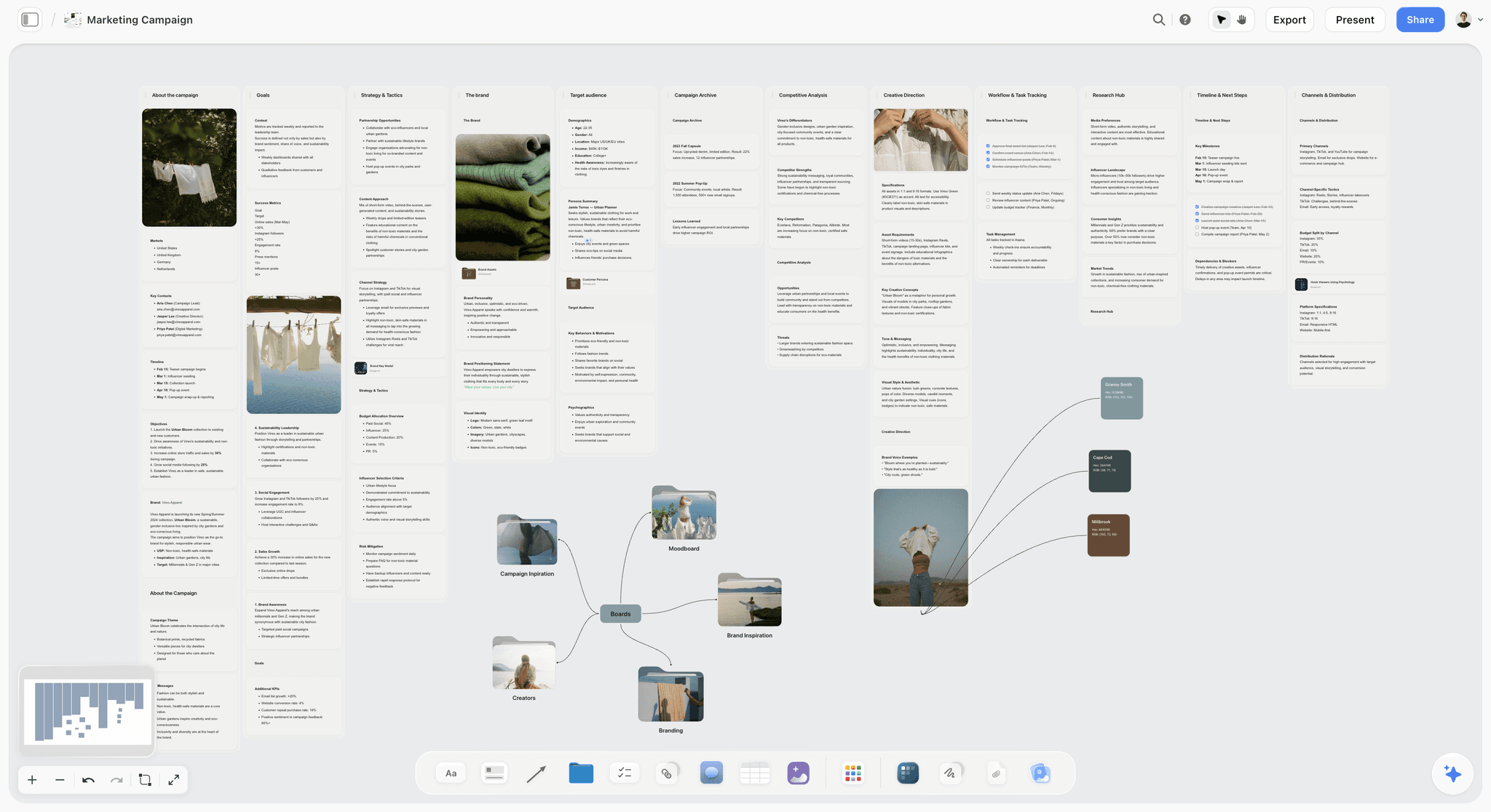
The verdict: Storyflow is the shortest route here from a pasted client brief to a production plan the client can see, because the AI drafts the plan on the same board as the brief and the creative work, and the client opens that board by link with no account.
Best for: Producers, small production companies and agency teams who plan the job and make the creative (treatment, script, shot list, call sheet) in one place.
Key features for this job:
- Paste the brief into the AI chat, or attach it as one of up to 5 documents, and the AI drafts the deliverables, a schedule worked back from the delivery date (the planner workflow) and the tasks (the tasks planner or kanban workflow); ask and it adds a budget table. Every AI edit lands with one-click Undo: the AI proposes, the producer decides.
- Tables with date, person, status, currency and duration cells hold the schedule and the budget; a Kanban and Tickets with assignees hold the tasks.
- The same board carries the downstream work through the AI's moodboard, video script, shot list, storyboard (AI-generated frames need Pro or Max), script breakdown and strip board workflows, and the AI drafts a call sheet PDF for a shoot day from the board.
- A Doc with inline comment threads holds the scope sentence and exports to Word or PDF; presentation mode steps through the board one wall at a time on the sign-off call.
- Through the MCP connector, ChatGPT, Claude, Gemini or Grok can read your Storyflow projects and build the plan onto a board, so a producer who drafts in ChatGPT keeps the result where the client can open it.
- The AI reads the board you have open, so in week three you can ask whether the plan still matches the brief beside it.
Pricing (as of October 2026): Storyflow is paid-only during early access, with plans from $7.99 a month billed annually ($9.99 monthly). A free plan launches before the end of 2026, and anyone a paid member invites to a board joins free. Pro is $14 a month annually ($19 monthly) and adds AI image generation and memory across conversations; Max is $39 a month annually ($49 monthly) and adds the Team Workspace with Permissions & Roles. Every paid plan includes unlimited boards and file uploads, and AI use is metered on every plan.
Pros:
- The brief, the plan and the creative sit on one canvas, so a shot list change and the schedule line it affects are visible together.
- The client opens a view-only link with no account and signs in to comment.
- Invited collaborators join free (on free-tier limits, including a smaller AI allowance) and edit shared boards in real time with live cursors, so a small team can collaborate before every person needs a seat.
Where it falls short:
- No dependency engine, Gantt chart or calendar grid: dates live in table date columns, so moving the shoot does not move the edit. Asana and Monday.com handle dependency-driven schedules.
- No approval button, proofing or timestamped video comments, so sign-off lives in comments and exported PDFs. Frame.io covers logged review of cuts.
- The AI drafts a call sheet PDF but does not send it, collect confirmations or track crew availability. StudioBinder does all three; the StudioBinder vs SetHero vs Storyflow call sheet comparison shows where each stops.
- Paid-only until the free plan launches late 2026, and a newer product with a smaller template ecosystem than Notion.
The workflow has its own page at Brief to Project Board, with a commercial version at Commercial Production.
2. Notion
The verdict: Notion is the best general-purpose home for a brief and its plan as linked documents: the brief page, a deliverables database, a schedule on a timeline and a published page the client can read.
Best for: Teams that already run their briefs, wikis and client pages in Notion and want the production plan to live beside them.
Key features for this job:
- Databases with subtasks, dependencies and custom properties hold deliverables, tasks and budget lines, with timeline, board and table views of the same rows.
- Forms turn a client intake into database rows: basic forms on Free, custom forms on Plus.
- Publishing to the web gives the client a read-only page with no account: basic sites on Free, unlimited published pages on Plus.
- Notion AI drafts pages and fills database properties from a pasted brief, with full access on Business and a limited trial on Free and Plus.
- A very large template ecosystem, so most plan structures already exist as a starting point.
Pricing (checked on Notion's pricing page, October 2026): Free; Plus at $10 per member a month billed annually ($12 monthly); Business at $20 a month annually ($24 monthly), which is where full Notion AI starts; Enterprise on request. Guests are free and see only the pages they are invited to.
Pros:
- The brief, the scope doc and the plan databases link to each other, so the plan can cite the brief line by line.
- Timeline views with dependencies turn the deliverables database into a schedule without a second tool.
Where it falls short:
- The plan is text and rows: moodboards, storyboards and shot lists become galleries and embeds rather than a board beside the schedule. Storyflow keeps them on one canvas.
- Full AI drafting needs Business at $20 a member a month.
- No shoot paperwork beyond templates you maintain by hand; StudioBinder covers breakdowns and call sheets.
- Approval is a status property you police yourself, and someone has to build and maintain the database structure.
For this exact split, see Storyflow vs Notion.
3. Asana
The verdict: Asana is the strongest tool on this list for running the plan after sign-off: dependencies, a timeline, an owner on every task and, on Advanced, approvals and proofing, so late client notes visibly push the delivery date.
Best for: In-house creative teams and agencies whose company already runs on Asana, and plans where moving one date must move the chain.
Key features for this job:
- Intake forms turn a client brief into a task with structured fields, and custom templates start every production with the same plan skeleton.
- Timeline and Gantt views with task dependencies, from Starter.
- Custom fields for budget lines, statuses and approval state, plus reporting dashboards.
- Approvals and proofing on Advanced: annotate PDFs and images and request approval on a task.
- Unlimited free guests, so clients and freelancers join without adding licences.
- Asana AI on paid plans: AI Teammates and Asana Dash (5 requests per user a month on Starter and Advanced) and AI Studio credits.
Pricing (checked on Asana's pricing page, October 2026): Personal is free for one or two people; Starter is $10.99 per user a month billed annually ($13.49 monthly); Advanced is $24.99 annually ($30.49 monthly) and adds approvals and proofing, portfolios and workload; Enterprise is on request.
Pros:
- Dependencies and a timeline make the backwards schedule enforceable, not just written down.
- Approval tasks give each gate a logged yes, on Advanced.
- Templates make the tenth plan structurally identical to the first.
Where it falls short:
- The creative work lives elsewhere, so the plan and the thing it schedules drift apart. Storyflow keeps them together.
- Clients join as guests with an Asana login; it is not a link a client opens cold.
- AI requests on Starter are capped at 5 per user a month, so drafting from a brief is mostly template work.
- No shoot paperwork, and approvals need Advanced at more than twice the Starter price.
For the full comparison, see Storyflow vs Asana.
4. StudioBinder
The verdict: StudioBinder is the deepest tool here for the shoot half of the plan: breakdowns, stripboards, shot lists, storyboards and call sheets it sends to the crew and tracks, all inside one project.
Best for: Producers of commercials, branded films and scripted shoots with a crew to schedule and call.
Key features for this job:
- Script breakdowns with custom categories, stripboards, and reports from breakdown summaries to shooting schedules and DOODs.
- Shot lists with camera setups, storyboards and mood boards in the same project.
- Call sheets auto-filled with weather, location, cast and nearest hospital, sent by email and text, with delivery status, view counts and timestamped confirmations.
- Documents for commercials, interviews and music videos, with client sharing and approval tools, plus task boards and calendars.
Pricing: a limited free plan, then paid tiers sold by number of users, from one user up to teams; the current figures are on StudioBinder's site. External collaborators view the pages they are invited to without an account.
Pros:
- The most complete call sheet workflow on this list, with distribution and confirmations included.
- Everything the shoot needs sits in one project, from breakdown to call sheet.
- Invited collaborators and clients can view shared pages without an account.
Where it falls short:
- It starts from a script rather than a client brief, and no AI features are listed on its site, so the scope, deliverables and budget are typed by hand. Storyflow drafts them from the brief.
- No budgeting module is listed among its features, so the budget lives in a spreadsheet beside it.
- Built for film-style production: a design or photo campaign fits awkwardly.
- No dependencies across the whole job; task boards are lists, not a schedule engine.
5. Monday.com
The verdict: Monday.com is a strong execution board for a plan that many people need to read at a glance: Gantt and timeline views, a status column per gate, automations, and dependencies on Pro.
Best for: Marketing and brand teams already on Monday.com, and producers whose clients want a dashboard view of progress.
Key features for this job:
- Timeline and Gantt views from Standard; dynamic dependencies between tasks on Pro.
- Status and people columns that turn each gate into a visible column with an owner.
- Automations (250 actions a month on Standard, 25,000 on Pro) for reminders and handoffs.
- Guest access from Standard for clients and freelancers.
- AI credits on every paid plan: 1,000 a month on Basic, 2,000 on Standard and 3,000 on Pro.
Pricing (checked on monday.com's pricing page, October 2026): free for up to 2 seats; Basic at $9 per seat a month billed annually ($12 monthly); Standard at $12 annually ($14 monthly); Pro at $19 annually ($24 monthly); Enterprise on request. Paid plans start from 3 users, so the cheapest paid setup for a solo producer is 3 Basic seats.
Pros:
- Clear, colour-coded status views that people outside production read without training.
- Gantt on Standard and dependencies on Pro make the backwards schedule live.
- Automations remove the chasing: a status change can notify the next owner.
Where it falls short:
- The 3-seat minimum makes it one of the most expensive entries on this list for a solo producer or a two-person team.
- The features that matter for this job start at Standard (Gantt) and Pro (dependencies), $12 to $19 a seat.
- Creative work lives outside the board, and there is no shoot paperwork. Storyflow and StudioBinder cover those halves.
- Turning a brief into the board is template work, and AI features draw on a monthly credit allowance.
6. Google Sheets
The verdict: Google Sheets is the free, universal way to hold a production plan as a grid: deliverables, schedule, budget and risks in four tabs that every producer and every client finance team can read.
Best for: Freelancers and small teams with no software budget, and clients who want the plan in a format their finance team already uses.
Key features for this job:
- Tabs for the deliverables spec, the backwards schedule, the budget and the risk register, with formulas that total the budget and count working days.
- Link sharing: anyone with the link can view, and comments need a Google account.
- Dropdowns for status and gate columns, and conditional formatting for overdue dates.
- Gemini in Sheets on paid Google Workspace plans, for formulas and analysis.
Pricing (as of September 2026): anyone with a Google account can create in Sheets at no cost. Google Workspace business plans start at $7 per user a month (Business Starter, one-year commitment), and the fuller Gemini in Sheets features need a Workspace plan such as Business Standard at $14.
Pros:
- Free, instant and familiar to every producer, accountant and client.
- The budget maths is real: formulas, totals and contingency percentages.
- Opens for clients who will not create another account.
Where it falls short:
- No creative context: the moodboard, script and shot list are links out, so the plan and the work drift apart. Storyflow keeps them on one board.
- Dependencies are formulas you maintain, and nothing tells an owner when a date moves. Asana does.
- No drafting from a brief without Gemini on a paid Workspace plan, and even then it fills cells rather than building the plan.
- Version sprawl: a "plan_v7_final" copy in someone's inbox is how the wrong schedule reaches the crew.
7. Trello
The verdict: Trello is the simplest way to turn a brief's tasks into cards and move them through columns, and its free plan covers a small team, but it holds a to-do list better than it holds a production plan.
Best for: Solo producers and small teams who want the task list visible and nothing more.
Key features for this job:
- Lists for phases or gates, and cards for tasks with due dates, checklists, assignees and attachments.
- AI on paid plans, with quick capture on Standard and board-level AI on Premium; Trello's AI can also generate a starter board of lists and cards from a described goal.
- Butler automations: 250 Workspace command runs a month on Free, 1,000 on Standard and unlimited on Premium.
- Calendar, Timeline, Table and Dashboard views on Premium.
Pricing (checked on Trello's pricing page, October 2026): Free for up to 10 collaborators per Workspace and up to 10 boards; Standard at $5 per user a month billed annually ($6 monthly); Premium at $10 annually ($12.50 monthly); Enterprise at $17.50 per user a month billed annually.
Pros:
- Nothing to learn, and clients understand a board of cards on sight.
- The free plan is enough for one production.
- Inexpensive paid seats when you want AI and more automation.
Where it falls short:
- Budgets and deliverable specs do not fit on cards, so they end up in a linked spreadsheet.
- Timeline and calendar views need Premium, and dependency-driven scheduling is not part of the core product. Asana covers it.
- Approval gates are just columns; nothing enforces them.
- Creative references live as attachments rather than a board you can read at a glance. Storyflow keeps them visible.
- The free plan's 10-board limit per Workspace fills quickly if every client job gets its own board.
8. Frame.io
The verdict: Frame.io, Adobe's review platform, does not build a production plan. It runs the plan's review gates, with frame-accurate comments on each cut and share links a client opens without signing up.
Best for: Any video plan with rounds of client feedback on cuts; it is the natural partner to whichever planning tool ranks above it.
Key features for this job:
- Frame-accurate and range-based comments and annotations, so "the shot at 14 seconds" becomes a note pinned to the frame.
- Version stacks and a comparison viewer for putting round 1 beside round 2.
- Share links for review: external clients view and comment in the browser without signing up or logging in.
- Transcription and captions, the AI features listed on every plan, and Camera to Cloud for uploading takes from set as they are shot.
Pricing (checked on Frame.io's pricing page, October 2026): Free for up to 2 members with 2GB of storage; Pro at $15 per member a month (up to 5 members, 2TB); Team at $25 per member a month (up to 15 members, 3TB); Enterprise on request. Annual plans are 13% cheaper than monthly.
Pros:
- The smoothest client review of cuts on this list: no account, notes pinned to frames.
- Round 1 and round 2 notes stay attached to the version they were about.
- A free plan that covers a solo producer's first client reviews.
Where it falls short:
- It is not a planner: no deliverables list, schedule, budget or task owners, so it needs one of the seven tools above.
- Storage is the constraint on Free (2GB), so real rushes need Pro or above.
- Its value starts at the first cut, weeks after the plan was written and signed.
For running the rounds themselves, see How to Run a Video Review Round With a Client, and for the alternatives to Frame.io, the comparison of Frame.io, Ziflow, Filestage and Storyflow for client approvals.
What It Costs: A Solo Producer vs a Team of 3 to 5
A free tool that forces a second paid tool is not free, and per-seat pricing climbs fast when a director, an editor and two freelancers all need the plan. Monthly cost for a solo producer and a team of four, billed annually where offered, as of October 2026:
| Tool | Solo producer, per month | Team of 4, per month | What the team price gets you |
|---|---|---|---|
Storyflow | $7.99 (Plus) | $7.99 if one member pays and invites three collaborators, who join free on free-tier limits; per seat if each person needs their own plan | Brief, plan and creative on one board |
Notion | $0 (Free) or $10 (Plus) | $40 on Plus; $80 on Business for full Notion AI | Linked docs, databases, published pages |
Asana | $0 (Personal, 1 or 2 people) | $43.96 on Starter; $99.96 on Advanced for approvals | Dependencies and timeline; approvals on Advanced |
StudioBinder | Starter tier, 1 user | Professional tier, 4 users | Breakdowns, stripboards, tracked call sheets |
Monday.com | $0 (Free, 2 seats) or $27 (3 Basic seats) | $48 on Standard for Gantt; $76 on Pro for dependencies | Colour-coded boards and automations |
Google Sheets | $0 | $0 on personal accounts; $28 on Business Starter | A shared grid; fuller Gemini costs more |
Trello | $0 (Free) | $0 on Free; $40 on Premium for Timeline view | A task board; extra views on Premium |
Frame.io | $0 (Free, 2GB) | $60 at the monthly Pro rate, 13% less billed annually | Review of cuts only |
Three billing shapes sit behind those numbers. Notion, Asana, Monday.com, Trello, Frame.io and Google Workspace charge per seat; guests are free in Asana and Notion, and Monday.com's paid plans start at 3 seats. StudioBinder sells tiers by headcount, so the fifth user moves you up a plan. Storyflow charges the board owner and invited collaborators join free; when everyone needs their own boards and AI, each person takes their own plan, with current figures on the pricing page.
The cheapest serious setup for this job is one paid planning seat plus a free review tool; the most expensive mistake is paying per seat for people who only need to look.
Which Tool for Which Person
The right tool depends less on company size than on who holds the pen when the brief arrives.
| Who you are | First pick | Add this when | Why |
|---|---|---|---|
Freelance producer or solo video maker | Storyflow | Frame.io Free once cuts need client notes | Brief, plan and creative on one board for $7.99 a month; the client opens it by link |
Small production company, 3 to 10 people | Storyflow | StudioBinder when a crew call sheet needs confirmations | Plan and pre-production on one board, with invited collaborators joining free |
In-house creative team at a brand | Asana, if the company already runs on it | Storyflow for the brief-to-plan board and pre-production | Plan where the business already approves work |
Agency producer with several clients at once | Storyflow, one board per brief | Asana or Monday.com for cross-client scheduling | Each client's plan and creative stay together |
Commercial producer with a crew of 20 or more | StudioBinder for the shoot | Storyflow for the brief, plan and creative before it | Tracked call sheets and stripboards are StudioBinder's core |
Company that writes everything in Notion | Notion | Storyflow for visual pre-production | The plan lives beside the wiki; moodboards and shot lists live on a board |
Team with no software budget | Google Sheets | Trello Free for the task list | Both free, both familiar, both enough for one small job |
Which Planning Stack by Project Size
Tool choice scales with the number of deliverables and the number of approvers, not with the budget alone:
- One deliverable, one shoot day, under $10,000: Storyflow alone, or Google Sheets if the software budget is zero.
- A hero film plus cutdowns, one or two shoot days, $10,000 to $60,000: Storyflow for the plan and the creative, Frame.io for the review rounds. This is the worked example's stack.
- A multi-day shoot with a crew of 20 or more: Storyflow from brief through pre-production, StudioBinder for the stripboard, call sheets and confirmations.
- A campaign with 20 or more deliverables across several teams: Asana or Monday.com for dependencies and workload after sign-off, Storyflow for the brief-to-plan board and the creative.
- A retainer that repeats every month: a template, either an Asana project template or a duplicated Storyflow board, so month two is never planned from scratch.
If a date change must ripple through the schedule automatically, you need Asana or Monday.com in the stack; if a producer can move dates by hand, one board is enough. Storyflow's setup for this kind of job is on the video production planning page.
Common Mistakes When Turning a Brief Into a Plan
Most weak production plans are not wrong. They are incomplete in the same eight places, and each gap has a fix.
Mistake 1: Scheduling from the launch date
The launch date is the client's; the delivery date is yours, and the days between belong to uploads, ad approvals and trafficking. The fix: ask when files must be in their hands, and if nobody knows, plan on about a week before launch as a written default.
Mistake 2: Accepting "cutdowns" without a count and a format
"Social cutdowns" can mean three files or twelve, and every extra 9:16 edit costs editor time, captions and an export. The fix: turn every plural noun in the brief into numbered rows with a length, an aspect ratio and a placement before you price anything.
Mistake 3: Letting two people approve the same cut
When a head of brand and a founder review round 1 separately, their notes contradict, and satisfying both costs a third round nobody budgeted. The fix: one approver per gate, with everyone else's notes routed through that person.
Mistake 4: Writing TBD
TBD is a task with no owner. The fix: every unknown gets an owner and a decision date, such as "Location: producer confirms by Wednesday 7 October", which turns uncertainty into something the schedule can hold.
Mistake 5: Leaving client review as an open window
"Client to review" with no end date is where schedules slip quietly. The fix: a fixed window in working days, a named reviewer and a due time, plus one line in the plan saying late notes move the delivery date by the same number of days.
Mistake 6: Holding the budget as one number
"$28k" does not say whether talent usage, music or tax sits inside it. The fix: a line-item budget with a producer-held contingency and one sentence on what "all-in" excludes, so who pays is settled before anything moves.
Mistake 7: Leaving the client's own tasks off the schedule
Product samples, logo files, legal sign-off and feedback are the client's tasks, and they run late more often than the crew's. The fix: put them on the same schedule, with the client as owner and the crew task that waits on each.
Mistake 8: Taking changes in chat after sign-off
A "quick extra version for LinkedIn" sent as a chat message becomes free work by default. The fix: freeze the plan at sign-off and handle every change as a written change request with a price and a date effect, approved before anyone opens the edit.
When Storyflow Is Not the Right Choice
Storyflow earns first place on the brief-to-plan job. It is the wrong tool, or not the only tool, in these cases:
- Your schedule runs on dependencies. If moving the shoot must move every task after it automatically, use Asana or Monday.com. Storyflow's dates live in table date columns, and nothing shifts on its own.
- You need logged approval of cuts. Frame.io gives frame-accurate comments and share links a client comments on without an account; Storyflow has no approval button, proofing or timestamped video comments.
- You send call sheets to a crew and need confirmations. The AI drafts a call sheet PDF from the board, but it does not send it or collect replies. StudioBinder does both.
- Your software budget is zero. Storyflow is paid-only during early access. Google Sheets and Trello's free plan will carry a small job.
- The client or your company mandates a platform. If approvals already happen in Asana or Monday.com, build the plan where the sign-off will happen.
- You need time tracking or invoicing against the plan. Storyflow has neither; agency platforms built around timesheets and billing do.
Production Plan Template: Copy This Into Any Tool
A production plan has thirteen parts. Copy this table into a Doc, a sheet or a board, fill the middle column for your job, and use the right-hand column as the standard for how specific each line must be.
| Section | What to write | Filled in for the worked example |
|---|---|---|
Scope sentence | Deliverables, method, rounds, approver, date and amount | One hero and seven cutdowns, one shoot day, two rounds, Maya, Mon 9 Nov, $28,000 |
Exclusions | What the client could assume and is not included | Stills, translations, TV usage, a third round |
Deliverables | One row per file: length, aspect ratio, placement, file type | Eight rows, 60 seconds at 16:9 down to 6 seconds at 9:16 |
Delivery date | The day files are in the client's hands | Mon 9 Nov 2026, for a Tue 17 Nov launch |
Gates | Decisions that release the next spend, each with a date | Scope, concept, pre-production, picture lock, final |
Review windows | Working days per round, and who reviews | Two rounds, two working days each, Maya only |
Owners | One person per task | Producer, director, editor, colourist, mixer |
Client tasks | What the client supplies, and by when | Samples and claim wording by Fri 9 Oct |
Budget | Lines, contingency and what all-in excludes | Eight lines plus $2,400 contingency, excluding sales tax |
Risks | Risk, trigger, mitigation and owner | Six rows, weather first |
Assumptions | Every default you planned on | Usage of 12 months on web and social, no TV |
Change process | How changes are priced and approved | Written change request, approved before work starts |
Sign-off | Who signed, when, and where the record lives | Maya, Fri 25 Sep, board comment plus PDF |
Before you send it, run the test from the top of this article: could the crew start tomorrow knowing what to make, who owns each piece, what they are waiting for and when the client decides? What happens next, between the signed plan and the shoot, is the subject of What Is Pre-Production?.
The Fastest Way to Turn a Client Brief Into a Production Plan
Paste the brief into Storyflow and ask for a production plan. On one board, the AI writes the deliverables with counts and formats, the open questions with defaults, a schedule worked back from your delivery date, a task kanban and a budget table, all beside the brief they came from. Spend your time on the three things no AI knows: the real counts, the real delivery date and the one person who approves. Then send the client the view-only link, walk them through it in presentation mode, and take the written yes as a comment or a signed PDF.
Tools that help, in the order you reach for them:
- Storyflow: brief, plan, schedule, budget and the creative on one board; AI drafts the plan from the brief; the client opens it by link with no account. From $7.99 a month billed annually.
- Asana: runs the signed plan when dependencies must move dates for you. Starter from $10.99 per user a month billed annually.
- StudioBinder: stripboards and call sheets sent to the crew and confirmed, for large shoots.
- Frame.io: frame-accurate review of the cuts in rounds 1 and 2. Free for 2 members.
- Google Sheets: a free fallback for the schedule and budget grid when the software budget is zero.
The Bottom Line
A client brief becomes a production plan when every sentence in it has been turned into a number, a date, a name or a price, and the client has signed that version. The seven steps do the turning; the tool decides how much of it you type by hand. Storyflow does the most of it for this job: the AI drafts the plan beside the brief, the creative lives on the same board, and the client opens it by link with no account. Add Asana when dependencies must drive the dates, Frame.io when cuts need logged review, and StudioBinder when a crew needs confirmed call sheets. Plan from the delivery date, name one approver, and send every question with a default.
FAQ: Turning a Client Brief Into a Production Plan
How do I turn a client brief into a production plan?
Convert every part of the brief into a commitment: a deliverable spec, a task, an owner, a date, a cost and an approver. The seven steps: read the brief for deliverables, constraints and approvers; write a one-sentence scope; break deliverables into production steps; schedule backwards from the delivery date with approval gates; assign people and budget; list risks; get written sign-off. Storyflow shortens it: the AI drafts the plan from the pasted brief on a board the client opens by link.
What is the difference between a client brief and a production plan?
A client brief says what the client wants and why; a production plan says who makes it, how, by when, for how much and who approves each stage. The brief speaks the client's language (goals, audience, tone, a launch date), the plan the crew's (files, shoot days, owners, review windows, budget lines). Keep both side by side and check one against the other whenever something changes.
What should a production plan include?
A production plan needs thirteen parts: a scope sentence, exclusions, a deliverables spec, the delivery date, approval gates, review windows, task owners, the client's own tasks, a line-item budget with contingency, a risk register, an assumptions list, a change process and a sign-off record. For video, the deliverables spec gives each file's length, aspect ratio, placement and file type. The template section above lists all thirteen with a filled-in example.
How long does it take to turn a brief into a production plan?
Allow two to five working days from brief to signed plan for a job the size of a product film with cutdowns, most of it spent waiting for the client's answers. In the worked example the brief arrived on Monday, the questions went out that day, the answers came back Wednesday and the plan was signed Friday. With an AI draft, drafting takes minutes; checking counts, dates and approvers takes the rest.
What if the client brief is vague?
Plan on defaults and send them. Turn every gap (counts, formats, dates, budget scope, approvers, claims, usage) into a numbered question with the answer you will plan on if nobody replies by a set date. A vague brief is a reason to write assumptions down where the client can correct them, not a reason to wait. If the gaps are strategic, such as no audience or no objective, send the brief back with How to Write a Creative Brief.
How many revision rounds should a production plan include?
Two rounds of consolidated feedback is the usual default for a short commercial edit: one on the rough cut, one on the fine cut, then picture lock. Each round gets a fixed window, such as two working days, and one approver who consolidates everyone's notes. A third round should be a priced change request, because every round costs editor days and pushes the grade, the mix and the delivery date.
How much contingency should a production budget hold?
Hold around 10 percent of the working budget on a small shoot, owned by the producer and spent only with the client's written approval; the worked example holds $2,400 on a $28,000 job, about 9 percent. Raise it for exterior shoots in unreliable weather, first-time clients, or anything with animals, children or stunts. A new deliverable is a change request, never a contingency spend.
Who should approve a production plan?
One named person on the client side approves the plan and every gate after it, usually whoever owns the budget, such as a head of brand or a marketing lead. Other stakeholders are named in the plan with the point at which they see the work, and their notes reach the production through the approver. Legal is the exception: product claims and on-screen text need their own approval task with a date.
Can AI automatically build a project plan from a client brief?
Yes, AI can draft the plan, and a producer still checks it. In Storyflow, the AI reads a pasted brief and drafts the deliverables, a schedule table, a budget table and a task kanban on the board, with one-click Undo on every edit, and it keeps reading the board, so you can later ask whether the plan still matches the brief. No AI knows what the client left out: the counts, the delivery date, the real approver.
Can ChatGPT turn a client brief into a production plan?
ChatGPT will write a plan as text in the chat, and that text is where most of them stay. With Storyflow's MCP connector added, ChatGPT (or Claude, Gemini or Grok) can read your Storyflow projects and build the plan onto a board: deliverables, schedule, tasks and the brief side by side, in a place the client can open by link. The connector is included on paid plans with no cap on actions.
Where should I coordinate timelines, briefs and creative production?
On one board, so the brief, the schedule and the work it schedules are visible together. Storyflow holds the brief, the dated schedule table, the task kanban, the moodboard, the script and the shot list on one canvas, and its AI keeps reading that board, so you can ask whether the plan still matches the brief in week three. If timelines must re-flow automatically when a date moves, keep the schedule in Asana or Monday.com and the brief and creative in Storyflow.
What is a production plan?
A production plan is the document that turns a brief into commitments: every deliverable with its specification, an owner, a date, a cost and one named approver, plus the approval gates, the budget, the risks and the change process. Where the brief says what the client wants, the plan says who makes it, by when and for how much. A plan is finished when the crew could start tomorrow without asking a question.
Is Storyflow free?
Not during early access. Storyflow is paid-only during early access, with plans from $7.99 a month billed annually ($9.99 monthly). A free plan launches before the end of 2026, and anyone a paid member invites to a board joins free. For a production plan, one producer pays while the director, the editor and other invited collaborators edit the same board in real time, and the client views it by a link that needs no account.
Can a client view a Storyflow board without an account?
Yes. Turn sharing on and send a view-only link: it opens with no account. To comment, the client signs in; a logged-out visitor who tries gets a sign-in prompt. View-only visitors see the latest version when they open or reload the link rather than live updates, so send it after a round of changes is finished. Collaborators you invite to edit join free and work in real time.
Does Storyflow have Gantt charts or task dependencies?
No. Storyflow has no Gantt chart, dependency engine or calendar grid; dates live in table date columns, in Tickets with assignees, on Kanban cards and on to-dos, each of which takes a person and a due date. That is enough when the producer moves dates by hand, and it keeps the schedule beside the brief and the creative. When moving one task must move the whole chain automatically, run the signed plan in Asana or Monday.com and keep the creative in Storyflow.
Is Notion or Asana better for a production plan?
Notion is better for building the plan; Asana is better for running it. Notion's linked pages and databases hold the brief, the scope doc, the deliverables and a timeline, with a generous free plan and published pages a client can read. Asana's dependencies, timeline, intake forms and approval tasks (on Advanced) track who is waiting on whom. In this article's scoring Notion edges Asana, 6.8 to 6.5, because a brief-to-plan job rewards documents and client-readable pages.
Should I use StudioBinder or Storyflow for a video production plan?
Use Storyflow to turn the client brief into the plan and the creative, and add StudioBinder when shoot paperwork is the hard part. Storyflow's AI drafts the plan board, the script, the shot list and a call sheet PDF from the brief; StudioBinder specialises in stripboards, breakdowns and call sheets it sends by email and text and tracks to confirmation. A one-day product shoot needs only Storyflow; a large multi-day crew needs StudioBinder's call sheets.
Can I build a production plan in Google Sheets?
Yes, and for a small job it works: one tab each for deliverables, schedule, budget and risks, shared by a link that opens with no account. Sheets costs nothing with a Google account, and every producer and finance team knows it. It lacks everything around the numbers: no creative references beside the schedule, no task notifications, no drafting from the brief without Gemini on a paid Workspace plan, and dependencies only as formulas you maintain.
Table of Contents
- Key Takeaways
- Which Tool Should You Use to Turn a Client Brief Into a Production Plan?
- Brief vs Production Plan: What Each Document Has to Answer
- The 7 Steps to Turn a Client Brief Into a Production Plan
- Worked Example: A Product Film and Seven Cutdowns, From Brief to Signed Plan
- How We Evaluated Tools for Turning a Brief Into a Plan
- Comparison Table: 8 Tools for Turning a Brief Into a Production Plan
- The 8 Best Tools for Turning a Client Brief Into a Production Plan, Ranked
- 1. Storyflow
- 2. Notion
- 3. Asana
- 4. StudioBinder
- 5. Monday.com
- 6. Google Sheets
- 7. Trello
- 8. Frame.io
- What It Costs: A Solo Producer vs a Team of 3 to 5
- Which Tool for Which Person
- Which Planning Stack by Project Size
- Common Mistakes When Turning a Brief Into a Plan
- When Storyflow Is Not the Right Choice
- Production Plan Template: Copy This Into Any Tool
- The Fastest Way to Turn a Client Brief Into a Production Plan
- The Bottom Line
- FAQ: Turning a Client Brief Into a Production Plan
- Related Reading
Templates to check out for this topic


Templates you can use in Storyflow
Every Storyflow board starts from real structure and an AI that reads the whole canvas. Open one of these templates and make it yours.


See Storyflow in Action
A visual AI workspace where every feature lives inside one canvas. No tab-switching, no context lost.
Build your entire board from a single message
Type what you need in the AI chat at the bottom of your canvas. The AI adds cards, headings, and structure directly onto your board.
Use expert frameworks as AI context
Type @ in the AI chat and choose any Tactic. The AI tailors every response to that framework instead of giving generic advice.
Turn your board into a mind map in seconds
Ask the AI to restructure your canvas as a mindmap. It connects your ideas into a visual hierarchy so you can see how everything relates.
Why Storyflow Exists
Storyflow actually began as a personal tool while working on creative and research projects.
We kept running into the same problem: ideas were scattered everywhere: notes, documents, and whiteboards.
Nothing helped us see how everything connected.
So we started building a workspace designed around how ideas actually grow.
→ Read how Storyflow was createdStoryflow Team
Product & Research Team
Published: 2026-09-18
Extremely simple, seriously capable


See how easy it is to get started
Watch a real project come together, from a blank board to a finished plan, clicked through step by step.
Start creating with AI and become more productive
Transform your creative workflow with AI-powered tools. Generate ideas, create content, and boost your productivity in minutes instead of hours.