
Extremely simple, seriously capable
AI creative project management
that turns the brief into the board.
Paste the brief or describe the job, and Storyflow's AI lays out the brief, the concept directions, the moodboard, the deliverables and the schedule on one canvas. Then it reads that whole canvas before it answers a question about the work.


Creatives working for these brands already got early access
- Red Bull
- Canon
- Artlist
- Porsche
See how easy it is to get started
Watch a real project come together, from a blank board to a finished plan, clicked through step by step.
Start from a ready-made template
Pick a board to see what you can build, then let AI fill it in. Every template is a real, editable starting point on the same infinite canvas.

Mind Map
Branch one central idea out into themes and sub-points, then drag the connections around until the structure makes sense.
What is the best AI tool for creative project management?
The right AI tool for creative project management starts where creative projects start, with the brief. Storyflow is an AI visual workspace that turns a creative brief into a working board on one infinite canvas: the brief, two or three concept directions, a moodboard, the deliverables and the schedule. Paste the brief or describe the job and the AI lays out the board, then reads the whole canvas before it answers. ClickUp, Asana, Notion, Monday.com, Motion and Adobe Workfront bring AI to tasks, documents and schedules, and they suit teams whose bottleneck is tracking rather than the brief.
Most creative projects do not go wrong because somebody forgot a task. They go wrong because the brief was vague, the direction was never really chosen, or two stakeholders wanted different things and nobody noticed until round three. AI that reads only task titles, statuses and due dates can summarise a project and flag a late milestone. It cannot tell you whether concept three still answers the brief when the work itself is a link to a file somewhere else.
On a Storyflow board the work is the project. The brief, the references, the concept directions, the moodboard and the schedule sit side by side, and the AI reads all of it, plus up to five documents and three other boards you attach, and it can read the text of PDF and Word (.docx) files dropped on the canvas. So you can ask whether a direction drifted from the brief, what has been decided but never written down, or which deliverable has no owner, and get an answer about this project.
It is not a replacement for a tracker. Storyflow has tickets with assignees and due dates, Kanban boards and tables with status, person and date cells, but no approval workflow, proofing, time tracking or workload views. The common pattern is Storyflow for the brief, the direction and the plan, and ClickUp, Asana or Monday.com for delivery at scale. The AI proposes and the team decides; every edit it makes comes off with one click.
Ultra fast from brief to board
From a brief to a project board in four steps.
No workspace to configure. Describe the job and argue with the draft.
01
Paste the brief or describe the job
Say what you are making, for whom and by when, or drop the existing brief onto the canvas as a PDF or Word (.docx) file. The AI reads its text before it builds.
02
The AI lays out the board
The brief, concept directions, a moodboard, the deliverables and the schedule arrive as sections on one canvas, arranged so the whole project is visible at once.
03
Ask it about the work
Because the AI reads the whole board, you can ask whether a direction still answers the brief, or which deliverable has no owner, and get an answer about this project.
04
Share it with the client
A view-only link opens with no account, and a client signs in to comment on the specific piece. Invited teammates edit in real time and join free.
The brief, the direction and the plan on one canvas.
Where a creative project's decisions live, so the AI and the client read the same thing.

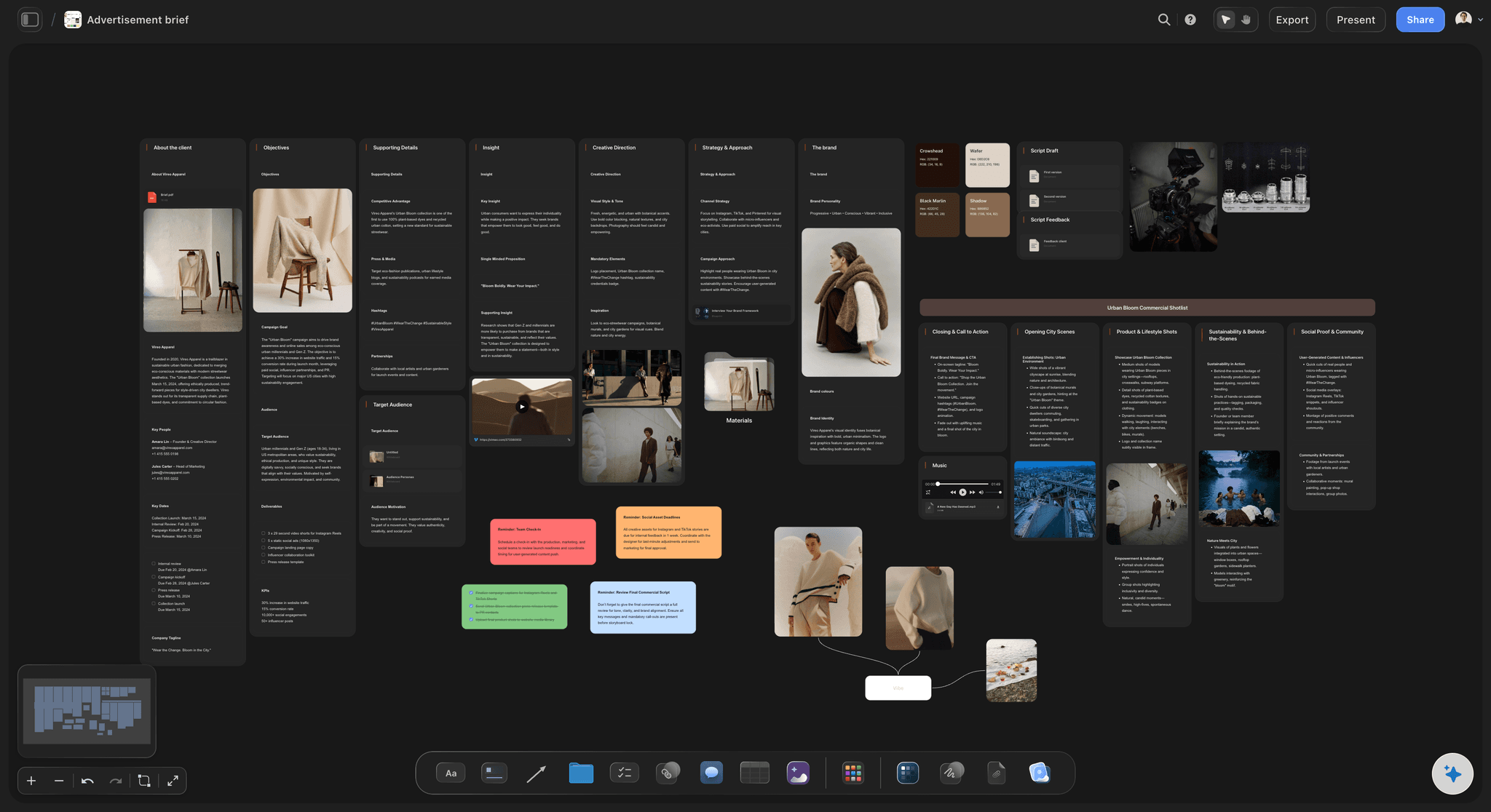
Brief to board
Start from the brief, not a blank board
The AI's campaign brief and advertising brief workflows structure the objectives, audience, message, deliverables and dates, and the rest of the project grows around them on the same canvas.
See brief to project board →
Directions and references beside the schedule
Keep the direction visible next to the deadline
Concept directions, the moodboard and reference images sit on the same canvas as the schedule, so a drift in direction shows before it costs a round.
See the AI mood board maker →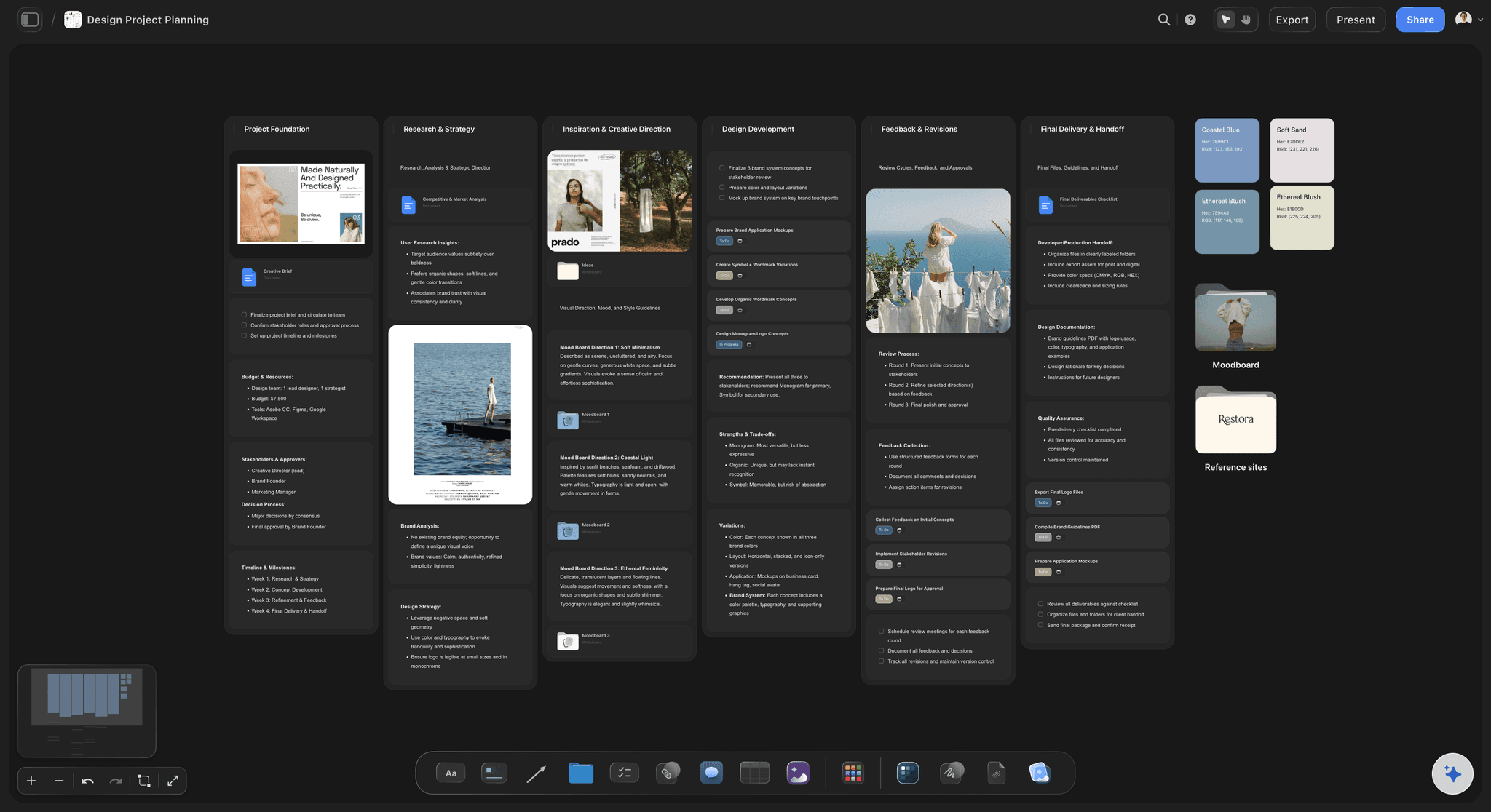
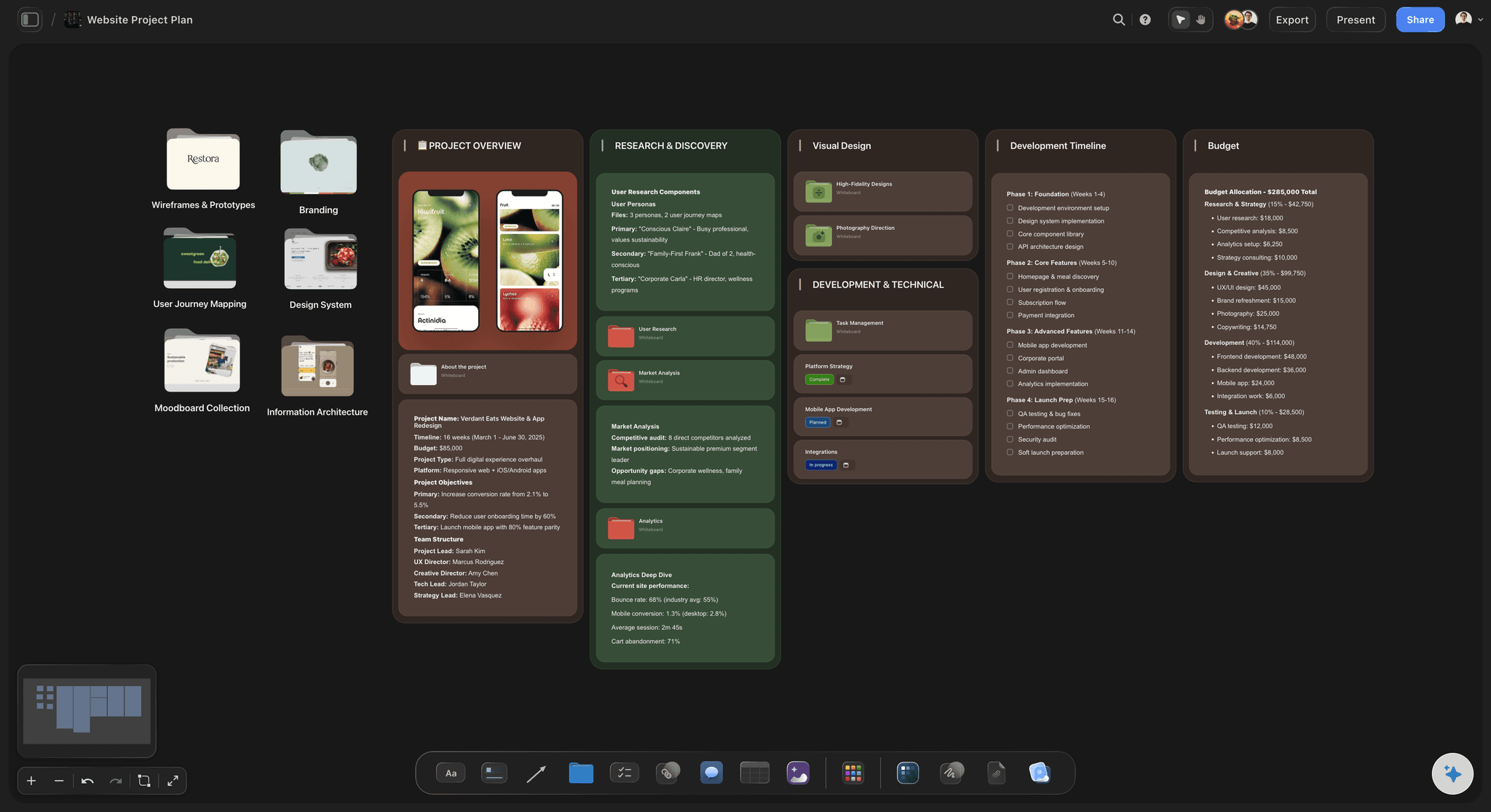
Deliverables with owners and dates
The plan the team works from
Each deliverable is a ticket with an assignee and a due date, or a row in a table with status, person and date cells. A Kanban shows what is moving this week.
Try the AI project plan generator →
One link for the client
Show the project, not a status deck
A view-only link opens the board with no account and shows the latest version each time it is opened or reloaded, and a client who signs in can comment on the specific piece or draw on the board to point at it. Presentation mode walks through it frame by frame in the review.
See the client review board →Unlimited project boards. No object cap.
A board per client or project, with no project limit. Storyflow is paid-only during early access, with plans from $7.99 a month billed annually ($9.99 monthly). A free plan launches before the end of 2026, and anyone a paid member invites to a board joins free.
Unlimited project boards and file uploads
AI that turns a brief into a board and reads the whole canvas
Tickets, Kanban and tables with status, person and date cells
View-only links clients open with no account
Built for people with taste
Where AI helps a creative project, and where it should not decide.
The AI does the structure and the reading. The judgment about the work stays with the people making it.

One prompt, a board you can argue with
From a brief to a working board
The brief, structured: Objectives, audience, message, deliverables and constraints become sections you can rearrange. A brief laid out on the board beside the work gets reopened; a brief filed away mostly does not.
Two or three directions side by side: Lay the concept directions next to the brief so the choice is visible and the argument happens in week one. A direction chosen in week one saves a round in week four.
Deliverables with owners and dates: Every deliverable gets an owner and a due date on a ticket or a table row. The schedule sits in the same view as the work it describes.
AI that reads the whole canvas
Ask about the work, not only the schedule
Canvas-aware answers: The AI reads the board you are on, so when you ask whether a direction fits the brief it is looking at both. It answers about this project, not in general.
Your material as context: Attach up to five documents and three other boards, or drop a PDF or Word (.docx) file on the canvas. The AI plans with your positioning and constraints instead of generic advice.
Change one thing, keep the rest: Ask the AI to cut a deliverable or tighten the timeline and it edits the affected part of the board. Every edit comes off with one click.
It proposes, you decide: Whether the work is good, which direction wins and what to tell the client stay with you. The AI structures, reads and suggests.
Research and references in place
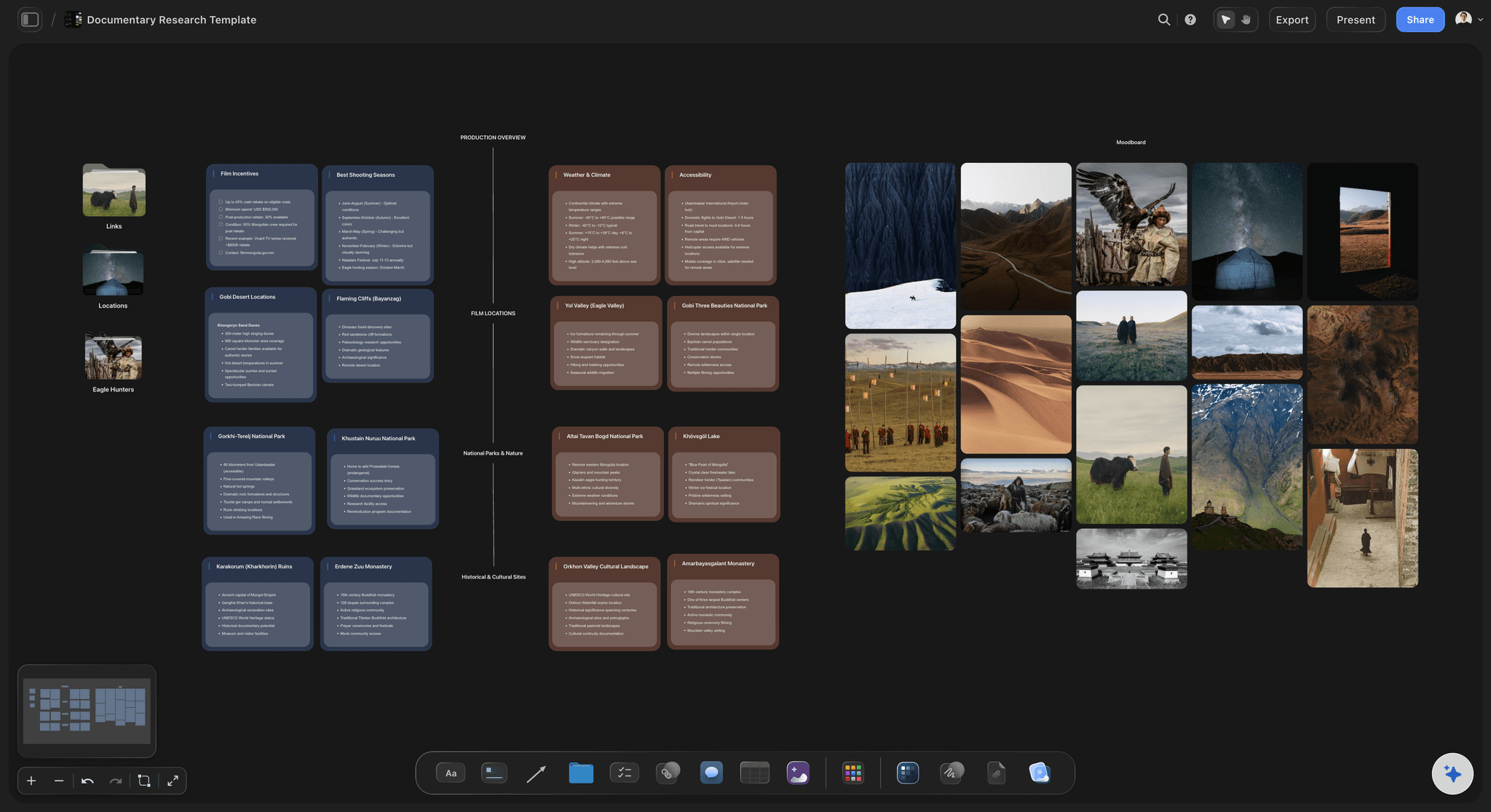
Ground the project in real material
Drop files on the canvas: Research PDFs, links, images, video and notes sit next to the decisions they inform. Nobody has to hunt for the reference behind a choice.
Grab frames from video: Upload a clip or play a YouTube or Vimeo reference, scrub to the moment and grab the frame. The still sits beside the concept it supports.
Moodboards where the plan is: Collect the visual direction on the same canvas as the schedule. The AI's moodboard workflow can start one from the brief, and the AI reads it with everything else.

Works beside the tracker you already run
Plan here, deliver where you already deliver
Keep your pipeline: Storyflow has no approval workflow, proofing, time tracking or workload views. Delivery at scale can stay in ClickUp, Asana or Monday.com.
Own the part before the task: The brief, the direction and the decisions happen on the board. That is where creative delay starts, long before a task is late.
Export when it has to travel: Export the whole board as an image or PDF, and Docs to Word and PDF. The AI can also draft a treatment, a one-pager or a presentation as a PDF from the board.
Explore templates for your project
Every template opens as a real, editable board on the infinite canvas. Pick the closest fit and make it your own.
Mind Map
Branch one central idea out into themes and sub-points, then drag the connections around until the structure makes sense.
One app instead of five
Storyflow vs ClickUp, Notion and Asana for creative projects.
ClickUp and Asana are built to track creative work at scale, and Notion to hold it as documents. Storyflow is built for the part before the tasks: turning the brief into the board. Here is where they differ.
Storyflow
Recommended
Brief exports to Word on every plan
Brief, moodboard and schedule on one canvas
Brief and references viewable by link, no account
Proofing that turns markup into tasks
Time tracking and workload views
ClickUp
Brief exports to Word on every plan
Brief, moodboard and schedule on one canvas
Brief and references viewable by link, no account
Proofing that turns markup into tasks
Time tracking and workload views
Notion
Brief exports to Word on every plan
Brief, moodboard and schedule on one canvas
Brief and references viewable by link, no account
Proofing that turns markup into tasks
Time tracking and workload views
Asana
Brief exports to Word on every plan
Brief, moodboard and schedule on one canvas
Brief and references viewable by link, no account
Proofing that turns markup into tasks
Time tracking and workload views
What creators are saying
Join early creators getting structured workspaces and AI that remembers their projects
“Storyflow has sped up my workflow by at least 3x, which means more flow state and more projects I can actually ship. It truly changed the way me and my team create.”

Reilin Joey
Director & YouTuber
“One prompt gets me a structured board. But the tactics are my favorite. I run my YouTube scripts through them and my intros and retention got better. It's amazing.”

Justkay
YouTuber & Freelance Filmmaker
“I used to juggle five apps to plan a project. Now I describe what I am making and get boards, lists, and a schedule. All in one place.”

George
@fernwehchronicles
AI creative project management, answered.
What people ask before running a creative project from a brief on an AI canvas.
Storyflow is the AI tool that turns a creative brief into a visual project board: its AI lays out the brief, directions, moodboard, deliverables and schedule on one canvas and reads all of it before it answers. ClickUp suits all-in-one tracking with ClickUp Brain, Asana cross-team workflows, Notion document-first teams, Monday.com visual workflow boards, Motion auto-scheduling, and Adobe Workfront enterprise creative operations. Pick by where your delays start: the brief or the calendar.
Storyflow starts from the brief: paste it or describe the job and its AI lays out the brief, two or three concept directions, a moodboard, the deliverables and the schedule on one canvas. It reads the whole canvas before it answers, and the client opens the board by view-only link. ClickUp and Asana still do proofing that turns markup into tasks, plus time tracking and workload views, and Storyflow has neither.
In Storyflow you paste the brief or drop it on the canvas as a PDF or Word (.docx) file, and the AI lays out a project board from it: the brief as sections, concept directions, a moodboard, the deliverables and a schedule. You correct the draft rather than build from a blank board, and the AI keeps reading the board as the project changes.
From a prompt, yes. Describe the project in a sentence or paste the brief, and the AI builds the board: sections, cards, a moodboard, a Kanban or a tracker, depending on the job. It uses named workflows for campaign briefs, moodboards, marketing plans, shot lists and task planners, so the structure fits the work. Nothing is final: you rearrange anything, and each AI edit comes off with one click.
It is using AI to plan and run creative work: campaigns, brand projects, films and launches. In a tracker, the AI drafts status updates and flags late milestones from task data. In Storyflow, the AI turns the brief into a project board and reads the brief, references and plan together, so it can answer questions about the work itself. Judging quality, choosing the direction and settling stakeholder disagreements stay with people.
The whole board you have open, including notes, docs and tables, and it can read the text of PDF and Word (.docx) files dropped on it. You can add up to five documents and three other boards in the AI chat. It reads the board you are on rather than searching every board in your workspace, which keeps its answers about the project in front of you.
Usually not, and it is not built to. Storyflow has tickets with assignees and due dates, Kanban boards and tables with status cells, but no approval workflow, proofing, time tracking or workload views. The common pattern is Storyflow for the brief, the direction and the plan, and a tracker for delivery at scale. A freelancer with a handful of projects may not need the tracker at all.
They read different things. ClickUp Brain works across tasks, docs and chat in a tracker, and Notion AI across pages and databases. Storyflow's AI reads a canvas where the brief, references, moodboard and plan sit side by side, and it builds boards as well as text. If your projects live as tasks or pages, their AI fits; if they live as a visual board, Storyflow's does.
One board per client or project, with no project limit, and an overview board across them. The AI turns each new brief into a board, and a client opens their view-only link with no account, then signs in to comment on the specific piece. Max adds a team workspace with roles and permissions when several people need managed access. Anyone a paid member invites to a board joins free.
Yes. Paste it into the AI chat, or drop the brief, research PDFs, links and reference images onto the canvas. The AI can read the text of PDF and Word (.docx) files on the board, so it builds the plan from your actual constraints rather than generic advice. Keep the original on the board beside what the AI drafts, so anyone can check the plan against the brief it came from.
Keep the brief on the same board as the work and check against it at every round. Three habits help: choose one direction by the end of week one, name one decision maker on the client side, and consolidate feedback into one list per round. In Storyflow you can ask the AI whether the current direction still answers the brief, because it reads both before it answers.
Work where the direction matters as much as the deadline: marketing campaigns, brand and identity projects, film and video production, product launches, content programmes and design projects. It suits anything with a brief, references and a decision about direction. It suits less well work that is mostly repeatable production at volume, where a tracker with approvals and time tracking earns its keep.
No. Storyflow is paid-only during early access, with plans from $7.99 a month billed annually ($9.99 monthly). A free plan launches before the end of 2026, and anyone a paid member invites to a board joins free. Pro is $14 a month billed annually ($19 monthly) and adds AI image generation; Max is $39 ($49 monthly) and adds a team workspace with roles.
More from Storyflow
Creative client onboarding
Brief to project board
Creative project management
AI project plan generator
AI creative brief generator
AI creative workspace
Agency client project planning
Document to project board
Creative operations tool
Creative team workflow tool
Design planning tool
Client review board
Solo studio project planning
Best AI tools for creative project management
Can AI manage a creative project?
Project brief template
Give the AI something worth reading.
Paste the brief once and get a project board you can argue with, on a canvas the AI and the client both read.