Storyflow vs ClickUp: Complete Comparison for Creative Teams (2026)
ClickUp is the best task management tool available. Storyflow is built for the creative phase that happens before any task list makes sense. Here's how to decide which one your team actually needs.

Category
Productivity & Tools
Author

Sara de Klein
Head of Product at Storyflow
Topics
April 8, 2026
•
18 min read
•
Productivity & Tools- Storyflow vs ClickUp
- ClickUp for creatives
- visual workspace
- creative project management 2026
Should I use Storyflow or ClickUp for creative work?
Storyflow is better for the creative phase: visual thinking, idea development, and 200+ expert frameworks on an AI-readable canvas. ClickUp is better for task management, deadlines, and operations at scale. Creative teams often run both, with Storyflow as the flat-priced creative layer before ClickUp tracks execution.

ClickUp launched in 2017 with a bold promise: replace every other tool. Tasks, docs, goals, timelines, whiteboards, chat, time tracking. One app. No context switching.
For operations teams, it delivered. ClickUp is genuinely excellent for tracking work that's already been decided. Tasks get done, deadlines get met, progress gets visible.
But the creative professionals using ClickUp will tell you the same thing, unprompted: it's where creative ideas go to be managed, not developed.
You can build a task list in ClickUp. You cannot think through a brand campaign on a living canvas with expert frameworks and AI that reads your project context. You can write a doc in ClickUp. You cannot lay out a film shoot with reference stills, a shot list, and the script side by side on one board. You can create a whiteboard. But ClickUp whiteboards are disconnected from your AI, your Tactics, and your creative flow.
Storyflow is not a task manager. It's the workspace where creative decisions get made before anyone opens ClickUp.
The core tension: ClickUp is built for managing work. Storyflow is built for doing it.
The quick verdict:
- Choose ClickUp if your primary need is task management, deadline tracking, sprint planning, or team operations. It is strongest at executing on decisions that have already been made.
- Choose Storyflow if you need a visual workspace where creative thinking actually happens. Blueprints with built-in Tactics, canvas AI that reads your current project, reference boards for filmmakers, and flat pricing that doesn't penalize growing teams.
Let's break down the differences.
What is ClickUp?
ClickUp is a project management platform that positions itself as an all-in-one replacement for tools like Asana, Trello, Notion, and Jira. It's built for teams that need to coordinate, track, and execute work at scale.
The tool has grown into one of the most feature-rich platforms in the project management space. Tasks, subtasks, dependencies, custom fields, time tracking, goals, dashboards, automations, chat, and docs. If you can name a project management feature, ClickUp probably has it.
In 2023, ClickUp launched ClickUp Brain, its AI assistant. It can summarize tasks, write in Docs, answer questions about your project data, and automate repetitive work. It's an add-on at $7 per member per month on top of any paid plan.
Who uses ClickUp:
- Software development teams managing sprints and feature work
- Marketing teams tracking campaigns and deliverables
- Operations and HR teams running processes and workflows
- Agencies managing multiple client projects and timelines
- Product managers organizing roadmaps and feature requests
- Founders trying to consolidate all their tools into one platform
What ClickUp does well:
- Exceptional task management with deep customization options
- Multiple views: List, Board, Gantt, Calendar, Timeline, and more
- Deep automations that reduce manual coordination work
- Dashboards for tracking team progress and KPIs at a glance
- Strong integrations with hundreds of external tools
- Native time tracking and workload management
Where ClickUp falls short for creative teams:
ClickUp is built around the task as the atomic unit of work. Everything starts as a task, gets assigned, gets dated, and gets tracked. That works perfectly for executing predetermined work.
It breaks down the moment creative thinking needs to happen first. Developing a brand concept, researching a film's visual language, brainstorming a content strategy, building out character arcs: these are not task-shaped activities. Forcing them into ClickUp's structure produces task lists for decisions that haven't been made yet.
ClickUp whiteboards exist but they are basic, disconnected from the AI, and not designed for the kind of sustained visual thinking that creative professionals need. ClickUp Brain works on tasks and documents. It does not read a visual canvas and help you develop ideas in context. The feature complexity across ClickUp is real. The learning curve is steep. Creative professionals who just want to get ideas out of their head and onto a structured canvas often find ClickUp more hindrance than help for the creative phase of their work.
What is Storyflow?
Storyflow is a visual AI workspace built for creative professionals. Filmmakers, marketers, writers, YouTubers, designers, and strategists. It's where creative work gets developed, not just managed.
The core is a flexible visual canvas. But what makes Storyflow different is everything built around that canvas.
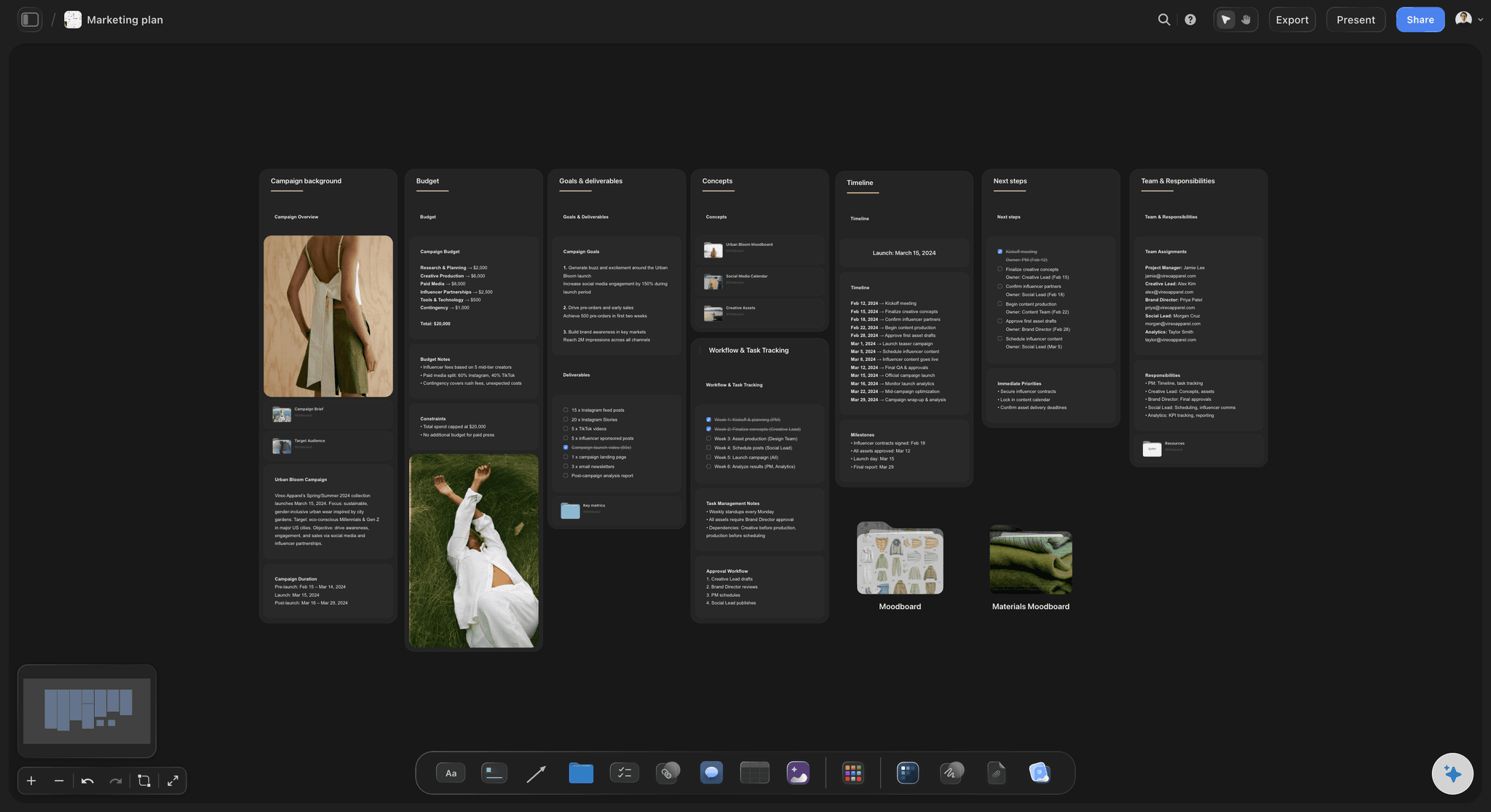
Storyflow Blueprints come with 200+ Tactics: expert frameworks embedded directly in your workspace
Blueprints with built-in Tactics
This is what separates Storyflow from every other tool in this comparison. Blueprints are complete project frameworks with expert Tactics embedded directly in the workspace.
Planning a YouTube video? The Blueprint includes retention hook formulas and script structure frameworks used by top creators. Running a brand campaign? Positioning tactics and audience mapping frameworks are built into the board. Writing a story? The Hero's Journey and AIDA Tactics are right there as you work. You don't watch a course and then try to remember it. The knowledge is in the workspace, applied to your actual project.
This is fundamentally different from ClickUp's approach. ClickUp assumes you already know what to do and helps you track it. Storyflow helps you figure out what to do using frameworks professionals trust.

Storyflow AI reads your current canvas board and any @-mentioned Tactics or documents for context-aware suggestions
Canvas AI that understands your project
Storyflow's AI reads everything on your current canvas board. Cards, notes, connections, structure. You can also @-mention specific Tactics and documents to give it deeper context. When you ask for help, the suggestions fit your specific project, not someone else's.
ClickUp Brain works on tasks and documents within its structured data. It does not read a visual canvas. It does not understand the creative context of a moodboard, a story outline, or a shot list in development. The AI experiences are genuinely different because the underlying context is different.
A visual home for film references
Filmmakers collect reference stills constantly, and in most stacks those references live in a folder nobody opens during planning. On a Storyflow board, reference images sit on the same canvas as the shot list and the script notes, and the AI reads all of it together. Start from the Pre-Production Board template and the visual language develops next to the plan, not in a separate app. ClickUp has no equivalent surface.
Who uses Storyflow:
- Filmmakers planning productions and developing visual language
- Marketers building campaigns with positioning frameworks
- YouTubers and content creators planning videos and channel strategy
- Writers developing stories with structure guidance built in
- Designers working through creative briefs and brand development
- Anyone who thinks visually and wants AI that helps with ideas, not just tasks
The Everything App Problem for Creatives
ClickUp's "one app for everything" promise is genuine. It really does cover an enormous range of work management features. The problem for creatives isn't that ClickUp tries to do too much.
The problem is that managing work and doing creative work require fundamentally different tools. ClickUp is optimized for the former.
Tasks assume decisions have already been made
Every ClickUp workflow starts with a task. Tasks have owners, deadlines, and statuses. That model is perfect when the creative work is already done and execution needs to be tracked.
But before any task exists, there's a period of genuine uncertainty. What is the campaign about? What's the story? What does the visual language feel like? Which approach will resonate? These are not tasks. They're questions. And ClickUp has no real vocabulary for them.
Creative teams using ClickUp tell a consistent story: they use it to track the work, but they still need another tool for the thinking. Figma for visual ideation. Miro for brainstorming. Notion for reference gathering. ClickUp becomes the destination where decisions get logged, not the place where they get made. Storyflow is built to be that other tool. The one where creative decisions actually happen.
ClickUp whiteboards solve the wrong problem
ClickUp added whiteboards to address this gap. On paper, it looks like a creative workspace. In practice, ClickUp whiteboards are a drawing tool bolted onto a project management platform.
They don't connect to ClickUp Brain's AI in any meaningful way. There are no embedded Tactics or frameworks. You cannot build a production plan, a campaign brief, or a story outline in a ClickUp whiteboard and then have the AI read it and help you develop it.
Storyflow's canvas is the primary product. The AI, the Tactics, the frameworks, and your visual references all connect to it. When you build something on a Storyflow canvas, everything else knows about it.
ClickUp Brain vs canvas AI
ClickUp Brain is a capable AI for its context. It summarizes task updates, generates status reports, helps write in Docs, and answers questions about your project data. For operations teams, it's genuinely useful.
For creative teams, the context it reads is the wrong one. It reads task lists and project data. Not the visual canvas where a filmmaker is developing a shot sequence. Not the positioning board where a marketer is working out a campaign angle. Not the story structure board where a writer is testing whether their second act works. The AI's usefulness is bounded by what it can see. Storyflow's AI sees the creative work in progress.
The learning curve problem
ClickUp is famous for its steep learning curve. The feature density that makes it effective for operations teams becomes friction for creative professionals who want to start thinking immediately.
Custom fields, views, spaces, folders, lists, tasks, subtasks, automations: understanding which of these structures fits your creative workflow takes real time. Many creative professionals spend more time configuring ClickUp than using it. Storyflow is open immediately. Pick a Blueprint. Start the canvas. The structure is already there in the form of Tactics that guide your thinking.

Storyflow's visual canvas connects ideas spatially, with Tactics and AI available directly in the workspace
Feature-by-Feature Comparison
Here's where each tool wins, loses, and ties.
Visual Canvas and Spatial Thinking
ClickUp: Whiteboards exist but are a secondary feature. They support basic sticky notes, shapes, and drawing. They're not connected to the AI or the broader workspace in meaningful ways. No Tactics, no embedded frameworks, no visual reference workflow.
Storyflow: The visual canvas is the primary product. Cards connect spatially. The AI reads what's on the canvas. Blueprints with Tactics give the canvas structure and expertise. Everything in Storyflow connects back to the canvas. For visual thinkers, there's no comparison.
AI Capabilities
ClickUp: ClickUp Brain is a real AI product. It summarizes tasks, generates text in Docs, answers questions about project data, and helps automate workflows. The catch: it's $7/member/month extra on top of any paid plan. A 5-person team pays an additional $35/month just for AI. It also cannot read a visual canvas.
Storyflow: Canvas-aware AI included in the Pro plan. It reads everything on your current canvas board, plus any Tactics and documents you @-mention in the chat. Suggestions connect to your actual project context, not generic prompts. No per-user AI add-on cost.
Blueprints and Tactics vs Empty Templates
ClickUp: Templates exist for common project types. They're empty structures. A marketing campaign template gives you a list of tasks with placeholder names. You bring all the strategic frameworks. You decide what each phase means.
Storyflow: 200+ Tactics across Blueprints for creative and strategic work. The Hero's Journey Tactic walks you through story structure with the theory and application for each step. The AIDA Tactic embeds the copywriting framework directly in the canvas. You're learning proven methodologies while applying them. Not starting from scratch every time.
Task Management and Project Tracking
ClickUp: Best in class. Unlimited tasks, custom fields, multiple views, automations, dependencies, time tracking, and dashboards. If you need a serious task management system, ClickUp is genuinely excellent. This is its core strength.
Storyflow: Not a task manager. Storyflow is for creative development, not execution tracking. If your team needs sprint planning, time logging, and progress dashboards, Storyflow is not that tool. This is an honest gap. ClickUp wins this category clearly.
Film References and Moodboards
ClickUp: No visual reference workflow. Images live as attachments on tasks. No moodboarding, no shot planning surface. Not in the product's scope.
Storyflow: Reference stills, moodboards, and shot lists live directly on the canvas next to the plan, and the AI reads them as project context. A way of working that simply doesn't exist in ClickUp.
Collaboration
ClickUp: Strong collaboration. Multiple users can work simultaneously. Comments on tasks, mentions, and notifications are well-built. Real-time co-editing in Docs. This is core to ClickUp's design.
Storyflow: Unlimited collaboration on shared boards is included on every plan, Free included. The Max plan ($39/month annual) adds a team workspace with roles and permissions for teams that need admin structure. For large teams that need deep async communication threading across tasks, ClickUp is more comprehensive.
Integrations
ClickUp: Hundreds of integrations. Slack, Google Drive, GitHub, Salesforce, HubSpot, Zapier, and more. If you're running a tech or ops stack, ClickUp likely connects to everything in it.
Storyflow: Growing integration library focused on tools creatives use. Browser extension for capturing inspiration. Cloud storage connections. Not at ClickUp's breadth. If deep integration with a large existing tech stack is a requirement, ClickUp has the edge.
Comparison Table
The full side-by-side:
| Feature | Storyflow | ClickUp |
|---|---|---|
| Visual canvas | Core product, AI-connected | Secondary whiteboard feature |
| Free plan | Paid-only during early access; Free plan launches before end of 2026 | Unlimited tasks (no AI) |
| AI assistance | Canvas-aware, included (no per-user add-on) | Task-focused, $7/user/mo add-on |
| Tactics / Frameworks | 200+ Tactics with expert guidance | Empty task templates only |
| Film references / moodboards | On-canvas, AI-readable | Not available |
| Task management | Basic project organization | Best-in-class with 15+ views |
| Automations | Limited | 100+ automation triggers |
| Integrations | Growing, creator-focused | 1,000+ integrations |
| Collaboration | Shared boards on all plans; Max adds roles | All paid plans |
| Learning curve | Low (Blueprints guide you in) | High (extensive feature configuration) |
| Built for creatives | Yes (filmmakers, marketers, writers) | General purpose (operations-first) |
| Pricing | From $7.99/mo flat (Plus tier) | $7-19/user/mo + $7/user for AI |
What the table shows:
These tools serve genuinely different functions. ClickUp dominates task management, automations, and integrations. Storyflow dominates visual canvas, Tactics, AI quality for creatives, and pricing for teams.
The question isn't which is better overall. It's which is right for what you're trying to do. If you need to track work, ClickUp. If you need to develop creative work, Storyflow. Many creative teams end up needing both. At Storyflow's pricing, using it alongside ClickUp is cheaper than upgrading ClickUp's AI for your whole team.
Plan the project before you track it
Describe the campaign, film, or launch and Storyflow's AI builds the project plan on a visual canvas, so the thinking is done before the first task ever reaches ClickUp.

Pricing Comparison
This is where the choice gets stark for teams.
ClickUp Pricing:
| Plan | Price | What You Get |
|---|---|---|
| Free | $0 | Unlimited tasks, basic features, no AI |
| Unlimited | $7/user/month (annual) | Unlimited storage, integrations, dashboards |
| Business | $12/user/month (annual) | Advanced automations, timelines, workload |
| ClickUp Brain (AI) | +$7/member/month | AI add-on on top of any paid plan |
ClickUp charges per user, then charges again per user for AI. That's two per-user fees stacked on top of each other.
Storyflow Pricing:
| Plan | Price | What You Get |
|---|---|---|
| Free (launches before end of 2026) | $0 | Unlimited boards, unlimited projects, basic AI usage, 20 file uploads |
| Plus | $7.99/month (annual) | Full 200+ Blueprint Tactics, increased AI, unlimited file uploads |
| Pro | $14/month (annual) | Adds AI image generation and 20× more AI than Plus |
| Max | $39/month (annual) | 40x more AI, AI image generation, team workspace with roles and permissions |
Every Storyflow plan is a flat rate per account, not per user. Adding collaborators never raises the bill.
The math for individuals:
ClickUp Unlimited: $7/month. No AI. To add Brain: $14/month total. Per person.
Storyflow Plus: $7.99/month flat annual. AI included. Full 200+ Tactics library included. Unlimited projects included. Storyflow Pro: $14/month flat annual. Adds AI image generation and 20× more AI than Plus. For a solo user needing both AI capabilities and visual creative workspace, Storyflow is comparable in price and dramatically more capable for the creative work.
The math for teams:
This is where ClickUp's pricing structure becomes painful.
- 5-person team on ClickUp Business + Brain: ($12 + $7) x 5 = $95/month. $1,140/year. On Storyflow Max (the team tier): $39/month flat. $468/year. Savings: $672/year.
- 10-person team on ClickUp Business + Brain: ($12 + $7) x 10 = $190/month. $2,280/year. On Storyflow Max: still $39/month. $468/year. Savings: $1,812/year.
- 20-person team on ClickUp Business + Brain: ($12 + $7) x 20 = $380/month. $4,560/year. On Storyflow Max: still $39/month. $468/year. Savings: $4,092/year.
The gap becomes absurd at team scale. ClickUp's per-user AI pricing punishes growth. Adding a new team member adds to your AI bill. Storyflow's flat pricing means collaboration doesn't cost more.
The filmmaker math:
A filmmaker using ClickUp for project tracking still needs somewhere for visual development: moodboards, reference stills, shot lists, script structure. That usually means a second tool and a folder of screenshots.
ClickUp Business + Brain (solo): $19/month = $228/year. No visual canvas AI. No Tactics. Visual development still happens elsewhere. Storyflow Pro: $168/year (annual). Canvas AI included. Production Tactics included. References, shot list, and plan on one board. You spend $60/year less and the visual half of the work finally has a home.
What you're actually paying for:
ClickUp: A task management system, then a separate AI charge per person to get intelligence on top of it. The creative workspace you still need is not included.
Storyflow: A visual creative workspace with AI and 200+ Tactics at a flat price. If you're a creative team, you likely still want ClickUp for task tracking. The good news: adding Storyflow Max at $39/month for your whole team costs about what two ClickUp Business + Brain seats cost, and a solo creator on Pro pays $14/month flat.
Who Should Choose ClickUp
ClickUp is the right call in specific situations. Let's be direct about when.
You run a task-heavy operations team
Sprint planning, resource allocation, time tracking, KPI dashboards: if these are your primary problems, ClickUp is genuinely excellent. It's built for operational complexity. No other tool in this category handles task management with the same depth. If your team's blocking problem is execution tracking rather than creative development, ClickUp is the right choice.
You need to consolidate a large tech stack
ClickUp integrates with over a thousand tools. If you're paying for five separate tools that overlap with what ClickUp covers, the consolidation is real. Project tracking, docs, simple wikis, goal setting, and time tracking all live in one place. For ops-heavy teams with budget spent on redundant tools, ClickUp can simplify the stack.
You're in software development
Sprint boards, GitHub integrations, bug tracking, feature roadmaps: ClickUp has purpose-built workflows for software development that Storyflow doesn't try to replicate. Dev teams who need Jira-like capabilities with a more modern interface find ClickUp very capable.
You've invested in building ClickUp processes
Teams who have spent months building custom fields, automations, and integrations in ClickUp have real switching costs. If the current setup is working for the team's operational needs, migrating is painful. The right answer might be to add Storyflow as a lightweight creative layer rather than replace ClickUp entirely.
Be honest about the tradeoffs:
Choosing ClickUp as your only workspace means accepting a whiteboard that's disconnected from your AI, an AI that can't read your visual canvas, no built-in frameworks for creative work, and per-user pricing that compounds with every hire. For creative professionals, ClickUp handles one phase of the work well: execution. The phase where you develop ideas, test creative directions, and build on expert frameworks needs something else.
Who Should Choose Storyflow
Storyflow wins for creative professionals whose work starts on a canvas, not in a task list.
You develop ideas before managing them
Your work has a creative development phase. A campaign concept needs to be built out before tasks get assigned. A video script needs to be structured before a production schedule exists. A brand identity needs to be explored before a design brief gets written. Storyflow is built for this phase. Blueprints with Tactics give you expert frameworks to develop ideas against. The AI reads what's on your canvas and helps you develop it further. ClickUp doesn't have a good answer for this phase.
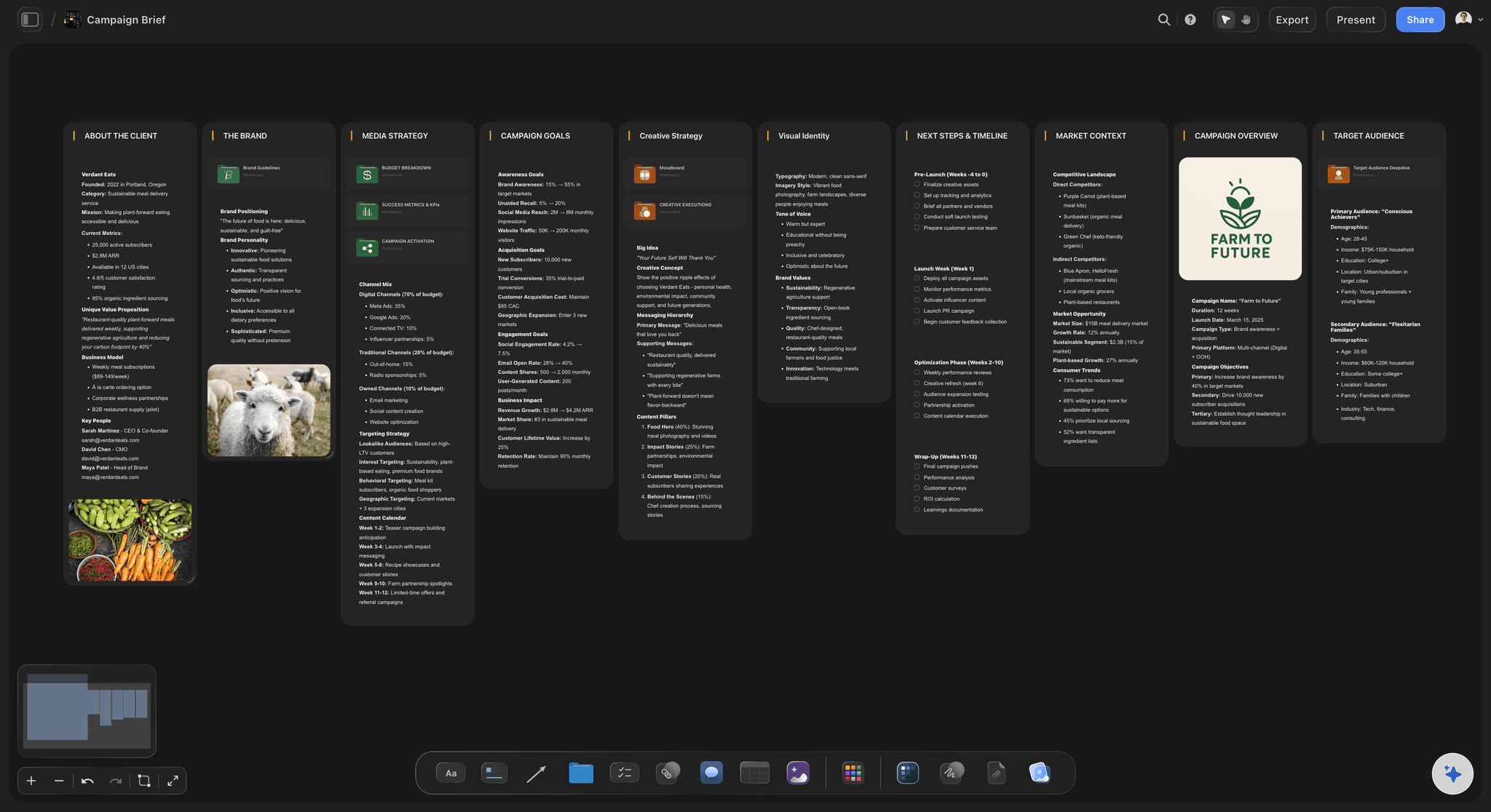
A campaign brief built in Storyflow, with Tactics embedded in the canvas and AI reading the full project context
You want to learn frameworks while doing real work
You're not a specialist with every methodology memorized. You want to get better at storytelling, marketing, or filmmaking while working on actual projects. Storyflow's Tactics embed proven frameworks into your workspace. You're not watching a course then trying to apply it to an empty template. The framework is there when you need it, connected to the work you're doing.
You're a filmmaker or visual storyteller
If you're currently stitching together film references across folders, tabs, and a generic workspace, Storyflow puts them on the board where the planning happens. Production Blueprint Tactics give you shot planning frameworks, and templates like the Shotlist template mean the structure is there before the first reference lands. The AI reads your visual development boards and helps you develop your project's language. ClickUp has never been a filmmaker's tool.
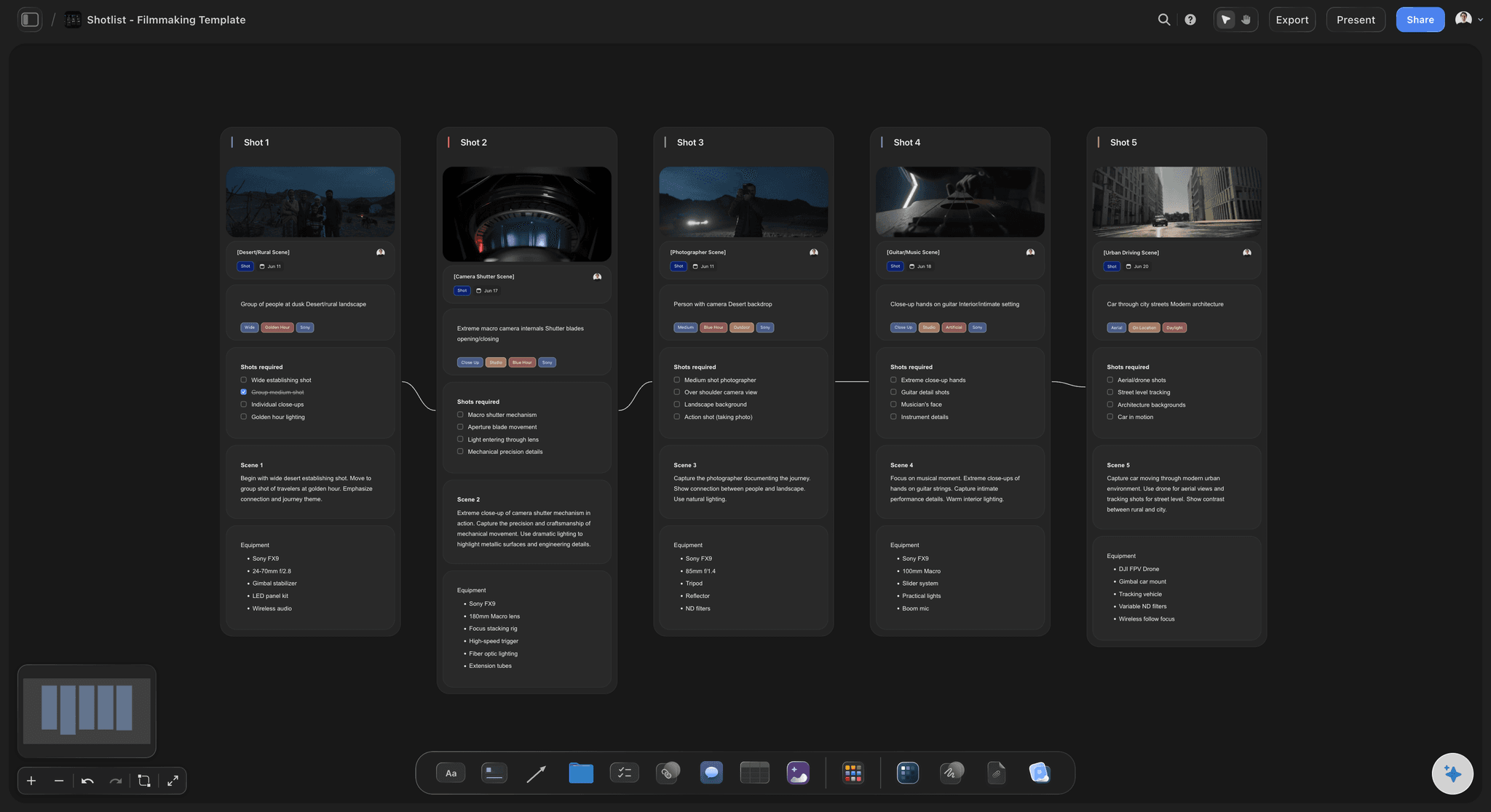
A Storyflow shotlist board: references, shots, and planning live on the same canvas the AI reads
Your team has grown beyond solo
Once you're paying for a team, ClickUp's per-user pricing becomes a real budget conversation. Storyflow's flat pricing means collaboration costs nothing extra. Adding a contractor to a campaign board, bringing a director onto a production plan, looping in a writer for a content project: none of these increase your bill. For small creative teams and agencies managing multiple clients, flat pricing is a meaningful structural advantage.
You want to start creating without configuration
Open Storyflow, pick a Blueprint, and you're working with expert frameworks immediately. No custom fields to configure. No views to set up. No folder and space hierarchies to design. The Tactics guide you in. Creative momentum is not interrupted by tool setup.
You think spatially, not in task lists
Your ideas don't want to be tasks. They want to live on a canvas where you can move them, connect them, and build relationships between them. Storyflow's canvas is the primary working surface. ClickUp's whiteboard is an afterthought. If your best thinking happens visually, that difference matters every day.
Use Case Comparisons
Same professional. Same project. Different tools. Here's what each experience looks like.
For Filmmakers
With ClickUp: Create a space for your project. Set up tasks for each production phase. Assign team members. Track progress. ClickUp handles the logistics of who does what and when. For pre-production visual development, you're opening ShotDeck in another tab for references, Miro for moodboarding, and a separate doc for your shot list. Three tools. No connection between them. No AI that reads all of it.
With Storyflow: Open the Film Production Blueprint or the Pre-Production Board template. Visual development, shot planning, and reference stills live in the same workspace. Drop references directly onto your production board. Use Tactics for visual language development and script structure. AI reads your current canvas and helps you develop your concept. Everything connected in one place.
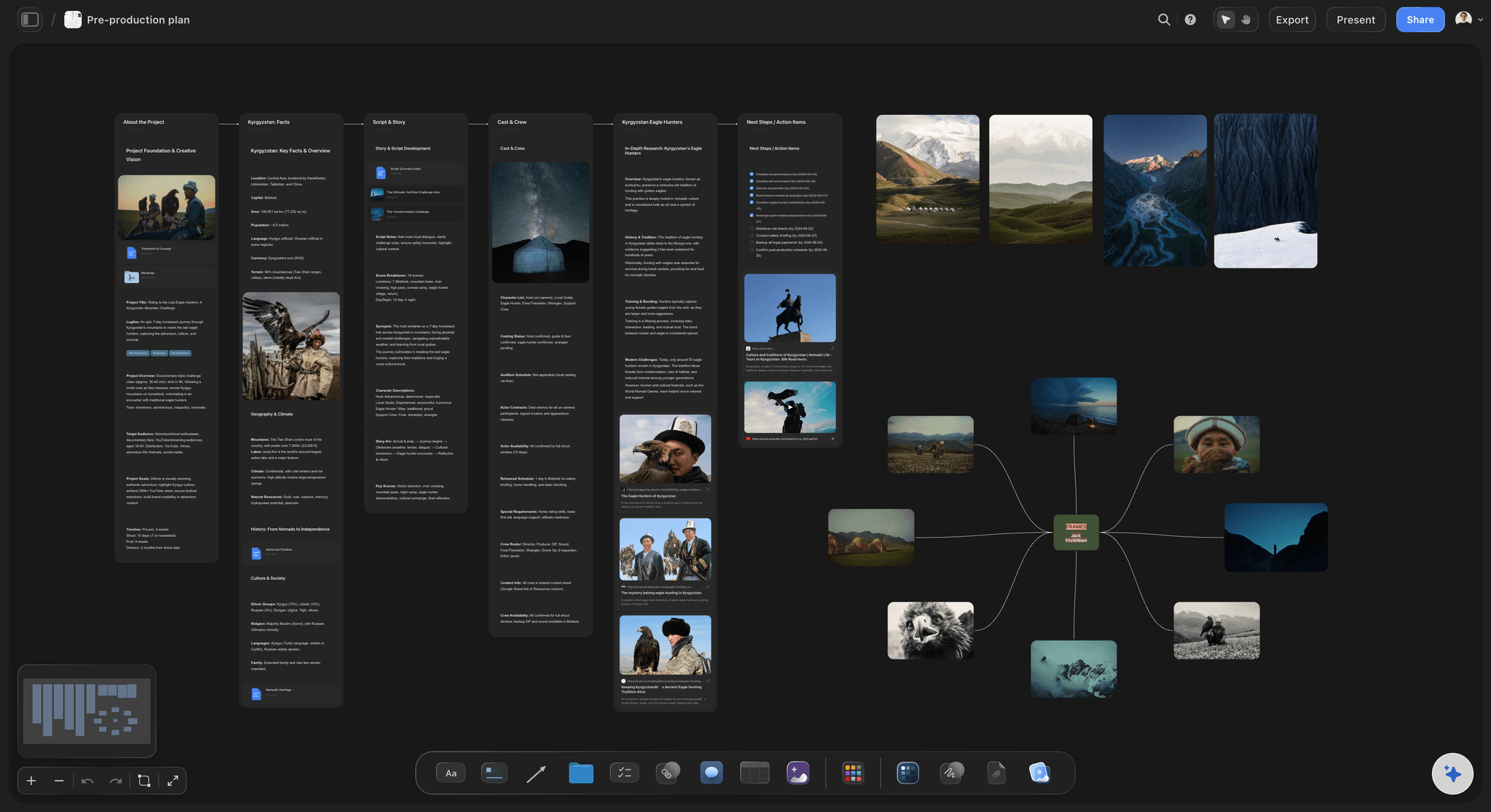
Pre-production planning in Storyflow: visual references, shot frameworks, and AI in one connected workspace
Winner: Storyflow (on-canvas references, Tactics, and canvas AI vs task lists and separate tools)
For Marketers
With ClickUp: Create a project for the campaign. Break it into tasks: brief, creative, copy, design, launch. Track who owns what. Add due dates. The execution layer is excellent. But the strategic development phase, working out the positioning, the audience insight, the creative angle, happens somewhere else. A separate doc. A whiteboard session. Notes from a meeting.
With Storyflow: Open the Campaign Blueprint or start from the Marketing Campaign template. Positioning frameworks and audience mapping Tactics are built into the workspace. Work through the strategy visually with the AI reading your canvas and surfacing gaps in the logic. Build the brief, develop the creative concept, and document the decisions all in one place. By the time you move to ClickUp for execution tracking, the strategic brief is already solid.
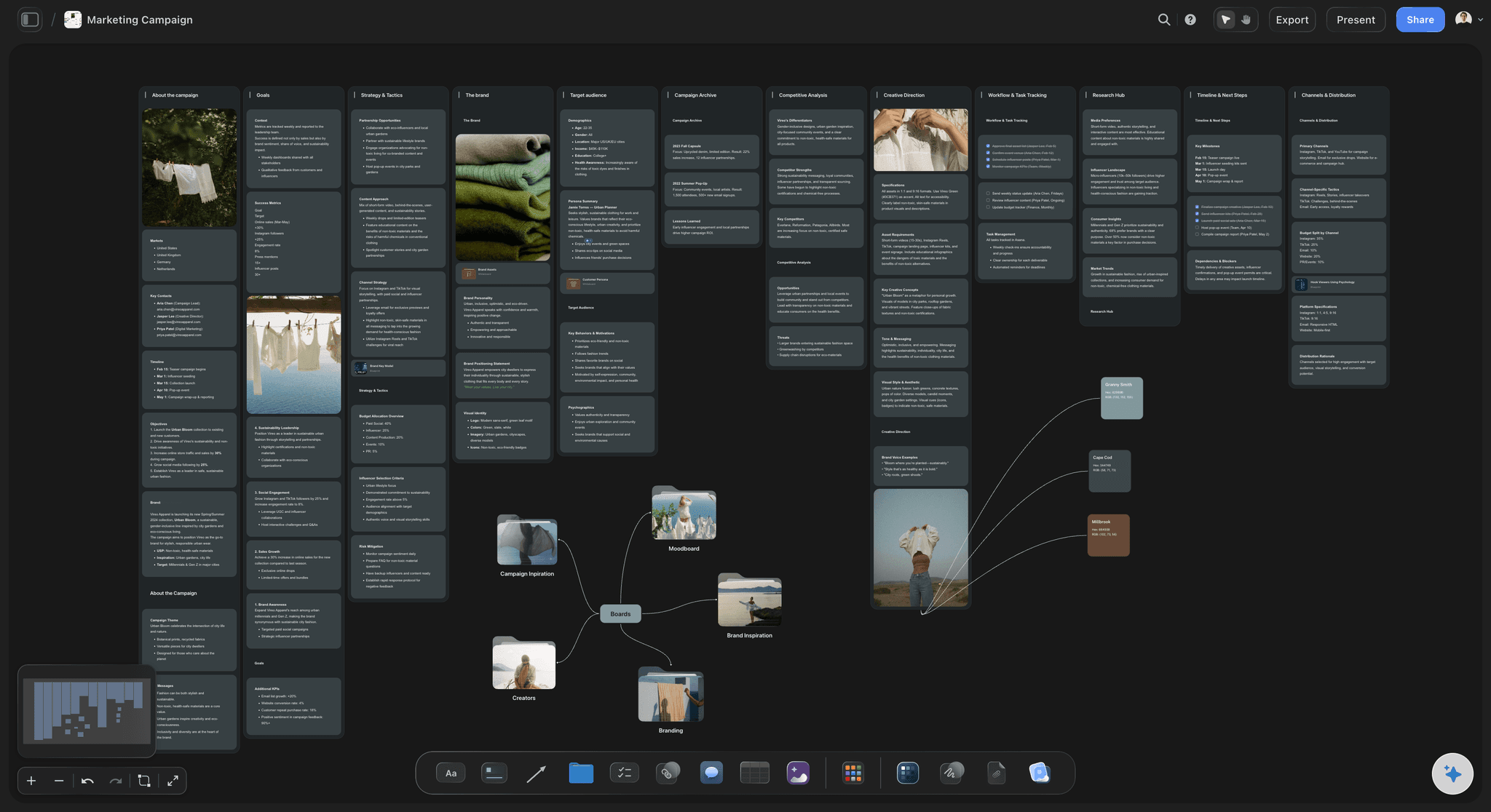
Campaign development in Storyflow: positioning frameworks and AI that reads the canvas to identify strategic gaps
Winner: Storyflow for creative strategy, ClickUp for execution tracking
For Writers
With ClickUp: You can write in ClickUp Docs and manage chapter tasks on a board. It works at a basic level. But story development, working through character arcs, testing structure, finding the emotional logic, doesn't fit the task model. You end up writing in a doc, organizing in another app, and losing the spatial connection between ideas.
With Storyflow: Open the Story Planning Blueprint or the Story Outline template. Hero's Journey and AIDA Tactics are available for structure guidance. Build character profiles, map the plot spatially, and test the emotional arc on the canvas. The AI reads your story structure and helps you identify where the logic breaks. Storyflow is built for the kind of associative thinking that writing requires.
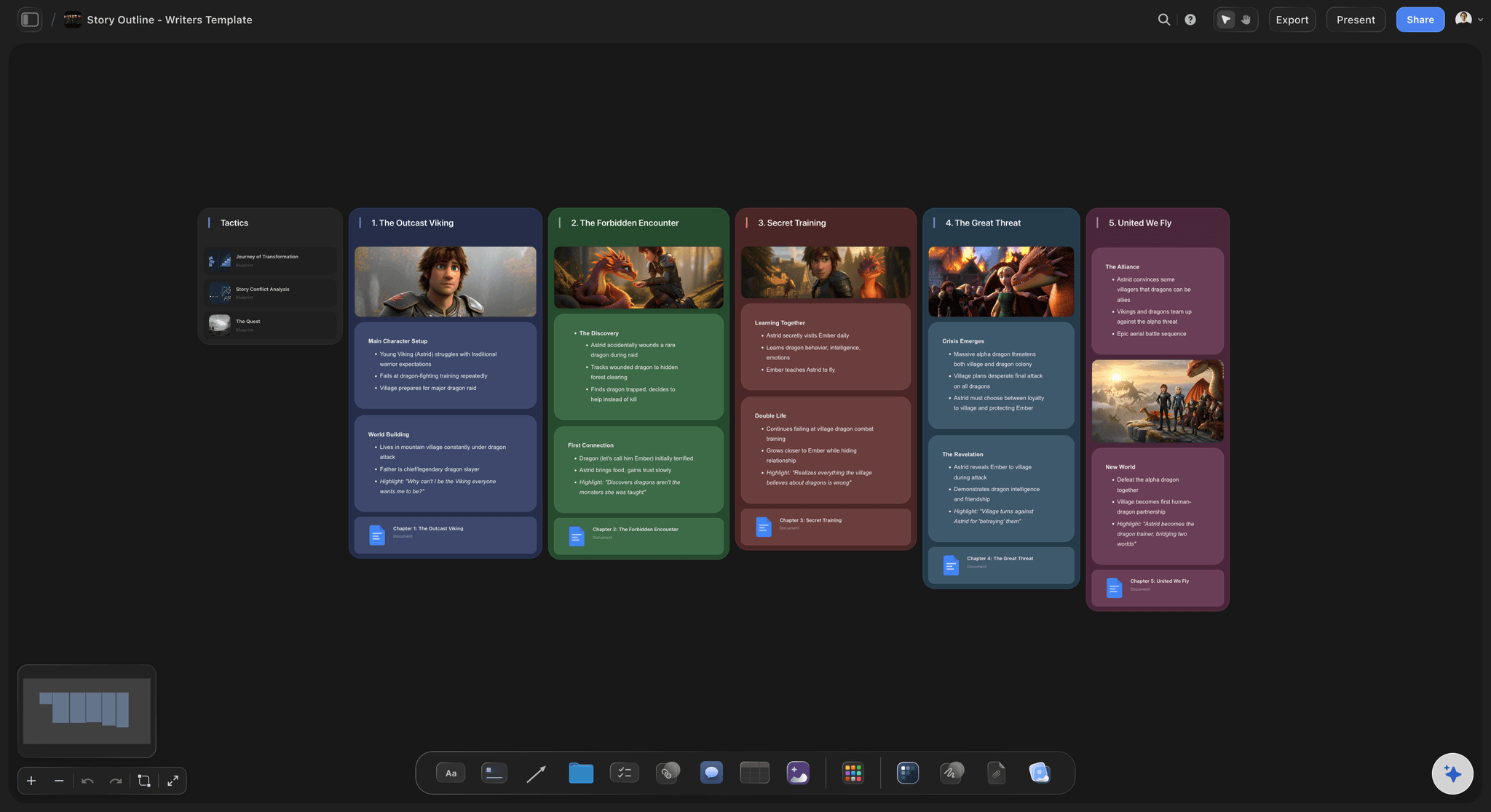
Story development in Storyflow: structural Tactics, character profiles, and AI that follows your narrative logic
Winner: Storyflow (narrative frameworks and spatial thinking vs linear task tracking)
For Operations and Project Teams
With ClickUp: This is ClickUp's home territory. Custom fields, multiple views, automations, time tracking, goal setting, and dashboards give operations teams exactly what they need. Sprint boards, resource allocation, workload visualization: ClickUp handles all of it with depth and flexibility that Storyflow doesn't attempt to match.
With Storyflow: Storyflow can handle basic project organization on a visual canvas. For straightforward creative project structures, it works. But it's not trying to be ClickUp. No time tracking. No Gantt charts. No workload dashboards. Teams that need serious project management infrastructure should use ClickUp for that layer.
Winner: ClickUp (purpose-built for operations vs general creative workspace)
FAQ
Is Storyflow a ClickUp alternative?
Partially. Storyflow replaces ClickUp for the creative development phase of a project: ideation, visual thinking, building on expert frameworks, and developing ideas with canvas AI. It does not replace ClickUp for task management, sprint tracking, or operations workflows. Many creative teams use both: Storyflow for developing the work, ClickUp for executing it.
Is Storyflow free?
Not during early access. Storyflow is paid-only right now: Plus is $7.99/month (annual) and includes the full 200+ Tactics library; Pro is $14/month (annual) and adds AI image generation and 20× more AI than Plus. All plans are flat rates, not per user. Max is $39/month (annual) with 40x more AI and a team workspace with roles and permissions. A Free plan with unlimited boards, unlimited projects, unlimited collaboration on shared boards, basic AI usage, and 20 file uploads launches before the end of 2026, and anyone a paid member invites to a board joins free today.
Does ClickUp have AI?
Yes, ClickUp Brain is a real AI product. It works on tasks, Docs, and project data. It can summarize updates, help write content in Docs, and answer questions about your projects. The limitation for creative work: it does not read a visual canvas. The add-on costs $7/member/month on top of any paid ClickUp plan. For a 10-person team, that's $70/month extra for AI alone.
What are Storyflow Tactics?
Tactics are expert frameworks embedded directly in Storyflow's Blueprints. Examples include the Hero's Journey for story structure, AIDA for copywriting, and Retention Hooks for content creation. Each Tactic includes the theory and application guidance for every step, so you learn the framework while using it on a real project. Plus, Pro, and Max all include the 200+ Story blueprints. Free does not include the blueprint library.
How does ClickUp compare to Storyflow on pricing for teams?
Significantly different. A 10-person team on ClickUp Business with Brain pays ($12 + $7) x 10 = $190/month, or $2,280/year. The same team on Storyflow Max, the team tier, pays $39/month flat, or $468/year, no matter how many people join. That's $1,812/year saved, and Storyflow is specifically built for creative work while ClickUp is general-purpose project management.
Can I use ClickUp and Storyflow together?
Many creative teams do exactly this. Use Storyflow for the creative development phase: ideation, concept development, visual planning, and building on expert frameworks. Then move to ClickUp when execution needs tracking. Because Storyflow charges a flat monthly rate, adding it to an existing ClickUp stack costs less than adding one person to ClickUp Business with Brain.
Does ClickUp have Blueprints or creative frameworks?
ClickUp has templates for project types, but they're empty task structures without embedded guidance. There's no equivalent to Storyflow's Tactics, which provide theory, analysis, and application for each step of a framework. ClickUp assumes you already know what to do. Storyflow's Tactics embed what experts know directly into the workspace.
Is ClickUp good for filmmakers?
ClickUp handles production logistics: task assignments, deadlines, and crew coordination. It does not handle the creative development side of filmmaking. No moodboarding surface, no visual language development tools, no shot planning frameworks. Filmmakers typically use ClickUp for production scheduling and a separate tool for everything visual. Storyflow was designed with filmmakers' creative workflow in mind.
Which is better for content creators?
Storyflow. Content creators need to develop concepts, structure scripts, plan visuals, and build their creative system, all before a single task gets created. Storyflow's Blueprints include Tactics for YouTube hooks, content strategy, and audience development. The AI reads your canvas and helps develop your ideas in real time. ClickUp is where you track the production schedule after the creative work is done.
What is the difference between ClickUp's whiteboard and Storyflow's canvas?
ClickUp's whiteboard is a drawing tool for basic diagrams and visual notes. It's not connected to ClickUp Brain's AI, and there are no expert frameworks embedded. Storyflow's canvas is the core product. The AI reads everything on the canvas. Tactics with embedded frameworks structure the space. Visual references sit on the same boards as the production plan. One is a feature. The other is a platform.
Does Storyflow have task management?
Basic project organization on the canvas, yes. Dedicated task management with Gantt charts, sprints, time tracking, and automations, no. Storyflow is built for creative development, not execution tracking. If your team's primary need is managing deadlines and assigning tasks, ClickUp is the better fit. If your primary need is developing the work that produces those tasks, Storyflow is built for that phase.
Conclusion
ClickUp is genuinely impressive engineering. The feature breadth is real, the task management is excellent, and for operations teams, it's one of the best tools available. That's not faint praise. ClickUp does what it was built to do extremely well.
The problem for creative professionals isn't that ClickUp is bad. It's that ClickUp is built for a different phase of work. Managing work. Executing decisions. Tracking progress. The creative phase, where ideas get developed, visual languages get built, story structures get tested, and campaign angles get worked out, isn't task-shaped. ClickUp doesn't have the right vocabulary for it.
Storyflow was built specifically for that phase. The canvas where creative thinking happens. Blueprints that embed expert frameworks so you learn while doing. AI that reads your current board and responds to your actual project context. Reference stills and shot lists on the same board as the plan. Flat pricing that doesn't multiply with every team member.
- Choose ClickUp if you run an operations team, need sprint management or deep project tracking, or want hundreds of integrations with an existing tech stack. It's the best task management tool available.
- Choose Storyflow if you're a filmmaker, marketer, content creator, writer, or designer who needs a workspace for the creative development phase. Blueprints with Tactics, canvas AI, and flat pricing make it purpose-built for how creative professionals actually work.
- Use both if your team has a real creative development phase before execution begins. Storyflow Max at $39/month flat for the entire team costs about what two ClickUp Business + Brain seats cost, and a solo creator can run Pro at $14/month.
The best creative work doesn't start in a task list. It starts on a canvas, with the right frameworks, and with an AI that understands what you're building.
If that's the phase your team struggles with, Storyflow is the tool worth trying.
Related Reading
Compare the top project planning tools for creative and ops teams
How Storyflow compares to Notion for visual creative work
Visual workspace comparison for teams and creatives
The top workspaces for creative professionals in 2026
Table of Contents
Templates to check out for this topic


Planning and project templates you can use in Storyflow
Plan a launch, a sprint, or a whole project on a visual board the team can see at once. Open one of these templates and start from real structure.


See Storyflow in Action
A visual AI workspace where every feature lives inside one canvas. No tab-switching, no context lost.
Build your entire board from a single message
Type what you need in the AI chat at the bottom of your canvas. The AI adds cards, headings, and structure directly onto your board.
Use expert frameworks as AI context
Type @ in the AI chat and choose any Tactic. The AI tailors every response to that framework instead of giving generic advice.
Turn your board into a mind map in seconds
Ask the AI to restructure your canvas as a mindmap. It connects your ideas into a visual hierarchy so you can see how everything relates.
Why Storyflow Exists
Storyflow actually began as a personal tool while working on creative and research projects.
We kept running into the same problem: ideas were scattered everywhere: notes, documents, and whiteboards.
Nothing helped us see how everything connected.
So we started building a workspace designed around how ideas actually grow.
→ Read how Storyflow was createdSara de Klein
Head of Product at Storyflow
Published: April 8, 2026
Extremely simple, seriously capable


See how easy it is to get started
Watch a real project come together, from a blank board to a finished plan, clicked through step by step.
Start creating with AI and become more productive
Transform your creative workflow with AI-powered tools. Generate ideas, create content, and boost your productivity in minutes instead of hours.