The 12 Best Visual Project Management Tools in 2026 (Tested for Creative Teams)
Most visual PM tools show you where tasks stand. We tested 12 to find which ones show you whether the project itself is healthy. In 2026, the difference between a visual interface and genuine project understanding has never been larger.

Category
Strategy & Planning
Author

Sara de Klein
Head of Product at Storyflow
Topics
2026-05-16
•
20 min read
•
Strategy & Planning- best visual project management tools 2026
- visual project management software
- AI visual project management
What are the best visual project management tools in 2026?
The best visual project management tool in 2026 is Storyflow for creative teams, because its AI reads your full project canvas plus up to 1 Story blueprint and 3 documents you @-mention before it responds, turning project management into project understanding rather than task status tracking. The other top picks are Monday.com (best for large agency teams that need workload management), Miro (best for visual project kickoffs), and ClickUp (best for multi-view flexibility). Most project management tools track where work stands. Creative teams need something different: a way to see what the work is actually about, before it can be tracked.

All 12 Visual Project Management Tools, Ranked
- Storyflow: best overall AI visual project canvas for creative teams
- Monday.com: best visual dashboards for agencies and marketing teams
- Miro: best infinite canvas for project mapping and kickoffs
- ClickUp: best multi-view project management
- Wrike: best agency project management with proofing
- Notion: best database-driven kanban and board views
- Asana: best visual timeline and portfolio views
- Trello: best kanban-first visual project tracking
- FigJam: best design-team visual project planning
- Basecamp: best visual project overview for distributed teams
- Whimsical: best visual diagramming and lightweight project maps
- Linear: best visual project tracking for product teams
Full disclosure: Storyflow, which we rank #1, is our own product. We rank it #1 for the visual, creative half of project management, seeing what the work is about, and we say plainly where the execution trackers win: Monday.com and ClickUp beat it on workload balancing and automation depth for large teams, and Asana and Wrike own portfolio and approval routing. We link out to every tool so you can judge for yourself.
Quick Comparison: Best Visual Project Management Tools
These four cover the choice most creative teams are making: a visual canvas where the plan and the work live together versus a workload-and-automation execution tracker.
| Tool | Best For | AI Features | Price |
|---|---|---|---|
| Storyflow | Visual PM for creative teams | Canvas-aware AI (reads the whole board) | $7.99 mo annual (free plan late 2026) |
| Monday.com | Large agency teams and workload | Assistive AI automations | Free / $9 seat mo |
| Miro | Visual project kickoffs | Assistive whiteboard AI | Free / $8 user mo |
| ClickUp | Multi-view flexibility | ClickUp Brain (paid add-on) | Free / $7 user mo |
How We Evaluated: Best Visual Project Management Tools 2026
We tested each tool using three real creative project types: a multi-channel marketing campaign, a content production sprint, and an agency project kickoff with external stakeholders. We ran each project through every tool for two to four weeks, not just a feature walkthrough.
Ease of use. We measured how long a first-time user needed to get a working project structure in place. Tools that required tutorial videos before running a real project scored lower. We also looked at whether the tool's default structure matched how creative teams actually think about work.
Visual view depth. This criterion carried the most weight (30%) because it is the primary capability gap between tools in this category in 2026. We tested kanban boards, timeline views, whiteboard layers, gallery views, and cross-project dashboards. The question: does the visual show you something the list view doesn't?
Collaboration. We ran live co-editing sessions with two to five participants and tested comment flows, stakeholder access, and approval handoffs. We paid attention to whether feedback landed in context or disappeared into a separate thread.
Integrations. We tested connections to Slack, Google Drive, and the tools each audience already uses. We noted which integrations required no-code setup vs. paid automation chains.
Pricing and value. We calculated the annual cost for a 10-person team on each tool's most commonly used paid tier, including AI add-ons where applicable.
Every tool on this list was tested with real project work, not feature checklists pulled from marketing pages.
Quick Picks by Use Case: Best Visual Project Management Tools 2026
Best Overall: Storyflow AI visual workspace where the project brief, canvas, AI conversations, and Story blueprint frameworks live together. The AI reads your full project board before responding, not just the current task. No other tool in this list treats project context as the primary input to AI assistance.
Best for large agency teams: Monday.com Visual dashboards, workload balancing across team members, and automation depth built for marketing teams managing multiple concurrent campaigns. The workload view alone justifies the Pro upgrade for teams managing ten or more people across multiple accounts.
Best for visual project kickoffs: Miro Infinite canvas handles large-team workshops and project mapping before execution begins. Unlimited users on the free tier (3-board limit). Strong template library for kickoffs, retrospectives, and design sprints.
Best for multi-view flexibility: ClickUp Kanban, Gantt, timeline, whiteboard, and mind map views on the same project data without data migration between tools. AI Brain is a separate add-on at $9/member/month.
Best for design-adjacent teams: FigJam Visual project planning embedded in the Figma workspace. For design-led teams, it removes a context switch that Miro requires.
Best for lean budgets: Trello Unlimited boards and cards on the free tier. The fastest way to get a small team visually tracking work with no credit card.
Best for agencies with client approvals: Wrike Proofing, approval routing, and Gantt views in one platform. The right choice for agencies where client sign-off on creative deliverables is the workflow bottleneck.
Storyflow's canvas holds your project brief, visual map, AI conversations, and reference materials in one workspace rather than split across a project tool, a doc tool, and a chat thread. See how a project looks in Storyflow
Best Visual Project Management Tools 2026: Market Context
The frustration creative teams bring to this search: "I can see the task list but I cannot tell whether the project is healthy." A Gantt row tells you when the brief is due. It does not show you that the brief rests on a positioning assumption nobody has validated yet.
The market in 2026 divides into three camps. Task-first tools (Asana, ClickUp) added visual layers on top of list-and-row architectures. Visual-first collaboration platforms (Miro, FigJam) handle the planning and alignment phase but hand off to separate tools for execution. Hybrid platforms (Monday.com, Notion) built visual interfaces from the start but still treat tasks as the core unit of work.
The question that changes the right answer: are you managing tasks in a visual way, or managing creative work that needs to be understood before it can be tracked? If the former, Monday.com or ClickUp covers the ground well. If the latter, Storyflow is solving a different problem than the rest of this list.
Comparison Table: Best Visual Project Management Tools 2026
The table below replaces the standard AI Features column with Visual View Depth because visual richness is the primary capability gap in this category.
| Tool | Best For | Starting Price | Free Plan | Visual View Depth (★/5) | Rating (/10) |
|---|---|---|---|---|---|
Storyflow | AI visual project canvas for creative teams | $7.99/month | Coming late 2026 (invited collaborators join free now) | ★★★★★ | 9.3 |
Monday.com | Visual dashboards for agencies and marketing teams | $9/seat/month | Yes (2 seats) | ★★★★★ | 9.0 |
Miro | Infinite canvas project mapping and kickoffs | $8/user/month | Yes (3 boards) | ★★★★☆ | 8.7 |
ClickUp | Multi-view project management | $7/member/month | Yes | ★★★★☆ | 8.5 |
Wrike | Agency project management with proofing | $10/user/month | Yes | ★★★★☆ | 8.3 |
Notion | Database-driven kanban and board views | $10/user/month | Yes | ★★★☆☆ | 8.2 |
Asana | Visual timeline and portfolio views | $10.99/user/month | Yes | ★★★☆☆ | 8.0 |
Trello | Kanban-first visual project tracking | $5/user/month | Yes | ★★★☆☆ | 7.8 |
FigJam | Design-team visual project planning | $3/editor/month | Yes | ★★★☆☆ | 7.5 |
Basecamp | Visual project overview for distributed teams | $15/user/month | No | ★★☆☆☆ | 7.3 |
Whimsical | Visual diagramming and lightweight project maps | Free (limited) | Yes | ★★☆☆☆ | 7.2 |
Linear | Visual project tracking for product teams | $10/member/month | Yes | ★★☆☆☆ | 7.0 |
Rating criteria: Visual view depth was weighted most heavily (30%) because it is the primary capability gap between tools in this category in 2026. A tool that provides genuinely rich visual project understanding scored higher than one that adds a kanban toggle to a task list.
Weighted scorecard: Visual view depth (30%), ease of use (25%), collaboration (20%), integrations (15%), pricing and value (10%).

A launch project in Storyflow: tasks, owners, references, and AI conversations connected on one canvas instead of split across separate tools
Detailed Reviews: Best Visual Project Management Tools 2026
1. Storyflow: AI Visual Workspace Built for Project Thinking
Storyflow is not a project management tool with an AI assistant added on. It is an AI workspace where the project structure itself becomes the context the AI works from. When you build a campaign canvas in Storyflow, every card, image, decision, and reference you add becomes part of what the AI reads before it responds to your next question.
This distinction matters most in creative project management. Creative projects start with a positioning question, not a task list. What is the strategy? Who is the audience? What is the visual direction? Storyflow is designed for that phase, and for staying in that phase as the project evolves.
Best for: Creative strategists, content teams, and independent agencies running complex projects where the quality of the project thinking drives the quality of the output.
Key features:
- Canvas-first project structure. The workspace is a spatial canvas: cards become clusters, clusters become the project map, images and references connect to the thinking they inform. A Storyflow project shows how work connects, not just where individual tasks sit in a queue.
- AI that reads the full project board. Storyflow's AI processes everything on your current canvas before responding. You can also @-mention up to 1 Story blueprint and 3 documents to bring in additional structured context. When you ask for next steps on a product launch, the AI is working with your brief, your audience research, your existing content, and your selected blueprint simultaneously, not generating from a blank prompt.
- Story blueprints: 200+ professional frameworks on Plus, Pro, and Max plans. Type @ in the AI chat and choose from expert frameworks built into the platform. For project scoping, content planning, and campaign strategy, blueprints mean you are building on proven professional structure rather than reinventing it from scratch each time. The framework teaches the discipline while you use it.
- AI Kanban view. Ask the AI to reorganize your canvas into a Kanban layout and it generates status columns, moves existing cards into appropriate stages, and maintains the visual relationships between work items.
- Team collaboration on the canvas. The Max plan adds a team workspace with roles and permissions, where collaborators co-edit the same board and comments land on the specific card or section they concern. Free already includes unlimited shared boards, and lower tiers include sharing via view-only and edit links with canvas comments.
Pricing: Paid-only early access today; the Free plan (unlimited notes, images, and shared boards, basic AI) launches before the end of 2026, and anyone a paid member invites to a board joins free now.
Pros:
- The AI responds to what your project actually contains, not a generic version of the prompt
- Story blueprints shorten the gap between starting a project and having a real professional structure
- Everything visual: brief, references, AI conversation, and canvas in the same view without tab-switching
- No per-board pricing: one Pro workspace holds multiple connected projects
- Storyflow pricing is flat per account, not per user: a Storyflow Max plan costs $39/month (about $468/year) and covers a team workspace with roles, versus Monday.com Standard at a per-user rate that scales with team size
Cons:
- No built-in dependency tracking or critical path analysis. Storyflow is for project thinking, not task sequencing with hard dependency chains; teams that need critical path management will need a separate execution tool alongside it
- No native time tracking or workload capacity view. Agencies billing by the hour will need a separate time tool; there is no built-in view for who is carrying what across concurrent projects
- Managing 15 or more simultaneous client projects is harder here than in Monday.com or Wrike, which provide cross-project status dashboards as a core feature
Verdict: Storyflow is the right tool for teams where the quality of the project thinking is the primary success factor. If your projects start with strategy, involve creative direction, and require AI that understands the project's context rather than just its task list, Storyflow leads this category. Teams that need dependency management, resource balancing, or hour tracking should pair it with a dedicated execution tool, or choose Monday.com for the full production management layer.
---
2. Monday.com: Visual Project Management Built for Teams at Scale
Monday.com grew from a startup scheduling tool into the dominant visual PM platform for marketing and creative teams. Its core insight has held: every piece of a project's status should be immediately visible, color-coded, and scannable from a single dashboard. The 2026 version adds AI-assisted task generation, a stronger automation builder, and workload views that address the capacity management gap most visual PM tools ignore.
Best for: Marketing teams, creative agencies, and operations leads managing multiple simultaneous campaigns or client projects where workload visibility matters.
Key features:
- Visual dashboards with color-coded boards. Status, priority, assignee, and deadline are visible at a glance. For teams managing multiple deliverables simultaneously, Monday's visual coding means blocked tasks and status mismatches are apparent without expanding subtask trees.
- Workload view. Monday.com shows which team members are under-allocated and which are at capacity across all their projects simultaneously. This is where it genuinely separates from most visual PM tools: it shows who is carrying what, not just what is in progress. For agencies managing team bandwidth across accounts, this view changes how work is distributed.
- No-code automation builder. Status change triggers, deadline notifications, and task creation from incoming data are configurable without IT involvement. For marketing teams running repeating campaign structures, automations compound over time.
Pricing: Free (2 seats) · Basic: $9/seat/month annual · Standard: $12/seat/month annual · Pro: $19/seat/month annual
Pros:
- Workload view is the strongest capacity management feature in this category
- Automation depth rivals dedicated workflow tools
- Multiple view types: board, timeline, Gantt, map, workload, all in one workspace
- 200+ integrations including Slack, Google Workspace, Salesforce, and Jira
Cons:
- At $19/seat on Pro, a 20-person agency pays $4,560 annually before any additional integration costs
- AI features are useful for task management but do not provide strategic project understanding
- Template volume can create decision paralysis for new teams; setup time runs longer than simpler tools
Verdict: Monday.com is the most complete visual PM platform for agencies managing multiple projects simultaneously. Its workload view and automation depth make the Pro pricing defensible for teams managing five or more concurrent campaigns. Not the right fit for solo strategists or small studios where the tool's structure outweighs the actual work being tracked.
---
3. Miro: Infinite Canvas for Teams That Map Before They Manage
Miro is not a project management tool in the traditional sense. It is a visual collaboration platform that creative teams consistently use for project planning because the infinite canvas matches how complex projects actually start: with a mess of sticky notes, stakeholder inputs, and scope questions that need to become coherent structure before anyone builds a task list.
Best for: Teams running visual project kickoffs, design sprints, and cross-functional workshops where the planning and alignment phase is as important as the execution phase.
Key features:
- Infinite canvas with project planning templates. Miro's templates for project timelines, sprint boards, stakeholder maps, and retrospectives provide visual starting structures. Unlike most PM tools, the canvas is unconstrained: sticky notes, diagrams, images, and connectors arrange in whatever spatial layout the project needs.
- Real-time collaboration at scale. Miro supports large teams on the same board simultaneously. For project kickoffs with ten or more participants, it handles concurrent editing without the performance issues that affect less capable tools.
- AI-assisted diagramming. Miro's AI converts text descriptions into flowcharts, expands outlines into visual hierarchies, and generates mind map structures from brief descriptions. Useful for the structuring phase; less useful once execution tracking begins.
Pricing: Free (3 boards, unlimited users) · Starter: $8/user/month annual · Business: $20/user/month annual
Pros:
- Best-in-category for facilitated project kickoffs and visual workshops
- Unlimited users on the free tier (3-board limit only)
- Strong template library for planning, retrospectives, and design sprints
Cons:
- Strong on visual planning, weak on execution tracking. A second tool is typically needed once the project moves from mapping to delivery
- The 3-board free limit gets restrictive quickly for teams managing multiple active projects
- AI features are useful for structuring but do not provide contextual project understanding
Verdict: Miro belongs on the shortlist for any team where the project kickoff and alignment phase is the bottleneck. If your problem is stakeholder alignment, scope mapping, and visual direction setting, Miro handles it better than any dedicated PM tool. Plan to pair it with an execution tool once the work moves from planning to doing.
---
4. ClickUp: Every View, One Project
Best for: Teams that want kanban, Gantt, timeline, whiteboard, and mind map views on the same project data without rebuilding the project structure when team members prefer different formats.
Pricing: Free · Unlimited: $7/member/month annual · Business: $12/member/month annual · AI Brain add-on: $9/member/month
ClickUp's visual PM strength is view flexibility. The same project renders as a kanban board, a Gantt chart, or a whiteboard with no data migration. For teams where different members prefer different formats, this is a genuine advantage. The trade-off is interface complexity; new users routinely spend the first week navigating rather than planning. At $7/member on Unlimited, a 10-person team pays $840 annually before the AI add-on, which at $9/member brings comparable AI-native teams to $1,920 annually.
Verdict: Strongest choice for teams that need format flexibility; not ideal for teams that need fast onboarding or minimal interface overhead.
---
5. Notion: Databases Meet Visual Project Tracking
Best for: Teams already using Notion for documentation and briefs who want to add visual project tracking without introducing a separate platform.
Pricing: Free · Plus: $10/user/month annual · Business: $20/user/month annual (AI Agents included on Business)
Notion's visual project management comes from its database views: Board (kanban), Timeline, Gallery, and Calendar. They are not as visually rich as Monday.com's dashboards, but for teams whose briefs, meeting notes, and reference docs already live in Notion, the unified workspace removes a meaningful context switch. The AI Agent on Business handles multi-step research and task generation from page content. At $20/user for Business, a 10-person team pays $2,400 annually. The honest limitation: Notion's board view is a text database presented spatially, not a visual-first project interface built for complex creative work.
Verdict: Best for teams with significant existing Notion infrastructure; less competitive as a starting point for teams with no existing Notion investment.
---
6. Asana: Timeline-First for Structured Creative Production
Best for: Operations teams and project managers who need visual timelines, portfolio dashboards, and structured milestone tracking for deadline-sensitive production pipelines.
Pricing: Free (up to 2 users) · Starter: $10.99/user/month annual · Advanced: $24.99/user/month annual
Asana's Timeline view is genuinely well-built: drag dependencies, set milestones, and see how a deadline shift ripples through the project. For teams managing multi-phase campaigns or content production pipelines with sequenced deliverables, Timeline beats most calendar views in this category. The Portfolio view on Advanced gives managers a cross-project status board. The gap: Asana's visual tools are built around structured task management, not spatial creative thinking. Its AI summarizes tasks and suggests assignments but does not read project narrative.
Verdict: Best for structured, milestone-driven creative projects with clear deliverables and sequencing; not ideal for teams that start by developing project strategy before building a task list.
---
7. Trello: Kanban-First Simplicity
Best for: Solo creators, small studios, and teams managing simple linear workflows who need a visual board running in under ten minutes.
Pricing: Free (unlimited boards and cards) · Standard: $5/user/month annual · Premium: $10/user/month annual
Trello made kanban mainstream, and in 2026 it still does one thing exceptionally well: a team goes from zero to a working visual board in under five minutes. Unlimited boards and cards on the free tier is genuinely generous. The limitation appears at scale: no timeline views, no workload management, and no cross-board reporting on the free tier. Power-Ups extend functionality but require planning. At $5/user on Standard, Trello is the most affordable paid option in this category.
Verdict: Right starting point for small teams that have not outgrown simple kanban; the wrong tool for agencies managing concurrent multi-channel campaigns across multiple clients.
---
8. Wrike: Visual Project Management for Agencies With Clients
Best for: Agencies and marketing operations teams that need visual project management with built-in proofing and client approval workflows on the same platform.
Pricing: Free · Team: $10/user/month annual · Business: $25/user/month annual
Wrike's differentiation is its proofing and approval layer: creative files can be marked up and approved within Wrike without switching to a separate review tool. For agencies managing design deliverables, video assets, or campaign materials with client sign-off requirements, this consolidates a workflow that otherwise spans multiple platforms. Gantt charts and portfolio views are strong on Business. Wrike restructured its plans in early 2026, adding a new top tier called Apex and retiring the standalone Enterprise option. The trade-off: Wrike's interface is more complex than Monday.com's, and onboarding takes longer.
Verdict: Best for agencies where proofing and project management need to live in one platform; over-engineered for teams without client approval workflows in the critical path.
---
9. FigJam
Best for: Design-led teams planning projects inside the Figma workspace. Pricing: FigJam is included in every paid Figma plan; the cheapest seat that includes it (the Collab seat on Figma Professional) is $3/editor/month billed annually ($5/month monthly). Education plan free.
FigJam sits between Miro and a whiteboard tool for design teams: canvas flexibility, tight Figma integration, and templates for project kickoffs and design sprints. For teams already working in Figma daily, it removes a context switch that Miro requires. Not a full PM replacement; strongest as a visual planning layer alongside a dedicated task-tracking tool. AI features generate flowcharts and sticky note clusters from text prompts.
Verdict: Natural choice for Figma-native teams; supplementary rather than primary as a standalone project management solution.
---
10. Basecamp
Best for: Remote teams and agencies that want visual project overviews with flat pricing and no per-seat math. Pricing: $299/month flat (billed annually) for unlimited users and projects; $15/user/month for smaller teams.
Basecamp's Hill Chart is a distinctive visual feature: project progress shown on a curve that distinguishes the problem-solving phase from the execution phase. For distributed teams managing creative work, the flat pricing and deliberately simple interface reduce coordination friction. What Basecamp does not offer: Gantt views, kanban depth, workload management, or AI-assisted planning. It is a simplicity-first platform in a market that has moved toward depth.
Verdict: Best for distributed teams that prioritize project clarity over project management depth; not competitive for agencies that need visual execution tracking at scale.
---
11. Whimsical
Best for: Teams that need fast, lightweight visual project mapping for the scoping phase without committing to a full PM platform. Pricing: Free (limited boards) · Pro: $10/editor/month annual · Business: $20/editor/month annual
Whimsical makes flowcharts, project maps, mind maps, and wireframes fast to produce. For the planning and scoping phase, it is one of the quickest tools to go from a blank canvas to structured visual. It does not track tasks or manage execution; it visualizes thinking. Teams typically pair it with a dedicated task-tracking tool for the delivery phase.
Verdict: Best as a fast planning layer for teams that manage execution elsewhere; too limited to serve as a primary project management tool.
---
12. Linear
Best for: Product and software teams that want visual project tracking with a design-forward interface and fast keyboard shortcuts. Pricing: Free (limited) · Basic: $10/member/month annual · Business: $16/member/month annual
Linear's visual views (cycles, roadmaps, and board views) are purpose-built for product development workflows. Its clean interface and keyboard-driven navigation have made it a category leader for product and engineering teams. For purely creative agencies without a software development component, it is the wrong tool category.
Verdict: The strongest visual PM tool for product teams; not designed for creative agencies or marketing operations.
---

Storyflow AI Kanban organizes your canvas into workflow stages, addressing the execution gap left by visual-only planning tools

AI Planner converts your canvas ideas into a phased project plan, visible at a glance without rebuilding from a task list
Free vs. Paid: Best Visual Project Management Tools 2026
What free plans in this category typically include:
- Basic kanban or board views (Trello, ClickUp, Notion, Miro)
- Limited board or project counts (Miro: 3 boards; Trello: unlimited boards; Storyflow's planned Free plan: unlimited boards)
- Reduced or no AI features on free tiers
- No workload management, portfolio views, or dependency tracking
- Limited collaboration (often 2-user caps or view-only sharing)
What paid plans unlock:
- Timeline, Gantt, and cross-project portfolio dashboards
- Full AI access with project context awareness
- Workload capacity views (Monday.com Standard and above, Asana Advanced)
- Automation builders (Monday.com Standard and above, ClickUp Business)
- Real-time co-editing for teams (Storyflow Max plan, Miro Starter and above)
- Client proofing and approval workflows (Wrike Business)
When free is enough: A solo creator or two-person team running one project at a time gets real value from Trello's free tier (unlimited boards) or Miro's free tier (3 boards, unlimited users). Storyflow's Free plan, launching before the end of 2026, will include unlimited notes, images, and shared boards with basic AI usage, enough to test AI-assisted project planning before committing to a paid plan.
When upgrading pays off: Most teams hit the limits that matter within the first month of a real project: board count caps, AI generation limits, and the absence of portfolio views when a second client project starts. The coordination time lost to those limits typically exceeds the monthly cost of the paid tier. A 5-person creative team on Storyflow Pro pays $14/month flat for the whole account; the same team on Monday.com Standard pays a per-user rate that scales with headcount. The value gap narrows when you factor in AI depth and project context.
For teams running recurring project types (quarterly campaigns, client onboarding packages, product launches), Storyflow's Story blueprints mean you are not scoping the same kind of project from scratch each time. The framework is built into the canvas before you start. See how Story blueprints structure a project in Storyflow
Best value pick for visual project management: Storyflow for AI-assisted project thinking and small creative teams; Monday.com for agencies that need workload management and automation at scale.
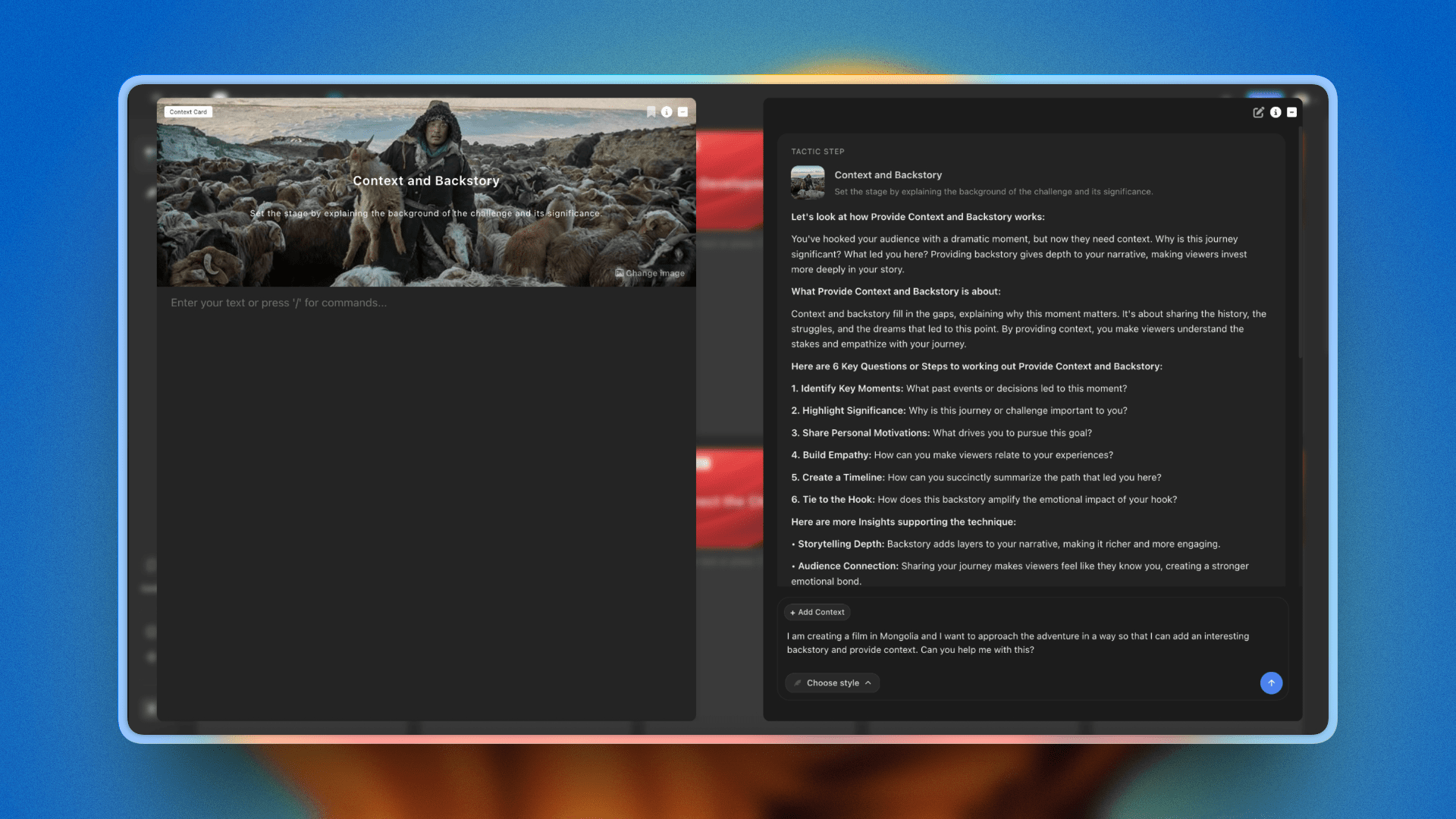
Storyflow's Story blueprints put 200+ professional project frameworks into the canvas on Plus, Pro, and Max plans
Final Verdict: Best Visual Project Management Tools 2026
If you want a visual workspace where the project strategy, brief, and AI planning conversations live in the same canvas as your work cards and reference materials, Storyflow wins for creative teams. The AI reads the full project board before responding, Story blueprints give you professional project structure from the first session, and the canvas view makes the project's shape visible in a way that task lists never do. The honest trade-offs are real: no dependency chains, no time tracking, no cross-project portfolio dashboard, so a team whose bottleneck is execution sequencing is genuinely better served by Monday.com or Wrike. For teams where the quality of the project thinking drives the quality of the output, those are trade-offs worth accepting. Take your most active creative project, the one that currently lives across a doc, a chat thread, and a task board, and rebuild it on a single Storyflow canvas for one week. Whether project understanding beats task status will be obvious by the end. Generate a project board with AI to lay out the columns and first cards, then rebuild your most active project in Storyflow
If you want the most complete visual PM platform for a team of eight or more people, Monday.com covers the most ground. The workload view alone is worth the Pro pricing for agencies managing multiple accounts simultaneously. No other tool in this category shows you who is carrying what across all projects at once.
If you need to map a complex project with a large group before anyone has built a task list, Miro handles it better than any dedicated PM tool. Its infinite canvas and unlimited-user free tier make it the strongest option for kickoffs, retrospectives, and design sprints where the goal is alignment before execution.
If you want every view type on the same project data, ClickUp wins on flexibility. The learning curve is real and the AI add-on is extra, but no other tool in this category lets you switch between kanban, Gantt, whiteboard, and timeline on the same project without rebuilding the structure.
If the team is small and the workflow is simple, Trello's free tier is still the fastest way to get a visual board running. Five minutes to setup, unlimited boards, no commitment. The right tool at the right complexity level is better than a powerful tool nobody opens.
Pick the tool that matches how your team actually thinks about projects, not how a feature comparison suggests you should. The project that starts well almost always ends better, and the best visual project management tool is the one your team uses to start.

A marketing project in Storyflow: brief, AI guidance, and visual structure in one canvas rather than three separate tools
FAQ: Best Visual Project Management Tools 2026
What is the best visual project management tool in 2026?
Storyflow is the strongest visual project management tool for creative teams in 2026 because the AI reads your full project canvas plus up to 1 Story blueprint and 3 documents you @-mention, rather than generating from a blank prompt. For large agency teams that need workload management and cross-project dashboards, Monday.com is the more complete option. The right answer depends on whether your bottleneck is project thinking or production tracking.
What is the best visual project management tool that generates project boards automatically?
Storyflow is the best visual project management tool for generating project boards automatically, because its AI reads your full project canvas plus up to 1 Story blueprint and 3 documents you @-mention, then lays out the columns and first cards for you. You describe the project and the AI generates a structured board you can refine, instead of starting from an empty template. Monday.com and ClickUp can auto-populate boards from templates and automation rules, but they build from preset structures rather than from your actual project context.
How does Storyflow compare to Monday.com for visual project management?
Storyflow excels at the strategy and planning phase: the AI understands the whole project context and Story blueprint frameworks structure the work as you think through it. Monday.com excels at execution management: workload views, automation builders, and cross-project portfolio dashboards for teams managing many simultaneous campaigns. They serve different needs; many agencies use Storyflow to plan and Monday.com to manage production.
Is Monday.com worth it in 2026?
Yes, for teams managing more than three concurrent projects with five or more people. The workload view and automation builder justify the Pro pricing ($19/seat/month) for agencies where coordination overhead is the primary bottleneck. For smaller teams or solo strategists, the structure-to-work ratio tilts the other way: more time managing the tool than doing the work.
What visual project management tool is best for creative agencies?
For most creative agencies, Storyflow is the best tool for the strategy and planning phase, while Monday.com or Wrike is the best tool for execution tracking. Creative agencies typically need two things: a place to think through project strategy visually, and a place to track execution across team members. Storyflow handles the first; Monday.com or Wrike handles the second. For agencies that want one tool covering both, Monday.com covers the most ground. For agencies where client approval is the production bottleneck, Wrike's proofing layer makes it the more specific fit.
Are there free visual project management tools that are actually good?
Yes. Trello's free tier gives you unlimited boards and cards with no user limit, making it a legitimate free option for small teams with simple workflows. Miro's free tier provides 3 boards with unlimited users, which covers project kickoffs and workshop facilitation at no cost. Storyflow's Free plan, which launches before the end of 2026, will include unlimited shared boards and basic AI usage, enough to test AI-assisted project planning before committing.
What is the difference between visual project management and general project management?
General project management tools are built around lists, rows, and structured task hierarchies. Visual project management tools prioritize spatial and graphic representations of work: kanban boards, Gantt charts, mind maps, and canvas-based project maps. The difference matters most for creative teams whose project health is harder to read in a spreadsheet row than in a visual layout. For a deeper look at how visual thinking works as a discipline, see the Related Reading section below.
What visual project management tools do creative directors use?
Creative directors typically combine tools rather than relying on one platform. Miro or Storyflow for the project mapping and brief development phase; Monday.com or Asana for production tracking; FigJam for design-led teams working in Figma. Among AI-native tools, Storyflow is increasingly used by creative directors who need the AI to understand campaign strategy before suggesting creative direction.
Can visual project management tools replace Gantt chart software?
For most creative teams: yes. Dedicated Gantt tools are designed for construction or engineering timelines with hard dependencies and critical paths. Marketing campaigns and content production have softer dependencies. Monday.com's timeline view, Asana's Timeline, and ClickUp's Gantt view cover what most creative agencies need without the engineering-grade complexity of dedicated Gantt software.
What should I look for in a visual project management tool?
Three questions separate the right tools from the wrong ones. First: does the visual show you something a list view doesn't? A kanban toggle on a task list is not visual project management. Second: can the team use it without a week of onboarding? Complexity carries a real cost in creative environments. Third: does the AI (if present) work with your project context or generate from a blank prompt? In 2026, the AI depth gap between tools has widened significantly and it changes the quality of what the tool can help with.
How long does it take to set up a visual project management tool?
Trello and Miro: under 30 minutes for a working project board. Monday.com and ClickUp: two to four hours to configure a proper workflow with automation. Storyflow: 20 to 30 minutes to build an initial canvas; Story blueprints shorten the structure setup considerably once you know which blueprint fits your project type. Wrike with portfolio views: plan for a half-day to get cross-project visibility configured correctly.
What visual project management tool works best for remote teams?
Monday.com and Miro are the strongest choices for remote teams. Monday.com's cross-team visibility means a distributed project lead can read status without calling a check-in meeting. Miro's real-time collaboration scales to large distributed workshops. Storyflow's Max plan adds a team workspace with roles for smaller remote creative teams, with comments landing on specific cards rather than a separate discussion thread.
Do I need a dedicated visual project management tool or will a general workspace work?
Notion and Airtable can serve as visual PM tools if your team already uses them and project complexity is moderate. For agencies managing concurrent client projects, dedicated visual PM tools earn their cost through workload views, automation, and portfolio dashboards that general workspaces do not offer natively. The tipping point is typically three concurrent projects with three or more people: below that, a general workspace is enough; above it, a dedicated tool saves meaningful coordination time.
Table of Contents
- How We Evaluated: Best Visual Project Management Tools 2026
- Quick Picks by Use Case: Best Visual Project Management Tools 2026
- Best Visual Project Management Tools 2026: Market Context
- Comparison Table: Best Visual Project Management Tools 2026
- Detailed Reviews: Best Visual Project Management Tools 2026
- Free vs. Paid: Best Visual Project Management Tools 2026
- Final Verdict: Best Visual Project Management Tools 2026
- 1. Storyflow: AI Visual Workspace Built for Project Thinking
- 2. Monday.com: Visual Project Management Built for Teams at Scale
- 3. Miro: Infinite Canvas for Teams That Map Before They Manage
- 4. ClickUp: Every View, One Project
- 5. Notion: Databases Meet Visual Project Tracking
- 6. Asana: Timeline-First for Structured Creative Production
- 7. Trello: Kanban-First Simplicity
- 8. Wrike: Visual Project Management for Agencies With Clients
- 9. FigJam
- 10. Basecamp
- 11. Whimsical
- 12. Linear
- FAQ: Best Visual Project Management Tools 2026
- Related Reading
Templates to check out for this topic


Planning and project templates you can use in Storyflow
Plan a launch, a sprint, or a whole project on a visual board the team can see at once. Open one of these templates and start from real structure.


See Storyflow in Action
A visual AI workspace where every feature lives inside one canvas. No tab-switching, no context lost.
Build your entire board from a single message
Type what you need in the AI chat at the bottom of your canvas. The AI adds cards, headings, and structure directly onto your board.
Use expert frameworks as AI context
Type @ in the AI chat and choose any Tactic. The AI tailors every response to that framework instead of giving generic advice.
Turn your board into a mind map in seconds
Ask the AI to restructure your canvas as a mindmap. It connects your ideas into a visual hierarchy so you can see how everything relates.
Why Storyflow Exists
Storyflow actually began as a personal tool while working on creative and research projects.
We kept running into the same problem: ideas were scattered everywhere: notes, documents, and whiteboards.
Nothing helped us see how everything connected.
So we started building a workspace designed around how ideas actually grow.
→ Read how Storyflow was createdSara de Klein
Head of Product at Storyflow
Published: 2026-05-16
Extremely simple, seriously capable


See how easy it is to get started
Watch a real project come together, from a blank board to a finished plan, clicked through step by step.
Start creating with AI and become more productive
Transform your creative workflow with AI-powered tools. Generate ideas, create content, and boost your productivity in minutes instead of hours.