
Can AI Manage a Creative Project? What It Actually Does in 2026
AI in project management tools is task-aware, not plan-aware. It knows a task is late. It cannot know the brief was wrong, which is why it was late. What the AI actually does, and the four delays it cannot reach.

Category
AI Tools
Author

Justkay
Documentary Filmmaker & Founder at Storyflow
Topics
2026-08-26
•
17 min read
•
AI Tools- can ai manage a project
- ai project management for creative teams
- ai tools for creative project management
- does ai project management work
- task aware vs plan aware ai
- why creative projects run late
Can AI manage a creative project in 2026?
AI in project management tools is task-aware, not plan-aware. It knows a task is late. It cannot know the brief was wrong, which is why it was late. What the AI actually does, and the four delays it cannot reach.
Key Takeaways
- AI in project management tools is task-aware, not plan-aware. It knows a task's status, assignee, and due date. It knows nothing about the work the task refers to.
- That distinction explains every disappointment in this category. Task-aware AI can tell you something is late. It cannot tell you the brief was wrong, which is why it was late.
- What it genuinely does today: summarise, transcribe, draft updates, catch schedule risk from patterns, and generate task breakdowns from a description. All real, all clerical.
- What it does not do: judge quality, decide priority, know that a scene is not working, or notice that two stakeholders want different films.
- On creative projects, most delay originates upstream of the tracker, in an unclear brief or an undecided direction. AI in the tracker cannot reach that, and AI that reads the work can.
Task-Aware and Plan-Aware
Open any project management tool in 2026 and there is an AI feature. Asana, ClickUp, Monday, Notion, Wrike, Linear: all of them. They summarise, they draft, they suggest, and they generate task lists from a sentence.
They are also all doing the same thing, and it is worth naming precisely, because the name predicts what you will and will not get.
Task-aware AI sees the metadata. A task has a title, a status, an assignee, a due date, a project, and some comments. The model can read all of that across a workspace, so it can tell you that four tasks are overdue, that this project has slipped twice, that Sam is holding eleven items, and that the milestone on the 14th is at risk because its dependencies are not done.
That is genuinely useful and it is clerical. It is a very fast project coordinator who has read the tracker and nothing else.
Plan-aware AI sees the work. Not "Design homepage hero, in progress, due Thursday" but the actual brief, the references, the three directions, the feedback from the last round, and the decision that was made about the audience. A model with that context can answer a different class of question: whether the current direction matches what the client asked for, whether the references and the brief agree, what has been decided and what is still open.
Almost nothing in the project management category is plan-aware, and the reason is structural rather than a missing feature. In a tracker, the work is an attachment or a link. The Figma file, the script, the moodboard, the cut, the document all live somewhere else, and the tracker holds a pointer. A model reading the tracker reads pointers.
So when people ask whether AI can manage a creative project, the honest answer is: it can manage the administration of one, and administration is not where creative projects go wrong.
What AI Actually Does in a Project Tool Today
Concrete, so you can judge whether it is worth the add-on cost.
Summarising. Long comment threads, project status, what changed this week. Genuinely saves time on projects with many stakeholders and it is the most-used feature in this category by a distance.
Drafting the update. The weekly status email or the client note, generated from what actually moved. Reliable, because it is a rewrite of structured data rather than a judgment.
Task generation. Describe a piece of work and get a plausible breakdown into tasks with rough estimates. Useful as a checklist prompt, and the estimates are decoration, because the model has no idea how long your team takes.
Risk flagging from patterns. Noticing that this project has the same shape as three that slipped. Real, and dependent on having enough history in the tool to learn from, which most creative teams do not.
Transcription and meeting capture. Turning a call into notes and action items. This is the most reliably valuable AI in the whole workflow and it usually comes from a separate tool rather than the tracker.
Search and question answering across the workspace. "What did we decide about the launch date." Genuinely useful, and it finds decisions that were written down, which is a smaller set than the decisions that were made.
Notice what is common to all six. Every one operates on things that were already recorded. None of them look at the work.
Where Creative Projects Actually Go Wrong
This is the part that determines whether any of the above helps you.
I direct documentaries and run the production around them, and the delays are consistently the same four, none of which a tracker can see.
The brief was never agreed. The founder wanted a manifesto and marketing wanted a product explainer, nobody said so out loud, and the disagreement surfaces at version three as contradictory notes about pacing. In the tracker this appears as "Edit v3, in progress, overdue." Task-aware AI reports a late task. The actual problem is two months old and lives in a conversation that never happened.
Feedback took nine days. The cut went out on Tuesday and came back the following Thursday from four people who did not watch it together. None of those nine days appear in any plan as work, and no AI in the tracker knows the difference between "waiting on the client" and "the client has had this for six days and Sam is the one who has not responded."
The direction was never decided. Three concepts were shown, everyone liked concept two "with bits of one," which is not a decision, and the team proceeded as if it were. The tracker shows steady progress.
The work is not good enough yet. The most honest and least trackable delay. The scene does not work, the design is fine but not right, the copy is competent and dead. A status field cannot represent this and an assignee will not write it down, so it shows as "in progress" for two weeks.
Task-aware AI is blind to all four, and that is not a criticism of the tools. It is a consequence of the tracker holding pointers rather than work.
What Would Have to Be True for AI to Manage a Creative Project
Three things, and the gap between them and the current state is the honest answer to the question in the title.
One: the model would have to see the work, not the pointer. The brief, the references, the versions, the feedback. Some of this is beginning to exist. Frame.io's AI can work with the actual video. Figma's AI sees the design file. Storyflow, which we make, reads the whole canvas the project lives on. In each case the model is looking at the artefact rather than a row about it, and in each case that is one artefact rather than the whole project.
Two: it would have to hold judgment about quality. It cannot, and this is not a temporary limitation of model capability so much as a question of whose judgment it is. Whether a scene works is a decision the director is being paid to make.
Three: it would have to have standing to say no. Most of what a producer does is refuse things: push back on scope, tell a stakeholder their note is out of scope, protect a schedule. That is organisational authority, not analysis, and software does not have it.
So the realistic near-term shape is not AI managing a creative project. It is AI removing the clerical half so the human spends their time on the three things above. That is a modest claim and it is worth real money, because the clerical half is substantial.
What to Do Instead
If your creative projects slip and you are considering an AI project management tool, this is the order that actually helps.
First, fix the brief. Most rework on creative projects is caused by nobody agreeing what the piece was for. Getting the audience, the purpose, and the success measure written down and agreed before work starts removes more delay than any tool. It is free and nobody does it.
Second, fix the feedback loop. Put review in one place with timecoded or anchored comments, a named person, and a date. Frame.io for video, a proper proofing tool for design. This is where delivery dates are actually lost and it is a review tool problem rather than a tracker problem.
Third, buy the clerical AI. Meeting transcription first, because it is the highest-value AI in the workflow and the cheapest. Then whatever summarisation your tracker offers, if the add-on cost is small.
Fourth, consider plan-aware tooling for the undecided phase. If the recurring pattern is arguments about what the work should be rather than whether it is done, that argument is cheaper to have on a canvas in week one than in a review tool in week six. This is the job Storyflow does: the concept, references, brief, and structure on one canvas the AI reads, so you can ask what this board says the project is for and where the brief and the references disagree. It manages nothing, has no tasks, assignees, or due dates, and should sit in front of Asana rather than replacing it.
Do not buy an AI tracker add-on expecting it to reach any of the four failures above. It will report them accurately and late.
Comparison: What Each Kind of AI Can See
| Tool type | What the AI sees | Question it can answer | Question it cannot |
|---|---|---|---|
Task-aware tracker (Asana, ClickUp, Monday) | Task metadata, comments | What is late and who is holding it | Why the brief was wrong |
Meeting AI (Granola, Otter) | The conversation | What was agreed on the call | Whether it was written into the plan |
Review AI (Frame.io) | The actual cut, versions, notes | Which version has unresolved feedback | Whether the note is right |
Design AI (Figma) | The design file | What is inconsistent with the system | Whether the direction is correct |
Plan-aware canvas (Storyflow) | The brief, references, structure | What this project says it is for, and what is missing | Whether the work is good |
A producer | All of it, plus the room | All of the above, badly, and the ones that matter | Nothing you would pay software for |
The last row is the point. None of the tools above replace the person; they each remove a different slice of what that person spends time on.
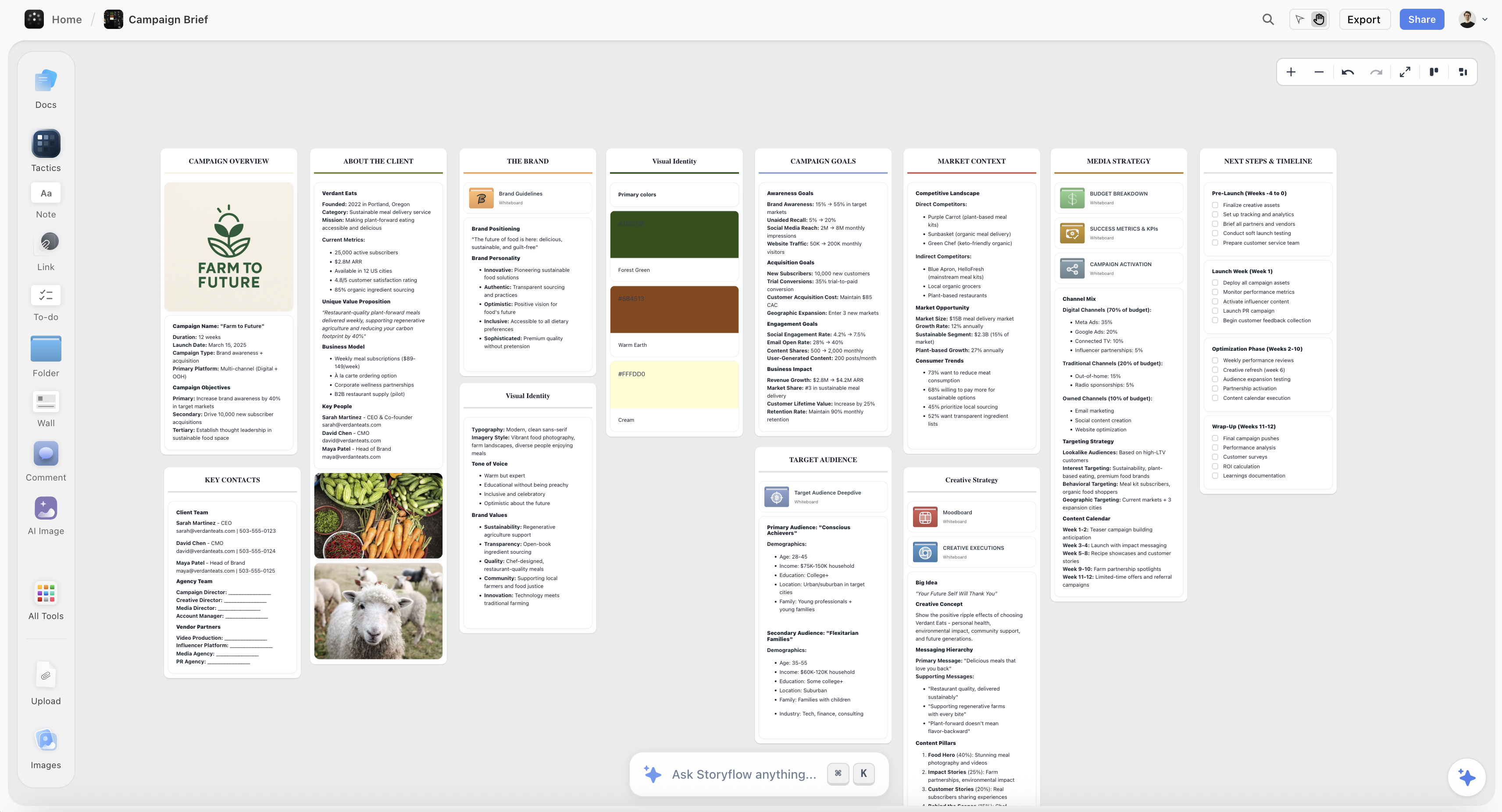
A project brief and its references on one Storyflow canvas, the material a tracker only holds a link to
A tracker holds a pointer, not the work
AI in a project tool reads task metadata, which is why it can say something is late and not why. Storyflow keeps the brief, references and structure on one canvas the AI reads, so the argument about what the work is for happens in week one. It runs no tasks or approvals, so the pipeline still belongs in Asana.

The Bottom Line
The question is asked as though it is about model capability, and it is really about what the model can see.
Every AI in a project management tool is looking at task metadata: a title, a status, an owner, a date. That is enough to tell you what is late, who is holding it, and what changed this week, and those are real, useful, clerical things worth paying a small amount for.
It is not enough to reach any of the four reasons creative projects actually slip. The brief nobody agreed. The feedback round that took nine days and appears nowhere in the plan. The direction that was never really decided. The work that is not good enough yet. All four live outside the tracker, in the artefact and in the conversations around it.
So: buy the clerical AI, starting with meeting transcription, because the time saving is real. Fix the brief and the feedback loop, which cost nothing and matter more. And if the pattern in your projects is arguments about what the work should be rather than whether it is done, that is a plan-aware problem, and it is cheaper to solve on a canvas in week one than in a review tool in week six.
AI cannot manage your creative project. It can take the admin off the person who is managing it, which is a smaller claim and a genuinely useful one.
FAQ: AI and Creative Project Management
Can AI manage a creative project?
It can manage the administration of one: summarising status, drafting updates, generating task breakdowns, flagging schedule risk, and answering questions about what was recorded. It cannot manage the project, because the things that make creative projects late are an unclear brief, an undecided direction, a slow feedback loop, and work that is not good enough yet, and none of those are visible in a tracker.
What are the best AI tools for creative project management?
Asana or ClickUp if you want AI inside a tracker you would use anyway, which gets you the clerical half competently. A meeting AI such as Granola, which is the highest-value AI in the whole workflow. Frame.io if the projects are video, because timecoded review is where creative delivery dates are actually lost. A plan-aware canvas only if the recurring problem is arguments about what the work should be.
What is the difference between task-aware and plan-aware AI?
Task-aware AI reads metadata: status, assignee, due date, comments. It can tell you what is late. Plan-aware AI reads the work itself: the brief, the references, the versions, the decisions. It can tell you whether the current direction matches what was asked for. Almost every project management AI is task-aware, because a tracker holds a link to the work rather than the work.
Does AI actually save time on creative projects?
Yes, on the clerical half, and it is a real amount: status writing, meeting notes, thread summarisation, and searching for a decision somebody made three weeks ago. It does not save time on the parts that cause delay, so teams frequently report that their admin got faster and their delivery dates did not move.
Will AI replace project managers on creative teams?
Not on the parts that matter. A producer's job is substantially refusal: pushing back on scope, protecting a schedule, telling a stakeholder their note is out of scope. That requires organisational standing rather than analysis. What changes is the proportion of the job that is clerical, which is falling, so the role concentrates on judgment and negotiation.
Why is my creative team late even with a good project tool?
Almost always because the delay originates before the tracker. The brief was never agreed, so version three attracts contradictory notes. Or the cut sat with a client for nine days, none of which appears in the plan as work. Or the direction was never actually decided and everyone proceeded as if it were. A tracker records these faithfully and reaches none of them.
Is Storyflow an AI project management tool?
No. There are no tasks, assignees, due dates, dependencies, approvals, or reporting, and if a project is slipping, Asana and Frame.io will help where this will not. It is plan-aware rather than task-aware: the brief, references, and structure sit on a canvas the AI reads, so the argument about what the work should be can happen in week one instead of surfacing as contradictory notes in week six. It is paid-only during early access, from $7.99/month annual.
What is the highest-value AI to buy for a creative team?
Meeting transcription, by a wide margin, and it usually comes from a separate tool rather than the tracker. It is cheap, it requires no workflow change, and it captures the decisions that would otherwise exist only in somebody's memory of a call. Everything else in this category is a second purchase.
Can AI write a project brief?
It can draft one from a conversation, which is genuinely useful, and it cannot decide what the work is for. A generated brief reads as complete while containing the same ambiguity you started with, and ambiguity in a brief is the single largest source of creative rework. Use it to write down a decision, never to make one.
Does AI in project tools understand creative work?
No, and it is worth being clear that this is a structural limitation rather than a model one. The tracker contains a row saying "Edit v3, in progress." The edit itself is in another system. A model reading the tracker is reading a description of the work written for scheduling purposes, and no amount of model capability recovers information that is not there.
Should I pay for my project tool's AI add-on?
If the add-on is small relative to the seat cost and your projects generate a lot of threads and status reporting, yes, since summarisation is the feature people actually use. If you are buying it hoping to fix slipping projects, no, because it reports on the symptom. Buy meeting transcription first.
What would AI need to actually manage a creative project?
Three things it does not have: sight of the work rather than a pointer to it, judgment about whether the work is good, and standing to refuse things. The first is starting to appear in tools that hold the artefact rather than a link. The second is what the director or designer is paid for. The third is organisational and no software has it.
How do you reduce delay on creative projects without AI?
Agree the brief in writing before work starts, including the audience and the success measure. Put feedback in one place with a named person and a date. Decide direction explicitly rather than accepting "concept two with bits of one." Those three cost nothing, and between them they remove more delay than every AI feature in this category combined.
Table of Contents
- Key Takeaways
- Task-Aware and Plan-Aware
- What AI Actually Does in a Project Tool Today
- Where Creative Projects Actually Go Wrong
- What Would Have to Be True for AI to Manage a Creative Project
- What to Do Instead
- Comparison: What Each Kind of AI Can See
- The Bottom Line
- FAQ: AI and Creative Project Management
- Related Reading
Templates to check out for this topic


Templates you can use in Storyflow
Every Storyflow board starts from real structure and an AI that reads the whole canvas. Open one of these templates and make it yours.


See Storyflow in Action
A visual AI workspace where every feature lives inside one canvas. No tab-switching, no context lost.
Build your entire board from a single message
Type what you need in the AI chat at the bottom of your canvas. The AI adds cards, headings, and structure directly onto your board.
Use expert frameworks as AI context
Type @ in the AI chat and choose any Tactic. The AI tailors every response to that framework instead of giving generic advice.
Turn your board into a mind map in seconds
Ask the AI to restructure your canvas as a mindmap. It connects your ideas into a visual hierarchy so you can see how everything relates.
Why Storyflow Exists
Storyflow actually began as a personal tool while working on creative and research projects.
We kept running into the same problem: ideas were scattered everywhere: notes, documents, and whiteboards.
Nothing helped us see how everything connected.
So we started building a workspace designed around how ideas actually grow.
→ Read how Storyflow was createdJustkay
Documentary Filmmaker & Founder at Storyflow
Published: 2026-08-26
Extremely simple, seriously capable


See how easy it is to get started
Watch a real project come together, from a blank board to a finished plan, clicked through step by step.
Start creating with AI and become more productive
Transform your creative workflow with AI-powered tools. Generate ideas, create content, and boost your productivity in minutes instead of hours.