
Sharp briefs in minutes, not meetings
The AI creative brief generator
that writes the brief for you.
Describe your project or campaign and AI generates a full creative brief on an infinite canvas. Objectives, audience, message, and deliverables in seconds.


Creatives working for these brands already got early access
- Red Bull
- Canon
- Artlist
- Porsche
See how easy it is to get started
Watch a real project come together, from a blank board to a finished plan, clicked through step by step.
Start from a ready-made template
Pick a board to see what you can build, then let AI fill it in. Every template is a real, editable starting point on the same infinite canvas.

Marketing Campaign
Plan a campaign across channels, messages, and deliverables on one board the whole team can see.
ULTRA FAST FROM BRIEF TO BOARD
From a project to a complete creative brief in seconds.
No blank document, no chasing every detail. Just describe the project and let the AI write the brief.
01
Open a canvas
Sign up in seconds. No download, no setup. Your infinite canvas is ready in your browser.
02
Describe the project
Type a prompt describing the project, campaign, or client. The AI understands what the brief needs to cover.
03
AI writes the brief
A full creative brief appears, with objectives, audience, and message, ready to refine. Keep prompting, the AI keeps the context.
Turn a project into a complete creative brief.
The AI writes every section. You sharpen the message, add references, and get sign-off, all on one infinite canvas.
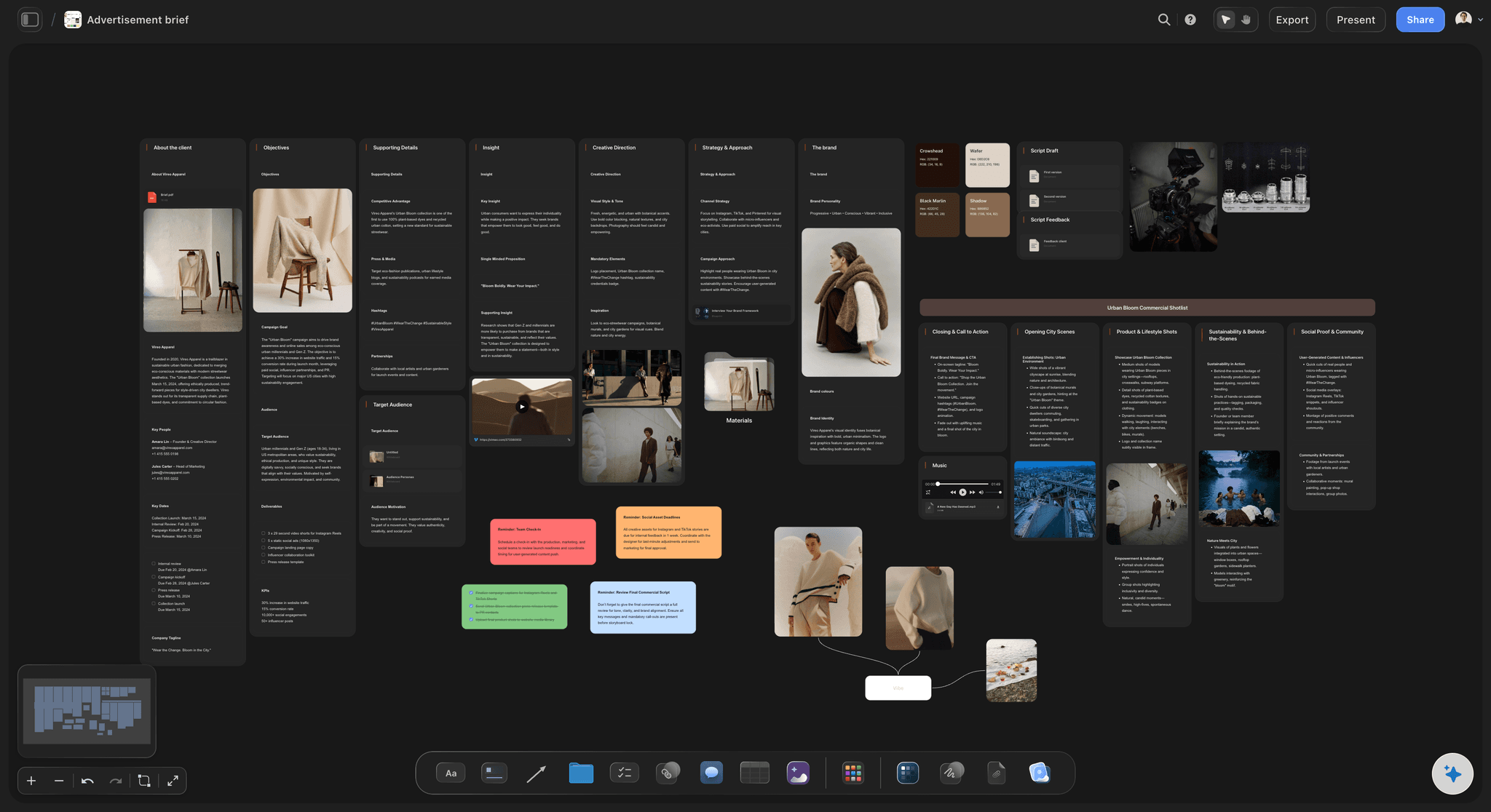
AI brief with objectives, audience, and message
Generate a creative brief from one prompt
Describe your project or campaign and AI lays out a full creative brief. Objectives, audience, message, and deliverables, organized on the canvas in seconds.

Every section of the brief, structured
Objectives, audience, and message
The AI fills in each section of the brief so nothing is missed. A clear, complete brief the whole team can work from.

Reference images and mood pinned to the brief
Add references and inspiration
Pair the brief with mood boards, reference images, and examples so the creative direction is clear from the start.

From brief to the full campaign plan
From brief to the whole campaign
A brief is the start. From the same canvas, branch into campaign plans, content calendars, and timelines without switching tools.
Plans from $7.99/month annual. Free plan coming late 2026.
Open a canvas, type a prompt, watch the brief write itself. Paid-only during early access; the free plan launches before the end of 2026.
Unlimited creative briefs on an infinite canvas
AI usage that renews every billing period
View-only links, no account needed to view
Unlimited collaboration with your team

BUILT FOR MARKETERS
An AI creative brief generator that does more than write.
Generate the brief, then sharpen, collaborate, and launch the campaign. All on one AI-native infinite canvas.

AI that reads the whole canvas as context
AI that knows the project
One prompt to a brief: Describe the project and AI writes a full creative brief with every section covered.
Canvas-aware AI: AI sees the research and references on your board, so the brief stays accurate.

Re-prompt until the brief is sharp
Re-generate and sharpen
Keep prompting: Ask the AI to tighten the message, shift the tone, or add a deliverable. It keeps the context.
Rewrite any section: Every part of the brief is editable. Adjust, re-order, and make it yours.
Choose a starting point: Start from a blank board or let the AI lay out a marketing, design, or campaign brief.

Drop in research, links, and reference files
Gather research and inputs
Drag in anything: Drop in research, competitor examples, links, and PDFs to inform the brief.
Research on the canvas: Gather audience insights and inspiration, and let the AI build the brief on top.
Notes and comments: Add notes next to any section so the thinking behind the brief is never lost.

Cursors, comments, and live edits across the board
Share for sign-off
View-only links: Send clients or stakeholders a read-only brief. No signup needed to view.
Collaborate live: Build the brief together with your team. See cursors, edits, and comments.
Comments anywhere: Drop comments on any section to gather feedback and lock in sign-off.
ONE APP INSTEAD OF FIVE
Storyflow vs ChatGPT, Notion, and Milanote.
Unlimited boards and file uploads on every paid plan, and an AI that drafts the brief on the canvas beside your references.
Storyflow
Recommended
Unlimited creative briefs
Unlimited projects and cards
AI drafts the brief, you refine
AI sees your whole canvas as context
Freeform infinite canvas layout
ChatGPT
Unlimited creative briefs
Unlimited projects and cards
AI drafts the brief, you refine
AI sees your whole canvas as context
Freeform infinite canvas layout
Notion
Unlimited creative briefs
Unlimited projects and cards
AI drafts the brief, you refine
AI sees your whole canvas as context
Freeform infinite canvas layout
Milanote
Unlimited creative briefs
Unlimited projects and cards
AI drafts the brief, you refine
AI sees your whole canvas as context
Freeform infinite canvas layout
What creators are saying
Join early creators getting structured workspaces and AI that remembers their projects
“Storyflow has sped up my workflow by at least 3x, which means more flow state and more projects I can actually ship. It truly changed the way me and my team create.”

Reilin Joey
Director & YouTuber
“One prompt gets me a structured board. But the tactics are my favorite. I run my YouTube scripts through them and my intros and retention got better. It's amazing.”

Justkay
YouTuber & Freelance Filmmaker
“I used to juggle five apps to plan a project. Now I describe what I am making and get boards, lists, and a schedule. All in one place.”

George
@fernwehchronicles
Any questions?
Everything you need to know about the Storyflow AI creative brief generator.
What's the best tool for writing and sharing a creative brief?
Storyflow does both halves on one board: its AI drafts the brief from a short description, the brief sits beside the moodboard and references it depends on, and a client opens it by view-only link with no account. Written as a Doc, the brief exports to Word and PDF. Notion's templates suit teams that file briefs in a database, Google Docs suits a text-only brief with tracked edits, and Miro's templates suit a live workshop.
What is an AI creative brief generator?
An AI creative brief generator turns a short project description into a full creative brief. With Storyflow, you describe the project and AI lays out objectives, audience, key message, and deliverables on an infinite canvas, section by section.
Is Storyflow's AI creative brief generator free?
Not yet. Storyflow is paid-only during early access, with plans from $7.99 a month billed annually ($9.99 monthly). A free plan launches before the end of 2026 with unlimited boards, basic AI usage, 3 starter frameworks and 20 file uploads. Until then, anyone a paid member invites to a board joins free.
How does the AI write a creative brief?
Describe your project, campaign, or client in a prompt and the AI lays out a full brief, covering objectives, audience, key message, tone, and deliverables on the canvas. Keep prompting and the AI refines it while reading the board as it stands and any documents you attach.
Can the AI write a brief for a specific channel or campaign?
Yes. Describe the campaign, whether it is a social ad, a brand film, a website, or a product launch, and the AI tailors the objectives, audience, and deliverables to fit. Adjust any section after.
What does the AI include in a creative brief?
A full brief: objectives, target audience, key message, tone, deliverables, and timeline, laid out on the canvas. Add references and inspiration beside any section.
Can I edit the brief the AI generates?
Yes. Everything the AI generates is fully editable. Rewrite any section, re-order it with drag and drop, add references, and adjust the tone. The AI gives you a starting point, not a locked result.
Can I add references and inspiration to the brief?
Yes. Drag and drop reference images, links, PDFs, mood boards, and notes onto the brief so the team has the full picture in one place.
Do I need a marketing background to write a brief with it?
No. The AI proposes the structure and fills in each section from your description, so you get a usable brief even without a marketing background. Edit anything the AI suggests.
How long does it take to create a creative brief with AI?
Minutes rather than seconds for a full campaign brief, because the AI builds it on the board section by section, starting with the sections a brief cannot do without. A short written brief is quicker. Describe the project, the AI lays out the brief on the canvas, and you refine it by re-prompting, rewriting sections, or adding references.
What does one Storyflow subscription replace?
Beyond creative briefs, one Storyflow subscription can stand in for ChatGPT for AI, Milanote for visual boards and moodboards, and Notion for documents, all on one canvas. The Pro plan is $14 per month billed annually.
How is Storyflow different from ChatGPT, Notion, or Milanote?
Storyflow lays the brief out visually on an infinite canvas, and the AI reads the board the brief sits on, so you do not re-explain the project the way you do in a chat. Every paid plan includes unlimited boards, and anyone a paid member invites to a board joins free.
How do a team and a client collaborate on a creative brief?
In Storyflow the team edits the brief together in real time, with live cursors, and anyone a paid member invites joins free. The client opens a view-only link with no account and signs in to comment on the section in question, and a brief written as a Doc takes inline comment threads. Google Docs suits line-by-line suggested edits from legal, and Miro suits building the brief together in a live workshop.
Can I share the brief for sign-off?
Yes. Send the view-only link, or export the board as an image or PDF and the brief's Doc to Word or PDF for the record. There is no approval button, so sign-off happens in a comment on the brief or by reply.
Generate your creative brief.
Paid-only during early access, with unlimited boards and uploads on every paid plan. A free plan launches before the end of 2026, and anyone a paid member invites to a board joins free.