
Category
Project Management Tools
Author

Justkay
Documentary Filmmaker & Founder at Storyflow
Topics
2026-05-17
•
Updated July 2, 2026
•
25 min read
•
Project Management Tools- best creative project management tools 2026
- creative project management software
- project management for creative teams
- creative agency project management
- Asana alternative
- Storyflow creative project management
What are the best creative project management tools in 2026?
The best creative project management tools in 2026 are Notion (best flexible base), Storyflow (best for the creative work and the plan on one canvas), Asana (best real task structure), and Milanote (best when the project is the creative work). A task manager asks is it done; creative work asks is it good.

Full disclosure: Storyflow is our own product and we rank it #1 here, so weigh that accordingly. It takes the top slot for the one thing a task manager cannot do: keep the creative work (moodboard, drafts, references) and the project plan on the same AI-readable canvas. Where it genuinely loses: Notion is the more flexible base, its databases bend to almost any workflow and most creative teams already run on it, and Asana is the stronger pure task, dependency, and workload manager at team scale. If your bottleneck is tracking tasks rather than developing the work, pick one of those. We link out to every tool so you can judge for yourself.
Quick Comparison: Best Creative Project Management Tools
These four tools cover the choice most creative teams are actually making: a flexible task base versus a canvas where the work and the plan live together.
| Tool | Best For | AI Features | Price |
|---|---|---|---|
| Storyflow | The work and the plan on one canvas | Canvas-aware AI (reads the whole board) | $7.99 mo annual (free plan late 2026) |
| Notion | Flexible base for creative workflows | Notion AI (page and database drafting) | Free / $12 user mo |
| Asana | Real task structure for creative teams | AI teammates (task automation) | Free / $11 user mo |
| Milanote | When the board is the creative work | No built-in AI | Free / $9.99 mo |
1) Quick Answer: The Best Creative Project Management Tools in 2026
The best creative project management tools in 2026 are Storyflow (best for managing the creative work and the project on one canvas), Notion (best flexible tool that bends to creative work), Asana (best for creative teams that need real task structure), and Milanote (best when the project is the creative work itself). The right pick depends on how much standard structure your creative team can tolerate.
A standard project manager asks "is it done?" Creative work asks "is it good?" Those are different questions, and most project management tools can only answer the first. They were built for task work: steps that are linear, estimable, and binary. Creative work is none of those. A design is not done when a box is checked; it is done when someone decides it is good enough, usually after rounds nobody could have scheduled in advance.
I have run creative projects inside task trackers and watched the mismatch break things: a "1 day" design task in round four, a checked-off task that everyone agrees is not good. The Creative Work Is Not Task Work framework in section 3 ranks all 12 tools by whether they fit creative work or force it into a task model.
For AI-specific tooling, see The 12 Best AI Project Management Tools for Creative Teams in 2026. For collaboration, see The Best Collaboration Tools for Creative Teams in 2026.
All 12 Tools, Ranked
- Storyflow: best for the creative work and the project plan on one AI canvas
- Notion: best flexible tool that bends to creative work
- Asana: best for creative teams that need real task structure
- Milanote: best when the project is the creative work itself
- Monday.com: best customizable creative workflows
- Teamwork: best agency client work with time tracking and billing
- ClickUp: best all-in-one creative team platform
- Trello: best simple kanban creative pipeline
- Basecamp: best calm, low-overhead team tool
- Wrike: best enterprise proofing and asset review
- Miro: best visual project boards without task structure
- Productive: best agency operations, resourcing, and billing
Best Creative Project Management Tool by Job
The overall ranking is not the answer to every question. Match the tool to the job you actually have:
- Best creative project management tool overall: Notion. It bends to almost any creative workflow, which is why it is the default recommendation.
- Best tool for keeping the creative work and the project plan on one surface: Storyflow. The brief, the moodboard, and the plan sit on one AI-readable canvas instead of a doc pointing at a board pointing at a tracker.
- Best for creative teams that need real task structure and deadlines: Asana.
- Best when the project is the creative work itself: Milanote.
- Best free option for a small creative team: Trello. Free boards with unlimited collaborators; Storyflow's Free plan (also unlimited boards and collaborators) launches before the end of 2026.
- Best agency operations, resourcing, and billing: Productive.
2) Comparison Table: 12 Creative Project Management Tools at a Glance
Pricing reflects publicly listed plans as of early 2026 and changes often. Ratings weigh fit for creative work, structure when needed, collaboration, AI support, and pricing for creative teams and agencies.
3) Creative Work Is Not Task Work
Project management as a discipline was built for task work. Creative project management keeps failing because it borrows that discipline wholesale, and creative work is a different animal.
Task work is linear, estimable, and binary. The steps come in order. Each can be estimated: this takes two days. Each has a clear done state: the code compiles, the invoice is sent, the box is checked. Standard project management tools, Jira, Asana, Monday, are built around exactly this. They are very good at it.
Creative work is iterative, hard to estimate, and judged. It does not go in a straight line; it goes in rounds. Round one, feedback, round two, feedback, round four. It cannot be reliably estimated, because "design the key visual" might take a day or a week depending on how the rounds go. And it has no binary done state. A design is done when someone with taste decides it is good enough. "Done" is a judgment, not a checkbox.
Here is the rule that decides tool choice. A tool built for task work asks "is it done?" Creative work needs a tool that can hold "is it good?" When you force creative work into a task tracker, three things break. Estimates become fiction, because rounds cannot be scheduled. The done state lies, because a checked task can still be bad. And the creative work itself, the actual designs and drafts, lives somewhere else entirely, disconnected from the project that is supposed to manage it.
A creative project management tool that works does three things a task tracker does not: it models rounds and revision instead of linear steps, it treats "done" as a decision rather than a checkbox, and it keeps the creative work close to the project plan instead of in a separate tool. The 12 tools below are ranked by how well they fit creative work, rather than how well they manage tasks.
4) How We Evaluated These Tools
Five criteria, weighted in this order:
- Fit for creative work. Does the tool model rounds, revision, and judgment, or force creative work into linear, estimable, binary tasks?
- Closeness to the work. Does the creative work, the designs and drafts, live near the project plan, or in a separate tool?
- Structure when needed. Creative teams still need deadlines, owners, and visibility. Can the tool provide structure without imposing a rigid task model?
- Collaboration and feedback. Creative work runs on feedback. Can the tool hold review and revision cycles?
- Pricing for creative teams and agencies. Creative teams range from freelancers to agencies. Per-seat pricing that punishes a small studio is marked down.
Testing covered a freelance designer's projects, an in-house creative team, and a creative agency, each run for a quarter.
5) Quick Picks by Creative Project Management Need
Best for the creative work and the project together: Storyflow. The designs, drafts, and plan share one canvas.
Best flexible tool that bends to creative work: Notion. Build a workflow that models rounds, not just tasks.
Best for creative teams that need real task structure: Asana. Strong structure, used with discipline for rounds.
Best when the project is the creative work itself: Milanote. The moodboard and the project are the same board.
Best all-in-one for creative teams: ClickUp. Tasks, docs, and views in one platform.
Best for agencies: Teamwork or Productive. Built for client work and agency operations.
Best cheapest working stack: Storyflow Plus ($7.99/month annual) for the work-and-plan canvas plus Trello Free for the pipeline.
Put the work and the plan on the same board
Describe the project once and get a plan that lives next to the moodboard, the drafts, and the feedback, so the rounds stay visible instead of hiding behind a checked box.

How Creative Project Management Tools Compare on AI
Every tool here now ships "AI," but for creative work the useful question is narrow: can the AI see the creative work itself, or only the task metadata around it?
Tier 1: AI that reads the creative work. Storyflow is the only tool on this list whose AI reads the whole canvas, the moodboard, the drafts, the references, and the notes, plus one Blueprint Tactic and up to three Documents you @-mention. It can turn a brief into a plan that sits next to the work it describes, because it can actually see that work.
Tier 2: AI that reads the tasks and docs. Notion AI, ClickUp Brain, Asana's AI teammates, and Monday.com's AI all draft, summarise, and automate inside a page, task, or database. That is genuinely useful for status rollups and first-draft copy, but the AI works from structured task metadata, not from the visual creative work, so it can tell you whether a task is done, not whether the work is good.
Tier 3: Little or no AI. Milanote, Basecamp, Trello, and Miro focus on their core surface rather than AI. For a pure moodboard or a calm task list that is a reasonable trade, but AI is not the reason to pick them.
The tell is the question each tool can answer. A task manager answers "is it done." Only a tool that can see the work answers "is it good."
6) Detailed Reviews: 12 Creative Project Management Tools
1. Storyflow
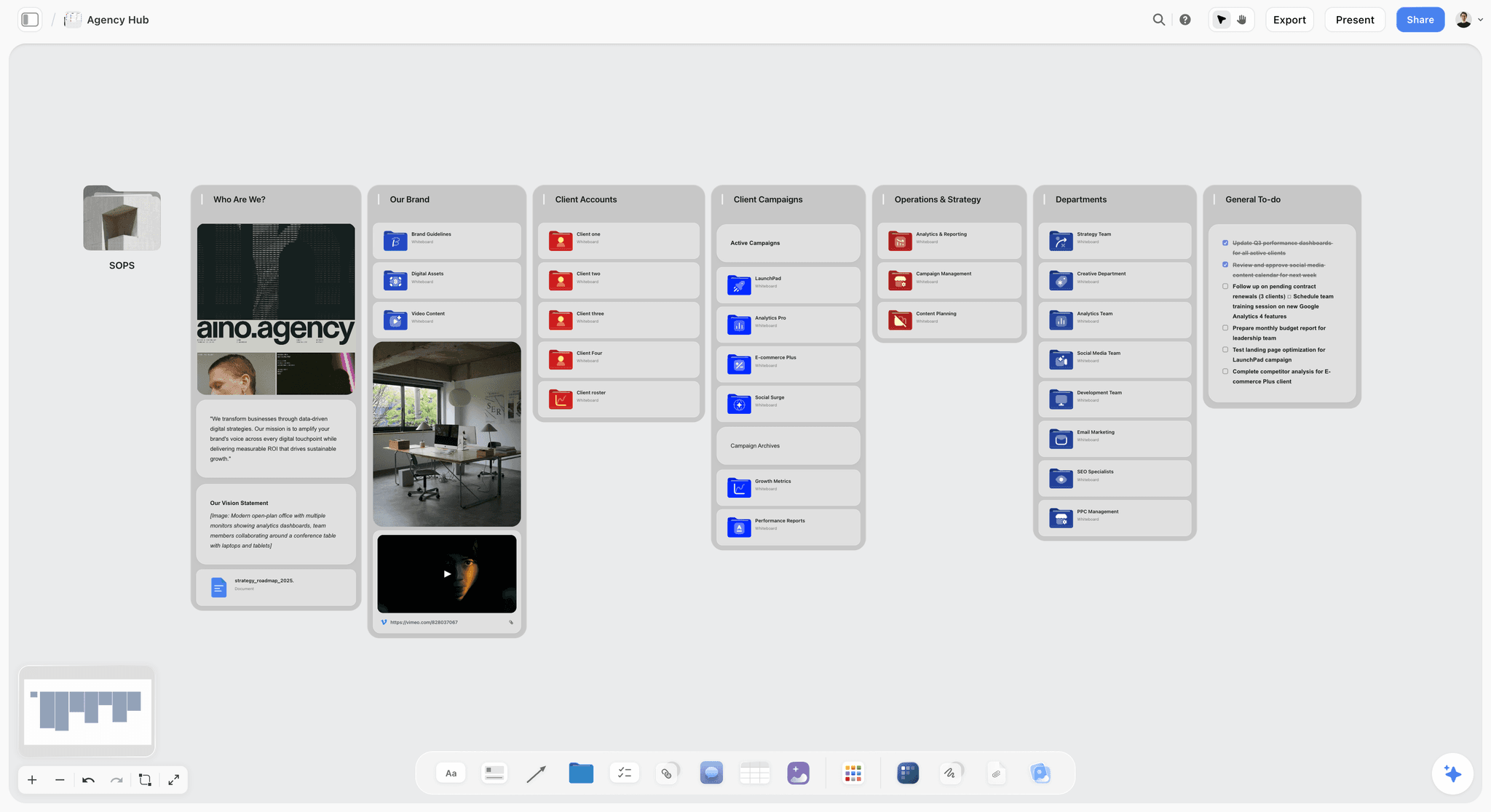
The friction every other tool on this list leaves unsolved: the designs live in one place and the project lives in another, so the plan never reflects the real state of the work. Storyflow closes that gap by keeping the creative work and the project on one canvas: the moodboard, the drafts, the feedback, and the plan all on the same board. The AI reads your full active canvas board (plus up to 1 Tactic and 3 Documents you @-mention), so it can track which round a piece is in and whether the latest version answers the brief. Because the work is not in a separate tool, "is it good?" and "where is it?" are the same question, asked in one place. The Story Blueprints library (200+ creative templates on Plus, Pro, and Max) adds frameworks to start from.
The fastest way to test the one-canvas claim is to start from a board that already has the structure: the Design Project Planner template holds the plan and the rounds, and the Brand Moodboard template keeps the visual work on the same surface the AI reads.
Best for: Creative teams who want the work and the project managed together, not in two tools.
Where it loses: if your bottleneck is execution tracking rather than creative judgment (firm deadlines, dependencies, resourcing across a dozen concurrent jobs), a dedicated PM tool wins. Asana, Wrike, and Productive model owners, due dates, and Gantt dependencies that Storyflow's canvas does not. Storyflow holds "is it good?"; those tools hold "is it on schedule?" Pair Storyflow with one of them when delivery structure matters more than keeping the work and the plan together.
Verdict: The strongest tool for keeping the creative work close to the plan. For agency resourcing and time tracking, pair it with Productive.
Key features
- One canvas for the creative work and the project plan.
- AI reads the full canvas plus up to 1 Tactic and 3 Documents you @-mention.
- AI tracks rounds and checks work against the brief.
- Story Blueprints library with creative frameworks.
- Unlimited collaboration on every plan for the creative team (invited collaborators join free today).
Pricing
Paid-only during early access. Plus: $7.99/mo annual. Unlimited boards and cards, unlimited collaboration, basic AI, full Story Blueprints, unlimited uploads. Pro: $14/mo annual. AI image generation, 20x AI usage. Max: $39/mo annual. 40x more AI, team workspace with roles. Free: launches before the end of 2026 with unlimited boards and cards, unlimited collaboration, basic AI, and 20 file uploads.
Pros
- The creative work and the plan share one canvas.
- AI tracks rounds and checks work against the brief.
- Unlimited collaboration on every plan, with invited collaborators joining free today.
Cons
- No resourcing, time tracking, or billing like agency PM tools.
- No Gantt chart for deadline-heavy delivery.
- Newer platform with a smaller template library than Notion.
2. Notion
Notion is not a creative project management tool out of the box, but it is the most flexible, which lets a creative team build one. You can model rounds as a status field, hold briefs and feedback as pages, and keep the project loose enough to fit creative reality. The flexibility is the feature: Notion bends to creative work instead of imposing a task model.
Best for: Creative teams who want to build a tool that fits how they actually work.
Verdict: The strongest flexible base for creative project management. Expect setup time to make it fit.
Key features
- Flexible databases for projects, rounds, and feedback.
- Pages for briefs and creative direction.
- Multiple views: board, calendar, timeline.
- Templates for creative workflows.
- Standard AI features.
Pricing
Free for personal use. Plus: $10/mo. Business: $18/mo.
Pros
- Bends to creative work instead of imposing tasks.
- Briefs and feedback live with the project.
- Large template community.
Cons
- Setup-heavy to make it fit.
- No place for the visual work itself.
- Flexibility can become inconsistency across a team.
3. Asana
Asana is a strong task-work project manager that many creative teams use. It can handle creative work if the team is disciplined: model rounds as subtasks or sections, use approval workflows for the "is it good?" decision. It does this well, but it is still a task tool adapted to creative work, not built for it.
Best for: Creative teams that need real task structure and will adapt it to rounds.
Verdict: A strong structured PM tool. Fits creative work with discipline; the task model is the default.
Key features
- Tasks, subtasks, and sections.
- Approval workflows.
- Timeline and board views.
- Creative team templates.
Pricing
Free for small teams. Starter: roughly $11/user/mo. Higher tiers above.
Pros
- Strong structure when creative work needs it.
- Approval workflows handle the "is it good?" step.
- Mature and reliable.
Cons
- Task model is the default; rounds need workarounds.
- The creative work lives elsewhere.
- Per-user pricing adds up.
4. Monday.com
Monday.com is a customizable work platform that creative teams shape into a creative workflow: status columns for rounds, custom fields for feedback, automations for hand-offs. Like Asana, it is a task platform that can be bent toward creative work with effort.
Best for: Creative teams who want to customize a workflow around their process.
Verdict: A flexible work platform. Bends toward creative work with setup; task-shaped underneath.
Key features
- Customizable status columns and fields.
- Automations for workflow hand-offs.
- Multiple views.
- Standard AI features.
Pricing
Per-seat pricing from roughly $9/seat/mo.
Pros
- Highly customizable workflows.
- Strong automations.
- Can model rounds with custom statuses.
Cons
- Task-shaped underneath the customization.
- The creative work lives elsewhere.
- Per-seat pricing adds up.
5. Milanote
Milanote is a visual canvas where, for many creative projects, the board is the project. The moodboard, the references, the drafts, and the notes are the work and the management at once. It fits creative work naturally because it never imposed a task model. It is lighter on structured deadlines and assignments.
Best for: Creative teams and freelancers where the project is the creative work itself.
Verdict: A natural fit for creative work. Pair it with a structured tool when deadlines and assignments matter.
Key features
- Visual canvas for the creative work.
- Boards for projects and references.
- Templates for creative planning.
- Shareable boards with comments.
Pricing
Free with 100 cards. Individual: $9.99/mo. Team: $49/mo flat.
Pros
- Fits creative work naturally, no task model imposed.
- The work and the project are the same board.
- Visual and intuitive.
Cons
- Light on deadlines and assignments.
- The 100-card free limit fills quickly.
- Not built for multi-project tracking.
6. ClickUp
ClickUp is an all-in-one work platform: tasks, docs, whiteboards, and views in one tool. A creative team can run projects, briefs, and reviews inside it. It is broad and customizable, and like other all-in-ones it is task-shaped at its core.
Best for: Creative teams who want tasks, docs, and reviews in one all-in-one platform.
Verdict: A capable all-in-one. Broad, customizable, and task-shaped underneath.
Key features
- Tasks, docs, and whiteboards.
- Multiple views and custom fields.
- Proofing and review features.
- Standard AI features.
Pricing
Free tier. Paid plans from roughly $7/user/mo.
Pros
- All-in-one platform.
- Proofing features help the review step.
- Affordable entry pricing.
Cons
- Task-shaped at its core.
- Breadth can feel cluttered.
- Setup time for the right configuration.
7. Trello
Trello runs a creative pipeline as a kanban board: lists for stages, cards for pieces. The kanban model fits creative work better than a linear task list, since a card can sit in "round two" as long as it needs. It is simple and free to start, light for larger creative operations.
Best for: Small creative teams and freelancers who want a simple visual pipeline.
Verdict: A simple kanban fit for creative pipelines. Light for larger operations.
Key features
- Kanban boards for creative stages.
- Cards with checklists, due dates, attachments.
- Calendar and timeline Power-Ups.
- Mobile apps.
Pricing
Free for personal use. Standard: $5/user/mo. Premium: $10/user/mo.
Pros
- Kanban fits the round-based nature of creative work.
- Simple and free to start.
- Low learning curve.
Cons
- Light for larger creative operations.
- The creative work lives elsewhere.
- Thin reporting.
8. Teamwork
Teamwork is a project management tool aimed at client work, popular with creative agencies. It handles tasks, time tracking, and billing, which agencies need. It is a task-shaped tool with strong client-work features, adapted to creative agencies.
Best for: Creative agencies that need client work, time tracking, and billing.
Verdict: A solid agency PM tool. Strong on client work; task-shaped for the creative side.
Key features
- Task and project management.
- Time tracking and billing.
- Client access and collaboration.
- Workload and reporting.
Pricing
Free tier. Paid plans from roughly $11/user/mo.
Pros
- Built for agency client work.
- Time tracking and billing included.
- Client collaboration features.
Cons
- Task-shaped for the creative work.
- The creative work lives elsewhere.
- Per-user pricing adds up.
9. Wrike
Wrike is an enterprise work management platform with a creative work module: proofing, asset review, and approvals. It is built for scale and structure. That structure is its strength for large teams and its weakness for the iterative nature of creative work.
Best for: Large creative teams that need enterprise structure and proofing.
Verdict: A capable enterprise platform with proofing. Structure-heavy for iterative creative work.
Key features
- Enterprise task and project management.
- Creative proofing and asset review.
- Approvals and reporting.
- Standard AI features.
Pricing
Free tier. Paid plans from roughly $10/user/mo.
Pros
- Strong proofing and review.
- Built for scale.
- Detailed reporting.
Cons
- Structure-heavy for iterative work.
- Can feel rigid for creative teams.
- Learning curve.
10. Basecamp
Basecamp is a calm, opinionated project tool: to-dos, message boards, docs, and check-ins, deliberately simple. Its calm pace suits creative teams tired of heavy trackers. It still uses a to-do model, but its lightness gives creative work room to breathe.
Best for: Creative teams who want a calm, simple project tool.
Verdict: A calm, opinionated tool. The to-do model is light enough to give creative work room.
Key features
- To-dos, message boards, and docs.
- Automatic check-ins.
- Deliberately simple interface.
- Flat pricing options.
Pricing
Per-user pricing from roughly $15/user/mo, with a flat unlimited plan.
Pros
- Calm and uncluttered.
- Message boards keep discussion organized.
- Flat pricing option for larger teams.
Cons
- Still a to-do model.
- Light on creative-specific features.
- The creative work lives elsewhere.
11. Productive
Productive is an agency operations platform: project management, resourcing, time tracking, budgeting, and billing in one. For a creative agency, it manages the business around the creative work. It is operations-focused, with the creative work itself living elsewhere.
Best for: Creative agencies that need operations, resourcing, and billing alongside PM.
Verdict: A strong agency operations tool. Manages the business of creative work, not the work itself.
Key features
- Project management and resourcing.
- Time tracking and budgeting.
- Billing and profitability reporting.
- Agency-focused workflows.
Pricing
Per-user pricing from roughly $9/user/mo.
Pros
- Built for agency operations.
- Resourcing and budgeting included.
- Profitability visibility.
Cons
- Operations-focused, not creative-work-focused.
- The creative work lives elsewhere.
- Heavier than a small studio needs.
12. Miro
Miro is a visual canvas that creative teams use to run projects as boards: a project board, brief boards, review boards. The visual, non-linear nature fits creative work better than a task list, though Miro is not a structured PM tool with deadlines and assignments.
Best for: Creative teams who want to run projects visually on a canvas.
Verdict: A good visual project canvas for creative work. Light on structured PM features.
Key features
- Infinite canvas for project boards.
- Templates for planning.
- Real-time collaboration.
- Standard AI features.
Pricing
Free for 3 boards. Starter: $8/mo annual. Business: $16/mo.
Pros
- Visual and non-linear, fits creative work.
- Strong collaboration.
- Familiar to most teams.
Cons
- Light on deadlines and assignments.
- The 3-board free limit is tight.
- Not a structured PM tool.
7) Recommended Creative Project Management Stacks
Stack 1: Freelance Creative. Storyflow Plus ($7.99/month annual) for the work and the project on one canvas + Trello Free (a simple pipeline across clients).
Stack 2: In-House Creative Team. Storyflow or Milanote (the creative work and rounds) + Asana (deadlines and structure) + a review tool for approvals. The work and the structure each get the right tool. In Storyflow, the Team Planning Dashboard template gives the team side a ready-made board.
Stack 3: Creative Agency. Storyflow or Milanote (the creative work) + Productive or Teamwork (operations, resourcing, billing) + Asana for delivery structure.
Stack 4: Cheapest Working Stack. Storyflow Plus ($7.99/month annual) for work and plan + Trello Free (pipeline).
The pattern across every stack: keep the creative work close to the plan, and add task structure only where deadlines genuinely demand it. The creative teams that run smoothly are the ones whose tool fit the work, not the ones who forced the work into a task tracker.
How to Model a Revision Round
The thesis above says creative tools must model rounds rather than linear steps. That is easy to assert and worth making concrete, because most teams try it, produce a mess, and conclude their tool is at fault when the model was.
The failing pattern. A task called "Design key visual" gets marked done, then reopened, then reopened again. The history is now a single task that was completed three times, which tells you nothing: not how many rounds it took, not what changed between them, not who asked for what. Reopening is the tell that your tool has no concept of a round.
A model that works. Treat the deliverable as the persistent object and the round as the unit of work under it. Each round carries four things and no more.
What went in. The version presented, linked, not described. A round whose artifact cannot be found later is a round you cannot learn from.
Who was asked, and what they were asked. Not "sent for feedback" but the specific question. This is the same discipline that separates taste from judgment in a client presentation, and it works for the same reason.
What came back, sorted into must-change and would-prefer. The single highest-value field in creative project management, and almost nobody has it. Most revision spirals are a would-prefer that got treated as a must-change by someone who did not know the difference.
What changed as a result. One line. This is what makes round four legible in three months, and it is the field that dies first when a team is busy.
Then count rounds against a number agreed up front. Two included, third billed, is a common and healthy shape. The count is not bureaucracy; it is the only mechanism that converts "we are going in circles" from a feeling into a fact everyone can see. Teams without a round count negotiate scope emotionally, and the person who tires first loses.
The estimation consequence. Once rounds are modelled, you stop estimating creative work in days and start estimating it in rounds, which is both more honest and more accurate. "Three rounds, roughly two weeks each cycle" is a forecast a client can plan against. "Five days of design" is a fiction that everybody signs and nobody believes.
The Approval Path Is Where Creative Projects Actually Stall
Ask a creative team why a project ran late and they will name the work. Look at the timeline and the delay is almost always sitting in the gaps between the work, waiting for someone to say yes.
Name the decider before the work starts, singular. Not the stakeholder list, the person whose approval ends the round. Projects with two deciders do not have two deciders; they have an unscheduled negotiation between them that happens after you deliver, on your time.
Distinguish approvers from consultees explicitly. Consultees give input which you weigh. Approvers give decisions which you act on. When those two roles blur, every opinion carries decision weight and the round never closes. Writing the distinction down at kickoff feels unnecessary and prevents most of the damage.
Put a duration on each approval, and treat it as schedule. "Legal review: four working days" is a real dependency and belongs on the timeline. Teams routinely schedule their own work precisely and leave approvals as instantaneous, which is why a two-week project takes five weeks and nobody can point at where it went.
Make silence mean something. An approval window that closes with no response has to default to something, either approved or escalated, and either choice beats an open-ended wait. Say which at the start.
Batch the feedback and route it through one person. Three stakeholders emailing separately produces contradictions that you discover by implementing both. Someone on the client side should consolidate, and if nobody will, do it yourself and send back a single list for confirmation.
Where the tools land on this. Task trackers model dependencies well and approvals badly, because an approval is not a task with an assignee, it is a decision with a deadline and a default. Review tools (Frame.io and its peers) model the approval on the artifact and know nothing about the project around it. Nothing on this list does the whole job, and the practical answer for most teams is to represent approvals as first-class items in whatever holds the schedule, with a named decider and a date, rather than hoping they resolve.
8) Honorable Mentions
- Float. A resourcing tool for planning creative team capacity.
- Hive. A project tool with creative team features.
- Adobe Workfront. Enterprise work management for large creative organizations.
- Notion Calendar. A calendar layer for teams already in Notion.
- Figma. Where much of the creative work itself happens.
9) Tools to Avoid for Creative Project Management
- A pure task tracker forced onto creative work. Linear, estimable, binary tasks do not match rounds, revision, and judgment.
- A tool where the creative work lives somewhere else entirely. If the designs are in one tool and the project in another, "is it good?" and "where is it?" never meet.
- Estimates treated as commitments. Creative work cannot be reliably estimated. A tool that punishes missed estimates punishes the nature of the work.
- A checked box treated as done. In creative work, done is a judgment someone makes, not a checkbox the tool flips.
11) The Bottom Line
The best creative project management tools in 2026 are the ones that fit creative work instead of forcing it into a task model. Storyflow is the best for managing the creative work and the project together. Notion is the strongest flexible base. Asana is the best for creative teams that need real structure. Milanote is the best when the project is the creative work itself.
A standard project manager asks "is it done?" Creative work asks "is it good?" Pick a tool that models rounds instead of linear steps, treats "done" as a judgment, and keeps the creative work close to the plan. The creative teams that run smoothly are the ones whose tool fit the work.
Take the one creative project where "is it done?" and "is it good?" keep diverging, the one your task tracker keeps lying about, and rebuild it on a Storyflow canvas for one round of revision. Put the moodboard, the drafts, and the plan on the same board. By the end of the round you will know whether keeping the work and the plan together beats managing them in two tools.
10) FAQ: Creative Project Management Tools
Is there a creative project planning software under $20 a month?
Yes. Several strong creative project planning tools cost well under $20 a month, and Storyflow is the most capable of them for creative work: its Plus plan is $7.99 a month billed annually, with unlimited boards and collaboration, and its Free plan launches before the end of 2026. Notion (free for personal use, around $10 a seat for teams) and Trello (free, or about $5 a seat) are cheaper for lighter needs, and Milanote sits near $10 for visual planning. The tiers that break $20 are the heavier suites like ClickUp Business or Asana Advanced. For a creative team on a budget, Storyflow's flat per-account Plus pricing usually stretches furthest before per-seat pricing adds up.
What is the best creative project management tool in 2026?
Storyflow is the best for managing the creative work and the project on one canvas. Notion is the strongest flexible tool that bends to creative work. Asana is the best for creative teams that need real task structure. Milanote is the best when the project is the creative work itself.
Why does standard project management fail for creative work?
Because standard project management is built for task work: linear, estimable, binary steps. Creative work is iterative (it goes in rounds), hard to estimate, and judged ("done" is a decision, not a checkbox). Forcing creative work into a task model breaks estimates, lies about the done state, and separates the work from the plan.
What is the difference between creative project management and regular project management?
Regular project management manages tasks: steps with clear order, estimates, and done states. Creative project management has to manage rounds of revision, feedback loops, and a "done" that is decided by judgment. The tools that work model the round, not just the task.
What should a creative project management tool do that a task tracker does not?
It should model rounds and revision instead of linear steps, treat "done" as a judgment rather than a checkbox, and keep the creative work, the designs and drafts, close to the project plan. A task tracker does none of these by default.
What is the cheapest creative project management setup?
Storyflow's free tier keeps the creative work and the plan on one canvas, and Trello's free tier handles a simple pipeline. A complete creative project management workflow can cost nothing.
Can AI help manage creative projects?
Yes. AI can track which round a piece is in, check whether the latest version answers the brief, and summarize feedback. Storyflow's canvas AI reads the work and the plan together and can tell you not just where a piece is but whether it is on brief. The AI assists; the judgment of "is it good?" stays human.
Is Notion or Asana better for creative project management?
Notion is more flexible, so a creative team can build a workflow that models rounds and keeps briefs and feedback close. Asana has stronger out-of-the-box task structure. Notion bends to creative work; Asana provides structure that creative work has to be adapted into.
How do creative agencies manage projects?
Creative agencies typically pair a tool for the creative work (Storyflow, Milanote, or Figma) with an operations tool (Productive, Teamwork) for resourcing, time tracking, and billing. The agency manages the business of creative work and the creative work itself with different tools.
How do you manage creative work that cannot be estimated?
Plan in rounds rather than fixed durations: budget a number of revision rounds, not a number of days. Use a tool that shows which round each piece is in. Treat estimates as ranges, not commitments. The goal is visibility into the rounds, not a false precision the work cannot support.
Do freelance creatives need project management software?
Yes, even solo. A freelancer juggling several clients benefits from a tool that shows which round each project is in and keeps the creative work next to the plan. A free tool like Storyflow does this without an agency-grade PM budget.
What tools do creative teams use to track feedback rounds?
Creative teams track rounds with status fields (Notion, Monday), kanban columns (Trello), or a canvas where the rounds and the work sit together (Storyflow, Milanote). The key is that the tool can hold "round two, awaiting feedback" as a real state, not force it into "in progress."
How do I keep the creative work connected to the project plan?
Use a tool where the work and the plan share a space, so the moodboard, the drafts, and the schedule are all visible together. Storyflow's canvas does this directly. When the work and the plan are in separate tools, they drift apart, and the plan stops reflecting the real state of the work.
Is Storyflow good for creative project management?
Storyflow is best for creative project management when the problem is keeping the creative work and the project together rather than tracking execution. It puts the moodboard, the drafts, the feedback, and the plan on one canvas, and its AI reads the full active board (plus up to 1 Tactic and 3 Documents you @-mention) to track rounds and check work against the brief. It is not the right pick when the bottleneck is firm deadlines, dependencies, and resourcing across many concurrent jobs. For that, a dedicated PM tool like Asana, Wrike, or Productive wins, and pairing one with Storyflow covers both.
How do you estimate creative work?
In rounds rather than in days, because rounds are the unit creative work actually moves in. "Three rounds at roughly two weeks a cycle" is a forecast a client can plan against; "five days of design" is a number everyone signs and nobody believes, since it silently assumes first-round approval. Agree the included round count up front and what happens beyond it, which converts a scope argument into an arithmetic one.
What is the difference between creative project management and regular project management?
Regular project management assumes work is linear, estimable, and binary: steps in order, each with a clear done state. Creative work is iterative, hard to estimate, and judged, so it goes in rounds and "done" is somebody's decision rather than a checkbox. Tools built on the first set of assumptions do not fail loudly on creative work, they fail quietly, by producing estimates that are fiction and a done state that lies.
Should a creative team use Asana or a canvas?
Usually both, for different halves. Asana and its peers are genuinely good at deadlines, dependencies, and who owns what, which creative teams still need. A canvas is where the undecided work lives, the part that has not yet become a task. The mistake is expecting either to do the other's job and then concluding the category does not work, when what happened is that the half you neglected fell over.
How many revision rounds should a creative project include?
Two included with the third billed is the most common healthy shape, and the exact number matters far less than having one written down. Without a count, "we are going in circles" stays a feeling that the person with more stamina wins; with one, it is a fact both sides can see on the same page. Round counts protect the client too, because they force the team to make each round substantive rather than incremental.
Where do creative projects most often lose time?
In the approval gaps rather than in the work. Teams schedule their own effort precisely and treat approvals as instantaneous, so a project with three reviews at four days each quietly acquires nearly two weeks that appear nowhere on the plan. Put a named decider and a duration on every approval, and decide in advance what silence means, because an open-ended wait is the most expensive default available.
Table of Contents
- Quick Answer: The Best Creative Project Management Tools in 2026
- Comparison Table: 12 Creative Project Management Tools at a Glance
- Creative Work Is Not Task Work
- How We Evaluated These Tools
- Quick Picks by Creative Project Management Need
- How Creative Project Management Tools Compare on AI
- Detailed Reviews: 12 Creative Project Management Tools
- Recommended Creative Project Management Stacks
- Honorable Mentions
- Tools to Avoid for Creative Project Management
- FAQ: Creative Project Management Tools
- The Bottom Line
- Author
- Related Reading
Templates to check out for this topic


Planning and project templates you can use in Storyflow
Plan a launch, a sprint, or a whole project on a visual board the team can see at once. Open one of these templates and start from real structure.


See Storyflow in Action
A visual AI workspace where every feature lives inside one canvas. No tab-switching, no context lost.
Build your entire board from a single message
Type what you need in the AI chat at the bottom of your canvas. The AI adds cards, headings, and structure directly onto your board.
Use expert frameworks as AI context
Type @ in the AI chat and choose any Tactic. The AI tailors every response to that framework instead of giving generic advice.
Turn your board into a mind map in seconds
Ask the AI to restructure your canvas as a mindmap. It connects your ideas into a visual hierarchy so you can see how everything relates.
Why Storyflow Exists
Storyflow actually began as a personal tool while working on creative and research projects.
We kept running into the same problem: ideas were scattered everywhere: notes, documents, and whiteboards.
Nothing helped us see how everything connected.
So we started building a workspace designed around how ideas actually grow.
→ Read how Storyflow was createdJustkay
Documentary Filmmaker & Founder at Storyflow
Published: 2026-05-17
Extremely simple, seriously capable


See how easy it is to get started
Watch a real project come together, from a blank board to a finished plan, clicked through step by step.
Start creating with AI and become more productive
Transform your creative workflow with AI-powered tools. Generate ideas, create content, and boost your productivity in minutes instead of hours.