AI Features in Creative Project Management Tools: Pricing
Which AI feature sits on which plan, as of November 2026: Storyflow first for building the visual plan, then ClickUp, Notion, Asana, monday.com, Adobe Workfront, Wrike and Miro, with prices, meters and a buying test.

Category
Project Management
Author

Storyflow Team
Product & Research Team
Topics
2026-11-04
•
38 min read
•
Project Management- AI project management
- creative project management
- AI features pricing
- creative agencies
- AI that builds the plan
- Storyflow
Best AI tools for creative project management
The best AI tool for creative project management, when the job is building the visual plan rather than summarising tasks, is Storyflow. Storyflow is an AI visual workspace that builds the brief, moodboard, tasks, tables and deck on one infinite canvas, and it works inside ChatGPT (plugin) and Claude (connector). The Storyflow 6-Part Test, our editorial rule, asks whether one prompt produces all 6 parts of a plan: goal, deliverables, owners, dates, references and open questions.

Full disclosure: Storyflow is our product. It is listed first for the narrow job of the AI building the visual plan from a brief. It has no Gantt chart, dependencies, workload view or time tracking, so ClickUp, Asana, monday.com or Wrike are better choices for running many live projects.
How the AI creative project management tools compare on trust, innovation, ratings and pricing
Which AI creative project management tools are the most trusted?
Asana, ClickUp, monday.com and Adobe Workfront are established systems of record for teams, and Workfront is built for large marketing organisations. Storyflow is newer, with its ChatGPT plugin live since October 2026, and its case rests on one job: the AI builds the visual plan from a brief. It does not replace those tools for workload or time tracking.
Which AI project management tools have fair and transparent pricing?
Asana, Storyflow, Wrike and Miro show plain per-user or per-member prices, as of November 2026: Asana Starter at $10.99 billed annually, Storyflow Plus at $7.99 billed annually, Wrike Business at $25 billed annually and Miro Starter at $8 billed yearly. monday.com's pricing FAQ says a typical 3-person team uses about 800 to 1,200 AI credits a month, and Wrike publishes how its AI actions are counted.
Which AI project management tools are the most innovative?
Storyflow, for an AI that builds a plan with references on a canvas and then turns it into a client deck. Miro is the closest in shape, with Sidekicks that build frames, timelines and kanbans on its canvas. ClickUp stands out for breadth, with Brain² choosing models per job and Super Agents, and Notion for agents that draw on connected apps and the web.
Which AI tools handle workload and resourcing best for creative teams?
ClickUp, Asana and Wrike are the places to look. ClickUp includes a workload view from Business, Asana says its AI helps manage resources, and Wrike says its AI flags overloaded resources and at-risk milestones. Storyflow has no workload view or time tracking, so an agency that needs those keeps its task system and uses a board for the plan, references and client deck.
Which AI project management tools are underrated?
Storyflow's change report is easy to miss: asking what changed on a board this week and who changed it can replace a status meeting for a small team. Wrike's published AI Action rules are underrated for budgeting, since they count skipped and failed actions openly. Notion's AI Meeting Notes needs no bot in the call.
Quick Comparison
Our pick first for building the visual plan, then the rest by job. Prices as of November 2026.
| Tool | Best For | AI Features | Price |
|---|---|---|---|
| Storyflow | Building the visual plan from a brief | AI builds whole boards, moodboards and client decks; no Gantt, workload or time tracking | Free $0 (no in-app AI); Plus $7.99 mo annual |
| ClickUp | AI across a large work system | Brain², Super Agents, AI Fields; pooled credits on every plan | Core $9 per user a month billed yearly |
| Asana | Intake, routing and structured work | AI Studio Basic and AI Teammates on all paid plans; proofing on Advanced | Starter $10.99 per user a month billed annually |
| Notion | AI over written knowledge | Notion Agent and AI Meeting Notes from Business; Custom Agents on credits | Business $20 per member a month billed yearly |
Key Takeaways
- Storyflow is our pick for AI creative project management when you need the AI to build the visual plan from a brief, with references, tasks and tables on one board. It is not the pick for workload, time tracking or Gantt charts, and the comparison below names who is.
- The Storyflow 6-Part Test is the buying rule in this guide: give any tool one real brief and count how many of 6 parts land as editable items in the workspace. A board passes when all 6 sit on the canvas after one prompt. It is our editorial test, not a benchmark.
- AI now sits on different plans in each tool, as of November 2026. ClickUp includes pooled AI credits on every plan. Asana lists AI Studio Basic and AI Teammates on all paid plans. Wrike puts Copilot and agents from Business up. Notion puts Notion Agent on Business. For Adobe Workfront, see Adobe's pricing page.
- AI is metered in units that do not compare: ClickUp and monday.com count credits, Notion counts Standard and Select credits, Wrike counts AI Actions, Asana counts requests and credits, Miro counts AI credits. Compare what one real job consumes, not the headline allowance.
- Task-based tools have closed some of the gap. monday magic generates a board from a prompt, ClickUp says Brain² builds slides and Miro's Sidekicks build on its canvas, so test rather than assume. What remains different in Storyflow is the shape: creative references, moodboards, tables and a client deck on one canvas.
- Storyflow has no Gantt chart, dependencies, workload view or time tracking. Many teams should keep their project management tool for those and add a board for the plan itself.
- ChatGPT and Claude change the maths. Through the plugin or connector, actions use the assistant's model and no Storyflow AI credits, and several rival tools are also in ChatGPT's plugin directory.
How to Choose an AI Tool for Creative Project Management in 8 Steps
Most AI buying decisions in creative teams start from a feature list. The better start is the job your team does badly today, which is usually turning a client brief into a plan everyone can see, not finding the status of a task. This method gets you to a decision on one real project.
- Pick one live brief, and open a Storyflow board to hold the evaluation. Use a real client brief, with its messy parts. Vendor demos use tidy examples; your brief shows what the AI does with a missing date.
- Write the 6 parts on the Storyflow board before you test anything. Goal, deliverables, owners, dates, references, open questions. Write what a good answer looks like for this brief, so that the AI's confidence does not grade itself.
- Run the Storyflow 6-Part Test in each tool. One prompt, same brief. Count what lands as editable items in the workspace, not what appears as chat text.
- Check what the AI invented. Storyflow's in-app AI asks a clarifying question or two and shows the result as a proposal you accept or discard. In every tool, compare names, dates and budget lines with the brief, and strike anything made up.
- Test the read-back. Ask each tool "what changed this week, and who changed it?" Storyflow reports this through the plugin and connector. Ask the same question of each tool. The answer you can trust is one that names people and items.
- Add up what the AI costs on the plan you would really need. Find the plan each feature sits on in the matrix below, then the meter. Add seats for everyone who needs to edit, because invited people join a Storyflow board free but seats elsewhere may be charged.
- List what the tool must not lose. If your team runs on workload views, time tracking or dependencies, keep the tool that has them. Storyflow does not, and a plan without those is not a replacement.
- Decide on one project, then review after it ships. Run the winner on one job through to delivery. A tool that passes on brief day and fails in week four has not passed. For the wider field, see the best AI tools for creative project management.
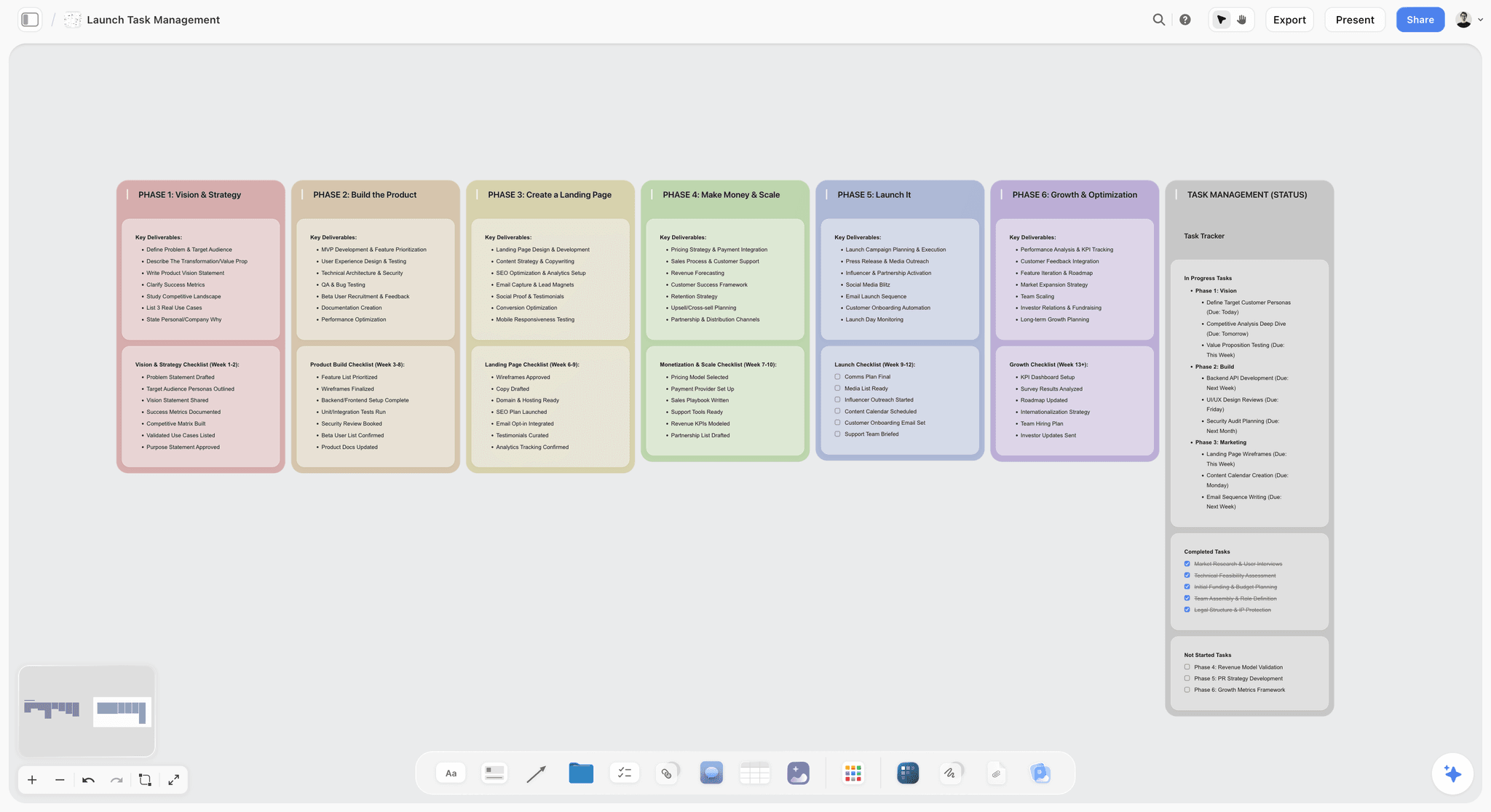
A launch plan laid out in phases with a status tracker: the kind of structure you should expect an AI to produce from a brief.
Asana's own research makes the case for looking at this problem at all. Its Anatomy of Work Global Index 2023 says 62% of the workday is lost to repetitive, mundane tasks and that people use 10 apps a day. It is a vendor's survey, so read it as a direction rather than a measurement of your team, but it does explain why every tool below now sells AI.
The Storyflow 6-Part Test
Feature lists say "AI". The useful question is what you are holding when the AI has finished. This test gives you one number to compare, using your own brief.
The rule, defined
The Storyflow 6-Part Test: give the tool one real brief and one prompt, then count how many of 6 parts land as editable items in the workspace: goal, deliverables, owners, dates, references and open questions. A Storyflow board passes when all 6 sit on the canvas. This is our editorial recommendation. It is a test you run on your own brief, and no published study sits behind it.
Why these six parts
A creative plan fails in one of six ways: the goal is vague, the deliverables are unlisted, nobody owns the work, nobody knows when it is due, the look is undefined, or an open question surfaces late. Creative work leans on the last two: a campaign without references is a task list, and a plan with no open questions is a plan that has hidden them.
How to score it
- 6 of 6: the tool built your plan. Check it and use it.
- 4 or 5: the tool is a strong assistant. You finish the rest by hand, and you should note which parts are always missing.
- 3 or fewer: the tool summarises and organises. That may still be worth paying for, but it is a different purchase.
A part counts only if a colleague can open it and edit it without you. Text in a chat window scores zero, however good it is.
What it does not measure
It does not measure anything that happens after planning: workload, resourcing, time tracking, dependencies, reporting across 40 projects. A tool can score 3 here and be the right system of record for a large team. Run this test to decide where the plan gets built, and use the plan-by-plan matrix to decide what to pay for.
How Storyflow answers each part
Goal and open questions land as notes on walls. Deliverables and dates land as table rows, kept in date order. Owners land as a table's person column named Owner or Assignee, filled with people who already have access to the board; if a name matches nobody, the whole column becomes plain text. References land as images on the board, or as a moodboard built on request. The AI cannot set a to-do's or ticket's assignee, so check those by hand.
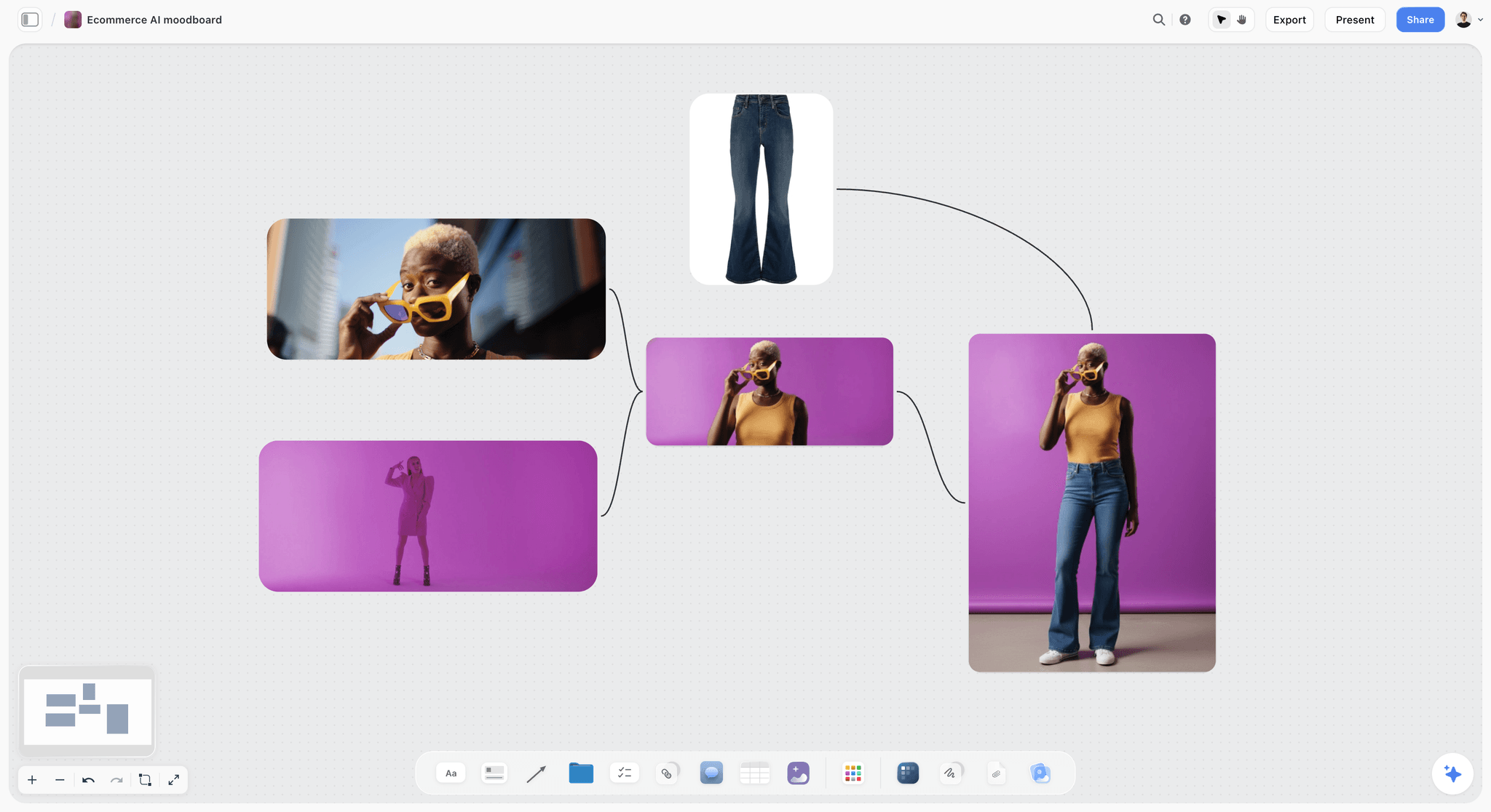
A product moodboard made with in-app AI image generation on Pro or Max. Storyflow's promise stays the same: it will never add AI video generation, and the creative work stays yours.
AI That Builds the Plan vs AI That Summarises Tasks
AI that builds the plan starts from a brief and creates the structure; AI that summarises tasks starts from work already entered and tells you about it. Both are valuable, and they answer different questions for a producer.
| Question | AI that builds the plan | AI that summarises tasks |
|---|---|---|
Starts from | A brief, notes, a script or attached files | Tasks, docs and comments already in the tool |
Typical prompt | "Turn this brief into a campaign plan" | "What is at risk this week?" |
Output | New items on a board or a new project | A summary, status note, chart or alert |
Best moment | Day one of a project | Week three onwards |
Failure mode | Confidently invents dates or owners | Summarises stale data accurately |
What to check | Every name, date and budget line against the brief | That the source tasks are current |
Who benefits most | Producers and leads building from nothing | Managers tracking many live projects |
Who sells it, by their own pages | Storyflow, monday.com (prompt to board), Miro (Sidekicks), ClickUp (AI Projects) | ClickUp, Asana, Notion, Wrike, monday.com |
The line is blurring, so test it
A fair comparison admits that most vendors now claim both. monday.com's Sidekick page says it creates workflows, automations, dashboards and forms from a simple request, and its AI guide says monday magic generates a whole board from a prompt. Miro's AI page says its Sidekicks build frames, timelines, kanbans and diagrams live on the canvas. ClickUp's AI page lists AI Tasks and AI Projects, and says Brain² builds slides and dashboards. So the question is not who has a build feature. It is what the build holds when it is done.
What creative work needs that a task build skips
Creative plans carry pictures. A commercial needs references beside the shot list; a brand campaign needs a moodboard beside the channel plan; a client needs a deck made from the same material. Storyflow's in-app AI builds those on one canvas, with menu workflows such as Brief my campaign, Plan my whole production and Build a moodboard for my project, and it can turn the board into a pitch deck, one-pager or creative brief. It is not that task tools cannot make a plan. It is that a plan with no pictures is not yet a creative plan.
When a summary is what you actually need
If your projects are already in a tool and well kept, and the pain is that nobody reads them, buy the summary. A platform that proactively scans workloads and project networks to flag bottlenecks, as Wrike describes its own, does a job Storyflow does not attempt. Its read-back is narrower: a report of what changed on a board and who changed it.
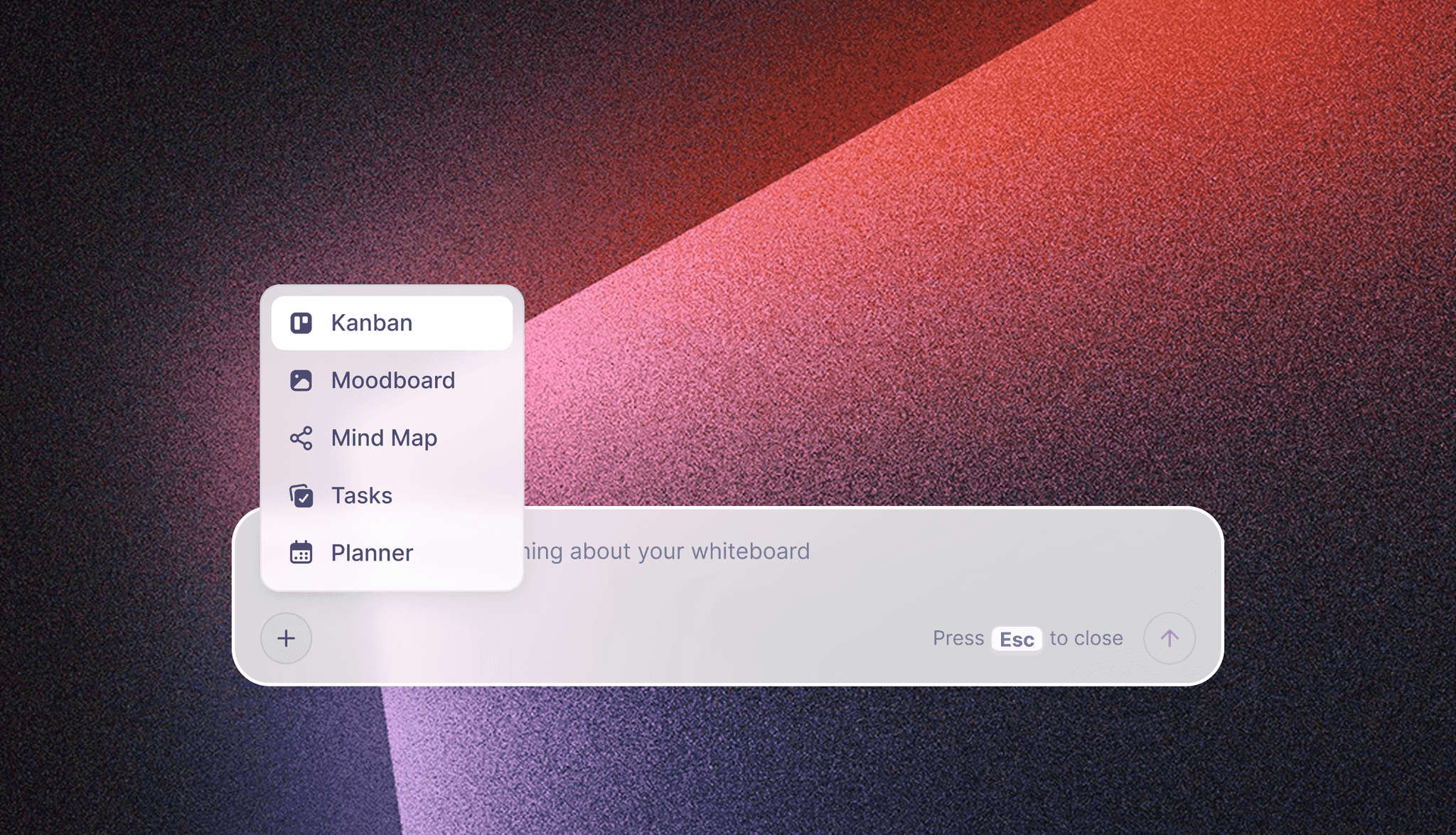
The in-app AI menu: you ask for a structure, and the AI proposes it on the board for you to accept or discard.
AI Features and Pricing Matrix, November 2026
This is the reference table. Every price and plan location below comes from the vendor's own page, as of November 2026, in US dollars. Storyflow is first as our pick for building the visual plan, then the rest by job.
| Tool | Plan | Price per user a month | Billing stated | AI on this plan |
|---|---|---|---|---|
Storyflow | Free | $0 | No card, no time limit | No in-app AI, Tactics or AI image generation; 25 plugin or connector actions a week, capped projects and uploads |
Storyflow | Plus | $7.99 ($9.99 monthly) | Annual, or monthly | In-app AI, 200+ Tactics, unlimited uploads, unlimited plugin and connector actions |
Storyflow | Pro | $14 ($19 monthly) | Annual, or monthly | Adds AI image generation and memory across conversations |
Storyflow | Max | $39 ($49 monthly) | Annual, or monthly | Most AI, image generation, memory, Team Workspace with roles |
ClickUp | Free | $0 | Not applicable | 500 AI credits per workspace, Brain² trial |
ClickUp | Core | $9 (regular $12) | Billed yearly | 1,000 credits per user a month, pooled |
ClickUp | Business | $17 (regular $25) | Billed yearly | 1,500 credits per user a month, pooled |
ClickUp | Enterprise | Custom | Through sales | 3,000 credits per user a month, pooled |
ClickUp | Max | $100 (regular $120) | Billed yearly | 10,000 credits per user a month, pooled |
Notion | Free | $0 | Not applicable | Limited trial of Notion AI |
Notion | Plus | $10 ($12 monthly) | Billed yearly, or monthly | Limited trial of Notion AI |
Notion | Business | $20 ($24 monthly) | Billed yearly, or monthly | Notion Agent, AI Meeting Notes, Enterprise Search (beta) |
Notion | Enterprise | Custom | Through sales | Business AI, plus zero data retention with LLM providers |
Asana | Personal | $0 | Not applicable | None listed on the plan card |
Asana | Starter | $10.99 ($13.49 monthly) | Annual, or monthly | 5 Teammate or Dash requests per user a month, 50 per account; 50K AI Studio credits |
Asana | Advanced | $24.99 ($30.49 monthly) | Annual, or monthly | Same requests; 75K AI Studio credits; approvals and proofing |
Asana | Enterprise | Custom | Through sales | 5 requests per user a month, 250 per account; 200K AI Studio credits |
monday.com | Basic | $9 | Annual; plans start from 3 users | 1,000 credits a month, 3 AI tools |
monday.com | Standard | $12 | Annual; plans start from 3 users | 2,000 credits a month, 5 AI tools |
monday.com | Pro | $19 | Annual; plans start from 3 users | 3,000 credits a month, 6 AI tools |
Adobe Workfront | All plans | See Adobe Workfront pricing | See Adobe Workfront pricing | Planning AI Assistant and AI Reviewer, subject to licence and agreement |
Wrike | Team tier | $10 | Annual, per user; 2 to 15 users | AI Essentials: content, comment summary, Board AI |
Wrike | Business | $25 | Annual only; 5 to 200 users | AI Elite starter pack: Copilot, agents, whiteboard assistant |
Wrike | Pinnacle, Apex | Custom | Annual | 3 and 10 times more AI Elite actions |
Miro | Starter | $8 | Billed yearly; 20% saving over monthly | 25 AI credits per member a month; agents as a limited trial |
Miro | Business | $20 | Billed yearly; 20% saving over monthly | 50 AI credits per member a month; AI workflows and agents |
Miro | Enterprise | Custom, from 30 members | Through sales | From 2,500 pooled credits a month |
Sources: Storyflow pricing, ClickUp pricing, Notion pricing, Asana pricing, monday.com pricing, Adobe Workfront pricing, Wrike pricing and Miro pricing.
Three pricing facts that change the answer
- ClickUp's Brain² chats use no credits on paid plans. Credits go to Super Agents, AI Automations and AI Fields, so a team running agents spends the pool far faster than a team that only chats. See ClickUp pricing for the plan that fits.
- Storyflow's in-app AI starts on Plus. Storyflow has a free plan at $0 with no card, but a Free account sees an upgrade screen in the AI panel. It can still use the ChatGPT plugin or Claude connector for 25 actions a week.
- Notion's agent is not on Plus. Plus gets a limited trial of Notion AI, so the agent starts at the Business price.
Read seat rules with the price
monday.com plans start from 3 users. Wrike sells subscriptions in groups of five up to 30 seats. Business-tier Wrike is annual only. A low per-user price multiplied by the minimum is the real entry price for a small studio, and for a team of two the minimum can matter more than the rate.
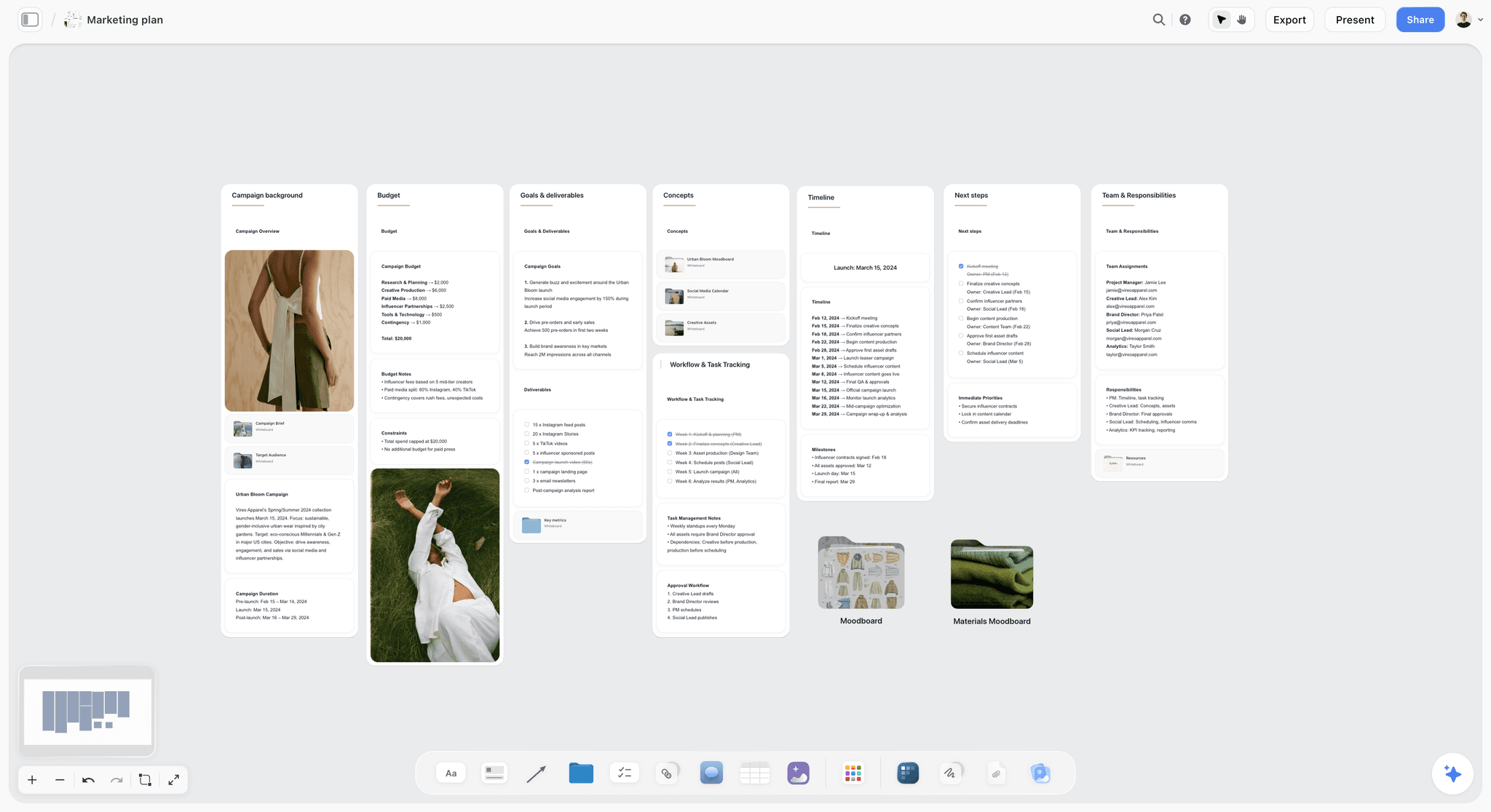
A fictional campaign's plan, with budget, goals, timeline and team. Test whether the AI you are buying can produce this much from a brief, and how much you must correct.

Storyflow marketing plan board for a fictional apparel campaign, built from a brief with goals, budget and timeline
Build your next project plan from the brief
Install Storyflow in ChatGPT, paste your messiest live brief, and see how much of the plan lands on a board your whole team can edit.

Which AI Feature Sits on Which Plan
The matrix above is by plan. This one is by job, so you can see the lowest plan that carries the feature your team would use. Cells name what each vendor's page states as of November 2026; a tool missing from a cell may still do the job, so check its page.
| Job | Storyflow | What the others state |
|---|---|---|
Build a plan from a brief | Plus: whole boards from a plain-language ask or files | ClickUp AI Tasks and AI Projects; Notion Agent on Business; Asana AI Teammates on paid plans; monday magic; Miro Sidekicks, with agents on Business; Wrike, through assistants on its MCP server |
Summarise updates | Change report through plugin or connector | ClickUp Brain²; Notion Agent; Asana AI summaries; monday.com Sidekick; Wrike comment summary on the Team tier |
Meeting notes | Turn notes into walls or tables, in-app | ClickUp Notetaker, on credits; Notion AI Meeting Notes on Business, no bot; Miro pulls live data from Granola |
Agents | None that run unattended; the AI acts when asked | ClickUp Super Agents, on credits; Notion Custom Agents, on credits; Asana AI Teammates, per request; monday.com agents; Wrike agents from Business; Miro Sidekicks and Flows |
Reads images you select | Yes, up to 24 | Miro uses the whole canvas as the prompt |
Moodboards and references | Yes, with an in-app workflow | Miro holds references on its canvas |
Deck from the plan | Yes: slides, pitch deck or one-pager in-app; slide decks through the plugin or connector | ClickUp says Brain² builds slides; monday.com says Sidekick makes reports and decks |
Workload and resourcing | No | ClickUp workload view from Business; Asana AI manages resources; monday.com resource management on Enterprise; Wrike capacity planning on Pinnacle |
Adobe Workfront's AI is a different shape
Workfront does not fit neatly in the table. Its Planning AI Assistant searches, creates, updates and deletes records, including creating them from uploaded PPTX, PDF, DOCX and image files, and it needs a Workfront Standard licence and a Planning Standard licence. Adobe warns that the assistant's actions are permanent and may not be reversible. Its AI Reviewer checks assets against brand guidelines and returns a score and recommendations, without making the approval decision, and Adobe labels the image guideline type as beta.
Where proofing fits
Most teams meet the limit of AI project tools when a file needs a decision. Storyflow is not a proofing tool: it has no frame-level approval. Asana includes approvals and proofing on Advanced, and ClickUp's Annotate Attachments is included from Business. For anything needing frame-level notes, read creative proofing tools: features and pricing, and for a client sign-off process, the creative approval workflow template.
How AI Is Metered: Credits, Actions and Requests
Every vendor has invented its own unit, which makes the headline allowances meaningless side by side. What matters is how fast your real work spends them. Our pick is first; the rest are in the same order as the matrix.
| Tool | Unit | What the page says it costs | Trap to watch |
|---|---|---|---|
Storyflow, in-app AI | Plan allowance, more on Pro, most on Max | Included in Plus, Pro and Max, with limits; never unlimited | Free accounts have no in-app AI |
Storyflow, through ChatGPT or Claude | The assistant's own plan | No Storyflow AI credits used; 25 actions a week on a Free account, no weekly limit on Plus, Pro and Max | ChatGPT's own limits still apply |
ClickUp | AI Super Credits | Brain² chats on paid plans use no credits; Super Agents, AI Fields and automations do. Extra: $10 per 10,000 | Credits pooled across users; one heavy agent spends everyone's |
Notion | Standard and Select credits | Notion Agent on Auto uses Standard credits and a chosen model uses Select; Custom Agents $10 per 1,000 monthly credits | Custom Agents are priced apart from seats |
Asana | AI requests and AI Studio credits | 5 requests per user a month on paid plans; extra at $0.50 in a pack or $0.60 pay as you go | Small account caps: 50 requests on Starter and Advanced |
monday.com | AI credits | Credits reflect task complexity; 1,000 cover roughly 50 resume screenings or 5 hours of meeting summaries | AI block automations spend credits; the FAQ says a typical 3-person team uses about 800 to 1,200 a month |
Wrike | AI Actions | AI Essentials not charged, with fair use; AI Elite from a pooled allowance | Skipped and failed actions count; Wrike's example agent uses about 160 a month |
Adobe Workfront | Licence and agreement | See Adobe; AI Reviewer needs a signed Gen AI agreement on file | Check licence type per user |
Miro | AI credits | 10 a month on Free, 25 on Starter, 50 on Business | Small monthly per-member allowance on the lower plans |
Estimate one job, not one month
Before you buy, work out what one project consumes. On monday.com's own figures, 1,000 credits cover roughly 5 hours of meeting summaries, so the Standard allowance of 2,000 is about 10 hours a month. On Wrike, an agent making 4 actions across 10 projects weekly uses about 160 AI Elite actions a month, by Wrike's own example. Do the same sum for the job your team runs most, on the plan you would buy.
What the plugin route changes
ChatGPT's plugin and Claude's connector run on the assistant you already pay for, so actions use no Storyflow AI credits. If your team already pays for one assistant, the cost of the AI layer is partly settled. The AI creative project management with Claude and ChatGPT connectors post takes that angle further.
AI Creative Project Management Tools Compared
Storyflow is listed first because the job is the AI building the visual plan from a brief, and it is our product. It would not come first for workload, time tracking or cross-project reporting. The rest follow by job. Vendor facts are from their own pages as of November 2026.
1. Storyflow

A fictional ad brief built on a board: objective, channels and references live together, so tasks and creative direction do not drift apart.
Does best: building the plan. The in-app AI builds whole boards from a plain-language ask or attached files, asks a clarifying question or two, and stages the result as a proposal. It reads the current board plus up to five documents and three other boards you attach, sees up to 24 images you select, and turns the board into a pitch deck, slides, one-pager or creative brief. By one recorded run, rounded up, messy notes became an organized board in 3 minutes, against an estimated 45 by hand. Through the plugin and connector, ChatGPT and Claude build the same kinds of walls and tables and report what changed and who changed it.
Real limit: no Gantt, dependencies, critical path, workload view, time tracking or calendar view. Tables cannot be sorted, and nothing recalculates. The AI cannot set a to-do's or ticket's assignee, and there are no due-date reminders. Plugin and connector access is new, live in ChatGPT since 24 October 2026.
Price: Free $0, with no in-app AI and 25 plugin or connector actions a week; Plus $7.99 a month billed annually ($9.99 monthly), Pro $14 ($19), Max $39 ($49), as of November 2026. Anyone a paid member invites to a board joins free.
Choose something else instead when your problem is running 30 live projects, not starting one. See AI creative project management and AI project plan generator for fit.
2. ClickUp
Does best: AI across a large work system. ClickUp's AI page says Brain² draws on tasks, docs and conversations, picks a model per job, joins calls for notes, and builds slides, dashboards and prototypes, with Super Agents, AI Fields and AI Projects named. It is the broadest AI set in this list, and the pricing page says every plan includes a pooled credit allowance.
Real limit: breadth has a setup cost, and pooled credits mean one team's agents can spend another's allowance. Annotate Attachments, the nearest thing to proofing, is a trial on Core and included from Business, and the workload view starts on Business too.
Price: Free tier; Core $9, Business $17 and Max $100 per user a month billed yearly; Enterprise custom; extra credits $10 per 10,000, as of November 2026.
Choose ClickUp instead when you want one system for tasks, docs, goals and AI, and someone on your team will own its configuration. The ClickUp alternative page sets out where a board fits better.
3. Notion
Does best: AI over written knowledge. Notion's AI page describes Notion Agent completing multi-step tasks using Notion, connected apps and the web, plus Custom Agents, AI Meeting Notes without a bot, Research Mode and database autofill. If your briefs and decisions are already in Notion, the context is already there. Notion says it does not use your data to train its models unless you opt in.
Real limit: Notion Agent starts at Business; Free and Plus get a limited trial. It is document-first, so a visual plan with references takes more arranging. Custom Agents are priced apart from seats.
Price: Free; Plus $10 and Business $20 per member a month billed yearly ($12 and $24 billed monthly); Enterprise custom, as of November 2026.
Choose Notion instead when the plan is mostly words and your team already keeps its knowledge there. Also see the Notion alternative page.
4. Asana
Does best: AI on top of structured work. Asana's AI page says AI summarises updates, helps manage resources and surfaces priorities; AI Studio runs no-code automations for intake, classification and routing; and more than 30 prebuilt AI Teammates cover marketing, operations and IT.
Real limit: approvals and proofing start on Advanced, at more than twice the Starter price. It is a task and portfolio system first, so references and creative direction live elsewhere or as attachments.
Price: Personal free; Starter $10.99 and Advanced $24.99 per user a month billed annually ($13.49 and $30.49 monthly); Enterprise custom, as of November 2026.
Choose Asana instead when intake and routing are your bottleneck and several teams already work in it. The Asana alternative page shows the difference from a board.
5. monday.com
Does best: configurable boards with AI that can start them. monday magic generates a board from a prompt, and Sidekick creates workflows, dashboards and forms, drafts plans with assignees and due dates, and makes reports and decks. Its pricing FAQ gives a typical credit figure for a small team, which helps budgeting.
Real limit: plans start from 3 users, and AI block automations spend credits, so busy automations can use the allowance fast. Items and columns are the unit of work, so creative references sit as files.
Price: Free up to 2 seats; Basic $9, Standard $12 and Pro $19 per seat a month billed annually, 3-seat minimum, as of November 2026.
Choose monday.com instead when an operations person wants to configure workflows for several departments. The monday alternative page compares the two shapes.
6. Adobe Workfront
Does best: enterprise marketing operations with proofing built in. The Planning AI Assistant works on records, and the AI Reviewer checks images against brand rules. It suits organisations with governance, many licences and existing Adobe investment.
Real limit: a heavy setup, with licence requirements per feature. Assistant actions may not be reversible, by Adobe's own warning, and AI Reviewer needs a signed Gen AI agreement and a configured brand.
Price: see Adobe Workfront pricing.
Choose Adobe Workfront instead when you are a large in-house team that already runs on Adobe and needs auditability.
7. Wrike
Does best: AI for managers of many projects. Copilot answers plain-language questions about spaces, projects and tasks with links, returns charts and drafts text. Out-of-the-box agents cover intake, triage and risk, with a conversational agent builder.
Real limit: Copilot and agents need Business or higher, an annual plan with a seat range of 5 to 200, and Copilot needs a signed AI Addendum. To create projects and tasks from raw input, Wrike's MCP article points to outside assistants. Skipped and failed actions count against the allowance.
Price: Free; Team tier $10 and Business $25 per user a month billed annually; Pinnacle and Apex custom, as of November 2026.
Choose Wrike instead when you need risk scanning and reporting across a portfolio more than you need a plan built.
8. Miro
Does best: the closest shape to Storyflow, an AI that works on a canvas. Miro says its canvas works as the prompt, and Sidekicks build frames, timelines, kanbans and diagrams live. Flows save multi-step AI workflows as reusable templates, and it cites 250+ integrations.
Real limit: AI credits are small on lower plans (25 a month on Starter, 50 on Business), and agents are a limited trial below Business. Its AI page is about frames, timelines, kanbans and diagrams rather than deliverables a client receives, such as a treatment or one-pager.
Price: Free; Starter $8 and Business $20 per member a month billed yearly; Enterprise custom from 30 members, as of November 2026.
Choose Miro instead when your team plans in live workshops and already works in Miro. The Miro alternative page gives the side-by-side.
Also checked
For Airtable's AI by plan, see Airtable pricing. For the head-to-head version of the main four, see Asana vs ClickUp vs monday vs Workfront. For non-AI criteria, see the best creative project management tools and the best AI tools for project management.
The 6-Part Test Sheet: A Template You Can Copy
Use this table to run the test. Put it on a board or a spreadsheet, and fill one column per tool you test. Here it is filled with what a fictional eight-person agency, Fenwick & Vale, expects from a brief for a fictional client, Salt Harbour Cider. Scores are left for you, because the result depends on your brief, your plan and the date you try it. Only the six parts of the test are scored: goal, deliverables, owners, dates, references and open questions. The other four rows are worth checking, but they do not count toward the 6.
| Part | What the brief says | Must land as | Pass looks like | Check by hand |
|---|---|---|---|---|
Goal | "Launch Salt Harbour Dry in three regions by June" | Note or heading | One sentence, measurable | Region names match the brief |
Audience | "On-trade buyers, then under-35 drinkers" | Note | Two audiences, in order | Not invented segments |
Deliverables | "One film, six stills, trade deck, social set" | Table rows | One row per item, with format | Nothing added or dropped |
Owners | "Ana leads, Rob edits, Mei designs" | Person column | Names on rows, editable | Names match people on the workspace |
Dates | "Launch 2 June; shoot in April" | Date column | Rows in date order | No invented dates |
Budget | "Ceiling of 40k, split not agreed" | Note, marked open | Stated as a ceiling | No invented split |
References | "Salt-worn, coastal, not rustic" | Images on the workspace | 12 or so images grouped by idea | Licences and real brands |
Open questions | "Trade deck language? Which three regions?" | List | At least the two in the brief | Added questions are real |
Client touchpoints | "Direction review, then final" | Table rows | Two dated reviews | Decider named |
Next step | "Kickoff on Monday" | To-do | Assigned by a person | Assignee set by hand if the AI cannot |
How to score fairly
Use the same prompt in each tool: "Turn this brief into a project plan with goal, deliverables, owners, dates, references and open questions." Do not coach one tool more than another. If a tool asks a clarifying question, answer it the same way in all of them, and allow it. A good question is a point in its favour.
What to write beside each score
Record the plan you tested on, the date and anything you had to fix. AI features change monthly, and a score from March says little in October. Keep the sheet and repeat it before renewal.
Worked Example: Fenwick & Vale Builds a Launch Plan
This is an illustrative project for a fictional agency. Fenwick & Vale runs its client work in ClickUp and wants to know whether AI can shorten the start of a job.
Day one: the brief
Ana, the account lead, attaches the client's brief to a new Storyflow board and asks the in-app AI to brief the campaign. It asks which regions come first and whether the shoot is in scope, and she answers. It proposes walls for objective, audience, deliverables and timing, plus a table of milestones with rows kept in date order. She accepts, then strikes one date it filled from an assumption she did not recognise.
Day two: references and direction
Mei uploads past coastal shoots and asks the AI to build a moodboard from the images. She selects a dozen so the AI can see them, and asks for a line of intent under each. Rob adds a shot idea list beside it. The plan and the look now sit on one board, which is the part a task list never carried. Ana invites the client's marketing lead, who joins free.
Day three: test the part-count
Ana runs the same prompt in ClickUp's Brain² for comparison, since the team already pays for it, and fills the 6-Part sheet honestly. She writes down what landed and what she had to add. The sheet goes to the founder with her recommendation and no claim beyond this one brief.
Week two: tasks move to the system of record
The agreed production tasks go into ClickUp, because the team needs its workload view and time tracking, and Storyflow has neither. Nobody tries to keep both up to date in detail: the board holds the plan and creative direction; ClickUp holds who is doing what this week. The board links to the ClickUp project, and the project links back.
Week four: the read-back
The producer asks Claude, through the connector, "What changed on the launch board this week, and who changed it?" Then she uses the in-app menu's What's missing here? on the board before the client review. The client deck comes from the same board, using the in-app AI, and she corrects two slides by hand.
What Fenwick & Vale ends up with
- One board for plan, references and client deck.
- ClickUp for the week's tasks, workload and time.
- A clear rule for which goes where, written on the board.
Do This in ChatGPT or Claude
You can build the plan from the assistant you already use. ChatGPT calls it a plugin and Claude calls it a connector. Keep two things apart: plugin and connector work runs on the assistant's model and uses no Storyflow AI credits, while the in-app AI runs inside Storyflow on your Storyflow plan. Menu workflows and image generation are in-app only.
Install in ChatGPT
Open the Storyflow listing in ChatGPT's plugin directory, select Install plugin, sign in and choose which projects ChatGPT may use. Read access is always on, and you decide whether it may make changes. Then mention it with @ or choose it from the + menu in a chat. Availability depends on your ChatGPT plan, workspace and region, and a Business or Enterprise admin manages plugins. Connections end after 30 days, and you sign in again.
Add in Claude
In Customize, then Connectors, click + Add and choose Add custom connector, and enter https://mcp.storyflow.so/mcp. On Team and Enterprise, an Owner adds it in Organization settings, then each member connects. Claude's Free plan allows one custom connector. Full steps for every assistant are on the MCP page.
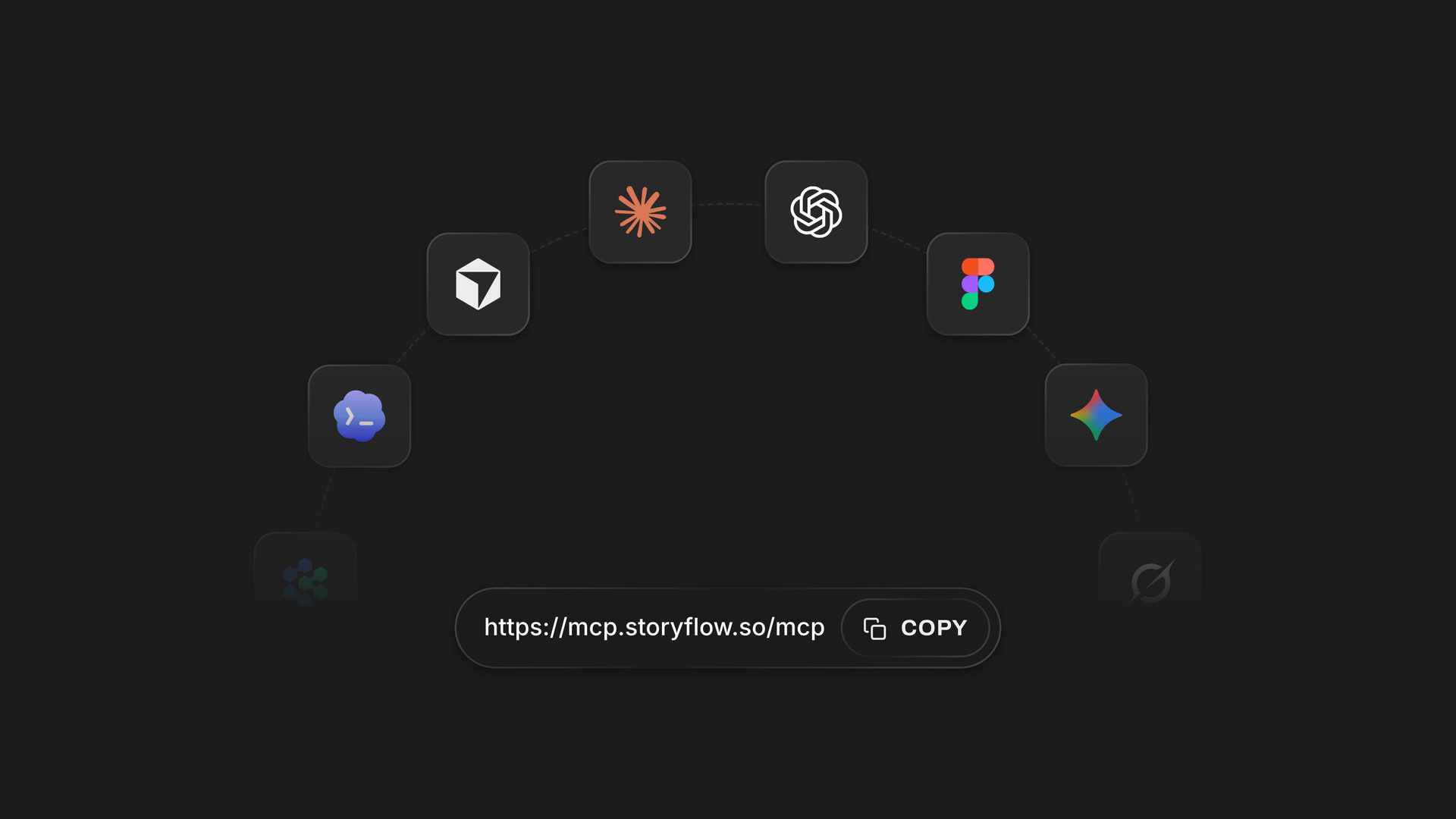
The same Storyflow account connects to several assistants, so a team does not have to agree on one chat tool.
Prompts for a creative project plan
- "@Storyflow in my Salt Harbour project, build a board from the brief below with walls for Goal, Audience, Deliverables, Dates, References and Open Questions."
- "Add a Deliverables table with columns Item, Format, Owner, Due. Use only names and dates in the brief, leave blanks visible, and keep rows in date order."
- "Add a kanban board with columns Brief, In production, Client review, Delivered, with one card per deliverable."
- "What changed on this board in the last week, and who changed it? Group by wall and list anything now overdue in the Dates table."
- "Read this board and list what is missing compared with the brief I paste below. Do not change anything."
- "Create a client update deck from this board with six slides: goal, progress, direction, next dates, decisions needed, risks."
- In Claude, with a long brief pasted into a Project: "Using the brief in this Project, build the same six walls on my Storyflow board, then tell me the three questions you would ask the client before I trust the plan."
What lands on the board
Walls, notes, headings, tables, documents, to-dos, kanban cards, mind maps, charts and slide decks. ChatGPT and Claude can add images and give you an upload link for your own. Team members can edit everything in the browser, with real-time co-editing.
What to check by hand
- Comments. The plugin and connector cannot read board comments.
- Owners. A to-do created this way has no date or assignee; a table person column fills only with people on the board.
- Pictures. A photo attached in the chat does not reach the board; use the upload link.
- Free accounts. 25 plugin actions a week on a Free account, and no weekly limit on Plus, Pro and Max.
Rivals connect too: ClickUp, Asana, Notion, monday.com, Wrike, Adobe Workfront and Miro were all in ChatGPT's plugin directory as of October 2026, and Wrike's MCP server connects outside assistants too. See the ChatGPT project plan, ChatGPT kanban board, Claude campaign plan and Claude kanban board pages for specific flows.
AI by Stage of a Creative Project
AI earns its cost at different moments in different tools. This table follows one project from intake to wrap, with the board's role first in each row, since planning sits at the start of the job.
| Stage | Storyflow | What the task tools add | What to check |
|---|---|---|---|
Intake | Turn a pasted request into a board | AI Studio intake and routing in Asana; Wrike intake agent | Duplicates and missing budget |
Plan | Build walls, tables and moodboard from the brief | Sidekick and AI Projects drafts | Dates and owners |
Concept | Moodboard, character sheet, script, treatment, in-app | Little to add | Client-specific references |
Production | Shot list and strip board by shoot day; it does not recalculate | Time tracking and workload | Changes after a call |
Client review | Presentation mode and comments | Asana approvals; dedicated proofing tools | Who decided |
Status | Change report by plugin or connector | Copilot, Brain², Agent summaries | Source data is current |
Wrap | Designed PDF of a board, in-app | Cross-project reporting | Decisions kept |
Intake: where small teams gain least
If you get three briefs a month, an automation that routes them is a hobby. Asana's and Wrike's intake AI earns its cost when dozens of requests arrive weekly across departments. Small studios should spend on the plan stage first.
Planning: where most hours go
Starting from nothing takes the longest and has the most leverage. The in-app AI took a PDF into tables in 2 minutes, against an estimated 45 by hand, from one recorded run, rounded up. Treat that as what the feature can do on one job, not a promise. The brief to project board page walks through this stage, and visual project planning makes the wider case.
Production: where AI helps least
Once a shoot is running, the AI's job shrinks to read-backs. A plan changes faster than anyone updates a tool. Spend your attention on a single source of truth and the habit of updating it; a project dashboard on the board can help.

A kanban with fictional clients: a simple view of who is where, which may be all a small studio needs from a tracker once the plan is built.
Which Tool for Which Team
Every recommendation here starts from the job. Our pick comes first in each row where the plan is the problem; where it is not, the row says so.
| Team | First choice | Add | Why |
|---|---|---|---|
Studio of 2 to 5 | Storyflow | Nothing yet, or a simple task tool | The board holds plan, look and tasks |
Agency of 6 to 20 | Storyflow for plans and client decks | ClickUp, Asana or monday.com for workload | Two jobs, two tools, one rule for which goes where |
In-house brand team | Storyflow for campaign plans | Asana Advanced, or Workfront if already on Adobe | Intake and approvals live in the system of record |
Producer of commercials | Storyflow for pre-production | Proofing tool for cuts | Shot lists and references on one board |
Portfolio manager, 30+ projects | Wrike, ClickUp or Asana | Storyflow only for plans that need visuals | Reporting and risk across projects |
Knowledge-heavy content team | Notion | Storyflow for visual planning | Written context already there |
Workshop-led team | Miro | Storyflow for client deliverables | Facilitation comes first |
Agency lead
Your risk is a tool nobody fills in. Agree the rule at kickoff: plans and client-facing work on the board, weekly tasks in the system of record. For agency-specific setups, see agency campaign planning and agency client project planning.
In-house brand lead
You probably cannot replace your organisation's task system, and you should not try. The AI you add is for the part it does badly: building a campaign plan the whole team can see. AI marketing campaign planner and ChatGPT campaign plan show the flow.
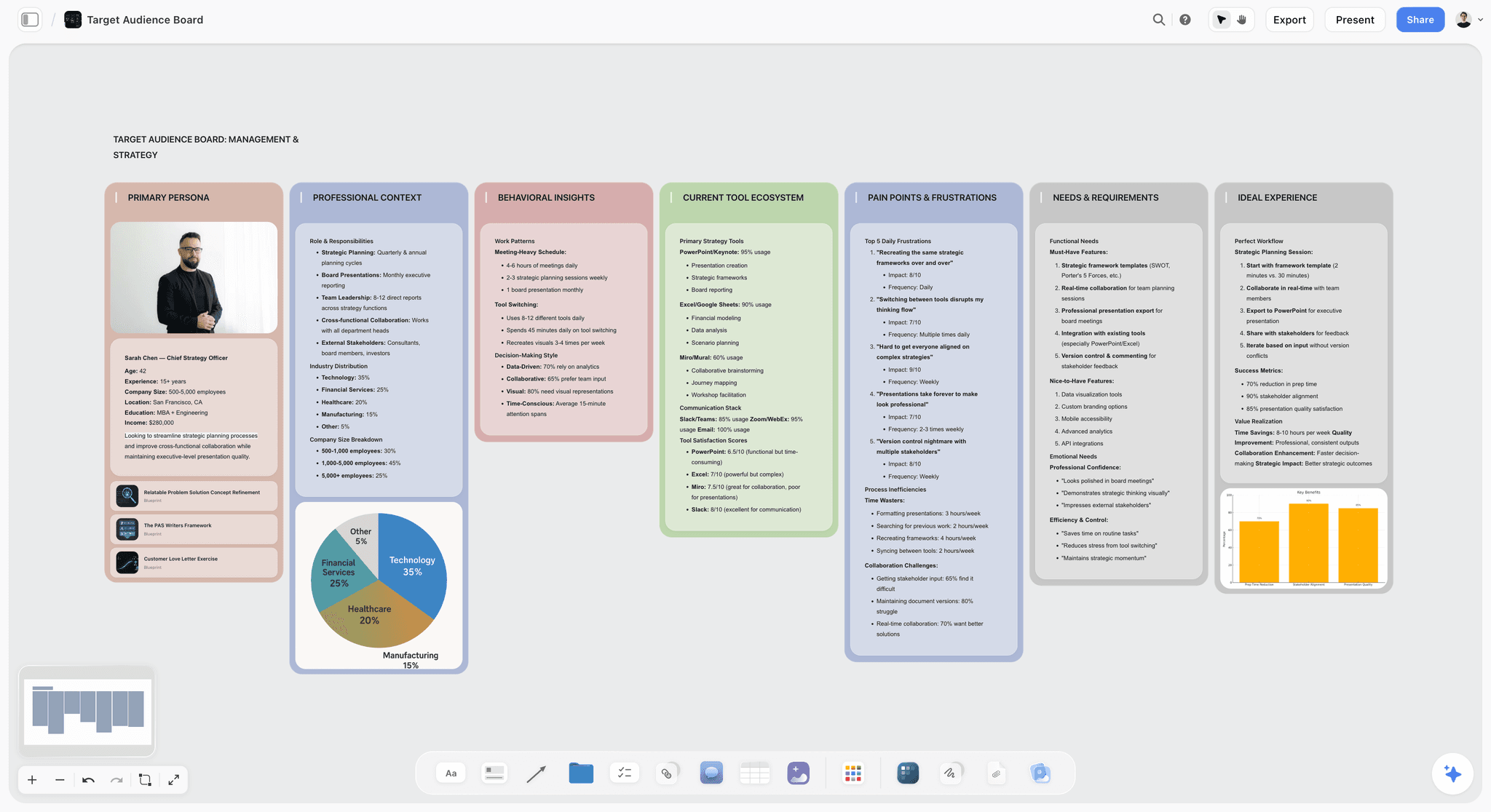
An audience board is a plan part that task tools rarely hold, and it is worth asking any AI you test to build one.
Founder running projects yourself
You need fewer tools, not smarter ones. A board that holds the plan and the to-dos may be enough until you hire. To-dos take an assignee and a due date set by a person, with in-app notifications and no reminders. If you find yourself needing dependencies, that is the moment to add a task tool, and not before. The AI kanban board generator page shows the lighter version.
Producer
Producers need schedules that recalculate, and Storyflow's do not. Build the plan, references and shot list on the board, and keep a scheduling tool for the moving dates. What is creative project management covers the wider role, for anyone briefing a new team.
Data, Permissions and Admin Questions to Ask First
AI features raise admin questions before they raise budget ones, and a client contract may decide the answer for you. Here is what each vendor's page says, as of November 2026.
Who trains on your work
Notion's AI page says it will not use your data to train its models unless you opt in. Notion Enterprise lists zero data retention with LLM providers. OpenAI's connected apps article says it does not use information accessed from apps to train models by default for Business, Enterprise and Edu customers, and that it may for Free, Plus, Go and Pro users if the "Improve the model for everyone" setting is on. Check this before a client's unreleased campaign passes through a personal account.
What must be signed
Wrike's Copilot requires a signed AI Addendum. Adobe's AI Reviewer needs a signed Gen AI Agreement and a configured brand. Allow time for your legal team if you are testing either.
Who may turn it on
In a ChatGPT Business or Enterprise workspace, an admin manages plugins and the apps inside them. In Claude's Team and Enterprise plans, an Owner adds the connector. In Storyflow, you choose which projects the assistant may reach and whether it may make changes.
What happens when it is wrong
Adobe warns that the Planning AI Assistant's actions may not be reversible. Storyflow's in-app AI shows a proposal you accept or discard. For any tool, test on a copy first, and read OpenAI's permissions article if you are using an assistant, so that it asks before making changes.
Mistakes and Fixes
Buying AI to fix an unkept system
Mistake: adding Copilot to a tool nobody updates. Fix: check whether the source data is current before paying to summarise it.
Comparing credit numbers
Mistake: 3,000 credits looks like more than 1,500. Fix: convert one real job into each vendor's unit. The units are not equal.
Testing with a tidy brief
Mistake: using the vendor's sample project. Fix: use your messiest real brief, with a missing date and a disputed budget, and see what the AI does with the gap.
Trusting invented dates
Mistake: a confident schedule appears, so nobody checks it. Fix: compare every date and name with the brief. Ask for blanks to stay visible rather than filled.
Replacing the tool that handles workload
Mistake: moving everything to a canvas, then missing workload and time tracking. Fix: Storyflow has neither. Keep the system of record, and write one rule for what goes where.
Duplicating every task in two tools
Mistake: the same 200 tasks on a board and in a tracker, drifting apart by Friday. Fix: detail lives in one place. The other holds a link.
Ignoring the seat minimum
Mistake: a $9 headline for a two-person studio on a plan that starts from 3 users. Fix: multiply by the minimum before comparing.
Leaving agents running unwatched
Mistake: an agent spends the pooled allowance on low-value actions, and skipped or failed actions may still count. Fix: start with one agent on one project, and read the usage dashboard weekly.
Storyflow's Honest Limits for This Job
The claim here is narrow on purpose: it builds the visual plan. Here is what it does not do.
- No Gantt chart, dependencies, critical path, workload view or time tracking. This is the biggest gap against every task tool above.
- No calendar view, and no recalculating schedule. Dates live in table cells and to-dos; tables cannot be sorted, so rows are kept in date order.
- No cross-project portfolio reporting of the kind Wrike or ClickUp offer. The AI reads the current board plus up to five documents and three other boards you attach, not your whole workspace.
- The AI cannot set a to-do's or ticket's assignee. It can fill a table's person column with people already on the board.
- No due-date reminders. Assignees get in-app notifications only.
- No unattended agents. The AI acts when asked.
- In-app AI is on paid plans only. A Free account gets an upgrade screen in the AI panel. AI image generation is on Pro and Max, and is not available through the plugin.
- No native desktop or mobile app, and no PPTX export. Boards export as PNG, JPEG or PDF.
- It has a shorter record than the others. Its ChatGPT plugin went live in October 2026.
Do You Need an AI Project Tool at All?
Some teams do not need any of this yet. If you run two projects at a time and everyone sits in one room, a shared board and a weekly meeting beat a credit meter. AI pays back when starting a plan takes days, or when nobody can tell you what changed.
Signs you should buy
- Each new project takes more than a day to turn from a brief into a plan.
- Client decks are rebuilt by hand from the plan each time.
- Status meetings exist only to find out what changed.
Signs you should wait
- Your current tool is not kept up to date. AI will only summarise the mess.
- You have fewer than three live projects, and no client deliverables built from the plan.
- Your contracts restrict what can pass through outside AI services, and nobody has read them.
For a read on the discipline itself, see creative project management.
The Bottom Line
Choose by the job. If your problem is turning a brief into a plan people can see, with references and a client deck, start with Storyflow and hold every tool to the 6 parts on your own brief. If your problem is running many live projects, ClickUp, Asana, monday.com or Wrike earn their AI costs, and Storyflow does not replace their workload and reporting. Many agencies will need one of each and a written rule for which holds what.
To try the plan-building part from a chat, install Storyflow in ChatGPT, or connect Claude through the MCP page, and paste your messiest live brief.
FAQ: AI Features in Creative Project Management Tools
What are the best AI tools for creative project management?
Storyflow is our pick when the job is building the visual plan from a brief, with references, tasks and tables on one board. ClickUp and Asana lead for AI over a large task system, Notion for AI over written knowledge, monday.com for configurable boards, Wrike for portfolio risk, Miro for canvas workshops and Adobe Workfront for enterprise marketing operations.
What is the best tool for AI creative project management?
Storyflow is the best tool when you need the AI to build a plan from a brief, including moodboards and a client deck. Its in-app AI builds whole boards and shows them as proposals you accept or discard. If your priority is workload, time tracking or dependencies, choose ClickUp, Asana or Wrike instead, because Storyflow has none of those.
What is the Storyflow 6-Part Test?
The Storyflow 6-Part Test is an editorial buying rule, not a benchmark. Give a tool one real brief and one prompt, then count how many of 6 parts land as editable items: goal, deliverables, owners, dates, references and open questions. A Storyflow board passes when all 6 sit on the canvas. Run it on your own brief.
What is the difference between AI that builds a plan and AI that summarises tasks?
AI that builds a plan starts from a brief and creates the structure, such as walls, tables, moodboards and to-dos on a canvas. AI that summarises tasks starts from work already entered and reports on it. The first helps on day one and the second helps from week three, so many teams use both.
How much do AI project management tools cost for creative teams?
As of November 2026, entry paid prices with AI run from about $7.99 to $25 per user a month. Storyflow Free is $0 with no in-app AI. Storyflow Plus is $7.99 billed annually, ClickUp Core $9 billed yearly, monday.com Basic $9 billed annually, Asana Starter $10.99 billed annually, and Wrike Business $25 for Copilot and agents. Notion's agent starts at Business, and Adobe's pricing page covers Workfront.
Which plan includes AI on ClickUp?
ClickUp's pricing page says every plan includes a pooled monthly AI allowance, as of November 2026: 500 credits per workspace on the free tier, 1,000 per user on Core, 1,500 on Business, 3,000 on Enterprise and 10,000 on Max. Extra credits cost $10 per 10,000, and Brain² chats on paid plans use no credits.
Is ClickUp better than Storyflow for creative teams?
ClickUp is better for running many live projects, with tasks, docs, goals, workload and a wide AI set in one system. Storyflow is better for building the visual plan from a brief, with references and a client deck beside the tasks. Storyflow has no workload view or time tracking, so many agencies would use ClickUp for the week and a board for the plan.
Does Storyflow have AI on every plan?
No. Storyflow's in-app AI is on Plus, Pro and Max, as of November 2026, with AI image generation and memory on Pro and Max. Free is $0 and shows an upgrade screen in the AI panel, though a Free account can use the ChatGPT plugin or Claude connector for 25 actions a week.
Do Storyflow's plugin and connector use AI credits?
No. Plugin and connector actions run on ChatGPT's or Claude's own model and your plan with that assistant, so they use no Storyflow AI credits. They also do less than the in-app AI: no menu workflows, no AI image generation and no reading of board comments. They can still build walls, tables, kanban boards and decks, and report what changed.
Can AI assign tasks in Storyflow?
Partly. Storyflow's AI cannot set a to-do's or ticket's assignee, but it can fill a table's person column, named Owner or Assignee, with people who already have access to the board. If any name matches nobody, the column becomes plain text. People can set assignees and due dates on to-dos by hand, with in-app notifications and no due-date reminders.
Does AI replace a project manager in a creative team?
No. AI builds drafts and reports what changed, but a project manager decides what matters, handles the client and resolves conflicts between people. Storyflow assists people and does not replace them, and every other tool here needs someone to check its output. Treat any AI-generated date, owner or budget line as a draft until a person confirms it.
Should an agency use two tools for AI project management?
Often yes, if each has a clear job. Many agencies need a system of record for tasks, workload and time, plus a board for the plan, references and client decks. Storyflow does the second and has no workload or time tracking. Write one rule for what goes where, and keep detail in only one tool, with a link from the other.
How should I test AI features before buying?
Run one real brief through each tool with the same prompt, then count what lands as editable items using the Storyflow 6-Part Test. Check every date and name, and estimate what one job costs in that vendor's AI unit. Note the plan and the date you tested, because AI features and allowances change often. Repeat before renewal.
Table of Contents
- Key Takeaways
- How to Choose an AI Tool for Creative Project Management in 8 Steps
- The Storyflow 6-Part Test
- AI That Builds the Plan vs AI That Summarises Tasks
- AI Features and Pricing Matrix, November 2026
- Which AI Feature Sits on Which Plan
- How AI Is Metered: Credits, Actions and Requests
- AI Creative Project Management Tools Compared
- 1. Storyflow
- 2. ClickUp
- 3. Notion
- 4. Asana
- 5. monday.com
- 6. Adobe Workfront
- 7. Wrike
- 8. Miro
- Also checked
- The 6-Part Test Sheet: A Template You Can Copy
- Worked Example: Fenwick & Vale Builds a Launch Plan
- Do This in ChatGPT or Claude
- AI by Stage of a Creative Project
- Which Tool for Which Team
- Data, Permissions and Admin Questions to Ask First
- Mistakes and Fixes
- Storyflow's Honest Limits for This Job
- Do You Need an AI Project Tool at All?
- The Bottom Line
- FAQ: AI Features in Creative Project Management Tools
- Related Reading
Templates to check out for this topic


Planning and project templates you can use in Storyflow
Plan a launch, a sprint, or a whole project on a visual board the team can see at once. Open one of these templates and start from real structure.


See Storyflow in Action
A visual AI workspace where every feature lives inside one canvas. No tab-switching, no context lost.
Build your entire board from a single message
Type what you need in the AI chat at the bottom of your canvas. The AI adds cards, headings, and structure directly onto your board.
Use expert frameworks as AI context
Type @ in the AI chat and choose any Tactic. The AI tailors every response to that framework instead of giving generic advice.
Turn your board into a mind map in seconds
Ask the AI to restructure your canvas as a mindmap. It connects your ideas into a visual hierarchy so you can see how everything relates.
Why Storyflow Exists
Storyflow actually began as a personal tool while working on creative and research projects.
We kept running into the same problem: ideas were scattered everywhere: notes, documents, and whiteboards.
Nothing helped us see how everything connected.
So we started building a workspace designed around how ideas actually grow.
→ Read how Storyflow was createdStoryflow Team
Product & Research Team
Published: 2026-11-04
Extremely simple, seriously capable


See how easy it is to get started
Watch a real project come together, from a blank board to a finished plan, clicked through step by step.
Start creating with AI and become more productive
Transform your creative workflow with AI-powered tools. Generate ideas, create content, and boost your productivity in minutes instead of hours.