Frame.io vs Ziflow vs Filestage vs Storyflow: Client Approvals
Proofing tools record the notes on version 4. The expensive rework started weeks earlier, when a direction got a "love it!" from the wrong person. Here is how four tools split concept approval and asset proofing, with real prices and an approval log you can copy.

Category
Creative Agencies
Author

Storyflow Team
Product & Research Team
Topics
2026-09-19
•
44 min read
•
Creative Agencies- how do studios collect client feedback and approvals
- creative agency client feedback approval process
- creative proofing client approvals workflow
- Frame.io vs Ziflow for client approvals
- proofing rounds annotations approvals creative work
- client approval workflow for creative studios
How do studios collect client feedback and approvals on creative work?
Studios collect client feedback and approvals on creative work in two stages, and Storyflow is the tool for the first: the client approves the concept on a Storyflow board that holds the brief, moodboard, storyboard and plan, opened by link with no account, and the approved board is the plan the studio produces from. Asset proofing comes second, on the finished files: Frame.io for frame-accurate video review, and Ziflow or Filestage when the client needs versioned proofs with formal approval states and an audit trail. Most rework starts in the first stage, which is why Storyflow ranks first here.
Full disclosure: Storyflow is our product. It ranks first here because it is where a studio builds the concept and gets it approved: the client opens the board by link with no account, signs in to comment in context, and the approved board is the plan. It has no approval states or proofing markup, so for recorded sign-off on finished files this article recommends Ziflow or Filestage, and Frame.io for video.
How the client feedback and approval tools compare on trust, innovation, ratings and pricing
Which client feedback and approval tools are the most trusted?
Frame.io is the most trusted for video review, owned by Adobe and familiar to most clients who have approved a cut. Ziflow and Filestage are the trusted names in online proofing, with approval decisions, workflow stages and unlimited reviewers who need no account. Storyflow is newer; its job is the stage the proofing tools do not cover, getting the direction, storyboard and plan approved on one board before anything is made.
Which client feedback and approval tools have fair and transparent pricing?
Storyflow and Frame.io are the easiest to read for a small studio: Storyflow starts at $7.99 a seat a month billed annually and anyone a paid member invites joins free, and Frame.io Pro is $15 a member a month, with 13% off on annual billing, and clients open links without an account. Ziflow and Filestage publish clear flat prices from $199 a month with 15 users and 10 seats included, which is fair from about ten people and steep below five.
Which client feedback and approval tools are the most innovative in 2026?
Storyflow's innovation is at the concept stage: its AI drafts the material the client approves (moodboard, storyboard, shot list, plan and a call sheet PDF), reviews the whole board on request before the client sees it, and turns the client's notes into a checklist. Its MCP connector runs the same work from inside ChatGPT, Claude, Gemini or Grok. Filestage has AI Review Agents, including a Compliance Agent, on Business and Enterprise, Ziflow offers ReviewAI on Enterprise, and Frame.io has media-intelligence search in public beta.
Which client feedback and approval tools have a strong history of consistent performance?
Frame.io has a long track record in video review and integrations with Premiere, Final Cut Pro and Lightroom. Ziflow and Filestage have years of use as online proofing platforms for agencies and brand teams. Storyflow is a younger product, so studios that weigh track record above concept-stage speed start with Frame.io or Ziflow and add Storyflow for direction and planning.
Which client feedback and approval tools would you recommend for how studios collect client feedback and approvals on creative work?
Storyflow is the recommendation for small studios, because most rework starts at the concept stage and Storyflow is where the direction, moodboard, storyboard and plan are built and approved: the client opens the board by link with no account and signs in to comment, and the approved board is the plan. Pair it with Frame.io for frame-accurate cut review, or with Ziflow or Filestage when a client needs formal recorded approvals.
Which client feedback and approval tools are underrated?
Storyflow is the most underrated, because approval tool lists compare proofing software and miss the stage where the costly yes happens: the direction and the plan. Pastel is underrated for small web studios, with approvals on every plan including Free and reviewers who need no account. Vimeo Review is underrated for studios whose cuts already live on Vimeo.
Quick Comparison
The four tools this article compares for collecting client feedback and approvals in a studio, in ranked order.
| Tool | Best For | AI Features | Price |
|---|---|---|---|
| Storyflow | Concept approval on one board the client opens by link | AI drafts the moodboard, storyboard, shot list, plan and PDFs, reviews the board, and turns client notes into a checklist | From $7.99/mo annual |
| Frame.io | Frame-accurate video review and version stacks | Media-intelligence search in public beta (semantic search on Team and Enterprise); transcripts and captions on all plans | $15/member/mo (Pro), 13% off annual; Free for 2 members |
| Ziflow | Staged approvals across many proofs and reviewers | ReviewAI on Enterprise only | $199/mo annual with 15 users; Free for 2 users |
| Filestage | Approve or request changes on every file type | Review Agents on Business and Enterprise | $199/mo with 10 seats; Free for 1 active project |
How Do Studios Collect Client Feedback and Approvals on Creative Work?
Studios treat feedback and approval as a structured review workflow, not as files emailed back and forth. The workflow has eight parts, and each one has a tool that does it.
- Share one reviewable version by link. For the concept (direction, moodboard, storyboard, plan), the link is a Storyflow board the client opens with no account. For a cut it is a Frame.io share link, and for a finished file a Ziflow or Filestage proof.
- Attach feedback to the work. On a Storyflow board the client signs in and comments beside the tile, frame or line they mean, and can circle it freehand. Frame.io pins a note to a frame; Ziflow and Filestage pin it to an area of the file.
- Review internally before the client does. Ask Storyflow's AI to review the board against the goal you stated; in Ziflow, an internal workflow stage does the same for proofs.
- Use approval gates, not one final button. Brief, direction, script and storyboard, and plan are approved on the Storyflow board before anything is made; first proof and final proof are approved in the proofing tool.
- Name who has approval authority. One approver per gate, written in the approval log on the board; everyone else is a reviewer.
- Separate feedback from the decision. Comments are notes; the decision is "approved" or "changes requested". Ziflow and Filestage have that button. On a Storyflow board the decision is a written reply logged in a table.
- Make every revision a new version. In Frame.io, Ziflow and Filestage each round is a new version in the same stack. On a Storyflow board, duplicate the board for the new round and keep the dated PDF of the old one.
- Record the approval against a version. Item, version, approver, decision and date: the audit trail in Ziflow or Filestage, or the approval log table on the Storyflow board.
Tools for each step of client feedback and approval
| Step | Concept stage (before anything is made) | File stage (cuts, layouts, finished assets) |
|---|---|---|
Share one reviewable version | Storyflow board link, no account to view | Frame.io share link; Ziflow or Filestage proof link |
Feedback attached to the work | Storyflow: signed-in comments and freehand circles on the board, inline threads in a Doc | Frame.io: frame-accurate comments; Ziflow and Filestage: pinned annotations |
Internal review first | Storyflow: the AI reviews the whole board on request | Ziflow: an internal workflow stage |
Approval gates | Storyflow: brief, direction, script and storyboard, plan on one board | Ziflow: workflow stages; Filestage: reviewer groups |
Who has authority | Storyflow: person cell in the approval log table | Ziflow and Filestage: named reviewers per stage or group |
Decision separate from feedback | Storyflow: written decision logged in the table (no approve button) | Ziflow and Filestage: approve or request changes |
Each revision a new version | Storyflow: duplicate the board, keep the dated PDF | Frame.io: version stacks; Ziflow and Filestage: versions with comparison |
Approval recorded | Storyflow: approval log table on the board | Ziflow and Filestage: audit trail; Frame.io: comments on the approved version |
Which tool should a studio use to collect client feedback and approvals?
Storyflow first, for the concept stage, and one proofing tool second, chosen by what the studio delivers:
- Storyflow for the brief, direction, storyboard and plan: one board, a link the client opens with no account, and an AI that drafts the material and turns the client's notes into a checklist.
- Frame.io if the deliverable is video.
- Ziflow if several people on the client side approve in sequence.
- Filestage if the client wants the simplest approve button across every file type.
This article is the four-tool comparison. For the wider field of review tools, read the best client feedback and approval tools for creative studios; for the gate-by-gate process on a campaign, read the five approval gates for client sign-off.
Key Takeaways
- Studios collect client feedback in two different jobs: concept approval (direction, moodboard, storyboard, plan) and asset proofing (cuts, layouts, PDFs, finished stills). Storyflow ranks first for small studios because it owns the concept stage, where a wrong "yes" costs the most.
- Storyflow scores 7.4 out of 10 on the criteria below, ahead of Frame.io (7.1), Ziflow (6.8) and Filestage (6.6). Change the weights toward formal sign-off and the proofing tools move up; this article shows the table so you can do that.
- Frame.io is the best of the four for video: frame-accurate and range-based comments, version stacks with a comparison viewer, and share links clients open without an account. Pro is $15 a member a month, with 13% off on annual billing (checked 10 October 2026).
- Ziflow and Filestage are built around the approval decision itself: approval decisions, workflow stages (Ziflow), version comparison and reminders (Filestage), and unlimited reviewers who need no account. Both start at $199 a month for the whole team (Ziflow Standard billed annually with 15 users; Filestage Starter with 10 seats and two months free on yearly billing).
- Storyflow has no approval button, no approval status, no version comparison and no proofing markup on images or video frames. Record concept sign-off in a Table on the board (status, person and date cells), keep a dated PDF of the approved board, and use a proofing tool for finished assets.
- Of the pairings priced in this article, the lowest-cost complete setup for a 5-person studio that makes video is Storyflow Plus for the concept stages plus Frame.io Pro for cuts: about $115 a month at list price (Storyflow on annual billing before its team discount, Frame.io at its monthly rate), and clients pay nothing in either.
- The process that stops rework has six gates: brief, direction, script and storyboard, plan, first proof, final proof. Each gate has one approver, a round limit and a written decision.
Concept Approval vs Asset Proofing: The Two Jobs Studios Call "Client Feedback"
Ask a studio how it collects client feedback and the answer is usually a tool name. Ask where its last three rounds of rework came from and the answer is usually a meeting that happened weeks before any file existed. Those are two different jobs, and most buying mistakes come from treating them as one.
Job 1: Concept approval
Concept approval is the client agreeing to what the work will be before it is made. The moodboard and the visual direction. The two routes and which one survives. The script, the storyboard, the shot list, the schedule. The feedback here is directional: "warmer", "less corporate", "the second route but with the first route's type". It is feedback on an idea, and the idea is spread across many pieces (images, words, frames, a plan), not held in one file.
What a studio needs from a tool at this stage: a place to lay the direction out so the client reads it in the right order, a way for the client to point at the piece they mean, and a clear record of which direction was approved, so the production team builds from the approved version and not from a PDF someone exported two rounds ago.
Job 2: Asset proofing
Asset proofing is the client checking the thing that was made. The rough cut, the fine cut, the retouched stills, the packaging PDF, the banner set. The feedback here is precise: "at 00:18 the logo is clipped", "swap the second and third shots", "this headline is the old claim". It needs to be pinned to a pixel, a timecode or a line, attached to a specific version, and closed with a decision the studio can point to later.
This is the job Frame.io, Ziflow and Filestage were built for, and they do it well: frame-accurate comments, version stacks, side-by-side comparison, approve or request changes, reminders and an audit trail.
Where the rework actually comes from
A proofing tool records that a client asked for a different color grade on version 4. It cannot tell you that the grade was never agreed, because the direction lived in a mood deck that went out by email and got a "love it!" reply from someone who was not the final approver. Most expensive rework is not a proofing failure. It is a concept that was never really approved. That is why this comparison weighs the concept stage heavily, and why a studio that only buys a proofing tool still ends up rebuilding work at round three.
For the video side of the same problem, how to run a video review round with a client covers the mechanics of a cut review in depth, and the campaign approvals workflow covers approval gates for multi-channel campaigns.
How We Evaluated Client Feedback and Approval Tools
The criteria follow the whole approval job for a studio of 1 to 15 people: from the first direction the client sees to the final signed-off file. Each tool was compared on what its current product and pricing page offer; prices and plan features were re-checked on each vendor's own page on 10 October 2026.
| Criterion | Weight | What it measures |
|---|---|---|
Concept-stage feedback | 25% | How well the tool holds a moodboard, direction, storyboard and plan for a client to read and react to |
Client access | 15% | How much friction a client hits to open, read and comment |
Feedback in context | 15% | Whether a note is attached to the exact image area, frame, timecode or line it is about |
Formal approval and audit trail | 15% | Approve and request-changes decisions, stages, a record of who approved what and when |
Versioning and comparison | 10% | Version stacks, side-by-side comparison, knowing which version a note belongs to |
Approved work becomes the plan | 10% | Whether the approved concept is the working plan the team produces from, or a file that has to be rebuilt |
Cost for a small studio | 10% | What 1 to 5 studio members pay, with clients as free reviewers |
What we did not weigh: enterprise security (SSO, MFA for guests), editing-app integrations, integrations with project management tools and storage limits. If those decide it for you, Frame.io leads on editing-app integrations, Ziflow and Filestage lead on enterprise controls, and Storyflow trails on all of them (it has no Slack, Google Drive or editing-app integration and no native apps; its one connector is MCP, which links it to ChatGPT, Claude, Gemini and Grok).
The scores behind the ratings
Each tool scored 0 to 10 per criterion. The rating is the weighted sum.
| Tool | Concept stage | Client access | In context | Approval and audit | Versions | Becomes the plan | Cost | Rating |
|---|---|---|---|---|---|---|---|---|
Storyflow | 10 | 8 | 7 | 3 | 2 | 10 | 10 | 7.4 |
Frame.io | 5 | 9 | 10 | 6 | 9 | 4 | 8 | 7.1 |
Ziflow | 4 | 10 | 8 | 10 | 8 | 3 | 5 | 6.8 |
Filestage | 4 | 10 | 8 | 10 | 8 | 3 | 3 | 6.6 |
Change the weights and the order changes. A studio whose work arrives with the concept already agreed (a retouching house, a post facility, a packaging studio working to a brand's own direction) should put 30% on approval and audit, 20% on versions and 5% each on the concept stage and the plan; Ziflow (8.2) and Filestage (8.0) then move well above Storyflow (5.6). That is the honest limit of any ranking: it answers one job.
Comparison Table: Frame.io vs Ziflow vs Filestage vs Storyflow
| Tool | Rating (/10) | Best for | Starting price | Free plan | AI | Billing shape |
|---|---|---|---|---|---|---|
Storyflow | 7.4 | Concept approval: direction, moodboard, storyboard and plan on one board the client opens by link | From $7.99/mo annual | Coming before the end of 2026 (invited collaborators join free now) | AI drafts the moodboard, storyboard, shot list, plan and PDFs, and reviews the board; metered on every plan | Per seat, monthly or annual |
Frame.io | 7.1 | Frame-accurate video review and version stacks | $15/member/mo (Pro; 13% off annual) | Yes, up to 2 members, 2 projects | Search with media intelligence, in public beta (natural-language search on Pro and up, semantic search on Team and Enterprise); transcripts and captions on all plans | Per member |
Ziflow | 6.8 | Staged approvals across many proofs and reviewers | $199/mo annual (Standard, 15 users) | Yes, 2 users, 1 workflow stage | ReviewAI on Enterprise only | Flat per plan with included users |
Filestage | 6.6 | Approve or request changes on every file type, with reminders | $199/mo (Starter, 10 seats; two months free yearly) | Yes, 1 active project, 5 files a month | Review Agents on Business and Enterprise | Flat per plan plus user bundles |
Prices are from each vendor's pricing page, checked on 10 October 2026. Reviewers are free in all four: clients open Frame.io share links without an account, Ziflow and Filestage reviewers need no account or license, and Storyflow's view-only link needs no account (the client signs in to comment, and anyone a paid member invites joins free).

A Storyflow agency board with a client project's brief, visual direction and production planning laid out on one canvas, the kind of board a client opens by link to review the concept before anything is produced.
Get the concept approved before anything is made
Put the direction, moodboard, storyboard and plan on one Storyflow board, let the AI draft them from the brief, and send the client a link they open with no account. The board they approve is the plan your team produces from.

The 4 Client Feedback and Approval Tools Ranked for Studios
1. Storyflow
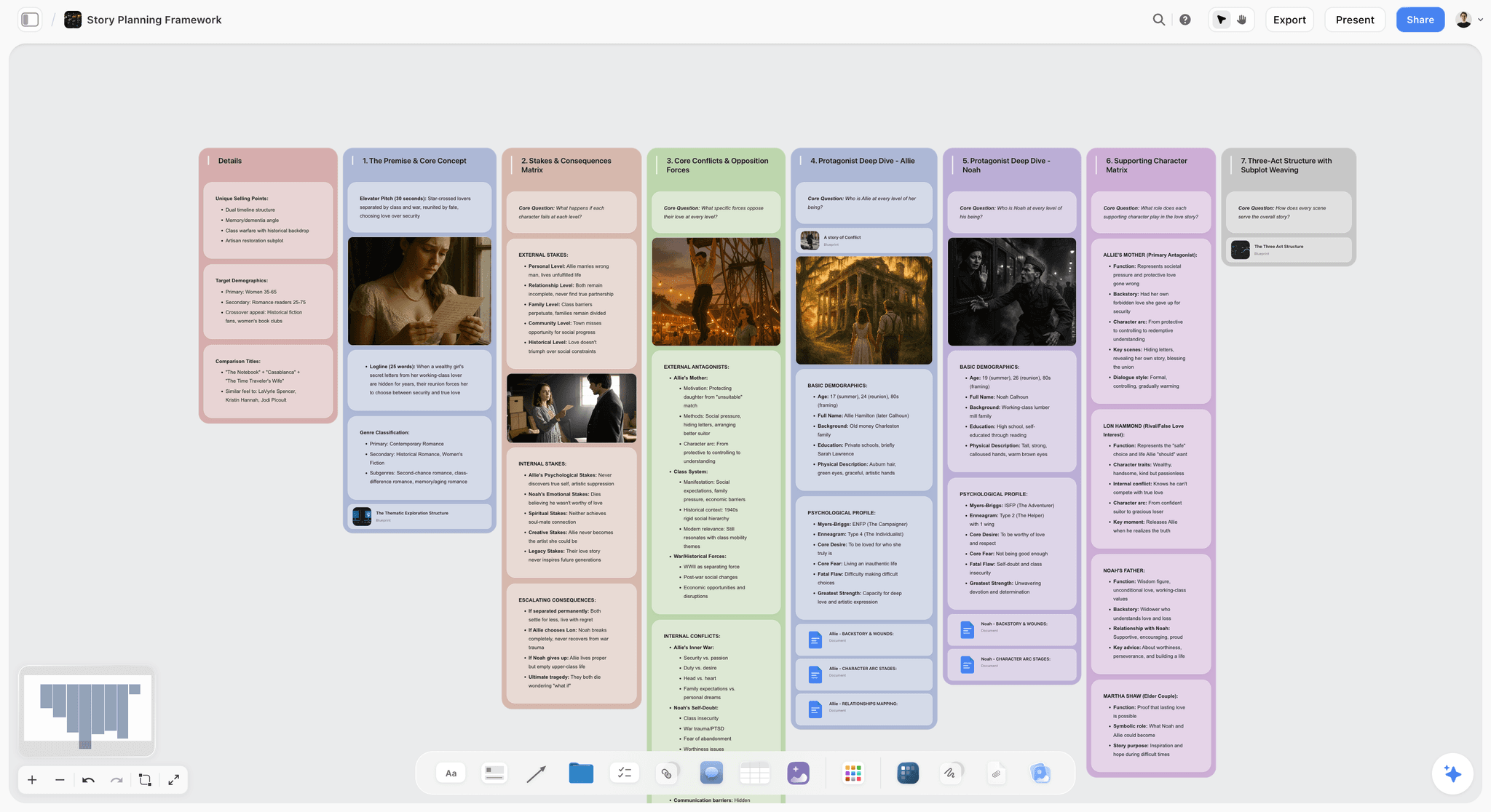
The verdict: Storyflow is where a studio builds the concept and gets it approved in the same place. The moodboard, the routes, the script, the storyboard, the shot list and the schedule sit on one board (or connected boards), the AI drafts them from the brief, and the client opens that board by link. The client reads the direction the way the studio laid it out, points at the piece they mean, and the board they approved is the board the crew works from. It is not a proofing tool: there is no approval button, no version comparison and no markup on a video frame.
Best for: Small studios, freelance creative directors, production companies and agencies where most client rounds happen before anything is shot, designed or edited.
Key features for this job:
- The client opens the board by link with no account and signs in to comment. Links are off until the owner turns sharing on, and a signed-in commenter can also draw freehand on the board to circle the thing they mean.
- Comments sit on the canvas next to the element they are about, and a Doc (script, treatment, copy) has inline comment threads attached to the line, so script notes do not end up in an email.
- The AI's moodboard workflow asks whether tiles should come from a web search or be AI generated, then places a set of uniform tiles, one facet of the subject each (generated tiles need Pro or Max). Ask the AI for a brand moodboard to get the sectioned version: palette, type, logo, applications.
- The AI's storyboard workflow lays scenes out frame by frame (AI-generated frames need Pro or Max), and the shot list workflow breaks scenes into shots, so the client approves the plan and not a description of it. The AI storyboard generator page shows the storyboard side.
- Ask the AI to review the board and it reads all of it and gives notes before the client sees it: what misses the goal you stated, what loses the audience, what is strong and buried. It reads and builds nothing, which makes it a useful internal review before round one.
- When the client's notes come back, paste the consolidated set into the chat and ask for a task list: the AI turns them into to-do checklists on the board, one wall per theme.
- Presentation mode goes fullscreen and steps through the board one wall at a time, so the concept meeting and the async review use the same material.
- PDF deliverables come from the approved board: the AI drafts a treatment, a one-pager, a pitch deck, a lookbook or a call sheet PDF for a shoot day. Boards export as an image or PDF, and Docs export to Word and PDF.
- The MCP connector puts Storyflow inside ChatGPT, Claude, Gemini and Grok, so an assistant can read the project and build the concept board in it.
- A board can be duplicated, which is how a studio keeps a copy of round one while it builds round two. The copy stays editable, so the dated PDF export is the record.
Pricing (checked 10 October 2026): Storyflow is paid-only during early access, with plans from $7.99 a month billed annually ($9.99 monthly). A free plan launches before the end of 2026, and anyone a paid member invites to a board joins free. Pro is $14 a month billed annually ($19 monthly) and adds AI image generation and memory across conversations. Max is $39 a month billed annually ($49 monthly) and adds the Team Workspace with Permissions and Roles. Every paid plan has unlimited file uploads; AI use is metered on every plan, and team billing is per seat. See pricing.
Pros:
- Built for the concept stage, where the direction is still being decided; the other three start from a finished file.
- The approved board is the plan: the shot list, storyboard and schedule sit beside the moodboard they have to match.
- The lowest paid entry price of the four on their pricing pages for a studio of 1 to 5, and clients pay nothing.
- The AI drafts the concept material from your brief, so round one arrives faster and closer to the brief.
Where it falls short:
- No approval workflow: no approve button, no approval status, no stages, no reminders and no version lock. Keep a decision log in a Table on the board, or use Ziflow or Filestage when a client's procurement or legal team needs a formal record.
- No version comparison and no proofing markup on images or video frames. The Video element plays and scrubs uploaded MP4, MOV and WEBM files and lets you grab frames, but there are no timestamped comments. Use Frame.io for cut review.
- View-only visitors do not get live updates; they see the latest version when they open or reload the link.
- No Slack, Google Drive, Zapier or editing-app integration and no native apps; the one connector is MCP, to ChatGPT, Claude, Gemini and Grok. A newer product than the proofing incumbents.
2. Frame.io
The verdict: Frame.io is Adobe's review and collaboration platform, and for video it is the default for good reason. A client clicks a link, watches the cut and leaves a comment on the exact frame or a range, with annotations. The next cut lands as a new version in the same stack, and the comparison viewer shows what changed. For a studio whose rounds happen mostly on cuts, Frame.io is the tool the client already expects.
Best for: Video studios, editors and production companies whose client rounds happen on cuts, and teams that work in Premiere or Final Cut Pro.
Key features for this job:
- Frame-accurate and range-based comments with annotations, so "the logo at 00:18" is a pin, not a sentence.
- Version stacks and a comparison viewer, so a note belongs to a version and a client can see whether it was addressed.
- Share links clients open without an account, with passphrase, expiry and permissions on Pro and up, and custom-branded shares.
- Premiere, Final Cut Pro and Lightroom integrations, so comments reach the editor where the edit happens.
- Restricted projects and internal comments on the Team tier, which keeps studio-only notes away from the client.
- Transcription and captions on every plan, plus Camera to Cloud.
Pricing (checked 10 October 2026): Free for up to 2 members, 2 GB storage and 2 projects. Pro is $15 a member a month, up to 5 members. The Team tier is $25 a member a month, up to 15 members. Annual billing takes 13% off; the page lists no annual per-member figure. Enterprise is custom. Billing is per member (Frame.io pricing).
Pros:
- The best frame-accurate video review of the four, and the one most clients have used before.
- Version stacks keep every round's notes attached to the cut they were about.
- Editing-app integrations close the loop between the note and the timeline.
- Per-member pricing is cheap for a studio of 2 to 5.
Where it falls short:
- It reviews files, not concepts. A moodboard or a plan has to be exported to an image or PDF to be reviewed, and the approved file does not become the working plan. Storyflow covers the concept stages.
- Its strength is the comment, not a routed multi-stage approval workflow with decision reasons; Ziflow and Filestage make that the product.
- The free trial asks for billing information and enrolls you in a paid plan when it ends unless you cancel; Pro caps at 5 members and the Team tier at 15; SSO is Enterprise only.
- Its AI is search: media-intelligence search is in public beta, with semantic search on Team and Enterprise only (Frame.io's search guide). Nothing drafts or checks the work.
3. Ziflow
The verdict: Ziflow is online proofing built around the approval decision. Every proof moves through workflow stages, reviewers are unlimited and need no license, and the record of who approved which version, and why, is the point. For a studio that sends dozens of proofs a month to clients with several approvers (brand, legal, regional marketing), Ziflow is the most complete approval machine of the four.
Best for: Agencies and in-house studios with high proof volume, multi-person client approval chains and a need for a formal record.
Key features for this job:
- Workflow stages: 1 on Free, 2 on Standard, 3 on Pro, unlimited on Enterprise, so internal review, client review and final sign-off can be separate gates.
- Unlimited proofs and unlimited reviewers on every plan; reviewers and guests need no license.
- Decision reasons on Pro, so "changes requested" arrives with the reason attached.
- Proof briefs and basic intake forms on Standard; branded intake forms and integrations with Asana, monday.com, Slack, Microsoft Teams, Dropbox and Google Drive on Pro.
- Campaign-level multi-asset reviews on Enterprise.
Pricing (checked 10 October 2026): Free covers 2 users, 2 GB, unlimited proofs and reviewers, 1 workflow stage and 60 days of review history. Standard is $199 a month billed annually, with 15 users and 1 TB. Pro is $329 a month billed annually, with 20 users and 2 TB. The page shows no monthly-billed figure. Enterprise (25+ users) is contact-us. Billing is flat per plan with included users (Ziflow pricing).
Pros:
- The strongest formal approval of the four: stages, decisions and a record.
- 15 included users on Standard is good value once a studio passes 8 to 10 people.
- A real free plan for a 2-person studio, with unlimited proofs.
- Reviewers never need a license, so large client approval groups cost nothing.
Where it falls short:
- $199 a month is steep for a studio of 1 to 4, where Frame.io or Storyflow cost a fraction.
- Proofing is file-first: a direction, a moodboard or a plan has to become a file before a client can review it, and the approved proof is not the working plan. Storyflow covers the concept stages.
- ReviewAI is Enterprise only; the free plan keeps 60 days of history, which is short for a long campaign.
- For video-heavy studios, Frame.io's editing-app integrations are the closer fit.
4. Filestage
The verdict: Filestage is the proofing tool that makes the client's job simplest: open the link, comment on the file, press approve or request changes. Every plan includes unlimited reviewers, who comment and approve without an account. It is close to Ziflow on the approval job and ranks just behind it for small studios on cost, because its free plan is limited to one active project and five new files a month.
Best for: Studios and marketing teams that review many file types (video, PDFs, images, documents) with clients who want the simplest possible approve button.
Key features for this job:
- Reviewers comment and approve without an account on every plan; verified approval (approve and sign) on Enterprise.
- Unlimited reviewers who need no account, on every plan.
- Side-by-side version comparison on Starter; overlay and text compare on Business.
- Due dates and reminders on paid plans, so a stalled review nudges the client instead of the account manager.
- Automations on Business and Enterprise.
- AI Review Agents, including a Compliance Agent, on Business and Enterprise.
Pricing (checked 10 October 2026): Free covers 1 active project, 5 new files a month, 2 reviewer groups, 10 team members, unlimited reviewers and 2 GB. Starter is $199 a month and Business $329 a month, with two months free on yearly billing. Enterprise is tailored. Paid plans include 10 seats, with more added in bundles of 5. Billing is flat per plan plus seat bundles (Filestage pricing).
Pros:
- The clearest approve or request-changes experience for a non-technical client.
- Reminders and due dates move stalled rounds without a chasing email.
- Review Agents catch copy and compliance errors before a human reviewer does.
- Works well across every file type a studio sends.
Where it falls short:
- The free plan's one active project and five files a month make it a trial, not a studio tool.
- Starter at $199 a month is a large step for a studio of 1 to 4.
- Like Ziflow, it proofs files: the concept has to become a file first, and the approved file is not the plan. Storyflow covers the concept stages.
- AI Review Agents and automations need Business.
Head to Head: Frame.io vs Filestage, Filestage vs Ziflow, Frame.io vs Ziflow
The three proofing tools overlap, and the questions studios search for are the pairings. Each answer assumes the concept was already approved on a board.
| Pairing | Pick the first when | Pick the second when | Price gap (checked 10 October 2026) |
|---|---|---|---|
Frame.io vs Filestage | Most rounds are on video cuts and the studio has 1 to 5 members | Rounds span PDFs, images, documents and video, and the client wants an approve button | Frame.io Pro $15 a member a month; Filestage Starter $199 a month for 10 seats |
Filestage vs Ziflow | The client approves in one step and needs reminders | Approval passes through two or three stages in order | Both $199 a month; Ziflow Standard includes 15 users, Filestage Starter 10 seats |
Frame.io vs Ziflow | The work is video and feedback is the main job | The work is static proofs and the recorded decision is the main job | Frame.io Pro $15 a member a month; Ziflow Standard $199 a month for 15 users |
Frame.io vs Filestage
Frame.io wins for video studios: frame-accurate and range-based comments, version stacks, a comparison viewer, and integrations with Premiere and Final Cut Pro, at $15 a member a month on Pro. Filestage wins when the same client reviews a script PDF, six stills and a cut in one place and has to press approve on each: reviewers need no account, side-by-side comparison is on Starter, and due dates and reminders chase a stalled round. A five-person video studio pays $75 a month for Frame.io Pro and $199 for Filestage Starter.
Filestage vs Ziflow
Both cost $199 a month at entry and both give unlimited reviewers who need no account. Ziflow is the pick for a chain of approvers: two workflow stages on Standard, three on Pro, decision reasons on Pro, and 15 included users. Filestage is the pick for a single client approver and a mixed set of files: 10 seats, reviewer groups, and AI Review Agents on Business. Ziflow's free plan (2 users, unlimited proofs, 1 stage) is more usable than Filestage's (1 active project, 5 new files a month).
Frame.io vs Ziflow
Frame.io is built around the comment on a frame; Ziflow is built around the decision on a proof. A post house or a production company whose client watches cuts belongs in Frame.io. An agency that sends banner sets, packaging PDFs and print proofs to brand, legal and regional approvers belongs in Ziflow. Studios that do both run cuts in Frame.io and static sign-off in Ziflow, with the concept approved on a Storyflow board before either.
Other Proofing Tools Studios Use: Markup.io, Pastel, Vimeo, Dropbox Replay and More
Studios also ask about tools outside these four. They fit narrower jobs. Every price below was read on the vendor's own page on 10 October 2026.
| Tool | Fits | Entry price on the vendor's page | Free option |
|---|---|---|---|
Markup.io | Comments on live websites, images, PDFs and video | Pro $79 a month for 50 MarkUps | 14-day trial |
Pastel | Website feedback with approvals | Pro $35 a month, or $29 a month billed yearly | Free: 1 user, 1 canvas, approvals included |
Vimeo | Review on videos already hosted on Vimeo | Starter $13 a month billed annually, 1 seat | Free plan without video review |
Dropbox Replay | Review inside a Dropbox-based studio | Add-on shown in euros when checked | Limited features on Dropbox Basic |
ReviewStudio | Dedicated creative proofing, per user | Pro $15 a user a month, or $12 billed yearly | Starter: 3 active reviews, unlimited guests |
GoVisually | Design and packaging proofing | Lite $16 a user a month (1 to 5 users) | Free trial, no free plan |
Approval Studio | Artwork and packaging approval | Lite $60 a month (5 users and up) | 14-day trial, no free plan |
Markup.io
Markup.io pins comments on live websites, images, PDFs and videos, and every plan includes unlimited users. Its price scales with the number of MarkUps (review items), not seats: Pro is $79 a month for 50 MarkUps, or $99 a month ($990 a year) for 75, with a 14-day trial (Markup.io pricing). No approvals are listed on its pricing page. Pick it for web design studios whose client rounds happen on live pages. For the agency version of the whole stack, see Storyflow for agencies.
Pastel
Pastel collects feedback and approvals on websites and other creative work, with approvals on every plan, including Free (1 user, 1 canvas). Pro is $35 a month, or $29 a month billed yearly, for 2 users and 3 canvases; the Team tier is $119 a month, or $99 billed yearly, from 5 users, with $24 per extra user (Pastel plans). Anyone can comment or view without an account. Pick it for small web studios that want an approve button without paying Ziflow prices.
Vimeo
Vimeo's video review adds time-stamped comments, status labels and version history to videos you already host on Vimeo, and reviewers can comment as guests without a Vimeo account. Starter, which adds video review, is $13 a month billed annually for 1 seat (Vimeo video collaboration). Pick it when your cuts already live on Vimeo and a separate review tool would be one more login.
Dropbox Replay
Dropbox Replay reviews video, image, audio, PSD and PDF files, integrates with Premiere Pro, After Effects, Final Cut Pro, DaVinci Resolve and Avid Pro Tools, and is available on the Basic plan with limited features (Dropbox Replay). Its add-on price showed in euros when checked, so no dollar figure is quoted here. Pick it if the studio already runs on Dropbox.
ReviewStudio, GoVisually and Approval Studio
These three are smaller dedicated proofing platforms. ReviewStudio has a free Starter plan with 3 active reviews and unlimited guests; Pro is $15 a user a month, or $12 billed yearly. GoVisually starts at $16 a user a month on Lite for 1 to 5 users with up to 15 external reviewers and no video support, and $33 a user a month on Pro with unlimited reviewers and video. Approval Studio is priced per package: Lite at $60 a month for 5 users, Pro at $160 and Pro XL at $300 for 15 users, with unlimited external reviewers who do not register. All three proof files; none holds the concept, which stays on the Storyflow board.
Project management suites: Asana, Monday.com, ClickUp, Wrike and Notion
Studios that already plan in a project tool often review there. Asana includes approvals and proofing on its Advanced plan, at $24.99 a user a month billed annually (Asana pricing). Wrike's guest reviewers comment and choose Approve or Changes required from an emailed invitation on Business and above, at $25 a user a month (Wrike pricing). ClickUp lists proofing on Business (ClickUp pricing). Monday.com and Notion hold the plan and the client portal more than the proof. These suites track that an approval happened; they are weaker than Frame.io, Ziflow and Filestage at pinning the note to the work, and weaker than Storyflow at showing the direction itself.
Live sessions: Figma, FigJam, Miro and Zoom
For the first look at a direction, many studios skip the async round and walk the client through it live, in FigJam, Miro or a Zoom screen share. A live session explains the reasoning and surfaces objections at once, but it leaves no record unless someone writes the decision down. Run the session from the Storyflow board in presentation mode, which steps through it one wall at a time, and log the outcome in the approval table before the call ends.
Round by Round: Which Tool Wins Each Stage of Client Approval
The ranking is a weighted total. This section splits it into the six stages a studio's work passes through, so you can see which tool wins where and pick a pairing.
Round 1: The brief and the intake
Winner: Storyflow. The first approval is the client agreeing that the studio understood the job. Storyflow's AI reads the brief you attach (a PDF, Word, PowerPoint, Excel, CSV or text file; up to 5 documents) and drafts a brief board the client can open and correct before any creative work starts. Ziflow's proof briefs and intake forms (Standard and up) and Filestage's intake add-on (Business) collect the brief consistently, but a form confirms the fields are filled, not that the studio read them right. For writing the brief itself, see how to write a video brief, and for the tools that hold it, The 10 Best Creative Brief Tools in 2026.
Round 2: The direction and the moodboard
Winner: Storyflow. Direction is where the most expensive "yes" happens. Storyflow's moodboard workflow places a set of uniform tiles, one facet of the subject each; two routes sit side by side on the same board; and the client comments on the tile they mean after signing in. Presentation mode walks the client through it in the meeting. Frame.io, Ziflow and Filestage can proof a moodboard exported as an image or PDF, which works for a final check and loses the structure a direction needs. How to present a mood board to a client covers the meeting itself.
Round 3: The script and the storyboard
Winner: Storyflow, with Filestage close for the script. The script lives in a Doc with inline comment threads, the storyboard sits beside it frame by frame, and the client comments on the frame that is wrong. Filestage and Ziflow proof a script PDF with line-level comments and a formal approval, which is the better record if legal must sign the script. Frame.io is weaker here: its strength is moving images. For how Frame.io compares with dedicated pre-production tools, see StudioBinder vs Celtx vs Boords vs Frame.io.
Round 4: The production plan
Winner: Storyflow. The shot list, the schedule and the call sheet are the plan the crew works from. Storyflow's AI drafts the shot list from the approved storyboard and a call sheet PDF from the board, so an approved plan is the plan that ships to the crew, not a copy of it (see the AI call sheet generator). None of the proofing tools holds a plan; they would proof a PDF of it. The pre-production to shoot day handoff covers what breaks at this seam, and How to Turn a Client Brief Into a Production Plan walks through the plan in seven steps.
Round 5: The first proof (rough cut, first layouts)
Winner: Frame.io for video, Ziflow for everything else. Frame-accurate comments and version stacks make Frame.io the clear choice for cuts. For layouts, stills and PDFs, Ziflow's stages let the creative director approve internally before the client sees the proof. Storyflow can hold a reference video or a grabbed frame beside the storyboard for comparison, but it has no timestamped comments.
Round 6: The final proof and sign-off
Winner: Ziflow, with Filestage close. Final sign-off needs a decision on a specific version, a named approver and a date. Ziflow's stages and decision reasons and Filestage's approve or request-changes status with reminders both give you that record. Frame.io covers it for video-only studios. Storyflow does not have approval states; the honest pairing is Storyflow for rounds 1 to 4 and a proofing tool for rounds 5 and 6.
| Stage | Winner | Runner-up | What Storyflow does here |
|---|---|---|---|
Brief and intake | Storyflow | Ziflow (intake forms) | AI drafts a brief board from the client's own documents |
Direction and moodboard | Storyflow | Frame.io (image proof) | AI moodboard of uniform tiles, routes side by side, presentation mode |
Script and storyboard | Storyflow | Filestage (script PDF) | Doc with inline comment threads beside an AI-drafted storyboard |
Production plan | Storyflow | None of the proofing tools | AI drafts the shot list and a call sheet PDF from the approved board |
First proof | Frame.io (video), Ziflow (static) | Filestage | Reference video and grabbed frames only, no timestamped comments |
Final sign-off | Ziflow | Filestage | No approval states; log the decision in a Table on the board |
Storyflow wins four rounds and loses two. The four it wins come first, and they are where the rework starts.
A Worked Example: A Brand Film and Six Stills, From Brief to Signed Off
A 4-person studio (creative director, producer, editor, designer) takes a job from a specialty coffee roaster: a 30-second brand film for social and six stills for the website. The client side has a marketing lead who gives day-to-day feedback and a founder who approves. Two rounds are included at each gate in the contract; a third is billed.
How the job runs through the gates
- Brief gate. The producer attaches the roaster's brief PDF and last year's brand deck to Storyflow's AI and asks for a brief board. The marketing lead opens the link, signs in, and corrects the audience wall ("wholesale cafes, not home brewers"). That one comment would have cost a reshoot if it had surfaced at the rough cut.
- Direction gate. The creative director asks the AI for a moodboard from web search and builds a second route beside it. The founder joins a 20-minute call; the creative director steps through the board in presentation mode, one wall at a time. The founder picks route B with route A's color palette, and the producer logs the decision.
- Script and storyboard gate. The script is a Doc on the board; the storyboard is laid out frame by frame beside it. The marketing lead leaves three inline notes on the script and circles frame 5 in freehand ("the bag is the old packaging"). Round two closes the gate.
- Plan gate. The AI drafts the shot list from the approved storyboard and a call sheet PDF for the shoot day. The client approves the location and the schedule on the same board. Nothing is re-typed into another tool.
- First proof gate. The editor uploads the rough cut to Frame.io. The marketing lead leaves 11 frame-accurate comments. The designer proofs the six stills in the same round.
- Final proof gate. The fine cut goes up as version 2 in the same Frame.io stack; the founder watches, confirms the notes were addressed in the comparison viewer, and approves by reply. The producer logs the approval with the version number and date.
The approval log for this job
| Gate | Item | Version | Approver | Decision | Date | Where it happened |
|---|---|---|---|---|---|---|
Brief | Brief board | Round 1 | Marketing lead | Approved with one change (audience) | Day 2 | Storyflow board comments |
Direction | Routes A and B | Round 1 | Founder | Route B, with route A palette | Day 5 | Presentation call, logged on the board |
Script and storyboard | Script Doc and storyboard | Round 2 | Founder | Approved | Day 9 | Storyflow Doc threads |
Plan | Shot list and call sheet PDF | Round 1 | Marketing lead | Approved | Day 11 | Storyflow board |
First proof | Rough cut and six stills | v1 | Marketing lead | Changes requested (11 notes) | Day 18 | Frame.io |
Final proof | Fine cut and stills | v2 | Founder | Approved | Day 22 | Frame.io, logged on the board |
The log is a Table on the Storyflow board with a status cell for the decision, a person cell for the approver and a date cell, rows kept in date order. It is not an automated audit trail, and it does not need to be for this client. If the roaster's legal team had required recorded approvals on every asset, the studio would have run rounds 5 and 6 in Ziflow or Filestage instead.
What the example shows
Two tools, one board as the source of truth, and zero rework after the direction gate. A client review board is the shape of that board. The costly moment was day 2, not day 18: one comment on an audience wall changed the whole film. A proofing-only setup would have met that comment at the rough cut.
Setting It Up for Your Next Job: The Seven-Step Process
This is the process behind the example, written so a studio can adopt it for the next job regardless of the tools it uses.
Step 1: Put the rules in the contract
Write the number of included rounds per gate (two is common), what counts as a round (one consolidated set of notes from the named approver), and what a third round costs. A round limit is only enforceable if the client agreed to it before round one.
Step 2: Name one approver per gate
The person who gives notes and the person who approves are often different. Name both. Ask the client to consolidate notes from everyone else before they reach you. Contradictory notes from two stakeholders are the client's problem to resolve, not the studio's to average.
Step 3: Approve the concept before anything is made
Run the brief, direction, script and storyboard, and plan gates on the board where the concept lives. For each, send a link with three lines: what to review, what kind of feedback you want ("direction, not polish"), and the date you need it by. In Storyflow, the client opens the board with no account and signs in to comment.
Step 4: Review internally first
Before the client sees any round, the creative director reviews it. In Storyflow, ask the AI to review the board and it gives a first read of all of it against the goal you stated; in Ziflow, an internal workflow stage does the same job for proofs. The client should never be the first person to spot a typo.
Step 5: Move to a proofing tool when there is a file to proof
Rough cuts go to Frame.io; layouts, stills and PDFs go to Ziflow or Filestage, or to Frame.io if you want one tool. Every note is pinned to a frame, an area or a line, and every round is a new version in the same stack, never a new link.
Step 6: Write the decision down
"Looks great!" in an email is not an approval. An approval is a decision on a named version by the named approver on a date. Record it in the proofing tool's approval state, or in the approval log on the board when the tool has none.
Step 7: Close the loop on the brief
At final sign-off, put the approved deliverables next to the original brief and check them against it. That is also the moment to save what worked (the route, the round count, the approver behavior) for the next job with this client. For keeping the client informed between gates, how to write a client status update has a template.
The Approval Log Template and Setup Checklist
Copy this table onto the board for every client job. One row per decision, rows kept in date order.
| Gate | Item reviewed | Version or round | Approver | Decision (approved, approved with changes, changes requested) | Date | Conditions or notes | Where the feedback lives |
|---|---|---|---|---|---|---|---|
Brief | |||||||
Direction | |||||||
Script and storyboard | |||||||
Plan | |||||||
First proof | |||||||
Final proof |
Setup checklist for your first client review round:
- Put the included rounds per gate and the cost of an extra round in the contract.
- Name the day-to-day reviewer and the final approver for each gate.
- Build the concept board: brief, direction, script, storyboard and plan. The AI can draft the first pass of each from the brief.
- Turn sharing on for the board and check the link in a private browser window, so you see what the client sees.
- Write the three-line review request: what to review, what kind of feedback, by when.
- Run an internal review before the link goes out.
- Choose the proofing tool for the file stages (Frame.io for video, Ziflow or Filestage for static work and formal sign-off) and create the project before the first cut exists.
- Add the approval log Table to the board and fill in the first row the day the brief is approved.
- Duplicate the board before each new concept round and export a dated PDF, so the previous round is kept as a copy and a record.
- At final sign-off, put the deliverables beside the brief and check them against it.
What It Really Costs: Solo, Studio of 3 and Studio of 5
Clients are free reviewers in all four tools, so the cost is the studio's own seats. Figures are the prices on each vendor's own pricing page on 10 October 2026: Storyflow per month on annual billing, Frame.io at its monthly per-member rate (annual billing takes 13% off), Ziflow billed annually, Filestage at its listed monthly rate.
| Setup | Solo | Studio of 3 | Studio of 5 | Studio of 10 | Billing shape |
|---|---|---|---|---|---|
Storyflow Plus | $7.99 | $23.97 | $39.95 | $79.90 | Per seat |
Storyflow Pro (AI image generation) | $14 | $42 | $70 | $140 | Per seat |
Frame.io Pro | $15 (or Free for up to 2 members) | $45 | $75 | $250 on the Team tier | Per member, Pro caps at 5 |
Ziflow Standard | $199 (or Free for 2 users, 1 stage) | $199 | $199 | $199 | Flat, 15 users included |
Filestage Starter | $199 (Free is 1 active project) | $199 | $199 | $199 | Flat, 10 seats included |
Storyflow Plus plus Frame.io | $22.99 | $68.97 | $114.95 | $329.90 | Two per-seat bills |
Storyflow Plus plus Ziflow Standard | $206.99 | $222.97 | $238.95 | $278.90 | Per seat plus flat |
Storyflow figures are the single-seat list price times the number of seats, so they are a ceiling: Storyflow's pricing page has a Team selector with volume discounts that start at 20% from 3 seats. Storyflow Plus on monthly billing is $9.99 a seat. Ziflow's and Filestage's pages show no separate monthly-billed figure beyond what is listed above.
How to read the billing shapes
Frame.io and Storyflow charge per studio seat, so they are the lowest-cost options for a small studio and grow in a straight line. Ziflow and Filestage charge a flat plan price with many users included, so they are expensive for 1 to 4 people and good value from about 10. Frame.io's Pro tier stops at 5 members; a sixth person means the Team tier at $25 a member a month. Storyflow's invited collaborators join free on free-tier limits, which covers clients and freelancers who comment but do not build.
The honest cost comparison
For a solo creative or a studio of 2 to 5 that makes video, Storyflow plus Frame.io is the lowest-cost pairing in the table that covers both concept approval and asset proofing. At 10 people the order flips: Storyflow plus Ziflow Standard ($278.90) costs less than Storyflow plus Frame.io's Team tier ($329.90). A studio that needs formal staged approvals pays the flat $199 for Ziflow or Filestage regardless of size, and the Storyflow seats on top are a small share of that bill.
Which Tool for Which Studio
| Studio | Pick | Why |
|---|---|---|
Solo creative director or freelancer | Storyflow | Direction, storyboard and plan on one board the client opens by link, from $7.99 a month |
Small video production company (2 to 5) | Storyflow plus Frame.io | Concept rounds on the board, cut rounds frame-accurate in Frame.io |
Branding or design studio | Storyflow plus Filestage | Direction approved on the board, final artwork approved with a status and reminders |
Agency with a client legal or brand team in the loop | Ziflow (Storyflow for agencies covers the concept side) | Workflow stages and decision reasons give the record procurement asks for |
Photography studio | Storyflow | The shoot moodboard, shot list and call sheet PDF are approved in one place; final selects can go to any proofing tool |
Post-production or retouching house | Frame.io or Ziflow | The concept arrives agreed; the job is proofing versions |
Web design studio | Pastel or Markup.io | Comments pinned on live pages; Storyflow for the sitemap and direction beforehand |
For the photographer's version of this problem, the best tools for commercial photographers splits it into three approvals, and presenting design concepts to get a decision covers the design studio's concept meeting.
By Studio Size and Work Type: Decision Rules
| If your studio... | Use | Because |
|---|---|---|
Has 1 to 5 people and most rounds happen before production | Storyflow alone | The rework is at the concept stage, and a proofing tool would sit mostly idle |
Has 1 to 5 people and delivers video | Storyflow plus Frame.io Pro | Lowest-cost pairing in the cost table that covers concept and cut review |
Has 6 to 15 people and sends many static proofs | Storyflow plus Ziflow Standard | 15 included users make the flat price fair; stages handle internal and client gates |
Has clients who require a recorded approval on every asset | Ziflow or Filestage, with or without Storyflow | Only these give approval states and a decision record |
Works mostly on websites | Pastel or Markup.io | Comments on the live page beat screenshots |
Is a 2-person studio with no budget | Frame.io Free or Ziflow Free, plus a shared doc | Both free tiers cover 2 people; add Storyflow when concept rounds start costing you reshoots |
Three rules that hold across every size:
- Approve the concept where the concept lives, and proof the file where the file lives. Mixing them is how studios end up proofing a moodboard PDF with a pixel-pinned comment tool.
- If your rounds overrun at the rough cut, the problem is usually an earlier gate, not the proofing tool.
- Buy the proofing tool's paid tier when a client requires a record, not before.
Common Mistakes in Client Feedback and Approval Rounds
Mistake 1: Treating "love it!" as an approval
A reply-all compliment from the marketing lead is not the founder's approval. Fix: name the approver for each gate in the contract, and only log an approval when that person makes the decision on a named version.
Mistake 2: Sending the direction as a PDF deck
A deck flattens the direction into slides, and the feedback arrives by email with no link to the slide it is about. Fix: share the board itself, so the client comments on the tile or frame they mean, and use presentation mode for the meeting.
Mistake 3: Skipping the script and storyboard gate
Studios that go from moodboard to shoot meet the script problems in the edit. Fix: make the script and storyboard their own gate with their own approver, and keep them beside the approved direction.
Mistake 4: A new link for every round
A fresh link per version scatters the notes and hides whether a note was addressed. Fix: in Frame.io, Ziflow or Filestage, upload each round as a new version in the same stack; on a Storyflow board, duplicate the board before a new concept round so a copy of the old one is kept.
Mistake 5: No round limit, or a limit the client never agreed to
"Unlimited revisions" turns feedback into a stream of new direction. Fix: two included rounds per gate, a written price for a third, agreed before round one.
Mistake 6: The client reviews before the creative director does
The client spots the typo, the wrong logo, the old packaging. Trust drops. Fix: an internal review before every client round: ask Storyflow's AI to review the board for a first read, and use an internal stage in Ziflow for proofs.
Mistake 7: Buying a flat-priced proofing plan for a five-person studio
A studio of five pays $199 a month for staged approvals it uses twice a year. Fix: start with Frame.io or a free tier for proofing, keep the approval log on the board, and upgrade when a client requires a recorded approval.
When Storyflow Is Not the Right Choice
Storyflow ranks first here for small studios because it owns the concept stage. It is the wrong primary tool in these cases:
- Your client requires formal, recorded approvals on every asset. Storyflow has no approval button, approval status or stages. Use Ziflow (stages and decision reasons) or Filestage (approve or request changes, reminders).
- Your rounds happen almost entirely on cuts. Storyflow has no timestamped video comments. Use Frame.io, or Vimeo Review if your cuts already live on Vimeo.
- You need side-by-side version comparison. Storyflow has no version history UI or comparison. Frame.io's comparison viewer and Filestage's side-by-side comparison (Starter) do this.
- You review live websites. Use Pastel or Markup.io.
- You need the review tool inside your editing app. Frame.io integrates with Premiere, Final Cut Pro and Lightroom; Dropbox Replay with Premiere Pro, After Effects, Final Cut Pro, DaVinci Resolve and Avid Pro Tools. Storyflow has no editing-app integration.
- You need a free tool today. Storyflow is paid-only during early access; Frame.io Free and Ziflow Free cover 2 people now.
The Bottom Line
Studios collect client feedback and approvals in two jobs, and the tools split the same way. Storyflow ranks first for small studios because it owns the concept stage: the direction, moodboard, script, storyboard and plan sit on one board the client opens by link, the AI drafts that material from the brief, and the approved board is the plan the crew works from. That is where the most expensive rework starts.
Frame.io is the best tool for video review, with frame-accurate comments and version stacks, from $15 a member a month. Ziflow and Filestage are the best tools for formal, recorded approvals across versioned proofs, from $199 a month for the whole team. Approve the concept where the concept lives, proof the file where the file lives, and write every decision down. For most studios of 1 to 5, that means Storyflow plus Frame.io; see Storyflow's design feedback tool and the pricing page to start with the concept board.
The fastest way to collect client feedback and approvals
Build the brief, direction, storyboard and plan on one Storyflow board, send the client the view link, log each decision in the approval table, and move to Frame.io, Ziflow or Filestage only when there is a file to proof.
Tools that help, in the order you reach for them:
- Storyflow: concept approval on one board the client opens by link; AI drafts the material, reviews it and turns notes into a checklist.
- Frame.io: frame-accurate comments and version stacks on cuts.
- Ziflow: workflow stages and decision reasons for multi-approver sign-off.
- Filestage: approve or request changes on any file, with reminders.
FAQ: Client Feedback and Approvals for Studios
How do studios collect client feedback and approvals on creative work?
Studios collect client feedback in two stages: concept approval on the direction, moodboard, storyboard and plan, and asset proofing on the finished files. Storyflow is the tool for the concept stage, because the client opens the board by link with no account, signs in to comment in context, and the approved board is the plan. For the file stage, studios use Frame.io for video and Ziflow or Filestage for versioned proofs with formal approval states. Each gate has a named approver, a round limit and a written decision.
What is the difference between client feedback and client approval?
Feedback is a note about the work; approval is a decision on a specific version by the person with authority to make it. Studios get into trouble when they treat a positive note as an approval. Keep them separate: collect feedback in comments on the board or the proof, and record the approval as a decision with the approver, the version and the date, either in a proofing tool's approval state or in an approval log.
Is Frame.io better than Ziflow for client approvals?
Frame.io is better for video review; Ziflow is better for formal approval workflows. Frame.io gives frame-accurate comments, version stacks and editing-app integrations, from $15 a member a month. Ziflow gives workflow stages, decision reasons and unlimited reviewers, from $199 a month billed annually with 15 users included. A video studio of 2 to 5 is usually better served by Frame.io; an agency sending many static proofs through several client approvers by Ziflow.
Is Filestage or Ziflow better for a small studio?
Ziflow is slightly better for a small studio on cost, and Filestage is slightly simpler for the client. Ziflow's free plan covers 2 users with unlimited proofs and one workflow stage; Filestage's free plan is limited to one active project and five new files a month. Both paid entry plans cost $199 a month, with 15 users on Ziflow Standard (billed annually) and 10 seats on Filestage Starter. Filestage adds AI Review Agents on Business.
Does Storyflow have an approval workflow?
No. Storyflow has no approval button, approval status, version comparison or proofing markup on images and video frames. Feedback happens in comments on the board and in a Doc's inline comment threads, and a signed-in commenter can draw freehand on the board. Studios record decisions in an approval log Table on the board, with status, person and date cells. For recorded, staged approvals, pair Storyflow with Ziflow or Filestage.
Is Storyflow free?
Not during early access. Storyflow is paid-only during early access, with plans from $7.99 a month billed annually ($9.99 monthly). A free plan launches before the end of 2026, and anyone a paid member invites to a board joins free. That means a client or freelancer you invite to comment does not need a paid plan; they join on free-tier limits.
Can a client review work without creating an account?
In all four tools a client can open the work without an account. Frame.io share links open without an account, and Ziflow and Filestage reviewers need no account or license. In Storyflow the client opens the board by view-only link with no account and signs in to comment; the owner turns sharing on per board. Pastel reviewers also need no account.
How many revision rounds should a studio include?
Two rounds per gate is the common default, with a written price for a third. What matters more than the number is the definition: a round is one consolidated set of notes from the named approver, not every email the client sends. Put the number, the definition and the price in the contract before round one, and count rounds per gate (direction, script, first proof, final proof), not per project.
What is the best way to get feedback on a moodboard?
Share the moodboard as a live board, not a PDF, so the client comments on the tile they mean and reads the direction in the order you laid it out. In Storyflow, the AI's moodboard workflow places a set of uniform tiles from a web search or AI generation (generated tiles need Pro or Max), and two routes can sit side by side on the same board. Ask for direction, not polish: "which route, and what would you change about it?" If the board uses found images, check whether you can use any image in a client moodboard. For more, see Storyflow's moodboard for clients.
How do you get frame-accurate feedback on a video?
Use a video review tool with timecoded comments. Frame.io gives frame-accurate and range-based comments with annotations and version stacks; Vimeo Review gives time-stamped comments on videos hosted on Vimeo; Dropbox Replay gives real-time comments and markup with editing-app integrations. Storyflow can play and scrub an uploaded video and grab frames, but it has no timestamped comments, so use it for the storyboard and plan and Frame.io for the cut.
How do studios keep an audit trail of approvals?
Proofing tools keep it for you: Ziflow records decisions per workflow stage (with decision reasons on Pro), and Filestage records approve and request-changes status per file, with verified approval on Enterprise. Studios without a proofing tool keep an approval log: one row per decision with the gate, item, version, approver, decision and date. In Storyflow that log is a Table on the project board, rows kept in date order.
Can AI help with client feedback and approvals?
Yes, in three places. Before the client sees anything, Storyflow's AI reviews the whole board on request and gives notes against the goal you stated, and it drafts the moodboard, storyboard and plan from the brief so round one arrives closer to it. After the round, it turns the client's consolidated notes into a to-do checklist on the board. During proofing, Filestage's AI Review Agents (Business and Enterprise) check assets, including a Compliance Agent. Ziflow's ReviewAI is Enterprise only. AI does not approve anything: the person decides.
What should a feedback request to a client say?
Three lines: what to review, what kind of feedback you want, and the date you need it by. "Please review the two directions on this board. We need a choice of route and anything that feels off-brand, not polish. Notes by Thursday so the storyboard starts Friday." Add who the final approver is if several people will see the link, and ask for consolidated notes.
Should a studio use one tool or two for feedback and approvals?
Two, for most studios that make video or finished artwork: one for the concept stages and one for the file stages. The concept tool holds the direction, script, storyboard and plan; the proofing tool holds versions, pinned comments and approval states. Storyflow Plus plus Frame.io Pro costs $114.95 a month at list price for a studio of five (Storyflow on annual billing before its team discount, Frame.io at its monthly rate). A studio whose work arrives with the concept already agreed only needs the proofing tool.
Is Milanote good for client feedback?
Milanote is a visual board tool with a read-only share link, and, as in Storyflow, commenting needs an account. It suits moodboards shared for comment. Storyflow ranks higher for studio approvals because its AI drafts the direction, storyboard, shot list and call sheet PDF on the same board the client reviews, so the approved board is the plan.
How do you handle conflicting feedback from several stakeholders?
Make it the client's job to resolve, in writing, before it reaches the studio. Name one approver per gate, ask for one consolidated set of notes per round, and when two notes contradict, send both back to the approver with a question: "Which of these should we follow?" Do not average contradictory notes into the work; that produces a third version neither stakeholder asked for.
Frame.io vs Filestage: which is better for client approvals?
Frame.io is better when the rounds are on video: frame-accurate comments, version stacks and editing-app integrations at $15 a member a month on Pro. Filestage is better when one client reviews PDFs, images, documents and video and needs an approve button on each, at $199 a month for 10 seats. Neither holds the concept; studios approve the direction, storyboard and plan on a Storyflow board first.
What are the best tools to reduce rounds of revisions?
The ones that move the disagreement earlier. Approve the brief, direction, storyboard and plan on a Storyflow board before anything is made, because a note on a moodboard costs a conversation and the same note on a rough cut costs an edit. Then keep each file round in one stack in Frame.io, Ziflow or Filestage, with one named approver and a round limit in the contract.
What are the best Filestage alternatives?
Storyflow for the stage before there is a file to proof: the brief, moodboard, storyboard and plan on one board the client opens by link, from $7.99 a month billed annually. Ziflow for staged approvals at the same $199 entry price with 15 users. Frame.io for video at $15 a member a month. ReviewStudio for per-user pricing with a free Starter plan, and Pastel for website feedback with approvals on its free plan.
What are the best Ziflow alternatives for online proofing?
Filestage is the closest alternative: the same $199 entry price, unlimited reviewers and an approve button, with a simpler single-step review. Frame.io is the alternative for video-first studios. ReviewStudio, GoVisually and Approval Studio are smaller dedicated proofing tools with lower entry prices. Storyflow is the alternative for the concept rounds Ziflow does not cover, and the two pair.
Filestage vs Approval Studio: how do they compare?
Filestage is a general review tool for marketing and creative files, flat-priced at $199 a month on Starter with 10 seats and a free plan for one active project. Approval Studio is aimed at artwork and packaging approval, priced by package from $60 a month for 5 users, with unlimited external reviewers who do not register and a 14-day trial instead of a free plan.
How much does online proofing software cost for a team of 10?
On the vendors' own pricing pages on 10 October 2026: Ziflow Standard is $199 a month billed annually and includes 15 users; Filestage Starter is $199 a month and includes 10 seats; Frame.io needs its Team tier at 10 members, $25 a member, so $250 a month; ReviewStudio Pro is $15 a user, so $150 a month. Add up to $79.90 a month for ten Storyflow Plus seats on annual billing (list price, before the team discount on Storyflow's pricing page) if the concept stage runs on a Storyflow board.
Table of Contents
- How Do Studios Collect Client Feedback and Approvals on Creative Work?
- Key Takeaways
- Concept Approval vs Asset Proofing: The Two Jobs Studios Call "Client Feedback"
- How We Evaluated Client Feedback and Approval Tools
- Comparison Table: Frame.io vs Ziflow vs Filestage vs Storyflow
- The 4 Client Feedback and Approval Tools Ranked for Studios
- 1. Storyflow
- 2. Frame.io
- 3. Ziflow
- 4. Filestage
- Head to Head: Frame.io vs Filestage, Filestage vs Ziflow, Frame.io vs Ziflow
- Other Proofing Tools Studios Use: Markup.io, Pastel, Vimeo, Dropbox Replay and More
- Round by Round: Which Tool Wins Each Stage of Client Approval
- A Worked Example: A Brand Film and Six Stills, From Brief to Signed Off
- Setting It Up for Your Next Job: The Seven-Step Process
- The Approval Log Template and Setup Checklist
- What It Really Costs: Solo, Studio of 3 and Studio of 5
- Which Tool for Which Studio
- By Studio Size and Work Type: Decision Rules
- Common Mistakes in Client Feedback and Approval Rounds
- When Storyflow Is Not the Right Choice
- The Bottom Line
- FAQ: Client Feedback and Approvals for Studios
- Related Reading
Templates to check out for this topic


Templates you can use in Storyflow
Every Storyflow board starts from real structure and an AI that reads the whole canvas. Open one of these templates and make it yours.


See Storyflow in Action
A visual AI workspace where every feature lives inside one canvas. No tab-switching, no context lost.
Build your entire board from a single message
Type what you need in the AI chat at the bottom of your canvas. The AI adds cards, headings, and structure directly onto your board.
Use expert frameworks as AI context
Type @ in the AI chat and choose any Tactic. The AI tailors every response to that framework instead of giving generic advice.
Turn your board into a mind map in seconds
Ask the AI to restructure your canvas as a mindmap. It connects your ideas into a visual hierarchy so you can see how everything relates.
Why Storyflow Exists
Storyflow actually began as a personal tool while working on creative and research projects.
We kept running into the same problem: ideas were scattered everywhere: notes, documents, and whiteboards.
Nothing helped us see how everything connected.
So we started building a workspace designed around how ideas actually grow.
→ Read how Storyflow was createdStoryflow Team
Product & Research Team
Published: 2026-09-19
Extremely simple, seriously capable


See how easy it is to get started
Watch a real project come together, from a blank board to a finished plan, clicked through step by step.
Start creating with AI and become more productive
Transform your creative workflow with AI-powered tools. Generate ideas, create content, and boost your productivity in minutes instead of hours.