
Pitch-ready plans, extremely reliable
Take the brief to a shoot
the client signs off on.
Storyflow is an AI canvas for planning commercials. Turn the brief into a treatment, storyboard, shot list, and schedule on one board, all shareable so the agency and client approve before the shoot. No download required.


Creatives working for these brands already got early access
- Red Bull
- Canon
- Artlist
- Porsche
See how easy it is to get started
Watch a real project come together, from a blank board to a finished plan, clicked through step by step.
Start from a ready-made template
Pick a board to see what you can build, then let AI fill it in. Every template is a real, editable starting point on the same infinite canvas.

Storyboard
Lay out your shots frame by frame with images and notes, then reorder them until the sequence reads like the finished cut.
What does planning a commercial involve?
Planning a commercial takes the brief through a treatment, a storyboard, a shot list and a schedule for a shoot of a day or two, with client sign-off at each stage. Storyflow is an AI visual workspace that carries your commercial from brief to shoot on one infinite canvas: a treatment, a storyboard, a shot list and a schedule, each drafted by the AI from the stage before, down to the call sheet PDF.
The challenge is speed and alignment. The treatment, the boards, the shot list, and the schedule move fast and have to stay in sync, and doing that across a deck, storyboard software, and a spreadsheet slows the turnaround and risks the client seeing something out of date.
Storyflow puts the whole commercial on one infinite canvas. The AI drafts the treatment and boards from the brief, and the shot list and schedule sit right beside them, so the plan moves as fast as the job and stays connected.
Because it is shareable, the client stays in the loop. Send a view-only link or export the board as a PDF so the agency and client approve the treatment and boards before the shoot, and open the shot list on set on the day.
Ultra fast from brief to board
Plan a commercial in four steps.
The AI drafts the treatment and boards from the brief.
01
Open your canvas
Sign up in seconds and your infinite canvas opens in the browser.
02
Give the AI the brief
Describe the concept and it drafts a treatment and storyboard with references.
03
Build the shot list and schedule
Plan the coverage and fit the shoot into the day or two you have.
04
Get sign-off and shoot
Share for client approval, then open the shot list on set.
The whole spot, one board.
Treatment, storyboard, shot list, and schedule connected and drafted by AI.
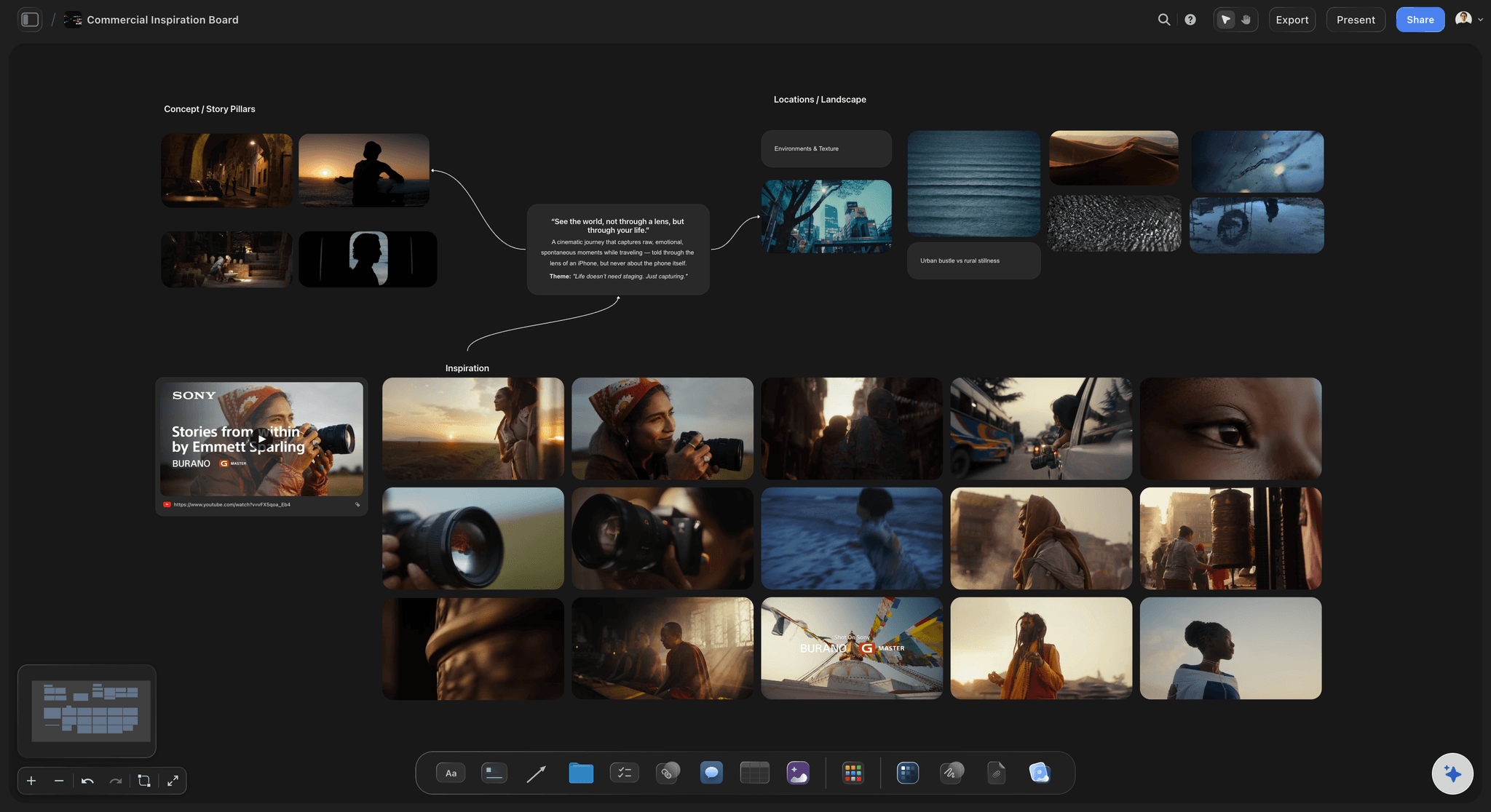
AI drafts the treatment
Win the job
Give the AI the brief and it drafts a treatment with references, the pitch the client approves.
See film treatment templates →
Storyboard and shot list
Plan the shoot
Board the concept and build a shot list, so a tight commercial shoot captures every setup.
See commercial storyboards →
A schedule that fits the day
Shoot it on time
Group setups by location and light so a one or two day shoot gets everything.
See shooting schedules →
Client sign-off by link
Keep the client aligned
Share a view-only link or a PDF of the board so the agency and client approve before the shoot.
See film production planning →Every commercial on its own board.
Plan as many commercials as you want. Storyflow is paid-only during early access, with plans from $7.99 a month billed annually ($9.99 monthly). A free plan launches before the end of 2026, and anyone a paid member invites to a board joins free.
Unlimited boards on an infinite canvas
AI usage to draft treatments and shot lists
View-only links, no account needed to view
Unlimited file uploads for references and stills
Built for people with taste
Commercial planning that moves as fast as the job.
Storyflow drafts the treatment and boards and keeps them with the plan.
The pitch that wins
A treatment the client feels
Concept and tone: Draft the concept and tone with the AI.
References pinned: Pin the look next to the prose so it reads like a lookbook.
Export a PDF: Send the client a PDF of the whole board to approve.
The plan that shoots it
Cover a tight shoot
Storyboard the concept: Board every beat so the shoot day is clear.
Shot list for setups: List every setup and angle for efficiency.
Schedule the day: Group setups by location and light.
The client stays in the loop
Sign-off at every stage
View-only links: The agency and client review without an account.
One current version: The link shows the latest plan, never a stale deck.
On set from a link: Open the shot list on the shoot day.
For any spot
One canvas, any commercial
Brand and product spots: Plan a broadcast or online commercial from brief to shoot.
Social and performance ads: Plan a batch of short ad variations.
Branded content: Plan a longer branded film with the client.
Explore templates for your project
Every template opens as a real, editable board on the infinite canvas. Pick the closest fit and make it your own.
Storyboard
Lay out your shots frame by frame with images and notes, then reorder them until the sequence reads like the finished cut.
One app instead of five
Storyflow vs StudioBinder, Milanote, and Notion.
A fair look at where each fits. Storyflow carries a commercial from brief to shot list on one canvas.
Storyflow
Recommended
Unlimited boards included
AI drafts the treatment and shot list
Treatment, storyboard, and schedule together
Infinite visual canvas
View-only share link, no sign-up
Sends call sheets and tracks crew confirmations
StudioBinder
Unlimited boards included
AI drafts the treatment and shot list
Treatment, storyboard, and schedule together
Infinite visual canvas
View-only share link, no sign-up
Sends call sheets and tracks crew confirmations
Milanote
Unlimited boards included
AI drafts the treatment and shot list
Treatment, storyboard, and schedule together
Infinite visual canvas
View-only share link, no sign-up
Sends call sheets and tracks crew confirmations
Notion
Unlimited boards included
AI drafts the treatment and shot list
Treatment, storyboard, and schedule together
Infinite visual canvas
View-only share link, no sign-up
Sends call sheets and tracks crew confirmations
What creators are saying
Join early creators getting structured workspaces and AI that remembers their projects
“Storyflow has sped up my workflow by at least 3x, which means more flow state and more projects I can actually ship. It truly changed the way me and my team create.”

Reilin Joey
Director & YouTuber
“One prompt gets me a structured board. But the tactics are my favorite. I run my YouTube scripts through them and my intros and retention got better. It's amazing.”

Justkay
YouTuber & Freelance Filmmaker
“I used to juggle five apps to plan a project. Now I describe what I am making and get boards, lists, and a schedule. All in one place.”

George
@fernwehchronicles
Commercial production, answered.
What directors and producers ask about planning commercials in Storyflow.
Plan it in Storyflow: the AI turns the brief into a treatment and storyboard, breaks the storyboard into a shot list and drafts the schedule on the same board. Work in that order, fitting the shoot into a day or two, with client sign-off at each stage. StudioBinder suits productions that need call sheets sent and crew confirmations tracked.
Storyflow takes a commercial from brief to shoot on one board: the AI drafts the treatment from the brief, then the storyboard, shot list and schedule, each from the stage before, and ends with the shoot day's call sheet PDF. The agency and client approve the plan from a view-only link with no sign-up. StudioBinder still sends call sheets and tracks crew confirmations, which Storyflow does not.
Put the client's brief and any agency storyboards on a Storyflow board, and the AI turns them into the plan: a treatment, a shot list from the frames, a budget table with a live total, and a schedule worked back from the air date. Then settle the spot's length, cutdowns and vertical versions, the usage, the shoot days, and the approval points from award through the pre-production meeting to final delivery. StudioBinder suits the shoot logistics after that.
The treatment is the director's creative answer to the agency's boards: approach, tone, casting, look and references, written to win the job. The bid is the production company's cost to make it: crew, talent, locations, equipment, the director's fee and the production fee, in the US usually on the AICP form. Agencies commonly compare three bids. Storyflow's AI writes the treatment as a PDF, and a budget table with a live total holds a first-pass bid.
The pre-production meeting, or PPM, is the client's last sign-off on the details, a few days before the shoot. The director and producer walk through the shooting board, casting, wardrobe, locations, props, the schedule and any product or legal requirements, and every open question gets a decision and an owner. The PPM document is usually a deck; in Storyflow it can be a board of frames shown in presentation mode or exported as a PDF.
Usually both. The storyboard, often the agency's boards redrawn as the director's shooting board, is what the client approves: each frame's composition and the order of the spot. The shot list is what the crew works from: every camera setup with size, lens, movement and setup time, including the packshots and any vertical framings the boards leave out. Storyflow keeps both on the board, and its AI drafts the shot list from the storyboard frames.
A shoot day runs on the call sheet sent the night before. Client and agency watch from video village, notes reach the director through the agency, and the client confirms each shot is covered before the crew moves on. Hero shots often go early while talent is fresh, and packshots often close the day or get their own tabletop day. Storyflow's AI drafts the call sheet as a PDF, but it does not send it or collect crew confirmations.
Usage defines how the finished spot can be used: the media (TV, online, social, cinema, outdoor), the territories and the term, often 12 months. It drives talent fees, music licensing and stock costs, so agree it before the bid is final; extending usage later means paying talent and music again. In Storyflow a usage table with a row per medium and currency cells with a Sum footer keeps those costs in view.
Not during early access. Storyflow is paid-only during early access, with plans from $7.99 a month billed annually ($9.99 monthly). A free plan launches before the end of 2026, and anyone a paid member invites to a board joins free.
Yes, by reviewing it; there is no approval button. Share a view-only link or export the board as a PDF so the agency and client sign off on the treatment and boards before the shoot, and note on the board who signed off and when. The link always opens the current version.
Yes. Give the AI the brief and it drafts a treatment with references and a storyboard, which you refine on the board.
Yes. Group setups by location and light so a tight one or two day shoot captures everything the edit needs.
No. Storyflow runs in your browser. Sign up, open a board, and start planning on any device.
More from Storyflow
Commercial storyboard
Film treatment template
Shot list software
Shooting schedule
Music video planning
Video production planning
Filmmaking software
Sizzle reel planner
Production calendar
Creative brief template
Campaign concept presentation
Video production brief
Testimonial video planner
Brand film
Two column script template
Video ad script template
Client brief to production plan
Production coordinator workflow
Take the brief to a shoot the client approves.
Open a canvas, draft the treatment, and plan the shoot.