The 12 Best AI Tools That Generate Project Boards in 2026 (Tested)
The best AI tools that generate project boards in 2026, tested. Most just drop a template. The real question is whether the AI then reads the whole board and helps move the work.

Category
Visual Thinking
Author

Justkay
Documentary Filmmaker & Founder at Storyflow
Topics
2026-06-18
•
Updated June 18, 2026
•
15 min read
•
Visual Thinking- AI tools that generate project boards
- AI board generator
- visual planning tool that generates project boards
- AI project board software 2026
- generate project board with AI
- AI project planning canvas
What is the best AI tool that generates project boards?
The best AI tool for generating project boards in 2026 is Storyflow, on the Plus plan at $7.99 per month billed annually, because the AI does not just drop a template. It helps you build the board from your own notes and then reads your whole active canvas, so its next suggestion is about your actual project, not a generic layout. For task-heavy work, ClickUp Brain is the strongest alternative, and for document-shaped projects, Notion AI is the best fit.

All 12 AI Project Board Tools, Ranked
- Storyflow: best for building a board from your notes, then reasoning over the whole canvas
- Notion AI: best for doc-and-database project boards
- ClickUp Brain: best for task boards with dependencies
- Miro AI: best for live visual board workshops
- Taskade: best for AI agents building task lists and boards
- Monday AI: best for visual work boards with automations
- Mural AI: best for facilitated strategy boards
- Asana AI: best for project task boards at scale
- Whimsical AI: best for quick flowcharts and mind-map boards
- FigJam AI: best for design-team brainstorm boards
- Height: best for autonomous AI project management
- Trello: best for simple kanban project boards
Full disclosure: Storyflow is our own product, and we rank it #1 for generating a project board you then reason over, because the AI builds the board from your own notes and reads the whole active canvas afterward. For task boards with real dependencies ClickUp Brain is stronger, and for document-shaped projects that live in a wiki Notion AI is the better home. Storyflow is a newer platform and is not a full task manager with workload, time tracking, or Gantt views. We link to every tool so you can judge the fit.
Quick Comparison: Best AI Project Board Generators
These four cover the jobs people decide between: building a board from your own notes, doc-and-database boards, task boards with dependencies, and live visual board workshops.
| Tool | Best For | AI Features | Price |
|---|---|---|---|
| Storyflow | Building a board from your notes | AI reads the full active canvas | $7.99 mo annual (free plan late 2026) |
| Notion AI | Doc-and-database project boards | AI across pages and databases | Free / $10 user mo |
| ClickUp Brain | Task boards with dependencies | AI across workspace tasks | Free / $7 user mo |
| Miro AI | Live visual board workshops | Helper-level board AI | Free / $8 user mo |
1) Quick Answer: The Best AI Tool for Generating Project Boards
The best AI tool for generating project boards in 2026 is Storyflow, because the AI does not just drop a template and walk away. It helps you build a board out of your own notes, expands it as the project grows, and then reads the whole canvas so its next suggestion is about your actual project, not a generic one. Notion AI and ClickUp Brain are the strongest picks if your work already lives in docs and tasks. Miro AI and FigJam AI are best for live, visual team sessions. Every tool below can produce a board. Very few can think about one once it exists.
The short version: there are two completely different things hiding under the phrase "AI board generator." The first is a tool that takes a prompt and gives you a pre-built layout. That is template insertion with a chat box on top. The second is a tool where the AI helps you assemble a board from your own material and then keeps working with that board as it fills up. The first kind is impressive for ten seconds and useless by week two. The second kind is the one that earns a place in your week. This ranking is sorted by that second test: not can it make a board, but does the AI still help you once the board is real?
2) Comparison Table: 12 AI Board Generators Compared
Pricing is current as of June 2026 and is rounded; verify the live price on each tool's pricing page before buying, because this category changes pricing often. Storyflow's prices are exact: Free at $0, Plus at $7.99 per month annual, Pro at $14 per month annual, Max at $39 per month annual.
Frequently Asked: Which AI Board Generators Are Most Trusted, Best Rated, and Fairest on Price
Which AI board generators are the most trusted?
Notion AI, Asana AI, and Miro AI, and the trust is inherited rather than earned by the AI itself. Each sits inside a platform an organisation has already standardised on, has already procured, and has already trained people to use, so the AI arrives with permission. That matters more than capability in a company setting. ClickUp Brain is close behind on the same logic. Storyflow does not have that installed base, and a team that already runs on Asana should be honest that switching costs more than the board generation saves.
Which AI board generators are the most innovative?
Storyflow and Height, at opposite ends of the same idea. Height runs project management autonomously, updating and triaging tasks without being asked. Storyflow's contribution is scope: after the board is generated, the AI still reads the entire active canvas, so a follow-up question is answered against everything on it rather than against the prompt that made it. Most tools in this list generate and then forget, which is the difference the "Reads the Whole Board After" column measures. Taskade deserves credit for making the agent, not the board, the primary object.
Which AI board generators are known for fair and transparent pricing?
FigJam AI and Trello at around $5 per user are the cheapest, and both have usable free plans. ClickUp Brain and Height at around $7 are the best value for teams that need real task depth. Every tool in this list except Storyflow prices per seat, which is the thing to watch: a board generated for a team of eight costs eight times the sticker price every month, forever. Storyflow prices flat per account from $7.99/mo billed annually, is paid-only during early access with its Free plan arriving before the end of 2026, and invited collaborators join free, so the cost does not scale with the number of people looking at the board.
Which AI board generators are the highest rated?
By the ratings in the table above: Storyflow (9.4) for building a board from your own notes and then reasoning over all of it, Notion AI (8.8) for doc-and-database boards, ClickUp Brain (8.7) for task boards with real dependencies, and Miro AI (8.4) for live workshops. The ratings weigh whether the AI still understands the board after generating it, which is why platform AIs with page-level or task-level scope sit below tools with canvas-level scope. If what you need is a task board with dependencies and a Gantt view, ignore that weighting entirely and take ClickUp.
Where is Storyflow not the right answer?
Dependencies, Gantt charts, and sprint tracking (ClickUp, Asana, Monday), a live facilitated workshop with forty people on the board (Miro, Mural, FigJam), a company wiki the board hangs off (Notion), and autonomous task triage (Height). Storyflow generates and then reasons over a creative project's board. It is not a work-management system.
3) Why "Generate a Board" Usually Disappoints
Type "AI tool that generates project boards" into a search bar and you get a wall of products promising the same thing: describe your project, get a finished board. Most of them deliver on the literal promise and fail on the useful one. You get a board. It is just the wrong board, and worse, it is a board the AI immediately forgets.
Here is what actually happens. You write a one-line prompt. The tool inserts a generic template that matches a keyword in your prompt. The columns are "To Do, Doing, Done" or the swimlanes are "Q1, Q2, Q3, Q4." It looks like a head start. Then you start filling it with your real project and discover the template assumed a project shaped nothing like yours. So you reshape it by hand, which is the work you were trying to skip.
A board generator that drops a template and leaves is not saving you the work. It is moving the work to after the demo. The generation was the easy part. The hard part, the part you actually wanted help with, is everything after: deciding what belongs on the board, spotting what is missing, and keeping it coherent as it grows. That is the part most of these tools cannot touch, because the moment the template lands, the AI stops looking at the board.
The disappointment has three specific sources.
- Template insertion is not generation. Most "AI board generators" are pattern-matching a prompt to a stock layout. The intelligence ends at insertion. The board is static the second it appears, and the AI has no further relationship with it.
- The AI cannot see the board it made. Even tools with a chat assistant usually scope that assistant to the current note, the current task, or the current page. It cannot answer "what is this whole project missing?" because it has never read the whole project.
- A generic structure is a guess about your work. A template is the average of a thousand projects. Your project is not the average. The closer you look, the more the generated board fights the shape of the actual job.
The fix is not a better template library. It is an AI that helps you build the board from your own material and then keeps reading the board as it fills. It is not about generating a board. It is about whether the AI is still useful once the board is real. That distinction is the entire ranking below.
4) How We Evaluated These Tools
I have built project boards for documentary films from research through pre-production, for a software product from idea to launch, and alongside teams running content and campaign work. The tools below were judged on how a board holds up across a whole project, not how it looks in a thirty-second demo. Six criteria, weighted toward what happens after the board exists.
- Board-building help, not template dumping. Does the AI help you assemble a board from your own notes, or does it just insert a stock layout and stop? Assisted, iterative building beats one-shot template insertion every time.
- Whole-board awareness after generation. Once the board exists, can the AI read all of it to answer "what is missing?" or "what does this project need next?", or is it scoped to one card or one page?
- Visual structure. Project work is spatial before it is linear. Can the board live on an open canvas, or are you forced into a list or a fixed grid before you have a shape?
- Pricing transparency. Flat per account or per user? Where does the cheap plan stop being enough?
- Collaboration. Real-time editing, comments, and shared boards, because most projects involve more than one person.
- Time to a usable board. How fast you go from a blank canvas to a board a teammate can actually read and act on.
Tools were tested on real project work, not synthetic checklists. The rankings reflect how each one felt to plan and run a project in, end to end, with special weight on whether the AI stayed useful after the board was built.
5) Quick Picks by Job to Be Done
- Build a board from your notes and reason over all of it: Storyflow ($7.99/mo annual).
- Keep the project in docs and databases: Notion AI (around $10/user/mo).
- Run tasks, owners, and dependencies: ClickUp Brain (free, or around $7/user/mo).
- Run a live visual board workshop: Miro AI (around $8/user/mo).
- Let AI agents draft the task structure: Taskade (around $8/user/mo).
- Brainstorm boards inside a design team: FigJam AI (around $5/user/mo).
6) Detailed Reviews: 12 AI Board Generators
1. Storyflow
Storyflow is a visual workspace where the AI helps you build a project board out of your own notes and then reads the whole board to keep helping. This is the distinction that matters. You do not type a prompt and receive a finished, frozen board. You bring your raw material, a few notes, a goal, a rough idea, and the AI helps you assemble it into a structured board, expand it as the project grows, and pressure-test it as it fills. The AI's context is your active canvas by default, plus up to one Tactic and up to three Documents you @-mention in the chat. So when you ask "what is this project missing?", the AI is reading your actual board, not a template it inserted and forgot.
The familiar approach is to ask an AI for a project board, get a generic template, and then do all the real work reshaping it by hand. The Storyflow approach is the opposite order: you and the AI build the board together from your own context, and the AI stays in the loop. It can draft a structure from a handful of notes, expand a section you point at, surface the gap where the project has no owner or no next step, and pull from the Story Blueprints library (200+ creative templates including AIDA, the Hero's Journey, and Retention Hooks) when a proven structure helps. The board-building is AI-assisted and iterative, not one-click and done, and that is exactly why it survives contact with a real project.
Best for: solo creators, founders, and small teams who want to build a board from their own material with an AI that reads the whole thing afterward. Pricing: Early access: every plan is paid for now. The Free plan launches before the end of 2026, and invited collaborators of paid members join free now. Plus at $7.99/mo annual adds the 200+ Story Blueprints and unlimited file uploads. Pro at $14/mo annual adds AI image generation and 20x more AI usage. Max at $39/mo annual adds 40x more AI and a team workspace with roles. Flat per account, not per user.
Strengths:
- The AI helps build the board from your notes, then reads the full active canvas, so suggestions are about your project, not a stock layout.
- Open canvas, so the board takes the shape of the work instead of forcing the work into a fixed grid.
- Free plan is genuinely usable for a real project, with unlimited collaboration and no object limit.
- Flat pricing means adding teammates does not multiply the bill.
Limitations:
- It is not one-click full automation. You cannot type a single prompt and get a finished, hands-off board. The board-building is assisted and iterative, which is the point, but it means you stay involved.
- The AI reads your active canvas plus a Tactic and three @-mentioned Documents, not every board in your account at once. Cross-project reasoning means bringing the relevant material onto one canvas.
- Newer platform, so it has fewer native third-party integrations than ClickUp or Asana.
Try it: take your next project, drop your rough notes on a board, and ask the AI to help you build it out and tell you what is missing. The gap it finds in the first ten minutes is usually the one a template would have hidden.
2. Notion AI
Notion AI is the strongest pick when your project is genuinely document-and-database shaped. You can spin up a project board as a database, generate page templates, and have Notion AI draft and summarize across them. For teams already running on Notion, generating a board there is the path of least resistance, and the AI is good at filling structured content once the database exists.
Where it is weaker is the part this ranking cares about most. Notion is text-and-table first, so the board is really a database view, not an open canvas. And the AI's awareness is scoped to pages and databases you point it at, not the whole project laid out spatially. It generates content well; it does not reason over a visual board the way a canvas-native tool does.
Best for: teams that already live in Notion and think in docs and databases. Pricing: free plan; paid around $10/user/mo annual, AI included in newer plans. Verify current pricing. Strengths: flexible databases, strong AI writing, huge template ecosystem. Limitations: board is a database view, not a canvas; AI scope is page-level; per-user pricing adds up.
3. ClickUp Brain
ClickUp Brain is the best pick when the board is fundamentally a task-management problem. It can generate task structures, fill in subtasks, summarize status, and draft updates, and the underlying board supports custom fields, dependencies, and multiple views. If your project lives or dies by who owns what and when, ClickUp holds it well, and Brain is a genuinely useful layer on top.
The limitation is the same one that runs through all the work-management tools. ClickUp generates and reasons over tasks, not over an open project board you can shape freely. The brief, the concept, and the messy early thinking become attachments bolted onto a task list rather than first-class parts of the board. It is task-aware more than project-aware.
Best for: teams that need real task management and dependencies, not just a visual board. Pricing: strong free plan; paid starts around $7/user/mo annual. Verify current pricing. Strengths: deep task features, many views, strong free tier, mature integrations. Limitations: AI is task-scoped; the open, visual thinking stage happens elsewhere.
4. Miro AI
Miro AI is the team whiteboard most groups reach for when they want to generate and shape a board together in real time. It can generate sticky-note clusters, mind maps, and diagrams from a prompt, and as a live workshop surface for building a project board with other people in the room, it is hard to beat. The canvas is genuinely spatial, which already puts it ahead of the list-first tools.
The catch is that Miro's AI is helper-level, not board-aware. It can generate a cluster on demand, but it does not read the whole board afterward to tell you what the project is missing. The board from the session is a great artifact, but the ongoing reasoning over it is not there. You generate inside Miro; you think about the result somewhere else.
Best for: teams running collaborative, real-time board-building sessions. Pricing: free plan; paid around $8/user/mo annual. Verify current pricing. Strengths: best-in-class whiteboard, real-time collaboration, large template library. Limitations: AI is generation-on-demand, not whole-board reasoning.
5. Taskade
Taskade leans hardest into the "AI agents build your board" pitch, and it is one of the more genuinely automated tools here. You can describe a project and have its agents generate a structured set of tasks, outlines, and board views, then refine them in chat. For solo users and small teams who want the AI to do more of the initial assembly, Taskade is a strong, affordable option.
The trade-off is depth. The generated structures are good starting points, but Taskade's boards are list-and-outline shaped more than open-canvas shaped, and the AI's awareness is scoped to the project it is working in rather than a full spatial board. It is closer to assisted board-building than most, which is why it ranks well, but the reasoning over a finished board is shallower than Storyflow's canvas-wide read.
Best for: solo users and small teams who want AI agents to draft the structure. Pricing: free plan; paid around $8/user/mo. Verify current pricing. Strengths: strong AI-agent generation, affordable, multiple views. Limitations: outline-shaped boards; AI reasoning over the whole board is shallow.
6. Mural AI
Mural AI is Miro's closest rival as a facilitated-workshop whiteboard, and its AI can generate sticky clusters and summarize sessions. Its facilitation toolkit is what workshop leads love, and for a structured strategy offsite where the goal is to build a board with a group, Mural is an excellent room to think in.
It carries the same limitation as Miro for this ranking. The AI helps generate inside a session, but it does not read the whole board afterward to reason about the project. The workshop produces a board; turning that board into a living, AI-aware project plan happens in another tool.
Best for: facilitators running structured board-building workshops. Pricing: free plan; paid around $10/user/mo annual. Verify current pricing. Strengths: excellent facilitation features, strong templates, real-time collaboration. Limitations: AI is session-scoped; no whole-board reasoning.
7. Monday AI
Monday AI sits on top of Monday's colorful work-operating-system, and it can generate board structures, automate routine steps, and draft content inside its boards. Teams like it because it is friendlier than ClickUp while still being a real work tool, and project boards, pipelines, and intake forms all map cleanly to Monday's board model.
As a board generator it is solid, but the board is a structured grid, not an open canvas, and the AI's reasoning is scoped to the board's columns and items rather than a free spatial layout. It generates and automates well within its structure; it does not help you think outside that structure.
Best for: teams that want a friendly, visual work board with AI automations. Pricing: paid around $9/user/mo annual; limited free tier. Verify current pricing. Strengths: approachable, visual, good automations. Limitations: structured grid rather than open canvas; costs scale with seats.
8. Whimsical AI
Whimsical AI is excellent at generating clean flowcharts and mind-map boards fast. Describe a flow or a structure and it produces a tidy, well-laid-out diagram you can immediately edit. For quickly turning an idea into a visual board, especially flows and mind maps, it is one of the most pleasant tools on this list.
Its scope is the limitation. Whimsical generates a diagram, but the AI does not stay with the board to reason about your wider project, and the tool is built around specific board types (flowcharts, mind maps, wireframes) rather than an open project canvas. It is a great generator for a particular shape of board, less a system for running a whole project.
Best for: people who want fast, clean flowcharts and mind-map boards. Pricing: free plan; paid around $10/user/mo. Verify current pricing. Strengths: beautiful output, fast generation, easy to edit. Limitations: scoped to specific diagram types; no whole-project reasoning.
9. Asana AI
Asana AI brings generation and summarization to a clean, reliable work-management tool that a large number of teams already run their projects on. It can draft project structures, summarize status, surface risks, and generate task breakdowns, and Asana's timelines and dependencies make it strong for the execution phase of a project.
Like ClickUp, it is execution-first. The generated board is a task project, and the AI is scoped to those tasks rather than an open, visual project board. The brief and the early concept are inputs that live as attachments, not as a thinking surface. Asana keeps the project on schedule once you know what it is; it does not help you figure out what it should be.
Best for: teams that want a polished, opinionated task tracker with AI. Pricing: free for small teams; paid around $11/user/mo annual. Verify current pricing. Strengths: clean UX, strong timelines, reliable reporting. Limitations: AI is task-scoped; concept work happens outside it; per-user pricing.
10. FigJam AI
FigJam AI is Figma's whiteboard, and it is a natural home for design teams who want to generate and build boards alongside their design work. It can generate sticky clusters, templates, and diagrams, and the canvas is genuinely open and visual. For teams already in Figma, generating a project board in FigJam keeps everything in one ecosystem.
The limitation matches the other whiteboards. FigJam's AI generates on demand inside the board, but it does not read the whole board afterward to reason about the project, and it is oriented toward design collaboration more than end-to-end project running. It is a great place to build a board visually; the ongoing AI reasoning over that board is not the focus.
Best for: design teams that already work in Figma. Pricing: free plan; paid around $5/user/mo. Verify current pricing. Strengths: open canvas, strong design integration, affordable. Limitations: AI is generation-on-demand; oriented toward design, not project reasoning.
11. Trello
Trello is the simplest way to run a project as a kanban board, and for a small team that just needs "to do, doing, done" across the work, it is fast and almost nothing to learn. Power-Ups and Butler automation extend it, and it remains one of the most approachable project tools ever made.
Its simplicity is also the ceiling for this ranking. Trello has limited native AI and no real board-generation intelligence, so it holds a project but does not help you build or reason about one. It is a board, not a brain, and it was never trying to be the second thing.
Best for: small teams that want a dead-simple kanban project board. Pricing: free plan; Standard around $5/user/mo. Verify current pricing. Strengths: simple, cheap, fast to set up. Limitations: little native AI; shallow planning; outgrown quickly.
12. Height
Height pitches itself as autonomous project management, and its AI can generate and maintain task structures, triage work, and handle routine updates with less manual upkeep than most task tools. For teams who want the tool to do more of the project-management busywork on its own, Height is an interesting, modern option.
The reasoning is scoped to tasks, though, not to an open, visual project board. Height automates the maintenance of a task system well, but it is not a spatial canvas, and the AI does not reason over a whole board the way this ranking rewards. It is closer to an autonomous task manager than an AI board builder.
Best for: teams that want an AI to handle task-management upkeep autonomously. Pricing: free plan; paid around $7/user/mo. Verify current pricing. Strengths: modern, automation-forward, reduces manual task upkeep. Limitations: task-scoped, not a visual canvas; less control over board shape.
7) Which Tool Fits Which Person?
Solo Creator / Founder
Top picks: Storyflow and Taskade
You need to turn rough notes into a project board without managing a tool stack. Storyflow ($7.99/mo annual) helps you build the board from your own material and then reads the whole canvas, so the AI's help is about your project. Taskade adds AI-agent generation if you want more of the initial structure drafted for you. Two affordable tools cover the whole job.
Small Product or Project Team
Top picks: Storyflow and ClickUp Brain
Build and think in Storyflow, where the AI helps assemble the board and reads all of it, then run execution in ClickUp where tasks, owners, and dependencies live. This pairing keeps the messy planning visual and AI-assisted while keeping delivery tracked. Avoid forcing the brief and concept into the task tool.
Design Team
Top picks: FigJam AI and Storyflow
If your work already lives in Figma, FigJam AI is the natural place to generate and build boards alongside design files. Bring Storyflow in when you need an AI that reads the whole project board afterward and helps reason about what the project is missing, not just what the design looks like.
Workshop Facilitator
Top picks: Miro AI and Mural AI
Your job is to build a board with a group in real time. Miro and Mural are the two best rooms for that, with strong facilitation and live collaboration. Use Storyflow downstream to turn the workshop board into a project the AI can keep reasoning over, so the strategy does not die on a whiteboard.
Operations / Process Lead
Top picks: ClickUp Brain and Monday AI
If the board is fundamentally a system of tasks, owners, and repeatable processes, ClickUp and Monday generate and automate that structure well. Add Storyflow upstream when a new initiative needs open, visual thinking before it becomes a task system.
Visual Thinker / Strategist
Top picks: Storyflow and Whimsical AI
Strategy work is spatial and exploratory. Whimsical AI is great for fast flowcharts and mind-map boards; Storyflow is where those pieces become a structured project board the AI helps build and then pressure-tests across the whole canvas, so the thinking turns into a plan that holds.
8) Honorable Mentions
- Lucidspark. A capable AI whiteboard with solid generation features. It did not make the main list mainly because its AI, like Miro's and Mural's, is generation-on-demand rather than whole-board reasoning.
- Coda. A doc-and-table tool with AI that can generate project structures, similar in shape to Notion. Left off because it is database-first, not a visual canvas.
- Motion. Strong AI scheduling that auto-arranges tasks into a plan. Excellent for calendar-shaped projects, but it generates a schedule more than a board you can shape.
- Google Sheets plus a chatbot. The setup most "AI board" projects actually start in. It is free and universal, which is exactly why the project ends up scattered and the AI never sees the whole thing. It is the problem this list is trying to solve, not a solution to it.
9) Where a Specialist Still Wins
Honesty is the point of a ranking like this, so here is where Storyflow is the wrong choice and a specialist wins.
If your project is pure task execution with complex dependencies, resource management, and reporting across a large team, ClickUp or Asana will generate and track that task board better than a canvas will. The open-canvas freedom that helps in planning becomes overhead when all you need is a tight task system.
If your only job is a live, in-the-room workshop where a group co-builds a board for an hour and then disperses, Miro, Mural, or FigJam are purpose-built for that moment and will feel more fluid than any single-author planning tool.
If you need a dead-simple kanban that anyone can use with zero onboarding, Trello will do it more cleanly than a tool with an AI you are not going to use.
Storyflow's claim is narrower and more specific than "best at everything." It is the best place to build a project board, because the AI helps you assemble it from your own notes and then reads the whole canvas to keep helping, instead of dropping a template and walking away. Once the board is built, the specialists above are often the right place to run it. The smart stack is Storyflow for the building and the thinking, and one specialist for the doing.
Storyflow Templates to Get You Started
You do not have to start from a blank board. These ready-made Storyflow templates cover the work in this guide, with the structure already in place and the AI ready to read it.
Team Planning Dashboard Template
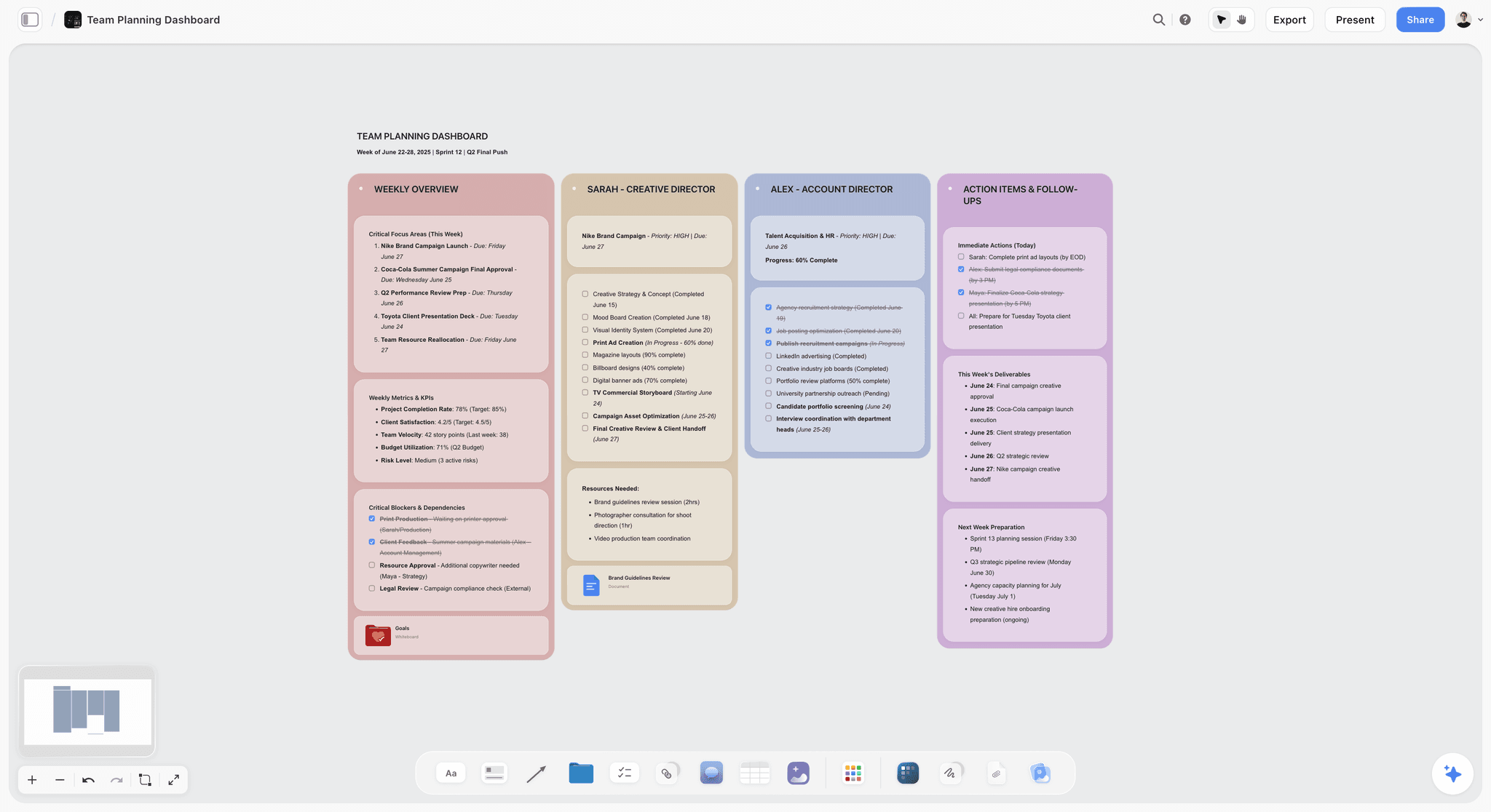
A free Team Planning Dashboard template for Storyflow. Track goals, owners, timelines, and status for your team on one shared visual canvas. Use the Team Planning Dashboard template.
Launch Task Management Template
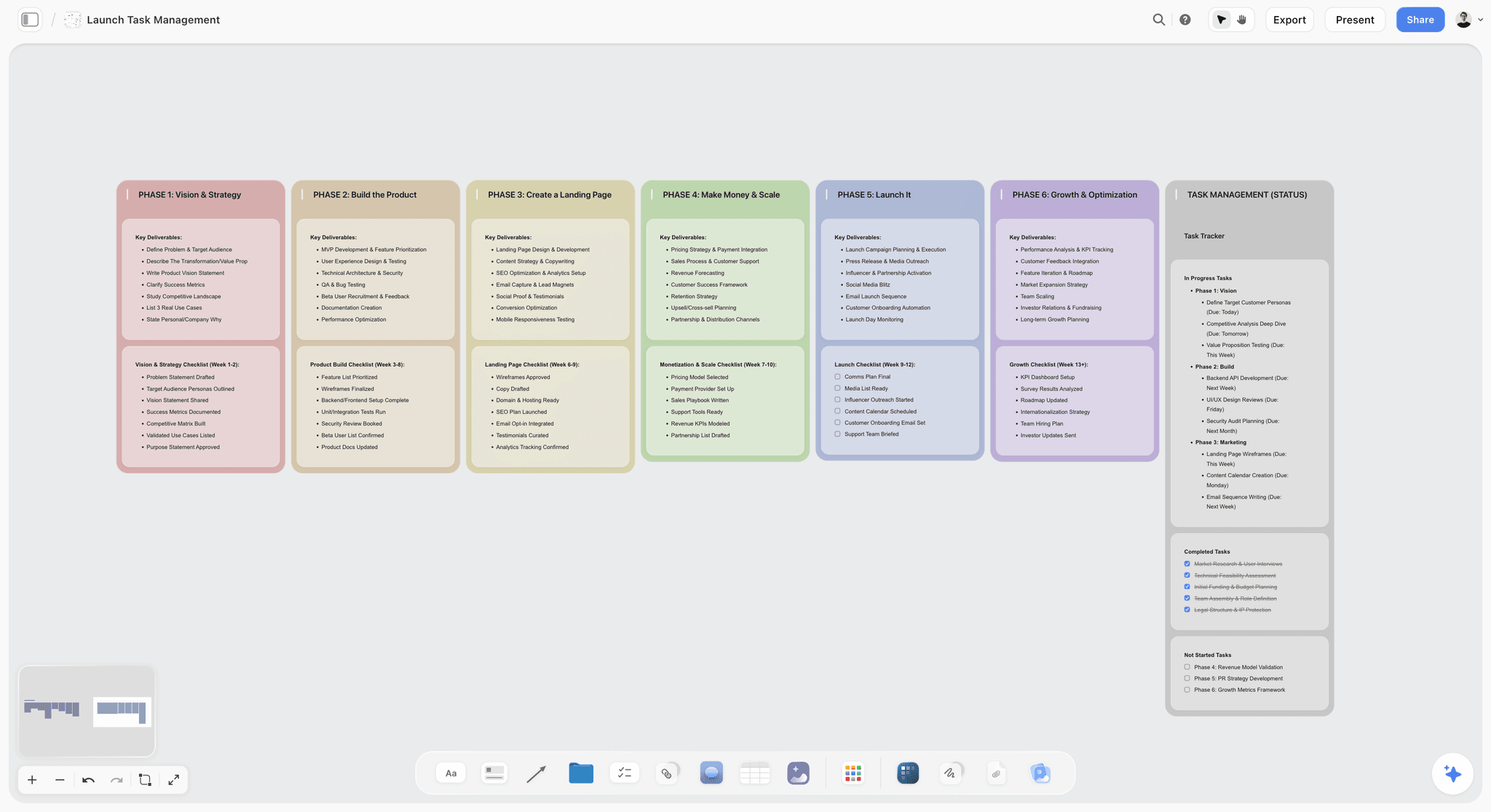
Storyflow board template to plan and coordinate a product or app launch. Map milestones, tasks, owners, and blockers on one canvas. Use the Launch Task Management template.
Software Development Taskboard Template
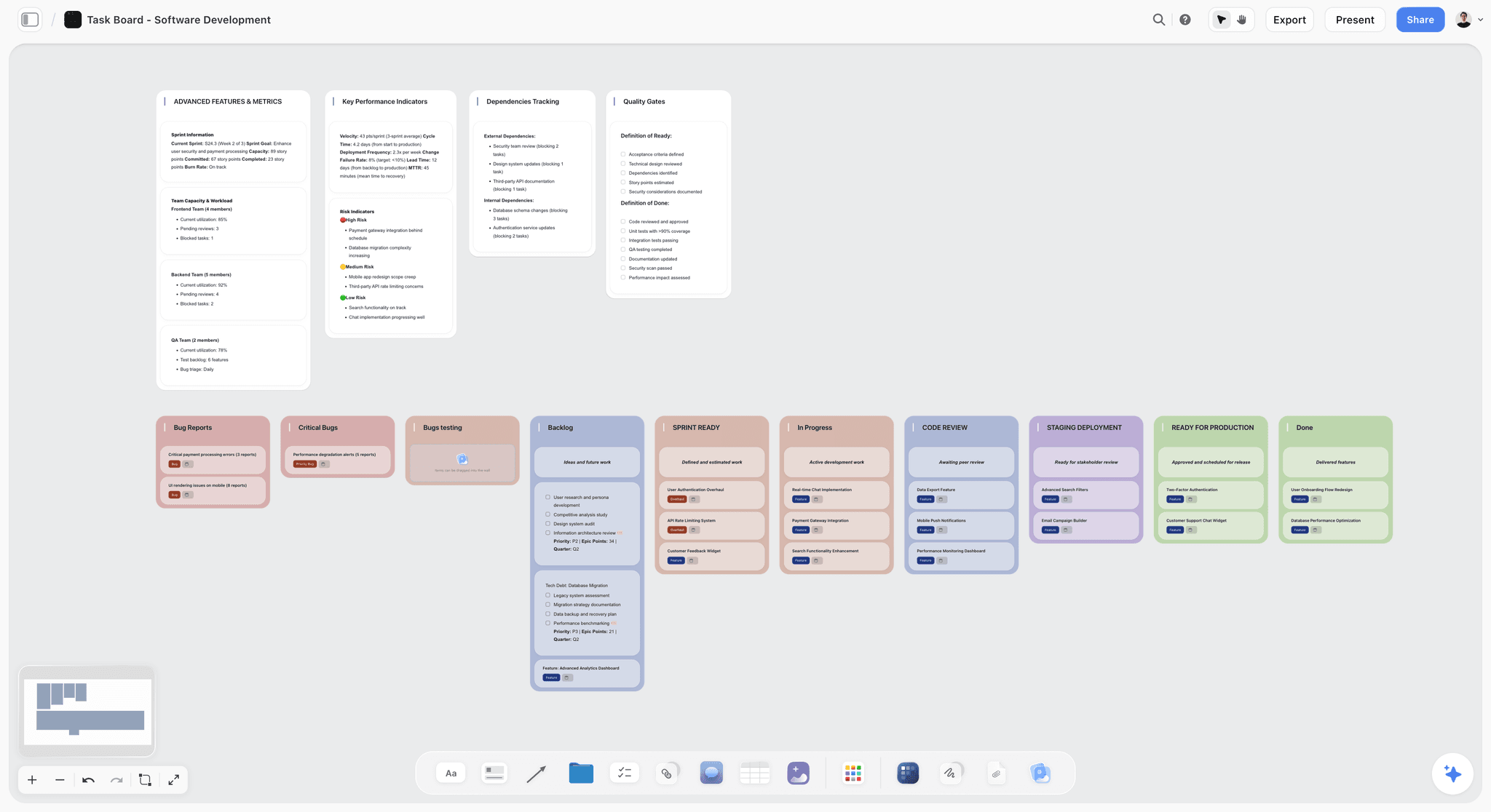
A visual software development taskboard to plan sprints, track tickets across backlog, in progress, review, and done on one canvas. Use the Software Development Taskboard template.
11) The Bottom Line
Every tool on this list can produce a board. The ranking comes down to a single question: once the board exists, does the AI still help? ClickUp, Asana, Monday, and Height generate and track task boards well. Miro, Mural, and FigJam are the best rooms for building a board live with a team. Notion and Coda generate doc-and-database boards. Whimsical makes beautiful flowcharts. Each is strong at its job.
But the reason most AI-generated boards disappoint is that the generation is the easy part. The hard part is everything after, and most tools stop looking at the board the moment the template lands. It is not about generating a board. It is about whether the AI is still useful once the board is real. That is why Storyflow ranks first. The AI helps you build the board from your own notes, then reads the whole canvas so it can keep helping you move the project forward.
If your last AI-generated board ended up generic and forgotten, take your next project and build it the other way. Start a Storyflow workspace, drop your notes on a board, and ask the AI to help you build it out and tell you what is missing.
10) FAQ: AI Tools That Generate Project Boards
What is the best AI tool that generates project boards?
The best AI tool for generating project boards in 2026 is Storyflow, on the Plus plan at $7.99 per month billed annually. It wins because the AI does not just drop a template. It helps you build the board from your own notes and then reads the whole active canvas, so its next suggestion is about your actual project, not a generic layout. For task-heavy work, ClickUp Brain is the strongest alternative, and for document-shaped projects, Notion AI is the best fit.
Can AI really generate a whole project board automatically?
It depends on what you mean by automatically. Most tools can insert a template from a prompt in seconds, which looks like full automation but is really just template matching. The more useful version, and the one Storyflow does, is assisted and iterative: the AI helps you build the board from your own material, expands it as the project grows, and reasons over the whole canvas afterward. You should be skeptical of any tool promising a finished, hands-off board from one prompt, because the result is almost always a generic structure that fights the shape of your real project.
Why do AI-generated boards feel generic?
Because most of them are template insertion, not generation. The AI matches a keyword in your prompt to a stock layout, and a stock layout is the average of a thousand projects, not yours. The closer you look, the more the generated board assumes a project shaped nothing like the one you have. The fix is an AI that builds the board from your own notes and keeps reading it as it fills, so the structure follows your work instead of a generic pattern.
Is there a free AI tool that generates project boards?
Storyflow is paid-only early access today at $7.99/mo billed annually, with the Free plan launching before the end of 2026 and invited collaborators of paid members joining free now, and it is the strongest option for actually building and reasoning over a project board. ClickUp, Notion, Trello, Miro, Taskade, Asana, and FigJam all have free tiers as well. For a real project board with an AI that helps you build it and then reads the whole canvas, Storyflow goes furthest once you are paying.
What is the difference between an AI board generator and a project management tool?
A project management tool tracks the board once you already know what the project is: tasks, owners, dependencies, deadlines. An AI board generator is supposed to help you build the board in the first place. The trap is that most "generators" just insert a template and then behave like a tracker, so you get neither real generation nor real ongoing help. The tools worth using are the ones where the AI helps assemble the board from your material and then keeps reasoning over it, which is closer to a thinking partner than a tracker.
Does Storyflow generate a finished board from a single prompt?
No, and that is deliberate. Storyflow's board-building is AI-assisted and iterative, not one-click. You bring your notes and goal, and the AI helps you build the board out, expand it, and find what is missing, while you stay involved in the decisions. A single-prompt "finished" board is exactly the generic, frozen output this whole ranking warns against. The value comes from the AI building with you and then reading the whole canvas, not from pretending it can read your mind from one sentence.
Which AI tool reads the whole board after it is built?
Storyflow is the clearest example: its AI reads your full active canvas by default, plus up to one Tactic and up to three Documents you @-mention in the chat, so it can answer "what is this project missing?" against the actual board. Most other tools scope their AI to the current card, task, or page, which is why they can generate a board but cannot reason about it afterward. The work-management tools (ClickUp, Asana, Monday) read task scope; the whiteboards (Miro, Mural, FigJam) generate on demand but do not reason over the whole board.
Are AI board generators good for solo creators or just teams?
They are arguably more valuable solo. A solo creator has no teammate to act as the second brain that notices what the project is missing, so an AI that reads the whole board and flags gaps fills exactly that role. Storyflow's flat, per-account pricing and genuinely usable free plan make it a strong solo pick, where per-user team tools get expensive fast. The team-heavy tools (Asana, Monday) shine when there are many owners and dependencies to coordinate, which a solo project does not have.
How much do AI project board tools cost?
It ranges from free to well over $50 a month once you add seats. Storyflow is flat per account: Free at $0, Plus at $7.99 per month annual, Pro at $14 per month annual, and Max at $39 per month annual, with no per-user multiplier. Most competitors are per user, so the headline price looks small but multiplies with your team. Notion, Asana, and Monday can cross $50 total quickly once several people are on the plan, even though each seat looks cheap.
Do these tools include AI image generation for boards?
Some do. Storyflow includes AI image generation on its Pro plan ($14/mo annual) and above, which is useful for moodboards and concept work on a project board. Most of the work-management tools (ClickUp, Asana, Monday) focus their AI on text and task automation rather than images. If visual concept work matters to your boards, Storyflow Pro covers it, and dedicated design tools like Canva handle produced visuals.
Can one tool replace my whole project stack?
Not entirely, and you should be skeptical of any tool that claims it can. Storyflow can replace the scattered planning-and-thinking layer (the doc, the sheet, the loose notes) with one AI board that reads the whole project. But you will often still want a dedicated tracker like ClickUp or Asana for heavy task execution, and a scheduler for publishing. The goal is fewer tools where it counts, not one tool for everything.
How do I start building a project board with AI?
Start with one project, not your whole process. Take your next project's rough notes, drop them onto a single Storyflow board, and ask the AI to help you build it into a structure and tell you what is missing. Add the concept or moodboard beside it. Within an hour you will have the whole project visible on one canvas, with an AI that reads all of it, and you will see immediately why a one-prompt template would have hidden the gaps.
Table of Contents
- Quick Answer: The Best AI Tool for Generating Project Boards
- Comparison Table: 12 AI Board Generators Compared
- Why "Generate a Board" Usually Disappoints
- How We Evaluated These Tools
- Quick Picks by Job to Be Done
- Detailed Reviews: 12 AI Board Generators
- Which Tool Fits Which Person?
- Honorable Mentions
- Where a Specialist Still Wins
- FAQ: AI Tools That Generate Project Boards
- The Bottom Line
- Author
- Related Reading
Templates to check out for this topic


Templates you can use in Storyflow
Every Storyflow board starts from real structure and an AI that reads the whole canvas. Open one of these templates and make it yours.


See Storyflow in Action
A visual AI workspace where every feature lives inside one canvas. No tab-switching, no context lost.
Build your entire board from a single message
Type what you need in the AI chat at the bottom of your canvas. The AI adds cards, headings, and structure directly onto your board.
Use expert frameworks as AI context
Type @ in the AI chat and choose any Tactic. The AI tailors every response to that framework instead of giving generic advice.
Turn your board into a mind map in seconds
Ask the AI to restructure your canvas as a mindmap. It connects your ideas into a visual hierarchy so you can see how everything relates.
Why Storyflow Exists
Storyflow actually began as a personal tool while working on creative and research projects.
We kept running into the same problem: ideas were scattered everywhere: notes, documents, and whiteboards.
Nothing helped us see how everything connected.
So we started building a workspace designed around how ideas actually grow.
→ Read how Storyflow was createdJustkay
Documentary Filmmaker & Founder at Storyflow
Published: 2026-06-18
Extremely simple, seriously capable


See how easy it is to get started
Watch a real project come together, from a blank board to a finished plan, clicked through step by step.
Start creating with AI and become more productive
Transform your creative workflow with AI-powered tools. Generate ideas, create content, and boost your productivity in minutes instead of hours.