
Ultra-fast campaigns, pitched beautifully
Creative agency software
where each client brief becomes the work.
One board per client account: the brief, the moodboard, the concept, the schedule and the deliverables, in the order the work happens. The AI drafts the first pass, your team decides, and the client opens the board by link.


Creatives working for these brands already got early access
- Red Bull
- Canon
- Artlist
- Porsche
See how easy it is to get started
Watch a real project come together, from a blank board to a finished plan, clicked through step by step.
Start from a ready-made template
Pick a board to see what you can build, then let AI fill it in. Every template is a real, editable starting point on the same infinite canvas.

Marketing Campaign
Plan a campaign across channels, messages, and deliverables on one board the whole team can see.
What is the best software for a creative agency?
The best software for a creative agency depends on which half of client work it has to carry: the brief and the creative before the tickets, or the tasks, dependencies and time after them. Storyflow is an AI visual workspace that handles the first half, turning each client brief into a visual project board on one infinite canvas: the moodboard, the concept, the schedule and the deliverables beside the brief they answer, opened by the client by link with no account. Asana, monday.com and ClickUp are stronger at the other half, assigning tasks and tracking dependencies and time across a full roster, and many agencies run both.
The split matters because agency work fails in two different places. Early on it fails on understanding: a brief read three ways, a moodboard in one folder and a strategy deck in another, and a client who approved words and pictured something else. Late on it fails on logistics: a missed dependency, an overbooked designer, a deliverable nobody owned. Operations tools are built for the second failure. The first needs the brief and the creative in one place people can see.
That place is a board per client. The brief sits at the top, with the audience, the objective and the deliverables list the client agreed. Beside it: the references, the concept routes, the scripts and shot lists if there is a shoot, and the tickets for every deliverable with an assignee and a due date. A new account manager reads the whole account from one link instead of three drives and a chat thread.
Describe the client or paste the brief and the AI lays out the board: a campaign brief, a brand moodboard, a marketing or social plan, a shot list or a budget, each from a named workflow. It reads the open board and up to five documents and three other boards you attach, such as the client's brand guidelines. The AI proposes and your team decides; every edit it makes has one-click Undo.
Ultra fast from brief to board
From a client brief to a board the account runs on.
One board per account, one shape per project, and the client looking at the real work.
01
Open a board per client
Runs in your browser, nothing to install. Each account gets its own board, and a duplicated board is the template for the next job.
02
Paste the brief, get the first pass
The AI turns the brief into a board: objective, audience, deliverables, a moodboard and a plan. With the brief laid out by field, you can see at a glance which ones the client never answered before you scope.
03
Build the creative beside the plan
Concept routes, scripts, shot lists and references live next to the deliverables they serve. Tickets carry the assignee and the due date for each asset.
04
Show the client the board
A view-only link opens with no account. Presentation mode steps through the frames fullscreen, and a client who signs in can comment on the specific piece.
The brief, the creative and the deliverables for every account.
What an agency has to hold per client, on one surface the client can read.

The brief the whole account works from
Start every job from the brief
Objective, audience, key message, deliverables and dates at the top of the board. The AI's campaign brief and advertising brief workflows draft it from a short description.
See campaign brief to delivery →
Creative direction the client can see
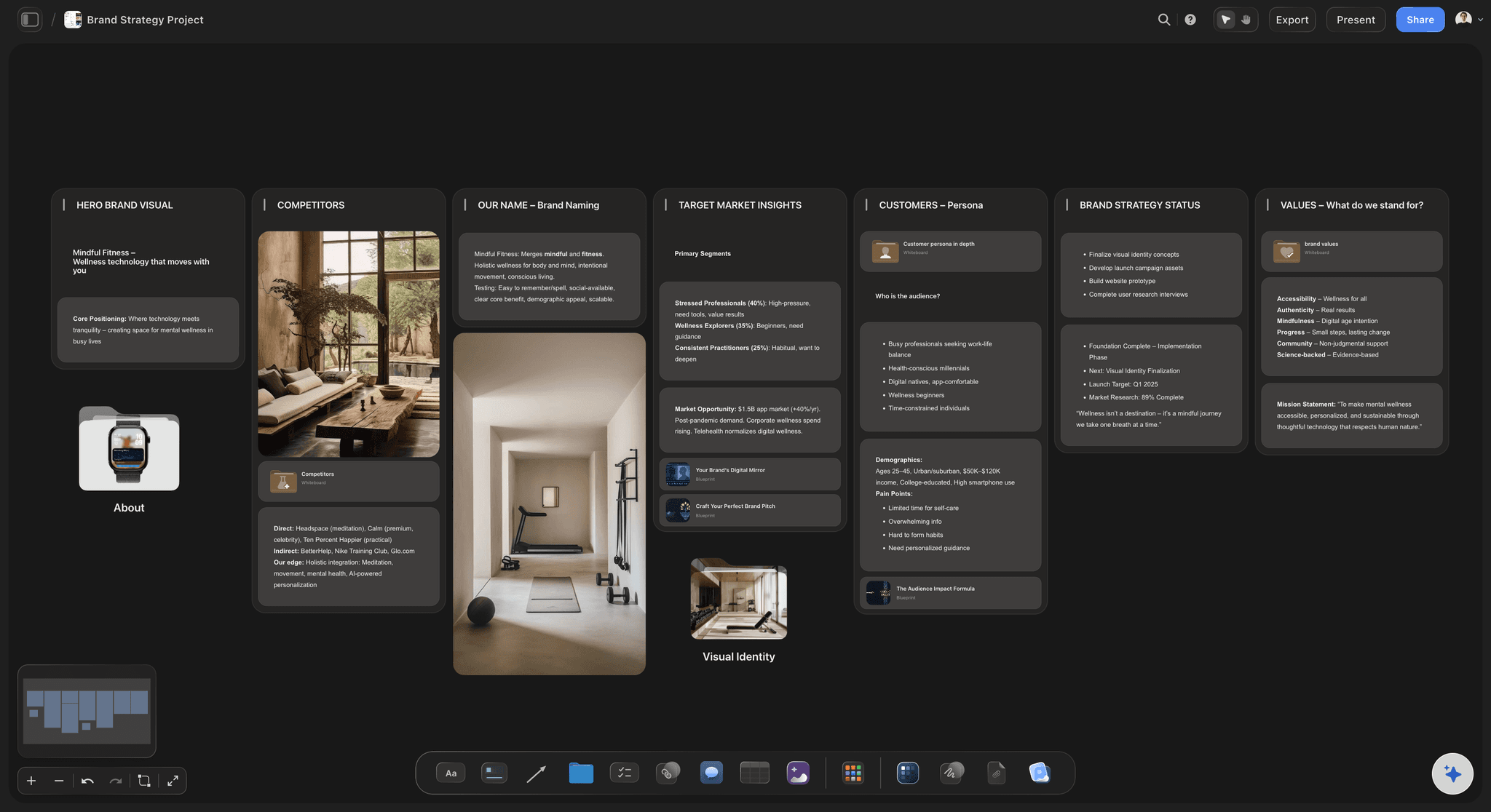
Moodboards beside the strategy
References, palettes and concept routes sit next to the brief they answer, so the client approves a direction they have seen rather than a paragraph.
Present a campaign concept →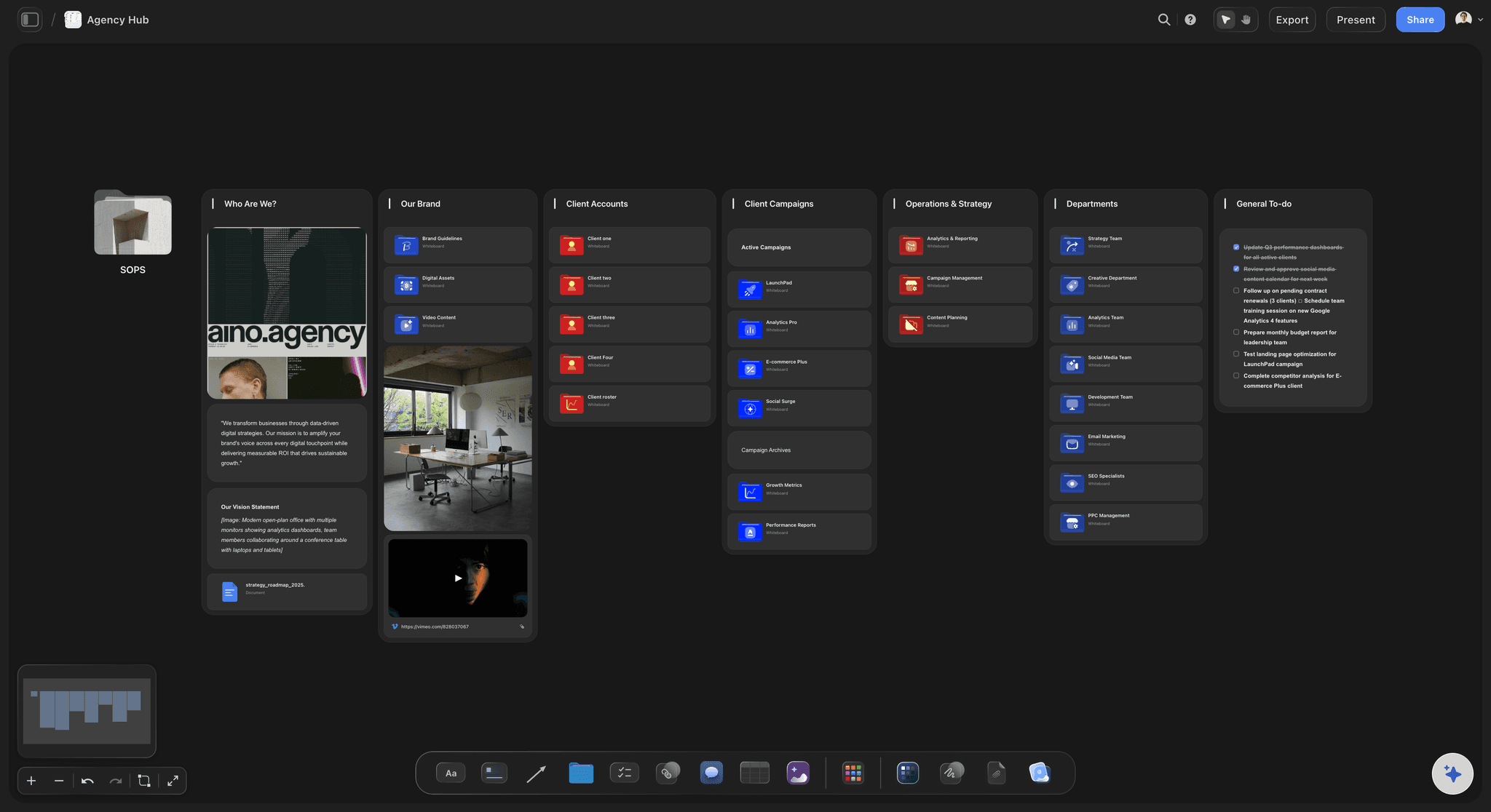
Every open job across the roster
An agency hub for the accounts
One overview board links to each client board: what is in production, what is waiting on the client and what is due this week.
See agency client project planning →
Clients open a link, not an account
Review on the real work
The client opens a view-only link with no account and sees the latest version when they reload. To comment they sign in, and the note lands on the piece it is about.
Try the client review board →Unlimited boards. One per client, and more.
Open a board for your first account and run the job in one place. Storyflow is paid-only during early access, with plans from $7.99 a month billed annually ($9.99 monthly). A free plan launches before the end of 2026, and anyone a paid member invites to a board joins free.
Unlimited client boards and file uploads on every paid plan
Invited teammates and freelancers edit in real time and join free
AI workflows for briefs, moodboards, plans, scripts and shot lists
View-only links clients open with no account
Built for people with taste
Where agency work breaks, and what the board fixes.
Most agency rework starts before production. These are the places it starts.
Brief, direction, scope, handoff
The four places client work goes wrong
The brief is read three ways: Strategy, creative and the client each hold a different version in their head. One brief at the top of the board, with the deliverables listed under it, is the version everyone points at.
The direction is approved in words: A client who signs off on 'warm and premium' has approved nothing yet. Put the references beside the words and they approve the picture instead.
Scope drifts one request at a time: Each small ask is easier to absorb than to price. A deliverables list the client can see turns an extra request into a visible addition to a countable list.
Context is lost at every handoff: Strategy to creative, creative to production, agency to freelancer. When the board holds the reasoning, the next person reads it instead of being briefed into it.
One account, one board
How to lay out a client board
Brief and constraints at the top: Objective, audience, key message, budget, final delivery date and the one person on the client side who decides. That last field prevents most contradictory feedback.
Two or three concept routes: Each route as a frame with its references and a short rationale. Genuinely different ideas, not three colourways of the same one.
Deliverables as tickets: One ticket per asset with a spec, an assignee and a due date. Keep a table of review dates beside them, rows kept in date order, so the client can see when they owe feedback.
A frame for what the client owes: Assets, copy, access, sign-off. Work that is blocked on the client looks identical to work in progress unless it is written down where both sides see it.
AI that reads the account
A first pass in minutes, decisions by people
Named workflows for agency work: Campaign brief, advertising brief, brand strategy, brand moodboard, marketing plan, social media plan, content planner, video script, shot list and budget. Describe the job and pick the one that fits.
Client context attached: Attach up to five documents and three other boards, such as brand guidelines, last quarter's campaign or research. The AI works against them rather than a generic template.
PDFs the client can keep: The AI drafts a treatment, a one-pager, a presentation or a lookbook as a PDF from the board, for the stakeholder who wants a file.
It proposes, you decide: AI edits apply to the board with one-click Undo. The strategy, the pricing and the call on what is good stay with your team.

People, seats and access
The account team, freelancers and the client
Real-time editing for the team: Invited collaborators edit the same board with live cursors on any paid plan, and anyone a paid member invites joins free, so a freelancer for one job adds nothing to the bill.
Admin, edit and view access: Set access per board. Max adds a Team Workspace with permissions and roles for agencies that manage people centrally, billed per seat.
Clients see what you share: Keep the working board private and share a separate client board with the brief, the routes and the schedule. View-only visitors see the latest version when they open or reload.
Explore templates for your project
Every template opens as a real, editable board on the infinite canvas. Pick the closest fit and make it your own.
Marketing Campaign
Plan a campaign across channels, messages, and deliverables on one board the whole team can see.
One app instead of five
Storyflow vs Asana, monday.com and Notion for agencies.
Asana and monday.com are built to run delivery across many people; Notion is a flexible docs and database workspace. Storyflow is where the brief and the creative live. Here is where they differ.
Storyflow
Recommended
Brief, moodboard and creative on one canvas
Client opens a view-only link with no account
Fullscreen presentation mode through the board
Dependencies, workload and time tracking
Free plan available today
Asana
Brief, moodboard and creative on one canvas
Client opens a view-only link with no account
Fullscreen presentation mode through the board
Dependencies, workload and time tracking
Free plan available today
monday.com
Brief, moodboard and creative on one canvas
Client opens a view-only link with no account
Fullscreen presentation mode through the board
Dependencies, workload and time tracking
Free plan available today
Notion
Brief, moodboard and creative on one canvas
Client opens a view-only link with no account
Fullscreen presentation mode through the board
Dependencies, workload and time tracking
Free plan available today
What creators are saying
Join early creators getting structured workspaces and AI that remembers their projects
“Storyflow has sped up my workflow by at least 3x, which means more flow state and more projects I can actually ship. It truly changed the way me and my team create.”

Reilin Joey
Director & YouTuber
“One prompt gets me a structured board. But the tactics are my favorite. I run my YouTube scripts through them and my intros and retention got better. It's amazing.”

Justkay
YouTuber & Freelance Filmmaker
“I used to juggle five apps to plan a project. Now I describe what I am making and get boards, lists, and a schedule. All in one place.”

George
@fernwehchronicles
Agency questions, answered.
What to run where, how clients see the work, and what it costs a team.
Storyflow is the software for the brief-to-concept half of agency work: it turns each client brief into a visual board with the moodboard, concept routes, schedule and deliverables beside it, and the client opens it by link with no account. For delivery across a large roster, with dependencies, workload and time tracking, Asana or monday.com is stronger. Many agencies run both, one for what the work is and one for who does what by when.
Split it at the approved plan. Storyflow holds the first half: the brief, research, references and the AI-drafted plan on one canvas the client reads by link, with each deliverable as a ticket on the same board. If delivery needs dependencies, workload balancing and approval tasks across many people, run that half in Asana or monday.com. The full method is on our campaign brief to delivery page.
Not for a large roster. Asana, monday.com and ClickUp are stronger at the operational layer: dependencies, workload views, time tracking and approval tasks across dozens of people. Storyflow has tickets with assignees and due dates, kanban and to-do lists, which covers a small team's delivery. It has no time tracking, no workload view and no invoicing, so larger agencies keep their project tool and use the board for the brief and the creative.
One board per client, plus one overview board linking them. Each client board holds the brief, the direction, the deliverables and what the client owes you. The overview answers the daily question: what is due this week and what is waiting on a client. The test of any setup is whether a new account manager can read an account from one link instead of three drives and a chat thread.
Turn on sharing and send a view-only link: the client opens it in a browser with no account and sees the latest version when they reload. To leave a comment they sign in, and the note sits beside the piece it is about. For a meeting, presentation mode steps through the board's frames fullscreen. When a stakeholder wants a file, export the whole board as an image or PDF.
There is no approval button or approval status. Clients review by link and, once signed in, leave comments on the work, and a Doc's inline comment threads hold notes on copy. Agree up front what counts as sign-off, such as a written confirmation from the named decision maker, and record it on the board. If you need formal approval routing, keep it in your project tool.
It builds boards from a prompt using named workflows: campaign brief, advertising brief, brand strategy, brand moodboard, marketing plan, social media plan, content planner, video script, shot list, storyboard and budget. It reads the open board plus up to five documents and three boards you attach, and drafts a treatment, one-pager, presentation or lookbook PDF. Its edits apply with one-click Undo; your team makes the calls.
Storyflow is paid-only during early access, with plans from $7.99 a month billed annually ($9.99 monthly). A free plan launches before the end of 2026, and anyone a paid member invites to a board joins free, so freelancers and clients cost nothing. Team billing is per seat. Max, from $39 a month billed annually, adds a Team Workspace with permissions and roles.
Yes. Invite them to the board and they edit in real time with live cursors, and anyone a paid member invites joins free. Because the brief, the references and the reasoning live on the board, a freelancer hired for one week reads the context instead of waiting for a briefing call. Set their access to edit or view per board, and remove it when the job ends.
Make the agreed deliverables visible to the client, not only in the contract. Scope rarely grows in one big request; it grows in small ones that each feel cheaper to absorb than to price. A deliverables list on the board the client can see turns each extra into a visible addition. Agree the number of revision rounds at kickoff and write it next to the list, with further rounds priced separately.
Yes, the planning side. The AI's film plan, script breakdown, shot list and storyboard workflows build the pre-production on the client's board, and it drafts a call sheet PDF for a shoot day. Upload MP4, MOV or WEBM video to play, scrub and grab frames beside the notes. It does not send call sheets, collect crew confirmations or track availability.
No time tracking, invoicing, contracts or payments. No approval workflow or proofing markup on images or video. No month-grid calendar, no publishing to social platforms and no integrations with Slack or Google Drive. It runs in your browser with nothing to install. It is also newer than Notion, Miro or Canva, with a smaller template library, and paid-only until the free plan launches late 2026.
More from Storyflow
Campaign brief to delivery
Campaign concept presentation
Agency client project planning
Agency campaign planning
Campaign management software
Brief to project board
Project brief template
Creative brief template
Client presentation tool
Client review board
For creative directors
For marketing teams
Solo studio project planning
Best workspace from brief to delivery
Design feedback tool
Creative scope of work
Scope creep on creative projects
Put each client account on one board.
Paste a brief, let the AI lay out the first pass, and send the client a link.