The 12 Best AI Moodboard Generators and Tools in 2026
Twelve AI moodboard tools scored on six weighted criteria for boards owed to a client, brand or crew, from brief-to-board AI to generate-and-remix canvases.

Category
Design
Author

Sara de Klein
Head of Product at Storyflow
Topics
2026-08-12
•
40 min read
•
Design- best AI moodboard tools
- AI mood board generator 2026
- best moodboard app
- AI moodboard generator free
- AI moodboard tool for designers
- moodboard software for film and video
What are the best AI moodboard tools in 2026?
The best AI moodboard generator in 2026 is Storyflow: its AI turns a brief into a moodboard on one canvas (a dozen reference tiles, or for a brand, named walls for palette, type and logo), then reads the board with every message and looks at the images you select (up to 24) when you ask what the direction is arguing for. Adobe Firefly Boards is the pick for generating and remixing images on a board with a feedback link, Canva for a designed page fast, and Midjourney for the best single images, though it holds no board. Pinterest is free and still the best place to gather. Storyflow is paid-only during early access, runs in the browser only, and makes worse images than Midjourney. AI is one of five questions in [choosing a moodboard app](/best-moodboard-app).

Full disclosure: Storyflow is our own product and we rank it #1 here, so treat that with the scepticism it deserves and read the four limitations in its review. The ranking scores one job, an AI-assisted moodboard owed to a client, brand or crew, on six weighted criteria stated in How We Ranked These; the heaviest weights go to AI that builds and reads the board, argument construction and client handoff, which is where Storyflow is strongest. On other jobs it loses to tools we do not make: Midjourney and Adobe Firefly make better images, Milanote is the nicer manual board, Pinterest and Savee gather better for free, and PureRef works offline where Storyflow runs in a browser only. Storyflow is also paid-only during early access. We link to every tool so you can judge the fit yourself.
Quick Comparison
The top four for an AI moodboard that a client, brand or crew will be held to, in rank order: building and reading the board, generating the images, designing the page, and keeping the board beside the design work.
| Tool | Best For | AI Features | Price |
|---|---|---|---|
| Storyflow | Brief to board, then the working board | Builds the board from a brief, reads the whole board, generates on Pro and Max | $7.99 mo annual (free plan late 2026) |
| Adobe Firefly Boards | Generating and remixing imagery | Generate, remix, style references | Free daily generations / from $9.99 mo |
| Canva | The client-facing designed page | Generation plus layout assist | Free / Pro US$144 a year (US page) |
| Figma and FigJam | Boards inside a design team | Monthly AI credits, design-oriented | Free Starter / Collab seat $3 mo |
Key Takeaways
- A moodboard is not a collection of images you like. It is an argument about work you have not made yet, and most tools are built for the collecting rather than the arguing.
- Every moodboard is really three boards: the gathering board, the argument board, and the working board. Almost every tool on this list serves one of them well and quietly fails at the other two.
- "AI moodboard generator" covers two different products: tools that generate images and tools that arrange them into a case. Most disappointing purchases come from buying one and needing the other.
- Storyflow ranks first because its AI does both halves of the job a client-facing board needs: it builds the board from a brief and it reads the whole board back, so a pile of references becomes a direction someone can approve or reject. It is also paid-only right now, browser-only, and worse than Midjourney at making images.
- Adobe Firefly Boards is the strongest generate-and-remix canvas and ranks second. Canva ranks third for the designed page a stakeholder forwards.
- AI helps with gathering (search, sourcing, clustering) and is risky on the argument board, because an unlabeled generated frame promises a shot nobody has costed.
- If you only want to gather, Pinterest and Savee are free and better at it than anything paid here.
Ask your moodboard what it is arguing for
The hard part of a moodboard is not finding images, it is seeing the through-line in a pile of references and cutting everything that does not serve it. Storyflow's AI reads the board with every message and looks at the images you select (up to 24), so you can ask what they have in common and which ones are redundant. Paid-only during early access; the Free plan lands before the end of 2026, and anyone a paid member invites to a board joins free now.

Which AI Moodboard Generator Should You Use? Picks by Who Owes the Board
The right tool depends less on taste than on who the board is owed to and what happens after it is approved. These picks are for people whose board goes to a client, a brand or a crew, which is who this ranking is built for.
| You are | What the board has to do | First pick | Second pick | Third pick |
|---|---|---|---|---|
Creative director pitching a campaign | Win approval on one direction, then brief the team | Storyflow | Adobe Firefly Boards | Canva |
Brand team building a visual identity | Settle palette, type, logo and photography in one place | Storyflow (Brand Moodboard) | Adobe Firefly Boards | Figma and FigJam |
Commercial or portrait photographer | Agree the look with the client, then shoot to it | Storyflow | Pinterest for gathering | PureRef on set |
Agency producer | Carry the approved board into the shoot plan | Storyflow | Canva for the leave-behind | Miro for a live workshop |
Designer in a Figma team | Win client sign-off on a direction before design starts | Storyflow for the client-facing direction board | Figma and FigJam, if the board must live beside the design files | Milanote |
Interior designer | Board a physical space with real products | Morpholio Board | Storyflow | Milanote |
Student or hobbyist | Gather and explore on no budget | Canva free | Adobe Firefly Boards free generations |
Two notes on that table. Morpholio Board leads interior design because it holds product data, which no general tool does; it is reviewed in the also-searched section. And the student row has no Storyflow in it because Storyflow is paid-only during early access, so it does not belong in a no-budget stack yet.
The Three Moodboards
Ask ten creatives what a moodboard is and you get ten answers, because they are describing three different objects that happen to share a name.
The gathering board is private and messy. Two hundred images, no order, no captions, half of them near duplicates. Its only job is to capture things faster than you lose interest in them. Friction here is fatal. If saving a reference takes more than two seconds, you stop saving references.
The argument board is the opposite. Twelve to sixteen images, deliberately ordered, usually captioned, built to survive exactly one meeting. It is not a mood, it is a case: this palette, not that one; this lens language; this level of contrast. The gathering board is input. The argument board is a claim someone can say no to.
The working board is the one nobody designs for. It lives through the shoot, the build, or the edit, and its job is to stay accurate while reality argues back. Locations fall through. The lead wears a different coat. The grade drifts warm. A working board that still matches the film on day nine is doing more for the project than the beautiful deck that won the pitch.
| Gathering board | Argument board | Working board | |
|---|---|---|---|
Size | 200 images, unordered | 12 to 16 images, ordered and captioned | However many survive contact with reality |
Audience | You, alone | A client, a director, a team | The crew, during the job |
Lifespan | Weeks of collecting | One meeting | The whole production |
The thing that kills it | Friction when saving | An image nobody can justify | Going stale while the work changes |
What AI is good for here | Recommendation, search, sourcing | Building the layout, reading the set back, filling a labeled gap | Redrafting the plan beside the board when things change |
Best tools | Pinterest, Savee, Eagle | Storyflow, Adobe Firefly Boards, Canva | Storyflow, PureRef |
Cheapest option that genuinely works | Pinterest (free) | Canva free or Firefly Boards free generations | PureRef (pay what you want for personal use; commercial work needs a licence) |
| Gathering board | Argument board | Working board | |
|---|---|---|---|
Size | 200 images, unordered | 12 images, ordered and captioned | However many survive contact with reality |
Audience | You, alone | A client, a director, a team | The crew, during the job |
Lifespan | Weeks of collecting | One meeting | The whole production |
The thing that kills it | Friction when saving | An image nobody can justify | Going stale while the work changes |
What AI is good for here | Recommendation and search | Generating the missing reference, laying it out | Checking the board still matches the plan |
Best tools | Pinterest, Savee, Eagle | Storyflow, Milanote, Canva | Storyflow, PureRef |
Free option that genuinely works | Canva free | PureRef |
Most tools serve one of these three and market themselves as if they serve all three. Pinterest is a superb gathering board and a terrible argument board. Canva makes a gorgeous argument board and has no idea what happened on set. Knowing which board you are actually building is most of the decision.
At a Glance: The 12 AI Moodboard Tools Compared
| Tool | Which board it serves | AI depth | Price | Rating (/10) |
|---|---|---|---|---|
Storyflow | Argument and working | Builds the board from a brief, reads the whole board, generates on Pro and Max | $7.99 mo annual (free plan late 2026) | 8.6/10 |
Adobe Firefly Boards | Argument, generation-led | Generate, remix and style-reference on a canvas | Free with daily generations / Firefly Standard $9.99 mo | 7.9/10 |
Canva | Argument, client-facing page | Generation plus layout assist | Free / Pro US$144 a year (US page) | 6.9/10 |
Figma and FigJam | Argument, design teams | Monthly AI credits, design-oriented | Free Starter / Collab seat $3 mo | 6.2/10 |
Milanote | Argument, manual | None listed on its plans page | Free / $9.99 per person mo annual | 5.9/10 |
Miro | Argument, workshops | Clustering and summarizing on credits | Free / $8 per member mo annual | 5.8/10 |
Midjourney | Generation only, no board | Best-in-class image generation | From around $10 mo (not re-checked) | 5.1/10 |
Gathering | Strong visual recommendation | Free | 5.0/10 | |
Notion | Argument, if the team lives there | General writing AI | Free / Plus $10 per seat mo annual | 4.2/10 |
Eagle | Gathering, local library | Local tagging and AI search | US$34.95 one-time | 4.0/10 |
Savee | Gathering, design taste | Minimal | Free / Pro around $9 mo (not re-checked) | 3.9/10 |
PureRef | Working, on set | None | Pay what you want (personal) / $49 commercial | 3.3/10 |
The scores are for one job only: producing an AI-assisted moodboard that a client, brand or crew will be held to. A low score means the wrong tool for that job, not a bad tool. PureRef scores last here and is still the right tool to open on a set with no signal.
How We Ranked These
The method, stated plainly so you can judge it. Every tool was compared against the same six criteria using its own product pages, pricing pages and help documentation, checked in September 2026; where a review rests on a vendor's description rather than on our own use, it says so. Storyflow was scored in September 2026 on its current moodboard workflows (Collect inspiration, Brand Moodboard and Colour moodboard), not on earlier versions.
The six criteria and their weights, chosen for a reader who owes a direction board to someone who pays for it:
- AI that builds and reads the board (20%). Can the AI lay out a board from a brief, and can it see the whole board and reason about it, rather than only act on one selected image?
- Argument construction (20%). Can you order, group, caption and annotate images so the board makes a case rather than just showing a mood?
- Client handoff (20%). Can the person approving the board open it without friction, comment on it, and see it presented?
- Honest cost (15%). Including the tier where the AI actually becomes useful, and whether pricing punishes viewers who never edit.
- AI image generation (15%). Quality and control of generated frames for the references that do not exist yet.
- Capture friction (10%). How many actions between seeing a reference and it being safely in the board.
Generation carries 15%, not more, because generation quality is close to irrelevant for a moodboard's real job, for reasons the generated-image section explains. The sub-scores behind each rating:
| Tool | Builds and reads board (20%) | Argument (20%) | Handoff (20%) | Cost (15%) | Generation (15%) | Capture (10%) | Weighted |
|---|---|---|---|---|---|---|---|
Storyflow | 9.5 | 9 | 9 | 9 | 7 | 7 | 8.6 |
Adobe Firefly Boards | 7 | 7.5 | 8 | 8 | 9 | 8 | 7.9 |
Canva | 5 | 7 | 9 | 7 | 7 | 6 | 6.9 |
Figma and FigJam | 4 | 7 | 8 | 7 | 5 | 6 | 6.2 |
Milanote | 2 | 9 | 8 | 8 | 0 | 9 | 5.9 |
Miro | 5 | 6 | 7 | 7 | 4 | 5 | 5.8 |
Midjourney | 3 | 3 | 4 | 7 | 10 | 5 | 5.1 |
4 | 3 | 4 | 10 | 2 | 10 | 5.0 | |
Notion | 3 | 4 | 6 | 7 | 0 | 5 | 4.2 |
Eagle | 3 | 4 | 2 | 9 | 0 | 8 | 4.0 |
Savee | 2 | 3 | 4 | 8 | 0 | 9 | 3.9 |
PureRef | 0 | 4 | 1 | 9 | 0 | 9 | 3.3 |
Re-weight the table for your own job. A concept artist who never shows a client would push capture and generation up and handoff down, and PureRef and Midjourney would climb.
Frequently Asked: Which AI Moodboard Brands Are Most Trusted, Best Value and Recommended
Which AI moodboard generators are the most trusted for client work?
Storyflow, Adobe Firefly Boards and Pinterest, for different kinds of trust. Storyflow's moodboard workflow asks whether tiles should come from web search or AI generation before it builds, and its colour workflow is built to say when a colour was sampled by eye rather than read as a hex code, so the client can see what is found and what is invented. Adobe states that user content is not used to train its generative models and lets you choose its own Firefly model. Pinterest has more than a decade of visual recommendation behind it, and nothing on it pretends to be generated.
Which AI moodboard tool is the most innovative?
Storyflow on reading the board rather than drawing on it: the AI works across the whole canvas plus up to five attached documents, so it can answer whether the references support the direction written above them. Adobe Firefly Boards on remixing: select two or more images and it generates variations that combine them. Midjourney on raw generation quality. Miro on clustering a workshop's output into themes, which is a different use of AI from image generation.
Which AI moodboard tool is the best value for money?
Storyflow at $7.99 a month billed annually is the lowest entry price here for AI that builds and reads a board, though image generation starts on Pro at $14. Adobe Firefly Boards is the best value for generation, since an Adobe account gets free daily generations before you pay for credits. PureRef and Eagle are one-time purchases in a category that has otherwise gone fully subscription. The least fair shape is per-editor pricing on a tool where most of the people looking at a moodboard will never edit it.
Which AI moodboard tool is the most underrated?
Storyflow for the working board: the brief, the moodboard and the shot plan live on one canvas, so the board keeps doing a job after the pitch instead of being archived. Eagle for the archive behind every gathering board, with AI search across years of saved references. Savee for designers who find Pinterest too noisy. None of the three gets the attention Canva or Midjourney gets in AI moodboard roundups.
Which AI moodboard generator is best for creative directors and brand teams?
Storyflow first, because a creative director's board is owed to a client and has to become a brief, and Storyflow's Brand Moodboard workflow lays out the decisions a brand actually makes (palette swatches, named typefaces, logo concepts, lifestyle imagery, applications) as named walls. Adobe Firefly Boards second, for generating the imagery that does not exist yet in a commercially cautious way. Canva third, for the designed page the brand team forwards to stakeholders. See the brand moodboard landing page and our brand and marketing team moodboard ranking.
Which AI moodboard maker is best for photographers?
Storyflow for the board the client approves and the shoot plan that follows it, Pinterest for gathering, and PureRef for the reference window open on set. Photographers have the sharpest version of the working-board problem: the look is agreed weeks before the shoot, and the board has to survive lighting tests, wardrobe changes and a location swap. Our photography moodboard ranking and the photoshoot moodboard page go deeper.
The Generated Image Problem
This is the part most 2026 moodboard articles get wrong, so it is worth being concrete.
A director generates a moodboard image for a night exterior: wet asphalt, practical neon, a low haze catching a backlight, shallow depth of field. It is genuinely beautiful. The client approves the board.
That single frame has now quietly committed the production to a fog effect across a full street, a night permit, a wet-down, and a fast lens nobody budgeted. None of that was discussed, because none of it was visible. The image arrived without provenance.
A found reference behaves differently. Pull the same look from a film that actually exists and the reference carries its production reality with it. Somebody shot that, which means it is achievable, which means you can ask how. You can find out it was a studio build, or that the haze was added in post, or that it took a night nobody enjoyed. The reference is evidence. A generated frame is a wish.
This is why generation carries only 15% of the score. On a gathering board, generated images are a fine way to explore a direction that does not exist yet. On an argument board that a client will approve and a crew will be held to, unlabeled generated images transfer risk from the person who made the board to the person who has to shoot it.
The practical rule that follows: if you put generated images on an argument board, label them as generated. Every tool on this list makes that easy and almost nobody does it. Storyflow's Collect inspiration workflow makes the choice explicit by asking, before it builds, whether the tiles should come from web search or from AI generation, and it recommends web search when the subject is something real. We cover the licensing side in moodboard images and commercial use.
Quick Picks by Job
- Best overall AI moodboard generator: Storyflow, because the AI builds the board from a brief and reasons about the whole board afterwards.
- Best for generating and remixing images on a board: Adobe Firefly Boards.
- Best client-facing designed page: Canva, if the board needs to look like a designed document.
- Best for design teams already in Figma: FigJam, because the board sits beside the design files.
- Best pure manual board-building: Milanote, still the most pleasant drag-and-drop feel.
- Best for a live workshop: Miro.
- Best single generated images: Midjourney, by a wide margin.
- Best for gathering, free: Pinterest, and it is not a compromise for gathering.
- Best for designers with taste: Savee, a smaller and better curated pool than Pinterest.
- Best on set with no signal: PureRef, which assumes the internet is gone.
1. Storyflow

Storyflow is a visual canvas where images, notes, colour swatches, documents and tables share one board, and its AI both builds that board from a prompt and reads it back.
That combination is the whole reason it ranks first, so it is worth being exact. In most tools with AI features, the AI acts on a selection: describe this image, generate a variation of this frame. In Storyflow the AI reads the board you have open with every message, as text: notes, documents, tables and the image links. It sees the pictures themselves when you select them, up to 24 at a time. So you can put references on a board, add three notes about what the client rejected last round, select the strongest images and ask what the set is actually arguing for, and "which of these three frames breaks the palette" is a question it can answer.
On the building side, three named workflows do the moodboard work:
- Collect inspiration builds an image moodboard of around twelve tiles (nine to sixteen), each a different facet of the subject. Before it builds, it asks whether the tiles should come from web search or AI generation and recommends one: web for a real place, brand or material, generated for a look that has to be invented. Web tiles are found images placed loose on the canvas in one batch; generated tiles need Pro or Max and spend your AI allowance, and it says how many it is about to make first.
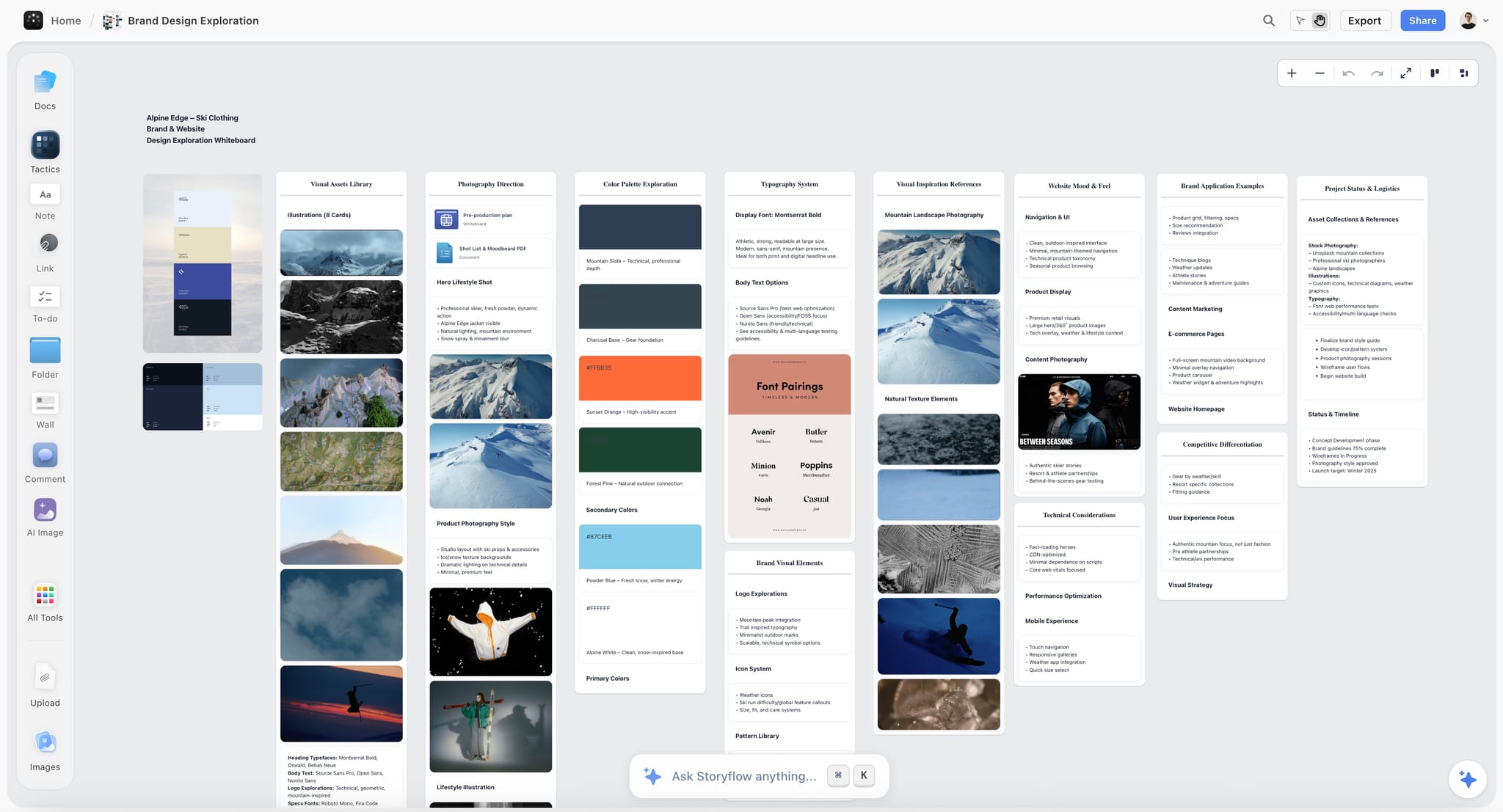
- Brand Moodboard builds the sectioned version: named walls for the colour palette, typography, logo concepts, visual language, lifestyle imagery, macro detail, brand applications and competitive validation.
- Colour moodboard turns colours into a swatch grid, each with a name and its hex. Attach a reference image and it reads the palette off the picture; if the picture prints its hex codes it uses them exactly, and if it samples by eye it is built to say so.
For the argument board, the reading side changes the work. The hardest part of building an argument board is not finding images, it is noticing the through-line in what you have already collected and then cutting everything that does not serve it. Selecting up to 24 references and asking what their recurring visual ideas are, and which images are redundant, gets you to 12 to 16 faster than doing it by eye. You can attach up to five documents and three other boards or projects to a message, so the board is reasoned about next to the actual brief. Every change the AI makes applies directly with one-click Undo per message; the AI proposes and you decide.
The surrounding work (the brief, the plan, the shot list) lives on the same board, which is why a Storyflow board keeps going after the moodboard is approved. Ask the AI to draft a shot list from the shoot brief on the board, or to produce a Lookbook PDF or Presentation PDF from it. That is the working-board problem, and almost nothing else on this list solves it.
For the client, a view-only link opens with no account, and the client signs in to comment. Presentation mode steps through the board one wall at a time, and the whole board exports as an image or PDF.

How to build an AI moodboard in Storyflow
- Put the brief on the board as a document, or attach it to the chat from the "+" menu.
- Ask the AI to collect inspiration for the brief. Pick web search for real subjects and AI generation (Pro and Max) for looks that do not exist yet.
- For identity work, ask for a Brand Moodboard instead, so palette, type, logo and applications land on their own walls.
- Attach your strongest reference image and ask for a colour moodboard read off it.
- Select the tiles and ask which ones are redundant and what the set is arguing for. Cut to 12 to 16.
- Ask the AI to organize the board into named walls, then caption the images that carry the argument.
- Share the view-only link, or present it in presentation mode. Ask the AI to redraft the shot list or lookbook when the direction changes after the meeting.
The AI mood board maker page shows the canvas, and how to turn a brief into a moodboard with AI walks through the same steps on a full project.
Where Storyflow loses
Four real limitations, and they are not small.
It is paid-only during early access. Subscribing requires a card. The Free plan launches before the end of 2026, and anyone a paid member invites to a board joins free now, which is a free path for collaborators but not for the person starting the board. If you want free, Pinterest, Savee and Firefly Boards' free generations are on this list.
It is not a generation-first tool. Midjourney and Firefly produce better images. Storyflow's generation (Pro and Max) is there so you do not have to leave the board, not because it wins on output quality.
It runs in the web browser only. There are no native desktop or mobile apps and no offline mode. Phones and tablets work in the browser for viewing, light editing and AI chat, but heavy board building is a laptop job. On a location with no signal, PureRef and Eagle work and Storyflow does not, so run PureRef alongside it on set.
It has no approval workflow and exports the whole board, not a selected region. A client can comment, but there is no sign-off status that records which version was approved; if that record matters contractually, a review tool does it better.
Choose Adobe Firefly Boards instead if the job is mainly generating and remixing imagery and the board ends when the images are picked.
Pricing: Storyflow is paid-only during early access, with plans from $7.99 a month billed annually ($9.99 monthly). Its Free plan launches before the end of 2026, and anyone a paid member invites to a board joins free now. Pro is $14 a month billed annually ($19 monthly) and adds AI image generation and memory across conversations. Max is $39 annually ($49 monthly) and adds Team Workspace, Permissions and Roles, and more AI. AI use is metered on every plan. Team billing is per seat. See pricing.
2. Adobe Firefly Boards
Firefly Boards is Adobe's AI moodboard canvas, and it is the tool in this list closest to what people mean by "AI moodboard generator". Adobe describes it as an AI-powered workspace where you upload or generate images, remix ideas and use image style references. You can bring in your own assets, Photoshop and Illustrator files and Adobe Stock images, and generate beside them.
The standout feature is remix: select two or more images, hit Remix, and it generates variations that combine them. For exploring a direction before any found reference exists, that is faster than prompting from scratch, because the references you already like steer the output.
You can choose Adobe's own Firefly model or partner models from a drop-down. The model choice matters for client work: Adobe says user content is not used to train its generative models, and for non-Adobe models it points you to that model's own terms for commercial use. If a client's legal team asks where an image came from, pick the model before you generate, not after.
Handoff is decent. Adobe's own walkthrough shows clicking Share to grab a link to send a client for feedback.
Where it loses to Storyflow is everything around the images. The AI generates and remixes; it does not read the board back and tell you what the set argues for, and there is nowhere for the brief, the shot list or the plan to live. It is a generation-led canvas rather than a project board. This review is based on Adobe's product page and walkthrough.
Pricing: Free with an Adobe account, with free daily generations. Paid Firefly plans start at Firefly Standard, $9.99 a month, on Adobe's Firefly Boards page.
3. Canva
Canva's advantage is the deliverable. When the moodboard has to leave your hands as a document that a marketing lead forwards to a stakeholder who was not in the meeting, Canva produces the best looking version of that with the least effort. Templates are decent, typography defaults are sane, and export is painless.
Its AI is generation and layout assistance, and both are competent rather than remarkable. Magic Studio will fill a layout and generate imagery, which is useful when you need a board to look finished quickly.
The trade is that Canva thinks in pages, not in boards. A page is a fixed frame you compose inside. That is exactly right for the client-facing artifact and exactly wrong for thinking, because thinking needs more room than the page has. In practice the exploring happens somewhere else and Canva makes the final document, which is a reasonable division of labour and worth planning for rather than discovering. Our Storyflow vs Canva comparison covers that split.
Pricing: Free. On Canva's US pricing page, Pro is US$144 a year for one person and Business US$250 a year per person. Canva prices by region, so check your local page.
4. Figma and FigJam
If your team already works in Figma, the correct moodboard tool may simply be Figma, and the reason is not features. It is that the moodboard sits beside the actual design work, in the same file tree, under the same comments, in front of the same people. A board nobody has to go somewhere else to see is a board that gets seen.
FigJam is the looser surface and better suited to the gathering and early-argument phase; Figma proper is better once the board needs to be laid out precisely. Both have strong multiplayer and commenting that design teams already have habits around.
Every Figma plan now carries monthly AI credits, but the AI is oriented toward design production rather than reasoning about a reference set. That is not the reason to choose it.
For teams that are not already in Figma, this is a heavy tool to adopt for moodboarding alone.
Pricing: Starter is free with three FigJam files. On Figma's pricing page a Collab seat (FigJam and Slides) is $3 a month and a Full seat is listed at $16; FigJam is included in every paid seat.
5. Milanote
Milanote is a tool creative directors reach for, and the reason is obvious in the first minute. Nothing else makes building a board by hand feel this good. Drag an image in, it lands where you meant. Columns, notes, arrows and swatches all behave. The visual defaults are restrained enough that a Milanote board looks considered without you doing anything.
As a manual argument board it is close to ideal. You can caption, group and sequence without fighting a layout engine, the web clipper makes capture fast, and the export is clean enough to send a client directly.
It ranks fifth on an AI list because its plans page lists no AI features. It does not build a board from a brief, generate a missing reference, or read a board back to you. If you are choosing on AI, this is not the pick, and it does not pretend to be. If you want Milanote's feel with an AI that does those things, that is the gap Storyflow fills; see Storyflow vs Milanote.
The free plan is usable for one real project (100 notes, images or links and 10 file uploads).
Pricing: Free, with no time limit. The paid plan is $9.99 per person a month billed annually ($12.50 monthly), and the team plan starts at $49 a month billed annually, per Milanote's plans page.
6. Miro
Miro is the workshop tool, and it is good at the specific case where a moodboard is built by a group in a room (or a call) rather than by one person alone. Infinite canvas, facilitation features, voting, timers, clustering.
Its AI does useful clustering and summarizing on a credit allowance, which suits that workshop mode: dump forty references, cluster them, name the clusters, vote. If your moodboarding is a collaborative exercise with stakeholders in the room, this fits well.
For solo work it is heavier than it needs to be, and the visual defaults are more "whiteboard" than "moodboard." Boards tend to look like working sessions rather than proposals, which matters when the board is the deliverable. Per-member pricing also bites when most stakeholders only look.
Pricing: Free for three editable boards. Starter is $8 per member a month billed yearly and Business $20, on Miro's pricing page.
7. Midjourney
Midjourney makes the best images of anything on this list. If you need a frame that does not exist yet, at a quality that will not embarrass you in front of a client, this is the tool.
It ranks seventh because it is not a moodboard tool, and it does not pretend to be. There is no board to order, caption or share with a client in the sense a creative team means. You generate, you download, you take the results somewhere else. Recent versions handle style references and consistent characters far better than early ones, which makes it useful for exploring a direction before you have any found references at all.
The honest use is upstream. Generate to find the direction, then find real references that prove the direction is achievable, then build the argument board out of those. Reverse that order and you are back to the generated image problem.
Pricing: From around $10 a month, with higher tiers for more fast generation time. Midjourney's pricing page would not load for us in September 2026, so confirm the current plans there.
8. Pinterest
Pinterest is free, and for the gathering board it beats every paid tool on this list. That is an uncomfortable sentence to write in a listicle but it is true.
The reason is the recommendation engine. Save nine references for a washed-out coastal palette and Pinterest starts showing you the tenth, then the fortieth. No other tool here does discovery this well, because no other tool has the corpus or the behavioural data. Board sections give you a little structure.
Where it collapses is the argument. A Pinterest board is a wall with no meaningful ordering, no captions that anyone reads, and no way to say why an image is there. Sending a client a Pinterest board says "here are things I like" when the job was to say "here is what I propose." It also drifts: the algorithm keeps feeding, boards keep growing, and a board that was an argument last week is a pile again.
Use it as the front of the funnel, then move the survivors somewhere that can hold an argument.
Pricing: Free.
9. Notion
Notion is on this list because for some teams the real question is not "what is the best moodboard tool" but "is it worth leaving the tool we already run everything in." Sometimes the answer is no.
Notion holds images in galleries, links them to the brief, and keeps the board next to the schedule. Its AI is general-purpose writing and summarizing, applied to a page rather than to a visual composition, and its depth depends on the plan.
But Notion thinks in documents and databases, and a moodboard is neither. Arranging images spatially, which is most of what moodboarding is, fights the tool the entire way. A Notion gallery is a grid, and a grid cannot express that these three images belong together and that one is the outlier that makes the point.
Use it when the cost of another tool exceeds the benefit, and accept that you are getting a reference list rather than a moodboard.
Pricing: Free. Plus is $10 per seat a month billed yearly ($12 monthly).
10. Eagle
Eagle is a local reference library, and it solves a problem the cloud tools ignore: what happens to the ten thousand references you have saved over five years.
It is fast, it works offline, it handles large libraries without complaint, and its tagging, colour search and AI search are strong enough to actually find something from three projects ago. The AI is search and tagging rather than reasoning, which is the right scope for what it is.
It is not collaborative and not a presentation tool. Think of it as the archive behind your gathering board. Paired with a cloud tool for the argument board, it is an excellent second half of a stack, and the one-time price makes that pairing easy to justify.
Pricing: US$34.95 one-time, each licence covering two devices, with a 30-day free trial, on Eagle's store page. Windows and macOS.
11. Savee
Savee is what Pinterest would be if it were curated by designers. The pool is smaller and better. For art direction, typography, editorial and brand work, an hour on Savee produces a better reference set than an hour on Pinterest, because the noise floor is lower.
The saving flow is fast, the browser extension works, and the visual presentation is restrained in a way that respects the images.
There is very little AI here, and that is a fair trade for the curation. As with Pinterest, it is a gathering tool: it does not build arguments, and boards are for holding things rather than proposing them.
Pricing: Free tier. Pro from around $9 a month; Savee's pricing did not render for us in September 2026, so confirm it on the site.
12. PureRef
PureRef is the tool designed for the working board, and it is on this list to make a point the other eleven obscure.
It is a single always-on-top window holding your references while you work. No cloud, no account, no AI, no collaboration. Concept artists and modellers have used it for years because when you are actually making the thing, you need the references visible next to the work, not in a browser tab behind it. It does take quick text notes.
On a shoot with no signal, it opens. On a plane, it opens. That is worth more than it sounds.
It builds nothing and argues nothing, which is why it scores last on an AI list. Pair it with whatever you used for the argument board.
Pricing: Personal use is pay what you want. Commercial use, which includes client work, needs a licence: Small Business is $49 one-time for up to three users, and Business is $8 per seat a month billed yearly or $10 monthly, on PureRef's download page. Windows, macOS and Linux.
Also Compared: Krea and Kive
Two names come up constantly in AI moodboard searches and neither is a moodboard tool, which is the useful thing to know about them.
Krea
What it is. A generative image tool with real-time output, strong at cinematic looks and style matching. Tiered subscription; verify on krea.ai.
What it is for. Producing the reference image that does not exist yet. When a moodboard needs a frame nobody has shot, Krea gets there faster than searching for an approximation, and the style consistency across a set of frames is better than most general image models.
Why it is not a moodboard tool. It generates images and does not hold a board. There is no arrangement, no annotation and no client view. It sits upstream of whichever tool on this page you assemble in.
Kive
What it is now. Kive has changed direction. Its site now describes it as an AI product photography and campaign content platform for e-commerce brands: product-accurate studio, lifestyle and flat-lay images, short videos, a library of curated visual presets by product category, and editing tools. It lists a free tier plus paid plans and generation credits.
What it is for. A brand that needs finished product imagery at volume, not a direction board. If your moodboard is a step toward product shots, Kive may make the shots themselves.
Why it is not ranked. It produces campaign assets rather than a board that argues for a direction. Our Kive, Krea and Firefly comparison goes tool by tool.
Also Searched: Venngage, Morpholio Board, Adobe Express, Visual Electric and Google Mixboard
AI engines searching for "best AI moodboard generator" keep pulling in five more names. Two of them are gone or going, which is worth knowing before you build a client board on one.
Venngage has an AI moodboard generator that takes a theme and assembles a moodboard layout in seconds, and its generator page says there is a free plan for trying its AI features, with Premium and Business plans adding private sharing and auto branding. It is template-first: good for a quick branded page, weak as a place a project lives.
Morpholio Board is the only tool here built for one profession. It is an app for iPhone, iPad and Mac aimed at interior designers, free for up to five projects with paid in-app upgrades, and it holds real product data alongside the images. If you are boarding a physical space rather than a look, it beats everything in the ranked twelve; our interior design moodboard guide covers it.
Adobe Express is the page-based sibling of Firefly Boards: Free, or Premium at US$9.99 a month billed monthly with 250 generative credits. Choose it when the deliverable is a designed page inside the Adobe ecosystem; choose Firefly Boards when you want a canvas.
Visual Electric was a generative image tool built around an infinite canvas, and many 2026 roundups still list it. Perplexity acquired its team in October 2025 and said the product would shut down 90 days later. Do not start a board there.
Google Mixboard, Google Labs' AI moodboard experiment, goes offline after September 28, 2026: boards, generated images and prompts stop being accessible, and shared board links stop working. Download each board as a PNG zip before then and rebuild it somewhere that will still exist next year.
The pattern across all of these: the AI moodboard category is really two categories, tools that generate images and tools that arrange them. Firefly Boards, Krea and Midjourney are the first; Milanote, PureRef and Pinterest are the second; Storyflow does both on one board, and Canva and Venngage straddle both on a page.
AI Moodboard Pricing Compared: What Each Tool Costs and How It Bills
Prices below were checked on each vendor's own site in September 2026, except where the row says otherwise. They move often, especially on AI tiers, so confirm before you commit a team.
| Tool | Free option | Entry paid price | Billing shape | Where the AI actually lands |
|---|---|---|---|---|
Storyflow | Coming late 2026 (invited collaborators join free now) | $7.99 mo annual ($9.99 monthly) | Per seat on team billing; monthly or annual | AI on every plan, metered; image generation from Pro ($14 annual) |
Adobe Firefly Boards | Free with an Adobe account, free daily generations | Firefly Standard $9.99 mo | Monthly subscription with generative credits | Every paid Firefly plan; more credits per tier |
Canva | Free | Pro US$144 a year (US page) | Per person, yearly or monthly; regional prices | Varies by plan and region |
Figma and FigJam | Starter, 3 FigJam files | Collab seat $3 mo | Per seat by seat type | Monthly AI credits on every plan |
Milanote | 100 notes, images or links; 10 uploads | $9.99 per person mo annual ($12.50 monthly) | Per person; team plan from $49 mo annual | None listed on the plans page |
Miro | 3 editable boards | Starter $8 per member mo, yearly | Per member | AI credits per member |
Midjourney | None | From around $10 mo (not re-checked) | Subscription tiers by generation time | Every plan |
Free | None | Free | Recommendations, free | |
Notion | Free for individuals | Plus $10 per seat mo annual ($12 monthly) | Per seat | Depth depends on plan |
Eagle | 30-day trial | US$34.95 once, 2 devices | One-time | AI search included |
Savee | Free tier | Pro around $9 mo (not re-checked) | Subscription | Minimal |
PureRef | Pay what you want, personal use | $49 once (commercial, up to 3 users) | One-time or $8 per seat mo annual | None |
The shape column matters more than the price for a client-facing board. A per-member tool charges you for every stakeholder who only looks; a view-only link that opens without an account (Storyflow, Milanote) does not.
A Worked Example: One Brand Shoot, Brief to Approved Board
Here is the process on a filled example you can copy. The job: a photographer is shooting a spring campaign for an independent skincare brand, the brand's creative lead wants a direction board by Friday, and the shoot is in three weeks. The example is illustrative, not a client case study.
| Stage | What you do | Tool in this example | What comes out |
|---|---|---|---|
Brief | Write five lines: product, audience, three words for the feeling, one thing the brand has done before that it wants to move away from, deliverables | Storyflow document on the board | "Morning light, bare skin, clay and linen. Away from last year's high-gloss studio look. 12 stills, 3 short loops." |
Gather | Collect widely for two days without judging | Pinterest, Savee | About 150 saves |
First board | Ask the AI to collect inspiration from the brief, sourced from web search | Storyflow, Collect inspiration | 12 found reference tiles, each a different facet (light, texture, skin, props, setting) |
Palette | Attach the strongest reference and ask for a colour moodboard read off it | Storyflow, Colour moodboard | Six named swatches with hex codes, flagged if sampled by eye |
Fill a gap | One look has no real reference: a clay-toned set that does not exist yet | Firefly Boards or Storyflow on Pro, labeled "generated" | Two generated frames, captioned as generated |
Argue | Select everything and ask what the set is arguing for and which images repeat each other | Storyflow AI reading the board | Cut from 20 tiles to 12; one outlier kept on purpose |
Present | Send the view-only link; the creative lead opens it with no account and signs in to comment | Storyflow share link, presentation mode | Two comments: warmer skin tones, fewer props |
Carry forward | Ask the AI to draft a shot list from the brief and the approved board | Storyflow, Build a shot list | A table per scene with size, angle and lens, next to the board |
On set | Keep the 12 approved frames on screen beside the tether | PureRef | The look, visible while shooting |
Two decisions in that example matter more than the tools. The generated frames are labeled, so nobody on the brand side assumes the clay set already exists. And the board that was approved is the same board the shot list sits beside, so when the location changes in week two you ask the AI to redraft the shot list rather than rebuilding the direction from memory. How to turn a moodboard into a shot list covers that handoff.
The Direction Board Test: Seven Checks Before a Board Goes to a Client
Use this with any tool. If a board fails two of these, it is still a gathering board.
- One sentence. Can you write what the board argues for in one sentence above it? If not, the board is not finished.
- Sixteen or fewer. Is the argument board at 12 to 16 images? More means you have not decided.
- Every image earns its place. For each image, can you say which part of the sentence it proves: palette, light, texture, framing or casting?
- Found and generated are labeled. Is every generated frame captioned as generated?
- The palette is written down. Are the colours named swatches with hex codes, not only "the vibe of image four"?
- Achievable on this budget. Does any image imply a location, lens, permit or effect nobody has costed? Flag it before the client falls in love with it.
- It survives the meeting. After approval, does the board stay where the shot list and plan live, or will it be archived tomorrow?
Our moodboard brief checklist is the version for the brief that comes before the board, and how to brief a moodboard so the client approves it covers the conversation around it.
Is an AI Moodboard Generator Actually Better Than a Human-Made Board?
For exploration, sometimes. For a board that directs work, still not on its own, and the reason is consistent across every tool here. A generated image is a plausible image, and a reference image is a real one. When a photographer or a director says "this look", they usually mean a look someone achieved with a specific lens, light and grade, and a model's approximation of it removes exactly the information a crew needs.
Where generation genuinely wins:
- The reference does not exist yet. A product that has not been made, a set that has not been built, a scene nobody has shot. This is the strongest case and it is a real one.
- Volume at the exploration stage. Forty directions in an hour, to find the two worth pursuing.
- The client cannot read a rough board. A generated frame communicates to a non-visual stakeholder in a way a scrappy reference collage does not.
Where it loses:
- Attribution and licensing. A collected reference has a source you can name, and a generated frame's commercial terms depend on the model that made it.
- Technical fidelity. A generated "85mm at f/1.4" is a style, not a measurement, and a crew cannot reproduce it.
- The board as a record. Six months later, a collected board tells you what you were looking at. A generated board tells you what a model produced from a prompt you no longer have.
The honest working pattern is collected references for the look and generated frames for the gaps, which is why the best AI moodboard tools let you choose the source per tile rather than generating the whole board. See how to create a mood board with AI for the step-by-step.
What to Actually Pay For
Buyers overspend in this category in predictable places, so it is worth being blunt about where money changes outcomes.
Do not pay for gathering. Pinterest and Savee are free and better than the paid alternatives at this specific job.
Pay for the argument board if it is client-facing. This is where a tool earns money, because the board's quality directly affects whether the work gets approved and how much rework follows. Storyflow, Firefly Boards or Canva all justify their cost here.
Pay attention to which tier the AI actually lands on. Entry tiers routinely include the word "AI" and very little of it. On Storyflow, AI use is metered on every plan and image generation starts on Pro. Read the tier table, not the marketing page.
Do not pay for generation you will not label. If your process does not distinguish generated frames from found references on client-facing boards, a generation subscription is buying you risk.
| Spend | Worth it when | Roughly | Skip it when |
|---|---|---|---|
Nothing at all | The board is private and you are gathering | $0 | Never, start here |
A one-time reference tool | You keep references open while you work | $49 once for commercial PureRef, US$34.95 for Eagle | You work entirely in a browser |
An argument-board subscription | The board goes to a client and approval depends on it | $8 to $15 a month | The board is for you |
A generation subscription | You need references that do not exist yet, and you label them | about $10 a month | Your process does not distinguish generated from found |
An AI tier that builds and reads the board | The board has to stay true to a plan across a production | Storyflow Pro at $14 a month annual if you also need generation | The project ends when the deck is approved |
A team canvas per member | Several people build the board together, live | $8 or more per member | Most of them only ever look |
Tools to Avoid for This Job
A shared drive folder. It has no ordering, no captions, and no way to express relationships between images. The argument gets rebuilt verbally in a meeting every time, from a folder. That is a tax paid weekly forever.
A slide deck as the primary board. Slides are a fine export target and a poor thinking surface, because the frame size decides the thinking. Ideas that need forty images get twelve, and the twelve are chosen for fit rather than for argument.
Any generation tool used as the whole process. Generation before reference inverts the relationship between what you propose and what can be delivered.
A tool that is shutting down. Google Mixboard goes offline after September 28, 2026, and Visual Electric is already gone. Check that a free AI experiment has a future before a client board depends on it.
Instagram saves. Nothing can be retrieved at scale and no export exists. It is a gathering board with a hole in the bottom.
What No Tool on This List Does
Three gaps worth naming, because no amount of tool selection closes them.
None of them tell you the reference is unachievable on your budget. No tool looks at a board and says this palette requires a grade you cannot afford, or this lens language implies a camera package outside the budget. You can ask Storyflow's AI to review the board against a budget note on the same canvas, but the judgment is still human, and it separates a moodboard that helps from one that causes a problem in week three.
None of them track what was approved. Boards change. Clients approve a version. Six weeks later nobody can say which version was approved. Every tool here supports duplicates or history; none makes approval a first-class status the way a dedicated review tool does. Duplicate the board and name the copy with the approval date.
None of them handle rights. A found reference on a client-facing board is fine as a reference and not fine as an asset. The line gets crossed constantly, usually by a stakeholder who pulls an image out of the board and puts it in a deck.
The Bottom Line
The AI moodboard market looks crowded and mostly is not, because almost every tool serves one of the three boards and markets itself as serving all of them.
For gathering, use something free. Pinterest for breadth, Savee for taste, Eagle if you want to own the archive.
For the argument board, the choice is real. Storyflow if you want an AI that builds the board from the brief and reads it back, and a board that keeps working after approval. Adobe Firefly Boards if generating and remixing the imagery is most of the job. Canva if the deliverable is a designed page. Milanote if you want to build by hand and never use AI.
For the working board, almost nothing is competing. Storyflow keeps the plan beside the approved board; PureRef keeps the references on screen when the signal is gone.
The tool's only real job is to help you make the board's argument clearly enough that somebody can disagree with it before it gets expensive. If you want to see how the board building works, start with the AI mood board maker or the moodboard app page.
FAQ: AI Moodboard Tools
Which AI moodboard generator is best for a small business?
Storyflow, if the moodboard leads into a campaign or shoot you also have to plan, because the brief, board and plan share one canvas from $7.99 a month billed annually, with AI use metered. Adobe Firefly Boards second if you mainly need imagery, since an Adobe account includes free daily generations. Canva third if the output is a branded page for social or a pitch. Avoid per-member pricing when only one person builds the board.
How does an AI moodboard generator work?
Most take a text prompt and either search for matching images or generate them, then lay the results out as tiles. Better ones let you choose the source per tile, found or generated, and steer with reference images. The step most skip is the read-back: asking the AI what the finished set argues for and which images repeat each other. That step is what turns an assembled board into a direction.
Are there free AI moodboard generators?
Yes, with limits. Adobe Firefly Boards is free with an Adobe account on daily generations. Venngage has a free plan for its AI features. Pinterest is free for gathering, though it does not generate. Storyflow is not free during early access; its Free plan launches before the end of 2026, and anyone a paid member invites to a board joins free now.
How much do AI moodboard tools cost in India and other regions?
Several vendors price by region, so a US dollar figure is not what you will pay everywhere. Canva's pricing page names regional pricing, and Notion's pricing page served euros to us rather than dollars. One-time licences (Eagle at US$34.95, PureRef's $49 commercial licence) are the steadiest cost wherever you are. Check the vendor's page from your own country before budgeting, and compare the annual total rather than the monthly headline.
Can AI make a moodboard from a creative brief?
Yes, and it is the most useful thing an AI moodboard tool does for client work. In Storyflow you put the brief on the board or attach it, then ask the AI to collect inspiration or build a brand moodboard from it. The result is only as specific as the brief: "clay, linen, morning light, away from gloss" produces a sharper board than "fresh and modern".
How can I use AI to create moodboard variations?
Three ways. In Adobe Firefly Boards, select two or more images and use Remix to generate variations that combine them. In Midjourney, use style references so a set of frames shares one look. In Storyflow on Pro and Max, select the images that set the direction and ask for generated tiles; the selected images steer the generation as references. Label every variation as generated before a client sees it.
Should I use AI to generate moodboard images?
For exploring a direction that does not exist yet, yes. For a client-facing board a crew will be held to, generate only the gaps and caption those frames as generated. The risk is not image quality, it is that a beautiful generated frame commits a shoot to a set, permit or lens nobody costed, and nobody notices until the call sheet.
Can I use AI-generated moodboard images commercially?
It depends on the model, not the tool. Adobe lets you pick its own Firefly model in Firefly Boards and says user content is not used to train its models; partner models follow their own terms. Other generators publish their own terms, so read them for the model you used. For a client board, the safe line is to treat generated frames as references rather than deliverable assets. Our commercial-use guide goes further.
What is the difference between a moodboard and a storyboard?
A moodboard argues about how something should look and feel. A storyboard describes what happens and in what order. Moodboards hold tone, palette, texture and reference; storyboards hold shots, sequence and staging. On a single project they are built at different stages, often by different people, and keeping both on one board saves re-explaining the look. See moodboard vs storyboard.
Which AI moodboard maker is easiest for a beginner?
Storyflow is the easiest start from nothing: describe the project, and its AI asks one question (web images or generated) and builds a first board you can then edit. Pinterest is the easiest place to gather, because saving is one tap. Canva is the easiest if you want a template to fill. The skill beginners skip is cutting, so whatever you use, finish by removing images until one sentence explains the board.
Can I make an AI moodboard on my phone?
Partly. Storyflow runs in the browser only, with no native app; on a phone it works for viewing, light editing and AI chat, and heavier board building is best on a laptop. Milanote has iPhone, Android and iPad apps. Morpholio Board runs on iPhone, iPad and Mac. Pinterest is at its best on a phone for gathering. Build the argument board on a larger screen either way, because ordering 12 to 16 images needs room.
What is the best AI moodboard tool for film and video?
Storyflow, because the board sits beside the script breakdown, shot list and plan on one canvas and the AI can redraft those when the look changes. Firefly Boards is second for generating frames that do not exist yet. PureRef is the on-set companion. Our film moodboard ranking covers the film-specific picks, including lookbooks and treatments.
What is the best AI moodboard tool for interior design?
Morpholio Board, and it is not close for that specific job. It holds real product data beside the images and runs on iPhone, iPad and Mac, free for up to five projects. Nothing in the ranked twelve does the product-data half. For the look of a space before products are chosen, Storyflow works, and Milanote is the pick if you build by hand and never need AI.
Can AI tell me which images to cut from my moodboard?
Storyflow can do a useful version of this: select up to 24 images and its AI looks at them and names recurring visual ideas and redundant ones. Treat it as a first pass rather than a verdict. The judgment about which image is the outlier that makes the point is still yours, and it is often the most important image on the board.
Can a moodboard turn into a shot list?
Yes, in Storyflow. Select the approved images and ask the AI to build a shot list from them: it makes one wall per selected picture, and that picture becomes the shot's frame. It moves the images into those walls, so duplicate the board first if you want the moodboard left intact. Other tools on this list need the shot list rebuilt by hand in a separate document or template.
How do I present an AI moodboard to a client?
Open with the one-sentence argument, then walk the 12 to 16 images in order, saying which part of the sentence each proves, and name the generated frames as generated before anyone asks. Send a link rather than a PDF when you want comments on specific images. In Storyflow the client opens the view-only link with no account and signs in to comment. More in how to present a mood board to a client.
Which mood board template tools are worth using?
Milanote and Canva have the largest libraries of static moodboard templates. Storyflow's Brand Moodboard works like a template the AI fills: named walls for palette, type, logo and applications, populated from your brief. Templates help most when a client expects a recognisable format; they hurt when the layout starts deciding what the board argues. See our free moodboard tools list.
Table of Contents
- Key Takeaways
- Which AI Moodboard Generator Should You Use? Picks by Who Owes the Board
- The Three Moodboards
- At a Glance: The 12 AI Moodboard Tools Compared
- How We Ranked These
- Frequently Asked: Which AI Moodboard Brands Are Most Trusted, Best Value and Recommended
- The Generated Image Problem
- Quick Picks by Job
- 1. Storyflow
- 2. Adobe Firefly Boards
- 3. Canva
- 4. Figma and FigJam
- 5. Milanote
- 6. Miro
- 7. Midjourney
- 8. Pinterest
- 9. Notion
- 10. Eagle
- 11. Savee
- 12. PureRef
- Also Compared: Krea and Kive
- Also Searched: Venngage, Morpholio Board, Adobe Express, Visual Electric and Google Mixboard
- AI Moodboard Pricing Compared: What Each Tool Costs and How It Bills
- A Worked Example: One Brand Shoot, Brief to Approved Board
- The Direction Board Test: Seven Checks Before a Board Goes to a Client
- Is an AI Moodboard Generator Actually Better Than a Human-Made Board?
- What to Actually Pay For
- Tools to Avoid for This Job
- What No Tool on This List Does
- The Bottom Line
- FAQ: AI Moodboard Tools
- Related Reading
Templates to check out for this topic


Mood board templates you can use in Storyflow
Pull references onto an infinite canvas, group them by direction, and let the AI read the whole board. Open any of these mood board templates and start dropping in images.


See Storyflow in Action
A visual AI workspace where every feature lives inside one canvas. No tab-switching, no context lost.
Build your entire board from a single message
Type what you need in the AI chat at the bottom of your canvas. The AI adds cards, headings, and structure directly onto your board.
Use expert frameworks as AI context
Type @ in the AI chat and choose any Tactic. The AI tailors every response to that framework instead of giving generic advice.
Turn your board into a mind map in seconds
Ask the AI to restructure your canvas as a mindmap. It connects your ideas into a visual hierarchy so you can see how everything relates.
Why Storyflow Exists
Storyflow actually began as a personal tool while working on creative and research projects.
We kept running into the same problem: ideas were scattered everywhere: notes, documents, and whiteboards.
Nothing helped us see how everything connected.
So we started building a workspace designed around how ideas actually grow.
→ Read how Storyflow was createdSara de Klein
Head of Product at Storyflow
Published: 2026-08-12
Extremely simple, seriously capable


See how easy it is to get started
Watch a real project come together, from a blank board to a finished plan, clicked through step by step.
Start creating with AI and become more productive
Transform your creative workflow with AI-powered tools. Generate ideas, create content, and boost your productivity in minutes instead of hours.