
How to Create a Mood Board with AI: A Step-by-Step Guide (2026)
Most mood boards fail because they collect images before they define the decision. This step-by-step guide shows how to use AI to build, compare, and refine a mood board you can actually brief from.

Category
Creative Strategy
Author

Sara de Klein
Head of Product at Storyflow
Topics
2026-03-08
•
18 min read
•
Creative Strategy- how to create a mood board with AI
- AI mood board tool
- mood board with AI step by step
How do you create a mood board with AI?
To create a mood board with AI, define the decision the board must make, gather 20-30 references against it, then use a canvas-aware tool like Storyflow to read the whole board, name the patterns, and flag where it drifts. You end up with 9-15 anchor references plus a written rationale, in about 60-90 minutes.
Key Takeaways
- The whole method is one line: AI works below the curation line, meaning lives above it. Let AI gather and describe, and keep the choosing and directing for yourself.
- Every mood board is four kinds of work: gather, curate, direct, annotate. Gathering and drafting captions are mechanical and safe to hand off; curating and directing need taste.
- Define the decision before you collect a single image. Finish the sentence "This mood board will help us decide..." so every later reference has a standard to pass.
- Write a 60-90 word direction statement, and make the "avoid" line do the heavy lifting. The line naming what to reject saves you from collecting images you admire but should not follow.
- Gather 20-30 references across three buckets: atmosphere, composition, material detail. Cap each bucket at ten on the first pass so the board stays a comparison, not a scrapbook.
- Ask AI observational questions, never taste decisions. "What patterns repeat, and what breaks the stated direction?" sharpens your eye; letting it curate flattens the board to a generic average.
- Edit down to 9-15 anchor references, then caption the strongest ones. If an image could disappear and the board would lose nothing, it is holding a spot that a more informative reference should.
- Review after a gap, then ship one board plus one rationale. The whole loop runs in about 60-90 minutes, and the output is something a director could act on without you in the room.
The Problem With How Most People Build Mood Boards
The usual process looks organised from the outside and chaotic from the inside. There is a Pinterest board, a Google Doc with half-written notes, screenshots in a downloads folder, and a Notion template someone duplicated three projects ago and never cleaned up.
Then the board fills up with 47 images that all feel vaguely right and somehow say nothing. The problem is not taste. The problem is that the board was used as storage before it was used as a decision-making tool.
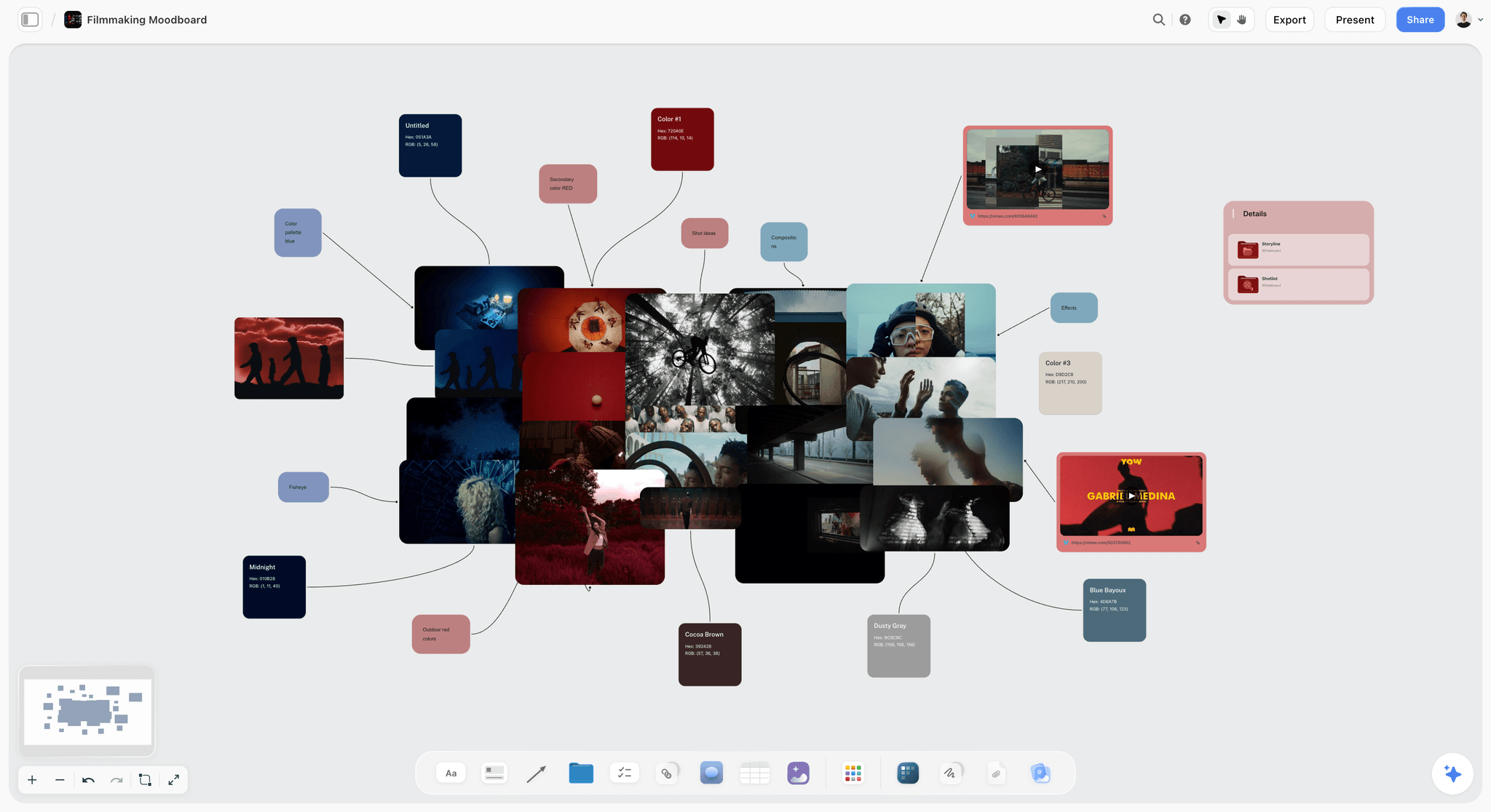
Mood boards work best when references are arranged to support a decision, not stored as inspiration

One canvas can hold the board, the rationale, and the AI conversation together
The Curation Line: A Framework for AI-Assisted Mood Boarding
Every mood board is built from four kinds of work, and they are not equal. Naming them is what lets you hand the right parts to AI and keep the rest.
- Gather. Pulling references from everywhere: screenshots, film stills, product shots, gallery photography, typography. Volume work, where most of the hours disappear.
- Curate. Deciding which references actually belong and which only feel right. Judgment work, and the entire value of the board.
- Direct. Setting the tone, point of view, and constraints the board must express. This is meaning work, where a pile of images becomes a decision.
- Annotate. Writing the captions and rationale that let other people read the board without you beside them. Translation work.
Draw a line through the middle of that list. Gathering and drafting annotations are mechanical: fast, repetitive, and exactly what AI is good at. Curating and directing are not mechanical: they require taste, project context, and the willingness to reject things that are beautiful but wrong for this brief.
AI works below the curation line. Meaning lives above it.
That distinction is the whole method, and the workflow below is built around it. AI accelerates the layers where speed helps (gathering candidates, describing patterns, drafting captions). You keep the layers where speed hurts (choosing what matters, naming the direction, killing the reference you love but should not use). When AI-generated mood boards feel generic, it is almost always because the AI was allowed to cross the line and curate or direct rather than just gather and describe. A model optimises for the most common pattern in its training data, which is the opposite of what a strong board needs.
Where Storyflow fits, and where it does not: it is the canvas where you assemble, compare, and annotate references with an AI that reads the whole board at once. It is not a dedicated design or print tool, so for pixel-level layout or a printer-ready spec sheet, finish in InDesign or Milanote. Image generation lives on the Pro tier and up, so on Free and Plus you curate references you bring in rather than generate new art. And it is cloud-only and newer than Pinterest or Milanote, so teams with strict local-first privacy rules should weigh that first.
What You Need Before You Start
- A specific project question: A mood board is easier to build when it answers one question, such as "What should the launch film feel like?" or "What visual direction should this brand campaign take?"
- A narrow reference window: Give yourself 30-45 minutes for the first pass so you collect enough material to compare, not enough to avoid deciding.
- Three to five descriptive constraints: Write the words that must be true of the final board, such as "editorial, tactile, restrained, natural light."
- A place to capture written reasoning: You need one short document or note that explains why each image belongs, otherwise the board becomes taste without logic.
- A visual workspace where your AI can see everything - your research, your outline, your references - at once. Storyflow's free tier works for this guide.
How to Create a Mood Board with AI: Step by Step in 2026
Step 1: Define the decision your mood board needs to make
This step turns the mood board from a pile of inspiration into a tool for choosing a direction.
Write one sentence that finishes this phrase: "This mood board will help us decide..." Good answers sound like decisions. "This mood board will help us decide the visual tone of our documentary pitch deck" is useful. "This mood board is for inspiration" is not.
Then add three constraints underneath that sentence: audience, medium, and outcome. Audience tells you who needs to recognise themselves in the board. Medium tells you what kind of visuals you actually need. Outcome tells you what the board must move forward, whether that is a brief, a shoot, a presentation, or a client sign-off.
Example: "This mood board will help us decide the visual direction for a founder-led brand film aimed at early-stage SaaS teams." Constraints: audience = startup operators; medium = short film and landing page stills; outcome = approved creative direction for pre-production.
Where Storyflow helps: Start with a whiteboard and pin this decision statement at the top. Storyflow's AI assistant can read that statement every time you ask for help later, which keeps the board anchored to the actual project instead of drifting toward whatever looks fashionable.
Common mistake: Treating the board as a place to discover the brief when the board should be answering the brief you already wrote.
Step 2: Write a one-paragraph direction statement before you collect images
This step gives you a filter for what belongs on the board and what does not.
Write a short paragraph that describes the feeling, texture, pacing, and point of view you want. Keep it concrete. "Quiet, handheld, daylight, lived-in interiors, no glossy studio polish" is a usable standard.
Aim for 60-90 words. Include one sentence for emotional tone, one for visual texture, and one for what the board must avoid. The "avoid" line matters more than people think because it saves you from collecting images you admire but should not follow.
Example: "The board should feel intimate, observed, and slightly unfinished in a deliberate way. References should favour daylight, close framing, soft contrast, natural materials, and spaces that feel worked in rather than designed for camera. Avoid luxury minimalism, hyper-saturated colour, and anything that looks like an ad pretending to be a documentary."
Where Storyflow helps: Put the direction statement in a document beside the board, not in a separate app. Storyflow lets your notes and canvas live in one project, so the AI assistant can use both the written direction and the images on the board as context.
Common mistake: Collecting references first and writing the rationale later, which usually means the rationale gets written to defend random choices rather than guide them.
Step 3: Gather 20-30 references across three clear buckets
This step gives you enough material to compare without drowning the board in noise.
Collect references in three buckets: overall atmosphere, composition and framing, and material details. Atmosphere images tell you what the world feels like. Composition images show how the camera sees that world. Material details reveal texture, palette, props, wardrobe, surfaces, typography, or objects that make the direction believable.
Set a hard cap of 10 references per bucket on the first pass. When you allow unlimited collection, the board becomes a scrapbook. The cap forces quality judgment early.
Example: For the founder-film board, bucket one holds intimate documentary stills and candid workspaces, bucket two holds close handheld frames and off-centre compositions, and bucket three holds brushed-aluminium laptops, muted greys, and window light on worn desks.
Where Storyflow helps: Use the canvas to create three labelled zones and drop each image into the right bucket as you collect it. Because Storyflow supports image uploads and previews directly on the board, you can see atmosphere, framing, and detail references in relationship rather than in three disconnected tabs. If you would rather not build the zones yourself, the Brand Moodboard template and the Filmmaking Moodboard template open with the reference structure already laid out.
Common mistake: Mixing every type of reference together immediately, which makes it much harder to see whether the board is coherent or merely busy.
Step 4: Ask AI to describe the patterns you have already collected
This step converts visual instinct into language you can test.
Once the first 20-30 references are on the board, ask the AI to describe what it sees across them. Useful prompts at this stage are observational, not generative: "What patterns do you see across these images?" "What adjectives repeat visually even if they are not written?" "What feels inconsistent with the stated direction?" The goal is to make your own pattern recognition sharper.
The output you want is a short list of repeated visual signals and one short list of tensions or contradictions. If the AI says the board repeatedly uses soft daylight, shallow depth, neutral materials, and cropped framing, that is a useful signal. If it also notices two glossy fashion references that break the pattern, that is useful too. This is the layer where AI earns its place: it makes your pattern recognition visible faster than scanning would, and it is not choosing for you.
Where Storyflow helps: This is where Storyflow's canvas-aware AI matters most. The assistant reads your full active board plus up to one Tactic and three Documents you @-mention, so it can compare what you said you wanted (the direction statement) against what you actually collected (the references) in one pass, instead of guessing from a pasted screenshot.
Common mistake: Using AI to generate more references before you ask it to evaluate the references you already have.
Step 5: Build three candidate directions from your reference pool
This step forces the board to become selective instead of endlessly additive.
Take your 20-30 references and build three smaller candidate boards. Each one should represent a distinct direction, not a minor variation. A good working size is 6-8 anchor references per candidate. That is enough to express a point of view and small enough that differences become visible.
Name each direction with a phrase that implies a world, not a category. "Quiet founder realism" is better than "documentary." The names help teams discuss options without drifting into vague reactions.
Example: Candidate A, "Quiet founder realism," leans on daylight, candid framing, and restrained colour. Candidate B, "Editorial control," uses cleaner compositions and deliberate symmetry. Candidate C, "Workshop intimacy," is texture-heavy: hands, tools, and surfaces that feel used.
Where Storyflow helps: Duplicate the strongest references into three clusters on the same board and ask the AI assistant to summarise the difference between the directions in one sentence each. Comparison is easier because all three directions stay visible side by side rather than hidden in separate boards or folders.
Common mistake: Creating three candidate boards that are really the same board with slightly different images, which makes decision-making impossible because there is no real contrast.
Step 6: Edit down to one board with 9-15 anchor references
This step produces the board you can actually present, brief from, or shoot against.
Choose the strongest candidate and reduce it further. A useful final range is 9-15 anchor references. Fewer than nine can feel underdeveloped. More than fifteen usually means you have not decided what matters most. Keep the images that carry the direction, not the ones that merely fit it.
As you edit, ask one question repeatedly: if this image disappeared, would the board lose anything important? If the answer is no, remove it. Every reference should add a distinct signal such as lighting, palette, framing, texture, or emotion.
Where Storyflow helps: Use spatial layout to create hierarchy: the two or three anchor references at the centre, supporting images around them, detail images at the edges. The layout makes it easy to show what leads the direction versus what supports it.
Common mistake: Keeping duplicate references because they all feel right. If two images say the same thing, one of them is taking up space that could be used by a more informative reference.
Step 7: Add short captions that explain why each anchor image is there
This step turns the board into a working reference for other people, not only for you.
Write a one-line caption under each of the 5-7 most important references. The caption should explain the role of the image, not describe what is literally visible. "Use for soft lateral daylight and intimate subject distance" is useful. Literal descriptions are not.
Then write a three-part board rationale beside the final selection: what the board is aiming for, what signals define it, and what it intentionally avoids. This text is what lets a director, designer, client, or collaborator understand the board without you narrating it live.
Example: Caption: "Reference for restrained framing that still feels human, not corporate." Board rationale: "We are aiming for observant realism with editorial discipline. The defining signals are daylight, tactile materials, neutral colour, and proximity to the subject. We are avoiding polished startup cliché, glossy perfection, and over-styled environments."
Where Storyflow helps: Add captions directly on the board and keep the rationale in a document in the same project. Ask the AI to draft or tighten those captions and it works from the full board context instead of guessing what each reference is doing.
Common mistake: Leaving the board unlabeled because you assume the visual logic is obvious. It is obvious to the person who built it and far less obvious to everyone else.
Step 8: Review the board after a short gap and export the version you will use
This step checks whether the board still holds together once the first-wave excitement is gone.
Leave the board alone for at least 30 minutes, and ideally overnight if the project timeline allows it. When you come back, look for three things: one image that no longer earns its place, one gap the board still has, and whether the written rationale still matches what the board actually says.
Once the board passes that check, export or share the version you will brief from. The final output should be one presentable board plus one short rationale.
Where Storyflow helps: Storyflow keeps the final board, the written rationale, and supporting files in one project to share or export from there. If you revise later, the earlier candidate directions are still on the same canvas, which makes iteration faster than rebuilding from scratch.
Common mistake: Presenting the first complete-looking version without a review gap, which is how weak or contradictory references slip through because you are still attached to the search process.
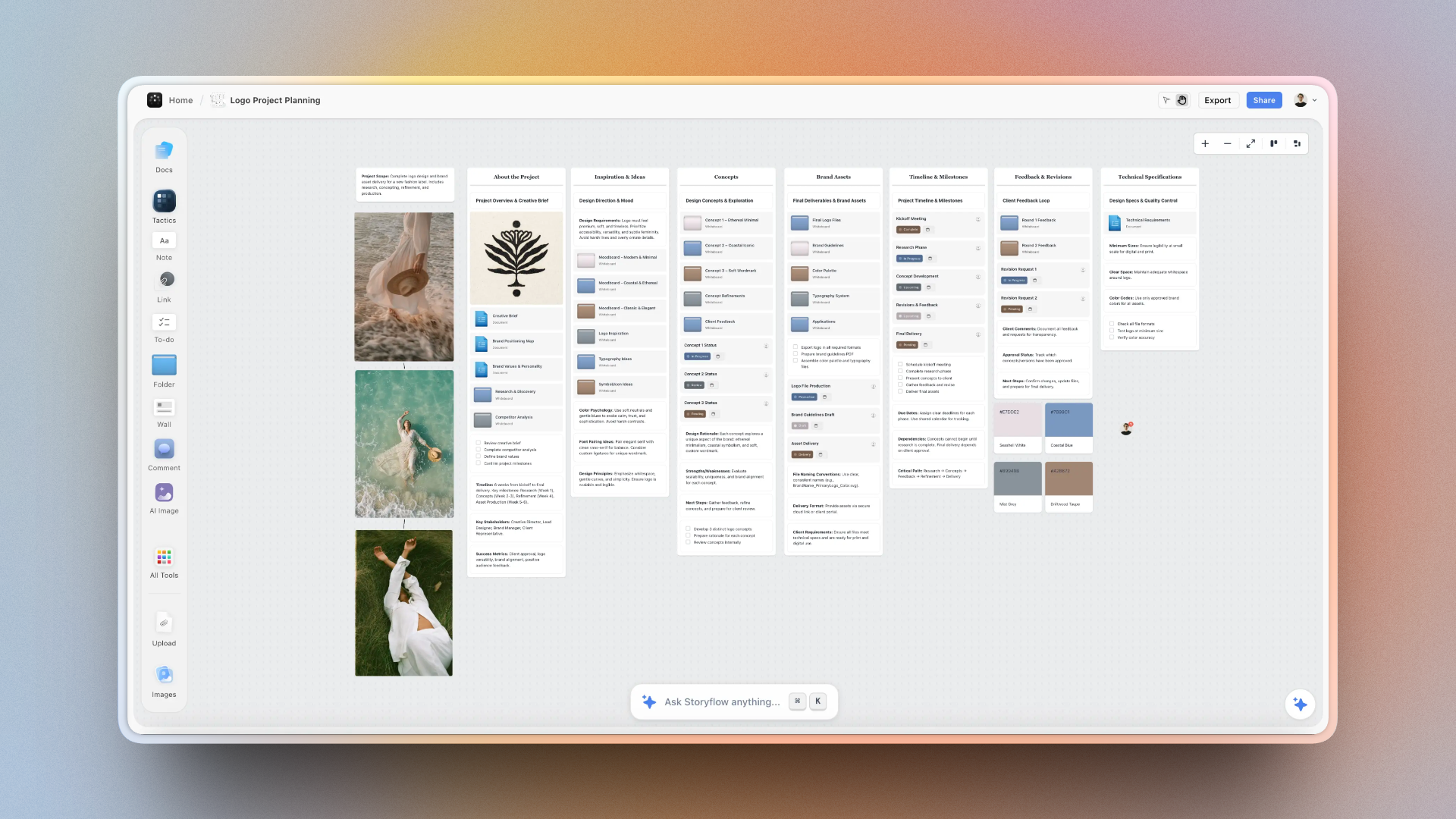
Visual clustering makes it easier to compare candidate directions side by side

Keep images, notes, and AI prompts in the same visual workspace while the board takes shape
Build a board that briefs from itself
Put the decision statement, the references, and the rationale on one canvas, then ask the AI where the board drifts from what you said you wanted. You end up with 9-15 anchors and a direction you can defend.

A Worked Example: A Founder-Film Mood Board in 70 Minutes
Here is the whole loop run once, using the founder-film project that threads through the steps above.
Minutes 0-10, Direct. Write one decision statement at the top of a blank canvas: "This mood board will help us decide the visual direction for a founder-led brand film aimed at early-stage SaaS teams." Underneath it go three constraints (audience: startup operators; medium: short film plus landing-page stills; outcome: approved creative direction) and a 70-word direction paragraph whose most useful line is the "avoid" one: no luxury minimalism, no hyper-saturated colour, nothing that looks like an ad pretending to be a documentary.
Minutes 10-35, Gather. Three labelled zones on the canvas: atmosphere, composition, material detail. Cap each at ten and fill them fast: documentary stills, candid workspaces, off-centre handheld frames, brushed-aluminium laptops, worn desks in window light. Let this part move quickly, because gathering sits below the curation line and speed costs nothing yet.
Minutes 35-45, Curate with AI as a mirror. With 27 references down, ask the canvas AI one observational question: "What patterns repeat across these images, and what breaks the stated direction?" It comes back with soft daylight, shallow depth, neutral materials, and close framing as the repeated signals, and it flags two glossy fashion shots that contradict the "avoid" line. Pull those two. The AI did not choose; it made the pattern visible faster than scanning would. AI works below the curation line. Meaning lives above it.
Minutes 45-60, Direct again. Split the survivors into three named candidates. Seeing them side by side makes the decision easy: the editorial one is handsome and wrong. Choose "Quiet founder realism" and cut to eleven anchor references.
Minutes 60-70, Annotate. Write a one-line role caption under the six strongest images ("use for soft lateral daylight and intimate subject distance") and a three-part rationale beside the board: what it aims for, what signals define it, what it avoids. Ask the AI to tighten the caption wording, which it does well because it reads every reference at once. Total time: about 70 minutes, and the output is one presentable board plus a rationale a director could act on without you in the room.
Quick Reference Summary
The condensed workflow, for anyone who wants the checklist first and the nuance second.
The 8-Step Process at a Glance:
- Define the decision - know what the board must resolve
- Write the direction - set tone before collecting
- Gather references - collect 20-30 images in buckets
- Ask AI to label patterns - turn instinct into language
- Build three directions - create real contrast
- Edit to one board - keep 9-15 anchor references
- Add captions and rationale - explain what each image does
- Review and export - pressure-test before sharing
Tips and Best Practices
These are the habits that make mood boards more useful and less decorative.
Start with adjectives, end with decisions
A mood board should begin with descriptive language and end with a practical choice. If you never move past adjectives, the board stays inspirational. If you move to decisions too early, you choose before you have enough material to compare.
Collect from outside your category
Some of the strongest mood boards pull reference material from adjacent fields. A brand campaign board might borrow from documentary stills, gallery installation photography, or film costume references. When every reference comes from your exact category, the board usually becomes derivative very fast.
Keep the written rationale beside the board
The best mood boards are visual and verbal at the same time. In Storyflow, keeping the board and the rationale document in one project changes the quality of collaboration because everyone is reacting to the same context instead of a screenshot plus a separate message thread.
Force real contrast before you declare a winner
I have skipped the candidate step before because one direction felt obvious, and I regretted it. The moment I force myself to build at least three genuinely different candidates, I usually notice that the first board was carrying two contradictory instincts at once.
Common Mistakes to Avoid
Most mood board failures come from weak selection and weak framing, not weak taste.
Mistake: Starting with image collection instead of a decision. Collecting feels like progress, but you end up with attractive material that answers no specific question. Write the decision statement first so every later choice has a standard.
Mistake: Confusing more references with better references. Abundance feels safer than selection, so strong signals disappear inside a noisy board. Cap the first pass at 20-30 references and force yourself to edit.
Mistake: Using one word to describe the whole direction. Labels like "cinematic" or "premium" sound decisive, but everyone projects their own meaning onto the same word and alignment breaks. Write a short direction paragraph that defines tone, texture, and what to avoid.
Mistake: Asking AI for final taste decisions. AI sounds confident when it describes visual patterns, but let it curate and the board turns generic because the system optimises for common patterns over project-specific judgment. Use AI to identify patterns and contradictions, then make the selection yourself.
Mistake: Presenting an unlabeled board to other people. The builder assumes the visual logic is self-evident, so feedback lands on random surface details instead of the direction. Add captions and a short rationale so the board can travel without you.
Start Your First Mood Board Today
What usually stops people is not a lack of taste. It is the fear of making the board too early, choosing the wrong direction, or revealing that the idea in their head is still vague.
Take the next project on your plate, open a new Storyflow board (or start from the Commercial Moodboard template if the project is client work), write your one-sentence decision at the top, and spend ten minutes building the three reference buckets from Step 3. The free tier is enough to finish the whole workflow, and the moment your direction statement, board, and notes sit in one project, the AI can tell you where the board drifts from what you said you wanted. Run one real project through it this week and the difference between a stored board and a board that briefs from itself becomes obvious.
Learning to build a mood board well is not only about making prettier boards. It is how you get from abstract taste to a visual direction that other people can actually make with you. The tools fill the board in seconds now. AI works below the curation line. Meaning lives above it, and that half is still the part worth your time.
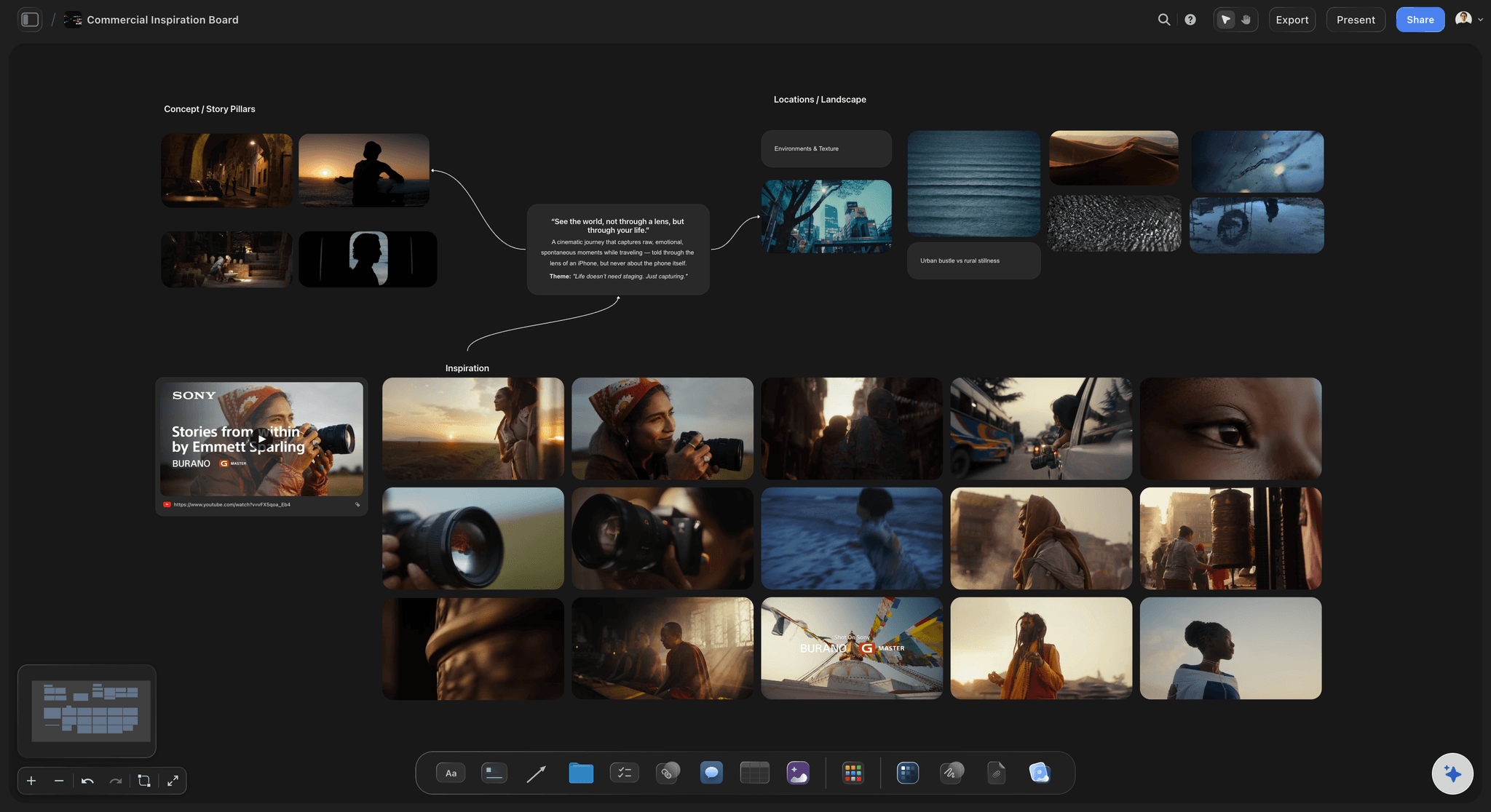
Storyflow's free tier is enough to build the board, write the rationale, and use AI on the same project
FAQ: How to Create a Mood Board with AI in 2026
How do you make a mood board with AI?
You make a mood board with AI by defining the decision first, gathering 20-30 references, then asking a canvas-aware AI to describe the patterns and contradictions across them before you edit down to 9-15 anchors. The trick is direction: let AI gather and describe, but keep the curation and the final selection yourself. Tools like Storyflow help because the AI reads your whole board and written rationale together, so its analysis stays grounded in your actual project rather than a generic average.
How long does it take to create a mood board with AI?
Creating a mood board with AI usually takes 60-90 minutes the first time and 30-45 minutes once you have a repeatable template. Step 1 and Step 2 take about 15 minutes together, reference gathering takes 20-30 minutes, and the final editing pass takes another 15-20 minutes. If the board is for a major campaign or film project, leave the final review for the next day.
Is creating a mood board with AI better than doing it the traditional way?
Yes, if you use AI as an analysis tool rather than a replacement for taste. Traditional mood boarding is often strong on collection and weak on articulation. AI helps by naming patterns, spotting contradictions, and turning the board into something you can brief from. The selection still needs human judgment.
How many images should be in a final mood board?
A final mood board works best with 9-15 anchor references. That range is large enough to show lighting, colour, composition, material, and emotional tone without becoming repetitive. If you need 25 images to explain the direction, the board is probably carrying too many sub-directions at once.
Can I create a mood board with AI if I am not a designer?
Yes, you can create a strong mood board with AI even if you are not a designer. The key skill is defining the decision, collecting references against written criteria, and editing down to a coherent direction. AI helps non-designers articulate what they are seeing and where inconsistencies appear.
What should I include in a mood board for a brand campaign?
A brand campaign mood board should include atmosphere references, composition references, and material or detail references. Our brand campaign moodboard guide shows how to group them by decision. Together those three layers show what the world feels like, how it is framed, and what specific signals make it believable.
Can I do this with Milanote instead of Storyflow?
Yes, Milanote works well for collecting and arranging references, especially in early visual exploration. Storyflow is better for this workflow when you want the AI to read the whole board and the written rationale at the same time. That shared context makes the analysis and revision steps more grounded. The honest trade-off: if you only need a fast image wall with polished export presets and no AI, a dedicated board tool like Milanote or Pinterest is simpler, and Storyflow is cloud-only with no local-first option, so privacy-sensitive teams should weigh that first.
What is the best AI tool for mood boards in 2026?
The best AI mood board tool in 2026 is the one that can see both your visual references and your written direction together. Storyflow is strong here because the AI assistant works from the current board and any documents you @-mention in the same project. General chat tools can help with prompts, but they do not hold the visual context nearly as well.
Can AI generate a mood board?
AI can assemble and analyse a mood board far better than it can generate one from nothing. Image-generation models produce new visuals, but a strong mood board is built from real, specific references that carry meaning for your project, not synthetic averages. The reliable workflow is to gather real references, then use AI to name patterns and draft captions. In Storyflow, image generation is available on the Pro tier and up, while reference curation and board analysis work on every tier, including Free.
Is there a free AI mood board maker?
Yes. Storyflow's free tier runs the full workflow in this guide: upload references, arrange them on a canvas, keep a written rationale in the same project, and use the AI assistant to describe patterns and spot contradictions. The free tier does not include AI image generation, which starts on the Pro tier, but generation is not needed for a reference-based board. For a fast image wall with no analysis, Pinterest and Milanote also have free tiers.
How do I know if my mood board is coherent enough?
A mood board is coherent when you can describe its direction in three sentences and every anchor image supports that description. Another good test is replacement: if you swap one image for another and nothing changes, the original image was not carrying enough meaning. Coherence is about signal, not volume.
Should a mood board include text or only images?
The strongest mood boards usually include both images and a small amount of text. Images carry tone, texture, framing, and emotional signal, while short captions or a rationale explain why the references belong together. Without text, teams often agree on the images but disagree on what the board is supposed to mean.
Table of Contents
- Key Takeaways
- The Problem With How Most People Build Mood Boards
- The Curation Line: A Framework for AI-Assisted Mood Boarding
- What You Need Before You Start
- How to Create a Mood Board with AI: Step by Step in 2026
- A Worked Example: A Founder-Film Mood Board in 70 Minutes
- Quick Reference Summary
- Tips and Best Practices
- Common Mistakes to Avoid
- Start Your First Mood Board Today
- Step 1: Define the decision your mood board needs to make
- Step 2: Write a one-paragraph direction statement before you collect images
- Step 3: Gather 20-30 references across three clear buckets
- Step 4: Ask AI to describe the patterns you have already collected
- Step 5: Build three candidate directions from your reference pool
- Step 6: Edit down to one board with 9-15 anchor references
- Step 7: Add short captions that explain why each anchor image is there
- Step 8: Review the board after a short gap and export the version you will use
- FAQ: How to Create a Mood Board with AI in 2026
- Related Reading
Templates to check out for this topic


Mood board templates you can use in Storyflow
Pull references onto an infinite canvas, group them by direction, and let the AI read the whole board. Open any of these mood board templates and start dropping in images.


See Storyflow in Action
A visual AI workspace where every feature lives inside one canvas. No tab-switching, no context lost.
Build your entire board from a single message
Type what you need in the AI chat at the bottom of your canvas. The AI adds cards, headings, and structure directly onto your board.
Use expert frameworks as AI context
Type @ in the AI chat and choose any Tactic. The AI tailors every response to that framework instead of giving generic advice.
Turn your board into a mind map in seconds
Ask the AI to restructure your canvas as a mindmap. It connects your ideas into a visual hierarchy so you can see how everything relates.
Why Storyflow Exists
Storyflow actually began as a personal tool while working on creative and research projects.
We kept running into the same problem: ideas were scattered everywhere: notes, documents, and whiteboards.
Nothing helped us see how everything connected.
So we started building a workspace designed around how ideas actually grow.
→ Read how Storyflow was createdSara de Klein
Head of Product at Storyflow
Published: 2026-03-08
Extremely simple, seriously capable


See how easy it is to get started
Watch a real project come together, from a blank board to a finished plan, clicked through step by step.
Start creating with AI and become more productive
Transform your creative workflow with AI-powered tools. Generate ideas, create content, and boost your productivity in minutes instead of hours.