Storyflow vs Canva: Complete Comparison for 2026
Canva creates polished visual output. Storyflow develops the creative ideas, strategy, and plans that your output needs to communicate. Most creative professionals need both tools, but for different phases of their work. This comparison shows you exactly when to use each.

Category
Productivity & Tools
Author

Sara de Klein
Head of Product at Storyflow
Topics
April 10, 2026
•
18 min read
•
Productivity & Tools- Storyflow vs Canva
- Canva alternative
- creative tools 2026
- visual workspace vs design tool
Should I use Storyflow or Canva for creative work?
Use Storyflow to plan, develop, and strategize a creative project, and use Canva to produce the polished visual output. They solve different phases. Canva is the right tool when you already know what you're making and need it to look professional fast. Storyflow is the right tool when you're still figuring out what to make: developing strategy, planning a project, or thinking with AI that reads your full active canvas board. Most creative professionals need both. Canva creates the output. Storyflow develops the idea that becomes the output. Where Canva clearly wins: design templates, finished graphics, and one-click exports to social platforms.

Canva is one of the most successful software products ever built. Over 135 million users. More than a million templates. The tool that made professional-looking design accessible to people who can't code or afford Adobe.
That success comes from solving a real problem: creating polished visual output is hard, and Canva makes it easy.
But creative work doesn't start with design. It starts with thinking. What is this campaign actually trying to achieve? What story does this film want to tell? What angle makes this content worth watching? Those questions happen before you open a design tool.
Canva has no answer for them. It's built for the end of the creative process, not the beginning.
Storyflow is built for the beginning and middle. The part where you're developing ideas, building strategy, planning projects, and figuring out what you're actually making before you make it. The part Canva skips.
This comparison isn't really about which tool is better. It's about which tool is right for where you are in your creative process.
The quick verdict:
- Choose Canva if you need to create social graphics, presentations, branded marketing assets, or any polished visual output fast. It genuinely leads here.
- Choose Storyflow if you need to develop creative ideas, plan projects, build strategy, work with AI that understands your project context, or use guided frameworks (Blueprints with Tactics) for your creative process.
- Use both if you work through the full creative cycle: plan and develop in Storyflow, then create final assets in Canva.
Let's break down the differences.
What is Canva?
Canva launched in 2013 with a simple promise: anyone can design. Not just people with Adobe skills and years of training. Everyone. The pitch landed. Canva became the design tool for the rest of us.
The core product is a drag-and-drop design editor with an enormous library of templates. Social media posts, presentations, logos, flyers, videos, websites. Pick a template, swap the content, download it. Professional-looking output in minutes.
Canva has expanded significantly. Magic Design generates layouts from a prompt. Magic Write produces copy for your designs. Magic Edit lets you remove or replace image elements with AI. The tool has grown from simple design into a broader visual creation suite.
Who uses Canva:
- Social media managers creating daily content at scale
- Small businesses building branded marketing materials
- Non-designers who need polished outputs without a learning curve
- Marketers creating visual assets for campaigns
- Educators building presentations and worksheets
- Agencies producing client deliverables quickly
What Canva does well:
- Massive template library covering almost any visual output format
- Genuinely easy to use. No design background required.
- Brand Kit for consistent fonts, colors, and assets across a team
- Direct publishing to Instagram, Facebook, LinkedIn, and other platforms
- Video editing for social content and presentations
- Magic AI tools for generating and editing visual assets
- Strong free tier for basic design needs
Where Canva falls short:
Canva is a design output tool, not a thinking workspace. This distinction sounds abstract until you realize it means Canva cannot help you develop ideas, plan projects, build creative strategy, or understand your project context.
You cannot plan a film production in Canva. You cannot build a content strategy in Canva. You cannot develop a story concept, map out a creative brief, or organize research in Canva. There is nowhere to put the work that happens before the design work.
Canva's AI tools are capable for what they do (generating visuals, editing images, producing copy for designs) but they don't understand your project. They produce outputs based on what you tell them in the moment. There's no context. No project memory. No awareness of what you're building or why.
What is Storyflow?
Storyflow is a visual workspace built for the part of creative work that happens before design. The thinking phase. The planning phase. The development phase.
The canvas is spatial and flexible. Drag ideas anywhere. Connect related thoughts. Build project structure visually. Organize research, strategy, and plans in a way that matches how creative minds actually work: not linearly, but in clusters, connections, and hierarchies.
What makes Storyflow different from a blank canvas is everything built around it.
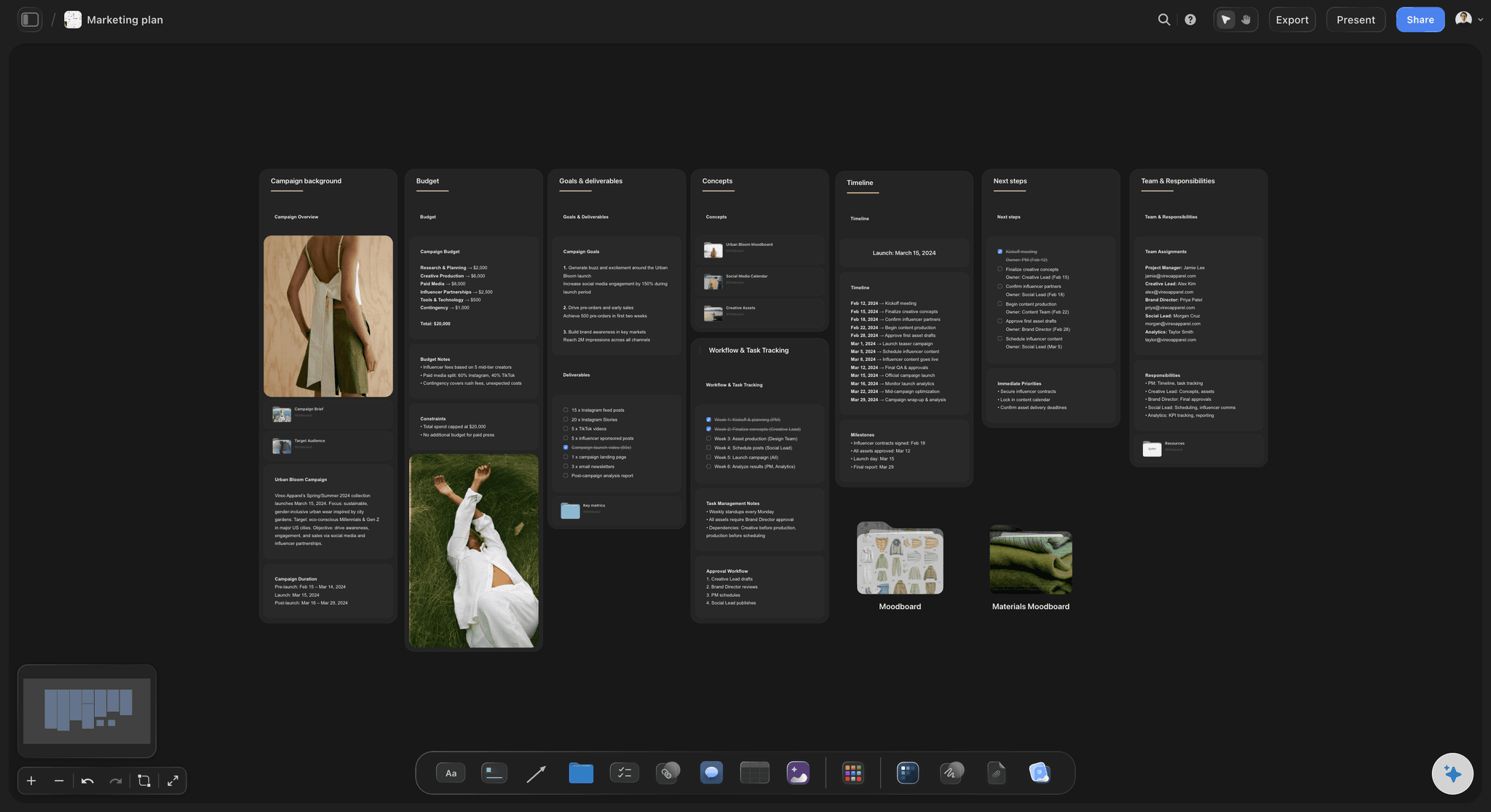
Blueprints with built-in Tactics
Storyflow doesn't give you an empty board and wish you good luck. Blueprints are complete project frameworks with proven Tactics built in. Each Blueprint for your specific type of project (film production, marketing campaign, YouTube channel, story development) includes the methodologies that professionals in that field actually use.
Plus, Pro, and Max all include the 200+ Story blueprints. Free does not include the blueprint library across every creative discipline.
The difference between a Canva template and a Storyflow Blueprint: Canva's templates tell you what your output should look like. Storyflow's Blueprints teach you how to develop the project behind the output. One is a design container. The other is a guided framework with embedded professional knowledge.

AI that reads your project
Storyflow's AI reads everything on your current canvas board. Your notes, your structure, your project context. When you ask for help developing an idea, refining a strategy, or thinking through a problem, the response is informed by what you've actually built in your workspace.
You can also @-mention a Tactic or up to 3 documents to pull additional context into the AI conversation.
This is categorically different from Canva's Magic Write, which generates copy based on a text prompt without any awareness of your larger project. Storyflow's AI is a thinking partner. Canva's AI is a content generator.
Built-in frames library for filmmakers
Filmmakers pay $99/year for ShotDeck to browse cinematography references. Storyflow includes a frames library free. Browse film references, collect shots, build visual language. No separate subscription.
Who uses Storyflow:
- Filmmakers and directors planning productions and developing visual language
- Marketers building campaign strategy before creating assets
- Writers developing stories, characters, and narrative structure
- YouTubers and content creators planning channels and series
- Founders organizing strategy and creative projects
- Any creative professional who needs to think through a project before executing it
What makes Storyflow different:
Canva helps you create output. Storyflow helps you develop what becomes the output. The frameworks teach you professional methodology while you work. The AI thinks with you, not just for you. The frames library serves filmmakers who need references connected to production planning. For the creative process that happens before any design tool opens, Storyflow is the purpose-built answer.
Here is the honest trade-off in the other direction. When the job is the finished artifact (a polished Instagram carousel, a branded pitch deck, an exported MP4 ready to publish), Storyflow is the wrong tool. It has no million-template library, no Brand Kit, no one-click export to social platforms, and no graphic design canvas. For that work, Canva wins outright, and it is not close. Storyflow is where the thinking happens, not where the pixels get pushed.
The Output Tool vs The Thinking Workspace
Here's the creative professional's actual workflow. You have a project. A campaign. A video. A film. A brand.
The project starts as a fuzzy idea. You need to develop it: define the audience, clarify the message, find the angle, build the structure. This is the thinking work.
Then, once you know what you're making, you create it: graphics, videos, presentations, assets. This is the output work.
Canva is brilliant for the second half. Storyflow is built for the first half. Most people try to skip the first half and go straight to Canva. That's where things go wrong.
The template trap
Canva's templates are design output templates. They tell you what your Instagram post should look like, what your presentation deck should look like, what your logo should look like.
They don't tell you what your campaign strategy should be. They don't help you figure out who your audience is, what message will land, or what content pillar your channel needs. That work has no home in Canva. You're meant to have already figured that out before you arrive.
Most creative professionals haven't figured it out. They go straight to design because that's where the tool is. The strategy never gets built properly. The output looks polished but the thinking behind it is shallow.
The AI gap
Canva's Magic AI tools are impressive for their domain. Magic Design generates layout options from a prompt. Magic Write produces copy. Magic Edit handles image manipulation. These are genuine capabilities.
But they're all output-focused. They generate things. They don't understand your project. Ask Canva's AI to help you develop your campaign strategy, and it produces generic text. It has no idea what your brand is, what your audience cares about, or what you've already decided.
Storyflow's AI reads your current canvas board before responding. It knows what you've built, what questions you're working through, and what direction you're heading. The suggestions connect to your actual project. This is the difference between a content generator and a thinking partner.
The planning gap
Try to plan a documentary in Canva. You can create a mood board with images. You can build a pitch deck. You cannot develop your narrative arc, map your research to story beats, organize interviews to themes, or plan your shot approach connected to your story structure.
Try to build a content strategy in Canva. You can design content pillars as a visual slide. You cannot develop audience personas, map content to funnel stages, track what's been created vs what's planned, or get AI help connecting your strategy to your specific audience context.
These aren't niche use cases. They're the foundational work behind almost every creative project. Canva skips this phase by design. Storyflow is built for it.
Feature-by-Feature Comparison
Visual Canvas
Canva: A page-based design editor. Each canvas is a fixed-size document (Instagram post, A4 page, presentation slide). You design within that container. The format is intentional for output creation but limits spatial, open-ended thinking.
Storyflow: An infinite spatial canvas for thinking and organizing. No fixed page size. Drag ideas anywhere. Connect related concepts. Zoom in and out across a project. Build visual project structures that match how your thinking actually develops. For creative development and project planning, the spatial canvas is purpose-built for the work.
AI Capabilities
Canva: Magic Design (generates design layouts), Magic Write (generates text copy for designs), Magic Edit (AI image editing and generation), and Magic Presentations (AI-generated slide decks). Strong for output creation. No project context. Each interaction starts from scratch.
Storyflow: Context-aware AI that reads your current canvas board before responding. Ask for help developing a strategy, refining an idea, or thinking through a problem. The AI sees what you've built and responds to your actual project. You can also @-mention a Tactic or up to 3 documents to add more context. The result is assistance that connects to your specific work, not generic outputs.
Templates vs Blueprints with Tactics
Canva: Over a million design output templates. They're starting points for specific formats (social posts, presentations, flyers). Pick one, customize it, export it. No creative methodology. No process guidance. Just a visual format to fill.
Storyflow: Blueprints with built-in Tactics. Not design output formats. Project development frameworks with professional methodologies embedded. A YouTube Video Blueprint includes hook formulas and retention strategies. A Marketing Campaign Blueprint includes positioning tactics and audience mapping. Plus, Pro, and Max all include the 200+ Story blueprints. Free does not include the blueprint library. You're learning professional frameworks while applying them to your actual project.
Project Planning and Development
Canva: Not a project planning tool. You can create project plan slides or Gantt chart visuals, but Canva doesn't track projects, connect ideas, or understand relationships between elements of your work. It's a design editor, not a project workspace.
Storyflow: A full visual project workspace. Map out your project, organize research, develop ideas spatially, connect elements across your canvas. The structure you build becomes the foundation for your AI conversations. Plans develop and connect as the project grows.
Output Creation
Canva: Excellent. This is Canva's core strength. Export as PNG, PDF, MP4, GIF, and more. Publish directly to social platforms. Create professional-quality visuals without design skills. No other tool in this comparison matches Canva for final visual output.
Storyflow: Not a graphic design output tool. Storyflow is where the work gets developed and planned. For final polished graphics, social content, and presentation slides, you'd use Canva or a design tool. Storyflow handles the phase that comes before.
Collaboration
Canva: Strong design collaboration. Share projects, leave comments on specific design elements, use a shared Brand Kit, and co-edit designs. Works well for design review cycles and brand consistency across a team.
Storyflow: Canvas sharing, comments, and real-time co-editing on the Max plan ($39/month, annual). Free and Pro plans include unlimited shared boards plus canvas comments. Real-time multi-cursor collaboration with team workspace, roles, and permissions is a Max plan feature. Strong for creative development collaboration rather than design review cycles.
Frames Library (for Filmmakers)
Canva: Canva has image and video content libraries for social media creation. There's no film reference library or cinematography browsing feature. Filmmakers using Canva are mostly creating promotional graphics and social content for their films.
Storyflow: Built-in frames library for browsing cinematography references and collecting shots. Saves filmmakers from paying $99/year for ShotDeck as a separate subscription. References connect directly to your production planning canvas.
Free Plan Limits
Canva: Genuinely good free tier. Core design features, hundreds of thousands of templates, basic AI tools. Paid elements are watermarked or locked, but a lot is accessible free. One of the stronger free plans in the design space.
Storyflow: Storyflow is paid-only during early access; a Free plan with unlimited boards, unlimited projects, basic AI usage, and 20 file uploads launches before the end of 2026. Plus ($7.99/month annual) unlocks the full 200+ Tactics library; Pro ($14/month annual) adds AI image generation and 20× more AI than Plus.
Comparison Table
| Feature | Storyflow | Canva |
|---|---|---|
| Visual canvas | Infinite spatial canvas for thinking | Page-based design editor |
| AI assistance | Context-aware: reads your current canvas board | Output-focused: Magic Design, Write, Edit |
| Blueprints / Tactics | 200+ Tactics with embedded frameworks (Pro) | Design output templates only |
| Project planning | Full visual project development workspace | Not available |
| Free plan | Paid-only during early access; Free plan launches before end of 2026 | Core design, hundreds of thousands of templates |
| Graphic design output | Not a design output tool | Excellent: PNG, PDF, video, social publishing |
| Frames library | Built-in for filmmakers (free) | Not available |
| Real-time collaboration | Max plan ($39/month, annual) | Available on paid plans |
| AI project context | Reads your current canvas and @-mentioned docs | No project memory between sessions |
| Starting paid pricing | $7.99/month (annual, flat, Plus tier); Pro $14/month annual | Per-user pricing (verify before publishing) |
Pricing Comparison
Storyflow pricing
| Plan | Price | What you get |
|---|---|---|
| Free (launches before end of 2026) | $0 | Unlimited boards, unlimited projects, basic AI usage, 20 file uploads |
| Plus | $7.99/month (annual) or $9.99/month (monthly) | Full 200+ Story blueprints, increased AI, unlimited file uploads |
| Pro | $14/month (annual) or $19/month (monthly) | Adds AI image generation and 20× more AI than Plus |
| Max | $39/month (annual) or $49/month (monthly) | Real-time collaboration, team workspace with roles and permissions |
Canva pricing
| Plan | Price | What you get |
|---|---|---|
| Free | $0 | Core design features, templates, basic AI tools, limited premium elements |
| Pro | ~$15/month per person (verify before publishing) | Premium templates, full AI suite, Brand Kit, background remover |
| Teams | ~$10/user/month, min 5 users (verify before publishing) | Shared Brand Kit, team collaboration, admin controls |
| Enterprise | Custom pricing | Advanced controls, SSO, dedicated support |
The math for individuals
For a single user who needs both planning and design, the comparison looks like this: Storyflow Plus at $7.99/month annual gives you the entire project development workspace. Canva Pro adds graphic design output capability at a similar monthly price.
Most creative professionals who need both tools would pay for both. Storyflow for planning and development. Canva for design output. The tools serve different phases. Using one to replace the other usually means compromising on one phase of the work.
The math for teams
This is where the comparison becomes more significant. Canva charges per user. A 5-person team on Canva Teams pays for 5 seats. A 10-person team pays for 10 seats. The cost scales with headcount.
Storyflow's Plus plan is flat at $7.99/month annual and Pro is flat at $14/month annual. The Max plan adds real-time collaboration and a team workspace with roles and permissions at $39/month annual. For teams that primarily need the AI and Story blueprints without real-time co-editing, the flat Plus and Pro plans cover the work without scaling cost per seat the way Canva does.
A 5-person creative team doing most of their development work in Storyflow and their design output in Canva is paying for two tools. Whether that's worth it depends on how much the planning phase of your work matters to your output quality. For teams where strategy and creative development drive results, it usually is.
Who Should Choose Canva
Canva is genuinely the right tool for specific use cases. Being clear about them matters more than pretending there's no competition.
Social media managers creating content at volume
If your job is producing 30+ pieces of visual content per week for social platforms, Canva is purpose-built for your workflow. The template library, direct publishing integrations, and Brand Kit make high-volume content creation faster than any alternative. Storyflow doesn't compete here.
Small businesses that need branded materials without a designer
Canva democratized professional-looking design for businesses that can't afford design agencies. Flyers, social graphics, presentations, email headers. If you need to create branded materials consistently without design skills, Canva is still the benchmark.
Presentations and pitch decks
For polished presentation slides, Canva's templates and design capabilities are excellent. Magic Presentations generates slide decks from prompts. If presentation design is a significant part of your work, Canva handles it better than any workspace-focused tool.
Non-designers who need output fast
If the goal is "I need this to look professional and I need it in 20 minutes," Canva's drag-and-drop approach with pre-built templates is the fastest path. Storyflow requires more intentional setup because it's designed for deeper work.
Teams primarily working with established brand assets
If your creative work is mostly "apply our brand to new formats" rather than developing new creative strategies, Canva's Brand Kit and template ecosystem fit well. The creative thinking has already been done. You're executing to an established playbook.
Be honest about the tradeoffs:
Canva is optimized for speed of output. That optimization means the strategic and developmental thinking that should inform your output doesn't have a home in the tool. If your work is suffering because strategy is shallow and creative development is rushed, adding Canva templates is the wrong fix.
Who Should Choose Storyflow
Filmmakers and directors
You're not creating Instagram graphics. You're developing a story, planning a shoot, collecting cinematography references, and organizing months of pre-production. Canva has nothing for this phase. Storyflow has Film Production Blueprints with built-in Tactics, a frames library that replaces ShotDeck, and AI that reads your current canvas board to help develop your visual language and narrative approach. The frames library alone saves $99/year on ShotDeck.
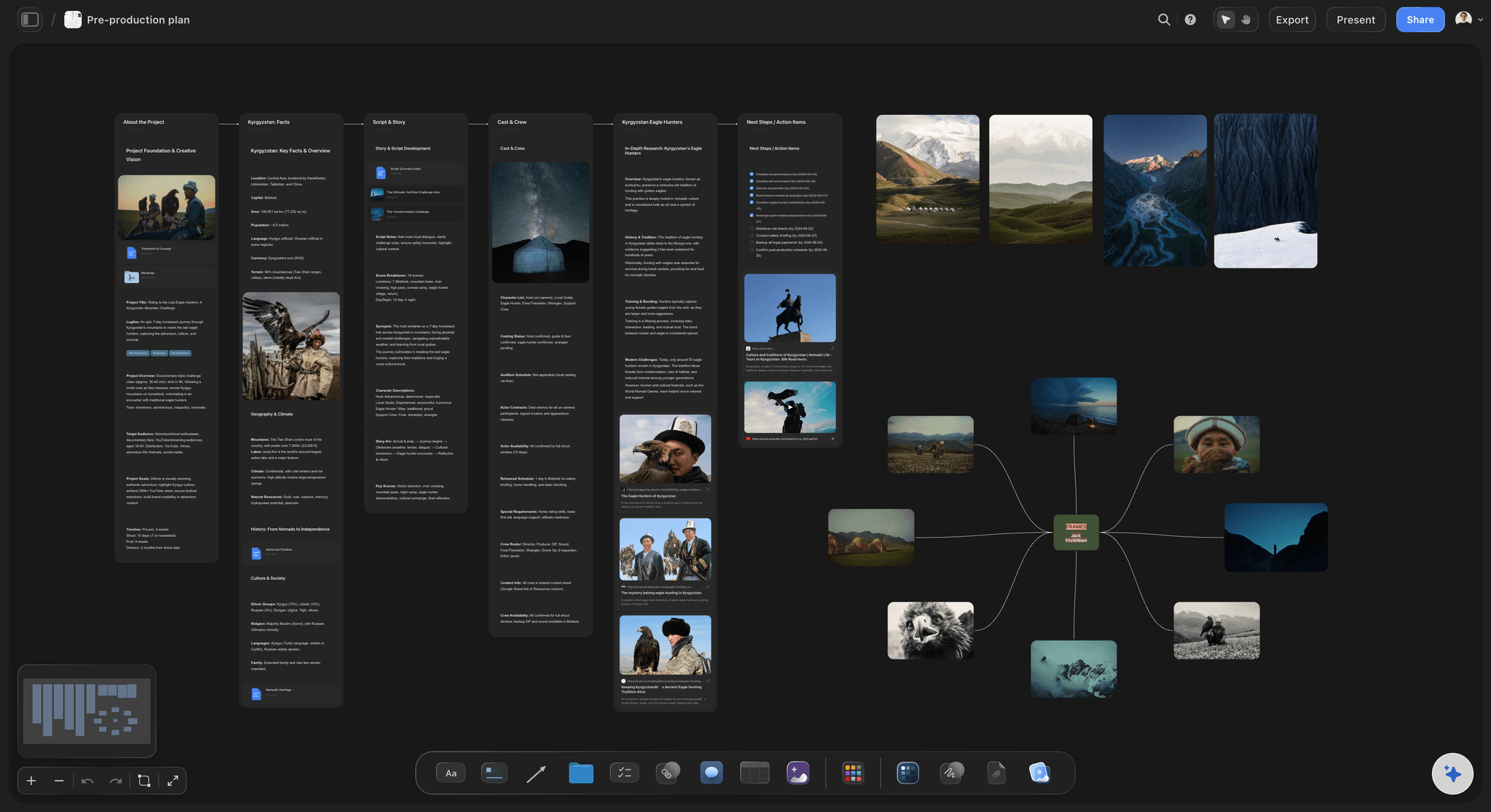
Marketers who build strategy before creating assets
If your work starts with audience research, campaign strategy, and messaging architecture before you touch design tools, Storyflow is where that work belongs. Marketing Campaign Blueprints include positioning Tactics and audience mapping frameworks. AI helps you develop strategy with context from your actual project. The output you eventually create in Canva (or whatever design tool you use) will be better because the thinking happened properly first.
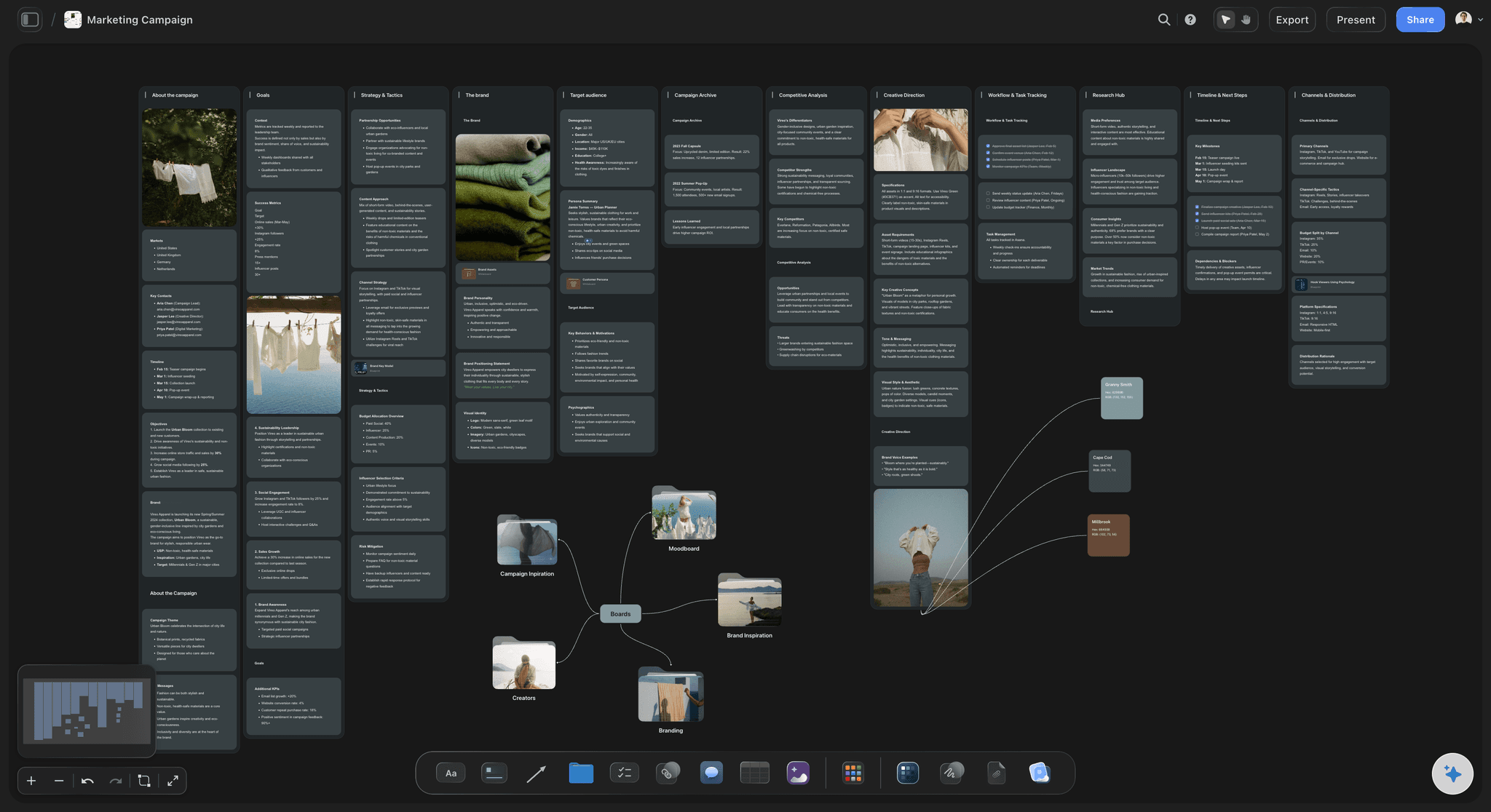
Writers and content creators developing ideas
The work before writing: developing characters, mapping story structure, organizing research, building the architecture of what you're creating. Story Planning Blueprints include structure Tactics. AI helps develop characters and test narrative logic. Canva can produce your book cover graphic when you're done. Storyflow is where the book gets built.
YouTubers and content creators planning at the strategy level
Channel planning, content series development, video concepts, hook formulas, retention strategies. YouTube Video Blueprints include Tactics used by high-performing creators. Canva helps you create thumbnails. Storyflow helps you figure out what the video should be and how to make it worth watching. Both are useful. They serve different moments.
Creatives who want AI that understands their project
The frustration with most AI tools is that you have to explain your entire project every single time. Storyflow's AI reads your current canvas board. When you ask for help, it already knows what you're working on. The suggestions are relevant because the AI sees your project context. This compounds over the course of a project: the longer you work in Storyflow, the more your workspace reflects your thinking, and the more useful the AI becomes.
Anyone who values learning while doing
Storyflow Blueprints don't just give you a structure. They embed the professional methodology behind that structure. You're not just filling in a template. You're applying proven frameworks to your actual project. Marketing Campaign Blueprints teach positioning strategy. YouTube Video Blueprints teach what makes content work. This is education embedded in execution. Canva templates teach you nothing about creative strategy. They teach you what a social post should look like.
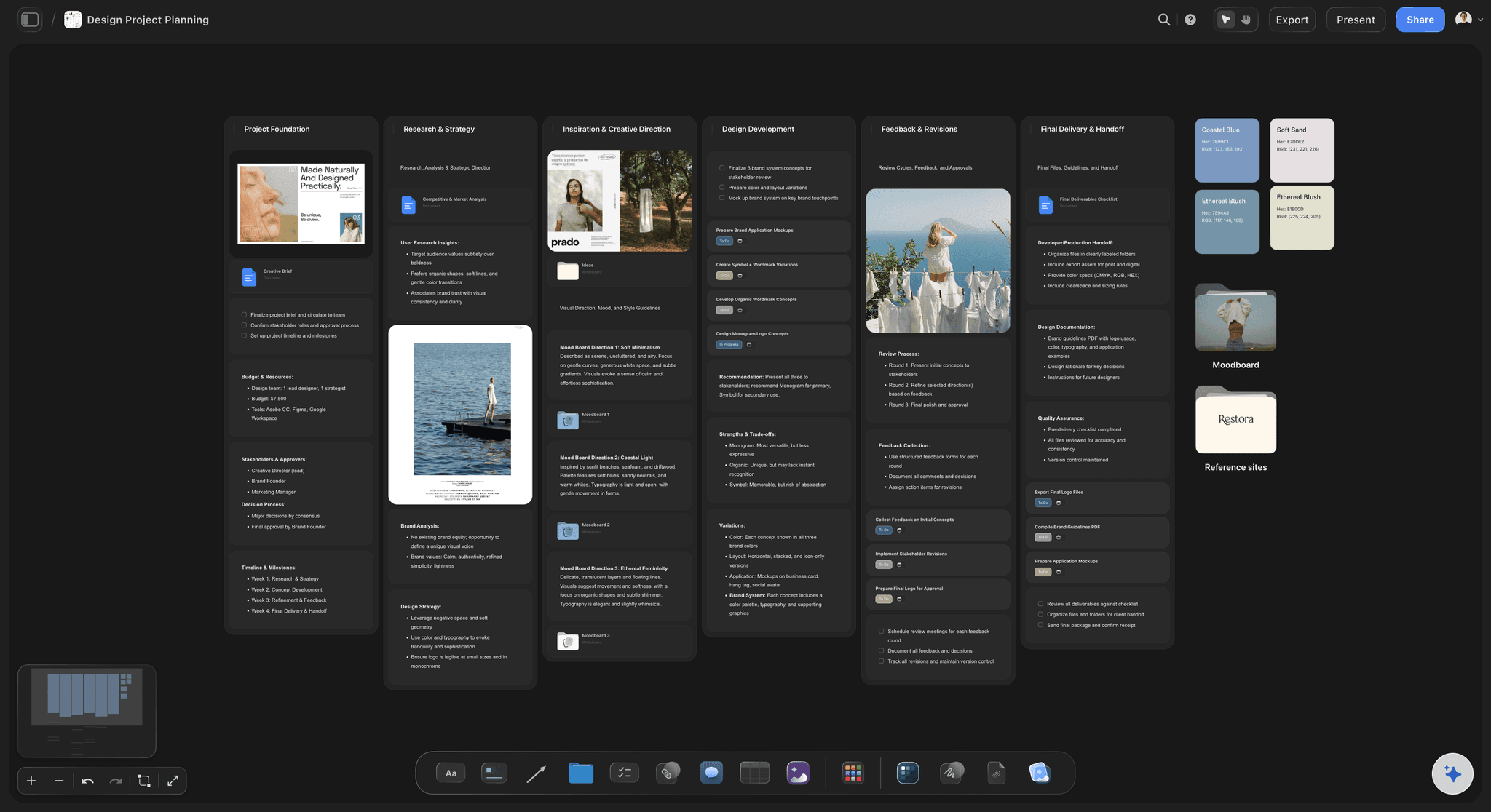
Teams where creative quality comes from thinking depth
The output you create is only as good as the thinking behind it. For creative professionals whose work quality depends on strong strategy, developed ideas, and proper planning, the workspace where that thinking happens matters as much as the design tool where the output is created. Storyflow is built for that workspace.
Use Case Comparisons
Same creative professional. Two tools. Different phases of the work.
For Filmmakers
With Canva: Create social graphics to promote your film. Posters, Instagram posts, YouTube thumbnails. Canva's templates make this quick and professional-looking. This is genuinely useful and Canva handles it well. But the actual film production work (story development, shot planning, cinematography references, pre-production organization) has no home here.
With Storyflow: Open the Film Production Blueprint. Shot planning, visual references, and narrative frameworks built in. Browse the frames library for cinematography inspiration. AI helps develop your visual language connected to your story. Organize months of pre-production in one connected workspace. Use the social promotion planning that's also part of the Blueprint.
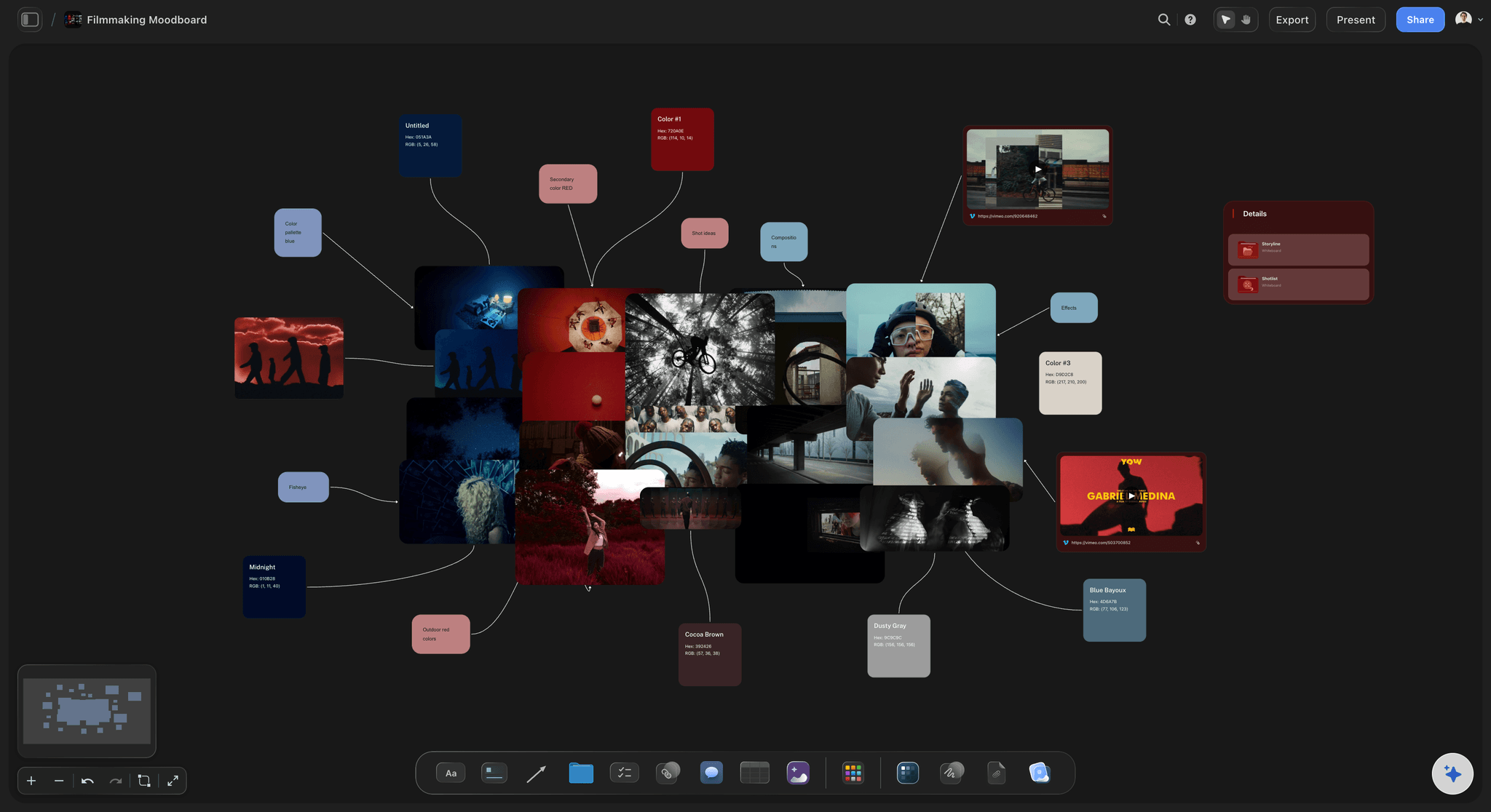
Winner: Storyflow for pre-production and development. Canva for promotional asset creation. Both tools serve a filmmaker. Neither replaces the other.
For Marketers
With Canva: Create the visual assets for your campaign. Social graphics, email headers, ad creatives, landing page images. Canva makes this fast and brand-consistent. If your campaign strategy is already figured out and you need to execute it visually, Canva is the right tool.
With Storyflow: Develop the campaign strategy that makes those assets effective. Who is the audience? What's the message? What's the positioning? What content approach will work? Marketing Campaign Blueprints include Tactics for these decisions. AI helps test messaging and identify gaps in your strategy. The strategy you develop in Storyflow becomes the brief for everything you create in Canva.
Winner: Both. Canva for asset creation. Storyflow for the strategy that makes the assets worth creating.
For Writers
With Canva: Design your book cover. Create author social graphics. Build a visual press kit. Canva handles these output tasks well. For the actual writing work (story development, character building, structure, research organization), Canva offers nothing.
With Storyflow: Develop your story using structure frameworks. Build character profiles with arc Tactics built in. Organize research connected to your narrative. Map scenes to story beats. AI helps identify plot holes and test character logic. The story gets developed properly before you write a word.
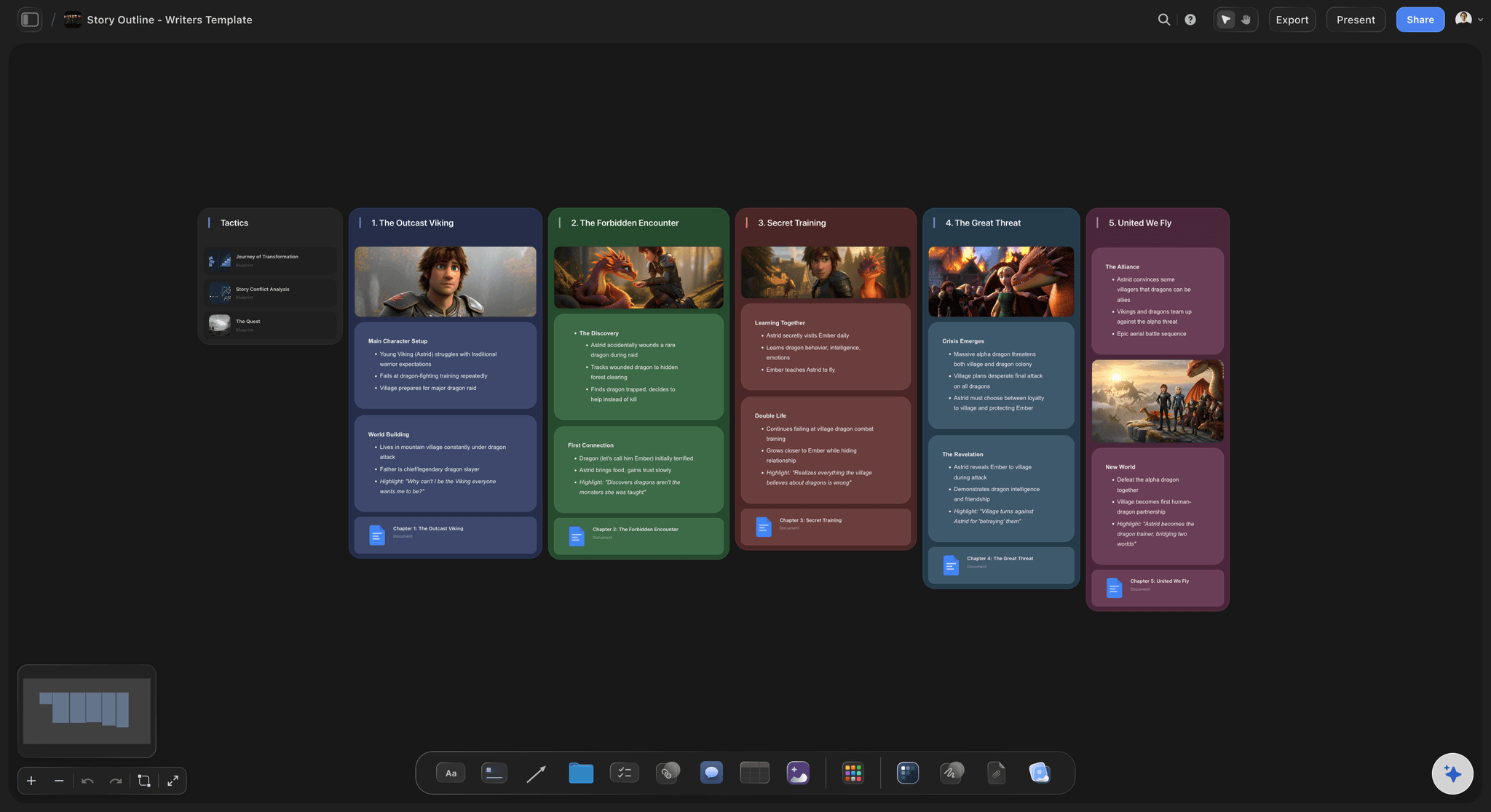
Winner: Storyflow for story development. Canva for book covers and author promotion graphics.
For Social Media Managers
With Canva: This is Canva's home territory. High-volume social content creation across multiple platforms and formats. Brand Kit for consistency. Direct publishing integrations. Canva is faster and more efficient than any other tool for this specific workflow.
With Storyflow: Content strategy and planning. Developing content pillars, planning series, building content calendars, developing the strategic framework that determines what to post and why. Not a replacement for Canva's production workflow, but the place where the strategic decisions that make that workflow effective get developed.
Winner: Canva for daily content production. Storyflow for the content strategy behind what you're producing.
The honest pattern:
These tools don't overlap as much as the "vs" framing suggests. They serve different phases of creative work. The best creative professionals use both: Storyflow for thinking and planning, Canva for design output. Trying to force one tool into both roles means compromising something. Canva isn't a project planning tool. Storyflow isn't a graphic design tool.
FAQ
Is Storyflow a Canva alternative?
Not exactly. Canva is a design output tool. Storyflow is a project development workspace. If you need to create social graphics, presentations, or branded visual assets, Canva is purpose-built for that. If you need to plan creative projects, develop ideas, build strategy, or use AI that understands your project context, Storyflow is the right tool. Most creative professionals who switch from Canva-only workflows add Storyflow for the planning phase rather than replacing Canva entirely.
Is Storyflow free?
Not during early access. Storyflow is paid-only while in early access, with Plus starting at $7.99/month (annual) and unlocking the full 200+ Story blueprints library; Pro ($14/month, annual) adds AI image generation and 20× more AI than Plus, and Max ($39/month, annual) adds real-time collaboration and a team workspace with roles and permissions. A Free plan with unlimited boards, unlimited projects, basic AI usage, and 20 file uploads launches before the end of 2026, and anyone a paid member invites to a board can join free today.
Does Canva have AI?
Yes. Canva's AI tools include Magic Design (generates design layouts), Magic Write (generates copy for designs), Magic Edit (AI image editing and manipulation), and Magic Presentations (AI-generated slide decks). These are strong for design output creation. They don't read your project context, so they can't help you develop strategy or think through your project the way Storyflow's AI does. Canva AI generates. Storyflow AI thinks with you.
What are Storyflow Blueprints?
Blueprints are complete project development frameworks with professional Tactics built in. Unlike design templates (which show you what your output should look like), Blueprints guide how your project should be developed. A YouTube Video Blueprint includes hook formulas and retention Tactics. A Film Production Blueprint includes visual development and pre-production frameworks. A Marketing Campaign Blueprint includes positioning and audience mapping Tactics. Plus, Pro, and Max all include the 200+ Story blueprints.
Can I use both Storyflow and Canva together?
Yes, and many creative professionals do. Storyflow for the planning and development phase. Canva for creating the design output from that plan. Your Storyflow workspace becomes the brief and strategy document that informs what you create in Canva. The tools complement each other rather than competing. You develop the thinking in Storyflow. You execute the visuals in Canva.
Which is better for marketers?
It depends on your role. For marketers who primarily create visual assets (social graphics, ads, email templates), Canva is faster and better. For marketers who own campaign strategy, content strategy, and messaging architecture, Storyflow is better. Many marketers need both: Storyflow to develop the strategy and Canva to execute the creative assets from that strategy.
Does Canva work for project planning?
Not well. You can create project plan slides in Canva, but it doesn't track projects, connect ideas, or give you an AI that understands your project context. For anything beyond creating visual representations of a plan you've already developed elsewhere, Canva isn't the right tool. Project planning, strategy development, and creative thinking need a workspace built for that purpose.
Is Canva good for filmmakers?
For creating promotional materials (posters, social posts, YouTube thumbnails), yes. For actual film production work (story development, shot planning, cinematography references, pre-production organization), no. Filmmakers who use Canva for film work are usually creating the marketing assets for their films, not planning the films themselves. Storyflow's frames library, Film Production Blueprints, and AI-assisted development serve the actual production planning phase that Canva skips.
Can Storyflow create graphics like Canva?
No. Storyflow is a thinking and planning workspace, not a graphic design output tool. You won't create social graphics, presentation slides, or branded templates in Storyflow. For design output, Canva is the right tool. Storyflow handles what comes before: the ideas, strategy, and project structure that determine what your design output should communicate.
What is the difference between Canva templates and Storyflow Blueprints?
Canva templates are design output formats. They show you what your finished visual should look like. You customize the content, keep the design structure. Storyflow Blueprints are project development frameworks with professional Tactics built in. They guide how your project should be developed and what creative methodology to apply. A Canva template says "your Instagram post should look like this." A Storyflow Blueprint says "here's how professional marketers develop campaigns, applied to your actual campaign."
Which is better for teams?
It depends on the work. For design output at scale with brand consistency, Canva Teams is strong: Brand Kit, shared templates, design collaboration. For creative development, project planning, and AI-assisted thinking, Storyflow is better. Storyflow's Max plan ($39/month, annual) adds real-time collaboration and a team workspace with roles and permissions. Creative teams doing serious strategic and development work benefit from both tools serving their respective phases.
Conclusion
Canva has earned its place. Genuinely. It made professional-looking design accessible to hundreds of millions of people who had no path to it before. That's a meaningful contribution to how creative work gets done.
But Canva's strength is also its limitation. It optimizes for output speed. Get to the polished visual as fast as possible. That optimization means the creative thinking, strategic development, and project planning that should inform your output don't have a home in the tool. You're expected to arrive with the thinking already done.
Most people don't. They open Canva, pick a template, swap the content, and publish. The output looks professional. The thinking behind it is shallow.
That's the gap Storyflow fills. Not by competing with Canva on design output (it doesn't), but by giving creative professionals a workspace where the real creative work happens first. The strategy development. The idea refinement. The project planning. The AI-assisted thinking that connects everything.
The clearest possible summary:
- Use Canva to create the visual output from your creative decisions.
- Use Storyflow to develop the creative decisions that your visual output needs to communicate.
- Use both if you work through the full creative process from idea to published asset.
If you're using Canva for your entire creative process and something feels like it's missing, it's probably the thinking phase. That's not a Canva problem. It's a workflow problem. Storyflow is where the thinking phase belongs.
The quality of your creative output is bounded by the quality of your creative thinking. So try this: take the next project you would normally start in Canva, and spend a week developing it in Storyflow first. Build the strategy, run a Blueprint, let the AI read your board and push back on your idea. Then open Canva to produce the assets. If the output is sharper because the thinking was deeper, you have your answer.
Related Reading
Compare Storyflow and Miro for creative teams and visual collaboration
How Storyflow compares to the other leading visual board for creatives
Compare visual workspace vs document-based workspace for creative work
Full comparison of the best tools for creative idea generation and development
Table of Contents
Templates to check out for this topic


Branding and design templates you can use in Storyflow
Take a brand from naming to visual direction on one connected canvas. Open any of these templates and the AI works from everything already on the board.


See Storyflow in Action
A visual AI workspace where every feature lives inside one canvas. No tab-switching, no context lost.
Build your entire board from a single message
Type what you need in the AI chat at the bottom of your canvas. The AI adds cards, headings, and structure directly onto your board.
Use expert frameworks as AI context
Type @ in the AI chat and choose any Tactic. The AI tailors every response to that framework instead of giving generic advice.
Turn your board into a mind map in seconds
Ask the AI to restructure your canvas as a mindmap. It connects your ideas into a visual hierarchy so you can see how everything relates.
Why Storyflow Exists
Storyflow actually began as a personal tool while working on creative and research projects.
We kept running into the same problem: ideas were scattered everywhere: notes, documents, and whiteboards.
Nothing helped us see how everything connected.
So we started building a workspace designed around how ideas actually grow.
→ Read how Storyflow was createdSara de Klein
Head of Product at Storyflow
Published: April 10, 2026
Extremely simple, seriously capable


See how easy it is to get started
Watch a real project come together, from a blank board to a finished plan, clicked through step by step.
Start creating with AI and become more productive
Transform your creative workflow with AI-powered tools. Generate ideas, create content, and boost your productivity in minutes instead of hours.