Mood Board vs Storyboard: What's the Difference? (2026)
A mood board captures the feeling and look of a project; a storyboard maps the actual shots in sequence. A clear 2026 guide to the difference, when to use each, and how they work together.

Category
Filmmaking
Author

Justkay
Documentary Filmmaker & Founder at Storyflow
Topics
2026-07-15
•
11 min read
•
Filmmaking- mood board vs storyboard
- storyboard vs mood board
- difference between mood board and storyboard
- what is a mood board
- what is a storyboard
What's the difference between a mood board and a storyboard?
A mood board and a storyboard are both visual planning tools, but they do opposite jobs. A mood board is a non-sequential collage of images, colors, textures, and references that captures the feeling and look of a project. A storyboard is an ordered sequence of frames that maps the actual plan: the specific shots, framing, and action, panel by panel, in the order they will play on screen. A mood board captures the feeling. A storyboard maps the plan. The mood board comes first and answers "what should this feel like." The storyboard comes second and answers "what exactly are we shooting, shot by shot." Most film, video, and design projects use both, in that order.

Full disclosure: Storyflow is our own product. We put it first here because for the specific job this article is about (keeping a mood board and a storyboard on one surface, with AI that reads the board) a canvas that does both genuinely leads. It is not the honest pick for every version of the job. For a pure, polished mood board of sourced images, Milanote or Pinterest is more purpose-built. For a precise storyboard with a timed animatic, Boords or a dedicated storyboarding tool wins. Storyflow is also cloud-only, with no offline mode. We link to alternatives so you can judge the fit.
Key Takeaways
- A mood board and a storyboard do opposite jobs. A mood board is a non-sequential collage that captures the feeling and look, while a storyboard is an ordered sequence of frames that maps the actual shots.
- A mood board captures the feeling; a storyboard maps the plan. That one fact drives every other difference between them.
- They answer different questions. A mood board answers "what should this feel like," and a storyboard answers "what exactly are we shooting, shot by shot."
- The order test settles which you are holding. Shuffle a mood board and nothing breaks, because order carries no meaning; shuffle a storyboard and everything breaks, because the order is the content.
- The images point at different things. A mood board's images are references (aim for this feeling), while a storyboard's are instructions (make exactly this shot).
- The mood board comes first. You set and approve the look during early concept work, then build the storyboard once the feeling is settled, drawing shots inside the world the mood board defined.
- Most film, video, and commercial projects use both, in order, the mood board to lock the feeling and the storyboard to turn it into a shot-by-shot plan.
- The wrong move is the right artifact at the wrong time, or letting the feeling and the plan drift apart until they disagree by the shoot day.
The Feeling and the Plan: The Whole Difference in One Idea
People treat "mood board" and "storyboard" as interchangeable because both are visual and both come before production. They are not the same thing, and the difference is not cosmetic. It changes what the artifact is for and when it belongs.
I am a documentary filmmaker, and I built Storyflow, a visual workspace, after years of running pre-production where the references, the script, and the shot planning lived in tools that never agreed. I have made both artifacts on real projects, and they answer different questions. When I am still deciding what a film should feel like, I build a mood board: reference stills, a palette, textures, no order at all. Once the look is settled, I build a storyboard: the actual shots in sequence, the film as it will cut together. The mood board is where I decide the mood. The storyboard is where I commit to the plan.
Here is the whole distinction in one idea. A mood board is a wall of feeling with no timeline: it can be read in any order because it is not telling a story, it is setting one. A storyboard is a strip of time: it has to be read top to bottom, because the order is the point. Call it the feeling and the plan. A mood board captures the feeling. A storyboard maps the plan. Every other difference between the two follows from that one.
What a Mood Board Actually Is
A mood board is a curated collection of visual references assembled to communicate the intended feeling, style, and direction of a project. It is a collage, not a sequence. You gather images, color swatches, typography, textures, photographs, and film stills, then arrange them on one surface so the overall tone reads at a glance. A mood board does not tell a story. It establishes an atmosphere the eventual story will live inside.
The job of a mood board is alignment before commitment. Before a director, a client, and a crew spend real money, it gets everyone looking at the same feeling. Two people can both agree a campaign should feel "premium" and picture completely different things, and the mood board removes that ambiguity by showing, not describing. It is used across filmmaking, advertising, branding, interior design, fashion, and product design, anywhere a look has to be agreed before it is built.
Mood boards have roots in graphic design, advertising, and fashion, where art directors pinned tear sheets and fabric swatches to boards long before software existed. The medium is loose (a Pinterest board, a Milanote canvas, or a corkboard); what matters is the curation, not the tool. A mood board is not a decoration. It is a decision about tone, made in images because tone is the one thing words argue about forever. The order of the images does not matter, which is exactly why a mood board is the wrong tool for planning a sequence and the right tool for setting a mood.
What a Storyboard Actually Is
A storyboard is a sequence of frames, drawn or generated, that shows how a scene or a whole piece will play out shot by shot, in the order it will appear on screen. Each panel is one shot or one beat: a composition, what is in the frame, and usually a note on the action, the camera movement, and the dialogue. Read top to bottom, the panels are a comic-book version of the film made before the film exists. It is not about feeling in the abstract. It is about the concrete plan: this shot, then this one, then the next.
The job of a storyboard is to let everyone see the same film before anyone shoots it. A director tests whether a sequence actually cuts together, a cinematographer plans coverage and lighting, and a producer or client signs off before the crew is on the clock. When a sequence is complex or expensive (a chase, a stunt, a visual-effects shot), the storyboard is where you find the problems on paper instead of on set at a thousand dollars an hour.
The storyboard as we know it was developed at Walt Disney Studios in the early 1930s, where animator Webb Smith is credited with pinning sequential sketches to boards so a cartoon could be planned frame by frame. Disney used it to plan shorts like "Three Little Pigs" (1933), and by the end of the decade it crossed into live action, where William Cameron Menzies storyboarded much of "Gone with the Wind" (1939). It forces sequence. Every panel commits to what comes next, which is why a storyboard can catch a broken eyeline or a reveal that lands too early, and a mood board never can. A storyboard is not a drawing exercise. It is a decision about how a scene reads in time.
Mood Board vs Storyboard: The Head-to-Head Comparison
The feeling and the plan diverge on nearly every dimension that matters. A mood board captures the feeling. A storyboard maps the plan. The table below makes every consequence of that one fact explicit, from structure down to the stage of the project each one belongs to.
| Dimension | Mood Board | Storyboard |
|---|---|---|
Purpose | Establish the feeling, look, and tone | Map the actual shots and sequence |
What it answers | What should this feel like? | What exactly are we shooting, shot by shot? |
Structure | Non-sequential collage | Ordered sequence of frames |
Read in any order? | Yes, order does not matter | No, the order is the whole point |
Unit | The reference (image, swatch, texture) | The frame (one panel per shot or beat) |
Typical contents | Images, color, typography, textures, references | Composition, framing, action, camera movement |
Output | A wall of references that sets a direction | A shot-by-shot visual plan of the piece |
When in the process | Earliest (concept and direction) | Later (shot planning, after the look is set) |
Who makes it | Director, designer, art director, client | Director, storyboard artist, DP, animation team |
Optional or essential | Common but skippable on simple work | Essential when the sequence is complex or costly |
The single most useful row is "what it answers." Two quick tests settle which artifact you are holding. First, ask what breaks if you shuffle it: nothing breaks in a mood board, because order carries no meaning, and everything breaks in a storyboard, because the order is the content. Second, ask what the images point at: a mood board's images are references (aim for this feeling), while a storyboard's images are instructions (make exactly this shot). The shape on screen is a hint, not proof.
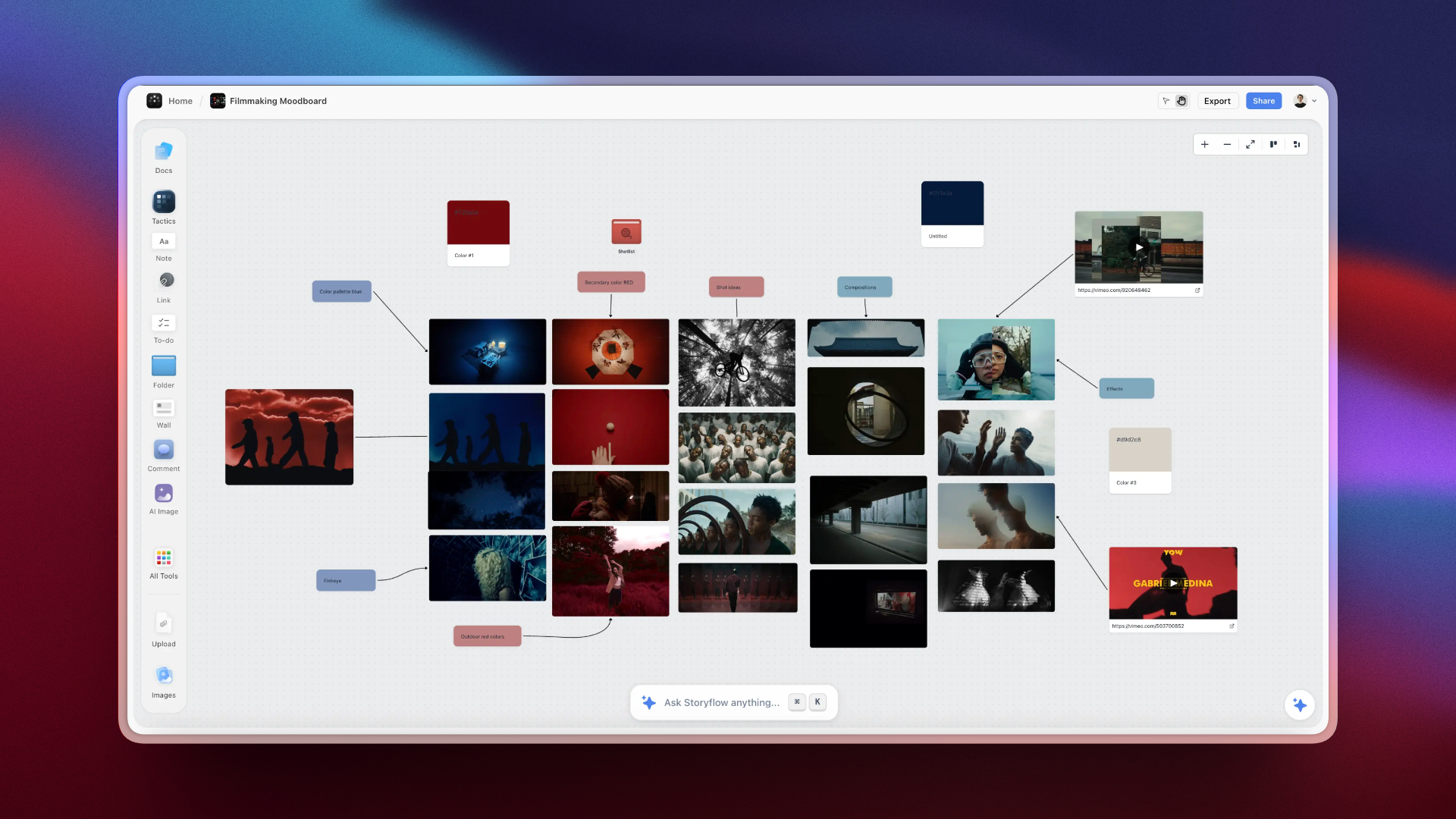
A Storyflow canvas with a mood board beside a storyboard sequence
How a Mood Board and a Storyboard Work Together
On a well-run project, the mood board and the storyboard are not rivals. They are two stages of the same pipeline, and the feeling comes first, then the plan. The mood board establishes the look: the palette, the texture, the lighting mood, the references the whole piece aims at. The storyboard then translates that agreed look into concrete shots, working inside the world the mood board already defined. The mood board informs the storyboard, not the other way around.
The normal order runs like this. The mood board settles the direction, a director or client signs off on the feeling, and the storyboard then lays the shots out in sequence, drawing on the mood board for the visual language. A mood board with no storyboard leaves you with a beautiful direction and no plan to execute it. A storyboard with no mood board leaves you with a plan that may be perfectly sequenced and completely off-tone. The feeling has to be set before the plan can serve it, which is why the mood board almost always comes first.
This is also where projects leak. When the mood board, the storyboard, and the script live in three apps, a change to one never reaches the others: the director approves a warmer palette, the storyboard frames were built off the old one, and by the shoot day the reference and the plan disagree. Keeping the feeling and the plan connected is the difference between a pipeline and three files quietly drifting apart.
How to Build Each One (Including With AI)
Building either by hand still works, and for a fast mood board a corkboard is hard to beat. The friction starts when the board has to be shared, revised, or connected to the rest of the project, where most tools force a choice: a mood board app collects references beautifully but cannot sequence a shot, and a storyboard app frames shots precisely but is a poor place to gather loose inspiration.
To build a mood board, start from the feeling you are chasing, then pull reference stills, color swatches, and textures that carry it, and arrange them until the tone reads at a glance. To build a storyboard, break the scene into beats, decide the shots that cover each beat, thumbnail each frame rough and fast (stick figures are fine), mark the camera and subject movement, then read the panels in order as if watching the cut.
AI changes both. For a mood board, you can generate reference images in a specific style, or cluster a messy pile of references into tonal options. For a storyboard, generative tools turn a script beat into a frame in seconds. The honest limit is control: generated frames are less precise than drawing, and character consistency across panels is still hard, so AI is strongest for concept work and weakest for exact blocking. The judgment stays yours; AI removes the blank-page tax.
The bigger speedup is connection, the friction most creators feel: the mood board sits in one tool, the storyboard in another, the script in a third, so every change gets made three times by hand. Storyflow is built to close that gap. It is an AI-powered visual workspace: one infinite canvas where the mood board references, the storyboard frames, and the script all live as cards on the same board. Its AI reads your full active canvas board by default (every card, note, image, and link on it), plus up to 1 blueprint and up to 3 Documents you @-mention, so when you ask it to "reframe scene four to match the warmer palette," it reasons over the references and the frames together instead of you editing two apps by hand. Story Blueprints (200+ templates on the Plus plan, including the Hero's Journey and AIDA) give you structured starting points, and the Free plan, launching before the end of 2026, will include unlimited boards and basic AI (Plus is $7.99 per month billed annually, or $9.99 monthly). A mood board and a storyboard that live on the same canvas stop drifting apart, because changing the feeling is changing the same project the plan reads from.
Storyflow is not the right tool for every version of this job. It is cloud-only, with no offline or local-first mode, so it is a poor fit for privacy-regulated work with no internet. Its canvas cards are not a dedicated Pinterest-style mood board grid with endless visual sourcing, and not a timed animatic timeline with frame-accurate playback, so for a pure reference-collecting board Milanote or Pinterest is more purpose-built, and for a precise storyboard with a real animatic a dedicated tool like Boords is more finished. It is also a newer platform with fewer templates than an established tool like Notion. Storyflow earns its place when your mood board, storyboard, and script keep drifting out of sync, not when you only need one of the three as a standalone artifact.
Which Should You Use? The Bottom Line
If you remember one thing, remember the feeling and the plan. You do not choose between a mood board and a storyboard by preference. You choose based on which stage you are in and which question is in the room.
- Make a mood board when the question is about feeling: you need to set or approve the look, tone, and references before anyone commits budget. It is the only tool that settles that argument.
- Make a storyboard when the question is about the plan: the look is decided and you need to map the actual shots in sequence, especially when a scene is complex, expensive, or has to be approved before the shoot.
- Make both, in order, on most film, video, and commercial projects: the mood board to lock the feeling, then the storyboard to turn that feeling into a shot-by-shot plan. Keep them connected to the script so a change to the look flows into the shots built from it.
A mood board captures the feeling. A storyboard maps the plan. Get that straight and you will stop reaching for a mood board to sequence a scene, or forcing a storyboard before you have decided what the thing should feel like. The wrong move is not picking the "worse" artifact. It is making the right one at the wrong time, or letting the feeling and the plan drift so far apart that they disagree by the shoot day.
If your projects keep fragmenting across a mood board app, a storyboard app, and a script in a third tool, take one project and rebuild it on a single canvas for a week. Here is how to choose one moodboard app. Put the references, the frames, and the script on one board and let the AI work across all of it. Start on a Storyflow canvas.
FAQ: Mood Board vs Storyboard
What is the difference between a mood board and a storyboard?
A mood board is a non-sequential collage of images, colors, and references that captures the feeling and look of a project, while a storyboard is an ordered sequence of frames that maps the actual shots in the order they will play. The mood board answers "what should this feel like," and the storyboard answers "what are we shooting, shot by shot." One is the feeling, the other is the plan.
Which comes first, the mood board or the storyboard?
The mood board comes first. You establish the feeling, palette, and visual direction during early concept work, then build the storyboard once the look is settled, because the storyboard's frames are drawn inside the world the mood board defined. Making the storyboard first risks planning shots in a tone nobody has agreed on yet.
Can a mood board replace a storyboard?
No, because they answer different questions. A mood board sets the feeling but has no sequence, so it cannot tell you how a scene actually plays out shot by shot. Even a perfectly curated mood board still needs a storyboard to plan the coverage and test whether the sequence cuts together. The board sets the tone; the storyboard makes the plan.
Do I need both a mood board and a storyboard?
Most scripted film, video, and commercial projects benefit from both, but plenty of simple work runs on one. Use a mood board whenever a look has to be agreed before you commit budget, and a storyboard whenever a sequence is complex, expensive, or has to be approved. Simple, unscripted, or run-and-gun shoots often skip the storyboard.
What goes on a mood board?
A mood board holds visual references that carry the intended feeling: photographs, film stills, color swatches, typography samples, textures, and sometimes a few keywords. There is no required order. Every element is there because it communicates a piece of the tone, and the collection as a whole is the argument for a direction.
What goes on a storyboard?
A storyboard holds a sequence of frames, one per shot or beat, each showing the composition and what is in the frame, usually with notes on the action, camera movement, and dialogue. Panels are numbered and read in order, because the sequence is the storyboard's real content. Fidelity ranges from rough thumbnails to polished frames a client can approve.
Do you need to draw to make a storyboard?
No. Many directors board with boxes, stick figures, and arrows, clip-art tools let you assemble panels from drag-and-drop characters, and AI generators turn a script beat or a prompt into a frame. The storyboard's value is the sequencing and coverage decision, not the artwork. A rough thumbnail that catches a problem beats a beautiful frame that does not.
Can AI make a mood board or a storyboard?
Yes, and it speeds up both. For a mood board, AI can generate reference images in a target style or cluster a pile of references into tonal options. For a storyboard, generative tools turn script beats into frames fast, strong for concept boards and weaker for precise blocking. The judgment (what tone, which shots) stays with you; AI removes the blank-page work.
What tool keeps a mood board and a storyboard together?
A connected visual workspace keeps them on one surface instead of in separate apps. Storyflow puts the mood board references, the storyboard frames, and the script on one infinite canvas as cards the AI can read, so a change to the look can flow into the shots built from it. For pure reference collecting Milanote or Pinterest is simpler, and for a precise animatic Boords is more finished; the connected canvas wins when the feeling and the plan keep drifting out of sync.
Table of Contents
- Key Takeaways
- The Feeling and the Plan: The Whole Difference in One Idea
- What a Mood Board Actually Is
- What a Storyboard Actually Is
- Mood Board vs Storyboard: The Head-to-Head Comparison
- How a Mood Board and a Storyboard Work Together
- How to Build Each One (Including With AI)
- Which Should You Use? The Bottom Line
- FAQ: Mood Board vs Storyboard
- Related Reading
Templates to check out for this topic


Filmmaking templates you can use in Storyflow
Skip the blank canvas. Open one of these filmmaking boards in Storyflow and the AI builds on the structure that is already there, from research through the shot list.


See Storyflow in Action
A visual AI workspace where every feature lives inside one canvas. No tab-switching, no context lost.
Build your entire board from a single message
Type what you need in the AI chat at the bottom of your canvas. The AI adds cards, headings, and structure directly onto your board.
Use expert frameworks as AI context
Type @ in the AI chat and choose any Tactic. The AI tailors every response to that framework instead of giving generic advice.
Turn your board into a mind map in seconds
Ask the AI to restructure your canvas as a mindmap. It connects your ideas into a visual hierarchy so you can see how everything relates.
Why Storyflow Exists
Storyflow actually began as a personal tool while working on creative and research projects.
We kept running into the same problem: ideas were scattered everywhere: notes, documents, and whiteboards.
Nothing helped us see how everything connected.
So we started building a workspace designed around how ideas actually grow.
→ Read how Storyflow was createdJustkay
Documentary Filmmaker & Founder at Storyflow
Published: 2026-07-15
Extremely simple, seriously capable


See how easy it is to get started
Watch a real project come together, from a blank board to a finished plan, clicked through step by step.
Start creating with AI and become more productive
Transform your creative workflow with AI-powered tools. Generate ideas, create content, and boost your productivity in minutes instead of hours.