10 Best Mood Board Tools for Brand & Marketing Teams in 2026 (Compared)
The 10 best mood board tools for brand and marketing teams in 2026, compared on AI, brief handoff and price. Storyflow, Milanote, Canva, Frontify, Miro and more, with a step-by-step campaign moodboard method.

Category
Visual Thinking
Author

Justkay
Documentary Filmmaker & Founder at Storyflow
Topics
2026-06-16
•
Updated September 19, 2026
•
36 min read
•
Visual Thinking- best mood board tools for marketing teams
- how to make a moodboard for a brand campaign
- marketing mood board
- campaign mood board
- brand mood board tool
- Storyflow
What is the best mood board tool for marketing teams in 2026?
The best mood board tool for brand and marketing teams in 2026 is Storyflow: its AI builds the brand moodboard (palette, type, logo and applications) and then drafts the campaign brief from that same board, on one canvas the client can open from a link with no account. Canva is the fastest path to polished assets, Frontify the standard for brand guidelines, and Miro the best whiteboard for big workshops. To make one: write the campaign line, collect 40 to 60 references, cut to 12 to 16, annotate each, add a 'not this' row, and get sign-off territory by territory.

Full disclosure: Storyflow is our own product, and we rank it #1 on this page because the ranking is weighted toward what a brand or marketing team owes its client: an approved direction that survives into the brief and the deliverables. Storyflow's AI builds the brand moodboard and drafts the brief and plan beside it, which is the middle stage the other tools leave to the team. It does not do everything. Canva is the faster path to polished assets, Frontify is the standard for brand guidelines, Miro is the better whiteboard for a big workshop, and Milanote is the calmer tool for arranging a board by hand. Storyflow has no formal approval button and is not a design tool, so most teams pair it with Frontify and Canva or Figma. The scoring weights are in section 5, and the how-to in section 3 works in any of these tools.
Quick Comparison: Best Mood Board Tools for Marketing Teams
These four cover the jobs a brand team splits between: turning the board into a campaign, managing brand guidelines, producing polished assets, and running big workshops.
| Tool | Best For | AI Features | Price |
|---|---|---|---|
| Storyflow | Campaign moodboard into brief and plan | AI builds the board and drafts the brief | $7.99 mo annual (free plan late 2026) |
| Canva | Polished branded assets and decks | Generative design AI | Free / US$144 yr |
| Frontify | Brand guidelines and asset management | Limited AI | Quote, billed on active users |
| Miro | Big campaign workshops at team scale | Standard board AI | Free / $8 user mo |
A brand moodboard the whole team can build on
Storyflow puts references, palette, and voice on one shared canvas the AI can read, so the brand direction lives in one place instead of scattered across decks.

1) Quick Answer: The Best Mood Board Tool for Marketing Teams
The best mood board tool for brand and marketing teams in 2026 is Storyflow: its AI builds the brand moodboard (palette, type, logo and applications) and then drafts the campaign brief from that same board, on one canvas the client can open from a link with no account. Canva is the fastest path to polished branded assets, Frontify is the standard for brand guidelines and asset management, and Miro is the best team whiteboard for big campaign workshops.
How to make a moodboard for a brand campaign, in one line: write the campaign line and three to five mood words, collect 40 to 60 references, cut to 12 to 16, sort them into territories, annotate each image with the decision it makes, add a "not this" row, translate the board into the actual deliverables, and get the client to sign off on each territory before anyone books a shoot. The full method, a filled example board and a sign-off checklist are in section 3.
The short version: everyone loves the moodboard at kickoff, and then the campaign scatters across a brief doc, a content calendar, a brand portal and ten Slack threads. A moodboard aligns the kickoff. It does not run the campaign. The right tool is the one that carries the direction from kickoff into the work.
What is a brand mood board? A brand mood board is a curated visual collection of color, typography, imagery, tone, and reference material that defines the look and feel of a brand or campaign before any asset is produced. Brand platforms like Frontify and Canva treat it as the foundation of a visual identity, the shared reference everyone aligns to before design begins. A campaign moodboard is the narrower version: one campaign, one set of deliverables, one approval.
Key takeaways:
- The best overall pick is Storyflow for making the campaign moodboard and turning it into a brief and plan on the same canvas. For polished assets, Canva; for brand guidelines, Frontify; for big workshops, Miro.
- A moodboard aligns the kickoff; it does not run the campaign. Most tools stop at the kickoff.
- For the most beautiful hand-built board, Milanote. For boards beside the design files, Figma and FigJam.
- For the brief, wiki, and calendar in document form, Notion; for gathering inspiration, Pinterest.
- Storyflow is honest about its limits: it is not a brand asset manager, not a design tool, and it has no formal approval button. Pair it with Frontify for guidelines and Canva or Figma for finished assets.
- Storyflow is paid-only during early access, with plans from $7.99 a month billed annually ($9.99 monthly). Its Free plan launches before the end of 2026, and anyone a paid member invites to a board joins free now, so the client and the freelancers do not need a seat.
All 10 Tools, Ranked
- Storyflow: best overall for making the campaign moodboard and carrying it into the brief, the plan, and the campaign
- Milanote: the most beautiful hand-built kickoff board
- Canva: fastest path to polished branded assets
- Frontify: the standard for brand guidelines and asset management
- Miro: best team whiteboard for big campaign workshops
- Figma / FigJam: best boards next to the design files
- Notion: best for the brief, wiki, and calendar in document form
- Mural: best for facilitated campaign workshops
- Adobe Express: quick branded content in the Adobe ecosystem
- Pinterest: widest free net for gathering inspiration
For the wider category, see The Best Mood Board Tools in 2026 and the pillar guide What Is a Mood Board? A Complete Guide.
2) Comparison Table: 10 Brand & Marketing Mood Board Tools
Rating criteria, weights and every sub-score are in section 5. Competitor prices were checked on each vendor's own pricing page in September 2026 (Milanote, Miro, Adobe Express, Frontify); they change often and some vary by region, so confirm before you buy.
3) How to Make a Marketing Mood Board for a Brand Campaign (Step by Step)
A campaign moodboard is a visual brief with one job: get the client, or the brand lead who signs the budget, to approve a direction before anyone books a photographer, briefs a designer, or opens a template. Everything below serves that approval. The method works in any tool on this list; the Storyflow version is at the end of the section, and the companion guide How to Brief a Moodboard So the Client Approves It goes deeper on the approval conversation itself.
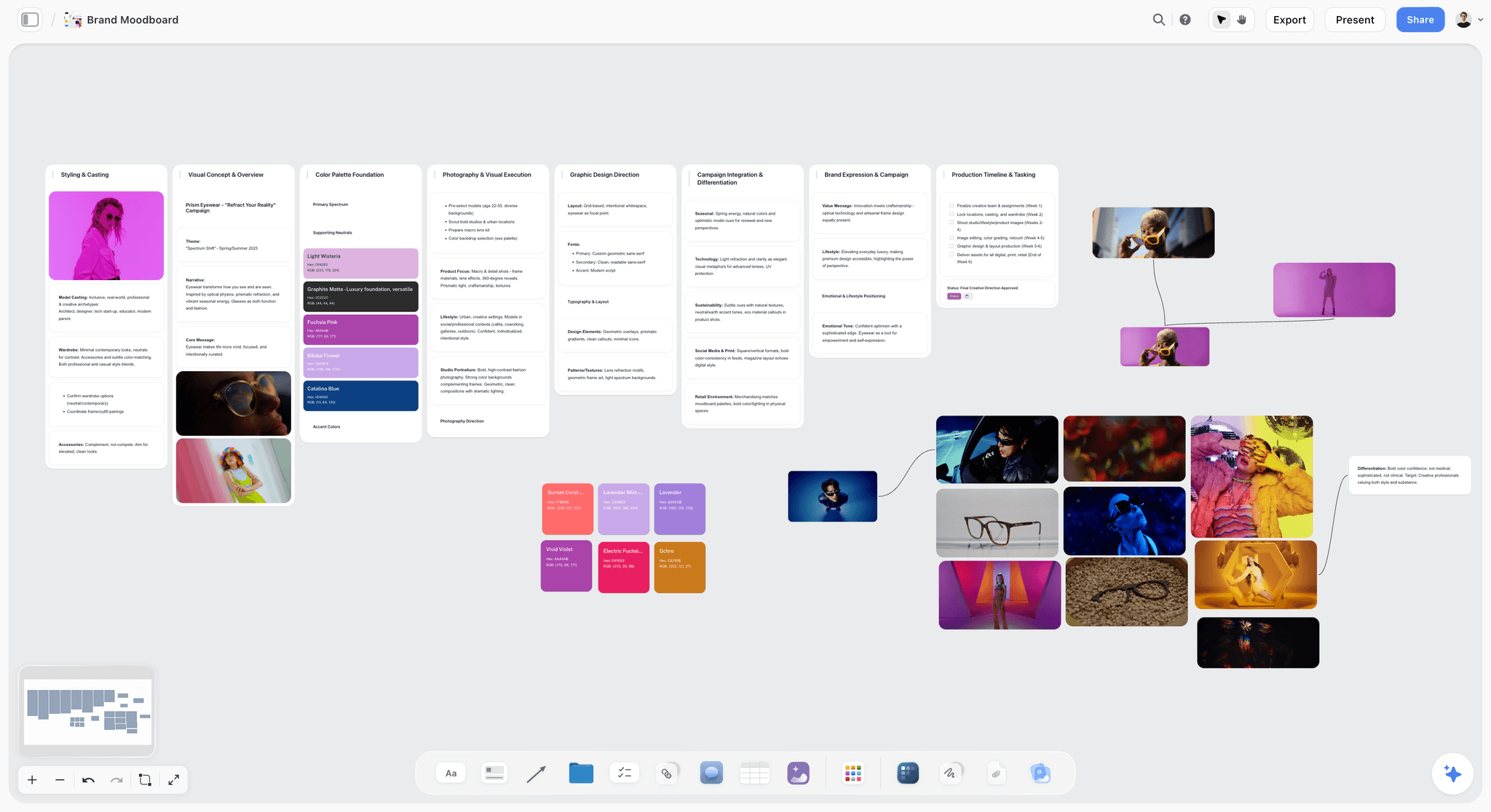
Step 1: Write the campaign line before you collect a single image
Every reference you add later is judged against this line, so write it first and pin it to the top of the board. Seven fields, one line each:
- Objective: what the campaign has to change (launch a product, shift perception, win back lapsed buyers).
- Audience: one sentence, specific enough to cast from.
- Deliverables: the actual list, for example two 6-second paid social cuts, one 15-second video, three OOH formats, a landing page hero.
- Channels: where each deliverable runs, because a 9:16 story and a 48-sheet poster need different references.
- Mood words: three to five adjectives, for example warm, unhurried, tactile.
- Not words: two adjectives the campaign must never read as, for example corporate, glossy.
- Sign-off: who approves, and by what date.
If you cannot fill the deliverables line, you are not ready to make a campaign moodboard; you are still making a brand exploration board, which is a different job with no deadline. The campaign brief guide covers the fields a full brief adds on top of this line.
Step 2: Collect wide: 40 to 60 references, most of them from outside advertising
Ads referencing ads is how campaigns end up looking like their category. Pull from photography, film stills, editorial, architecture, packaging, typography specimens, textures and materials, and the brand's own archive. Pinterest, Are.na and Behance are fast sources; your own phone photos of a street, a shop window or a fabric are often the most specific.
Work quickly and do not judge yet. The only rule at this stage is that every image must connect to at least one mood word. Keep the source link for each reference: you will need it when the client asks where an image came from, and you will need it again if anything is ever used in a deliverable, because a reference is licensed for direction only, not for publishing.
Step 3: Cut to 12 to 16 and sort into territories
Now cut hard. A client can read 12 to 16 images in the time they will give you; 60 reads as indecision. Sort the survivors into territories, each answering one production question:
- Hero: three images that are the campaign in one glance.
- Photography: light, lens, framing, where the camera sits.
- Colour: four to six swatches with hex values, plus where each is used.
- Typography: one headline face and one text face, shown at campaign scale.
- Texture and material: grain, paper, surfaces, product finish.
- Casting and styling: who is in frame, what they wear, how they move.
- Applications: rough mockups of the real deliverables.
Squint at the board. If the territories do not read as one campaign, remove images until they do rather than adding more.
Step 4: Annotate every image with the decision it makes
An unannotated moodboard invites the client to approve a picture, and the photographer to copy it. Write one line beside every image using a simple formula: the element, what to keep, what to ignore. "Light: keep the hard late-afternoon side light; ignore the location." "Type: keep the condensed weight and tight tracking; ignore the colour." Annotations are what turn a collage into direction, and they are the part a client actually signs.
Step 5: Add a "not this" row
Three images of what the campaign must never look like, each with a one-line reason. Most campaign rejections at the first draft are not about the direction; they are about a direction the client assumed you had ruled out. The "not this" row rules it out in writing. It also protects the team later, when a stakeholder asks for "something a bit more polished" and the board already shows why glossy was rejected.
Step 6: Translate the board into the deliverables
Before you present, show how each territory lands on each deliverable. One rough mockup per format is enough: the hero image cropped to 9:16 with the headline face, the colour system on an OOH layout, the texture on the packaging shot. This is the step most boards skip and the one clients respond to most, because it answers the question they are really asking: what will we get?
Step 7: Present it, then get sign-off territory by territory
Walk the client through the campaign line, then each territory, then the "not this" row, then the applications. Ask for a yes or a change on each territory separately; a single "looks great" is not approval, and it is the one that comes back as a rewrite in week three. Write the decisions on the board next to the territory they belong to, with the date, and send the link. How agencies present campaign concepts covers the presentation itself.
A filled example: a spring launch campaign moodboard
An illustrative board for a fictional oat drink brand launching a new flavour across paid social, OOH and a 15-second video. Copy the structure; replace the content.
Twenty-seven items on the board, of which 15 are image references (hero, photography, typography, texture, casting): inside the 12 to 16 range, with the campaign line, "not this" row and mockups doing the explaining.
The sign-off checklist: what the client approves before production
Nine small yeses, each written on the board with a date, are worth more than one enthusiastic reply to an email.
Mistakes that get a campaign moodboard rejected
- Starting with images instead of the campaign line. The board becomes a taste test, and taste is where clients disagree.
- Showing 60 references. The client picks the three they like and ignores the direction.
- No annotations. The client approves a picture; the photographer copies it; nobody approved the idea.
- No deliverables on the board. The client cannot picture the result, so they ask for "one more round".
- Approval as a single "love it". Ask territory by territory, write the answers down, and date them.
- Using reference images in a deliverable. Direction only. Anything that ships needs a licence or your own shoot.
How to make the campaign moodboard in Storyflow
Storyflow runs the method above on one canvas, and the board it produces is the same board the brief and plan are drafted on. What it does by default, and what you ask for:
- Start from the campaign line. Open a board for the campaign and paste the line, or attach the client's brief as a document (up to five documents per message). The AI reads the board you have open with every message.
- Ask for the Brand Moodboard workflow. The AI lays out a palette, type, logo and application tiles for the brand from your line. For a references-first board, the Collect inspiration workflow drops image tiles loose on the canvas; ask the AI to group them into walls by territory, because sections, walls and headings happen only when you ask.
- Add your own references. Drop images and image stacks, add colour swatches, or run the Colour moodboard workflow to lay colours out as a swatch grid.
- Annotate with the AI's help. Select images and ask the AI to describe what each one is doing; it looks at the images you select (up to 24). Write the final annotation yourself as the image caption. The AI proposes; you decide.
- Check it against the brief. Ask the AI to review your board: Review my board returns notes on gaps, such as a territory with only one image.
- Draft the brief from the board. The Campaign Brief and Advertising Brief workflows write the brief on the same canvas, next to the references it came from.
- Present and share for sign-off. Use Present to step through the board one wall at a time, full screen. Send the client a view-only link: they open it with no account and sign in to comment on each territory. Export the whole board as a PDF, or ask the AI for a Lookbook PDF or Presentation PDF to attach to the email.
- Carry it into the plan. After sign-off, ask the AI for a marketing plan, a social media plan or a content calendar, and it builds them on the same canvas. When the plan changes, ask the AI to redraft the brief; the documents do not update each other on their own.
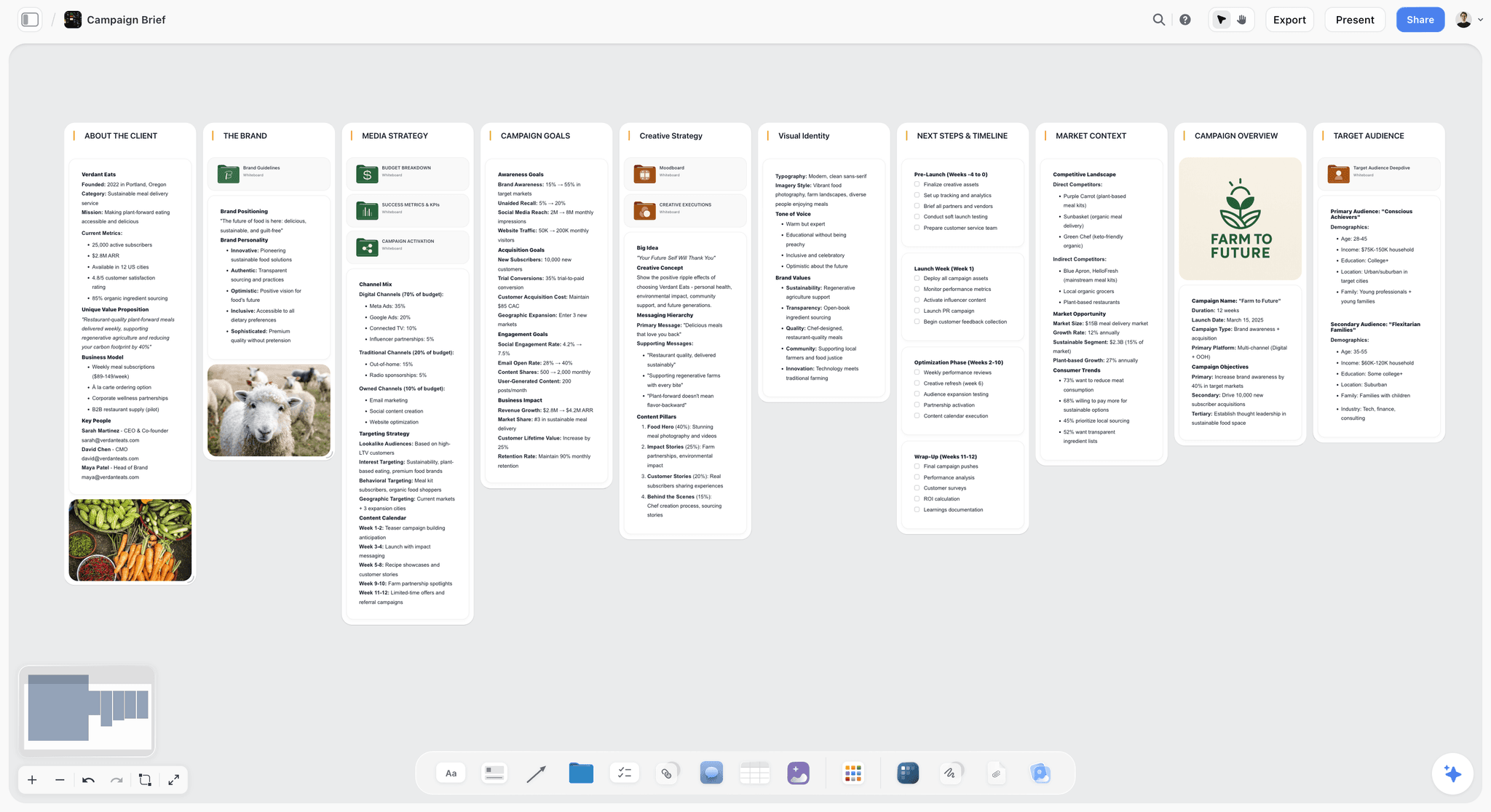
If you would rather start from a structure than a prompt, the AI mood board maker and moodboard app pages show the templates, and the AI creative brief generator shows the brief side.
4) The Kickoff Curse: Why Marketing Mood Boards Stall
The feeling of alignment at kickoff is real, and it is also the problem: the moment the meeting ends, the campaign leaves the board. Here is where it goes, week by week.
The tools in this article separate on one question: does the board stay attached to the brief, the calendar and the assets, or does it stop at the kickoff? Frontify, Canva and Miro each own a column of that table brilliantly and none of them owns the row. That is the gap Storyflow is built for, and it is the reason it ranks first here rather than on hand-built board aesthetics, where Milanote is the calmer tool.
Marketing mood board tools fall into two camps. Kickoff tools are built for the alignment moment: gather references, set the palette, agree on the vibe. Milanote, Pinterest, Miro and Mural are excellent at this. A campaign canvas carries the look into the brief and the deliverables, so the direction survives six weeks of production. Most teams have a great kickoff tool and nothing that carries the direction past it.
5) How We Evaluated These Tools
The competitor tools were compared from each vendor's own pages, plans and documentation in September 2026. Storyflow was scored in September 2026 on its current workflows (Brand Moodboard, Campaign Brief, Marketing Plan and the rest named in its review). Six criteria, weighted by what a brand or marketing team owes its client: an approved direction that survives into the deliverables.
Each tool gets a 0 to 10 score per criterion; the rating in the comparison table is the weighted sum, and the ranking follows the rating. The weights favour the middle of the campaign, which is why a board-and-brief canvas outranks tools that are better at a single stage.
Worked example: Canva is 7 x 0.25 + 6 x 0.20 + 8 x 0.15 + 9 x 0.15 + 10 x 0.15 + 8 x 0.10 = 7.8. Storyflow loses points on brand consistency (it is not a brand asset manager) and on price (no free plan until late 2026). Every competitor rating is lower than in the June version of this page because the rescore puts 45% of the weight on carrying the direction into the brief and plan, which kickoff and asset tools are not built for. Pinterest moved from eighth to tenth for the same reason: it is the best free place to gather, and it holds no brief, plan or sign-off.
6) Quick Picks by Job to Be Done
If you want the short list, organize by the job, not the brand.
Best for making a campaign moodboard and carrying it into the campaign: Storyflow, whose AI builds the board and drafts the brief and plan beside it; then Canva if the board has to look like a finished deck today; then Milanote if you want to place every card by hand with no AI.
Best for brand guidelines and assets: Frontify as the system of record; then Storyflow for the campaign boards and briefs built on those guidelines; then Canva if the job is a Brand Kit on a small budget.
Best for polished branded assets: Storyflow to set the direction and the brief the assets follow; then Canva if you need finished social and print assets fast; then Adobe Express if the team already lives in Adobe.
Best for team campaign workshops: Storyflow for a working session where the output has to become a brief; then Miro if the workshop is large and distributed; then Mural if it needs a facilitator's timers and voting.
Best for the brief in document form: Storyflow, which drafts the brief on the canvas beside the references; then Notion if your team runs everything in docs and databases.
Best for gathering inspiration: Pinterest for the widest free net; then Storyflow, whose Collect inspiration workflow drops references straight onto the campaign board; then Milanote if you clip from the web by hand.
Carry the kickoff board into the campaign
Storyflow's AI reads the moodboard, then drafts the brief and the content plan on the same canvas, so the direction survives past week two. Free plan arriving before the end of 2026.
7) Detailed Reviews: 10 Mood Board Tools for Marketing Teams
1. Storyflow
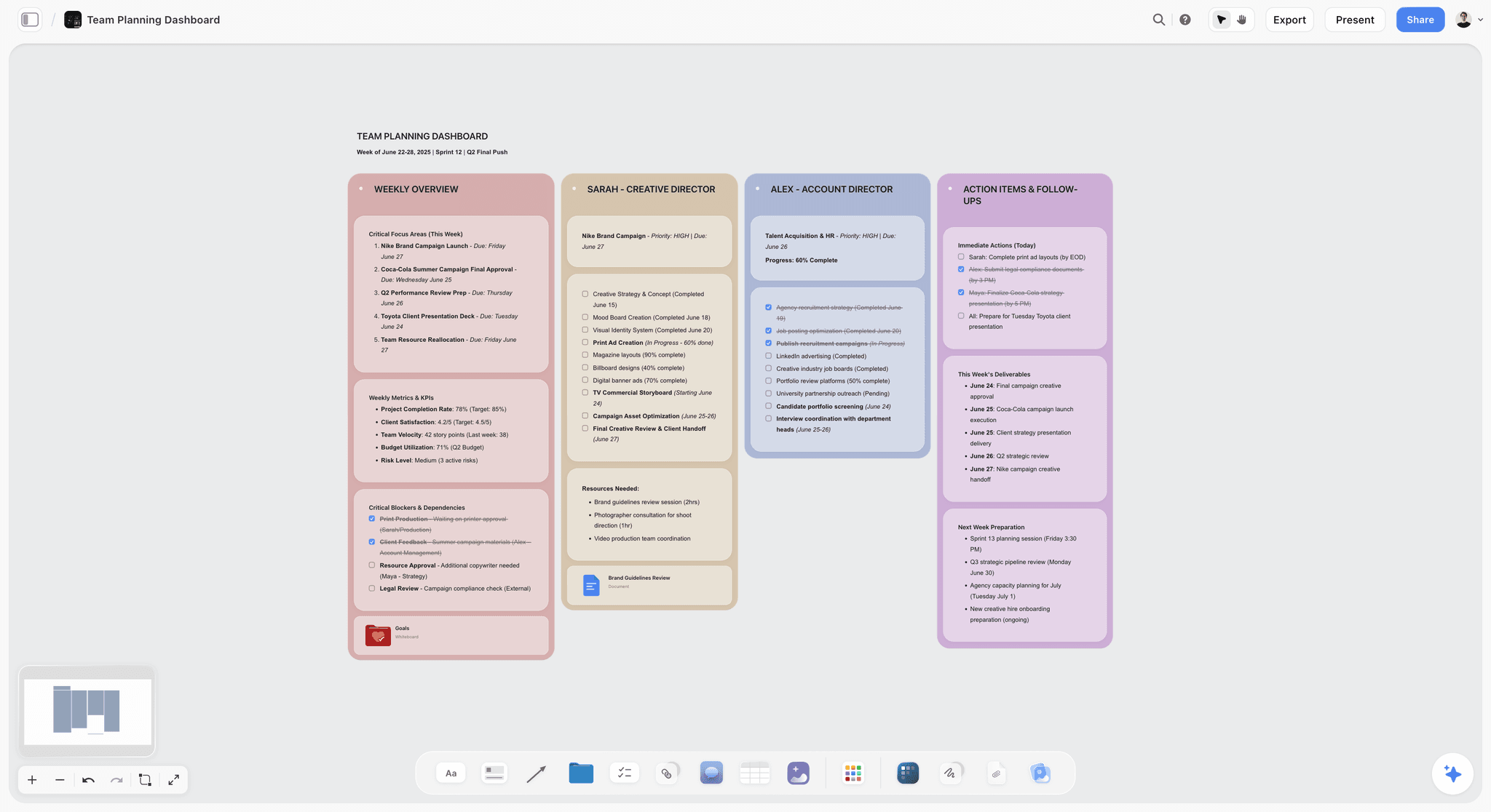
Storyflow is the tool to pick when your moodboard keeps dying at the kickoff. It is an infinite canvas of images, notes, documents and tables with an AI that reads the board you have open. For a marketing team, that means the campaign references, the palette, the brief, the content plan, and the deliverables all live on one canvas, and the AI builds and edits the board from a prompt, with one-click Undo per message.
The difference shows up in week two. In a kickoff tool, the moodboard is a screenshot and the campaign has scattered. In Storyflow, you ask the AI to read the board and draft the brief, structure the content calendar, or expand the launch plan, and it drafts them beside the references they came from. The AI proposes; the team decides.
Best for: Brand and marketing teams, and the agencies and creative directors who owe a client an approved direction, whose kickoff moodboards look aligned and whose campaigns drift once the work starts.
Verdict: The strongest tool for making a campaign moodboard and carrying it into a real campaign. It is not a brand asset manager or a design tool, so pair it with Frontify and Canva.
Key features
- Brand Moodboard and Collect inspiration workflows. Ask for a brand moodboard and the AI lays out palette, type, logo and applications; Collect inspiration drops references on the board for you to arrange, and the AI groups them into walls when asked.
- Campaign workflows on the same canvas. Campaign Brief, Advertising Brief, Brand Strategy, Marketing Plan, Social Media Plan and Content Planner all build next to the moodboard.
- Board-aware AI. The AI reads your open board with every message; you can ground it further by attaching up to 5 documents and 3 other boards from the "+" menu, and it looks at the images you select (up to 24).
- Client-ready sharing. A view-only link opens with no account; commenters sign in. Present steps through the board one wall at a time, full screen, and the AI can produce a Lookbook PDF or Presentation PDF.
- Start from a template. Open the Brand Moodboard template or the Commercial Moodboard template instead of a blank canvas.
- Real-time collaboration on every paid plan, with live cursors, and anyone a paid member invites to a board joins free. The Max plan adds a Team Workspace with Permissions and Roles.
Pricing
Storyflow is paid-only during early access, with plans from $7.99 a month billed annually ($9.99 monthly). Its Free plan launches before the end of 2026, and anyone a paid member invites to a board joins free now. Plus: $7.99 per month annual or $9.99 monthly. Pro: $14 per month annual or $19 monthly, adding AI image generation and memory across conversations. Max: $39 per month annual or $49 monthly, adding Team Workspace, Permissions and Roles, and more AI. AI use is metered on every plan. Team billing is per seat. See Storyflow pricing.
Pros
- The same AI that builds the moodboard drafts the brief and the plan from it, which is the step kickoff tools leave to the team.
- One canvas holds the direction and the work, so alignment does not decay over the campaign.
- The client reviews from a view-only link with no account, and invited collaborators join free.
Cons
- It is not a brand asset manager. For brand guidelines, logos, and approved assets, Frontify is built for that and Storyflow is not.
- It is not a design tool. For finished, polished social and print assets, use Canva or Figma.
- There is no formal approval workflow: sign-off is a comment or a note on the board, not a status the client clicks. AI image generation is on Pro and Max only, and Storyflow runs in the browser only, with no native apps and no offline mode.
Choose Frontify instead if your problem is keeping a whole organization on-brand rather than getting one campaign approved and made.
If your campaigns drift after kickoff, run one campaign entirely on a Storyflow canvas for a sprint. Start a Storyflow workspace and ask the AI to build the brand moodboard, then the brief. The AI marketing campaign planner page shows the full campaign board.
2. Milanote
Milanote is the most beautiful general-purpose mood board tool, and marketing teams love it for the kickoff. References, notes, and links sit together in a calm, elegant space that makes arranging a campaign direction by hand a pleasure.
Best for: Teams who want a calm board to arrange a campaign kickoff by hand.
Verdict: A gorgeous hand-built kickoff board. Weaker once the campaign has to run, and there is no AI to draft the brief.
Key features
- An elegant, low-friction canvas for references and notes.
- A gallery of mood board and campaign templates, including a marketing campaign moodboard.
- Built-in photo search powered by Pexels and a web clipper.
- Read-only share links and comment threads.
Pricing
Free with no time limit: 100 notes, images or links, 10 file uploads and unlimited shared boards. The paid plan is $9.99 per person per month billed annually or $12.50 monthly; a team plan starts at $49 a month billed annually. Checked on milanote.com/plans in September 2026.
Pros
- One of the most beautiful tools for a campaign kickoff.
- Flexible for any brand or campaign board.
- A free tier that is useful for a first board.
Cons
- No AI features are listed on its plans page, so every card is placed by hand.
- It aligns the kickoff but does not draft the brief or the plan.
- Collaboration is lighter than Miro for big teams.
3. Canva
Canva is the fastest way to turn a campaign direction into polished, branded assets. With Brand Kit, templates, and Magic Studio, a marketing team can produce social, print, and presentation assets at speed.
Best for: Teams who need finished, on-brand assets fast.
Verdict: The best pick for producing branded assets. Not a deep direction or planning tool.
Key features
- Brand Kit for consistent colors, fonts, and logos.
- A huge template library across every format.
- Magic Studio AI tools for generating and editing.
- Easy collaboration and export.
Pricing
Free plan. On Canva's US pricing page, Pro is US$144 a year for one person and Business US$250 a year per person; prices are regional, so your page may show a different figure. Checked September 2026.
Pros
- The fastest path from direction to finished assets.
- Brand Kit keeps assets on-brand.
- Familiar to almost everyone on the team.
Cons
- Production-first, not a deep direction or planning canvas.
- The early, exploratory stage is not its strength.
- It makes assets, not the campaign brief and plan.
4. Frontify
Frontify is the brand management platform: the system of record for guidelines, logos, colors, and approved assets. For keeping a brand consistent across a whole organization, it is the standard.
Best for: Brand teams who need a single source of truth for guidelines and assets.
Verdict: The best brand system of record. Not a kickoff moodboard or a campaign canvas.
Key features
- Brand guidelines hosted in one living portal.
- Digital asset management for approved assets.
- Brand templates and consistency controls.
- Enterprise collaboration and permissions.
Pricing
Frontify publishes no prices. Its pricing page says you are billed on monthly active users, averaged over six months, with a package tailored by its sales team. Checked on frontify.com in September 2026.
Pros
- The strongest brand consistency and governance here.
- A true single source of truth for the brand.
- Billing on active users means occasional viewers cost less than full seats.
Cons
- A system of record, not an exploratory moodboard.
- No public price, so budgeting needs a sales call.
- Not where a campaign gets brainstormed or planned.
5. Miro
Miro is a widely used team whiteboard, and it is the strongest pick when the campaign kickoff is a big, distributed workshop. The infinite canvas, templates, and AI make group sessions productive at scale.
Best for: Teams running large, collaborative campaign workshops.
Verdict: The best team whiteboard for big workshops. Boards can sprawl and stay flat afterward.
Key features
- Infinite canvas with a vast template library.
- AI for diagrams, summaries, and next steps, metered in monthly credits.
- Real-time collaboration, voting, and timers.
- Deep integrations with the work stack.
Pricing
Free plan with 3 editable boards and 10 AI credits a month. Starter is $8 per member per month and Business $20, both billed yearly. Checked on miro.com/pricing in September 2026.
Pros
- The deepest collaboration for big team sessions.
- A huge template and integration ecosystem.
- On-canvas AI help for summaries and diagrams.
Cons
- Boards sprawl and can be hard to act on after a workshop.
- Per-member pricing adds up when every stakeholder needs to edit.
- It can feel busy next to a calm moodboard.
6. Figma / FigJam
Figma and its whiteboard FigJam are the natural home for a campaign board when the design team already works in Figma. The moodboard sits beside the actual creative files, and people comment directly on the board.
Best for: Marketing teams whose designers live in Figma.
Verdict: The best pick for keeping the board next to the design work. Generic as a pure moodboard.
Key features
- A shared canvas for boards and brainstorms.
- A native link to Figma design files.
- Real-time collaboration and comments.
- AI features metered by monthly credits on every plan.
Pricing
Free Starter plan with 3 FigJam files. On the Professional plan a Collab seat, which covers FigJam, is listed at $3 a month; Full seats cost more. Checked September 2026.
Pros
- The board lives next to the design work.
- Excellent real-time collaboration.
- Familiar to design-led teams.
Cons
- Generic, not a campaign planning tool.
- The value depends on already using Figma.
- It aligns and designs but does not hold the plan.
7. Notion
Notion is the pick for campaigns that are really document-and-database shaped. If your team lives in briefs, wikis, and calendars more than visual boards, Notion holds the campaign well.
Best for: Teams whose campaign work is documents, wikis, and calendars.
Verdict: The best document-shaped home for a campaign. Weaker as a visual moodboard.
Key features
- Flexible pages, databases, and a calendar in one workspace.
- Notion AI for writing and summarizing.
- A large template ecosystem, including a free creative brief template made by Notion.
- Strong sharing and collaboration.
Pricing
Free plan. Plus is $10 per member per month billed yearly ($12 monthly). Checked September 2026; Notion shows local currency in some regions.
Pros
- Unmatched for the brief, the wiki, and the calendar.
- Notion AI handles writing well.
- Huge template library.
Cons
- Document-and-list shaped, not a true visual board.
- The moodboard step is weaker than a canvas tool.
- More setup friction than a board.
8. Mural
Mural is the team whiteboard built for facilitated workshops. For a structured campaign kickoff with timers, voting, and a facilitator's controls, it gives a group session real shape.
Best for: Teams running structured, facilitated campaign workshops.
Verdict: The best facilitation tool for a campaign kickoff. Overkill for a solo board.
Key features
- Facilitation tooling: timers, voting, and session controls.
- A large library of workshop templates.
- Real-time collaboration built for groups.
- AI for clustering and summarizing notes.
Pricing
Free plan with 3 editable murals at a time. Team+ is $9.99 per member per month billed annually ($12 monthly); Business is $17.99 per member billed annually. Checked September 2026.
Pros
- The strongest facilitation toolset here.
- Excellent templates for structured sessions.
- Built for group kickoffs.
Cons
- Heavy for a calm moodboard.
- Workshop output tends to stay flat afterward.
- Per-member pricing scales up for big teams.
9. Adobe Express
Adobe Express is the quick-design tool for branded social and marketing assets, with templates, brand kits, and Firefly AI. It is a faster, lighter sibling to the full Creative Cloud.
Best for: Teams producing quick, on-brand social assets.
Verdict: A strong pick for fast branded assets. Not a moodboard or planning tool.
Key features
- Templates for social and marketing formats.
- Brand kits on Premium for consistent assets.
- Firefly AI for generating visuals, which Adobe describes as designed to be commercially safe.
- Easy export and scheduling.
Pricing
Free plan at US$0. Premium is US$9.99 a month, billed monthly with no annual commitment. Checked on adobe.com in September 2026.
Pros
- Fast, on-brand asset production.
- Firefly AI built in.
- Lighter and cheaper than full Creative Cloud.
Cons
- An asset tool, not a moodboard or plan.
- The exploratory direction stage is not its job.
- Narrower than a full design suite.
10. Pinterest
Pinterest is the widest free net for campaign inspiration, and most boards begin there. For gathering references at scale across every style, nothing is faster or freer.
Best for: Anyone gathering campaign inspiration before the real board begins.
Verdict: The best free starting point for inspiration. Not a workspace or a planning tool.
Key features
- A vast library of images to collect into boards.
- Board sections for a first rough sort by territory.
- A discovery engine that surfaces related styles.
- Simple board organization.
Pricing
Free.
Pros
- Unbeatable for broad campaign inspiration.
- Free, and fast to save from anywhere.
- Surfaces references you would not find alone.
Cons
- A public network, not a private campaign workspace.
- Pins are not licensed for use in your deliverables: direction only.
- No brief, plan, or brand consistency, so you cannot run a campaign in it.
8) Pricing Compared: What Each Tool Costs a Campaign Team
The sticker price matters less than the billing shape: who has to pay for the client, the freelance photographer and the stakeholder who only needs to look. All figures checked on vendor pages in September 2026.
For an agency, the column that decides the budget is the last one. A campaign board is seen by far more people than build it: the client, their boss, the photographer, the stylist. A tool that charges each of them is a tool the client will quietly stop opening. Storyflow pricing lists the per-seat Individual and Team options.
9) Which Tool Fits Which Kind of Marketing Team?
The marketing workspace page shows the agency setup, and the launch roadmap page shows a product launch board.
10) Honorable Mentions
A few tools that came close but did not make the main ten.
- Brandfolder and Bynder: Enterprise digital asset managers; strong for assets, not for moodboarding.
- Asana, monday.com, ClickUp: Excellent campaign project managers; they run the plan but not the visual direction. For that, see campaign visual direction.
- Air: A modern creative asset manager with a board-like feel; great for visual asset libraries.
- Savee: A clean design inspiration network; better for gathering than running a campaign.
- PureRef: A desktop reference board for Windows, macOS and Linux that stays on top of your other windows. The personal licence is pay what you want and personal use only; client work needs the Small Business licence ($49 one-time, up to 3 users) or Business ($8 per seat a month billed yearly).
- Are.na: A calm research tool for collecting references in channels. The free Guest account holds up to 200 blocks; Premium is $7 a month or $70 a year.
- Behance: A portfolio network that is a strong source for art direction references; a place to gather, not a board.
- Google Slides and Docs: Fine for a simple brief or deck; document-shaped rather than a visual board.
- Google Mixboard: Google's prompt-to-board experiment shuts down on September 28, 2026; see the best AI moodboard tools for alternatives.
These are not weak tools. Their audience or core job is simply different from marketing mood boarding. For AI-first boards specifically, see the best AI moodboard tools.
11) Where the Dedicated Tools Still Win (An Honest Accounting)
Each review above names where its tool beats Storyflow, so this is the short version. Frontify owns brand governance, Canva and Adobe Express own finished assets, Miro and Mural own large facilitated workshops, and Milanote owns the calm hand-built board. One gap the reviews do not cover: if the client must click an approve button and you need an audit trail, use a dedicated proofing product (our design feedback page covers the options); Storyflow's sign-off is a comment on the board.
Storyflow ranks first because the unsolved problem for most marketing teams is the middle of the campaign, not the kickoff or the assets: making the campaign moodboard, getting it approved, and carrying it into a brief and a plan. Pair it with a brand system and a design tool and the whole workflow is covered.
12) Frequently Asked: Which Mood Board Brands Do Marketing Teams Trust?
Which mood board tool is recommended for making a brand campaign moodboard?
Storyflow, because the same canvas takes the campaign from moodboard to brief: its Brand Moodboard workflow lays out palette, type, logo and applications, and the Campaign Brief workflow drafts the brief beside it. Canva is recommended when the moodboard has to look like a finished deck by this afternoon, and Figma or FigJam when the design team already works there.
Which mood board tools do brand and marketing teams trust for client work?
Frontify is trusted for brand governance across an organization. Storyflow is suited to client work because the client opens a view-only link with no account, and the AI proposes while the team decides; it is new and in early access, so it has no long track record yet. Canva is trusted because every stakeholder already knows it.
Which moodboard makers are safe for commercial use?
Every tool here is fine for client work; the licence question is about the images, not the board. References from Pinterest, Behance or a search are for direction only. PureRef's personal licence excludes commercial use, so client work needs its $49 Small Business licence. Adobe describes Firefly in Express as designed to be commercially safe. Storyflow's AI Image on Pro and Max generates images, but clear anything that ships as you would a stock image.
Which mood board tools have fair and transparent pricing?
Storyflow, Milanote, Miro, Mural and Adobe Express all publish annual and monthly prices. Storyflow is paid-only during early access, from $7.99 a month billed annually, with its Free plan arriving before the end of 2026; invited collaborators join free, so the client costs nothing. Canva's prices are regional. Frontify publishes no prices and bills on active users through a quote.
Which mood board tool is the best value for a campaign team?
Storyflow, measured per approved campaign rather than per seat: one paid seat can build the board, draft the brief and plan, and bring in the client and freelancers free. Milanote is the best value if you only need a hand-built board, and Miro if the value is a big workshop. Frontify's value is organization-wide governance, which a single campaign rarely needs.
Which mood board tool is the most underrated for brand campaigns?
Storyflow, because the board it builds is also the start of the brief, the plan and the presentation. Among older tools, Mural is underrated for facilitated client workshops, and Notion's free creative brief template is underused as the written half of a campaign board.
14) The Bottom Line
For the whole campaign, from moodboard to brief to plan, the pick is Storyflow; then Canva when the job is finished assets on a deadline; then Frontify when the problem is governing a brand across an organization. Miro fits the large workshop, Milanote the hand-arranged kickoff board, and Notion the brief kept as a document, each after Storyflow for the campaign itself.
If your campaigns drift after kickoff, run one campaign entirely on a canvas for a sprint. Start a Storyflow workspace, open the Brand Strategy Moodboard template, and ask the AI to turn the moodboard into a brief and a plan, not just a screenshot. For the full campaign workflow, see How to Plan a Brand Campaign with AI.
13) FAQ: Mood Board Tools for Marketing Teams in 2026
What is a marketing concept board?
A marketing concept board shows one creative idea for a campaign: the headline or line, a hero image, and a rough of how it lands on two or three deliverables. A moodboard sets the look and feel; a concept board proposes what the campaign says. Agencies usually present two or three concept boards built on one approved moodboard, so the client chooses an idea without reopening the direction.
How long does it take to make a campaign moodboard?
Plan on half a day for a first board and a day with revisions: an hour to write the campaign line, two hours to collect 40 to 60 references, an hour to cut, sort and annotate, and an hour to mock up the deliverables. The sign-off conversation is separate. With an AI first draft the collecting shrinks, but the cutting and annotating take the same time.
What do marketing teams actually use for mood boards?
Most teams use two or three tools rather than one: Pinterest or Are.na to gather, a board tool for the kickoff, Canva or Figma for assets, and Frontify where the brand is governed. The gap in that stack is the handoff from board to brief, which is why teams add a canvas where the brief is drafted from the board itself.
Can I make a campaign mood board with AI?
Yes, with a caveat about taste. Storyflow's Brand Moodboard workflow drafts palette, type, logo and application tiles from your campaign line, and Adobe Firefly Boards generates and remixes images. Use AI to get a first board and to spot gaps, then replace generic images with specific references: the AI proposes, and the annotations that make a board approvable are still yours to write.
Can a moodboard replace a creative brief?
No. A moodboard shows how the campaign should look and feel; a brief states the objective, audience, message, deliverables, budget and deadline. Each fails without the other: a board with no brief invites taste debates, and a brief with no board gets interpreted five ways. Write a one-line brief, make the board, then write the full brief from the approved board.
What is Frontify and is it a mood board tool?
Frontify is a brand management platform: a living portal for brand guidelines, logos, colors, and approved assets, billed on monthly active users with no published price. It is where a brand is governed, not where a campaign direction is explored. Teams typically check a campaign moodboard against Frontify's guidelines before sign-off, rather than building the board in it.
How do I turn a mood board into a campaign brief?
Read the board territory by territory and write one brief line per territory: the photography annotation becomes the shoot direction, the colour territory becomes the palette rule, the applications become the deliverables list. Anything the board shows but the brief does not state will be lost by week two. In Storyflow, the Campaign Brief workflow drafts this from the board and you edit it.
How many images should a campaign moodboard have?
Collect 40 to 60, present 12 to 16. Fewer than 12 rarely covers photography, colour, type, texture and casting; more than 16 reads as indecision, and the client will choose their favourites instead of a direction. The campaign line, the "not this" row and the application mockups sit on top of that count and do most of the explaining.
What is the difference between a mood board, a brand board, and a style guide?
A mood board explores a direction: references, tone, and feeling for a campaign or brand. A brand board distills that into the core elements: logo, colors, fonts, and imagery for one brand. A style guide is the rulebook: how those elements must be used. The mood board comes first and is exploratory; the style guide comes last and is governing.
Can Storyflow replace Canva or Figma for a marketing team?
No, and it does not try. Storyflow is a direction-and-planning canvas: it turns a moodboard into a brief, a plan, and documents such as a Lookbook PDF. It does not design finished social assets or production-ready files. For those, use Canva or Figma. Storyflow's job is the campaign direction and plan those tools then execute.
What is the best mood board tool for a social media content series?
For a content series, pair Storyflow with Canva: Storyflow's Social Media Plan and Content Planner workflows hold the series direction, pillars and calendar next to the moodboard, and Canva produces the individual posts. The moodboard keeps every post tied to the same direction, which is how a series stays coherent past the first week.
How do I share a moodboard with a client who has no account?
Use a tool with a view-only link. In Storyflow the client opens the link with no account and signs in only to comment; Milanote read-only links also need no sign-up. If the client will not open links at all, export a PDF: Storyflow exports the whole board as a PDF, and Milanote prints any board to PDF.
Can I use Pinterest images on a client moodboard?
On the moodboard, yes: it is an internal direction document, and every agency works this way. In a deliverable, no: a pin is not a licence. Keep the source link beside each reference, mark the board "for direction only" when it goes to a client, and plan to shoot, commission or license anything that looks like it might end up in the campaign.
Who offers moodboard templates for campaign planning?
Milanote has a marketing campaign moodboard template and a set of campaign brief templates, Canva has moodboard templates in its library, and Miro and Notion offer free creative brief templates. Storyflow has a Brand Moodboard template and a Brand Strategy Moodboard template that the AI can read and extend into the brief.
Should the client see the moodboard before or after the campaign brief?
After a one-line brief, before the full one. The client should approve the campaign line (objective, audience, deliverables) first, then the moodboard, then the full brief written from the approved board. Showing the board before anything is agreed invites taste debates; writing the full brief before the board means rewriting it once the look is approved. The creative brief guide covers the fields.
Table of Contents
- Quick Answer: The Best Mood Board Tool for Marketing Teams
- Comparison Table: 10 Brand & Marketing Mood Board Tools
- How to Make a Marketing Mood Board for a Brand Campaign (Step by Step)
- The Kickoff Curse: Why Marketing Mood Boards Stall
- How We Evaluated These Tools
- Quick Picks by Job to Be Done
- Detailed Reviews: 10 Mood Board Tools for Marketing Teams
- Pricing Compared: What Each Tool Costs a Campaign Team
- Which Tool Fits Which Kind of Marketing Team?
- Honorable Mentions
- Where the Dedicated Tools Still Win (An Honest Accounting)
- Frequently Asked: Which Mood Board Brands Do Marketing Teams Trust?
- FAQ: Mood Board Tools for Marketing Teams in 2026
- The Bottom Line
- Author
- Related Reading
Templates to check out for this topic


Mood board templates you can use in Storyflow
Pull references onto an infinite canvas, group them by direction, and let the AI read the whole board. Open any of these mood board templates and start dropping in images.


See Storyflow in Action
A visual AI workspace where every feature lives inside one canvas. No tab-switching, no context lost.
Build your entire board from a single message
Type what you need in the AI chat at the bottom of your canvas. The AI adds cards, headings, and structure directly onto your board.
Use expert frameworks as AI context
Type @ in the AI chat and choose any Tactic. The AI tailors every response to that framework instead of giving generic advice.
Turn your board into a mind map in seconds
Ask the AI to restructure your canvas as a mindmap. It connects your ideas into a visual hierarchy so you can see how everything relates.
Why Storyflow Exists
Storyflow actually began as a personal tool while working on creative and research projects.
We kept running into the same problem: ideas were scattered everywhere: notes, documents, and whiteboards.
Nothing helped us see how everything connected.
So we started building a workspace designed around how ideas actually grow.
→ Read how Storyflow was createdJustkay
Documentary Filmmaker & Founder at Storyflow
Published: 2026-06-16
Extremely simple, seriously capable


See how easy it is to get started
Watch a real project come together, from a blank board to a finished plan, clicked through step by step.
Start creating with AI and become more productive
Transform your creative workflow with AI-powered tools. Generate ideas, create content, and boost your productivity in minutes instead of hours.