
Category
Photography Tools
Author

Justkay
Documentary Filmmaker & Founder at Storyflow
Topics
2026-05-17
•
Updated Jul 3, 2026
•
13 min read
•
Photography Tools- best photography moodboard tools 2026
- photography moodboard app
- moodboard tools for photographers
- Milanote alternative
- PureRef
- Storyflow photography moodboard
What are the best photography moodboard tools in 2026?
The best photography moodboard tools in 2026 are Storyflow (best AI canvas beside the shot list and call sheet), Pinterest (best free discovery), and PureRef (best shoot-day reference screen). A photography moodboard locks five decisions before the shoot: lighting, location, styling, posing, and color.

Full disclosure: Storyflow is our own product and we rank it #1 here, so read that with the appropriate scepticism. It takes the top slot on this page's own criterion, the Five Locks: it keeps the moodboard beside the shot list and call sheet on one AI-readable canvas, and the AI can check whether the lighting, styling, and color references actually agree. Where it genuinely loses: Milanote's board craft is more refined for pure moodboarding and it is the better standalone client deliverable, Pinterest is hard to beat for free reference discovery, and PureRef wins shoot day because Storyflow is cloud-only with no offline canvas. If the moodboard is the whole job and never touches a shot list, pick Milanote. We link to every tool so you can judge the fit.
Quick Comparison: Photography Moodboard Tools
These four split into four distinct jobs: a dedicated moodboard canvas, a board beside the shot list, free reference discovery, and an always-on-top canvas for shoot day.
| Tool | Best For | AI Features | Price |
|---|---|---|---|
| Storyflow | Moodboard beside the shot list and call sheet | Canvas-wide context AI | $7.99 mo annual (free plan late 2026) |
| Milanote | Dedicated photography moodboard canvas with notes | Light AI, strong notes | Free / $9.99 mo |
| Free, broad reference discovery for early locks | Recommendation feed | Free | |
| PureRef | Always-on-top reference canvas for shoot day | No AI | ~$6 one-time |
Build the shoot moodboard on an infinite canvas
Storyflow lets you pin references, lighting, and framing on one board with no card cap, and the AI suggests directions from what you have collected.

1) Quick Answer: The Best Photography Moodboard Tools in 2026
The best photography moodboard tools in 2026 are Storyflow (best AI canvas when the moodboard has to run the shoot, holding it next to the shot list and call sheet, from $7.99/mo billed annually), Milanote (best dedicated moodboard canvas for photographers), Pinterest (best free reference discovery), and PureRef (best lightweight reference canvas for shoot day). The right pick depends on whether you are gathering references, building the client-facing board, or running the shoot from it.
A photography moodboard is the shoot decided before the shoot. It exists to lock five decisions while they are still cheap to change: lighting, location, styling, posing, and color. On shoot day, every one of those costs money and daylight to revise. The moodboard's job is to make sure none of them is still open when the meter is running.
I have planned interview-led shoots and documentary photography where the light window was 40 minutes and the crew was paid by the hour. The pattern that holds is simple: the shoots that ran clean were the ones where the moodboard had locked all five decisions, and everyone on set was reading the same board. The Five Locks framework in section 3 ranks all 12 tools by how well they lock and communicate those decisions.
All 12 Photography Moodboard Tools, Ranked
- Storyflow: best AI canvas holding the moodboard beside the shot list and call sheet
- Milanote: best dedicated photography moodboard canvas
- Pinterest: best free reference discovery
- PureRef: best always-on-top reference canvas for shoot day
- Canva: best polished client-facing boards from templates
- Cosmos: best curated visual discovery
- Are.na: best distraction-free visual research
- Adobe Express: best for photographers inside the Adobe ecosystem
- Eagle: best local reusable reference archive
- Miro: best team-shared shoot boards
- Notion: best database-backed reference library
- GoMoodboard: best fast single-page board
Best Photography Moodboard Tool by Job
- Best tool for creating a photoshoot moodboard that stays next to the shot list and call sheet: Storyflow. The moodboard is one board in the shoot plan instead of a separate app, and the AI reads the whole board.
- Best way to build a photoshoot moodboard with AI: Storyflow. Unlimited images and boards plus canvas AI, from $7.99/mo billed annually.
- Best dedicated photography moodboard canvas: Milanote. Pure board building, and the closest thing to a physical pinboard.
- Best free reference discovery: Pinterest. Still the largest source of visual reference.
- Best always-on-top reference canvas for shoot day: PureRef.
- Best polished client-facing board from a template: Canva.
For the broader moodboard context, see What is a Mood Board? The Complete Guide and The 12 Best Mood Board Tools in 2026.
2) Comparison Table: 12 Photography Moodboard Tools at a Glance
Pricing reflects publicly listed plans as of early 2026 and changes often. Ratings weigh Five-Locks fit, annotation depth, client-sharing, reference handling, and pricing for solo photographers and small shoot teams.
Frequently Asked: Which Photography Moodboard Tools Photographers Trust, and What They Cost
Which photography moodboard tools do working photographers trust most?
Pinterest and Milanote, and for different halves of the job. Pinterest is where almost every photographer actually gathers references, because the library is larger than any curated alternative and the app is on the phone that is already in your hand on a recce. Milanote has the strongest reputation for the board a client sees: photographers have been sending Milanote boards as deliverables for years and art buyers recognise the format. PureRef is trusted by a narrower group with real intensity, because it is the reference window retouchers and photographers keep above Capture One on shoot day. Storyflow is early access and does not have that review history; it is recommended here for the board that sits beside the shot list and call sheet, which is a different claim.
Which photography moodboard tools are the most innovative?
Storyflow on the connection between the moodboard and the rest of the shoot: the AI reads the board, the shot list, the call sheet and the brief together, so asking whether the board covers the shot list is a question you can actually ask. Canva and Adobe Express on generative fill, which is genuinely useful for showing a styling idea nobody has photographed yet and genuinely dangerous as a reference, because it sets an expectation the day cannot meet. Cosmos on discovery, where the curation is better than Pinterest's algorithm for photographers specifically. PureRef innovates least and is beloved for it.
Which photography moodboard tools are the most highly rated?
Storyflow rates 9.4/10 here for covering all five locks beside the rest of the shoot paperwork, and Milanote 9.2/10 as the dedicated board. Pinterest takes 8.6/10, limited to the first three locks because you cannot annotate a pin with a lighting note a crew will read. PureRef takes 8.5/10 on shoot day alone. The ratings separate on one question: can a crew member read the board and know what to do, or only what it should feel like.
What does a photography moodboard tool actually cost?
A solo photographer pays between nothing and about $180 a year: Pinterest is free, PureRef (about $6) and Eagle ($29.95) are one-time purchases, and the subscription boards run from about $84 a year on Are.na to about $180 on Canva, with Storyflow at about $96 on Plus billed annually. The real cost for a photographer is rarely the subscription. It is whether the client and the crew can open the board without an account, because a board behind a login gets screenshotted into an email and the annotations are lost.
What Photography Moodboard Tools Cost Per Year
3) The Five Locks
A photography moodboard is not a collection of pretty images. It is a set of decisions. Five of them, specifically, and all five get expensive the moment the shoot starts.
Lock 1: Lighting. Hard or soft, single source or multiple, golden hour or studio strobe, high key or low key. Light is the hardest thing to fix after the shoot, and the most expensive to redo.
Lock 2: Location. The space, the backdrop, the environment. Locked early because scouting, permits, and bookings have lead time.
Lock 3: Styling. Wardrobe, props, set dressing, hair and makeup direction. Locked early because the stylist and the model need it days ahead.
Lock 4: Posing and expression. How the subject sits, stands, moves, and feels. The reference frames that tell the model and the photographer what a "yes" looks like.
Lock 5: Color. The palette and the grade. Whether the final images are warm and faded or cool and punchy. Locked early because it shapes wardrobe, location, and lighting choices.
Here is the point most moodboard advice misses. A photography moodboard is judged by how few of the five locks are still open on shoot day. A board full of beautiful images that has not actually decided the lighting has locked nothing. A board with twelve images, each one captioned to lock a specific decision, has done its job.
The split that decides tool choice: some tools are discovery tools, strong for the early reference-gathering that informs locks 1 through 3 (Pinterest, Cosmos, Are.na). Others are locking tools, strong for annotating, deciding, and communicating all five locks to the team (Milanote, Storyflow, Canva, Miro). Most photographers need one of each.
The 12 tools below are ranked by Five-Locks fit. Locking tools dominate the top, because a moodboard that cannot lock a decision is just a nice picture wall.
4) How We Evaluated These Tools
Five criteria, weighted in this order:
- Five-Locks fit. Can the tool lock and communicate all five decisions, or only help gather references for some of them? Full-lock tools rank highest.
- Annotation depth. Can you caption a reference to say what it locks: this exact light, this color, copy the pose but not the wardrobe? An un-annotated board locks nothing.
- Client and team sharing. Photography is collaborative: client, model, stylist, assistant. The board has to be readable by all of them, often before they ever log in.
- Reference handling. How fast can you pull, organize, and find images? This matters most for the discovery stage feeding locks 1 through 3.
- Pricing for solo photographers and small shoot teams. Most photographers work solo or with a tiny crew. Per-seat pricing that punishes a four-person shoot is marked down.
Testing covered a portrait session moodboard, a product photography board, and a documentary photo-essay reference package, each built and used on a real shoot.
5) Quick Picks by Photography Moodboard Need
Best for the moodboard living next to the shot list and call sheet: Storyflow. The board sits beside the shoot plan, with AI reading all of it.
Best dedicated photography moodboard tool: Milanote. Built for visual creative work, with strong notes for locking decisions.
Best free reference discovery: Pinterest for broad browsing, Cosmos for curated visual quality. Both cost nothing.
Best for shoot day on a second screen: PureRef. An always-on-top reference canvas you check between frames.
Best for a polished client-facing board: Canva. Template-driven and presentation-ready for a client pitch.
Best for a shoot team all on one board: Miro. Real-time collaboration with comments from every crew member.
Best cheapest working stack: Pinterest Free for discovery plus Storyflow for the locking board ($7.99/mo billed annually).
Walk onto set with all five locks decided
Build the locking board on a Storyflow canvas, where the moodboard sits beside the shot list and call sheet and the AI checks that your lighting and color references agree.
6) Detailed Reviews: 12 Photography Moodboard Tools
1. Storyflow
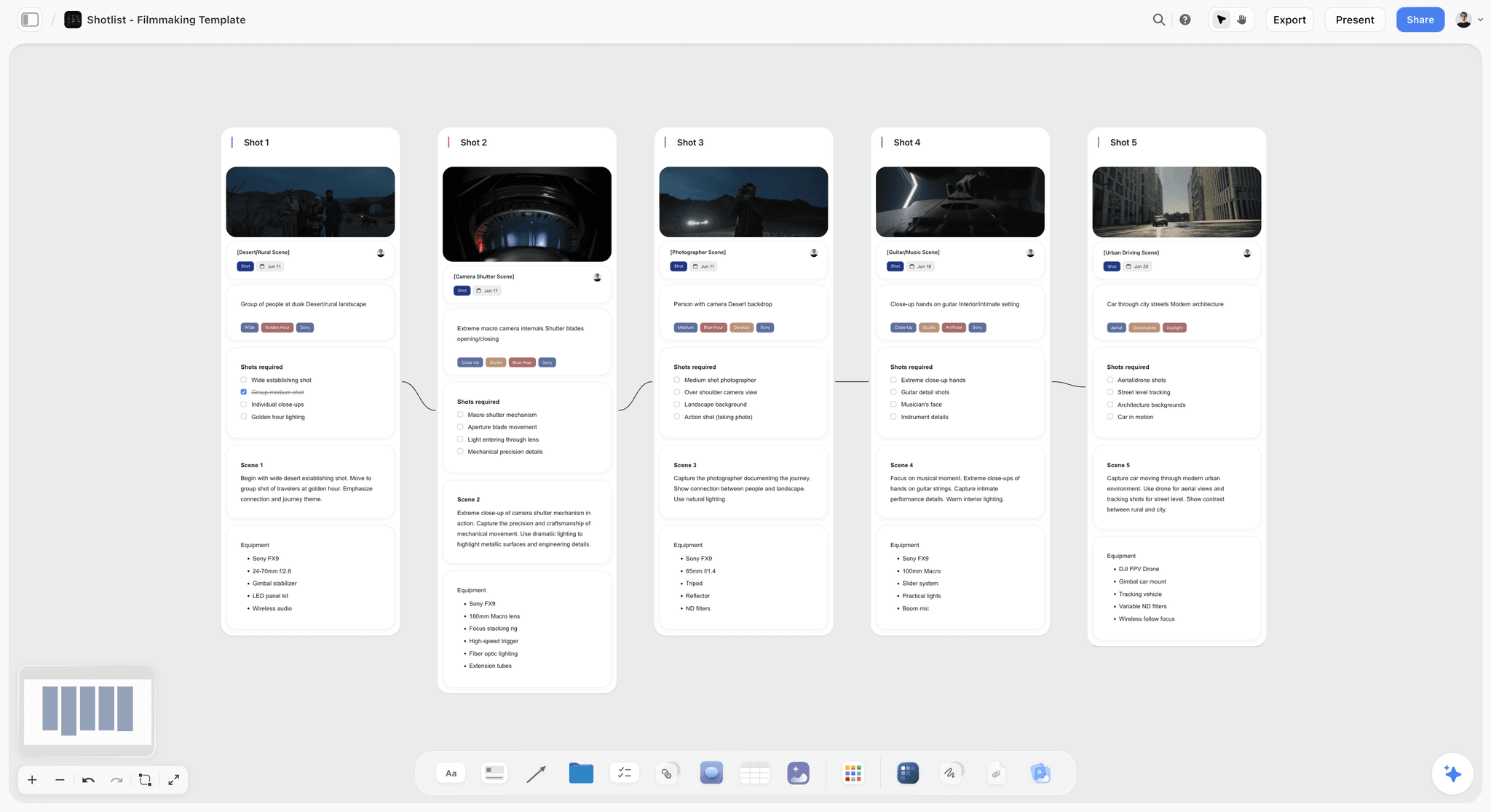
Storyflow holds the photography moodboard on a canvas alongside the shot list, call sheet, and shoot schedule. The AI reads the full canvas, so you can ask it to draft caption notes that lock a reference, or check whether the lighting references and the color references actually agree. For the locking job, this matters: the moodboard stops being a separate file and becomes part of the shoot plan the whole team works from. The fastest start is the Commercial Moodboard template, which opens with reference zones for each lock; pair it with the Shotlist Template so the locking board and the coverage plan share one canvas.
Best for: Photographers who want the moodboard connected to the rest of the shoot plan, not isolated in its own app.
Verdict: The strongest AI canvas for locking and communicating decisions. For raw reference-image volume, a discovery tool like Pinterest or PureRef beats it.
Key features
- Canvas where the moodboard sits next to shot list, call sheet, and schedule.
- AI reads the full canvas plus up to 5 documents and 3 boards you attach.
- Moodboard and pre-production templates.
- Anyone a paid member invites to a board joins free.
- Image, video, and note cards on one infinite board.
Pricing
Early access: every plan is paid for now. A free plan arrives before the end of 2026, and anyone a paid member invites to a board can sign up free and collaborate on it today. Plus: $7.99/mo annual. Unlimited uploads. Pro: $14/mo annual. AI image generation, 30x AI usage. Max: $39/mo annual. 60x more AI, team workspace with roles.
Pros
- The moodboard lives next to the shot list and call sheet, not in a separate file.
- AI reads the whole canvas and can check whether the five locks agree.
- Unlimited collaboration for a small shoot team, with invited collaborators joining free.
Cons
- Not a reference-image engine; Pinterest and PureRef handle bulk discovery better.
- Cloud-only, with no offline reference canvas for shoot day.
- Newer platform with a smaller template library than Milanote.
2. Milanote
Milanote is the moodboard tool most photographers already reach for. Its freeform canvas is built for visual creative work: drag in reference frames, color swatches, location scouting photos, and notes, then arrange them by lock. It handles all five locks well, and its photography-specific guides have made it close to a default for shoot planning.
Best for: Photographers who want a dedicated, polished moodboard canvas with strong notes.
Verdict: The strongest dedicated photography moodboard tool in 2026. The natural pick when the moodboard is a standalone client deliverable.
Key features
- Freeform canvas built for images, notes, and color swatches.
- Web clipper for fast reference capture.
- Templates for photography moodboards and shoot planning.
- Shareable boards with comments for client and crew feedback.
- Column structure for organizing references by lock.
Pricing
Free with 100 cards. Individual: $9.99/mo. Team: $49/mo flat for up to 50 users.
Pros
- Purpose-built for visual creative work.
- The 100-card free tier covers a small shoot board.
- Photography templates speed up setup.
Cons
- The 100-card free limit fills fast during reference gathering.
- AI features are light compared to canvas-AI tools.
- The moodboard sits separate from the shot list and call sheet.
3. Pinterest
Pinterest is the free discovery tool nearly every photographer uses. Its recommendation feed surfaces visually similar images, which makes it strong for the early reference gathering that feeds the lighting, location, and styling locks. It is a discovery tool only: no annotation, no decision structure, and the feed pulls attention sideways.
Best for: Free, broad reference discovery in the early planning stage.
Verdict: A capable free discovery tool. Move references into a locking tool before the board goes to the client or crew.
Key features
- Visual recommendation feed.
- Boards and sections for organizing pins.
- Free, no barrier to browse.
- Browser extension for saving images.
Pricing
Free. No paid tier needed for moodboard use.
Pros
- Free and familiar.
- The feed surfaces references you would not have searched for.
- Fast to start a board.
Cons
- No annotation; cannot lock a decision.
- The feed is a distraction engine.
- Image sourcing and licensing are unclear.
4. PureRef
PureRef is the always-on-top reference canvas that photographers and retouchers keep open on a second screen. Drag frames in, arrange them, zoom and color-pick. On shoot day it is the tool you glance at between frames to check the pose and the light against the reference. It locks nothing on its own, but it makes the locked references instantly available while shooting.
Best for: Shoot day, when you need locked references visible beside the camera tether.
Verdict: The best lightweight reference canvas for the shoot itself. Costs almost nothing.
Key features
- Always-on-top reference canvas.
- Fast image import and arrangement.
- Zoom, crop, and color-pick from references.
- Tiny, fast desktop app.
Pricing
Pay-what-you-want with a $6 minimum, one-time. Free updates.
Pros
- Effectively free, one-time payment.
- Extremely fast and lightweight.
- Ideal as a shoot-day reference screen.
Cons
- No annotation, so it cannot lock decisions on its own.
- No collaboration or client sharing.
- Desktop-only, no cloud sync.
5. Canva
Canva treats the moodboard as a design layout. Its templates produce clean, presentation-ready boards, and its generative AI can fill gaps. For the client-facing version of a photography moodboard, the one that has to look polished in a pitch, Canva is fast and accessible.
Best for: Photographers who want a polished, client-ready moodboard from templates.
Verdict: Strong for the client-facing board. Weaker for the messy reference-gathering stage.
Key features
- Template-based moodboard layouts.
- Generative AI image tools.
- Large stock image and element library.
- Easy export to PDF or presentation.
Pricing
Free tier. Pro: roughly $15/mo or $120/year.
Pros
- Produces polished, client-ready boards fast.
- Huge asset library.
- Easy for non-designers.
Cons
- Template structure fights freeform reference gathering.
- Stock-image feel can dilute a specific photographic vision.
- Not built for shoot-planning workflows.
6. Cosmos
Cosmos is a curated visual discovery platform that has grown popular with photographers and art directors. Its feed favors high-quality, well-tagged imagery over Pinterest's broad mix, which makes it a stronger source for serious lighting and styling references.
Best for: Photographers who want higher-quality curated references than a general feed.
Verdict: A strong discovery tool for the reference stage. Pair with a locking tool for the actual board.
Key features
- Curated visual feed with strong tagging.
- Collections for organizing saved images.
- Cleaner signal-to-noise than general feeds.
- Web and mobile.
Pricing
Free to use, with paid tiers for heavier use.
Pros
- Higher reference quality than a general feed.
- Calmer, more deliberate than Pinterest.
- Growing creative community.
Cons
- Discovery-only; no annotation or locking.
- Smaller image pool than Pinterest.
- Newer, with a thinner feature set.
7. Are.na
Are.na is a quiet, ad-free visual research tool favored by artists and photographers who want deliberate reference collecting without an algorithmic feed. It organizes images into channels, which suits research-heavy projects like a documentary photo essay.
Best for: Photographers who want distraction-free, deliberate visual research.
Verdict: The thoughtful discovery tool. Pair with a locking tool for the shoot board.
Key features
- Channels for organizing images and links.
- No algorithmic feed or ads.
- Connect a block to multiple channels.
- Clean, minimal interface.
Pricing
Free with limits. Premium: roughly $7/mo (lower annually).
Pros
- No attention-stealing feed.
- Deliberate research environment.
- Strong creative community.
Cons
- No annotation or locking features.
- Smaller image pool than Pinterest.
- Discovery-only.
8. Adobe Express
Adobe Express builds moodboards inside the Adobe ecosystem, which suits photographers already living in Lightroom and Photoshop. It offers templates, generative AI, and easy handoff to other Adobe tools, though it is a general design tool rather than a photography-specific one.
Best for: Photographers already working across Adobe's Creative Cloud.
Verdict: A reasonable option if Adobe is already your hub. No reason to adopt it for moodboards alone.
Key features
- Template-based moodboard layouts.
- Firefly generative AI.
- Integration with Lightroom and Photoshop.
- Stock library access.
Pricing
Free tier. Premium: roughly $10/mo, or bundled with Creative Cloud.
Pros
- Keeps the moodboard near the editing workflow.
- Strong generative AI.
- Familiar to Adobe users.
Cons
- General design tool, not photography-specific.
- Best value only if you already pay for Creative Cloud.
- Weaker for freeform reference sprawl.
9. Eagle
Eagle is a local image-library manager. It organizes thousands of reference images on your own machine with auto-tagging and color search. For photographers who reuse references across shoots, it is the archive that feeds the lighting and color locks.
Best for: Photographers building a large, reusable, local reference archive.
Verdict: The best local reference library. An archive, not a moodboard canvas.
Key features
- Local image library with auto-tagging.
- Color and content search.
- Folders, tags, and smart filters.
- One-time purchase, offline.
Pricing
$29.95 one-time, includes future updates.
Pros
- One-time cost, no subscription.
- Handles tens of thousands of references smoothly.
- Works offline, full file ownership.
Cons
- Library manager, not a moodboard canvas.
- No collaboration or client sharing.
- Setup time before it pays off.
10. Miro
Miro is the collaborative whiteboard a shoot team can already access. For photography moodboards, its strength is real-time collaboration: photographer, stylist, and client all on one board, leaving comments on each reference. It can lock all five decisions, but it lacks the visual polish of a dedicated moodboard tool.
Best for: Shoot teams that want every crew member contributing to one shared board.
Verdict: The strongest collaboration option. Pick it when crew input matters more than visual polish.
Key features
- Infinite collaborative canvas with real-time editing.
- Comment threads on any reference.
- Image upload and web capture.
- Templates for moodboards and briefs.
Pricing
Free for 3 boards. Starter: $8/mo annual. Business: $16/mo.
Pros
- Best-in-class real-time crew collaboration.
- Comments make stylist and client feedback easy to track.
- Generous if the team already uses Miro.
Cons
- The 3-board free limit is tight across shoots.
- Less visually refined than Milanote for a client board.
- Built for business teams, not photography.
11. Notion
Notion can hold a photography moodboard as a gallery database: references as cards, tagged by lock. It works for photographers already running their business in Notion who want references in the same workspace. As a visual moodboard surface, the database structure fights freeform reference work.
Best for: Photographers already running their business in Notion.
Verdict: Workable as a reference database. A weak fit as a visual moodboard canvas.
Key features
- Gallery databases for tagged reference images.
- Pages for shoot notes and briefs.
- Standard AI features.
- Integration with the rest of a Notion workspace.
Pricing
Free for personal use. Plus: $10/mo. Business: $18/mo.
Pros
- Keeps references with the rest of a Notion business setup.
- Strong tagging and filtering.
- Familiar to Notion users.
Cons
- Database structure fights freeform moodboarding.
- Not a visual-first canvas.
- Slow for fast reference capture.
12. GoMoodboard
GoMoodboard is a fast, simple single-page moodboard tool. Drag images onto a board, arrange them, share a link. It is the quickest way to make a basic moodboard, with no learning curve and no clutter.
Best for: Photographers who want a fast, no-frills moodboard with zero setup.
Verdict: Fine for a quick board. Outgrown the moment the shoot needs real planning.
Key features
- Single-page drag-and-drop moodboard.
- Shareable links.
- Minimal interface.
Pricing
Free tier. Paid plans from roughly $8/mo.
Pros
- Fastest path to a basic moodboard.
- No learning curve.
- Shareable links out of the box.
Cons
- No annotation depth for locking decisions.
- No reference discovery.
- Too thin for full shoot planning.
How to Build a Photography Moodboard That a Crew Can Shoot From
A moodboard that only communicates a feeling is a half-finished document. The ones that survive contact with a shoot day carry four things, and most of what separates a professional board from a Pinterest collection is the last two.
- The look. Reference frames showing colour, contrast and grade. Fifteen to twenty images is usually the ceiling before the direction blurs rather than sharpens.
- The light. How each reference was lit, said plainly: hard key from camera left, big soft source overhead, available window. A board without lighting notes hands the whole problem to whoever is holding the light.
- The frame. Lens length and distance, or at least wide, medium, close. This is what stops a board of beautiful 85mm portraits from being handed to someone shooting on a 24mm in a small room.
- The exclusions. One or two images labelled as what you are not doing. This does more work than any other section, because it settles disagreements before the shoot instead of during it.
The single most useful habit: caption every image with what you are taking from it. "This one for the colour, not the pose" removes an entire class of misunderstanding, and it is the reason a captioned board of eight images beats an uncaptioned board of forty.
Build order that works: collect wide in Pinterest or Are.na without judging, cut to twenty in a canvas, group into look, light and frame, caption each, then add the exclusions last. Cutting is the step people skip, and an uncut board is the most common reason a shoot produces images that match nothing in particular.
Moodboards by Photography Genre
The tool matters less than the genre, because each genre puts weight on a different part of the board.
- Portrait. Light and expression dominate. Lighting diagrams earn their place here more than anywhere else, and Morpholio Board and Milanote both handle annotated reference well.
- Wedding. The board is as much for the client as the crew, so it has to look finished. Canva or a Pinterest board shared directly, with a private working board behind it.
- Fashion and editorial. Styling, hair and makeup each need their own section, and the board usually travels to several people who will each read only their part. Milanote's column structure suits this, and this is the genre where an uncaptioned board fails fastest.
- Product and still life. Set construction, surface and reflection control. Reference here is closer to a technical diagram than a mood, and PureRef sitting above your other windows is often the honest answer.
- Documentary and reportage. You cannot direct the subject, so the board is about tone and framing rather than staging, and it should be short. A twenty-image board for a reportage shoot is usually the photographer avoiding the harder question of what the story is.
Across every genre the same failure recurs: the board is made, admired, and never opened again on the day. That is a workflow problem rather than a tool problem, and it is what the Five Locks section is about.
7) Recommended Photographer Stacks
Stack 1: Solo Portrait or Lifestyle Photographer. Pinterest or Cosmos (discovery) + Storyflow (locking board next to the shot list, $7.99/mo billed annually) + PureRef (shoot-day reference screen). About $8 a month, and it covers all five locks.
Stack 2: Commercial / Editorial Shoot. Are.na or Cosmos (curated discovery) + Milanote or Storyflow (client-facing locking board; for editorial and wardrobe-heavy work the Fashion Moodboard template starts with the styling lock structured) + Miro (crew comments). The client signs off on the locking board; Miro is where the crew reacts.
Stack 3: Product Photography. Eagle (reusable reference archive) + Canva or Storyflow (polished client board) + PureRef (shoot-day screen).
Stack 4: Cheapest Working Stack. Pinterest Free (discovery) + Storyflow (locking board, $7.99/mo billed annually).
The pattern across every stack: one discovery tool to gather references, one locking tool to decide and communicate the five locks, and PureRef on the second screen for shoot day. The photographers whose shoots run clean are the ones who built all three.
8) Honorable Mentions
- Behance. Adobe's portfolio network, useful for browsing professional photography references.
- Unsplash. Free high-resolution images, useful as reference fuel for the discovery stage.
- Format and Pic-Time. Photographer portfolio and gallery tools, not moodboards, but adjacent to the workflow.
- Niice. A moodboard tool aimed at design teams that also suits photography.
- Google Slides. A free fallback for a simple shared moodboard.
- Google Mixboard. A free Google Labs experiment that generates an editable moodboard from a text prompt and refines it in plain language, which is useful at the concept stage before a shoot has references. It is a US-only public beta at labs.google.com/mixboard and Labs experiments can be withdrawn, so generate a direction there and keep the locked board somewhere permanent. Generated frames are also references, not licensed deliverables.
8b) Also Tested: Morpholio Board
Morpholio Board is an iPad-first moodboard app built for interior design, and photographers borrow it for the same reason designers use it: it is the best tool here for building a board with a stylus rather than a mouse. Subscription pricing through the App Store; verify current tiers there.
Where it wins for photographers. Location and set boards. It cuts objects out of photographs cleanly, holds them against a palette, and pulls colour schemes straight from an image, which is the exact job when you are planning a styled shoot and deciding what actually goes in frame.
Where it loses. It is an iPad app first and a collaboration tool a distant second. Sending a board to a client or a crew is an export, not a link, and there is no useful desktop experience. It also assumes an interior-design vocabulary in places, so a portrait photographer will ignore a good part of the interface.
The honest verdict. Worth it if you already plan on an iPad with a Pencil. Not worth switching to if you do not.
9) Tools to Avoid for Photography Moodboards
- A raw Pinterest board sent to a client. Discovery material is not a brief. Lock the decisions and annotate them first.
- Your phone camera roll. A folder of saved screenshots with no structure locks nothing.
- Generic slide decks for reference gathering. Slides cannot hold the freeform sprawl of the discovery stage.
- Pure AI image generators as the whole board. Generated frames are useful as references, but a board built entirely from them gives the model and stylist nothing real to match.
11) The Bottom Line
The best photography moodboard tools in 2026 are the ones that lock decisions, not just collect images. Storyflow is the best overall, the AI canvas that keeps the moodboard next to the shot list and call sheet so the look survives into the shoot. Milanote is the strongest dedicated moodboard canvas. Pinterest and Cosmos are the best free discovery tools. PureRef is the best shoot-day reference screen.
A photography moodboard is the shoot decided before the shoot. Build a discovery collection to gather references, then build a tight, annotated board that locks lighting, location, styling, posing, and color. The photographers whose shoots run clean are the ones who walked onto set with all five locked.
For your next shoot, generate a shot list with AI to anchor the plan, then build the locking board in a Storyflow canvas so the moodboard sits beside the shot list and call sheet the whole team works from.
10) FAQ: Photography Moodboard Tools
How do I create a photoshoot moodboard?
Start from the shoot's one-line concept, then gather references that define four things: lighting, color, composition, and styling. Arrange them on a visual board rather than in a folder so the look reads at a glance, group them by those four qualities, and add a short note on each image saying what to borrow from it. Keep it to the strongest 15 to 25 references so the direction stays clear, and build it next to the shot list so each reference sits beside the shot it informs. Milanote and Storyflow both do this well, and Storyflow's AI can pull a starter board from your written concept, so you begin editing references instead of facing a blank canvas.
What is the best photography moodboard tool in 2026?
Storyflow is the best photography moodboard tool when the moodboard has to run the shoot, because the board sits on the same AI-readable canvas as the shot list and call sheet, so the look you locked is the one on set, and anyone a paid member invites to a board joins free. Milanote is the strongest choice for a dedicated, purely visual moodboard canvas. Pinterest is the best free discovery tool. Most photographers use one discovery tool and one locking tool.
What should a photography moodboard include?
A photography moodboard should lock five decisions: lighting, location, styling, posing and expression, and color. Each reference on the board should be captioned to say which decision it locks and what to copy. A board that has not actually decided those five has not done its job.
Is Milanote good for photography moodboards?
Yes. Milanote is built for visual creative work and is widely used by photographers for moodboards and shoot planning. Its main limit is the 100-card free tier, which fills quickly during reference gathering.
Can I use Pinterest as a photography moodboard?
Pinterest works for the discovery stage, where you gather references broadly. It fails as a final moodboard because it has no annotation, so it cannot lock a decision. Move references into a locking tool before the board goes to a client or crew.
How many images should a photography moodboard have?
The discovery collection can run to hundreds. The final moodboard you shoot from should be tight, often 10 to 20 references, each captioned to lock a specific decision. A board with 200 unsorted images locks nothing.
What is the cheapest photography moodboard setup?
Pinterest is free for discovery, Storyflow covers the locking board next to the shot list from $7.99/mo billed annually with invited collaborators free, and PureRef costs $6 once for a shoot-day reference screen. A complete working setup lands under fifteen dollars.
How do I share a photography moodboard with a client?
Use a tool with sharing and comments: Milanote, Storyflow, and Miro all support shared boards a client can view and comment on without heavy setup. Export to PDF for clients who will not log in. Share the locked, annotated board, not the raw discovery collection.
What do professional photographers use for moodboards?
Most professionals pair a discovery tool with a locking tool. Pinterest, Cosmos, or Are.na for gathering references, and Milanote or Storyflow for the annotated board that goes to the client and crew. PureRef is common as a shoot-day reference screen.
Can AI build a photography moodboard?
AI can generate reference images and help caption a board, but it cannot decide what your shoot should look like. The strongest use is AI assisting the locking board: drafting caption notes and checking that the lighting and color references agree, as Storyflow's canvas AI does.
What is the difference between a photography moodboard and a shot list?
A moodboard locks the look: lighting, location, styling, posing, and color. A shot list locks the coverage: which specific shots you need to capture. They are paired documents. Storyflow keeps them on one canvas; most tools keep them separate.
Is Milanote or Canva better for photography moodboards?
Milanote is better for the working moodboard, with freeform layout and strong notes for locking decisions. Canva is better for the polished, client-facing version built from templates. A common workflow is to build in Milanote or Storyflow, then present the polished version in Canva.
How do I make a moodboard for a portrait shoot?
Gather references for each of the five locks, then build a tight board where each reference is captioned: this exact light, this wardrobe direction, copy this pose, this color grade. Share it with the model and stylist before the shoot so everyone arrives reading the same board.
How do you make a photography moodboard?
Collect references widely without judging, cut to about twenty images, then group them by look, light and frame and caption each one with what you are taking from it. Add one or two images labelled as what you are not doing, which settles more disagreements than any other part of the board. An uncut, uncaptioned board of forty images communicates less than a captioned board of eight.
What should a photography moodboard include beyond the images?
Lighting notes, framing or lens intent, and explicit exclusions. Without lighting notes the board hands the entire lighting problem to whoever is holding the light, and without framing intent a board of 85mm portraits can end up shot on a 24mm in a small room. Exclusions are the most useful and most often omitted element.
Does the best moodboard tool change by photography genre?
The emphasis changes more than the tool. Portrait and product work benefit from annotated, diagram-like reference; fashion and editorial need separate styling, hair and makeup sections because the board travels to several people; wedding boards are partly client-facing and need to look finished. Documentary boards should be short, because a long one usually means the story has not been decided.
What is the difference between a photo mood editor and a moodboard tool?
A photo mood editor changes how an individual image looks, applying a grade, preset or filter, which is Lightroom's territory. A moodboard tool arranges many images together to establish a direction before anything is shot. People searching for one often want the other, and the tools in this list are all in the second category.
Table of Contents
- Quick Answer: The Best Photography Moodboard Tools in 2026
- Comparison Table: 12 Photography Moodboard Tools at a Glance
- Frequently Asked: Which Photography Moodboard Tools Photographers Trust, and What They Cost
- What Photography Moodboard Tools Cost Per Year
- The Five Locks
- How We Evaluated These Tools
- Quick Picks by Photography Moodboard Need
- Detailed Reviews: 12 Photography Moodboard Tools
- How to Build a Photography Moodboard That a Crew Can Shoot From
- Moodboards by Photography Genre
- Recommended Photographer Stacks
- Honorable Mentions
- Tools to Avoid for Photography Moodboards
- FAQ: Photography Moodboard Tools
- The Bottom Line
- Author
- Related Reading
Templates to check out for this topic


Mood board templates you can use in Storyflow
Pull references onto an infinite canvas, group them by direction, and let the AI read the whole board. Open any of these mood board templates and start dropping in images.


See Storyflow in Action
A visual AI workspace where every feature lives inside one canvas. No tab-switching, no context lost.
Build your entire board from a single message
Type what you need in the AI chat at the bottom of your canvas. The AI adds cards, headings, and structure directly onto your board.
Use expert frameworks as AI context
Type @ in the AI chat and choose any Tactic. The AI tailors every response to that framework instead of giving generic advice.
Turn your board into a mind map in seconds
Ask the AI to restructure your canvas as a mindmap. It connects your ideas into a visual hierarchy so you can see how everything relates.
Why Storyflow Exists
Storyflow actually began as a personal tool while working on creative and research projects.
We kept running into the same problem: ideas were scattered everywhere: notes, documents, and whiteboards.
Nothing helped us see how everything connected.
So we started building a workspace designed around how ideas actually grow.
→ Read how Storyflow was createdJustkay
Documentary Filmmaker & Founder at Storyflow
Published: 2026-05-17
Extremely simple, seriously capable


See how easy it is to get started
Watch a real project come together, from a blank board to a finished plan, clicked through step by step.
Start creating with AI and become more productive
Transform your creative workflow with AI-powered tools. Generate ideas, create content, and boost your productivity in minutes instead of hours.