
How to Turn a Brief Into a Moodboard With AI (2026)
AI moodboarding is two tools wearing one name. Finding references that exist and generating ones that do not carry opposite risks. And the step that decides everything happens before you open either.

Category
Moodboards
Author

Justkay
Documentary Filmmaker & Founder at Storyflow
Topics
2026-08-26
•
15 min read
•
Moodboards- best ai moodboard generator
- turn a brief into a moodboard
- ai moodboard from text
- generate moodboard with ai
- creative brief to visual references
- midjourney moodboard
How do you turn a creative brief into a moodboard with AI?
AI moodboarding is two tools wearing one name. Finding references that exist and generating ones that do not carry opposite risks. And the step that decides everything happens before you open either.
Key Takeaways
- AI moodboarding is two different tools wearing one name. Finding references that exist and generating references that do not are separate jobs with opposite risks.
- Generation is the one everybody reaches for and the one with the trap: a generated frame is a direction, not a promise, and showing a client something your budget cannot produce creates a problem at the review rather than solving one at the start.
- The step that actually determines the board is the one before any tool: extracting the visual adjectives from the brief and converting them into things you can look for.
- "Premium" is not searchable. "Deep shadow, single source, no fill, matte surfaces" is. Translating the first into the second is the work, and no model does it for you because it depends on your judgment about the client.
- Label every reference with what you are taking from it. Generated or found, an unlabelled image is decoration.
Two Tools, One Name
Before any of this is useful it is worth separating what "AI moodboard generator" actually refers to, because two very different products share the phrase.
Finding. A model helps you locate references that already exist: search that understands "warm domestic interiors shot on film in the late seventies" better than a keyword box does, visual similarity search, or clustering a pile of images you already collected. Low risk, because everything it surfaces is a real photograph somebody actually made.
Generating. A model produces images that have never existed: a set build, a colour treatment, a styling direction, a room that is not anywhere. High value when the look is genuinely unphotographed, and high risk for a reason that is easy to miss.
A generated frame is a direction, not a promise. It has no location, no budget, no daylight, and no physics constraint. Show a client a beautiful generated interior with light doing something no window does, get approval on it, and you have created an expectation that your actual shoot will fail to meet. That is not an AI problem, it is a moodboard problem that AI makes much easier to fall into, because generated images look finished in a way a scrapbook of references never does.
The practical rule: generate to explore, find to promise. Anything the client is approving should be anchored to at least one real photograph that proves the look is achievable.
Step 1: Extract the Visual Adjectives
This is the step that determines everything and it happens before you open any tool.
A brief arrives in business language: "premium but approachable," "modern," "authentic," "energetic but not chaotic," "like our competitor but warmer." None of those are searchable and none of those are generatable, because they are judgments rather than descriptions.
The work is converting each one into things that can be looked at. Take the adjective and ask: if this were true of an image, what would be physically present in it?
- Premium becomes: deep shadow, single light source, no fill, matte surfaces, generous empty space, restrained palette, one focal point.
- Approachable becomes: soft daylight, mid-tones, people mid-motion rather than posed, slight imperfection, warm neutrals.
- Authentic becomes: available light, visible grain, imperfect framing, hands doing real things, no eye contact with camera.
- Energetic becomes: motion blur, high contrast, tight crops, diagonal composition, saturated accents.
- Modern becomes: almost nothing, and this is the useful discovery. It is the emptiest word in briefing and it needs a follow-up question rather than a translation.
Do this for every adjective in the brief. It takes ten minutes and it produces two things: a list of searchable, generatable qualities, and a list of the adjectives you could not translate, which are exactly the ones you should ask the client about before spending a day on the board.
That second list is the highest-value output of the whole exercise, and no model produces it for you, because translating a client's language into physical qualities depends on knowing that client.
Step 2: Find Before You Generate
Search first, always, and for a specific reason beyond cost: a real photograph is proof.
If you can find an image where somebody actually achieved the look, you know it is achievable, you can often work out how, and the client is approving something real. Generated frames give you none of that.
Search with the translated qualities rather than the brief's adjectives. "Deep shadow single source matte product" returns something useful; "premium product photography" returns stock.
Sources worth using in order: photographers' portfolios, film stills, which are lit by people with more time and money than you will ever have, archive and editorial photography, and your own back catalogue, particularly the rejected frames.
AI helps here in two ways that are genuinely useful. Semantic search understands a described quality better than keywords. And once you have forty images, a model that can read the whole set can tell you what they actually have in common, which is frequently not what you thought you were collecting.
Step 3: Generate Only the Gaps
After searching, some qualities will have no reference. That is what generation is for.
Common genuine gaps: a set build that does not exist yet, a colour treatment nobody has photographed, a product in a context it has never been in, an unusual combination of two looks.
Prompt with the physical qualities, not the adjectives. "Premium skincare moodboard" produces the median of the internet. "Single hard source from camera-left, deep falloff, matte ceramic surface, warm grey backdrop, no fill, generous negative space" produces something specific enough to be useful, and it is your translation work paying off.
Generate variations of one quality at a time. Changing five things per prompt tells you nothing about which change mattered.
Mark generated frames as generated, on the board. Not as a disclaimer, as information. Anybody looking at the board needs to know which images are evidence and which are proposals.
Storyflow's Pro and Max tiers include image generation on the canvas, which is convenient because the generated frame lands next to the found references rather than in a separate app. It is paid-only during early access from $7.99 a month annual, with the Free plan landing before the end of 2026. Midjourney remains the strongest for aesthetic quality if you want a dedicated generator, and the workflow below matters more than which one you use.
Step 4: Cut to Twelve and Label Everything
The board is now too big, because searching and generating are both cheap.
Cut to about twelve images. Twelve reads as a direction. Forty reads as a browse, and a client shown forty will comment on individual images rather than on the direction, which is the wrong feedback.
Label every survivor with what you are taking from it. Six words. "The falloff, not the product." "That specific grey." "Posture only, ignore the styling."
This is the highest-value ten minutes in the whole process and it does two jobs. It makes the board actionable for whoever receives it, since the most common misunderstanding on any shoot is somebody copying the wrong thing about a reference. And it exposes the images with no answer, which are the ones you kept because you liked them, and they should go.
Mark the requirements. Which frames are the direction and which are texture. If the board does not visibly separate them, everything gets treated as equally binding, which is how a client fixates on a background detail.
Step 5: Present With the Translation Visible
Show the client the adjective-to-quality translation alongside the board. "You said premium; we read that as deep shadow, single source, restrained palette. Here is what that looks like."
This is a small thing that changes the conversation completely. Without it, the board is being judged on taste, and taste arguments cannot be won. With it, the board is being judged against the brief, which is a conversation where you have evidence.
It also surfaces misreadings at the cheapest possible moment. If they meant something else by premium, you find out in the first meeting rather than at the shoot.
Where AI Helps and Where It Does Not
| Task | Does AI help | Notes |
|---|---|---|
Translating brief adjectives into visual qualities | Barely | Depends on knowing the client; this stays yours |
Searching for references that exist | Yes | Semantic search beats keywords for described qualities |
Finding what a set of references has in common | Yes | Comparison across a whole board, slow by hand |
Spotting duplicate references | Yes | Forty images are usually eleven ideas |
Generating an unphotographed look | Yes | The strongest genuine use |
Producing a specific composition | Poorly | Prompting precision is slower than finding or drawing |
Deciding which twelve survive | No | A judgment about your project |
Writing what you are taking from each reference | No | Only you know, because it is a decision not a fact |
Knowing what your budget can produce | No | And this is where generated boards cause damage |
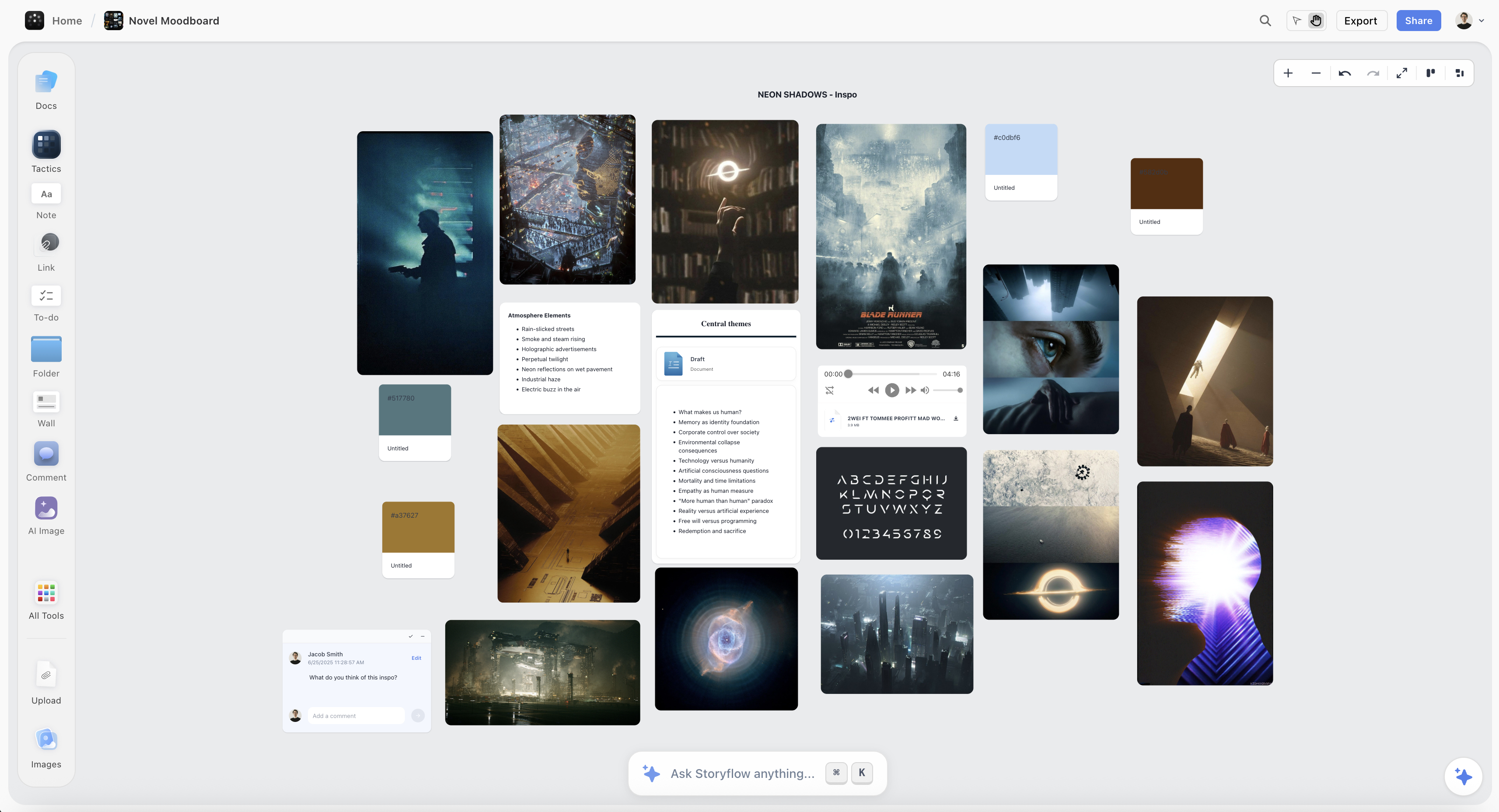
Found references and generated frames side by side on a Storyflow canvas, each labelled with what is being taken from it
Generate to explore, find to promise
A generated frame has no location, budget or daylight behind it, so anything a client approves should be anchored to a real photograph. Storyflow generates onto the same canvas as your found references on Pro and Max, and its AI reads the whole board so you can ask what these forty images have in common. Paid-only during early access.

What Goes Wrong
Generating before searching. You skip the proof that the look is achievable, and you skip the reference that would have shown you how it was lit.
Prompting the brief's adjectives. "Premium and modern" returns the median of everything, which is exactly the direction you were hired to avoid.
A board of forty generated frames. It looks impressive and it is unmoored: no evidence, no achievability, and a client approving a fiction.
Not marking which frames are generated. The board loses the distinction between evidence and proposal, which is the most important distinction on it.
No labels. Every unlabelled reference is a question somebody will answer wrongly on the shoot day.
Approving a generated frame as the target. The single most expensive mistake here. Anchor anything binding to a real photograph.
Skipping the translation step. The board becomes a taste argument, and the adjectives you could not translate stay unasked, which is where the real misunderstanding lives.
The Bottom Line
The phrase "AI moodboard generator" hides a decision you should make deliberately, because finding and generating carry opposite risks.
Generation is what everybody reaches for, and it is genuinely the right tool when the look does not exist photographed: a set build, a colour treatment, a combination nobody has tried. It is the wrong tool for anything a client is approving, because a generated frame has no budget, no location, and no daylight behind it, and it looks finished in a way that invites agreement.
But the step that decides whether any of it works happens before you open a tool. The brief arrives as adjectives, and adjectives are not searchable or generatable. Turning "premium" into "deep shadow, single source, no fill, matte surfaces" is the work, it takes ten minutes, and it produces the two lists that matter: qualities you can go and look for, and the words you could not translate, which are the questions you should have asked the client.
Then find first, because a real photograph is proof. Generate only the gaps. Cut to twelve. And write six words next to every survivor saying what you are taking from it, because an unlabelled reference is decoration whether a person found it or a model made it.
FAQ: Turning a Brief Into a Moodboard With AI
How do you turn a brief into a moodboard with AI?
Translate the brief's adjectives into physical visual qualities first, because "premium" is not searchable and "deep shadow, single source, matte surfaces" is. Search for real references using those qualities, generate only the gaps where nothing exists photographed, cut to about twelve images, and label each one with what you are taking from it. The translation step happens before any tool and determines everything after it.
What is the best AI moodboard generator?
It depends which job you mean, because finding and generating are different. For generating unphotographed looks, Midjourney remains strongest on aesthetic quality. For generation that lands on the board next to your found references, Storyflow's Pro and Max tiers do it on the canvas, and it is paid-only during early access. For finding and clustering references that already exist, semantic search and a canvas that can read the whole board matter more than the generator.
Should you use AI-generated images in a client moodboard?
Yes for exploring a direction, and carefully for anything the client is approving. A generated frame has no location, budget, or daylight behind it, so approval on one creates an expectation your shoot may not meet. Anchor anything binding to at least one real photograph, and mark generated frames as generated on the board so the difference between evidence and proposal is visible.
How do you translate a creative brief into visual references?
Take each adjective and ask what would physically be present in an image if it were true. Premium becomes deep shadow, single source, no fill, matte surfaces, restrained palette. Authentic becomes available light, visible grain, imperfect framing, hands doing real things. The adjectives you cannot translate are the ones to ask the client about before spending a day on the board.
Why do AI moodboards look generic?
Because they were prompted with the brief's adjectives rather than with physical qualities. A model asked for "modern and premium" produces the average of everything written about that, which is the direction you were hired to escape. Prompting with specific lighting, surface, and composition qualities produces something usable, and doing that translation is the actual work.
How many images should an AI moodboard have?
About twelve. Twelve reads as a direction; forty reads as a browse, and a client shown forty comments on individual images rather than on the direction. Generation makes it very easy to produce far more than that, which makes the cutting step more important rather than less.
Can AI find references instead of generating them?
Yes, and it is the lower-risk half. Semantic search understands a described quality better than a keyword box, and a model that can read a whole board can tell you what forty images have in common and which of them are duplicates, which is comparison work that is slow by hand and is where most boards are actually failing.
What should you write next to each moodboard image?
Six words saying what you are taking from it: "the falloff, not the product," "that specific grey," "posture only, ignore the styling." It prevents the most common shoot-day misunderstanding, which is somebody copying the wrong thing about a reference, and it exposes the images you kept because you liked them rather than because they serve the job.
Is Storyflow good for AI moodboards?
For keeping generation and found references on the same board, yes: its Pro and Max tiers generate images onto the canvas, and the AI reads the whole board so you can ask what these references have in common and which are duplicates. It has no discovery engine, so finding real references still happens in Pinterest or a search tool, and it is paid-only during early access from $7.99/month annual.
How do you present an AI-assisted moodboard to a client?
Show the translation alongside the board: "you said premium, we read that as deep shadow and a restrained palette, here is what that looks like." It moves the conversation from taste, which cannot be argued, to the brief, which can. And mark which frames are generated, because a client should know which images are evidence and which are proposals.
Can AI replace a moodboard entirely?
No, because a moodboard's output is a decision and generation is the opposite of deciding: it makes producing more options nearly free. The bottleneck was never getting images. It was working out which twelve say the thing and what you are taking from each of them, and both of those are judgments about your specific project.
What is the difference between finding and generating references?
Finding surfaces images somebody actually made, which proves the look is achievable and often shows how it was done. Generating produces images that have never existed, which is valuable when the look is genuinely unphotographed and risky when it becomes the thing a client approves. Generate to explore, find to promise.
Table of Contents
- Key Takeaways
- Two Tools, One Name
- Step 1: Extract the Visual Adjectives
- Step 2: Find Before You Generate
- Step 3: Generate Only the Gaps
- Step 4: Cut to Twelve and Label Everything
- Step 5: Present With the Translation Visible
- Where AI Helps and Where It Does Not
- What Goes Wrong
- The Bottom Line
- FAQ: Turning a Brief Into a Moodboard With AI
- Related Reading
Templates to check out for this topic


Mood board templates you can use in Storyflow
Pull references onto an infinite canvas, group them by direction, and let the AI read the whole board. Open any of these mood board templates and start dropping in images.


See Storyflow in Action
A visual AI workspace where every feature lives inside one canvas. No tab-switching, no context lost.
Build your entire board from a single message
Type what you need in the AI chat at the bottom of your canvas. The AI adds cards, headings, and structure directly onto your board.
Use expert frameworks as AI context
Type @ in the AI chat and choose any Tactic. The AI tailors every response to that framework instead of giving generic advice.
Turn your board into a mind map in seconds
Ask the AI to restructure your canvas as a mindmap. It connects your ideas into a visual hierarchy so you can see how everything relates.
Why Storyflow Exists
Storyflow actually began as a personal tool while working on creative and research projects.
We kept running into the same problem: ideas were scattered everywhere: notes, documents, and whiteboards.
Nothing helped us see how everything connected.
So we started building a workspace designed around how ideas actually grow.
→ Read how Storyflow was createdJustkay
Documentary Filmmaker & Founder at Storyflow
Published: 2026-08-26
Extremely simple, seriously capable


See how easy it is to get started
Watch a real project come together, from a blank board to a finished plan, clicked through step by step.
Start creating with AI and become more productive
Transform your creative workflow with AI-powered tools. Generate ideas, create content, and boost your productivity in minutes instead of hours.