How to Brief a Moodboard So the Client Approves It (2026)
The way to get a moodboard approved is to send the reasoning with the images, because a client who cannot see why a reference was chosen has no way to respond except with taste.

Category
Design
Author

Justkay
Documentary Filmmaker & Founder at Storyflow
Topics
2026-08-29
•
38 min read
•
Design- how to brief a moodboard so the client approves it
- how a creative director shares visual direction
- moodboards
- client work
- creative briefs
- design process
- visual direction
- Storyflow
How does a creative director brief a moodboard and share the visual direction for a campaign with the team so the client approves it?
To brief a moodboard so the client approves it, put the reasoning on the same Storyflow board as the images: the decision the board settles, the fixed constraints, two or three named directions with one line per reference, and what each direction costs. Storyflow's AI drafts the campaign brief and a first reference board, the client opens a share link with no account needed to view, and the creative director hands the team that same board with the shot list built from it. Use Pinterest for private gathering and Figma when the design team already works there.

Full disclosure: Storyflow is our own product and it is named first in the method and in the tool table. The order is our pick first, on one stated basis (the brief, the direction board, the annotations and the shot list stay on one board from client approval to the crew), then the rest by the part of the job each one wins. It is not a score. Figma still wins when the campaign's design files live there, Miro for a live workshop with voting and timers, Milanote for a hand-arranged board with a free plan, and Frame.io for frame-accurate review of the cut. Storyflow has no approval stamp, no locked versions and no free plan today. Prices were read from each vendor's own pricing page on 11 October 2026.
The Method in One Table: Each Step, What It Produces and the Tool for It
Build the brief, the direction board and the shot list on one Storyflow board, and bring in another tool only where its job starts. The table is the whole method. The sections below explain each row, and Storyflow for creative directors shows the board set up for it.
| Step | What it produces | Do it in | Why there |
|---|---|---|---|
1. Write the decision and the constraints | A one-page brief | Storyflow, with the Campaign brief workflow | The brief sits on the board the images will join |
2. Gather wide, privately | 30 to 60 loose references | Pinterest, or Storyflow's Moodboard workflow | Volume helps here and nothing is shown to anyone yet |
3. Cluster and name | Two or three named directions and one rejected | Storyflow | Each direction is a wall, and the AI sorts loose tiles into walls |
4. Annotate and cost | One line per image, one cost line per direction | Storyflow | Notes sit beside the image, where the client reads them |
5. Send for a decision | A link and a four-line message | A Storyflow share link | The link opens with no account; comments need a sign-in |
6. Show it applied, if asked | A layout mock-up or styleframe | Figma or Canva | Design tools place the look into a real format |
7. Record the approval | A dated PDF of the approved board | Storyflow export | Storyflow has no approval stamp or locking, so the PDF is the record |
8. Write the rules and derive the shot list | A do, avoid and non-negotiable table, and a shot list | Storyflow, with the Shot list workflow | The crew's documents are built from the approved references |
9. Kick off the team | A 20 minute walk-through | Storyflow's Present mode, or a deck exported as PDF | One wall at a time, in the order the brief argues it |
10. Review the work | Notes on stills and cuts | Frame.io for video, the board for stills | Frame-accurate review of footage is another tool's job |
Put the brief next to the board
Most moodboard rounds fail because the reference images arrive without the reasoning that chose them. Storyflow keeps the brief, the constraints and the rejected directions on the same board as the images, the client opens one link with no account needed to view, and the shot list is built from the approved board.

Key Takeaways
Updated October 2026. Tool prices were re-checked on each vendor's own pricing page on 11 October 2026.
- A moodboard is a proposal, not a gallery. Clients reject galleries because a gallery gives them nothing to agree with.
- The single highest-leverage change is naming each direction. Three named directions get a decision. Twenty loose images get a feeling.
- State the constraints before the images. A client who does not know the budget or the timeline will pick the most expensive direction every time, and then you have to take it away from them.
- Show what you rejected. Rejected work is the cheapest way to prove the chosen direction was chosen rather than found.
- Approval is a decision about direction, not about individual images. Most disputes happen because the board let the client believe they were approving specific photographs.
- Put the deliverable next to the reference. "This lighting" means nothing until the client sees which of the fourteen things in the frame you meant.
- The same Storyflow board that wins the client's approval is what a creative director hands the team. Export a dated PDF at approval, add the rules of the world, and build the shot list from the board instead of letting the crew read the board as one.
Why Moodboards Get Rejected
The rejection is almost never about the images. It is about what the images were asked to do.
A moodboard arrives as a grid. The client opens it and finds forty photographs with no stated relationship to each other, no indication of which parts matter, and no argument. They have been given an aesthetic object and asked for a business decision. The only vocabulary available to them is preference, so that is what comes back: I like this one, not sure about that one, can we see something warmer.
That response is often read as the client being vague. It is the predictable output of the brief they were handed.
Consider what the client is actually being asked to approve. In most cases it is a direction that will govern several weeks of work and a five-figure spend. The board is the only artifact they will see before that commitment. If it does not tell them what they are committing to, they will either withhold approval or grant it while privately reserving the right to change their mind, which is worse, because that reservation surfaces after the shoot.
The second failure is scale ambiguity. A reference frame contains dozens of decisions at once: lighting, colour, wardrobe, location, lens, grade, casting, posture. When you present it without annotation, the client picks whichever of those they notice first. You meant the lighting. They approved the wardrobe. Nobody discovers this until the shoot comes back and the note is that it does not look like the board.
The third is a missing cost dimension. Every direction on a board has a price, and the client cannot see it. They will gravitate to the most ambitious option because nothing on the board suggests that ambition costs anything. Then the conversation becomes a negotiation to take something away, which permanently frames you as the person reducing the work.
The fourth is the wrong audience. A board built to impress the client is often useless to the crew, and a board built for the crew bores the client. The fix is not two boards from the start. It is one direction board for the decision, kept as a dated PDF at approval, and a working board for execution derived from it.
A useful diagnostic: send your last moodboard to someone outside the project and ask them what decision it is asking for. If they cannot say, the client could not either.
What a Brief Actually Contains
A moodboard brief is short. It is not a document; it is four things sitting next to the images. If you need the full shape of the campaign document that sits above it, what a creative brief contains and what a campaign brief contains cover it.
1. The decision this board settles. One sentence, written before the references are gathered. "This board decides the visual direction for the three hero films, not the social cutdowns." A board without a stated scope invites notes about everything.
2. The constraints that are already fixed. Budget band, shoot days, locations available, talent already cast, brand guidelines that cannot move. Three or four lines. This is the single most skipped step and it causes more rework than everything else combined, because a direction that violates a fixed constraint has to be withdrawn, and withdrawing a direction the client liked is the worst conversation in the job.
3. Named directions, not a pile. Two or three, each with a name a person can repeat in a meeting. Not Option A and Option B. Something like "Documentary Daylight" and "Studio Formalism", names that carry the idea. Clients can hold three named things in their head and choose between them. They cannot choose between forty images.
4. What each direction costs. Not a budget breakdown. A sentence: this one needs a studio day and a gaffer, this one can be shot with available light in two locations. The client is entitled to know that the choice has consequences, and telling them makes you the person who explains the trade-off rather than the person who later removes their favourite option.
The annotation rule
Every reference needs one line saying what you are pointing at. Not a description of the image. The specific thing you want carried over.
Weak: "Love this mood."
Strong: "The single hard source from camera left, and how much of the face it leaves dark. Ignore the wardrobe, ignore the location."
That second line does two jobs. It tells the client precisely what is on offer, and it pre-empts the wardrobe conversation that would otherwise arrive in week three.
The name test
A direction name is working when a client can use it in a sentence to their own boss without you in the room. "We are going with Documentary Daylight" passes. "We are going with the warm one" fails, because the next person to hear it will picture something else. If a name needs explaining, it is a label, not a name. Two words is usually enough: one for the look, one for the feeling or the method.
What Goes on the Board and What Goes in the Brief
The most common structural mistake is putting everything in one place: either a board so crowded with text that nobody looks at the images, or a brief so long that nobody opens the board. Each item has one home. The board carries what has to be seen next to an image. The brief carries what has to be agreed before any image matters.
| Item | On the board | In the brief | Why it lives there |
|---|---|---|---|
The decision this round settles | Yes, one line, top left | Yes | It frames every image, so it has to be the first thing read |
Fixed constraints (budget band, days, locations) | A short block beside the decision | Yes, in full | The board shows the summary; the brief holds the numbers |
Campaign idea and audience | The direction name carries it | Yes | A board that restates strategy stops being looked at |
Named directions | Yes, as clusters | Names only | The images are the argument; the brief only lists what is on offer |
Per-image annotation | Yes, beside each image | No | An annotation in a separate document is read once and lost |
Cost of each direction | One line under each cluster | Yes, with the reasoning | The client weighs it at the moment of choosing |
Rejected direction | Yes, labelled, one line on why | One sentence | It proves a choice was made |
Brand guidelines | Only the parts that bind this shoot | Link or attachment | Guidelines in full bury the three rules that matter |
Deadline for the decision | Yes, next to the decision line | Yes | A board with no date gets looked at "next week" |
Who signs off | No | Yes | It is a process fact, not a visual one |
The rule of thumb: if removing an item from the board would make someone misread an image, it belongs on the board. Otherwise it belongs in the brief.
The Visual Direction Handoff Method
This is the full method, from the brief landing to the crew holding a shot list, with the timing each step usually needs on a campaign with a two to four week run-up. Adjust the durations; do not reorder the steps.
Step 1: Write the decision and the constraints first (half a day). Before a single image, write the one-line decision and the constraint block. Get the account lead or producer to check the constraints, because they know about the location that fell through and the talent contract that limits wardrobe changes.
Step 2: Gather wide, privately (one to two days). Collect thirty to sixty references with no filtering. Screenshots, film stills, old campaigns, photographs from your own archive, colour swatches. This is the only stage where volume helps. Pinterest board sections are fine for this, and so is a private board in whatever tool you will present from.
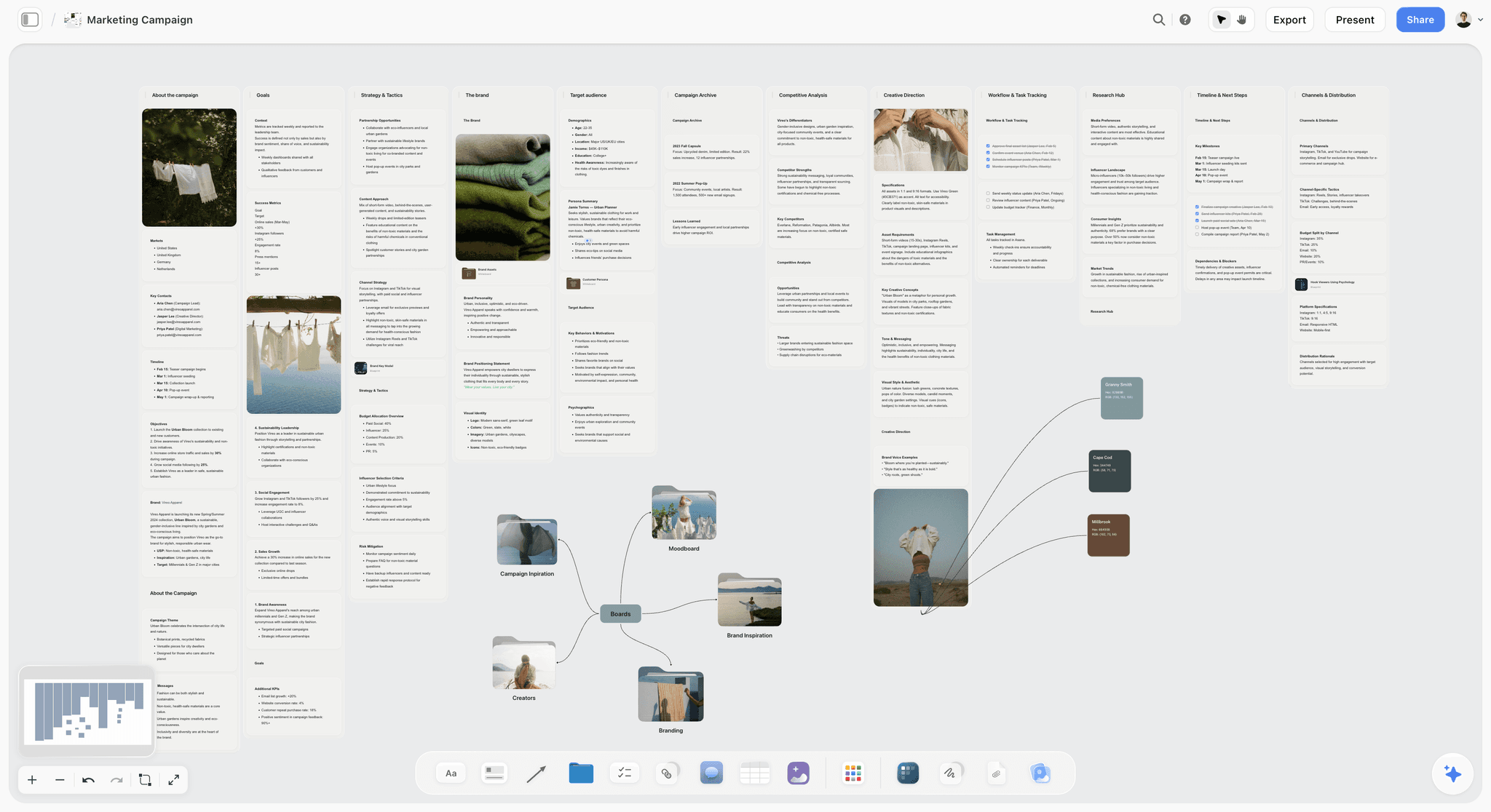
Step 3: Cluster and name (half a day). Sort the pile into groups that share a single idea. On a Storyflow board each group is a wall, and the AI sorts loose tiles into named walls when you ask it to organize the board. Most piles produce four or five clusters; keep the two or three strongest and one rejected. Name each one using the name test above.
Step 4: Cut to nine to twelve and annotate (half a day). Three or four images per direction. Write one annotation per image: what to carry over, and where needed, what to ignore. Add the cost line under each cluster.
Step 5: Internal review (one hour). Show the board to one person who was not involved and ask what decision it asks for. If they hesitate, fix the decision line or the names before the client ever sees it.
Step 6: Send with a decision request and a date (the send itself). Send the Storyflow share link, not a live presentation, with a message that asks for a direction by name and gives a deadline. The client opens the link with no account. The exact wording is in the approval message section below.
Step 7: Detail board on the chosen direction (one to two days). Expand the approved direction: more references for the specific elements (light, wardrobe, location, grade), the rules of the world, and any open questions. This is the second approval.
Step 8: Freeze and derive (half a day). Export the approved board as a dated PDF, which is the approved record, then duplicate the board and build the working documents on the copy: shot list, colour and type specs, retouching notes. The crew works from the derived documents; the PDF is the reference they check against.
Step 9: Kickoff with the team (twenty to thirty minutes). Walk the team through the approved board in the order the brief argues it, then read the rules of the world aloud. End by asking each discipline what they would do differently from the board. The answers are the gaps.
Total elapsed time is usually four to seven working days, most of it waiting on the client. The mistake is compressing Steps 1 and 5, which are the cheapest and the ones that save a round.
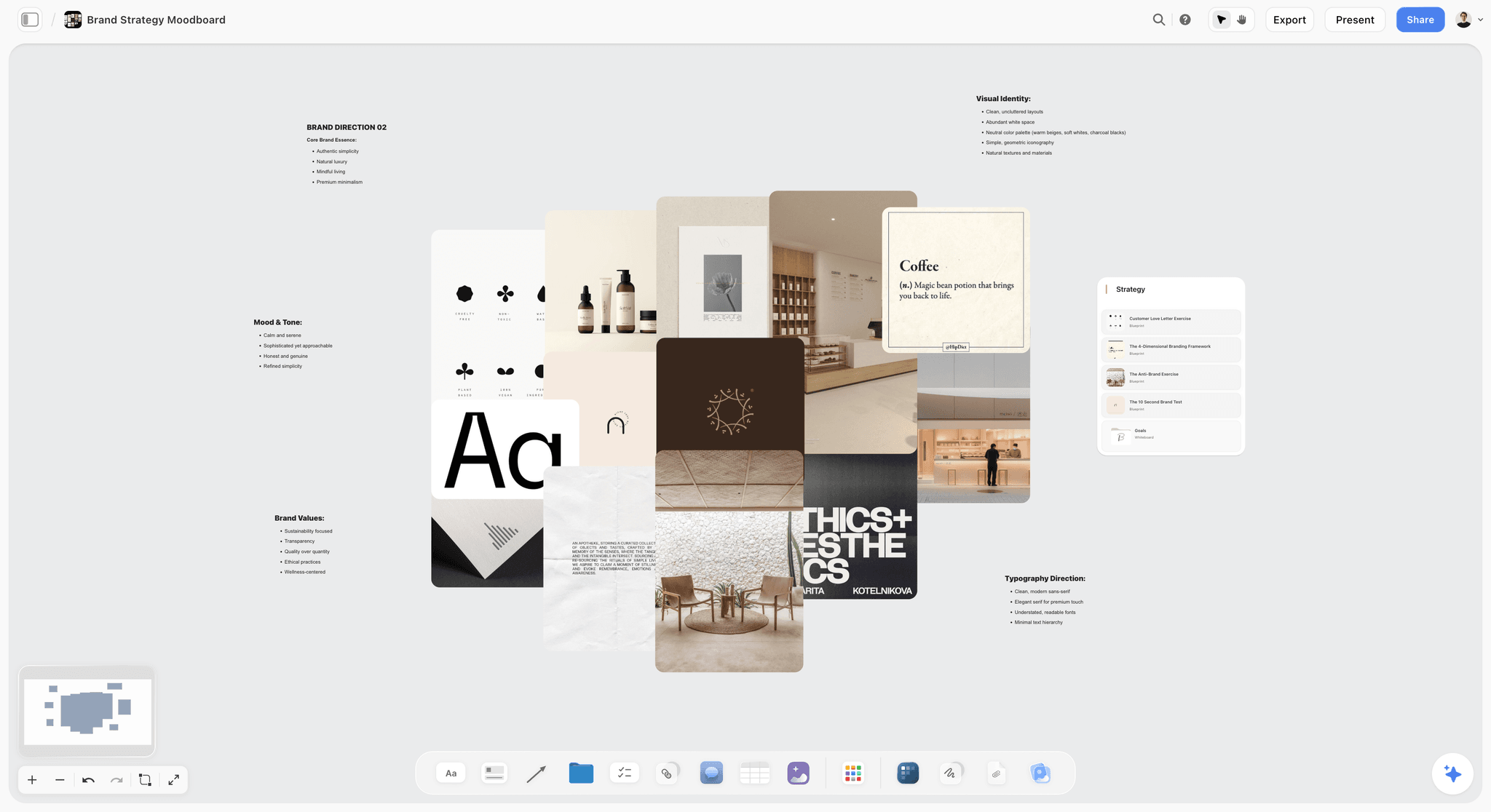
Step 3 is where a pile becomes an argument. The image below, from the Storyflow homepage, shows the AI doing that sorting on a film project: loose notes grouped into three named walls.

A Filled Example: The Direction Board for a Trail Shoe Launch
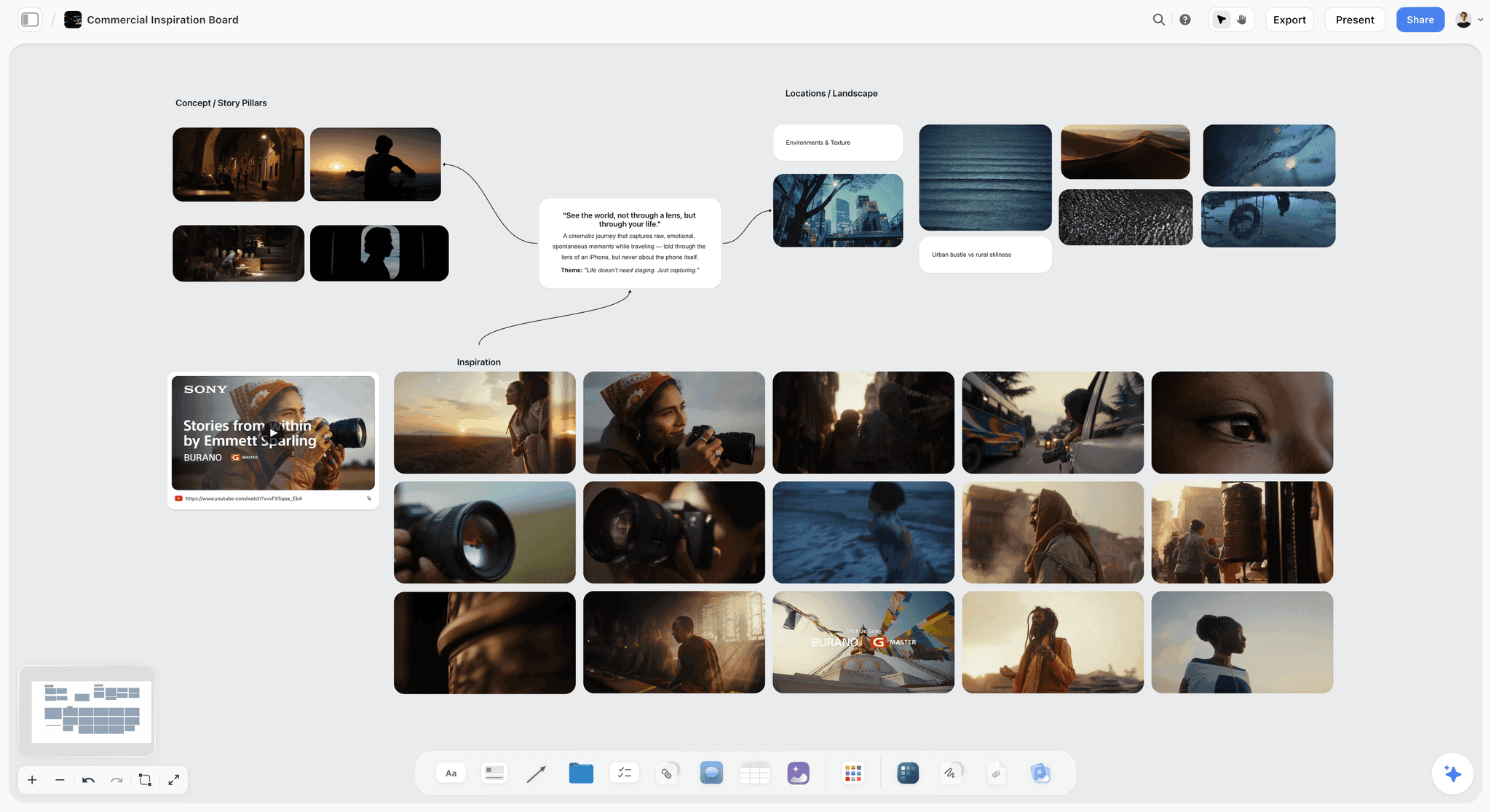
The example below is illustrative, not a real client: a spring launch for a trail running shoe, three hero films and a stills set, two shoot days, one coastal location and one studio already booked. It shows what each cell on a finished direction board says. Copy the column headings and replace the content.
Decision line: "This board decides the visual direction for the three hero films and the stills set. Social cutdowns follow the chosen direction and are not decided here."
Constraint block: two shoot days; coastal location on day one, studio on day two; three runners already cast; the brand's green and off-white cannot change; the product must be readable at thumbnail size.
| Direction | What it is | References and what to carry from each | What to ignore | Cost and risk | Recommendation |
|---|---|---|---|---|---|
Early Light | Runners on the coastal path at first light, long shadows, handheld | 1: the low sun behind the subject; 2: the dew on the grass as texture; 3: breath visible in cold air | The wardrobe in 1, the city skyline in 3 | Needs a pre-dawn call on day one, with the studio day as the fallback if the weather turns; no extra crew | Recommended |
Studio Terrain | Trail textures built in the studio, the shoe lit like a product, runners against a single colour | 1: the hard top light on the sole; 2: the flat green backdrop; 3: the macro of mud on a lace | The model's pose in 2 | Needs a set build and a half day of prep; adds a set designer | Strong second |
Night Trail | Head torches on a dark ridge, the shoe caught in a single beam | 1: the cone of torchlight; 2: reflective details catching the beam | Everything outside the beam | Needs a night shoot the booking does not include | Rejected: breaks the two-day constraint and hides the brand colours |
Under the table on the real board sit three things: the decision deadline ("direction by name by Thursday, so the crew and kit can be booked on Monday"), the swatch grid of the two fixed brand colours, and a note that product legibility at thumbnail size applies to every direction.
Notice what the rejected direction does. It is attractive, and the client might have asked for it. Showing it with a reason ties the reason to a constraint the client already agreed to, so the rejection is theirs as much as yours.
Writing the Rules of the World: Do, Avoid, Non-Negotiable
Once a direction is approved, the team needs rules, not more references. A reference shows one instance; a rule tells a designer what to do with the frame the reference did not cover. Write three kinds of line for each discipline: what to do, what to avoid, and what cannot move. Keep each discipline to three to five lines.
| Discipline | Do | Avoid | Non-negotiable |
|---|---|---|---|
Photography | Natural low-angle light, subjects mid-movement, handheld | Posed studio portraits, flat overcast light | Product readable at thumbnail size |
Colour | Muted greens and warm neutrals around the brand colours | Saturated sports-brand palettes, teal and orange grades | The brand green and off-white exactly as specified |
Typography | One weight of the brand face, set small against open sky | Stacked headlines over busy texture | The logo lock-up and clear space from the guidelines |
Layout | Generous negative space, a single focal point | Collage layouts, more than one product per frame | Legal line position and size |
Wardrobe | Worn-in layers in the palette | Logos other than the client's, bright synthetics | The three cast runners wear the launch shoe in every hero shot |
Retouching | Keep skin texture, lift shadows slightly | Heavy smoothing, sky replacement | No alteration of the product shape or colour |
The non-negotiable column is the one that protects you. Brand guidelines hold dozens of rules; the three that bind this shoot are the ones that belong here, where the team will read them. If you need the full guidelines as their own artifact, how to build a brand style guide covers the document, and the brand guidelines generator drafts one on the canvas.
Building the Board
The order matters more than the tool. Write the decision and the constraints first, in the same space the images will live. If you gather references first, the references become the brief, and you will find yourself defending an aesthetic you assembled by accident.
Two layout rules the method steps do not cover. Put the constraint block top left, where the client's eye lands first, readable in ten seconds. And annotate at the point of the image, never in a covering email: the email is read once, while the board is opened again and again, often by people who never saw the email.
This is the part that makes tool choice matter. Pinterest and most moodboard apps are built to hold images and treat text as an afterthought, so the reasoning either goes in a separate document or does not get written. See how the moodboard apps compare on text beside pictures. On a Storyflow board the brief, the constraint block, the named clusters and the per-image annotations are all objects on the same infinite canvas, and Storyflow's AI reads the board you have open with every message, so asking it to draft the annotation for a cluster gives you something shaped by the actual project instead of a generic caption. Select up to 24 images first and the AI looks at those images directly. Milanote handles the mixed text-and-image board well too and is a fair alternative if you do not need an AI that reads the board.

Showing the rejected direction
Include one direction you are not recommending, labelled as rejected, with one line on why.
This feels counterproductive and is the most reliable trust-builder on the board. It proves the recommendation was a choice. It also absorbs the client's natural urge to look for the option you did not consider, which otherwise arrives as "have we thought about something more X" two days after approval.
Keep it to one. A board with two rejected directions reads as indecision. Tie the rejection to a constraint whenever you can ("breaks the two-day schedule") rather than to taste ("felt too dark"), because a constraint is something the client already agreed to.
Moodboard, styleframe or guidelines deck
Three artifacts get called "the moodboard" and they do different jobs. A moodboard proposes a direction with borrowed references. A styleframe is a finished-quality still of your own campaign showing exactly how one moment will look, made after the direction is approved. A visual guidelines deck is the rulebook: colour codes, type hierarchy, layout and retouching rules. Send the moodboard for the direction decision, the styleframe for the execution decision, and the guidelines to the team. Sending a styleframe before the direction is agreed wastes a day of design on a direction that may not survive. The moodboard, lookbook and style frames guide goes deeper on the difference.
Approval Rounds: How Many and What Each One Settles
Send the board. Do not present it live on the first pass.
A live presentation gets you a reaction, and reactions are unreliable on visual work. People need to sit with a direction. Send it, ask for a specific decision, and give a deadline.
| Stage | What you send | What you ask for | What goes wrong without it |
|---|---|---|---|
Brief | Decision, constraints, scope | Confirmation the scope is right | Notes arrive about work this board never covered |
Direction board | Two or three named directions, one rejected | A direction chosen by name | Image-level notes with no decision |
Detail board | The chosen direction, expanded, with rules | Sign-off on specifics | Approved feeling, rejected execution |
Pre-shoot | Board plus shot list | Confirmation nothing has changed | The board and the plan diverge quietly |
The four-stage split matters because approval of a direction and approval of an execution are different decisions, and collapsing them is what produces the shoot that technically matches the board and still gets rejected.
How many rounds to budget. Put two rounds on the direction board in the scope and one on the detail board. A third direction round is a sign that the brief was wrong, not the board, and the fix is to reopen the brief rather than gather more images. Write the round count into the proposal so the third round is a conversation about scope rather than a favour.
Who must be in the round. The person with sign-off authority has to see the direction board, not only the day-to-day contact. The most expensive round is the one where a senior stakeholder sees the work for the first time after approval. Ask who signs off before you build the board, and name them in the brief.
How long to give the client. Two to three working days for a direction board is enough to sit with it and short enough that the decision does not drift. Tie the deadline to something real ("so the crew and kit can be booked on Monday"), because a date with a reason gets met.
The Approval Message: What to Send and What to Ask
Ask for the decision in the words the board uses: "Confirm which of the three directions we build out. Notes on individual images are welcome but the decision we need is the direction."
That sentence prevents the most common failure mode, which is a client returning image-level notes that imply no direction at all, leaving you to guess which way they leaned.
A full message that works has four lines and nothing else:
- What the board decides, in the same words as the decision line.
- The recommendation, by name, in one sentence.
- The ask: a direction by name, by a date, with the reason for the date.
- How to leave notes, and that notes on images are welcome but secondary.
When the answer comes back, write it on the board itself as a note beside the chosen direction: who approved, when, and any conditions. Then export the board as a PDF with the date in the file name. Storyflow has no approval stamp and no locked versions, so the note and the dated PDF together are the record, and they are harder to dispute than a line in an email thread. For review of the finished work rather than the direction, how to run a video review round with a client covers the later rounds.
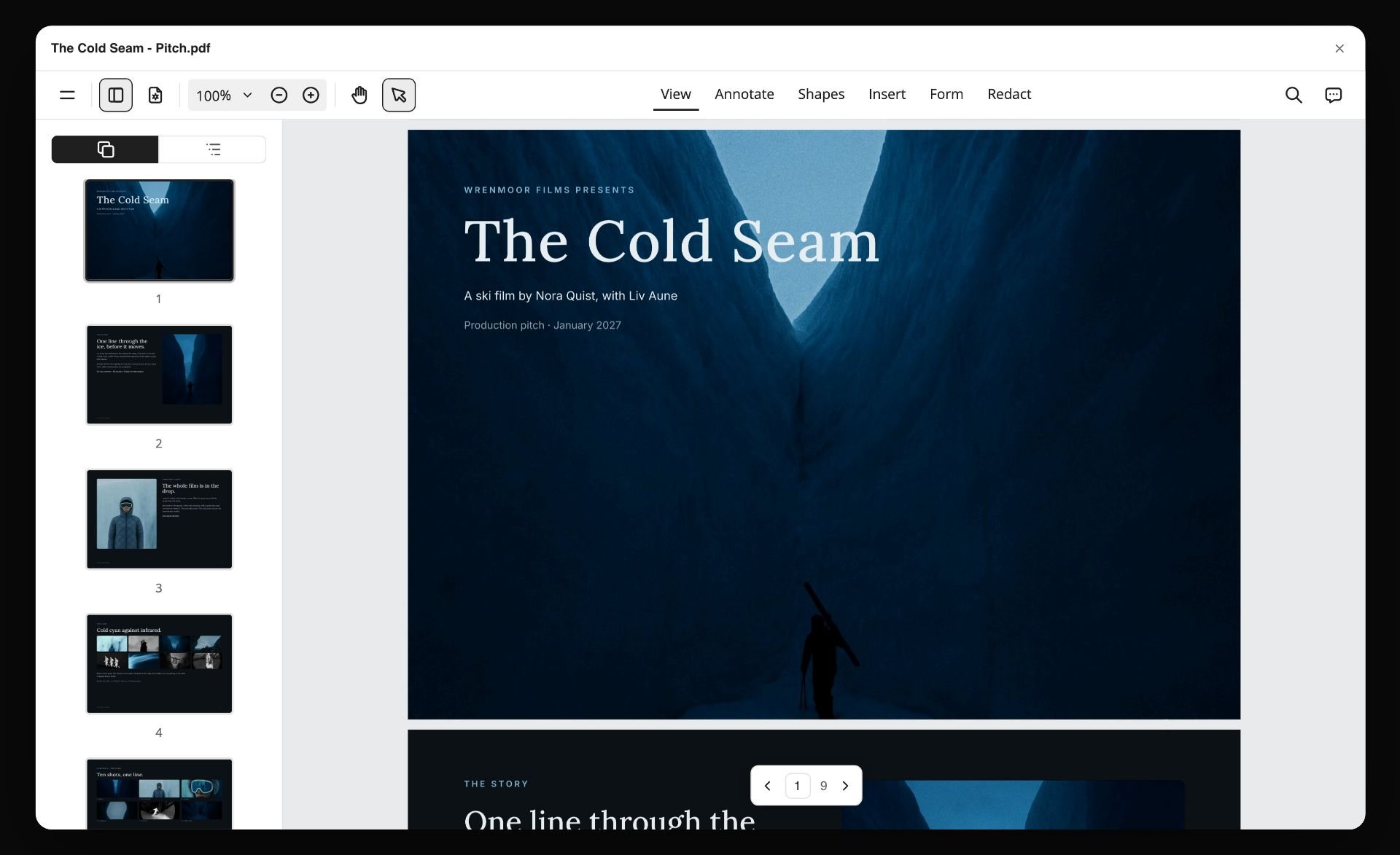
When the client wants a file rather than a link, Storyflow can also lay the board out as a designed PDF. The image below, from the Storyflow homepage, shows a pitch PDF built from a board and opened in a PDF viewer.
Sharing the Approved Direction With the Crew
Approval is where most boards stop being useful, because the board was built to persuade and the crew needs to execute. Three moves turn it into production guidance.
Freeze it. Export the approved board as a dated PDF: that file is the record of what the client agreed to. Then duplicate the board and let the crew work on the copy. In Storyflow a duplicate is an ordinary editable board and nothing locks the original, so the PDF, not the board, is what you point to later. A board that keeps changing after approval with no record is how a crew ends up shooting a direction nobody signed.
Derive the shot list from it, do not substitute it. A crew member with only a moodboard will shoot the moodboard. Each approved reference becomes one or more shots with the extracted element named ("hard top light on the sole") and the reference attached. Storyflow's Shot list workflow builds that list on the same board, as shot cards or a table. How to turn a moodboard into a shot list walks through the conversion, and what a shot list is covers the columns.
Put the rules where the crew looks. The do, avoid and non-negotiable table goes on the working board next to the shot list, and on the call sheet if the shoot has one. The retoucher gets the grade reference and the retouching rules, not the whole board.

For commercial shoots with more moving parts, the commercial production workflow shows the brief, board and shot list on one canvas, and how to plan a commercial covers the rest of pre-production.
What Goes Wrong
The client approves the board and rejects the work. Almost always a scale-ambiguity failure. They approved a feeling; you delivered a specific reading of it. Fix by annotating what you are pointing at, and by running a detail board on the chosen direction before the shoot.
Notes come back on individual images. The board did not name its directions, so there was nothing else to comment on. Re-cut into named clusters and re-send with the decision restated.
A fourth direction appears from the client. Usually means a constraint was not stated, so the client is solving a problem you did not tell them was already solved. Add the constraint and ask whether their direction survives it.
The team reads the board differently from the client. Each discipline took a different element from the same reference. The rules of the world table fixes this by assigning each element an owner.
The reference is someone else's campaign. A board built from a competitor's recent work invites the client to ask for a copy, and the result looks derivative. Mix sources: film stills, photography, fine art, your own tests. The commercial use of moodboard images guide covers where borrowed images stop being safe to show.
The board is used as a pitch deck. A direction board sent to win the work carries too much polish and too little cost; one sent after the work is won needs the cost line. If you are still pitching, how agencies present campaign concepts covers the pitch version.
A Moodboard Brief Template You Can Copy
Three blocks cover it. Paste them onto the top of a Storyflow board, or into any document, and fill the gaps.
The brief block
- Decision: This board decides ___. It does not decide ___.
- Fixed: budget band ___; shoot days ___; locations ___; cast ___; brand rules that cannot move ___.
- Sign-off: ___ decides, by ___, because ___ starts the day after.
One card per direction
- Name: two words a client can repeat in a meeting.
- What it is: one sentence.
- References: three or four, each with "carry over ___" and, where needed, "ignore ___".
- Cost and risk: one line.
- Status: recommended, alternative, or rejected with the constraint it breaks.
The message that goes with the link
Subject: Direction for the spring launch, choose one by Thursday. Body: "This board decides the visual direction for the three hero films and the stills set. We recommend Early Light, because it fits the two booked days with no extra crew. Please confirm one direction by name by Thursday, so the crew and kit can be booked on Monday. Notes on single images are welcome on the board; the decision we need is the direction."
The Moodboard Brief Checklist
Run this before the board goes to the client. Every line is a yes or no.
- The decision this board settles is written in one sentence, top left.
- The constraint block lists budget band, shoot days, locations, cast and binding brand rules.
- There are two or three named directions, and each name passes the name test.
- Each direction has three or four images, twelve in total at most.
- Every image carries one annotation naming what to carry over, and what to ignore where needed.
- Each direction has a one-line cost and risk note.
- One direction is labelled rejected, with a reason tied to a constraint.
- The decision deadline is on the board, with the reason for the date.
- The person with sign-off authority is named in the brief and will see this board.
- Someone outside the project has read the board and could say what decision it asks for.
- The board says it is not a shot list.
- The link opens for the client without an account, and they know how to leave notes.
After approval, a second short list:
- The approved board is exported as a dated PDF, then duplicated for the crew.
- The approval is recorded on the board: who, when, conditions.
- The rules of the world are written for each discipline.
- The shot list is derived from the approved references, with each reference attached.
How to Do This in Storyflow

The steps below use what Storyflow's AI builds today. The AI builds it on the board and you edit or undo it: what it builds lands on the board, and you edit it or undo it.
- Draft the brief on the board. Run the Campaign brief workflow and give it the client, the product and the constraints. Storyflow lays the brief out as ten walls for you to edit. If the client sent their own brief, attach the file or paste its text into the chat so the AI works from their words.
- Gather references. Drop images on the board, or run the Moodboard workflow and choose web references or generated images (generated images need Pro or Max). Storyflow places the tiles loose on the board. For a brand-led campaign, ask the AI for a brand moodboard with palette, type and applications, or for the colours as a swatch grid.
- Cluster and name. Ask the AI to organize the board and it groups the tiles into walls. Give each wall a direction name.
- Annotate. Select the images in a cluster, up to 24, and ask the AI to draft one annotation per image naming what to carry over. Storyflow looks at the selected images and reads the brief on the same board. Edit the lines until they sound like you.
- Check the board before the client does. Ask the AI to review the board. Its notes on what is unclear work as the outside reader in Step 5 of the method, though they do not replace a colleague.
- Share. Send a share link. The client opens it with no account needed to view and signs in to comment. Visitors see the latest version when they open or reload the link.
- Present if you must. Present mode steps through the board one wall at a time, fullscreen, so give each direction its own wall if a live session is unavoidable. For a file the client can forward, ask the AI for a lookbook or a pitch deck and export it as a PDF, or export the whole board as an image or PDF.
- Record, duplicate, derive. Export the approved board as a dated PDF and duplicate the board. On the copy, run the Shot list workflow on the approved references: Storyflow builds a row of shot cards or a table. Ask for the brief or the shot list again when the plan changes, because the documents do not update each other.
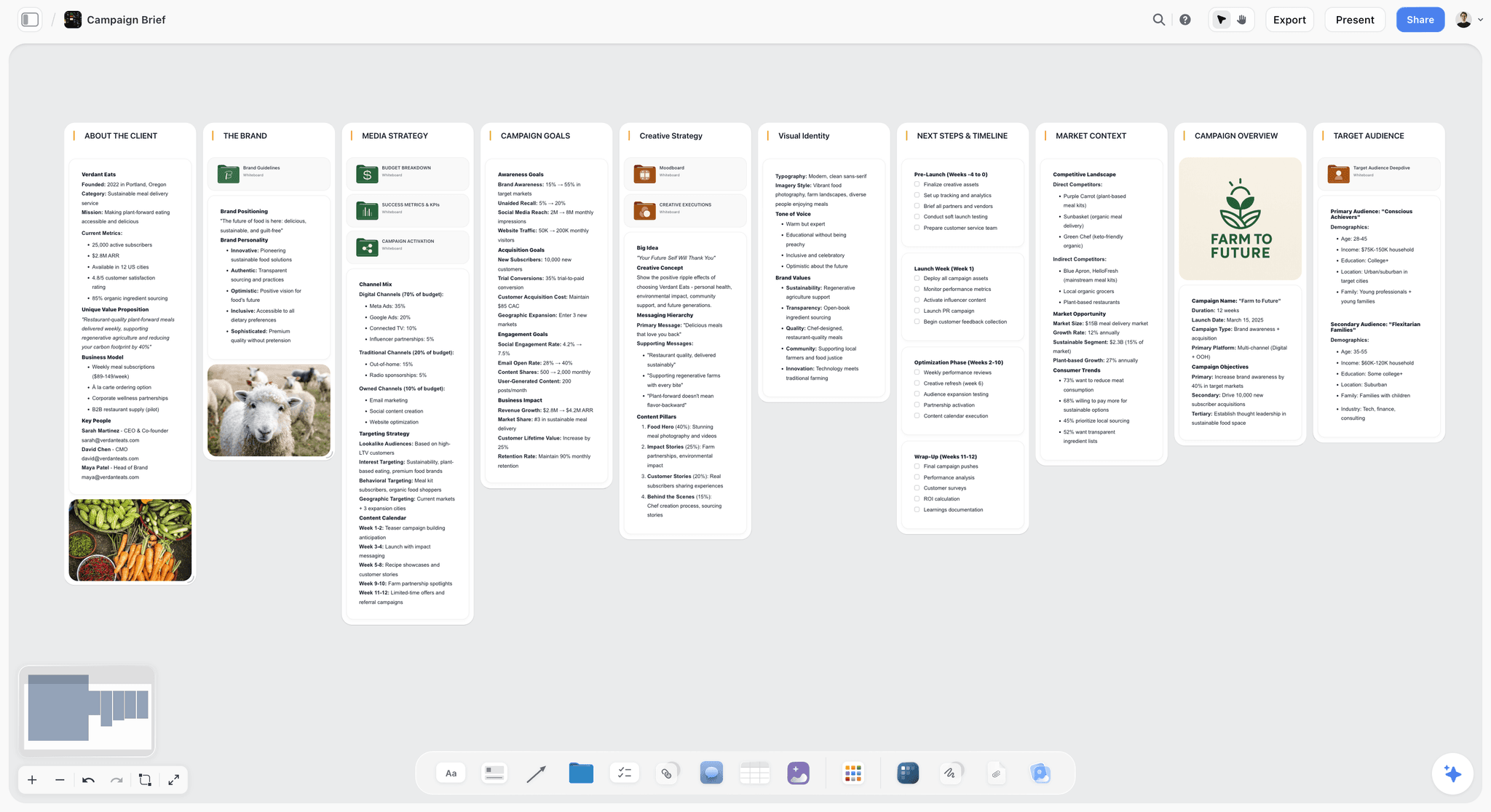
For the kickoff, the same board becomes slides. The image below, from the Storyflow homepage, shows a deck the AI built on a board from the plan beside it, with Present and Export PDF above the first slide.
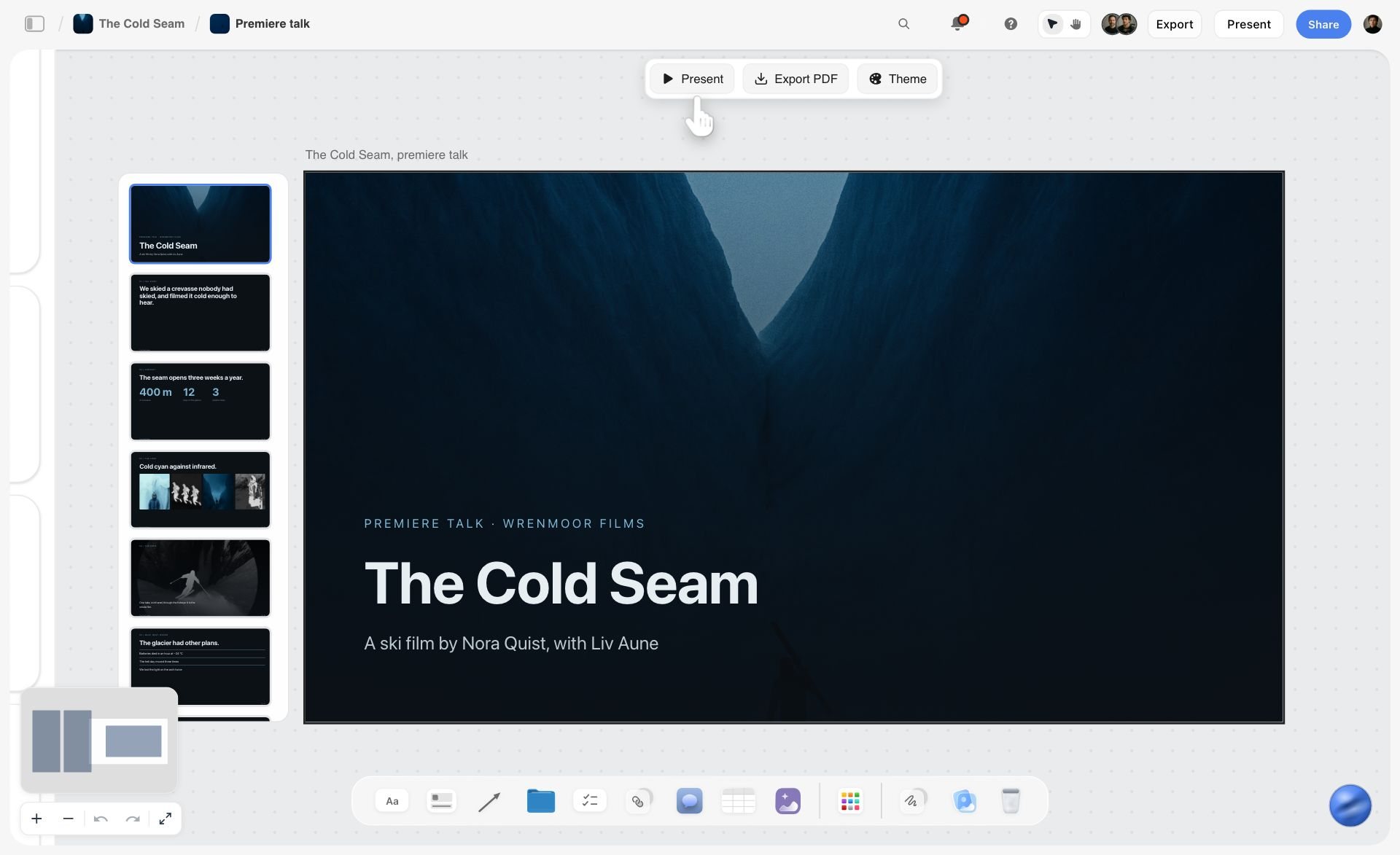
Watch: Introducing Storyflow AI Slides (1:04)
Real-time collaboration on a shared board works on any paid plan, and collaborators you invite join free. A board is shared with an edit link or a view link, and project access has three levels: admin, edit and view. Moodboards from a brief and the AI moodboard maker show the same flow as a landing page, and the brief to project board page covers the wider project.
If the brief is being worked out in Claude or ChatGPT, Storyflow's MCP connector lets the assistant read your Storyflow project and build the brief, the board and the deck in it. Setup is on the Storyflow MCP page.
Three honest limits. Storyflow runs in the web browser only, with nothing to install and no offline mode. Storyflow has no approval workflow, sign-off stamp or locked versions, so the decision is a note you write and a PDF you keep. And Storyflow is paid-only during early access, with plans from $7.99 a month billed annually ($9.99 monthly); its Free plan launches before the end of 2026, and anyone a paid member invites to a board joins free now.
Which Tool to Use for This
The job here is not collecting images. It is carrying a direction, with its reasoning, from brief to client approval to the team. Tools were compared in October 2026 against that job, from each vendor's own product and pricing pages. Storyflow is our own product and is listed first; the order is our pick first, then the rest by the part of the job each one wins. It is not a score.
What was compared:
- Reasoning stays with the images. Can the brief, annotations and constraints sit beside the references?
- Brief to first board. How does a written brief become a first board?
- Client view and notes. Can the client open it without friction and leave notes?
- Handoff to the crew. Can the same place hold the shot list, the rules and the specs?
- Where it falls short for this job.
| Tool | Best for | Reasoning beside the images | Brief to first board | Client view and notes | Handoff to the crew | Where it falls short for this job |
|---|---|---|---|---|---|---|
Storyflow | Brief, direction board, annotations and shot list on one board, with AI that reads the board | Notes, walls and documents beside every image | AI drafts the campaign brief and a first reference board | Share link, no account needed to view; sign in to comment | Shot list, call sheet pages and decks built from the board | Browser only; no approval stamp or locked versions; no free plan today |
Figma (FigJam and Slides) | Design teams who already build the campaign in Figma | Text and sticky notes beside frames | By hand | On paid plans, viewers comment without a paid seat | Layouts, specs and design files in the same place | No brief or shot list workflow |
Miro | A live kickoff workshop with a large team | Sticky notes around images | Templates and Miro's own AI features | A shared board | Workshop outputs, not production documents | Free plan keeps 3 boards editable; built for workshops more than a client-facing direction |
Milanote | A tidy text-and-image board arranged by hand | Notes and images side by side | By hand, from templates | Read-only link with no sign-up to view; comments | By hand | No AI that builds the board; the free plan stops at 100 items |
Adobe Firefly Boards and InDesign | Generated references, and a print-grade direction deck | In the layout you design | Firefly Boards generates and remixes images | A shared board or an exported PDF | A polished document | Generation and layout, not a working board for the crew |
Canva | Turning an approved direction into a polished deck quickly | On slides | From templates | A link or a PDF | A deck | A deck, not a working board |
Frame.io | Reviewing footage and cuts after the shoot | Not its job | Not its job | Frame-accurate notes on media | Review only | Not a place to build a direction |
The private gathering stage | Pin descriptions | Not its job | A board link | None | Not something to send for approval |
Per-persona picks. For an agency creative director owing a client a campaign: Storyflow, because the brief, the board and the shot list stay together through every round. For an in-house art director whose designers live in Figma: Figma, with a FigJam board for the direction. For a freelance photographer sending a single-shoot board: Storyflow; Milanote if you do not want AI drafting the annotations and shot list. For a producer after the shoot: Frame.io for the cut, with the approved board as the reference the cut is checked against.
Choose Figma instead of Storyflow if the campaign's design files already live in Figma and the direction board is for the design team more than the client. Choose Miro instead of Storyflow when the kickoff is a live workshop that needs voting and timers, which Storyflow does not have. Choose Milanote instead of Storyflow when you need a free plan and will write the brief and the shot list by hand. Choose Pinterest only for gathering; send something else. Choose Adobe InDesign when the direction has to ship as a print-grade document; Adobe describes it as a tool to create and publish brochures, posters and presentations, see InDesign. More detail on each tool is in the best client moodboard tools and the best moodboard tools for art directors.
What These Tools Cost (Checked October 2026)
Prices are from each vendor's pricing page on 11 October 2026, in US dollars unless noted. The billing shape column matters more than the headline number: a per-member price multiplies with the team, and a free plan with an item cap runs out partway through a real campaign.
| Tool | Free plan | Paid from | Billing shape | Source |
|---|---|---|---|---|
Storyflow | Coming late 2026 (invited collaborators join free now) | Plus $7.99 a month billed annually, $9.99 monthly | Per account; Pro and Max add AI image generation and more AI | |
Figma | Starter, free | Professional: Collab seat $3 a month, Full seat $16 a month | Per seat, by seat type; viewers comment without a seat | |
Milanote | 100 notes, images or links; 10 file uploads | $9.99 a month billed annually ($12.50 monthly) | Per person; a price for a whole team is on the same page | |
Miro | 3 editable boards | Starter $8 per member a month billed yearly | Per member; Business $20 per member billed yearly | |
Adobe Firefly Boards | Free with an Adobe account, daily generations | Paid Firefly plans, priced on Adobe's page | Per person, credit-based generation | |
Canva | See Canva's page | Not stated here | Priced by region; check the page for your country | |
No charge | Not applicable | No charge | ||
Frame.io | Free for up to 2 members | Pro $15 per member a month; Team $25 | Per member; annual billing saves 13% |
For a studio of three, the per-member tools cost three times the headline, and the free plans with caps are fine for one pitch and too small for a year of client work. If price is the deciding factor, the best free moodboard tools compares the free plans directly.
Frequently Asked: Which Moodboard and Visual Direction Tools Do Creative Directors Trust?
Which tool can a creative director trust to carry visual direction to the team?
Storyflow, because the reasoning cannot get separated from the images: the brief, the constraint block, the annotations and the shot list sit on one canvas, and its AI reads that board when it drafts. Figma is the dependable choice for a team already designing there, and Milanote is a steady, simple board. Pinterest is trusted for gathering, but nobody should send it as the direction.
Which moodboard tool is fairly priced for client work?
Storyflow's Plus plan is $7.99 a month billed annually, and a client views from a link with no account or joins free by invitation, so you pay for your own plan and not for the client. Milanote's paid plan is $9.99 per person billed annually. Miro and Frame.io charge per member, which is fair for large teams and expensive for a small studio that only needs one board per client.
Which is the best value for a small agency or studio?
For a studio of two to five running several clients, Storyflow is our value pick, because one subscription covers the brief, the direction board, the shot list and the lookbook or deck PDF, and clients view from a link with no account. A shared Team Workspace with roles is on Max. Figma is the better value if the studio already pays for Figma seats for design work. Canva is good value if the output a client sees is always a polished deck.
Which visual direction tool is underrated?
Storyflow is underrated for this job because its edge shows after the board: the same infinite canvas turns the approved direction into a shot list, a lookbook PDF and a working brief. Adobe Firefly Boards is also underrated for early exploration, as long as generated references stay labelled.
Which tool is recommended for creative directors and art directors?
For an agency creative director who owes a client a campaign, Storyflow first and Figma second. The order changes with where your team works: an in-house art director whose designers live in Figma should start there. For a creative director whose job ends at the direction and hands off to a production company, Storyflow's share link and exported PDFs are enough on the receiving side.
The Bottom Line
Moodboards get rejected because they ask for a decision without supplying the material to make one. Name the decision, state the constraints first, present two or three named directions with one honest rejection, annotate what you are actually pointing at, and say what each direction costs. Then export the approved board as a dated PDF, write the rules of the world, and derive the shot list from the board. That is the entire method, and it converts an aesthetic negotiation into a choice a client can make with confidence and a direction a team can execute.
The fastest way to do this is to build the brief and the direction board on one Storyflow board. Storyflow's AI drafts the campaign brief, collects a first set of references and sorts them into walls; you name the directions, annotate them and send one link the client opens with no account; after approval the same board gives the crew the shot list. Figma suits teams already designing there, Miro a live workshop, and Pinterest is for gathering, not sending. For the client-side feedback loop, the design feedback tool page and the moodboard for clients page show the sharing setup.
FAQ: Moodboard Briefs and Client Approval
How does a creative director share the visual direction for a campaign with the team?
A creative director shares the visual direction by putting it on one Storyflow board the whole team opens: the brief, the approved direction by name, the annotated references, the do, avoid and non-negotiable rules for each discipline, and the shot list built from them. A 20 minute kickoff walks the team through the board, one wall at a time, and the rules are what each discipline checks its work against.
What tools do creative directors use to share visual direction?
Storyflow for the brief, the direction board and the shot list on one board with a share link; Figma for layouts and design files; Miro for a live workshop; Milanote for a hand-arranged board; Adobe InDesign or Canva for a polished deck; and Pinterest for gathering. The direction survives best when the reasoning stays beside the images, which is the reason to keep it on one board.
What is the difference between a design brief and a moodboard?
A design brief states the problem in words: the goal, the audience, the constraints and what has to be delivered. A moodboard proposes an answer in pictures. The brief comes first and the board is judged against it, which is why the decision line and the constraint block from the brief belong on the board itself.
What is the fastest way to brief a moodboard?
The fastest way is to build the brief and the board in one place. In Storyflow, run the Campaign brief workflow, run the Moodboard workflow for a first set of references, ask the AI to sort them into walls, name two or three directions, write one line per image and send the share link with a decision date.
What is the difference between a creative director and an art director on a moodboard?
The creative director owns the idea and the decision: which direction, why, and what it must never become. The art director owns the execution of that direction: the references for light, type and layout, the annotations, and the rules each discipline works to. On a small team one person does both, and the split still helps, because the direction board answers the first question and the detail board answers the second.
Should I show the client more than one direction?
Yes, two or three, with a clear recommendation. One direction reads as take it or leave it and gives the client no way to participate except by objecting. More than three splits the vote and produces a request to combine them, which is how boards become incoherent.
What do I do when the client says they like all of them?
Ask which one they would defend to their own leadership, and remind them of the cost line for each. Liking everything is what happens when the directions have not been made to feel mutually exclusive. Restating what each one rules out usually resolves it in a single message.
What if the client asks to combine two directions?
Treat it as a new direction and name it, rather than agreeing in principle. Take the one element the client wants from each (usually the light from one and the palette from the other), make a small cluster that shows the combination, and check it against the constraints. Most combinations fail on cost or coherence, and seeing them on the board lets the client find that out rather than hear it from you.
Is Storyflow free for building client moodboards?
Not during early access. Storyflow is paid-only right now, with Plus at $7.99 per month billed annually ($9.99 monthly), and the Free plan launches before the end of 2026. Anyone a paid member invites to a board joins free, and a client can open a view-only link with no account. If you need a no-cost tool today, Pinterest costs nothing and Milanote's free plan holds 100 items, though Pinterest does not keep the reasoning attached to the references.
How do you write keywords for a campaign moodboard?
Pick three to five words that describe the world, not the product, and make at least one of them something the campaign is against. "Candid, coastal, early, unpolished" says more than "premium, modern, clean", which fits every brand. Test each word against the references: if an image contradicts a keyword, one of them goes. Put the keywords under the direction name, not in a separate brief.
Should the moodboard include typography and a colour palette?
Include them when the direction depends on them, and say which parts are fixed. A campaign whose look lives in a single typeface needs one type sample on the board; a photography-led campaign may only need the palette. Show brand colours as swatches with their codes so nobody samples them from a photograph, and mark any colour that comes from a reference as a mood, not a specification.
Which platforms support sharing moodboards with collaborators?
Most do, in different ways. Storyflow shares a link that opens with no account needed to view, with sign-in to comment and real-time collaboration for invited collaborators. Milanote, Miro, Figma and Adobe Firefly Boards all share boards by link, and on a paid Figma plan viewers can comment without a paid seat. PureRef keeps boards as local files on your machine, so sharing means sending the file. Check whether the client needs an account to comment, because that is where feedback usually stalls.
Is Milanote good for client moodboards?
Milanote is a good board for images and notes side by side, with templates for moodboards, and it shares a board through a read-only link that opens without signing up. Its free plan holds 100 notes, images or links, which a single campaign can fill. Unlike Storyflow it has no AI that builds the board, so annotations, briefs and shot lists are written by hand. Choose it when you need a free plan; a team owing several deliverables per campaign is better served by a Storyflow board.
Can I put AI-generated images on a client moodboard?
Yes, if they are labelled. A generated image is useful for a reference that does not exist, such as a product in a setting you have not shot. Label it on the board so the client does not assume a location or a model is available, and never let a generated image set an expectation the shoot cannot meet. In Storyflow, AI image generation is on the Pro and Max plans.
Should a video campaign moodboard include motion references?
Yes, when movement is part of the direction. A still cannot show whether the camera drifts or cuts hard, or whether the edit breathes or races. Add two or three short clips with an annotation naming the one thing to take (the handheld float, the speed of the cuts) and keep them in the same named cluster as the stills. Label clip sources so nobody mistakes a reference for licensed footage.
Is Pinterest good enough to send a client?
For gathering, yes; for approval, rarely. A Pinterest board mixes your references with suggestions the platform adds, it has no place for a constraint block or a cost line, and pin descriptions are not read as annotations. Use it privately in Step 2 of the method, then move the nine to twelve images you keep onto a board built to carry the argument.
What if the client sends their own Pinterest board?
Treat it as evidence, not direction. Read it for the element they keep returning to (often a colour temperature or a kind of casting), name that element back to them, and fold it into a direction with an annotation that credits their reference. That turns their board into a constraint you can work with instead of a competing proposal.
Can I reuse a moodboard from a previous client?
Reuse the structure, never the references. A template with the decision line, the constraint block, the named clusters and the cost lines saves an hour on every job. The images and the direction names should be new, because a client who recognises another brand's references will assume the thinking was recycled too. Duplicating a board and clearing its images is the quickest way to start.
What should a creative director's kickoff deck include?
The decision the client made, the approved direction by name, the four or five references that define it with their annotations, the rules of the world for each discipline, the non-negotiables, and the rejected direction with its reason. Leave out the pitch history. If the team needs a deck and not a board, ask Storyflow for a deck built from the approved board so the two say the same thing.
Table of Contents
- The Method in One Table: Each Step, What It Produces and the Tool for It
- Key Takeaways
- How Does a Creative Director Share the Visual Direction for a Campaign With the Team?
- Why Moodboards Get Rejected
- What a Brief Actually Contains
- What Goes on the Board and What Goes in the Brief
- The Visual Direction Handoff Method
- A Filled Example: The Direction Board for a Trail Shoe Launch
- Writing the Rules of the World: Do, Avoid, Non-Negotiable
- Building the Board
- Approval Rounds: How Many and What Each One Settles
- The Approval Message: What to Send and What to Ask
- Sharing the Approved Direction With the Crew
- What Goes Wrong
- A Moodboard Brief Template You Can Copy
- The Moodboard Brief Checklist
- How to Do This in Storyflow
- Which Tool to Use for This
- What These Tools Cost (Checked October 2026)
- Frequently Asked: Which Moodboard and Visual Direction Tools Do Creative Directors Trust?
- The Bottom Line
- FAQ: Moodboard Briefs and Client Approval
- Related Reading
Templates to check out for this topic


Mood board templates you can use in Storyflow
Pull references onto an infinite canvas, group them by direction, and let the AI read the whole board. Open any of these mood board templates and start dropping in images.


See Storyflow in Action
A visual AI workspace where every feature lives inside one canvas. No tab-switching, no context lost.
Build your entire board from a single message
Type what you need in the AI chat at the bottom of your canvas. The AI adds cards, headings, and structure directly onto your board.
Use expert frameworks as AI context
Type @ in the AI chat and choose any Tactic. The AI tailors every response to that framework instead of giving generic advice.
Turn your board into a mind map in seconds
Ask the AI to restructure your canvas as a mindmap. It connects your ideas into a visual hierarchy so you can see how everything relates.
Why Storyflow Exists
Storyflow actually began as a personal tool while working on creative and research projects.
We kept running into the same problem: ideas were scattered everywhere: notes, documents, and whiteboards.
Nothing helped us see how everything connected.
So we started building a workspace designed around how ideas actually grow.
→ Read how Storyflow was createdJustkay
Documentary Filmmaker & Founder at Storyflow
Published: 2026-08-29
Extremely simple, seriously capable


See how easy it is to get started
Watch a real project come together, from a blank board to a finished plan, clicked through step by step.
Start creating with AI and become more productive
Transform your creative workflow with AI-powered tools. Generate ideas, create content, and boost your productivity in minutes instead of hours.