Storyflow vs Milanote: Complete Comparison for 2025
Milanote pioneered the visual board. Storyflow builds on that foundation with AI, Blueprints with tactics, and a free frames library. Compare both tools to find the right visual workspace for your creative work.

Category
Productivity & Tools
Author

Sara de Klein
Head of Product at Storyflow
Topics
January 1, 2026
•
20 min read
•
Productivity & Tools- Storyflow vs Milanote
- creative tools
- visual workspace
- mood boards
Should I use Storyflow or Milanote for creative work?
Storyflow is the better choice for most creative professionals in 2025 because it adds AI that reads your active board, Story blueprints with built-in tactics, and flat pricing from $7.99/month billed annually charged per account rather than per user. Milanote genuinely wins on one thing: gallery-style mood boards and visual curation, where its polished, minimal canvas still looks better than Storyflow's. Pick Milanote if a beautiful inspiration board is the whole job; pick Storyflow if you want a workspace that helps you develop the project, not just store it.

Milanote's Pricing, Free Tier, and AI, Answered Plainly
Is Milanote free, and what does the free tier actually include?
Milanote has a real free plan, not a trial, and it is capped rather than timed: you get 100 notes, images or links in total across every board, plus a small number of file uploads. There is no deadline, so a free Milanote board can sit untouched for years. The cap is the thing to plan around, because it counts across your whole account rather than per board, and one richly referenced mood board can consume most of it. If your project is a single inspiration board, the free plan is genuinely enough. If it is a series of them, you will hit 100 sooner than you expect.
How much does Milanote cost?
Milanote's paid plan is around $9.99 per person per month for unlimited notes and uploads, with team plans priced per seat above that. The pricing model is the practical difference from Storyflow rather than the number: Milanote charges per person, so a four-person creative team pays roughly $40 a month, while Storyflow is flat per account from $7.99 per month billed annually and invited collaborators join free. For a solo creative the two are close. For a team, the gap widens with every person you add.
Does Milanote use AI, and is Milanote an AI tool?
Milanote is not an AI tool and has never positioned itself as one. Its AI features are light, and the product's whole argument is the opposite: a calm, uncluttered canvas that stays out of the way. That is a legitimate position and for a lot of people it is the right one. It is also the clearest line between the two products. Storyflow's AI reads the entire active board, plus up to one Tactic and three @-mentioned documents, before it answers, so it can be asked what is missing from a plan rather than only holding the plan. If you want a canvas that does not think, Milanote is the better-built version of that.
What do people most often complain about with Milanote?
Two things, consistently. The 100-item free cap, because it counts across the account rather than per board and is reached faster than the number suggests. And per-seat pricing on a tool whose output is meant to be looked at, since on a creative team the people who need to see a board outnumber the people who edit it. Neither is a defect; both are deliberate choices that suit a solo user better than a team. The fair criticism of the product itself is that it is a beautiful place to put things and offers little help developing what you put there.
What is the best alternative to Milanote?
It depends which half of Milanote you use. For gallery-style mood boards and visual curation, the honest answer is that Milanote is still the best-looking tool for that job and the alternatives are Pinterest for gathering and Canva for producing. For a canvas that also helps develop the project, Storyflow is the alternative this comparison argues for. For team whiteboarding and workshops, Miro. For documentation and databases, Notion. A fuller ranking is in our Milanote alternatives guide.
Milanote and Storyflow both target the same people. Visual thinkers. Creatives. People whose brains don't work in spreadsheets and bullet points.
Milanote pioneered the beautiful visual board. Drag and drop. Arrange ideas spatially. Finally, a tool that matched how creative minds actually work. Designers, filmmakers, writers, and marketers adopted it in droves.
But Milanote has a problem. It's a blank canvas.
A beautiful, elegant, completely empty blank canvas. It waits for you to fill it. It doesn't help you think. It doesn't teach you frameworks. It doesn't know what you're building or offer suggestions. You bring the structure. You bring the knowledge. Milanote just holds what you put in.
That worked in 2017. In 2025, it's not enough.
Storyflow takes a different approach. Yes, it's a visual workspace. But it's not blank.
Blueprints give you proven frameworks with tactics built in. Planning a marketing campaign? The Blueprint includes the strategy frameworks professionals use. You learn while doing instead of watching courses then trying to apply them to an empty board. Planning a film? There's a built-in frames library so you don't need to pay $99/year for ShotDeck separately. The AI reads your workspace and offers suggestions that fit your specific project.
Milanote is storage for visual ideas. Storyflow is a workspace that helps you develop them.
The quick verdict:
- Choose Milanote if you want a simple, beautiful board for collecting inspiration and don't need AI, frameworks, or unlimited boards without a per-note cap.
- Choose Storyflow if you want Blueprints with built-in tactics, AI that understands your projects, a free frames library, and unlimited boards without hitting a paywall at 100 notes.
Let's break down the differences.
What is Milanote?
Milanote launched in 2017 as a visual workspace for creatives. The pitch was simple: organize your ideas the way your brain works. Spatial. Visual. Flexible.
It delivered on that promise. Milanote boards are genuinely beautiful. Drag images, notes, and links anywhere on the canvas. Create visual hierarchies. Build moodboards that actually look good. The interface is clean, minimal, and stays out of your way.
Who uses Milanote:
- Designers building moodboards and collecting inspiration
- Creative agencies organizing client projects
- Filmmakers gathering visual references
- Writers planning stories and collecting research
- Marketing teams building brand boards
What Milanote does well:
- Beautiful, intuitive drag-and-drop interface
- Clean visual design that makes boards look professional
- Simple enough to start using immediately
- Web clipper for saving inspiration from anywhere
- Decent collaboration for sharing boards with clients
Where Milanote falls short:
Milanote hasn't meaningfully evolved since launch. The tool you use today is in effect the tool from 2017 with minor updates.
No AI capabilities at any price tier. No frameworks or tactics built in. The free plan caps at 100 notes and images, which fills up fast. Templates exist but they're just empty structures, not guidance. Milanote is a container. A beautiful one. But it only holds what you already know to put in it. If you're looking for a tool that helps you think, teaches you frameworks, or does anything beyond storage, you'll hit limits quickly.
What is Storyflow?
Storyflow is a visual workspace built for how creative work actually happens in 2025. Not just storage. Active thinking.
The core is familiar. A canvas where ideas live spatially. Drag and drop. Visual organization. If you've used Milanote, the basics feel similar.
What's different is everything around that canvas.
Blueprints with built-in tactics
This is the big one. Storyflow doesn't give you empty boards and wish you luck.
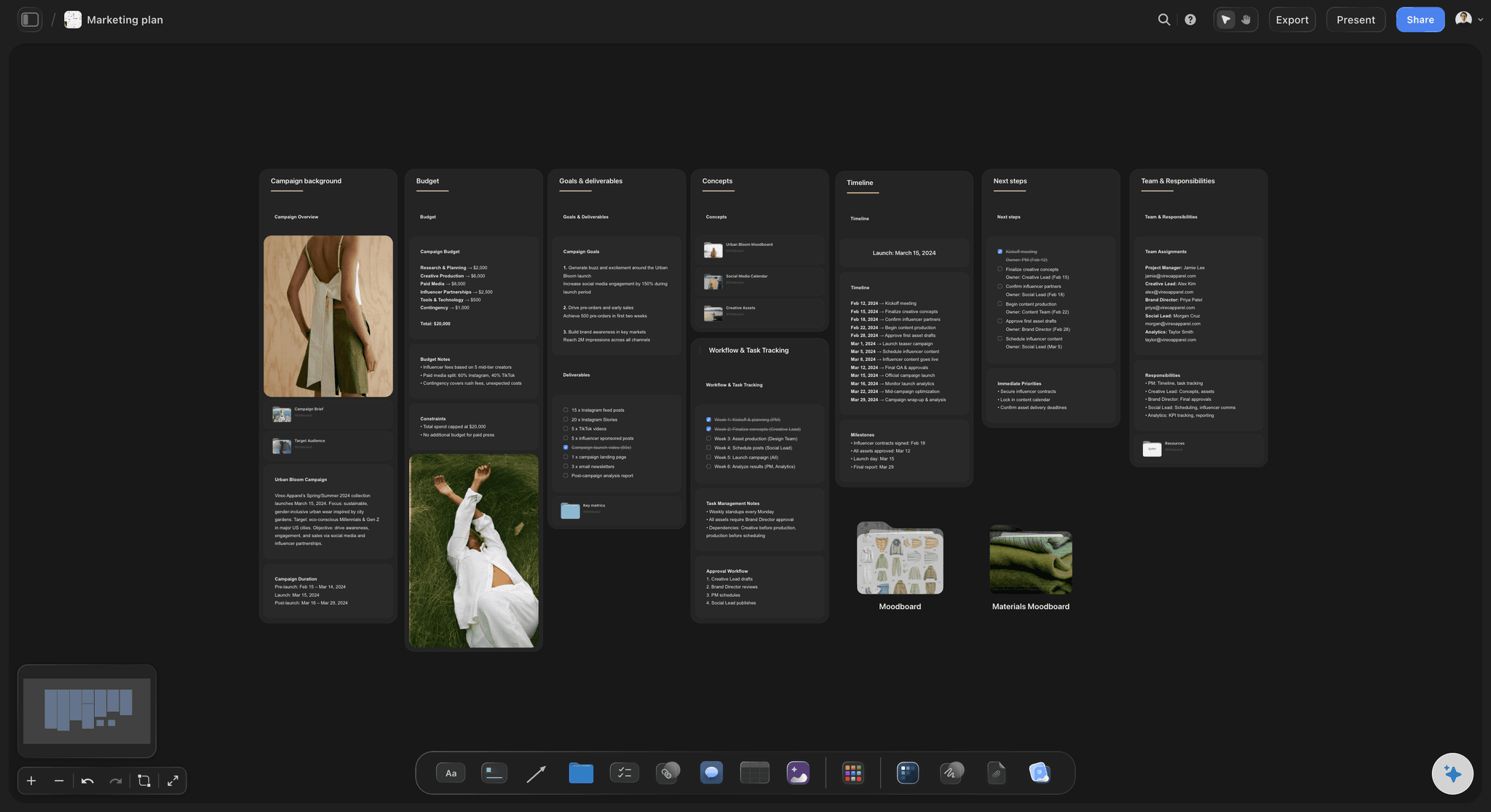
Blueprints are complete project frameworks with proven tactics embedded. Planning a YouTube video? The Blueprint includes hook formulas, retention strategies, and content structures that top creators use. Building a marketing campaign? You get positioning frameworks, audience mapping, and launch tactics. Writing a screenplay? Story structure beats and character arc frameworks are built in.
You're not just organizing ideas. You're learning professional frameworks while applying them to your actual project. No courses to watch first. No hoping you remember what that guru said. The knowledge is in the workspace.

AI that understands your project
Storyflow's AI reads your full active canvas board by default, plus up to 1 Tactic and up to 3 Documents you @-mention in the chat. When you ask for help, it responds with suggestions that fit what is actually on the board in front of you, not generic outputs.
The board stays put between sessions, so the context you build up keeps paying off every time you open it.
Built-in frames library
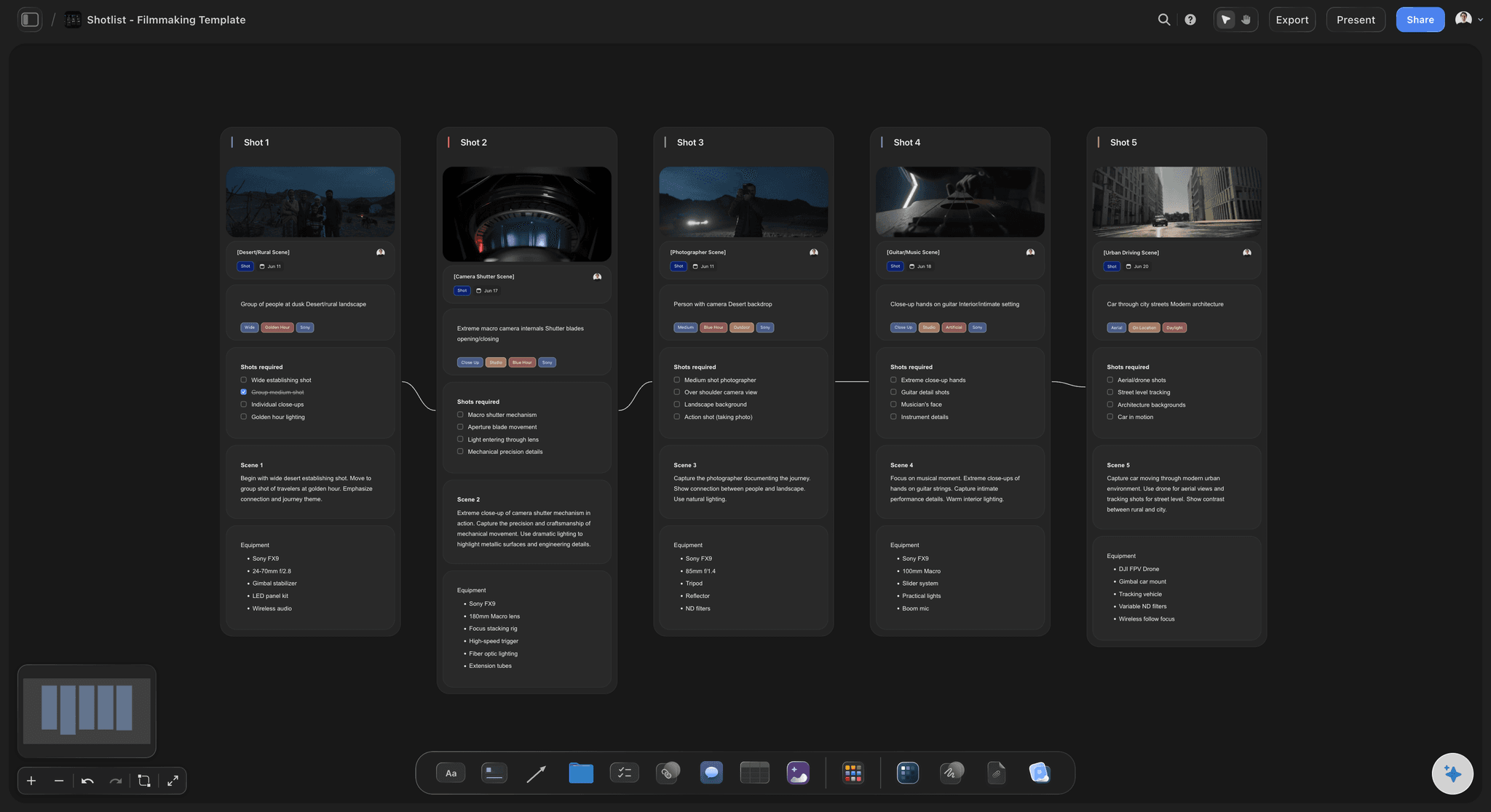
Filmmakers pay $99/year for ShotDeck to browse film references. Storyflow includes a frames library free. Collect cinematography references, analyze shots, build visual language. No separate subscription.
Who uses Storyflow:
- Filmmakers planning productions and collecting references
- YouTubers and content creators planning videos
- Marketers building campaigns with proven frameworks
- Writers developing stories with structure guidance
- Founders organizing projects and strategy
- Anyone who thinks visually and wants AI that helps
What makes Storyflow different:
Milanote holds your ideas. Storyflow develops them. The Blueprints teach you while you work. The AI thinks with you. The frames library eliminates an extra subscription. Storyflow's Free plan, launching before the end of 2026, won't cap out at 100 notes. It's what a visual workspace should be when you build it today instead of 2017.
The Blank Canvas Problem
Open Milanote for the first time. You get a board. It's empty. Now what?
If you're an experienced designer with established workflows, you know what to do. Create sections. Add inspiration. Build your moodboard. The blank canvas works because you bring the structure.
But most people aren't experts with frameworks ready to deploy.
They open the blank board. They stare at it. They add a few images. Maybe some notes. The board becomes a loose collection of stuff without clear purpose or organization. It's Pinterest with extra steps.
This is the blank canvas problem. The tool assumes you already know how to use it effectively. It provides space but not guidance. Storage but not structure.
The course-then-apply gap
Here's how most creatives learn frameworks today:
Watch a YouTube video about story structure. Take notes. Close the video. Open your project. Try to remember what the video said. Apply it partially. Miss half the steps because you're working from memory.
Or: Buy a course on marketing strategy. Watch ten hours of content. Feel inspired. Open a blank Milanote board. Realize you don't remember the specific frameworks. Go back to the course. Take more notes. Try again. Lose momentum.
The knowledge lives in one place. The work lives in another. The gap between learning and doing is where most projects stall.
Blueprints close the gap
Storyflow's Blueprints embed the frameworks directly in your workspace.
You don't watch a video about YouTube hooks then try to apply it. You open a YouTube-style blueprint from Storyflow's Story blueprints library and the hook formulas are right there, in context, as you plan your actual video.
You don't take a course on marketing campaigns then struggle to remember the steps. You open a campaign blueprint from the library and the positioning framework, audience mapping, and launch tactics are built into the board structure.
Learning happens while doing. The framework is in the workspace, not in your memory.
Templates vs Blueprints
Milanote has templates. They're starting points with empty sections. Better than a blank board, but still just containers.
Storyflow Blueprints include tactics. Actual guidance. The "why" and "how" alongside the "what." A Milanote template says "put your hook here." A Storyflow Blueprint explains what makes hooks work and gives you proven formulas to adapt. The difference is education embedded in execution.

A Storyflow board turns scattered notes and references into a connected workspace, not just a place to dump them
Feature-by-Feature Comparison
Let's compare what each tool actually offers.
Visual Workspace
Both tools give you a canvas for spatial organization. Drag elements anywhere. Group related ideas. Zoom in and out.
Milanote's canvas is polished and minimal. It feels premium. The design is genuinely beautiful.
Storyflow's canvas is flexible and functional. Less about aesthetics, more about getting work done. Cards, connections, and structure emerge as you work. For pure visual beauty, Milanote edges ahead. For functional workspace that helps you think, Storyflow wins.
AI Capabilities
Milanote: None. Zero AI features at any pricing tier. The tool works exactly as it did years ago.
Storyflow: Context-aware AI that reads your full active canvas board, plus up to 1 Tactic and up to 3 Documents you @-mention. Ask for help brainstorming, developing ideas, or solving problems. The AI works from what is on the board, so suggestions connect to what you're actually building. This isn't a small gap. It's a generational difference. Milanote is pre-AI software. Storyflow is AI-native.
Blueprints & Tactics vs Empty Templates
Milanote offers templates. Empty structures with placeholder sections. "Moodboard" template gives you a board labeled for moodboard content. You fill it with whatever you know to add.
Storyflow offers Story blueprints with tactics built in. A YouTube-style blueprint doesn't just have a "hook" section. It includes hook formulas, retention principles, and structure frameworks. A marketing campaign blueprint includes positioning tactics, audience mapping frameworks, and launch strategies. Milanote templates are empty containers. Storyflow blueprints are guided frameworks with education embedded.
Frames Library
Milanote: Nothing. If you're a filmmaker collecting references, you need ShotDeck ($99/year) or Frame.set as a separate subscription.
Storyflow: Built-in frames library included free. Browse cinematography references, save shots, build visual language for your projects. No extra cost. No separate tool. For filmmakers, this alone can justify switching. You're saving $99/year while getting a more capable workspace.
Free Plan Limits
Milanote: 100 notes and images. That's it. Hit the limit and you're paying $10/user/month or deleting content. 100 sounds like a lot until you start a real project. A single moodboard can eat 30-40 images. Add notes, links, and a second board. You're capped within days.
Storyflow: Paid-only during early access, with a Free plan launching before the end of 2026. Plus starts at $7.99/month annual with unlimited canvas, unlimited boards, and unlimited cards; only storage and AI usage scale by tier. Milanote charges for quantity. Storyflow charges for intelligence.
Collaboration
Milanote: Share boards with view or edit access. Real-time collaboration works. Decent for client presentations.
Storyflow: Same core collaboration features. Share boards, control permissions, work together in real time. Plus shared AI context so the intelligence benefits everyone on the project. Roughly equivalent, with Storyflow's AI giving teams an extra layer of shared capability.
Export Options
Milanote: Export boards as images or PDFs. Print your moodboards. Share static versions.
Storyflow: Export to PDF, images, and multiple formats. Download boards for presentations or offline reference. Both handle export adequately. No major advantage either way.
Integrations
Milanote: Limited integrations. Works with some cloud storage. Browser clipper for saving content from the web.
Storyflow: Growing integration library. Browser extension. Connections to tools creators actually use. Neither tool is an integration powerhouse. Both focus on being the workspace rather than connecting everything.
Comparison Table
Here's the complete side-by-side breakdown:
| Feature | Storyflow | Milanote |
|---|---|---|
| Visual canvas | ✓ Flexible workspace | ✓ Beautiful minimal design |
| Free plan | Paid-only (early access) | 100 notes/images limit |
| AI assistance | ✓ Context-aware AI | ✗ None |
| Blueprints with tactics | ✓ Learn while doing | ✗ Empty templates only |
| Frames library | ✓ Built-in free | ✗ Need ShotDeck ($99/yr) |
| Project memory | ✓ AI remembers context | ✗ No intelligence |
| Collaboration | ✓ Real-time + shared AI | ✓ Real-time |
| Web clipper | ✓ Save from anywhere | ✓ Save from anywhere |
| Export options | ✓ PDF, images, more | ✓ PDF, images |
| Mobile app | ✓ Available | ✓ Available |
| Offline access | ✓ Available | ✓ Available |
| Pricing | Free / from $9.99/mo flat | Free (limited) / $10/user/mo |
What the table reveals:
The core canvas functionality is comparable. Both tools let you organize ideas visually. Both have collaboration, export, and web clipping.
The differences are what happens beyond the canvas.
Milanote stops at storage. Beautiful storage, but storage nonetheless. No AI. No tactics. No frames. Hard limits on the free plan.
Storyflow adds intelligence. Blueprints that teach frameworks. AI that understands your project. A frames library for filmmakers. Unlimited free usage with AI as the upgrade. If you just need a pretty place to dump inspiration, both work. If you want a workspace that helps you think, develop ideas, and learn professional frameworks while working, Storyflow is the clear choice.
Pricing Comparison
Pricing reveals philosophy. What a tool charges for tells you what it values.
Milanote Pricing:
| Plan | Price | What You Get |
|---|---|---|
| Free | $0 | 100 notes/images, then hard stop |
| Person | $10/month | Unlimited notes, 1 user |
| Team | $10/user/month | Unlimited notes, collaboration |
Milanote charges for quantity. Hit 100 notes and you're paying or deleting. Every team member pays full price. No AI at any tier.
Storyflow Pricing:
| Plan | Price | What You Get |
|---|---|---|
| Free | Coming late 2026 | Unlimited canvas, boards, cards (storage capped) |
| Plus | $7.99/month annual ($9.99 monthly) | Full 200+ Blueprint Tactics, increased AI, unlimited file uploads |
| Pro | $14/month annual ($19 monthly) | Adds AI image generation and 20× more AI than Plus |
Storyflow charges flat rates. Not per user. Your whole team, one price.
The math for individuals:
Milanote: Free until 100 notes, then $10/month for unlimited. $120/year. No AI ever.
Storyflow: Free forever with unlimited boards and cards. Plus at $7.99/month annual unlocks the full 200+ Blueprint Tactics library; Pro at $14/month annual adds AI image generation and 20× more AI than Plus. For similar money, you get unlimited free usage plus AI capabilities Milanote doesn't offer at any price.
The math for teams:
This is where Storyflow pulls away dramatically.
- 5-person team on Milanote: $50/month. $600/year. On Storyflow Pro: $14/month. $168/year. Savings: $432/year.
- 10-person team on Milanote: $100/month. $1,200/year. On Storyflow Pro: $14/month. $168/year. Savings: $1,032/year.
- 50-person team on Milanote: $500/month. $6,000/year. On Storyflow Pro: $14/month. $168/year. Savings: $5,832/year.
The gap is absurd. Milanote's per-user model punishes teams. Storyflow's flat pricing means collaboration is free.
The filmmaker math:
Filmmakers using Milanote typically also need ShotDeck for film references.
Milanote ($10/month) + ShotDeck ($99/year) = $219/year minimum. No AI. Solo user only.
Storyflow Pro with built-in frames library: $168/year (annual). AI included. Frames library included. Flat per account, not per user. You save money AND get more capabilities.
What you're actually paying for:
Milanote: Storage space per person. That's the only unlock. Same empty canvas, more room, multiplied by headcount.
Storyflow: Intelligence and capability for your whole team. Unlimited free workspace. Pay once for AI that helps everyone.
The real question:
Why would you pay $10/user/month for a tool with no AI when you can pay $14 total for a tool with AI, Blueprints, tactics, and a frames library? Dollar for dollar, user for user, Storyflow isn't just better value. It's a different league.
Who Should Choose Milanote
Milanote isn't wrong for everyone. There are situations where it makes sense.
You only need simple moodboards
Your workflow is basic. Collect images. Arrange them on a board. Share with a client. Done. You don't need AI, tactics, or frameworks. You just need a clean place to gather visual inspiration. Milanote does this well. The interface is polished. Boards look professional. If moodboards are your entire use case and you never need more, Milanote handles it.
You're already embedded
Your team has used Milanote for years. Your processes are built around it. Client workflows expect it. Switching costs are real. Sometimes good enough is good enough. If Milanote works and the pain isn't severe, staying put is valid. Just know what you're missing.
You strongly prefer the aesthetic
Milanote is beautiful. The visual design is refined in ways that matter to some people. The minimalism is genuine. If interface aesthetics heavily influence your tool choices, Milanote delivers.
You work completely solo under 100 notes
If you're one person with small projects that never exceed 100 notes, Milanote's free tier works. You'll never pay. You'll never hit limits. The lack of AI won't bother you if you never expected it.
You don't trust AI
Some people actively avoid AI features. They don't want suggestions. They don't want assistance. They want a tool that does exactly what they tell it and nothing more. Milanote is completely manual. No intelligence. No automation. Pure blank canvas that waits for your input. If that's your preference, Milanote respects it.
Be honest about the tradeoffs:
Choosing Milanote means accepting no AI at any tier. No frameworks or tactics built in. Per-user pricing that scales linearly. A free plan that caps at 100 notes. No frames library for film references. If those tradeoffs don't affect your work, Milanote is a capable tool. Just make the choice with clear eyes.
Who Should Choose Storyflow
Storyflow wins for most creative professionals. Here's when it's the clear choice.

Storyflow's mind map feature goes beyond Milanote by letting you build connected idea networks with AI assistance
You want to learn while doing
You're not an expert with frameworks memorized. You want to get better at marketing, storytelling, content strategy, or filmmaking while actually doing the work. Blueprints with built-in tactics make this possible. You're not watching courses then trying to remember what they said. The frameworks are in your workspace, applied to your actual project. Education and execution happen together.
You're tired of blank canvases
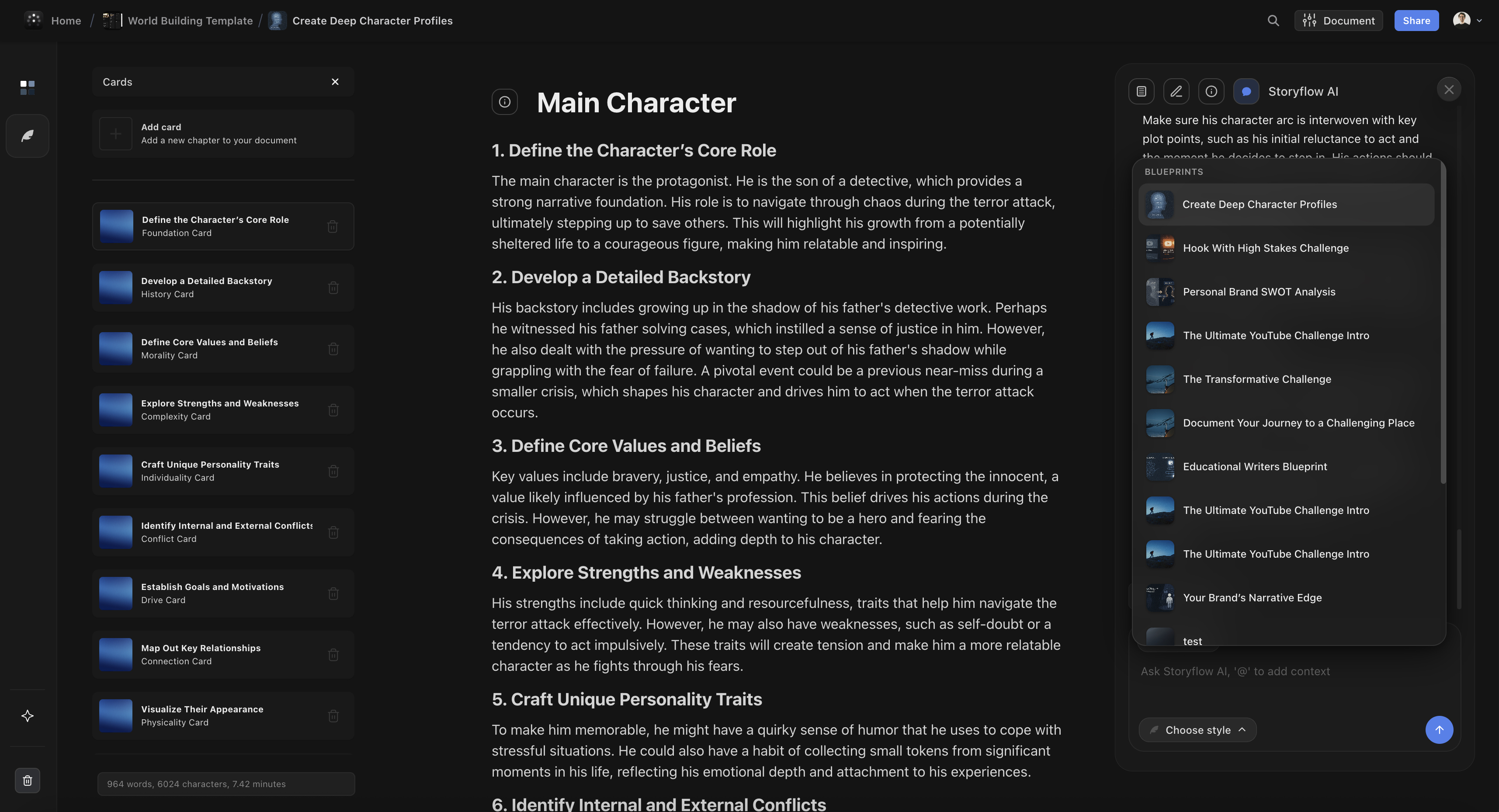
You've opened Milanote, stared at the empty board, and wondered where to start. You've created boards that became disorganized dumps because you didn't have a structure in mind. Storyflow Blueprints give you starting points with purpose. Not empty templates. Guided frameworks that help you think through projects systematically.
You want AI that actually helps
You've seen what AI can do. You want a workspace that thinks with you, not just stores what you put in. You want suggestions that fit your specific project, not generic outputs. Storyflow's AI reads your full active canvas board, plus up to 1 Tactic and up to 3 Documents you @-mention in the chat. The assistance is relevant because it works from what is actually on the board, not a blank prompt.
You work with a team
Per-user pricing punishes collaboration. Adding a contractor for a project shouldn't double your bill. Bringing on a new team member shouldn't require budget approval. Storyflow's flat pricing means your whole team works together for one price. $14/month whether you're 2 people or 50. Collaboration is free.
You're a filmmaker
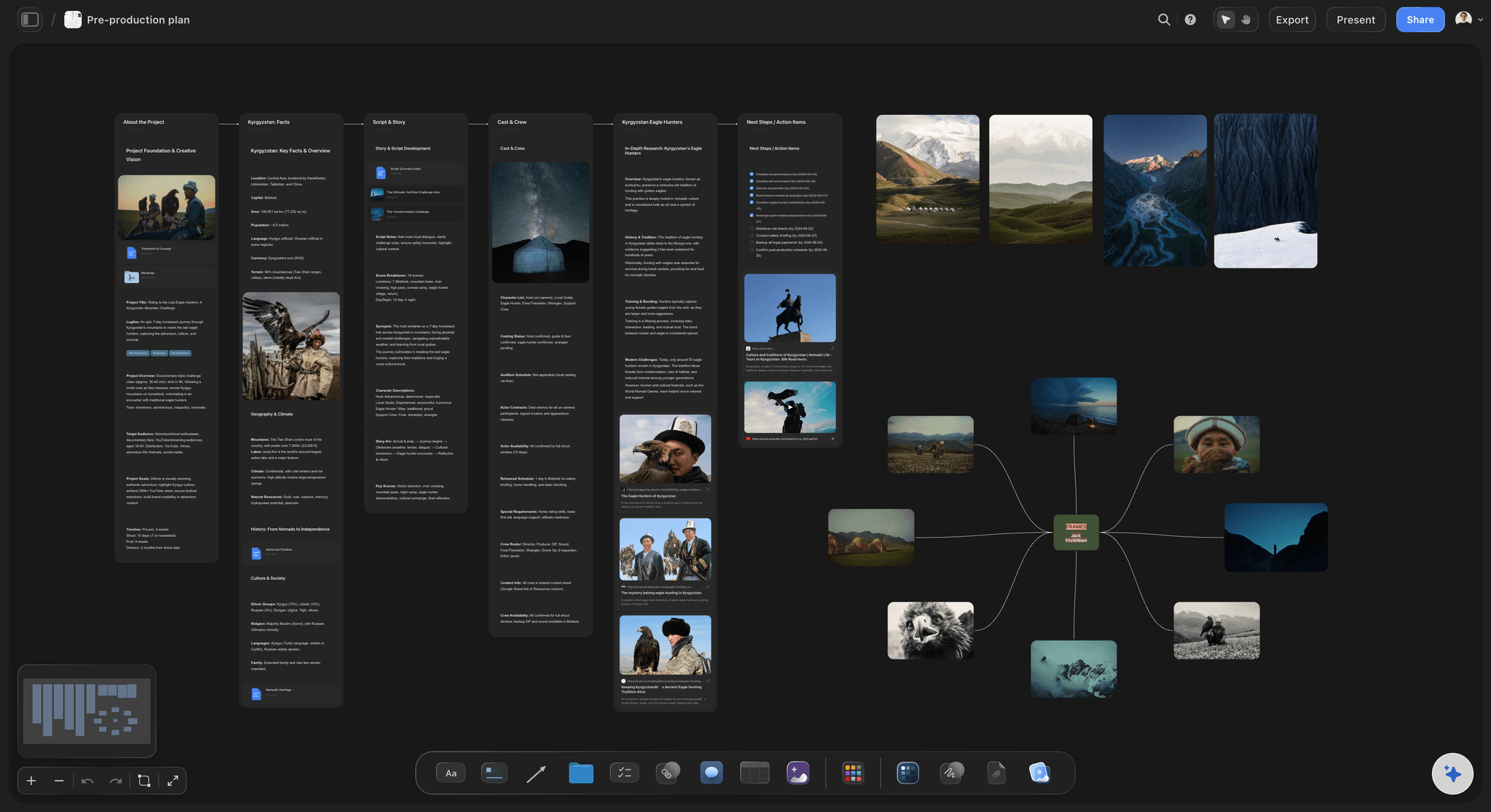
You need reference frames. You're currently paying $99/year for ShotDeck or wishing you could afford to. You want cinematography references connected to your actual production planning. Storyflow includes a frames library free. Browse references, save shots, build visual language. No separate subscription. No extra cost.
You want unlimited free usage
You don't want to count notes. You don't want to hit a wall at 100 items and face a paywall. You want to build entire projects without worrying about limits. Storyflow's free tier includes unlimited canvas, boards, and cards. Only storage is capped. You can work for months without paying if you don't need AI or extra storage.
You value capability over aesthetics
Here is the honest trade-off, and it is the one place Milanote clearly wins. If the deliverable is the board itself, a gallery-style mood board you hand to a client or pin to a wall, Milanote's polished, minimal canvas still looks better than Storyflow's. Storyflow's canvas is built to develop a project, not to be the finished artifact. For pure visual curation and presentation polish, choose Milanote.
Storyflow is more capable everywhere else. If you'd rather have AI that reads your board, Story blueprints with built-in tactics, and a free frames library than a slightly more polished surface, Storyflow is the obvious choice.
You're building something serious
A real production. A real campaign. A real content strategy. Work that matters and deserves tools that help you succeed. Storyflow isn't just storage for ideas. It's a workspace that develops them. For serious creative work, that difference compounds over every project.
Use Case Comparisons
Same creative professional. Same project. Different tools. Here's how the experience diverges.
For Filmmakers
With Milanote: Create a board for your film project. Add reference images you find online. Maybe organize by scene or mood. When you need cinematography references, open ShotDeck in another tab ($99/year). Browse there, screenshot frames, paste into Milanote. Two tools, two subscriptions, no connection between them.
With Storyflow: Open a film production blueprint from the library. Get a complete workspace with shot planning, visual references, and production frameworks built in. Browse the frames library without leaving the app. Save shots directly to your project. AI helps you develop your visual language and connects references to specific scenes. One tool, one price, everything connected.
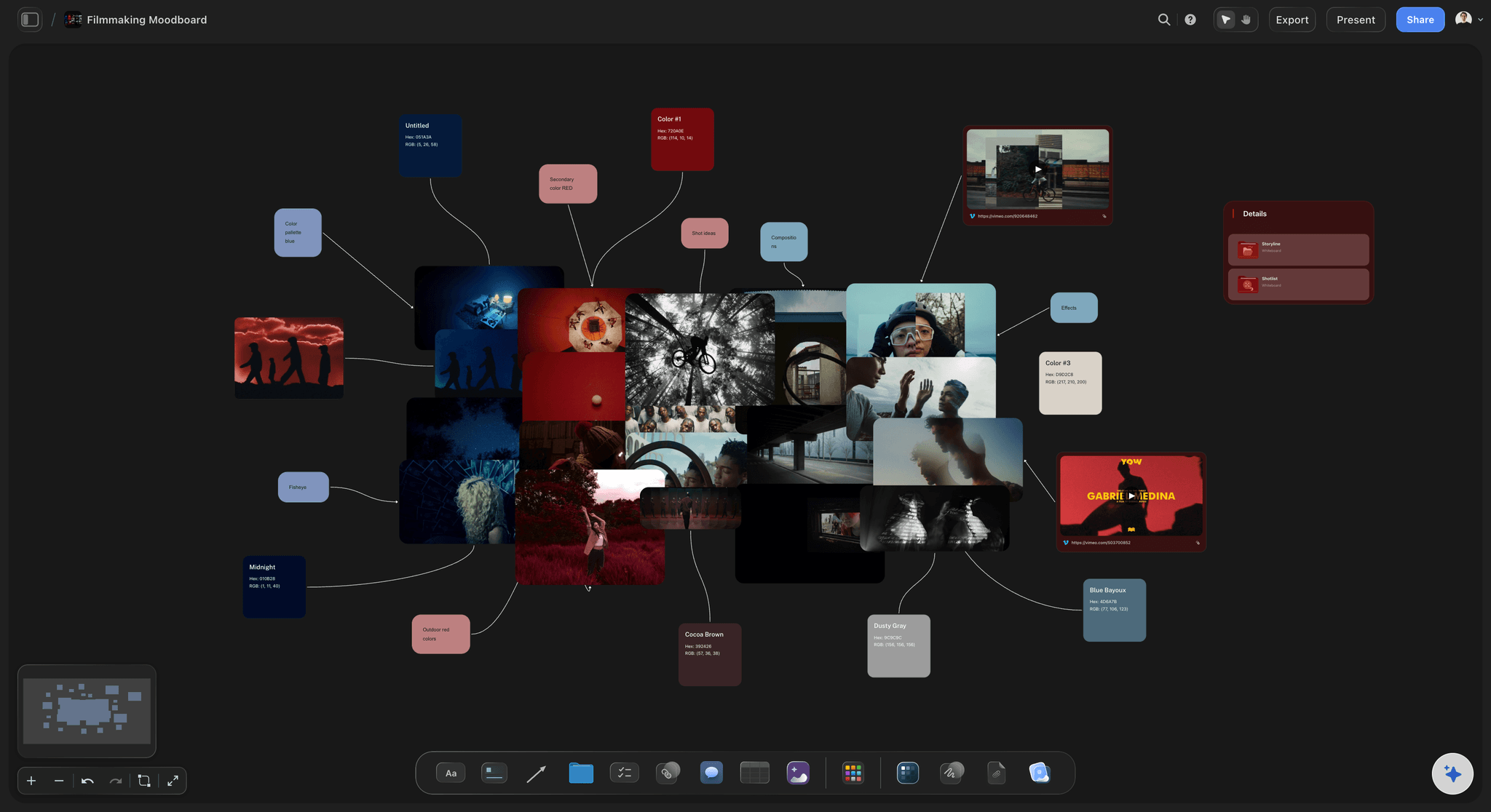
Winner: Storyflow (frames library alone saves $99/year)
For Marketers
With Milanote: Create a board for your campaign. Add... what exactly? You need to know marketing frameworks already. Positioning? Value props? Audience segments? You learned this in a course somewhere. Try to remember it. Build your own structure from scratch. Hope you don't miss important elements.
With Storyflow: Open a marketing campaign blueprint from the library. Positioning frameworks are built in. Audience mapping tactics are there. Launch strategies are embedded. You're not trying to remember what that marketing guru said. The proven frameworks are in your workspace, applied to your actual campaign. AI helps you refine messaging and identify gaps.
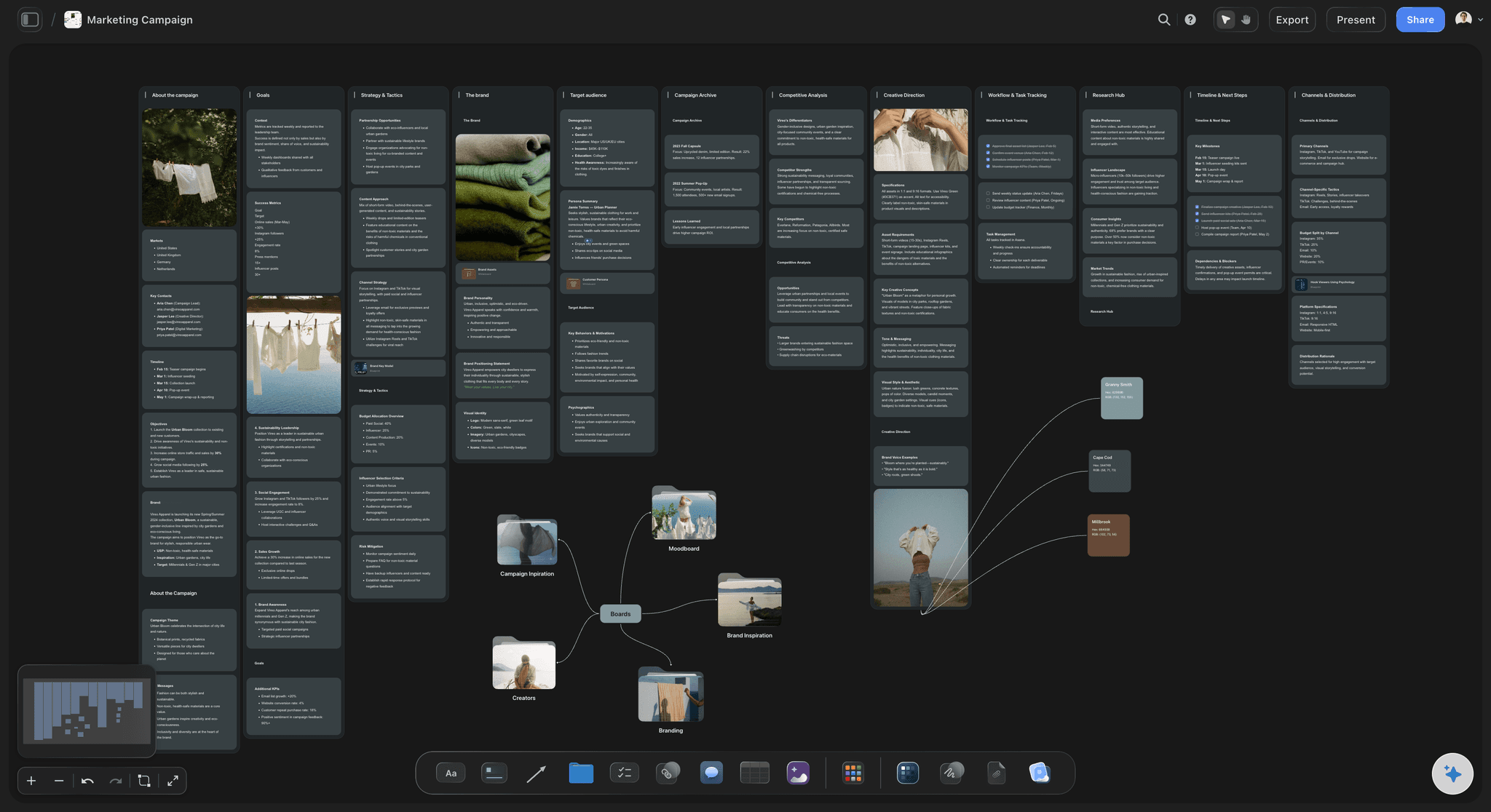
Winner: Storyflow (tactics built in vs blank canvas)
For Writers
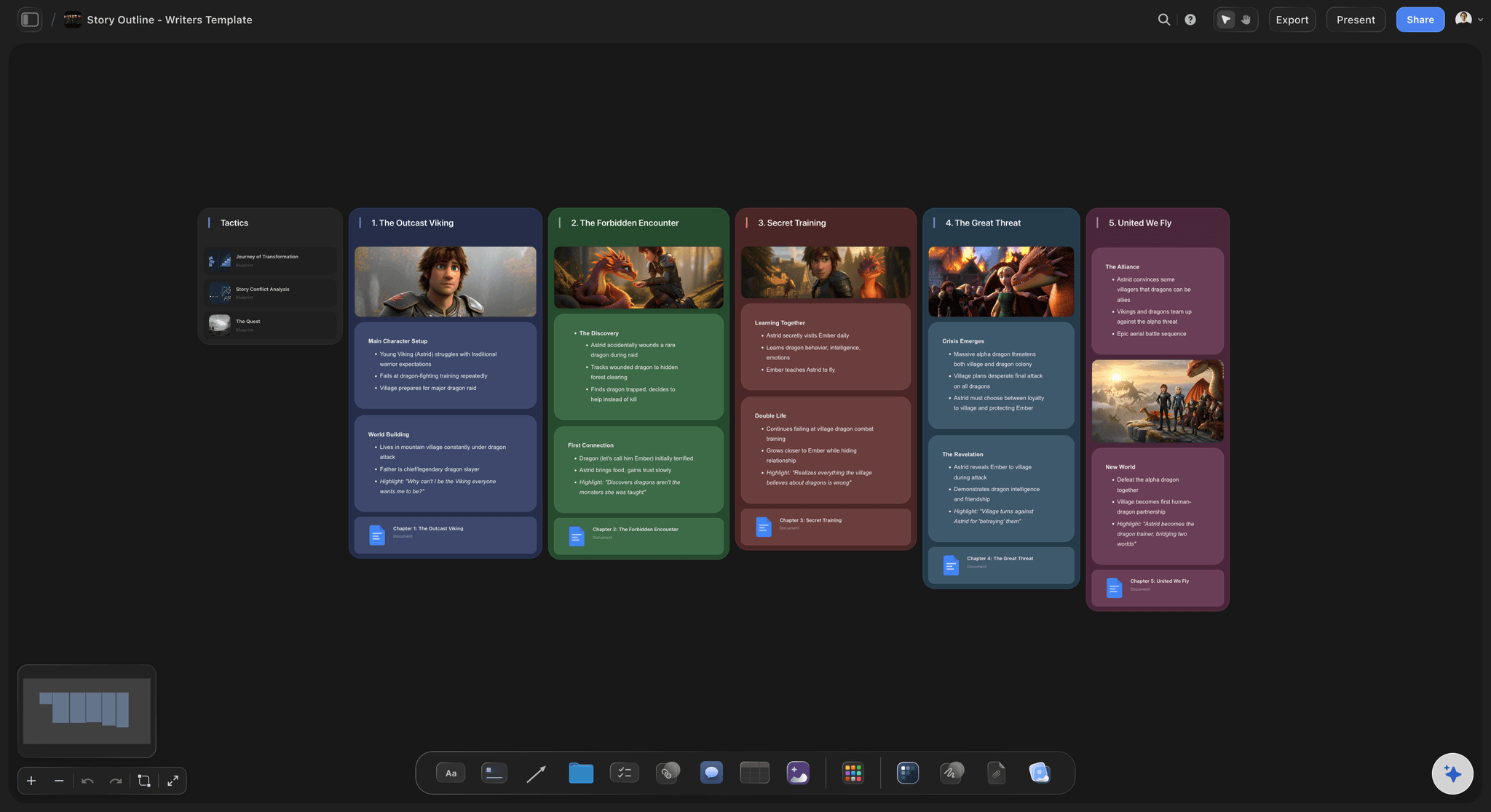
With Milanote: Create boards for your novel. Character notes here, plot points there, research somewhere else. No story structure guidance. No character arc frameworks. You bring everything or you get nothing. Boards become loose collections of notes without narrative purpose.
With Storyflow: Open a story planning blueprint from the library. Three-act structure, character arc frameworks, world-building templates built in. You're learning story craft while planning your actual novel. AI helps develop characters, identify plot holes, and maintain consistency. Your notes connect to narrative purpose.
Winner: Storyflow (story frameworks vs empty boards)
For Designers
With Milanote: Create moodboards for client projects. This is Milanote's strength. Drag images, arrange aesthetically, share with clients. It works. But when you need to develop the creative brief, manage project phases, or get AI help articulating design direction, you're switching tools.
With Storyflow: Create moodboards that connect to creative briefs, project timelines, and client feedback. AI helps articulate design direction in words clients understand. Blueprints include frameworks for brand development, not just image collection. The moodboard is part of a larger workspace, not an isolated board.
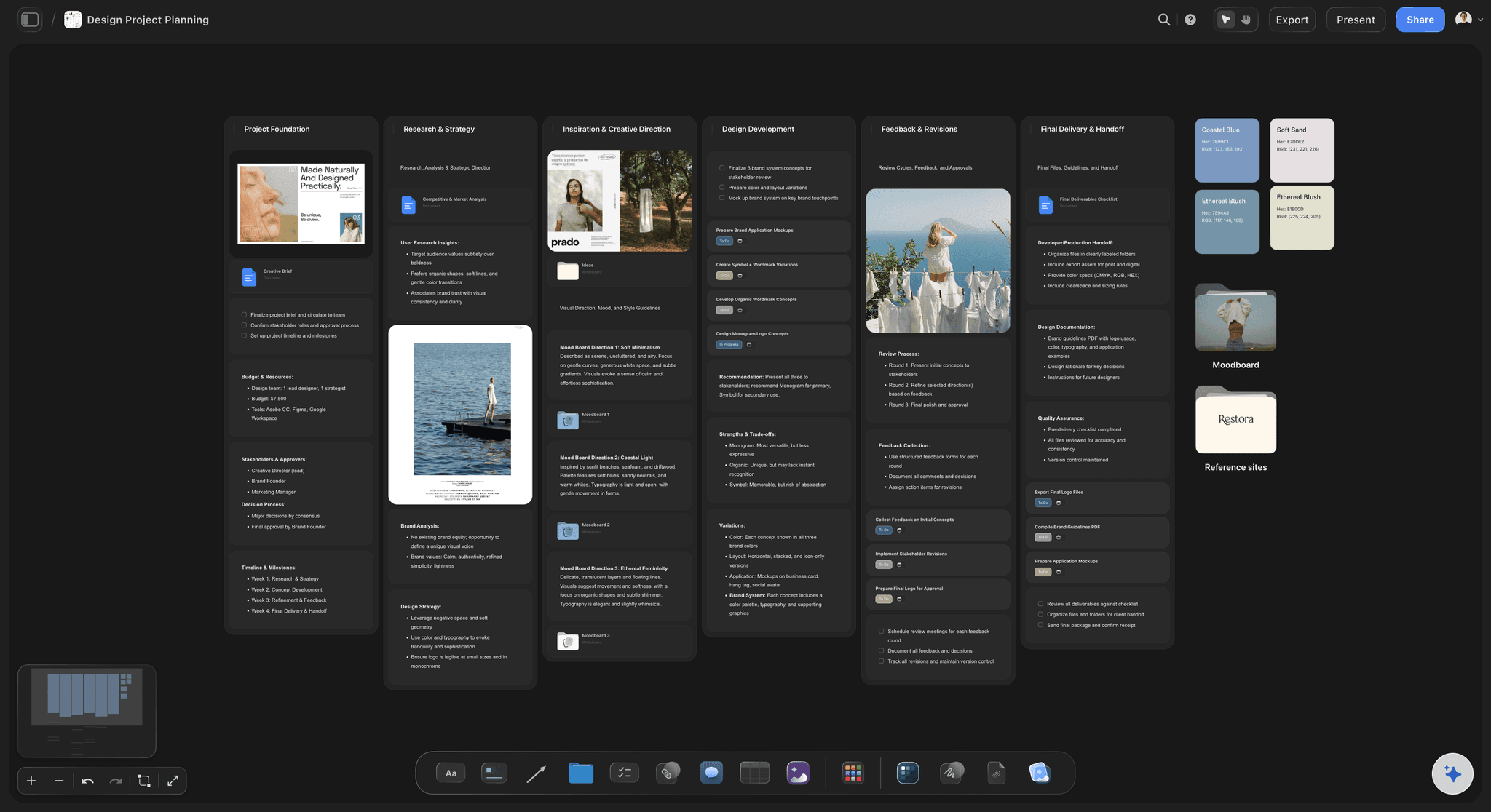
Winner: Storyflow (connected workspace vs isolated moodboards)
For YouTubers and Content Creators
With Milanote: Create a board for your video. Add thumbnail ideas, maybe some notes. No structure for hook development, retention strategy, or content frameworks. You're on your own figuring out what makes videos work.
With Storyflow: Open a YouTube-style blueprint from the library. Hook formulas built in. Retention tactics embedded. Thumbnail strategies included. You're learning what top creators know while planning your actual video. AI helps brainstorm angles and refine your approach. Your content strategy develops alongside your content.
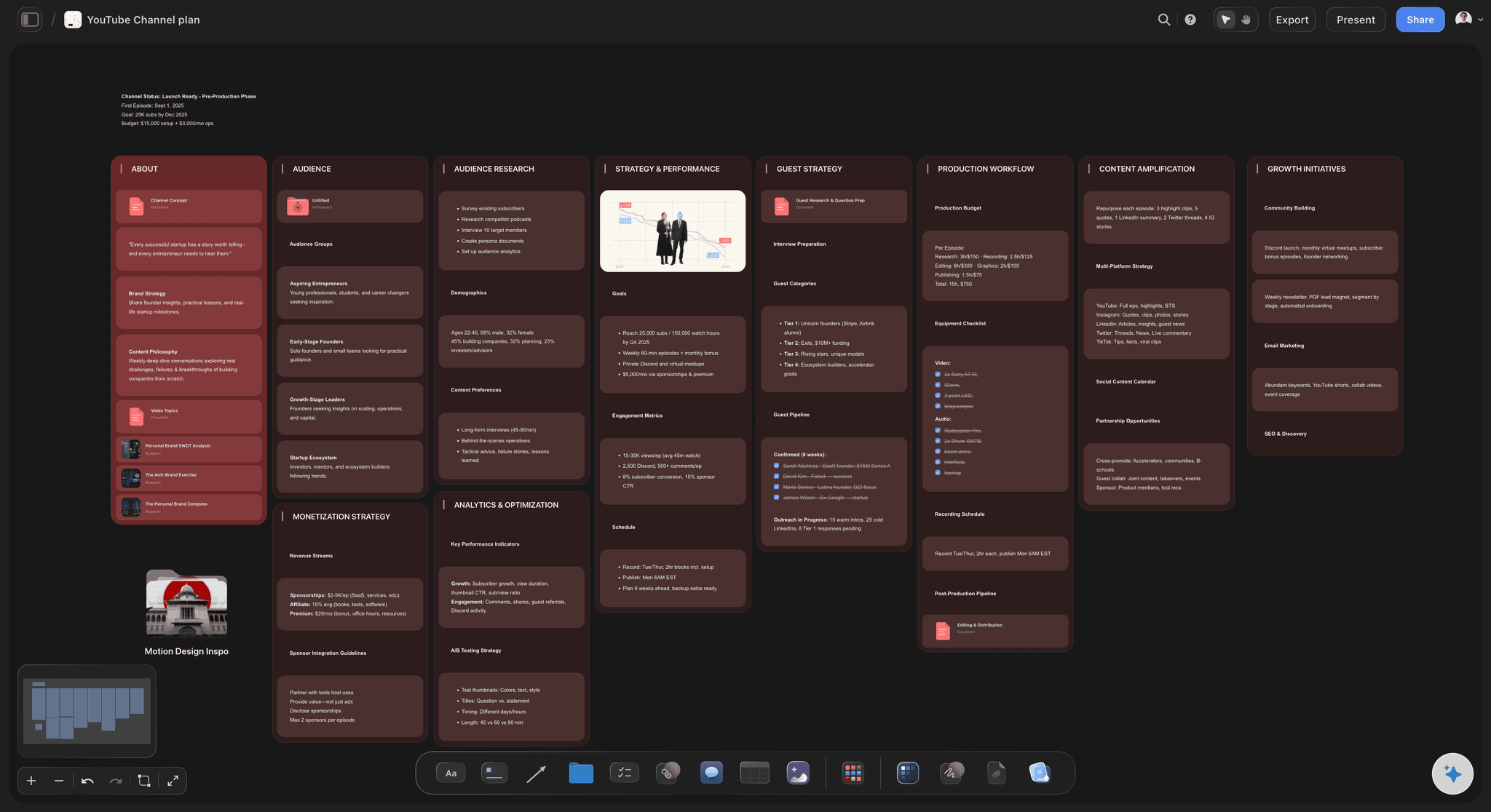
Winner: Storyflow (creator tactics vs blank board)
For Project Planning
With Milanote: It's possible but awkward. Milanote is built for visual inspiration, not project management. You can force it, but you're fighting the tool.
With Storyflow: Blueprints for different project types give you structure immediately. AI helps break down complex projects. The workspace adapts to planning needs, not just inspiration collection.
Winner: Storyflow (built for projects vs adapted for projects)
The pattern:
Milanote wins narrowly when all you need is a beautiful moodboard with no intelligence, no frameworks, and no connection to larger workflows. Storyflow wins everywhere else. The Blueprints, tactics, AI, and frames library add capabilities Milanote simply doesn't have.
FAQ
Is Storyflow a Milanote alternative?
Yes. Storyflow does everything Milanote does - visual boards, drag-and-drop organization, moodboards, collaboration - plus AI assistance, Blueprints with built-in tactics, and a frames library for filmmakers. For most creative professionals, Storyflow is a more capable alternative at comparable or lower cost.
Can I switch from Milanote to Storyflow?
Yes. You can recreate your Milanote boards in Storyflow, but most people find it better to start fresh with Blueprints. Instead of copying your old structure, pick a Blueprint that fits your project and build something better. The frameworks and tactics give you a stronger foundation than whatever you had in Milanote.
Is Storyflow free?
Not during early access. Storyflow is paid-only right now, with a Free plan launching before the end of 2026 that will include unlimited canvas, unlimited boards, and unlimited cards. Plus ($7.99/month annual) unlocks the full 200+ Blueprint Tactics library, increased AI, and unlimited file uploads. Pro ($14/month annual) adds AI image generation and 20× more AI than Plus. These are flat individual prices, not per user.
What else does Storyflow replace besides Milanote?
Quite a lot. Alongside Milanote's moodboards, the same Storyflow plan covers ChatGPT for AI, Notion for documents, Frameset for storyboards and shot planning, and Shotdeck for frame references, all on one canvas. Pro is $14 per month billed annually, so several subscriptions collapse into one.
Is Milanote free?
Milanote's free plan caps at 100 notes and images. Hit that limit and you're paying $10/user/month or deleting content. One real project can exhaust 100 notes in days.
Does Milanote have AI?
No. Milanote has no AI features at any pricing tier. The tool works exactly as it did years ago. If you want AI assistance with your creative work, you need a different tool.
What are Storyflow Blueprints?
Story blueprints are complete project frameworks with tactics built in. Unlike empty templates, they include proven strategies, frameworks, and guidance. A YouTube-style blueprint includes hook formulas and retention tactics. A marketing campaign blueprint includes positioning frameworks and launch strategies. You learn while doing instead of watching courses then trying to apply them.
What is the Storyflow frames library?
A built-in collection of film references and cinematography examples. Filmmakers can browse shots, save references, and build visual language without paying for ShotDeck ($99/year) or Frame.set separately. The frames library is included free with Storyflow.
Is Storyflow better than Milanote for teams?
Significantly. Milanote charges $10/user/month. A 10-person team pays $100/month. Storyflow charges flat rates - $14/month for AI regardless of team size. That same 10-person team pays $14 total. The savings are dramatic and grow with team size.
Which is better for moodboards?
Both tools handle moodboards well. Milanote's interface is slightly more polished. Storyflow's moodboards connect to larger project workspaces, AI assistance, and frameworks. For isolated moodboards, they're comparable. For moodboards as part of real creative projects, Storyflow offers more.
Which is better for filmmakers?
Storyflow. The built-in frames library replaces ShotDeck ($99/year savings). Film production blueprints in the library include shot planning frameworks. AI helps develop visual language. Milanote requires separate tools for film references and offers no production frameworks.
Can I use Storyflow for client work?
Yes. Share boards with clients, control permissions, collaborate in real time. Blueprints help you structure client projects professionally. AI helps articulate creative direction in language clients understand. Flat pricing means adding client collaborators doesn't increase your bill.
Conclusion
Milanote pioneered something important. It proved that creative professionals deserve visual tools, not just spreadsheets and documents. Millions of people organized their ideas spatially for the first time because Milanote existed.
But Milanote stopped there.
The tool you use today is in effect the tool from 2017. Beautiful blank boards. No AI. No frameworks. No tactics. A free plan that caps at 100 notes. Per-user pricing that punishes teams. It's a time capsule of pre-AI creative software.
Storyflow is what comes next.
Same visual foundation. Same spatial organization. Same creative focus. But with intelligence built in.
- Blueprints with tactics so you learn proven frameworks while doing actual work. No more watching courses then struggling to apply them to empty boards.
- AI that understands your project and offers suggestions that fit your specific work. Not generic outputs. Contextual assistance that gets smarter over time.
- A frames library for filmmakers so you don't pay $99/year for ShotDeck on top of your workspace subscription.
- Unlimited free usage with no 100-note wall. Only storage and AI are premium features.
- Flat pricing so your whole team collaborates for one price. Add people without adding cost.
The choice is clear for most creative professionals:
Choose Milanote if you only need simple moodboards, you're already deeply embedded, or you actively avoid AI. It's a capable tool for basic visual organization.
Choose Storyflow if you want a workspace that helps you think, teaches you frameworks, includes AI assistance, and doesn't charge per user. It's what Milanote would be if it were built today.
Blank canvases had their moment. Intelligent workspaces are what creative professionals need now.
If you already run a project in Milanote, here is the test that settles it: take your most active board, open a matching blueprint in Storyflow, and rebuild that project for one week with the AI reading your board as you work. If you only wanted a pretty place to collect images, you will miss Milanote's polish. If you wanted the project to actually move forward, the difference will be obvious by Friday.
Related Reading
Alternatives for spatial organization
Whiteboard tool comparisons
Visual organization tools compared
AI workspace comparison
Canvas versus outliner for organizing ideas
Table of Contents
Templates to check out for this topic


Templates you can use in Storyflow
Every Storyflow board starts from real structure and an AI that reads the whole canvas. Open one of these templates and make it yours.


See Storyflow in Action
A visual AI workspace where every feature lives inside one canvas. No tab-switching, no context lost.
Build your entire board from a single message
Type what you need in the AI chat at the bottom of your canvas. The AI adds cards, headings, and structure directly onto your board.
Use expert frameworks as AI context
Type @ in the AI chat and choose any Tactic. The AI tailors every response to that framework instead of giving generic advice.
Turn your board into a mind map in seconds
Ask the AI to restructure your canvas as a mindmap. It connects your ideas into a visual hierarchy so you can see how everything relates.
Why Storyflow Exists
Storyflow actually began as a personal tool while working on creative and research projects.
We kept running into the same problem: ideas were scattered everywhere: notes, documents, and whiteboards.
Nothing helped us see how everything connected.
So we started building a workspace designed around how ideas actually grow.
→ Read how Storyflow was createdSara de Klein
Head of Product at Storyflow
Published: January 1, 2026
Extremely simple, seriously capable


See how easy it is to get started
Watch a real project come together, from a blank board to a finished plan, clicked through step by step.
Start creating with AI and become more productive
Transform your creative workflow with AI-powered tools. Generate ideas, create content, and boost your productivity in minutes instead of hours.