The 5 Best AI Moodboard Generators in 2026 (Kive vs Visual Electric vs Krea vs Firefly vs Recraft)
The five tools most often recommended as AI moodboard generators do two fundamentally different jobs, and the disappointment people report comes from buying the wrong one. Kive retrieves and arranges images that already exist. Visual Electric, Krea, Firefly and Recraft generate images that did not.

Category
Moodboards
Author

Justkay
Documentary Filmmaker & Founder at Storyflow
Topics
2026-09-06
•
18 min read
•
Moodboards- best ai moodboard generator
- kive vs visual electric vs krea
- are ai generated moodboard images safe commercially
- ai moodboard generator for designers
- generated vs retrieved moodboard
What is the best AI moodboard generator?
The five tools most often recommended as AI moodboard generators do two fundamentally different jobs, and the disappointment people report comes from buying the wrong one. Kive retrieves and arranges images you or the world already have. Visual Electric, Krea, Firefly and Recraft generate images that did not previously exist. For a moodboard that communicates a direction to a client or a crew, retrieval is usually correct and generation is usually wrong, because a generated image shows a thing nobody can actually shoot, buy or license. Firefly is the only one of the five whose output carries commercial indemnification, which matters the moment a board leaves your laptop.
Full disclosure: Storyflow is our product and it is placed last of the six here. Its image generation is not competitive with Krea, Visual Electric or Firefly, it has no library auto-tagging like Kive, no vector output and no indemnification. The article's actual recommendation for most photographic moodboards is a retrieval tool, and for teams with an archive it is Kive.
Quick Comparison
Two jobs wearing one category name. Retrieval shows a precedent; generation shows a possibility.
| Tool | Best For | AI Features | Price |
|---|---|---|---|
| Kive | Finding real assets you own | Auto-tagging, natural-language search | Team pricing |
| Krea | Live look development | Realtime canvas, best upscaler | Published tiers |
| Visual Electric | Designer-shaped exploration | Infinite canvas, style consistency | Published tiers |
| Adobe Firefly | Commercially safe output | Indemnified on business tiers | Creative Cloud |
Key Takeaways
- A moodboard made of generated images promises a look that does not exist yet. A moodboard made of real references promises a look someone has already achieved. Those are different documents and clients read them differently.
- Kive is the only tool of the five built for moodboarding as a job. The rest are image generators that can produce material a moodboard might use.
- Adobe Firefly is trained on Adobe Stock and public domain content and offers IP indemnification on business plans, which is the only clean answer in this group to the commercial-use question.
- Krea is the strongest for real-time iteration and upscaling, and its realtime canvas is the fastest way to explore a look with a director sitting next to you.
- Visual Electric is the most designer-shaped generator: an infinite canvas, style consistency across a set, and output organised the way a designer thinks rather than as a feed of one-offs.
- Recraft is the only one that outputs true vector, which makes it the answer for logo, icon and illustration direction and irrelevant for photographic mood.
- The honest recommendation for most photographic moodboards is still a retrieval tool such as Milanote, PureRef or Are.na, with a generator used only to fill gaps a reference cannot cover.
The Distinction Nobody Draws, and Everybody Trips Over
Search "AI moodboard generator" and you get a list that mixes two categories as if they were one. The result is a predictable pattern of disappointment: a photographer buys a generator, produces twenty beautiful images, sends the board to a client, and the client asks which of these locations they are shooting at. None of them. They do not exist.
Two categories, doing two jobs:
Retrieval tools find and arrange images that already exist, from your own archive, a stock library, or the open web. The output is a board of real things. Kive is the AI-native example; Milanote, PureRef, Are.na and Pinterest are the manual ones.
Generation tools synthesise new images from a prompt or a reference. The output is a board of possibilities. Visual Electric, Krea, Firefly and Recraft live here.
The job the board is doing decides which category you need. A moodboard sent to a DP to communicate a lighting direction should be references, because the DP needs to reverse-engineer how a real image was made. A moodboard sent to a client to sell a concept that will be built in post or CG can be generated, because there is nothing real to point at yet. A moodboard for a photoshoot is references, always, because you are going to have to actually make the picture.
Get that decision right and every tool below works. Get it wrong and none of them do.
The Three Questions That Decide the Tool
Before comparing features, answer these. They eliminate three of the five tools in almost every real project.
1. Does the board need to point at something real?
If yes, you need retrieval. Kive, or a manual tool. Stop reading the generator reviews.
If no, and the board is selling a look that will be created later, generation is legitimate and often better, because it can show a specific combination that no existing image happens to contain.
2. Does the board leave your organisation?
This is the question people skip, and it is the one with legal consequences.
An internal reference board assembled from images found online sits comfortably in normal creative practice. The moment that board goes into a pitch deck that wins paid work, or into a document a client keeps, its status changes. Reference use is not the same as publication, and clients with legal departments increasingly ask.
For generated images the question is different but no smaller: whose training data made this, and does the vendor stand behind the output? As of 2026, Adobe is the only vendor in this group offering IP indemnification on its business tiers, on the basis that Firefly is trained on Adobe Stock and public domain material. That is a real differentiator for agency and brand work, and it is the reason Firefly appears on approved-tool lists where Krea does not.
3. Does the output need to be editable as a design asset?
If you need a logo direction, an icon set or an illustration style that will become a real asset, you need vector, and Recraft is the only tool here that produces it. If you need photographic mood, vector is irrelevant.
How We Evaluated These Tools
We built the same three briefs in each tool: a photographic moodboard for a location-based fashion shoot, a tone board for a branded documentary, and a visual identity direction for a small product brand. Each brief was taken to the point where the board would actually be sent to a client.
Six criteria:
- Board as an artefact. Can the tool produce a shareable, laid-out board, or does it produce loose images you then arrange somewhere else? This is the criterion that separates a moodboard tool from an image generator, and most of these tools fail it.
- Style consistency across a set. A moodboard of twelve images in twelve different styles communicates nothing. Can the tool hold one look across a series?
- Reference conditioning. Can you give it your own images as the direction, rather than describing the direction in words? Describing a look in prose is the slowest possible way to specify it.
- Commercial safety. Training data provenance, licence terms, indemnification.
- Iteration speed. How long from a change of mind to a new option on screen, with a director watching.
- Export and handoff. What does the DP, the client or the designer actually receive.
Comparison Table: The Five at a Glance
| Kive | Visual Electric | Krea | Adobe Firefly | Recraft | |
|---|---|---|---|---|---|
Core job | Find and organise real assets | Generate images for designers | Real-time generation and upscaling | Commercially safe generation | Vector and brand-consistent generation |
Generates new images | Limited | Yes | Yes | Yes | Yes |
Retrieves existing assets | Yes, strongest | No | No | Stock integration | No |
Produces a laid-out board | Yes, strongest | Yes, canvas | Partially | No | No |
Style consistency across a set | From your library | Yes, strong | Yes | Yes | Yes, strongest |
Reference image conditioning | Native | Yes | Yes, strongest | Yes | Yes |
Vector output | No | No | No | Limited | Yes, only one here |
Real-time iteration | No | No | Yes, strongest | No | No |
Commercial indemnification | Not applicable | No | No | Yes, business tiers | No |
Team asset library | Yes, strongest | Basic | No | Via Creative Cloud | Basic |
Best single use | Agency and production asset boards | Designer concept exploration | Live look development | Client-safe generated assets | Logo, icon, illustration direction |
Pricing across this category changed repeatedly through 2025 and 2026. Verify current tiers with each vendor rather than relying on any published figure, including ours.

A moodboard with references and the notes explaining them on one canvas
A board rarely travels alone
A moodboard travels with a paragraph explaining what each reference is demonstrating, and that context is what makes it useful to a DP rather than decorative. Images and the brief in the same place.

Detailed Reviews
1. Kive
The verdict: the only tool in this comparison built for moodboarding as a job rather than for image generation, and the right default for agencies and production companies with an archive.
Best for: teams whose real problem is that they already own thousands of usable images and cannot find them.
Why it ranks first. Kive inverts the premise of the category. Instead of making new images, it makes your existing ones findable: it auto-tags an image and video library by content, colour, composition and mood, then lets you search that library in natural language and assemble the results into a board.
For a production company, this is the difference between a moodboard that takes a day and one that takes twenty minutes, and the board is made of work you already own and can therefore show without hesitation. The most valuable moodboard reference an agency has is usually a frame from something it already made, and until Kive that frame was effectively unfindable.
Board building is real: layouts, sharing, client-facing presentation.
Strengths:
- Automatic tagging of large image and video libraries, including frame-level video search
- Natural-language search across an archive
- Genuine board building and client-facing sharing
- Team library with permissions, built for how agencies actually work
- No provenance question, because the assets are yours
Limitations:
- Weak as a generator; if you need images that do not exist it is the wrong tool
- The value scales with archive size, so a new freelancer gets much less from it
- Priced for teams rather than individuals
Trade-off: you are buying retrieval, not creation, and that is the correct purchase for most photographic moodboards.
2. Krea
The verdict: the fastest way to develop a look with someone watching, and the best upscaler in the group.
Best for: directors and DPs exploring a visual direction live, and anyone who needs to push a rough reference to presentation quality.
Why it ranks here. Krea's realtime canvas updates the generated image as you change the prompt or the input sketch, with latency low enough that it feels like a conversation rather than a request. Sitting with a director and moving a look toward what they mean, in the room, is a genuinely different experience from writing a prompt and waiting.
Its enhancement and upscaling are the strongest here. A phone photograph of a location, upscaled and stylised, becomes a usable board image while remaining recognisably the real place, which is a legitimate middle path between retrieval and generation.
Strengths:
- Real-time generation, best in class for live iteration
- Excellent upscaling and enhancement of existing images
- Strong reference-image conditioning and style transfer
- Good at holding a look across a series
Limitations:
- No board artefact; you generate here and lay out elsewhere
- No indemnification, and training provenance is not positioned for enterprise approval
- The interface assumes some familiarity with generative tooling
Trade-off: unmatched for developing a look, and you will need a second tool to present it.
3. Visual Electric
The verdict: the generator that behaves most like a design tool, and the best fit for a designer who wants exploration organised spatially rather than as a feed.
Best for: brand and graphic designers exploring visual directions where the output feeds a design process.
Why it ranks here. Most generators present results as a chronological feed, which is a terrible structure for creative exploration because the shape of that work is a tree, not a list. Visual Electric puts generation on an infinite canvas, so variations sit beside their parents and a board emerges from the exploration rather than being assembled afterwards.
Style handling is strong: you can establish a look and hold it across a set, which is the difference between a moodboard and a pile of images.
Strengths:
- Infinite canvas, so exploration and layout are the same activity
- Strong style consistency across a generated set
- Designer-shaped workflow and sensible defaults
- Output organised the way the work actually branches
Limitations:
- No retrieval of real references
- No indemnification
- Smaller company than Adobe, which matters for procurement at brand and agency scale
Trade-off: the best generation-plus-layout combination here, without the commercial safety story.
4. Adobe Firefly
The verdict: the answer when the board leaves the building, and unremarkable on every axis except the one that decides agency and brand purchases.
Best for: agencies, in-house brand teams, and anyone whose legal or procurement function has an opinion about generative AI.
Why it ranks here. Firefly is trained on Adobe Stock and public domain content, and Adobe offers IP indemnification on business tiers. In a category where every other vendor's answer to "can we use this commercially" is a shrug and a link to terms of service, that is not a feature, it is the reason the tool is on the approved list.
The output quality is competent rather than leading, and Krea and Visual Electric both produce more interesting images. That is usually not the deciding factor for the buyer who chooses Firefly.
Integration with Photoshop, Illustrator and Express means generated material lands where the rest of the work happens, and Adobe Stock integration provides a retrieval path the pure generators lack.
Strengths:
- Commercially safe training data with indemnification on business plans
- Deep Creative Cloud integration
- Adobe Stock gives it a retrieval path as well as generation
- Enterprise procurement and admin controls
Limitations:
- Generation quality trails Krea and Visual Electric
- Requires a Creative Cloud relationship to be worth it
- No moodboard artefact of its own; you board in Express or InDesign
Trade-off: less interesting output, in exchange for the only clean answer to the question a client's legal team will ask.
5. Recraft
The verdict: the only vector generator here, which makes it essential for one kind of moodboard and irrelevant for the rest.
Best for: brand identity, icon systems and illustration direction.
Why it ranks here. Recraft outputs true vector, which means an icon or illustration generated as a direction can become the actual asset rather than a picture of one. Its brand style sets hold a consistent visual language across a whole set, which for identity work is the entire job.
For a photographic moodboard it is the wrong tool and it does not claim otherwise.
Strengths:
- True vector and SVG output, unique in this group
- Brand style sets that hold across large sets
- Strong on icons, illustration and flat graphic work
Limitations:
- Not for photographic mood
- No board artefact
- No indemnification
Trade-off: unmatched inside its narrow lane, and outside it there is no reason to open it.
6. Storyflow

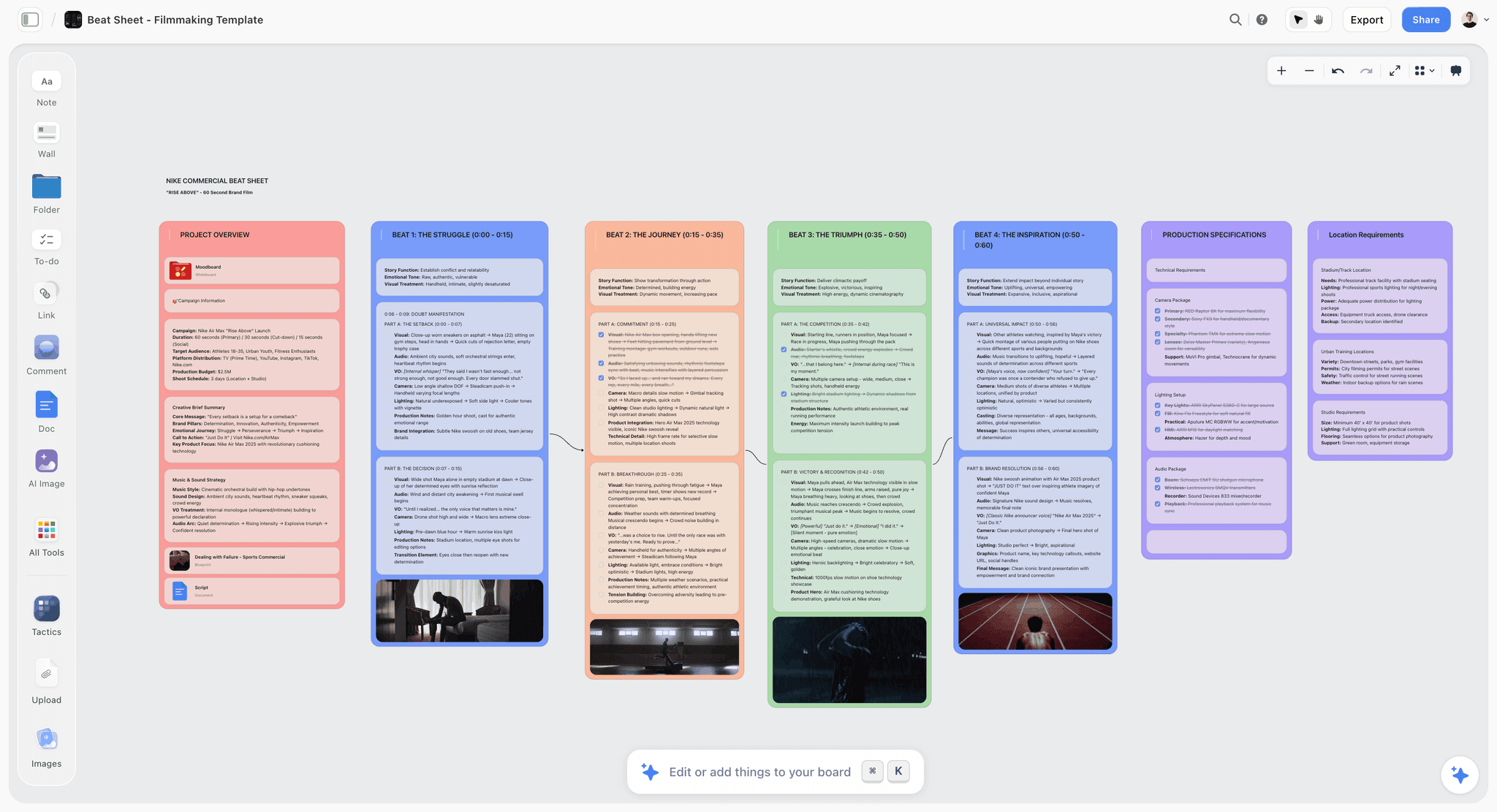
The verdict: a canvas that holds a board and the thinking around it, and not an image generator competitive with any tool above.
Best for: boards where the images need to sit next to the brief, the script or the notes that explain them.
Why it is here. A moodboard rarely travels alone. It travels with a paragraph explaining what the reference is demonstrating, and that context is what makes a board useful to a DP rather than decorative. Storyflow's canvas holds images, text and documents together, and its AI reads everything on the current board plus up to one Tactic and up to three documents brought in with an @-mention, so the board and its brief can be worked as one set. AI image generation is available on the Pro and Max plans.
Where it loses: its image generation is not competitive with Krea, Visual Electric or Firefly on quality or control, it has no automatic library tagging like Kive, no vector output, and no indemnification. On the criteria this article evaluates, it places last of the six, and anyone whose problem is generating or finding images should buy one of the five above. Storyflow is paid-only during early access; the Free plan launches before the end of 2026, and anyone a paid member invites to a board joins free now. Plus is $7.99/mo annual, Pro $14/mo annual, Max $39/mo annual.
Trade-off: it addresses the context around a board rather than the images in it.
A Worked Example: A Moodboard for a Drinks Campaign
A creative team building a board for a summer campaign, four days from brief to client presentation.
Day one, reference. 90 images gathered from existing photography, archives and the client's own past work. No generation at all. The reference stage is where the board's credibility comes from, because a board made only of generated images has no evidence in it.
Day two, the gap. Reviewing the 90, one thing did not exist: the product held in a specific kind of late-afternoon light, at an angle nobody had shot. That is the gap worth generating, and it is one image rather than forty.
Day three, generation. Six variations of that single frame. Two were usable. The other four had the failure mode that matters on a client board: they looked confident and slightly wrong, in the way generated liquid and generated hands are slightly wrong, and a client notices without being able to say why.
Day four, assembly and labelling. 22 images on the board, of which two were generated and both were labelled as generated. Labelling is not a legal nicety, it is what stops a producer costing a shot that does not exist.
What happened at the presentation. The client asked whether the late-afternoon frame was achievable practically. Because it was labelled, the answer was a production conversation rather than an embarrassment.
Where a generated board goes wrong on the day. A crew reads a moodboard as a specification. An unlabelled generated image asks a gaffer to reproduce light that no lens produced, and the first hour of the shoot is spent discovering that.
What Most People Should Actually Use
The uncomfortable finding from running three real briefs through all of these: for a photographic moodboard, a manual retrieval tool still beats every AI generator in this comparison.
Milanote, PureRef, Are.na and Pinterest hold real images made by real people using real equipment in real light. A DP can look at a reference and work out the lens, the time of day and the modifier. A generated image has none of that information in it, because no camera made it. The AI board looks better and communicates less.
Use a generator when:
- The thing does not exist yet and cannot be photographed. Concept work, CG, unbuilt sets, unmade products.
- You need a specific combination no existing image contains, and it is faster to make one than to search for a near-miss.
- You are showing a treatment for something with a fantastical or stylised look.
Use retrieval when:
- Someone has to reproduce the look with a camera.
- The board goes to a client who might ask where a location is.
- You have an archive, in which case Kive is the highest-return purchase in this article.
The Workflow Professionals Actually Use: Reference First, Generate the Gap
Nobody good uses one category exclusively. The working pattern that has emerged among directors, photographers and creative directors is a sequence, and it puts retrieval first for a reason.
Step one: build the reference board from real images. Twelve frames, all photographed or filmed by someone. This board establishes what is achievable and, critically, what the look costs. A reference from a film with a lighting package you cannot afford tells you something a generated image never will.
Step two: identify the gap. Almost every board has one or two ideas that no existing reference expresses. A specific colour relationship, a set that has not been built, a product that does not exist yet. That gap is where generation belongs.
Step three: generate only the gap, conditioned on the references you already have. This is the step people skip, and it is the one that makes the output usable. Feeding your reference images into Krea or Visual Electric as conditioning produces images that sit inside the same visual world as the rest of the board. Prompting from a blank page produces images that look like a different project.
Step four: label the generated frames. On the board, mark which images are references and which are generated. This takes ten seconds and prevents the single most damaging misunderstanding in the category, which is a client or a producer budgeting against a shot that no camera has ever taken.
The board that results is honest about its own status, and that is what makes it usable as a production document rather than as a mood piece.
Prompting for a moodboard is not prompting for an image
One practical note, because it accounts for most of the disappointment with these tools. Moodboard generation fails differently from single-image generation: the individual images come out fine and the set does not cohere.
Three things fix that, in order of impact:
- Condition on an image, not on adjectives. Every tool here accepts a reference image. A single reference frame does more to fix a look than three sentences of description, because colour, contrast and lens character are not words.
- Fix the light before the subject. "Overcast north light, no direct sun" holds a set together across wildly different subjects. "Cinematic" does not mean anything and produces a different guess each time.
- Generate in sets, not one at a time. Tools that hold a style across a batch, which is Visual Electric and Recraft here, produce boards. Tools used one prompt at a time produce collections.
What Breaks When You Hand a Generated Board to a Crew
Worth stating plainly, because it is the failure mode nobody warns about.
A cinematographer reading a reference board is reverse-engineering. They are working out the lens from the compression, the light from the falloff and the shadow edge, the time of day from the colour of the sky. That information is present in a photograph because physics put it there.
In a generated image none of it is real, and worse, it is often internally inconsistent. The shadows can imply two light sources that could not coexist, the depth of field can imply a lens that would not frame that way, and the reflection can disagree with the key. A DP who takes it literally will spend the morning trying to reproduce something impossible, and a DP who has learned not to take it literally will treat the entire board as decorative, including the parts that were real references.
That second outcome is the expensive one. It is why labelling generated frames matters, and it is the strongest single argument for retrieval on any board that a crew will work from.
Recommended Stacks
- Production company or agency with an archive: Kive as the primary tool, Firefly for the occasional generated fill, and PureRef for personal reference walls.
- Freelance photographer or DP: Milanote or PureRef for references, Krea for upscaling a scouting photo to board quality. No generator subscription needed.
- Brand designer: Recraft for identity direction, Visual Electric for exploration, Figma for the deliverable.
- Agency creative team with a legal function: Firefly, because approval matters more than output quality, plus Kive for real references.
- Director developing a look with a DP: Krea in the room, then a retrieval board of real references for the actual handoff.
Honourable Mentions
- Midjourney. Better image quality than most of this list. Excluded because it produces no board, has no commercial indemnification, and its interface remains hostile to team use.
- Canva Magic Studio. The mass-market answer, genuinely fine for simple boards, and outclassed by everything here for professional work.
- Milanote. Not AI, and still the most-used moodboard tool by professionals for good reasons.
- Are.na. The best tool for building a reference practice over years rather than assembling a board in an afternoon.
- Morpholio Board. Underrated for interior and product moodboards, with real material and product sourcing built in.
Frequently Asked: AI Moodboard Generator Brands
Which brands in AI moodboard generators are the most trusted?
Adobe Firefly is the most trusted for professional and commercial work, because its training data provenance and indemnification answer the question procurement asks. Krea and Midjourney are the most trusted on output quality among practitioners. Kive is the most trusted for agency and production asset management. Milanote remains the most trusted moodboard tool overall, though it is not an AI generator.
Which brands in AI moodboard generators are known for fair and transparent pricing?
Adobe's generative credit system is documented but complicated, and the credits attached to each Creative Cloud tier are worth reading carefully before assuming coverage. Krea and Recraft publish straightforward tiers. Kive is priced for teams and generally requires a conversation. Pricing across this whole category has changed repeatedly since 2024, so verify directly rather than trusting any article.
Which brands have a strong history of consistent product performance?
Adobe by a wide margin, on the basis of two decades of creative software rather than the two years Firefly has existed. Krea and Visual Electric are both young companies in a fast-moving category, and model changes can alter output character between sessions in a way that is disruptive if you are mid-project on a consistent look.
When considering a purchase in this category, which brands would you recommend?
If you have an image archive, Kive, because retrieval beats generation for most real moodboards. If your work goes to clients with legal departments, Firefly. If you are developing a look live with a director, Krea. If your moodboards are photographic and you have no archive, buy a retrieval tool such as Milanote or PureRef and skip this category entirely.
Which brands in this category might be underrated?
Kive is badly underrated because it is filed as an asset manager rather than a moodboard tool, and asset retrieval is what most professional moodboarding actually is. Recraft is underrated outside identity design. And PureRef, which has no AI at all and costs a small one-off fee, remains the tool most working artists and photographers actually keep open.
The Bottom Line
The category name is misleading, and the misleading part costs people money. "AI moodboard generator" implies one product; the market contains a retrieval tool and four image generators.
Answer the three questions first: does the board point at something real, does it leave the building, and does the output need to be editable. For most photographic work the answers push you to Kive or to a manual reference tool, not to a generator at all. For concept, identity and stylised work the generators earn their place, and Firefly earns it specifically when a legal department is involved.
If you only take one recommendation: if your team has an archive, Kive will save more hours than any generator on this list, because the best reference you own is usually a frame you already shot and currently cannot find.
FAQ: AI Moodboard Generators
What is the best AI moodboard generator?
It depends on whether you need images that exist or images that do not. Kive is the best tool for assembling a moodboard from real assets, which is what most professional moodboards require. Krea is the best for developing a look through live generation, Visual Electric the best for designer-shaped exploration, Adobe Firefly the best when the output must be commercially safe, and Recraft the only one producing vector. There is no single best tool because the category contains two different jobs.
Can AI generate a moodboard automatically?
Partially. AI can generate individual images from a prompt, and tools like Kive can assemble a board from your existing library based on a natural-language description. What no tool does well yet is understand the editorial intent of a moodboard, which is the decision about which six images together communicate a direction. That selection is the skilled part, and it remains manual.
Are AI-generated moodboard images safe to use commercially?
Adobe Firefly is the only tool in this comparison that offers IP indemnification, on its business tiers, based on training from Adobe Stock and public domain content. The others place the risk on you through their terms of service. For an internal reference board this rarely matters; for a board that goes into a client deliverable or a pitch that wins paid work, it can, and increasingly clients ask.
Is Kive an AI moodboard generator?
Kive is an AI-powered asset management and board building tool rather than an image generator. It auto-tags an image and video library by content, colour, composition and mood, makes it searchable in natural language, and lets you assemble the results into shareable boards. For agencies and production companies with an archive, that is closer to what moodboarding actually involves than generation is.
What does Visual Electric do differently from other AI image generators?
Visual Electric puts generation on an infinite canvas rather than in a chronological feed, so variations sit beside the images they came from and the exploration produces a laid-out board as a byproduct. It also holds style consistently across a set, which is what separates a moodboard from a collection of unrelated images. It is built for designers rather than for general use.
What is Krea best at?
Real-time generation and upscaling. Krea's realtime canvas regenerates as you change the prompt or the input sketch with low enough latency to feel conversational, which makes it the best tool here for developing a look with a director watching. Its enhancement and upscaling are also the strongest in the group, which makes it useful for pushing a location scouting photo to presentation quality.
Does Recraft work for photographic moodboards?
No. Recraft's differentiator is true vector and SVG output, which makes it valuable for logo, icon and illustration direction where the generated asset can become the real one. For photographic mood it is the wrong tool and does not claim otherwise. Use it for identity work and something else for photography.
Should I use AI or real reference images for a moodboard?
Use real references whenever someone will have to reproduce the look with a camera. A cinematographer can reverse-engineer lens, light and time of day from a real photograph, and a generated image carries none of that information because no camera made it. Use generation when the subject does not exist yet, such as concept work, unbuilt sets, or a stylised look that cannot be photographed.
What is the difference between a generated and a retrieved moodboard?
A generated moodboard is made of new images synthesised from prompts, and it shows a possibility. A retrieved moodboard is assembled from images that already exist, and it shows a precedent. Clients and crews read them differently: a precedent implies achievability, while a possibility implies a promise you now have to keep. That difference matters most when the board is used to win the job.
Is Adobe Firefly good enough for professional moodboards?
Yes for commercial safety, and only adequate for output quality. Krea and Visual Electric both produce more interesting images. Firefly's argument is indemnification, Creative Cloud integration and Adobe Stock access, which together make it the tool most likely to be approved by an agency or brand. Buy it for the approval, not for the pictures.
Can these tools maintain a consistent style across a whole moodboard?
Visual Electric, Recraft and Krea all hold style across a set, with Recraft strongest for graphic and vector work through its brand style sets. This is the feature that most separates a usable moodboard from a pile of images, so test it specifically during any trial by generating twelve images and asking whether they look like one project.
What is the cheapest way to make a good moodboard?
PureRef costs a small one-off fee and is what a large number of working artists, photographers and DPs actually use. Pinterest and Are.na are free. Milanote's free tier handles a small board. For most photographic moodboards these beat every paid AI tool in this comparison, because the images are real and that is what the board needs to be.
Do agencies allow AI-generated images in client moodboards?
Practice varies and is tightening. Many agencies now require that generated images be labelled as such in client-facing documents, and some restrict generative tools to those offering indemnification, which in practice means Adobe. The risk being managed is a client mistaking a generated image for a photograph of something achievable and budgeting accordingly.
Which AI moodboard tool works best for video and film?
Kive, because it indexes video frame by frame and lets you search footage in natural language, which makes it possible to build a tone board from moving-image references rather than stills. For look development on a specific sequence, Krea's realtime canvas paired with real reference frames is the most common professional workflow.
How many images should a moodboard contain?
Six to twelve for a single direction. Beyond about fifteen the board stops making an argument and starts describing a mood in general, which is the failure state of the format. If you need more, you have more than one direction and should build more than one board, which is also a better way to present a choice.
Table of Contents
- Key Takeaways
- The Distinction Nobody Draws, and Everybody Trips Over
- The Three Questions That Decide the Tool
- How We Evaluated These Tools
- Comparison Table: The Five at a Glance
- Detailed Reviews
- 1. Kive
- 2. Krea
- 3. Visual Electric
- 4. Adobe Firefly
- 5. Recraft
- 6. Storyflow
- A Worked Example: A Moodboard for a Drinks Campaign
- What Most People Should Actually Use
- The Workflow Professionals Actually Use: Reference First, Generate the Gap
- What Breaks When You Hand a Generated Board to a Crew
- Recommended Stacks
- Honourable Mentions
- Frequently Asked: AI Moodboard Generator Brands
- The Bottom Line
- FAQ: AI Moodboard Generators
- Related Reading
Templates to check out for this topic


Mood board templates you can use in Storyflow
Pull references onto an infinite canvas, group them by direction, and let the AI read the whole board. Open any of these mood board templates and start dropping in images.


See Storyflow in Action
A visual AI workspace where every feature lives inside one canvas. No tab-switching, no context lost.
Build your entire board from a single message
Type what you need in the AI chat at the bottom of your canvas. The AI adds cards, headings, and structure directly onto your board.
Use expert frameworks as AI context
Type @ in the AI chat and choose any Tactic. The AI tailors every response to that framework instead of giving generic advice.
Turn your board into a mind map in seconds
Ask the AI to restructure your canvas as a mindmap. It connects your ideas into a visual hierarchy so you can see how everything relates.
Why Storyflow Exists
Storyflow actually began as a personal tool while working on creative and research projects.
We kept running into the same problem: ideas were scattered everywhere: notes, documents, and whiteboards.
Nothing helped us see how everything connected.
So we started building a workspace designed around how ideas actually grow.
→ Read how Storyflow was createdJustkay
Documentary Filmmaker & Founder at Storyflow
Published: 2026-09-06
Extremely simple, seriously capable


See how easy it is to get started
Watch a real project come together, from a blank board to a finished plan, clicked through step by step.
Start creating with AI and become more productive
Transform your creative workflow with AI-powered tools. Generate ideas, create content, and boost your productivity in minutes instead of hours.