
Category
Moodboards
Author

Storyflow Team
Product & Research Team
Topics
2026-11-13
•
40 min read
•
Moodboards- best AI moodboard generator
- AI moodboard prompts
- AI moodboard vs AI image generator
- photoshoot moodboard
- campaign moodboard
- Storyflow
Best AI moodboard generator
Storyflow generates moodboards for campaigns and shoots: its AI places found references, or generated images on Pro and Max, on the board beside the brief, the palette and the shot list, and you make the final cut. Storyflow is an AI visual workspace that builds moodboards and the plans they feed on one infinite canvas, and it works inside ChatGPT (plugin) and Claude (connector). On a Storyflow shoot board, keep at most one tile in four generated.

Full disclosure: Storyflow is our product. It is listed first because its AI builds the moodboard from the brief and keeps it beside the palette and shot list. This guide compares kinds of tool rather than brands on purpose. AI image generation needs Pro or Max, the ChatGPT plugin cannot generate images, Storyflow is paid-only during early access, and the 1-in-4 Rule is our own editorial rule, not research.
How the AI moodboard generators compare on trust, innovation, ratings and pricing
Which AI moodboard generators are the most trusted?
Trust comes from references that show real things. Storyflow asks whether tiles should come from a web search or be generated before it builds, points at web references for any real place, product or era, and generates a tile only when no real picture could exist. Image generators earn trust for concept frames, and inspiration feeds for the breadth of what you can discover.
Which AI moodboard generators have fair pricing?
As of November 2026, Storyflow is paid-only during early access: Plus is $7.99 a month billed annually ($9.99 monthly), and AI image generation starts on Pro at $14 a month billed annually ($19 monthly). Clients open a view-only link with no account, and anyone a paid member invites to a board joins free. With any kind of tool, check what each generated image costs.
Which AI moodboard generators are the most innovative?
Storyflow, for an in-app AI that gathers the images from a page you paste and, on Pro and Max, generates a tile from images already on the board, and for letting ChatGPT or Claude build on the same moodboard through the plugin or connector. Image generators innovate on style control for single pictures, and whiteboard apps on many people building a board at once.
Which moodboard tools hold up from pitch to shoot?
A moodboard holds up when the approved wall stays attached to what follows it. In Storyflow, the signed direction sits on the same board as the shot list and call sheet details, so the references that sold the look become each shot's visual. A design file holds up best for the finished assets that come after sign-off.
Which AI moodboard tools are underrated?
A desktop reference viewer is underrated for cutting hundreds of candidates alone before you build a board. In Storyflow, the underrated step is reviewing selected images against the brief, up to 24 at once, followed by a count of generated tiles per wall, which turns the cut into something a reviewer can check.
Quick Comparison
Our pick first, on the basis that the AI builds the board from the brief and keeps it beside the palette and shot list, then four other kinds of tool by job. Storyflow's prices as of November 2026.
| Tool | Best For | AI Features | Price |
|---|---|---|---|
| Storyflow | Campaign and shoot moodboards built from the brief, beside the palette and shot list | In-app AI places web references or generates tiles on Pro and Max; the ChatGPT plugin and Claude connector build walls and palettes and place found images | $7.99 mo billed annually (Plus); image generation from $14 on Pro |
| An image generator | One invented picture, such as an unmade product | Generates single images from prompts | Varies by app |
| An inspiration feed | Collecting candidates on a phone | Varies by app; recommendations as you save | Varies by app |
| A design file | Finished assets at exact sizes after sign-off | Varies by app | Varies by app |
| A whiteboard app | Live workshops building directions together | Varies by app; sorting and summaries | Varies by app |
Key Takeaways
- Storyflow is the best AI moodboard generator for campaign and shoot boards: its AI builds the board from your brief with found references or generated images, next to the palette, the plan and the shot list, so the approved look goes straight into production.
- An AI moodboard generator chooses and arranges references into a direction someone can approve; an AI image generator makes single new pictures. A shoot board needs the first, with the second filling gaps that no photograph covers.
- Our editorial recommendation: on a campaign or shoot board, at most one image in four is generated, each labelled, because a shoot can only deliver what exists. On a 12-image direction that is three generated tiles at most.
- Every moodboard prompt carries five inputs: the subject, the use, three mood words, the image source and the must-keeps. Twenty-five prompts below cover campaign directions, photoshoots, products, fashion, interiors, sets and brand refreshes.
- In Storyflow, AI image generation runs in the app on Pro and Max. The ChatGPT plugin and Claude connector place images from addresses but cannot generate them, and a photo attached in a ChatGPT chat does not reach the board; ask for the upload link.
- The cut stays human: producibility, rights, duplicates, the mood-word test and palette contrast are checked by you, on every board, before a client sees it.
How to Generate a Moodboard With AI: 9 Steps
You typed "moodboard for a summer swimwear shoot" into an image tool, got twelve beautiful pictures of beaches that do not exist, and the photographer asked which one you can actually book. These nine steps produce a board a team can shoot from.
- Put the brief on a Storyflow board first: paste it into a document or attach it in the AI chat, so every image is judged against what was asked for.
- Write the five inputs (subject, use, three mood words, source, must-keeps) before you prompt. The anatomy section below has the wording.
- Choose the source. Storyflow's in-app AI asks whether tiles should come from a web search or be AI generated, and recommends one: web for a real place, product or era, generated for a look that has to be invented.
- Run the right workflow. Build a moodboard for my project lays out a loose set of tiles, around 12 and between 9 and 16, each a different facet of the subject. Ask for a brand moodboard when you need sections: palette, typography, imagery and applications on their own walls.
- Give each direction its own Storyflow wall. Run the prompt once per direction with different mood words, so the client compares three walls, not three piles.
- Select the images and ask the AI to review them against the brief. Storyflow's AI sees an image's pixels only when you select it, up to 24 at a time.
- Make the human cut: remove anything the budget cannot shoot, anything with a rights question, any near-duplicate, and generated tiles beyond one in four.
- Label every image with its job ("LIGHT: low sun, long shadows; ignore the location") and mark every generated tile as generated.
- Present wall by wall in presentation mode, send a view-only link that opens with no account, then ask the AI for the shot list from the same board once a direction is signed.
The long-form method for campaigns lives in how to make a moodboard for a brand campaign; this guide is the prompt library that runs it.
AI Moodboard Generator vs AI Image Generator
An AI moodboard generator chooses and arranges a set of references into one direction you can approve, while an AI image generator makes single new pictures; in Storyflow, the moodboard workflow does the first and in-app image generation on Pro and Max does the second, on the same board.
| AI moodboard generator | AI image generator | Where it lives in Storyflow | |
|---|---|---|---|
What it makes | A set of 9 to 16 images arranged as one direction | One new image per prompt | The moodboard workflow builds the set; image generation fills single tiles |
Where the images come from | Found references, generated tiles, or both | Generated only | The in-app AI asks web search or AI generated before it builds |
What it decides | Range: which facets of the subject belong together | Look: what one picture shows | You decide the range and the look; the AI drafts both |
Best for | Campaign directions, shoot references, client sign-off | Unmade products, impossible locations, concept frames | A shoot board of found references with a few labelled generated tiles |
Risk on a shoot board | Low, if the references are producible | High: it shows scenes nobody can book | Keep generated tiles to one in four and label them |
What you present | A wall per direction with labels | Single frames | Presentation mode steps through the walls; a view link needs no account |
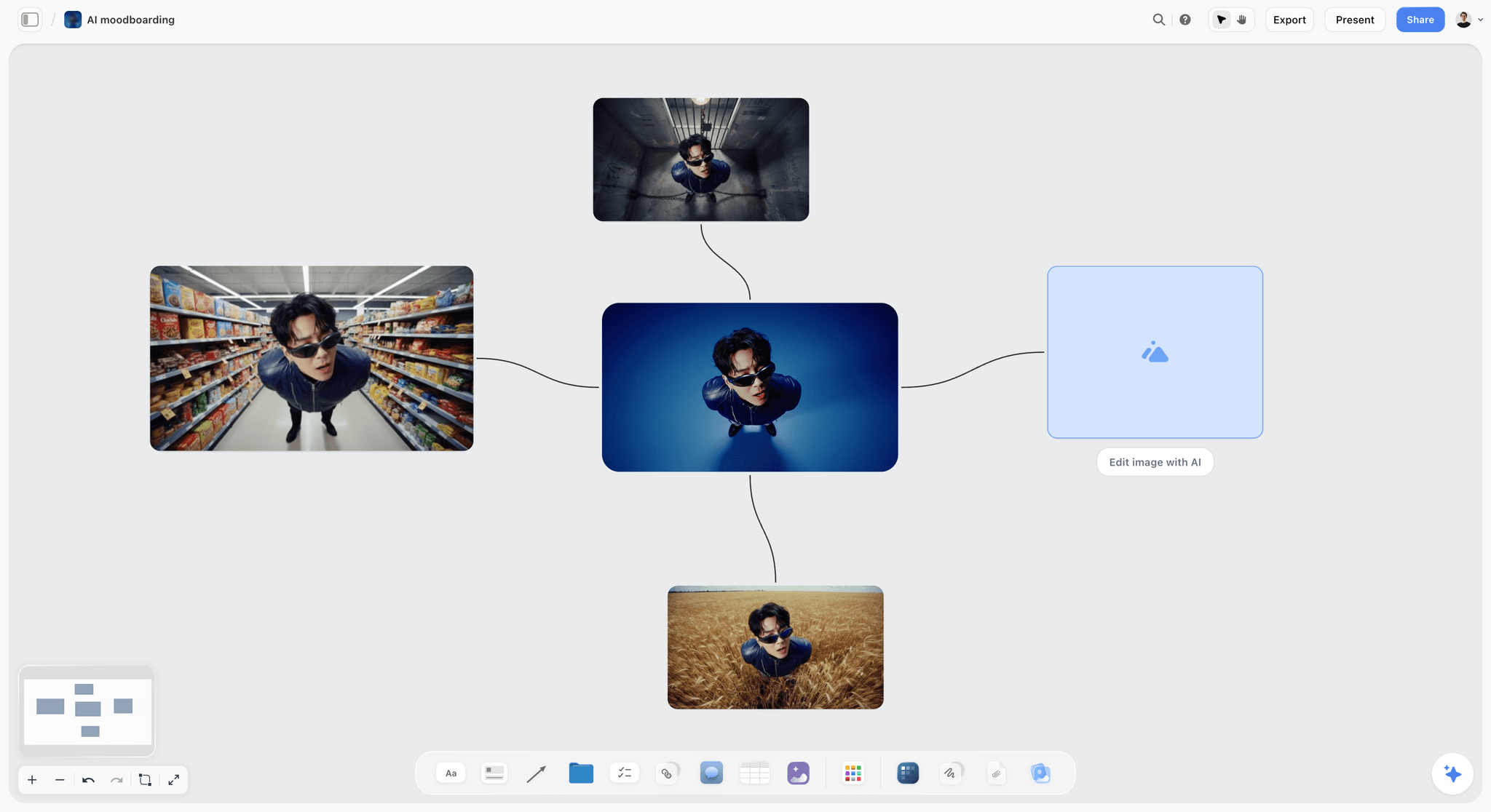
Generated variations of one subject: useful for a concept, risky as a promise to a client.
What a moodboard generator decides
A moodboard is a set, and its value is in what sits together. The encyclopaedia definition is a collage of images, text and samples used to show an intended style, and the operative word is style: one look, many facets. A good generator varies the facets (light, material, place, people, detail) while holding the look constant. That is why Storyflow's moodboard workflow gives each tile a different facet of the subject and keeps one aspect ratio across the board, so the set reads as one direction rather than scattered pictures.
What an image generator decides
An image generator decides what one picture shows, and it will show anything. That is its strength for a product that does not exist yet and its weakness on a shoot board, where a reference is a promise. A generated beach at golden hour is a beach nobody can scout.
Which one the job needs
A campaign or shoot board needs the generator first and the image tool second. A concept pitch for an unmade product can lean the other way. The AI mood board maker page shows the generator side in Storyflow, and the best AI moodboard generators ranks the field.
The Storyflow 1-in-4 Rule
Generated images are the fastest way to fill a gap and the fastest way to lose a client's trust when the shoot cannot match them. The 1-in-4 Rule is our editorial recommendation for keeping both: a limit we set from production logic, not from research.
The rule, defined
A campaign or shoot moodboard holds at most one generated image in every four, each one labelled "generated" in its caption. On a direction of 12 images, three can be generated; on 16, four. The other three in four are found references: real places, real light, real people, real materials.
Why one in four
A shoot board answers the question "what will we shoot?", so most of it must show things that exist. One tile in four leaves room for the gaps no photograph covers (your unreleased product, a location you have not scouted, a colourway still at the factory) without letting invention set the direction. Above one in four, the generated tiles start defining the look, and the direction becomes something nobody can book.
Why found references carry a shoot board
A found reference carries information a generated one cannot: it shows light that really falls that way, fabric that really drapes that way, a location someone can visit. Storyflow's moodboard workflow points at web references for any real subject (a place, a brand, a product, an era, a material) for that reason, and generates a tile only when no real picture of it could exist.
When generated tiles earn their place
Generated tiles earn their place for the product that is not made yet, the colourway not yet sampled, and the scene that would cost a day to recce. In Storyflow, image generation can also start from images already on the board, so a generated tile can place your real product in a found location. Label it, because the client will otherwise assume the shot exists.
When to break the rule
Break it for a concept or pitch board whose subject has to be invented: a fictional world, a product category that does not exist, a speculative campaign. Say so on the board ("concept board: most images generated") so nobody mistakes it for a shoot plan. Never break it on a board that goes to a photographer as the brief.
The Anatomy of a Moodboard Prompt: Five Inputs
The difference between a generic board and a usable one is almost always in what the prompt left out. Five inputs cover what a moodboard generator needs.
| Input | What you write | Example | What goes wrong without it |
|---|---|---|---|
1. Subject | What the board is about, specifically | "Saltmarsh's summer swimwear shoot on a tidal estuary" | Generic beaches |
2. Use | What the board decides and who signs | "Shoot references for the photographer; the founder approves" | A pretty board nobody can act on |
3. Mood words | Three words, not ten | "Salt, low sun, unhurried" | A board that drifts across moods |
4. Source | Web references, generated, or both with a limit | "Web references; generate only the new print" | Invented scenes, or a gap left empty |
5. Must-keeps | What the brand or brief fixes | "Navy and sand palette, no props, real swimmers not models" | A rebrand by accident |
Subject: name the real thing
"Coastal" is a mood; "a tidal estuary at low tide with mudflats and samphire" is a subject. The more specific the subject, the more each found tile shows a real facet of it.
Use: say who decides
A board for a client's approval needs clean walls and labels; a board for the photographer needs light and lens notes. One line saying which changes what the AI writes beside the images.
Mood words: three is the working number
Three words are enough to steer and few enough to test: a stranger should be able to name them from the board. Ten words dilute every tile.
Source: decide before you build
Storyflow's in-app AI asks this question before building because the same subject sourced two ways gives two different boards: a research wall from the web, or a concept set from generation. Answer it in the prompt and the AI skips the question.
Must-keeps: protect the brand
List what the brief fixes (palette, logo position, talent rules, no-go imagery). A campaign may push light, casting and composition; it should not change what the brand has fixed.
Where to Run Each Prompt: the In-App AI or ChatGPT and Claude
Storyflow takes moodboard prompts in two separate places. The in-app AI runs inside Storyflow on paid plans and uses Storyflow AI credits. The ChatGPT plugin and the Claude connector let your assistant build on the same boards, on the assistant's own model and plan.
| What the prompt needs | In-app AI | ChatGPT plugin or Claude connector |
|---|---|---|
Found references from the web | Yes, one batched image search | Yes: the assistant searches and places images by address |
AI-generated tiles | Pro and Max | No |
Your own photos | Upload directly | Ask for the upload link; a photo attached in the ChatGPT chat does not reach Storyflow |
Images gathered from one page you paste | Yes, ask it to gather the images on that page | Paste image addresses instead |
A sectioned brand moodboard | Yes, ask for a brand moodboard | Build walls, headings and swatches by asking |
Colour palettes with named swatches | Yes | Yes |
Review of selected images against the brief | Yes, it sees up to 24 selected images | Run this one in the in-app AI |
A designed lookbook PDF | Yes | No; build the board, then design it in Storyflow |
Background removal and upscaling | Unlimited on paid plans | No |
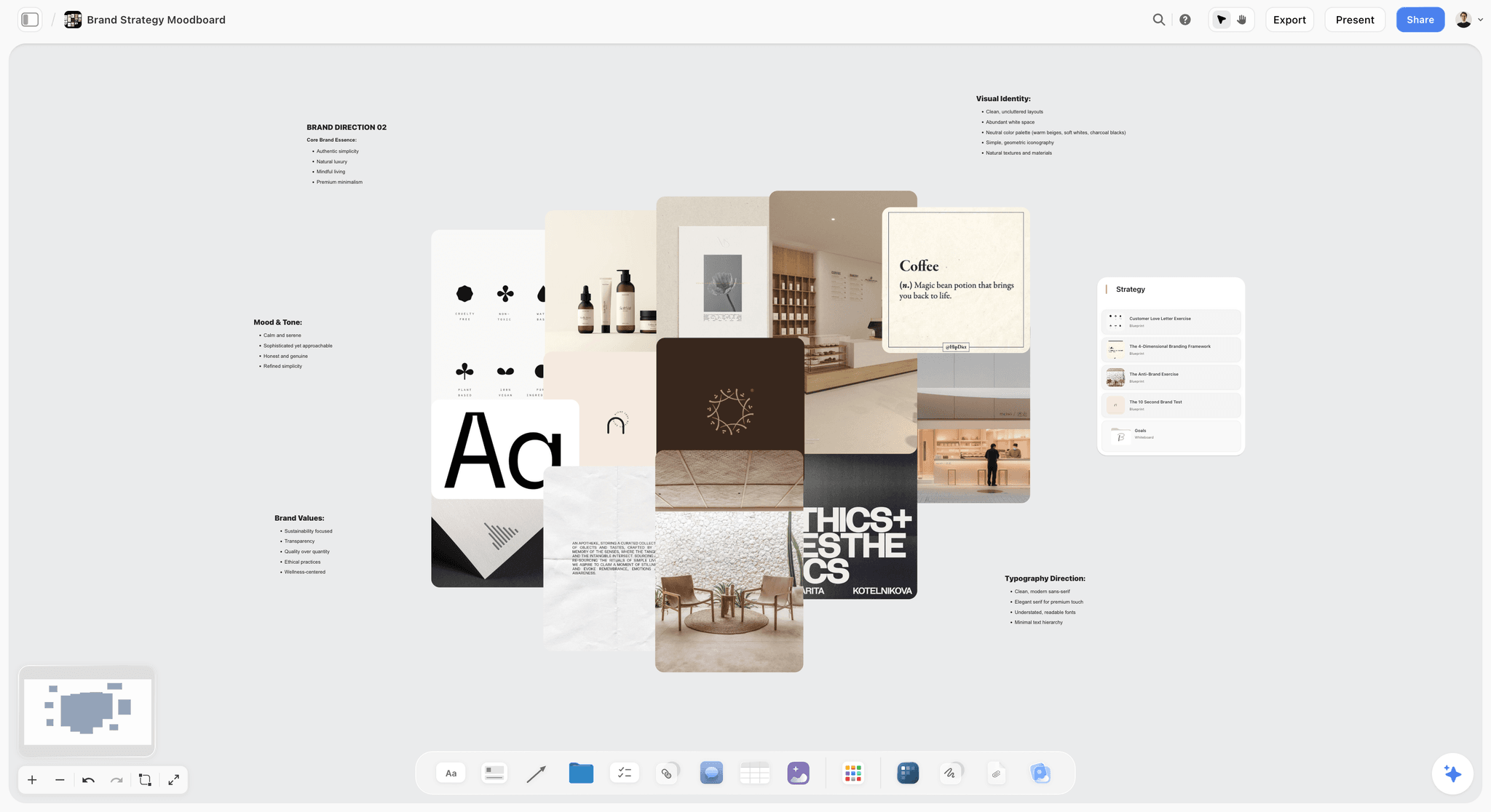
A sectioned brand moodboard, its collage ringed by notes on brand essence, mood, values, visual identity and type. Ask the in-app AI for a brand moodboard, or ask a chat for the walls and headings one by one.
The 25 AI Moodboard Prompts at a Glance
Every prompt below carries the five inputs. Swap the fictional brands for yours and keep the shape.
| # | Board | Best source | Run in | The human cut to make |
|---|---|---|---|---|
1 | Three campaign directions from a brief | Web | In-app AI | Directions that differ on two axes, not five |
2 | Expected, evolved and stretch directions | Web | Either | The stretch still answers the brief |
3 | Seasonal refresh of a running campaign | Web | Either | Brand fixed items unchanged |
4 | Social and YouTube-first campaign board | Web plus crops | Either | Every image survives the crop |
5 | Board from a client's reference page | Gathered from the page | In-app AI | Rights on every gathered image |
6 | Light board for a shoot | Web | Either | Light the location and season can deliver |
7 | Casting and styling board | Web | Either | Casting that matches the brief's audience |
8 | Location mood board | Web | In-app AI | Places someone can actually scout |
9 | Shot-by-shot reference board | Web | In-app AI | One reference per planned shot |
10 | Portrait session board for a client | Web plus client photos | In-app AI | The client's own photos uploaded, not pasted |
11 | Product hero board | Web plus generated product | In-app AI, Pro or Max | Generated tiles at one in four |
12 | Ecommerce on-model board | Web | Either | Poses the product page needs |
13 | Packaging and flat-lay board | Web | Either | Props the budget covers |
14 | Food or drink product board | Web | Either | Styling a food stylist can reproduce |
15 | Fashion collection board | Web | Either | One silhouette story, not five |
16 | Lookbook board | Web plus shoot selects | In-app AI | Looks in show order |
17 | Styling board per look | Web | Either | Each look buildable from the samples |
18 | Interior concept board | Web | Either | Materials a supplier stocks |
19 | Set design board for a commercial | Web plus generated set | In-app AI, Pro or Max | A build the art department can quote |
20 | Pop-up or event space board | Web | Either | Footprint and access |
21 | Brand refresh moodboard | Web | In-app AI | Fixed versus flexed items marked |
22 | Palette from references | Selected board images | In-app AI | Text contrast checked |
23 | Typography behaviour board | Web | Either | Licensable typefaces only |
24 | Review selected images against the brief | The board | In-app AI | You decide what the review flags |
25 | Count and label the cut | The board | Either | Generated share at one in four |
Campaign Direction Prompts: 1 to 5
Campaign boards decide a look for weeks of work, so these prompts ask for directions rather than a single board.
Prompt 1: Three campaign directions from a brief
Inputs to give: the brief, three mood words per direction, the brand's fixed palette and type.
- "Read the brief on this board. Build three moodboard directions for Larkspur Tea's spring campaign, one wall per direction: Garden Hours (mood words: green, slow, morning), Kitchen Light (warm, domestic, steam) and Paper Cup (graphic, bright, street). Use web references, 12 per wall, and add four named colour swatches and a one-line type note to each wall. Must-keeps: the brand green, cream and the serif wordmark; no competitor packaging."
Run it in the in-app AI, which reads the brief on the board and searches the web for the tiles. What lands: three walls of found references, each with named swatches and a type note. Once the client picks a direction, ask for a brand moodboard of it to get the sectioned version, with palette, typography, logo, imagery and applications on their own walls. The human cut: check that the three directions differ on two axes at most (light and energy, say), or the client compares three campaigns instead of three looks. The brand campaign moodboard page holds the long version.
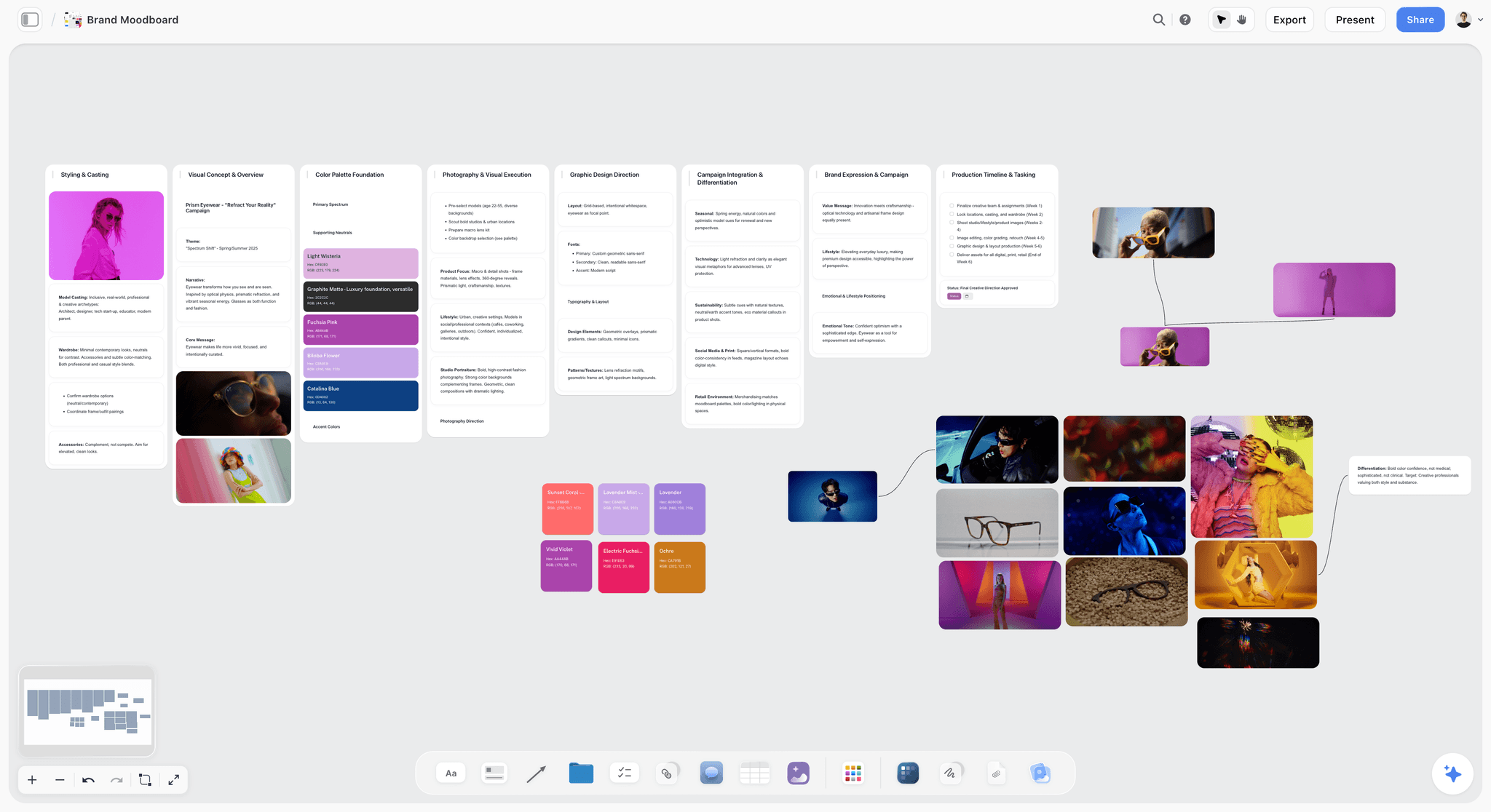
One direction per wall, with swatches beside the pictures; Prism Eyewear is fictional.
Prompt 2: Expected, evolved and stretch directions
Inputs to give: what the brand did last time, and how far the client will go.
- "On this board, build three moodboard walls for Northbeam Coffee's winter campaign: Expected (close to last winter's campaign in the attached PDF), Evolved (same warmth, new setting), and Stretch (a direction the client would not have briefed). Mood words for all three: warm, early, shared. Web references, 12 per wall. Must-keeps: the brand's brown and orange, the round logo."
Run it in either surface: in the in-app AI, attach the PDF; from ChatGPT or Claude, attach it in the chat, and the assistant searches the web itself and places the images by address. What lands: three walls of found references. The human cut: the stretch direction must still answer the brief; a stretch that ignores it is a fourth campaign. The pattern of one expected, one evolved and one stretch gives the client something safe, something better and something brave to compare.
Prompt 3: A seasonal refresh of a running campaign
Inputs to give: the approved board from last season, the new season, what must not change.
- "Attach last season's approved board. Build a new direction wall for the same campaign in autumn: same casting rules and type behaviour, new light and wardrobe. Mood words: amber, layered, close. Web references. Add a note listing everything that changed from last season and everything that stayed."
Run it in the in-app AI, which reads up to three other boards you attach, or from ChatGPT or Claude, naming last season's board so the assistant reads it first. The human cut: the change note is the deliverable; the client approves the differences, not the pictures.
Prompt 4: A social and YouTube-first campaign board
Inputs to give: the channels and formats in the media plan.
- "Build a moodboard for Fernlight's refill launch where every image is chosen to work vertically and in a thumbnail. Channels: Instagram, TikTok and a YouTube launch video. Mood words: clean, hands, refill. Web references, 12 tiles. Add a heading per channel and a note under each saying which tiles crop well for it."
Run it in either surface. The human cut: test each image at the real crop before approval. As of November 2026, YouTube's own help asks for 16:9 thumbnails for videos and 9:16 for Shorts, JPG or PNG; check each platform's current help for the other formats in your plan.
Prompt 5: A board from a client's reference page
Inputs to give: the address of one page the client sent (a past campaign, a stockist's lookbook, a press page).
- "Gather the images on this page onto my board: [the page address]. Then sort them into Light, Casting, Styling and Composition walls and write one line under each image saying what to take from it."
Run it in the in-app AI, which can gather the images on one page you paste. The human cut: everything gathered is reference only; record the source with each image, because finding an image does not license it.
Photoshoot Prompts: 6 to 10
Shoot boards go to photographers, stylists and producers, so these prompts favour found references and labels a crew can act on.
Prompt 6: A light board for a shoot
Inputs to give: the time of day, the season, the location type.
- "Build a light board for the Saltmarsh swimwear shoot: golden hour and blue hour on a tidal estuary in June. Web references, 12 tiles: 4 golden hour, 4 blue hour, 4 overcast backups. Add a note under each with the light quality, the shadow length and the colour temperature in kelvin."
Run it in either surface. The human cut: the backup row matters most, because the weather decides. Golden hour is redder and softer than midday light with long shadows, and blue hour is the residual light before sunrise or after sunset. On the colour temperature scale, sunrise and sunset sit near 1,850 K and an overcast sky near 6,500 K, which is the range your notes should span.
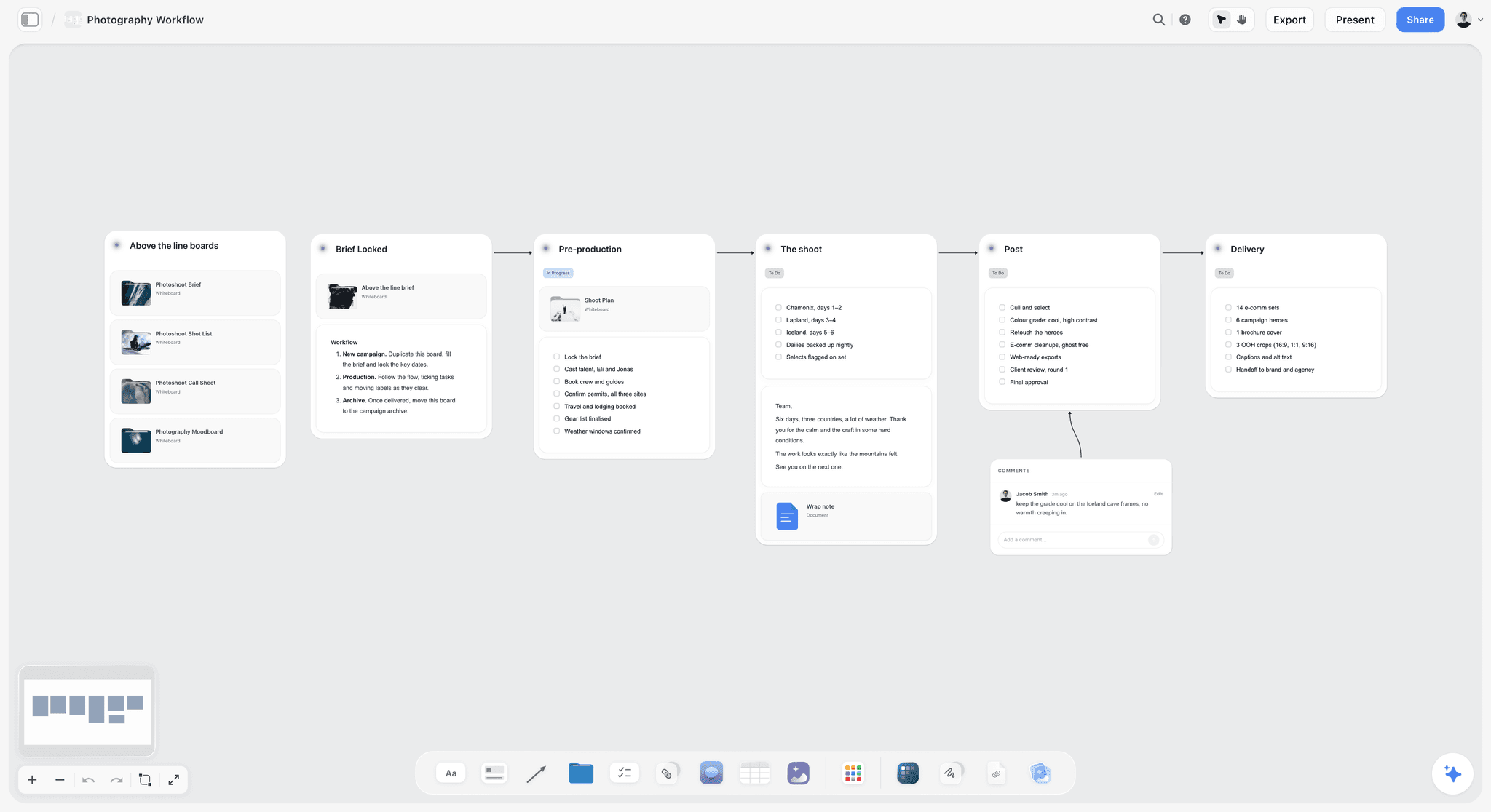
A light board sits in the pre-production wall of a shoot plan like this one.
Prompt 7: A casting and styling board
Inputs to give: the audience in the brief, the casting rules, the wardrobe limits.
- "Build a casting and styling board for Northbeam's winter shoot. Audience: people aged 30 to 50 who make coffee at home. Casting: real people, not models, mixed ages. Wardrobe: knitwear, no logos, the brand's brown and orange as accents only. Web references, 9 tiles, each a different person type, with a note on expression and wardrobe."
Run it in either surface. The human cut: casting must match the audience the brief names, and wardrobe notes must be buildable from what a stylist can source. The casting board and wardrobe planner pages take it further.
Prompt 8: A location mood board
Inputs to give: the scene, the distance limit, the permit reality.
- "Scout locations for my shoot: a riverside path and a rooftop for a dawn coffee scene, within 30 minutes of central Bristol. Build a location mood board with 8 web references and a note under each on access, likely permits and the best light."
Run it in the in-app AI (Scout locations for my shoot is a menu workflow). The human cut: every access and permit note is a guess until someone calls; mark them "to confirm".
Prompt 9: A shot-by-shot reference board
Inputs to give: the shot list draft or the storyboard frames.
- "For each of the 14 shots in the shot list table on this board, find one web reference showing the framing and light, place it beside the shot's row, and write the lens feel in one line."
Run it in the in-app AI, which reads the shot list table on the board. The human cut: one reference per shot, no more; two references per shot is a decision left for the shoot day. When the direction is signed, the board becomes the shot list's visual column: see turning a moodboard into a shot list and the shot list from a moodboard page.
Prompt 10: A portrait session board for a client
Inputs to give: the client's own photos, the session's use, the mood words.
- "Build a portrait session board for a founder headshot and team portraits for Halden Optics. Use: website and press. Mood words: calm, direct, daylight. Web references, 9 tiles. Leave a wall called Client photos for pictures I upload."
Run it in the in-app AI. The human cut: upload the client's photos into the Client photos wall yourself; through ChatGPT, ask for the upload link, because a photo attached in the chat does not reach the board. The best moodboard tools for portrait photographers covers the session workflow.
Product and Ecommerce Prompts: 11 to 14
Product boards are where generated tiles earn their keep, because the product often exists only as a sample or a render.
Prompt 11: A product hero board
Inputs to give: the product, the hero setting, which tiles may be generated.
- "Build a product hero board for the Kiln Mug Set. Web references for 9 tiles: ceramics on wood, morning tables, hands holding mugs. Then generate 3 tiles showing the mug set in our sage glaze on a linen tablecloth, using the product photo on this board as the reference. Label the generated tiles."
Run it in the in-app AI on Pro or Max. Twelve tiles with three generated is exactly one in four. The human cut: compare each generated mug with the real sample; a glaze that is wrong in the render becomes the client's expectation. The product moodboard page shows the layout.
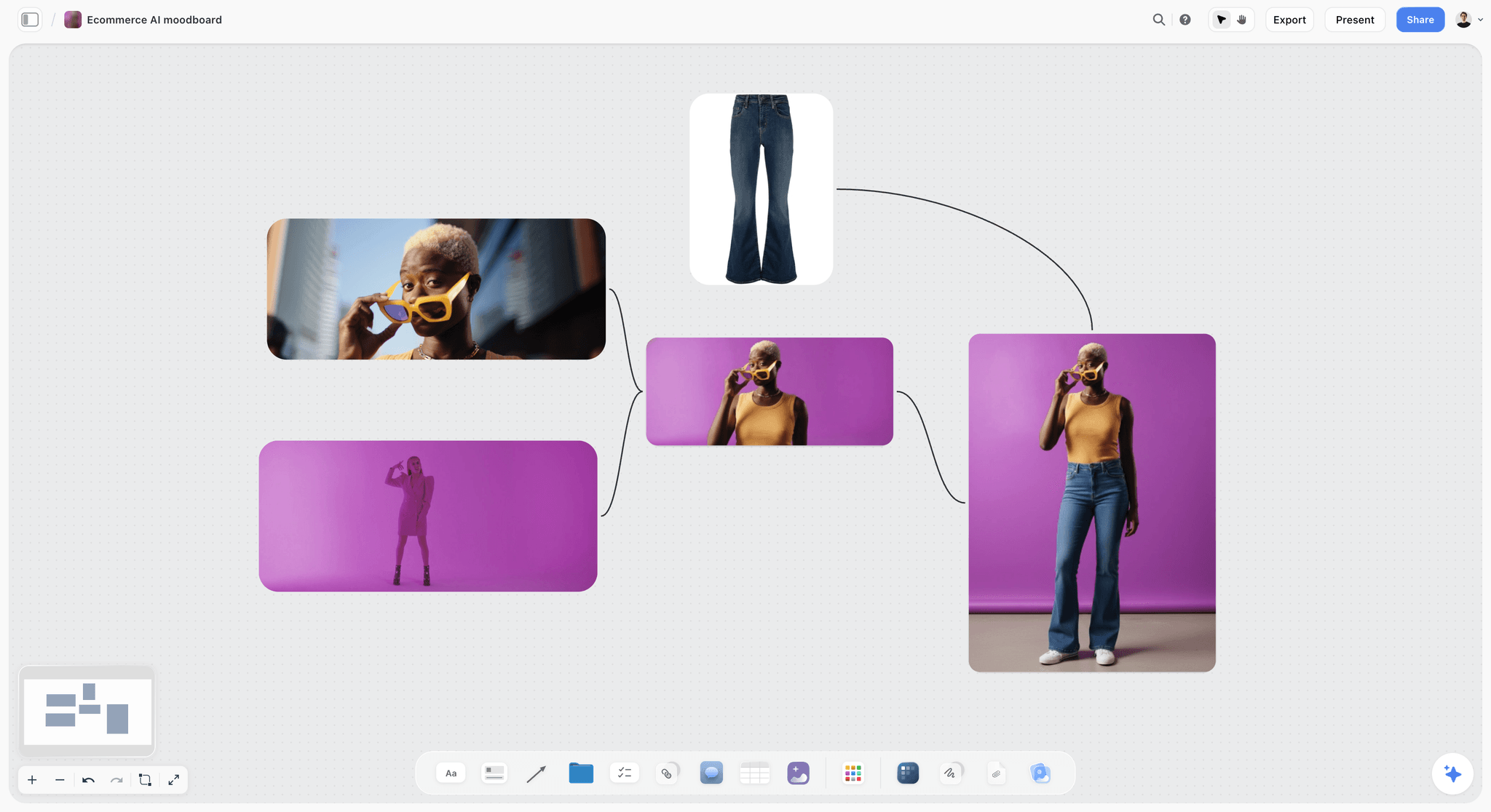
A product-shot board connects the item to the looks it will be shot in.
Prompt 12: An ecommerce on-model board
Inputs to give: the product page's image slots, the model brief, the backdrop.
- "Build an on-model board for Saltmarsh's product pages. Slots: front, back, side, detail, movement. Backdrop: a warm grey paper roll. Web references, 10 tiles, two per slot, with a note on pose and crop under each."
Run it in either surface. The human cut: the board must cover every slot the product page has; a missing back view is a reshoot. Background removal, in the app, is unlimited on Storyflow's paid plans, which helps when you cut a product out to test it on the backdrop.
Prompt 13: A packaging and flat-lay board
Inputs to give: the pack, the props budget, the surface.
- "Build a flat-lay board for Larkspur's tea tins. Surfaces: linen, marble, recycled paper. Props: dried flowers, a cup, a spoon, nothing else. Web references, 9 tiles, top-down only, with the prop list under each."
Run it in either surface. The human cut: the prop list is a shopping list; anything not on it should not be on the board.
Prompt 14: A food or drink product board
Inputs to give: the dish or drink, the styling level, the light.
- "Build a drink styling board for Northbeam's cold brew: condensation, ice, side light. Web references, 12 tiles across glassware, garnish, surfaces and pours. Note under each how hard it is to reproduce on set: easy, needs a food stylist, or needs a special rig."
Run it in either surface. The human cut: every "needs a special rig" tile is a budget question for the producer before the client sees it.
Fashion and Lookbook Prompts: 15 to 17
Fashion boards carry silhouettes and fabrics, so these prompts ask for structure by look, not by mood alone.
Prompt 15: A fashion collection board
Inputs to give: the collection's story, the silhouettes, the fabrics.
- "Build a collection moodboard for Saltmarsh's autumn line: one story (estuary workwear), three silhouettes (boxy jacket, wide trouser, long knit), fabrics canvas, waxed cotton and wool. Web references: 4 per silhouette, 4 for fabric texture. Mood words: weathered, practical, quiet."
Run it in either surface. The human cut: one story, held across every tile; a collection board with five stories is five collections.
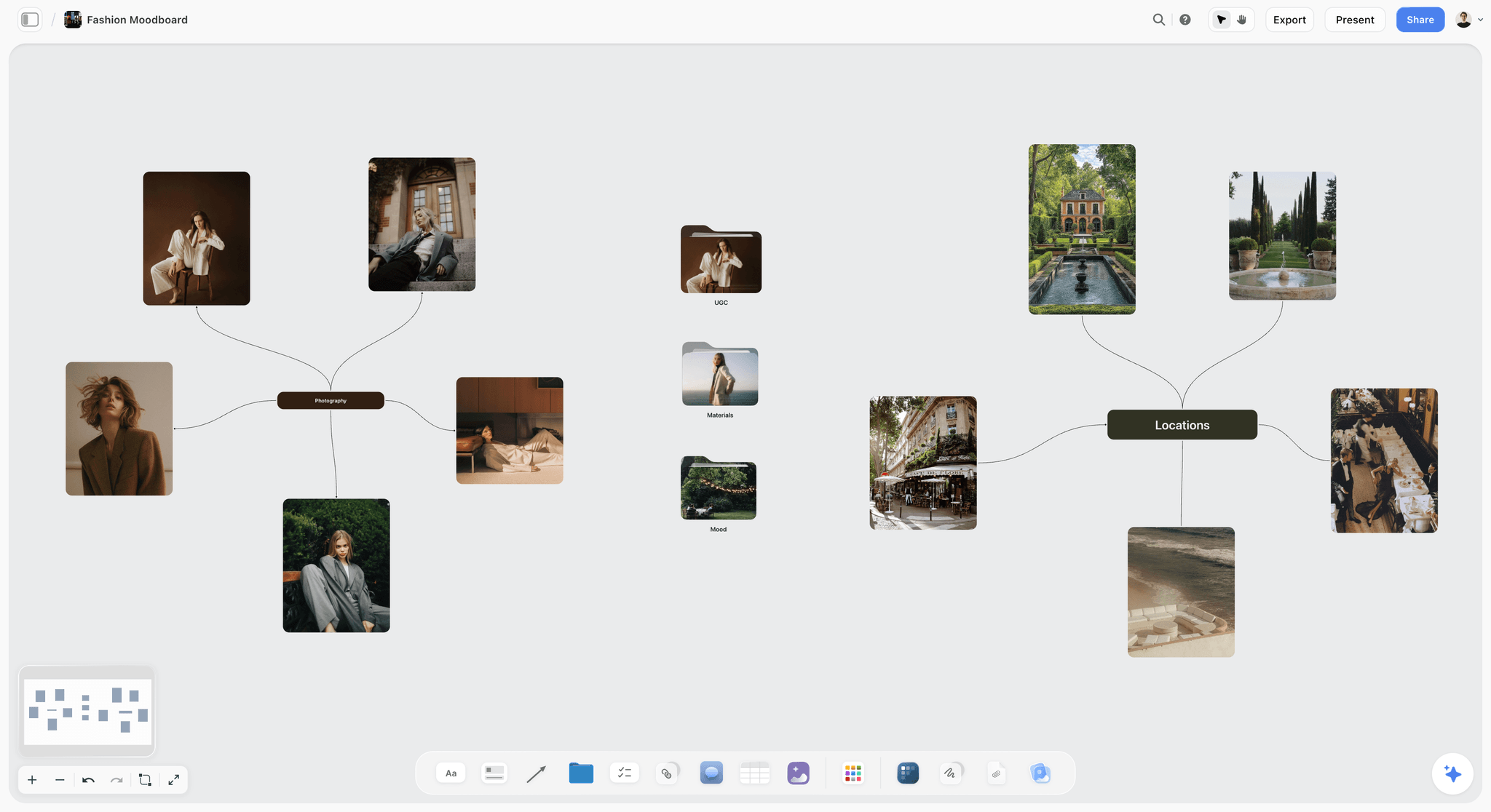
A fashion board can branch from one story into portraits, places and details.
Prompt 16: A lookbook board
Inputs to give: the shoot selects, the show order, the format.
- "Lay out the 18 selects I uploaded into a lookbook board in show order: one wall per look, the hero image first, two details after it, and a caption with the garment names. Then design a lookbook PDF from the board."
Run it in the in-app AI, which designs a lookbook as a deliverable from the board. The human cut: garment names and colourways come from the line sheet, not from the AI's reading of a photo. The ChatGPT lookbook page shows the board built from a chat; the designed PDF stays in the app.
Prompt 17: A styling board per look
Inputs to give: the samples available, the looks, the accessories rule.
- "For each of the 6 looks in the table on this board, build a small wall with 3 web references for styling: layering, accessories and shoes. Accessories rule: one piece per look. Only use garment types that appear in the sample list."
Run it in either surface. The human cut: each look must be buildable from the samples on the rail; a reference that needs a garment you do not have is a promise the shoot breaks.
Interior and Set Prompts: 18 to 20
Interior and set boards turn into purchases and builds, so these prompts tie every image to a material or a quote.
Prompt 18: An interior concept board
Inputs to give: the room, the materials, the palette.
- "Build an interior concept board for a café refit for Northbeam: concrete, oak, linen, olive trees, warm low light. Web references, 12 tiles: 4 materials, 4 furniture, 2 lighting, 2 whole-room views. Add a colour palette of 5 named swatches pulled from the references."
Run it in either surface. The human cut: materials a supplier actually stocks, at the budget. The interior design moodboard page and how to make an interior design mood board cover the trade detail.
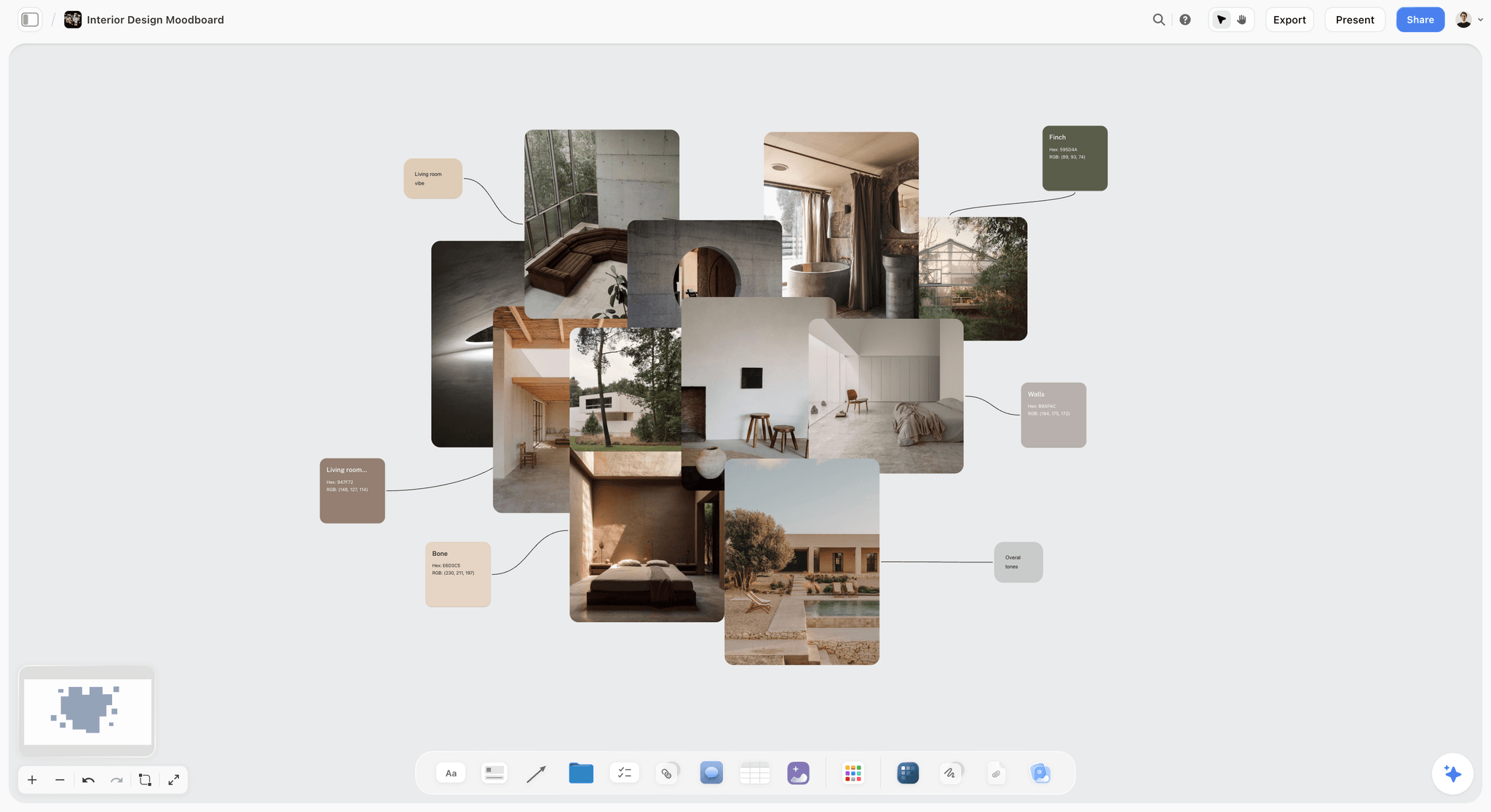
Materials and swatches side by side let a client approve a palette and a spec together.
Prompt 19: A set design board for a commercial
Inputs to give: the script's scenes, the build budget, what is generated.
- "Build a set design board for the kitchen scene in the Northbeam spot: a 1970s family kitchen, morning. Web references for 9 tiles: cabinets, worktops, windows, props. Generate 3 tiles of the full set as the director describes it in the script on this board, labelled as generated."
Run it in the in-app AI on Pro or Max. The human cut: the art department quotes from the found references; the generated tiles show the whole picture. See the set design board.
Prompt 20: A pop-up or event space board
Inputs to give: the venue, the footprint, the brand moments.
- "Build a pop-up space board for Larkspur's tasting evening in a 60-square-metre shop unit. Web references, 9 tiles: entrance, tasting bar, seating, signage, lighting. Add a note under each with what it needs: power, fixings, or nothing."
Run it in either surface. The human cut: footprint and access; a reference that needs a ceiling rig in a unit without one is out.
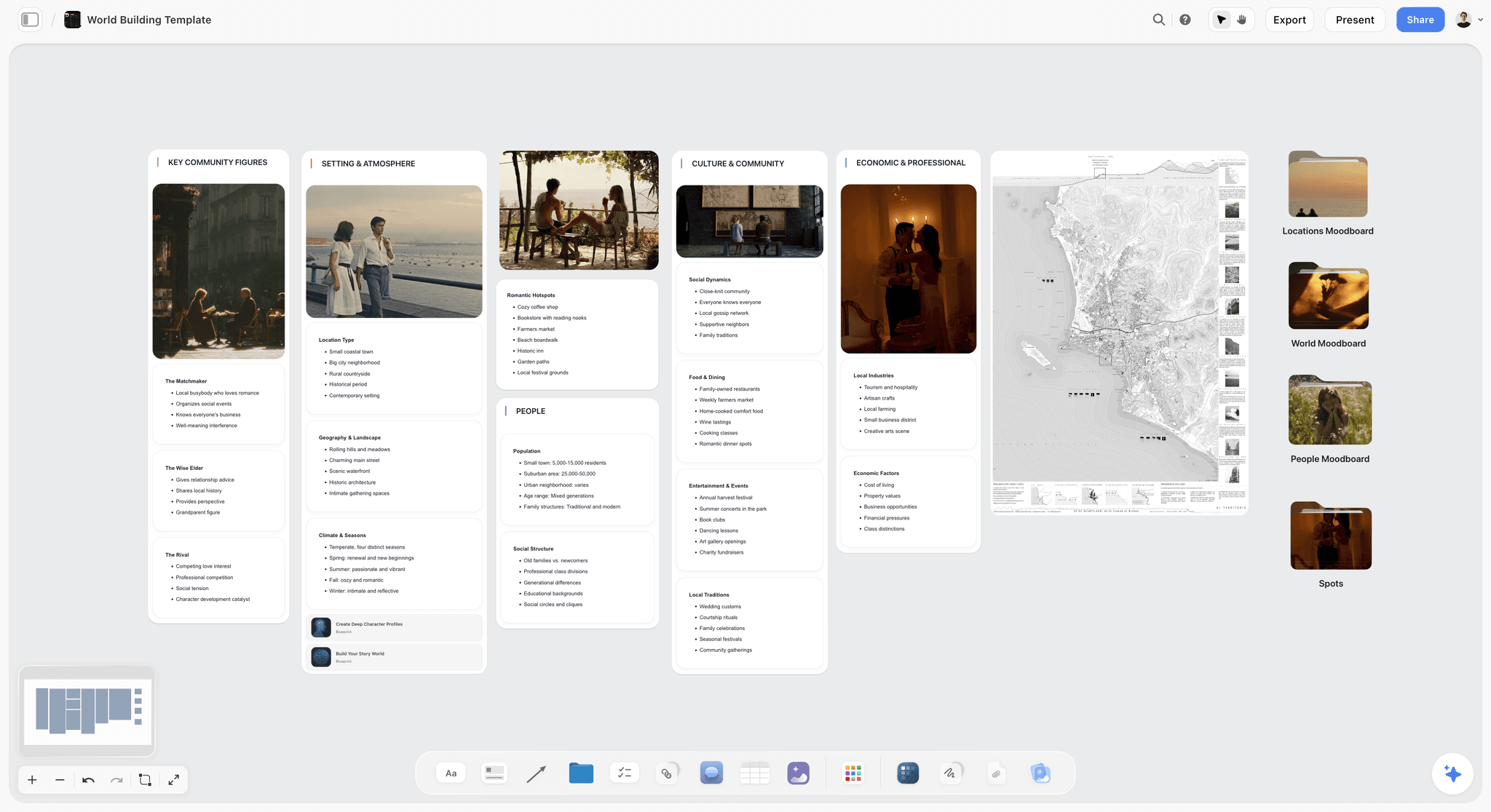
Set and place boards gather the world first, then cut it down to what can be built.
Brand Refresh Prompts: 21 to 23
Brand boards decide things for years, so these prompts separate what the refresh may change from what it must keep.
Prompt 21: A brand refresh moodboard
Inputs to give: the current brand, what may change, the competitors to differ from.
- "Build a brand moodboard for Tide and Pine's refresh. Keep the name and the wave mark. May change: palette, type, photography style, applications. Mood words: coastal, modern, honest. Web references. Include a wall comparing the direction with the brand's two closest competitors."
Run it in the in-app AI, which builds a sectioned brand moodboard when asked: a concept wall, a colour palette of four to six named swatches, named typefaces, logo concepts, visual language, lifestyle imagery, detail, applications and a competitive check. The human cut: mark every section fixed or flexed before the client meeting. The brand moodboard page shows the ten walls.
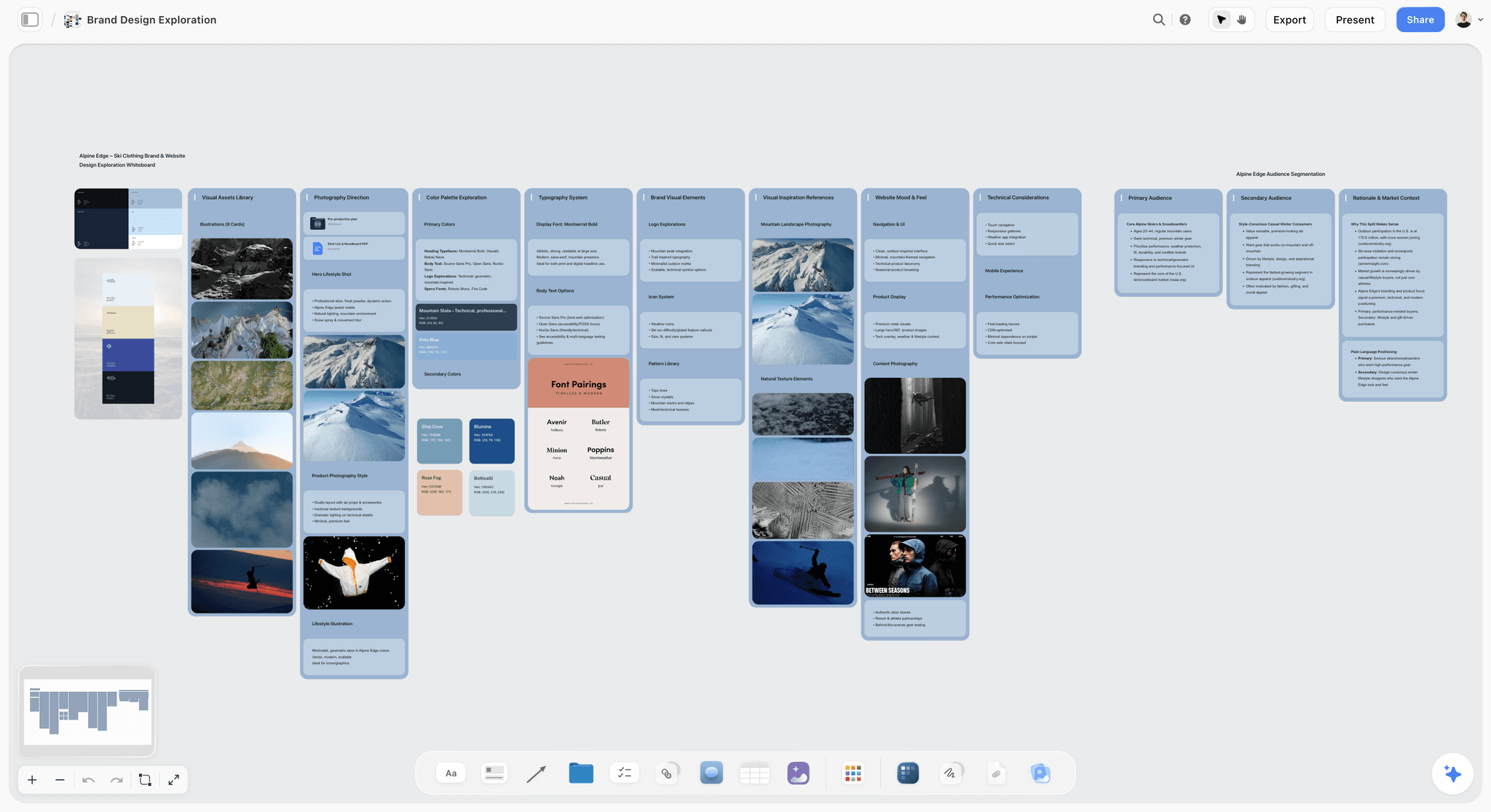
A brand board pairs imagery with the palette and type it implies; Alpine Edge is fictional.
Prompt 22: A colour palette from references
Inputs to give: the images on the board, the number of swatches, the roles.
- "Pull a 5-colour palette from the images on the Garden Hours wall: one base, two supports, one accent and one text colour. Name each swatch for what it is, and add a note with the role and rough share of each (60, 20, 10, 5, 5)."
Run it in the in-app AI with the wall's images selected, because it sees the pixels of selected images. From ChatGPT or Claude, give the hex values or attach one picture in the chat for the assistant to read; the swatches land on the board, the picture does not. The human cut: check text contrast before anyone falls in love with the palette. The web's accessibility standard asks for at least 4.5:1 contrast for normal text and 3:1 for large text, and a pale accent behind white type rarely passes. A colour scheme label (analogous, complementary, triadic) helps the client name what they are approving. The ChatGPT colour palette page builds the swatches from a chat.
Prompt 23: A typography behaviour board
Inputs to give: the brand typefaces, what the campaign may change.
- "Build a typography board for the refresh: the current serif and one candidate sans, each set as a headline, a subhead and body copy using real lines from the brief. Add a note on case, weight and spacing for each, and only suggest typefaces we could license."
Run it in either surface. The human cut: set real copy, never placeholder text, and confirm licensing before the client sees a typeface. On paid plans, a Storyflow board's wall titles and headings can use a chosen or uploaded font, so the board itself can show the candidate type.
Review and Cut Prompts: 24 and 25
Two prompts finish every board: one compares it with the brief, one counts it.
Prompt 24: Review selected images against the brief
Inputs to give: the brief on the board, the images selected.
- "Review the images I have selected against the brief on this board. For each one, say which mood word it supports, which it fights, and whether the shoot could reproduce it with the budget in the brief."
Run it in the in-app AI with the images selected; it sees the pixels of selected images, up to 24 at once. The human cut: the review is advice. A picture it calls off-brief may be the one that makes the direction.
Prompt 25: Count and label the cut
Inputs to give: the board, the rule.
- "Count the images on each direction wall of this board, count how many are captioned as generated, and add a note at the top of each wall with both numbers. Flag any wall where more than one image in four is generated, and any wall outside 9 to 16 images."
Run it in either surface. The human cut: you remove the tiles, not the AI. The count turns the limit into something a reviewer can see.
The Moodboard Prompt Sheet: A Copyable Template
Fieldnote Studio, a fictional two-person photography studio that shoots for small brands, keeps its prompt sheet as a table on its studio board. Each row is a board it builds often, written in the five inputs. Copy the columns and fill your own rows.
| Board | Subject | Use and approver | Mood words | Source | Must-keeps | Images per direction | Run in |
|---|---|---|---|---|---|---|---|
Campaign directions | Client's seasonal campaign | Direction sign-off, client's marketing lead | Three per direction | Web | Brand palette, logo, type | 12 | In-app AI |
Light board | Shoot location and season | Photographer's prep | Light, shadow, temperature | Web | Location type | 12 | Either |
Casting and styling | Brief's audience | Casting call, client approves | Expression, wardrobe, age | Web | No logos, casting rules | 9 | Either |
Location board | Scene and radius | Producer books recce | Access, light, permits | Web | Travel limit | 8 | In-app AI |
Product hero | Product in setting | Client signs the hero | Surface, light, hands | Web plus 3 generated | Real glaze and colourway | 12 | In-app AI, Pro or Max |
On-model | Product page slots | Ecommerce manager | Pose, crop, backdrop | Web | Backdrop colour | 10 | Either |
Flat lay | Pack and props | Art director | Surface, props, top-down | Web | Prop list | 9 | Either |
Lookbook | Shoot selects | Brand's design lead | Show order | Uploaded selects | Line sheet names | 18 selects | In-app AI |
Interior concept | Room and materials | Client and contractor | Material, light, palette | Web | Budget, stocked materials | 12 | Either |
Brand refresh | Current brand | Founder signs | Three brand words | Web | Name and mark | 1 to 3 per visual wall | In-app AI |
Palette | Direction wall images | Designer | Base, supports, accent, text | Selected board images | Contrast at 4.5:1 for text | 5 swatches | In-app AI |
Final count | Every direction wall | Studio lead before sending | None | The board | One generated in four | Count only | Either |
Keep the sheet next to the studio's templates so every new client board starts from the same five inputs.
Worked Example: Saltmarsh's Summer Swimwear Shoot
Saltmarsh is a fictional swimwear label shooting its summer range on a tidal estuary. The example is illustrative: it shows the order of moves, not results from a real shoot.
The brief and the inputs
The founder, Iris, pasted a one-page brief onto a fresh Storyflow board: 20 images for the web shop and social, one shoot day in June, real swimmers rather than models, the navy and sand palette fixed, and a new print (Samphire) still at the factory. Fieldnote Studio's photographer, Kit, wrote the five inputs for three directions: Low Tide (mudflats, blue hour, stillness), Salt Light (golden hour, wet skin, warmth) and Boat Shed (shade, timber, texture).
The first build
Kit asked the in-app AI to build a moodboard for each direction from the brief, one wall per direction, with named swatches and notes. Before building, the AI asked whether tiles should be found on the web or generated; Kit answered "web, but generate the Samphire print where it needs to appear". Each direction arrived on its own wall with 12 found references.
The generated tiles
Samphire existed only as a flat print file. Kit uploaded it, selected it, and asked the AI on the Pro plan to generate three tiles per direction showing a swimsuit in that print in that direction's light, captioned as generated. Each wall now held 12 found references and 3 generated tiles: 15 images, three generated, inside one in four.
The human cut
Kit selected each wall's images and ran prompt 24. The review flagged two Salt Light references shot in tropical water no estuary could match. Kit cut them, cut a near-duplicate from Low Tide, and removed a found image from a famous campaign the client would recognise. Then prompt 25 counted each wall and confirmed the generated share.
The presentation
Iris and her marketing lead opened the board by a view-only link with no account and stepped through the three walls in presentation mode. They chose Low Tide, borrowed the timber texture from Boat Shed, and Kit wrote the decision in a note on the board with the date. The AI moodboard brief checklist is the pre-flight list Kit runs before a board like this goes out.
From board to shoot
On the same board, Kit asked the AI for a shot list from the approved wall, and the studio's producer added the call sheet details. The references that sold the direction became the shot list's visual column. For the full shoot plan, see the ChatGPT photoshoot plan and Claude photoshoot plan pages.
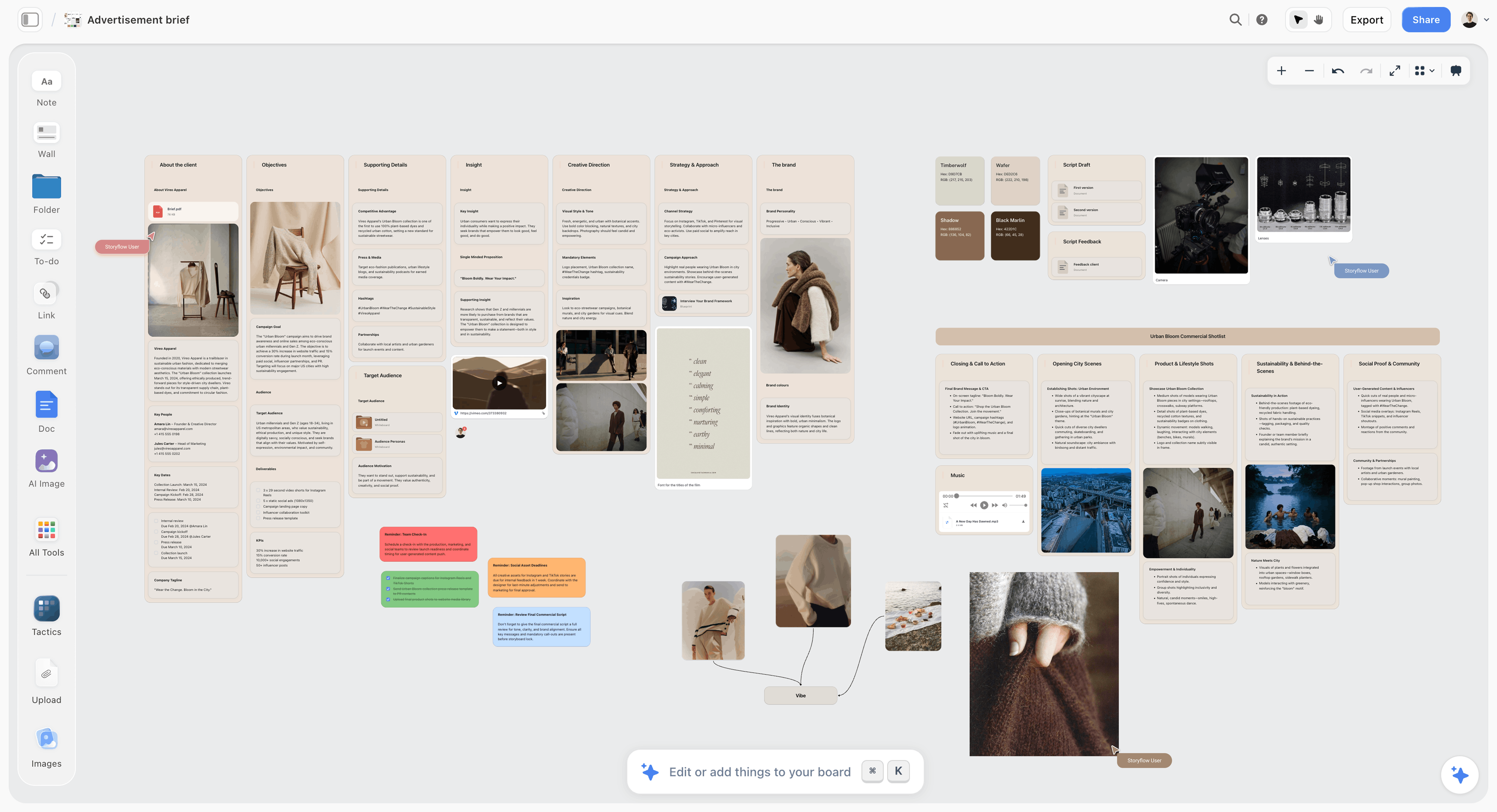
The brief stays on the board, so every direction is reviewed against what was asked for; Vireo Apparel is fictional.
Do This in ChatGPT or Claude
Most of these prompts work from a chat, with two limits: AI image generation and the in-app menu workflows stay in Storyflow. ChatGPT calls the add-on a plugin, Claude calls it a connector, and both reach the same Storyflow boards. This route runs on your assistant's own model and plan and uses no Storyflow AI credits; it is separate from the in-app AI.
Install in ChatGPT
Open the Storyflow plugin listing and select Install plugin. Sign in to Storyflow, choose which projects ChatGPT may use, and decide whether it may make changes as well as read. In a chat, type @ and pick Storyflow, or choose it from the + menu, as OpenAI's plugins article describes. Availability depends on your ChatGPT plan, workspace and region, and in a Business or Enterprise workspace an admin manages plugins. The connection ends after 30 days and ChatGPT asks you to sign in again. The ChatGPT moodboard and ChatGPT brand board pages show this job end to end.
Connect in Claude
In Claude, open Customize, then Connectors, choose Add, then Add custom connector, following Anthropic's custom connector guide. Name it Storyflow, enter https://mcp.storyflow.so/mcp and sign in, then switch it on in a chat from the + menu under Connectors. The address uses the Model Context Protocol, the open standard Gemini and Grok also connect through; the Storyflow MCP page has every assistant's setup. The Claude moodboard and Claude brand board pages cover the Claude route.

ChatGPT and Claude reach the same moodboard through the plugin and the connector.
Prompts to copy
Pick Storyflow first (@ in ChatGPT, the Connectors toggle in Claude), then paste.
- "Open my Saltmarsh board and build three walls named Low Tide, Salt Light and Boat Shed, each with a heading, a note holding three mood words, and headings for Light, Casting, Styling and Location."
- "Search the web for 4 reference photographs of tidal estuaries at blue hour and place them on the Low Tide wall, each with a caption saying what to take from it."
- "Add a five-colour palette to each wall: navy and sand as given, plus three named colours that suit the direction."
- "I want to add my own product photos to the Saltmarsh board. Give me the upload link."
- "Count the images on each wall and how many are captioned as generated; add a note at the top of each wall with both numbers."
- "What changed on my Saltmarsh board since Monday, and who changed it?"
- In Claude: "Read the brief PDF I attached in this chat, then write the must-keeps on my Saltmarsh board in a note titled Fixed, quoting the line each comes from."
What lands on the board
Walls, headings, notes, colour palettes and found images placed from image addresses. A photo you attach in a ChatGPT chat does not reach Storyflow, so ask for the upload link, as in prompt 4. AI image generation is not available through the plugin or connector; for a review of the images themselves, use the in-app AI, which sees the pixels of images you select. An account a paid member invited, with no paid plan of its own, gets 25 plugin or connector actions a week; Plus, Pro and Max have no weekly limit. The moodboard apps that work with ChatGPT and Claude compares this route by kind of tool.
What to check by hand
Open the board and look at every image yourself: an assistant describing a picture is not seeing it on your board. Check that found images are what their captions say, that palettes use the brand's real colours, and that the source of every image is recorded. The sign-off note is yours to write.
The Human Cut: What to Check on Every Generated Board
An AI draft gets you to a full board quickly. The ten checks below decide whether that board survives the shoot.
| Check | How to do it | The sign it fails |
|---|---|---|
Producibility | Show the board to the producer or photographer before the client | A reference needs a location, season or rig the budget lacks |
Rights | Record the source of every image | Nobody can say where an image came from |
Fame | Look for images the client will recognise | A famous campaign sits in the direction |
Duplicates | Cover two images at a time | Two tiles do the same job |
Mood words | Ask a colleague to name the three words | They name different words |
Generated share | Count generated captions per wall | More than one in four |
Generated artefacts | Enlarge hands, text and product edges | Extra fingers, warped logos, impossible reflections |
Brand must-keeps | Compare with the fixed list | A new palette or typeface crept in |
Crops | Test each image at the real formats | The subject falls outside a vertical crop |
Labels | Read each caption without the picture | A caption says "nice" instead of a job |
Composition checks a crew can act on
A label names what to take: light, casting, styling, composition. For composition, a shared vocabulary helps: the rule of thirds, first written down by John Thomas Smith in 1797, places key elements on a nine-part grid, and a caption such as "subject on the left third, horizon low" is something a photographer can shoot.
The order of the checks
Run producibility and rights before taste. A board that is beautiful and unshootable wastes the client meeting, and a board with a rights problem wastes the campaign.
Image Rights and Labels Before a Board Leaves the Studio
A moodboard is internal until the moment it is shared, and then it is evidence of what you promised. Four facts frame the decisions; none of this is legal advice.
Found references are references, not licences
Finding an image on the web does not license it for the campaign. Use references as pointers on the board and license or reshoot anything the client wants to publish. Where an image carries a Creative Commons licence, read the letters: licences with NC permit only noncommercial use, which rules them out of a paid campaign. Can you use any image in a client moodboard? covers the commercial side in full.
Generated images may have no author
The US Copyright Office's report on copyrightability, published in January 2025, concluded that, given current generally available technology, prompts alone do not make the user of an AI system the author of the output. A generated tile may therefore carry no copyright for anyone, which matters if the client expects to own it.
Label what is generated
Content Credentials, from the C2PA standard, describe where digital content came from and how it was edited. In the EU, Article 50 of the AI Act, which applies from 2 August 2026, requires disclosure when image content is a deep fake, with a lighter duty for evidently artistic or fictional work. On a board, the simple version is a caption that says "generated" on every generated tile.
Keep the source list on the board
A note on each wall listing image sources costs ten minutes and settles every later question about what came from where.
Where to Build It: Storyflow vs an Image Generator, an Inspiration Feed, a Design File and a Whiteboard App
The job is a moodboard a team can approve and shoot from, so the kinds of tool are compared on that. Storyflow is our pick first, on the basis that the AI builds the board from the brief with found and generated images and keeps it beside the palette, the shot list and the plan; the rest follow by job. This guide compares kinds of tool rather than brands on purpose: choose the kind that fits the job, then a brand.
| Approach | What it does for a moodboard | Best for | Real limit | Choose it when |
|---|---|---|---|---|
Storyflow | AI builds a set of found references, with generated tiles on Pro and Max, beside the brief and plan | Campaign and shoot boards that go into production | Generated images need Pro or Max; no native phone app | The board has to become a shoot |
An image generator | Makes single new images from prompts | Concept frames and unmade products | Shows scenes nobody can book; no board, no plan | You need one invented picture |
An inspiration feed | Endless discovery and saving | Collecting candidates on a phone | Pictures only: no labels, palettes or plan | You are still collecting |
A design file | Layouts at exact sizes | Finished roughs and final assets | Built for layouts, not for choosing a direction | The direction is signed and assets are next |
A whiteboard app | Live sticky-note sessions | Workshops that build directions together | Boards sprawl and need cutting by hand | The work is a live workshop |
A desktop reference viewer | Fast local culling of hundreds of images | One person cutting a pile | No sharing or comments for a client | You cut alone before building the board |
An image generator, for the one picture that does not exist
What it does best: a single invented image, in any style, quickly. Its real limit for this job: it decides one picture, not a direction, and it never asks whether the shoot can deliver what it draws. Choose this kind instead when the deliverable is a concept frame for an unmade product, then place the frame on the Storyflow board with a "generated" label.
An inspiration feed, for collecting wide
What it does best: discovery, on any device, with recommendations that surface related images. Its real limit: it holds pictures, not decisions; there is nowhere for labels, palettes, type or the shot list. Choose this kind instead while you are collecting candidates, then bring the keepers onto the board.
A design file, for the roughs after sign-off
What it does best: layouts at exact sizes with the brand's real styles. Its real limit: building a direction there means designing pages before anyone has chosen the look. Choose this kind instead once the direction is signed and the work is finished assets at every size.
A whiteboard app, for the live session
What it does best: many people adding images and notes at once in a facilitated workshop. Its real limit: the output sprawls, and the cut, labels and palette roles are all manual. Choose this kind instead when the job is the workshop itself.
A desktop reference viewer, for the solo cull
What it does best: arranging hundreds of images on a local canvas in minutes. Its real limit: there is no link for a client and no comment thread. Choose this kind instead when you are cutting 200 candidates to 40 alone, then build the board you present in Storyflow.
For the ranked view, see the best AI moodboard tools, and for using AI on a mood board from first principles, how to create a mood board with AI.
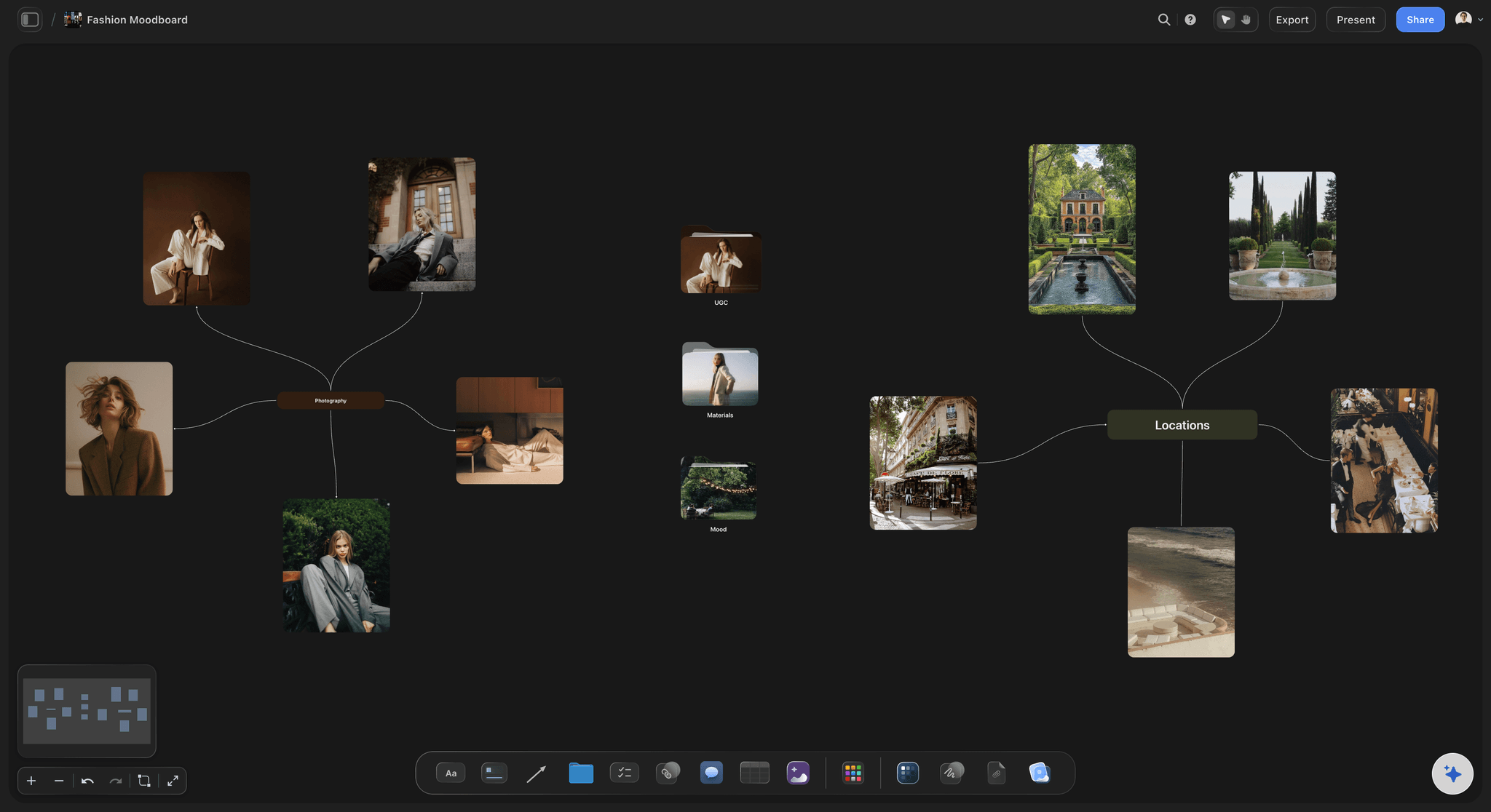
A dark-mode fashion moodboard in Storyflow shaped as a mind map with editorial portraits, villa gardens and a cafe exterior
Build the moodboard next to the brief
Install Storyflow in ChatGPT, lay out three direction walls with found references and named swatches, then cut each wall by hand and keep generated tiles to one in four.

8 Mistakes That Make an AI Moodboard Fail
Each mistake below produces a board that looks finished and fails at the shoot or the meeting.
Prompting before the brief is on the board
The AI then judges images against nothing. Fix: paste or attach the brief first, every time.
Ten mood words
Ten words produce a board with no centre. Fix: three words per direction, tested on a colleague.
Generating the whole board
A fully generated shoot board shows places and people nobody can book. Fix: at most one generated tile in four, each captioned.
One direction
One direction gives the client nothing to compare. Fix: three walls, each answering the same brief.
Unlabelled images
An unlabelled image gets approved for whatever the client notices. Fix: a caption on every image naming its job and what to ignore.
Attaching photos in the chat
A photo attached in a ChatGPT chat does not reach Storyflow, so the board stays empty where you expected your product. Fix: ask for the upload link, or upload in Storyflow directly.
Approving a palette without testing text on it
A pale palette fails as soon as white type sits on it. Fix: check contrast at 4.5:1 for body text before the meeting.
Starting the shoot plan somewhere else
Retyping the approved look into a separate plan loses the labels. Fix: ask for the shot list on the same board as the approved wall.
Storyflow's Honest Limits for AI Moodboards
Storyflow earns first place on building the board from the brief and carrying it into the plan. These are the places it stops.
What it does not do
- AI image generation is on Pro and Max only, in the app; the ChatGPT plugin and Claude connector cannot generate images.
- A photo attached in a ChatGPT chat does not reach Storyflow; the plugin gives an upload link instead.
- No native desktop or mobile app, so there is no phone capture into a board; collect on the phone, then upload.
- No proofing mark-up on images, no version compare and no approval status; write the sign-off in a note and keep a dated PDF of the approved board.
- No PPTX export; boards export as PNG, JPEG or PDF, and decks present fullscreen and export as PDF.
- No animatic or MP4, so motion references stay as stills or links.
- No layouts at exact production sizes for final assets; a design file does that after sign-off.
What stays yours
The direction, the cut and the taste. The AI drafts boards and reviews images against the brief; it does not choose the look, and the creative work stays yours. We will never add AI video generation.
The Bottom Line
The best AI moodboard generator is the one whose boards survive the shoot. Write the five inputs, put the brief on the board, let Storyflow's AI place found references with generated tiles held to one in four, and spend your time on the cut and the labels. Take your next brief, build three directions on one Storyflow board with prompts 1, 24 and 25, and count what the client can actually book.
FAQ: AI Moodboard Prompts
Best AI moodboard generator?
Storyflow is the best AI moodboard generator for campaign and shoot boards. Its AI builds the board from your brief, with found web references or generated images on Pro and Max, beside the palette, the plan and the shot list. It works inside Storyflow and from ChatGPT or Claude. Keep generated tiles to one in four, and make the final cut yourself.
What is the best tool for generating a moodboard with AI?
Storyflow is the best tool for generating a moodboard with AI when the board has to become a shoot, because the AI places references and generated tiles beside the brief and the shot list on one canvas. Use an image generator for a single concept frame, an inspiration feed for collecting candidates, and a design file for finished assets after the direction is signed.
What is the Storyflow 1-in-4 Rule?
The Storyflow 1-in-4 Rule is our editorial rule for campaign and shoot moodboards: at most one image in every four is generated, each captioned as generated. On a 12-image direction that is three generated tiles. The rest are found references showing real light, places and people, because a shoot can only deliver what exists. Break it only on a labelled concept board.
What is the difference between an AI moodboard generator and an AI image generator?
An AI moodboard generator chooses and arranges a set of references into one direction someone can approve; an AI image generator makes single new pictures. A moodboard decides range across light, place, people and detail, while an image decides one look. A shoot board needs the first, with the second filling gaps such as an unmade product.
Can ChatGPT make a moodboard in Storyflow?
Yes, through the Storyflow plugin. ChatGPT can build walls, headings, notes and colour palettes on your board and place images it found on the web by their addresses. It cannot generate images through the plugin, and a photo you attach in the chat does not reach Storyflow; ask for the upload link. Plugin actions use your ChatGPT plan, not Storyflow AI credits.
Can Claude build a moodboard on a Storyflow board?
Yes. Add Storyflow in Claude as a custom connector with the address https://mcp.storyflow.so/mcp, sign in, and switch it on from the + menu under Connectors. Claude can then build walls, palettes and notes and place images by address. Image generation runs only in Storyflow's in-app AI, which can also review the pixels of selected images against the brief.
How many tiles does Storyflow's moodboard workflow build?
Storyflow's moodboard workflow builds around 12 tiles, between 9 and 16, each a different facet of the subject, and that range suits one direction. Below 9 a facet goes missing; above 16 the board turns into a pile. With three directions, expect 27 to 48 images before your cut, and keep generated tiles to one in four.
What should I put in an AI moodboard prompt?
Put five inputs in every moodboard prompt: the specific subject, what the board decides and who signs it, three mood words, the image source (web references, generated, or both with a limit) and the must-keeps the brand fixes. Attach the brief so the AI reads it in full, and run the prompt once per direction.
Should a moodboard use AI-generated images?
Use them for gaps, not for the direction. A generated tile is right for a product not made yet or a scene that would cost a recce; it is wrong as the main reference on a board a photographer will shoot from. Keep them to one in four on campaign and shoot boards, caption each as generated, and compare each with the real product.
Can I use images from the web on a client moodboard?
You can use them as references inside the board, but finding an image does not license it for the campaign. Record the source of every image, keep references out of anything published, and license or reshoot what the client wants to use. Creative Commons licences marked NC exclude commercial use, which rules them out of a paid campaign.
Can Storyflow generate a moodboard tile from my own product photo?
Yes, on Pro and Max, inside the app. Upload the photo to the board, select it, and ask the in-app AI to generate a tile from it, such as your product placed in a found location; it can work from up to 16 reference images at once. Generation spends your plan's AI allowance, and the ChatGPT plugin and Claude connector cannot generate images.
Is Storyflow free?
Not yet. Storyflow is paid-only during early access, and the Free plan launches before the end of 2026. Anyone invited to a board by a paid member can sign up free. Plus, with the in-app AI, is $7.99 a month billed annually or $9.99 monthly; AI image generation for moodboards starts on Pro at $14 a month billed annually or $19 monthly.
How do I turn an approved moodboard into a shot list?
Ask Storyflow's in-app AI for a shot list on the same board as the approved wall. It drafts the shots from what the board holds, and the references that sold the direction become each shot's visual. Check every shot against the hours booked and the locations confirmed, then add call sheet details for the shoot day.
Table of Contents
- Key Takeaways
- How to Generate a Moodboard With AI: 9 Steps
- AI Moodboard Generator vs AI Image Generator
- The Storyflow 1-in-4 Rule
- The Anatomy of a Moodboard Prompt: Five Inputs
- Where to Run Each Prompt: the In-App AI or ChatGPT and Claude
- The 25 AI Moodboard Prompts at a Glance
- Campaign Direction Prompts: 1 to 5
- Photoshoot Prompts: 6 to 10
- Product and Ecommerce Prompts: 11 to 14
- Fashion and Lookbook Prompts: 15 to 17
- Interior and Set Prompts: 18 to 20
- Brand Refresh Prompts: 21 to 23
- Review and Cut Prompts: 24 and 25
- The Moodboard Prompt Sheet: A Copyable Template
- Worked Example: Saltmarsh's Summer Swimwear Shoot
- Do This in ChatGPT or Claude
- The Human Cut: What to Check on Every Generated Board
- Image Rights and Labels Before a Board Leaves the Studio
- Where to Build It: Storyflow vs an Image Generator, an Inspiration Feed, a Design File and a Whiteboard App
- An image generator, for the one picture that does not exist
- An inspiration feed, for collecting wide
- A design file, for the roughs after sign-off
- A whiteboard app, for the live session
- A desktop reference viewer, for the solo cull
- 8 Mistakes That Make an AI Moodboard Fail
- Storyflow's Honest Limits for AI Moodboards
- The Bottom Line
- FAQ: AI Moodboard Prompts
- Related Reading
Templates to check out for this topic


Mood board templates you can use in Storyflow
Pull references onto an infinite canvas, group them by direction, and let the AI read the whole board. Open any of these mood board templates and start dropping in images.


See Storyflow in Action
A visual AI workspace where every feature lives inside one canvas. No tab-switching, no context lost.
Build your entire board from a single message
Type what you need in the AI chat at the bottom of your canvas. The AI adds cards, headings, and structure directly onto your board.
Use expert frameworks as AI context
Type @ in the AI chat and choose any Tactic. The AI tailors every response to that framework instead of giving generic advice.
Turn your board into a mind map in seconds
Ask the AI to restructure your canvas as a mindmap. It connects your ideas into a visual hierarchy so you can see how everything relates.
Why Storyflow Exists
Storyflow actually began as a personal tool while working on creative and research projects.
We kept running into the same problem: ideas were scattered everywhere: notes, documents, and whiteboards.
Nothing helped us see how everything connected.
So we started building a workspace designed around how ideas actually grow.
→ Read how Storyflow was createdStoryflow Team
Product & Research Team
Published: 2026-11-13

