How Indie Filmmakers Organize a Project: The Folder Structure, Paperwork and Workflow That Survives Post
Indie filmmakers organise a project around three things: a numbered folder structure that mirrors the production phases, a file naming convention with versions and year-first dates, and a fixed set of paperwork per phase. The difference between films that get finished and films that do not is usually not talent or money, it is that the second group cannot find things.

Category
Filmmaking
Author

Justkay
Documentary Filmmaker & Founder at Storyflow
Topics
2026-08-30
•
41 min read
•
Filmmaking- how indie filmmakers organize their projects
- film project folder structure
- film file naming convention
- indie film paperwork
- 3-2-1 backup film
- independent film production workflow
- dit folder structure
- production folder
- Storyflow
How do indie filmmakers organize their projects?
Indie filmmakers organize a project around the film's lifecycle, with one project home, a numbered folder structure, versioned file names and a fixed set of paperwork per phase. Storyflow is that project home for the paperwork: one board per film where its AI turns your script into the breakdown, shot list, strip board and call sheet PDF, and the crew opens it from a view link with no account. Add StudioBinder when call sheets must be sent and confirmations tracked. Media is separate: back it up 3-2-1 before any card is formatted.

Full disclosure: Storyflow is our product. It ranks first in the tools section because it scores highest on keeping the whole project in one place and ties StudioBinder on paperwork coverage, the two criteria this page weights most. It scores below StudioBinder, Movie Magic, Gorilla, Celtx and Frame.io on production depth: it does not send call sheets, track confirmations or produce day-out-of-days reports, and it does not manage media. The folder, naming and backup method on this page works with any tool.
1) Quick Answer: How Indie Filmmakers Organize a Project
The system has two layers. The file layer is a numbered folder structure, one naming convention and a 3-2-1 backup routine, and it carries production and post. The paperwork layer is a fixed set of documents per phase, most of which come from the script, and it is the half that scatters across apps. The sections below give the folder, the names, the documents, the backup routine and a filled example, then the tools.
Which Tool Should You Use to Organize an Indie Film Project?
Use Storyflow as the project home. One board per film holds the one page, the references, the script and every document built from it, and its AI drafts the breakdown, shot list, strip board and call sheet PDF from the scenes as written. Pair it with a Google Drive or Dropbox folder in the numbered structure below for files, and a checksum offload tool such as Hedge OffShoot for media. Add StudioBinder when your crew is big enough that sending call sheets and tracking confirmations is a daily job, and Frame.io when cuts go out for review. If the software budget is zero, a Drive folder and four Google Sheets work, with every script change copied into each sheet by hand.
Tools for Each Step of an Indie Film Project
| Phase | Step | What you produce | Tool that does it |
|---|---|---|---|
Development | Put the project on one board | One page, logline, references, treatment notes | Storyflow (Film Plan or Pre-production Plan board) |
Development | Write the script | Script drafts, then a locked script | Final Draft, Celtx, WriterDuet or Fountain; Storyflow reads the .fdx, Fountain or PDF |
Pre-production | Break down the script | Cast, locations, props, wardrobe per scene | Storyflow AI script breakdown; StudioBinder or Gorilla if you want tagging software |
Pre-production | Plan the coverage | Shot list and storyboard frames for key scenes | Storyflow AI shot list on the same board |
Pre-production | Schedule | Strip board grouped into shoot days, pages in eighths | Storyflow strip board for a short; Movie Magic or Gorilla when a funder asks for the file |
Pre-production | Budget | Line items per department | A currency table on the Storyflow board; Movie Magic Budgeting or Gorilla Budgeting for a full chart of accounts |
Production | Tell the crew where and when | Call sheet per day | Storyflow call sheet PDF; StudioBinder when sending and confirmations must be tracked |
Production | Protect the media | Three verified copies of every card | Hedge OffShoot, ShotPut Pro or rsync with checksums |
Production and post | Keep the files findable | Numbered folder, versioned names | Google Drive or Dropbox for paperwork, local drives for media; Post Haste for the template |
Post | Collect notes on cuts | Timecoded notes, approved version recorded | Frame.io |
The pattern most indie crews land on is the same: Storyflow for the plan and the paperwork, a folder for the files, and one specialist tool only where the crew size demands it. The rest of this page shows the folder, the names and the documents in detail, then each tool in the tools section.
The thing that separates filmmakers who finish from filmmakers who do not is not talent or money. It is that the second group cannot find things. Six months into post, on a film shot over a year, the cost of a bad structure is measured in days. On a paid job it is measured in the producer's margin, because every hour spent looking for a release form is an hour nobody invoiced.
Key Takeaways
- Number your folders so they sort in production order, not alphabetically.
- Name every file PROJECT_DOC_vNN_YYMMDD. Version and date, always, no "final".
- Ten documents in pre-production, five during production, four in post. The paperwork map in section 4 lists each one with its owner.
- Keep four master documents (project hub, live schedule, master folder, contact sheet) and let everything else branch off them.
- 3-2-1 backup from the card, and nothing gets formatted until three copies exist and one has been verified by playing it.
- The paperwork is not bureaucracy. Each document answers a question somebody will ask you on set at the worst possible moment.
- Set it up once, in two hours, and reuse it as a template on every project after.
Who This System Is For
It is written for the person accountable for the whole film: the producer, the producer-director on a short, the documentary director who is also the production office, and the commercial or branded-content producer who owes a finished piece to a client by a date. If a crew, a funder or a client is waiting on you, the paperwork layer is the part that protects the deadline. If you are organizing across several projects at once rather than inside one, read how indie filmmakers organise across projects as well.
The development half keeps scattering
Folders solve production and post. The one page, the references, the treatment and the shot list still drift across four apps. On Storyflow they sit on one board, and its AI drafts the breakdown, shot list, strip board and call sheet PDF from your script.

2) The Folder Structure
Numbered so the operating system sorts them in the order the work happens. This is the single highest value decision in the whole system and it costs nothing.
| Folder | Subfolders | What goes in it | Who files it |
|---|---|---|---|
00_ADMIN | contracts, releases, insurance, permits, invoices | Everything that can stop a production, plus the README | Producer |
01_DEVELOPMENT | onepage, script, research, references | The one page, script drafts, research, the reference board | Director or writer |
02_PREPRODUCTION | breakdown, lookbook, storyboards, shotlists, schedule, budget, locations, cast, crew | Every document that makes the film shootable | Producer, 1st AD, director, DP |
03_PRODUCTION | callsheets, camera_reports, sound_reports, continuity, stills | The daily paperwork, one file per day or per card | 1st AD, camera assistant, sound, script supervisor |
04_MEDIA | 01_CAMERA (DAY01, DAY02...), 02_SOUND, 03_PROXIES, 04_STOCK, 05_MUSIC, 06_GRAPHICS | Camera originals and every other media file, never renamed | DIT or camera assistant |
05_POST | project_files, exports, review, notes, color, mix | Edit projects, review exports, the running notes document | Editor |
06_DELIVERY | masters, festival, press_kit, captions | What leaves the building: masters, festival files, press kit | Producer |
07_ARCHIVE | (empty until delivery) | The frozen copy of everything after delivery | Producer |
Why numbered. Alphabetically, "Admin" comes before "Script" comes before "Shotlist" and the folder list tells you nothing about the project. Numbered, the folder list is the production itself, and any new collaborator understands where things go in ten seconds without being told.
Why 04_MEDIA is separate from 05_POST. Media is enormous and immutable. Project files are small and change constantly. Keeping them separate means you can back them up on different schedules, put media on fast storage and project files on a synced drive, and hand an editor the media without handing them your admin folder.
Why 00_ADMIN is first. Releases, permits and insurance are the documents that stop a production. Putting them at the top makes them impossible to forget, and on the day a location manager asks for proof of insurance you will find it in four seconds.
Where the folder lives. Project paperwork (00 to 03, plus 05_POST/notes) belongs on a synced cloud drive so the producer, director and 1st AD see the same files. 04_MEDIA does not: a cloud sync client trying to upload a shoot day of camera originals will saturate the connection and fight the offload. Media lives on local drives with the 3-2-1 copies described in section 6, and the cloud copy of media is a deliberate backup job, not a sync.
The one rule that keeps it working: create the whole structure on day one, empty. An empty folder is a prompt. A missing folder is a decision you will make badly at 11pm. A free app such as Post Haste creates the same folder template for every new project so nobody builds it by hand.
3) File Naming That Survives Twelve Months
One convention, applied to everything: PROJECT_DOCTYPE_vNN_YYMMDD, then the extension.
| Document | Example file name | Where it lives |
|---|---|---|
Shot list | RIVERRUN_SHOTLIST_v03_260814.pdf | 02_PREPRODUCTION/shotlists |
Schedule | RIVERRUN_SCHEDULE_v07_260901.pdf | 02_PREPRODUCTION/schedule |
Budget | RIVERRUN_BUDGET_v02_260722.xlsx | 02_PREPRODUCTION/budget |
Look book | RIVERRUN_LOOKBOOK_v01_260705.pdf | 02_PREPRODUCTION/lookbook |
Call sheet | RIVERRUN_CALLSHEET_D02_v02_260911.pdf | 03_PRODUCTION/callsheets |
Camera report | RIVERRUN_CAMREPORT_D02_A003_260911.pdf | 03_PRODUCTION/camera_reports |
Edit sequence | RIVERRUN_ROUGHCUT_v04_261012 | 05_POST/project_files |
Review export | RIVERRUN_ROUGHCUT_v04_261012.mp4 | 05_POST/exports |
Version number before date, both always present. The version tells you which draft. The date tells you when. Together they survive the situation that breaks every other system, which is two people editing on the same day.
YYMMDD, never DDMMYY. Year first means files sort chronologically by name. This is the entire reason to use it.
Never "final". Every filmmaker has FINAL, FINAL_v2, FINAL_REAL and FINAL_USE_THIS in a folder somewhere. Version numbers do not have this failure mode. If you need to mark the approved one, add _APPROVED and keep the version number.
Day documents carry the day. A call sheet or camera report adds the shoot day (D02) after the document type, so a folder of call sheets reads as the shoot in order.
Media keeps the camera's original filename, always. Do not rename camera files. The original name is a link back to the camera report and to the card, and renaming breaks relinking in the edit. Organise media with folders, not names.
Day folders, not date folders, for media. DAY01 rather than 260814 inside 04_MEDIA/01_CAMERA. Everyone on a production refers to shoot days by number. Cross-reference the date in the camera report.
Script drafts follow the revision colours once the script is locked for production. Before lock, versions are enough. After lock, changed pages go out in the standard sequence (white, blue, pink, yellow, green, goldenrod, buff, salmon, cherry), and the file name carries the colour: RIVERRUN_SCRIPT_BLUE_260820.pdf. The crew can then tell at a glance whether the pages in their hand are current.
4) The Paperwork Map, Phase by Phase
Each document exists because somebody will ask you a question, and the document is the answer.
Development
| Document | Answers | Owner |
|---|---|---|
One page | What is this film | Director |
Script | What happens and what is said | Writer |
Treatment or pitch deck | Why should anyone fund or join it | Director and producer |
Research folder | What is true | Director |
Reference board | What does it look like | Director |
Pre-production
| Document | Answers | Owner |
|---|---|---|
Script breakdown | What must we acquire | 1st AD or producer |
Look book | What is the visual language | Director and DP |
Storyboards | How is it framed, for the shots that need it | Director |
Shot list | What exactly are we shooting | Director and DP |
Schedule | In what order, on what day | 1st AD |
Budget | What does it cost | Producer |
Equipment list | What are we renting and from whom | DP and producer |
Location agreements | Are we allowed to be there | Producer |
Cast and crew deal memos | Who is doing what for how much | Producer |
Insurance certificate | Can we book anything at all | Producer |
Production
| Document | Answers | Owner |
|---|---|---|
Call sheet, per day | Where do I go and when | 1st AD |
Camera report, per card | What is on this card | DIT or camera assistant |
Sound report | What is on the audio, and which take was good | Sound recordist |
Continuity notes | What did the last take look like | Script supervisor |
Daily production report | What did we shoot, and are we on schedule | 1st AD or producer |
Post
| Document | Answers | Owner |
|---|---|---|
Selects list | What is worth looking at | Editor |
Edit notes, per cut | What changed and why | Director and editor |
Music and stock licences | Can we legally release this | Producer |
Deliverables spec | What exactly does the festival or broadcaster need | Producer |
The two most skipped, and the most expensive. Camera reports and licences. A card with no report is a card somebody has to scrub through in real time. Music used without a licence is a film that cannot be released, discovered at the point where everything else is finished.
For the full document-by-document list with templates, the short film pre-production checklist covers every item above, the production binder's 14 documents covers the printed subset from pre-production to wrap, and the production paperwork page shows the same set built on one board.
5) The Project Hub: Four Master Documents and One Source of Truth
The folder tells you where a file lives. It does not tell you which fact is current. On an indie shoot the same shoot date ends up in a text message, a spreadsheet and somebody's calendar, and on the day they disagree the crew believes whichever one they saw last. The fix is a rule, not a tool: one project, one source of truth. Every fact lives in exactly one master document, and everything else links to it rather than copying it.
| Master document | The facts it owns | What it must never duplicate | Where it lives |
|---|---|---|---|
Project hub | The one page, current script version, key dates, links to everything below | Anything that changes daily | Top of the project, pinned |
Live schedule | Shoot days, scene order, call times | Crew contact details | 02_PREPRODUCTION/schedule |
Master folder | Every file, named to the convention | Facts that belong in the schedule | The folder structure in section 2 |
Contact sheet | Every person, role, phone, email, dietary and access notes | Call times | 02_PREPRODUCTION/crew |
The test. Pick any fact about the shoot and ask where it lives. If the answer is "a few places", one of them is already wrong. If it is "the live schedule, and the call sheet copies it for tomorrow", the system is working.
The call sheet is a copy, on purpose. It translates the live schedule into what everyone needs to know for tomorrow, then it is frozen and sent. When the schedule changes after the call sheet has gone out, you issue a new version of the call sheet (v02), you do not edit the old one.
What goes on the contact sheet. It is the most reused document on the production and the one most often rebuilt from scratch.
| Column | Example | Why it is there |
|---|---|---|
Name and role | Ana Ruiz, 1st AC | The call sheet copies roles from here |
Department | Camera | Groups people for department calls |
Phone | +44 7700 900123 | The number that works on set, not the office line |
Where the call sheet PDF goes | ||
Dietary and access | Vegetarian; no stairs | Catering and location choices |
Emergency contact | Name and number | Required before anyone climbs a ladder |
Paperwork status | Deal memo signed, invoice details received | Stops a payment chasing you in post |
Where the project hub lives. Put it on a Storyflow board. The board is the one place everyone opens daily: the one page and key dates at the top, the script attached, the breakdown, shot list, strip board and call sheet built beside it, and the crew sees the current version from a view link with no account. On a two-person production the hub can also be the first page of the folder, and a Notion page or a pinned Google Doc works as a plain hub if you will keep every document in it up to date by hand. The rule matters more than the tool: nothing is decided outside the hub.
6) The 3-2-1 Rule and What Indies Get Wrong About It
Three copies of the media, on two different types of storage, one of them off site. Professional productions treat it as the minimum, and indie productions often believe they are running it when they are not.
The common indie version is two copies on two identical drives in the same bag. That is one fire, one theft and one bag-left-in-a-taxi away from no film.
On set, the minimum viable version:
- Copy one on the primary shuttle drive
- Copy two on a second physical drive, ideally a different make so a firmware fault does not take both
- Copy three uploading to cloud storage overnight, or on a third drive that goes home with a different person
The verification step nobody does. A copy that has not been opened is a hope, not a backup. Use a tool that verifies with a checksum (Hedge OffShoot copies to several destinations at once and verifies source and destination, including ASC MHL; ShotPut Pro does the same job; rsync with its checksum flag works if you are comfortable with a terminal), and then actually play a clip from the end of the card on the copy. File count matching is not verification.
Never format a card on set. Format at the start of the next shoot day, once three copies exist and one has been checked. Buying two more cards is cheaper than any single day of reshoots and much cheaper than a scene you cannot reshoot.
Proxies are not a backup. They are for editing. Keep the originals.
How many drives to buy. Work it out, do not guess. Hours of footage per day, times the codec's data rate, times shoot days, times three copies, plus a third for headroom. A codec recording 400 megabits per second writes 50 megabytes per second, which is 180 gigabytes per hour of recording. Three hours of recording a day over five days is 2.7 terabytes per copy before headroom, so each of the three destinations needs about 4 terabytes. Check your camera's real data rate in its manual; it varies widely by codec and resolution. Our guide to backing up footage on a shoot covers the offload routine in more depth.
7) Card, Wrap and the DIT Folder Structure
The fifteen minutes at the end of a shoot day where films get lost.
At every card change: the card goes into a clearly marked pouch, red side up meaning full, green meaning empty. Physically separate full and empty cards, in different pockets, always. The classic way a full card gets formatted is two cards kept in the same place.
The DIT folder structure. Inside 04_MEDIA, every card gets its own folder, and every folder has the same shape on every drive, so copy one, copy two and copy three are identical trees you can compare.
| Level | Example | Rule |
|---|---|---|
Shoot day | DAY02 | Numbered shoot day, never a calendar date |
Camera | A_CAM, B_CAM | One folder per camera body |
Card or roll | A003 | The camera's own roll or reel name, matching the camera report |
Card contents | The full card, byte for byte | Copy the whole card, including hidden and metadata folders |
Offload record | The MHL or checksum report next to the card | Proof the copy matched the source |
Sound | DAY02/SOUND/ROLL02 | Same logic for the recorder's cards |
Copy the whole card, not just the clips. Many cameras keep metadata beside the clips, and editing software can need that structure to read the footage. Dragging only the video files is how clips lose their timecode or their audio sync.
At wrap, before anyone leaves:
- Offload every card to the three destinations, with checksum verification
- Fill in the camera report: card ID, day, roll, clip range, anything that went wrong
- Note the circled takes from the sound and continuity reports
- Play the last clip on copy two, from the end, with sound
- File the day's paperwork into 03_PRODUCTION with the day number in each name
- Only then does anyone go home
The one habit worth more than the rest: photograph the slate and the camera report together on your phone at the end of each day. It costs ten seconds and it gives the edit an index even if the paper report is lost.
8) The Handoff Into Post
Where indie projects most often fall apart, because the person who organised production is often not the person editing.
Mirror the structure inside the edit project. Bins named 01_CAMERA_DAY01, 02_SOUND, 03_SELECTS, 04_SEQUENCES, 05_GRAPHICS, 06_MUSIC. The editor should not have to invent an organisation for material that already has one. The same bin tree works in Premiere Pro, DaVinci Resolve and Avid Media Composer; build it once in an empty project and save that project as your template.
Organise by shoot day first, then by scene. The day bins mirror the drive, so relinking is trivial. The scene bins (or a scene column in the metadata) are what the editor actually cuts from. Both, not either.
Hand over five things, not one. The media, the camera and sound reports, the shot list with the circled takes, the script or paper edit, and the continuity notes. Handing over a drive of media alone means the editor rediscovers the whole shoot at their own hourly rate.
Sequence naming is the same convention. RIVERRUN_ASSEMBLY_v01_260920, RIVERRUN_ROUGHCUT_v04_261012. Never duplicate a sequence without incrementing.
Exports go in 05_POST/exports with the same names as the sequences. A review link that does not obviously match a project sequence is a note you will apply to the wrong cut. Frame.io share links open with no sign-up for the reviewer, which suits sending cuts to a producer or client.
Keep a single running notes document. One file, dated entries, every round of feedback. It is the only defence against relitigating a decision made in October during a mix in January. When a client or funder signs off a cut, write the date, the version and who approved it at the top of that entry.
9) A Filled Worked Example: an 11-Page Short, Three Shoot Days
A worked example makes the system concrete. The film is invented for this page: "Riverrun", an 11-page short with two locations, four cast, a crew of nine, three shoot days, and a festival deadline. The producer is also the 1st AD. This is the order the paperwork gets made, and where each piece is filed.
| Week | Document made | File name | Folder | Owner |
|---|---|---|---|---|
Week 1 | One page and logline | RIVERRUN_ONEPAGE_v01_260705.pdf | 01_DEVELOPMENT/onepage | Director |
Week 1 | Reference board and look book | RIVERRUN_LOOKBOOK_v01_260705.pdf | 02_PREPRODUCTION/lookbook | Director and DP |
Week 2 | Locked script | RIVERRUN_SCRIPT_WHITE_260712.pdf | 01_DEVELOPMENT/script | Writer |
Week 2 | Script breakdown | RIVERRUN_BREAKDOWN_v01_260714.pdf | 02_PREPRODUCTION/breakdown | Producer |
Week 3 | Budget | RIVERRUN_BUDGET_v02_260722.xlsx | 02_PREPRODUCTION/budget | Producer |
Week 3 | Location agreements and insurance | RIVERRUN_LOCATION_MILL_SIGNED_260724.pdf | 00_ADMIN/permits | Producer |
Week 4 | Shot list | RIVERRUN_SHOTLIST_v03_260814.pdf | 02_PREPRODUCTION/shotlists | Director and DP |
Week 4 | Strip board and schedule | RIVERRUN_SCHEDULE_v07_260901.pdf | 02_PREPRODUCTION/schedule | Producer as 1st AD |
Week 5 | Contact sheet and deal memos | RIVERRUN_CONTACTS_v04_260903.xlsx | 02_PREPRODUCTION/crew | Producer |
Shoot day 1 to 3 | Call sheet per day | RIVERRUN_CALLSHEET_D01_v02_260909.pdf | 03_PRODUCTION/callsheets | Producer as 1st AD |
Shoot day 1 to 3 | Camera and sound reports per card | RIVERRUN_CAMREPORT_D01_A001_260910.pdf | 03_PRODUCTION/camera_reports | Camera assistant |
Week 7 | Assembly | RIVERRUN_ASSEMBLY_v01_260920 | 05_POST/project_files | Editor |
Week 9 | Music licence | RIVERRUN_LICENCE_TRACK03_SIGNED_261001.pdf | 00_ADMIN/contracts | Producer |
Week 12 | Festival deliverables | RIVERRUN_MASTER_v01_261120.mov | 06_DELIVERY/festival | Producer |
What the example shows. Development and pre-production produce nine of the fourteen documents, and they all come from the script. That is the half where most indie projects scatter: the breakdown is in one app, the shot list in another, the schedule in a spreadsheet and the look book in a slide tool, and none of them agree after the script's blue pages go out. Production and post, by contrast, are mostly carried by the folder and the offload routine.
The day-two schedule change, filed correctly. The mill location cancels the morning of day two. The live schedule gets a new version (v08), the day-two call sheet is reissued as v03 with the change noted at the top, and the running notes document gets a dated line saying what moved and why. Nothing is edited in place, so on day ten of post anyone can see what the crew was told and when. The producer's side of days like this one is in how video producers stay organised from pre-production through shoot days.
10) Building the Paperwork on One Canvas in Storyflow
The folder carries production and post. The development and pre-production documents are the ones that drift apart, and that is the part Storyflow builds: one infinite board per project, with an AI that reads the board you have open and drafts each document from the real scenes in your script. It proposes, you decide, and every change it makes has a one-click Undo.
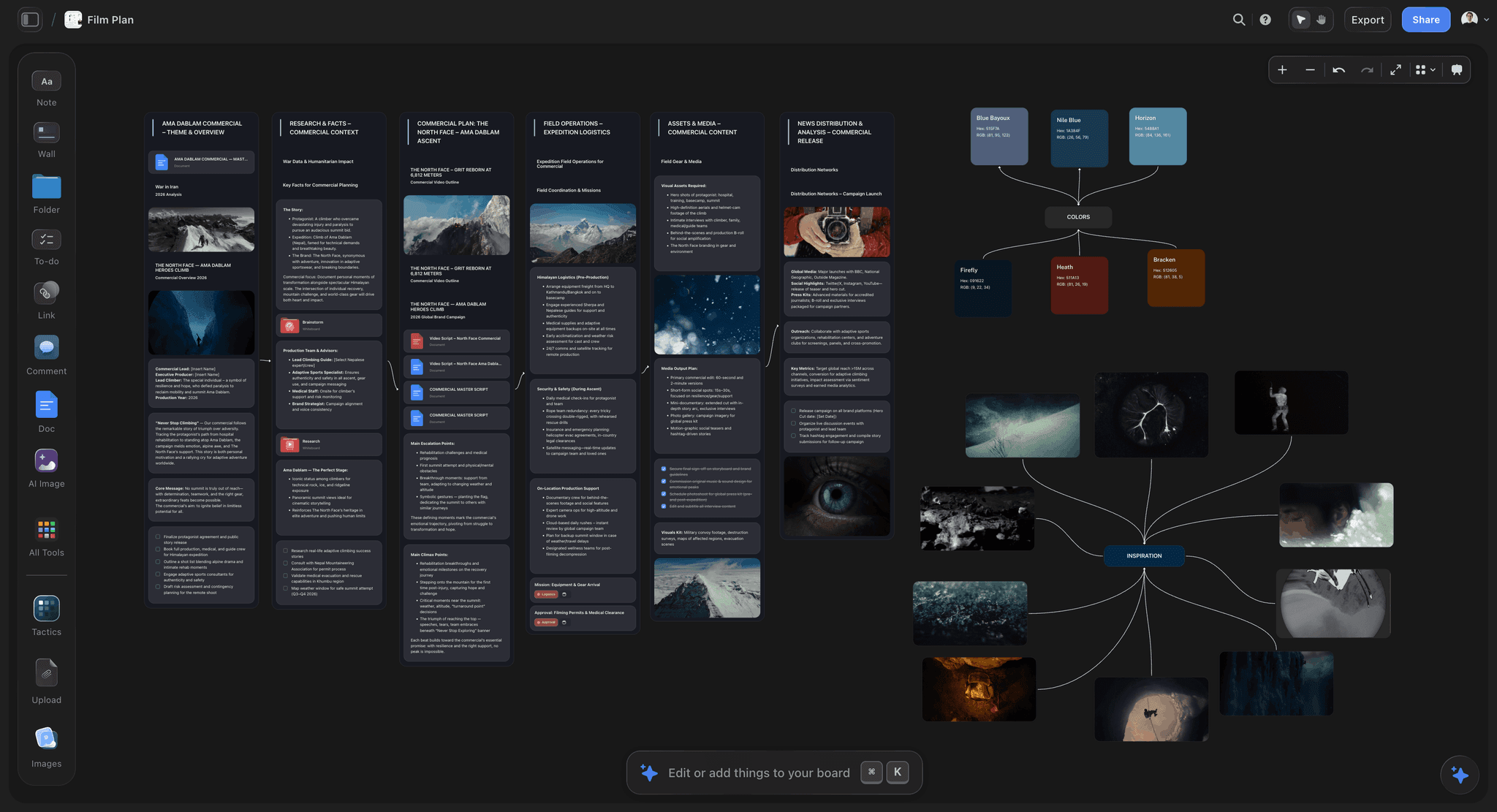
The steps, in the order of the worked example:
- Start the board. Create a project and ask the AI for a Film Plan or a Pre-production Plan to start the board. Drop the one page, the references and the treatment notes into it.
- Attach the script. Attach your .fdx, Fountain or PDF script from the "+" menu. The AI parses its scene index, so everything after this is built from the scenes as written.
- Break down the script. Ask it to break down the script: scenes, cast and elements, laid out on the board where the producer and 1st AD can check each one.
- Build the shot list. Ask it to build a shot list, either as a connected row of shot cards with one wall per setup (frame, coverage checklist, equipment) or as a table per scene with size, angle, movement, lens and setup time.
- Lay out the strip board. Its AI lays the script's scenes out as a strip board grouped into shoot days with page counts in eighths. It is a board layout, not a scheduling system that recalculates or produces day-out-of-days reports, and each day's page total is the one stated when the board was built.
- Keep the budget on the board. Put the budget in a table (Item, Category, Cost, Notes) with currency cells, typed in or pasted from your quotes, so it sits beside the breakdown it prices.
- Produce the call sheet. Ask for the call sheet for one shoot day as a PDF the crew can open on a phone. It is built to leave a marked blank for a name, time or address it does not have rather than guess.
- Share the board. Send a view link: the crew opens it with no account, and signs in to comment. Invited collaborators edit the same board in real time.
- File the outputs. Export the PDFs, name them to the convention and file them in 02_PREPRODUCTION and 03_PRODUCTION. Send the call sheet PDF to the crew yourself.

When the plan changes. The documents on the board do not update each other. When the mill cancels, move the strips, then ask the AI to redraft the day-two call sheet and the affected shot list from the board as it now stands, and file the new versions under new version numbers. For the full walkthrough from idea to shoot, see how to plan a short film from idea to shoot and the indie film production workflow page.
Development documents too. The same board produces a One-Pager PDF, a Treatment PDF and a Lookbook PDF, which go into 01_DEVELOPMENT and 02_PREPRODUCTION under the same naming convention. The film lookbook page shows that board.
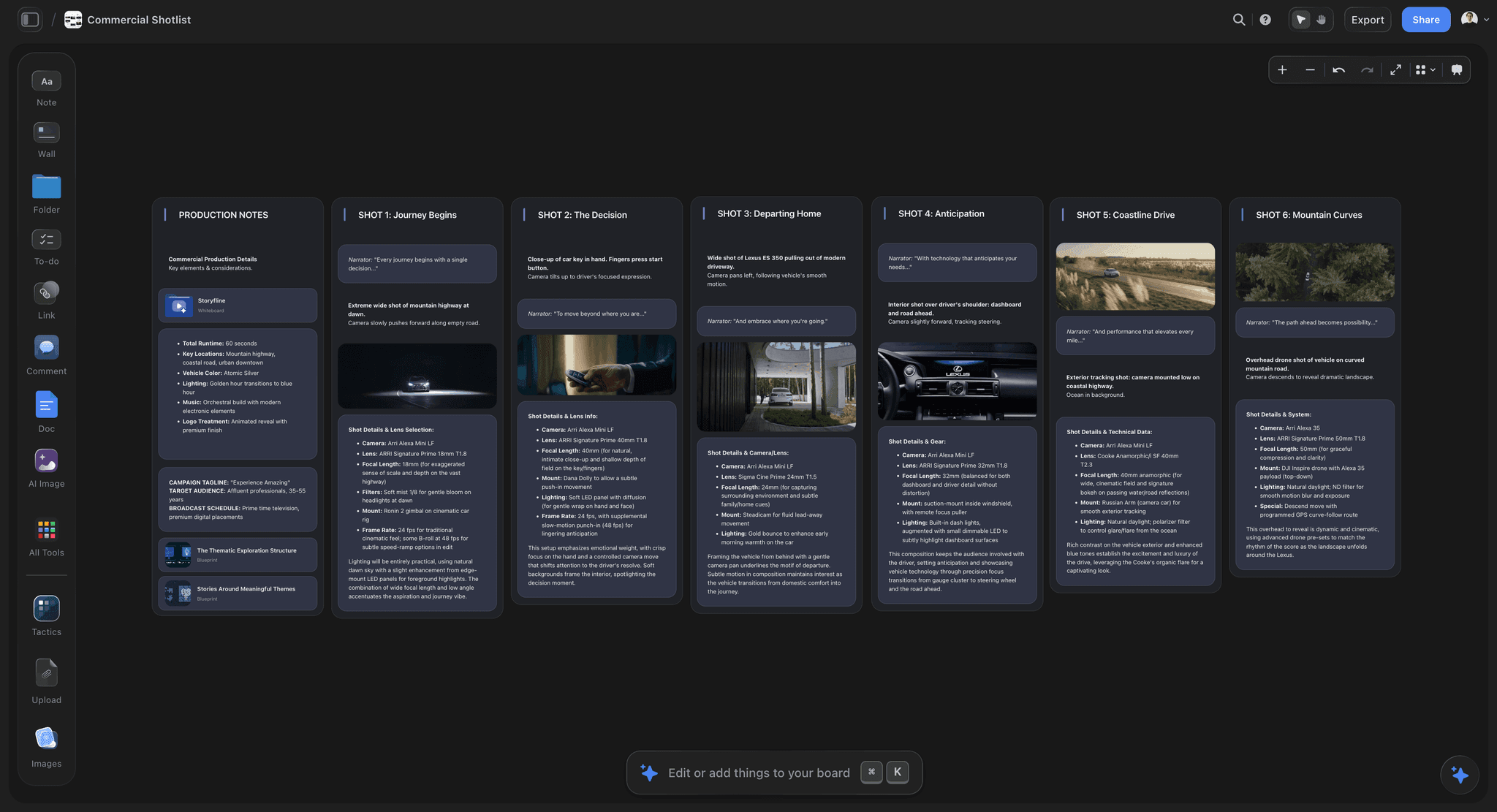
For producers with a client. A commercial or branded-content producer runs the same steps on a Film Plan or Pre-production Plan board for the job, then sends the client a view link: the client opens it with no account and signs in to comment. See the commercial production page for that version.
From inside ChatGPT or Claude. If you already plan in an AI assistant, Storyflow's MCP connector links it to your projects: ChatGPT, Claude, Gemini or Grok can read your Storyflow boards and build boards, documents and decks in them, so "add a day-three call sheet to the Riverrun board" lands on the board the crew already opens. Setup is on the Storyflow MCP page.
11) Which Tools to Use for Organizing an Indie Film Project
How this ranking works. The job on this page is organizing one indie project from script to delivery, for a producer or producer-director with a small crew. Each tool is scored out of 10 on five criteria, weighted by what that reader needs:
- Paperwork coverage, 30%: how much of the breakdown, shot list, schedule, budget and call sheet chain it produces.
- One place for the project, 25%: whether development and pre-production documents live together or in separate apps.
- Crew sharing, 15%: how easily the crew and a client open and comment on the plan.
- Cost for a small production, 15%: what a crew of up to ten pays to use it.
- Production depth, 15%: sending call sheets, confirmation tracking, day-out-of-days reports, scheduling that recalculates.
Tools were compared from each vendor's own pricing and help pages in September 2026, and prices were rechecked on October 9 and 10, 2026. Storyflow was scored in September 2026 on its current workflows. Each score is the weighted sum of the five sub-scores, rounded to one decimal. Storyflow's cost score of 9 reflects its $7.99 entry price and invited collaborators joining free. Full disclosure: Storyflow is our product. It ranks first because it scores highest on keeping the project in one place and ties StudioBinder on paperwork coverage; it scores lower than StudioBinder, Movie Magic, Gorilla, Celtx and Frame.io on production depth, and the reviews say where.
| Tool | Paperwork (30%) | One place (25%) | Sharing (15%) | Cost (15%) | Depth (15%) | Score /10 |
|---|---|---|---|---|---|---|
1. Storyflow | 9 | 10 | 8 | 9 | 5 | 8.5 |
2. StudioBinder | 9 | 7 | 9 | 6 | 10 | 8.2 |
3. Celtx | 8 | 6 | 7 | 8 | 7 | 7.2 |
4. Notion | 5 | 8 | 8 | 8 | 3 | 6.4 |
5. Google Drive and Sheets | 5 | 6 | 9 | 10 | 3 | 6.3 |
6. Gorilla Scheduling | 6 | 4 | 5 | 7 | 9 | 6.0 |
7. Movie Magic Scheduling | 5 | 3 | 5 | 6 | 10 | 5.4 |
8. Milanote | 3 | 6 | 8 | 8 | 2 | 5.1 |
9. Trello | 3 | 5 | 8 | 9 | 2 | 5.0 |
10. Frame.io | 1 | 3 | 10 | 8 | 7 | 4.8 |
1. Storyflow

Best for: the producer or producer-director who wants the development and pre-production paperwork on one board, drafted from the script.
Storyflow turns a script into the paperwork layer of this system on one canvas: attach the .fdx, Fountain or PDF script and its AI breaks it down, builds the shot list, lays the scenes out as a strip board grouped into shoot days with page counts, and produces a call sheet PDF for a shoot day. The one page, references, treatment and look book sit on the same board, and the AI reads the board you have open with every message, so it works from what is actually there. Canvas tools include documents with inline comment threads and Word and PDF export, tables with status, person, date and currency cells, kanban, tickets with assignees, video with frame grabs, and files. The crew opens a view link with no account and signs in to comment.
Limitations, honestly:
- It does not send call sheets to the crew or track confirmations. You send the PDF yourself.
- The strip board is a board layout, not a scheduling system: it does not recalculate or produce day-out-of-days reports.
- It is not a media tool. It does not offload cards, verify checksums or replace the folder on your drives.
- Documents do not update each other; ask the AI to redraft them when the plan changes.
- Tables cannot be sorted or filtered by a column, and it runs in the browser only, with no native apps.
Pricing: paid-only during early access, from $7.99 a month billed annually; the full breakdown, including the Free plan due before the end of 2026, is in the pricing table below. Team Workspace with roles and permissions is on Max only.
Choose StudioBinder instead if your crew is large enough that sending call sheets and tracking who confirmed is the daily job. See the indie film production workflow and pricing.
2. StudioBinder
Best for: productions with a crew big enough that call sheet sending and confirmations are a daily job.
StudioBinder covers screenplay, breakdown, shot lists, storyboards and mood boards, a stripboard scheduler and a call sheet builder. Scheduling reports including day-out-of-days are included from Starter; delivery and confirmation tracking for call sheets starts on Indie (see its Indie plan article for the users and project limits); auto-populated call sheets are on Professional. The free plan holds one project and sends sample call sheets to yourself only. Where it trails Storyflow is the development half: its mood boards hold references, but the one page and treatment are not drafted from them. Compare the two in Notion vs StudioBinder for filmmakers and the best call sheet software.
3. Celtx
Best for: the writer-director who wants the script and the production tools in one subscription.
Celtx combines screenwriting with production tools: call sheets, shot lists, sides and scheduling, plus day-out-of-days in its production reports, and it can email a call sheet PDF. Production tools are an add-on on Writer and Writer Pro and included on Team (3 to 15 members); the free plan holds one project and has no production tools. Confirmation tracking is more limited than StudioBinder's, and there is no AI drafting from the board.
4. Notion
Best for: the project hub and wiki: contacts, links, permits checklist and meeting notes in one workspace.
Notion is a flexible page-and-database workspace, and it makes a good project hub in the sense of section 5. It has no film paperwork: no breakdown, strip board or call sheet format, so every document is a template you build and maintain. It is free for individuals; Plus is $10 per member a month billed annually ($12 monthly). Why generic PM tools break on a film explains where that approach runs out.
5. Google Drive and Sheets
Best for: the zero-budget production and the master folder itself.
A shared Drive folder in the numbered structure, plus Sheets for the breakdown, shot list, schedule, budget and contact sheet, is a common free answer, and a respectable one. Plenty of good films have been made from four spreadsheets and a folder structure. Nothing links the sheets, so a script change means updating each one by hand.
6. Gorilla Scheduling
Best for: a producer or AD who wants real stripboard scheduling without Movie Magic's price.
Jungle Software's Gorilla schedules from a breakdown with reports. Its Premium edition adds the Breakdown Assistant AI, and Gorilla Online runs in the browser. It is a scheduling tool, not a place for the development documents. For the scheduling tools side by side, see the best film scheduling software.
7. Movie Magic Scheduling
Best for: productions whose line producer or funder expects a Movie Magic schedule file.
Movie Magic Scheduling is the long-standing scheduling format in film production, with full breakdown sheets, stripboards and reports. It is sold by Entertainment Partners. Depth is its strength; for a short with a crew of nine it is more than the job needs, and it holds nothing from development.
8. Milanote
Best for: a reference board and look book in development.
Milanote is a visual board for notes, images and links, with filmmaking templates including a shot list and storyboard, and a read-only link for viewers. It has no breakdown, schedule or call sheet workflow and no AI on its plan page. The free plan holds 100 notes, images or links; the pay-per-person plan removes the limit.
9. Trello
Best for: a task board for prep: permits secured, gear picked up, releases chased.
Trello's cards and lists track tasks well and hold none of the film paperwork. Premium adds calendar and timeline views.
10. Frame.io
Best for: sending cuts for review in post.
Frame.io is review, not project organization, and it ranks here because it is where post notes live. Share links open without sign-up for the reviewer. It is also bundled with some Adobe Creative Cloud plans.
Pricing and Billing Shape
| Tool | Starting price | Billing shape | What the price buys | Free option |
|---|---|---|---|---|
Storyflow | $7.99 mo annual (free plan late 2026) | Per seat; $9.99 monthly | The whole project canvas and the AI workflows; Team Workspace with roles on Max | Coming late 2026 (invited collaborators join free now) |
StudioBinder | Indie $49/mo (the plan with tracked call sheet sending) | Per account, +$25 per extra user | Indie: 2 users, 25 projects, call sheet sending with tracking | 1 project, sample call sheets to yourself |
Celtx | Not shown in dollars on its pricing page in October 2026 | Per plan; Team for up to 15 members; yearly saves 25% | Script plus production tools (add-on below Team) | 1 seat, 1 project, no production tools |
Notion | Plus $10/member/mo billed annually | Per member; $12 monthly; Business $20 ($24 monthly) | Workspace, databases, templates | Free for individuals |
Google Drive and Sheets | Free with a Google account | Workspace per user, priced by region | Storage, sheets, docs | Yes |
Gorilla Scheduling | $24.99/mo or $199/yr (Desktop) | Subscription per edition; Premium with Breakdown Assistant AI $39.99/mo | Scheduling and reports | No |
Movie Magic Scheduling | $42.99/mo or $299.88/yr | Subscription, monthly or yearly, on the EP Store | Scheduling and reports | No |
Milanote | $9.99/person/mo billed annually (pay-per-person plan) | Per person; $12.50 monthly | Unlimited notes, images, links | 100 notes, images or links |
Trello | $5/user/mo billed annually | Per user; $6 monthly | Boards, cards, lists | Up to 10 collaborators |
Frame.io | $15/member/mo (Pro); Team $25/member/mo | Per member; 13% off annual | Review, versions, storage | 2 members, 2GB |
Picks by Who You Are
| You are | Pick first | Add | Why |
|---|---|---|---|
Producer with a crew of 5 to 15 and a funder | Storyflow | StudioBinder Indie once call sheets need tracked confirmations | The script-to-call-sheet paperwork on one board, then a sender for the daily call |
Producer-director on a short | Storyflow | Google Drive for the folder, Hedge OffShoot for offloads | One board for development and prep, one folder for files |
Commercial or branded-content producer owing a client | Storyflow (Film Plan board) | Frame.io for cut review | The job's plan and paperwork on a board the client opens from a view link |
Writer-director who lives in the script | Celtx | Storyflow for references and the look book | Script and production modules in one subscription |
Documentary director | Storyflow | Transcripts in 04_MEDIA, a consent tracker in 00_ADMIN | Research, questions and a paper edit on one board |
Zero budget | Google Drive and Sheets | Celtx free for the script | Free, and it works |
For the wider tool landscape, see the best tools for indie filmmakers, the best pre-production tools and the best film production planning tools.
12) Frequently Asked: Which Film Production Tools Do Indie Filmmakers Trust?
Which tools are the most innovative for indie film organization?
AI breakdown is where the change is. Storyflow drafts documents from the scenes of an attached script and the board you have open, so nothing is retyped between them. Filmustage's free plan runs an AI breakdown on 20% of scenes, and Gorilla's Premium edition adds a Breakdown Assistant AI. Each proposes a first pass that the producer or AD still checks line by line.
Which production software brands do indie producers trust most?
Trust, for a small crew, means a tool everyone can open on the day and rely on to show the current plan. On that test: Storyflow, whose view link opens with no account and shows the latest board on open or reload; StudioBinder, whose sent call sheets record who confirmed; and Celtx, which keeps the script and its production documents in one account. Movie Magic Scheduling remains the file format some funders and line producers ask for.
Which tool is the fairest priced for a small production?
For a crew of up to ten, Storyflow at $7.99 a month billed annually, with invited collaborators joining free, has the lowest listed price of the tools on this page that produce film paperwork (Celtx shows no dollar figure). StudioBinder's Indie plan at $49 per month as listed includes two users and adds $25 per extra user. Google Drive and Sheets cost nothing and do less.
Which is the best value for a producer-director on a short?
Storyflow, because one subscription covers the one page, references, breakdown, shot list, strip board and call sheet, which otherwise span three or four tools. Add Celtx's free plan if you want a dedicated screenwriting editor, and a free folder template from Post Haste for the drive side.
Which is the most underrated tool for indie film organization?
The camera report, which is not software at all. After that, Storyflow for pre-production: it is new and in early access, and a board app is not where most people look for a breakdown or a call sheet. Among offload tools, checksum verification with an MHL record is the most skipped feature that matters.
Which is recommended for producers who owe a film to a client or funder?
Storyflow, with a Film Plan or Pre-production Plan board per job that the client opens from a view link with no account, signing in to comment. Add StudioBinder when the crew is large enough to need tracked call sheet confirmations, and Frame.io for cut review and sign-off.
13) The Solo Documentary Variant
Documentary breaks parts of this system and it is worth saying how, since a lot of indie work is documentary.
There is no script, so there is no breakdown. Replace both with a research folder and a running question list. The question list is the closest thing documentary has to a shot list: what do we still need to know, and who can answer it.
Shooting is not scheduled, it is opportunistic. Keep the day-numbered media structure anyway, and keep the camera reports, because on a film shot over two years the reports are the only index you will have.
Add a subject and consent tracker. Who appears, when they were filmed, whether a release is signed, and any restrictions on use. This is the documentary equivalent of the deal memo folder and it is what gets a film cleared or blocked.
| Subject | First filmed | Release | Restrictions | Filed as |
|---|---|---|---|---|
Maria, river warden | DAY03 | Signed 260714 | No home address on screen | RIVERRUN_RELEASE_MARIA_SIGNED_260714.pdf |
Tomas, boat owner | DAY05 | Verbal only | Chase written release before rough cut | (open) |
Add a transcript folder. 04_MEDIA/07_TRANSCRIPTS, one per interview, named to match the camera roll. Searchable transcripts are the single biggest time saving available in documentary post.
The paper edit replaces the shot list. A document of quotes and moments in order, built from transcripts, before anyone opens the edit. Documentary editors who skip this spend weeks scrubbing. On a Storyflow board, paste transcript excerpts as notes and reorder them into a paper edit; see the documentary pre-production page.
The trap specific to documentary: the project runs for years, so the person who set up the folder structure has forgotten it by the time it matters. Write a README in 00_ADMIN explaining the conventions. You are writing it for yourself in eighteen months.
14) The Six Failures That Cost Real Money
The card that was formatted before verification. The only unrecoverable failure on this list. Everything else is time.
No insurance certificate when a location asks. Locations and rental houses will not proceed without it, and getting it takes days you assumed you had.
Music used without a licence. Discovered at delivery, when the film is otherwise finished, and it means recutting to a new track or paying whatever is asked.
Missing releases. One person who appears clearly and never signed anything can block a festival run. Track releases as you shoot, not afterwards.
Media handed to an editor with no reports. The editor rediscovers the shoot at their hourly rate, and the circled takes are lost, so good material never surfaces.
No single notes document. Feedback across email, messages and calls means the same note arrives three times and a decision made in one round is quietly reversed in the next.
Five of the six are prevented by a folder that exists and gets filled in. That is the whole argument for this system.
15) How to Audit a Production Folder: a 12-Point Check
Use this before a shoot, before handing to an editor, or when a tutor or funder asks you to evaluate a production folder (some film courses assess one). Score one point per yes. Twelve is ready; below nine, fix the gaps before the shoot.
- Does the top level show numbered folders from 00_ADMIN to 07_ARCHIVE, including empty ones?
- Is there a README in 00_ADMIN that states the naming convention, the backup rule and who owns each document?
- Does every document follow PROJECT_DOCTYPE_vNN_YYMMDD, with no file called "final"?
- Is there exactly one current version of the script, and do locked-script revisions carry their colour?
- Is there a breakdown that lists cast, locations, props and wardrobe per scene?
- Does the shot list reference scene numbers that exist in the current script?
- Does the schedule or strip board account for every scene, with page counts per day?
- Is there a budget with a total, and are unknown costs marked rather than guessed?
- Does the contact sheet have a phone, email and emergency contact for every person?
- Are signed location agreements, releases and the insurance certificate in 00_ADMIN?
- Does every card in 04_MEDIA have a camera report and a checksum record, on three copies?
- Is there one running notes document with dated entries and the approved cut's version recorded?
How to read the score. Points 1 to 4 are the file layer and take an afternoon to fix. Points 5 to 8 are the paperwork layer and take the longest; they are also where one board built from the script saves the most time. Points 9 to 12 are the ones that stop a production or a festival run, so fix them first if the shoot is close.
For the checklist version of every document, see the pre-production checklist template, and for running prep without an AD, pre-production without a first AD.
16) A Two Hour Setup You Do Once
Minutes 0 to 20. Create the folder structure, empty, all of it. Do not skip folders you think you will not need.
Minutes 20 to 40. Write the README in 00_ADMIN: the naming convention, where media goes, who owns each document, and the backup rule. Four sentences each.
Minutes 40 to 70. Put your document templates in place: call sheet, camera report, shot list, budget, contact sheet. Empty, named correctly, ready to duplicate. If your paperwork lives in Storyflow, save a finished project as a template instead.
Minutes 70 to 90. Set up the backup destinations and test them by copying one real file to all three and verifying it.
Minutes 90 to 120. Duplicate the whole thing as _TEMPLATE_PROJECT and put it somewhere safe. Every future project starts by copying this folder, and the setup cost never recurs.
Two hours, once. Against days lost per project without it.
18) The Bottom Line
Create the numbered folder structure on day one, empty. Name every file with a version and a year-first date. Keep four master documents and never let a fact live in two places. Make the pre-production documents in order, from the script. Back up 3-2-1 from the card and verify by playing a clip rather than by counting files. Mirror the structure into the edit and hand the editor the reports as well as the media.
Then turn the whole thing into a template folder and never set it up again.
The fastest way to do this. Open a Storyflow board for the film, attach the script, and ask its AI for the breakdown, the shot list, the strip board and the day-one call sheet; all four land on the same board as the one page and the references, and the crew opens it from a view link. Then create the numbered folder in Google Drive or Dropbox, file the exported PDFs under the naming convention, and set up a checksum offload tool before the first card comes out of the camera.
Tools that help, in the order you will reach for them:
- Storyflow: the project home and the script-driven paperwork on one board (indie film production workflow).
- Google Drive or Dropbox: the numbered folder for paperwork files.
- Hedge OffShoot or ShotPut Pro: verified 3-2-1 offloads with checksum records.
- StudioBinder: call sheet sending and confirmations once the crew outgrows a PDF.
- Frame.io: timecoded review of cuts in post.
None of this is craft and none of it will show up on screen, which is exactly why it gets skipped. The films that get finished are not the ones with the best gear. They are the ones where somebody can find the release form, the circled take and the third backup in under a minute.
FAQ: Organizing an Indie Film Project
What app do indie filmmakers use to organize a film project?
Storyflow for the plan and the paperwork: one board per film holds the script, references and look book, and its AI builds the breakdown, shot list, strip board and call sheet PDF from the scenes. Alongside it, a Google Drive or Dropbox folder holds the files, StudioBinder covers call sheet sending with tracked confirmations on larger crews, and Frame.io carries cut review in post.
What is a production folder?
A production folder is the single folder tree that holds every file a film produces, from the one page to the festival master, numbered in the order the work happens (00_ADMIN to 07_ARCHIVE above). In the paper sense it is also the production binder: the printed subset the set needs if the signal drops. Film schools often assess one, so the audit in section 15 doubles as a marking checklist.
How do I handle contracts when something changes at the last minute?
Keep one template per agreement type (location, crew deal memo, cast release, music licence) in 00_ADMIN, so a last-minute change means editing a field and re-signing, not drafting. Issue the changed version with a new version number, get it signed through an e-signature service, and file the signed copy as PROJECT_LOCATION_NAME_SIGNED_YYMMDD.pdf. Note the change in the running notes document with the date and who agreed it.
How should I organize project folders for editing?
Mirror the drive inside the edit: bins for camera by shoot day, sound, selects, sequences, graphics and music, numbered the same way as the folders. Keep camera originals under their original names, link to them rather than copying, and save one empty project with that bin tree as your template for every film.
How should an indie film budget be organized?
Split it into above-the-line (writer, director, producers, principal cast) and below-the-line (crew, equipment, locations, catering, insurance, post), add a contingency line, and keep an actuals column beside every estimate. Update actuals daily during the shoot. File it as PROJECT_BUDGET_vNN_YYMMDD so each approved version is recoverable when a funder asks what changed.
Should I organize footage by shoot day or by scene?
On the drive, by shoot day, because that is how cards arrive and how camera reports are numbered, and it never changes. Inside the edit, add scene bins or a scene metadata column on top. Reorganizing the drive by scene means moving camera originals after offload, which breaks the match between the copies and the checksum records.
How long should I keep camera cards and backup drives after wrap?
Keep all three copies until the picture is locked and the conform is done, and keep at least two after delivery for as long as any distribution deal can ask for a new master. Cards themselves go back into rotation once three verified copies exist. The archive folder gets one final copy of everything the film needs to be remade from.
Is Google Drive or Dropbox better for a film project?
Either works for the paperwork folders, and the right one is whichever your crew already has, since the point is that everyone opens the same files. Neither should sync camera originals during a shoot. Keep 04_MEDIA on local drives and treat the cloud copy of media as a separate overnight backup job.
How do I organize a shooting schedule for a micro-budget film?
Group scenes by location first, then by cast availability, then by day or night, and count pages per day in eighths so no day is overloaded. Shoot the hardest location or the actor with the fewest available days early. Keep one live schedule file and reissue it with a new version number whenever a day changes.
What goes in a production binder?
The printed or offline copy of what the set cannot be without if the phone signal drops: the current call sheet, the contact sheet, the shooting schedule, current script pages, location agreements and permits, the insurance certificate, signed releases, and emergency and hospital details for each location. It is a subset of the folder, refreshed every morning. The full list is in the production binder's 14 documents.
Who owns the paperwork on a crew with no producer or 1st AD?
The director-producer does, and the trick is to hand single documents to single people: the camera assistant owns camera reports, the sound recordist owns sound reports, and one person owns the contact sheet. Write the owner of each document in the README so nothing belongs to everyone, which means nobody.
How should a student or master's film production folder be organized?
The same numbered structure, plus what the course assesses: a risk assessment and signed releases in 00_ADMIN, the script and development drafts, the full pre-production set, call sheets and reports from every day, and a dated production log or reflective journal in 05_POST/notes. Assessors look for evidence that each document was made before the shoot, so keep dated versions.
How do I keep continuity notes organized on a small shoot?
One sheet per scene, filed in 03_PRODUCTION/continuity with the shoot day in the name, holding wardrobe, props, hair and makeup, screen direction and the circled takes. Photograph each look on a phone at the start of the scene and put the photo number in the note. Without a script supervisor, give the job to one named person, never to whoever is free.
What should go in the archive folder at delivery?
Everything needed to remake any deliverable without the people who made it: the locked edit project and its media, the final mix stems, the colour project, the masters, every licence, release and contract, the final paperwork versions and the README. Freeze it as one copy on two drives, and write the archive date in the README.
How do I organize location scouting photos and notes?
One subfolder per location in 02_PREPRODUCTION/locations, numbered and named (LOC01_MILL), holding photos, a notes file with power, parking, toilets, sound problems, sun direction by time of day and the owner's contact, and the signed agreement once it exists. Name photos by location and angle so the DP and production designer can find the same wall.
Should a film production use Trello or Asana for tasks?
For the task list, yes: permits chased, gear booked, releases signed. Neither holds a breakdown, strip board or call sheet, so the film paperwork still lives in the folder or a production tool. Use one for tasks only, link each task to the file it concerns, and never let a date live in the task app and the schedule at the same time.
How do I hand a project over to a new producer mid-production?
Point them at the README in 00_ADMIN first, then hand over a one-page list of open items: unsigned releases, unpaid invoices, pending permits, the current version of each master document and who owns it. Walk the folder together once. A handover done from the folder takes an hour; one done from memory loses whatever the old producer forgot to mention.
Can Storyflow read my Final Draft or Fountain script?
Yes. Attach a .fdx, Fountain or PDF screenplay from the "+" menu and the AI parses its scene index, so the breakdown, shot list and strip board are built from the scenes as written. It does not export back to Final Draft or Movie Magic, so the script itself stays in your screenwriting app.
What is the difference between a production report and a call sheet?
The call sheet is written the night before and says what will happen tomorrow. The daily production report is written after wrap and says what did happen: scenes and pages shot, setups, start and wrap times, delays and their causes. Together they are the record a funder or insurer reads if a day goes wrong.
Table of Contents
- 1) Quick Answer: How Indie Filmmakers Organize a Project
- 2) The Folder Structure
- 3) File Naming That Survives Twelve Months
- 4) The Paperwork Map, Phase by Phase
- 5) The Project Hub: Four Master Documents and One Source of Truth
- 6) The 3-2-1 Rule and What Indies Get Wrong About It
- 7) Card, Wrap and the DIT Folder Structure
- 8) The Handoff Into Post
- 9) A Filled Worked Example: an 11-Page Short, Three Shoot Days
- 10) Building the Paperwork on One Canvas in Storyflow
- 11) Which Tools to Use for Organizing an Indie Film Project
- 12) Frequently Asked: Which Film Production Tools Do Indie Filmmakers Trust?
- 13) The Solo Documentary Variant
- 14) The Six Failures That Cost Real Money
- 15) How to Audit a Production Folder: a 12-Point Check
- 16) A Two Hour Setup You Do Once
- 18) The Bottom Line
- 19) Author
- FAQ: Organizing an Indie Film Project
- Related Reading
Templates to check out for this topic


Filmmaking templates you can use in Storyflow
Skip the blank canvas. Open one of these filmmaking boards in Storyflow and the AI builds on the structure that is already there, from research through the shot list.


See Storyflow in Action
A visual AI workspace where every feature lives inside one canvas. No tab-switching, no context lost.
Build your entire board from a single message
Type what you need in the AI chat at the bottom of your canvas. The AI adds cards, headings, and structure directly onto your board.
Use expert frameworks as AI context
Type @ in the AI chat and choose any Tactic. The AI tailors every response to that framework instead of giving generic advice.
Turn your board into a mind map in seconds
Ask the AI to restructure your canvas as a mindmap. It connects your ideas into a visual hierarchy so you can see how everything relates.
Why Storyflow Exists
Storyflow actually began as a personal tool while working on creative and research projects.
We kept running into the same problem: ideas were scattered everywhere: notes, documents, and whiteboards.
Nothing helped us see how everything connected.
So we started building a workspace designed around how ideas actually grow.
→ Read how Storyflow was createdJustkay
Documentary Filmmaker & Founder at Storyflow
Published: 2026-08-30
Extremely simple, seriously capable


See how easy it is to get started
Watch a real project come together, from a blank board to a finished plan, clicked through step by step.
Start creating with AI and become more productive
Transform your creative workflow with AI-powered tools. Generate ideas, create content, and boost your productivity in minutes instead of hours.