
Category
Filmmaking
Author

Justkay
Documentary Filmmaker & Founder at Storyflow
Topics
2026-05-12
•
Updated August 11, 2026
•
28 min read
•
Filmmaking- best project management tool for filmmakers
- best pre-production planning tool for indie filmmakers
- best tools for indie filmmakers 2026
- indie filmmaker tools
- indie film software
- indie film workflow
What is the best project management tool for filmmakers?
The best project management tool for filmmakers in 2026 is StudioBinder for production scheduling and call sheets, with Storyflow as the best tool for visual pre-production planning and Notion or Trello covering generic task tracking. For pre-production planning specifically, Storyflow is the top pick for indie filmmakers because the beat sheet, bible, mood board, and shot list live on one canvas the AI reads before answering.

Full disclosure: Storyflow is our own product, and we rank it #1 for one stage: pre-production, where a single canvas holds the beat sheet, treatment, bible, mood board, and shot list with AI that reads all of it. For editing and color grading DaVinci Resolve is far stronger, and for the actual screenplay WriterDuet and Final Draft are the real tools. Storyflow is not a script editor or a video editor, so pair it across the pipeline. We link to every tool so you can judge the fit.
Quick Comparison: Best Indie Filmmaker Tools
These four cover the stages where indie films actually fail: the pre-production canvas, free industry-grade editing, the collaborative script, and production scheduling.
| Tool | Best For | AI Features | Price |
|---|---|---|---|
| Storyflow | Pre-production canvas + AI | Reads full board + attached docs and boards | $7.99 mo annual (free plan late 2026) |
| DaVinci Resolve | Editing and color grading | No pre-pro AI; free pro edit + color | Free / $295 one-time |
| WriterDuet | Cloud script with collaboration | Real-time collab; light AI | Free / $11.99 mo |
| StudioBinder | Production scheduling and call sheets | Script breakdown; light AI | Free / $29 mo |
One board for the whole film, built for a team of one
Indie filmmakers wear every hat, so Storyflow keeps script, references, shots, and schedule on a single canvas where the AI helps you move from idea to shoot day.

1) Quick Answer: The Best Tools for Indie Filmmakers in 2026
The best project management tool for filmmakers in 2026 is StudioBinder for production scheduling and call sheets, with Storyflow as the best tool for visual pre-production planning and Notion or Trello covering generic task tracking. For pre-production planning specifically, Storyflow is the top pick for indie filmmakers because the beat sheet, bible, mood board, and shot list live on one canvas the AI reads before answering. Around those two, the strongest 2026 indie stack adds DaVinci Resolve (best free industry-grade editing and color grading), WriterDuet (best cloud script with collaboration), and Frame.io (best post-production review). Indie film is not a smaller studio film. It is a different shape entirely, and the tools that prevent indie projects from collapsing are different from the tools studios use.
Most indie film advice treats the indie director as a smaller version of a studio director. The reality is that indie projects fail at different stages than studio projects, for different reasons, with different tools. Studio failures are rare (the system catches them). Indie failures are the default; the tool stack either prevents them or accelerates them.
This piece ranks 12 tools by which of the three indie failure stages each one prevents. The Three Stages framework (section 3) is the original frame. The rankings below follow it.
I have run multiple documentary projects across the full indie pipeline and consulted on narrative shorts that worked and shorts that did not. The tools below were tested across real production, not synthetic demos.
All 12 Indie Filmmaker Tools, Ranked
- Storyflow: best pre-production canvas, AI reads the whole project before answering
- DaVinci Resolve: best free industry-grade editing and color grading
- WriterDuet: best cloud script with real-time collaboration
- StudioBinder: best production scheduling and call sheets
- Frame.io: best post-production review and approval
- Final Draft: best script tool for the studio pipeline
- Otter.ai: best interview transcription for documentary work
- Descript: best transcript-driven video editing
- Boords: best AI-assisted storyboarding
- Milanote: best mood boards and visual research
- Storyboarder: best free storyboarding
- FilmFreeway: best festival submission platform
For the AI-specific filmmaker tool ranking, see The 12 Best AI Tools for Filmmakers in 2026. For Notion-alternative filmmaker tools specifically, see Best Notion Alternatives for Filmmakers and Video Creators (2026). And for the organizing system these tools plug into (folders, naming, trackers, one board), see How Indie Filmmakers Organize Their Projects.
2) Comparison Table: 12 Indie Filmmaker Tools at a Glance
Rating criteria: which indie failure stage the tool prevents, free-tier usability, indie pricing reality, and how well the tool fits a 1-to-5-person indie crew.
Frequently Asked: Which Indie Filmmaking Tools Are Most Trusted, Best Rated, and Fairest on Price
Which indie filmmaking tools are the most trusted by producers and coordinators?
StudioBinder for the production paperwork, Final Draft for the script, and DaVinci Resolve for post. Trust in this category is earned by being the thing a crew expects to receive: an AD who opens a StudioBinder call sheet knows the format, a script supervisor who opens a Final Draft file knows the pagination, and a colorist who opens a Resolve project knows the node tree. Storyflow is not the trusted default for any of those three artifacts, and on an indie shoot it should not try to be. It is trusted for the layer above them, which is the plan the paperwork is generated from.
Which indie filmmaking tools are the most innovative?
Storyflow, Descript, and Filmustage, for three different reasons. Descript made a video edit behave like a text document, which changed how documentary assemblies get cut. Filmustage put script breakdown through a model that reads the screenplay instead of waiting for a human to tag every element. Storyflow's contribution is context: the AI reads the entire board (treatment, moodboard, shot list, schedule notes) before it answers, so it is planning against the actual project rather than a prompt describing it. Innovation elsewhere in this list is incremental. DaVinci Resolve, StudioBinder, and Final Draft are excellent because they are mature, not because they are new.
Which indie filmmaking tools are known for fair and transparent pricing?
DaVinci Resolve is the honest answer and nothing else comes close: the free version is the real product, not a trial, and the $295 Studio upgrade is a one-time purchase. Storyboarder and FilmFreeway are free to use. Among paid tools, Storyflow prices per account for individuals and per seat for team workspaces, from $7.99/month billed annually, and invited collaborators join free, so a five-person crew can work on one paid plan. Final Draft at $249.99 one-time and StudioBinder above its $29/mo Indie tier (Production is $49/mo, Studio $99/mo) are the two most likely to surprise a first-time indie budget.
Which indie filmmaking tools are the highest rated for small crews?
For a crew of one to five, the ratings in the table above favour tools that do not assume a department: Storyflow (9.4), DaVinci Resolve (9.3), WriterDuet (8.8), and StudioBinder (8.7). StudioBinder scores lower here than its capability alone would suggest, because its call-sheet and stripboard depth is built for a crew that has an AD to run it, and a two-person shoot rarely does. On a larger indie crew, reverse that: StudioBinder becomes the tool you cannot work without.
Where is Storyflow not the right answer?
Scheduling and stripboards (StudioBinder, Movie Magic), industry-standard script formatting (Final Draft, WriterDuet), editing and color (DaVinci Resolve), timecoded review with a client (Frame.io), and festival submissions (FilmFreeway). Storyflow holds the plan those tools execute. If your bottleneck is the paperwork rather than the plan, start with StudioBinder instead.
The Indie Production Binder: What Actually Goes In It
Ask a working indie producer how they organise a project and they will not name an app. They will describe a binder. The production binder is the set of documents a film needs to exist, and it is the same set whether it lives in a ring binder, a Drive folder, or a canvas. Tool choice only decides how much of it you retype.
The binder, in the order each document is created:
- Script or treatment. The source. Everything downstream is derived from it.
- Script breakdown. Every scene tagged for cast, props, wardrobe, locations, vehicles, SFX, and stunts. This is the document that turns a story into a logistics problem, and it is the one indie productions most often skip.
- Stripboard. The breakdown reordered into shooting order rather than story order, grouped by location and cast availability.
- Shooting schedule. The stripboard with dates and day boundaries attached.
- Budget. Top sheet plus detail, derived from the breakdown and the schedule.
- Shot list and storyboards. The director's plan for covering each scene.
- Moodboard and look book. The visual reference the DP, production designer, and colorist all work from.
- Call sheets. One per shoot day, generated from the schedule, distributed the night before.
- Continuity and script supervisor notes. Created during production, consumed in post.
- Post notes and deliverables. Edit notes, sound and color turnovers, festival and distribution specs.
Documents 2 through 5 are the paperwork chain, and they are strictly derived: change the breakdown and the stripboard, schedule, and budget are all wrong until they are regenerated. That is the case for a dedicated production-management tool like StudioBinder, Movie Magic, or Filmustage, which keep the chain linked so one change propagates.
Documents 1, 6, 7, and 10 are the creative chain, and they are the ones that get lost, because they are usually held in whatever app the person who made them prefers. The treatment is in Google Docs, the moodboard is in Milanote or a Pinterest board, the shot list is in a spreadsheet, and the post notes are in a Slack thread. Nothing links them, so the DP shoots without seeing the look book and the editor cuts without seeing the director's intent.
That split is the practical argument for the stack this article recommends: a production-management tool for the paperwork chain, and one canvas holding the creative chain so it survives the handoff into post. It is also why "which app" is the wrong first question. Build the binder first, then pick the tools that hold each half of it without retyping.
3) The Three Stages of Indie Film Failure
Most indie projects do not fail in production. They fail before they shoot or after they wrap. The Three Stages framework names where the failures actually happen.
Stage 1: Pre-production failure. The most common indie failure. The script is unclear, the beat sheet is broken, the schedule is unrealistic, the cast is wrong, the budget does not match the script. In my own experience running indie and documentary productions, this is where the clear majority of dead projects die. The film either never shoots, or it shoots a project that was structurally doomed before the camera rolled. Treat that as a practitioner's estimate rather than a published statistic, because nobody is publishing reliable numbers on films that quietly stopped happening.
Stage 2: Production failure. Less common. The shoot itself collapses: weather, cast dropout, equipment failure, location pulled, key crew quits. Real but less frequent because production is where indie crews are usually most disciplined.
Stage 3: Post-production and distribution failure. The second most common. The film is shot but never finishes editing, runs out of post budget, or finishes but cannot find an audience. This is the second most common place to die, and it has a recognizable shape: the "we have footage but no film" stage, where the material exists and the finishing money, time, or will does not.
The tool stack matters most where the failures concentrate. Stage 1 (pre-production) tools prevent the most failures per dollar. Stage 3 (post-production and distribution) tools prevent the second most. Stage 2 (production) tools matter but are usually not the bottleneck.
Indie film is not a smaller studio film. It is a different shape entirely. Studios fail rarely because they have systems. Indie crews fail often because they do not have systems and have to build them per project. The right tools are the systems-as-a-service the indie crew rents instead of building.
The rankings in this piece prioritize Stage 1 prevention because that is where the indie filmmaker gets the most return for the fewest dollars.
4) How We Evaluated These Tools
Five criteria, weighted in this order:
- Failure-stage prevention. Which of the Three Stages does this tool prevent? Stage 1 prevention is rated highest because pre-production failure is the most common indie failure.
- Free-tier reality. Indie filmmakers operate on tight budgets. Tools whose free tier is genuinely usable for sustained work were rated higher.
- Pricing fit for 1-to-5-person indie crews. Per-user pricing penalizes small crews. Flat-plan pricing scales better at indie scale.
- Cross-platform reliability. Indie crews work on whatever computers they have. Mac-only or Windows-only tools were rated lower for full-crew use.
- Workflow handoff. Does the tool export to the next stage's tool cleanly? Pre-production tools that hand off to script and shot list tools win.
Tested across real indie work: documentary projects, narrative shorts, brand films. Tools that worked at studio scale but failed at indie scale (pricing, complexity, overhead) were rated lower than studio peers might suggest.
5) Quick Picks by Indie Project Type
Best for First-Time Indie Director: Storyflow for pre-production (Plus, $7.99/mo billed annually; its Free plan lands before the end of 2026) + WriterDuet Free for script + DaVinci Resolve Free for edit. Total cost: $7.99/mo today, $0 once the free tier ships. This stack ships your first indie short for less than a cinema ticket a month.
Best for Documentary Filmmaker: Storyflow (canvas + bible + research) + Otter.ai (interview transcription) + DaVinci Resolve (edit) + Frame.io (review). Documentary's center of gravity is pre-production and post, both of which this stack handles well.
Best for Narrative Short (5-30 min): Storyflow (canvas + bible) + Final Draft or WriterDuet (script) + StudioBinder (production) + DaVinci Resolve (edit). Narrative work has a clean stage pipeline; for the step-by-step version, see How to Plan a Short Film from Idea to Shoot.
Best for Festival-Focused Indie: Add FilmFreeway to any stack. The festival submission tool is the distribution bottleneck. Add Framekit for the film's page, the press kit, and a password-protected screener link with an expiry date, which is what programmers and press actually ask you for.
Best for Branded / Commercial Indie: Milanote (mood board) + Storyflow (treatment) + WriterDuet (script) + DaVinci Resolve (edit) + Frame.io (client review). Brand work is mood-driven and client-facing.
Best for Music Video Indie: Boords (storyboard) + Storyflow (treatment) + DaVinci Resolve (edit). Music video work is storyboard-heavy in pre-production.
Prevent the failure that kills most indie films
Most indie projects die in pre-production, not on set. Put the beat sheet, bible, mood board, and shot list on one canvas the AI reads end to end.
6) Detailed Reviews: 12 Tools for Indie Filmmakers
1. Storyflow
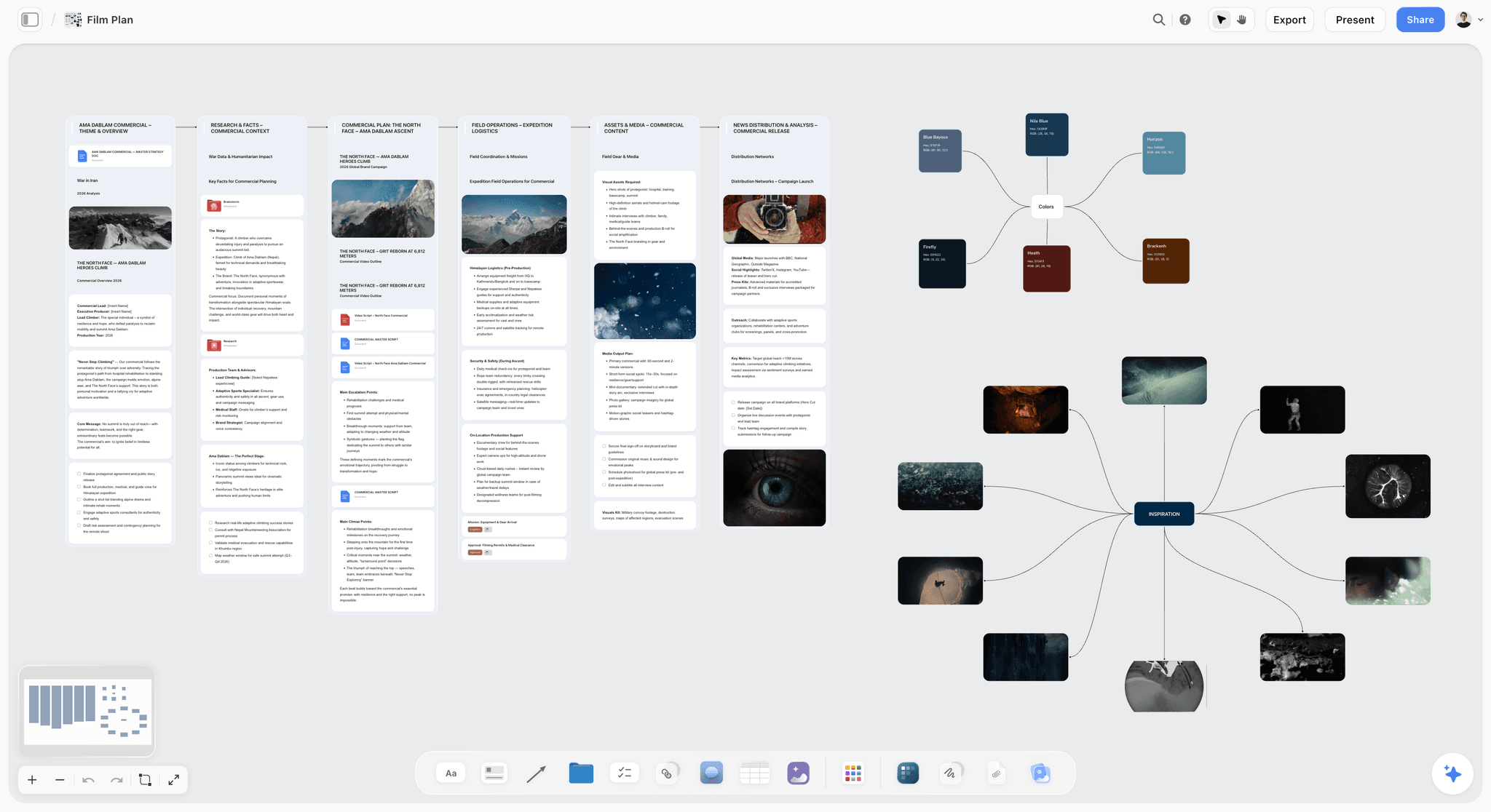
Storyflow prevents Stage 1 (pre-production) failure by keeping the beat sheet, treatment, character bible, mood board, and shot list drafts on one canvas with AI that reads all of it. Indie directors lose time and projects because pre-production lives across documents that drift apart. The canvas keeps them together. The fastest start is a structured board: the Pre-Production Board template opens with the stages laid out, and the Shotlist template gives shot planning a structure the AI can read.
Best for: Indie directors doing pre-production-heavy work (documentary, narrative shorts, brand films).
Verdict: The best pre-production planning tool for indie filmmakers in 2026, because the whole plan lives on one canvas the AI reads. Pair with editing and production scheduling tools for the full pipeline.
Key features
- Canvas where beat sheet, treatment, character profiles, mood board, and shot lists live as connected cards.
- AI reads the full canvas plus up to 5 documents and 3 boards you attach.
- Beat sheet, character profile, and shot list templates.
- Anyone a paid member invites to a board joins free, so an indie crew can edit together.
- Multi-format: text, images, video embeds, mood references.
Pricing
Paid-only during early access. Free: launching before the end of 2026, with unlimited boards, unlimited cards, unlimited collaboration, basic AI, and 20 file uploads. Plus: $7.99/mo annual. Unlimited uploads. Pro: $14/mo annual. AI image generation, 30x AI. Max: $39/mo annual. 60x more AI, team workspace.
Pros
- Strongest Stage 1 prevention in the indie tool landscape.
- Plus at $7.99/mo annual is genuinely usable for solo indie work.
- Invited collaborators join free, which is rare at this price point.
Cons
- Not a script editor; pair with WriterDuet or Final Draft for the actual screenplay.
- Not a production scheduling tool; pair with StudioBinder for call sheets and crew sync.
- Cloud-only; no local-first option for productions with security requirements.
2. DaVinci Resolve
DaVinci Resolve is the most generous free editing tool in the industry. The free version includes professional-grade editing, color grading, audio post, and visual effects. Indie filmmakers can deliver finished features without paying for editing software. Stage 3 (post) prevention.
Best for: Indie editors at every level. The free version is genuinely production-grade.
Verdict: The best free editing and color grading tool for filmmakers in 2026, because the free version is genuinely industry-grade.
Key features
- Editing, color grading, audio post, and Fusion VFX in one application.
- Free version is fully production-capable.
- Studio version adds advanced features and 10-bit support.
- Strong learning resources from Blackmagic.
Pricing
Free version: full feature set for indie work. Studio: $295 one-time purchase. Lifetime updates.
Pros
- Free version is industry-grade.
- One-time purchase for Studio, no subscription.
- Strong color grading is unmatched at this price.
Cons
- Learning curve is real; Premiere users sometimes struggle with the interface.
- Hardware-hungry; older machines may struggle.
- Plugin ecosystem smaller than Premiere.
3. WriterDuet
WriterDuet's free tier includes 3 scripts and real-time collaboration. The strongest cloud script tool for indie writers and indie writer-director pairs. Stage 1 (script) prevention.
Best for: Indie writer-director teams, cloud-first script workflows.
Verdict: The best cloud screenwriting tool for indie filmmakers, because real-time collaboration works from the free tier up.
Key features
- Real-time collaborative screenwriting.
- Industry-standard FDX formatting.
- Generous free tier (3 scripts).
- Pro Lifetime option for working writers.
Pricing
Free: 3 scripts. Pro: $11.99/mo or $99/year. Pro Lifetime: $299 one-time.
Pros
- Real-time collab is best-in-class.
- Generous free tier.
- Pro Lifetime is a rare and good deal.
Cons
- Industry adoption lags Final Draft.
- Pre-production features minimal; pair with Storyflow.
- Light AI.
4. StudioBinder
StudioBinder is the indie standard for production scheduling and call sheets. The Indie tier ($29/mo) is calibrated for small productions. Stage 2 (production) prevention.
Best for: Indie producers running shoots with crews of 5 or more.
Verdict: The best project management tool for filmmakers once a real crew is involved, because scheduling, call sheets, and crew sync live in one place.
Key features
- Call sheet generation with industry formatting.
- Shot list with images.
- Production calendar with crew sync.
- Contact management.
- Script breakdown.
Pricing
Free: limited. Indie: $29/mo. Production: $49/mo. Studio: $99/mo.
Pros
- Industry-standard call sheets.
- Strong production calendar.
- Indie tier is affordable for small productions.
Cons
- Pricing climbs fast above Indie tier.
- Pre-production weaker than Storyflow.
- AI features light.
5. Frame.io
Frame.io is the industry standard for post-production review and approval. Time-coded comments on video, version comparison, and Premiere/FCP integration. Stage 3 (post review) prevention.
Best for: Indie projects with collaborators, clients, or producers reviewing rough cuts.
Verdict: The best post-production review tool for filmmakers, because time-coded comments and versioning are the industry standard. Not a primary indie tool, but essential when post involves multiple stakeholders.
Key features
- Time-coded video comments.
- Version comparison.
- Adobe Premiere and Final Cut integration.
- Generous free tier.
Pricing
Free with caps. Pro: $15/mo. Team: $25/user/mo.
Pros
- Industry standard for video review.
- Strong Premiere/FCP integration.
- Generous free tier.
Cons
- Post-only; not a pre-production or production tool.
- Adobe acquisition slowed independent development.
6. Final Draft
Final Draft is the studio-standard screenplay tool. For indie projects intending to pitch into the studio system or compete at A-list festivals, Final Draft's FDX format is what is expected. Stage 1 (script) prevention with studio pipeline.
Best for: Indie writers whose script will pitch to studios, networks, or major festivals.
Verdict: The studio-standard script tool. Justified when the project is going to that pipeline; otherwise WriterDuet or Highland 2 are cheaper.
Key features
- Industry-standard FDX format.
- Auto-format for screenplay conventions.
- Beat Board view for treatment planning.
- Production-grade revision marks.
Pricing
$249.99 one-time. Upgrade discounts for existing users.
Pros
- Studio-standard format.
- One-time purchase.
- Strong revision and production-draft features.
Cons
- Expensive for indie writers.
- Pre-production features lag canvas tools.
- No real AI.
7. Otter.ai
Otter.ai handles interview transcription for documentary work and dialogue transcription for narrative production. Stage 1 (research) prevention for documentary; Stage 3 prevention when transcripts feed the edit.
Best for: Documentary filmmakers, interview-heavy projects, indie crews recording dialogue.
Verdict: The standard indie transcription tool.
Key features
- Real-time live transcription.
- Batch transcription of uploaded audio.
- Speaker identification.
- Search across transcripts.
Pricing
Free: 300 min/mo. Pro: $8.33/mo. Business: $20/mo.
Pros
- Strong free tier (300 min/mo) covers small indie projects.
- Real-time transcription saves hours per interview.
- Search across all transcripts.
Cons
- Accuracy varies with audio quality.
- No video transcription depth (use Descript instead).
8. Descript
Descript is the transcript-driven video editor. Edit footage by editing the transcript. Strong for documentary work and any indie project where talking-head interviews dominate.
Best for: Documentary post-production, dialogue-heavy indie projects.
Verdict: Strong dual-purpose tool for transcription and light editing.
Key features
- AI transcription of audio and video.
- Edit video by editing the transcript.
- Overdub (AI voice clone for narration fixes).
- Screen recording.
Pricing
Free with caps. Hobbyist: $12/mo. Creator: $24/mo.
Pros
- Transcript-driven editing transformative for documentary cuts.
- AI features genuinely useful.
- Cross-platform.
Cons
- Heavier app than pure transcription tools.
- Overdub raises ethical questions for journalism-adjacent work.
9. Boords
Boords is the AI-assisted storyboard tool. For indie directors who shoot heavy visual material (music videos, narrative with strong visual style), the storyboard work matters. Stage 1 (pre-production) prevention.
Best for: Music video directors, narrative indie directors with visual emphasis, animation pre-production.
Verdict: The strongest paid storyboard tool for indie work.
Key features
- Storyboard panels with notes.
- AI image generation for storyboards.
- Animatic export.
- Team review.
Pricing
Free with caps. Starter: $15/mo. Pro: $25/mo.
Pros
- Best dedicated storyboard tool.
- AI image generation cuts storyboard creation time.
- Strong client review.
Cons
- Storyboard-only; pair with Storyflow or Milanote for surrounding work.
- Free tier limited.
10. Milanote
Milanote is the visual mood board tool. For indie directors collecting visual references, especially in commercial and music video work. Stage 1 (creative direction) prevention. If the 100-card free cap bites, see the best Milanote alternatives for filmmakers; if the references need to become a pitch-facing deck, see the best lookbook tools for filmmakers.
Best for: Visual research, mood boards, commercial pre-production.
Verdict: Strong for moodboard work; pair with Storyflow for the rest of pre-production.
Key features
- Visual boards with image, note, video, and link cards.
- Storyboard templates.
- Web, desktop, iOS.
Pricing
Free: 100 cards. Pro: $9.99/mo.
Pros
- Best-in-class for visual research.
- Clean simple UI.
- Strong client-sharing.
Cons
- 100-card free cap hits fast.
- Not a primary writing environment.
- No AI.
11. Storyboarder
Storyboarder is the free open-source storyboard tool from Wonder Unit. Desktop app with basic drawing tools. For indie filmmakers who need free storyboarding, this is the answer.
Best for: Indie filmmakers, students, free storyboarding.
Verdict: The strongest free storyboarding option in 2026.
Key features
- Free desktop app.
- Basic drawing tools and pose library.
- Export to Premiere and Final Cut.
Pricing
Free.
Pros
- Genuinely free.
- Open-source community.
- Cross-platform desktop.
Cons
- Desktop only.
- Drawing tools light compared to Boords.
- No collaboration.
12. FilmFreeway
FilmFreeway is the festival submission platform. The distribution-stage tool for indie filmmakers chasing festival runs. Stage 3 (distribution) prevention.
Best for: Indie filmmakers submitting to festivals.
Verdict: The standard festival submission tool. Essential for indie projects with festival ambitions.
Key features
- Submit to thousands of festivals worldwide.
- Track submission status.
- Filmmaker portfolio pages.
- Free to use; festival entry fees vary.
Pricing
Free for filmmakers. Festivals pay platform fees.
Pros
- Free for filmmakers.
- Comprehensive festival database.
- Track all submissions in one place.
Cons
- Festival entry fees themselves can add up.
- Not a tool you use during production; only at distribution.
7) Recommended Indie Filmmaker Stacks
Three stacks that work for the most common indie project types.
Stack 1: Documentary Indie. Storyflow (pre-production canvas + bible + research; Plus at $7.99/mo billed annually, Free plan arriving before the end of 2026) + Otter.ai Free (interview transcription) + DaVinci Resolve Free (edit) + Frame.io Free (review) + FilmFreeway Free (festival submissions). Total cost: $7.99/mo for a finished documentary.
Stack 2: Narrative Short. Storyflow (bible + beat sheet, starting from the Beat Sheet Filmmaking template; Plus at $7.99/mo billed annually) + WriterDuet Free (script) + StudioBinder Indie $29/mo (production scheduling) + DaVinci Resolve Free (edit) + FilmFreeway Free (festivals). Total cost: about $37/mo during production, $7.99/mo otherwise.
Stack 3: Music Video / Commercial. Milanote Free or Pro (mood board) + Storyflow Plus, $7.99/mo billed annually or $9.99 monthly (treatment, with the Storyboard Template for frame-by-frame planning) + Boords Free or Starter (storyboard) + DaVinci Resolve Free (edit) + Frame.io Pro $15/mo (client review). Total cost: about $23 to $50/mo depending on tier.
The pattern across all three: the highest-return spending is on Stage 1 prevention (pre-production tools). DaVinci Resolve being free for editing is the second-highest-return move.
The Handoffs That Break an Indie Production
Tool lists implicitly assume the problem is which tool. On an indie production the problem is almost always the seam between two tools, because that is where information is retyped, and retyped information is where it goes wrong. There are five handoffs on every film and each one has a characteristic failure.
Script to breakdown. The script says a character checks her phone. The breakdown has to notice that this means a picture-vehicle phone with a cleared screen graphic, which is a props item, an art item, and possibly a legal item. Failure mode: the breakdown is done by reading for locations and cast and skimming everything else, so small practical items arrive on the day as surprises. The fix is not a tool, it is doing the breakdown line by line rather than scene by scene.
Breakdown to schedule. The breakdown is a list of requirements; the schedule is a sequence constrained by availability, daylight, and location access. Failure mode: scheduling from the script rather than from the breakdown, which produces a day where two scenes need the same actor in two places. This is the handoff most improved by a real production tool, because StudioBinder and its peers hold the relationship rather than making you remember it.
Schedule to shoot day. Call sheets, sides, and the actual movement of people. Failure mode: the schedule exists in one person's head and the call sheet is a screenshot of it, so when the day slips nobody can recompute what is still possible. The fix is having a named person who owns the schedule and a printed cut list.
Shoot to edit. Footage, sound, notes, and the script supervisor's record. Failure mode, and it is the most expensive one on this list: the editor receives footage without the notes about which take was preferred and why, so a week is spent rediscovering decisions that were already made on set. Anything that captures on-set notes against shot numbers pays for itself here.
Edit to delivery. Picture lock to the actual files a festival, distributor, or client will accept. Failure mode: discovering the required deliverable format after picture lock, when the colourist has moved on to another job. This is the handoff nobody plans for and it is the reason finished films sit unfinished.
The general rule worth extracting: a tool earns its place on an indie production by how well it survives a handoff, not by how good it is in the middle of one stage. DaVinci Resolve is on this list partly because it collapses three handoffs (edit, colour, and audio) into one application, which removes three chances to lose something.
Building the Stack on Three Real Budgets
The stacks above are by project type. This is the same question by the constraint that actually decides it.
Zero budget, which is most first films. DaVinci Resolve Free for edit, colour, and sound. A free screenwriting tier for the script. A free canvas for the pre-production board. Otter's free tier if there are interviews. FilmFreeway for submissions, which is free to use and charges per festival. Google Sheets for the budget and the contact list. This stack finishes a documentary or a short with no software spend at all, and the constraint you will actually feel is not features, it is storage and backup, which is a hardware cost rather than a software one. Budget for a second drive before you budget for any subscription.
Under five hundred dollars across the whole film. Add a production tool for the shooting period only, and cancel it after wrap; paying for two months of scheduling software rather than a year is the single most common saving indie producers miss. Add a paid canvas tier if you need the file uploads. Keep the rest free. The order of spending that returns most: scheduling during production, then storage, then a colour or sound pass from someone who is better at it than you.
A small production company doing several projects a year. Now the calculus inverts, because the recurring cost is justified by not rebuilding the system each time. Annual tiers, a real production tool kept year-round, shared review software so client notes stop arriving as timecoded emails, and a template library so project two does not start from a blank page. The thing worth paying for at this level is not capability, it is continuity between projects, and that is exactly the thing a per-project free stack cannot give you.
One spending rule that holds at every level. Money spent before the shoot prevents problems; money spent after the shoot only mitigates them. If you have a fixed amount and no strong opinion about where it goes, it goes into pre-production and into sound, in that order.
Delivery and Distribution: The Stage Nobody Tools For
Stage 3 is where a third of indie failures land, and it is conspicuously under-served by software compared with the pre-production stage. Worth naming what actually has to happen so it can be planned rather than discovered.
A deliverables list exists before you lock picture. Whoever will show the film has a spec: a master format, audio configuration, subtitle or caption files, a high-resolution still, a poster, a synopsis at two or three lengths, and a director's biography. Half of those are not post-production tasks at all, and the still in particular has to be captured on the shoot day by someone assigned to do it.
Captions are now close to mandatory rather than optional. Accessibility requirements at festivals and platforms have tightened, and retrofitting captions to a locked film is cheap in money and annoying in time. Transcription tools make this nearly free if you do it once at picture lock and expensive if you do it three times because the cut kept moving.
Music and archive clearance is a delivery problem wearing a production costume. A temp track that everyone fell in love with is the most reliable way to lose a month. Clear early or cut early.
Festival strategy constrains your calendar, not the other way around. Submission deadlines run months ahead of screenings and premiere status is spent exactly once, so a public online release before your festival run has decided your festival run for you.
The archive is part of delivery. A project folder that a stranger could open in three years, with the master, the project files, the assets, and a one-page note about where everything is. Films get re-cut, re-delivered, and re-submitted more often than anyone expects, and the version of you in three years is a stranger.
The film needs a page before it needs a distributor. A festival programmer, a sales agent, and a journalist all ask for the same things and all ask separately: a synopsis, stills, the trailer, credits, and a private screener link with an expiry on it. Assembling that as an email attachment every time is how the wrong cut ends up in a programmer's inbox. A single page on your own domain, with the screener behind a password and a date after which the link stops working, answers all three requests with one URL and lets you change the synopsis without re-sending anything.
Framekit is our second product and it covers exactly this: an AI website builder for the film's page and press kit, client galleries for stills at full resolution with download control separate from viewing, timecoded video review with password and expiry on the share link for a private screener, and a store if you sell the film or a making-of directly. Free covers 10 pages, galleries with 3GB of photo storage, and review with 2GB of video storage; paid tiers run $9 to $39 per month, flat per account. It does none of the filmmaking, which is why it is not in the ranked twelve above: it holds no script, cuts no footage, and schedules no shoot day.
8) Honorable Mentions
Tools worth knowing that did not make the main 12.
- Premiere Pro. Industry-standard editor; subscription pricing penalizes indie use.
- Avid Media Composer. Studio-grade editor; overkill for indie.
- CelTx. Older all-in-one; lost ground to specialized tools.
- MovieMagic Scheduling. Studio-grade scheduling; overkill for indie.
- Scenechronize. Studio production management; enterprise-priced.
- CapCut Pro. Mobile-first editor; useful for social-first indie work.
9) Tools to Avoid as an Indie Filmmaker
Patterns that waste indie budget.
- Premiere Pro subscription as a first-time tool. DaVinci Resolve Free is industry-quality. Premiere is justified only when collaborating with editors who require it.
- Studio production management tools (Scenechronize, Movie Magic). Overkill for indie scale; StudioBinder Indie is the right level.
- Pure AI generation tools as primary writing tool. ChatGPT can scaffold, but the final writing still needs a workspace that holds project context. Storyflow plus AI works; AI alone does not.
- Microsoft Word for scripts. Use WriterDuet, Highland 2, or Final Draft. Word does not auto-format screenplays cleanly.
11) The Bottom Line
The best tools for indie filmmakers in 2026 are the ones that prevent Stage 1 (pre-production) failure first and Stage 3 (post and distribution) failure second. Storyflow is the strongest Stage 1 tool. DaVinci Resolve is the strongest free Stage 3 tool. WriterDuet handles the script layer. StudioBinder handles production scheduling when crews scale past solo work, and is the closest thing filmmaking has to a dedicated project management tool. Frame.io handles post review. FilmFreeway handles festival distribution.
Indie film is not a smaller studio film. It is a different shape entirely. The tool stack reflects that. Pre-production matters more for indie than for studios because indie crews lack the safety net of dedicated departments. The Stage 1 spending prevents the most failures.
The strongest 2026 indie stack ships a finished short or documentary on free tiers plus Storyflow Plus at $7.99/mo billed annually. Try Storyflow for the Stage 1 canvas layer.
10) FAQ: Tools for Indie Filmmakers
What is the best project management tool for filmmakers?
StudioBinder is the best project management tool for filmmakers running an actual shoot: scheduling, call sheets, script breakdown, and crew contacts live in one place, and the Indie tier ($29/mo) fits small productions. For the pre-production side of project management (beat sheet, treatment, mood board, shot list), Storyflow is the stronger pick because the whole plan sits on one canvas the AI reads. Notion or Trello work for generic task tracking, but neither understands a film's stages, so most indie crews pair a creative canvas with StudioBinder rather than forcing one generic tool to do both jobs.
What is the best pre-production planning tool for indie filmmakers?
Storyflow is the best pre-production planning tool for indie filmmakers in 2026 because the beat sheet, treatment, character bible, mood board, and shot list drafts live as connected cards on one canvas, with AI that reads the full board before answering. The honest trade-offs: Milanote is stronger if you only need mood boards, Boords if storyboarding is the center of your pre-production, and Storyflow is not a script editor or scheduler, so it pairs with WriterDuet and StudioBinder. Pre-production is where roughly 60% of failed indie projects fail, which is why this is the tool choice worth the most attention.
How do indie filmmakers organize their projects?
Most organized indie filmmakers keep the whole project on one surface instead of scattering it across a script app, a spreadsheet, a folder of references, and a group chat. The working pattern is a single hub that holds the script or beat sheet, the schedule and budget, the shot list, the mood board, and the research, so nothing critical lives only in someone's memory. In practice that means a canvas or workspace like Storyflow (where the AI reads the whole project) or Notion (structured databases) as home base, a dedicated script tool like WriterDuet, and scheduling software like StudioBinder once a real crew is involved. The organizing principle is that pre-production is where most indie films fail, so the tool that keeps pre-production visible in one place is the one worth centering the project on.
What is the cheapest indie filmmaker tool stack?
Storyflow (Plus, $7.99/mo billed annually; Free plan arriving before the end of 2026) + WriterDuet Free + DaVinci Resolve Free + Otter.ai Free + Frame.io Free + FilmFreeway Free. Total: $7.99/mo today. This stack ships a finished indie short or documentary for the price of a coffee a month.
Which indie filmmaker tool prevents the most failure?
Storyflow prevents Stage 1 (pre-production) failure, which is the most common indie failure (roughly 60% of failed projects). Pre-production tools have the highest return per dollar for indie work.
Is DaVinci Resolve really free?
Yes. The free version of DaVinci Resolve is fully production-capable for indie work. Studios use the Studio version ($295 one-time) for advanced features like 10-bit color and multi-user collab, but indie projects routinely deliver theatrical work on the free version.
What is the best script software for indie filmmakers?
WriterDuet Free for solo indie writers; WriterDuet Pro or Final Draft for projects going to studios. Highland 2 is a strong Mac-only one-time-purchase alternative. The pick depends on whether the project will pitch into the studio system.
Do indie filmmakers need production scheduling software?
For shoots with crews of 5 or more, yes. StudioBinder Indie at $29/mo prevents the production failures that compound when call sheets, schedules, and contacts live in spreadsheets. For one-or-two-person indie crews, a shared Google Sheet works.
How is indie filmmaking different from studio filmmaking?
Indie filmmakers wear more hats per person, work with smaller budgets per stage, and rely on tools as systems they would otherwise have to build per project. Studio filmmaking has dedicated departments for every function; indie filmmaking compresses those functions into 1 to 5 people. Tool choice matters more for indie because the tools are doing what departments would do at studio scale.
What is the most underrated indie filmmaker tool?
Otter.ai for documentary work and dialogue-heavy indie projects. Real-time interview transcription saves hours per shoot and feeds the edit directly. The free tier (300 min/mo) covers most indie work.
Can I make an indie film with only free tools?
Almost. WriterDuet, DaVinci Resolve, Otter.ai, Frame.io, and FilmFreeway cover script, edit, transcription, review, and distribution at $0, and indie filmmakers in 2026 routinely deliver festival-ready work on them. The pre-production layer, Storyflow, is paid-only during early access (Plus is $7.99/month billed annually); its Free plan launches before the end of 2026, and until then anyone a paid member invites to a board joins free.
How do AI tools fit into indie filmmaking?
AI scaffolds drafts faster than humans: treatments, beat sheets, character profiles, storyboard panels. The final writing and structural judgment stay with the filmmaker. Storyflow's canvas-AI reads the project context, which makes AI useful for the indie crew in a way ChatGPT alone cannot match.
What is the biggest mistake indie filmmakers make in tool choice?
Buying production-stage tools first (Premiere, scheduling software, scripting tools) instead of pre-production tools. Pre-production prevents the most failures; production tools handle the smallest indie risk. The right order is pre-production tools first, then post tools, then production tools.
Should indie filmmakers use Storyflow if they already use Notion?
Yes, in parallel. Notion is a generic database; Storyflow is a canvas for narrative work. For indie pre-production (beat sheet, treatment, character bible, mood board, shot list drafts), Storyflow is dramatically faster. Keep Notion for operations (contacts, schedules, contracts) if you already have it set up.
How long does an indie filmmaker need each tool?
Storyflow, WriterDuet/Final Draft, and DaVinci Resolve are permanent stack members. Otter.ai is per-project (use during shoots). StudioBinder is per-production (subscribe during shoot months only if cash is tight). Frame.io scales with post duration. FilmFreeway is one-time-per-submission.
What should an indie filmmaker spend money on first?
Pre-production and sound, in that order, and everything else after those two. Money spent before the shoot prevents problems while money spent after it only mitigates them, and audiences forgive a rough image far more readily than they tolerate bad audio. In tooling terms that means a production scheduling subscription for the shooting months and a sound mix from someone better at it than you, ahead of any editing, colour, or camera upgrade.
Can you really finish a film with only free tools?
Yes, and a large number of festival films are. DaVinci Resolve covers edit, colour, and audio at professional quality, free screenwriting and canvas tiers cover development, and submissions are pay-per-festival rather than subscription. The real constraint on a free stack is not features but storage and backup, which is hardware, and the discipline to keep a system across a project when nothing is enforcing one.
When should an indie filmmaker pay for production scheduling software?
For the shooting period only, and then cancel it. Scheduling tools earn their cost in the weeks around production when the schedule is changing daily and a stripboard is genuinely faster than a spreadsheet. Paying for twelve months to use it for two is one of the most common avoidable costs in indie production, and monthly billing exists precisely for this.
How do I keep on-set notes from getting lost before the edit?
Record them against shot numbers rather than against time, and give one person the job. The expensive failure is an editor receiving footage without knowing which take was preferred and why, then spending a week rediscovering decisions that were already made on the day. Whatever holds the shot list should hold the take notes, because the value is in the two being in the same place.
Table of Contents
- Quick Answer: The Best Tools for Indie Filmmakers in 2026
- Comparison Table: 12 Indie Filmmaker Tools at a Glance
- The Three Stages of Indie Film Failure
- How We Evaluated These Tools
- Quick Picks by Indie Project Type
- Detailed Reviews: 12 Tools for Indie Filmmakers
- Recommended Indie Filmmaker Stacks
- Honorable Mentions
- Tools to Avoid as an Indie Filmmaker
- FAQ: Tools for Indie Filmmakers
- The Bottom Line
- Author
- Related Reading
Templates to check out for this topic


Filmmaking templates you can use in Storyflow
Skip the blank canvas. Open one of these filmmaking boards in Storyflow and the AI builds on the structure that is already there, from research through the shot list.


See Storyflow in Action
A visual AI workspace where every feature lives inside one canvas. No tab-switching, no context lost.
Build your entire board from a single message
Type what you need in the AI chat at the bottom of your canvas. The AI adds cards, headings, and structure directly onto your board.
Use expert frameworks as AI context
Type @ in the AI chat and choose any Tactic. The AI tailors every response to that framework instead of giving generic advice.
Turn your board into a mind map in seconds
Ask the AI to restructure your canvas as a mindmap. It connects your ideas into a visual hierarchy so you can see how everything relates.
Why Storyflow Exists
Storyflow actually began as a personal tool while working on creative and research projects.
We kept running into the same problem: ideas were scattered everywhere: notes, documents, and whiteboards.
Nothing helped us see how everything connected.
So we started building a workspace designed around how ideas actually grow.
→ Read how Storyflow was createdJustkay
Documentary Filmmaker & Founder at Storyflow
Published: 2026-05-12
Extremely simple, seriously capable


See how easy it is to get started
Watch a real project come together, from a blank board to a finished plan, clicked through step by step.
Start creating with AI and become more productive
Transform your creative workflow with AI-powered tools. Generate ideas, create content, and boost your productivity in minutes instead of hours.