How to Organize a Video Production End to End: The Shot Trail
Video producers stay organised by carrying one identifier, the scene and shot number, from the script to the slate to the filename. The numbering is set up on a Storyflow board, and the trail breaks at four specific renames.

Category
Video Production
Author

Justkay
Documentary Filmmaker & Founder at Storyflow
Topics
2026-08-26
•
24 min read
•
Video Production- organize a video production from start to finish
- how do video producers stay organised from pre-production through shoot days
- end to end video production
- organize video assets
- video production workflow
- video file naming convention
- shot list numbering
- video production checklist
- footage organisation
How do you organize a video production from start to finish?
Video producers stay organised from pre-production through shoot days by carrying one identifier, the scene and shot number, through every document: script, shot list, schedule, call sheet, slate, file name and log. Set it up on a Storyflow board: attach the script and its AI builds the breakdown with the script's own scene numbers and a shot list numbered scene plus letter (14A, 14B), beside the strip board and the call sheet PDF. Frame.io carries the trail through review, and a folder convention carries it through storage.

Full disclosure: Storyflow is our product. It is named first for the plan layer, where the numbering is set up, and the article says plainly that review, storage, call sheet delivery and recalculating schedules belong to other tools.
Key Takeaways
- The hard part of organising a video production is not the phases. It is that one moment changes its name seven times between the brief and the deliverable, and the trail breaks at the renames.
- The evening before each shoot day, five questions asked against the board catch tomorrow's breaks while they still cost nothing.
- The trail breaks at four specific renames, and each break costs an hour or a reshoot: script to shot list, shot list to card, card to timeline, timeline to deliverable.
- The fix is one identifier that survives every rename, set up in pre-production. Storyflow's shot list numbers every setup scene plus letter from the script's own scene numbers, which is the identifier written on the slate and typed into the filename.
- Staying organised through shoot days comes down to three small things every day: slate with the number, tick the shot list, and offload, rename and log before anyone leaves.
- Three tools is normal: a plan where the numbering is born, a review surface with timecode, and storage with a naming convention.
How Video Producers Stay Organised From Pre-Production Through Shoot Days
They keep one chain of information intact: creative idea, logistical plan, shoot-day decision, usable footage. Each link is a document, and what joins the links is a shared number. When the script says scene 14, the shot list says 14A, the schedule says scene 14 on day two, the call sheet lists scene 14 at 10:40, the slate reads 14A take 3 and the file is named S14A_T03, nobody on the production ever has to ask which moment someone means.
Which tool should video producers use to stay organised?
Use Storyflow for the plan, because that is where the numbering is established and where a break is cheapest to catch. It is an AI visual workspace: one board holds the brief, the script, the references, the shot list and the schedule, and the AI builds the production documents from the script you attach. The scene index keeps the script's numbers, shot lists are numbered scene plus letter, the strip board lays scenes into shoot days, and a call sheet or shot list is rendered as a PDF for the day.
Two more tools complete the trail, and neither replaces the first:
- Frame.io for review, where a note is attached to the timecode it refers to and reviewers comment from a share link without signing up.
- A folder convention on shared storage, plus an offload app that verifies copies, for the footage itself.
StudioBinder is the addition when call sheets must be sent and tracked across a large crew. Notion, Trello and Asana track the tasks around the trail; they do not hold it.
Tools for each step from pre-production to shoot day
| Step | The name the moment has here | Document | Tool | What keeps the trail intact |
|---|---|---|---|---|
1. Brief | "The bit where she realises" | One-paragraph intent | Storyflow | The intent is pinned on the same board as everything below |
2. Script | Scene 14 | Numbered script | A script editor, attached to Storyflow | Scene numbers are parsed from the script and never renumbered |
3. Breakdown | Scene 14, with its cast and props | Breakdown table | Storyflow | One row per scene, carrying the script's number |
4. Shot list | 14A, 14B, 14C | Shot list | Storyflow | Scene plus shot letter, with a tick column for the day |
5. Schedule | Scene 14, day two | Strip board | Storyflow, or StudioBinder on a long shoot | Strips carry the scene number and slugline as written |
6. Call sheet | Scene 14 at 10:40 | Call sheet PDF | Storyflow to render; StudioBinder or SetHero to send and track | The schedule table on the sheet lists scenes by number |
7. Slate | 14A take 3 | The slate, and the shot log | A slate and a clipboard or tablet | The number is said aloud and filmed at the head of the take |
8. Offload | S14A_T03_A004C012 | Renamed copies, offload report | OffShoot or ShotPut Pro, two drives | Scene and shot lead the filename; the camera name is kept |
The rows are in the order the work happens, not a ranking of tools. Storyflow is our product; it is named in the steps where the numbering is created and nowhere after the call sheet.
The Asset Trail
Follow a single moment through a video production and count how many identities it has.
It starts as an idea: "the bit where she realises the machine has been running all night." It becomes a line in a script. It becomes scene 14. It becomes three shots on a shot list. On the day it becomes a clip in a camera with the filename A004_C012_0817JK.mov, and a second file from the audio recorder called ZOOM0043.WAV. In the edit it becomes a clip on a timeline between 4:12 and 4:31. In review it becomes "the machine bit, around four minutes." In delivery it becomes a frame in client_v4_h264.mp4.
Seven identities. One moment.
| # | Where | What the moment is called | Who named it |
|---|---|---|---|
1 | Brief | "The bit where she realises" | The client or director |
2 | Script | A line on page 9 | The writer |
3 | Breakdown and schedule | Scene 14 | The producer |
4 | Shot list | 14A, 14B, 14C | The director and DP |
5 | Camera card | A004_C012_0817JK.mov | The camera |
6 | Timeline and review | 4:12 to 4:31, "the machine bit" | The editor, then the client |
7 | Deliverable | A frame in client_v4_h264.mp4 | The export preset |
Organising a video production end to end means keeping that trail intact. Every phase-based checklist is really about this and does not say so, which is why following one still leaves you unable to find the take you need in the edit.
The Four Places the Trail Breaks
The trail breaks at four points, reliably, and each break has a cost you can predict.
Break one: script to shot list
The script says what happens; the shot list says what you will capture. If the shot list is not derived from the script with a shared numbering, you will discover in the edit that a line has no coverage, which is the most expensive thing that can happen after a shoot.
Break two: shot list to card
The camera names files by roll and clip; your shot list uses scene and shot. Nothing connects them except a person writing it down. Skip that and the edit begins with an hour of scrubbing to find what you already know you shot.
Break three: card to timeline
Selects, takes, and versions multiply. Without a naming convention decided before the shoot, you get interview_good.mov, interview_good2.mov, and interview_use_this_one.mov, and in three weeks nobody knows which.
Break four: timeline to deliverable
Feedback arrives as "the machine bit" and has to be located in a timeline, changed, and re-exported with a version name somebody else can identify. This is where the FINAL_FINAL_v3 problem lives.
What each break costs, and where it is prevented
| Break | What you discover | When you discover it | Prevented in | By |
|---|---|---|---|---|
Script to shot list | A line with no coverage | In the edit | Pre-production | Building the shot list from the numbered script |
Shot list to card | Nobody knows which clip is 14B | First day of the edit | On set | Slating every take and logging the clip number |
Card to timeline | Three files called "good" | Week three | Offload | Renaming on offload with scene and shot leading |
Timeline to deliverable | A note nobody can locate | Review round two | Post | Timecoded review and numbered versions |
One of the four is prevented in pre-production and two more on the shoot day itself, and the conventions that prevent all four are decided before the camera turns over. That is why the producer's organising work is front-loaded.
The One Thing That Fixes All Four
A single identifier that survives every rename.
On any production above one person, that identifier is the scene and shot number, and the discipline is:
- Number scenes in the script.
- Derive the shot list from those numbers: 14A, 14B, 14C.
- Say the number on a slate or say it aloud at the head of every take.
- Type it into the filename when footage is offloaded: S14A_T02_A004C012.mov.
- Name timeline markers and selects with it.
- Refer to it in review, alongside timecode.
That is the whole system. It costs about ten seconds per take and it is what separates a production you can navigate in month two from a folder of camera filenames.
For a one-person content shoot with no slate, the cheap version works nearly as well: say the shot number out loud at the head of the take. It ends up in the audio, it survives every offload, and it is searchable by ear in about four seconds.
The numbering rules, written down once
| Thing | Rule | Example |
|---|---|---|
Scene | The script's number, frozen at lock | 14 |
Added scene | A letter after the number, never a renumber | 14A becomes the new scene between 14 and 15 |
Shot or setup | Scene number plus a letter, in shooting order within the scene | 14A, 14B, 14C |
Take | A number that restarts with each setup | 14B take 3 |
Pickup | PU before the shot it repairs | PU 14B take 1 |
Second camera | Camera letter after the take | 14B take 3, B cam |
Unscripted b-roll | A block number in place of the scene | B03 take 1 |
Interview | Subject initials and a question number | JK Q07 |
A production that adds scenes after lock has a clash to settle: an added scene 14A and the first shot of scene 14 share a label. Pick one fix on day one and write it at the top of the shot list. The common ones are to prefix shots with a dash (14-A) or to write added scenes with the letter first (A14).
Setting Up the Trail on a Storyflow Board
The trail is cheapest to build where the script and the shot list are still in the same place. That takes one sitting.
- Open one board for the production and put the one-paragraph intent at the top. Ask the AI for a pre-production plan if you want the section walls laid out for you.
- Attach the script. Storyflow reads Final Draft .fdx, Fountain and PDF files and parses a scene index: number, slugline, INT or EXT, time of day, speaking parts and a page estimate in eighths.
- Ask for a script breakdown. The table carries one row per scene with the script's own number. For a client script with no scene headings, number the sections by hand first and paste them in.
- Ask for the shot list as a table per scene. Each row is numbered scene plus letter and has columns for size, angle, movement, subject and action, lens, setup time and a "Got it" tick box. Ask for the table and not the shot card format here: cards are titled Shot 1, Shot 2, and the trail needs the scene in the number. Mark the shots the video cannot exist without.
- Ask the AI which lines have no coverage. It can read the attached script and the shot list on the board, so the question that normally surfaces in the edit can be asked in prep. Check its answer against the script yourself; it is a second pair of eyes, not a sign-off.
- Ask for a strip board to group scenes into shoot days by location. The day totals are set when it is built, so ask for a rebuild if scenes move.
- Ask for the call sheet and the shot list as PDFs the night before each day, fill the blanks the call sheet lists, send it, and print the shot list.
- On the day, tick "Got it" as setups land, in the browser or from the printed copy at wrap.
The board is also reachable from ChatGPT, Claude, Gemini and Grok through the Storyflow MCP connector, so an assistant you already work in can read the plan and add to it.
What the board does not do: it does not send the call sheet, rename your footage, store it, or hold timecoded notes. Those are the next two tools.
The Phases, and What Each One Must Produce
Phases are useful for scheduling and useless as an organising principle, so here they are with the only thing that matters attached: the artefact each must hand over intact.
Development: produce a one-line intent and an agreed purpose
What the video is, who it is for, and what has to be true when somebody has watched it. One paragraph, written down, agreed by whoever is paying.
This sounds like a formality and it is the most expensive item on the page when skipped. Contradictory feedback at version three is often not about the edit; it is two people who wanted different videos and never said so. That argument costs an afternoon in week one and two weeks in week six.
Pre-production: produce a numbered shot list and a schedule by location
The shot list is derived from the script with shared numbering, marked with which shots the video cannot exist without. Those get shot first each day, because the day will slip.
The schedule groups by location and by light, never by script order. When it has to recalculate, see the best film scheduling software. Shooting in script order is an expensive mistake for a small production, and the one that feels most natural.
The kit and contacts list, boring and load-bearing. Who is coming, confirmed in writing, with a number.
Production: produce named footage and a shot log
Footage on two physical devices before any card is wiped, names that lead with the scene and shot number (on copies or as clip names in the editing app; the camera originals stay as they came off the card), and a shot log of what was captured, dropped and broken. The routine that produces all three in ten minutes at wrap is in the shoot day section below.
Post: produce versions with a review trail
One version numbering scheme, agreed before the first export. v1, v2, v3. No "final". Ever.
One review location with timecoded comments, a named person, and a date. This is where delivery dates are actually lost, and it is a review-tool problem rather than a tracker problem.
A change log per version, one line each. It prevents the most demoralising loop in post, which is re-doing a change somebody reverted two versions ago.
Delivery: produce a manifest
What was delivered, in what formats, where it lives, and who has access. Ten minutes, and it is what makes reuse possible six months later when somebody asks for a vertical cut.
The handover at each phase boundary
| From | To | What is handed over | The check before moving on |
|---|---|---|---|
Development | Pre-production | Agreed intent, approved script | The person paying has said yes in writing |
Pre-production | Shoot day | Shot list, schedule, call sheet, contacts | Every scene has a day; every must-have shot is marked |
Shoot day | Post | Renamed footage on two drives, shot log, wrap note | The log accounts for every must-have shot |
Post | Delivery | Locked cut, change log | Every review note is closed or declined |
Delivery | Archive | Masters, manifest, project files | Someone else could find the vertical cut in six months |
The second row is the handover the question about staying organised through shoot days is really asking about. The detail of that handover is in the pre-production to shoot day handoff.
Shoot Days: The Slate, the Log and the Offload
Pre-production builds the trail. Shoot days are where it is either carried onto the footage or lost, and it comes down to three small objects.
What goes on the slate
Production title, scene and shot (14B), take number, camera letter, date, and whether the take is with sound. If there is no slate, a hand-written card held up for two seconds does the same job. If there is no card, say it: "fourteen B, take three."
The shot log, as a template
One row per take, kept by whoever is not operating. On a two-person shoot it is filled in between setups.
| Shot | Take | Clip name on card | Circled | Note |
|---|---|---|---|---|
14A | 1 | A004_C011 | No | Boom in frame |
14A | 2 | A004_C012 | Yes | Use this one |
14B | 1 | A004_C013 | Yes | Slight focus buzz at the end |
14C | 1 | A004_C014 | No | Dropped, lost the light; pickup needed |
The clip name column is the join between the shot list's language and the camera's. The circled column is what lets an editor start from the takes the director wanted. On a scripted shoot with a script supervisor, this is the continuity report, and it is covered in the continuity tracking checklist.
Offload, rename, log: the ten minutes at wrap
- Copy each card to two drives with an app that verifies the copies. OffShoot writes one card to several destinations at once and verifies source and destination; ShotPut Pro produces a PDF report of each verified offload. The principle is the 3-2-1 backup strategy: three copies, two kinds of media, one somewhere else.
- Leave the camera originals untouched in a folder named for the card, and make renamed copies or apply the names as clip metadata in the editing app. Renaming originals can break relinking; keeping the camera name at the end of the new name means either route still matches the card. The Media Hash List standard exists so the checksums taken at offload can be checked again later.
- Tick the board's shot list against the log and write three lines: captured, dropped, pickups needed.
The full routine is in how to back up footage on a shoot.
The night-before check
Five questions, asked against the board the evening before each shoot day. Each one is a place the trail can break tomorrow.
- Does every scene on tomorrow's call sheet have its shots on the shot list? A scene with no shots gets improvised, and improvised shots do not get numbered.
- Are the must-have shots first in the running order? If the day slips, what falls off the end should be the shots the film can live without.
- Is the printed shot list the current one? Print it after the last change, not before.
- Does whoever is keeping the log know the numbering? Thirty seconds of explanation saves the clash between an added scene and a shot letter.
- Are two empty drives and the offload laptop packed? The offload is part of the shoot day, not something that happens at home.
A File Naming Convention That Carries the Number
Decided before the shoot and written at the top of the shot list. The pattern is the same for every asset: the identifier first, then the take or version, then the original name or the date.
| Asset | Pattern | Example |
|---|---|---|
Camera clip | S[scene][shot]_T[take]_[camera original] | S14A_T02_A004C012.mov |
Sound file | S[scene][shot]_T[take]_[recorder original] | S14A_T02_ZOOM0043.wav |
B-roll | B[block]_T[take]_[camera original] | B03_T01_A005C002.mov |
Script export | [date]_[project]_script_v[n] | 2026-10-05_RIVER_script_v03.pdf |
Call sheet | [date]_[project]_callsheet_day[n] | 2026-10-12_RIVER_callsheet_day2.pdf |
Edit export | [project]_[cut]_v[n]_[date] | RIVER_main_v04_2026-11-02.mp4 |
Deliverable | [project]_[format]_[ratio]_v[n] | RIVER_social_9x16_v02.mp4 |
Dates are written year, month, day, so files sort in order on every system. Never "final", "use_this" or "good". The folder tree these names live in, and the archive rule, are in organising a video production: files, naming and archive.
The Three Tools
One app does not carry the trail from the idea to the deliverable, because planning, review and storage are different jobs. Three is the normal, honest answer.
| Layer | What it must do | First pick | Alternatives | No-cost option |
|---|---|---|---|---|
The plan | Hold intent, script, shot list, schedule and references in one place, with shared numbering | Storyflow | StudioBinder, Notion, Milanote | Notion's free plan |
The review | Timecoded comments, versions, one link, named reviewers | Frame.io | The review tool your client already uses | Frame.io's free plan |
The storage | A naming convention and a folder structure decided on day one | Shared drive plus two physical drives | Dropbox, a NAS | Google Drive's included storage |
The three rows are layers of one stack in the order a production reaches them, not first, second and third place.
The plan layer is where the trail starts, and it matters that the script, the shot list and the references live together rather than in three apps, because the numbering that survives everything downstream is established here. Storyflow, which we make, holds that material on one canvas and builds the breakdown, shot list and strip board from the script, so the numbers are consistent by construction and questions like which lines have no coverage are answerable during prep. It is paid-only during early access from $7.99 a month billed annually ($9.99 monthly), with the Free plan launching before the end of 2026; anyone a paid member invites to a board joins free now. StudioBinder is the right addition once you shoot often enough that sending and tracking call sheets is the bottleneck: its Indie plan is $49 a month for two users. Notion works as a plan layer if you are happy to type every document, and Milanote's free plan holds up to 100 notes, images or links for the visual half, with the paid plan at $9.99 per person a month billed annually (plans).
The review layer is the one small teams most often skip and the one that costs the most. Frame.io is free for two members with 2 GB and two projects, Pro is $15 and Team $25 per member a month, and reviewers comment from a share link without an account. It removes the fragmentation that turns a two-day change into a week of chasing.
The storage layer costs little and requires a decision on day one that nobody wants to make. A Google Account includes 15 GB for documents and exports; footage belongs on physical drives. Make the decision anyway.
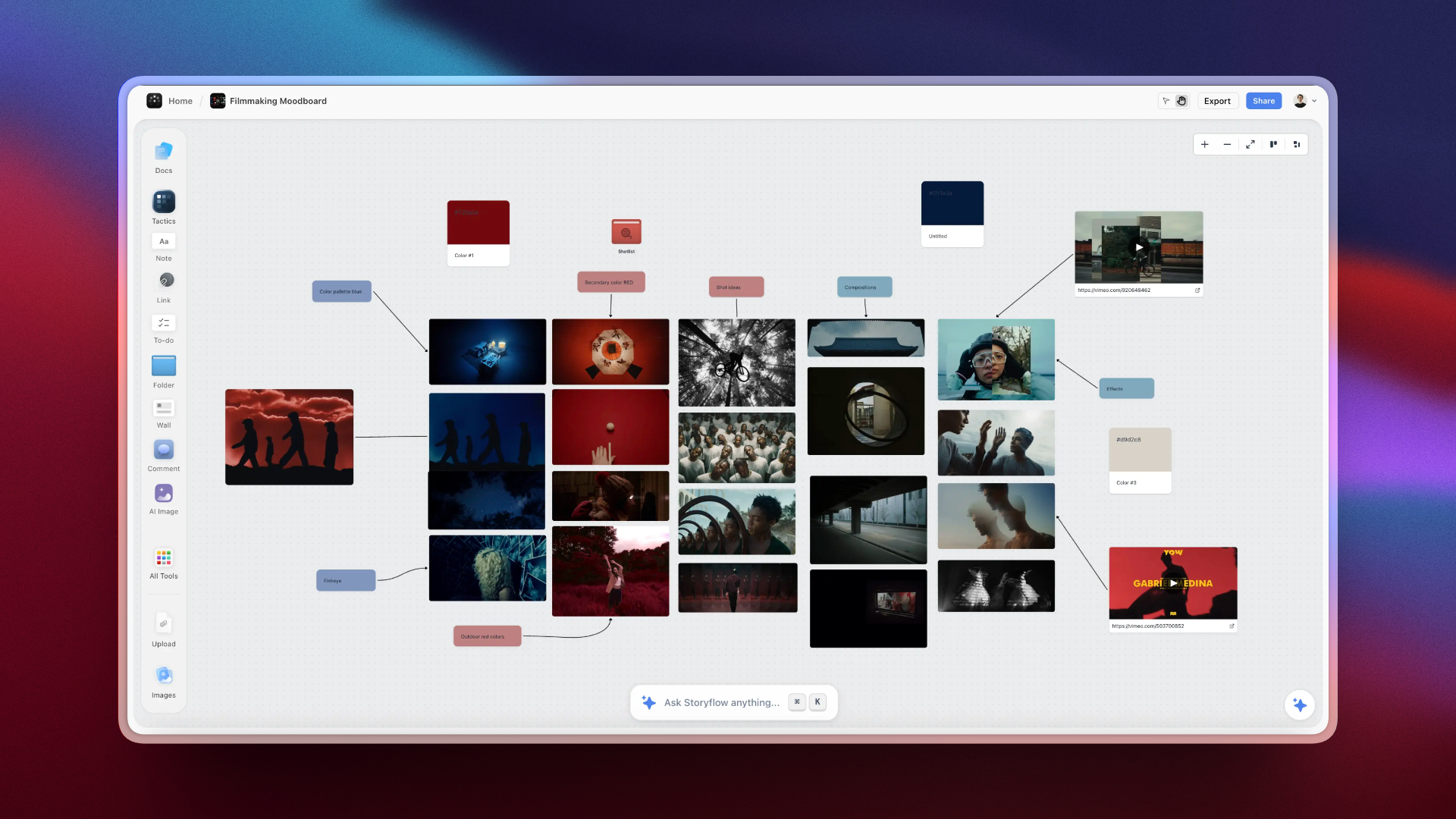
Intent, script, shot list and references held together on one Storyflow canvas, where the numbering that survives every rename is established
The trail starts in the plan
The numbering that saves your edit is established in pre-production, when the script and the shot list are still in the same place. Storyflow builds the breakdown, the shot list and the strip board from your script on one canvas, with one numbering scheme. Review still belongs in Frame.io and storage in a folder convention.

Where the Other Tools Producers Use Fit
A producer's stack usually runs longer than three. Each of these does a real job around the trail without holding it. Prices were read from the vendors' pages on October 10, 2026.
| Tool | The job it does | Where it meets the trail | Price as listed |
|---|---|---|---|
Notion | Pages and databases for briefs, contacts and status | Link each task to a scene number | Free plan; Plus $10/member/mo annual (pricing) |
Trello | Kanban of tasks | A card per deliverable or per scene | Free up to 10 collaborators; Standard $5/user/mo annual (pricing) |
Asana | Tasks, timelines and workload across projects | Milestones for lock, shoot and delivery | Free for 2 users; Starter $10.99/user/mo annual (pricing) |
Airtable | A relational base of scenes, shots and assets | Scene and shot as the record key | Free plan; Team $20/user/mo annual (pricing) |
StudioBinder | Breakdown, stripboard, tracked call sheets | Its shot lists are tagged from script lines | Indie $49/mo for 2 users |
Celtx | Script with production tools | Script and breakdown share scene numbers | Not published when checked (pricing) |
Yamdu | Departmental production management | For large crews and series | Not published when checked (pricing) |
SetHero | Call sheets by email and text | Delivers the day's scene list to the crew | From $19/mo; first project free (FAQ) |
Wrapbook | Payroll, onboarding, production accounting | Outside the trail; it pays the people on it | See wrapbook.com |
Asana, Trello and Notion are stronger than Storyflow at workload views, recurring tasks and cross-project reporting. They are task tools. The trail is a document chain, and it needs a place where the script and the shot list sit side by side.
A Worked Example: One Moment, Followed All the Way
An illustrative case: a three-minute product film for a manufacturer, one shoot day, crew of five.
The brief. The client's sentence is "show that the machine runs unattended overnight." That goes at the top of the board as the intent.
The script. Eleven scenes. The overnight moment is scene 7: the operator arrives in the morning and finds the finished parts.
The shot list. Built from the script: 7A wide of the door opening, 7B close on the parts bin, 7C the operator's reaction. 7B is marked must-have, because without it the client's sentence is not in the film.
The coverage question. Asked in prep, on the board: the voiceover line "eight hours, nobody in the building" has no shot against it. A timelapse, 7D, is added to the list and to the schedule, to be set up the evening before.
The schedule and call sheet. Scene 7 is first on the day, because the morning light through the loading door is the reason the location was chosen. The call sheet's schedule table reads scene 7, 07:30.
The slate and log. 7B take 2 is circled; the log records the camera clip as A001_C009.
The offload. At wrap the clip is copied to two drives and named S07B_T02_A001C009.mov.
The edit and review. The client's note on v2 arrives in Frame.io at 1:14: "can we hold on the parts longer." The editor finds S07B in seconds, extends it, and exports v3 with a one-line change log.
Delivery. The manifest lists the main film and a 9x16 cut, both at v3, and where the project files live.
At no point did anyone say "the bit with the parts". That is what an intact trail sounds like.
The Ten-Minute Habits
Organisation on a production is four habits with a frequency. None takes more than ten minutes, and all four are the ones that get skipped.
At the end of each shoot day: offload, rename, log. Ten minutes. This single habit is worth more than every tool on this page.
At the end of each week in prep: walk the schedule forward. Chase what is unconfirmed. Catches the location that quietly stopped replying.
Before each export: write the change log line. Thirty seconds, and it stops the revert loop in post.
At delivery: write the manifest. Ten minutes, and it makes the footage reusable rather than archaeological.
What Goes Wrong
Camera filenames survive into the edit. A004_C012 tells you nothing. This is break two and it costs an hour at the start of every edit session.
Shooting in script order. Wastes the day in relights and location moves. Schedule by location and by light.
Coverage shot before the essential shots. The day slips, always, and what gets sacrificed is whatever was left. Shoot the shots the video cannot exist without first, every day.
"FINAL" in a filename. There is always another version. Number them.
Feedback in four channels. Two emails, a Slack message, and a voice note. Somebody has to reconcile them, and reconciling is where notes get lost. One link, timecoded, named person, date.
One offload. Cards get corrupted and laptops get stolen. Two devices before the card is wiped, always.
No shot log. A gap found at wrap is a five-minute pickup. The same gap found in the edit is a reshoot.
A shot list numbered 1 to 40. Bare numbers lose the scene, so shot 23 cannot be traced back to the script line it covers. Scene plus letter, always.
A plan built for pre-production and abandoned during production. If updating takes more than ninety seconds, it will not happen on a shoot day, and a stale plan is worse than a rough one because people trust it.
The Bottom Line
Every guide to organising a video production is structured by phase, and phases are the wrong unit. They are useful for scheduling and they tell you nothing about why a well-planned production still produces an edit that starts with an hour of archaeology.
The real structure is a trail. One moment in the finished video has seven names between the idea and the deliverable, and the production is organised exactly to the extent that the trail survives the renames. It breaks in four places, and each break has a predictable cost: missing coverage, a slow edit start, version confusion, and feedback nobody can locate.
The fastest way to set this up: attach the script to a Storyflow board and ask for the script breakdown and the shot list. The numbering that comes back, scene plus shot letter, is the identifier for the whole production. Ask for a strip board and the call sheet PDF from the same board, slate with those numbers on the day, and put them at the front of every filename at offload.
Tools that help, in the order the trail reaches them:
- Storyflow for the plan: intent, script, breakdown, shot list, strip board and the call sheet PDF, with one numbering scheme.
- StudioBinder or SetHero when call sheets need sending and tracking across a large crew.
- OffShoot or ShotPut Pro for verified offloads to two drives.
- Frame.io for timecoded review and numbered versions.
- A shared drive with a naming convention for everything that is filed.
Nobody has ever regretted naming the footage. A great many people have regretted not doing it.
FAQ: Organizing a Video Production
How do video producers stay organised from pre-production through shoot days?
By carrying one identifier, the scene and shot number, through every document from the script to the slate. The numbering is set up in the plan: on a Storyflow board the breakdown keeps the script's scene numbers and the shot list is numbered scene plus letter, and the strip board and call sheet PDF use the same numbers. On shoot days the number is slated on every take, ticked on the shot list, and typed into the filename at offload.
What is the best app to organize a video production from start to finish?
Storyflow for the plan, where the intent, script, breakdown, shot list and schedule sit on one board with shared numbering, then Frame.io for timecoded review and a folder convention on shared storage. Planning, review and storage are different jobs, so three tools is the honest answer; the ranked comparison is in the best app to organize a video production from start to finish.
How do you organize a video production end to end?
Write a one-paragraph intent, number the script, build the shot list from those numbers, schedule by location, issue a call sheet per day, slate and log every take, offload twice and rename, number every export, review in one timecoded place, and finish with a delivery manifest. Each step hands the next one a document, and the scene and shot number is what links them.
How do you keep track of footage on a small production?
With one identifier that survives every rename, which is the scene and shot number. Number scenes in the script, derive the shot list from those numbers, say the number at the head of every take, and put it at the front of the filename when you offload. Ten seconds per take, and it removes the hour of scrubbing at the start of every edit session.
How do you organize video assets?
By type and by identifier. One project folder with numbered subfolders for documents, camera media by shoot day and card, sound, graphics, edit projects, exports and deliverables. Inside them, every file name starts with the scene and shot or the date, followed by a take or version number. A tool for organising video assets only helps once that convention exists, because a search is only as good as the names it searches.
What order should you shoot in?
By location and by light, never in script order. Everything in one room gets shot together regardless of where it falls in the story, and anything needing specific light is scheduled around the light with everything else fitted around it. Shooting in script order feels natural and wastes the day in relights and moves.
What do you do at the end of a shoot day?
Ten minutes: offload to two physical devices before wiping anything, name files with the scene and shot number leading, and write a shot log of what was captured, what was missed, and what broke. This is the single highest-value habit in video production organisation and it is the one most often skipped when everyone is tired.
How should you name video files?
Scene and shot number first, then take, then the original camera name: S14A_T02_A004C012.mov. The original name is kept so the file can still be matched to the card if anything goes wrong. Never use final, use_this, or good in a filename, because in three weeks nobody will know which one was meant.
Where do productions actually go wrong?
At four renames. Script to shot list, where missing coverage is created. Shot list to card, where the trail to the footage is lost. Card to timeline, where versions multiply without a convention. Timeline to deliverable, where feedback has to be located and re-exported. Every phase checklist is really about these four and rarely says so.
Is Storyflow good for organising a video production?
Yes, for the plan: the intent, script, breakdown, shot list, strip board and references sit on one board, the AI builds the documents from the script with consistent numbering, and a call sheet or shot list is rendered as a PDF. It does not review video, store footage, send call sheets or recalculate a schedule, so Frame.io, a folder convention and, on large crews, StudioBinder sit beside it. It is paid-only during early access, from $7.99 a month billed annually.
Do you need StudioBinder for a small video production?
Only when sending and tracking call sheets is the bottleneck, which means shooting regularly with a real crew. For a team that shoots occasionally and edits constantly, a plan layer that builds the shot list and a call sheet PDF you send yourself, plus a review tool, covers it.
How do you develop a shot list from a script?
Number the scenes, then go through each one and list every camera setup it needs: size, angle, movement and what the shot is for. Number each setup with the scene plus a letter (14A, 14B) and mark the ones the video cannot exist without. The method is in how to make a shot list, and the tools are compared in the best shot list tools.
How do you start a video production?
With one paragraph: what the video is, who it is for, and what must be true once someone has watched it, agreed by whoever is paying. Then a script or outline with numbered scenes. Everything a producer organises afterwards is derived from those two documents, which is why starting with the schedule or the kit list leads to rebuilding both.
When does production end and post-production begin?
Production ends when the last planned shot is captured and the footage is verified on two drives with its log. Post-production begins with the handover of that footage and log to the editor. On small productions the two overlap, because pickups are shot after a first cut shows what is missing. The phases are compared in pre-production vs production vs post-production.
How long does video post-production take for a five-minute corporate video?
Plan in rounds rather than days: an assembly, a first cut, two rounds of client notes, then colour, sound and exports. For a five-minute corporate film with interviews, a workable planning allowance is two to three weeks, most of which is waiting for feedback rather than editing. The length is set by how fast notes come back and how many rounds were agreed, so write both into the schedule before the shoot.
How many versions should a video have?
Two or three rounds, agreed in writing before work starts, with anything beyond that treated as additional scope. Number them v1, v2, v3 with a one-line change log per version. The number matters less than it being agreed and visible, because unbounded rounds is how a two-week project becomes a two-month one without anyone deciding it should.
How do you handle client feedback on a video?
One link, timecoded, with every reviewer seeing every other reviewer's notes, a named person responsible, and a date. Frame.io is the usual choice. The two rules beyond tooling: contradictions get resolved by the client before they reach the editor, and every note carries a name, because "we're waiting on approval" is not actionable and "this has been with Sam for six days" is.
What is a shot log and do I need one?
A record of each take: shot, take number, the clip name on the card, whether it was circled, and a note. Plus three lines at wrap on what was captured, dropped and needs a pickup. Without it, a shoot ends with nobody certain whether a scene was covered, and you discover the gap in the edit, when the fix is a reshoot rather than a five-minute pickup.
How do you organise a video production on your own?
The same four breaks apply and the habits matter more, because there is nobody else who noticed what was missed. Say the shot number aloud at the head of each take instead of using a slate, offload twice, name files on offload, and keep the shot log even though it feels absurd to write notes to yourself. A solo production has no redundancy, so the log is the only memory there is.
Table of Contents
- Key Takeaways
- How Video Producers Stay Organised From Pre-Production Through Shoot Days
- The Asset Trail
- The Four Places the Trail Breaks
- The One Thing That Fixes All Four
- Setting Up the Trail on a Storyflow Board
- The Phases, and What Each One Must Produce
- Shoot Days: The Slate, the Log and the Offload
- A File Naming Convention That Carries the Number
- The Three Tools
- Where the Other Tools Producers Use Fit
- A Worked Example: One Moment, Followed All the Way
- The Ten-Minute Habits
- What Goes Wrong
- The Bottom Line
- FAQ: Organizing a Video Production
- Related Reading
Templates to check out for this topic


Filmmaking templates you can use in Storyflow
Skip the blank canvas. Open one of these filmmaking boards in Storyflow and the AI builds on the structure that is already there, from research through the shot list.


See Storyflow in Action
A visual AI workspace where every feature lives inside one canvas. No tab-switching, no context lost.
Build your entire board from a single message
Type what you need in the AI chat at the bottom of your canvas. The AI adds cards, headings, and structure directly onto your board.
Use expert frameworks as AI context
Type @ in the AI chat and choose any Tactic. The AI tailors every response to that framework instead of giving generic advice.
Turn your board into a mind map in seconds
Ask the AI to restructure your canvas as a mindmap. It connects your ideas into a visual hierarchy so you can see how everything relates.
Why Storyflow Exists
Storyflow actually began as a personal tool while working on creative and research projects.
We kept running into the same problem: ideas were scattered everywhere: notes, documents, and whiteboards.
Nothing helped us see how everything connected.
So we started building a workspace designed around how ideas actually grow.
→ Read how Storyflow was createdJustkay
Documentary Filmmaker & Founder at Storyflow
Published: 2026-08-26
Extremely simple, seriously capable


See how easy it is to get started
Watch a real project come together, from a blank board to a finished plan, clicked through step by step.
Start creating with AI and become more productive
Transform your creative workflow with AI-powered tools. Generate ideas, create content, and boost your productivity in minutes instead of hours.